This document discusses Microsoft volume licensing, including:
- An introduction to Microsoft volume licensing and the various agreement types available for large enterprises, such as Enterprise Agreements and Server and Cloud Enrollments.
- Key details of Enterprise Agreements, including requirements, terms, available products, qualifying devices and users, and how additional products and true-ups work.
- The differences between Enterprise Agreements and Enterprise Subscription Agreements, and how cloud subscriptions can be handled under each.
- An overview of the Server and Cloud Enrollment, including requirements to cover all servers with Core Infrastructure Suite licenses and Software Assurance.
AGENDA:
VOLUME LICENSING –THE BASICS
INTRODUCTION TO MICROSOFT VOLUME LICENSING
VOLUME LICENSING AGREEMENTS AT A GLANCE (ENTERPRISE)
ENTERPRISE AGREEMENT CONTRACTS DEEP DIVE
MICROSOFT CUSTOMER AGREEMENT (MCA)
SOFTWARE ASSURANCE
MORE?
INTRODUCTION
WHAT WILL WE DISCUSS TODAY?
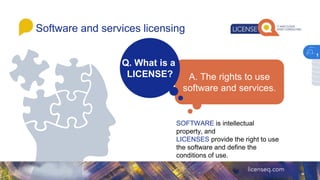
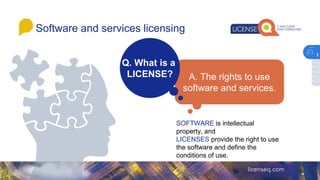
Software and serviceslicensing
SOFTWARE is intellectual
property, and
LICENSES provide the right to use
the software and define the
conditions of use.
1
5.
Software and serviceslicensing
SOFTWARE is intellectual
property, and
LICENSES provide the right to use
the software and define the
conditions of use.
1
6.
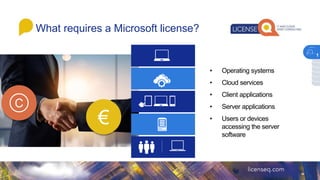
What requires aMicrosoft license?
• Operating systems
• Cloud services
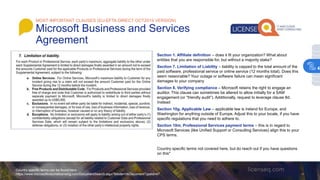
• Client applications
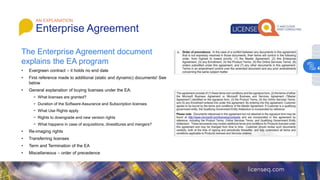
• Server applications
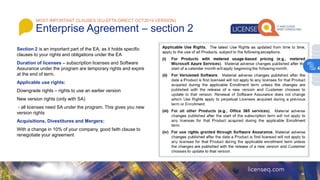
• Users or devices
accessing the server
software
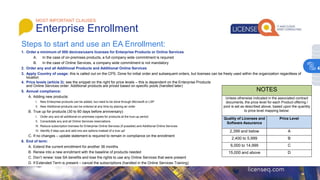
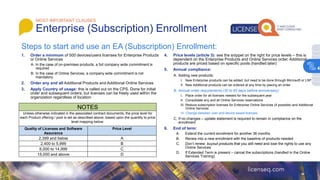
C
€
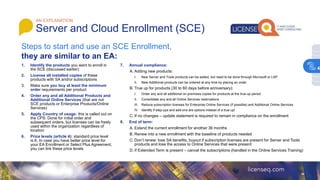
1
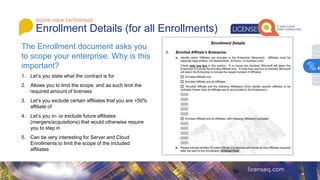
7.
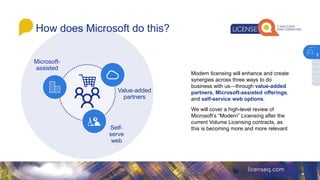
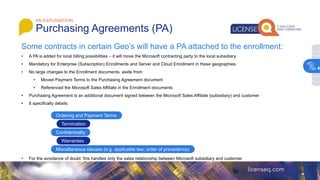
Modern licensing willenhance and create
synergies across three ways to do
business with us—through value-added
partners, Microsoft-assisted offerings,
and self-service web options.
We will cover a high-level review of
Microsoft’s “Modern” Licensing after the
current Volume Licensing contracts, as
this is becoming more and more relevant
Self-
serve
web
Value-added
partners
Microsoft-
assisted
How does Microsoft do this?
1
8.
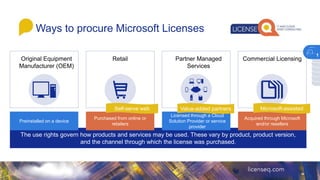
Original Equipment
Manufacturer (OEM)
Waysto procure Microsoft Licenses
The use rights govern how products and services may be used. These vary by product, product version,
and the channel through which the license was purchased.
Acquired through Microsoft
and/or resellers
Commercial Licensing
Purchased from online or
retailers
Retail
Licensed through a Cloud
Solution Provider or service
provider
Partner Managed
Services
Self-serve web Value-added partners Microsoft-assisted
Preinstalled on a device
1
9.
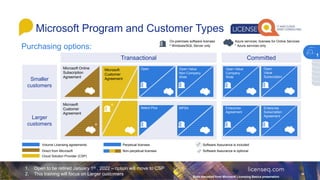
Purchasing options:
Microsoft Programand Customer Types
1
Microsoft
Customer
Agreement
Microsoft Online
Subscription
Agreement
Transactional Committed
Smaller
customers
Larger
customers
Volume Licensing agreements
Direct from Microsoft
Cloud Solution Provider (CSP)
Perpetual licenses
Non-perpetual licenses
Software Assurance is included
Software Assurance is optional
Open
Value
Subscription
Open Value
Company
Wide
Enterprise
Agreement
Enterprise
Subscription
Agreement
Open Value
Non-Company
Wide
MPSA
Open
Select Plus
Microsoft
Customer
Agreement
On-premises software licenses
⁰ Windows/SQL Server only
⁰
*
Azure services, licenses for Online Services
* Azure services only
1. Open to be retired January 1st , 2022 – option will move to CSP
2. This training will focus on Larger customers Slide reworked from Microsoft Licensing Basics presenation
1
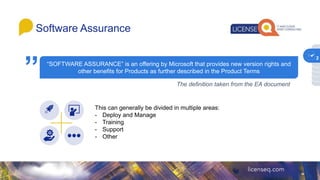
“SOFTWARE ASSURANCE” isan offering by Microsoft that provides new version rights and
other benefits for Products as further described in the Product Terms
Software Assurance
1
The definition taken from the EA document
This can generally be divided in multiple areas:
- Deploy and Manage
- Training
- Support
- Other
”
2
12.
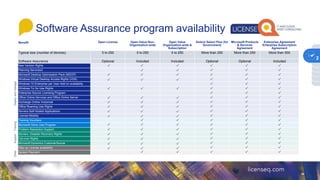
Software Assurance programavailability
1
Benefit Open License Open Value Non-
Organization-wide
Open Value
Organization-wide &
Subscription
Select/ Select Plus (for
Government)
Microsoft Products
& Services
Agreement
Enterprise Agreement
Enterprise Subscription
Agreement
Typical size (number of devices) 5 to 250 5 to 250 5 to 250 More than 250 More than 250 More than 500
Software Assurance Optional Included Included Optional Optional Included
New Version Rights
Planning Services3
Microsoft Desktop Optimization Pack (MDOP)
Windows Virtual Desktop Access Rights (VDA)
Windows 10 Enterprise per User Add-on availability
Windows To Go Use Rights
Enterprise Source Licensing Program
Office Online Services and Office Online Server
Exchange Online Voicemail
Office Roaming Use Rights
Servers-Self-Hosted Applications
License Mobility
Training Vouchers
Microsoft Home Use Program
Problem Resolution Support
Servers- Disaster Recovery Rights
Fail-over Rights
Microsoft Dynamics CustomerSourse
Step-up License availability
Spread Payment
Other
Support
Training
Deploy
and
manage
2
13.
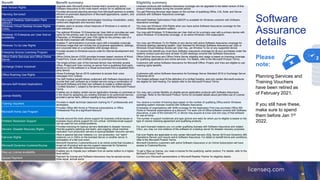
Benefit Benefit summaryEligibility summary
New Version Rights Upgrade each Microsoft product license that’s covered by active
Software Assurance to the most resent version for no additional cost.
Licensed products with Software Assurance coverage can be upgraded to the latest version of that
product made available during the covered period.
Planning Services3
Provides structured planning services from Microsoft partners to enable
efficient on-premises deployment of Microsoft applications, system, and
server products.
You get Planning Services days based on the number of qualifying Office, CAL Suite, and Server
products with Software Assurance coverage.
Microsoft Desktop Optimization Pack
(MDOP)
Provide a suite of innovative technologies including virtualization, policy
control and diagnostic and recovery tools.
Microsoft Desktop Optimization Pack (MDOP) is available for Windows customer with Software
Assurance coverage.
Windows Virtual Desktop Access Rights
(VDA)
Enables users to access virtual instances of Windows in a variety of
user scenarios.
You may use Windows VDA Rights when you have active Software Assurance coverage for the
Windows desktop operation system.
Windows 10 Enterprise per User Add-on
availability
The optional Windows 10 Enterprise per User Add-on provides per user
rights for the primary user of a device that’s licensed with Windows
Enterprise, or Windows per User VDA rights for the primary user of a
decide that’s licensed with Windows VDA.
You may add Windows 10 Enterprise per User Add-on for a primary user with a primary device with
active Windows 10 Enterprise coverage, or an active Windows VDA subscription.
Windows To Go Use Rights
Enables IT administrators to provide users with a bootable corporate
Windows image that can include line-of-business applications, settings,
and corporate data on a compatible USB storage device.
You may use Windows To Go Rights on any device with active Software Assurance coverage for
Windows desktop operating system. User licensed for Windows Software Assurance per User or
Windows Virtual Desktop Access per User may use Window To Go on any supported device.
Enterprise Source Licensing Program Provides access to Windows source code for internal development and
support.
To receive this benefit you must have Software Assurance coverage for all your purchases under the
systems product pool and have at least 10,000 desktops covered with Software Assurance.
Office Online Services and Office Online
Server
Office Online Server (OOS) provides browser-based versions of Word,
PowerPoint, Excel, and OneNote from on-premises environments.
Office Online Services and Office Online Server eligibility and usage is based on licensing coverage
for qualifying applications and online services. For details, refer to the Microsoft Product Terms.
Exchange Online Voicemail
The single primary user of the licensed device may remotely access
Office, Project and Visio running on server from a qualifying third-party
device or run the software in a virtual environment from a qualified third-
party device.
Customers with active Software Assurance for Microsoft Office, Project, and Visio are eligible to use
roaming rights benefits.
Office Roaming Use Rights Allows Exchange Server 2019 customers to access their voice
messages from Outlook.
Customers with active Software Assurance for Exchange Server Standard 2019 or Exchange Server
Enterprise 2019.
Servers-Self-Hosted Applications
The Self Hosting benefit allows customers with Software Assurance to
provide their own software as a hosted service using a combination of
Microsoft Software and their own software to create a unified solution
(“Unified Solution”), subject to the terms outlined in the Microsoft Product
Terms.
The hosted software must fit the definition of a Unified Solution, and only certain Microsoft products
are eligible for Self-Hosting. For details refer to the Microsoft Product Terms.
License Mobility
Enables you to deploy certain server application licenses on-premises or
in the cloud by assigning you existing licenses to an authorized service
provider’s server farm, without needing to buy additional licenses.
You may use License Mobility on eligible server application products with Software Assurance
coverage. Refer to the Microsoft Product Terms for complete details about permitted use of License
Mobility.
Training Vouchers Provides in-depth technical classroom training for IT professionals and
developers.
You receive a number of training days based on the number of qualifying Office and/or Windows
operating system licenses covered with Software Assurance.
Microsoft Home Use Program
Provides Office 365 Home or Personal subscriptions or Office
Professional Plus at a significant discount
Employees of organizations with SAM coverage for the Application Pool may purchase Office 365
Home or Personal subscriptions at a discount. For each unit of Office software covered with Software
Assurance, a user of the licensed PC or device may acquire at a low cost one copy of that software
for use at home.
Problem Resolution Support
Provide around-the-clock phone support for business-critical issues or
business hours phone support for non-critical. Unlimited email support
can be used for non-critical problems.
The number of support incidences and type (phone and web) for which you’re eligible is based on the
type of volume licensing agreement and qualifying products.
Servers- Disaster Recovery Rights
Provides licensing for backup servers dedicated to disaster recovery.
Permits quarterly patching and testin, and ongoing virtual machine
replication from production servers to backup/disaster recovery servers.
For each licensed instance you run under qualifying licenses with Software Assurance and related
CALs, you may run one instance of the software on a backup server for disaster recovery purposes.
Fail-over Rights
Allow a passive-fail-over instance (i.e. non-production, but “warm”
instance) run in OSEs on the licensed Server or another server in
anticipation of a fail-over event
Fail-over Rights are applicable to only certain Microsoft servers (SQL Server 2019 and Dynamics 365
Operations Server) and require active Software Assurance. For detail on benefit terms and conditions,
refer to the Microsoft Product Terms.
Microsoft Dynamics CustomerSourse
Microsoft Dynamics CustomerSource is an online portal that includes a
broad set of product and service support resources for Dynamics
customers with Software Assurance coverage.
Microsoft Dynamics customers with active Software Assurance or an Online Subscription will have
access to CustomerSource.
Step-up License availability Enables you to migrate your software from an earlier edition to a higher-
level edition.
To get a Step-up license, you need a license for the qualifying, earlier product. For details, refer to the
Microsoft Product Terms.
Spread Payment Payment for license and Software Assurance may be spread across
three equal, annual sums.
Contact your Microsoft representative or Microsoft Reseller Partner for eligibility details.
Software
Assurance
details
1
Please
note:
Planning Services and
Training Vouchers
have been retired as
of February 2021.
If you still have these,
make sure to spend
them before Jan 1st
2022.
2
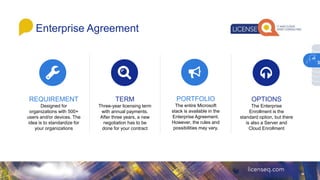
Enterprise Agreement
REQUIREMENT
Designed for
organizationswith 500+
users and/or devices. The
idea is to standardize for
your organizations
TERM
Three-year licensing term
with annual payments.
After three years, a new
negotiation has to be
done for your contract
PORTFOLIO
The entire Microsoft
stack is available in the
Enterprise Agreement.
However, the rules and
possibilities may vary.
OPTIONS
The Enterprise
Enrollment is the
standard option, but there
is also a Server and
Cloud Enrollment
3
16.
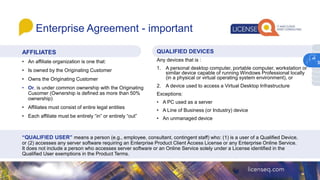
Enterprise Agreement -important
AFFILIATES
• An affiliate organization is one that:
• Is owned by the Originating Customer
• Owns the Originating Customer
• Or, is under common ownership with the Originating
Cusomer (Ownership is defined as more than 50%
ownership)
• Affiliates must consist of entire legal entities
• Each affiliate must be entirely “in” or entirely “out”
QUALIFIED DEVICES
Any devices that is :
1. A personal desktop computer, portable computer, workstation or
similar device capable of running Windows Professional locally
(in a physical or virtual operating system environment), or
2. A device used to access a Virtual Desktop Infrastructure
Exceptions:
• A PC used as a server
• A Line of Business (or Industry) device
• An unmanaged device
“QUALIFIED USER” means a person (e.g., employee, consultant, contingent staff) who: (1) is a user of a Qualified Device,
or (2) accesses any server software requiring an Enterprise Product Client Access License or any Enterprise Online Service.
It does not include a person who accesses server software or an Online Service solely under a License identified in the
Qualified User exemptions in the Product Terms.
3
17.
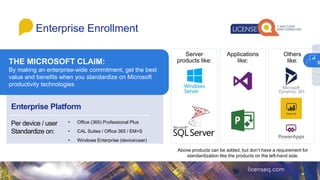
Enterprise Platform
Per device/ user
Standardize on:
THE MICROSOFT CLAIM:
By making an enterprise-wide commitment, get the best
value and benefits when you standardize on Microsoft
productivity technologies
Enterprise Enrollment
Applications
like:
Server
products like:
Others
like:
• Office (365) Professional Plus
• CAL Suites / Office 365 / EM+S
• Windows Enterprise (device/user)
Above products can be added, but don’t have a requirement for
standardization like the products on the left-hand side.
3
18.
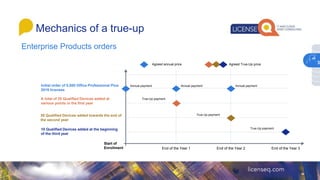
Enterprise Products orders
Mechanicsof a true-up
Initial order of 5,000 Office Professional Plus
2019 licenses
A total of 25 Qualified Devices added at
various points in the first year
30 Qualified Devices added towards the end of
the second year
10 Qualified Devices added at the beginning
of the third year
Start of
Enrollment End of the Year 1 End of the Year 2 End of the Year 3
Agreed annual price Agreed True-Up price
Annual payment Annual payment Annual payment
True-Up payment
True-Up payment
True-Up payment
3
19.
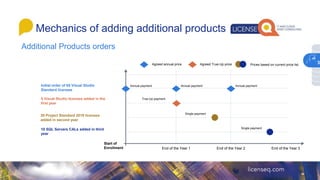
Mechanics of addingadditional products
Initial order of 85 Visual Studio
Standard licenses
5 Visual Studio licenses added in the
first year
30 Project Standard 2019 licenses
added in second year
10 SQL Servers CALs added in third
year
Start of
Enrollment End of the Year 1 End of the Year 2 End of the Year 3
Agreed annual price Agreed True-Up price
Annual payment Annual payment Annual payment
True-Up payment
Single payment
Single payment
Prices based on current price list
Additional Products orders
3
20.
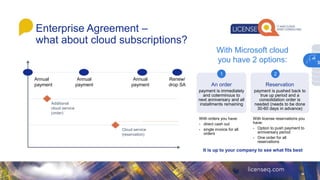
Enterprise Agreement –
whatabout cloud subscriptions?
Annual
payment
Annual
payment
Annual
payment
Additional
cloud service
(order)
Cloud service
(reservation)
Renew/
drop SA
With Microsoft cloud
you have 2 options:
An order
payment is immediately
and coterminous to
next anniversary and all
installments remaining
Reservation
payment is pushed back to
true up period and a
consolidation order is
needed (needs to be done
30-60 days in advance)
1 2
With orders you have:
- direct cash out
- single invoice for all
orders
With license reservations you
have:
- Option to push payment to
anniversary period
- One order for all
reservations
It is up to your company to see what fits best
3
21.
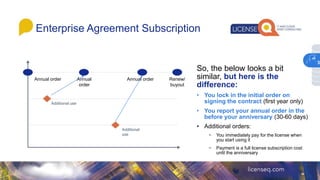
Enterprise Agreement Subscription
So,the below looks a bit
similar, but here is the
difference:
• You lock in the initial order on
signing the contract (first year only)
• You report your annual order in the
before your anniversary (30-60 days)
• Additional orders:
− You immediately pay for the license when
you start using it
− Payment is a full license subscription cost
until the anniversary
Annual order Annual
order
Annual order
Additional use
Additional
use
Renew/
buyout
3
22.
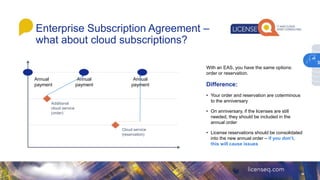
Enterprise Subscription Agreement–
what about cloud subscriptions?
With an EAS, you have the same options:
order or reservation.
Difference:
• Your order and reservation are coterminous
to the anniversary
• On anniversary, if the licenses are still
needed, they should be included in the
annual order
• License reservations should be consolidated
into the new annual order – if you don’t,
this will cause issues
Annual
payment
Annual
payment
Annual
payment
Additional
cloud service
(order)
Cloud service
(reservation)
3
23.
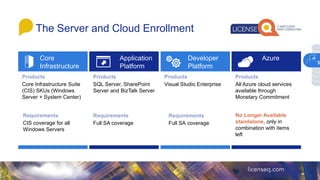
The Server andCloud Enrollment
Core
Infrastructure
Core Infrastructure Suite
(CIS) SKUs (Windows
Server + System Center)
Application
Platform
SQL Server, SharePoint
Server and BizTalk Server
Full SA coverage
Developer
Platform
Visual Studio Enterprise
Azure
All Azure cloud services
available through
Monetary Commitment
No Longer Available
standalone, only in
combination with items
left
Full SA coverage
CIS coverage for all
Windows Servers
3
24.
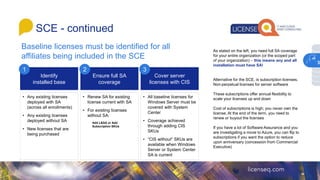
Baseline licenses mustbe identified for all
affiliates being included in the SCE
SCE - continued
As stated on the left, you need full SA coverage
for your entire organization (or the scoped part
of your organization) – this means any and all
installation must have SA!
Alternative for the SCE, is subscription licenses.
Non-perpetual licenses for server software
These subscriptions offer annual flexibility to
scale your licenses up and down
Cost of subscriptions is high; you never own the
license. At the end of the term, you need to
renew or buyout the licenses
If you have a lot of Software Assurance and you
are investigating a move to Azure, you can flip to
subscriptions if you want the option to reduce
upon anniversary (concession from Commercial
Executive)
Identify
installed base
Ensure full SA
coverage
Cover server
licenses with CIS
1 2 3
• Any existing licenses
deployed with SA
(across all enrollments)
• Any existing licenses
deployed without SA
• New licenses that are
being purchased
• Renew SA for existing
license current with SA
• For existing licenses
without SA:
Add L&SA or Add
Subscription SKUs
• All baseline licenses for
Windows Server must be
covered with System
Center
• Coverage achieved
through adding CIS
SKUs
• “CIS without” SKUs are
available when Windows
Server or System Center
SA is current
3
25.
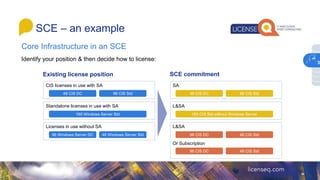
SCE – anexample
Identify your position & then decide how to license:
Existing license position SCE commitment
CIS licenses in use with SA
Standalone licenses in use with SA
Licenses in use without SA
48 CIS DC 96 CIS Std
160 Windows Server Std
96 Windows Server DC 48 Windows Server Std
SA
L&SA
L&SA
Or Subscription
48 CIS DC 96 CIS Std
160 CIS Std without Windows Server
96 CIS DC 48 CIS Std
Core Infrastructure in an SCE
3
26.
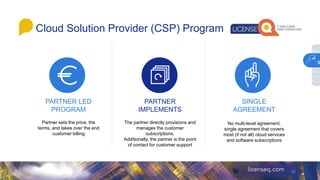
Cloud Solution Provider(CSP) Program
26
PARTNER LED
PROGRAM
Partner sets the price, the
terms, and takes over the end
customer billing
PARTNER
IMPLEMENTS
The partner directly provisions and
manages the customer
subscriptions.
Additionally, the partner is the point
of contact for customer support
SINGLE
AGREEMENT
No multi-level agreement,
single agreement that covers
most (if not all) cloud services
and software subscriptions
3
27.
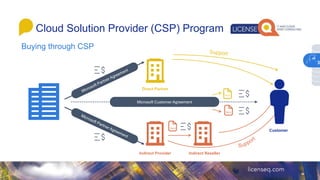
Cloud Solution Provider(CSP) Program
Buying through CSP
Microsoft Customer Agreement
Direct Partner
Indirect Provider Indirect Reseller
Customer
T&Cs
T&Cs
T&Cs
3
28.
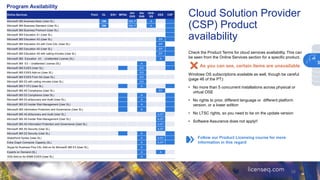
Cloud Solution Provider
(CSP)Product
availability
28
Check the Product Terms for cloud services availability. This can
be seen from the Online Services section for a specific product.
As you can see, certain items are unavailable
Windows OS subscriptions available as well, though be careful
(page 46 of the PT):
• No more than 5 concurrent installations across physical or
virtual OSE
• No rights to prior, different language or different platform
version, or a lower edition
• No LTSC rights, so you need to be on the update version
• Software Assurance does not apply!!
Follow our Product Licensing course for more
information in this regard
Online Services Point OL S/S+ MPSA
OV/
OVS
EA/
EAS
OVS-
ES
EES CSP
Microsoft 365 Business Basic (User SL) OM OM, P A
Microsoft 365 Business Standard (User SL) OM OM, P A
Microsoft 365 Business Premium (User SL)
Microsoft 365 Education A1 (User SL)
Microsoft 365 Education A3 (User SL) EP
Microsoft 365 Education A3 with Core CAL (User SL) EP
Microsoft 365 Education A5 (User SL) EP
Microsoft 365 Education A5 with calling minutes (User SL) EP
Microsoft 365 Education A3 - Unattended License (SL) A
Microsoft 365 E3 – Unattended License (SL) A
Microsoft 365 E3/E5 (User SL) EO
Microsoft 365 E3/E5 Add-on (User SL) EO
Microsoft 365 E3/E5 From SA (User SL) EO
Microsoft 365 E5 with calling minutes (User SL) EO
Microsoft 365 F1/F3 (User SL) A
Microsoft 365 A5 Compliance (User SL) ST
Microsoft 365 E5 Compliance (User SL) A
Microsoft 365 E5 eDiscovery and Audit (User SL) A
Microsoft 365 E5 Insider Risk Management (User SL) A
Microsoft 365 Information Protection and Governance (User SL) A
Microsoft 365 A5 eDiscovery and Audit (User SL) A,ST
Microsoft 365 A5 Insider Risk Management (User SL) A,ST
Microsoft 365 A5 Information Protection and Governance (User SL) A,ST
Microsoft 365 A5 Security (User SL) A,ST
Microsoft 365 E5 Security (User SL) A
SharePoint Syntex (User SL) A A,ST
Extra Graph Connector Capacity (SL) A A,ST
Skype for Business Plus CAL Add-on for Microsoft 365 E3 (User SL) A
Experts on Demand (SL) A A
VDA Add-on for M365 E3/E5 (User SL) A
Program Availability
3
29.
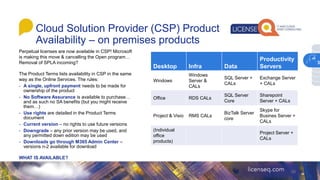
Cloud Solution Provider(CSP) Product
Availability – on premises products
29
Perpetual licenses are now available in CSP! Microsoft
is making this move & cancelling the Open program…
Removal of SPLA incoming?
The Product Terms lists availability in CSP in the same
way as the Online Services. The rules:
- A single, upfront payment needs to be made for
ownership of the product
- No Software Assurance is available to purchase…
and as such no SA benefits (but you might receive
them…)
- Use rights are detailed in the Product Terms
document
- Current version – no rights to use future versions
- Downgrade – any prior version may be used, and
any permitted down edition may be used
- Downloads go through M365 Admin Center –
versions n-2 available for download
WHAT IS AVAILABLE?
Desktop Infra Data
Productivity
Servers
Windows
Windows
Server &
CALs
SQL Server +
CALs
Exchange Server
+ CALs
Office RDS CALs
SQL Server
Core
Sharepoint
Server + CALs
Project & Visio RMS CALs
BizTalk Server
core
Skype for
Busines Server +
CALs
(Individual
office
products)
Project Server +
CALs
3
30.
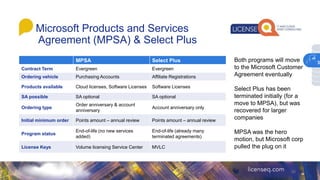
Microsoft Products andServices
Agreement (MPSA) & Select Plus
30
MPSA Select Plus
Contract Term Evergreen Evergreen
Ordering vehicle Purchasing Accounts Affiliate Registrations
Products available Cloud licenses, Software Licenses Software Licenses
SA possible SA optional SA optional
Ordering type
Order anniversary & account
anniversary
Account anniversary only
Initial minimum order Points amount – annual review Points amount – annual review
Program status
End-of-life (no new services
added)
End-of-life (already many
terminated agreements)
License Keys Volume licensing Service Center MVLC
Both programs will move
to the Microsoft Customer
Agreement eventually
Select Plus has been
terminated initially (for a
move to MPSA), but was
recovered for larger
companies
MPSA was the hero
motion, but Microsoft corp
pulled the plug on it
3
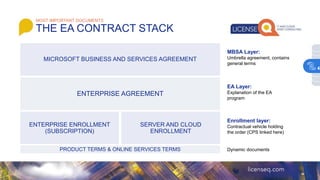
MOST IMPORTANT DOCUMENTS
THEEA CONTRACT STACK
ENTERPRISE AGREEMENT
ENTERPRISE ENROLLMENT
(SUBSCRIPTION)
MICROSOFT BUSINESS AND SERVICES AGREEMENT
SERVER AND CLOUD
ENROLLMENT
Dynamic documents
PRODUCT TERMS & ONLINE SERVICES TERMS
MBSA Layer:
Umbrella agreement, contains
general terms
EA Layer:
Explanation of the EA
program
Enrollment layer:
Contractual vehicle holding
the order (CPS linked here)
4
33.
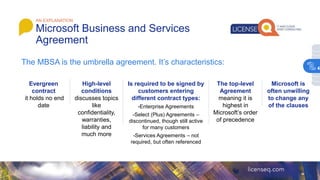
AN EXPLANATION
Microsoft Businessand Services
Agreement
The MBSA is the umbrella agreement. It’s characteristics:
Evergreen
contract
it holds no end
date
High-level
conditions
discusses topics
like
confidentiality,
warranties,
liability and
much more
Is required to be signed by
customers entering
different contract types:
-Enterprise Agreements
-Select (Plus) Agreements –
discontinued, though still active
for many customers
-Services Agreements – not
required, but often referenced
The top-level
Agreement
meaning it is
highest in
Microsoft’s order
of precedence
Microsoft is
often unwilling
to change any
of the clauses
4
34.
Section 1. Affiliatedefinition – does it fit your organization? What about
entities that you are responsible for, but without a majority stake?
Section 7. Limitation of Liability – liability is capped to the total amount of the
paid software, professional service or online service (12 months total). Does this
seem reasonable? Your outage or software failure can mean significant
damages to your company
Section 8. Verifying compliance – Microsoft retains the right to engage an
auditor. This clause can sometimes be altered to allow initially for a SAM
engagement (or “friendly audit”). Additionally, request to leverage clause 8d.
Instead
Section 10g. Applicable Law – applicable law is Ireland for Europe, and
Washington for anything outside of Europe. Adjust this to your locale, if you have
specific regulations that you need to adhere to.
Section 10m. Professional Services payment terms – this is in regard to
Microsoft Services (like Unified Support or Consulting Services) align this to your
CPS terms.
Country specific terms not covered here, but do reach out if you have questions
on this*
Country specific terms can be found here:
https://www.microsoftvolumelicensing.com/DocumentSearch.aspx?Mode=3&DocumentTypeId=47
MOST IMPORTANT CLAUSES (EU-EFTA DIRECT OCT2019 VERSION)
Microsoft Business and Services
Agreement
4
35.
• Evergreen contract– it holds no end date
• First reference made to additional (static and dynamic) documents! See
below
• General explanation of buying licenses under the EA:
− What licenses are granted?
− Duration of the Software Assurance and Subscription licenses
− What Use Rights apply
− Rights to downgrade and new version rights
− What happens in case of acquisitions, divestitures and mergers?
• Re-imaging rights
• Transferring licenses
• Term and Termination of the EA
• Miscellaneous – order of precedence
AN EXPLANATION
Enterprise Agreement
The Enterprise Agreement document
explains the EA program
4
36.
Section 2 isan important part of the EA, as it holds specific
clauses to your rights and obligations under the EA
Duration of licenses – subscription licenses and Software
Assurance under the program are temporary rights and expire
at the end of term.
Applicable use rights:
Downgrade rights – rights to use an earlier version
New version rights (only with SA)
- all licenses need SA under the program. This gives you new
version rights
Acquisitions, Divestitures and Mergers:
With a change in 10% of your company, good faith clause to
renegotiate your agreement
MOST IMPORTANT CLAUSES (EU-EFTA DIRECT OCT2019 VERSION)
Enterprise Agreement – section 2
4
37.
Clause 3 –important and usually looked over clause!
It grants you permission to use copies of products (not online services!) for
your training facilities, for evaluation purposes and back-up
Re-imaging rights: Reimaging is the copying of software onto multiple devices
from one consistent image. Reimaging rights are granted to Microsoft
Commercial Licensing customers buying licenses under Enterprise
Agreement (also available for other VL programs)
For more on reimaging, see below link
https://download.microsoft.com/download/3/d/4/3d42bdc2-6725-4b29-b75a-a5b04179958b/reimaging.pdf
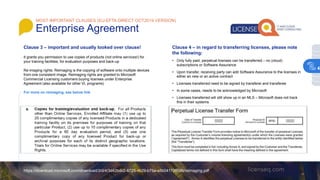
Clause 4 – in regard to transferring licenses, please note
the following:
• Only fully paid, perpetual licenses can be transferred – no (cloud)
subscriptions or Software Assurance
• Upon transfer, receiving party can add Software Assurance to the licenses in
either an new or an active contract
• Licenses transferred need to be signed by transferer and transferee
• In some cases, needs to be acknowledged by Microsoft
• Licenses transferred will still show up in an MLS – Microsoft does not track
this in their systems
MOST IMPORTANT CLAUSES (EU-EFTA DIRECT OCT2019 VERSION)
Enterprise Agreement
4
38.
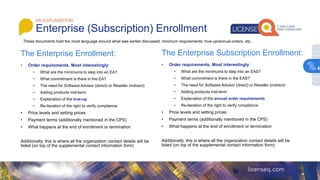
The Enterprise Enrollment:
•Order requirements. Most interestingly:
− What are the minimums to step into an EA?
− What commitment is there in the EA?
− The need for Software Advisor (direct) or Reseller (indirect)
− Adding products mid-term
− Explanation of the true-up
− Re-iteration of the right to verify compliance
• Price levels and setting prices
• Payment terms (additionally mentioned in the CPS)
• What happens at the end of enrollment or termination
Additionally, this is where all the organization contact details will be
listed (on top of the supplemental contact information form)
• Order requirements. Most interestingly:
− What are the minimums to step into an EAS?
− What commitment is there in the EAS?
− The need for Software Advisor (direct) or Reseller (indirect)
− Adding products mid-term
− Explanation of the annual order requirements
− Re-iteration of the right to verify compliance
• Price levels and setting prices
• Payment terms (additionally mentioned in the CPS)
• What happens at the end of enrollment or termination
Additionally, this is where all the organization contact details will be
listed (on top of the supplemental contact information form)
The Enterprise Subscription Enrollment:
These documents hold the most language around what was earlier discussed: minimum requirements, true-up/annual orders, etc.
AN EXPLANATION
Enterprise (Subscription) Enrollment
4
39.
MOST IMPORTANT CLAUSES
EnterpriseEnrollment
NOTES
Unless otherwise indicated in the associated contract
documents, the price level for each Product offering /
pool is set as described above, based upon the quantity
to price level mapping below:
Quality of Licenses and
Software Assurance
Price Level
2,399 and below A
2,400 to 5,999 B
6,000 to 14,999 C
15,000 and above D
Steps to start and use an EA Enrollment:
1. Order a minimum of 500 devices/users licenses for Enterprise Products or Online Services
A. In the case of on-premises products, a full company wide commitment is required
B. In the case of Online Services, a company wide commitment is not mandatory
2. Order any and all Additional Products and Additional Online Services
3. Apply Country of usage: this is called out on the CPS. Done for initial order and subsequent orders, but licenses can be freely used within the organization regardless of
location
4. Price levels (article 3): see the snippet on the right for price levels – this is dependent on the Enterprise Products
and Online Services order. Additional products are priced based on specific pools (handled later)
5. Annual compliance:
A. Adding new products:
I. New Enterprise products can be added, but need to be done through Microsoft or LSP
II. New Additional products can be ordered at any time by placing an order
B. True up for products (30 to 60 days before anniversary):
I. Order any and all additional on-premises copies for products at the true-up period
II. Consolidate any and all Online Services reservations
III. Reduce subscription licenses for Enterprise Online Services (if possible) and Additional Online Services
IV. Identify if step-ups and add-ons are options instead of a true up!
C. If no changes – update statement is required to remain in compliance on the enrollment
6. End of term:
A. Extend the current enrollment for another 36 months
B. Renew into a new enrollment with the baseline of products needed
C. Don’t renew: lose SA benefits and lose the rights to use any Online Services that were present
D. If Extended Term is present – cancel the subscriptions (handled in the Online Services Training)
4
40.
1. Order aminimum of 500 devices/users licenses for Enterprise Products
or Online Services
A. In the case of on-premises products, a full company wide commitment is
required
B. In the case of Online Services, a company wide commitment is not
mandatory
2. Order any and all Additional Products and Additional Online Services
3. Apply Country of usage: this is called out on the CPS. Done for initial
order and subsequent orders, but licenses can be freely used within the
organization regardless of location
MOST IMPORTANT CLAUSES
Enterprise (Subscription) Enrollment
NOTES
Unless otherwise indicated in the associated contract documents, the price level for
each Product offering / pool is set as described above, based upon the quantity to price
level mapping below:
Quality of Licenses and Software
Assurance
Price Level
2,399 and below A
2,400 to 5,999 B
6,000 to 14,999 C
15,000 and above D
Steps to start and use an EA (Subscription) Enrollment:
4. Price levels (article 3): see the snippet on the right for price levels – this is
dependent on the Enterprise Products and Online Services order. Additional
products are priced based on specific pools (handled later)
5. Annual compliance:
A. Adding new products:
I. New Enterprise products can be added, but need to be done through Microsoft or LSP
II. New Additional products can be ordered at any time by placing an order
B. Annual order requirements (30 to 60 days before anniversary):
I. Place order for all licenses needed for the subsequent year
II. Consolidate any and all Online Services reservations
III. Reduce subscription licenses for Enterprise Online Services (if possible) and Additional
Online Services
IV. Change between user and device based licenses
C. If no changes – update statement is required to remain in compliance on the
enrollment
6. End of term:
A. Extend the current enrollment for another 36 months
B. Renew into a new enrollment with the baseline of products needed
C. Don’t renew: buyout products that you still need and lose the rights to use any
Online Services
D. If Extended Term is present – cancel the subscriptions (handled in the Online
Services Training)
4
41.
1. Identify theproducts you want to enroll in
the SCE (discussed earlier)
2. License all installed copies of these
products with SA and/or subscriptions
3. Make sure you buy at least the minimum
order requirements per product
4. Order any and all Additional Products and
Additional Online Services (that are not
SCE products or Enterprise Products/Online
Services)
5. Apply Country of usage: this is called out on
the CPS. Done for initial order and
subsequent orders, but licenses can be freely
used within the organization regardless of
location
6. Price levels (article 4): standard price level
is A. In case you have better price level for
your EA Enrollment or Select Plus Agreement,
you can link these price levels
AN EXPLANATION
Server and Cloud Enrollment (SCE)
Steps to start and use an SCE Enrollment,
they are similar to an EA:
7. Annual compliance:
A. Adding new products:
I. New Server and Tools products can be added, but need to be done through Microsoft or LSP
II. New Additional products can be ordered at any time by placing an order
B. True up for products (30 to 60 days before anniversary):
I. Order any and all additional on-premises copies for products at the true-up period
II. Consolidate any and all Online Services reservations
III. Reduce subscription licenses for Enterprise Online Services (if possible) and Additional Online Services
IV. Identify if step-ups and add-ons are options instead of a true up!
C. If no changes – update statement is required to remain in compliance on the enrollment
8. End of term:
A. Extend the current enrollment for another 36 months
B. Renew into a new enrollment with the baseline of products needed
C. Don’t renew: lose SA benefits, buyout if subscription licenses are present for Server and Tools
products and lose the access to Online Services that were present
D. If Extended Term is present – cancel the subscriptions (handled in the Online Services Training)
4
42.
1. Let’s youstate what the contract is for
2. Allows you to limit the scope, and as such limit the
required amount of licenses
3. Let’s you exclude certain affiliates that you are >50%
affiliate of
4. Let’s you in- or exclude future affiliates
(mergers/acquisitions) that would otherwise require
you to step in
5. Can be very interesting for Server and Cloud
Enrollments to limit the scope of the included
affiliates
SCOPE YOUR ENTERPRISE
Enrollment Details (for all Enrollments)
The Enrollment document asks you
to scope your enterprise. Why is this
important? 4
43.
• A PAis added for local billing possibilities – it will move the Microsoft contracting party to the local subsidiary
• Mandatory for Enterprise (Subscription) Enrollments and Server and Cloud Enrollment in these geographies
• No large changes to the Enrollment documents, aside from:
• Moved Payment Terms to the Purchasing Agreement document
• Referenced the Microsoft Sales Affiliate in the Enrollment documents
• Purchasing Agreement is an additional document signed between the Microsoft Sales Affiliate (subsidiary) and customer
• It specifically details:
• For the avoidance of doubt: this handles only the sales relationship between Microsoft subsidiary and customer
AN EXPLANATION
Purchasing Agreements (PA)
Some contracts in certain Geo’s will have a PA attached to the enrollment:
Ordering and Payment Terms
Termination
Confidentiality
Miscellaneous clauses (e.g. applicable law; order of precedence)
Warranties
4
44.
• It holdsthe actual order, and the negotiated prices for your
organization
• Make sure all prices of the actual order are correctly locked in the
future pricing table
• Sidenote: If possible, discuss discount on true-up prices!
• If it is not locked in the future pricing table, you can either:
• Not order it until it is locked – true for Enterprise Products and Enterprise
Online Services
• Order it only at list price – true for Additional Products
• Final two pages of CPS: Product Notes and Terms and Conditions –
be sure to review!
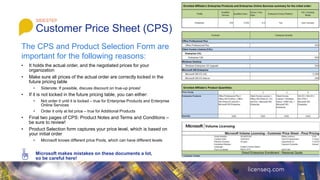
• Product Selection form captures your price level, which is based on
your initial order
• Microsoft knows different price Pools, which can have different levels
Microsoft makes mistakes on these documents a lot,
so be careful here!
SIDESTEP
Customer Price Sheet (CPS)
Enrolled Affiliate’s Enterprise Products and Enterprise Online Services summary for the initial order:
Enrolled Affiliate’s Product Quantities:
The CPS and Product Selection Form are
important for the following reasons:
45.
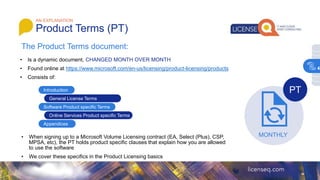
The Product Termsdocument:
AN EXPLANATION
Product Terms (PT)
• Is a dynamic document, CHANGED MONTH OVER MONTH
• Found online at https://www.microsoft.com/en-us/licensing/product-licensing/products
• Consists of:
Introduction
General License Terms
Software Product specific Terms
Appendices
Online Services Product specific Terms
• When signing up to a Microsoft Volume Licensing contract (EA, Select (Plus), CSP,
MPSA, etc), the PT holds product specific clauses that explain how you are allowed
to use the software
• We cover these specifics in the Product Licensing basics
MONTHLY
PT
4
46.
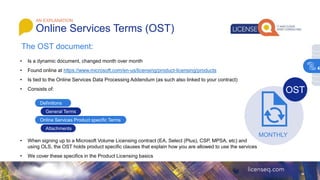
The OST document:
•Is a dynamic document, changed month over month
• Found online at https://www.microsoft.com/en-us/licensing/product-licensing/products
• Is tied to the Online Services Data Processing Addendum (as such also linked to your contract)
• Consists of:
• When signing up to a Microsoft Volume Licensing contract (EA, Select (Plus), CSP, MPSA, etc) and
using OLS, the OST holds product specific clauses that explain how you are allowed to use the services
• We cover these specifics in the Product Licensing basics
AN EXPLANATION
Online Services Terms (OST)
MONTHLY
OST
Definitions
General Terms
Online Services Product specific Terms
Attachments
4
47.
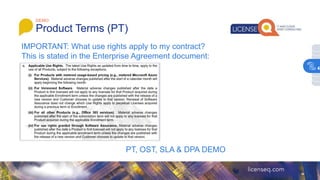
PT, OST, SLA& DPA DEMO
DEMO
Product Terms (PT)
IMPORTANT: What use rights apply to my contract?
This is stated in the Enterprise Agreement document:
4
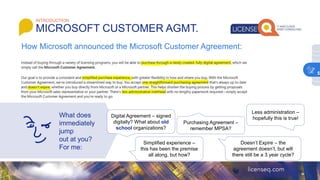
What does
immediately
jump
out atyou?
For me:
INTRODUCTION
MICROSOFT CUSTOMER AGMT.
How Microsoft announced the Microsoft Customer Agreement:
Digital Agreement – signed
digitally? What about old
school organizations?
Simplified experience –
this has been the premise
all along, but how?
Purchasing Agreement –
remember MPSA?
Doesn’t Expire – the
agreement doesn’t, but will
there still be a 3 year cycle?
Less administration –
hopefully this is true!
5
51.
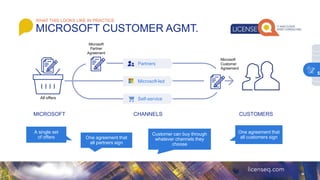
Customer can buythrough
whatever channels they
choose
A single set
of offers One agreement that
all partners sign
MICROSOFT CUSTOMERS
All offers
CHANNELS
Partners
Microsoft-led
Self-service
Microsoft
Customer
Agreement
Microsoft
Partner
Agreement
One agreement that
all customers sign
WHAT THIS LOOKS LIKE IN PRACTICE
MICROSOFT CUSTOMER AGMT.
5
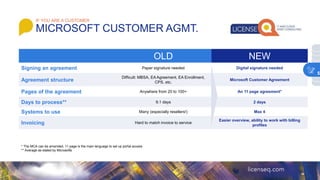
52.
MICROSOFT CUSTOMER AGMT.
IFYOU ARE A CUSTOMER
OLD NEW
Signing an agreement Paper signature needed Digital signature needed
Agreement structure
Difficult: MBSA, EA Agreement, EA Enrollment,
CPS, etc.
Microsoft Customer Agreement
Pages of the agreement Anywhere from 20 to 100+ An 11 page agreement*
Days to process** 9.1 days 2 days
Systems to use Many (especially resellers!) Max 4
Invoicing Hard to match invoice to service
Easier overview, ability to work with billing
profiles
* The MCA can be amended, 11 page is the main language to set up portal access
** Average as stated by Microsofts
5
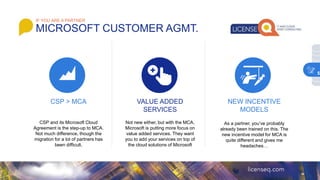
53.
CSP > MCA
CSPand its Microsoft Cloud
Agreement is the step-up to MCA.
Not much difference, though the
migration for a lot of partners has
been difficult.
VALUE ADDED
SERVICES
Not new either, but with the MCA,
Microsoft is putting more focus on
value added services. They want
you to add your services on top of
the cloud solutions of Microsoft
NEW INCENTIVE
MODELS
As a partner, you’ve probably
already been trained on this. The
new incentive model for MCA is
quite different and gives me
headaches…
IF YOU ARE A PARTNER
MICROSOFT CUSTOMER AGMT.
5
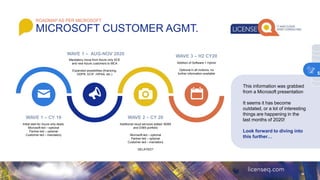
54.
Initial start forAzure only deals.
Microsoft-led – optional
Partner-led – optional
Customer-led – mandatory
WAVE 1 – CY 19
Mandatory move from Azure only SCE
and new Azure customers to MCA
Expanded possibilities (financing,
GDPR, ECIF, HIPAA, etc.)
WAVE 1 – AUG-NOV 2020
Addition of Software + Hybrid
Optional in all motions, no
further information available
WAVE 3 – H2 CY20
Additional cloud services added: M365
and D365 portfolio
Microsoft-led – optional
Partner-led – optional
Customer-led – mandatory
DELAYED?
WAVE 2 – CY 20
This information was grabbed
from a Microsoft presentation
It seems it has become
outdated, or a lot of interesting
things are happening in the
last months of 2020!
Look forward to diving into
this further…
ROADMAP AS PER MICROSOFT
MICROSOFT CUSTOMER AGMT.
5
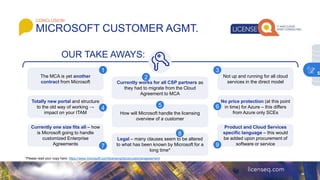
55.
MICROSOFT CUSTOMER AGMT.
CONCLUSION
TheMCA is yet another
contract from Microsoft Currently works for all CSP partners as
they had to migrate from the Cloud
Agreement to MCA
Not up and running for all cloud
services in the direct model
1
2
3
OUR TAKE AWAYS:
Totally new portal and structure
to the old way of working →
impact on your ITAM How will Microsoft handle the licensing
overview of a customer
No price protection (at this point
in time) for Azure – this differs
from Azure only SCEs
4 5 6
Currently one size fits all – how
is Microsoft going to handle
customized Enterprise
Agreements
Legal – many clauses seem to be altered
to what has been known by Microsoft for a
long time*
Product and Cloud Services
specific language – this would
be added upon procurement of
software or service
7
8
9
*Please read your copy here: https://www.microsoft.com/licensing/docs/customeragreement
5
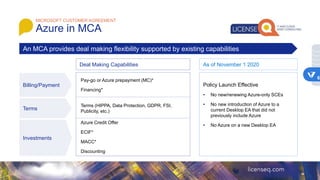
MICROSOFT CUSTOMER AGREEMENT
Azurein MCA
Policy Launch Effective
• No new/renewing Azure-only SCEs
• No new introduction of Azure to a
current Desktop EA that did not
previously include Azure
• No Azure on a new Desktop EA
An MCA provides deal making flexibility supported by existing capabilities
Billing/Payment
Deal Making Capabilities As of November 1 2020
Terms
Investments
Pay-go or Azure prepayment (MC)*
Financing*
Terms (HIPPA, Data Protection, GDPR, FSI,
Publicity, etc.)
Azure Credit Offer
ECIF*
MACC*
Discounting
6
58.
MICROSOFT CUSTOMER AGREEMENT
Azurein MCA
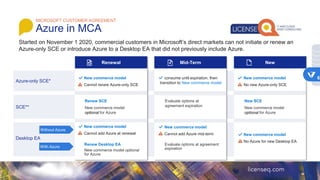
Started on November 1 2020, commercial customers in Microsoft’s direct markets can not initiate or renew an
Azure-only SCE or introduce Azure to a Desktop EA that did not previously include Azure.
SCE**
Desktop EA
Azure-only SCE*
Renewal Mid-Term New
New commerce model
Cannot renew Azure-only SCE
consume until expiration, then
transition to New commerce model
New commerce model
• No new Azure-only SCE
Renew SCE
New commerce model
optional for Azure
Evaluate options at
agreement expiration
New SCE
New commerce model
optional for Azure
New commerce model
• Cannot add Azure at renewal
Renew Desktop EA
New commerce model optional
for Azure
Without Azure
With Azure
New commerce model
• Cannot add Azure mid-term
Evaluate options at agreement
expiration
New commerce model
• No Azure for new Desktop EA
6
59.
MICROSOFT CUSTOMER AGREEMENT
AzureInvoicing (current)
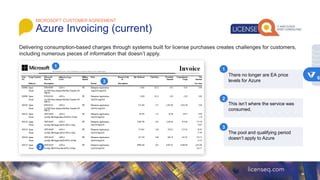
There no longer are EA price
levels for Azure
1
2
3
This isn’t where the service was
consumed.
The pool and qualifying period
doesn’t apply to Azure
1
2
3
6
60.
MICROSOFT CUSTOMER AGREEMENT
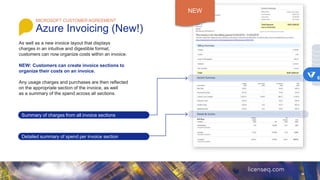
AzureInvoicing (New!)
NEW: Customers can create invoice sections to
organize their costs on an invoice.
Summary of charges from all invoice sections
Detailed summary of spend per invoice section
NEW
6
61.
MICROSOFT CUSTOMER AGREEMENT
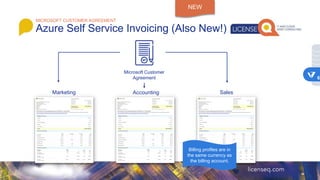
AzureSelf Service Invoicing (Also New!)
NEW
Microsoft Customer
Agreement
Marketing Accounting Sales
Billing profiles are in
the same currency as
the billing account.
6
MICROSOFT VOLUME LICENSING
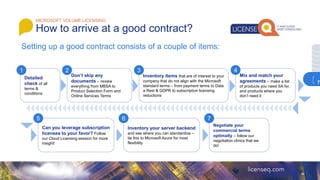
Howto arrive at a good contract?
Setting up a good contract consists of a couple of items:
Detailed
check of all
terms &
conditions
Don’t skip any
documents – review
everything from MBSA to
Product Selection Form and
Online Services Terms
Inventory items that are of interest to your
company that do not align with the Microsoft
standard terms – from payment terms to Data
a Rest & GDPR to subscription licensing
reductions
Mix and match your
agreements – make a list
of products you need SA for,
and products where you
don’t need it
Can you leverage subscription
licenses to your favor? Follow
our Cloud Licensing session for more
insight!
Inventory your server backend
and see where you can standardize –
tie this to Microsoft Azure for most
flexibility
Negotiate your
commercial terms
optimally – follow our
negotiation clinics that we
do!
1 2 3 4
5 6 7
7
#3 Note: this session will have a strong focus on cloud licensing models for the Enterprise Agreement
Licensing alternative scenario’s like CSP and MCA is covered in our Volume Licensing Basics series
#5 What is a license? The rights to use software and services.
Software is intellectual property, and licenses provide the right to use the software and define the conditions of use.
#6 What is a license? The rights to use software and services.
Software is intellectual property, and licenses provide the right to use the software and define the conditions of use.
#7 What requires a software license?
A license is required for the operating system software of devices, cloud software used on those devices, the applications on those devices, server applications, and the users or devices that access the software on the server.
Licenses are required for employees and non-employee users or devices accessing the server.
Licensing rules vary between products and how the license was purchased. Please consult applicable use rights for specific details.
#8 Modern licensing aligns to how customers want to buy and will enhance and create synergies across three ways to do business with us:
Value-added partners
Microsoft-assisted offerings
Self-service web options
#9 There are four key ways to buy a Microsoft license, depending on the volume of licenses needed for your organization today and in the future:
The Original Equipment Manufacturer (OEM), where the licenses come preinstalled on a new device and the software is associated with the device.
Retail purchase, including either the Full Packaged Product (FPP) or Microsoft Online Subscription Program (MOSP).
Partner Managed Services that are hosted solutions available from Cloud Solution Provider, service providers.
Commercial Licensing, which are purchased directly from Microsoft or through resellers and offer a variety of agreements to suit different types of organizations.
The use rights govern how products and services may be used:
These vary by product, product version, and the channel through which the license was purchased.
We will go over these ways of purchasing and highlight what use rights govern them.
#10 Select Plus is still available for Public Sector customers
For public sector organizations with fewer than 250 devices, Microsoft offers customized versions of the Open agreements:
Open License,
Open Value
Open Value Subscription option
The Open License for Academic and Open License for Government agreements are similar to commercial Open License, but with different pricing and partner channels. In some regions, government organizations can also participate in the Open Value for Government and Open Value Subscription option for Government agreements.
In some regions, nonprofit organizations can participate in the Open License for Charities program.
Check with your Microsoft reseller for availability.
Government and education organizations with more than 250 devices can participate in the Select Plus program.
Government organizations can also participate in the Enterprise Agreement program.
For education institutions that prefer to license their software on an annual subscription basis, Microsoft offers two unique programs:
Microsoft Campus Agreement for higher education and Microsoft School Agreement for primary and secondary education institutions.
Microsoft Products and Services Agreement (MPSA)
#12 Select Plus is still available for Public Sector customers
For public sector organizations with fewer than 250 devices, Microsoft offers customized versions of the Open agreements:
Open License,
Open Value
Open Value Subscription option
The Open License for Academic and Open License for Government agreements are similar to commercial Open License, but with different pricing and partner channels. In some regions, government organizations can also participate in the Open Value for Government and Open Value Subscription option for Government agreements.
In some regions, nonprofit organizations can participate in the Open License for Charities program.
Check with your Microsoft reseller for availability.
Government and education organizations with more than 250 devices can participate in the Select Plus program.
Government organizations can also participate in the Enterprise Agreement program.
For education institutions that prefer to license their software on an annual subscription basis, Microsoft offers two unique programs:
Microsoft Campus Agreement for higher education and Microsoft School Agreement for primary and secondary education institutions.
Microsoft Products and Services Agreement (MPSA)
#13 Select Plus is still available for Public Sector customers
For public sector organizations with fewer than 250 devices, Microsoft offers customized versions of the Open agreements:
Open License,
Open Value
Open Value Subscription option
The Open License for Academic and Open License for Government agreements are similar to commercial Open License, but with different pricing and partner channels. In some regions, government organizations can also participate in the Open Value for Government and Open Value Subscription option for Government agreements.
In some regions, nonprofit organizations can participate in the Open License for Charities program.
Check with your Microsoft reseller for availability.
Government and education organizations with more than 250 devices can participate in the Select Plus program.
Government organizations can also participate in the Enterprise Agreement program.
For education institutions that prefer to license their software on an annual subscription basis, Microsoft offers two unique programs:
Microsoft Campus Agreement for higher education and Microsoft School Agreement for primary and secondary education institutions.
Microsoft Products and Services Agreement (MPSA)
#14 Select Plus is still available for Public Sector customers
For public sector organizations with fewer than 250 devices, Microsoft offers customized versions of the Open agreements:
Open License,
Open Value
Open Value Subscription option
The Open License for Academic and Open License for Government agreements are similar to commercial Open License, but with different pricing and partner channels. In some regions, government organizations can also participate in the Open Value for Government and Open Value Subscription option for Government agreements.
In some regions, nonprofit organizations can participate in the Open License for Charities program.
Check with your Microsoft reseller for availability.
Government and education organizations with more than 250 devices can participate in the Select Plus program.
Government organizations can also participate in the Enterprise Agreement program.
For education institutions that prefer to license their software on an annual subscription basis, Microsoft offers two unique programs:
Microsoft Campus Agreement for higher education and Microsoft School Agreement for primary and secondary education institutions.
Microsoft Products and Services Agreement (MPSA)
#16 Enterprise Agreement is a Microsoft assisted program for commercial and eligible government customers with 500+ users or devices:
There is a minimum of 500 users or devices required at the time of signing the agreement.
Enterprise Agreement is a three-year license term with annual payments.
Customers can add products and services as needed, with price protection throughout the three-year term.
Within the EA, Licenses are purchased through the Enterprise Enrollment, the Enterprise Subscription Enrollment, and/or the Server and Cloud Enrollment.
#17 By making the Enterprise Enrollment, you get the best pricing when you make an organization-wide commitment to the Enterprise Platform, which includes:
Office Professional Plus
CAL Suites
Windows Enterprise
As we mention on the slide prior all software purchased through the Enterprise Agreement include Software Assurance.
A customer can choose to commit to one or all three of the Enterprise Platform. The software within the Enterprise Platform are called enterprise products. When purchasing enterprise products, customers must make a enterprise-wide commitment to that product.
#18 By making the Enterprise Enrollment, you get the best pricing when you make an organization-wide commitment to the Enterprise Platform, which includes:
Office Professional Plus
CAL Suites
Windows Enterprise
As we mention on the slide prior all software purchased through the Enterprise Agreement include Software Assurance.
A customer can choose to commit to one or all three of the Enterprise Platform. The software within the Enterprise Platform are called enterprise products. When purchasing enterprise products, customers must make a enterprise-wide commitment to that product.
#19 The Server and Cloud Enrollment will offer four different components:
Core Infrastructure
Application Platform
Developer Platform
Azure
Customers can choose from any of these components individually or group them as needed.
Azure is automatically available as Pay-As-You-Go (quarterly billing in arrears) when enrolling in any of the other three components and can also be licensed standalone.
Requirements
Each of the first three components will require that customers have full Software Assurance coverage on all of the licenses they have deployed.
In the Core Infrastructure component, customers will need System Center coverage across all the Windows Servers deployed in their environment. This is accomplished by assigning the CIS licenses as appropriate to all existing Windows Servers.
#20 The Server and Cloud Enrollment will offer four different components:
Core Infrastructure
Application Platform
Developer Platform
Azure
Customers can choose from any of these components individually or group them as needed.
Azure is automatically available as Pay-As-You-Go (quarterly billing in arrears) when enrolling in any of the other three components and can also be licensed standalone.
Requirements
Each of the first three components will require that customers have full Software Assurance coverage on all of the licenses they have deployed.
In the Core Infrastructure component, customers will need System Center coverage across all the Windows Servers deployed in their environment. This is accomplished by assigning the CIS licenses as appropriate to all existing Windows Servers.
#21 The Server and Cloud Enrollment will offer four different components:
Core Infrastructure
Application Platform
Developer Platform
Azure
Customers can choose from any of these components individually or group them as needed.
Azure is automatically available as Pay-As-You-Go (quarterly billing in arrears) when enrolling in any of the other three components and can also be licensed standalone.
Requirements
Each of the first three components will require that customers have full Software Assurance coverage on all of the licenses they have deployed.
In the Core Infrastructure component, customers will need System Center coverage across all the Windows Servers deployed in their environment. This is accomplished by assigning the CIS licenses as appropriate to all existing Windows Servers.
#22 The Server and Cloud Enrollment will offer four different components:
Core Infrastructure
Application Platform
Developer Platform
Azure
Customers can choose from any of these components individually or group them as needed.
Azure is automatically available as Pay-As-You-Go (quarterly billing in arrears) when enrolling in any of the other three components and can also be licensed standalone.
Requirements
Each of the first three components will require that customers have full Software Assurance coverage on all of the licenses they have deployed.
In the Core Infrastructure component, customers will need System Center coverage across all the Windows Servers deployed in their environment. This is accomplished by assigning the CIS licenses as appropriate to all existing Windows Servers.
#23 The Server and Cloud Enrollment will offer four different components:
Core Infrastructure
Application Platform
Developer Platform
Azure
Customers can choose from any of these components individually or group them as needed.
Azure is automatically available as Pay-As-You-Go (quarterly billing in arrears) when enrolling in any of the other three components and can also be licensed standalone.
Requirements
Each of the first three components will require that customers have full Software Assurance coverage on all of the licenses they have deployed.
In the Core Infrastructure component, customers will need System Center coverage across all the Windows Servers deployed in their environment. This is accomplished by assigning the CIS licenses as appropriate to all existing Windows Servers.
#24 The Server and Cloud Enrollment will offer four different components:
Core Infrastructure
Application Platform
Developer Platform
Azure
Customers can choose from any of these components individually or group them as needed.
Azure is automatically available as Pay-As-You-Go (quarterly billing in arrears) when enrolling in any of the other three components and can also be licensed standalone.
Requirements
Each of the first three components will require that customers have full Software Assurance coverage on all of the licenses they have deployed.
In the Core Infrastructure component, customers will need System Center coverage across all the Windows Servers deployed in their environment. This is accomplished by assigning the CIS licenses as appropriate to all existing Windows Servers.
#31 Microsoft Products and Services Agreement (MPSA) is an agreement for midsize and large organizations that need transactional software.
Recommended for transactional software only
Recommended for 250 or more users or devices
No organization-wide commitment
No purchase minimums required to enter: just reach the minimum purchase within one year of signing
No new Azure plans or services will be added to MPSA going forward
#33 When signing an EA, this is all captured in the contract:
Signature Form;
MBSA;
EA
Enrollment(s)
Customer Price Sheet
Product Selection form
Product Terms and OST
Supplemental contact information and previous enrollment forms
Amendments
#54 Partner incentive model is moving into three areas: management, migration, customer adds. CSP is still available in MCA, so margins are still there as well
#58 Floris
Discount, while important, is not the goal in itself. First figure out what you really need from such a mega vendor. Buy less might give you lesser discounts, but will save you money
Flexibility: Microsoft sometimes will sell their cloud as they used to sell their on premises products, but making sure you are unable to scale down. Do not fall into this trap (unless you want to) as it will remove the little flexibility you already have!
Price and pricelock: It’s worthwhile to check all the pricing on the CPS as this is an area that Microsoft makes a lot of mistakes. Pricelocks will help you in the sense that you don’t have the additional discussions on commitment to get discount.
#59 Floris
Discount, while important, is not the goal in itself. First figure out what you really need from such a mega vendor. Buy less might give you lesser discounts, but will save you money
Flexibility: Microsoft sometimes will sell their cloud as they used to sell their on premises products, but making sure you are unable to scale down. Do not fall into this trap (unless you want to) as it will remove the little flexibility you already have!
Price and pricelock: It’s worthwhile to check all the pricing on the CPS as this is an area that Microsoft makes a lot of mistakes. Pricelocks will help you in the sense that you don’t have the additional discussions on commitment to get discount.
#60 Floris
Discount, while important, is not the goal in itself. First figure out what you really need from such a mega vendor. Buy less might give you lesser discounts, but will save you money
Flexibility: Microsoft sometimes will sell their cloud as they used to sell their on premises products, but making sure you are unable to scale down. Do not fall into this trap (unless you want to) as it will remove the little flexibility you already have!
Price and pricelock: It’s worthwhile to check all the pricing on the CPS as this is an area that Microsoft makes a lot of mistakes. Pricelocks will help you in the sense that you don’t have the additional discussions on commitment to get discount.
#61 Floris
Discount, while important, is not the goal in itself. First figure out what you really need from such a mega vendor. Buy less might give you lesser discounts, but will save you money
Flexibility: Microsoft sometimes will sell their cloud as they used to sell their on premises products, but making sure you are unable to scale down. Do not fall into this trap (unless you want to) as it will remove the little flexibility you already have!
Price and pricelock: It’s worthwhile to check all the pricing on the CPS as this is an area that Microsoft makes a lot of mistakes. Pricelocks will help you in the sense that you don’t have the additional discussions on commitment to get discount.