


















Microsoft Teams with third-party video conferencing
– what it means for the enterprise
15 May 2019
Your team from Pexip:
Anders Løkke
Marketing Manager
@anderslokke
Graham Walsh
Director of Architecture
@graham_walsh
What you will take away from this session
Understand the top five typical use cases in an organisation
Migrating to Microsoft Teams with third-party video conferencing
Get an overview of how it works and what it does
Understand if Cloud Video Interop is right for you
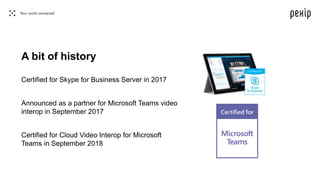
Certified for Skype for Business Server in 2017
Announced as a partner for Microsoft Teams video
interop in September 2017
Certified for Cloud Video Interop for Microsoft
Teams in September 2018
A bit of history
What is the deal with Microsoft Teams
and third-party video conferencing? Why
is that complex?
What does Pexip do for Microsoft? Technically speaking?
Enables third-party video teleconferencing (VTC) systems to
join Microsoft Teams and Skype for Business meetings
(typically Cisco, Polycom, etc.)
2
1
Simplify existing video conferencing – and shift workloads into
the Microsoft Azure cloud through a number of Pexip capabilities
How do I migrate from Skype for Business
to Microsoft Teams – and ensure I keep
my video conferencing interoperability
capabilities?
Skype for Business Server > Microsoft Teams:
Has existing video conferencing solutions and is migrating from
Skype for Business Server to Microsoft Teams.
Use cases
1
Skype for Business Online > Microsoft Teams:
Migrates to Microsoft Teams from Skype for Business Online.
Use cases
2
Cisco UC > Microsoft Teams:
Organisation moves from Cisco video to Microsoft Teams, but wants
to keep existing meeting room systems.
Use cases
3
Mix of different solutions > Microsoft Teams:
The organisation has multiple solutions and vendors side by side, eg.
Cisco, BroadSoft, SfB Server, SfBO, etc.
Use cases
4
The organization works with others that have other solutions:
The organisation uses Microsoft collaboration technology, but works with partners
and customers that use other solutions.
Use cases
5
What does Pexip for Microsoft Teams
look and feel like?
How do I make sure the correct dial-in
information is in the meeting invite I send
out? Do I have to do anything?
Meeting invites
So how do I join the meeting then
– considering I have a Teams meeting
invite from someone?
Is it easy?
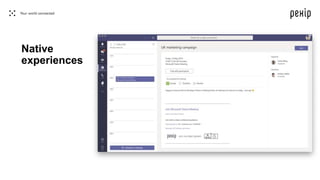
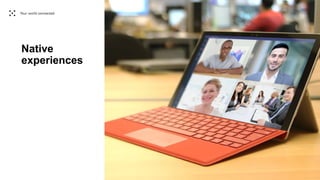
Native
experiences
Native
experiences
How do I know what system the people
I invite will join from?
Join experience from outside the company
• you don’t know how people will join
• It is up to them after you send an invite
• Trusted or lobby
Native experiences
So what do I need to do as an enterprise
– how do I get started, where do I begin?
Is Cloud Video Interop for me?
Key questions to ask yourself
Are any of the key use cases relevant to me?
What is it that I want to accomplish?
Should I be paying for multiple UC platforms and licenses?
Have it your way:
Self-hosted As a serviceIn any cloud
Summary
• Pexip enables third-party video conferencing systems and non-Microsoft clients
to join Microsoft Teams calls as native participants – with audio, video and
content sharing
• You can have Pexip as a dedicated software platform or as a service depending
on your organization’s needs and requirements
Q & A
See us
For more information: pexip.com/teams
docs.pexip.com
msft@pexip.com

Microsoft Teams with third-party video conferencing - Pexip Cloud Video Interop

  • 1.
    Microsoft Teams withthird-party video conferencing – what it means for the enterprise 15 May 2019
  • 2.
    Your team fromPexip: Anders Løkke Marketing Manager @anderslokke Graham Walsh Director of Architecture @graham_walsh
  • 3.
    What you willtake away from this session Understand the top five typical use cases in an organisation Migrating to Microsoft Teams with third-party video conferencing Get an overview of how it works and what it does Understand if Cloud Video Interop is right for you
  • 6.
    Certified for Skypefor Business Server in 2017 Announced as a partner for Microsoft Teams video interop in September 2017 Certified for Cloud Video Interop for Microsoft Teams in September 2018 A bit of history
  • 7.
    What is thedeal with Microsoft Teams and third-party video conferencing? Why is that complex?
  • 9.
    What does Pexipdo for Microsoft? Technically speaking? Enables third-party video teleconferencing (VTC) systems to join Microsoft Teams and Skype for Business meetings (typically Cisco, Polycom, etc.) 2 1 Simplify existing video conferencing – and shift workloads into the Microsoft Azure cloud through a number of Pexip capabilities
  • 10.
    How do Imigrate from Skype for Business to Microsoft Teams – and ensure I keep my video conferencing interoperability capabilities?
  • 11.
    Skype for BusinessServer > Microsoft Teams: Has existing video conferencing solutions and is migrating from Skype for Business Server to Microsoft Teams. Use cases 1
  • 12.
    Skype for BusinessOnline > Microsoft Teams: Migrates to Microsoft Teams from Skype for Business Online. Use cases 2
  • 13.
    Cisco UC >Microsoft Teams: Organisation moves from Cisco video to Microsoft Teams, but wants to keep existing meeting room systems. Use cases 3
  • 14.
    Mix of differentsolutions > Microsoft Teams: The organisation has multiple solutions and vendors side by side, eg. Cisco, BroadSoft, SfB Server, SfBO, etc. Use cases 4
  • 15.
    The organization workswith others that have other solutions: The organisation uses Microsoft collaboration technology, but works with partners and customers that use other solutions. Use cases 5
  • 16.
    What does Pexipfor Microsoft Teams look and feel like?
  • 17.
    How do Imake sure the correct dial-in information is in the meeting invite I send out? Do I have to do anything?
  • 18.
  • 19.
    So how doI join the meeting then – considering I have a Teams meeting invite from someone? Is it easy?
  • 20.
  • 21.
  • 23.
    How do Iknow what system the people I invite will join from?
  • 24.
    Join experience fromoutside the company • you don’t know how people will join • It is up to them after you send an invite • Trusted or lobby Native experiences
  • 25.
    So what doI need to do as an enterprise – how do I get started, where do I begin? Is Cloud Video Interop for me?
  • 26.
    Key questions toask yourself Are any of the key use cases relevant to me? What is it that I want to accomplish? Should I be paying for multiple UC platforms and licenses?
  • 27.
    Have it yourway: Self-hosted As a serviceIn any cloud
  • 28.
    Summary • Pexip enablesthird-party video conferencing systems and non-Microsoft clients to join Microsoft Teams calls as native participants – with audio, video and content sharing • You can have Pexip as a dedicated software platform or as a service depending on your organization’s needs and requirements
  • 29.
  • 30.
  • 31.
    For more information:pexip.com/teams docs.pexip.com msft@pexip.com