09/05/2018 Microsoft Excel 2016 Intermediate Training - Adams Academy
https://www.adamsacademy.com/course/microsoft-excel-2016-intermediate-training/ 1/12
( 8 REVIEWS )
HOME / COURSE / MICROSOFT OFFICE / EXCEL / MICROSOFT EXCEL 2016 INTERMEDIATE TRAINING
Microsoft Excel 2016 Intermediate
Training
586 STUDENTS
Since its inception in 1985, Microsoft Excel has an average of ve new users added every minute. Now
the total stands at more than thirty million users of this amazing spreadsheet program, who use it every
day for personal and professional reasons. The 2016 version has many new features added to the
program, and if you would like to learn more about them, you can do so with this Microsoft Excel 2016
Intermediate Training course.
This course is designed to help all users get familiar with the di erent features of Excel. As such you
start out with learning how to use range names in formulas and functions, along with using specialized
functions. Next you get to analyze the data with logical and lookup functions, organise and analyze
datasets and tables, and also visualize data with charts. Furthermore you will learn about creating Pivot
Table, ltering data using slicers, and analyzing data using PivotCharts. Finally the course will teach you
to insert graphics, and enhance workbooks through customizing them, managing themes, and creating
and using templates.
HOME CURRICULUM REVIEWS
LOGIN

09/05/2018 Microsoft Excel 2016 Intermediate Training - Adams Academy
https://www.adamsacademy.com/course/microsoft-excel-2016-intermediate-training/ 2/12
Overall this course can help you rediscover Excel, and if used correctly, you will only get to add
invaluable skills to your arsenal.
Why Should You Choose Microsoft Excel 2016 Intermediate
Training
Internationally recognised accredited quali cation
1 year accessibility to the course
Free e-Certi cate
Instant certi cate validation facility
Properly curated course with comprehensive syllabus
Full-time tutor support on working days (Monday – Friday)
E cient exam system, assessment and instant results
Access to the course content on mobile, tablet or desktop from anywhere anytime
Eligible for **NUS Extra** card which gives you 1000’s of discounts from biggest companies.
Career path
This course opens a new door for you to enter the relevant job market and also gives you the
opportunity to acquire extensive knowledge along with required skills to become successful in no time.
You will be able to stand out in the crowd after completing this course. You will also be able to add our
quali cations to your Resume and make yourself worthy in the competitive job industry.
FAQs
Who is this course for?
There is no experience or previous quali cations required for enrolment on this course. It is available to
all students of all academic backgrounds.
Is this course accredited?
Yes, this course is accredited by IAO and CPD Quali cation Standards.
If I take the course, how will I be assessed?
Once you complete all the lessons/units, you are required to sit an exam which is multiple-choice. Pass
mark is 60%.
Does this course include exams?
Yes, this course includes exams.
How can I achieve my certificate?
Once you successfully pass your exam you can obtain your certi cate of achievement either in PDF or
hard copy format, or both, for an additional fee.  Certi cates are also available as e-certi cates.
Is there any charge for certification?
Yes, there is an additional charge for the certi cation service.  Certi cates are £4 each for PDFs and £8
each for hard copies. If both PDF and hard copy certi cates are ordered at the same time, the cost is
£10. E-certi cates are available from your learning portal completely free of charge.
Can anyone validate my certificate through your website?
Yes, there is a unique code issued for every certi cate and anyone can validate your certi cate by using
this code through our website.
Are there any prerequisites for the course?

09/05/2018 Microsoft Excel 2016 Intermediate Training - Adams Academy
https://www.adamsacademy.com/course/microsoft-excel-2016-intermediate-training/ 3/12
 
 
 
 
 
 
 
 
 
 
 
 
 
There are no prerequisites for this course and it is open to everyone.
How long until I receive the course confirmation details?
Once you purchase a course your account will be set up within 48 hours and you will receive an email
with your account details.
For how long do I have access to the course?
You will have access to the course for one year following purchase.
What support do you offer?
We provide 24 hours live chat support and our customer service team is available during working hours
to answer your phone calls.
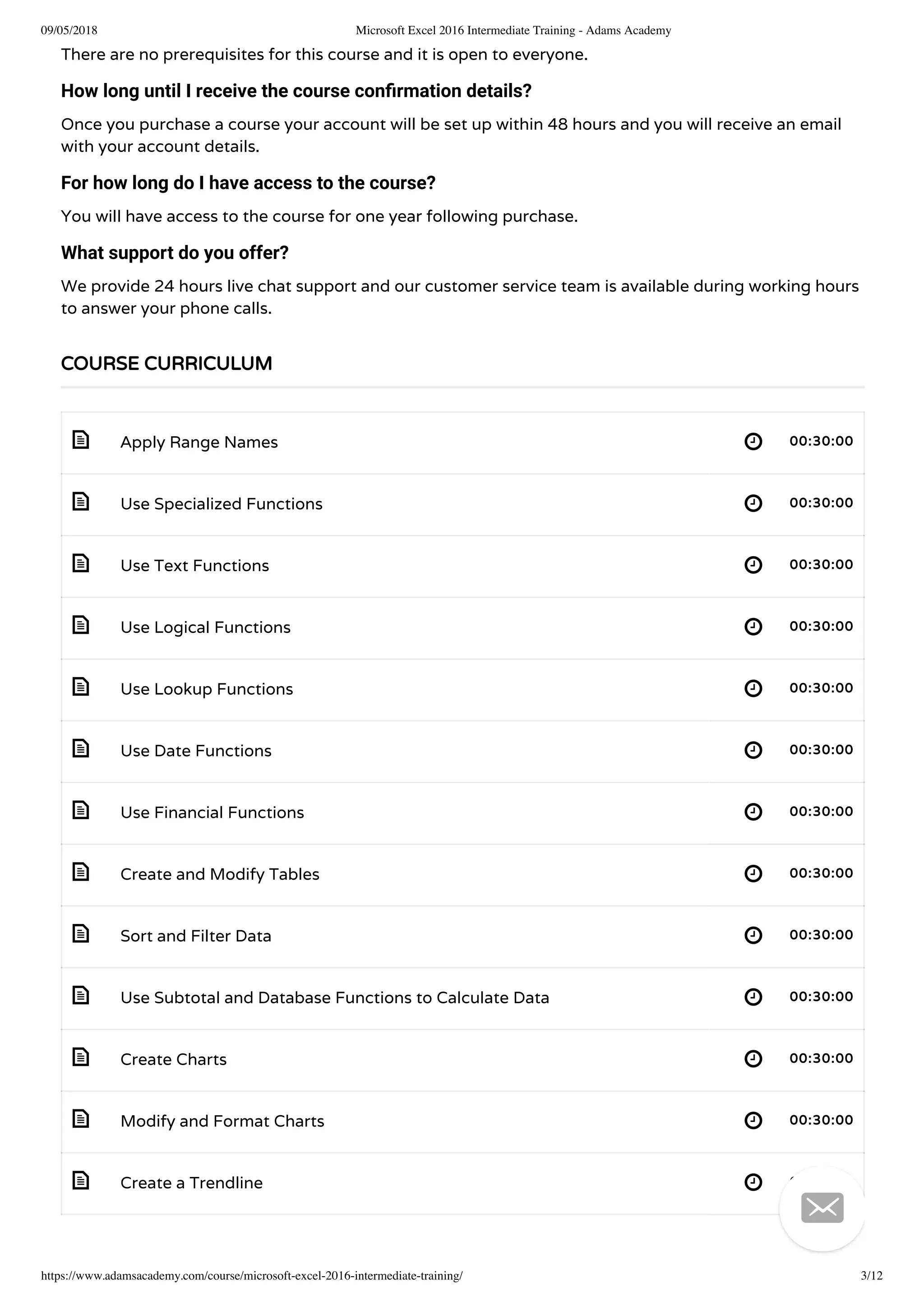
Apply Range Names 00:30:00
Use Specialized Functions 00:30:00
Use Text Functions 00:30:00
Use Logical Functions 00:30:00
Use Lookup Functions 00:30:00
Use Date Functions 00:30:00
Use Financial Functions 00:30:00
Create and Modify Tables 00:30:00
Sort and Filter Data 00:30:00
Use Subtotal and Database Functions to Calculate Data 00:30:00
Create Charts 00:30:00
Modify and Format Charts 00:30:00
Create a Trendline 00:30:00
COURSE CURRICULUM

09/05/2018 Microsoft Excel 2016 Intermediate Training - Adams Academy
https://www.adamsacademy.com/course/microsoft-excel-2016-intermediate-training/ 4/12
 
 
 
 
 
 
 
 
 
 
 
 
 
- 
- 
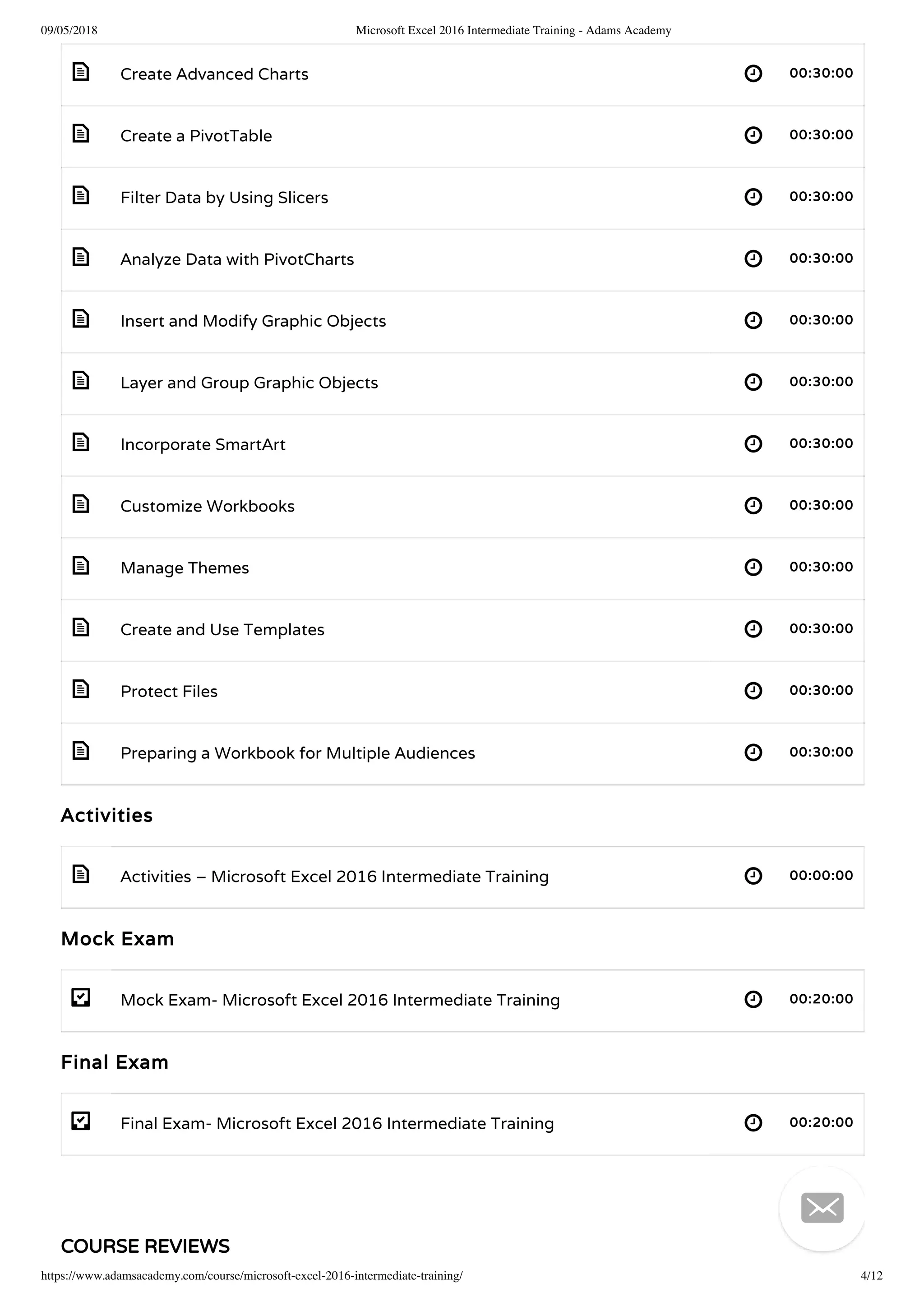
Create Advanced Charts 00:30:00
Create a PivotTable 00:30:00
Filter Data by Using Slicers 00:30:00
Analyze Data with PivotCharts 00:30:00
Insert and Modify Graphic Objects 00:30:00
Layer and Group Graphic Objects 00:30:00
Incorporate SmartArt 00:30:00
Customize Workbooks 00:30:00
Manage Themes 00:30:00
Create and Use Templates 00:30:00
Protect Files 00:30:00
Preparing a Workbook for Multiple Audiences 00:30:00
Activities
Activities – Microsoft Excel 2016 Intermediate Training 00:00:00
Mock Exam
Mock Exam- Microsoft Excel 2016 Intermediate Training 00:20:00
Final Exam
Final Exam- Microsoft Excel 2016 Intermediate Training 00:20:00
COURSE REVIEWS

09/05/2018 Microsoft Excel 2016 Intermediate Training - Adams Academy
https://www.adamsacademy.com/course/microsoft-excel-2016-intermediate-training/ 5/12
4.9
8 ratings

5 STARS
4 STARS
3 STARS
2 STARS
1 STARS
0
0
0
0
0
NO REVIEWS FOUND FOR THIS COURSE.
RELATED COURSES

09/05/2018 Microsoft Excel 2016 Intermediate Training - Adams Academy
https://www.adamsacademy.com/course/microsoft-excel-2016-intermediate-training/ 6/12
465
70-662 - Deploying Microsoft Exchange Server 2010 S Accredited Training
£43£350


09/05/2018 Microsoft Excel 2016 Intermediate Training - Adams Academy
https://www.adamsacademy.com/course/microsoft-excel-2016-intermediate-training/ 7/12
493
Microsoft Office 2007 Word Basic - Video Course
£39£350

531
Microsoft Office 2007 Outlook Basic - Video Course
£39£350

£27£336
1 YEAR
TAKE THIS COURSE

09/05/2018 Microsoft Excel 2016 Intermediate Training - Adams Academy
https://www.adamsacademy.com/course/microsoft-excel-2016-intermediate-training/ 8/12
Instructors
CAMERON DALLPORT
586 STUDENTS ENROLLED
   
INTERMEDIATE
COURSE BADGE
COURSE CERTIFICATE
26NUMBER OF UNITS
2NUMBER OF QUIZZES
13 HOURS, 10 MINUTES
ACCREDITED BY

09/05/2018 Microsoft Excel 2016 Intermediate Training - Adams Academy
https://www.adamsacademy.com/course/microsoft-excel-2016-intermediate-training/ 9/12
Registered with the UK Register of Learning Providers (UKRLP)
UKPRN: 10063816
OUR COURSE AWARDING BODIES
OUR COURSES PARTNERS

09/05/2018 Microsoft Excel 2016 Intermediate Training - Adams Academy
https://www.adamsacademy.com/course/microsoft-excel-2016-intermediate-training/ 10/12

09/05/2018 Microsoft Excel 2016 Intermediate Training - Adams Academy
https://www.adamsacademy.com/course/microsoft-excel-2016-intermediate-training/ 11/12
ABOUT
Make learning more accessible to learning enthusiasts, regardless of where they are residing in the
world.
 Beaufort House, 15 St Botolph Street, London EC3A 7BB
 0800 368 7767
 help@adamsacademy.com
CERTIFICATE CODE
Enter Certi cate Code
IMPORTANT LINKS
About
Blog
Terms & Conditions
VALIDATE
OUR STUDENTS SAY..
Course content are awesome! Greatest
course I had this time.
Ginny
Student
An extremely helpful and informative
course, especially in conjunction with
quiz and video tutorial.
Mike
Student, Finance
Great Course Content! Le
anywhere using personal
Video is a good way to le
Kiara
Student
 

09/05/2018 Microsoft Excel 2016 Intermediate Training - Adams Academy
https://www.adamsacademy.com/course/microsoft-excel-2016-intermediate-training/ 12/12
Privacy Policy
Cookie Policy
FAQ
Contact
COMING SOON
   
© ADAMS ACADEMY INC. LTD.
   


Microsoft excel 2016 intermediate training - Adams Academy

  • 1.
    09/05/2018 Microsoft Excel2016 Intermediate Training - Adams Academy https://www.adamsacademy.com/course/microsoft-excel-2016-intermediate-training/ 1/12 ( 8 REVIEWS ) HOME / COURSE / MICROSOFT OFFICE / EXCEL / MICROSOFT EXCEL 2016 INTERMEDIATE TRAINING Microsoft Excel 2016 Intermediate Training 586 STUDENTS Since its inception in 1985, Microsoft Excel has an average of ve new users added every minute. Now the total stands at more than thirty million users of this amazing spreadsheet program, who use it every day for personal and professional reasons. The 2016 version has many new features added to the program, and if you would like to learn more about them, you can do so with this Microsoft Excel 2016 Intermediate Training course. This course is designed to help all users get familiar with the di erent features of Excel. As such you start out with learning how to use range names in formulas and functions, along with using specialized functions. Next you get to analyze the data with logical and lookup functions, organise and analyze datasets and tables, and also visualize data with charts. Furthermore you will learn about creating Pivot Table, ltering data using slicers, and analyzing data using PivotCharts. Finally the course will teach you to insert graphics, and enhance workbooks through customizing them, managing themes, and creating and using templates. HOME CURRICULUM REVIEWS LOGIN 
  • 2.
    09/05/2018 Microsoft Excel2016 Intermediate Training - Adams Academy https://www.adamsacademy.com/course/microsoft-excel-2016-intermediate-training/ 2/12 Overall this course can help you rediscover Excel, and if used correctly, you will only get to add invaluable skills to your arsenal. Why Should You Choose Microsoft Excel 2016 Intermediate Training Internationally recognised accredited quali cation 1 year accessibility to the course Free e-Certi cate Instant certi cate validation facility Properly curated course with comprehensive syllabus Full-time tutor support on working days (Monday – Friday) E cient exam system, assessment and instant results Access to the course content on mobile, tablet or desktop from anywhere anytime Eligible for **NUS Extra** card which gives you 1000’s of discounts from biggest companies. Career path This course opens a new door for you to enter the relevant job market and also gives you the opportunity to acquire extensive knowledge along with required skills to become successful in no time. You will be able to stand out in the crowd after completing this course. You will also be able to add our quali cations to your Resume and make yourself worthy in the competitive job industry. FAQs Who is this course for? There is no experience or previous quali cations required for enrolment on this course. It is available to all students of all academic backgrounds. Is this course accredited? Yes, this course is accredited by IAO and CPD Quali cation Standards. If I take the course, how will I be assessed? Once you complete all the lessons/units, you are required to sit an exam which is multiple-choice. Pass mark is 60%. Does this course include exams? Yes, this course includes exams. How can I achieve my certificate? Once you successfully pass your exam you can obtain your certi cate of achievement either in PDF or hard copy format, or both, for an additional fee.  Certi cates are also available as e-certi cates. Is there any charge for certification? Yes, there is an additional charge for the certi cation service.  Certi cates are £4 each for PDFs and £8 each for hard copies. If both PDF and hard copy certi cates are ordered at the same time, the cost is £10. E-certi cates are available from your learning portal completely free of charge. Can anyone validate my certificate through your website? Yes, there is a unique code issued for every certi cate and anyone can validate your certi cate by using this code through our website. Are there any prerequisites for the course? 
  • 3.
    09/05/2018 Microsoft Excel2016 Intermediate Training - Adams Academy https://www.adamsacademy.com/course/microsoft-excel-2016-intermediate-training/ 3/12                           There are no prerequisites for this course and it is open to everyone. How long until I receive the course confirmation details? Once you purchase a course your account will be set up within 48 hours and you will receive an email with your account details. For how long do I have access to the course? You will have access to the course for one year following purchase. What support do you offer? We provide 24 hours live chat support and our customer service team is available during working hours to answer your phone calls. Apply Range Names 00:30:00 Use Specialized Functions 00:30:00 Use Text Functions 00:30:00 Use Logical Functions 00:30:00 Use Lookup Functions 00:30:00 Use Date Functions 00:30:00 Use Financial Functions 00:30:00 Create and Modify Tables 00:30:00 Sort and Filter Data 00:30:00 Use Subtotal and Database Functions to Calculate Data 00:30:00 Create Charts 00:30:00 Modify and Format Charts 00:30:00 Create a Trendline 00:30:00 COURSE CURRICULUM 
  • 4.
    09/05/2018 Microsoft Excel2016 Intermediate Training - Adams Academy https://www.adamsacademy.com/course/microsoft-excel-2016-intermediate-training/ 4/12                           -  -  Create Advanced Charts 00:30:00 Create a PivotTable 00:30:00 Filter Data by Using Slicers 00:30:00 Analyze Data with PivotCharts 00:30:00 Insert and Modify Graphic Objects 00:30:00 Layer and Group Graphic Objects 00:30:00 Incorporate SmartArt 00:30:00 Customize Workbooks 00:30:00 Manage Themes 00:30:00 Create and Use Templates 00:30:00 Protect Files 00:30:00 Preparing a Workbook for Multiple Audiences 00:30:00 Activities Activities – Microsoft Excel 2016 Intermediate Training 00:00:00 Mock Exam Mock Exam- Microsoft Excel 2016 Intermediate Training 00:20:00 Final Exam Final Exam- Microsoft Excel 2016 Intermediate Training 00:20:00 COURSE REVIEWS 
  • 5.
    09/05/2018 Microsoft Excel2016 Intermediate Training - Adams Academy https://www.adamsacademy.com/course/microsoft-excel-2016-intermediate-training/ 5/12 4.9 8 ratings  5 STARS 4 STARS 3 STARS 2 STARS 1 STARS 0 0 0 0 0 NO REVIEWS FOUND FOR THIS COURSE. RELATED COURSES 
  • 6.
    09/05/2018 Microsoft Excel2016 Intermediate Training - Adams Academy https://www.adamsacademy.com/course/microsoft-excel-2016-intermediate-training/ 6/12 465 70-662 - Deploying Microsoft Exchange Server 2010 S Accredited Training £43£350  
  • 7.
    09/05/2018 Microsoft Excel2016 Intermediate Training - Adams Academy https://www.adamsacademy.com/course/microsoft-excel-2016-intermediate-training/ 7/12 493 Microsoft Office 2007 Word Basic - Video Course £39£350  531 Microsoft Office 2007 Outlook Basic - Video Course £39£350  £27£336 1 YEAR TAKE THIS COURSE 
  • 8.
    09/05/2018 Microsoft Excel2016 Intermediate Training - Adams Academy https://www.adamsacademy.com/course/microsoft-excel-2016-intermediate-training/ 8/12 Instructors CAMERON DALLPORT 586 STUDENTS ENROLLED     INTERMEDIATE COURSE BADGE COURSE CERTIFICATE 26NUMBER OF UNITS 2NUMBER OF QUIZZES 13 HOURS, 10 MINUTES ACCREDITED BY 
  • 9.
    09/05/2018 Microsoft Excel2016 Intermediate Training - Adams Academy https://www.adamsacademy.com/course/microsoft-excel-2016-intermediate-training/ 9/12 Registered with the UK Register of Learning Providers (UKRLP) UKPRN: 10063816 OUR COURSE AWARDING BODIES OUR COURSES PARTNERS 
  • 10.
    09/05/2018 Microsoft Excel2016 Intermediate Training - Adams Academy https://www.adamsacademy.com/course/microsoft-excel-2016-intermediate-training/ 10/12 
  • 11.
    09/05/2018 Microsoft Excel2016 Intermediate Training - Adams Academy https://www.adamsacademy.com/course/microsoft-excel-2016-intermediate-training/ 11/12 ABOUT Make learning more accessible to learning enthusiasts, regardless of where they are residing in the world.  Beaufort House, 15 St Botolph Street, London EC3A 7BB  0800 368 7767  help@adamsacademy.com CERTIFICATE CODE Enter Certi cate Code IMPORTANT LINKS About Blog Terms & Conditions VALIDATE OUR STUDENTS SAY.. Course content are awesome! Greatest course I had this time. Ginny Student An extremely helpful and informative course, especially in conjunction with quiz and video tutorial. Mike Student, Finance Great Course Content! Le anywhere using personal Video is a good way to le Kiara Student   
  • 12.
    09/05/2018 Microsoft Excel2016 Intermediate Training - Adams Academy https://www.adamsacademy.com/course/microsoft-excel-2016-intermediate-training/ 12/12 Privacy Policy Cookie Policy FAQ Contact COMING SOON     © ADAMS ACADEMY INC. LTD.     