Print
Score Report
Thank you for taking this test.
For interpretation of your test score, please contact your Test Administrator.
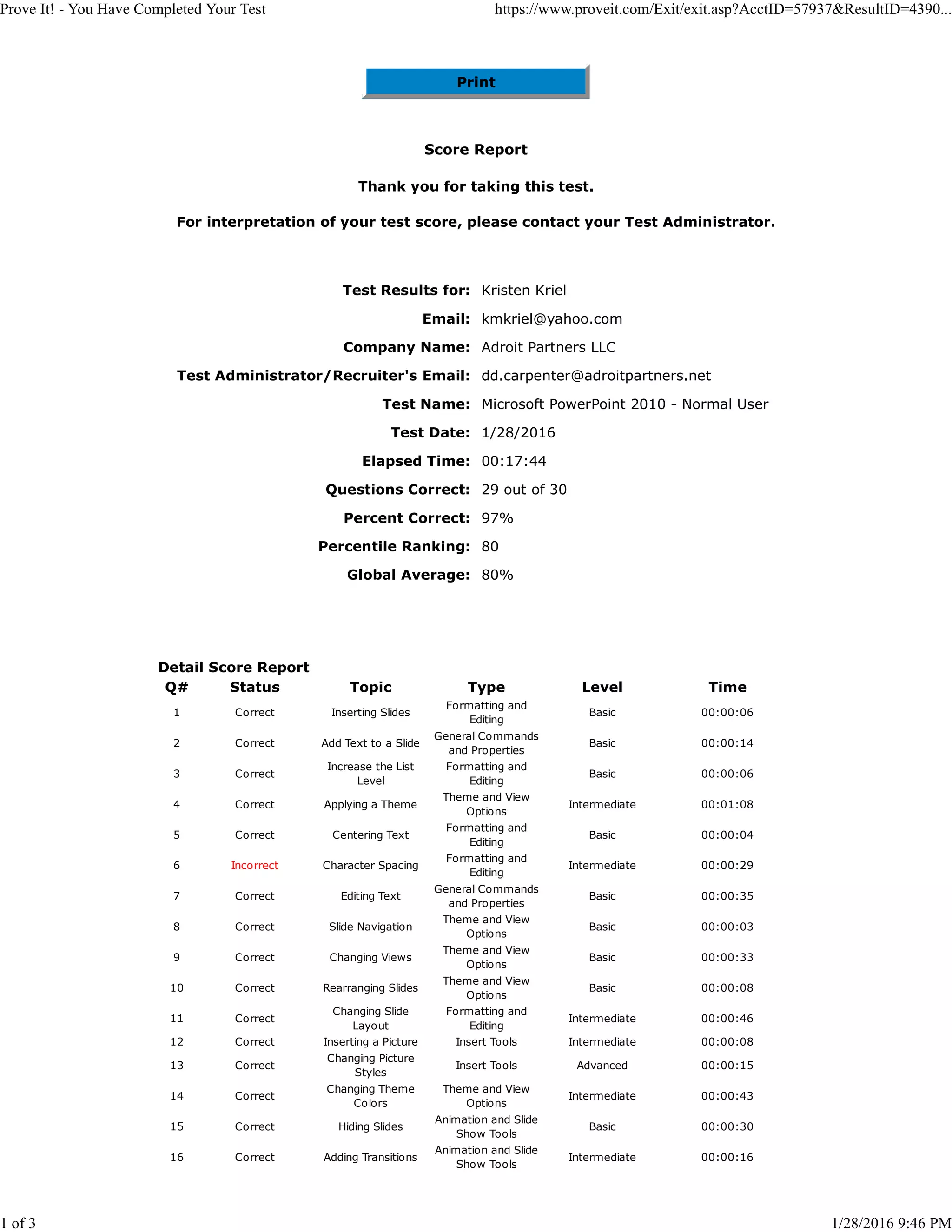
Test Results for: Kristen Kriel
Email: kmkriel@yahoo.com
Company Name: Adroit Partners LLC
Test Administrator/Recruiter's Email: dd.carpenter@adroitpartners.net
Test Name: Microsoft PowerPoint 2010 - Normal User
Test Date: 1/28/2016
Elapsed Time: 00:17:44
Questions Correct: 29 out of 30
Percent Correct: 97%
Percentile Ranking: 80
Global Average: 80%
Detail Score Report
Q# Status Topic Type Level Time
1 Correct Inserting Slides
Formatting and
Editing
Basic 00:00:06
2 Correct Add Text to a Slide
General Commands
and Properties
Basic 00:00:14
3 Correct
Increase the List
Level
Formatting and
Editing
Basic 00:00:06
4 Correct Applying a Theme
Theme and View
Options
Intermediate 00:01:08
5 Correct Centering Text
Formatting and
Editing
Basic 00:00:04
6 Incorrect Character Spacing
Formatting and
Editing
Intermediate 00:00:29
7 Correct Editing Text
General Commands
and Properties
Basic 00:00:35
8 Correct Slide Navigation
Theme and View
Options
Basic 00:00:03
9 Correct Changing Views
Theme and View
Options
Basic 00:00:33
10 Correct Rearranging Slides
Theme and View
Options
Basic 00:00:08
11 Correct
Changing Slide
Layout
Formatting and
Editing
Intermediate 00:00:46
12 Correct Inserting a Picture Insert Tools Intermediate 00:00:08
13 Correct
Changing Picture
Styles
Insert Tools Advanced 00:00:15
14 Correct
Changing Theme
Colors
Theme and View
Options
Intermediate 00:00:43
15 Correct Hiding Slides
Animation and Slide
Show Tools
Basic 00:00:30
16 Correct Adding Transitions
Animation and Slide
Show Tools
Intermediate 00:00:16
Prove It! - You Have Completed Your Test https://www.proveit.com/Exit/exit.asp?AcctID=57937&ResultID=4390...
1 of 3 1/28/2016 9:46 PM
17 Correct
Customizing
Animation
Animation and Slide
Show Tools
Advanced 00:00:23
18 Correct
Customizing Slide
Numbers
Insert Tools Intermediate 00:01:22
19 Correct
Set Automatic Slide
Timings
Animation and Slide
Show Tools
Advanced 00:00:50
20 Correct Changing Chart Style Chart Tools Intermediate 00:01:00
21 Correct Legend Chart Tools Intermediate 00:00:55
22 Correct Custom Animation Chart Tools Advanced 00:02:22
23 Correct Formatting Font
Formatting and
Editing
Intermediate 00:00:42
24 Correct Inserting a Table Insert Tools Basic 00:00:32
25 Correct Moving Objects
General Commands
and Properties
Basic 00:00:50
26 Correct Deleting Slides
Formatting and
Editing
Basic 00:00:33
27 Correct Inserting a Note
General Commands
and Properties
Basic 00:00:24
28 Correct Save As
General Commands
and Properties
Basic 00:00:27
29 Correct Print Outline View
General Commands
and Properties
Basic 00:01:02
30 Correct Run Slide Show
Animation and Slide
Show Tools
Basic 00:00:18
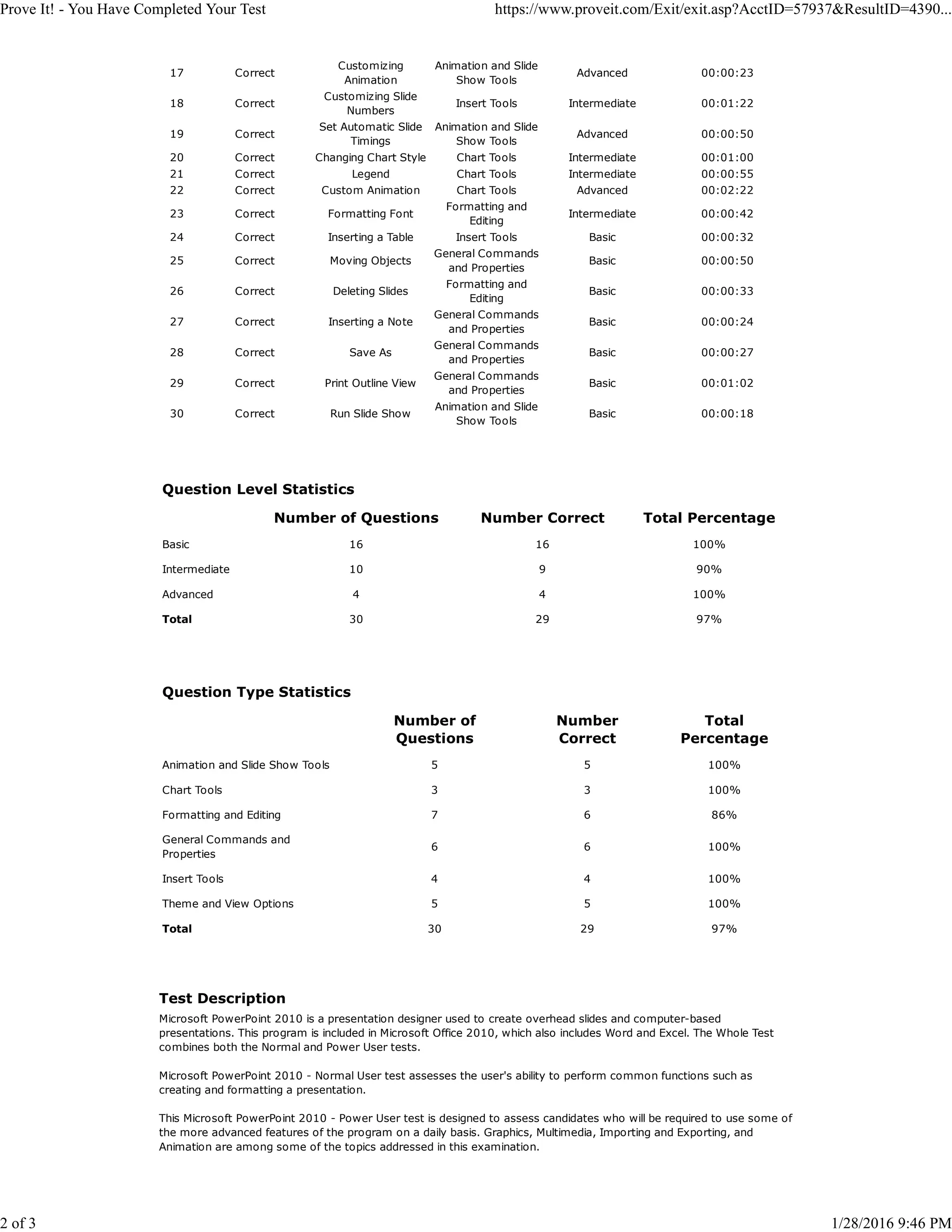
Question Level Statistics
Number of Questions Number Correct Total Percentage
Basic 16 16 100%
Intermediate 10 9 90%
Advanced 4 4 100%
Total 30 29 97%
Question Type Statistics
Number of
Questions
Number
Correct
Total
Percentage
Animation and Slide Show Tools 5 5 100%
Chart Tools 3 3 100%
Formatting and Editing 7 6 86%
General Commands and
Properties
6 6 100%
Insert Tools 4 4 100%
Theme and View Options 5 5 100%
Total 30 29 97%
Test Description
Microsoft PowerPoint 2010 is a presentation designer used to create overhead slides and computer-based
presentations. This program is included in Microsoft Office 2010, which also includes Word and Excel. The Whole Test
combines both the Normal and Power User tests.
Microsoft PowerPoint 2010 - Normal User test assesses the user's ability to perform common functions such as
creating and formatting a presentation.
This Microsoft PowerPoint 2010 - Power User test is designed to assess candidates who will be required to use some of
the more advanced features of the program on a daily basis. Graphics, Multimedia, Importing and Exporting, and
Animation are among some of the topics addressed in this examination.
Prove It! - You Have Completed Your Test https://www.proveit.com/Exit/exit.asp?AcctID=57937&ResultID=4390...
2 of 3 1/28/2016 9:46 PM

Prove It! - MS PowerPoint

  • 1.
    Print Score Report Thank youfor taking this test. For interpretation of your test score, please contact your Test Administrator. Test Results for: Kristen Kriel Email: kmkriel@yahoo.com Company Name: Adroit Partners LLC Test Administrator/Recruiter's Email: dd.carpenter@adroitpartners.net Test Name: Microsoft PowerPoint 2010 - Normal User Test Date: 1/28/2016 Elapsed Time: 00:17:44 Questions Correct: 29 out of 30 Percent Correct: 97% Percentile Ranking: 80 Global Average: 80% Detail Score Report Q# Status Topic Type Level Time 1 Correct Inserting Slides Formatting and Editing Basic 00:00:06 2 Correct Add Text to a Slide General Commands and Properties Basic 00:00:14 3 Correct Increase the List Level Formatting and Editing Basic 00:00:06 4 Correct Applying a Theme Theme and View Options Intermediate 00:01:08 5 Correct Centering Text Formatting and Editing Basic 00:00:04 6 Incorrect Character Spacing Formatting and Editing Intermediate 00:00:29 7 Correct Editing Text General Commands and Properties Basic 00:00:35 8 Correct Slide Navigation Theme and View Options Basic 00:00:03 9 Correct Changing Views Theme and View Options Basic 00:00:33 10 Correct Rearranging Slides Theme and View Options Basic 00:00:08 11 Correct Changing Slide Layout Formatting and Editing Intermediate 00:00:46 12 Correct Inserting a Picture Insert Tools Intermediate 00:00:08 13 Correct Changing Picture Styles Insert Tools Advanced 00:00:15 14 Correct Changing Theme Colors Theme and View Options Intermediate 00:00:43 15 Correct Hiding Slides Animation and Slide Show Tools Basic 00:00:30 16 Correct Adding Transitions Animation and Slide Show Tools Intermediate 00:00:16 Prove It! - You Have Completed Your Test https://www.proveit.com/Exit/exit.asp?AcctID=57937&ResultID=4390... 1 of 3 1/28/2016 9:46 PM
  • 2.
    17 Correct Customizing Animation Animation andSlide Show Tools Advanced 00:00:23 18 Correct Customizing Slide Numbers Insert Tools Intermediate 00:01:22 19 Correct Set Automatic Slide Timings Animation and Slide Show Tools Advanced 00:00:50 20 Correct Changing Chart Style Chart Tools Intermediate 00:01:00 21 Correct Legend Chart Tools Intermediate 00:00:55 22 Correct Custom Animation Chart Tools Advanced 00:02:22 23 Correct Formatting Font Formatting and Editing Intermediate 00:00:42 24 Correct Inserting a Table Insert Tools Basic 00:00:32 25 Correct Moving Objects General Commands and Properties Basic 00:00:50 26 Correct Deleting Slides Formatting and Editing Basic 00:00:33 27 Correct Inserting a Note General Commands and Properties Basic 00:00:24 28 Correct Save As General Commands and Properties Basic 00:00:27 29 Correct Print Outline View General Commands and Properties Basic 00:01:02 30 Correct Run Slide Show Animation and Slide Show Tools Basic 00:00:18 Question Level Statistics Number of Questions Number Correct Total Percentage Basic 16 16 100% Intermediate 10 9 90% Advanced 4 4 100% Total 30 29 97% Question Type Statistics Number of Questions Number Correct Total Percentage Animation and Slide Show Tools 5 5 100% Chart Tools 3 3 100% Formatting and Editing 7 6 86% General Commands and Properties 6 6 100% Insert Tools 4 4 100% Theme and View Options 5 5 100% Total 30 29 97% Test Description Microsoft PowerPoint 2010 is a presentation designer used to create overhead slides and computer-based presentations. This program is included in Microsoft Office 2010, which also includes Word and Excel. The Whole Test combines both the Normal and Power User tests. Microsoft PowerPoint 2010 - Normal User test assesses the user's ability to perform common functions such as creating and formatting a presentation. This Microsoft PowerPoint 2010 - Power User test is designed to assess candidates who will be required to use some of the more advanced features of the program on a daily basis. Graphics, Multimedia, Importing and Exporting, and Animation are among some of the topics addressed in this examination. Prove It! - You Have Completed Your Test https://www.proveit.com/Exit/exit.asp?AcctID=57937&ResultID=4390... 2 of 3 1/28/2016 9:46 PM