
































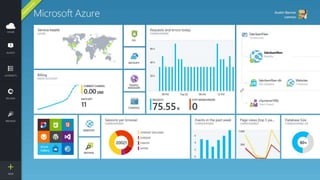



Azure Websites
For PHP Developers
Presenter Name
Position or role
Microsoft Azure
Agenda
 What is Microsoft Azure?
 What is Azure Websites?
 Environment
 Extend the Environment
 Continuous Integration
 Background Tasks (cron)
 Application Services
 Scale
What is Azure?
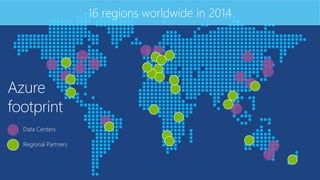
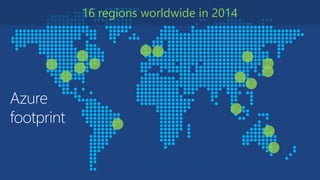
Azure
footprint
16 regions worldwide in 2014
Data Centers
Regional Partners
Microsoft Azure ServicesClientlayer
(on-premises)
Tablet Phone
Games
consolePC
On-premises
databaseBrowserOffice Add-in
On-premises
service
AD
Multifactor
Authentication
AccessControl
Layer
Integration
layer
Service Bus CDN
BizTalk
Services
Traffic
Manager
Virtual
Networks
Express
Route
Application
layer
API Mgmt Websites
Cloud
Services VM
Mobile
Services
Media
Services
Notification
Hubs Scheduler Automation
DataLayer
Storage Blobs Tables Queues Data
Machine
Learning HD Insight
Backup and
Recovery
SQL
Database Caching StorSimple
.NET Support2014
Offline Sync
Mobile Services
Networking Visual Studio & .NET
Virtual Machines
Memory Optimized Disk Optimized
Resource Manager
Portal
VSO GA
XamarinPoint-to-site VPN
Web Sites
SMB File System
IBIZA
Remote Debug
VM Management
SQL Database
Puppet Chef Docker
Powershell and DSC
Capture / Deploy
Autoscale
Dynamic Routing
Subnet Routing
Static IP
Storage
Autoscale
Traffic Mgr
Web Jobs
Backup
Java Support
ASP.NET MVC 5.1
ASP.NET Web API 2.1
AD support
Powershell Automation
Node.JS project support
Remote Debugging
Kindle Support
BD’s up to 500GB
99.95% SLA
Self Service Site Recovery
Active GEO replication
HDInsight
Hadoop 2.2
YARN support
.NET 4.5
.NET Foundation
Azure Redis Cache
API Management
Site Recovery
Remote Apps
Cordova
VSO Open
Api’s
Event Hub
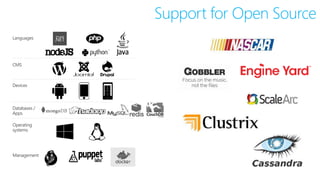
Support for Open Source
Languages
CMS
Devices
Databases /
Apps
Operating
systems
Management
What is Azure
Websites?
Fastest way to build for the cloud
Open and Flexible for Everyone
Environment
13
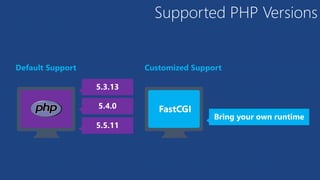
Supported PHP Versions
5.4.0
5.3.13
5.5.11
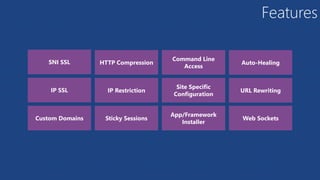
Features
SNI SSL
IP SSL
Custom Domains Sticky Sessions
HTTP Compression
App/Framework
Installer
Site Specific
Configuration
Command Line
Access
IP Restriction
Web Sockets
URL Rewriting
Auto-Healing
Extend the
Environment
Site Slots
Site Slots
Site Slots
Site Slots
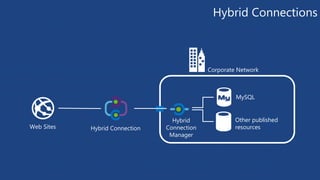
Hybrid Connections
Web Sites
Corporate Network
MySQL
Hybrid Connection
Other published
resources
Hybrid
Connection
Manager
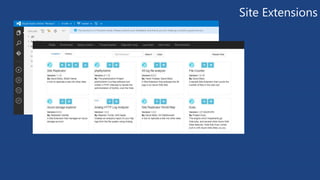
Site Extensions
Continuous Integration
GitHubVisual Studio
Online
Git BitBucketCodePlex DropBox FTP
Choose your own Adventure!
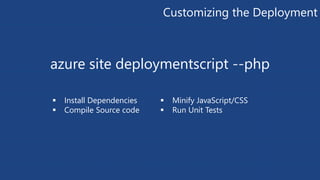
Customizing the Deployment
azure site deploymentscript --php
 Install Dependencies
 Compile Source code
 Minify JavaScript/CSS
 Run Unit Tests
Background Tasks
WebJobs
WebJobs
Scale
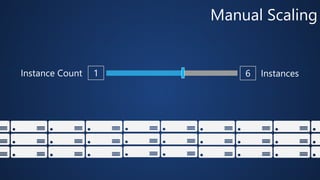
Manual Scaling
1 6Instance Count Instances
AutoScale
AutoScale
AutoScale
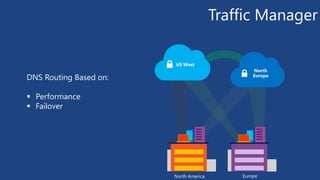
Traffic Manager
North
Europe
US West
North America Europe
DNS Routing Based on:
 Performance
 Failover
Application Services
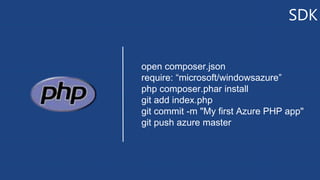
SDK
open composer.json
require: “microsoft/windowsazure”
php composer.phar install
git add index.php
git commit -m "My first Azure PHP app"
git push azure master
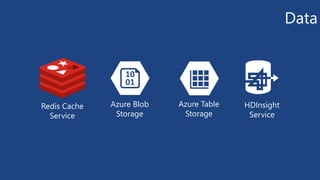
Data
Redis Cache
Service
Azure Blob
Storage
Azure Table
Storage
HDInsight
Service
Messaging
Service Bus
Queues
Service Bus
Topics
Notification
Hubs
Much More…
CDN Azure Active
Directory
Media Services API Management
Thanks!
We are done now.
Get started
Visit azure.microsoft.com
Azure
footprint
16 regions worldwide in 2014
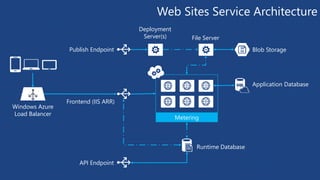
Web Sites Service Architecture
Windows Azure
Load Balancer
Runtime Database
Application Database
API Endpoint
Frontend (IIS ARR)
Publish Endpoint Blob Storage
File Server
Metering
Deployment
Server(s)
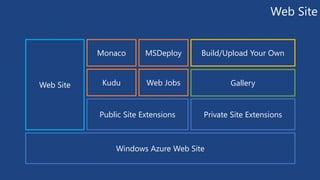
Web Site
Windows Azure Web Site
Public Site Extensions Private Site Extensions
Web Site Kudu Web Jobs
Monaco MSDeploy Build/Upload Your Own
Gallery
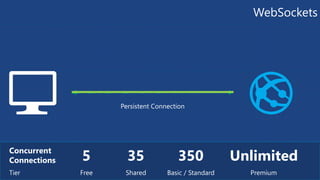
WebSockets
5Concurrent
Connections
Tier Free
35
Shared
350
Basic / Standard
Persistent Connection
Microsoft Azure Websites for PHP Developers

Microsoft Azure Websites for PHP Developers

Editor's Notes

  • #15 Default Support Change configurations with .user.ini Load extensions via PHP_Extensions AppSetting Customized Support Bin deploy specific PHP Runtime Configure FastCGI Handler in Web Site Configuration Uses local php.ini file for extensions and configurations
  • #16 Additional Extensions can be uploaded to the Bin directory. Extensions are loaded by specifying a list of relative paths to the dll starting from the wwwroot folder.
  • #25 Available for Administrative Purposes, Authentication is Required!
  • #26 Install phpMyAdmin site extension to show off site extensions.
  • #28 Slide Objectives: Objective #1 Transition: Transition statement(s) to setup the slide Speaking Points: Speaking Point #1 Speaking Point #2 Notes: Any notes go here