

Microsoft CloudStrategic OverviewPham Anh VuTechnology Specialist
AgendaToday’s ChallengesCloud ComputingMicrosoftPartnershipPublic CloudPrivate Cloud
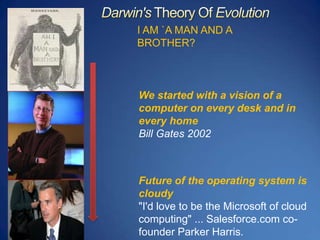
Darwin's Theory Of EvolutionI AM `A MAN AND A BROTHER?We started with a vision of a computer on every desk and in every homeBill Gates 2002Future of the operating system is cloudy "I'd love to be the Microsoft of cloud computing" ... Salesforce.com co-founder Parker Harris.
Today’s Challenges
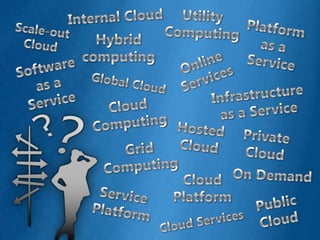
Utility ComputingInternal CloudPlatform as a ServiceScale-out CloudHybrid computingOnline ServicesSoftware as a ServiceGlobal CloudInfrastructure as a ServiceCloud ComputingHosted CloudPrivate CloudGrid ComputingOn DemandCloud PlatformService PlatformPublic CloudCloud Services
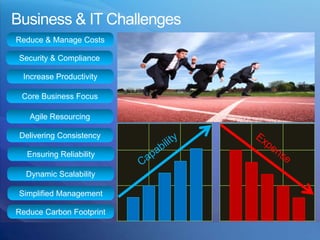
Business & IT ChallengesReduce & Manage CostsSecurity & ComplianceIncrease ProductivityCore Business FocusAgile ResourcingDelivering ConsistencyExpenseCapabilityEnsuring ReliabilityDynamic ScalabilitySimplified ManagementReduce Carbon Footprint
Cloud Computing
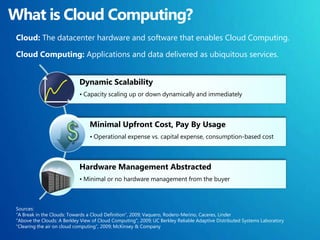
What is Cloud Computing?Cloud: The datacenter hardware and software that enables Cloud Computing.Cloud Computing: Applications and data delivered as ubiquitous services.Sources:“A Break in the Clouds: Towards a Cloud Definition”, 2009; Vaquero, Rodero-Merino, Caceres, Linder"Above the Clouds: A Berkley View of Cloud Computing", 2009; UC Berkley Reliable Adaptive Distributed Systems Laboratory“Clearing the air on cloud computing”, 2009; McKinsey & Company
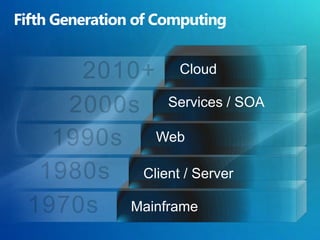
Fifth Generation of Computing2010+Cloud2000sServices / SOA1990sWeb1980sClient / Server1970sMainframe
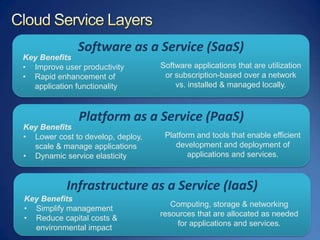
Cloud Service LayersSoftware as a Service (SaaS)Key BenefitsImprove user productivity
Rapid enhancement of application functionalitySoftware applications that are utilization or subscription-based over a network vs. installed & managed locally.Platform as a Service (PaaS)Key BenefitsLower cost to develop, deploy, scale & manage applications
Dynamic service elasticityPlatform and tools that enable efficient development and deployment of applications and services.Infrastructure as a Service (IaaS)Key BenefitsSimplify management
Reduce capital costs& environmental impactComputing, storage & networking resources that are allocated as needed for applications and services.
Cloud Computing EfficiencyLoad ForecastAllocated IT CapacityNo “Under Supply“IT CAPACITYReduction of “Over Supply“Possible Reduction of CapacityMinimal Initial InvestmentActualLoadTime
Microsoft Partnership
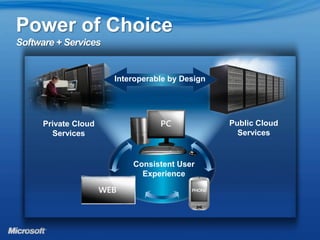
Power of ChoiceSoftware + ServicesInteroperable by DesignPublic CloudServicesPrivate CloudServicesConsistent UserExperience
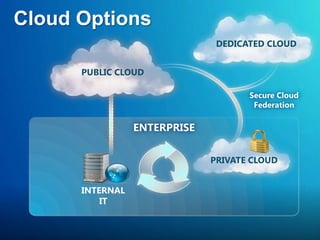
Cloud Options   DEDICATED CLOUDPUBLIC CLOUDSecure CloudFederationENTERPRISE  PRIVATE CLOUDINTERNALIT
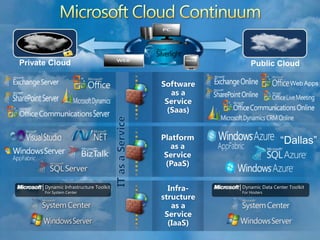
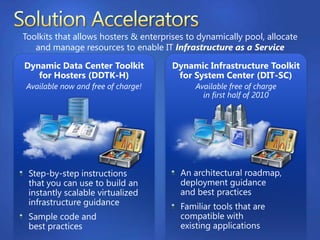
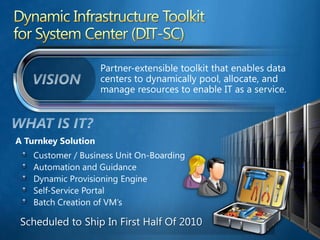
Microsoft Cloud ContinuumWeb AppsPrivate CloudPublic CloudSoftware as aService(Saas)“Dallas”Platform as a Service (PaaS)IT as a ServiceInfra-structureas aService(IaaS)| | Dynamic Infrastructure ToolkitFor System CenterDynamic Data Center ToolkitFor Hosters
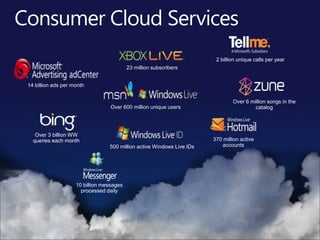
Consumer Cloud Services2 billion unique calls per year14 billion ads per monthOver 6 million songs in the catalogOver 600 million unique users23 million subscribersOver 3 billion WW queries each month370 million active accounts500 million active Windows Live IDs10 billion messages processed daily
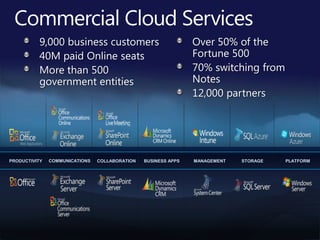
Commercial Cloud Services9,000 business customers40M paid Online seatsMore than 500 government entitiesOver 50% of the Fortune 50070% switching from Notes12,000 partnersCOMMUNICATIONSBUSINESS APPSCOLLABORATIONSTORAGEPLATFORMMANAGEMENTPRODUCTIVITY
Customer Momentum
Public Cloud
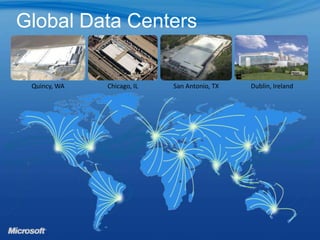
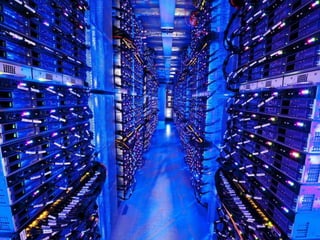
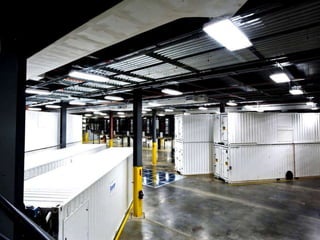
Global Data CentersQuincy, WAChicago, ILSan Antonio, TXDublin, Ireland
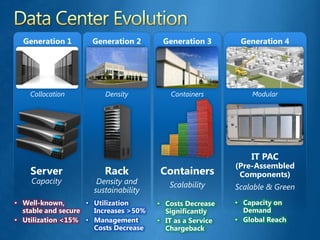
Data Center EvolutionGeneration 4Generation 1Generation 2Generation 3ModularCollocationDensityContainersServerCapacityIT PAC(Pre-Assembled Components)Capacity on Demand
Global Reach
Well-known, stable and secure
Utilization <15%
Utilization Increases >50%
Management Costs Decrease
Costs Decrease Significantly
IT as a Service ChargebackContainersRack Scalable & GreenScalability Density and sustainability
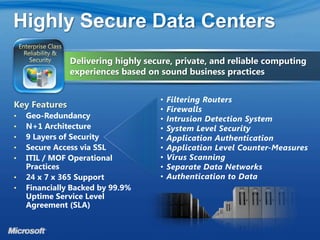
Highly Secure Data CentersDelivering highly secure, private, and reliable computing experiences based on sound business practicesEnterprise Class Reliability & SecurityFiltering Routers

Microsoft cloud strategic_overview_vu

  • 1.
    Microsoft CloudStrategic OverviewPhamAnh VuTechnology Specialist
  • 2.
  • 3.
    Darwin's Theory OfEvolutionI AM `A MAN AND A BROTHER?We started with a vision of a computer on every desk and in every homeBill Gates 2002Future of the operating system is cloudy "I'd love to be the Microsoft of cloud computing" ... Salesforce.com co-founder Parker Harris.
  • 4.
  • 5.
    Utility ComputingInternal CloudPlatformas a ServiceScale-out CloudHybrid computingOnline ServicesSoftware as a ServiceGlobal CloudInfrastructure as a ServiceCloud ComputingHosted CloudPrivate CloudGrid ComputingOn DemandCloud PlatformService PlatformPublic CloudCloud Services
  • 6.
    Business & ITChallengesReduce & Manage CostsSecurity & ComplianceIncrease ProductivityCore Business FocusAgile ResourcingDelivering ConsistencyExpenseCapabilityEnsuring ReliabilityDynamic ScalabilitySimplified ManagementReduce Carbon Footprint
  • 7.
  • 8.
    What is CloudComputing?Cloud: The datacenter hardware and software that enables Cloud Computing.Cloud Computing: Applications and data delivered as ubiquitous services.Sources:“A Break in the Clouds: Towards a Cloud Definition”, 2009; Vaquero, Rodero-Merino, Caceres, Linder"Above the Clouds: A Berkley View of Cloud Computing", 2009; UC Berkley Reliable Adaptive Distributed Systems Laboratory“Clearing the air on cloud computing”, 2009; McKinsey & Company
  • 9.
    Fifth Generation ofComputing2010+Cloud2000sServices / SOA1990sWeb1980sClient / Server1970sMainframe
  • 10.
    Cloud Service LayersSoftwareas a Service (SaaS)Key BenefitsImprove user productivity
  • 11.
    Rapid enhancement ofapplication functionalitySoftware applications that are utilization or subscription-based over a network vs. installed & managed locally.Platform as a Service (PaaS)Key BenefitsLower cost to develop, deploy, scale & manage applications
  • 12.
    Dynamic service elasticityPlatformand tools that enable efficient development and deployment of applications and services.Infrastructure as a Service (IaaS)Key BenefitsSimplify management
  • 13.
    Reduce capital costs&environmental impactComputing, storage & networking resources that are allocated as needed for applications and services.
  • 14.
    Cloud Computing EfficiencyLoadForecastAllocated IT CapacityNo “Under Supply“IT CAPACITYReduction of “Over Supply“Possible Reduction of CapacityMinimal Initial InvestmentActualLoadTime
  • 15.
  • 16.
    Power of ChoiceSoftware+ ServicesInteroperable by DesignPublic CloudServicesPrivate CloudServicesConsistent UserExperience
  • 17.
    Cloud Options DEDICATED CLOUDPUBLIC CLOUDSecure CloudFederationENTERPRISE PRIVATE CLOUDINTERNALIT
  • 18.
    Microsoft Cloud ContinuumWebAppsPrivate CloudPublic CloudSoftware as aService(Saas)“Dallas”Platform as a Service (PaaS)IT as a ServiceInfra-structureas aService(IaaS)| | Dynamic Infrastructure ToolkitFor System CenterDynamic Data Center ToolkitFor Hosters
  • 19.
    Consumer Cloud Services2billion unique calls per year14 billion ads per monthOver 6 million songs in the catalogOver 600 million unique users23 million subscribersOver 3 billion WW queries each month370 million active accounts500 million active Windows Live IDs10 billion messages processed daily
  • 20.
    Commercial Cloud Services9,000business customers40M paid Online seatsMore than 500 government entitiesOver 50% of the Fortune 50070% switching from Notes12,000 partnersCOMMUNICATIONSBUSINESS APPSCOLLABORATIONSTORAGEPLATFORMMANAGEMENTPRODUCTIVITY
  • 21.
  • 22.
  • 23.
    Global Data CentersQuincy,WAChicago, ILSan Antonio, TXDublin, Ireland
  • 24.
    Data Center EvolutionGeneration4Generation 1Generation 2Generation 3ModularCollocationDensityContainersServerCapacityIT PAC(Pre-Assembled Components)Capacity on Demand
  • 25.
  • 26.
  • 27.
  • 28.
  • 29.
  • 30.
  • 31.
    IT as aService ChargebackContainersRack Scalable & GreenScalability Density and sustainability
  • 36.
    Highly Secure DataCentersDelivering highly secure, private, and reliable computing experiences based on sound business practicesEnterprise Class Reliability & SecurityFiltering Routers

Editor's Notes

  • #9 Based on industry views of the likes of UC Berkley RAD Labs, MCKinsey, Gartner, Forrester, etc. the lowest common denominator attributes required for cloud computing are …..
  • #10 The history of technology is characterized by periods of particularly rapid evolution. The adoption of the PC by businesses in the 90s dramatically altered the staid, mainframe/mini-computer dominated world of enterprise IT and empowered individuals to apply technology creatively and broadly across business to the point where – today – it’s almost unimaginable to consider working without a PC.In the middle of the 1990s the Web emerged, and a whole generation of Internet-facing Web applications, both Internet, and intranet within a corporation, were built using HTML and Web servers. And we see many, many thousands, hundreds of thousands of these being written every year. It is still a core model that people use for building modern applications.In the early 2000s Web services and SOA (Service-Oriented Architecture) enabled applications to communicate over standard-based Web protocols, be it Web services, or REST-based protocols, and this is also very popular particularly because it promotes the ideal of assembling – or composing – more complex solutions from simpler parts. In fact, it is a core building block for how we think about the Azure services platform.There are many advantages to the services model particularly with the immediacy of global reach, the ease of provisioning and, of course, allowing a 3rd party with the greater expertise to run the computers, networks, data-centers and software on my behalf. However, there are many advantages to running software on premises too. Principally, the ability to tailor the software to most effectively address specific business needs and the level of privacy and control that can only be guaranteed when the software and data are within my control.The cloud platform builds on previous platform generations but it is a fundamentally different approach and it has its own unique advantages.
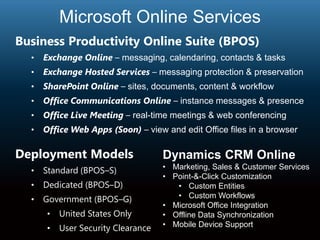
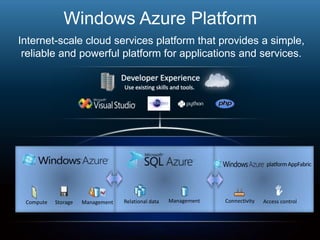
  • #14 Presenter ScriptOur software-plus-services strategy is the key to how we will deliver on our vision across the PC, Web, and phone. This is an area that I think is pivotal to our Dynamic IT strategy. At Microsoft, we believe that your preference for how you deploy and use software and manage your IT environment will be as unique as your business. Our software-plus-services approach is about giving you the power of choice: enabling you to provide a seamless experience for users while choosing the level of control and flexibility that is right for your organization, through on-premises software deployment, cloud-based services, or an integrated hybrid of the two.On-premises, or customer-hosted, deployment has been the traditional licensing and deployment model for decades. We believe that for some specific applications, for some specific pieces of data, and for some specific users, most companies (though not all) will want to control certain elements. Our on-premises platform gives you complete control of your IT environment, provides the maximum security for your sensitive data, and enables custom application development to meet your unique business needs. Cloud-based services, providing rapid scalability and advanced manageability, enable you to subscribe to enterprise-class software hosted by Microsoft and solutions from our broad ecosystem of partners. Subscribing to online services can help you reduce costs, overcome IT skill shortages, and ensure that your organization always benefits from the latest technology. The online services model helps reduce costs and minimize total cost of ownership (TCO) in two key ways:Reducing capital expenditure, by removing hardware and datacenter costs and simplifying the planning and deployment effortMinimizing ongoing operating expenses, by reducing the administrative and management burdenMicrosoft Online Services today offers an extension of many of our best-in-class enterprise server solutions including Microsoft Exchange Online, Microsoft SharePoint® Online, Microsoft Office Communications Online, and Microsoft Dynamics™ CRM Online. In October 2008, we announced that we are also extending our core developer platform and .NET programming model to the cloud with a set of developer services called the Microsoft Azure™ Services Platform. The Azure Services Platform is an Internet-scale cloud computing and services platform hosted in Microsoft data centers; it provides a range of functionality to build applications that span from consumer Web to enterprise scenarios. The Azure Services Platform extends the Microsoft Windows® programming model to include cloud computing scenarios, ensuring that the developer skills that exist on our platform today continue to be relevant in the world of cloud computing. Our partners play a key role in offering you deployment choice. Where you choose on-premises deployment, they can support you through systems integration, custom application development, and value-added solutions. For cloud-based services, you can choose between Microsoft-hosted services through Microsoft Online Services and partner-hosted services. In areas where Microsoft has deep expertise, such as with Microsoft Exchange Server, Microsoft Office SharePoint Server, and Microsoft Dynamics CRM, we&apos;re building the capacity and capability to host it for you, and we currently have some very large pilots underway with companies such as Coca-Cola, Autodesk, Ingersoll-Rand, and Energizer. We’re also enabling partner hosting where partners represent specific expertise, such as Accenture, EDS, HP, and even IBM, and other partners that offer value-added services. In addition, we recognize the reality that most of our customers are managing a heterogeneous environment and want to reduce the cost of running a mixed IT environment. At Microsoft, we are committed to achieving greater interoperability and making it easier to integrate Microsoft software into your existing environment—through innovative products, community engagement, technology access, and support for technology standards.Our focus is on giving customers flexibility and choice in deployment, and given the breadth of our offerings, we are one of a very few companies in the world that can execute across such a broad array of services and experiences. Our investments on the services side are designed to extend the Microsoft experience from the desktop to new devices and across the Web and provide customers with choice. And be assured that as our services offerings evolve, we will continue to innovate around our licensing model to ensure that the licensing process is as easy and streamlined as possible. We believe that the industry shift to software-plus-services is one of the most significant shifts in technology that we&apos;ll see, and our strategy of offering deployment choice and flexibility is central to our goal of helping customers realize a Dynamic IT infrastructure to reduce costs and accelerate agility.But that choice is a relatively new one, and you may be wondering how to make it. What are the key criteria you should consider? What are the benefits of taking some or all of your users to an online deployment? Today I want to share some ways you can look at that choice – to help you determine whether online is the right strategy for some or all of your business. Additional Presenter GuidanceTo find more information on our software-plus-services strategy, visit: http://infoweb2007/softwareplusservices. For more information on interoperability, visit http://www.microsoft.com/interop and download the business decision maker (BDM) and technical decision maker (TDM) presentations:BDM: http://arsenalcontent/redirectURL.aspx?ContentID=154743&amp;Url=Powerpoint%20Presentations/BDM%20Interop%20Discussion05122008105606/BDM%20Interop%20Discussion.pptx&amp;portal=officesystemTDM:http://arsenalcontent/redirectURL.aspx?ContentID=154742&amp;Url=Powerpoint%20Presentations/TDM%20Interop%20Discussion05122008104807/TDM%20Interop%20Discussion.pptx&amp;portal=officesystem
  • #17 Key Points: Microsoft has a long history of providing some of the largest cloud services in the world.Script: We’ve actually been in cloud computing for a while:We’ve been delivering some of the largest cloud services on the planet for almost 15 years.Our online properties (WL, MSN) see some 600 million unique users every monthXbox pushed out some 5 petabytes of content over Xbox Live during the week of Christmas (2009)We process up to 9.9 billion messages a day via WL MessengerWe have over 500 million active Windows Live IDsThe BPOS guys have a million paying users in 36 countries and regionsEven MS Update/Windows Update … operates at incredible scale - pushes out over a petabyte of updates every month to millions of servers and hundreds of millions of PCs When you look at our experience, our commitment and our continued leadership in cloud computing there are a number of fairly substantial differences between us and other providers.
  • #18 Key Points:No one has the breadth of cloud servicesOnly Microsoft has a the wide set of cloud services that complements on-premises softwareScript:In addition to our consumer-facing cloud services, Microsoft offers the most complete set of cloud-based solutions to meet your business needs including advertising, communications (email, telephony, meetings), collaboration (document storage, sharing, workflow), business applications (CRM, business productivity), storage, management and infrastructure services. And unique to Microsoft these sets of cloud services complement a full and rich set of on-premise software enabling often times to add cloud functionality to your existing software or move between cloud and on-premises systems.Click:And with BPOS we are seeing quite a bit of momentum of customers moving to the cloud.
  • #20 Main Talking points:The main focus of this slide is on gen 3 and gen 4 datacenters and the hyper-scale configurations delivered at the compute, management and automation levels. The number of companies building datacenters of this size are few and far between, but, the point is that these learning&apos;s around cost management, standardization, commoditization and service automation will make their way back into the “every-day” ITshops and datacenters (i.e. datacenters with less thank 50K seats)Gen 1 – all about adding capacity. Our focus was on more basic requirements like uptime, reliability and redundancy. Look at the deployment scale unit was at the server level. As the industry has progress from collocating servers into central datacenters to gaining maximum density with racks, we’ve also learned a lot about costs beyond the hardware itself, such as cooling, power and the building itself.Gen 2 - focused on density - Majority of the costs is the cement and copper without putting a $ of IT equipment. Scale units were rack level deployments at this time. Gen 3 – focus is on simple hyper-scale at the compute level - Containers can scale faster to meet services requirements. But, building costs are still a significant amount of the overall cost. Gen4 – focus on scale at the datacenter level: just in time scaling, modularized DCs with plug and play configurations and environmental sustainability*. No concrete buildings. Pre-manufactured supply chain of Data Center Facilities delivered at the same time as the IT equipment. Designed to meet the time to market/agility, scale and TCO needs of cloud businesses. *Environmental sustainability (designs eliminate concrete buildings– responsible for 5% of global green house gases, reduced water/ copper, chiller requirements)
  • #27 One area that we are very conscious of is the importance of security and availability. We want to ensure that customer feel confident that we are protecting their data and the service is highly available. Our service runs on a set of datacenters that are managed by a centralized organization within Microsoft that are making major investments in datacenter spaces and capabilities. We deploy our service on the latest hardware and network equipments in a N+1 architecture to enable failover capabilities as well as saving your data in a separate geo-redundant location. We are regularly tested by a third party CyberTrust to ensure our infrastructure is secure against attacks. We follow ITIL/MOF in our operational processes and we are in the process of getting our SAS-70 audit to ensure we have strictest level of control. Above all, we will provide 24x7 IT Pro support and our service availability is backed by a 99.9% uptime SLA.Physical security is but one part it. When you look, we ultimately need to make sure that since we are providing an internet based service, we are protecting customer’s data in a variety of ways. We look at this as multiple layers of protection. Microsoft is actually providing 9 layers of logical security for our customers and their service and data. Filtering Routers: these are implemented to protect against any traffic we do not see as well constructed. One of the great benefits of providing a focused service like BPOS is we actually set up the routers to protect against any form of malform data. We block at an aggregate at the edge. Firewalls are set up as deny all. Behind the firewalls we have an Intrusion Detection System. We have a very sophisticated correlation engine for any intrusion alert that we’re tracking 24 hours a day. Below the IDS, we have a level System Level Security. When you look, the service operations organization actually has broad based, dual factor authentication. This means each individual within a support and service operations team have either some sort of secure ID card or a RSH secure ID token that is coupled with their role. Each individual must have a user ID and password and must apply a pin with their secure ID token. Based on the role they have, we grant access per individuals to the service.  Application Authentication: when you get below the System Level Security, the customers actually have application level authentication. We have a very sophisticated mechanism by which we provide access to data. The structure of the service provides users access to only those capabilities they are designed to have. In the reseller model where a partner is actually providing the service to the customer, they have a level of application authentication that sits over top of that which the customers have. So we’re able to provide a very rich set of security protocols for our customers, as it relates to authentication to the different services.Microsoft, as most people know, has a good history as relates to security and trustworthy computing. Our services are actually designed to make sure that we apply those security methods not only to the software, but we also treat that software as a service. So when we do our threat walling and follow the Windows initiative, we’re thinking about our applications as if they are delivered through the Internet. We apply a significant level of counter measures, such as buffer overflows and SQL injection, we make sure that the applications we’re running are sandboxed so you can’t activate elevated levels of security or access a higher level of authentication when you’re actually doing work within our application. Virus Scanning is provided for multiple set of capabilities. We actually virus scan at all over our server levels, we have in place intrusion detection at the host and we’re scanning our content via Microsoft ForeFront.Then we have Separate Data Networks. When you look inside the data center, So what when we do our threat walling and follow the Windows initiative. These are implemented in a form that breaks it apart. For example, the data bases are on a separate sub net then from the actual content server or something that is an internet facing device.When you look, even though we are an internet facing service, very few devices have direct access to the internet. All of the servers are on some form of non-routable subnet space. Finally you are authenticated into the data. The data itself is never stored on the physical servers, we run separate data networks and the data is stored on dedicated storage devices. So when you look at the content, the content is actually being sent from dedicated storage devices, which allows us to provide significant levels of backup as well.
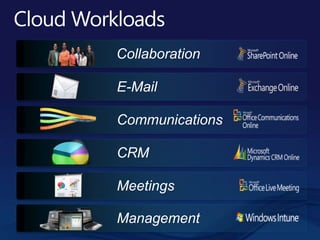
  • #28 At the application level…Key Points:There are a number of applications or workloads you could move to the cloudMicrosoft can help you do it.Script:First of all, are there things you can move to the cloud? Things that are cheaper, easier or can free up more time if you have someone else provide them for you? Email? Communication? Meeting software? Customer management? Managing PCs?Microsoft can help with online complements of programs you’re already familiar with.