
Windows Phone 7Li Jingnan / Wang Tao2011-7-151
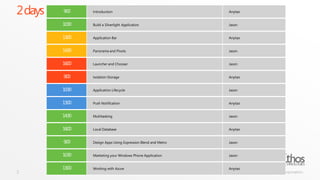
2 days2
ethoshttp://www.ethostechnologies.com/One of the 1st ISVs for cloud computing in Europe and China.Cloud computing development partner with Microsoft in Greater China Region.Invited to speak about Azure at several Microsoft events.
aboutanytao| Ethos<ethos:Member   id = “Wang Tao”   msn = anytao@live.comweibo = http://weibo.com/anytaorunat = “Senior System Architect”/>Jason | Ethos<ethos:Member   id = “Li Jingnan”   msn = zengnami@hotmail.comweibo= http://weibo.com/jn1981runat = “SE”/>
abouthttp://book.anytao.net
10 Local DatabaseWang Tao / 2011-07-15
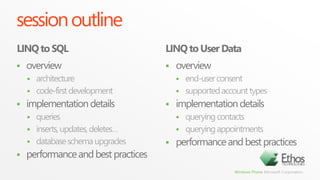
session outlineLINQ to SQLLINQ to User Dataoverviewarchitecturecode-first developmentimplementation detailsqueriesinserts, updates, deletes…database schema upgradesperformance and best practicesoverviewend-user consentsupported account typesimplementation detailsquerying contactsquerying appointmentsperformance and best practices
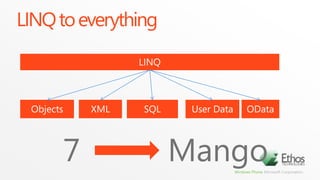
LINQ to everythingLINQObjectsXMLSQLUser DataOData7Mango
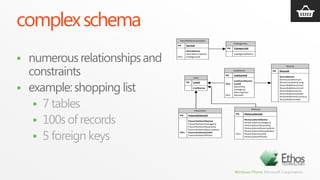
complex schemanumerous relationships and constraintsexample: shopping list7 tables100s of records5 foreign keys
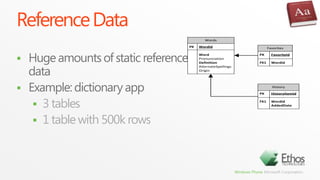
Reference DataHuge amounts of static reference dataExample: dictionary app3 tables1 table with 500k rows
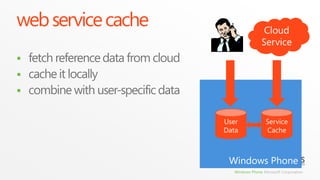
web service cacheCloud Servicefetch reference data from cloudcache it locallycombine with user-specific dataWindows PhoneService CacheUser Data
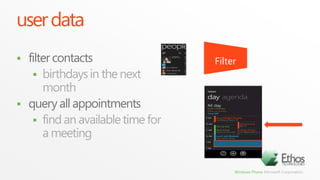
user datafilter contactsbirthdays in the next monthquery all appointmentsfind an available time for a meetingFilter
database support
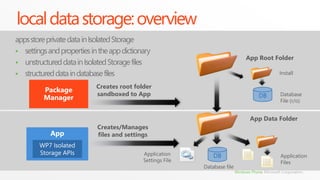
local data storage: overviewapps store private data in Isolated Storagesettings and properties in the app dictionary
unstructured data in Isolated Storage files
structured data in database filesApp Root FolderInstallPackage ManagerCreates root foldersandboxed to AppDBDatabaseFile (r/o)App Data FolderCreates/Managesfiles and settingsAppWP7 Isolated Storage APIsDBApplicationSettings FileApplicationFilesDatabase file
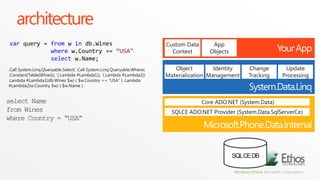
architectureYour AppCustom Data ContextApp Objectsvar query = fromw indb.Wineswherew.Country== “USA"selectw.Name;System.Data.LinqIdentity ManagementChange TrackingUpdate ProcessingObject Materialization.Call System.Linq.Queryable.Select( .Call System.Linq.Queryable.Where( .Constant(Table(Wines)), '(.Lambda #Lambda1)), '(.Lambda #Lambda2)) .Lambda #Lambda1(db.Wines $w) { $w.Country== “USA" } .Lambda #Lambda2(w.Country $w) { $w.Name}select Namefrom Wineswhere Country = “USA”Microsoft.Phone.Data.Internal Core ADO.NET (System.Data)SQL CE DBSQLCE ADO.NET Provider (System.Data.SqlServerCe)
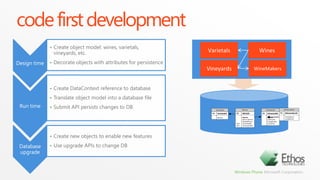
code first developmentDesign timeCreate object model: wines, varietals, vineyards, etc.
Decorate objects with attributes for persistenceVarietalsWinesVineyardsWineMakersCreate DataContextreference to database
Translate object model into a database file
Submit API persists changes to DBRun timeDatabase upgradeCreate new objects to enable new features
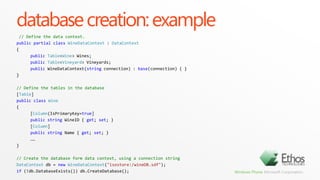
Use upgrade APIs to change DBdatabase creation: example// Define the data context.publicpartialclassWineDataContext: DataContext{publicTable<Wine> Wines;publicTable<Vineyard> Vineyards;publicWineDataContext(stringconnection) : base(connection) { }}// Define the tables in the database[Table]publicclassWine{[Column(IsPrimaryKey=true]publicstringWineID{ get; set; }[Column]publicstringName { get; set; }……}// Create the database form data context, using a connection stringDataContextdb = newWineDataContext("isostore:/wineDB.sdf");if (!db.DatabaseExists()) db.CreateDatabase();
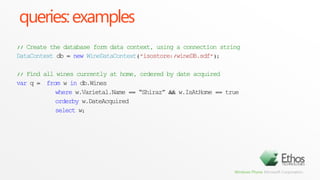
queries: examples// Create the database form data context, using a connection stringDataContextdb = newWineDataContext("isostore:/wineDB.sdf");// Find all wines currently at home, ordered by date acquiredvarq = from w indb.Wines	  wherew.Varietal.Name == “Shiraz” && w.IsAtHome == trueorderbyw.DateAcquired	  select w;
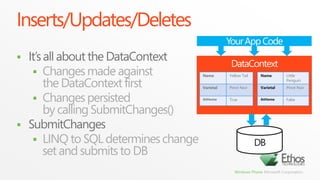
Inserts/Updates/DeletesYour App CodeIt’s all about the DataContextChanges made against the DataContext firstChanges persisted by calling SubmitChanges()SubmitChangesLINQ to SQL determines change set and submits to DBDataContextDB
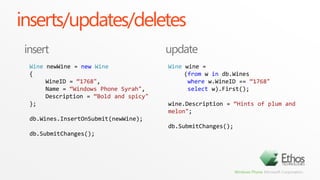
inserts/updates/deletesupdateinsertWinenewWine= newWine{WineID= “1768",Name = “Windows Phone Syrah",Description = “Bold and spicy"};db.Wines.InsertOnSubmit(newWine);db.SubmitChanges();Winewine= (fromw indb.Wines wherew.WineID== “1768"select w).First();wine.Description= “Hints of plum and melon";db.SubmitChanges();
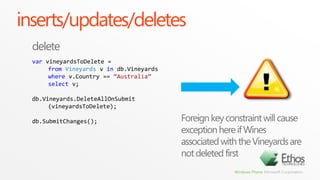
inserts/updates/deletesdeletevarvineyardsToDelete= fromVineyards v in db.Vineyardswherev.Country== “Australia”select v;db.Vineyards.DeleteAllOnSubmit(vineyardsToDelete);db.SubmitChanges();Foreign key constraint will cause exception here if Wines associated with the Vineyards are not deleted first
inserts/updates/deletesvarvineyardsToDelete= fromVineyards v indb.Vineyards			wherev.Country== “Australia"select v;foreach (Vineyards v invineyardsToDelete){db.Wines.DeleteAllOnSubmit(v.Wines);}db.Vineyards.DeleteAllOnSubmit(vineyardsToDelete);db.SubmitChanges();
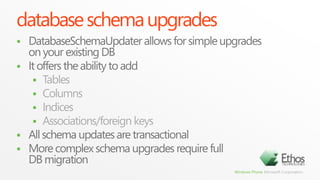
database schema upgradesDatabaseSchemaUpdater allows for simple upgrades on your existing DBIt offers the ability to addTablesColumnsIndicesAssociations/foreign keysAll schema updates are transactionalMore complex schema upgrades require full DB migration
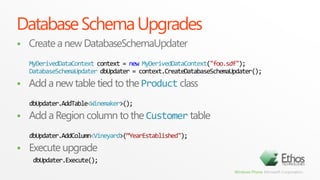
Database Schema UpgradesCreate a new DatabaseSchemaUpdaterMyDerivedDataContext context = newMyDerivedDataContext("foo.sdf");DatabaseSchemaUpdaterdbUpdater = context.CreateDatabaseSchemaUpdater();Add a new table tied to the Product classdbUpdater.AddTable<Winemaker>();Add a Region column to the Customer tabledbUpdater.AddColumn<Vineyard>(“YearEstablished");Execute upgradedbUpdater.Execute();
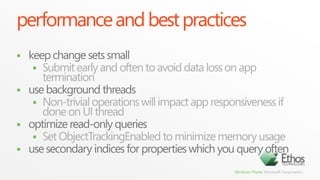
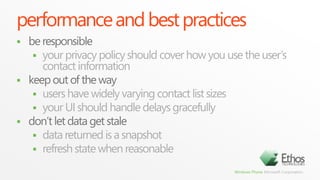
performance and best practiceskeep change sets smallSubmit early and often to avoid data loss on app terminationuse background threadsNon-trivial operations will impact app responsiveness if done on UI threadoptimize read-only queriesSet ObjectTrackingEnabled to minimize memory usageuse secondary indices for properties which you query often
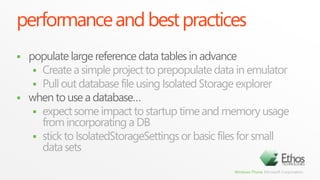
performance and best practicespopulate large reference data tables in advanceCreate a simple project to prepopulate data in emulatorPull out database file using Isolated Storage explorerwhen to use a database…expect some impact to startup time and memory usage from incorporating a DBstick to IsolatedStorageSettings or basic files for small data sets
user data
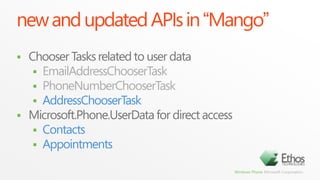
new and updated APIs in “Mango”Chooser Tasks related to user dataEmailAddressChooserTaskPhoneNumberChooserTaskAddressChooserTaskMicrosoft.Phone.UserData for direct accessContactsAppointments
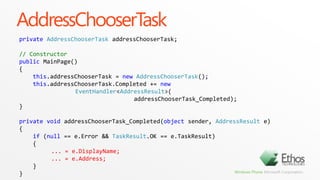
AddressChooserTaskprivateAddressChooserTaskaddressChooserTask;// ConstructorpublicMainPage(){this.addressChooserTask= newAddressChooserTask();this.addressChooserTask.Completed += newEventHandler<AddressResult>(addressChooserTask_Completed);}privatevoidaddressChooserTask_Completed(objectsender, AddressResulte){if(null == e.Error && TaskResult.OK == e.TaskResult)   {... = e.DisplayName;... = e.Address;}}
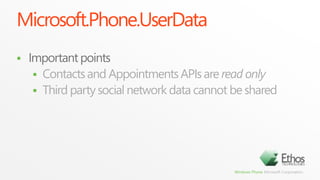
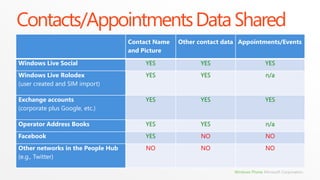
Microsoft.Phone.UserDataImportant pointsContacts and Appointments APIs are read onlyThird party social network data cannot be shared
Contacts/Appointments Data Shared
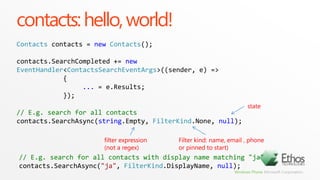
contacts: hello, world!Contactscontacts = newContacts();contacts.SearchCompleted+= newEventHandler<ContactsSearchEventArgs>((sender, e) =>            {...= e.Results;            });// E.g. search for all contactscontacts.SearchAsync(string.Empty, FilterKind.None, null);state// E.g. search for all contacts with display name matching "ja"contacts.SearchAsync("ja", FilterKind.DisplayName, null);filter expression(not a regex)Filter kind: name, email , phone or pinned to start)
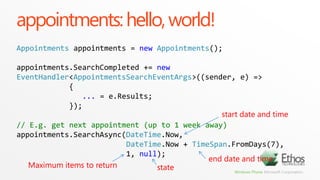
appointments: hello, world!Appointmentsappointments = newAppointments();appointments.SearchCompleted+= newEventHandler<AppointmentsSearchEventArgs>((sender, e) =>            {... = e.Results;            });// E.g. get next appointment (up to 1 week away)appointments.SearchAsync(DateTime.Now,DateTime.Now+ TimeSpan.FromDays(7),                        1, null);start date and timeend date and timeMaximum items to returnstate

10 wp7 local database

  • 1.
    Windows Phone 7LiJingnan / Wang Tao2011-7-151
  • 2.
  • 3.
    ethoshttp://www.ethostechnologies.com/One of the1st ISVs for cloud computing in Europe and China.Cloud computing development partner with Microsoft in Greater China Region.Invited to speak about Azure at several Microsoft events.
  • 4.
    aboutanytao| Ethos<ethos:Member id = “Wang Tao” msn = anytao@live.comweibo = http://weibo.com/anytaorunat = “Senior System Architect”/>Jason | Ethos<ethos:Member id = “Li Jingnan” msn = zengnami@hotmail.comweibo= http://weibo.com/jn1981runat = “SE”/>
  • 5.
  • 6.
    10 Local DatabaseWangTao / 2011-07-15
  • 7.
    session outlineLINQ toSQLLINQ to User Dataoverviewarchitecturecode-first developmentimplementation detailsqueriesinserts, updates, deletes…database schema upgradesperformance and best practicesoverviewend-user consentsupported account typesimplementation detailsquerying contactsquerying appointmentsperformance and best practices
  • 8.
  • 9.
    complex schemanumerous relationshipsand constraintsexample: shopping list7 tables100s of records5 foreign keys
  • 10.
    Reference DataHuge amountsof static reference dataExample: dictionary app3 tables1 table with 500k rows
  • 11.
    web service cacheCloudServicefetch reference data from cloudcache it locallycombine with user-specific dataWindows PhoneService CacheUser Data
  • 12.
    user datafilter contactsbirthdaysin the next monthquery all appointmentsfind an available time for a meetingFilter
  • 13.
  • 14.
    local data storage:overviewapps store private data in Isolated Storagesettings and properties in the app dictionary
  • 15.
    unstructured data inIsolated Storage files
  • 16.
    structured data indatabase filesApp Root FolderInstallPackage ManagerCreates root foldersandboxed to AppDBDatabaseFile (r/o)App Data FolderCreates/Managesfiles and settingsAppWP7 Isolated Storage APIsDBApplicationSettings FileApplicationFilesDatabase file
  • 17.
    architectureYour AppCustom DataContextApp Objectsvar query = fromw indb.Wineswherew.Country== “USA"selectw.Name;System.Data.LinqIdentity ManagementChange TrackingUpdate ProcessingObject Materialization.Call System.Linq.Queryable.Select( .Call System.Linq.Queryable.Where( .Constant(Table(Wines)), '(.Lambda #Lambda1)), '(.Lambda #Lambda2)) .Lambda #Lambda1(db.Wines $w) { $w.Country== “USA" } .Lambda #Lambda2(w.Country $w) { $w.Name}select Namefrom Wineswhere Country = “USA”Microsoft.Phone.Data.Internal Core ADO.NET (System.Data)SQL CE DBSQLCE ADO.NET Provider (System.Data.SqlServerCe)
  • 18.
    code first developmentDesigntimeCreate object model: wines, varietals, vineyards, etc.
  • 19.
    Decorate objects withattributes for persistenceVarietalsWinesVineyardsWineMakersCreate DataContextreference to database
  • 20.
    Translate object modelinto a database file
  • 21.
    Submit API persistschanges to DBRun timeDatabase upgradeCreate new objects to enable new features
  • 22.
    Use upgrade APIsto change DBdatabase creation: example// Define the data context.publicpartialclassWineDataContext: DataContext{publicTable<Wine> Wines;publicTable<Vineyard> Vineyards;publicWineDataContext(stringconnection) : base(connection) { }}// Define the tables in the database[Table]publicclassWine{[Column(IsPrimaryKey=true]publicstringWineID{ get; set; }[Column]publicstringName { get; set; }……}// Create the database form data context, using a connection stringDataContextdb = newWineDataContext("isostore:/wineDB.sdf");if (!db.DatabaseExists()) db.CreateDatabase();
  • 23.
    queries: examples// Createthe database form data context, using a connection stringDataContextdb = newWineDataContext("isostore:/wineDB.sdf");// Find all wines currently at home, ordered by date acquiredvarq = from w indb.Wines wherew.Varietal.Name == “Shiraz” && w.IsAtHome == trueorderbyw.DateAcquired select w;
  • 24.
    Inserts/Updates/DeletesYour App CodeIt’sall about the DataContextChanges made against the DataContext firstChanges persisted by calling SubmitChanges()SubmitChangesLINQ to SQL determines change set and submits to DBDataContextDB
  • 25.
    inserts/updates/deletesupdateinsertWinenewWine= newWine{WineID= “1768",Name= “Windows Phone Syrah",Description = “Bold and spicy"};db.Wines.InsertOnSubmit(newWine);db.SubmitChanges();Winewine= (fromw indb.Wines wherew.WineID== “1768"select w).First();wine.Description= “Hints of plum and melon";db.SubmitChanges();
  • 26.
    inserts/updates/deletesdeletevarvineyardsToDelete= fromVineyards vin db.Vineyardswherev.Country== “Australia”select v;db.Vineyards.DeleteAllOnSubmit(vineyardsToDelete);db.SubmitChanges();Foreign key constraint will cause exception here if Wines associated with the Vineyards are not deleted first
  • 27.
    inserts/updates/deletesvarvineyardsToDelete= fromVineyards vindb.Vineyards wherev.Country== “Australia"select v;foreach (Vineyards v invineyardsToDelete){db.Wines.DeleteAllOnSubmit(v.Wines);}db.Vineyards.DeleteAllOnSubmit(vineyardsToDelete);db.SubmitChanges();
  • 28.
    database schema upgradesDatabaseSchemaUpdaterallows for simple upgrades on your existing DBIt offers the ability to addTablesColumnsIndicesAssociations/foreign keysAll schema updates are transactionalMore complex schema upgrades require full DB migration
  • 29.
    Database Schema UpgradesCreatea new DatabaseSchemaUpdaterMyDerivedDataContext context = newMyDerivedDataContext("foo.sdf");DatabaseSchemaUpdaterdbUpdater = context.CreateDatabaseSchemaUpdater();Add a new table tied to the Product classdbUpdater.AddTable<Winemaker>();Add a Region column to the Customer tabledbUpdater.AddColumn<Vineyard>(“YearEstablished");Execute upgradedbUpdater.Execute();
  • 30.
    performance and bestpracticeskeep change sets smallSubmit early and often to avoid data loss on app terminationuse background threadsNon-trivial operations will impact app responsiveness if done on UI threadoptimize read-only queriesSet ObjectTrackingEnabled to minimize memory usageuse secondary indices for properties which you query often
  • 31.
    performance and bestpracticespopulate large reference data tables in advanceCreate a simple project to prepopulate data in emulatorPull out database file using Isolated Storage explorerwhen to use a database…expect some impact to startup time and memory usage from incorporating a DBstick to IsolatedStorageSettings or basic files for small data sets
  • 32.
  • 33.
    new and updatedAPIs in “Mango”Chooser Tasks related to user dataEmailAddressChooserTaskPhoneNumberChooserTaskAddressChooserTaskMicrosoft.Phone.UserData for direct accessContactsAppointments
  • 34.
    AddressChooserTaskprivateAddressChooserTaskaddressChooserTask;// ConstructorpublicMainPage(){this.addressChooserTask= newAddressChooserTask();this.addressChooserTask.Completed+= newEventHandler<AddressResult>(addressChooserTask_Completed);}privatevoidaddressChooserTask_Completed(objectsender, AddressResulte){if(null == e.Error && TaskResult.OK == e.TaskResult) {... = e.DisplayName;... = e.Address;}}
  • 35.
    Microsoft.Phone.UserDataImportant pointsContacts andAppointments APIs are read onlyThird party social network data cannot be shared
  • 36.
  • 37.
    contacts: hello, world!Contactscontacts= newContacts();contacts.SearchCompleted+= newEventHandler<ContactsSearchEventArgs>((sender, e) => {...= e.Results; });// E.g. search for all contactscontacts.SearchAsync(string.Empty, FilterKind.None, null);state// E.g. search for all contacts with display name matching "ja"contacts.SearchAsync("ja", FilterKind.DisplayName, null);filter expression(not a regex)Filter kind: name, email , phone or pinned to start)
  • 38.
    appointments: hello, world!Appointmentsappointments= newAppointments();appointments.SearchCompleted+= newEventHandler<AppointmentsSearchEventArgs>((sender, e) => {... = e.Results; });// E.g. get next appointment (up to 1 week away)appointments.SearchAsync(DateTime.Now,DateTime.Now+ TimeSpan.FromDays(7), 1, null);start date and timeend date and timeMaximum items to returnstate