H. C. So Page 1
Human
ƒHuman Models, Senses and Memory
ƒConceptual Model and Mental Model
H. C. So Page 2
Why Study Human?
We are the users
When we try to understand something, particularly new,
we use a combination of
ƒ What our senses (sight, hearing, touch, smell, taste)
are telling
ƒ Past experience
ƒ Our expectations
e.g., When we browse a new Web, our past experience
tells us that underlined blue text is supposed to be a link
e.g., When we are given a new product with buttons, we
expect that it is operated by pressing the buttons
Human Model
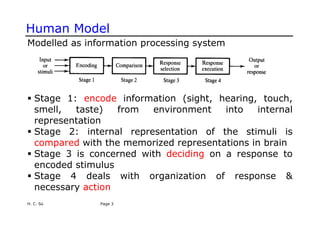
Modelled as information processing system
ƒ Stage 1: encode information (sight, hearing, touch,
smell, taste) from environment into internal
representation
ƒ Stage 2: internal representation of the stimuli is
compared with the memorized representations in brain
ƒ Stage 3 is concerned with deciding on a response to
encoded stimulus
ƒ Stage 4 deals with organization of response &
necessary action
H. C. So Page 3
Human Model
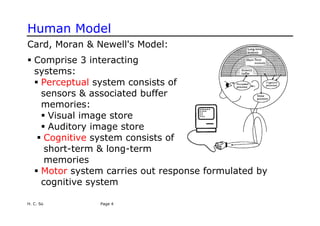
Card, Moran & Newell's Model:
ƒ Comprise 3 interacting
systems:
ƒ Perceptual system consists of
sensors & associated buffer
memories:
ƒ Visual image store
ƒ Auditory image store
ƒ Cognitive system consists of
short-term & long-term
memories
ƒ Motor system carries out response formulated by
cognitive system
H. C. So Page 4
H. C. So Page 5 Semester A, 2008
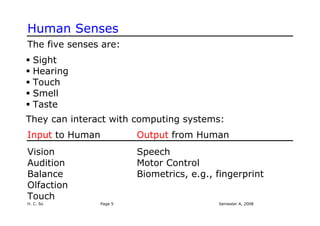
Human Senses
The five senses are:
ƒ Sight
ƒ Hearing
ƒ Touch
ƒ Smell
ƒ Taste
They can interact with computing systems:
Input to Human Output from Human
Vision Speech
Audition Motor Control
Balance Biometrics, e.g., fingerprint
Olfaction
Touch
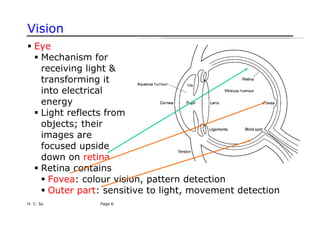
Vision
H. C. So Page 6
ƒ Eye
ƒ Mechanism for
receiving light &
transforming it
into electrical
energy
ƒ Light reflects from
objects; their
images are
focused upside
down on retina
ƒ Retina contains
ƒ Fovea: colour vision, pattern detection
ƒ Outer part: sensitive to light, movement detection
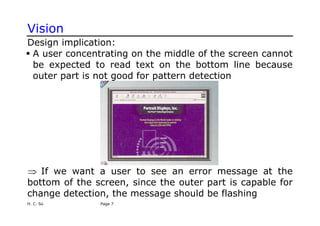
Vision
Design implication:
ƒ A user concentrating on the middle of the screen cannot
be expected to read text on the bottom line because
outer part is not good for pattern detection
⇒ If we want a user to see an error message at the
bottom of the screen, since the outer part is capable for
change detection, the message should be flashing
H. C. So Page 7
H. C. So Page 8
Constructivism
A theory about vision is constructivism:
ƒ Our brains do not create pixel-by-pixel images
ƒ Our minds create, or construct, models that summarize
what comes from our senses
ƒ These models are what we perceive
ƒ When we see something, we do not remember all the
details, only those that have meaning for us
Design implication:
ƒ Do not expect people “see” all the details of an interface
because people filter out irrelevant information and
save only the important ones
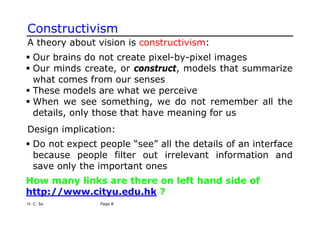
How many links are there on left hand side of
http://www.cityu.edu.hk ?
Constructivism
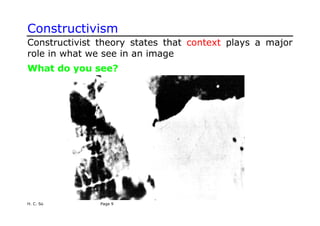
Constructivist theory states that context plays a major
role in what we see in an image
What do you see?
H. C. So Page 9
Constructivism
Why we cannot see it at first?
ƒ The image is too blurry
ƒ We had no idea what to expect because there was no
context
Now we have context, we can recognize easily next time
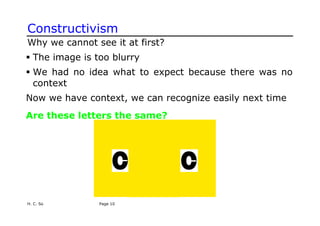
Are these letters the same?
H. C. So Page 10
Constructivism
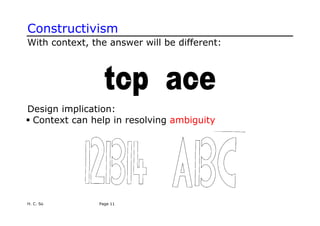
With context, the answer will be different:
Design implication:
ƒ Context can help in resolving ambiguity
H. C. So Page 11
Constructivism
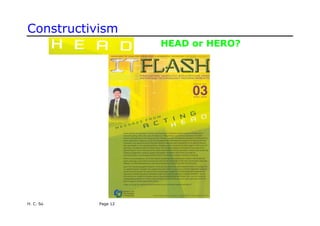
HEAD or HERO?
H. C. So Page 12
Constructivism
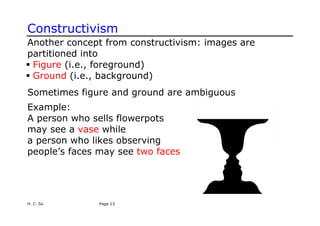
Another concept from constructivism: images are
partitioned into
ƒ Figure (i.e., foreground)
ƒ Ground (i.e., background)
Sometimes figure and ground are ambiguous
H. C. So Page 13
Example:
A person who sells flowerpots
may see a vase while
a person who likes observing
people’s faces may see two faces
H. C. So Page 14
Gestalt Psychology
ƒ Main idea: We do not see things in isolation, but as
parts of a whole
ƒ We organize things into meaningful units using
ƒ Proximity: we group by distance or location
ƒ Similarity: we group by type
ƒ Symmetry: we group by meaning
ƒ Continuity: we group by flow of lines (alignment)
ƒ Closure: we perceive shapes that are not (completely)
there
Gestalt Psychology
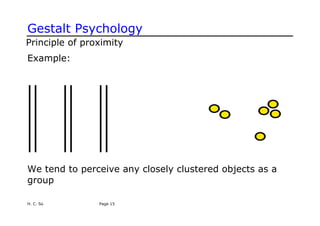
Principle of proximity
Example:
We tend to perceive any closely clustered objects as a
group
H. C. So Page 15
H. C. So Page 16
Gestalt Psychology
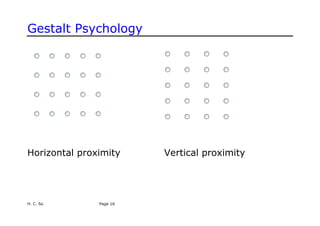
Horizontal proximity Vertical proximity
Gestalt Psychology
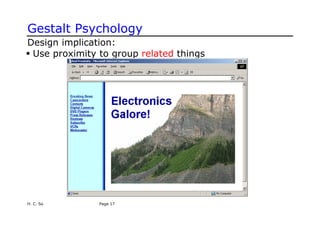
Design implication:
ƒ Use proximity to group related things
H. C. So Page 17
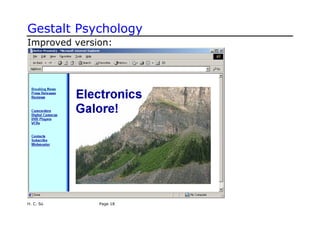
Gestalt Psychology
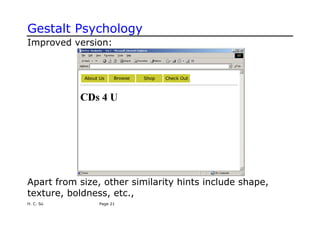
Improved version:
H. C. So Page 18
H. C. So Page 19
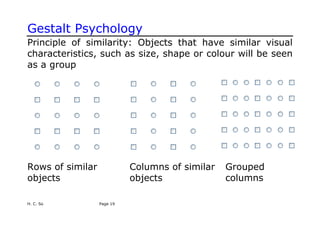
Gestalt Psychology
Principle of similarity: Objects that have similar visual
characteristics, such as size, shape or colour will be seen
as a group
Rows of similar Columns of similar Grouped
objects objects columns
Gestalt Psychology
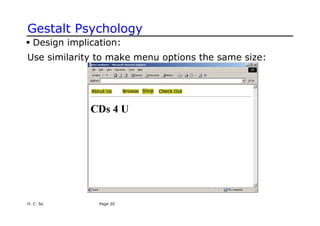
ƒ Design implication:
Use similarity to make menu options the same size:
H. C. So Page 20
Gestalt Psychology
Improved version:
Apart from size, other similarity hints include shape,
texture, boldness, etc.,
H. C. So Page 21
Gestalt Psychology
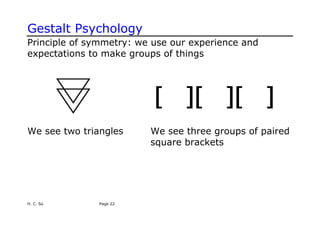
Principle of symmetry: we use our experience and
expectations to make groups of things
We see two triangles We see three groups of paired
square brackets
H. C. So Page 22
Gestalt Psychology
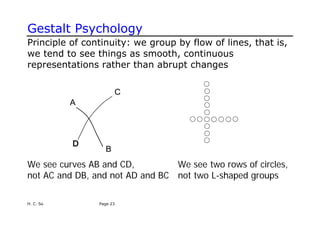
Principle of continuity: we group by flow of lines, that is,
we tend to see things as smooth, continuous
representations rather than abrupt changes
We see curves AB and CD, We see two rows of circles,
not AC and DB, and not AD and BC not two L-shaped groups
H. C. So Page 23
Gestalt Psychology
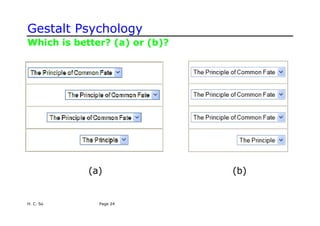
Which is better? (a) or (b)?
(a) (b)
H. C. So Page 24
Gestalt Psychology
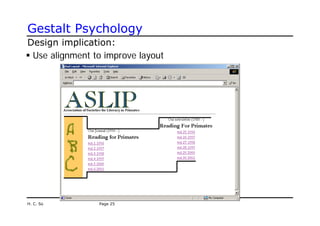
Design implication:
ƒ Use alignment to improve layout
H. C. So Page 25
Gestalt Psychology
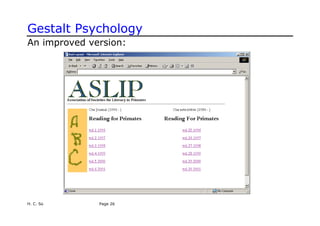
An improved version:
H. C. So Page 26
Gestalt Psychology
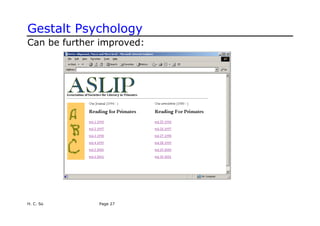
Can be further improved:
H. C. So Page 27
Gestalt Psychology
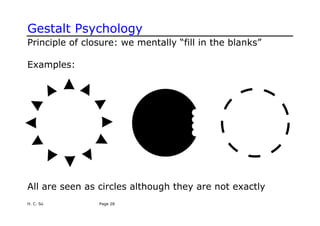
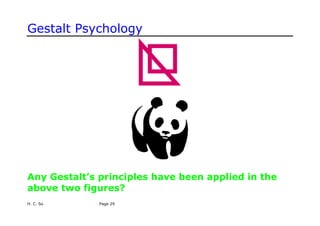
Principle of closure: we mentally “fill in the blanks”
Examples:
All are seen as circles although they are not exactly
H. C. So Page 28
Gestalt Psychology
Any Gestalt’s principles have been applied in the
above two figures?
H. C. So Page 29
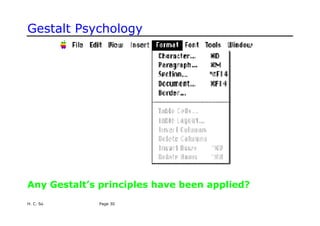
Gestalt Psychology
Any Gestalt’s principles have been applied?
H. C. So Page 30
Reading Speed/Accuracy
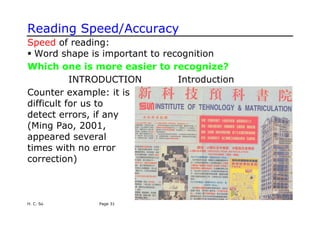
Speed of reading:
ƒ Word shape is important to recognition
Which one is more easier to recognize?
INTRODUCTION Introduction
H. C. So Page 31
Counter example: it is
difficult for us to
detect errors, if any
(Ming Pao, 2001,
appeared several
times with no error
correction)
Reading Speed/Accuracy
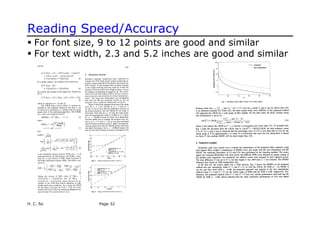
ƒ For font size, 9 to 12 points are good and similar
ƒ For text width, 2.3 and 5.2 inches are good and similar
H. C. So Page 32
H. C. So Page 33
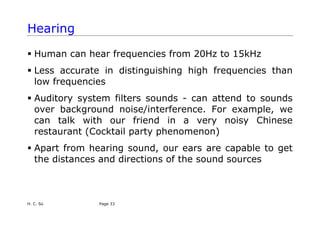
Hearing
ƒ Human can hear frequencies from 20Hz to 15kHz
ƒ Less accurate in distinguishing high frequencies than
low frequencies
ƒ Auditory system filters sounds - can attend to sounds
over background noise/interference. For example, we
can talk with our friend in a very noisy Chinese
restaurant (Cocktail party phenomenon)
ƒ Apart from hearing sound, our ears are capable to get
the distances and directions of the sound sources
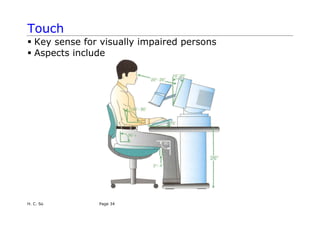
Touch
ƒ Key sense for visually impaired persons
ƒ Aspects include
H. C. So Page 34
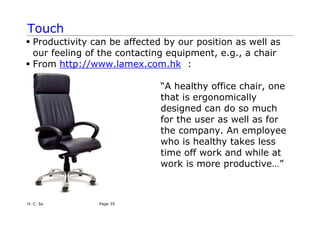
Touch
ƒ Productivity can be affected by our position as well as
our feeling of the contacting equipment, e.g., a chair
ƒ From http://www.lamex.com.hk :
“A healthy office chair, one
that is ergonomically
designed can do so much
for the user as well as for
the company. An employee
who is healthy takes less
time off work and while at
work is more productive…”
H. C. So Page 35
Movement
ƒ Time taken to respond to stimulus: reaction time +
movement time
ƒ Reaction time - depend on stimulus type
ƒ Visual - 200ms
ƒ Auditory - 150ms
ƒ Pain - 700ms
ƒ Combined signal will result in faster response
ƒ Movement time - dependent on age, fitness, etc.
ƒ ↓ reaction time ↓ accuracy in unskilled operator but not
in skilled operator
H. C. So Page 36
Movement
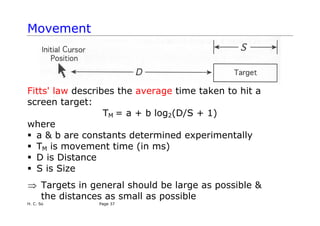
Fitts' law describes the average time taken to hit a
screen target:
TM = a + b log2(D/S + 1)
where
ƒ a & b are constants determined experimentally
ƒ TM is movement time (in ms)
ƒ D is Distance
ƒ S is Size
⇒ Targets in general should be large as possible &
the distances as small as possible
H. C. So Page 37
H. C. So Page 38
Movement
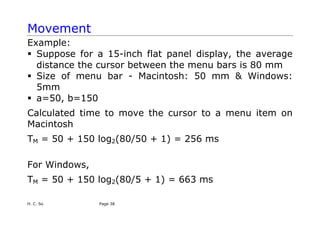
Example:
ƒ Suppose for a 15-inch flat panel display, the average
distance the cursor between the menu bars is 80 mm
ƒ Size of menu bar - Macintosh: 50 mm & Windows:
5mm
ƒ a=50, b=150
Calculated time to move the cursor to a menu item on
Macintosh
TM = 50 + 150 log2(80/50 + 1) = 256 ms
For Windows,
TM = 50 + 150 log2(80/5 + 1) = 663 ms
Movement
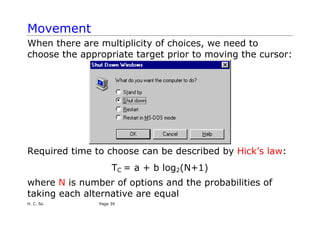
When there are multiplicity of choices, we need to
choose the appropriate target prior to moving the cursor:
Required time to choose can be described by Hick’s law:
TC = a + b log2(N+1)
where N is number of options and the probabilities of
taking each alternative are equal
H. C. So Page 39
Memory
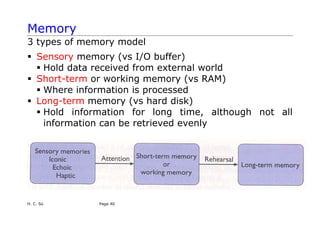
3 types of memory model
ƒ Sensory memory (vs I/O buffer)
ƒ Hold data received from external world
ƒ Short-term or working memory (vs RAM)
ƒ Where information is processed
ƒ Long-term memory (vs hard disk)
ƒ Hold information for long time, although not all
information can be retrieved evenly
H. C. So Page 40
H. C. So Page 41
Memory
ƒ Sensory memory acts as buffers for stimuli received via
senses
ƒ Constantly overwritten
ƒ Information passes from sensory to short-term memory
by attention (e.g., you are constantly seeing but you
will not pay attention to all things you see)
ƒ Attention or selection of stimuli is governed by level of
interest or need
e.g., cocktail party phenomenon: we can attend to one
conversation over background noise but we may choose
to switch our attention to another conversation if we
hear our name mentioned
H. C. So Page 42
Memory
ƒ Short-term memory (STM) is used for temporary recall
of information
ƒ Rapid access - 70ms
ƒ Rapid decay - 200ms
ƒ Limited capacity - 7 +/- 2 digits or chunks
ƒ Long-term memory (LTM) is the main resource for all
our knowledge
ƒ Slow access - 100 ms
ƒ Slow decay, if any
ƒ Huge or unlimited capacity
Memory
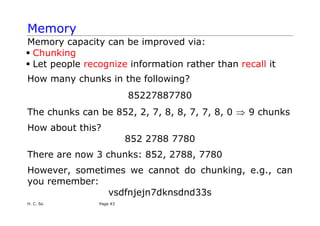
Memory capacity can be improved via:
ƒ Chunking
ƒ Let people recognize information rather than recall it
How many chunks in the following?
85227887780
The chunks can be 852, 2, 7, 8, 8, 7, 7, 8, 0 9 chunks
⇒
How about this?
852 2788 7780
There are now 3 chunks: 852, 2788, 7780
However, sometimes we cannot do chunking, e.g., can
you remember:
vsdfnjejn7dknsdnd33s
H. C. So Page 43
H. C. So Page 44
Memory
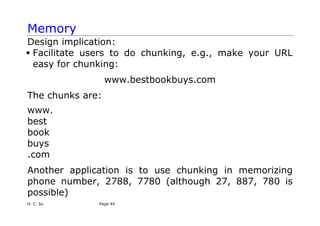
Design implication:
ƒ Facilitate users to do chunking, e.g., make your URL
easy for chunking:
www.bestbookbuys.com
The chunks are:
www.
best
book
buys
.com
Another application is to use chunking in memorizing
phone number, 2788, 7780 (although 27, 887, 780 is
possible)
H. C. So Page 45
Memory
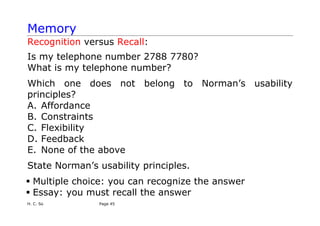
Recognition versus Recall:
Is my telephone number 2788 7780?
What is my telephone number?
Which one does not belong to Norman’s usability
principles?
A. Affordance
B. Constraints
C. Flexibility
D. Feedback
E. None of the above
State Norman’s usability principles.
ƒ Multiple choice: you can recognize the answer
ƒ Essay: you must recall the answer
H. C. So Page 46
Memory
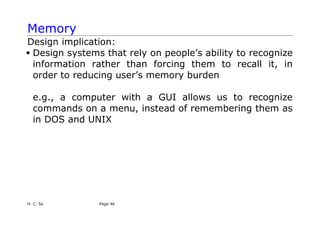
Design implication:
ƒ Design systems that rely on people’s ability to recognize
information rather than forcing them to recall it, in
order to reducing user’s memory burden
e.g., a computer with a GUI allows us to recognize
commands on a menu, instead of remembering them as
in DOS and UNIX
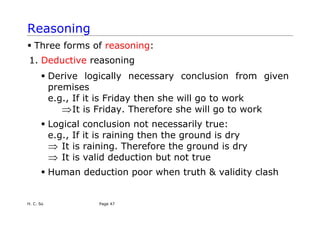
Reasoning
ƒ Three forms of reasoning:
1. Deductive reasoning
ƒ Derive logically necessary conclusion from given
premises
e.g., If it is Friday then she will go to work
⇒It is Friday. Therefore she will go to work
ƒ Logical conclusion not necessarily true:
e.g., If it is raining then the ground is dry
⇒ It is raining. Therefore the ground is dry
It is valid deduction but not true
⇒
ƒ Human deduction poor when truth & validity clash
H. C. So Page 47
H. C. So Page 48
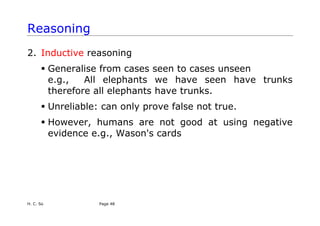
Reasoning
2. Inductive reasoning
ƒ Generalise from cases seen to cases unseen
e.g., All elephants we have seen have trunks
therefore all elephants have trunks.
ƒ Unreliable: can only prove false not true.
ƒ However, humans are not good at using negative
evidence e.g., Wason's cards
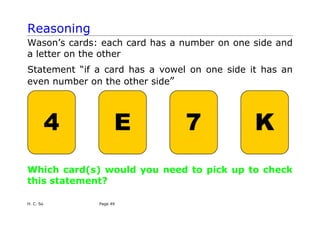
Reasoning
Wason’s cards: each card has a number on one side and
a letter on the other
Statement “if a card has a vowel on one side it has an
even number on the other side”
4 E 7 K
Which card(s) would you need to pick up to check
this statement?
H. C. So Page 49
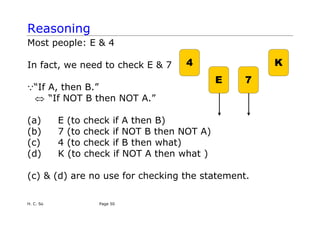
Reasoning
Most people: E & 4
4
E 7
K
In fact, we need to check E & 7
Q“If A, then B.”
⇔ “If NOT B then NOT A.”
(a) E (to check if A then B)
(b) 7 (to check if NOT B then NOT A)
(c) 4 (to check if B then what)
(d) K (to check if NOT A then what )
(c) & (d) are no use for checking the statement.
H. C. So Page 50
H. C. So Page 51
Reasoning
How about if the condition “each card has a
number on one side and a letter on the other” is
not stated? Which card(s) would you need to pick
up to check the statement?
Design implication:
Avoid negative evidence, e.g., If not Exit, don’t press “X”
3. Abductive reasoning
ƒ Reasoning from event to cause
e.g., Sam drives fast when drunk
If see Sam driving fast, assume drunk
ƒ Unreliable: can lead to false explanations.
e.g., Sam may need to do an emergency matter
H. C. So Page 52
Conceptual Model
ƒ It is a high-level description of how a system is
organized and operates
ƒ It outlines what people can do with a product and what
concepts are needed to understand how to interact
with it
ƒ If the conceptual model meets the user’s intention, this
implies that the user will use the system easily.
ƒ How to develop a conceptual model?
ƒ Identify user’s needs and system requirements
ƒ Identify a set of possible ways of interactions
ƒ Select suitable metaphors and analogies
Conceptual Model
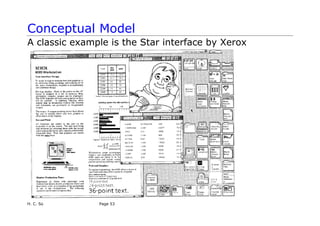
A classic example is the Star interface by Xerox
H. C. So Page 53
H. C. So Page 54
Conceptual Model
ƒ Targeted for workers not interested in computing –
make the computer as “invisible” to the users as
possible and to design applications suitable to them
ƒ Based on an analogy to a physical office
ƒ Metaphors: paper, folders, filing cabinets and
mailboxes were represented as icons on the screen and
were designed to possess some of their properties of
their physical counterparts
ƒ Concepts: Dragging an electronic document onto an
electronic folder was seen as being analogous to
placing a physical document into a physical cabinet;
Placing an electronic file onto the printer icon would
print it out
H. C. So Page 55
Conceptual Model
ƒ Consider a company that wants to develop a wireless
information system to help tourists with personal
digital assistants (PDAs) in Hong Kong.
How to develop a conceptual model for this
system?
What questions should we ask in developing the
conceptual model?
H. C. So Page 56
Conceptual Model
Suggestions:
ƒ Who are they? Chinese or English speaking foreigners?
ƒ What do tourists want? Information.
ƒ How to get from airport to downtown?
ƒ Where is a good Chinese restaurant?
ƒ How to support the activity of requesting information
in the optimum way? A menu system or voice
command activated system? Provide a system that
structures information in the form of lists, maps,
recommendations, etc.?
ƒ Concepts??
H. C. So Page 57
Mental Model
ƒ Don Norman’s definition: “the model people have of
themselves, others, the environment, & the things with
which they interact. People form mental models
through experience, training & instruction”
ƒ An internal representation of a user’s current
conceptualization and understanding of a system
ƒ Knowledge developed in learning & using a system –
How to use it? How it works?
e.g., Make a phone call:
Pick up the phone
Dial the number I want to call
Hear the phone on the other end ringing
The person at the other end answers
H. C. So Page 58
Mental Model
ƒ Mental models are:
ƒ Unscientific—They are often based on guesswork and
approximations
ƒ Partial—They do not necessarily describe whole
systems, just the aspects that are relevant to the
persons who formulate them
ƒ Unstable—They are not concrete formulations, but
evolve and adapt to the context
ƒ Inconsistent—They do not necessarily form a cohesive
whole; some parts may be incompatible with other
parts of the same model
ƒ Personal—They are specific to each individual and are
not universal concepts that can be applied generally
H. C. So Page 59
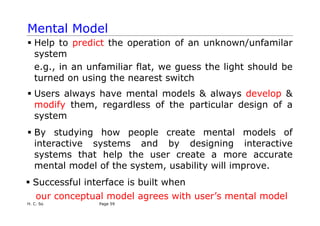
Mental Model
ƒ Help to predict the operation of an unknown/unfamilar
system
e.g., in an unfamiliar flat, we guess the light should be
turned on using the nearest switch
ƒ Users always have mental models & always develop &
modify them, regardless of the particular design of a
system
ƒ By studying how people create mental models of
interactive systems and by designing interactive
systems that help the user create a more accurate
mental model of the system, usability will improve.
ƒ Successful interface is built when
our conceptual model agrees with user’s mental model

Mental model Human model conceptula model human senses-HCI.pdf

  • 1.
    H. C. SoPage 1 Human ƒHuman Models, Senses and Memory ƒConceptual Model and Mental Model
  • 2.
    H. C. SoPage 2 Why Study Human? We are the users When we try to understand something, particularly new, we use a combination of ƒ What our senses (sight, hearing, touch, smell, taste) are telling ƒ Past experience ƒ Our expectations e.g., When we browse a new Web, our past experience tells us that underlined blue text is supposed to be a link e.g., When we are given a new product with buttons, we expect that it is operated by pressing the buttons
  • 3.
    Human Model Modelled asinformation processing system ƒ Stage 1: encode information (sight, hearing, touch, smell, taste) from environment into internal representation ƒ Stage 2: internal representation of the stimuli is compared with the memorized representations in brain ƒ Stage 3 is concerned with deciding on a response to encoded stimulus ƒ Stage 4 deals with organization of response & necessary action H. C. So Page 3
  • 4.
    Human Model Card, Moran& Newell's Model: ƒ Comprise 3 interacting systems: ƒ Perceptual system consists of sensors & associated buffer memories: ƒ Visual image store ƒ Auditory image store ƒ Cognitive system consists of short-term & long-term memories ƒ Motor system carries out response formulated by cognitive system H. C. So Page 4
  • 5.
    H. C. SoPage 5 Semester A, 2008 Human Senses The five senses are: ƒ Sight ƒ Hearing ƒ Touch ƒ Smell ƒ Taste They can interact with computing systems: Input to Human Output from Human Vision Speech Audition Motor Control Balance Biometrics, e.g., fingerprint Olfaction Touch
  • 6.
    Vision H. C. SoPage 6 ƒ Eye ƒ Mechanism for receiving light & transforming it into electrical energy ƒ Light reflects from objects; their images are focused upside down on retina ƒ Retina contains ƒ Fovea: colour vision, pattern detection ƒ Outer part: sensitive to light, movement detection
  • 7.
    Vision Design implication: ƒ Auser concentrating on the middle of the screen cannot be expected to read text on the bottom line because outer part is not good for pattern detection ⇒ If we want a user to see an error message at the bottom of the screen, since the outer part is capable for change detection, the message should be flashing H. C. So Page 7
  • 8.
    H. C. SoPage 8 Constructivism A theory about vision is constructivism: ƒ Our brains do not create pixel-by-pixel images ƒ Our minds create, or construct, models that summarize what comes from our senses ƒ These models are what we perceive ƒ When we see something, we do not remember all the details, only those that have meaning for us Design implication: ƒ Do not expect people “see” all the details of an interface because people filter out irrelevant information and save only the important ones How many links are there on left hand side of http://www.cityu.edu.hk ?
  • 9.
    Constructivism Constructivist theory statesthat context plays a major role in what we see in an image What do you see? H. C. So Page 9
  • 10.
    Constructivism Why we cannotsee it at first? ƒ The image is too blurry ƒ We had no idea what to expect because there was no context Now we have context, we can recognize easily next time Are these letters the same? H. C. So Page 10
  • 11.
    Constructivism With context, theanswer will be different: Design implication: ƒ Context can help in resolving ambiguity H. C. So Page 11
  • 12.
  • 13.
    Constructivism Another concept fromconstructivism: images are partitioned into ƒ Figure (i.e., foreground) ƒ Ground (i.e., background) Sometimes figure and ground are ambiguous H. C. So Page 13 Example: A person who sells flowerpots may see a vase while a person who likes observing people’s faces may see two faces
  • 14.
    H. C. SoPage 14 Gestalt Psychology ƒ Main idea: We do not see things in isolation, but as parts of a whole ƒ We organize things into meaningful units using ƒ Proximity: we group by distance or location ƒ Similarity: we group by type ƒ Symmetry: we group by meaning ƒ Continuity: we group by flow of lines (alignment) ƒ Closure: we perceive shapes that are not (completely) there
  • 15.
    Gestalt Psychology Principle ofproximity Example: We tend to perceive any closely clustered objects as a group H. C. So Page 15
  • 16.
    H. C. SoPage 16 Gestalt Psychology Horizontal proximity Vertical proximity
  • 17.
    Gestalt Psychology Design implication: ƒUse proximity to group related things H. C. So Page 17
  • 18.
  • 19.
    H. C. SoPage 19 Gestalt Psychology Principle of similarity: Objects that have similar visual characteristics, such as size, shape or colour will be seen as a group Rows of similar Columns of similar Grouped objects objects columns
  • 20.
    Gestalt Psychology ƒ Designimplication: Use similarity to make menu options the same size: H. C. So Page 20
  • 21.
    Gestalt Psychology Improved version: Apartfrom size, other similarity hints include shape, texture, boldness, etc., H. C. So Page 21
  • 22.
    Gestalt Psychology Principle ofsymmetry: we use our experience and expectations to make groups of things We see two triangles We see three groups of paired square brackets H. C. So Page 22
  • 23.
    Gestalt Psychology Principle ofcontinuity: we group by flow of lines, that is, we tend to see things as smooth, continuous representations rather than abrupt changes We see curves AB and CD, We see two rows of circles, not AC and DB, and not AD and BC not two L-shaped groups H. C. So Page 23
  • 24.
    Gestalt Psychology Which isbetter? (a) or (b)? (a) (b) H. C. So Page 24
  • 25.
    Gestalt Psychology Design implication: ƒUse alignment to improve layout H. C. So Page 25
  • 26.
    Gestalt Psychology An improvedversion: H. C. So Page 26
  • 27.
    Gestalt Psychology Can befurther improved: H. C. So Page 27
  • 28.
    Gestalt Psychology Principle ofclosure: we mentally “fill in the blanks” Examples: All are seen as circles although they are not exactly H. C. So Page 28
  • 29.
    Gestalt Psychology Any Gestalt’sprinciples have been applied in the above two figures? H. C. So Page 29
  • 30.
    Gestalt Psychology Any Gestalt’sprinciples have been applied? H. C. So Page 30
  • 31.
    Reading Speed/Accuracy Speed ofreading: ƒ Word shape is important to recognition Which one is more easier to recognize? INTRODUCTION Introduction H. C. So Page 31 Counter example: it is difficult for us to detect errors, if any (Ming Pao, 2001, appeared several times with no error correction)
  • 32.
    Reading Speed/Accuracy ƒ Forfont size, 9 to 12 points are good and similar ƒ For text width, 2.3 and 5.2 inches are good and similar H. C. So Page 32
  • 33.
    H. C. SoPage 33 Hearing ƒ Human can hear frequencies from 20Hz to 15kHz ƒ Less accurate in distinguishing high frequencies than low frequencies ƒ Auditory system filters sounds - can attend to sounds over background noise/interference. For example, we can talk with our friend in a very noisy Chinese restaurant (Cocktail party phenomenon) ƒ Apart from hearing sound, our ears are capable to get the distances and directions of the sound sources
  • 34.
    Touch ƒ Key sensefor visually impaired persons ƒ Aspects include H. C. So Page 34
  • 35.
    Touch ƒ Productivity canbe affected by our position as well as our feeling of the contacting equipment, e.g., a chair ƒ From http://www.lamex.com.hk : “A healthy office chair, one that is ergonomically designed can do so much for the user as well as for the company. An employee who is healthy takes less time off work and while at work is more productive…” H. C. So Page 35
  • 36.
    Movement ƒ Time takento respond to stimulus: reaction time + movement time ƒ Reaction time - depend on stimulus type ƒ Visual - 200ms ƒ Auditory - 150ms ƒ Pain - 700ms ƒ Combined signal will result in faster response ƒ Movement time - dependent on age, fitness, etc. ƒ ↓ reaction time ↓ accuracy in unskilled operator but not in skilled operator H. C. So Page 36
  • 37.
    Movement Fitts' law describesthe average time taken to hit a screen target: TM = a + b log2(D/S + 1) where ƒ a & b are constants determined experimentally ƒ TM is movement time (in ms) ƒ D is Distance ƒ S is Size ⇒ Targets in general should be large as possible & the distances as small as possible H. C. So Page 37
  • 38.
    H. C. SoPage 38 Movement Example: ƒ Suppose for a 15-inch flat panel display, the average distance the cursor between the menu bars is 80 mm ƒ Size of menu bar - Macintosh: 50 mm & Windows: 5mm ƒ a=50, b=150 Calculated time to move the cursor to a menu item on Macintosh TM = 50 + 150 log2(80/50 + 1) = 256 ms For Windows, TM = 50 + 150 log2(80/5 + 1) = 663 ms
  • 39.
    Movement When there aremultiplicity of choices, we need to choose the appropriate target prior to moving the cursor: Required time to choose can be described by Hick’s law: TC = a + b log2(N+1) where N is number of options and the probabilities of taking each alternative are equal H. C. So Page 39
  • 40.
    Memory 3 types ofmemory model ƒ Sensory memory (vs I/O buffer) ƒ Hold data received from external world ƒ Short-term or working memory (vs RAM) ƒ Where information is processed ƒ Long-term memory (vs hard disk) ƒ Hold information for long time, although not all information can be retrieved evenly H. C. So Page 40
  • 41.
    H. C. SoPage 41 Memory ƒ Sensory memory acts as buffers for stimuli received via senses ƒ Constantly overwritten ƒ Information passes from sensory to short-term memory by attention (e.g., you are constantly seeing but you will not pay attention to all things you see) ƒ Attention or selection of stimuli is governed by level of interest or need e.g., cocktail party phenomenon: we can attend to one conversation over background noise but we may choose to switch our attention to another conversation if we hear our name mentioned
  • 42.
    H. C. SoPage 42 Memory ƒ Short-term memory (STM) is used for temporary recall of information ƒ Rapid access - 70ms ƒ Rapid decay - 200ms ƒ Limited capacity - 7 +/- 2 digits or chunks ƒ Long-term memory (LTM) is the main resource for all our knowledge ƒ Slow access - 100 ms ƒ Slow decay, if any ƒ Huge or unlimited capacity
  • 43.
    Memory Memory capacity canbe improved via: ƒ Chunking ƒ Let people recognize information rather than recall it How many chunks in the following? 85227887780 The chunks can be 852, 2, 7, 8, 8, 7, 7, 8, 0 9 chunks ⇒ How about this? 852 2788 7780 There are now 3 chunks: 852, 2788, 7780 However, sometimes we cannot do chunking, e.g., can you remember: vsdfnjejn7dknsdnd33s H. C. So Page 43
  • 44.
    H. C. SoPage 44 Memory Design implication: ƒ Facilitate users to do chunking, e.g., make your URL easy for chunking: www.bestbookbuys.com The chunks are: www. best book buys .com Another application is to use chunking in memorizing phone number, 2788, 7780 (although 27, 887, 780 is possible)
  • 45.
    H. C. SoPage 45 Memory Recognition versus Recall: Is my telephone number 2788 7780? What is my telephone number? Which one does not belong to Norman’s usability principles? A. Affordance B. Constraints C. Flexibility D. Feedback E. None of the above State Norman’s usability principles. ƒ Multiple choice: you can recognize the answer ƒ Essay: you must recall the answer
  • 46.
    H. C. SoPage 46 Memory Design implication: ƒ Design systems that rely on people’s ability to recognize information rather than forcing them to recall it, in order to reducing user’s memory burden e.g., a computer with a GUI allows us to recognize commands on a menu, instead of remembering them as in DOS and UNIX
  • 47.
    Reasoning ƒ Three formsof reasoning: 1. Deductive reasoning ƒ Derive logically necessary conclusion from given premises e.g., If it is Friday then she will go to work ⇒It is Friday. Therefore she will go to work ƒ Logical conclusion not necessarily true: e.g., If it is raining then the ground is dry ⇒ It is raining. Therefore the ground is dry It is valid deduction but not true ⇒ ƒ Human deduction poor when truth & validity clash H. C. So Page 47
  • 48.
    H. C. SoPage 48 Reasoning 2. Inductive reasoning ƒ Generalise from cases seen to cases unseen e.g., All elephants we have seen have trunks therefore all elephants have trunks. ƒ Unreliable: can only prove false not true. ƒ However, humans are not good at using negative evidence e.g., Wason's cards
  • 49.
    Reasoning Wason’s cards: eachcard has a number on one side and a letter on the other Statement “if a card has a vowel on one side it has an even number on the other side” 4 E 7 K Which card(s) would you need to pick up to check this statement? H. C. So Page 49
  • 50.
    Reasoning Most people: E& 4 4 E 7 K In fact, we need to check E & 7 Q“If A, then B.” ⇔ “If NOT B then NOT A.” (a) E (to check if A then B) (b) 7 (to check if NOT B then NOT A) (c) 4 (to check if B then what) (d) K (to check if NOT A then what ) (c) & (d) are no use for checking the statement. H. C. So Page 50
  • 51.
    H. C. SoPage 51 Reasoning How about if the condition “each card has a number on one side and a letter on the other” is not stated? Which card(s) would you need to pick up to check the statement? Design implication: Avoid negative evidence, e.g., If not Exit, don’t press “X” 3. Abductive reasoning ƒ Reasoning from event to cause e.g., Sam drives fast when drunk If see Sam driving fast, assume drunk ƒ Unreliable: can lead to false explanations. e.g., Sam may need to do an emergency matter
  • 52.
    H. C. SoPage 52 Conceptual Model ƒ It is a high-level description of how a system is organized and operates ƒ It outlines what people can do with a product and what concepts are needed to understand how to interact with it ƒ If the conceptual model meets the user’s intention, this implies that the user will use the system easily. ƒ How to develop a conceptual model? ƒ Identify user’s needs and system requirements ƒ Identify a set of possible ways of interactions ƒ Select suitable metaphors and analogies
  • 53.
    Conceptual Model A classicexample is the Star interface by Xerox H. C. So Page 53
  • 54.
    H. C. SoPage 54 Conceptual Model ƒ Targeted for workers not interested in computing – make the computer as “invisible” to the users as possible and to design applications suitable to them ƒ Based on an analogy to a physical office ƒ Metaphors: paper, folders, filing cabinets and mailboxes were represented as icons on the screen and were designed to possess some of their properties of their physical counterparts ƒ Concepts: Dragging an electronic document onto an electronic folder was seen as being analogous to placing a physical document into a physical cabinet; Placing an electronic file onto the printer icon would print it out
  • 55.
    H. C. SoPage 55 Conceptual Model ƒ Consider a company that wants to develop a wireless information system to help tourists with personal digital assistants (PDAs) in Hong Kong. How to develop a conceptual model for this system? What questions should we ask in developing the conceptual model?
  • 56.
    H. C. SoPage 56 Conceptual Model Suggestions: ƒ Who are they? Chinese or English speaking foreigners? ƒ What do tourists want? Information. ƒ How to get from airport to downtown? ƒ Where is a good Chinese restaurant? ƒ How to support the activity of requesting information in the optimum way? A menu system or voice command activated system? Provide a system that structures information in the form of lists, maps, recommendations, etc.? ƒ Concepts??
  • 57.
    H. C. SoPage 57 Mental Model ƒ Don Norman’s definition: “the model people have of themselves, others, the environment, & the things with which they interact. People form mental models through experience, training & instruction” ƒ An internal representation of a user’s current conceptualization and understanding of a system ƒ Knowledge developed in learning & using a system – How to use it? How it works? e.g., Make a phone call: Pick up the phone Dial the number I want to call Hear the phone on the other end ringing The person at the other end answers
  • 58.
    H. C. SoPage 58 Mental Model ƒ Mental models are: ƒ Unscientific—They are often based on guesswork and approximations ƒ Partial—They do not necessarily describe whole systems, just the aspects that are relevant to the persons who formulate them ƒ Unstable—They are not concrete formulations, but evolve and adapt to the context ƒ Inconsistent—They do not necessarily form a cohesive whole; some parts may be incompatible with other parts of the same model ƒ Personal—They are specific to each individual and are not universal concepts that can be applied generally
  • 59.
    H. C. SoPage 59 Mental Model ƒ Help to predict the operation of an unknown/unfamilar system e.g., in an unfamiliar flat, we guess the light should be turned on using the nearest switch ƒ Users always have mental models & always develop & modify them, regardless of the particular design of a system ƒ By studying how people create mental models of interactive systems and by designing interactive systems that help the user create a more accurate mental model of the system, usability will improve. ƒ Successful interface is built when our conceptual model agrees with user’s mental model