© 2015-2016 Emagezone. All rights reserved.
Reproduction of this publication in any form without prior written permission is forbidden.
Mega MenuMagento Extension
Mega Menu
Extension Documentation
© 2015-2016 Emagezone. All rights reserved.
Reproduction of this publication in any form without prior written permission is forbidden.
1
Store URL: http://emagezone.com/
Support: http://www.emagezone.com/support/
Contents
Understanding............................................................................................................................1
Features ...........................................................................................................................................1
System Requirements...................................................................................................................1
How This Extension Works?........................................................................................................3
Back End Screenshots..................................................................................................................6
Understanding
Unknowingly most Magento extensions slower down the site. Improve your eCommerce site
navigation in a professional manner with Mega Menu. The extensions allows you to display all
kind of information flexibility while optimizing the website’s navigation performance.
Features
•You can easily customize menu with header, footer, main content and featured content layout.
• System Configuration Settings are given for Desktop and Mobile version to change Menu
colour, Active menu colour, Text label, Font size etc. according to your theme requirement.
• You can show 7 types of Main Content Area i.e. Anchor, Default Category, Dynamic
category, Product Grid, Product List etc.
• You can show 3 types of Featured Content Area i.e. Categories, Products and HTML
Content.
• Mega menu is responsive, and can be viewed in mobile also
© 2015-2016 Emagezone. All rights reserved.
Reproduction of this publication in any form without prior written permission is forbidden.
2
System Requirements
Magento 1.6 to 1.9
IonCube PHP Encoder (8.3) should be installed on your server.
Steps to be taken for installation
>>Step-1. Login with your Magento admin.
© 2015-2016 Emagezone. All rights reserved.
Reproduction of this publication in any form without prior written permission is forbidden.
3
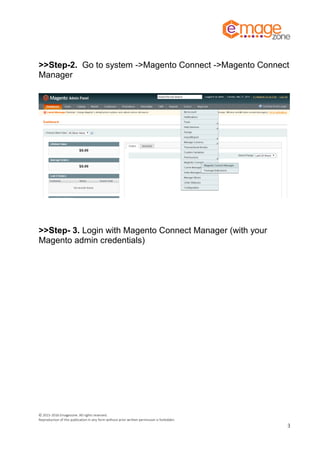
>>Step-2. Go to system ->Magento Connect ->Magento Connect
Manager
>>Step- 3. Login with Magento Connect Manager (with your
Magento admin credentials)
© 2015-2016 Emagezone. All rights reserved.
Reproduction of this publication in any form without prior written permission is forbidden.
4
>>Step-4. Upload package file (purchased file) in direct package
file upload section and click on upload.
© 2015-2016 Emagezone. All rights reserved.
Reproduction of this publication in any form without prior written permission is forbidden.
5
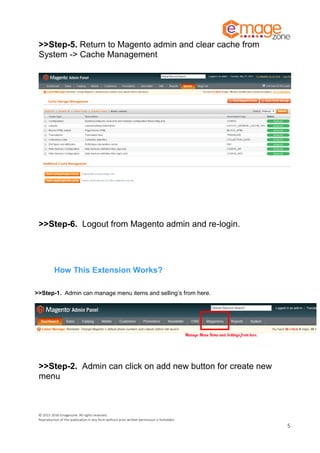
>>Step-5. Return to Magento admin and clear cache from
System -> Cache Management
>>Step-6. Logout from Magento admin and re-login.
How This Extension Works?
>>Step-1. Admin can manage menu items and selling’s from here.
>>Step-2. Admin can click on add new button for create new
menu
© 2015-2016 Emagezone. All rights reserved.
Reproduction of this publication in any form without prior written permission is forbidden.
6
>>Step- 3. Admin can fill these fields as per requirements.
>>Step-4.Admin can add 7 types of menu (Anchor Text, Default
Category Listing, Static Category Listing, Dynamic Category
Listing, Product Listing, Product Grid, Content)
© 2015-2016 Emagezone. All rights reserved.
Reproduction of this publication in any form without prior written permission is forbidden.
7
>>Step-5.Featured Content can be added of 3 types (Category,
Product and Content)
>>Step-6.Admin can be added Header content and footer content
© 2015-2016 Emagezone. All rights reserved.
Reproduction of this publication in any form without prior written permission is forbidden.
8
Front End Demo
>>Step 1.
>>Step 2.
© 2015-2016 Emagezone. All rights reserved.
Reproduction of this publication in any form without prior written permission is forbidden.
9
>>Step 3.
>> Step 4.
© 2015-2016 Emagezone. All rights reserved.
Reproduction of this publication in any form without prior written permission is forbidden.
10
- End of Document -

Mega Menu Extension for Magento

  • 1.
    © 2015-2016 Emagezone.All rights reserved. Reproduction of this publication in any form without prior written permission is forbidden. Mega MenuMagento Extension Mega Menu Extension Documentation
  • 2.
    © 2015-2016 Emagezone.All rights reserved. Reproduction of this publication in any form without prior written permission is forbidden. 1 Store URL: http://emagezone.com/ Support: http://www.emagezone.com/support/ Contents Understanding............................................................................................................................1 Features ...........................................................................................................................................1 System Requirements...................................................................................................................1 How This Extension Works?........................................................................................................3 Back End Screenshots..................................................................................................................6 Understanding Unknowingly most Magento extensions slower down the site. Improve your eCommerce site navigation in a professional manner with Mega Menu. The extensions allows you to display all kind of information flexibility while optimizing the website’s navigation performance. Features •You can easily customize menu with header, footer, main content and featured content layout. • System Configuration Settings are given for Desktop and Mobile version to change Menu colour, Active menu colour, Text label, Font size etc. according to your theme requirement. • You can show 7 types of Main Content Area i.e. Anchor, Default Category, Dynamic category, Product Grid, Product List etc. • You can show 3 types of Featured Content Area i.e. Categories, Products and HTML Content. • Mega menu is responsive, and can be viewed in mobile also
  • 3.
    © 2015-2016 Emagezone.All rights reserved. Reproduction of this publication in any form without prior written permission is forbidden. 2 System Requirements Magento 1.6 to 1.9 IonCube PHP Encoder (8.3) should be installed on your server. Steps to be taken for installation >>Step-1. Login with your Magento admin.
  • 4.
    © 2015-2016 Emagezone.All rights reserved. Reproduction of this publication in any form without prior written permission is forbidden. 3 >>Step-2. Go to system ->Magento Connect ->Magento Connect Manager >>Step- 3. Login with Magento Connect Manager (with your Magento admin credentials)
  • 5.
    © 2015-2016 Emagezone.All rights reserved. Reproduction of this publication in any form without prior written permission is forbidden. 4 >>Step-4. Upload package file (purchased file) in direct package file upload section and click on upload.
  • 6.
    © 2015-2016 Emagezone.All rights reserved. Reproduction of this publication in any form without prior written permission is forbidden. 5 >>Step-5. Return to Magento admin and clear cache from System -> Cache Management >>Step-6. Logout from Magento admin and re-login. How This Extension Works? >>Step-1. Admin can manage menu items and selling’s from here. >>Step-2. Admin can click on add new button for create new menu
  • 7.
    © 2015-2016 Emagezone.All rights reserved. Reproduction of this publication in any form without prior written permission is forbidden. 6 >>Step- 3. Admin can fill these fields as per requirements. >>Step-4.Admin can add 7 types of menu (Anchor Text, Default Category Listing, Static Category Listing, Dynamic Category Listing, Product Listing, Product Grid, Content)
  • 8.
    © 2015-2016 Emagezone.All rights reserved. Reproduction of this publication in any form without prior written permission is forbidden. 7 >>Step-5.Featured Content can be added of 3 types (Category, Product and Content) >>Step-6.Admin can be added Header content and footer content
  • 9.
    © 2015-2016 Emagezone.All rights reserved. Reproduction of this publication in any form without prior written permission is forbidden. 8 Front End Demo >>Step 1. >>Step 2.
  • 10.
    © 2015-2016 Emagezone.All rights reserved. Reproduction of this publication in any form without prior written permission is forbidden. 9 >>Step 3. >> Step 4.
  • 11.
    © 2015-2016 Emagezone.All rights reserved. Reproduction of this publication in any form without prior written permission is forbidden. 10 - End of Document -