© 2006-2015 SoftProdigy. All rights reserved.
Reproduction of this publication in any form without prior written permission is forbidden.
Enhanced Order Delivery Date
Extension Documentation
Extension Page: Order Delivery Date
Store URL: http://www.softprodigy.com/store
Support: http://www.softprodigy.com/store/support/
© 2006-2015 SoftProdigy. All rights reserved.
Reproduction of this publication in any form without prior written permission is forbidden.
1
Contents
Understanding ..............................................................................................................................2
Features ...........................................................................................................................................2
Steps to be taken for installation ....................................................................................................3
How this extension works at back end?....................................................................................6
How this extension works at front end?....................................................................................9
© 2006-2015 SoftProdigy. All rights reserved.
Reproduction of this publication in any form without prior written permission is forbidden.
2
Understanding
Enhanced Order Delivery Date allows your customers to set the delivery for their orders.
Customers can also add their delivery comments while placing an order. This module is
very useful to increase shopping experience of your customers on the store.
Features
 The users can enter an expected shipping and arrival date.
 The users have the option of mentioning special comments while placing an order.
 An earlier will not be entered.
 The shipping and date of arrival will be displayed in the order view page.
 The shipping date and comment will be emailed to the customer.
System Requirements
Magento 1.5 and Higher.
IonCube PHP Encoder (8.3) should be installed on your server.
© 2006-2015 SoftProdigy. All rights reserved.
Reproduction of this publication in any form without prior written permission is forbidden.
3
Steps to be Taken for Installation
>>Step-1. Login with your Magento admin.
>>Step-2. Go to system -> Magento Connect -> Magento Connect Manager
© 2006-2015 SoftProdigy. All rights reserved.
Reproduction of this publication in any form without prior written permission is forbidden.
4
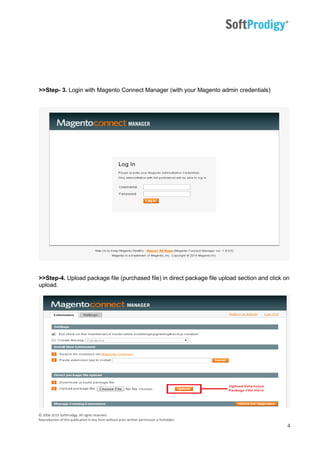
>>Step- 3. Login with Magento Connect Manager (with your Magento admin credentials)
>>Step-4. Upload package file (purchased file) in direct package file upload section and click on
upload.
© 2006-2015 SoftProdigy. All rights reserved.
Reproduction of this publication in any form without prior written permission is forbidden.
5
>>Step-5. Return to Magento admin and clear cache from System -> Cache Management
>>Step-6. Logout from Magento admin and re-login.
© 2006-2015 SoftProdigy. All rights reserved.
Reproduction of this publication in any form without prior written permission is forbidden.
6
How This Extension Works at Back End?
>>Step-1. After installation Go to SoftProdigy>> Enhanced Delivery Date
© 2006-2015 SoftProdigy. All rights reserved.
Reproduction of this publication in any form without prior written permission is forbidden.
7
>>Step-2. Go to General Settings
Admin can enable settings here for date format, time format, day off and where to show
Enhanced Delivery Date
© 2006-2015 SoftProdigy. All rights reserved.
Reproduction of this publication in any form without prior written permission is forbidden.
8
>>Step-3. Admin can check Delivery Date Information from back end
© 2006-2015 SoftProdigy. All rights reserved.
Reproduction of this publication in any form without prior written permission is forbidden.
9
How This Extension Works at Front End?
© 2006-2015 SoftProdigy. All rights reserved.
Reproduction of this publication in any form without prior written permission is forbidden.
10
>>Step-1.Customer can set delivery date and delivery comments on checkout page
- End of Document -
View Extension Here

Enhanced Order Delivery Date

  • 1.
    © 2006-2015 SoftProdigy.All rights reserved. Reproduction of this publication in any form without prior written permission is forbidden. Enhanced Order Delivery Date Enhanced Order Delivery Date Extension Documentation Extension Page: Order Delivery Date Store URL: http://www.softprodigy.com/store Support: http://www.softprodigy.com/store/support/
  • 2.
    © 2006-2015 SoftProdigy.All rights reserved. Reproduction of this publication in any form without prior written permission is forbidden. 1 Contents Understanding ..............................................................................................................................2 Features ...........................................................................................................................................2 Steps to be taken for installation ....................................................................................................3 How this extension works at back end?....................................................................................6 How this extension works at front end?....................................................................................9
  • 3.
    © 2006-2015 SoftProdigy.All rights reserved. Reproduction of this publication in any form without prior written permission is forbidden. 2 Understanding Enhanced Order Delivery Date allows your customers to set the delivery for their orders. Customers can also add their delivery comments while placing an order. This module is very useful to increase shopping experience of your customers on the store. Features  The users can enter an expected shipping and arrival date.  The users have the option of mentioning special comments while placing an order.  An earlier will not be entered.  The shipping and date of arrival will be displayed in the order view page.  The shipping date and comment will be emailed to the customer. System Requirements Magento 1.5 and Higher. IonCube PHP Encoder (8.3) should be installed on your server.
  • 4.
    © 2006-2015 SoftProdigy.All rights reserved. Reproduction of this publication in any form without prior written permission is forbidden. 3 Steps to be Taken for Installation >>Step-1. Login with your Magento admin. >>Step-2. Go to system -> Magento Connect -> Magento Connect Manager
  • 5.
    © 2006-2015 SoftProdigy.All rights reserved. Reproduction of this publication in any form without prior written permission is forbidden. 4 >>Step- 3. Login with Magento Connect Manager (with your Magento admin credentials) >>Step-4. Upload package file (purchased file) in direct package file upload section and click on upload.
  • 6.
    © 2006-2015 SoftProdigy.All rights reserved. Reproduction of this publication in any form without prior written permission is forbidden. 5 >>Step-5. Return to Magento admin and clear cache from System -> Cache Management >>Step-6. Logout from Magento admin and re-login.
  • 7.
    © 2006-2015 SoftProdigy.All rights reserved. Reproduction of this publication in any form without prior written permission is forbidden. 6 How This Extension Works at Back End? >>Step-1. After installation Go to SoftProdigy>> Enhanced Delivery Date
  • 8.
    © 2006-2015 SoftProdigy.All rights reserved. Reproduction of this publication in any form without prior written permission is forbidden. 7 >>Step-2. Go to General Settings Admin can enable settings here for date format, time format, day off and where to show Enhanced Delivery Date
  • 9.
    © 2006-2015 SoftProdigy.All rights reserved. Reproduction of this publication in any form without prior written permission is forbidden. 8 >>Step-3. Admin can check Delivery Date Information from back end
  • 10.
    © 2006-2015 SoftProdigy.All rights reserved. Reproduction of this publication in any form without prior written permission is forbidden. 9 How This Extension Works at Front End?
  • 11.
    © 2006-2015 SoftProdigy.All rights reserved. Reproduction of this publication in any form without prior written permission is forbidden. 10 >>Step-1.Customer can set delivery date and delivery comments on checkout page - End of Document - View Extension Here