Maximizing Your Rundeck
Migration
Nathan Fluegel Dutch Rapley
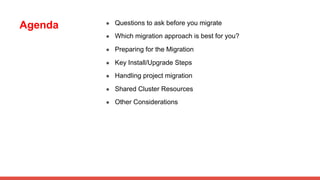
Agenda ● Questions to ask before you migrate
● Which migration approach is best for you?
● Preparing for the Migration
● Key Install/Upgrade Steps
● Handling project migration
● Shared Cluster Resources
● Other Considerations
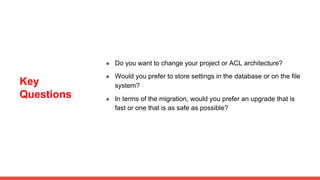
Key
Questions
● Do you want to change your project or ACL architecture?
● Would you prefer to store settings in the database or on the file
system?
● In terms of the migration, would you prefer an upgrade that is
fast or one that is as safe as possible?
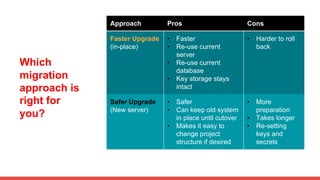
Which
migration
approach is
right for
you?
Approach Pros Cons
Faster Upgrade
(in-place)
• Faster
• Re-use current
server
• Re-use current
database
• Key storage stays
intact
• Harder to roll
back
Safer Upgrade
(New server)
• Safer
• Can keep old system
in place until cutover
• Makes it easy to
change project
structure if desired
• More
preparation
• Takes longer
• Re-setting
keys and
secrets
Preparing for
the Migration
Make backups of:
● db
● framework.properties
● rundeck-config.properties
● node resource files (such
as resources.xml, if
applicable)
● acl policies
● local execution log files
(optional, if you want to
keep all history)
Be prepared with:
● keys/passwords
● credentials for your
authentication system
● shared location for
○ execution logs
○ other resources (such as
node resource files)
● (optional) a load balancer to
place in front of cluster
servers
● settings for any custom
plugins you use
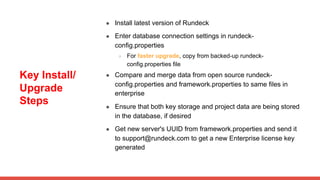
Key Install/
Upgrade
Steps
● Install latest version of Rundeck
● Enter database connection settings in rundeck-
config.properties
○ For faster upgrade, copy from backed-up rundeck-
config.properties file
● Compare and merge data from open source rundeck-
config.properties and framework.properties to same files in
enterprise
● Ensure that both key storage and project data are being stored
in the database, if desired
● Get new server's UUID from framework.properties and send it
to support@rundeck.com to get a new Enterprise license key
generated
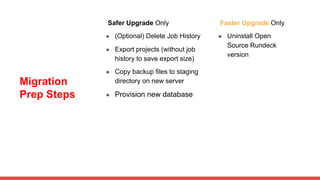
Migration
Prep Steps
Safer Upgrade Only
● (Optional) Delete Job History
● Export projects (without job
history to save export size)
● Copy backup files to staging
directory on new server
● Provision new database
Faster Upgrade Only
● Uninstall Open
Source Rundeck
version
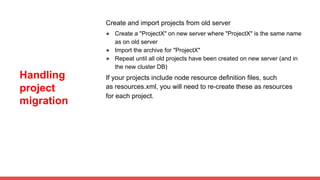
Handling
project
migration
Create and import projects from old server
● Create a "ProjectX" on new server where "ProjectX" is the same name
as on old server
● Import the archive for "ProjectX"
● Repeat until all old projects have been created on new server (and in
the new cluster DB)
If your projects include node resource definition files, such
as resources.xml, you will need to re-create these as resources
for each project.
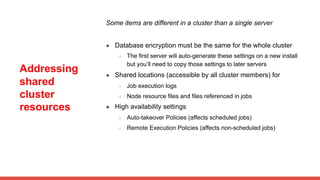
Addressing
shared
cluster
resources
Some items are different in a cluster than a single server
● Database encryption must be the same for the whole cluster
○ The first server will auto-generate these settings on a new install
but you’ll need to copy those settings to later servers
● Shared locations (accessible by all cluster members) for
○ Job execution logs
○ Node resource files and files referenced in jobs
● High availability settings
○ Auto-takeover Policies (affects scheduled jobs)
○ Remote Execution Policies (affects non-scheduled jobs)
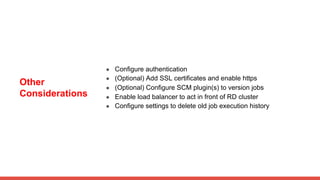
Other
Considerations
● Configure authentication
● (Optional) Add SSL certificates and enable https
● (Optional) Configure SCM plugin(s) to version jobs
● Enable load balancer to act in front of RD cluster
● Configure settings to delete old job execution history

Maximizing Your Rundeck Migration

  • 1.
  • 2.
    Agenda ● Questionsto ask before you migrate ● Which migration approach is best for you? ● Preparing for the Migration ● Key Install/Upgrade Steps ● Handling project migration ● Shared Cluster Resources ● Other Considerations
  • 3.
    Key Questions ● Do youwant to change your project or ACL architecture? ● Would you prefer to store settings in the database or on the file system? ● In terms of the migration, would you prefer an upgrade that is fast or one that is as safe as possible?
  • 4.
    Which migration approach is right for you? ApproachPros Cons Faster Upgrade (in-place) • Faster • Re-use current server • Re-use current database • Key storage stays intact • Harder to roll back Safer Upgrade (New server) • Safer • Can keep old system in place until cutover • Makes it easy to change project structure if desired • More preparation • Takes longer • Re-setting keys and secrets
  • 5.
    Preparing for the Migration Makebackups of: ● db ● framework.properties ● rundeck-config.properties ● node resource files (such as resources.xml, if applicable) ● acl policies ● local execution log files (optional, if you want to keep all history) Be prepared with: ● keys/passwords ● credentials for your authentication system ● shared location for ○ execution logs ○ other resources (such as node resource files) ● (optional) a load balancer to place in front of cluster servers ● settings for any custom plugins you use
  • 6.
    Key Install/ Upgrade Steps ● Installlatest version of Rundeck ● Enter database connection settings in rundeck- config.properties ○ For faster upgrade, copy from backed-up rundeck- config.properties file ● Compare and merge data from open source rundeck- config.properties and framework.properties to same files in enterprise ● Ensure that both key storage and project data are being stored in the database, if desired ● Get new server's UUID from framework.properties and send it to support@rundeck.com to get a new Enterprise license key generated
  • 7.
    Migration Prep Steps Safer UpgradeOnly ● (Optional) Delete Job History ● Export projects (without job history to save export size) ● Copy backup files to staging directory on new server ● Provision new database Faster Upgrade Only ● Uninstall Open Source Rundeck version
  • 8.
    Handling project migration Create and importprojects from old server ● Create a "ProjectX" on new server where "ProjectX" is the same name as on old server ● Import the archive for "ProjectX" ● Repeat until all old projects have been created on new server (and in the new cluster DB) If your projects include node resource definition files, such as resources.xml, you will need to re-create these as resources for each project.
  • 9.
    Addressing shared cluster resources Some items aredifferent in a cluster than a single server ● Database encryption must be the same for the whole cluster ○ The first server will auto-generate these settings on a new install but you’ll need to copy those settings to later servers ● Shared locations (accessible by all cluster members) for ○ Job execution logs ○ Node resource files and files referenced in jobs ● High availability settings ○ Auto-takeover Policies (affects scheduled jobs) ○ Remote Execution Policies (affects non-scheduled jobs)
  • 10.
    Other Considerations ● Configure authentication ●(Optional) Add SSL certificates and enable https ● (Optional) Configure SCM plugin(s) to version jobs ● Enable load balancer to act in front of RD cluster ● Configure settings to delete old job execution history