Maximizing New Tools
Sarah Arnold
Instructional Technology Librarian
Overview
• Background & Timeline
• Usability Testing Pre-Migration
• Migration Process
• Usability Testing Post-Migration
• Next Steps and Lessons Learned
Background
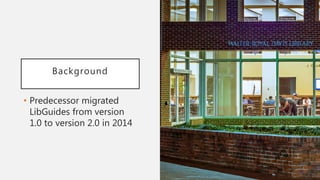
• Predecessor migrated
LibGuides from version
1.0 to version 2.0 in 2014
Background
• E-Resource & Serials Management
(ESM) Department maintained
databases in 2 systems
• eresdb – 15-year old MySQL-based system
• LibGuides A-Z Database List
• Approaching migration and killing off of
server
Not just a list of databases…
• EZ-Proxy for off campus access
• Best Bets
• Catalog access to databases
• E-Journals search
• Subject guides and Course pages
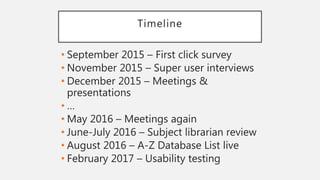
Timeline
• September 2015 – First click survey
• November 2015 – Super user interviews
• December 2015 – Meetings &
presentations
• …
• May 2016 – Meetings again
• June-July 2016 – Subject librarian review
• August 2016 – A-Z Database List live
• February 2017 – Usability testing
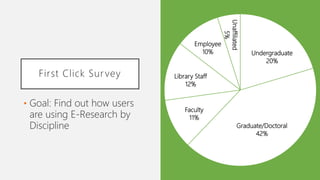
First Click Survey
• Goal: Find out how users
are using E-Research by
Discipline
Undergraduate
20%
Graduate/Doctoral
42%
Faculty
11%
Library Staff
12%
Employee
10%
Unaffiliated
5%
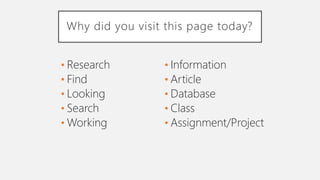
Why did you visit this page today?
• Research
• Find
• Looking
• Search
• Working
• Information
• Article
• Database
• Class
• Assignment/Project
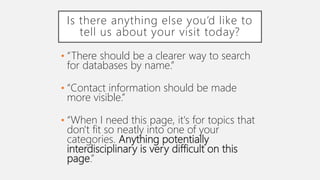
Is there anything else you’d like to
tell us about your visit today?
• “There should be a clearer way to search
for databases by name.”
• “Contact information should be made
more visible.”
• “When I need this page, it's for topics that
don't fit so neatly into one of your
categories. Anything potentially
interdisciplinary is very difficult on this
page.”
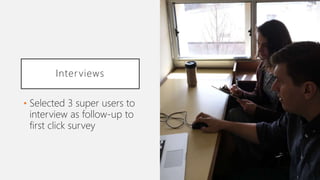
Interviews
• Selected 3 super users to
interview as follow-up to
first click survey
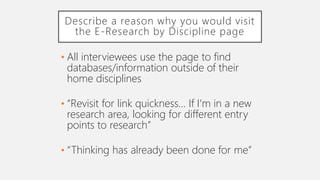
Describe a reason why you would visit
the E-Research by Discipline page
• All interviewees use the page to find
databases/information outside of their
home disciplines
• “Revisit for link quickness… If I'm in a new
research area, looking for different entry
points to research”
• “Thinking has already been done for me”
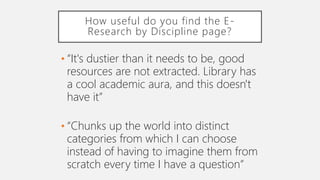
How useful do you find the E-
Research by Discipline page?
• “It's dustier than it needs to be, good
resources are not extracted. Library has
a cool academic aura, and this doesn't
have it”
• “Chunks up the world into distinct
categories from which I can choose
instead of having to imagine them from
scratch every time I have a question”
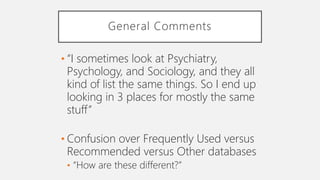
General Comments
• “I sometimes look at Psychiatry,
Psychology, and Sociology, and they all
kind of list the same things. So I end up
looking in 3 places for mostly the same
stuff”
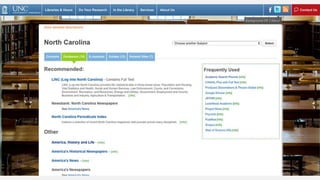
• Confusion over Frequently Used versus
Recommended versus Other databases
• “How are these different?”
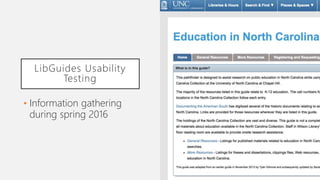
LibGuides Usability
Testing
• Information gathering
during spring 2016
LibGuides Usability Testing
• Focused on subject guide layout
• Spoke to graduate and undergraduate
students
• Included comparison of old E-Research by
Discipline page to LibGuides A-Z Database
List as one point of entry to guides
E-Research by Discipline
• Described as “overwhelming” and
“busy” by multiple users
• “Takes more ‘steadying’ to figure out
where you are”
• “Just a bunch of hyperlinks”
LibGuides A-Z Database List
• “Looks clean and not many distractors.
Obvious as a place to find resources
related to the subjects listed”
• “Would be more inclined to use this
because it looks friendlier, but
intimidating”
• Referring to long list of subjects as
intimidating
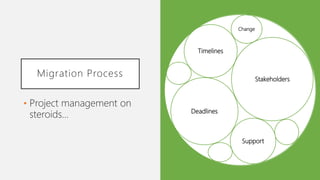
Migration Process
• Project management on
steroids…
Undergraduate
20%
Graduate/Doctoral
42%
Faculty
11%
Library Staff
12%
Employee
10%
Unaffiliated
5%
Stakeholders
Deadlines
Support
Change
Timelines
Stakeholders
• University Library
• Branch libraries like Music, Art,
Undergraduate, Science, etc.
• Health Sciences Library
• Law Library
• Media & Journalism Library
• Business School Library
Workflows
• EZProxy .cfg file creation
• Linking subject guides and course
pages to library site
• Adding new databases and updating
existing ones
• Database template
• Access issues, problems, and questions
Migration Process
• Database description review by subject
librarians
• Database import followed by asset
merge
• URL update for catalog links
• Recreating Frequently Used databases
and search options in right column
User Interface Changes
• … or lack thereof
• Focused on migration and content
cleanup
• Most users tell us they understand how
to use the page after becoming familiar
with it
Usability Testing
• To swoosh or not to
swoosh…
New E-Research by Discipline Page
• “Might be confusing to new users, but I
think it makes sense once you know
what it is”
• Majority would use the page when
already have topic to narrow it down
based on specific discipline
Individual Subject Page
• Majority of users liked best bets and
librarian photo
• Prefer search bar to be more prominent
on page
• Some thought subject bar at top of the
page was a search bar
Next Steps
• It’s not over, and
probably won’t ever be…
Undergraduate
20%
Graduate/Doctoral
42%
Faculty
11%
Library Staff
12%
Employee
10%
Unaffiliated
5%
Next Steps
• Address taxonomy of disciplines on
page
• Re-design main and sub-pages based
on user feedback
• A/B testing or guerilla usability testing
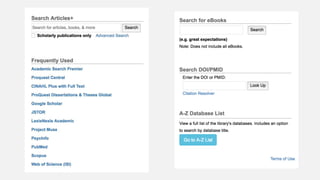
• Adjust Frequently Used and search options
in right column
• Focus on interdisciplinary research
needs
Lessons Learned
• Only bite off as much as you can chew
• Develop a timeline from the beginning
• Find a friend or two
• Go with the flow
• Take advantage of change
Thank you!
Questions?
Undergraduate
20%
Graduate/Doctoral
42%
Faculty
11%
Library Staff
12%
Employee
10%
Unaffiliated
5%

Maximizing New Tools

  • 1.
    Maximizing New Tools SarahArnold Instructional Technology Librarian
  • 2.
    Overview • Background &Timeline • Usability Testing Pre-Migration • Migration Process • Usability Testing Post-Migration • Next Steps and Lessons Learned
  • 3.
    Background • Predecessor migrated LibGuidesfrom version 1.0 to version 2.0 in 2014
  • 6.
    Background • E-Resource &Serials Management (ESM) Department maintained databases in 2 systems • eresdb – 15-year old MySQL-based system • LibGuides A-Z Database List • Approaching migration and killing off of server
  • 8.
    Not just alist of databases… • EZ-Proxy for off campus access • Best Bets • Catalog access to databases • E-Journals search • Subject guides and Course pages
  • 9.
    Timeline • September 2015– First click survey • November 2015 – Super user interviews • December 2015 – Meetings & presentations • … • May 2016 – Meetings again • June-July 2016 – Subject librarian review • August 2016 – A-Z Database List live • February 2017 – Usability testing
  • 10.
    First Click Survey •Goal: Find out how users are using E-Research by Discipline Undergraduate 20% Graduate/Doctoral 42% Faculty 11% Library Staff 12% Employee 10% Unaffiliated 5%
  • 13.
    Why did youvisit this page today? • Research • Find • Looking • Search • Working • Information • Article • Database • Class • Assignment/Project
  • 14.
    Is there anythingelse you’d like to tell us about your visit today? • “There should be a clearer way to search for databases by name.” • “Contact information should be made more visible.” • “When I need this page, it's for topics that don't fit so neatly into one of your categories. Anything potentially interdisciplinary is very difficult on this page.”
  • 15.
    Interviews • Selected 3super users to interview as follow-up to first click survey
  • 16.
    Describe a reasonwhy you would visit the E-Research by Discipline page • All interviewees use the page to find databases/information outside of their home disciplines • “Revisit for link quickness… If I'm in a new research area, looking for different entry points to research” • “Thinking has already been done for me”
  • 17.
    How useful doyou find the E- Research by Discipline page? • “It's dustier than it needs to be, good resources are not extracted. Library has a cool academic aura, and this doesn't have it” • “Chunks up the world into distinct categories from which I can choose instead of having to imagine them from scratch every time I have a question”
  • 18.
    General Comments • “Isometimes look at Psychiatry, Psychology, and Sociology, and they all kind of list the same things. So I end up looking in 3 places for mostly the same stuff” • Confusion over Frequently Used versus Recommended versus Other databases • “How are these different?”
  • 20.
    LibGuides Usability Testing • Informationgathering during spring 2016
  • 21.
    LibGuides Usability Testing •Focused on subject guide layout • Spoke to graduate and undergraduate students • Included comparison of old E-Research by Discipline page to LibGuides A-Z Database List as one point of entry to guides
  • 22.
    E-Research by Discipline •Described as “overwhelming” and “busy” by multiple users • “Takes more ‘steadying’ to figure out where you are” • “Just a bunch of hyperlinks”
  • 23.
    LibGuides A-Z DatabaseList • “Looks clean and not many distractors. Obvious as a place to find resources related to the subjects listed” • “Would be more inclined to use this because it looks friendlier, but intimidating” • Referring to long list of subjects as intimidating
  • 24.
    Migration Process • Projectmanagement on steroids… Undergraduate 20% Graduate/Doctoral 42% Faculty 11% Library Staff 12% Employee 10% Unaffiliated 5% Stakeholders Deadlines Support Change Timelines
  • 25.
    Stakeholders • University Library •Branch libraries like Music, Art, Undergraduate, Science, etc. • Health Sciences Library • Law Library • Media & Journalism Library • Business School Library
  • 26.
    Workflows • EZProxy .cfgfile creation • Linking subject guides and course pages to library site • Adding new databases and updating existing ones • Database template • Access issues, problems, and questions
  • 27.
    Migration Process • Databasedescription review by subject librarians • Database import followed by asset merge • URL update for catalog links • Recreating Frequently Used databases and search options in right column
  • 28.
    User Interface Changes •… or lack thereof • Focused on migration and content cleanup • Most users tell us they understand how to use the page after becoming familiar with it
  • 32.
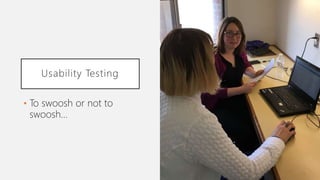
    Usability Testing • Toswoosh or not to swoosh…
  • 33.
    New E-Research byDiscipline Page • “Might be confusing to new users, but I think it makes sense once you know what it is” • Majority would use the page when already have topic to narrow it down based on specific discipline
  • 34.
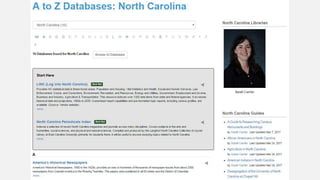
    Individual Subject Page •Majority of users liked best bets and librarian photo • Prefer search bar to be more prominent on page • Some thought subject bar at top of the page was a search bar
  • 35.
    Next Steps • It’snot over, and probably won’t ever be… Undergraduate 20% Graduate/Doctoral 42% Faculty 11% Library Staff 12% Employee 10% Unaffiliated 5%
  • 36.
    Next Steps • Addresstaxonomy of disciplines on page • Re-design main and sub-pages based on user feedback • A/B testing or guerilla usability testing • Adjust Frequently Used and search options in right column • Focus on interdisciplinary research needs
  • 37.
    Lessons Learned • Onlybite off as much as you can chew • Develop a timeline from the beginning • Find a friend or two • Go with the flow • Take advantage of change
  • 38.

Editor's Notes

  • #2 Discuss process for migrating from custom-built system to the LibGuides A-Z Database List for database/eresource management > case study for migrating E-Research by Discipline = main access point for databases (think of it as Databases) User Experience & Assessment department Contact: sjarnold@email.unc.edu
  • #3 Discuss process for migrating from custom-built system to the LibGuides A-Z Database List for database/eresource management > case study for migrating E-Research by Discipline = main access point for databases (think of it as Databases)
  • #4 Position open for about a year before I came in Info on my position and responsibilities Subject librarian meetings > needed to move project forward
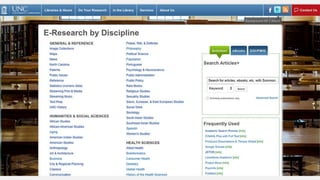
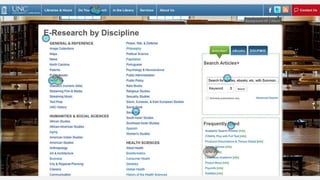
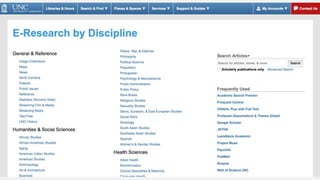
  • #5 Screenshot of E-Research by Discipline landing page in September 2015 (only top half is visible) Over 1500 databases listed by subject/discipline Right column with search options and Frequently Used
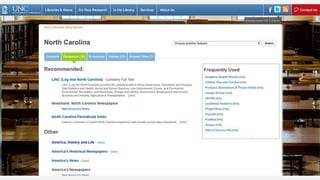
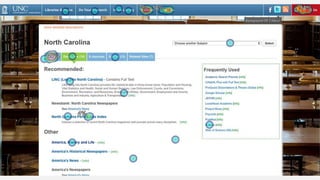
  • #6 Screenshot of E-Research by Discipline North Carolina subject page in September 2015 Tabs across top for related information/contacts
  • #7 Total for number of resources in 15-year old system, affectionately called eresdb, reached well over 2500 rows Never seen such huge spreadsheets and so many connecting tables ESM double maintenance of databases in 2 different systems > reason + workflow difficulty Redhat server called Henderson had to be migrated and taken down > no longer supported
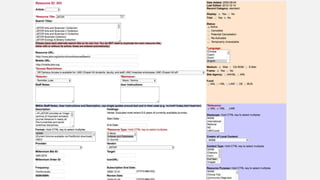
  • #8 Screenshot of internal/admin interface used by ESM
  • #9 15-year old systems grow > octopus's tentacles Had to consider all of these factors
  • #10 … = break from project to focus on other priorities including IRB-approved study examining our subject guides/LibGuides Subject librarian/database review: June 27 to July 8, extended to July 15
  • #11 Used Optimal Workshop’s Chalkmark 103 respondents – pie chart shows break down More survey goals: Main areas of focus on E-Research page: tabs, subject divisions, frequently used box Are users seeing these on the page? Do they appear to make sense to users? Use data to develop use cases for a tool like the E-Research by Discipline page that will inform future decisions in regards to replacing it
  • #12 Survey question: Where would you click to access JSTOR? Overwhelmingly successful – 88% clicked JSTOR link in Frequently Used options
  • #13 Survey question: Where would you click to access information about the librarian who specializes in North Carolina-related topics? Mixed bag of responses: 45% clicked Contacts tab 16% clicked About Us in top navigation 14% clicked Contact Us in top navigation 7% clicked Services in top navigation 4% clicked on the “North Carolina Periodicals Index” database
  • #14 Top reasons all users visited the E-Research by Discipline page
  • #15 Finding databases by name and library contacts needed to be more prominent Focus on interdisciplinary topics > wanted to redesign page to make this easier
  • #17 Interdisciplinary nature of research on campus kept coming up
  • #18 Mixed responses – it’s useful, but could be better
  • #19 1st comment again relates to lack of ability to do interdisciplinary research using E-Research by Discipline Next slide once again shows old layout of a subject page re: Frequently Used vs. Recommended vs. Other > physical circling movement of mouse on screen when looking at different lists/options
  • #20 Screenshot of E-Research by Discipline North Carolina subject page in September 2015
  • #21 Not directly related to E-Research by Discipline migration, but did get some valuable information from undergrads, grads, and faculty
  • #22 IRB-approved study looking at subject guide layout (tabbed versus side navigation, “What’s in this guide?” box on home page, etc.) Included look at old E-Research by Discipline page versus LibGuides A-Z Database List
  • #23 Overwhelming = what we hear a lot from students Able to understand how to use the page once they’re familiar, but it’s more rocket surgery than it want it to be
  • #24 Overall positive feedback on LibGuides page, but still intimidating/overwhelming with large amount of information
  • #25 Between user testing and migrating, also worked with stakeholders from across libraries to gather input and share plans Addressed new/updated workflows
  • #26 eresources monthly meeting of self-selected interested groups/individuals = biggest sounding board Also presented at departmental meetings, Collection & Services Steering Committee, one-on-one meetings as needed/requested
  • #27 Auto-created .cfg file each night from any changes made to eresdb/E-Research by Discipline backend > hardest sticking point for moving project forward Changed process for how subject librarians add their guides to the library site – was part of eresdb Worked with E-Resources & Serials Management department to figure out new workflows and who to contact with problems > still ongoing for databases being linked from the catalog
  • #28 Understood full scope > Moved to updating content that hadn’t been updated in many years Springshare hadn’t added feature to import databases at customer-level yet > worked with Support to create spreadsheets that they imported for us Followed by asset merge to remove duplicates from system Created spreadsheet for Database Management Librarian to update URLs in catalog for databases
  • #29 Eventually had to accept couldn’t do it all Decided to focus on migration of content with some updates Will circle back over next few years to interface and interdisciplinary issues > small changes overtime (iteration)
  • #30 Screenshot of new/updated E-Research by Discipline page, March 2017 Cleaner than original E-Research by Discipline page, but not all that different
  • #31 Screenshot of right column on E-Research by Discipline page, March 2017
  • #32 Screenshot of new North Carolina/individual subject page in LibGuides A-Z Database List, March 2017 More prominent best bets, guides, and librarian contact
  • #33 Explain swooshing/non-swooshing resources in more detail > final workflow to figure out
  • #34 Overall positive feedback with some of the same themes/comments we’ve heard before Overwhelming, lots of info, etc.
  • #38 Take it one step/piece at a time and iterate after the first big push An overall timeline for project would have been useful Committee tasked with overseeing project > buy-in + support Springshare/LibGuides > new features, changes If you’re already updating/making changes, take advantage of it > update content