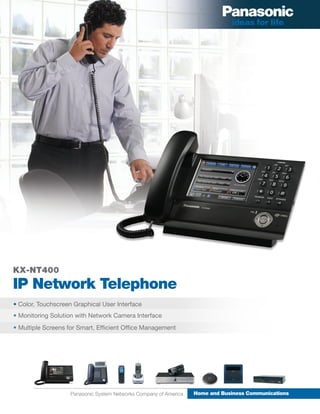
KX-NT400
IP Network Telephone
• Color, Touchscreen Graphical User Interface
• Monitoring Solution with Network Camera Interface
• Multiple Screens for Smart, Efficient Office Management


                    Panasonic System Networks Company of America   Home and Business Communications
Enhanced Communications Solutions


The Ultimate
Multi-Tasker
The Panasonic KX-NT400 Series IP Network Telephone is
a revolutionary applications device that lets you harness the
power of your Panasonic KX-NCP or KX-TDE communications
platform in an entirely new way. Featuring a color touchscreen display and our acclaimed, built-in
Communication Assistant software, ready access to enhanced communications is at your fingertips.


Perfect for locations where a PC is not practical, the NT400 features web-based functionality so you can
easily access business applications running on a company web server. Need a simple and efficient monitor-
ing solution? The NT400 features network camera integration so you can view up to 20 remote locations
right on the LCD screen.


                                            Monitoring solutions

                                            Susan is the night manager at a shipping company’s distribution
                                            hub. Network camera interface capability lets her check who’s
                                            pulling in at the loading dock and also see and speak with per-
                                            sons at the front door and buzz them in—all right from the phone.


Keep an eye on your business

David manages a twelve-unit restaraunt chain. The
KX-NT400 lets him see what’s going on in each of them in
real time. He can pan, tilt and zoom1 the camera remotely
right from the screen to get a closer look at what’s going
on at each location.
Access the company server—
without a computer

Elaine works for an online shoe retailer. A born multi-
tasker, she can be found at the front desk, in the stock
room or handling overflow calls from customer service.
When a call kicks over to her, the NT400 lets her check
the delivery status of a customer’s order—without the
need to find an available PC.


                                                    The perfect home office assistant

                                                    Jeff has joined the growing legion of executives who
                                                    spend less time commuting and more time in a home
                                                    office. The NT400 not only gives him an efficient means
                                                    of keeping in contact with customers and colleagues, but
                                                    also delivers piece of mind by letting him keep an eye on
                                                    the front door and back yard.


Efficient contact management

Sharon is a receptionist at a busy dental office and loves
the NT400’s contacts screen. Searching for a patient’s
contact info, initiating a call and adding new contacts
have never been easier or more efficient.


  For more information visit panasonic.com/bts


                Panasonic System Networks Company of America         Home and Business Communications
Powerful Features
   that Mean Business
       Key Features                                                         Power Saver Mode
                                                                            User-controlled timers let you dim
       • Color Touchscreen LCD Display
                                                                           the LCD or shut it off completely
       • Intuitive Graphical User Interface (GUI)                         when not in use. An incoming call
       • Network Camera Integration                       or a touch of the screen wakes it. It’s one more
                                                          way Panasonic continues its commitment to sav-
       • Built-in Web Browser
                                                          ing energy and creating a more sustainable future.


                                             Touchscreen LCD             Incoming Ringing/
                                                QVGA 5.7"                    Message
                                               65,000 colors                Waiting LED


Speakerphone                                                                                             SD Card Slot


                                                                                                          USB Port


                                                                                                         Hold Button


                                                                                                       Transfer Button


                                                                        Easy Navigation Key              Enter Button


                                             Additional Features
   • 48 self-labeling programmable soft keys for easy         • Second Ethernet Port helps your business cut costs
     call handling.                                             and reduce desktop clutter by allowing connection from
                                                                phone to PC versus the added cost of two cables
   • Easy Navigation Key allows fast, one-touch access to       back to the network switch.
     multiple phone system functions. The ergonomical-
     ly designed navigation key makes it easy to go through   • Built-In Headset Jack for hands-free communication.
     phone system feature menus.
                                                              • Power over Ethernet (PoE) allows data and electrical
   • Bluetooth Module for effortless wireless headset
               ®
                                                                power to be transmitted over a single Ethernet cable.
     communication.
Multiple Screens—
Unified Communications
Calls Screen                                                 Camera Screen
The Calls Screen shows connected calls and han-              The KX-NT400 can register and display video feeds
dling options for each. Simply touch the buttons on          from up to 20 IP network cameras. Use the pan, tilt
the screen to initiate call recording, conferencing,         and zoom1 controls to get a closer look.
parking or transferring.

                                                             Home (Standby) Screen
Web Browser Screen                                           The jumping off point for accessing key features
View your company’s web portal via the built-in web          such as presence and call forward settings, Do Not
browser. Perfect for locations where a PC is not prac-       Disturb mode (DND), time display, voicemail, new
tical or cost effective. You can access resources such       message waiting and more.
as an employee directory or delivery schedules.

                                                             Chat Screen
Contacts Screen                                              Send and receive text-based messages using the
Puts contacts right at your fingertips with key fea-         Chat Screen. Type on the software keyboard or the
tures including search, call initiate, start chat, dial by   phone keypad. Store up to 2,000 messages.
keypad and simple options for adding, editing and
deleting contacts.
                                                             Options Screen
                                                             Provides settings and maintenance capabilities for
Call Log Screen                                              the user and administrator. Change key features
Provides incoming, outgoing and missed call log              such as password, display, call alert pop-up, dial
functions along with caller ID data. Easily make calls       numbers and languages or access the network and
to numbers in any of the logs, add a contact to the          directory server (LDAP) for dial modification, mainte-
Personal Directory or view saved images captured             nance and programming.
by the network camera.
Industry Accolades

                                         CEPro 2010 Best Electronic Systems                                                  International CES Innovations
                                         Technologies (BEST) Award                                                           2011 Design & Engineering Award


KX-NT400 Specifications
                   Type                                            Item                                                       Description
                                                Signaling Protocol                              PCC proprietary protocol (MGCP based) for Telephony
                                                Voice CODEC                                     G.711, G.729A, G.722
                                                IP Addressing                                   Static and DHCP
IP Related
                                                Q0S                                             VLAN and DiffServ
                                                Jitter Buffer Size                              Up to 200msec (default)
                                                VoIP Security                                   Panasonic Proprietary
                                                LCD                                             5.7" QVGA TFT 65,000 colors with Touchscreen and Backlight
                                                Speakerphone                                    Yes
Telephone
                                                Message / Ring Lamp                             Dual-colored LED green and red
Features
                                                Ringer Tone                                     8
                                                Melody Ringer                                   10 Titles
                                                Operating System                                Windows CE v5.0 Pro
                                                Network Camera Integration                      Yes
                                                Camera View Frame Rate                          Motion JPEG: 10fps / MPEG4: 15fps
                                                                                                For intranet access and Web application for business:
                                                Browser (Portal)                                HTML 4.01(supports tables and forms)/Scripting:
                                                                                                JScript 5.5(ECMA-262 compliant)
Applications                                    Presence (Absent Message)                       Yes
                                                Directory                                       Contacts: 300 entries / Extension Directory / System Speed Dial
                                                Corporate Directory Access                      Simple database integration by LDAP (v3)
                                                Call Log                                        Incoming Calls: 100 / Outgoing Calls: 100
                                                API for External Application Integration        HTML
                                                Application Lock                                Protects private information from others.
                                                USB                                             USB 1.1: One USB host port for USB Keyboard, USB low-power device only
                                                SD Slot                                         Supports Panasonic SD Cards: 32MB-2GB
                                                                                                Supports optional Bluetooth Headset connection / Data communication not
                                                Bluetooth
                                                                                                supported
Interface
                                                Primary Ethernet                                10/100Base-TX
                                                Secondary Ethernet                              10/100Base-TX
                                                Keyboard Support                                Software Keyboard on LCD / USB Keyboard optional
                                                Headset Connection                              2.5mm Jack
                                                Handset/Headset Volume Control                  4 Steps
                                                Speakerphone Volume Control                     12 Steps
                                                Ringer Volume Control                           5 Steps (H-M-L-UL-Off)
Adjustment                                      Touch Panel Tone ON/OFF                         Yes
                                                LCD ON/OFF Timer                                Reduces power of LCD and backlight
                                                LCD Brightness                                  5 Levels
                                                LCD Calibration                                 Touchscreen calibration
                                                Programming for PBX                             System and Station Programming
                                                Programming for NT400                           Local Programming
Maintenance
                                                Firmware Upgrade                                Via SD Card or FTP
                                                Data Backup                                     All system data including application data / Data backup via SD Card
                                                Power Supply                                    AC Adaptor and PoE / IEEE802.3af compliant
                                                Stylus Pen                                      Included
                                                Wall Mount                                      Yes
General                                         Tilt                                            Yes: 7 Steps / 30° to 60°
                                                                                                German, French, Italian, Spanish, Portuguese, English, Russian, Ukrainian /
                                                Language
                                                                                                Other languages available via PBX programming
                                                Operating Temperature                           0-40°C
                                                IP-PT                                           IP Proprietary Telephone / Activation Key required
Activation Key
                                                Application                                     No Activation Key required: Total number of CA Pro Users adjusted
1 - Pan, tilt, zoom function requires camera with pan, tilt, zoom capability.


               Panasonic System Networks Company of America                                   Home and Home andCommunications
                                                                                                       Business Business Communications

               Three Panasonic Way,
               Secaucus, NJ 07094
               (201) 348 - 7000                                                            Design and specifications subject
                                                                                                                                                        BTS10074BROr1
               www.panasonic.com/bts                                                       to change without notice.

Kx nt400 brochure

  • 1.
    KX-NT400 IP Network Telephone •Color, Touchscreen Graphical User Interface • Monitoring Solution with Network Camera Interface • Multiple Screens for Smart, Efficient Office Management Panasonic System Networks Company of America Home and Business Communications
  • 2.
    Enhanced Communications Solutions TheUltimate Multi-Tasker The Panasonic KX-NT400 Series IP Network Telephone is a revolutionary applications device that lets you harness the power of your Panasonic KX-NCP or KX-TDE communications platform in an entirely new way. Featuring a color touchscreen display and our acclaimed, built-in Communication Assistant software, ready access to enhanced communications is at your fingertips. Perfect for locations where a PC is not practical, the NT400 features web-based functionality so you can easily access business applications running on a company web server. Need a simple and efficient monitor- ing solution? The NT400 features network camera integration so you can view up to 20 remote locations right on the LCD screen. Monitoring solutions Susan is the night manager at a shipping company’s distribution hub. Network camera interface capability lets her check who’s pulling in at the loading dock and also see and speak with per- sons at the front door and buzz them in—all right from the phone. Keep an eye on your business David manages a twelve-unit restaraunt chain. The KX-NT400 lets him see what’s going on in each of them in real time. He can pan, tilt and zoom1 the camera remotely right from the screen to get a closer look at what’s going on at each location.
  • 3.
    Access the companyserver— without a computer Elaine works for an online shoe retailer. A born multi- tasker, she can be found at the front desk, in the stock room or handling overflow calls from customer service. When a call kicks over to her, the NT400 lets her check the delivery status of a customer’s order—without the need to find an available PC. The perfect home office assistant Jeff has joined the growing legion of executives who spend less time commuting and more time in a home office. The NT400 not only gives him an efficient means of keeping in contact with customers and colleagues, but also delivers piece of mind by letting him keep an eye on the front door and back yard. Efficient contact management Sharon is a receptionist at a busy dental office and loves the NT400’s contacts screen. Searching for a patient’s contact info, initiating a call and adding new contacts have never been easier or more efficient. For more information visit panasonic.com/bts Panasonic System Networks Company of America Home and Business Communications
  • 4.
    Powerful Features that Mean Business Key Features Power Saver Mode User-controlled timers let you dim • Color Touchscreen LCD Display the LCD or shut it off completely • Intuitive Graphical User Interface (GUI) when not in use. An incoming call • Network Camera Integration or a touch of the screen wakes it. It’s one more way Panasonic continues its commitment to sav- • Built-in Web Browser ing energy and creating a more sustainable future. Touchscreen LCD Incoming Ringing/ QVGA 5.7" Message 65,000 colors Waiting LED Speakerphone SD Card Slot USB Port Hold Button Transfer Button Easy Navigation Key Enter Button Additional Features • 48 self-labeling programmable soft keys for easy • Second Ethernet Port helps your business cut costs call handling. and reduce desktop clutter by allowing connection from phone to PC versus the added cost of two cables • Easy Navigation Key allows fast, one-touch access to back to the network switch. multiple phone system functions. The ergonomical- ly designed navigation key makes it easy to go through • Built-In Headset Jack for hands-free communication. phone system feature menus. • Power over Ethernet (PoE) allows data and electrical • Bluetooth Module for effortless wireless headset ® power to be transmitted over a single Ethernet cable. communication.
  • 5.
    Multiple Screens— Unified Communications CallsScreen Camera Screen The Calls Screen shows connected calls and han- The KX-NT400 can register and display video feeds dling options for each. Simply touch the buttons on from up to 20 IP network cameras. Use the pan, tilt the screen to initiate call recording, conferencing, and zoom1 controls to get a closer look. parking or transferring. Home (Standby) Screen Web Browser Screen The jumping off point for accessing key features View your company’s web portal via the built-in web such as presence and call forward settings, Do Not browser. Perfect for locations where a PC is not prac- Disturb mode (DND), time display, voicemail, new tical or cost effective. You can access resources such message waiting and more. as an employee directory or delivery schedules. Chat Screen Contacts Screen Send and receive text-based messages using the Puts contacts right at your fingertips with key fea- Chat Screen. Type on the software keyboard or the tures including search, call initiate, start chat, dial by phone keypad. Store up to 2,000 messages. keypad and simple options for adding, editing and deleting contacts. Options Screen Provides settings and maintenance capabilities for Call Log Screen the user and administrator. Change key features Provides incoming, outgoing and missed call log such as password, display, call alert pop-up, dial functions along with caller ID data. Easily make calls numbers and languages or access the network and to numbers in any of the logs, add a contact to the directory server (LDAP) for dial modification, mainte- Personal Directory or view saved images captured nance and programming. by the network camera.
  • 6.
    Industry Accolades CEPro 2010 Best Electronic Systems International CES Innovations Technologies (BEST) Award 2011 Design & Engineering Award KX-NT400 Specifications Type Item Description Signaling Protocol PCC proprietary protocol (MGCP based) for Telephony Voice CODEC G.711, G.729A, G.722 IP Addressing Static and DHCP IP Related Q0S VLAN and DiffServ Jitter Buffer Size Up to 200msec (default) VoIP Security Panasonic Proprietary LCD 5.7" QVGA TFT 65,000 colors with Touchscreen and Backlight Speakerphone Yes Telephone Message / Ring Lamp Dual-colored LED green and red Features Ringer Tone 8 Melody Ringer 10 Titles Operating System Windows CE v5.0 Pro Network Camera Integration Yes Camera View Frame Rate Motion JPEG: 10fps / MPEG4: 15fps For intranet access and Web application for business: Browser (Portal) HTML 4.01(supports tables and forms)/Scripting: JScript 5.5(ECMA-262 compliant) Applications Presence (Absent Message) Yes Directory Contacts: 300 entries / Extension Directory / System Speed Dial Corporate Directory Access Simple database integration by LDAP (v3) Call Log Incoming Calls: 100 / Outgoing Calls: 100 API for External Application Integration HTML Application Lock Protects private information from others. USB USB 1.1: One USB host port for USB Keyboard, USB low-power device only SD Slot Supports Panasonic SD Cards: 32MB-2GB Supports optional Bluetooth Headset connection / Data communication not Bluetooth supported Interface Primary Ethernet 10/100Base-TX Secondary Ethernet 10/100Base-TX Keyboard Support Software Keyboard on LCD / USB Keyboard optional Headset Connection 2.5mm Jack Handset/Headset Volume Control 4 Steps Speakerphone Volume Control 12 Steps Ringer Volume Control 5 Steps (H-M-L-UL-Off) Adjustment Touch Panel Tone ON/OFF Yes LCD ON/OFF Timer Reduces power of LCD and backlight LCD Brightness 5 Levels LCD Calibration Touchscreen calibration Programming for PBX System and Station Programming Programming for NT400 Local Programming Maintenance Firmware Upgrade Via SD Card or FTP Data Backup All system data including application data / Data backup via SD Card Power Supply AC Adaptor and PoE / IEEE802.3af compliant Stylus Pen Included Wall Mount Yes General Tilt Yes: 7 Steps / 30° to 60° German, French, Italian, Spanish, Portuguese, English, Russian, Ukrainian / Language Other languages available via PBX programming Operating Temperature 0-40°C IP-PT IP Proprietary Telephone / Activation Key required Activation Key Application No Activation Key required: Total number of CA Pro Users adjusted 1 - Pan, tilt, zoom function requires camera with pan, tilt, zoom capability. Panasonic System Networks Company of America Home and Home andCommunications Business Business Communications Three Panasonic Way, Secaucus, NJ 07094 (201) 348 - 7000 Design and specifications subject BTS10074BROr1 www.panasonic.com/bts to change without notice.