Programming on Parallel Machines
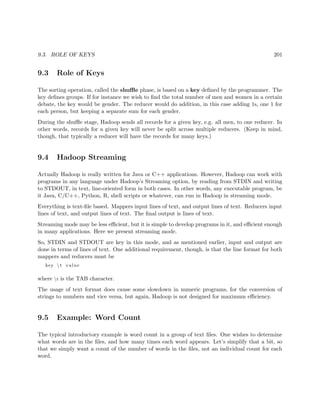
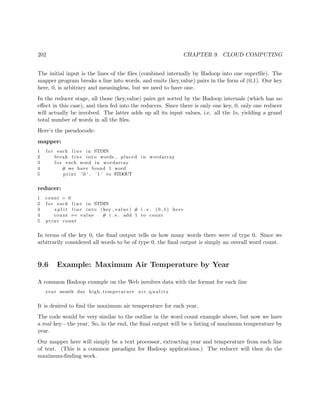
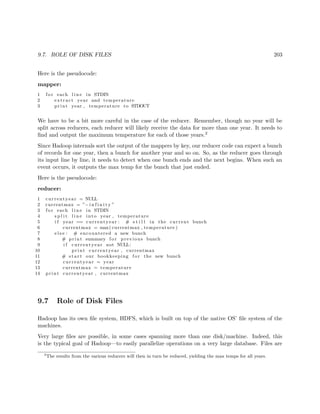
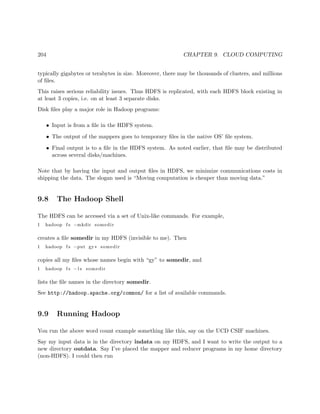
Norm Matloff
University of California, Davis
GPU, Multicore, Clusters and More
See Creative Commons license at http://heather.cs.ucdavis.edu/ matloff/probstatbook.html
This book is often revised and updated, latest edition available at http://heather.cs.ucdavis.edu/ mat-
loff/158/PLN/ParProcBook.pdf
CUDA and NVIDIA are registered trademarks.
The author has striven to minimize the number of errors, but no guarantee is made as to accuracy
of the contents of this book.
2
Author’s Biographical Sketch
Dr. Norm Matloff is a professor of computer science at the University of California at Davis, and
was formerly a professor of statistics at that university. He is a former database software developer
in Silicon Valley, and has been a statistical consultant for firms such as the Kaiser Permanente
Health Plan.
Dr. Matloff was born in Los Angeles, and grew up in East Los Angeles and the San Gabriel Valley.
He has a PhD in pure mathematics from UCLA, specializing in probability theory and statistics. He
has published numerous papers in computer science and statistics, with current research interests
in parallel processing, statistical computing, and regression methodology.
Prof. Matloff is a former appointed member of IFIP Working Group 11.3, an international com-
mittee concerned with database software security, established under UNESCO. He was a founding
member of the UC Davis Department of Statistics, and participated in the formation of the UCD
Computer Science Department as well. He is a recipient of the campuswide Distinguished Teaching
Award and Distinguished Public Service Award at UC Davis.
Dr. Matloff is the author of two published textbooks, and of a number of widely-used Web tutorials
on computer topics, such as the Linux operating system and the Python programming language.
He and Dr. Peter Salzman are authors of The Art of Debugging with GDB, DDD, and Eclipse.
Prof. Matloff’s book on the R programming language, The Art of R Programming, was published
in 2011. His book, Parallel Computation for Data Science, will come out in 2014. He is also the
author of several open-source textbooks, including From Algorithms to Z-Scores: Probabilistic and
Statistical Modeling in Computer Science (http://heather.cs.ucdavis.edu/probstatbook), and
Programming on Parallel Machines (http://heather.cs.ucdavis.edu/~matloff/ParProcBook.
pdf).
3
About This Book
Why is this book different from all other parallel programming books? It is aimed more on the
practical end of things, in that:
• There is very little theoretical content, such as O() analysis, maximum theoretical speedup,
PRAMs, directed acyclic graphs (DAGs) and so on.
• Real code is featured throughout.
• We use the main parallel platforms—OpenMP, CUDA and MPI—rather than languages that
at this stage are largely experimental or arcane.
• The running performance themes—communications latency, memory/network contention,
load balancing and so on—are interleaved throughout the book, discussed in the context
of specific platforms or applications.
• Considerable attention is paid to techniques for debugging.
The main programming language used is C/C++, but some of the code is in R, which has become
the pre-eminent language for data analysis. As a scripting language, R can be used for rapid
prototyping. In our case here, it enables me to write examples which are much less less cluttered
than they would be in C/C++, thus easier for students to discern the fundamental parallelixation
principles involved. For the same reason, it makes it easier for students to write their own parallel
code, focusing on those principles. And R has a rich set of parallel libraries.
It is assumed that the student is reasonably adept in programming, and has math background
through linear algebra. An appendix reviews the parts of the latter needed for this book. Another
appendix presents an overview of various systems issues that arise, such as process scheduling and
virtual memory.
It should be note that most of the code examples in the book are NOT optimized. The primary
emphasis is on simplicity and clarity of the techniques and languages used. However, there is
plenty of discussion on factors that affect speed, such cache coherency issues, network delays, GPU
memory structures and so on.
Here’s how to get the code files you’ll see in this book: The book is set in LaTeX, and the raw .tex
files are available in http://heather.cs.ucdavis.edu/~matloff/158/PLN. Simply download the
relevant file (the file names should be clear), then use a text editor to trim to the program code of
interest.
In order to illustrate for students the fact that research and teaching (should) enhance each other,
I occasionally will make brief references here to some of my research work.
4
Like all my open source textbooks, this one is constantly evolving. I continue to add new topics,
new examples and so on, and of course fix bugs and improve the exposition. For that reason, it
is better to link to the latest version, which will always be at http://heather.cs.ucdavis.edu/
~matloff/158/PLN/ParProcBook.pdf, rather than to copy it.
For that reason, feedback is highly appreciated. I wish to thank Stuart Ambler, Matt Butner,
Stuart Hansen, Bill Hsu, Sameer Khan, Mikel McDaniel, Richard Minner, Lars Seeman and Johan
Wikstr¨om for their comments. I’m also very grateful to Professor Hsu for his making available to
me advanced GPU-equipped machines.
You may also be interested in my open source textbook on probability and statistics, at http:
//heather.cs.ucdavis.edu/probstatbook.
This work is licensed under a Creative Commons Attribution-No Derivative Works 3.0 United
States License. Copyright is retained by N. Matloff in all non-U.S. jurisdictions, but permission to
use these materials in teaching is still granted, provided the authorship and licensing information
here is displayed in each unit. I would appreciate being notified if you use this book for teaching,
just so that I know the materials are being put to use, but this is not required.
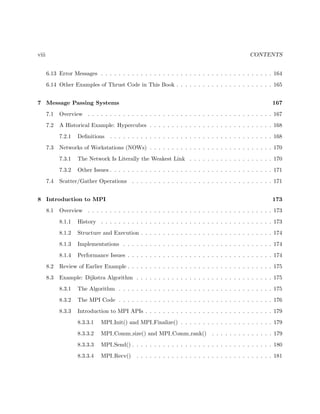
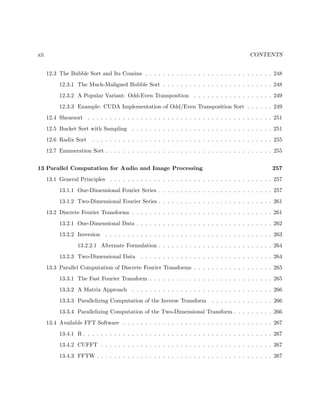
Contents
1 Introduction to Parallel Processing 1
1.1 Why Use Parallel Systems? . . . . . . . . . . . . . . . . . . . . . . . . . . . . . . . . 1
1.1.1 Execution Speed . . . . . . . . . . . . . . . . . . . . . . . . . . . . . . . . . . 1
1.1.2 Memory . . . . . . . . . . . . . . . . . . . . . . . . . . . . . . . . . . . . . . . 2
1.1.3 Distributed Processing . . . . . . . . . . . . . . . . . . . . . . . . . . . . . . . 2
1.1.4 Our Focus Here . . . . . . . . . . . . . . . . . . . . . . . . . . . . . . . . . . . 2
1.2 Parallel Processing Hardware . . . . . . . . . . . . . . . . . . . . . . . . . . . . . . . 3
1.2.1 Shared-Memory Systems . . . . . . . . . . . . . . . . . . . . . . . . . . . . . . 3
1.2.1.1 Basic Architecture . . . . . . . . . . . . . . . . . . . . . . . . . . . . 3
1.2.1.2 Multiprocessor Topologies . . . . . . . . . . . . . . . . . . . . . . . . 3
1.2.1.3 Memory Issues Etc. . . . . . . . . . . . . . . . . . . . . . . . . . . . 4
1.2.2 Message-Passing Systems . . . . . . . . . . . . . . . . . . . . . . . . . . . . . 4
1.2.2.1 Basic Architecture . . . . . . . . . . . . . . . . . . . . . . . . . . . . 4
1.2.2.2 Example: Clusters . . . . . . . . . . . . . . . . . . . . . . . . . . . . 5
1.2.3 SIMD . . . . . . . . . . . . . . . . . . . . . . . . . . . . . . . . . . . . . . . . 5
1.3 Programmer World Views . . . . . . . . . . . . . . . . . . . . . . . . . . . . . . . . . 5
1.3.1 Example: Matrix-Vector Multiply . . . . . . . . . . . . . . . . . . . . . . . . 5
1.3.2 Shared-Memory . . . . . . . . . . . . . . . . . . . . . . . . . . . . . . . . . . . 6
1.3.2.1 Programmer View . . . . . . . . . . . . . . . . . . . . . . . . . . . . 6
i
ii CONTENTS
1.3.2.2 Example: Pthreads Prime Numbers Finder . . . . . . . . . . . . . . 7
1.3.2.3 Role of the OS . . . . . . . . . . . . . . . . . . . . . . . . . . . . . . 12
1.3.2.4 Debugging Threads Programs . . . . . . . . . . . . . . . . . . . . . 13
1.3.2.5 Higher-Level Threads . . . . . . . . . . . . . . . . . . . . . . . . . . 13
1.3.2.6 Example: Sampling Bucket Sort . . . . . . . . . . . . . . . . . . . . 13
1.3.3 Message Passing . . . . . . . . . . . . . . . . . . . . . . . . . . . . . . . . . . 16
1.3.3.1 Programmer View . . . . . . . . . . . . . . . . . . . . . . . . . . . . 16
1.3.3.2 Example: MPI Prime Numbers Finder . . . . . . . . . . . . . . . . 17
1.3.4 Scatter/Gather . . . . . . . . . . . . . . . . . . . . . . . . . . . . . . . . . . . 20
1.3.4.1 R snow Package . . . . . . . . . . . . . . . . . . . . . . . . . . . . . 20
2 Recurring Performance Issues 25
2.1 Communication Bottlenecks . . . . . . . . . . . . . . . . . . . . . . . . . . . . . . . . 25
2.2 Load Balancing . . . . . . . . . . . . . . . . . . . . . . . . . . . . . . . . . . . . . . . 26
2.3 “Embarrassingly Parallel” Applications . . . . . . . . . . . . . . . . . . . . . . . . . 26
2.3.1 What People Mean by “Embarrassingly Parallel” . . . . . . . . . . . . . . . . 26
2.3.2 Iterative Algorithms . . . . . . . . . . . . . . . . . . . . . . . . . . . . . . . . 27
2.4 Static (But Possibly Random) Task Assignment Typically Better Than Dynamic . . 28
2.4.1 Example: Matrix-Vector Multiply . . . . . . . . . . . . . . . . . . . . . . . . 28
2.4.2 Load Balance, Revisited . . . . . . . . . . . . . . . . . . . . . . . . . . . . . . 30
2.4.3 Example: Mutual Web Outlinks . . . . . . . . . . . . . . . . . . . . . . . . . 31
2.4.4 Work Stealing . . . . . . . . . . . . . . . . . . . . . . . . . . . . . . . . . . . . 32
2.4.5 Timing Example . . . . . . . . . . . . . . . . . . . . . . . . . . . . . . . . . . 32
2.5 Latency and Bandwidth . . . . . . . . . . . . . . . . . . . . . . . . . . . . . . . . . . 32
2.6 Relative Merits: Performance of Shared-Memory Vs. Message-Passing . . . . . . . . 33
2.7 Memory Allocation Issues . . . . . . . . . . . . . . . . . . . . . . . . . . . . . . . . . 34
2.8 Issues Particular to Shared-Memory Systems . . . . . . . . . . . . . . . . . . . . . . 34
CONTENTS iii
3 Shared Memory Parallelism 35
3.1 What Is Shared? . . . . . . . . . . . . . . . . . . . . . . . . . . . . . . . . . . . . . . 35
3.2 Memory Modules . . . . . . . . . . . . . . . . . . . . . . . . . . . . . . . . . . . . . . 36
3.2.1 Interleaving . . . . . . . . . . . . . . . . . . . . . . . . . . . . . . . . . . . . . 36
3.2.2 Bank Conflicts and Solutions . . . . . . . . . . . . . . . . . . . . . . . . . . . 37
3.2.3 Example: Code to Implement Padding . . . . . . . . . . . . . . . . . . . . . . 39
3.3 Interconnection Topologies . . . . . . . . . . . . . . . . . . . . . . . . . . . . . . . . . 40
3.3.1 SMP Systems . . . . . . . . . . . . . . . . . . . . . . . . . . . . . . . . . . . . 40
3.3.2 NUMA Systems . . . . . . . . . . . . . . . . . . . . . . . . . . . . . . . . . . 41
3.3.3 NUMA Interconnect Topologies . . . . . . . . . . . . . . . . . . . . . . . . . . 42
3.3.3.1 Crossbar Interconnects . . . . . . . . . . . . . . . . . . . . . . . . . 42
3.3.3.2 Omega (or Delta) Interconnects . . . . . . . . . . . . . . . . . . . . 44
3.3.4 Comparative Analysis . . . . . . . . . . . . . . . . . . . . . . . . . . . . . . . 45
3.3.5 Why Have Memory in Modules? . . . . . . . . . . . . . . . . . . . . . . . . . 46
3.4 Synchronization Hardware . . . . . . . . . . . . . . . . . . . . . . . . . . . . . . . . . 47
3.4.1 Test-and-Set Instructions . . . . . . . . . . . . . . . . . . . . . . . . . . . . . 47
3.4.1.1 LOCK Prefix on Intel Processors . . . . . . . . . . . . . . . . . . . . 47
3.4.1.2 Locks with More Complex Interconnects . . . . . . . . . . . . . . . 49
3.4.2 May Not Need the Latest . . . . . . . . . . . . . . . . . . . . . . . . . . . . . 49
3.4.3 Fetch-and-Add Instructions . . . . . . . . . . . . . . . . . . . . . . . . . . . . 49
3.5 Cache Issues . . . . . . . . . . . . . . . . . . . . . . . . . . . . . . . . . . . . . . . . . 50
3.5.1 Cache Coherency . . . . . . . . . . . . . . . . . . . . . . . . . . . . . . . . . . 50
3.5.2 Example: the MESI Cache Coherency Protocol . . . . . . . . . . . . . . . . . 53
3.5.3 The Problem of “False Sharing” . . . . . . . . . . . . . . . . . . . . . . . . . 55
3.6 Memory-Access Consistency Policies . . . . . . . . . . . . . . . . . . . . . . . . . . . 55
3.7 Fetch-and-Add Combining within Interconnects . . . . . . . . . . . . . . . . . . . . . 58
3.8 Multicore Chips . . . . . . . . . . . . . . . . . . . . . . . . . . . . . . . . . . . . . . . 58
iv CONTENTS
3.9 Optimal Number of Threads . . . . . . . . . . . . . . . . . . . . . . . . . . . . . . . . 58
3.10 Processor Affinity . . . . . . . . . . . . . . . . . . . . . . . . . . . . . . . . . . . . . . 59
3.11 Illusion of Shared-Memory through Software . . . . . . . . . . . . . . . . . . . . . . . 59
3.11.0.1 Software Distributed Shared Memory . . . . . . . . . . . . . . . . . 59
3.11.0.2 Case Study: JIAJIA . . . . . . . . . . . . . . . . . . . . . . . . . . . 62
3.12 Barrier Implementation . . . . . . . . . . . . . . . . . . . . . . . . . . . . . . . . . . 65
3.12.1 A Use-Once Version . . . . . . . . . . . . . . . . . . . . . . . . . . . . . . . . 66
3.12.2 An Attempt to Write a Reusable Version . . . . . . . . . . . . . . . . . . . . 66
3.12.3 A Correct Version . . . . . . . . . . . . . . . . . . . . . . . . . . . . . . . . . 67
3.12.4 Refinements . . . . . . . . . . . . . . . . . . . . . . . . . . . . . . . . . . . . . 67
3.12.4.1 Use of Wait Operations . . . . . . . . . . . . . . . . . . . . . . . . . 67
3.12.4.2 Parallelizing the Barrier Operation . . . . . . . . . . . . . . . . . . . 69
3.12.4.2.1 Tree Barriers . . . . . . . . . . . . . . . . . . . . . . . . . . 69
3.12.4.2.2 Butterfly Barriers . . . . . . . . . . . . . . . . . . . . . . . 69
4 Introduction to OpenMP 71
4.1 Overview . . . . . . . . . . . . . . . . . . . . . . . . . . . . . . . . . . . . . . . . . . 71
4.2 Example: Dijkstra Shortest-Path Algorithm . . . . . . . . . . . . . . . . . . . . . . . 71
4.2.1 The Algorithm . . . . . . . . . . . . . . . . . . . . . . . . . . . . . . . . . . . 74
4.2.2 The OpenMP parallel Pragma . . . . . . . . . . . . . . . . . . . . . . . . . 74
4.2.3 Scope Issues . . . . . . . . . . . . . . . . . . . . . . . . . . . . . . . . . . . . . 75
4.2.4 The OpenMP single Pragma . . . . . . . . . . . . . . . . . . . . . . . . . . 76
4.2.5 The OpenMP barrier Pragma . . . . . . . . . . . . . . . . . . . . . . . . . . 76
4.2.6 Implicit Barriers . . . . . . . . . . . . . . . . . . . . . . . . . . . . . . . . . . 77
4.2.7 The OpenMP critical Pragma . . . . . . . . . . . . . . . . . . . . . . . . . 77
4.3 The OpenMP for Pragma . . . . . . . . . . . . . . . . . . . . . . . . . . . . . . . . . 77
4.3.1 Example: Dijkstra with Parallel for Loops . . . . . . . . . . . . . . . . . . . . 77
CONTENTS v
4.3.2 Nested Loops . . . . . . . . . . . . . . . . . . . . . . . . . . . . . . . . . . . . 80
4.3.3 Controlling the Partitioning of Work to Threads: the schedule Clause . . . . 80
4.3.4 Example: In-Place Matrix Transpose . . . . . . . . . . . . . . . . . . . . . . . 82
4.3.5 The OpenMP reduction Clause . . . . . . . . . . . . . . . . . . . . . . . . . 83
4.4 Example: Mandelbrot Set . . . . . . . . . . . . . . . . . . . . . . . . . . . . . . . . . 84
4.5 The Task Directive . . . . . . . . . . . . . . . . . . . . . . . . . . . . . . . . . . . . . 87
4.5.1 Example: Quicksort . . . . . . . . . . . . . . . . . . . . . . . . . . . . . . . . 88
4.6 Other OpenMP Synchronization Issues . . . . . . . . . . . . . . . . . . . . . . . . . . 89
4.6.1 The OpenMP atomic Clause . . . . . . . . . . . . . . . . . . . . . . . . . . . 89
4.6.2 Memory Consistency and the flush Pragma . . . . . . . . . . . . . . . . . . 90
4.7 Combining Work-Sharing Constructs . . . . . . . . . . . . . . . . . . . . . . . . . . . 91
4.8 The Rest of OpenMP . . . . . . . . . . . . . . . . . . . . . . . . . . . . . . . . . . . 91
4.9 Compiling, Running and Debugging OpenMP Code . . . . . . . . . . . . . . . . . . 91
4.9.1 Compiling . . . . . . . . . . . . . . . . . . . . . . . . . . . . . . . . . . . . . . 91
4.9.2 Running . . . . . . . . . . . . . . . . . . . . . . . . . . . . . . . . . . . . . . . 92
4.9.3 Debugging . . . . . . . . . . . . . . . . . . . . . . . . . . . . . . . . . . . . . . 92
4.10 Performance . . . . . . . . . . . . . . . . . . . . . . . . . . . . . . . . . . . . . . . . . 93
4.10.1 The Effect of Problem Size . . . . . . . . . . . . . . . . . . . . . . . . . . . . 93
4.10.2 Some Fine Tuning . . . . . . . . . . . . . . . . . . . . . . . . . . . . . . . . . 94
4.10.3 OpenMP Internals . . . . . . . . . . . . . . . . . . . . . . . . . . . . . . . . . 97
4.11 Example: Root Finding . . . . . . . . . . . . . . . . . . . . . . . . . . . . . . . . . . 98
4.12 Example: Mutual Outlinks . . . . . . . . . . . . . . . . . . . . . . . . . . . . . . . . 100
4.13 Example: Transforming an Adjacency Matrix . . . . . . . . . . . . . . . . . . . . . . 101
4.14 Locks with OpenMP . . . . . . . . . . . . . . . . . . . . . . . . . . . . . . . . . . . . 104
4.15 Other Examples of OpenMP Code in This Book . . . . . . . . . . . . . . . . . . . . 104
5 Introduction to GPU Programming with CUDA 107
vi CONTENTS
5.1 Overview . . . . . . . . . . . . . . . . . . . . . . . . . . . . . . . . . . . . . . . . . . 107
5.2 Example: Calculate Row Sums . . . . . . . . . . . . . . . . . . . . . . . . . . . . . . 108
5.3 Understanding the Hardware Structure . . . . . . . . . . . . . . . . . . . . . . . . . . 112
5.3.1 Processing Units . . . . . . . . . . . . . . . . . . . . . . . . . . . . . . . . . . 112
5.3.2 Thread Operation . . . . . . . . . . . . . . . . . . . . . . . . . . . . . . . . . 112
5.3.2.1 SIMT Architecture . . . . . . . . . . . . . . . . . . . . . . . . . . . . 112
5.3.2.2 The Problem of Thread Divergence . . . . . . . . . . . . . . . . . . 113
5.3.2.3 “OS in Hardware” . . . . . . . . . . . . . . . . . . . . . . . . . . . . 113
5.3.3 Memory Structure . . . . . . . . . . . . . . . . . . . . . . . . . . . . . . . . . 114
5.3.3.1 Shared and Global Memory . . . . . . . . . . . . . . . . . . . . . . . 114
5.3.3.2 Global-Memory Performance Issues . . . . . . . . . . . . . . . . . . 117
5.3.3.3 Shared-Memory Performance Issues . . . . . . . . . . . . . . . . . . 118
5.3.3.4 Host/Device Memory Transfer Performance Issues . . . . . . . . . . 118
5.3.3.5 Other Types of Memory . . . . . . . . . . . . . . . . . . . . . . . . . 119
5.3.4 Threads Hierarchy . . . . . . . . . . . . . . . . . . . . . . . . . . . . . . . . . 120
5.3.5 What’s NOT There . . . . . . . . . . . . . . . . . . . . . . . . . . . . . . . . 122
5.4 Synchronization, Within and Between Blocks . . . . . . . . . . . . . . . . . . . . . . 123
5.5 More on the Blocks/Threads Tradeoff . . . . . . . . . . . . . . . . . . . . . . . . . . 124
5.6 Hardware Requirements, Installation, Compilation, Debugging . . . . . . . . . . . . 124
5.7 Example: Improving the Row Sums Program . . . . . . . . . . . . . . . . . . . . . . 126
5.8 Example: Finding the Mean Number of Mutual Outlinks . . . . . . . . . . . . . . . 128
5.9 Example: Finding Prime Numbers . . . . . . . . . . . . . . . . . . . . . . . . . . . . 129
5.10 Example: Finding Cumulative Sums . . . . . . . . . . . . . . . . . . . . . . . . . . . 132
5.11 Example: Transforming an Adjacency Matrix . . . . . . . . . . . . . . . . . . . . . . 133
5.12 Error Checking . . . . . . . . . . . . . . . . . . . . . . . . . . . . . . . . . . . . . . . 136
5.13 Loop Unrolling . . . . . . . . . . . . . . . . . . . . . . . . . . . . . . . . . . . . . . . 137
5.14 Short Vectors . . . . . . . . . . . . . . . . . . . . . . . . . . . . . . . . . . . . . . . . 137
CONTENTS vii
5.15 The New Generation . . . . . . . . . . . . . . . . . . . . . . . . . . . . . . . . . . . . 138
5.16 CUDA from a Higher Level . . . . . . . . . . . . . . . . . . . . . . . . . . . . . . . . 138
5.16.1 CUBLAS . . . . . . . . . . . . . . . . . . . . . . . . . . . . . . . . . . . . . . 138
5.16.1.1 Example: Row Sums Once Again . . . . . . . . . . . . . . . . . . . 139
5.16.2 Thrust . . . . . . . . . . . . . . . . . . . . . . . . . . . . . . . . . . . . . . . . 141
5.16.3 CUDPP . . . . . . . . . . . . . . . . . . . . . . . . . . . . . . . . . . . . . . . 141
5.16.4 CUFFT . . . . . . . . . . . . . . . . . . . . . . . . . . . . . . . . . . . . . . . 141
5.17 Other CUDA Examples in This Book . . . . . . . . . . . . . . . . . . . . . . . . . . 141
6 Introduction to Thrust Programming 143
6.1 Compiling Thrust Code . . . . . . . . . . . . . . . . . . . . . . . . . . . . . . . . . . 143
6.1.1 Compiling to CUDA . . . . . . . . . . . . . . . . . . . . . . . . . . . . . . . . 143
6.1.2 Compiling to OpenMP . . . . . . . . . . . . . . . . . . . . . . . . . . . . . . . 143
6.2 Example: Counting the Number of Unique Values in an Array . . . . . . . . . . . . 144
6.3 Example: A Plain-C Wrapper for Thrust sort() . . . . . . . . . . . . . . . . . . . . . 148
6.4 Example: Calculating Percentiles in an Array . . . . . . . . . . . . . . . . . . . . . . 149
6.5 Mixing Thrust and CUDA Code . . . . . . . . . . . . . . . . . . . . . . . . . . . . . 151
6.6 Example: Doubling Every kth Element of an Array . . . . . . . . . . . . . . . . . . . 151
6.7 Scatter and Gather Operations . . . . . . . . . . . . . . . . . . . . . . . . . . . . . . 153
6.7.1 Example: Matrix Transpose . . . . . . . . . . . . . . . . . . . . . . . . . . . . 154
6.8 Advanced (“Fancy”) Iterators . . . . . . . . . . . . . . . . . . . . . . . . . . . . . . . 155
6.8.1 Example: Matrix Transpose Again . . . . . . . . . . . . . . . . . . . . . . . . 155
6.9 A Timing Comparison . . . . . . . . . . . . . . . . . . . . . . . . . . . . . . . . . . . 157
6.10 Example: Transforming an Adjacency Matrix . . . . . . . . . . . . . . . . . . . . . . 161
6.11 Prefix Scan . . . . . . . . . . . . . . . . . . . . . . . . . . . . . . . . . . . . . . . . . 163
6.12 More on Use of Thrust for a CUDA Backend . . . . . . . . . . . . . . . . . . . . . . 164
6.12.1 Synchronicity . . . . . . . . . . . . . . . . . . . . . . . . . . . . . . . . . . . . 164
viii CONTENTS
6.13 Error Messages . . . . . . . . . . . . . . . . . . . . . . . . . . . . . . . . . . . . . . . 164
6.14 Other Examples of Thrust Code in This Book . . . . . . . . . . . . . . . . . . . . . . 165
7 Message Passing Systems 167
7.1 Overview . . . . . . . . . . . . . . . . . . . . . . . . . . . . . . . . . . . . . . . . . . 167
7.2 A Historical Example: Hypercubes . . . . . . . . . . . . . . . . . . . . . . . . . . . . 168
7.2.1 Definitions . . . . . . . . . . . . . . . . . . . . . . . . . . . . . . . . . . . . . 168
7.3 Networks of Workstations (NOWs) . . . . . . . . . . . . . . . . . . . . . . . . . . . . 170
7.3.1 The Network Is Literally the Weakest Link . . . . . . . . . . . . . . . . . . . 170
7.3.2 Other Issues . . . . . . . . . . . . . . . . . . . . . . . . . . . . . . . . . . . . . 171
7.4 Scatter/Gather Operations . . . . . . . . . . . . . . . . . . . . . . . . . . . . . . . . 171
8 Introduction to MPI 173
8.1 Overview . . . . . . . . . . . . . . . . . . . . . . . . . . . . . . . . . . . . . . . . . . 173
8.1.1 History . . . . . . . . . . . . . . . . . . . . . . . . . . . . . . . . . . . . . . . 173
8.1.2 Structure and Execution . . . . . . . . . . . . . . . . . . . . . . . . . . . . . . 174
8.1.3 Implementations . . . . . . . . . . . . . . . . . . . . . . . . . . . . . . . . . . 174
8.1.4 Performance Issues . . . . . . . . . . . . . . . . . . . . . . . . . . . . . . . . . 174
8.2 Review of Earlier Example . . . . . . . . . . . . . . . . . . . . . . . . . . . . . . . . . 175
8.3 Example: Dijkstra Algorithm . . . . . . . . . . . . . . . . . . . . . . . . . . . . . . . 175
8.3.1 The Algorithm . . . . . . . . . . . . . . . . . . . . . . . . . . . . . . . . . . . 175
8.3.2 The MPI Code . . . . . . . . . . . . . . . . . . . . . . . . . . . . . . . . . . . 176
8.3.3 Introduction to MPI APIs . . . . . . . . . . . . . . . . . . . . . . . . . . . . . 179
8.3.3.1 MPI Init() and MPI Finalize() . . . . . . . . . . . . . . . . . . . . . 179
8.3.3.2 MPI Comm size() and MPI Comm rank() . . . . . . . . . . . . . . 179
8.3.3.3 MPI Send() . . . . . . . . . . . . . . . . . . . . . . . . . . . . . . . . 180
8.3.3.4 MPI Recv() . . . . . . . . . . . . . . . . . . . . . . . . . . . . . . . 181
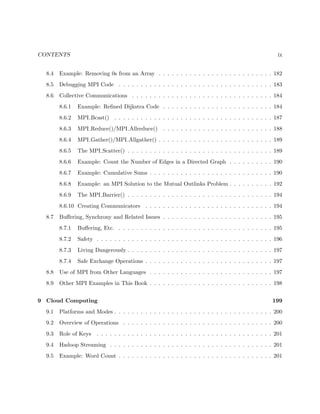
CONTENTS ix
8.4 Example: Removing 0s from an Array . . . . . . . . . . . . . . . . . . . . . . . . . . 182
8.5 Debugging MPI Code . . . . . . . . . . . . . . . . . . . . . . . . . . . . . . . . . . . 183
8.6 Collective Communications . . . . . . . . . . . . . . . . . . . . . . . . . . . . . . . . 184
8.6.1 Example: Refined Dijkstra Code . . . . . . . . . . . . . . . . . . . . . . . . . 184
8.6.2 MPI Bcast() . . . . . . . . . . . . . . . . . . . . . . . . . . . . . . . . . . . . 187
8.6.3 MPI Reduce()/MPI Allreduce() . . . . . . . . . . . . . . . . . . . . . . . . . 188
8.6.4 MPI Gather()/MPI Allgather() . . . . . . . . . . . . . . . . . . . . . . . . . . 189
8.6.5 The MPI Scatter() . . . . . . . . . . . . . . . . . . . . . . . . . . . . . . . . . 189
8.6.6 Example: Count the Number of Edges in a Directed Graph . . . . . . . . . . 190
8.6.7 Example: Cumulative Sums . . . . . . . . . . . . . . . . . . . . . . . . . . . . 190
8.6.8 Example: an MPI Solution to the Mutual Outlinks Problem . . . . . . . . . . 192
8.6.9 The MPI Barrier() . . . . . . . . . . . . . . . . . . . . . . . . . . . . . . . . . 194
8.6.10 Creating Communicators . . . . . . . . . . . . . . . . . . . . . . . . . . . . . 194
8.7 Buffering, Synchrony and Related Issues . . . . . . . . . . . . . . . . . . . . . . . . . 195
8.7.1 Buffering, Etc. . . . . . . . . . . . . . . . . . . . . . . . . . . . . . . . . . . . 195
8.7.2 Safety . . . . . . . . . . . . . . . . . . . . . . . . . . . . . . . . . . . . . . . . 196
8.7.3 Living Dangerously . . . . . . . . . . . . . . . . . . . . . . . . . . . . . . . . . 197
8.7.4 Safe Exchange Operations . . . . . . . . . . . . . . . . . . . . . . . . . . . . . 197
8.8 Use of MPI from Other Languages . . . . . . . . . . . . . . . . . . . . . . . . . . . . 197
8.9 Other MPI Examples in This Book . . . . . . . . . . . . . . . . . . . . . . . . . . . . 198
9 Cloud Computing 199
9.1 Platforms and Modes . . . . . . . . . . . . . . . . . . . . . . . . . . . . . . . . . . . . 200
9.2 Overview of Operations . . . . . . . . . . . . . . . . . . . . . . . . . . . . . . . . . . 200
9.3 Role of Keys . . . . . . . . . . . . . . . . . . . . . . . . . . . . . . . . . . . . . . . . 201
9.4 Hadoop Streaming . . . . . . . . . . . . . . . . . . . . . . . . . . . . . . . . . . . . . 201
9.5 Example: Word Count . . . . . . . . . . . . . . . . . . . . . . . . . . . . . . . . . . . 201
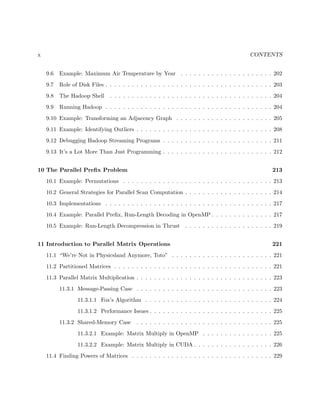
x CONTENTS
9.6 Example: Maximum Air Temperature by Year . . . . . . . . . . . . . . . . . . . . . 202
9.7 Role of Disk Files . . . . . . . . . . . . . . . . . . . . . . . . . . . . . . . . . . . . . . 203
9.8 The Hadoop Shell . . . . . . . . . . . . . . . . . . . . . . . . . . . . . . . . . . . . . 204
9.9 Running Hadoop . . . . . . . . . . . . . . . . . . . . . . . . . . . . . . . . . . . . . . 204
9.10 Example: Transforming an Adjacency Graph . . . . . . . . . . . . . . . . . . . . . . 205
9.11 Example: Identifying Outliers . . . . . . . . . . . . . . . . . . . . . . . . . . . . . . . 208
9.12 Debugging Hadoop Streaming Programs . . . . . . . . . . . . . . . . . . . . . . . . . 211
9.13 It’s a Lot More Than Just Programming . . . . . . . . . . . . . . . . . . . . . . . . . 212
10 The Parallel Prefix Problem 213
10.1 Example: Permutations . . . . . . . . . . . . . . . . . . . . . . . . . . . . . . . . . . 213
10.2 General Strategies for Parallel Scan Computation . . . . . . . . . . . . . . . . . . . . 214
10.3 Implementations . . . . . . . . . . . . . . . . . . . . . . . . . . . . . . . . . . . . . . 217
10.4 Example: Parallel Prefix, Run-Length Decoding in OpenMP . . . . . . . . . . . . . . 217
10.5 Example: Run-Length Decompression in Thrust . . . . . . . . . . . . . . . . . . . . 219
11 Introduction to Parallel Matrix Operations 221
11.1 “We’re Not in Physicsland Anymore, Toto” . . . . . . . . . . . . . . . . . . . . . . . 221
11.2 Partitioned Matrices . . . . . . . . . . . . . . . . . . . . . . . . . . . . . . . . . . . . 221
11.3 Parallel Matrix Multiplication . . . . . . . . . . . . . . . . . . . . . . . . . . . . . . . 223
11.3.1 Message-Passing Case . . . . . . . . . . . . . . . . . . . . . . . . . . . . . . . 223
11.3.1.1 Fox’s Algorithm . . . . . . . . . . . . . . . . . . . . . . . . . . . . . 224
11.3.1.2 Performance Issues . . . . . . . . . . . . . . . . . . . . . . . . . . . . 225
11.3.2 Shared-Memory Case . . . . . . . . . . . . . . . . . . . . . . . . . . . . . . . 225
11.3.2.1 Example: Matrix Multiply in OpenMP . . . . . . . . . . . . . . . . 225
11.3.2.2 Example: Matrix Multiply in CUDA . . . . . . . . . . . . . . . . . . 226
11.4 Finding Powers of Matrices . . . . . . . . . . . . . . . . . . . . . . . . . . . . . . . . 229
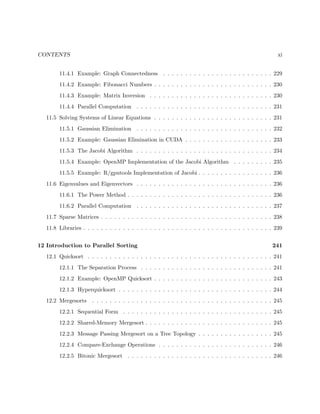
CONTENTS xi
11.4.1 Example: Graph Connectedness . . . . . . . . . . . . . . . . . . . . . . . . . 229
11.4.2 Example: Fibonacci Numbers . . . . . . . . . . . . . . . . . . . . . . . . . . . 230
11.4.3 Example: Matrix Inversion . . . . . . . . . . . . . . . . . . . . . . . . . . . . 230
11.4.4 Parallel Computation . . . . . . . . . . . . . . . . . . . . . . . . . . . . . . . 231
11.5 Solving Systems of Linear Equations . . . . . . . . . . . . . . . . . . . . . . . . . . . 231
11.5.1 Gaussian Elimination . . . . . . . . . . . . . . . . . . . . . . . . . . . . . . . 232
11.5.2 Example: Gaussian Elimination in CUDA . . . . . . . . . . . . . . . . . . . . 233
11.5.3 The Jacobi Algorithm . . . . . . . . . . . . . . . . . . . . . . . . . . . . . . . 234
11.5.4 Example: OpenMP Implementation of the Jacobi Algorithm . . . . . . . . . 235
11.5.5 Example: R/gputools Implementation of Jacobi . . . . . . . . . . . . . . . . . 236
11.6 Eigenvalues and Eigenvectors . . . . . . . . . . . . . . . . . . . . . . . . . . . . . . . 236
11.6.1 The Power Method . . . . . . . . . . . . . . . . . . . . . . . . . . . . . . . . . 236
11.6.2 Parallel Computation . . . . . . . . . . . . . . . . . . . . . . . . . . . . . . . 237
11.7 Sparse Matrices . . . . . . . . . . . . . . . . . . . . . . . . . . . . . . . . . . . . . . . 238
11.8 Libraries . . . . . . . . . . . . . . . . . . . . . . . . . . . . . . . . . . . . . . . . . . . 239
12 Introduction to Parallel Sorting 241
12.1 Quicksort . . . . . . . . . . . . . . . . . . . . . . . . . . . . . . . . . . . . . . . . . . 241
12.1.1 The Separation Process . . . . . . . . . . . . . . . . . . . . . . . . . . . . . . 241
12.1.2 Example: OpenMP Quicksort . . . . . . . . . . . . . . . . . . . . . . . . . . . 243
12.1.3 Hyperquicksort . . . . . . . . . . . . . . . . . . . . . . . . . . . . . . . . . . . 244
12.2 Mergesorts . . . . . . . . . . . . . . . . . . . . . . . . . . . . . . . . . . . . . . . . . 245
12.2.1 Sequential Form . . . . . . . . . . . . . . . . . . . . . . . . . . . . . . . . . . 245
12.2.2 Shared-Memory Mergesort . . . . . . . . . . . . . . . . . . . . . . . . . . . . . 245
12.2.3 Message Passing Mergesort on a Tree Topology . . . . . . . . . . . . . . . . . 245
12.2.4 Compare-Exchange Operations . . . . . . . . . . . . . . . . . . . . . . . . . . 246
12.2.5 Bitonic Mergesort . . . . . . . . . . . . . . . . . . . . . . . . . . . . . . . . . 246
xii CONTENTS
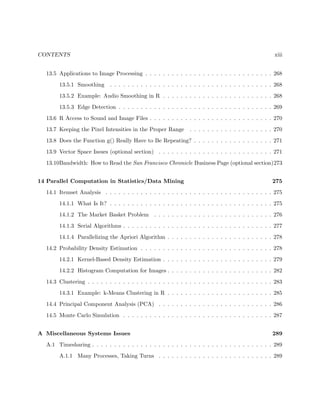
12.3 The Bubble Sort and Its Cousins . . . . . . . . . . . . . . . . . . . . . . . . . . . . . 248
12.3.1 The Much-Maligned Bubble Sort . . . . . . . . . . . . . . . . . . . . . . . . . 248
12.3.2 A Popular Variant: Odd-Even Transposition . . . . . . . . . . . . . . . . . . 249
12.3.3 Example: CUDA Implementation of Odd/Even Transposition Sort . . . . . . 249
12.4 Shearsort . . . . . . . . . . . . . . . . . . . . . . . . . . . . . . . . . . . . . . . . . . 251
12.5 Bucket Sort with Sampling . . . . . . . . . . . . . . . . . . . . . . . . . . . . . . . . 251
12.6 Radix Sort . . . . . . . . . . . . . . . . . . . . . . . . . . . . . . . . . . . . . . . . . 255
12.7 Enumeration Sort . . . . . . . . . . . . . . . . . . . . . . . . . . . . . . . . . . . . . . 255
13 Parallel Computation for Audio and Image Processing 257
13.1 General Principles . . . . . . . . . . . . . . . . . . . . . . . . . . . . . . . . . . . . . 257
13.1.1 One-Dimensional Fourier Series . . . . . . . . . . . . . . . . . . . . . . . . . . 257
13.1.2 Two-Dimensional Fourier Series . . . . . . . . . . . . . . . . . . . . . . . . . . 261
13.2 Discrete Fourier Transforms . . . . . . . . . . . . . . . . . . . . . . . . . . . . . . . . 261
13.2.1 One-Dimensional Data . . . . . . . . . . . . . . . . . . . . . . . . . . . . . . . 262
13.2.2 Inversion . . . . . . . . . . . . . . . . . . . . . . . . . . . . . . . . . . . . . . 263
13.2.2.1 Alternate Formulation . . . . . . . . . . . . . . . . . . . . . . . . . . 264
13.2.3 Two-Dimensional Data . . . . . . . . . . . . . . . . . . . . . . . . . . . . . . 264
13.3 Parallel Computation of Discrete Fourier Transforms . . . . . . . . . . . . . . . . . . 265
13.3.1 The Fast Fourier Transform . . . . . . . . . . . . . . . . . . . . . . . . . . . . 265
13.3.2 A Matrix Approach . . . . . . . . . . . . . . . . . . . . . . . . . . . . . . . . 266
13.3.3 Parallelizing Computation of the Inverse Transform . . . . . . . . . . . . . . 266
13.3.4 Parallelizing Computation of the Two-Dimensional Transform . . . . . . . . . 266
13.4 Available FFT Software . . . . . . . . . . . . . . . . . . . . . . . . . . . . . . . . . . 267
13.4.1 R . . . . . . . . . . . . . . . . . . . . . . . . . . . . . . . . . . . . . . . . . . . 267
13.4.2 CUFFT . . . . . . . . . . . . . . . . . . . . . . . . . . . . . . . . . . . . . . . 267
13.4.3 FFTW . . . . . . . . . . . . . . . . . . . . . . . . . . . . . . . . . . . . . . . . 267
CONTENTS xiii
13.5 Applications to Image Processing . . . . . . . . . . . . . . . . . . . . . . . . . . . . . 268
13.5.1 Smoothing . . . . . . . . . . . . . . . . . . . . . . . . . . . . . . . . . . . . . 268
13.5.2 Example: Audio Smoothing in R . . . . . . . . . . . . . . . . . . . . . . . . . 268
13.5.3 Edge Detection . . . . . . . . . . . . . . . . . . . . . . . . . . . . . . . . . . . 269
13.6 R Access to Sound and Image Files . . . . . . . . . . . . . . . . . . . . . . . . . . . . 270
13.7 Keeping the Pixel Intensities in the Proper Range . . . . . . . . . . . . . . . . . . . 270
13.8 Does the Function g() Really Have to Be Repeating? . . . . . . . . . . . . . . . . . . 271
13.9 Vector Space Issues (optional section) . . . . . . . . . . . . . . . . . . . . . . . . . . 271
13.10Bandwidth: How to Read the San Francisco Chronicle Business Page (optional section)273
14 Parallel Computation in Statistics/Data Mining 275
14.1 Itemset Analysis . . . . . . . . . . . . . . . . . . . . . . . . . . . . . . . . . . . . . . 275
14.1.1 What Is It? . . . . . . . . . . . . . . . . . . . . . . . . . . . . . . . . . . . . . 275
14.1.2 The Market Basket Problem . . . . . . . . . . . . . . . . . . . . . . . . . . . 276
14.1.3 Serial Algorithms . . . . . . . . . . . . . . . . . . . . . . . . . . . . . . . . . . 277
14.1.4 Parallelizing the Apriori Algorithm . . . . . . . . . . . . . . . . . . . . . . . . 278
14.2 Probability Density Estimation . . . . . . . . . . . . . . . . . . . . . . . . . . . . . . 278
14.2.1 Kernel-Based Density Estimation . . . . . . . . . . . . . . . . . . . . . . . . . 279
14.2.2 Histogram Computation for Images . . . . . . . . . . . . . . . . . . . . . . . . 282
14.3 Clustering . . . . . . . . . . . . . . . . . . . . . . . . . . . . . . . . . . . . . . . . . . 283
14.3.1 Example: k-Means Clustering in R . . . . . . . . . . . . . . . . . . . . . . . . 285
14.4 Principal Component Analysis (PCA) . . . . . . . . . . . . . . . . . . . . . . . . . . 286
14.5 Monte Carlo Simulation . . . . . . . . . . . . . . . . . . . . . . . . . . . . . . . . . . 287
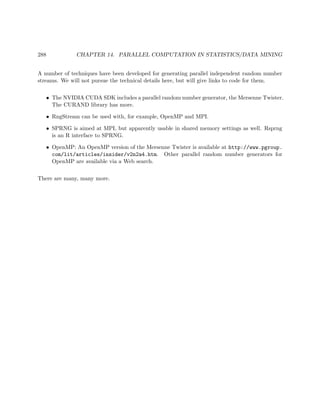
A Miscellaneous Systems Issues 289
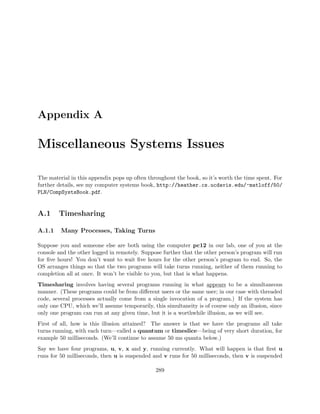
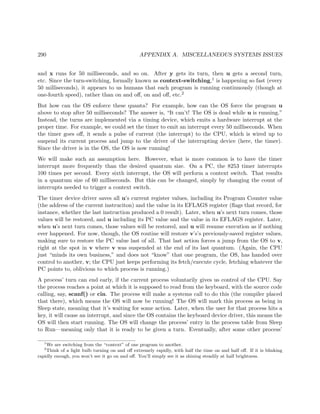
A.1 Timesharing . . . . . . . . . . . . . . . . . . . . . . . . . . . . . . . . . . . . . . . . . 289
A.1.1 Many Processes, Taking Turns . . . . . . . . . . . . . . . . . . . . . . . . . . 289
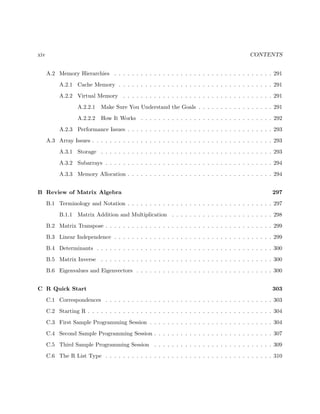
xiv CONTENTS
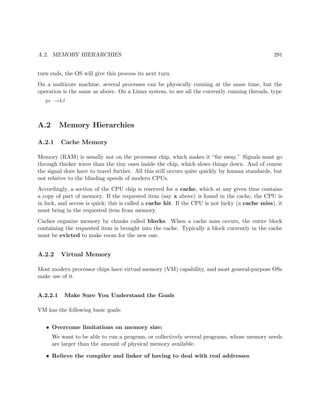
A.2 Memory Hierarchies . . . . . . . . . . . . . . . . . . . . . . . . . . . . . . . . . . . . 291
A.2.1 Cache Memory . . . . . . . . . . . . . . . . . . . . . . . . . . . . . . . . . . . 291
A.2.2 Virtual Memory . . . . . . . . . . . . . . . . . . . . . . . . . . . . . . . . . . 291
A.2.2.1 Make Sure You Understand the Goals . . . . . . . . . . . . . . . . . 291
A.2.2.2 How It Works . . . . . . . . . . . . . . . . . . . . . . . . . . . . . . 292
A.2.3 Performance Issues . . . . . . . . . . . . . . . . . . . . . . . . . . . . . . . . . 293
A.3 Array Issues . . . . . . . . . . . . . . . . . . . . . . . . . . . . . . . . . . . . . . . . . 293
A.3.1 Storage . . . . . . . . . . . . . . . . . . . . . . . . . . . . . . . . . . . . . . . 293
A.3.2 Subarrays . . . . . . . . . . . . . . . . . . . . . . . . . . . . . . . . . . . . . . 294
A.3.3 Memory Allocation . . . . . . . . . . . . . . . . . . . . . . . . . . . . . . . . . 294
B Review of Matrix Algebra 297
B.1 Terminology and Notation . . . . . . . . . . . . . . . . . . . . . . . . . . . . . . . . . 297
B.1.1 Matrix Addition and Multiplication . . . . . . . . . . . . . . . . . . . . . . . 298
B.2 Matrix Transpose . . . . . . . . . . . . . . . . . . . . . . . . . . . . . . . . . . . . . . 299
B.3 Linear Independence . . . . . . . . . . . . . . . . . . . . . . . . . . . . . . . . . . . . 299
B.4 Determinants . . . . . . . . . . . . . . . . . . . . . . . . . . . . . . . . . . . . . . . . 300
B.5 Matrix Inverse . . . . . . . . . . . . . . . . . . . . . . . . . . . . . . . . . . . . . . . 300
B.6 Eigenvalues and Eigenvectors . . . . . . . . . . . . . . . . . . . . . . . . . . . . . . . 300
C R Quick Start 303
C.1 Correspondences . . . . . . . . . . . . . . . . . . . . . . . . . . . . . . . . . . . . . . 303
C.2 Starting R . . . . . . . . . . . . . . . . . . . . . . . . . . . . . . . . . . . . . . . . . . 304
C.3 First Sample Programming Session . . . . . . . . . . . . . . . . . . . . . . . . . . . . 304
C.4 Second Sample Programming Session . . . . . . . . . . . . . . . . . . . . . . . . . . . 307
C.5 Third Sample Programming Session . . . . . . . . . . . . . . . . . . . . . . . . . . . 309
C.6 The R List Type . . . . . . . . . . . . . . . . . . . . . . . . . . . . . . . . . . . . . . 310
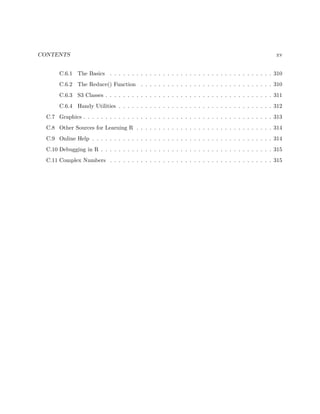
CONTENTS xv
C.6.1 The Basics . . . . . . . . . . . . . . . . . . . . . . . . . . . . . . . . . . . . . 310
C.6.2 The Reduce() Function . . . . . . . . . . . . . . . . . . . . . . . . . . . . . . 310
C.6.3 S3 Classes . . . . . . . . . . . . . . . . . . . . . . . . . . . . . . . . . . . . . . 311
C.6.4 Handy Utilities . . . . . . . . . . . . . . . . . . . . . . . . . . . . . . . . . . . 312
C.7 Graphics . . . . . . . . . . . . . . . . . . . . . . . . . . . . . . . . . . . . . . . . . . . 313
C.8 Other Sources for Learning R . . . . . . . . . . . . . . . . . . . . . . . . . . . . . . . 314
C.9 Online Help . . . . . . . . . . . . . . . . . . . . . . . . . . . . . . . . . . . . . . . . . 314
C.10 Debugging in R . . . . . . . . . . . . . . . . . . . . . . . . . . . . . . . . . . . . . . . 315
C.11 Complex Numbers . . . . . . . . . . . . . . . . . . . . . . . . . . . . . . . . . . . . . 315
xvi CONTENTS
Chapter 1
Introduction to Parallel Processing
Parallel machines provide a wonderful opportunity for applications with large computational re-
quirements. Effective use of these machines, though, requires a keen understanding of how they
work. This chapter provides an overview of both the software and hardware.
1.1 Why Use Parallel Systems?
1.1.1 Execution Speed
There is an ever-increasing appetite among some types of computer users for faster and faster
machines. This was epitomized in a statement by the late Steve Jobs, founder/CEO of Apple and
Pixar. He noted that when he was at Apple in the 1980s, he was always worried that some other
company would come out with a faster machine than his. But later at Pixar, whose graphics work
requires extremely fast computers, he was always hoping someone would produce faster machines,
so that he could use them!
A major source of speedup is the parallelizing of operations. Parallel operations can be either
within-processor, such as with pipelining or having several ALUs within a processor, or between-
processor, in which many processor work on different parts of a problem in parallel. Our focus here
is on between-processor operations.
For example, the Registrar’s Office at UC Davis uses shared-memory multiprocessors for processing
its on-line registration work. Online registration involves an enormous amount of database compu-
tation. In order to handle this computation reasonably quickly, the program partitions the work
to be done, assigning different portions of the database to different processors. The database field
has contributed greatly to the commercial success of large shared-memory machines.
1
2 CHAPTER 1. INTRODUCTION TO PARALLEL PROCESSING
As the Pixar example shows, highly computation-intensive applications like computer graphics also
have a need for these fast parallel computers. No one wants to wait hours just to generate a single
image, and the use of parallel processing machines can speed things up considerably. For example,
consider ray tracing operations. Here our code follows the path of a ray of light in a scene,
accounting for reflection and absorbtion of the light by various objects. Suppose the image is to
consist of 1,000 rows of pixels, with 1,000 pixels per row. In order to attack this problem in a
parallel processing manner with, say, 25 processors, we could divide the image into 25 squares of
size 200x200, and have each processor do the computations for its square.
Note, though, that it may be much more challenging than this implies. First of all, the computation
will need some communication between the processors, which hinders performance if it is not done
carefully. Second, if one really wants good speedup, one may need to take into account the fact
that some squares require more computation work than others. More on this below.
We are now in the era of Big Data, which requires Big Computation, thus again generating a major
need for parallel processing.
1.1.2 Memory
Yes, execution speed is the reason that comes to most people’s minds when the subject of parallel
processing comes up. But in many applications, an equally important consideration is memory
capacity. Parallel processing application often tend to use huge amounts of memory, and in many
cases the amount of memory needed is more than can fit on one machine. If we have many machines
working together, especially in the message-passing settings described below, we can accommodate
the large memory needs.
1.1.3 Distributed Processing
In the above two subsections we’ve hit the two famous issues in computer science—time (speed)
and space (memory capacity). But there is a third reason to do parallel processing, which actually
has its own name, distributed processing. In a distributed database, for instance, parts of the
database may be physically located in widely dispersed sites. If most transactions at a particular
site arise locally, then we would make more efficient use of the network, and so on.
1.1.4 Our Focus Here
In this book, the primary emphasis is on processing speed.
1.2. PARALLEL PROCESSING HARDWARE 3
1.2 Parallel Processing Hardware
This is a common scenario: Someone acquires a fancy new parallel machine, and excitedly writes a
program to run on it—only to find that the parallel code is actually slower than the original serial
version! This is due to lack of understanding of how the hardware works, at least at a high level.
This is not a hardware book, but since the goal of using parallel hardware is speed, the efficiency of
our code is a major issue. That in turn means that we need a good understanding of the underlying
hardware that we are programming. In this section, we give an overview of parallel hardware.
1.2.1 Shared-Memory Systems
1.2.1.1 Basic Architecture
Here many CPUs share the same physical memory. This kind of architecture is sometimes called
MIMD, standing for Multiple Instruction (different CPUs are working independently, and thus
typically are executing different instructions at any given instant), Multiple Data (different CPUs
are generally accessing different memory locations at any given time).
Until recently, shared-memory systems cost hundreds of thousands of dollars and were affordable
only by large companies, such as in the insurance and banking industries. The high-end machines
are indeed still quite expensive, but now multicore machines, in which two or more CPUs share
a common memory,1 are commonplace in the home and even in cell phones!
1.2.1.2 Multiprocessor Topologies
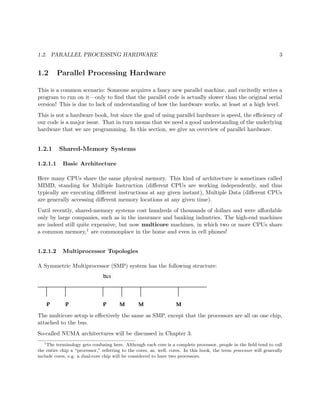
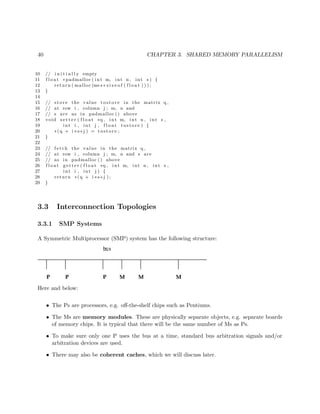
A Symmetric Multiprocessor (SMP) system has the following structure:
The multicore setup is effectively the same as SMP, except that the processors are all on one chip,
attached to the bus.
So-called NUMA architectures will be discussed in Chapter 3.
1
The terminology gets confusing here. Although each core is a complete processor, people in the field tend to call
the entire chip a “processor,” referring to the cores, as, well, cores. In this book, the term processor will generally
include cores, e.g. a dual-core chip will be considered to have two processors.
4 CHAPTER 1. INTRODUCTION TO PARALLEL PROCESSING
1.2.1.3 Memory Issues Etc.
Consider the SMP figure above.
• The Ps are processors, e.g. off-the-shelf chips such as Pentiums.
• The Ms are memory modules. These are physically separate objects, e.g. separate boards
of memory chips. It is typical that there will be the same number of memory modules as
processors. In the shared-memory case, the memory modules collectively form the entire
shared address space, but with the addresses being assigned to the memory modules in one
of two ways:
– (a)
High-order interleaving. Here consecutive addresses are in the same M (except at bound-
aries). For example, suppose for simplicity that our memory consists of addresses 0
through 1023, and that there are four Ms. Then M0 would contain addresses 0-255, M1
would have 256-511, M2 would have 512-767, and M3 would have 768-1023.
We need 10 bits for addresses (since 1024 = 210). The two most-significant bits would be
used to select the module number (since 4 = 22); hence the term high-order in the name
of this design. The remaining eight bits are used to select the word within a module.
– (b)
Low-order interleaving. Here consecutive addresses are in consecutive memory modules
(except when we get to the right end). In the example above, if we used low-order
interleaving, then address 0 would be in M0, 1 would be in M1, 2 would be in M2, 3
would be in M3, 4 would be back in M0, 5 in M1, and so on.
Here the two least-significant bits are used to determine the module number.
• To make sure only one processor uses the bus at a time, standard bus arbitration signals
and/or arbitration devices are used.
• There may also be coherent caches, which we will discuss later.
All of the above issues can have major on the speed of our program, as will be seen later.
1.2.2 Message-Passing Systems
1.2.2.1 Basic Architecture
Here we have a number of independent CPUs, each with its own independent memory. The various
processors communicate with each other via networks of some kind.
1.3. PROGRAMMER WORLD VIEWS 5
1.2.2.2 Example: Clusters
Here one has a set of commodity PCs and networks them for use as a parallel processing system. The
PCs are of course individual machines, capable of the usual uniprocessor (or now multiprocessor)
applications, but by networking them together and using parallel-processing software environments,
we can form very powerful parallel systems.
One factor which can be key to the success of a cluster is the use of a fast network, fast both in terms
of hardware and network protocol. Ordinary Ethernet and TCP/IP are fine for the applications
envisioned by the original designers of the Internet, e.g. e-mail and file transfer, but is slow in the
cluster context. A good network for a cluster is, for instance, Infiniband.
Clusters have become so popular that there are now “recipes” on how to build them for the specific
purpose of parallel processing. The term Beowulf come to mean a cluster of PCs, usually with
a fast network connecting them, used for parallel processing. Software packages such as ROCKS
(http://www.rocksclusters.org/wordpress/) have been developed to make it easy to set up
and administer such systems.
1.2.3 SIMD
In contrast to MIMD systems, processors in SIMD—Single Instruction, Multiple Data—systems
execute in lockstep. At any given time, all processors are executing the same machine instruction
on different data.
Some famous SIMD systems in computer history include the ILLIAC and Thinking Machines
Corporation’s CM-1 and CM-2. Also, DSP (“digital signal processing”) chips tend to have an
SIMD architecture.
But today the most prominent example of SIMD is that of GPUs—graphics processing units. In
addition to powering your PC’s video cards, GPUs can now be used for general-purpose computa-
tion. The architecture is fundamentally shared-memory, but the individual processors do execute
in lockstep, SIMD-fashion.
1.3 Programmer World Views
1.3.1 Example: Matrix-Vector Multiply
To explain the paradigms, we will use the term nodes, where roughly speaking one node corresponds
to one processor, and use the following example:
6 CHAPTER 1. INTRODUCTION TO PARALLEL PROCESSING
Suppose we wish to multiply an nx1 vector X by an nxn matrix A, putting the product
in an nx1 vector Y, and we have p processors to share the work.
In all the forms of parallelism, each node could be assigned some of the rows of A, and that node
would multiply X by those rows, thus forming part of Y.
Note that in typical applications, the matrix A would be very large, say thousands of rows, pos-
sibly even millions. Otherwise the computation could be done quite satisfactorily in a serial, i.e.
nonparallel manner, making parallel processing unnecessary..
1.3.2 Shared-Memory
1.3.2.1 Programmer View
In implementing the matrix-vector multiply example of Section 1.3.1 in the shared-memory paradigm,
the arrays for A, X and Y would be held in common by all nodes. If for instance node 2 were to
execute
Y[3] = 12;
and then node 15 were to subsequently execute
print("%dn",Y[3]);
then the outputted value from the latter would be 12.
Computation of the matrix-vector product AX would then involve the nodes somehow deciding
which nodes will handle which rows of A. Each node would then multiply its assigned rows of A
times X, and place the result directly in the proper section of the shared Y.
Today, programming on shared-memory multiprocessors is typically done via threading. (Or,
as we will see in other chapters, by higher-level code that runs threads underneath.) A thread
is similar to a process in an operating system (OS), but with much less overhead. Threaded
applications have become quite popular in even uniprocessor systems, and Unix,2 Windows, Python,
Java, Perl and now C++11 and R (via my Rdsm package) all support threaded programming.
In the typical implementation, a thread is a special case of an OS process. But the key difference
is that the various threads of a program share memory. (One can arrange for processes to share
memory too in some OSs, but they don’t do so by default.)
2
Here and below, the term Unix includes Linux.
1.3. PROGRAMMER WORLD VIEWS 7
On a uniprocessor system, the threads of a program take turns executing, so that there is only an
illusion of parallelism. But on a multiprocessor system, one can genuinely have threads running
in parallel.3 Whenever a processor becomes available, the OS will assign some ready thread to it.
So, among other things, this says that a thread might actually run on different processors during
different turns.
Important note: Effective use of threads requires a basic understanding of how processes take
turns executing. See Section A.1 in the appendix of this book for this material.
One of the most popular threads systems is Pthreads, whose name is short for POSIX threads.
POSIX is a Unix standard, and the Pthreads system was designed to standardize threads program-
ming on Unix. It has since been ported to other platforms.
1.3.2.2 Example: Pthreads Prime Numbers Finder
Following is an example of Pthreads programming, in which we determine the number of prime
numbers in a certain range. Read the comments at the top of the file for details; the threads
operations will be explained presently.
1 // PrimesThreads.c
2
3 // threads-based program to find the number of primes between 2 and n;
4 // uses the Sieve of Eratosthenes, deleting all multiples of 2, all
5 // multiples of 3, all multiples of 5, etc.
6
7 // for illustration purposes only; NOT claimed to be efficient
8
9 // Unix compilation: gcc -g -o primesthreads PrimesThreads.c -lpthread -lm
10
11 // usage: primesthreads n num_threads
12
13 #include <stdio.h>
14 #include <math.h>
15 #include <pthread.h> // required for threads usage
16
17 #define MAX_N 100000000
18 #define MAX_THREADS 25
19
20 // shared variables
21 int nthreads, // number of threads (not counting main())
22 n, // range to check for primeness
23 prime[MAX_N+1], // in the end, prime[i] = 1 if i prime, else 0
24 nextbase; // next sieve multiplier to be used
25 // lock for the shared variable nextbase
26 pthread_mutex_t nextbaselock = PTHREAD_MUTEX_INITIALIZER;
27 // ID structs for the threads
28 pthread_t id[MAX_THREADS];
3
There may be other processes running too. So the threads of our program must still take turns with other
processes running on the machine.
8 CHAPTER 1. INTRODUCTION TO PARALLEL PROCESSING
29
30 // "crosses out" all odd multiples of k
31 void crossout(int k)
32 { int i;
33 for (i = 3; i*k <= n; i += 2) {
34 prime[i*k] = 0;
35 }
36 }
37
38 // each thread runs this routine
39 void *worker(int tn) // tn is the thread number (0,1,...)
40 { int lim,base,
41 work = 0; // amount of work done by this thread
42 // no need to check multipliers bigger than sqrt(n)
43 lim = sqrt(n);
44 do {
45 // get next sieve multiplier, avoiding duplication across threads
46 // lock the lock
47 pthread_mutex_lock(&nextbaselock);
48 base = nextbase;
49 nextbase += 2;
50 // unlock
51 pthread_mutex_unlock(&nextbaselock);
52 if (base <= lim) {
53 // don’t bother crossing out if base known composite
54 if (prime[base]) {
55 crossout(base);
56 work++; // log work done by this thread
57 }
58 }
59 else return work;
60 } while (1);
61 }
62
63 main(int argc, char **argv)
64 { int nprimes, // number of primes found
65 i,work;
66 n = atoi(argv[1]);
67 nthreads = atoi(argv[2]);
68 // mark all even numbers nonprime, and the rest "prime until
69 // shown otherwise"
70 for (i = 3; i <= n; i++) {
71 if (i%2 == 0) prime[i] = 0;
72 else prime[i] = 1;
73 }
74 nextbase = 3;
75 // get threads started
76 for (i = 0; i < nthreads; i++) {
77 // this call says create a thread, record its ID in the array
78 // id, and get the thread started executing the function worker(),
79 // passing the argument i to that function
80 pthread_create(&id[i],NULL,worker,i);
81 }
82
83 // wait for all done
84 for (i = 0; i < nthreads; i++) {
85 // this call says wait until thread number id[i] finishes
86 // execution, and to assign the return value of that thread to our
1.3. PROGRAMMER WORLD VIEWS 9
87 // local variable work here
88 pthread_join(id[i],&work);
89 printf("%d values of base donen",work);
90 }
91
92 // report results
93 nprimes = 1;
94 for (i = 3; i <= n; i++)
95 if (prime[i]) {
96 nprimes++;
97 }
98 printf("the number of primes found was %dn",nprimes);
99
100 }
To make our discussion concrete, suppose we are running this program with two threads. Suppose
also the both threads are running simultaneously most of the time. This will occur if they aren’t
competing for turns with other threads, say if there are no other threads, or more generally if the
number of other threads is less than or equal to the number of processors minus two. (Actually,
the original thread is main(), but it lies dormant most of the time, as you’ll see.)
Note the global variables:
int nthreads, // number of threads (not counting main())
n, // range to check for primeness
prime[MAX_N+1], // in the end, prime[i] = 1 if i prime, else 0
nextbase; // next sieve multiplier to be used
pthread_mutex_t nextbaselock = PTHREAD_MUTEX_INITIALIZER;
pthread_t id[MAX_THREADS];
This will require some adjustment for those who’ve been taught that global variables are “evil.”
In most threaded programs, all communication between threads is done via global variables.4 So
even if you consider globals to be evil, they are a necessary evil in threads programming.
Personally I have always thought the stern admonitions against global variables are overblown any-
way; see http://heather.cs.ucdavis.edu/~matloff/globals.html. But as mentioned, those
admonitions are routinely ignored in threaded programming. For a nice discussion on this, see the
paper by a famous MIT computer scientist on an Intel Web page, at http://software.intel.
com/en-us/articles/global-variable-reconsidered/?wapkw=%28parallelism%29.
As mentioned earlier, the globals are shared by all processors.5 If one processor, for instance,
assigns the value 0 to prime[35] in the function crossout(), then that variable will have the value
4
Technically one could use locals in main() (or whatever function it is where the threads are created) for this
purpose, but this would be so unwieldy that it is seldom done.
5
Technically, we should say “shared by all threads” here, as a given thread does not always execute on the same
processor, but at any instant in time each executing thread is at some processor, so the statement is all right.
10 CHAPTER 1. INTRODUCTION TO PARALLEL PROCESSING
0 when accessed by any of the other processors as well. On the other hand, local variables have
different values at each processor; for instance, the variable i in that function has a different value
at each processor.
Note that in the statement
pthread_mutex_t nextbaselock = PTHREAD_MUTEX_INITIALIZER;
the right-hand side is not a constant. It is a macro call, and is thus something which is executed.
In the code
pthread_mutex_lock(&nextbaselock);
base = nextbase
nextbase += 2
pthread_mutex_unlock(&nextbaselock);
we see a critical section operation which is typical in shared-memory programming. In this
context here, it means that we cannot allow more than one thread to execute the code
base = nextbase;
nextbase += 2;
at the same time. A common term used for this is that we wish the actions in the critical section to
collectively be atomic, meaning not divisible among threads. The calls to pthread mutex lock()
and pthread mutex unlock() ensure this. If thread A is currently executing inside the critical
section and thread B tries to lock the lock by calling pthread mutex lock(), the call will block
until thread B executes pthread mutex unlock().
Here is why this is so important: Say currently nextbase has the value 11. What we want to
happen is that the next thread to read nextbase will “cross out” all multiples of 11. But if we
allow two threads to execute the critical section at the same time, the following may occur, in order:
• thread A reads nextbase, setting its value of base to 11
• thread B reads nextbase, setting its value of base to 11
• thread A adds 2 to nextbase, so that nextbase becomes 13
• thread B adds 2 to nextbase, so that nextbase becomes 15
Two problems would then occur:
1.3. PROGRAMMER WORLD VIEWS 11
• Both threads would do “crossing out” of multiples of 11, duplicating work and thus slowing
down execution speed.
• We will never “cross out” multiples of 13.
Thus the lock is crucial to the correct (and speedy) execution of the program.
Note that these problems could occur either on a uniprocessor or multiprocessor system. In the
uniprocessor case, thread A’s turn might end right after it reads nextbase, followed by a turn by
B which executes that same instruction. In the multiprocessor case, A and B could literally be
running simultaneously, but still with the action by B coming an instant after A.
This problem frequently arises in parallel database systems. For instance, consider an airline
reservation system. If a flight has only one seat left, we want to avoid giving it to two different
customers who might be talking to two agents at the same time. The lines of code in which the
seat is finally assigned (the commit phase, in database terminology) is then a critical section.
A critical section is always a potential bottleneck in a parallel program, because its code is serial
instead of parallel. In our program here, we may get better performance by having each thread
work on, say, five values of nextbase at a time. Our line
nextbase += 2;
would become
nextbase += 10;
That would mean that any given thread would need to go through the critical section only one-fifth
as often, thus greatly reducing overhead. On the other hand, near the end of the run, this may
result in some threads being idle while other threads still have a lot of work to do.
Note this code.
for (i = 0; i < nthreads; i++) {
pthread_join(id[i],&work);
printf("%d values of base donen",work);
}
This is a special case of of barrier.
A barrier is a point in the code that all threads must reach before continuing. In this case, a barrier
is needed in order to prevent premature execution of the later code
12 CHAPTER 1. INTRODUCTION TO PARALLEL PROCESSING
for (i = 3; i <= n; i++)
if (prime[i]) {
nprimes++;
}
which would result in possibly wrong output if we start counting primes before some threads are
done.
Actually, we could have used Pthreads’ built-in barrier function. We need to declare a barrier
variable, e.g.
p t h r e a d b a r r i e r t barr ;
and then call it like this:
pthread barrier wait (&barr ) ;
The pthread join() function actually causes the given thread to exit, so that we then “join” the
thread that created it, i.e. main(). Thus some may argue that this is not really a true barrier.
Barriers are very common in shared-memory programming, and will be discussed in more detail in
Chapter 3.
1.3.2.3 Role of the OS
Let’s again ponder the role of the OS here. What happens when a thread tries to lock a lock:
• The lock call will ultimately cause a system call, causing the OS to run.
• The OS keeps track of the locked/unlocked status of each lock, so it will check that status.
• Say the lock is unlocked (a 0). Then the OS sets it to locked (a 1), and the lock call returns.
The thread enters the critical section.
• When the thread is done, the unlock call unlocks the lock, similar to the locking actions.
• If the lock is locked at the time a thread makes a lock call, the call will block. The OS will
mark this thread as waiting for the lock. When whatever thread currently using the critical
section unlocks the lock, the OS will relock it and unblock the lock call of the waiting thread.
If several threads are waiting, of course only one will be unblock.
Note that main() is a thread too, the original thread that spawns the others. However, it is
dormant most of the time, due to its calls to pthread join().
1.3. PROGRAMMER WORLD VIEWS 13
Finally, keep in mind that although the globals variables are shared, the locals are not. Recall that
local variables are stored on a stack. Each thread (just like each process in general) has its own
stack. When a thread begins a turn, the OS prepares for this by pointing the stack pointer register
to this thread’s stack.
1.3.2.4 Debugging Threads Programs
Most debugging tools include facilities for threads. Here’s an overview of how it works in GDB.
First, as you run a program under GDB, the creation of new threads will be announced, e.g.
(gdb) r 100 2
Starting program: /debug/primes 100 2
[New Thread 16384 (LWP 28653)]
[New Thread 32769 (LWP 28676)]
[New Thread 16386 (LWP 28677)]
[New Thread 32771 (LWP 28678)]
You can do backtrace (bt) etc. as usual. Here are some threads-related commands:
• info threads (gives information on all current threads)
• thread 3 (change to thread 3)
• break 88 thread 3 (stop execution when thread 3 reaches source line 88)
• break 88 thread 3 if x==y (stop execution when thread 3 reaches source line 88 and the
variables x and y are equal)
Of course, many GUI IDEs use GDB internally, and thus provide the above facilities with a GUI
wrapper. Examples are DDD, Eclipse and NetBeans.
1.3.2.5 Higher-Level Threads
The OpenMP library gives the programmer a higher-level view of threading. The threads are there,
but rather hidden by higher-level abstractions. We will study OpenMP in detail in Chapter 4, and
use it frequently in the succeeding chapters, but below is an introductory example.
1.3.2.6 Example: Sampling Bucket Sort
This code implements the sampling bucket sort of Section 12.5.
14 CHAPTER 1. INTRODUCTION TO PARALLEL PROCESSING
1 // OpenMP introductory example : sampling bucket sort
2
3 // compile : gcc −fopenmp −o bsort bucketsort . c
4
5 // set the number of threads via the environment v a r i a b l e
6 // OMP NUM THREADS, e . g . in the C s h e l l
7
8 // setenv OMP NUM THREADS 8
9
10 #include <omp. h> // required
11 #include <s t d l i b . h>
12
13 // needed f o r c a l l to qsort ()
14 int cmpints ( int ∗u , int ∗v)
15 { i f (∗u < ∗v) return −1;
16 i f (∗u > ∗v) return 1;
17 return 0;
18 }
19
20 // adds xi to the part array , increments npart , the length of part
21 void grab ( int xi , int ∗part , int ∗ npart )
22 {
23 part [∗ npart ] = xi ;
24 ∗ npart += 1;
25 }
26
27 // f i n d s the min and max in y , length ny ,
28 // placing them in miny and maxy
29 void findminmax ( int ∗y , int ny , int ∗miny , int ∗maxy)
30 { int i , yi ;
31 ∗miny = ∗maxy = y [ 0 ] ;
32 f o r ( i = 1; i < ny ; i++) {
33 yi = y [ i ] ;
34 i f ( yi < ∗miny) ∗miny = yi ;
35 e l s e i f ( yi > ∗maxy) ∗maxy = yi ;
36 }
37 }
38
39 // sort the array x of length n
40 void bsort ( int ∗x , int n)
41 { // these are l o c a l to t h i s function , but shared among the threads
42 f l o a t ∗ bdries ; int ∗ counts ;
43 #pragma omp p a r a l l e l
44 // entering t h i s block a c t i v a t e s the threads , each executing i t
45 { // these are l o c a l to each thread :
46 int me = omp get thread num ( ) ;
47 int nth = omp get num threads ( ) ;
48 int i , xi , minx , maxx , s t a r t ;
49 int ∗mypart ;
50 f l o a t increm ;
1.3. PROGRAMMER WORLD VIEWS 15
51 int SAMPLESIZE;
52 // now determine the bucket boundaries ; nth − 1 of them , by
53 // sampling the array to get an idea of i t s range
54 #pragma omp s i n g l e // only 1 thread does this , implied b a r r i e r at end
55 {
56 i f (n > 1000) SAMPLESIZE = 1000;
57 e l s e SAMPLESIZE = n / 2;
58 findminmax (x ,SAMPLESIZE,&minx,&maxx ) ;
59 bdries = malloc (( nth −1)∗ s i z e o f ( f l o a t ) ) ;
60 increm = (maxx − minx ) / ( f l o a t ) nth ;
61 f o r ( i = 0; i < nth −1; i++)
62 bdries [ i ] = minx + ( i +1) ∗ increm ;
63 // array to serve as the count of the numbers of elements of x
64 // in each bucket
65 counts = malloc ( nth∗ s i z e o f ( int ) ) ;
66 }
67 // now have t h i s thread grab i t s portion of the array ; thread 0
68 // takes everything below bdries [ 0 ] , thread 1 everything between
69 // bdries [ 0 ] and bdries [ 1 ] , etc . , with thread nth−1 taking
70 // everything over bdries [ nth −1]
71 mypart = malloc (n∗ s i z e o f ( int ) ) ; int nummypart = 0;
72 f o r ( i = 0; i < n ; i++) {
73 i f (me == 0) {
74 i f (x [ i ] <= bdries [ 0 ] ) grab (x [ i ] , mypart ,&nummypart ) ;
75 }
76 e l s e i f (me < nth −1) {
77 i f (x [ i ] > bdries [me−1] && x [ i ] <= bdries [me ] )
78 grab (x [ i ] , mypart ,&nummypart ) ;
79 } e l s e
80 i f (x [ i ] > bdries [me−1]) grab (x [ i ] , mypart ,&nummypart ) ;
81 }
82 // now record how many t h i s thread got
83 counts [me] = nummypart ;
84 // sort my part
85 qsort ( mypart , nummypart , s i z e o f ( int ) , cmpints ) ;
86 #pragma omp b a r r i e r // other threads need to know a l l of counts
87 // copy sorted chunk back to the o r i g i n a l array ; f i r s t find s t a r t point
88 s t a r t = 0;
89 f o r ( i = 0; i < me; i++) s t a r t += counts [ i ] ;
90 f o r ( i = 0; i < nummypart ; i++) {
91 x [ s t a r t+i ] = mypart [ i ] ;
92 }
93 }
94 // implied b a r r i e r here ; main thread won ’ t resume u n t i l a l l threads
95 // are done
96 }
97
98 int main ( int argc , char ∗∗ argv )
99 {
100 // t e s t case
16 CHAPTER 1. INTRODUCTION TO PARALLEL PROCESSING
101 int n = a t o i ( argv [ 1 ] ) , ∗x = malloc (n∗ s i z e o f ( int ) ) ;
102 int i ;
103 f o r ( i = 0; i < n ; i++) x [ i ] = rand () % 50;
104 i f (n < 100)
105 f o r ( i = 0; i < n ; i++) p r i n t f (”%dn” ,x [ i ] ) ;
106 bsort (x , n ) ;
107 i f (n <= 100) {
108 p r i n t f (”x a f t e r s o r t i n g : n ” ) ;
109 f o r ( i = 0; i < n ; i++) p r i n t f (”%dn” ,x [ i ] ) ;
110 }
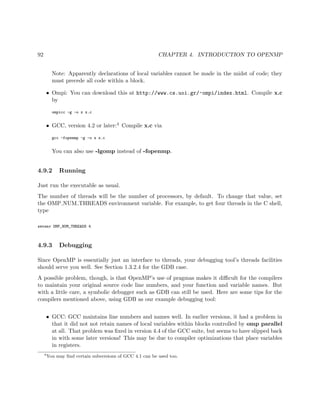
111 }
Details on OpenMP are presented in Chapter 4. Here is an overview of a few of the OpenMP
constructs available:
• #pragma omp for
In our example above, we wrote our own code to assign specific threads to do specific parts
of the work. An alternative is to write an ordinary for loop that iterates over all the work to
be done, and then ask OpenMP to assign specific iterations to specific threads. To do this,
insert the above pragma just before the loop.
• #pragma omp critical
The block that follows is implemented as a critical section. OpenMP sets up the locks etc.
for you, alleviating you of work and alleviating your code of clutter.
1.3.3 Message Passing
1.3.3.1 Programmer View
Again consider the matrix-vector multiply example of Section 1.3.1. In contrast to the shared-
memory case, in the message-passing paradigm all nodes would have separate copies of A, X and
Y. Our example in Section 1.3.2.1 would now change. in order for node 2 to send this new value of
Y[3] to node 15, it would have to execute some special function, which would be something like
send(15,12,"Y[3]");
and node 15 would have to execute some kind of receive() function.
To compute the matrix-vector product, then, would involve the following. One node, say node 0,
would distribute the rows of A to the various other nodes. Each node would receive a different set
1.3. PROGRAMMER WORLD VIEWS 17
of rows. The vector X would be sent to all nodes.6 Each node would then multiply X by the node’s
assigned rows of A, and then send the result back to node 0. The latter would collect those results,
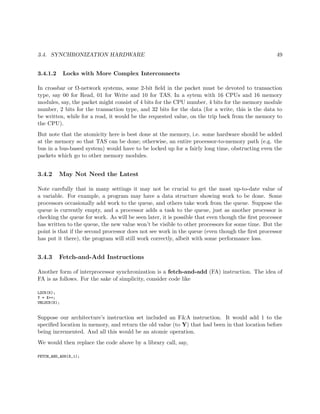
and store them in Y.
1.3.3.2 Example: MPI Prime Numbers Finder
Here we use the MPI system, with our hardware being a cluster.
MPI is a popular public-domain set of interface functions, callable from C/C++, to do message
passing. We are again counting primes, though in this case using a pipelining method. It is
similar to hardware pipelines, but in this case it is done in software, and each “stage” in the pipe
is a different computer.
The program is self-documenting, via the comments.
1 /* MPI sample program; NOT INTENDED TO BE EFFICIENT as a prime
2 finder, either in algorithm or implementation
3
4 MPI (Message Passing Interface) is a popular package using
5 the "message passing" paradigm for communicating between
6 processors in parallel applications; as the name implies,
7 processors communicate by passing messages using "send" and
8 "receive" functions
9
10 finds and reports the number of primes less than or equal to N
11
12 uses a pipeline approach: node 0 looks at all the odd numbers (i.e.
13 has already done filtering out of multiples of 2) and filters out
14 those that are multiples of 3, passing the rest to node 1; node 1
15 filters out the multiples of 5, passing the rest to node 2; node 2
16 then removes the multiples of 7, and so on; the last node must check
17 whatever is left
18
19 note that we should NOT have a node run through all numbers
20 before passing them on to the next node, since we would then
21 have no parallelism at all; on the other hand, passing on just
22 one number at a time isn’t efficient either, due to the high
23 overhead of sending a message if it is a network (tens of
24 microseconds until the first bit reaches the wire, due to
25 software delay); thus efficiency would be greatly improved if
26 each node saved up a chunk of numbers before passing them to
27 the next node */
28
29 #include <mpi.h> // mandatory
30
31 #define PIPE_MSG 0 // type of message containing a number to be checked
32 #define END_MSG 1 // type of message indicating no more data will be coming
33
34 int NNodes, // number of nodes in computation
6
In a more refined version, X would be parceled out to the nodes, just as the rows of A are.
18 CHAPTER 1. INTRODUCTION TO PARALLEL PROCESSING
35 N, // find all primes from 2 to N
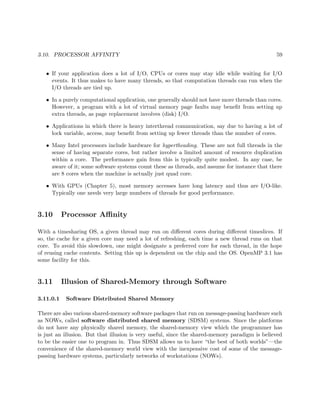
36 Me; // my node number
37 double T1,T2; // start and finish times
38
39 void Init(int Argc,char **Argv)
40 { int DebugWait;
41 N = atoi(Argv[1]);
42 // start debugging section
43 DebugWait = atoi(Argv[2]);
44 while (DebugWait) ; // deliberate infinite loop; see below
45 /* the above loop is here to synchronize all nodes for debugging;
46 if DebugWait is specified as 1 on the mpirun command line, all
47 nodes wait here until the debugging programmer starts GDB at
48 all nodes (via attaching to OS process number), then sets
49 some breakpoints, then GDB sets DebugWait to 0 to proceed; */
50 // end debugging section
51 MPI_Init(&Argc,&Argv); // mandatory to begin any MPI program
52 // puts the number of nodes in NNodes
53 MPI_Comm_size(MPI_COMM_WORLD,&NNodes);
54 // puts the node number of this node in Me
55 MPI_Comm_rank(MPI_COMM_WORLD,&Me);
56 // OK, get started; first record current time in T1
57 if (Me == NNodes-1) T1 = MPI_Wtime();
58 }
59
60 void Node0()
61 { int I,ToCheck,Dummy,Error;
62 for (I = 1; I <= N/2; I++) {
63 ToCheck = 2 * I + 1; // latest number to check for div3
64 if (ToCheck > N) break;
65 if (ToCheck % 3 > 0) // not divis by 3, so send it down the pipe
66 // send the string at ToCheck, consisting of 1 MPI integer, to
67 // node 1 among MPI_COMM_WORLD, with a message type PIPE_MSG
68 Error = MPI_Send(&ToCheck,1,MPI_INT,1,PIPE_MSG,MPI_COMM_WORLD);
69 // error not checked in this code
70 }
71 // sentinel
72 MPI_Send(&Dummy,1,MPI_INT,1,END_MSG,MPI_COMM_WORLD);
73 }
74
75 void NodeBetween()
76 { int ToCheck,Dummy,Divisor;
77 MPI_Status Status;
78 // first received item gives us our prime divisor
79 // receive into Divisor 1 MPI integer from node Me-1, of any message
80 // type, and put information about the message in Status
81 MPI_Recv(&Divisor,1,MPI_INT,Me-1,MPI_ANY_TAG,MPI_COMM_WORLD,&Status);
82 while (1) {
83 MPI_Recv(&ToCheck,1,MPI_INT,Me-1,MPI_ANY_TAG,MPI_COMM_WORLD,&Status);
84 // if the message type was END_MSG, end loop
85 if (Status.MPI_TAG == END_MSG) break;
86 if (ToCheck % Divisor > 0)
87 MPI_Send(&ToCheck,1,MPI_INT,Me+1,PIPE_MSG,MPI_COMM_WORLD);
88 }
89 MPI_Send(&Dummy,1,MPI_INT,Me+1,END_MSG,MPI_COMM_WORLD);
90 }
91
92 NodeEnd()
1.3. PROGRAMMER WORLD VIEWS 19
93 { int ToCheck,PrimeCount,I,IsComposite,StartDivisor;
94 MPI_Status Status;
95 MPI_Recv(&StartDivisor,1,MPI_INT,Me-1,MPI_ANY_TAG,MPI_COMM_WORLD,&Status);
96 PrimeCount = Me + 2; /* must account for the previous primes, which
97 won’t be detected below */
98 while (1) {
99 MPI_Recv(&ToCheck,1,MPI_INT,Me-1,MPI_ANY_TAG,MPI_COMM_WORLD,&Status);
100 if (Status.MPI_TAG == END_MSG) break;
101 IsComposite = 0;
102 for (I = StartDivisor; I*I <= ToCheck; I += 2)
103 if (ToCheck % I == 0) {
104 IsComposite = 1;
105 break;
106 }
107 if (!IsComposite) PrimeCount++;
108 }
109 /* check the time again, and subtract to find run time */
110 T2 = MPI_Wtime();
111 printf("elapsed time = %fn",(float)(T2-T1));
112 /* print results */
113 printf("number of primes = %dn",PrimeCount);
114 }
115
116 int main(int argc,char **argv)
117 { Init(argc,argv);
118 // all nodes run this same program, but different nodes take
119 // different actions
120 if (Me == 0) Node0();
121 else if (Me == NNodes-1) NodeEnd();
122 else NodeBetween();
123 // mandatory for all MPI programs
124 MPI_Finalize();
125 }
126
127 /* explanation of "number of items" and "status" arguments at the end
128 of MPI_Recv():
129
130 when receiving a message you must anticipate the longest possible
131 message, but the actual received message may be much shorter than
132 this; you can call the MPI_Get_count() function on the status
133 argument to find out how many items were actually received
134
135 the status argument will be a pointer to a struct, containing the
136 node number, message type and error status of the received
137 message
138
139 say our last parameter is Status; then Status.MPI_SOURCE
140 will contain the number of the sending node, and
141 Status.MPI_TAG will contain the message type; these are
142 important if used MPI_ANY_SOURCE or MPI_ANY_TAG in our
143 node or tag fields but still have to know who sent the
144 message or what kind it is */
The set of machines can be heterogeneous, but MPI “translates” for you automatically. If say
one node has a big-endian CPU and another has a little-endian CPU, MPI will do the proper
conversion.
20 CHAPTER 1. INTRODUCTION TO PARALLEL PROCESSING
1.3.4 Scatter/Gather
Technically, the scatter/gather programmer world view is a special case of message passing.
However, it has become so pervasive as to merit its own section here.
In this paradigm, one node, say node 0, serves as a manager, while the others serve as workers.
The parcels out work to the workers, who process their respective chunks of the data and return the
results to the manager. The latter receives the results and combines them into the final product.
The matrix-vector multiply example in Section 1.3.3.1 is an example of scatter/gather.
As noted, scatter/gather is very popular. Here are some examples of packages that use it:
• MPI includes scatter and gather functions (Section 7.4).
• Hadoop/MapReduce Computing (Chapter 9) is basically a scatter/gather operation.
• The snow package (Section 1.3.4.1) for the R language is also a scatter/gather operation.
1.3.4.1 R snow Package
Base R does not include parallel processing facilities, but includes the parallel library for this
purpose, and a number of other parallel libraries are available as well. The parallel package
arose from the merger (and slight modifcation) of two former user-contributed libraries, snow and
multicore. The former (and essentially the latter) uses the scatter/gather paradigm, and so will
be introduced in this section; see Section 1.3.4.1 for further details. for convenience, I’ll refer to
the portion of parallel that came from snow simply as snow.
Let’s use matrix-vector multiply as an example to learn from:
1 > l i b r a r y ( p a r a l l e l )
2 > c2 <− makePSOCKcluster ( rep (” l o c a l h o s t ” ,2))
3 > c2
4 socket c l u s t e r with 2 nodes on host l o c a l h o s t
5 > mmul
6 function ( cls , u , v) {
7 rowgrps <− s p l i t I n d i c e s ( nrow (u ) , length ( c l s ))
8 grpmul <− function ( grp ) u [ grp , ] %∗% v
9 mout <− clusterApply ( cls , rowgrps , grpmul )
10 Reduce ( c , mout)
11 }
12 > a <− matrix ( sample (1:50 ,16 , replace=T) , ncol =2)
13 > a
14 [ , 1 ] [ , 2 ]
15 [ 1 , ] 34 41
16 [ 2 , ] 10 28
1.3. PROGRAMMER WORLD VIEWS 21
17 [ 3 , ] 44 23
18 [ 4 , ] 7 29
19 [ 5 , ] 6 24
20 [ 6 , ] 28 29
21 [ 7 , ] 21 1
22 [ 8 , ] 38 30
23 > b <− c (5 , −2)
24 > b
25 [ 1 ] 5 −2
26 > a %∗% b # s e r i a l multiply
27 [ , 1 ]
28 [ 1 , ] 88
29 [ 2 , ] −6
30 [ 3 , ] 174
31 [ 4 , ] −23
32 [ 5 , ] −18
33 [ 6 , ] 82
34 [ 7 , ] 103
35 [ 8 , ] 130
36 > clusterExport ( c2 , c (” a ” ,”b ”)) # send a , b to workers
37 > clusterEvalQ ( c2 , a ) # check that they have i t
38 [ [ 1 ] ]
39 [ , 1 ] [ , 2 ]
40 [ 1 , ] 34 41
41 [ 2 , ] 10 28
42 [ 3 , ] 44 23
43 [ 4 , ] 7 29
44 [ 5 , ] 6 24
45 [ 6 , ] 28 29
46 [ 7 , ] 21 1
47 [ 8 , ] 38 30
48
49 [ [ 2 ] ]
50 [ , 1 ] [ , 2 ]
51 [ 1 , ] 34 41
52 [ 2 , ] 10 28
53 [ 3 , ] 44 23
54 [ 4 , ] 7 29
55 [ 5 , ] 6 24
56 [ 6 , ] 28 29
57 [ 7 , ] 21 1
58 [ 8 , ] 38 30
59 > mmul( c2 , a , b) # t e s t our p a r a l l e l code
60 [ 1 ] 88 −6 174 −23 −18 82 103 130
What just happened?
First we set up a snow cluster. The term should not be confused with hardware systems we referred
to as “clusters” earlier. We are simply setting up a group of R processes that will communicate
22 CHAPTER 1. INTRODUCTION TO PARALLEL PROCESSING
with each other via TCP/IP sockets.
In this case, my cluster consists of two R processes running on the machine from which I invoked
makePSOCKcluster(). (In TCP/IP terminology, localhost refers to the local machine.) If I
were to run the Unix ps command, with appropriate options, say ax, I’d see three R processes. I
saved the cluster in c2.
On the other hand, my snow cluster could indeed be set up on a real cluster, e.g.
c3 <− makePSOCKcluster ( c (” pc28 ” ,” pc29 ” ,” pc29 ”))
where pc28 etc. are machine names.
In preparing to test my parallel code, I needed to ship my matrices a and b to the workers:
> clusterExport ( c2 , c (” a ” ,”b ”)) # send a , b to workers
Note that this function assumes that a and b are global variables at the invoking node, i.e. the
manager, and it will place copies of them in the global workspace of the worker nodes.
Note that the copies are independent of the originals; if a worker changes, say, b[3], that change
won’t be made at the manager or at the other worker. This is a message-passing system, indeed.
So, how does the mmul code work? Here’s a handy copy:
1 mmul <− function ( cls , u , v) {
2 rowgrps <− s p l i t I n d i c e s ( nrow (u ) , length ( c l s ))
3 grpmul <− function ( grp ) u [ grp , ] %∗% v
4 mout <− clusterApply ( cls , rowgrps , grpmul )
5 Reduce ( c , mout)
6 }
As discussed in Section 1.3.1, our strategy will be to partition the rows of the matrix, and then
have different workers handle different groups of rows. Our call to splitIndices() sets this up for
us.
That function does what its name implies, e.g.
> s p l i t I n d i c e s (12 ,5)
[ [ 1 ] ]
[ 1 ] 1 2 3
[ [ 2 ] ]
[ 1 ] 4 5
[ [ 3 ] ]
[ 1 ] 6 7
[ [ 4 ] ]
[ 1 ] 8 9
1.3. PROGRAMMER WORLD VIEWS 23
[ [ 5 ] ]
[ 1 ] 10 11 12
Here we asked the function to partition the numbers 1,...,12 into 5 groups, as equal-sized as possible,
which you can see is what it did. Note that the type of the return value is an R list.
So, after executing that function in our mmul() code, rowgrps will be an R list consisting of a
partitioning of the row numbers of u, exactly what we need.
The call to clusterApply() is then where the actual work is assigned to the workers. The code
mout <− clusterApply ( cls , rowgrps , grpmul )
instructs snow to have the first worker process the rows in rowgrps[[1]], the second worker to
work on rowgrps[[2]], and so on. The clusterApply() function expects its second argument to
be an R list, which is the case here.
Each worker will then multiply v by its row group, and return the product to the manager. However,
the product will again be a list, one component for each worker, so we need Reduce() to string
everything back together.
Note that R does allow functions defined within functions, which the locals and arguments of the
outer function becoming global to the inner function.
Note that a here could have been huge, in which case the export action could slow down our
program. If a were not needed at the workers other than for this one-time matrix multiply, we may
wish to change to code so that we send each worker only the rows of a that we need:
1 mmul1 <− function ( cls , u , v) {
2 rowgrps <− s p l i t I n d i c e s ( nrow (u ) , length ( c l s ))
3 uchunks <− Map( function ( grp ) u [ grp , ] , rowgrps )
4 mulchunk <− function ( uc ) uc %∗% v
5 mout <− clusterApply ( cls , uchunks , mulchunk )
6 Reduce ( c , mout)
7 }
Let’s test it:
1 > a <− matrix ( sample (1:50 ,16 , replace=T) , ncol =2)
2 > b <− c (5 , −2)
3 > clusterExport ( c2 ,” b”) # don ’ t send a
4 a
5 [ , 1 ] [ , 2 ]
6 [ 1 , ] 10 26
7 [ 2 , ] 1 34
8 [ 3 , ] 49 30
9 [ 4 , ] 39 41
10 [ 5 , ] 12 14
24 CHAPTER 1. INTRODUCTION TO PARALLEL PROCESSING
11 [ 6 , ] 2 30
12 [ 7 , ] 33 23
13 [ 8 , ] 44 5
14 > a %∗% b
15 [ , 1 ]
16 [ 1 , ] −2
17 [ 2 , ] −63
18 [ 3 , ] 185
19 [ 4 , ] 113
20 [ 5 , ] 32
21 [ 6 , ] −50
22 [ 7 , ] 119
23 [ 8 , ] 210
24 > mmul1( c2 , a , b)
25 [ 1 ] −2 −63 185 113 32 −50 119 210
Note that we did not need to use clusterExport() to send the chunks of a to the workers, as the
call to clusterApply() does this, since it sends the arguments,
Chapter 2
Recurring Performance Issues
Oh no! It’s actually slower in parallel!—almost everyone’s exclamation the first time they try to
parallelize code
The available parallel hardware systems sound wonderful at first. But everyone who uses such
systems has had the experience of enthusiastically writing his/her first parallel program, anticipat-
ing great speedups, only to find that the parallel code actually runs more slowly than the original
nonparallel program.
In this chapter, we highlight some major issues that will pop up throughout the book.
2.1 Communication Bottlenecks
Whether you are on a shared-memory, message-passing or other platform, communication is always
a potential bottleneck:
• On a shared-memory system, the threads must contend with each other in communicating
with memory. And the problem is exacerbated by cache coherency transactions (Section 3.5.1.
• On a NOW, even a very fast network is very slow compared to CPU speeds.
• GPUs are really fast, but their communication with their CPU hosts is slow. There are also
memory contention issues as in ordinary shared-memory systems.
Among other things, communication considerations largely drive the load balancing issue, discussed
next.
25
26 CHAPTER 2. RECURRING PERFORMANCE ISSUES
2.2 Load Balancing
Arguably the most central performance issue is load balancing, i.e. keeping all the processors
busy as much as possible. This issue arises constantly in any discussion of parallel processing.
A nice, easily understandable example is shown in Chapter 7 of the book, Multicore Application
Programming: for Windows, Linux and Oracle Solaris, Darryl Gove, 2011, Addison-Wesley. There
the author shows code to compute the Mandelbrot set, defined as follows.
Start with any number c in the complex plane, and initialize z to 0. Then keep applying the
transformation
z ← z2
+ c (2.1)
If the resulting sequence remains bounded (say after a certain number of iterations), we say that c
belongs to the Mandelbrot set.
Gove has a rectangular grid of points in the plane, and wants to determine whether each point is
in the set or not; a simple but time-consuming computation is used for this determination.1
Gove sets up two threads, one handling all the points in the left half of the grid and the other
handling the right half. He finds that the latter thread is very often idle, while the former thread
is usually busy—extremely poor load balance. We’ll return to this issue in Section 2.4.
2.3 “Embarrassingly Parallel” Applications
The term embarrassingly parallel is heard often in talk about parallel programming.
2.3.1 What People Mean by “Embarrassingly Parallel”
Consider a matrix multiplication application, for instance, in which we compute AX for a matrix
A and a vector X. One way to parallelize this problem would be to have each processor handle a
group of rows of A, multiplying each by X in parallel with the other processors, which are handling
other groups of rows. We call the problem embarrassingly parallel, with the word “embarrassing”
meaning that the problem is too easy, i.e. there is no intellectual challenge involved. It is pretty
obvious that the computation Y = AX can be parallelized very easily by splitting the rows of A
into groups.
1
You can download Gove’s code from http://blogs.sun.com/d/resource/map_src.tar.bz2. Most relevant is
listing7.64.c.
2.3. “EMBARRASSINGLY PARALLEL” APPLICATIONS 27
By contrast, most parallel sorting algorithms require a great deal of interaction. For instance,
consider Mergesort. It breaks the vector to be sorted into two (or more) independent parts, say
the left half and right half, which are then sorted in parallel by two processes. So far, this is
embarrassingly parallel, at least after the vector is broken in half. But then the two sorted halves
must be merged to produce the sorted version of the original vector, and that process is not
embarrassingly parallel; it can be parallelized, but in a more complex, less obvious manner.
Of course, it’s no shame to have an embarrassingly parallel problem! On the contrary, except for
showoff academics, having an embarrassingly parallel application is a cause for celebration, as it is
easy to program.
In recent years, the term embarrassingly parallel has drifted to a somewhat different meaning.
Algorithms that are embarrassingly parallel in the above sense of simplicity tend to have very low
communication between processes, key to good performance. That latter trait is the center of
attention nowadays, so the term embarrassingly parallel generally refers to an algorithm with
low communication needs.
For that reason, many people would NOT considered even our prime finder example in Section
1.3.2.2 to be embarrassingly parallel. Yes, it was embarrassingly easy to write, but it has high
communication costs, as both its locks and its global array are accessed quite often.
On the other hand, the Mandelbrot computation described in Section 2.2 is truly embarrassingly
parallel, in both the old and new sense of the term. There the author Gove just assigned the
points on the left to one thread and the rest to the other thread—very simple—and there was no
communication between them.
2.3.2 Iterative Algorithms
Many parallel algorithms involve iteration, with a rendezvous of the tasks after each iteration.
Within each iteration, the nodes act entirely independently of each other, which makes the problem
seem embarrassingly parallel.
But unless the granularity of the problem is coarse, i.e. there is a large amount of work to do
in each iteration, the communication overhead will be significant, and the algorithm may not be
considered embarrassingly parallel.
28 CHAPTER 2. RECURRING PERFORMANCE ISSUES
2.4 Static (But Possibly Random) Task Assignment Typically Bet-
ter Than Dynamic
Say an algorithm generates t independent2 tasks and we have p processors to handle them. In our
matrix-times-vector example of Section 1.3.1, say, each row of the matrix might be considered one
task. A processor’s work would then be to multiply the vector by this processor’s assigned rows of
the matrix.
How do we decide which tasks should be done by which processors? In static assignment, our code
would decide at the outset which processors will handle which tasks. The alternative, dynamic
assignment, would have processors determine their tasks as the computation proceeds.
In the matrix-times-vector example, say we have 10000 rows and 10 processors. In static task
assignment, we could pre-assign processor 0 rows 0-999, processor 1 rows 1000-1999 and so on. On
the other hand, we could set up a task farm, a queue consisting here of the numbers 0-9999. Each
time a processor finished handling one row, it would remove the number at the head of the queue,
and then process the row with that index.
It would at first seem that dynamic assignment is more efficient, as it is more flexible. However,
accessing the task farm, for instance, entails communication costs, which might be very heavy. In
this section, we will show that it’s typically better to use the static approach, though possibly
randomized.3
2.4.1 Example: Matrix-Vector Multiply
Consider again the problem of multiplying a vector X by a large matrix A, yielding a vector Y. Say
A has 10000 rows and we have 10 threads. Let’s look at little closer at the static/dynamic tradeoff
outlined above. For concreteness, assume the shared-memory setting.
There are several possibilities here:
• Method A: We could simply divide the 10000 rows into chunks of 10000/10 = 1000, and
parcel them out to the threads. We would pre-assign thread 0 to work on rows 0-999 of A,
thread 1 to work on rows 1000-1999 and so on.
This is essentially OpenMP’s static scheduling policy, with default chunk size.4
There would be no communication between the threads this way, but there could be a problem
of load imbalance. Say for instance that by chance thread 3 finishes well before the others.
2
Note the qualifying term.
3
This is still static, as the randomization is done at the outset, before starting computation.
4
See Section 4.3.3.
2.4. STATIC (BUT POSSIBLY RANDOM) TASK ASSIGNMENT TYPICALLY BETTER THAN DYNAMIC29
Then it will be idle, as all the work had been pre-allocated.
• Method B: We could take the same approach as in Method A, but with a chunk size of, say,
100 instead of 1000. This is OpenMP’s static policy again, but with a chunk size of 100.
If we didn’t use OpenMP (which would internally do the following anyway, in essence), we
would have a shared variable named,say, nextchunk similar to nextbase in our prime-finding
program in Section 1.3.2.2. Each time a thread would finish a chunk, it would obtain a new
chunk to work on, by recording the value of nextchunk and incrementing that variable by 1
(all atomically, of course).
This approach would have better load balance, because the first thread to find there is no
work left to do would be idle for at most 100 rows’ amount of computation time, rather than
1000 as above. Meanwhile, though, communication would increase, as access to the locks
around nextchunk would often make one thread wait for another.5
• Method C: So, Method A above minimizes communication at the possible expense of load
balance, while the Method B does the opposite.
OpenMP also offers the guided policy, which is like dynamic except the chunk size decreases over
time.
I will now show that in typical settings, the Method A above (or a slight modification) works well.
To this end, consider a chunk consisting of m tasks, such as m rows in our matrix example above,
with times T1, T2, ..., Tm. The total time needed to process the chunk is then T1 + ..., Tm.
The Ti can be considered random variables; some tasks take a long time to perform, some take
a short time, and so on. As an idealized model, let’s treat them as independent and identically
distributed random variables. Under that assumption (if you don’t have the probability background,
follow as best you can), we have that the mean (expected value) and variance of total task time
are
E(T1 + ..., Tm) = mE(T1)
and
V ar(T1 + ..., Tm) = mV ar(T1)
Thus
5
Why are we calling it “communication” here? Recall that in shared-memory programming, the threads commu-
nicate through shared variables. When one thread increments nextchunk, it “communicates” that new value to the
other threads by placing it in shared memory where they will see it, and as noted earlier contention among threads
to shared memory is a major source of potential slowdown.
30 CHAPTER 2. RECURRING PERFORMANCE ISSUES
standard deviation of chunk time
mean of chunk time
∼ O
1
√
m
In other words:
• run time for a chunk is essentially constant if m is large, and
• there is essentially no load imbalance in Method A
Since load imbalance was the only drawback to Method A and we now see it’s not a problem after
all, then Method A is best.
For more details and timing examples, see N. Matloff, “Efficient Parallel R Loops on Long-Latency
Platforms,” Proceedings of the 42nd Interface between Statistics and Computer Science, Rice Uni-
versity, June 2012.6
2.4.2 Load Balance, Revisited
But what about the assumptions behind that reasoning? Consider for example the Mandelbrot
problem in Section 2.2. There were two threads, thus two chunks, with the tasks for a given chunk
being computations for all the points in the chunk’s assigned region of the picture.
Gove noted there was fairly strong load imbalance here, and that the reason was that most of the
Mandelbrot points turned out to be in the left half of the picture! The computation for a given
point is iterative, and if a point is not in the set, it tends to take only a few iterations to discover
this. That’s why the thread handling the right half of the picture was idle so often.
So Method A would not work well here, and upon reflection one can see that the problem was that
the tasks within a chunk were not independent, but were instead highly correlated, thus violating
our mathematical assumptions above. Of course, before doing the computation, Gove didn’t know
that it would turn out that most of the set would be in the left half of the picture. But, one could
certainly anticipate the correlated nature of the points; if one point is not in the Mandelbrot set,
its near neighbors are probably not in it either.
But Method A can still be made to work well, via a simple modification: Simply form the chunks
randomly. In the matrix-multiply example above, with 10000 rows and chunk size 1000, do NOT
assign the chunks contiguously. Instead, generate a random permutation of the numbers 0,1,...,9999,
naming them i0, i1, ..., i9999. Then assign thread 0 rows i0 − i999, thread 1 rows i1000 − i1999, etc.
6
As noted in the Preface to this book, I occasionally refer here to my research, to illustrate for students the
beneficial interaction between teaching and research.
2.4. STATIC (BUT POSSIBLY RANDOM) TASK ASSIGNMENT TYPICALLY BETTER THAN DYNAMIC31
In the Mandelbrot example, we could randomly assign rows of the picture, in the same way, and
avoid load imbalance.
So, actually, Method A, or let’s call it Method A’, will still typically work well.
2.4.3 Example: Mutual Web Outlinks
Here’s an example that we’ll use at various points in this book:
Mutual outlinks in a graph:
Consider a network graph of some kind, such as Web links. For any two vertices, say
any two Web sites, we might be interested in mutual outlinks, i.e. outbound links that
are common to two Web sites. Say we want to find the number of mutual outlinks,
averaged over all pairs of Web sites.
Let A be the adjacency matrix of the graph. Then the mean of interest would be
found as follows:
1 sum = 0
2 f o r i = 0 . . . n−2
3 f o r j = i + 1 . . . n−1
4 count = 0
5 f o r k = 0 . . . n−1 count += a [ i ] [ k ] ∗ a [ j ] [ k ]
6 mean = sum / (n∗(n−1)/2)
Say again n = 10000 and we have 10 threads. We should not simply assign work to the
threads by dividing up the i loop, with thread 0 taking the cases i = 0,...,999, thread
1 the cases 1000,...,1999 and so on. This would give us a real load balance problem.
Thread 8 would have much less work to do than thread 3, say.
We could randomize as discussed earlier, but there is a much better solution: Just pair
the rows of A. Thread 0 would handle rows 0,...,499 and 9500,...,9999, thread 1 would
handle rows 500,999 and 9000,...,9499 etc. This approach is taken in our OpenMP
implementation, Section 4.12.
In other words, Method A still works well.
In the mutual outlinks problem, we have a good idea beforehand as to how much time each task
needs, but this may not be true in general. An alternative would be to do random pre-assignment
of tasks to processors.
On the other hand, if we know beforehand that all of the tasks should take about the same time,
we should use static scheduling, as it might yield better cache and virtual memory performance.
32 CHAPTER 2. RECURRING PERFORMANCE ISSUES
2.4.4 Work Stealing
There is another variation to Method A that is of interest today, called work stealing. Here a
thread that finishes its assigned work and has thus no work left to do will “raid” the work queue
of some other thread. This is the approach taken, for example, by the elegant Cilk language.
Needless to say, accessing the other work queue is going to be expensive in terms of time and
memory contention overhead.
2.4.5 Timing Example
I ran the Mandelbrot example on a shared memory machine with four cores, two threads per core,
with the following results for eight threads, on an 8000x8000 grid:
policy time
static 47.8
dynamic 21.4
guided 29.6
random 15.7
Default values were used for chunk size in the first three cases. I did try other chunk sizes for the
dynamic policy, but it didn’t make much difference. See Section 4.4 for the code.
Needless to say, one shouldn’t overly extrapolate from the above timings, but it does illustrate the
issues.
2.5 Latency and Bandwidth
We’ve been speaking of communications delays so far as being monolithic, but they are actually
(at least) two-dimensional. The key measures are latency and bandwidth:
• Latency is the time it takes for one bit to travel for source to destination, e.g. from a CPU
to memory in a shared memory system, or from one computer to another in a cluster.
• Bandwidth is the number of bits per unit time that can be input into the communications
channel. This can be affected by factors such as bus width in a shared memory system and
number of parallel network paths in a message passing system, and also by the speed of the
links.
It’s helpful to think of a bridge, with toll booths at its entrance. Latency is the time needed for one
car to get from one end of the bridge to the other. Bandwidth is the number of cars that can enter
2.6. RELATIVE MERITS: PERFORMANCE OF SHARED-MEMORY VS. MESSAGE-PASSING33
the bridge per unit time. We can reduce latency by increasing the speed limit, and can increase
bandwidth by improving the speed by which toll takers can collect tolls, and increasing the number
of toll booths.
Latency hiding:
One way of dealing with long latencies is known as latency hiding. The idea is to do a long-latency
operation in parallel with something else.
For example, GPUs tend to have very long memory access times, but this is solved by having many
pending memory accesses at the same time. During the latency of some accesses, earlier ones that
have now completed can now be acted upon (Section 5.3.3.2).
2.6 Relative Merits: Performance of Shared-Memory Vs. Message-
Passing
My own preference is shared-memory, but there are pros and cons to each paradigm.
It is generally believed in the parallel processing community that the shared-memory paradigm
produces code that is easier to write, debug and maintain than message-passing. See for instance
R. Chandra, Parallel Programming in OpenMP, MKP, 2001, pp.10ff (especially Table 1.1), and
M. Hess et al, Experiences Using OpenMP Based on Compiler Directive Software DSM on a PC
Cluster, in OpenMP Shared Memory Parallel Programming: International Workshop on OpenMP
Applications and Tools, Michael Voss (ed.), Springer, 2003, p.216.
On the other hand, in some cases message-passing can produce faster code. Consider the Odd/Even
Transposition Sort algorithm, for instance. Here pairs of processes repeatedly swap sorted arrays
with each other. In a shared-memory setting, this might produce a bottleneck at the shared memory,
slowing down the code. Of course, the obvious solution is that if you are using a shared-memory
machine, you should just choose some other sorting algorithm, one tailored to the shared-memory
setting.
There used to be a belief that message-passing was more scalable, i.e. amenable to very large
systems. However, GPU has demonstrated that one can achieve extremely good scalability with
shared-memory.
As will be seen, though, GPU is hardly a panacea. Where, then, are people to get access to large-
scale parallel systems? Most people do not (currently) have access to large-scale multicore machines,
while most do have access to large-scale message-passing machines, say in cloud computing venues.
Thus message-passing plays a role even for those of us who preferred the shared-memory paradigm.
Also, hybrid systems are common, in which a number of shared-memory systems are tied together
34 CHAPTER 2. RECURRING PERFORMANCE ISSUES
by, say, MPI.
2.7 Memory Allocation Issues
Many algorithms require large amounts of memory for intermediate storage of data. It may be
prohibitive to allocate this memory statically, i.e. at compile time. Yet dynamic allocation, say via
malloc() or C++’s new (which probably produces a call to malloc() anyway, is very expensive
in time.
Using large amounts of memory also can be a major source of overhead due to cache misses and
page faults.
One way to avoid malloc(), of course, is to set up static arrays whenever possible.
There are no magic solutions here. One must simply be aware of the problem, and tweak one’s code
accordingly, say by adjusting calls to malloc() so that one achieves a balance between allocating
too much memory and making too many calls.
2.8 Issues Particular to Shared-Memory Systems
This topic is covered in detail in Chapter 3, but is so important that the main points should be
mentioned here.
• Memory is typically divided into banks. If more than one thread attempts to access the
same bank at the same time, that effectively serializes the program.
• There is typically a cache at each processor. Keeping the contents of these caches consistent
with each other, and with the memory itself, adds a lot of overhead, causing slowdown.
In both cases, awareness of these issues should impact how you write your code.
See Sections 3.2 and 3.5.
Chapter 3
Shared Memory Parallelism
Shared-memory programming is considered by many in the parallel processing community as being
the clearest of the various parallel paradigms available.
Note: To get the most of this section—which is used frequently in the rest of this book—you may
wish to read the material on array storage in the appendix of this book, Section A.3.1.
3.1 What Is Shared?
The term shared memory means that the processors all share a common address space. Say this
is occurring at the hardware level, and we are using Intel Pentium CPUs. Suppose processor P3
issues the instruction
movl 200, %eabx
which reads memory location 200 and places the result in the EAX register in the CPU. If processor
P4 does the same, they both will be referring to the same physical memory cell. In non-shared-
memory machines, each processor has its own private memory, and each one will then have its own
location 200, completely independent of the locations 200 at the other processors’ memories.
Say a program contains a global variable X and a local variable Y on share-memory hardware
(and we use shared-memory software). If for example the compiler assigns location 200 to the
variable X, i.e. &X = 200, then the point is that all of the processors will have that variable in
common, because any processor which issues a memory operation on location 200 will access the
same physical memory cell.
35
36 CHAPTER 3. SHARED MEMORY PARALLELISM
On the other hand, each processor will have its own separate run-time stack. All of the stacks are
in shared memory, but they will be accessed separately, since each CPU has a different value in its
SP (Stack Pointer) register. Thus each processor will have its own independent copy of the local
variable Y.
To make the meaning of “shared memory” more concrete, suppose we have a bus-based system,
with all the processors and memory attached to the bus. Let us compare the above variables X and
Y here. Suppose again that the compiler assigns X to memory location 200. Then in the machine
language code for the program, every reference to X will be there as 200. Every time an instruction
that writes to X is executed by a CPU, that CPU will put 200 into its Memory Address Register
(MAR), from which the 200 flows out on the address lines in the bus, and goes to memory. This
will happen in the same way no matter which CPU it is. Thus the same physical memory location
will end up being accessed, no matter which CPU generated the reference.
By contrast, say the compiler assigns a local variable Y to something like ESP+8, the third item
on the stack (on a 32-bit machine), 8 bytes past the word pointed to by the stack pointer, ESP.
The OS will assign a different ESP value to each thread, so the stacks of the various threads will
be separate. Each CPU has its own ESP register, containing the location of the stack for whatever
thread that CPU is currently running. So, the value of Y will be different for each thread.
3.2 Memory Modules
Parallel execution of a program requires, to a large extent, parallel accessing of memory. To
some degree this is handled by having a cache at each CPU, but it is also facilitated by dividing
the memory into separate modules or banks. This way several memory accesses can be done
simultaneously.
In this section, assume for simplicity that our machine has 32-bit words. This is still true for many
GPUs, in spite of the widespread use of 64-bit general-purpose machines today, and in any case,
the numbers here can easily be converted to the 64-bit case.
Note that this means that consecutive words differ in address by 4. Let’s thus define the word-
address of a word to be its ordinary address divided by 4. Note that this is also its address with
the lowest two bits deleted.
3.2.1 Interleaving
There is a question of how to divide up the memory into banks. There are two main ways to do
this:
3.2. MEMORY MODULES 37
(a) High-order interleaving: Here consecutive words are in the same bank (except at bound-
aries). For example, suppose for simplicity that our memory consists of word-addresses 0
through 1023, and that there are four banks, M0 through M3. Then M0 would contain
word-addresses 0-255, M1 would have 256-511, M2 would have 512-767, and M3 would have
768-1023.
(b) Low-order interleaving: Here consecutive addresses are in consecutive banks (except when
we get to the right end). In the example above, if we used low-order interleaving, then word-
address 0 would be in M0, 1 would be in M1, 2 would be in M2, 3 would be in M3, 4 would
be back in M0, 5 in M1, and so on.
Say we have eight banks. Then under high-order interleaving, the first three bits of a word-address
would be taken to be the bank number, with the remaining bits being address within bank. Under
low-order interleaving, the three least significant bits would be used to determine bank number.
Low-order interleaving has often been used for vector processors. On such a machine, we might
have both a regular add instruction, ADD, and a vector version, VADD. The latter would add two
vectors together, so it would need to read two vectors from memory. If low-order interleaving is
used, the elements of these vectors are spread across the various banks, so fast access is possible.
A more modern use of low-order interleaving, but with the same motivation as with the vector
processors, is in GPUs (Chapter 5).
High-order interleaving might work well in matrix applications, for instance, where we can partition
the matrix into blocks, and have different processors work on different blocks. In image processing
applications, we can have different processors work on different parts of the image. Such partitioning
almost never works perfectly—e.g. computation for one part of an image may need information
from another part—but if we are careful we can get good results.
3.2.2 Bank Conflicts and Solutions
Consider an array x of 16 million elements, whose sum we wish to compute, say using 16 threads.
Suppose we have four memory banks, with low-order interleaving.
A naive implementation of the summing code might be
1 parallel for thr = 0 to 15
2 localsum = 0
3 for j = 0 to 999999
4 localsum += x[thr*1000000+j]
5 grandsum += localsumsum
In other words, thread 0 would sum the first million elements, thread 1 would sum the second
million, and so on. After summing its portion of the array, a thread would then add its sum to a
38 CHAPTER 3. SHARED MEMORY PARALLELISM
grand total. (The threads could of course add to grandsum directly in each iteration of the loop,
but this would cause too much traffic to memory, thus causing slowdowns.)
Suppose for simplicity that the threads run in lockstep, so that they all attempt to access memory
at once. On a multicore/multiprocessor machine, this may not occur, but it in fact typically will
occur in a GPU setting.
A problem then arises. To make matters simple, suppose that x starts at an address that is a
multiple of 4, thus in bank 0. (The reader should think about how to adjust this to the other
three cases.) On the very first memory access, thread 0 accesses x[0] in bank 0, thread 1 accesses
x[1000000], also in bank 0, and so on—and these will all be in memory bank 0! Thus there will
be major conflicts, hence major slowdown.
A better approach might be to have any given thread work on every sixteenth element of x, instead
of on contiguous elements. Thread 0 would work on x[1000000], x[1000016], x[10000032,...;
thread 1 would handle x[1000001], x[1000017], x[10000033,...; and so on:
1 parallel for thr = 0 to 15
2 localsum = 0
3 for j = 0 to 999999
4 localsum += x[16*j+thr]
5 grandsum += localsumsum
Here, consecutive threads work on consecutive elements in x.1 That puts them in separate banks,
thus no conflicts, hence speedy performance.
In general, avoiding bank conflicts is an art, but there are a couple of approaches we can try.
• We can rewrite our algorithm, e.g. use the second version of the above code instead of the
first.
• We can add padding to the array. For instance in the first version of our code above, we
could lengthen the array from 16 million to 16000016, placing padding in words 1000000,
2000001 and so on. We’d tweak our array indices in our code accordingly, and eliminate bank
conflicts that way.
In the first approach above, the concept of stride often arises. It is defined to be the distance
betwwen array elements in consecutive accesses by a thread. In our original code to compute
grandsum, the stride was 1, since each array element accessed by a thread is 1 past the last access
by that thread. In our second version, the stride was 16.
Strides of greater than 1 often arise in code that deals with multidimensional arrays. Say for
example we have two-dimensional array with 16 columns. In C/C++, which uses row-major order,
1
Here thread 0 is considered “consecutive” to thread 15, in a wraparound manner.
3.2. MEMORY MODULES 39
access of an entire column will have a stride of 16. Access down the main diagonal will have a
stride of 17.
Suppose we have b banks, again with low-order interleaving. You should experiment a bit to see
that an array access with a stride of s will access s different banks if and only if s and b are relatively
prime, i.e. the greatest common divisor of s and b is 1. This can be proven with group theory.
Another strategy, useful for collections of complex objects, is to set up structs of arrays rather
than arrays of structs. Say for instance we are working with data on workers, storing for each
worker his name, salary and number of years with the firm. We might naturally write code like
this:
1 s t r u c t {
2 char name [ 2 5 ] ;
3 f l o a t salary ;
4 f l o a t yrs ;
5 } x [ 1 0 0 ] ;
That gives a 100 structs for 100 workers. Again, this is very natural, but it may make for poor
memory access patterns. Salary values for the various workers will no longer be contiguous, for
instance, even though the structs are contiguous. This could cause excessive cache misses.
One solution would be to add padding to each struct, so that the salary values are a word apart
in memory. But another approach would be to replace the above arrays of structs by a struct of
arrays:
1 s t r u c t {
2 char ∗name [ ] 1 0 0 ;
3 f l o a t salary [ 1 0 0 ] ;
4 f l o a t yrs [ 1 0 0 ] ;
5 }
3.2.3 Example: Code to Implement Padding
As discussed above, array padding is used to try to get better parallel access to memory banks. The
code below is aimed to provide utilities to assist in this. Details are explained in the comments.
1
2 // routines to i n i t i a l i z e , read and write
3 // padded versions of a matrix of f l o a t s ;
4 // the matrix i s nominally mxn, but i t s
5 // rows w i l l be padded on the r i g h t ends ,
6 // so as to enable a s t r i d e of s down each
7 // column ; i t i s assumed that s >= n
8
9 // a l l o c a t e space f o r the padded matrix ,
40 CHAPTER 3. SHARED MEMORY PARALLELISM
10 // i n i t i a l l y empty
11 f l o a t ∗padmalloc ( int m, int n , int s ) {
12 return ( malloc (m∗ s ∗ s i z e o f ( f l o a t ) ) ) ;
13 }
14
15 // s t o r e the value t o s t o r e in the matrix q ,
16 // at row i , column j ; m, n and
17 // s are as in padmalloc () above
18 void s e t t e r ( f l o a t ∗q , int m, int n , int s ,
19 int i , int j , f l o a t t o s t o r e ) {
20 ∗(q + i ∗ s+j ) = t o s t o r e ;
21 }
22
23 // fetch the value in the matrix q ,
24 // at row i , column j ; m, n and s are
25 // as in padmalloc () above
26 f l o a t g e t t e r ( f l o a t ∗q , int m, int n , int s ,
27 int i , int j ) {
28 return ∗(q + i ∗ s+j ) ;
29 }
3.3 Interconnection Topologies
3.3.1 SMP Systems
A Symmetric Multiprocessor (SMP) system has the following structure:
Here and below:
• The Ps are processors, e.g. off-the-shelf chips such as Pentiums.
• The Ms are memory modules. These are physically separate objects, e.g. separate boards
of memory chips. It is typical that there will be the same number of Ms as Ps.
• To make sure only one P uses the bus at a time, standard bus arbitration signals and/or
arbitration devices are used.
• There may also be coherent caches, which we will discuss later.
3.3. INTERCONNECTION TOPOLOGIES 41
3.3.2 NUMA Systems
In a Nonuniform Memory Access (NUMA) architecture, each CPU has a memory module
physically next to it, and these processor/memory (P/M) pairs are connected by some kind of
network.
Here is a simple version:
Each P/M/R set here is called a processing element (PE). Note that each PE has its own local
bus, and is also connected to the global bus via R, the router.
Suppose for example that P3 needs to access location 200, and suppose that high-order interleaving
is used. If location 200 is in M3, then P3’s request is satisfied by the local bus.2 On the other hand,
suppose location 200 is in M8. Then the R3 will notice this, and put the request on the global bus,
where it will be seen by R8, which will then copy the request to the local bus at PE8, where the
request will be satisfied. (E.g. if it was a read request, then the response will go back from M8 to
R8 to the global bus to R3 to P3.)
It should be obvious now where NUMA gets its name. P8 will have much faster access to M8 than
P3 will to M8, if none of the buses is currently in use—and if say the global bus is currently in use,
P3 will have to wait a long time to get what it wants from M8.
Today almost all high-end MIMD systems are NUMAs. One of the attractive features of NUMA is
that by good programming we can exploit the nonuniformity. In matrix problems, for example, we
can write our program so that, for example, P8 usually works on those rows of the matrix which are
stored in M8, P3 usually works on those rows of the matrix which are stored in M3, etc. In order
to do this, we need to make use of the C language’s & address operator, and have some knowledge
of the memory hardware structure, i.e. the interleaving.
2
This sounds similar to the concept of a cache. However, it is very different. A cache contains a local copy of
some data stored elsewhere. Here it is the data itself, not a copy, which is being stored locally.
42 CHAPTER 3. SHARED MEMORY PARALLELISM
3.3.3 NUMA Interconnect Topologies
The problem with a bus connection, of course, is that there is only one pathway for communication,
and thus only one processor can access memory at the same time. If one has more than, say, two
dozen processors are on the bus, the bus becomes saturated, even if traffic-reducing methods such
as adding caches are used. Thus multipathway topologies are used for all but the smallest systems.
In this section we look at two alternatives to a bus topology.
3.3.3.1 Crossbar Interconnects
Consider a shared-memory system with n processors and n memory modules. Then a crossbar
connection would provide n2 pathways. E.g. for n = 8:
3.3. INTERCONNECTION TOPOLOGIES 43
Generally serial communication is used from node to node, with a packet containing information on
both source and destination address. E.g. if P2 wants to read from M5, the source and destination
will be 3-bit strings in the packet, coded as 010 and 101, respectively. The packet will also contain
bits which specify which word within the module we wish to access, and bits which specify whether
we wish to do a read or a write. In the latter case, additional bits are used to specify the value to
be written.
Each diamond-shaped node has two inputs (bottom and right) and two outputs (left and top), with
buffers at the two inputs. If a buffer fills, there are two design options: (a) Have the node from
which the input comes block at that output. (b) Have the node from which the input comes discard
the packet, and retry later, possibly outputting some other packet for now. If the packets at the
heads of the two buffers both need to go out the same output, the one (say) from the bottom input
will be given priority.
44 CHAPTER 3. SHARED MEMORY PARALLELISM
There could also be a return network of the same type, with this one being memory → processor,
to return the result of the read requests.3
Another version of this is also possible. It is not shown here, but the difference would be that at
the bottom edge we would have the PEi and at the left edge the memory modules Mi would be
replaced by lines which wrap back around to PEi, similar to the Omega network shown below.
Crossbar switches are too expensive for large-scale systems, but are useful in some small systems.
The 16-CPU Sun Microsystems Enterprise 10000 system includes a 16x16 crossbar.
3.3.3.2 Omega (or Delta) Interconnects
These are multistage networks similar to crossbars, but with fewer paths. Here is an example of a
NUMA 8x8 system:
Recall that each PE is a processor/memory pair. PE3, for instance, consists of P3 and M3.
Note the fact that at the third stage of the network (top of picture), the outputs are routed back
to the PEs, each of which consists of a processor and a memory module.4
At each network node (the nodes are the three rows of rectangles), the output routing is done by
destination bit. Let’s number the stages here 0, 1 and 2, starting from the bottom stage, number
the nodes within a stage 0, 1, 2 and 3 from left to right, number the PEs from 0 to 7, left to right,
and number the bit positions in a destination address 0, 1 and 2, starting from the most significant
bit. Then at stage i, bit i of the destination address is used to determine routing, with a 0 meaning
routing out the left output, and 1 meaning the right one.
Say P2 wishes to read from M5. It sends a read-request packet, including 5 = 101 as its destination
address, to the switch in stage 0, node 1. Since the first bit of 101 is 1, that means that this switch
will route the packet out its right-hand output, sending it to the switch in stage 1, node 3. The
latter switch will look at the next bit in 101, a 0, and thus route the packet out its left output, to
the switch in stage 2, node 2. Finally, that switch will look at the last bit, a 1, and output out
3
For safety’s sake, i.e. fault tolerance, even writes are typically acknowledged in multiprocessor systems.
4
The picture may be cut off somewhat at the top and left edges. The upper-right output of the rectangle in the top
row, leftmost position should connect to the dashed line which leads down to the second PE from the left. Similarly,
the upper-left output of that same rectangle is a dashed lined, possibly invisible in your picture, leading down to the
leftmost PE.
3.3. INTERCONNECTION TOPOLOGIES 45
its right-hand output, sending it to PE5, as desired. M5 will process the read request, and send a
packet back to PE2, along the same
Again, if two packets at a node want to go out the same output, one must get priority (let’s say it
is the one from the left input).
Here is how the more general case of N = 2n PEs works. Again number the rows of switches, and
switches within a row, as above. So, Sij will denote the switch in the i-th row from the bottom and
j-th column from the left (starting our numbering with 0 in both cases). Row i will have a total
of N input ports Iik and N output ports Oik, where k = 0 corresponds to the leftmost of the N in
each case. Then if row i is not the last row (i < n − 1), Oik will be connected to Ijm, where j =
i+1 and
m = (2k + (2k)/N ) mod N (3.1)
If row i is the last row, then Oik will be connected to, PE k.
3.3.4 Comparative Analysis
In the world of parallel architectures, a key criterion for a proposed feature is scalability, meaning
how well the feature performs as we go to larger and larger systems. Let n be the system size, either
the number of processors and memory modules, or the number of PEs. Then we are interested in
how fast the latency, bandwidth and cost grow with n:
criterion bus Omega crossbar
latency O(1) O(log2 n) O(n)
bandwidth O(1) O(n) O(n)
cost O(1) O(n log2 n) O(n2)
Let us see where these expressions come from, beginning with a bus: No matter how large n is, the
time to get from, say, a processor to a memory module will be the same, thus O(1). Similarly, no
matter how large n is, only one communication can occur at a time, thus again O(1).5
Again, we are interested only in “O( )” measures, because we are only interested in growth rates
as the system size n grows. For instance, if the system size doubles, the cost of a crossbar will
quadruple; the O(n2) cost measure tells us this, with any multiplicative constant being irrelevant.
For Omega networks, it is clear that log2n network rows are needed, hence the latency value given.
Also, each row will have n/2 switches, so the number of network nodes will be O(n log2n). This
5
Note that the ‘1’ in “O(1)” does not refer to the fact that only one communication can occur at a time. If we
had, for example, a two-bus system, the bandwidth would still be O(1), since multiplicative constants do not matter.
What O(1) means, again, is that as n grows, the bandwidth stays at a multiple of 1, i.e. stays constant.
46 CHAPTER 3. SHARED MEMORY PARALLELISM
figure then gives the cost (in terms of switches, the main expense here). It also gives the bandwidth,
since the maximum number of simultaneous transmissions will occur when all switches are sending
at once.
Similar considerations hold for the crossbar case.
The crossbar’s big advantage is that it is guaranteed that n packets can be sent simultaneously,
providing they are to distinct destinations.
That is not true for Omega-networks. If for example, PE0 wants to send to PE3, and at the same
time PE4 wishes to sent to PE2, the two packets will clash at the leftmost node of stage 1, where
the packet from PE0 will get priority.
On the other hand, a crossbar is very expensive, and thus is dismissed out of hand in most modern
systems. Note, though, that an equally troublesom aspect of crossbars is their high latency value;
this is a big drawback when the system is not heavily loaded.
The bottom line is that Omega-networks amount to a compromise between buses and crossbars,
and for this reason have become popular.
3.3.5 Why Have Memory in Modules?
In the shared-memory case, the Ms collectively form the entire shared address space, but with the
addresses being assigned to the Ms in one of two ways:
• (a)
High-order interleaving. Here consecutive addresses are in the same M (except at boundaries).
For example, suppose for simplicity that our memory consists of addresses 0 through 1023,
and that there are four Ms. Then M0 would contain addresses 0-255, M1 would have 256-511,
M2 would have 512-767, and M3 would have 768-1023.
• (b)
Low-order interleaving. Here consecutive addresses are in consecutive M’s (except when we
get to the right end). In the example above, if we used low-order interleaving, then address
0 would be in M0, 1 would be in M1, 2 would be in M2, 3 would be in M3, 4 would be back
in M0, 5 in M1, and so on.
The idea is to have several modules busy at once, say in conjunction with a split-transaction
bus. Here, after a processor makes a memory request, it relinquishes the bus, allowing others to
use it while the memory does the requested work. Without splitting the memory into modules, this
wouldn’t achieve parallelism. The bus does need extra lines to identify which processor made the
request.
3.4. SYNCHRONIZATION HARDWARE 47
3.4 Synchronization Hardware
Avoidance of race conditions, e.g. implementation of locks, plays such a crucial role in shared-
memory parallel processing that hardware assistance is a virtual necessity. Recall, for instance,
that critical sections can effectively serialize a parallel program. Thus efficient implementation is
crucial.
3.4.1 Test-and-Set Instructions
Consider a bus-based system. In addition to whatever memory read and memory write instructions
the processor included, there would also be a TAS instruction.6 This instruction would control a
TAS pin on the processor chip, and the pin in turn would be connected to a TAS line on the bus.
Applied to a location L in memory and a register R, say, TAS does the following:
copy L to R
if R is 0 then write 1 to L
And most importantly, these operations are done in an atomic manner; no bus transactions by
other processors may occur between the two steps.
The TAS operation is applied to variables used as locks. Let’s say that 1 means locked and 0
unlocked. Then the guarding of a critical section C by a lock variable L, using a register R, would
be done by having the following code in the program being run:
TRY: TAS R,L
JNZ TRY
C: ... ; start of critical section
...
... ; end of critical section
MOV 0,L ; unlock
where of course JNZ is a jump-if-nonzero instruction, and we are assuming that the copying from
the Memory Data Register to R results in the processor N and Z flags (condition codes) being
affected.
3.4.1.1 LOCK Prefix on Intel Processors
On Pentium machines, the LOCK prefix can be used to get atomicity for certain instructions:
ADD, ADC, AND, BTC, BTR, BTS, CMPXCHG, DEC, INC, NEG, NOT, OR, SBB, SUB, XOR,
6
This discussion is for a mythical machine, but any real system works in this manner.
48 CHAPTER 3. SHARED MEMORY PARALLELISM
XADD. The bus will be locked for the duration of the execution of the instruction, thus setting up
atomic operations. There is a special LOCK line in the control bus for this purpose. (Locking thus
only applies to these instructions in forms in which there is an operand in memory.) By the way,
XCHG asserts this LOCK# bus signal even if the LOCK prefix is not specified.
For example, consider our count-the-2s example on page ??. If we store mycount in a register,
say EDX, then
lock add %edx , overallcount
would replace the code we had earlier,
pthread mutex lock(&nextbaselock ) ;
overallcount += mylocalcount ;
pthread mutex unlock(&nextbaselock ) ;
without locks!
Here is how we could implement a lock if needed. The lock would be in a variable named, say,
lockvar.
movl $lockvar , %ebx
movl $1 , %ecx
top :
movl $0 , %eax
lock cmpxchg (%ebx ) , %ecx
j z top # e l s e leave the loop and enter the c r i t i c a l s e c t i o n
The operation CMPXCHG has EAX as an unnamed operand. The instruction basically does (here
source is ECX and destination is lockvar)
i f c (EAX) != c ( de s t i na t i o n ) # sorry , lock i s already locked
c (EAX) <− c ( de s t i na t i o n )
ZF <− 0 # the Zero Flag in the EFLAGS r e g i s t e r
e l s e
c ( de s t i na t i o n ) <− c ( source ) # lock the lock
ZF <− 1
The LOCK prefix locks the bus for the entire duration of the instruction. Note that the ADD
instruction here involves two memory transactions—one to read the old value of overallcount,
and the second the write the new, incremented value back to overallcount. So, we are locking
for a rather long time, potentially compromising performance when other threads want to access
memory, but the benefits can be huge.
3.4. SYNCHRONIZATION HARDWARE 49
3.4.1.2 Locks with More Complex Interconnects
In crossbar or Ω-network systems, some 2-bit field in the packet must be devoted to transaction
type, say 00 for Read, 01 for Write and 10 for TAS. In a sytem with 16 CPUs and 16 memory
modules, say, the packet might consist of 4 bits for the CPU number, 4 bits for the memory module
number, 2 bits for the transaction type, and 32 bits for the data (for a write, this is the data to
be written, while for a read, it would be the requested value, on the trip back from the memory to
the CPU).
But note that the atomicity here is best done at the memory, i.e. some hardware should be added
at the memory so that TAS can be done; otherwise, an entire processor-to-memory path (e.g. the
bus in a bus-based system) would have to be locked up for a fairly long time, obstructing even the
packets which go to other memory modules.
3.4.2 May Not Need the Latest
Note carefully that in many settings it may not be crucial to get the most up-to-date value of
a variable. For example, a program may have a data structure showing work to be done. Some
processors occasionally add work to the queue, and others take work from the queue. Suppose the
queue is currently empty, and a processor adds a task to the queue, just as another processor is
checking the queue for work. As will be seen later, it is possible that even though the first processor
has written to the queue, the new value won’t be visible to other processors for some time. But the
point is that if the second processor does not see work in the queue (even though the first processor
has put it there), the program will still work correctly, albeit with some performance loss.
3.4.3 Fetch-and-Add Instructions
Another form of interprocessor synchronization is a fetch-and-add (FA) instruction. The idea of
FA is as follows. For the sake of simplicity, consider code like
LOCK(K);
Y = X++;
UNLOCK(K);
Suppose our architecture’s instruction set included an F&A instruction. It would add 1 to the
specified location in memory, and return the old value (to Y) that had been in that location before
being incremented. And all this would be an atomic operation.
We would then replace the code above by a library call, say,
FETCH_AND_ADD(X,1);
50 CHAPTER 3. SHARED MEMORY PARALLELISM
The C code above would compile to, say,
F&A X,R,1
where R is the register into which the old (pre-incrementing) value of X would be returned.
There would be hardware adders placed at each memory module. That means that the whole
operation could be done in one round trip to memory. Without F&A, we would need two round
trips to memory just for the
X++;
(we would load X into a register in the CPU, increment the register, and then write it back to X
in memory), and then the LOCK() and UNLOCK() would need trips to memory too. This could
be a huge time savings, especially for long-latency interconnects.
3.5 Cache Issues
If you need a review of cache memories or don’t have background in that area at all, read Section
A.2.1 in the appendix of this book before continuing.
3.5.1 Cache Coherency
Consider, for example, a bus-based system. Relying purely on TAS for interprocessor synchroniza-
tion would be unthinkable: As each processor contending for a lock variable spins in the loop shown
above, it is adding tremendously to bus traffic.
An answer is to have caches at each processor.7 These will store copies of the values of lock
variables. (Of course, non-lock variables are stored too. However, the discussion here will focus
on effects on lock variables.) The point is this: Why keep looking at a lock variable L again and
again, using up the bus bandwidth? L may not change value for a while, so why not keep a copy
in the cache, avoiding use of the bus?
The answer of course is that eventually L will change value, and this causes some delicate problems.
Say for example that processor P5 wishes to enter a critical section guarded by L, and that processor
P2 is already in there. During the time P2 is in the critical section, P5 will spin around, always
getting the same value for L (1) from C5, P5’s cache. When P2 leaves the critical section, P2 will
7
The reader may wish to review the basics of caches. See for example http://heather.cs.ucdavis.edu/~matloff/
50/PLN/CompOrganization.pdf.
3.5. CACHE ISSUES 51
set L to 0—and now C5’s copy of L will be incorrect. This is the cache coherency problem,
inconsistency between caches.
A number of solutions have been devised for this problem. For bus-based systems, snoopy protocols
of various kinds are used, with the word “snoopy” referring to the fact that all the caches monitor
(“snoop on”) the bus, watching for transactions made by other caches.
The most common protocols are the invalidate and update types. This relation between these
two is somewhat analogous to the relation between write-back and write-through protocols for
caches in uniprocessor systems:
• Under an invalidate protocol, when a processor writes to a variable in a cache, it first (i.e.
before actually doing the write) tells each other cache to mark as invalid its cache line (if
any) which contains a copy of the variable.8 Those caches will be updated only later, the
next time their processors need to access this cache line.
• For an update protocol, the processor which writes to the variable tells all other caches to
immediately update their cache lines containing copies of that variable with the new value.
Let’s look at an outline of how one implementation (many variations exist) of an invalidate protocol
would operate:
In the scenario outlined above, when P2 leaves the critical section, it will write the new value 0 to
L. Under the invalidate protocol, P2 will post an invalidation message on the bus. All the other
caches will notice, as they have been monitoring the bus. They then mark their cached copies of
the line containing L as invalid.
Now, the next time P5 executes the TAS instruction—which will be very soon, since it is in the loop
shown above—P5 will find that the copy of L in C5 is invalid. It will respond to this cache miss by
going to the bus, and requesting P2 to supply the “real” (and valid) copy of the line containing L.
But there’s more. Suppose that all this time P6 had also been executing the loop shown above,
along with P5. Then P5 and P6 may have to contend with each other. Say P6 manages to grab
possession of the bus first.9 P6 then executes the TAS again, which finds L = 0 and changes L
back to 1. P6 then relinquishes the bus, and enters the critical section. Note that in changing L to
1, P6 also sends an invalidate signal to all the other caches. So, when P5 tries its execution of the
TAS again, it will have to ask P6 to send a valid copy of the block. P6 does so, but L will be 1,
so P5 must resume executing the loop. P5 will then continue to use its valid local copy of L each
8
We will follow commonly-used terminology here, distinguishing between a cache line and a memory block. Memory
is divided in blocks, some of which have copies in the cache. The cells in the cache are called cache lines. So, at any
given time, a given cache line is either empty or contains a copy (valid or not) of some memory block.
9
Again, remember that ordinary bus arbitration methods would be used.
52 CHAPTER 3. SHARED MEMORY PARALLELISM
time it does the TAS, until P6 leaves the critical section, writes 0 to L, and causes another cache
miss at P5, etc.
At first the update approach seems obviously superior, and actually, if our shared, cacheable10
variables were only lock variables, this might be true.
But consider a shared, cacheable vector. Suppose the vector fits into one block, and that we write
to each vector element sequentially. Under an update policy, we would have to send a new message
on the bus/network for each component, while under an invalidate policy, only one message (for the
first component) would be needed. If during this time the other processors do not need to access
this vector, all those update messages, and the bus/network bandwidth they use, would be wasted.
Or suppose for example we have code like
Sum += X[I];
in the middle of a for loop. Under an update protocol, we would have to write the value of Sum
back many times, even though the other processors may only be interested in the final value when
the loop ends. (This would be true, for instance, if the code above were part of a critical section.)
Thus the invalidate protocol works well for some kinds of code, while update works better for
others. The CPU designers must try to anticipate which protocol will work well across a broad mix
of applications.11
Now, how is cache coherency handled in non-bus shared-memory systems, say crossbars? Here
the problem is more complex. Think back to the bus case for a minute: The very feature which
was the biggest negative feature of bus systems—the fact that there was only one path between
components made bandwidth very limited—is a very positive feature in terms of cache coherency,
because it makes broadcast very easy: Since everyone is attached to that single pathway, sending a
message to all of them costs no more than sending it to just one—we get the others for free. That’s
no longer the case for multipath systems. In such systems, extra copies of the message must be
created for each path, adding to overall traffic.
A solution is to send messages only to “interested parties.” In directory-based protocols, a list is
kept of all caches which currently have valid copies of all blocks. In one common implementation, for
example, while P2 is in the critical section above, it would be the owner of the block containing L.
(Whoever is the latest node to write to L would be considered its current owner.) It would maintain
a directory of all caches having valid copies of that block, say C5 and C6 in our story here. As
soon as P2 wrote to L, it would then send either invalidate or update packets (depending on which
type was being used) to C5 and C6 (and not to other caches which didn’t have valid copies).
10
Many modern processors, including Pentium and MIPS, allow the programmer to mark some blocks as being
noncacheable.
11
Some protocols change between the two modes dynamically.
3.5. CACHE ISSUES 53
There would also be a directory at the memory, listing the current owners of all blocks. Say for
example P0 now wishes to “join the club,” i.e. tries to access L, but does not have a copy of that
block in its cache C0. C0 will thus not be listed in the directory for this block. So, now when it
tries to access L and it will get a cache miss. P0 must now consult the home of L, say P14. The
home might be determined by L’s location in main memory according to high-order interleaving;
it is the place where the main-memory version of L resides. A table at P14 will inform P0 that
P2 is the current owner of that block. P0 will then send a message to P2 to add C0 to the list of
caches having valid copies of that block. Similarly, a cache might “resign” from the club, due to
that cache line being replaced, e.g. in a LRU setting, when some other cache miss occurs.
3.5.2 Example: the MESI Cache Coherency Protocol
Many types of cache coherency protocols have been proposed and used, some of them quite complex.
A relatively simple one for snoopy bus systems which is widely used is MESI, which for example is
the protocol used in the Pentium series.
MESI is an invalidate protocol for bus-based systems. Its name stands for the four states a given
cache line can be in for a given CPU:
• Modified
• Exclusive
• Shared
• Invalid
Note that each memory block has such a state at each cache. For instance, block 88 may be in state
S at P5’s and P12’s caches but in state I at P1’s cache.
Here is a summary of the meanings of the states:
state meaning
M written to more than once; no other copy valid
E valid; no other cache copy valid; memory copy valid
S valid; at least one other cache copy valid
I invalid (block either not in the cache or present but incorrect)
Following is a summary of MESI state changes.12 When reading it, keep in mind again that there
is a separate state for each cache/memory block combination.
12
See Pentium Processor System Architecture, by D. Anderson and T. Shanley, Addison-Wesley, 1995. We have
simplified the presentation here, by eliminating certain programmable options.
54 CHAPTER 3. SHARED MEMORY PARALLELISM
In addition to the terms read hit, read miss, write hit, write miss, which you are already
familiar with, there are also read snoop and write snoop. These refer to the case in which our
CPU observes on the bus a block request by another CPU that has attempted a read or write
action but encountered a miss in its own cache; if our cache has a valid copy of that block, we must
provide it to the requesting CPU (and in some cases to memory).
So, here are various events and their corresponding state changes:
If our CPU does a read:
present state event new state
M read hit M
E read hit E
S read hit S
I read miss; no valid cache copy at any other CPU E
I read miss; at least one valid cache copy in some other CPU S
If our CPU does a memory write:
present state event new state
M write hit; do not put invalidate signal on bus; do not update memory M
E same as M above M
S write hit; put invalidate signal on bus; update memory E
I write miss; update memory but do nothing else I
If our CPU does a read or write snoop:
present state event newstate
M read snoop; write line back to memory, picked up by other CPU S
M write snoop; write line back to memory, signal other CPU now OK to do its write I
E read snoop; put shared signal on bus; no memory action S
E write snoop; no memory action I
S read snoop S
S write snoop I
I any snoop I
Note that a write miss does NOT result in the associated block being brought in from memory.
Example: Suppose a given memory block has state M at processor A but has state I at processor
B, and B attempts to write to the block. B will see that its copy of the block is invalid, so it notifies
the other CPUs via the bus that it intends to do this write. CPU A sees this announcement, tells
B to wait, writes its own copy of the block back to memory, and then tells B to go ahead with its
write. The latter action means that A’s copy of the block is not correct anymore, so the block now
3.6. MEMORY-ACCESS CONSISTENCY POLICIES 55
has state I at A. B’s action does not cause loading of that block from memory to its cache, so the
block still has state I at B.
3.5.3 The Problem of “False Sharing”
Consider the C declaration
int W,Z;
Since W and Z are declared adjacently, most compilers will assign them contiguous memory ad-
dresses. Thus, unless one of them is at a memory block boundary, when they are cached they
will be stored in the same cache line. Suppose the program writes to Z, and our system uses an
invalidate protocol. Then W will be considered invalid at the other processors, even though its
values at those processors’ caches are correct. This is the false sharing problem, alluding to the
fact that the two variables are sharing a cache line even though they are not related.
This can have very adverse impacts on performance. If for instance our variable W is now written
to, then Z will suffer unfairly, as its copy in the cache will be considered invalid even though it is
perfectly valid. This can lead to a “ping-pong” effect, in which alternate writing to two variables
leads to a cyclic pattern of coherency transactions.
One possible solution is to add padding, e.g. declaring W and Z like this:
int Q,U[1000],Z;
to separate Q and Z so that they won’t be in the same cache block. Of course, we must take block
size into account, and check whether the compiler really has placed the two variables are in widely
separated locations. To do this, we could for instance run the code
printf("%x %xn,&Q,&Z);
3.6 Memory-Access Consistency Policies
Though the word consistency in the title of this section may seem to simply be a synonym for
coherency from the last section, and though there actually is some relation, the issues here are
quite different. In this case, it is a timing issue: After one processor changes the value of a shared
variable, when will that value be visible to the other processors?
56 CHAPTER 3. SHARED MEMORY PARALLELISM
There are various reasons why this is an issue. For example, many processors, especially in multi-
processor systems, have write buffers, which save up writes for some time before actually sending
them to memory. (For the time being, let’s suppose there are no caches.) The goal is to reduce
memory access costs. Sending data to memory in groups is generally faster than sending one at a
time, as the overhead of, for instance, acquiring the bus is amortized over many accesses. Reads
following a write may proceed, without waiting for the write to get to memory, except for reads to
the same address. So in a multiprocessor system in which the processors use write buffers, there
will often be some delay before a write actually shows up in memory.
A related issue is that operations may occur, or appear to occur, out of order. As noted above, a
read which follows a write in the program may execute before the write is sent to memory. Also, in
a multiprocessor system with multiple paths between processors and memory modules, two writes
might take different paths, one longer than the other, and arrive “out of order.” In order to simplify
the presentation here, we will focus on the case in which the problem is due to write buffers, though.
The designer of a multiprocessor system must adopt some consistency model regarding situations
like this. The above discussion shows that the programmer must be made aware of the model,
or risk getting incorrect results. Note also that different consistency models will give different
levels of performance. The “weaker” consistency models make for faster machines but require the
programmer to do more work.
The strongest consistency model is Sequential Consistency. It essentially requires that memory
operations done by one processor are observed by the other processors to occur in the same order
as executed on the first processor. Enforcement of this requirement makes a system slow, and it
has been replaced on most systems by weaker models.
One such model is release consistency. Here the processors’ instruction sets include instructions
ACQUIRE and RELEASE. Execution of an ACQUIRE instruction at one processor involves telling
all other processors to flush their write buffers. However, the ACQUIRE won’t execute until pending
RELEASEs are done. Execution of a RELEASE basically means that you are saying, ”I’m done
writing for the moment, and wish to allow other processors to see what I’ve written.” An ACQUIRE
waits for all pending RELEASEs to complete before it executes.13
A related model is scope consistency. Say a variable, say Sum, is written to within a critical
section guarded by LOCK and UNLOCK instructions. Then under scope consistency any changes
made by one processor to Sum within this critical section would then be visible to another processor
when the latter next enters this critical section. The point is that memory update is postponed
until it is actually needed. Also, a barrier operation (again, executed at the hardware level) forces
all pending memory writes to complete.
All modern processors include instructions which implement consistency operations. For example,
13
There are many variants of all of this, especially in the software distibuted shared memory realm, to be discussed
later.
3.6. MEMORY-ACCESS CONSISTENCY POLICIES 57
Sun Microsystems’ SPARC has a MEMBAR instruction. If used with a STORE operand, then all
pending writes at this processor will be sent to memory. If used with the LOAD operand, all writes
will be made visible to this processor.
Now, how does cache coherency fit into all this? There are many different setups, but for example
let’s consider a design in which there is a write buffer between each processor and its cache. As the
processor does more and more writes, the processor saves them up in the write buffer. Eventually,
some programmer-induced event, e.g. a MEMBAR instruction,14 will cause the buffer to be flushed.
Then the writes will be sent to “memory”—actually meaning that they go to the cache, and then
possibly to memory.
The point is that (in this type of setup) before that flush of the write buffer occurs, the cache
coherency system is quite unaware of these writes. Thus the cache coherency operations, e.g. the
various actions in the MESI protocol, won’t occur until the flush happens.
To make this notion concrete, again consider the example with Sum above, and assume release or
scope consistency. The CPU currently executing that code (say CPU 5) writes to Sum, which is a
memory operation—it affects the cache and thus eventually the main memory—but that operation
will be invisible to the cache coherency protocol for now, as it will only be reflected in this processor’s
write buffer. But when the unlock is finally done (or a barrier is reached), the write buffer is flushed
and the writes are sent to this CPU’s cache. That then triggers the cache coherency operation
(depending on the state). The point is that the cache coherency operation would occur only now,
not before.
What about reads? Suppose another processor, say CPU 8, does a read of Sum, and that page
is marked invalid at that processor. A cache coherency operation will then occur. Again, it will
depend on the type of coherency policy and the current state, but in typical systems this would
result in Sum’s cache block being shipped to CPU 8 from whichever processor the cache coherency
system thinks has a valid copy of the block. That processor may or may not be CPU 5, but even
if it is, that block won’t show the recent change made by CPU 5 to Sum.
The analysis above assumed that there is a write buffer between each processor and its cache. There
would be a similar analysis if there were a write buffer between each cache and memory.
Note once again the performance issues. Instructions such as ACQUIRE or MEMBAR will use
a substantial amount of interprocessor communication bandwidth. A consistency model must be
chosen carefully by the system designer, and the programmer must keep the communication costs
in mind in developing the software.
The recent Pentium models use Sequential Consistency, with any write done by a processor being
immediately sent to its cache as well.
14
We call this “programmer-induced,” since the programmer will include some special operation in her C/C++
code which will be translated to MEMBAR.
58 CHAPTER 3. SHARED MEMORY PARALLELISM
3.7 Fetch-and-Add Combining within Interconnects
In addition to read and write operations being specifiable in a network packet, an F&A operation
could be specified as well (a 2-bit field in the packet would code which operation was desired).
Again, there would be adders included at the memory modules, i.e. the addition would be done at
the memory end, not at the processors. When the F&A packet arrived at a memory module, our
variable X would have 1 added to it, while the old value would be sent back in the return packet
(and put into R).
Another possibility for speedup occurs if our system uses a multistage interconnection network
such as a crossbar. In that situation, we can design some intelligence into the network nodes to do
packet combining: Say more than one CPU is executing an F&A operation at about the same
time for the same variable X. Then more than one of the corresponding packets may arrive at the
same network node at about the same time. If each one requested an incrementing of X by 1,
the node can replace the two packets by one, with an increment of 2. Of course, this is a delicate
operation, and we must make sure that different CPUs get different return values, etc.
3.8 Multicore Chips
A recent trend has been to put several CPUs on one chip, termed a multicore chip. As of March
2008, dual-core chips are common in personal computers, and quad-core machines are within reach
of the budgets of many people. Just as the invention of the integrated circuit revolutionized the
computer industry by making computers affordable for the average person, multicore chips will
undoubtedly revolutionize the world of parallel programming.
A typical dual-core setup might have the two CPUs sharing a common L2 cache, with each CPU
having its own L1 cache. The chip may interface to the bus or interconnect network of via an L3
cache.
Multicore is extremely important these days. However, they are just SMPs, for the most part, and
thus should not be treated differently.
3.9 Optimal Number of Threads
A common question involves the best number of threads to run in a shared-memory setting. Clearly
there is no general magic answer, but here are some considerations:15
15
As with many aspects of parallel programming, a good basic knowledge of operating systems is key. See the
reference on page 7.
3.10. PROCESSOR AFFINITY 59
• If your application does a lot of I/O, CPUs or cores may stay idle while waiting for I/O
events. It thus makes to have many threads, so that computation threads can run when the
I/O threads are tied up.
• In a purely computational application, one generally should not have more threads than cores.
However, a program with a lot of virtual memory page faults may benefit from setting up
extra threads, as page replacement involves (disk) I/O.
• Applications in which there is heavy interthread communication, say due to having a lot of
lock variable, access, may benefit from setting up fewer threads than the number of cores.
• Many Intel processors include hardware for hypertheading. These are not full threads in the
sense of having separate cores, but rather involve a limited amount of resource duplication
within a core. The performance gain from this is typically quite modest. In any case, be
aware of it; some software systems count these as threads, and assume for instance that there
are 8 cores when the machine is actually just quad core.
• With GPUs (Chapter 5), most memory accesses have long latency and thus are I/O-like.
Typically one needs very large numbers of threads for good performance.
3.10 Processor Affinity
With a timesharing OS, a given thread may run on different cores during different timeslices. If
so, the cache for a given core may need a lot of refreshing, each time a new thread runs on that
core. To avoid this slowdown, one might designate a preferred core for each thread, in the hope
of reusing cache contents. Setting this up is dependent on the chip and the OS. OpenMP 3.1 has
some facility for this.
3.11 Illusion of Shared-Memory through Software
3.11.0.1 Software Distributed Shared Memory
There are also various shared-memory software packages that run on message-passing hardware such
as NOWs, called software distributed shared memory (SDSM) systems. Since the platforms
do not have any physically shared memory, the shared-memory view which the programmer has
is just an illusion. But that illusion is very useful, since the shared-memory paradigm is believed
to be the easier one to program in. Thus SDSM allows us to have “the best of both worlds”—the
convenience of the shared-memory world view with the inexpensive cost of some of the message-
passing hardware systems, particularly networks of workstations (NOWs).
60 CHAPTER 3. SHARED MEMORY PARALLELISM
SDSM itself is divided into two main approaches, the page-based and object-based varieties.
The page-based approach is generally considered clearer and easier to program in, and provides the
programmer the “look and feel” of shared-memory programming better than does the object-based
type.16 We will discuss only the page-based approach here. The most popular SDSM system today
is the page-based Treadmarks (Rice University). Another excellent page-based system is JIAJIA
(Academy of Sciences, China).
To illustrate how page-based SDSMs work, consider the line of JIAJIA code
Prime = (int *) jia_alloc(N*sizeof(int));
The function jia alloc() is part of the JIAJIA library, libjia.a, which is linked to one’s application
program during compilation.
At first this looks a little like a call to the standard malloc() function, setting up an array Prime
of size N. In fact, it does indeed allocate some memory. Note that each node in our JIAJIA group
is executing this statement, so each node allocates some memory at that node. Behind the scenes,
not visible to the programmer, each node will then have its own copy of Prime.
However, JIAJIA sets things up so that when one node later accesses this memory, for instance in
the statement
Prime[I] = 1;
this action will eventually trigger a network transaction (not visible to the programmer) to the
other JIAJIA nodes.17 This transaction will then update the copies of Prime at the other nodes.18
How is all of this accomplished? It turns out that it relies on a clever usage of the nodes’ virtual
memory (VM) systems. To understand this, you need a basic knowledge of how VM systems work.
If you lack this, or need review, read Section A.2.2 in the appendix of this book before continuing.
Here is how VM is exploited to develop SDSMs on Unix systems. The SDSM will call a system
function such as mprotect(). This allows the SDSM to deliberately mark a page as nonresident
(even if the page is resident). Basically, anytime the SDSM knows that a node’s local copy of a
variable is invalid, it will mark the page containing that variable as nonresident. Then, the next
time the program at this node tries to access that variable, a page fault will occur.
As mentioned in the review above, normally a page fault causes a jump to the OS. However,
technically any page fault in Unix is handled as a signal, specifically SIGSEGV. Recall that Unix
allows the programmer to write his/her own signal handler for any signal type. In this case, that
16
The term object-based is not related to the term object-oriented programming.
17
There are a number of important issues involved with this word eventually, as we will see later.
18
The update may not occur immediately. More on this later.
3.11. ILLUSION OF SHARED-MEMORY THROUGH SOFTWARE 61
means that the programmer—meaning the people who developed JIAJIA or any other page-based
SDSM—writes his/her own page fault handler, which will do the necessary network transactions
to obtain the latest valid value for X.
Note that although SDSMs are able to create an illusion of almost all aspects of shared memory,
it really is not possible to create the illusion of shared pointer variables. For example on shared
memory hardware we might have a variable like P:
int Y,*P;
...
...
P = &Y;
...
There is no simple way to have a variable like P in an SDSM. This is because a pointer is an
address, and each node in an SDSM has its own memory separate address space. The problem is
that even though the underlying SDSM system will keep the various copies of Y at the different
nodes consistent with each other, Y will be at a potentially different address on each node.
All SDSM systems must deal with a software analog of the cache coherency problem. Whenever one
node modifies the value of a shared variable, that node must notify the other nodes that a change
has been made. The designer of the system must choose between update or invalidate protocols,
just as in the hardware case.19 Recall that in non-bus-based shared-memory multiprocessors, one
needs to maintain a directory which indicates at which processor a valid copy of a shared variable
exists. Again, SDSMs must take an approach similar to this.
Similarly, each SDSM system must decide between sequential consistency, release consistency etc.
More on this later.
Note that in the NOW context the internode communication at the SDSM level is typically done
by TCP/IP network actions. Treadmarks uses UDP, which is faster than TCP. but still part of the
slow TCP/IP protocol suite. TCP/IP was simply not designed for this kind of work. Accordingly,
there have been many efforts to use more efficient network hardware and software. The most
popular of these is the Virtual Interface Architecture (VIA).
Not only are coherency actions more expensive in the NOW SDSM case than in the shared-memory
hardware case due to network slowness, there is also expense due to granularity. In the hardware
case we are dealing with cache blocks, with a typical size being 512 bytes. In the SDSM case, we
are dealing with pages, with a typical size being 4096 bytes. The overhead for a cache coherency
transaction can thus be large.
19
Note, though, that we are not actually dealing with a cache here. Each node in the SDSM system will have a
cache, of course, but a node’s cache simply stores parts of that node’s set of pages. The coherency across nodes is
across pages, not caches. We must insure that a change made to a given page is eventually propropagated to pages
on other nodes which correspond to this one.
62 CHAPTER 3. SHARED MEMORY PARALLELISM
3.11.0.2 Case Study: JIAJIA
Programmer Interface
We will not go into detail on JIAJIA programming here. There is a short tutorial on JIAJIA at
http://heather.cs.ucdavis.edu/~matloff/jiajia.html, but here is an overview:
• One writes in C/C++ (or FORTRAN), making calls to the JIAJIA library, which is linked
in upon compilation.
• The library calls include standard shared-memory operations for lock, unlock, barrier, pro-
cessor number, etc., plus some calls aimed at improving performance.
Following is a JIAJIA example program, performing Odd/Even Transposition Sort. This is a
variant on Bubble Sort, sometimes useful in parallel processing contexts.20 The algorithm consists
of n phases, in which each processor alternates between trading with its left and right neighbors.
1 // JIAJIA example program: Odd-Even Tranposition Sort
2
3 // array is of size n, and we use n processors; this would be more
4 // efficient in a "chunked" versions, of course (and more suited for a
5 // message-passing context anyway)
6
7 #include <stdio.h>
8 #include <stdlib.h>
9 #include <jia.h> // required include; also must link via -ljia
10
11 // pointer to shared variable
12 float *x; // array to be sorted
13
14 int n, // range to check for primeness
15 debug; // 1 for debugging, 0 else
16
17
18 // does sort of m-element array y
19 void oddeven(float *y, int m)
20 { int i,left=jiapid-1,right=jiapid+1;
21 float newval;
22 for (i=0; i < m; i++) {
23 if ((i+jiapid)%2 == 0) {
24 if (right < m)
25 if (y[jiapid] > y[right]) newval = y[right];
26 }
27 else {
28 if (left >= 0)
29 if (y[jiapid] < y[left]) newval = y[left];
30 }
31 jia_barrier();
20
Though, as mentioned in the comments, it is aimed more at message-passing contexts.
3.11. ILLUSION OF SHARED-MEMORY THROUGH SOFTWARE 63
32 if ((i+jiapid)%2 == 0 && right < m || (i+jiapid)%2 == 1 && left >= 0)
33 y[jiapid] = newval;
34 jia_barrier();
35 }
36 }
37
38 main(int argc, char **argv)
39 { int i,mywait=0;
40 jia_init(argc,argv); // required init call
41 // get command-line arguments (shifted for nodes > 0)
42 if (jiapid == 0) {
43 n = atoi(argv[1]);
44 debug = atoi(argv[2]);
45 }
46 else {
47 n = atoi(argv[2]);
48 debug = atoi(argv[3]);
49 }
50 jia_barrier();
51 // create a shared array x of length n
52 x = (float *) jia_alloc(n*sizeof(float));
53 // barrier recommended after allocation
54 jia_barrier();
55 // node 0 gets simple test array from command-line
56 if (jiapid == 0) {
57 for (i = 0; i < n; i++)
58 x[i] = atoi(argv[i+3]);
59 }
60 jia_barrier();
61 if (debug && jiapid == 0)
62 while (mywait == 0) { ; }
63 jia_barrier();
64 oddeven(x,n);
65 if (jiapid == 0) {
66 printf("nfinal arrayn");
67 for (i = 0; i < n; i++)
68 printf("%fn",x[i]);
69 }
70 jia_exit();
71 }
System Workings
JIAJIA’s main characteristics as an SDSM are:
• page-based
• scope consistency
• home-based
• multiple writers
64 CHAPTER 3. SHARED MEMORY PARALLELISM
Let’s take a look at these.
As mentioned earlier, one first calls jia alloc() to set up one’s shared variables. Note that this
will occur at each node, so there are multiple copies of each variable; the JIAJIA system ensures
that these copies are consistent with each other, though of course subject to the laxity afforded by
scope consistency.
Recall that under scope consistency, a change made to a shared variable at one processor is guar-
anteed to be made visible to another processor if the first processor made the change between
lock/unlock operations and the second processor accesses that variable between lock/unlock oper-
ations on that same lock.21
Each page—and thus each shared variable—has a home processor. If another processor writes to
a page, then later when it reaches the unlock operation it must send all changes it made to the
page back to the home node. In other words, the second processor calls jia unlock(), which sends
the changes to its sister invocation of jia unlock() at the home processor.22 Say later a third
processor calls jia lock() on that same lock, and then attempts to read a variable in that page.
A page fault will occur at that processor, resulting in the JIAJIA system running, which will then
obtain that page from the first processor.
Note that all this means the JIAJIA system at each processor must maintain a page table, listing
where each home page resides.23 At each processor, each page has one of three states: Invalid,
Read-Only, Read-Write. State changes, though, are reported when lock/unlock operations occur.
For example, if CPU 5 writes to a given page which had been in Read-Write state at CPU 8, the
latter will not hear about CPU 5’s action until some CPU does a lock. This CPU need not be CPI
8. When one CPU does a lock, it must coordinate with all other nodes, at which time state-change
messages will be piggybacked onto lock-coordination messages.
Note also that JIAJIA allows the programmer to specify which node should serve as the home of a
variable, via one of several forms of the jia alloc() call. The programmer can then tailor his/her
code accordingly. For example, in a matrix problem, the programmer may arrange for certain rows
to be stored at a given node, and then write the code so that most writes to those rows are done
by that processor.
21
Writes will also be propagated at barrier operations, but two successive arrivals by a processor to a barrier can
be considered to be a lock/unlock pair, by considering a departure from a barrier to be a “lock,” and considering
reaching a barrier to be an “unlock.” So, we’ll usually not mention barriers separately from locks in the remainder
of this subsection.
22
The set of changes is called a diff, remiscent of the Unix file-compare command. A copy, called a twin, had
been made of the original page, which now will be used to produce the diff. This has substantial overhead. The
Treadmarks people found that it took 167 microseconds to make a twin, and as much as 686 microseconds to make
a diff.
23
In JIAJIA, that location is normally fixed, but JIAJIA does include advanced programmer options which allow
the location to migrate.
3.12. BARRIER IMPLEMENTATION 65
The general principle here is that writes performed at one node can be made visible at other nodes
on a “need to know” basis. If for instance in the above example with CPUs 5 and 8, CPU 2
does not access this page, it would be wasteful to send the writes to CPU 2, or for that matter
to even inform CPU 2 that the page had been written to. This is basically the idea of all non-
Sequential consistency protocols, even though they differ in approach and in performance for a
given application.
JIAJIA allows multiple writers of a page. Suppose CPU 4 and CPU 15 are simultaneously writing
to a particular page, and the programmer has relied on a subsequent barrier to make those writes
visible to other processors.24 When the barrier is reached, each will be informed of the writes of the
other.25 Allowing multiple writers helps to reduce the performance penalty due to false sharing.
3.12 Barrier Implementation
Recall that a barrier is program code26 which has a processor do a wait-loop action until all
processors have reached that point in the program.27
A function Barrier() is often supplied as a library function; here we will see how to implement
such a library function in a correct and efficient manner. Note that since a barrier is a serialization
point for the program, efficiency is crucial to performance.
Implementing a barrier in a fully correct manner is actually a bit tricky. We’ll see here what can
go wrong, and how to make sure it doesn’t.
In this section, we will approach things from a shared-memory point of view. But the methods
apply in the obvious way to message-passing systems as well, as will be discused later.
24
The only other option would be to use lock/unlock, but then their writing would not be simultaneous.
25
If they are writing to the same variable, not just the same page, the programmer would use locks instead of a
barrier, and the situation would not arise.
26
Some hardware barriers have been proposed.
27
I use the word processor here, but it could be just a thread on the one hand, or on the other hand a processing
element in a message-passing context.
66 CHAPTER 3. SHARED MEMORY PARALLELISM
3.12.1 A Use-Once Version
1 struct BarrStruct {
2 int NNodes, // number of threads participating in the barrier
3 Count, // number of threads that have hit the barrier so far
4 EvenOdd, // "parity"
5 pthread_mutex_t Lock = PTHREAD_MUTEX_INITIALIZER;
6 } ;
7
8 Barrier(struct BarrStruct *PB)
9 { pthread_mutex_lock(&PB->Lock);
10 PB->Count++;
11 pthread_mutex_unlock(&PB->Lock);
12 while (PB->Count < PB->NNodes) ;
13 }
This is very simple, actually overly so. This implementation will work once, so if a program using
it doesn’t make two calls to Barrier() it would be fine. But not otherwise. If, say, there is a call
to Barrier() in a loop, we’d be in trouble.
What is the problem? Clearly, something must be done to reset Count to 0 at the end of the call,
but doing this safely is not so easy, as seen in the next section.
3.12.2 An Attempt to Write a Reusable Version
Consider the following attempt at fixing the code for Barrier():
1 Barrier(struct BarrStruct *PB)
2 { int OldCount;
3 pthread_mutex_lock(&PB->Lock);
4 OldCount = PB->Count++;
5 pthread_mutex_unlock(&PB->Lock);
6 if (OldCount == PB->NNodes-1) PB->Count = 0;
7 while (PB->Count < PB->NNodes) ;
8 }
Unfortunately, this doesn’t work either. To see why, consider a loop with a barrier call at the end:
1 struct BarrStruct B; // global variable
2 ........
3 while (.......) {
4 .........
5 Barrier(&B);
6 .........
7 }
At the end of the first iteration of the loop, all the processors will wait at the barrier until everyone
catches up. After this happens, one processor, say 12, will reset B.Count to 0, as desired. But
3.12. BARRIER IMPLEMENTATION 67
if we are unlucky, some other processor, say processor 3, will then race ahead, perform the second
iteration of the loop in an extremely short period of time, and then reach the barrier and increment
the Count variable before processor 12 resets it to 0. This would result in disaster, since processor
3’s increment would be canceled, leaving us one short when we try to finish the barrier the second
time.
Another disaster scenario which might occur is that one processor might reset B.Count to 0 before
another processor had a chance to notice that B.Count had reached B.NNodes.
3.12.3 A Correct Version
One way to avoid this would be to have two Count variables, and have the processors alternate
using one then the other. In the scenario described above, processor 3 would increment the other
Count variable, and thus would not conflict with processor 12’s resetting. Here is a safe barrier
function based on this idea:
1 struct BarrStruct {
2 int NNodes, // number of threads participating in the barrier
3 Count[2], // number of threads that have hit the barrier so far
4 pthread_mutex_t Lock = PTHREAD_MUTEX_INITIALIZER;
5 } ;
6
7 Barrier(struct BarrStruct *PB)
8 { int Par,OldCount;
9 Par = PB->EvenOdd;
10 pthread_mutex_lock(&PB->Lock);
11 OldCount = PB->Count[Par]++;
12 if (OldCount == PB->NNodes-1) {
13 PB->Count[Par] = 0;
14 PB->EvenOdd = 1 - Par;
15 pthread_mutex_unlock(&PB->Lock);
16 }
17 else {
18 pthread_mutex_unlock(&PB->Lock);
19 while (PB->Count[Par] > 0) ;
20 }
21 }
3.12.4 Refinements
3.12.4.1 Use of Wait Operations
The code
else while (PB->Count[Par] > 0) ;
68 CHAPTER 3. SHARED MEMORY PARALLELISM
is harming performance, since it has the processor spining around doing no useful work. In the
Pthreads context, we can use a condition variable:
1 struct BarrStruct {
2 int NNodes, // number of threads participating in the barrier
3 Count[2], // number of threads that have hit the barrier so far
4 pthread_mutex_t Lock = PTHREAD_MUTEX_INITIALIZER;
5 pthread_cond_t CV = PTHREAD_COND_INITIALIZER;
6 } ;
7
8 Barrier(struct BarrStruct *PB)
9 { int Par,I;
10 Par = PB->EvenOdd;
11 pthread_mutex_lock(&PB->Lock);
12 PB->Count[Par]++;
13 if (PB->Count < PB->NNodes)
14 pthread_cond_wait(&PB->CV,&PB->Lock);
15 else {
16 PB->Count[Par] = 0;
17 PB->EvenOdd = 1 - Par;
18 for (I = 0; I < PB->NNodes-1; I++)
19 pthread_cond_signal(&PB->CV);
20 }
21 pthread_mutex_unlock(&PB->Lock);
22 }
Here, if a thread finds that not everyone has reached the barrier yet, it still waits for the rest, but
does so passively, via the wait for the condition variable CV. This way the thread is not wasting
valuable time on that processor, which can run other useful work.
Note that the call to pthread cond wait() requires use of the lock. Your code must lock the
lock before making the call. The call itself immediately unlocks that lock after it registers the
wait with the threads manager. But the call blocks until awakened when another thread calls
pthread cond signal() or pthread cond broadcast().
It is required that your code lock the lock before calling pthread cond signal(), and that it
unlock the lock after the call.
By using pthread cond wait() and placing the unlock operation later in the code, as seen above,
we actually could get by with just a single Count variable, as before.
Even better, the for loop could be replaced by a single call
pthread_cond_broadcast(&PB->CV);
This still wakes up the waiting threads one by one, but in a much more efficient way, and it makes
for clearer code.
3.12. BARRIER IMPLEMENTATION 69
3.12.4.2 Parallelizing the Barrier Operation
3.12.4.2.1 Tree Barriers It is clear from the code above that barriers can be costly to per-
formance, since they rely so heavily on critical sections, i.e. serial parts of a program. Thus in
many settings it is worthwhile to parallelize not only the general computation, but also the barrier
operations themselves.
Consider for instance a barrier in which 16 threads are participating. We could speed things up
by breaking this barrier down into two sub-barriers, with eight threads each. We would then set
up three barrier operations: one of the first group of eight threads, another for the other group
of eight threads, and a third consisting of a “competition” between the two groups. The variable
NNodes above would have the value 8 for the first two barriers, and would be equal to 2 for the
third barrier.
Here thread 0 could be the representative for the first group, with thread 4 representing the second
group. After both groups’s barriers were hit by all of their members, threads 0 and 4 would
participated in the third barrier.
Note that then the notification phase would the be done in reverse: When the third barrier was
complete, threads 0 and 4 would notify the members of their groups.
This would parallelize things somewhat, as critical-section operations could be executing simulta-
neously for the first two barriers. There would still be quite a bit of serial action, though, so we
may wish to do further splitting, by partitioning each group of four threads into two subroups of
two threads each.
In general, for n threads (with n, say, equal to a power of 2) we would have a tree structure, with
log2n levels in the tree. The ith level (starting with the root as level 0) with consist of 2i parallel
barriers, each one representing n/2i threads.
3.12.4.2.2 Butterfly Barriers Another method basically consists of each node “shaking hands”
with every other node. In the shared-memory case, handshaking could be done by having a global
array ReachedBarrier. When thread 3 and thread 7 shake hands, for instance, would reach the
barrier, thread 3 would set ReachedBarrier[3] to 1, and would then wait for ReachedBarrier[7]
to become 1. The wait, as before, could either be a while loop or a call to pthread cond wait().
Thread 7 would do the opposite.
If we have n nodes, again with n being a power of 2, then the barrier process would consist of log2n
phases, which we’ll call phase 0, phase 1, etc. Then the process works as follows.
For any node i, let i(k) be the number obtained by inverting bit k in the binary representation of
i, with bit 0 being the least significant bit. Then in the kth phase, node i would shake hands with
node i(k).
70 CHAPTER 3. SHARED MEMORY PARALLELISM
For example, say n = 8. In phase 0, node 5 = 1012, say, would shake hands with node 4 = 1002.
Actually, a butterfly exchange amounts to a number of simultaneously tree operations.
Chapter 4
Introduction to OpenMP
OpenMP has become the de facto standard for shared-memory programming.
4.1 Overview
OpenMP has become the environment of choice for many, if not most, practitioners of shared-
memory parallel programming. It consists of a set of directives which are added to one’s C/C++/FORTRAN
code that manipulate threads, without the programmer him/herself having to deal with the threads
directly. This way we get “the best of both worlds”—the true parallelism of (nonpreemptive)
threads and the pleasure of avoiding the annoyances of threads programming.
Most OpenMP constructs are expressed via pragmas, i.e. directives. The syntax is
#pragma omp ......
The number sign must be the first nonblank character in the line.
4.2 Example: Dijkstra Shortest-Path Algorithm
The following example, implementing Dijkstra’s shortest-path graph algorithm, will be used through-
out this tutorial, with various OpenMP constructs being illustrated later by modifying this code:
1 // Dijkstra.c
2
3 // OpenMP example program: Dijkstra shortest-path finder in a
71
72 CHAPTER 4. INTRODUCTION TO OPENMP
4 // bidirectional graph; finds the shortest path from vertex 0 to all
5 // others
6
7 // usage: dijkstra nv print
8
9 // where nv is the size of the graph, and print is 1 if graph and min
10 // distances are to be printed out, 0 otherwise
11
12 #include <omp.h>
13
14 // global variables, shared by all threads by default
15
16 int nv, // number of vertices
17 *notdone, // vertices not checked yet
18 nth, // number of threads
19 chunk, // number of vertices handled by each thread
20 md, // current min over all threads
21 mv, // vertex which achieves that min
22 largeint = -1; // max possible unsigned int
23
24 unsigned *ohd, // 1-hop distances between vertices; "ohd[i][j]" is
25 // ohd[i*nv+j]
26 *mind; // min distances found so far
27
28 void init(int ac, char **av)
29 { int i,j,tmp;
30 nv = atoi(av[1]);
31 ohd = malloc(nv*nv*sizeof(int));
32 mind = malloc(nv*sizeof(int));
33 notdone = malloc(nv*sizeof(int));
34 // random graph
35 for (i = 0; i < nv; i++)
36 for (j = i; j < nv; j++) {
37 if (j == i) ohd[i*nv+i] = 0;
38 else {
39 ohd[nv*i+j] = rand() % 20;
40 ohd[nv*j+i] = ohd[nv*i+j];
41 }
42 }
43 for (i = 1; i < nv; i++) {
44 notdone[i] = 1;
45 mind[i] = ohd[i];
46 }
47 }
48
49 // finds closest to 0 among notdone, among s through e
50 void findmymin(int s, int e, unsigned *d, int *v)
51 { int i;
52 *d = largeint;
53 for (i = s; i <= e; i++)
54 if (notdone[i] && mind[i] < *d) {
55 *d = mind[i];
56 *v = i;
57 }
58 }
59
60 // for each i in [s,e], ask whether a shorter path to i exists, through
61 // mv
4.2. EXAMPLE: DIJKSTRA SHORTEST-PATH ALGORITHM 73
62 void updatemind(int s, int e)
63 { int i;
64 for (i = s; i <= e; i++)
65 if (mind[mv] + ohd[mv*nv+i] < mind[i])
66 mind[i] = mind[mv] + ohd[mv*nv+i];
67 }
68
69 void dowork()
70 {
71 #pragma omp parallel
72 { int startv,endv, // start, end vertices for my thread
73 step, // whole procedure goes nv steps
74 mymv, // vertex which attains the min value in my chunk
75 me = omp_get_thread_num();
76 unsigned mymd; // min value found by this thread
77 #pragma omp single
78 { nth = omp_get_num_threads(); // must call inside parallel block
79 if (nv % nth != 0) {
80 printf("nv must be divisible by nthn");
81 exit(1);
82 }
83 chunk = nv/nth;
84 printf("there are %d threadsn",nth);
85 }
86 startv = me * chunk;
87 endv = startv + chunk - 1;
88 for (step = 0; step < nv; step++) {
89 // find closest vertex to 0 among notdone; each thread finds
90 // closest in its group, then we find overall closest
91 #pragma omp single
92 { md = largeint; mv = 0; }
93 findmymin(startv,endv,&mymd,&mymv);
94 // update overall min if mine is smaller
95 #pragma omp critical
96 { if (mymd < md)
97 { md = mymd; mv = mymv; }
98 }
99 #pragma omp barrier
100 // mark new vertex as done
101 #pragma omp single
102 { notdone[mv] = 0; }
103 // now update my section of mind
104 updatemind(startv,endv);
105 #pragma omp barrier
106 }
107 }
108 }
109
110 int main(int argc, char **argv)
111 { int i,j,print;
112 double startime,endtime;
113 init(argc,argv);
114 startime = omp_get_wtime();
115 // parallel
116 dowork();
117 // back to single thread
118 endtime = omp_get_wtime();
119 printf("elapsed time: %fn",endtime-startime);
74 CHAPTER 4. INTRODUCTION TO OPENMP
120 print = atoi(argv[2]);
121 if (print) {
122 printf("graph weights:n");
123 for (i = 0; i < nv; i++) {
124 for (j = 0; j < nv; j++)
125 printf("%u ",ohd[nv*i+j]);
126 printf("n");
127 }
128 printf("minimum distances:n");
129 for (i = 1; i < nv; i++)
130 printf("%un",mind[i]);
131 }
132 }
The constructs will be presented in the following sections, but first the algorithm will be explained.
4.2.1 The Algorithm
The code implements the Dijkstra algorithm for finding the shortest paths from vertex 0 to the
other vertices in an N-vertex undirected graph. Pseudocode for the algorithm is shown below, with
the array G assumed to contain the one-hop distances between vertices.
1 Done = {0} # vertices checked so far
2 NewDone = None # currently checked vertex
3 NonDone = {1,2,...,N-1} # vertices not checked yet
4 for J = 0 to N-1 Dist[J] = G(0,J) # initialize shortest-path lengths
5
6 for Step = 1 to N-1
7 find J such that Dist[J] is min among all J in NonDone
8 transfer J from NonDone to Done
9 NewDone = J
10 for K = 1 to N-1
11 if K is in NonDone
12 # check if there is a shorter path from 0 to K through NewDone
13 # than our best so far
14 Dist[K] = min(Dist[K],Dist[NewDone]+G[NewDone,K])
At each iteration, the algorithm finds the closest vertex J to 0 among all those not yet processed,
and then updates the list of minimum distances to each vertex from 0 by considering paths that go
through J. Two obvious potential candidate part of the algorithm for parallelization are the “find
J” and “for K” lines, and the above OpenMP code takes this approach.
4.2.2 The OpenMP parallel Pragma
As can be seen in the comments in the lines
4.2. EXAMPLE: DIJKSTRA SHORTEST-PATH ALGORITHM 75
// parallel
dowork();
// back to single thread
the function main() is run by a master thread, which will then branch off into many threads
running dowork() in parallel. The latter feat is accomplished by the directive in the lines
void dowork()
{
#pragma omp parallel
{ int startv,endv, // start, end vertices for this thread
step, // whole procedure goes nv steps
mymv, // vertex which attains that value
me = omp_get_thread_num();
That directive sets up a team of threads (which includes the master), all of which execute the
block following the directive in parallel.1 Note that, unlike the for directive which will be discussed
below, the parallel directive leaves it up to the programmer as to how to partition the work. In
our case here, we do that by setting the range of vertices which this thread will process:
startv = me * chunk;
endv = startv + chunk - 1;
Again, keep in mind that all of the threads execute this code, but we’ve set things up with the
variable me so that different threads will work on different vertices. This is due to the OpenMP
call
me = omp_get_thread_num();
which sets me to the thread number for this thread.
4.2.3 Scope Issues
Note carefully that in
#pragma omp parallel
{ int startv,endv, // start, end vertices for this thread
step, // whole procedure goes nv steps
mymv, // vertex which attains that value
me = omp_get_thread_num();
1
There is an issue here of thread startup time. The OMPi compiler sets up threads at the outset, so that that
startup time is incurred only once. When a parallel construct is encountered, they are awakened. At the end of the
construct, they are suspended again, until the next parallel construct is reached.
76 CHAPTER 4. INTRODUCTION TO OPENMP
the pragma comes before the declaration of the local variables. That means that all of them are
“local” to each thread, i.e. not shared by them. But if a work sharing directive comes within a
function but after declaration of local variables, those variables are actually “global” to the code
in the directive, i.e. they are shared in common among the threads.
This is the default, but you can change these properties, e.g. using the private keyword and its
cousins. For instance,
#pragma omp parallel private(x,y)
would make x and y nonshared even if they were declared above the directive line. You may wish
to modify that a bit, so that x and y have initial values that were shared before the directive; use
firstprivate for this.
It is crucial to keep in mind that variables which are global to the program (in the C/C++ sense) are
automatically global to all threads. This is the primary means by which the threads communicate
with each other.
4.2.4 The OpenMP single Pragma
In some cases we want just one thread to execute some code, even though that code is part of a
parallel or other work sharing block.2 We use the single directive to do this, e.g.:
#pragma omp single
{ nth = omp_get_num_threads();
if (nv % nth != 0) {
printf("nv must be divisible by nthn");
exit(1);
}
chunk = nv/nth;
printf("there are %d threadsn",nth); }
Since the variables nth and chunk are global and thus shared, we need not have all threads set
them, hence our use of single.
4.2.5 The OpenMP barrier Pragma
As see in the example above, the barrier implements a standard barrier, applying to all threads.
2
This is an OpenMP term. The for directive is another example of it. More on this below.
4.3. THE OPENMP FOR PRAGMA 77
4.2.6 Implicit Barriers
Note that there is an implicit barrier at the end of each single block, which is also the case for
parallel, for, and sections blocks. This can be overridden via the nowait clause, e.g.
#pragma omp for nowait
Needless to say, the latter should be used with care, and in most cases will not be usable. On the
other hand, putting in a barrier where it is not needed would severely reduce performance.
4.2.7 The OpenMP critical Pragma
The last construct used in this example is critical, for critical sections.
#pragma omp critical
{ if (mymd < md)
{ md = mymd; mv = mymv; }
}
It means what it says, allowing entry of only one thread at a time while others wait. Here we are
updating global variables md and mv, which has to be done atomically, and critical takes care of
that for us. This is much more convenient than setting up lock variables, etc., which we would do
if we were programming threads code directly.
4.3 The OpenMP for Pragma
This one breaks up a C/C++ for loop, assigning various iterations to various threads. (The threads,
of course, must have already been set up via the omp parallel pragma.) This way the iterations
are done in parallel. Of course, that means that they need to be independent iterations, i.e. one
iteration cannot depend on the result of another.
4.3.1 Example: Dijkstra with Parallel for Loops
Here’s how we could use this construct in the Dijkstra program :
1 // Dijkstra.c
2
3 // OpenMP example program (OMPi version): Dijkstra shortest-path finder
78 CHAPTER 4. INTRODUCTION TO OPENMP
4 // in a bidirectional graph; finds the shortest path from vertex 0 to
5 // all others
6
7 // usage: dijkstra nv print
8
9 // where nv is the size of the graph, and print is 1 if graph and min
10 // distances are to be printed out, 0 otherwise
11
12 #include <omp.h>
13
14 // global variables, shared by all threads by default
15
16 int nv, // number of vertices
17 *notdone, // vertices not checked yet
18 nth, // number of threads
19 chunk, // number of vertices handled by each thread
20 md, // current min over all threads
21 mv, // vertex which achieves that min
22 largeint = -1; // max possible unsigned int
23
24 unsigned *ohd, // 1-hop distances between vertices; "ohd[i][j]" is
25 // ohd[i*nv+j]
26 *mind; // min distances found so far
27
28 void init(int ac, char **av)
29 { int i,j,tmp;
30 nv = atoi(av[1]);
31 ohd = malloc(nv*nv*sizeof(int));
32 mind = malloc(nv*sizeof(int));
33 notdone = malloc(nv*sizeof(int));
34 // random graph
35 for (i = 0; i < nv; i++)
36 for (j = i; j < nv; j++) {
37 if (j == i) ohd[i*nv+i] = 0;
38 else {
39 ohd[nv*i+j] = rand() % 20;
40 ohd[nv*j+i] = ohd[nv*i+j];
41 }
42 }
43 for (i = 1; i < nv; i++) {
44 notdone[i] = 1;
45 mind[i] = ohd[i];
46 }
47 }
48
49 void dowork()
50 {
51 #pragma omp parallel
52 { int step, // whole procedure goes nv steps
53 mymv, // vertex which attains that value
54 me = omp_get_thread_num(),
55 i;
56 unsigned mymd; // min value found by this thread
57 #pragma omp single
58 { nth = omp_get_num_threads();
59 printf("there are %d threadsn",nth); }
60 for (step = 0; step < nv; step++) {
61 // find closest vertex to 0 among notdone; each thread finds
4.3. THE OPENMP FOR PRAGMA 79
62 // closest in its group, then we find overall closest
63 #pragma omp single
64 { md = largeint; mv = 0; }
65 mymd = largeint;
66 #pragma omp for nowait
67 for (i = 1; i < nv; i++) {
68 if (notdone[i] && mind[i] < mymd) {
69 mymd = ohd[i];
70 mymv = i;
71 }
72 }
73 // update overall min if mine is smaller
74 #pragma omp critical
75 { if (mymd < md)
76 { md = mymd; mv = mymv; }
77 }
78 // mark new vertex as done
79 #pragma omp single
80 { notdone[mv] = 0; }
81 // now update ohd
82 #pragma omp for
83 for (i = 1; i < nv; i++)
84 if (mind[mv] + ohd[mv*nv+i] < mind[i])
85 mind[i] = mind[mv] + ohd[mv*nv+i];
86 }
87 }
88 }
89
90 int main(int argc, char **argv)
91 { int i,j,print;
92 init(argc,argv);
93 // parallel
94 dowork();
95 // back to single thread
96 print = atoi(argv[2]);
97 if (print) {
98 printf("graph weights:n");
99 for (i = 0; i < nv; i++) {
100 for (j = 0; j < nv; j++)
101 printf("%u ",ohd[nv*i+j]);
102 printf("n");
103 }
104 printf("minimum distances:n");
105 for (i = 1; i < nv; i++)
106 printf("%un",mind[i]);
107 }
108 }
109
The work which used to be done in the function findmymin() is now done here:
#pragma omp for
for (i = 1; i < nv; i++) {
if (notdone[i] && mind[i] < mymd) {
mymd = ohd[i];
mymv = i;
80 CHAPTER 4. INTRODUCTION TO OPENMP
}
}
Each thread executes one or more of the iterations, i.e. takes responsibility for one or more values
of i. This occurs in parallel, so as mentioned earlier, the programmer must make sure that the
iterations are independent; there is no predicting which threads will do which values of i, in which
order. By the way, for obvious reasons OpenMP treats the loop index, i here, as private even if by
context it would be shared.
4.3.2 Nested Loops
If we use the for pragma to nested loops, by default the pragma applies only to the outer loop. We
can of course insert another for pragma inside, to parallelize the inner loop.
Or, starting with OpenMP version 3.0, one can use the collapse clause, e.g.
#pragma omp parallel for collapse(2)
to specify two levels of nesting in the assignment of threads to tasks.
4.3.3 Controlling the Partitioning of Work to Threads: the schedule Clause
In this default version of the for construct, iterations are executed by threads in unpredictable
order; the OpenMP standard does not specify which threads will execute which iterations in which
order. But this can be controlled by the programmer, using the schedule clause. OpenMP provides
three choices for this:
• static: The iterations are grouped into chunks, and assigned to threads in round-robin
fashion. Default chunk size is approximately the number of iterations divided by the number
of threads.
• dynamic: Again the iterations are grouped into chunks, but here the assignment of chunks
to threads is done dynamically. When a thread finishes working on a chunk, it asks the
OpenMP runtime system to assign it the next chunk in the queue. Default chunk size is 1.
• guided: Similar to dynamic, but with the chunk size decreasing as execution proceeds.
For instance, our original version of our program in Section 4.2 broke the work into chunks, with
chunk size being the number vertices divided by the number of threads.
4.3. THE OPENMP FOR PRAGMA 81
For the Dijkstra algorithm, for instance, we could get the same operation with less code by asking
OpenMP to do the chunking for us, say with a chunk size of 8:
...
#pragma omp for schedule(static)
for (i = 1; i < nv; i++) {
if (notdone[i] && mind[i] < mymd) {
mymd = ohd[i];
mymv = i;
}
}
...
#pragma omp for schedule(static)
for (i = 1; i < nv; i++)
if (mind[mv] + ohd[mv*nv+i] < mind[i])
mind[i] = mind[mv] + ohd[mv*nv+i];
...
Note again that this would have the same effect as our original code, which each thread handling
one chunk of contiguous iterations within a loop. So it’s just a programming convenience for us in
this case. (If the number of threads doesn’t evenly divide the number of iterations, OpenMP will
fix that up for us too.)
The more general form is
#pragma omp for schedule(static,chunk)
Here static is still a keyword but chunk is an actual argument. However, setting the chunk size
in the schedule() clause is a compile-time operation. If you wish to have the chunk size set at run
time, call omp set schedule() in conjunction with the runtime clause. Example:
1 int main ( int argc , char ∗∗ argv )
2 {
3 . . .
4 n = a t oi ( argv [ 1 ] ) ;
5 int chunk = a to i ( argv [ 2 ] ) ;
6 omp set schedule ( omp sched static , chunk ) ;
7 #pragma omp p a r a l l e l
8 {
9 . . .
10 #pragma omp f o r schedule ( runtime )
11 f o r ( i = 1; i < n ; i++) {
12 . . .
13 }
14 . . .
15 }
16 }
82 CHAPTER 4. INTRODUCTION TO OPENMP
Or set the OMP SCHEDULE environment variable.
The syntax is the same for dynamic and guided.
As discussed in Section 2.4, on the one hand, large chunks are good, due to there being less
overhead—every time a thread finishes a chunk, it must go through the critical section, which
serializes our parallel program and thus slows things down. On the other hand, if chunk sizes are
large, then toward the end of the work, some threads may be working on their last chunks while
others have finished and are now idle, thus foregoing potential speed enhancement. So it would be
nice to have large chunks at the beginning of the run, to reduce the overhead, but smaller chunks
at the end. This can be done using the guided clause.
For the Dijkstra algorithm, for instance, we could have this:
...
#pragma omp for schedule(guided)
for (i = 1; i < nv; i++) {
if (notdone[i] && mind[i] < mymd) {
mymd = ohd[i];
mymv = i;
}
}
...
#pragma omp for schedule(guided)
for (i = 1; i < nv; i++)
if (mind[mv] + ohd[mv*nv+i] < mind[i])
mind[i] = mind[mv] + ohd[mv*nv+i];
...
There are other variations of this available in OpenMP. However, in Section 2.4, I showed that
these would seldom be necessary or desirable; having each thread handle a single chunk would be
best.
See Section 2.4 for a timing example.
1 setenv OMP SCHEDULE ” s t a t i c ,20”
4.3.4 Example: In-Place Matrix Transpose
This method works in-place, a virtue if we are short on memory. Its cache performance is probably
poor, though. It may be better to look at horizontal slabs above the diagonal, say, and trade them
with vertical ones below the diagonal.
1 #include <omp. h>
2
3 // t r a n s l a t e from 2−D to 1−D i n d i c e s
4 int onedim ( int n , int i , int j ) { return n ∗ i + j ; }
4.3. THE OPENMP FOR PRAGMA 83
5
6 void transp ( int ∗m, int n)
7 {
8 #pragma omp p a r a l l e l
9 { int i , j , tmp ;
10 // walk through a l l the above−diagonal elements , swapping them
11 // with t h e i r below−diagonal counterparts
12 #pragma omp f o r
13 f o r ( i = 0; i < n ; i++) {
14 f o r ( j = i +1; j < n ; j++) {
15 tmp = m[ onedim (n , i , j ) ] ;
16 m[ onedim (n , i , j ) ] = m[ onedim (n , j , i ) ] ;
17 m[ onedim (n , j , i ) ] = tmp ;
18 }
19 }
20 }
21 }
4.3.5 The OpenMP reduction Clause
The name of this OpenMP clause alludes to the term reduction in functional programming.
Many parallel programming languages include such operations, to enable the programmer to more
conveniently (and often more efficiently) have threads/processors cooperate in computing sums,
products, etc. OpenMP does this via the reduction clause.
For example, consider
1 int z;
2 ...
3 #pragma omp for reduction(+:z)
4 for (i = 0; i < n; i++) z += x[i];
The pragma says that the threads will share the work as in our previous discussion of the for
pragma. In addition, though, there will be independent copies of z maintained for each thread,
each initialized to 0 before the loop begins. When the loop is entirely done, the values of z from
the various threads will be summed, of course in an atomic manner.
Note that the + operator not only indicates that the values of z are to be summed, but also that
their initial values are to be 0. If the operator were *, say, then the product of the values would
be computed, and their initial values would be 1.
One can specify several reduction variables to the right of the colon, separated by commas.
Our use of the reduction clause here makes our programming much easier. Indeed, if we had old
serial code that we wanted to parallelize, we would have to make no change to it! OpenMP is taking
84 CHAPTER 4. INTRODUCTION TO OPENMP
care of both the work splitting across values of i, and the atomic operations. Moreover—note this
carefully—it is efficient, because by maintaining separate copies of z until the loop is done, we are
reducing the number of serializing atomic actions, and are avoiding time-costly cache coherency
transactions and the like.
Without this construct, we would have to do
int z,myz=0;
...
#pragma omp for private(myz)
for (i = 0; i < n; i++) myz += x[i];
#pragma omp critical
{ z += myz; }
Here are the eligible operators and the corresponding initial values:
In C/C++, you can use reduction with +, -, *, &, |, && and || (and the exclusive-or operator).
operator initial value
+ 0
- 0
* 1
& bit string of 1s
| bit string of 0s
^ 0
&& 1
|| 0
The lack of other operations typically found in other parallel programming languages, such as min
and max, is due to the lack of these operators in C/C++. The FORTRAN version of OpenMP
does have min and max.3
Note that the reduction variables must be shared by the threads, and apparently the only acceptable
way to do so in this case is to declare them as global variables.
A reduction variable must be scalar, in C/C++. It can be an array in FORTRAN.
4.4 Example: Mandelbrot Set
Here’s the code for the timings in Section 2.4.5:
3
Note, though, that plain min and max would not help in our Dijkstra example above, as we not only need to find
the minimum value, but also need the vertex which attains that value.
4.4. EXAMPLE: MANDELBROT SET 85
1 // compile with −D, e . g .
2 //
3 // gcc −fopenmp −o manddyn Gove . c −DDYNAMIC
4 //
5 // to get the version that uses dynamic scheduling
6
7 #include <omp. h>
8 #include <complex . h>
9
10 #include <time . h>
11 f l o a t t i m e d i f f ( s t r u c t timespec t1 , s t r u c t timespec t2 )
12 { i f ( t1 . tv nsec > t2 . tv nsec ) {
13 t2 . t v s e c −= 1;
14 t2 . tv nsec += 1000000000;
15 }
16 return t2 . tv sec −t1 . t v s e c + 0.000000001 ∗ ( t2 . tv nsec −t1 . tv nsec ) ;
17 }
18
19 #i f d e f RC
20 // f i n d s chunk among 0 , . . . , n−1 to assign to thread number me among nth
21 // threads
22 void findmyrange ( int n , int nth , int me, int ∗myrange )
23 { int chunksize = n / nth ;
24 myrange [ 0 ] = me ∗ chunksize ;
25 i f (me < nth −1) myrange [ 1 ] = (me+1) ∗ chunksize − 1;
26 e l s e myrange [ 1 ] = n − 1;
27 }
28
29 #include <s t d l i b . h>
30 #include <s t d i o . h>
31 // from http ://www. c i s . temple . edu/˜ ingargio / c i s 7 1 /code/randompermute . c
32 // I t returns a random permutation of 0 . . n−1
33 int ∗ rpermute ( int n) {
34 int ∗a = ( int ∗)( int ∗) malloc (n∗ s i z e o f ( int ) ) ;
35 // int ∗a = malloc (n∗ s i z e o f ( int ) ) ;
36 int k ;
37 f o r (k = 0; k < n ; k++)
38 a [ k ] = k ;
39 f o r (k = n−1; k > 0; k−−) {
40 int j = rand () % (k+1);
41 int temp = a [ j ] ;
42 a [ j ] = a [ k ] ;
43 a [ k ] = temp ;
44 }
45 return a ;
46 }
47 #endif
48
49 #define MAXITERS 1000
50
86 CHAPTER 4. INTRODUCTION TO OPENMP
51 // g l o b a l s
52 int count = 0;
53 int nptsside ;
54 f l o a t side2 ;
55 f l o a t side4 ;
56
57 int i n s e t ( double complex c ) {
58 int i t e r s ;
59 f l o a t rl , im ;
60 double complex z = c ;
61 f o r ( i t e r s = 0; i t e r s < MAXITERS; i t e r s ++) {
62 z = z∗z + c ;
63 r l = c r e a l ( z ) ;
64 im = cimag ( z ) ;
65 i f ( r l ∗ r l + im∗im > 4) return 0;
66 }
67 return 1;
68 }
69
70 int ∗scram ;
71
72 void dowork ()
73 {
74 #i f d e f RC
75 #pragma omp p a r a l l e l reduction (+: count )
76 #e l s e
77 #pragma omp p a r a l l e l
78 #endif
79 {
80 int x , y ; f l o a t xv , yv ;
81 double complex z ;
82 #i f d e f STATIC
83 #pragma omp f o r reduction (+: count ) schedule ( s t a t i c )
84 #e l i f defined DYNAMIC
85 #pragma omp f o r reduction (+: count ) schedule ( dynamic )
86 #e l i f defined GUIDED
87 #pragma omp f o r reduction (+: count ) schedule ( guided )
88 #endif
89 #i f d e f RC
90 int myrange [ 2 ] ;
91 int me = omp get thread num ( ) ;
92 int nth = omp get num threads ( ) ;
93 int i ;
94 findmyrange ( nptsside , nth ,me, myrange ) ;
95 f o r ( i = myrange [ 0 ] ; i <= myrange [ 1 ] ; i++) {
96 x = scram [ i ] ;
97 #e l s e
98 f o r (x=0; x<nptsside ; x++) {
99 #endif
100 f o r ( y=0; y<nptsside ; y++) {
4.5. THE TASK DIRECTIVE 87
101 xv = (x − side2 ) / side4 ;
102 yv = (y − side2 ) / side4 ;
103 z = xv + yv∗ I ;
104 i f ( i n s e t ( z )) {
105 count++;
106 }
107 }
108 }
109 }
110 }
111
112 int main ( int argc , char ∗∗ argv )
113 {
114 nptsside = at o i ( argv [ 1 ] ) ;
115 side2 = nptsside / 2 . 0 ;
116 side4 = nptsside / 4 . 0 ;
117
118 s t r u c t timespec bgn , nd ;
119 clock gettime (CLOCK REALTIME, &bgn ) ;
120
121 #i f d e f RC
122 scram = rpermute ( nptsside ) ;
123 #endif
124
125 dowork ( ) ;
126
127 // implied b a r r i e r
128 p r i n t f (”%dn” , count ) ;
129 clock gettime (CLOCK REALTIME, &nd ) ;
130 p r i n t f (”% f n” , t i m e d i f f (bgn , nd ) ) ;
131 }
The code is similar to that of a number of books and Web sites, such as the Gove book cited in
Section 2.2. Here RC is the random chunk method discussed in Section 2.4.
4.5 The Task Directive
This is new to OpenMP 3.0. The basic idea is to set up a task queue: When a thread encounters
a task directive, it arranges for some thread to execute the associated block—at some time. The
first thread can continue. Note that the task might not execute right away; it may have to wait
for some thread to become free after finishing another task. Also, there may be more tasks than
threads, also causing some threads to wait.
Note that we could arrange for all this ourselves, without task. We’d set up our own work queue,
as a shared variable, and write our code so that whenever a thread finished a unit of work, it would
88 CHAPTER 4. INTRODUCTION TO OPENMP
delete the head of the queue. Whenever a thread generated a unit of work, it would add it to the
que. Of course, the deletion and addition would have to be done atomically. All this would amount
to a lot of coding on our part, so task really simplifies the programming.
4.5.1 Example: Quicksort
1 // OpenMP example program: quicksort; not necessarily efficient
2
3 void swap(int *yi, int *yj)
4 { int tmp = *yi;
5 *yi = *yj;
6 *yj = tmp;
7 }
8
9 int *separate(int *x, int low, int high)
10 { int i,pivot,last;
11 pivot = x[low]; // would be better to take, e.g., median of 1st 3 elts
12 swap(x+low,x+high);
13 last = low;
14 for (i = low; i < high; i++) {
15 if (x[i] <= pivot) {
16 swap(x+last,x+i);
17 last += 1;
18 }
19 }
20 swap(x+last,x+high);
21 return last;
22 }
23
24 // quicksort of the array z, elements zstart through zend; set the
25 // latter to 0 and m-1 in first call, where m is the length of z;
26 // firstcall is 1 or 0, according to whether this is the first of the
27 // recursive calls
28 void qs(int *z, int zstart, int zend, int firstcall)
29 {
30 #pragma omp parallel
31 { int part;
32 if (firstcall == 1) {
33 #pragma omp single nowait
34 qs(z,0,zend,0);
35 } else {
36 if (zstart < zend) {
37 part = separate(z,zstart,zend);
38 #pragma omp task
39 qs(z,zstart,part-1,0);
40 #pragma omp task
41 qs(z,part+1,zend,0);
42 }
43
44 }
45 }
46 }
47
48 // test code
4.6. OTHER OPENMP SYNCHRONIZATION ISSUES 89
49 main(int argc, char**argv)
50 { int i,n,*w;
51 n = atoi(argv[1]);
52 w = malloc(n*sizeof(int));
53 for (i = 0; i < n; i++) w[i] = rand();
54 qs(w,0,n-1,1);
55 if (n < 25)
56 for (i = 0; i < n; i++) printf("%dn",w[i]);
57 }
The code
if (firstcall == 1) {
#pragma omp single nowait
qs(z,0,zend,0);
gets things going. We want only one thread to execute the root of the recursion tree, hence the
need for the single clause. After that, the code
part = separate(z,zstart,zend);
#pragma omp task
qs(z,zstart,part-1,0);
sets up a call to a subtree, with the task directive stating, “OMP system, please make sure that
this subtree is handled by some thread.”
There are various refinements, such as the barrier-like taskwait clause.
4.6 Other OpenMP Synchronization Issues
Earlier we saw the critical and barrier constructs. There is more to discuss, which we do here.
4.6.1 The OpenMP atomic Clause
The critical construct not only serializes your program, but also it adds a lot of overhead. If your
critical section involves just a one-statement update to a shared variable, e.g.
x += y;
etc., then the OpenMP compiler can take advantage of an atomic hardware instruction, e.g. the
LOCK prefix on Intel, to set up an extremely efficient critical section, e.g.
90 CHAPTER 4. INTRODUCTION TO OPENMP
#pragma omp atomic
x += y;
Since it is a single statement rather than a block, there are no braces.
The eligible operators are:
++, --, +=, *=, <<=, &=, |=
4.6.2 Memory Consistency and the flush Pragma
Consider a shared-memory multiprocessor system with coherent caches, and a shared, i.e. global,
variable x. If one thread writes to x, you might think that the cache coherency system will ensure
that the new value is visible to other threads. But as discussed in Section 3.6, it is is not quite so
simple as this.
For example, the compiler may store x in a register, and update x itself at certain points. In
between such updates, since the memory location for x is not written to, the cache will be unaware
of the new value, which thus will not be visible to other threads. If the processors have write buffers
etc., the same problem occurs.
In other words, we must account for the fact that our program could be run on different kinds of
hardware with different memory consistency models. Thus OpenMP must have its own memory
consistency model, which is then translated by the compiler to mesh with the hardware.
OpenMP takes a relaxed consistency approach, meaning that it forces updates to memory
(“flushes”) at all synchronization points, i.e. at:
• barrier
• entry/exit to/from critical
• entry/exit to/from ordered
• entry/exit to/from parallel
• exit from parallel for
• exit from parallel sections
• exit from single
In between synchronization points, one can force an update to x via the flush pragma:
4.7. COMBINING WORK-SHARING CONSTRUCTS 91
#pragma omp flush (x)
The flush operation is obviously architecture-dependent. OpenMP compilers will typically have the
proper machine instructions available for some common architectures. For the rest, it can force a
flush at the hardware level by doing lock/unlock operations, though this may be costly in terms of
time.
4.7 Combining Work-Sharing Constructs
In our examples of the for pragma above, that pragma would come within a block headed by
a parallel pragma. The latter specifies that a team of theads is to be created, with each one
executing the given block, while the former specifies that the various iterations of the loop are to
be distributed among the threads. As a shortcut, we can combine the two pragmas:
#pragma omp parallel for
This also works with the sections pragma.
4.8 The Rest of OpenMP
There is much, much more to OpenMP than what we have seen here. To see the details, there
are many Web pages you can check, and there is also the excellent book, Using OpenMP: Portable
Shared Memory Parallel Programming, by Barbara Chapman, Gabriele Jost and Ruud Van Der
Pas, MIT Press, 2008. The book by Gove cited in Section 2.2 also includes coverage of OpenMP.
4.9 Compiling, Running and Debugging OpenMP Code
4.9.1 Compiling
There are a number of open source compilers available for OpenMP, including:
• Omni: This is available at (http://phase.hpcc.jp/Omni/). To compile an OpenMP pro-
gram in x.c and create an executable file x, run
omcc -g -o x x.c
92 CHAPTER 4. INTRODUCTION TO OPENMP
Note: Apparently declarations of local variables cannot be made in the midst of code; they
must precede all code within a block.
• Ompi: You can download this at http://www.cs.uoi.gr/~ompi/index.html. Compile x.c
by
ompicc -g -o x x.c
• GCC, version 4.2 or later:4 Compile x.c via
gcc -fopenmp -g -o x x.c
You can also use -lgomp instead of -fopenmp.
4.9.2 Running
Just run the executable as usual.
The number of threads will be the number of processors, by default. To change that value, set
the OMP NUM THREADS environment variable. For example, to get four threads in the C shell,
type
setenv OMP_NUM_THREADS 4
4.9.3 Debugging
Since OpenMP is essentially just an interface to threads, your debugging tool’s threads facilities
should serve you well. See Section 1.3.2.4 for the GDB case.
A possible problem, though, is that OpenMP’s use of pragmas makes it difficult for the compilers
to maintain your original source code line numbers, and your function and variable names. But
with a little care, a symbolic debugger such as GDB can still be used. Here are some tips for the
compilers mentioned above, using GDB as our example debugging tool:
• GCC: GCC maintains line numbers and names well. In earlier versions, it had a problem in
that it did not not retain names of local variables within blocks controlled by omp parallel
at all. That problem was fixed in version 4.4 of the GCC suite, but seems to have slipped back
in with some later versions! This may be due to compiler optimizations that place variables
in registers.
4
You may find certain subversions of GCC 4.1 can be used too.
4.10. PERFORMANCE 93
• Omni: The function main() in your executable is actually in the OpenMP library, and your
function main() is renamed ompc main(). So, when you enter GDB, first set a breakpoint
at your own code:
(gdb) b _ompc_main
Then run your program to this breakpoint, and set whatever other breakpoints you want.
You should find that your other variable and function names are unchanged.
• Ompi: Older versions also changed your function names, but the current version (1.2.0)
doesn’t. Works fine in GDB.
4.10 Performance
As is usually the case with parallel programming, merely parallelizing a program won’t necessarily
make it faster, even on shared-memory hardware. Operations such as critical sections, barriers and
so on serialize an otherwise-parallel program, sapping much of its speed. In addition, there are
issues of cache coherency transactions, false sharing etc.
4.10.1 The Effect of Problem Size
To illustrate this, I ran our original Dijkstra example (Section 4.2 on various graph sizes, on a quad
core machine. Here are the timings:
nv nth time
1000 1 0.005472
1000 2 0.011143
1000 4 0.029574
The more parallelism we had, the slower the program ran! The synchronization overhead was just
too much to be compensated by the parallel computation.
However, parallelization did bring benefits on larger problems:
nv nth time
25000 1 2.861814
25000 2 1.710665
25000 4 1.453052
94 CHAPTER 4. INTRODUCTION TO OPENMP
4.10.2 Some Fine Tuning
How could we make our Dijkstra code faster? One idea would be to eliminate the critical section.
Recall that in each iteration, the threads compute their local minimum distance values md and
mv, and then update the global values md and mv. Since the update must be atomic, this causes
some serialization of the program. Instead, we could have the threads store their values mymd
and mymv in a global array mymins, with each thread using a separate pair of locations within
that array, and then at the end of the iteration we could have just one task scan through mymins
and update md and mv.
Here is the resulting code:
1 // Dijkstra.c
2
3 // OpenMP example program: Dijkstra shortest-path finder in a
4 // bidirectional graph; finds the shortest path from vertex 0 to all
5 // others
6
7 // **** in this version, instead of having a critical section in which
8 // each thread updates md and mv, the threads record their mymd and mymv
9 // values in a global array mymins, which one thread then later uses to
10 // update md and mv
11
12 // usage: dijkstra nv print
13
14 // where nv is the size of the graph, and print is 1 if graph and min
15 // distances are to be printed out, 0 otherwise
16
17 #include <omp.h>
18
19 // global variables, shared by all threads by default
20
21 int nv, // number of vertices
22 *notdone, // vertices not checked yet
23 nth, // number of threads
24 chunk, // number of vertices handled by each thread
25 md, // current min over all threads
26 mv, // vertex which achieves that min
27 largeint = -1; // max possible unsigned int
28
29 int *mymins; // (mymd,mymv) for each thread; see dowork()
30
31 unsigned *ohd, // 1-hop distances between vertices; "ohd[i][j]" is
32 // ohd[i*nv+j]
33 *mind; // min distances found so far
34
35 void init(int ac, char **av)
36 { int i,j,tmp;
37 nv = atoi(av[1]);
38 ohd = malloc(nv*nv*sizeof(int));
39 mind = malloc(nv*sizeof(int));
40 notdone = malloc(nv*sizeof(int));
41 // random graph
4.10. PERFORMANCE 95
42 for (i = 0; i < nv; i++)
43 for (j = i; j < nv; j++) {
44 if (j == i) ohd[i*nv+i] = 0;
45 else {
46 ohd[nv*i+j] = rand() % 20;
47 ohd[nv*j+i] = ohd[nv*i+j];
48 }
49 }
50 for (i = 1; i < nv; i++) {
51 notdone[i] = 1;
52 mind[i] = ohd[i];
53 }
54 }
55
56 // finds closest to 0 among notdone, among s through e
57 void findmymin(int s, int e, unsigned *d, int *v)
58 { int i;
59 *d = largeint;
60 for (i = s; i <= e; i++)
61 if (notdone[i] && mind[i] < *d) {
62 *d = ohd[i];
63 *v = i;
64 }
65 }
66
67 // for each i in [s,e], ask whether a shorter path to i exists, through
68 // mv
69 void updatemind(int s, int e)
70 { int i;
71 for (i = s; i <= e; i++)
72 if (mind[mv] + ohd[mv*nv+i] < mind[i])
73 mind[i] = mind[mv] + ohd[mv*nv+i];
74 }
75
76 void dowork()
77 {
78 #pragma omp parallel
79 { int startv,endv, // start, end vertices for my thread
80 step, // whole procedure goes nv steps
81 me,
82 mymv; // vertex which attains the min value in my chunk
83 unsigned mymd; // min value found by this thread
84 int i;
85 me = omp_get_thread_num();
86 #pragma omp single
87 { nth = omp_get_num_threads();
88 if (nv % nth != 0) {
89 printf("nv must be divisible by nthn");
90 exit(1);
91 }
92 chunk = nv/nth;
93 mymins = malloc(2*nth*sizeof(int));
94 }
95 startv = me * chunk;
96 endv = startv + chunk - 1;
97 for (step = 0; step < nv; step++) {
98 // find closest vertex to 0 among notdone; each thread finds
99 // closest in its group, then we find overall closest
96 CHAPTER 4. INTRODUCTION TO OPENMP
100 findmymin(startv,endv,&mymd,&mymv);
101 mymins[2*me] = mymd;
102 mymins[2*me+1] = mymv;
103 #pragma omp barrier
104 // mark new vertex as done
105 #pragma omp single
106 { md = largeint; mv = 0;
107 for (i = 1; i < nth; i++)
108 if (mymins[2*i] < md) {
109 md = mymins[2*i];
110 mv = mymins[2*i+1];
111 }
112 notdone[mv] = 0;
113 }
114 // now update my section of mind
115 updatemind(startv,endv);
116 #pragma omp barrier
117 }
118 }
119 }
120
121 int main(int argc, char **argv)
122 { int i,j,print;
123 double startime,endtime;
124 init(argc,argv);
125 startime = omp_get_wtime();
126 // parallel
127 dowork();
128 // back to single thread
129 endtime = omp_get_wtime();
130 printf("elapsed time: %fn",endtime-startime);
131 print = atoi(argv[2]);
132 if (print) {
133 printf("graph weights:n");
134 for (i = 0; i < nv; i++) {
135 for (j = 0; j < nv; j++)
136 printf("%u ",ohd[nv*i+j]);
137 printf("n");
138 }
139 printf("minimum distances:n");
140 for (i = 1; i < nv; i++)
141 printf("%un",mind[i]);
142 }
143 }
Let’s take a look at the latter part of the code for one iteration;
1 findmymin(startv,endv,&mymd,&mymv);
2 mymins[2*me] = mymd;
3 mymins[2*me+1] = mymv;
4 #pragma omp barrier
5 // mark new vertex as done
6 #pragma omp single
7 { notdone[mv] = 0;
8 for (i = 1; i < nth; i++)
9 if (mymins[2*i] < md) {
4.10. PERFORMANCE 97
10 md = mymins[2*i];
11 mv = mymins[2*i+1];
12 }
13 }
14 // now update my section of mind
15 updatemind(startv,endv);
16 #pragma omp barrier
The call to findmymin() is as before; this thread finds the closest vertex to 0 among this thread’s
range of vertices. But instead of comparing the result to md and possibly updating it and mv, the
thread simply stores its mymd and mymv in the global array mymins. After all threads have
done this and then waited at the barrier, we have just one thread update md and mv.
Let’s see how well this tack worked:
nv nth time
25000 1 2.546335
25000 2 1.449387
25000 4 1.411387
This brought us about a 15% speedup in the two-thread case, though less for four threads.
What else could we do? Here are a few ideas:
• False sharing could be a problem here. To address it, we could make mymins much longer,
changing the places at which the threads write their data, leaving most of the array as padding.
• We could try the modification of our program in Section 4.3.1, in which we use the OpenMP
for pragma, as well as the refinements stated there, such as schedule.
• We could try combining all of the ideas here.
4.10.3 OpenMP Internals
We may be able to write faster code if we know a bit about how OpenMP works inside.
You can get some idea of this from your compiler. For example, if you use the -t option with the
Omni compiler, or -k with Ompi, you can inspect the result of the preprocessing of the OpenMP
pragmas.
Here for instance is the code produced by Omni from the call to findmymin() in our Dijkstra
program:
# 93 "Dijkstra.c"
findmymin(startv,endv,&(mymd),&(mymv));{
98 CHAPTER 4. INTRODUCTION TO OPENMP
_ompc_enter_critical(&__ompc_lock_critical);
# 96 "Dijkstra.c"
if((mymd)<(((unsigned )(md)))){
# 97 "Dijkstra.c"
(md)=(((int )(mymd)));
# 97 "Dijkstra.c"
(mv)=(mymv);
}_ompc_exit_critical(&__ompc_lock_critical);
Fortunately Omni saves the line numbers from our original source file, but the pragmas have been
replaced by calls to OpenMP library functions.
With Ompi, while preprocessing of your file x.c, the compiler produces an intermediate file x ompi.c,
and the latter is what is actually compiled. Your function main is renamed to ompi originalMain().
Your other functions and variables are renamed. For example in our Dijkstra code, the function
dowork() is renamed to dowork parallel 0. And by the way, all indenting is lost! So it’s a bit
hard to read, but can be very instructive.
The document, The GNU OpenMP Implementation, http://pl.postech.ac.kr/~gla/cs700-07f/
ref/openMp/libgomp.pdf, includes good outline of how the pragmas are translated.
4.11 Example: Root Finding
The application is described in the comments, but here are a couple of things to look for in
particular:
• The variables curra and currb are shared by all the threads, but due to the nature of the
application, no critical sections are needed.
• On the other hand, the barrier is essential. The reader should ponder what calamities would
occur without it.
Note the disclaimer in the comments, to the effect that parallelizing this application will be fruitful
only if the functioin f() is very time-consuming to evaluate. It might be the output of some complex
simulation, for instance, with the argument to f() being some simulation parameter.
1 #include <omp. h>
2 #include <math . h>
3
4 // OpenMP example : root f in di ng
5
6 // the function f () i s known to be negative
7 // at a , p o s i t i v e at b , and thus has at
4.11. EXAMPLE: ROOT FINDING 99
8 // l e a s t one root in (a , b ) ; i f there are
9 // multiple roots , only one i s found ;
10 // the procedure runs f o r n i t e r s i t e r a t i o n s
11
12 // strategy : in each i t e r a t i o n , the current
13 // i n t e r v a l i s s p l i t into nth equal parts ,
14 // and each thread checks i t s subinterval
15 // f o r a sign change of f ( ) ; i f one i s
16 // found , t h i s subinterval becomes the
17 // new current i n t e r v a l ; the current guess
18 // f o r the root i s the l e f t endpoint of the
19 // current i n t e r v a l
20
21 // of course , t h i s approach i s u s e f u l in
22 // p a r a l l e l only i f f () i s very expensive
23 // to evaluate
24
25 // f o r simplicity , assumes that no endpoint
26 // of a subinterval w i l l ever exactly
27 // coincide with a root
28
29 f l o a t root ( f l o a t (∗ f )( f l o a t ) ,
30 f l o a t inita , f l o a t initb , int n i t e r s ) {
31 f l o a t curra = i n i t a ;
32 f l o a t currb = i n i t b ;
33 #pragma omp p a r a l l e l
34 {
35 int nth = omp get num threads ( ) ;
36 int me = omp get thread num ( ) ;
37 int i t e r ;
38 f o r ( i t e r = 0; i t e r < n i t e r s ; i t e r++) {
39 #pragma omp b a r r i e r
40 f l o a t subintwidth =
41 ( currb − curra ) / nth ;
42 f l o a t myleft =
43 curra + me ∗ subintwidth ;
44 f l o a t myright = myleft + subintwidth ;
45 i f ((∗ f )( myleft ) < 0 &&
46 (∗ f )( myright ) > 0) {
47 curra = myleft ;
48 currb = myright ;
49 }
50 }
51 }
52 return curra ;
53 }
54
55 f l o a t t e s t f ( f l o a t x) {
56 return pow(x −2.1 ,3);
57 }
100 CHAPTER 4. INTRODUCTION TO OPENMP
58
59 int main ( int argc , char ∗∗ argv )
60 { p r i n t f (”% f n” , root ( t e s t f , −4.1 ,4.1 ,1000)); }
4.12 Example: Mutual Outlinks
Consider the example of Section 2.4.3. We have a network graph of some kind, such as Web
links. For any two vertices, say any two Web sites, we might be interested in mutual outlinks, i.e.
outbound links that are common to two Web sites.
The OpenMP code below finds the mean number of mutual outlinks, among all pairs of sites in a
set of Web sites. Note that it uses the method for load balancing presented in Section 2.4.3.
1 #include <omp.h>
2 #include <stdio.h>
3
4 // OpenMP example: finds mean number of mutual outlinks, among all
5 // pairs of Web sites in our set
6
7 int n, // number of sites (will assume n is even)
8 nth, // number of threads (will assume n/2 divisible by nth)
9 *m, // link matrix
10 tot = 0; // grand total of matches
11
12 // processes row pairs (i,i+1), (i,i+2), ...
13 int procpairs(int i)
14 { int j,k,sum=0;
15 for (j = i+1; j < n; j++) {
16 for (k = 0; k < n; k++)
17 sum += m[n*i+k] * m[n*j+k];
18 }
19 return sum;
20 }
21
22 float dowork()
23 {
24 #pragma omp parallel
25 { int pn1,pn2,i,mysum=0;
26 int me = omp_get_thread_num();
27 nth = omp_get_num_threads();
28 // in checking all (i,j) pairs, partition the work according to i;
29 // to get good load balance, this thread me will handle all i that equal
30 // me mod nth
31 for (i = me; i < n; i += nth) {
32 mysum += procpairs(i);
33 }
34 #pragma omp atomic
35 tot += mysum;
36 #pragma omp barrier
37 }
38 int divisor = n * (n-1) / 2;
4.13. EXAMPLE: TRANSFORMING AN ADJACENCY MATRIX 101
39 return ((float) tot)/divisor;
40 }
41
42 int main(int argc, char **argv)
43 { int n2 = n/2,i,j;
44 n = atoi(argv[1]); // number of matrix rows/cols
45 int msize = n * n * sizeof(int);
46 m = (int *) malloc(msize);
47 // as a test, fill matrix with random 1s and 0s
48 for (i = 0; i < n; i++) {
49 m[n*i+i] = 0;
50 for (j = 0; j < n; j++) {
51 if (j != i) m[i*n+j] = rand() % 2;
52 }
53 }
54 if (n < 10) {
55 for (i = 0; i < n; i++) {
56 for (j = 0; j < n; j++) printf("%d ",m[n*i+j]);
57 printf("n");
58 }
59 }
60 tot = 0;
61 float meanml = dowork();
62 printf("mean = %fn",meanml);
63 }
4.13 Example: Transforming an Adjacency Matrix
Say we have a graph with adjacency matrix




0 1 0 0
1 0 0 1
0 1 0 1
1 1 1 0



 (4.1)
with row and column numbering starting at 0, not 1. We’d like to transform this to a two-column
matrix that displays the links, in this case












0 1
1 0
1 3
2 1
2 3
3 0
3 1
3 2












(4.2)
102 CHAPTER 4. INTRODUCTION TO OPENMP
For instance, there is a 1 on the far right, second row of the above matrix, meaning that in the
graph there is an edge from vertex 1 to vertex 3. This results in the row (1,3) in the transformed
matrix seen above.
Suppose further that we require this listing to be in lexicographical order, sorted on source vertex
and then on destination vertex. Here is code to do this computation in OpenMP:
1 // takes a graph adjacency matrix f o r a directed graph , and converts i t
2 // to a 2−column matrix of p a i r s ( i , j ) , meaning an edge from vertex i to
3 // vertex j ; the output matrix must be in l e x i c o g r a p h i c a l order
4
5 // not claimed e f f i c i e n t , e i t h e r in speed or in memory usage
6
7 #include <omp. h>
8
9 // needs −l r t l i n k f l a g f o r C++
10 #include <time . h>
11 f l o a t t i m e d i f f ( s t r u c t timespec t1 , s t r u c t timespec t2 )
12 { i f ( t1 . tv nsec > t2 . tv nsec ) {
13 t2 . t v s e c −= 1;
14 t2 . tv nsec += 1000000000;
15 }
16 return t2 . tv sec −t1 . t v s e c + 0.000000001 ∗ ( t2 . tv nsec −t1 . tv nsec ) ;
17 }
18
19 // transgraph () does t h i s work
20 // arguments :
21 // adjm : the adjacency matrix (NOT assumed symmetric ) , 1 f o r edge , 0
22 // otherwise ; note : matrix i s overwritten by the function
23 // n : number of rows and columns of adjm
24 // nout : output , number of rows in returned matrix
25 // return value : pointer to the converted matrix
26 int ∗ transgraph ( int ∗adjm , int n , int ∗nout )
27 {
28 int ∗outm , // to become the output matrix
29 ∗num1s , // i−th element w i l l be the number of 1 s in row i of adjm
30 ∗cumul1s ; // cumulative sums in num1s
31 #pragma omp p a r a l l e l
32 { int i , j ,m;
33 int me = omp get thread num ( ) ,
34 nth = omp get num threads ( ) ;
35 int myrows [ 2 ] ;
36 int tot1s ;
37 int outrow , num1si ;
38 #pragma omp s i n g l e
39 {
40 num1s = malloc (n∗ s i z e o f ( int ) ) ;
41 cumul1s = malloc (( n+1)∗ s i z e o f ( int ) ) ;
42 }
43 // determine the rows in adjm to be handled by t h i s thread
4.13. EXAMPLE: TRANSFORMING AN ADJACENCY MATRIX 103
44 findmyrange (n , nth ,me, myrows ) ;
45 // s t a r t the action
46 f o r ( i = myrows [ 0 ] ; i <= myrows [ 1 ] ; i++) {
47 tot1s = 0;
48 f o r ( j = 0; j < n ; j++)
49 i f ( adjm [ n∗ i+j ] == 1) {
50 adjm [ n∗ i +( tot1s ++)] = j ;
51 }
52 num1s [ i ] = tot1s ;
53 }
54 #pragma omp b a r r i e r
55 #pragma omp s i n g l e
56 {
57 cumul1s [ 0 ] = 0;
58 // now c a l c u l a t e where the output of each row in adjm
59 // should s t a r t in outm
60 f o r (m = 1; m <= n ; m++) {
61 cumul1s [m] = cumul1s [m−1] + num1s [m−1];
62 }
63 ∗nout = cumul1s [ n ] ;
64 outm = malloc (2∗(∗ nout ) ∗ s i z e o f ( int ) ) ;
65 }
66 // now f i l l in t h i s thread ’ s portion
67 f o r ( i = myrows [ 0 ] ; i <= myrows [ 1 ] ; i++) {
68 outrow = cumul1s [ i ] ;
69 num1si = num1s [ i ] ;
70 f o r ( j = 0; j < num1si ; j++) {
71 outm [ 2 ∗ ( outrow+j ) ] = i ;
72 outm [ 2 ∗ ( outrow+j )+1] = adjm [ n∗ i+j ] ;
73 }
74 }
75 #pragma omp b a r r i e r
76 }
77 return outm ;
78 }
79
80 int main ( int argc , char ∗∗ argv )
81 { int i , j ;
82 int ∗adjm ;
83 int n = at o i ( argv [ 1 ] ) ;
84 int nout ;
85 int ∗outm ;
86 adjm = malloc (n∗n∗ s i z e o f ( int ) ) ;
87 f o r ( i = 0; i < n ; i++)
88 f o r ( j = 0; j < n ; j++)
89 i f ( i == j ) adjm [ n∗ i+j ] = 0;
90 e l s e adjm [ n∗ i+j ] = rand () % 2;
91
92 s t r u c t timespec bgn , nd ;
93 clock gettime (CLOCK REALTIME, &bgn ) ;
104 CHAPTER 4. INTRODUCTION TO OPENMP
94
95 outm = transgraph (adjm , n,&nout ) ;
96 p r i n t f (”number of output rows : %dn” , nout ) ;
97
98 clock gettime (CLOCK REALTIME, &nd ) ;
99 p r i n t f (”% f n” , t i m e d i f f (bgn , nd ) ) ;
100
101 i f (n <= 10)
102 f o r ( i = 0; i < nout ; i++)
103 p r i n t f (”%d %dn” ,outm [2∗ i ] , outm [2∗ i +1]);
104 }
105
106 // f i n d s chunk among 0 , . . . , n−1 to assign to thread number me among nth
107 // threads
108 void findmyrange ( int n , int nth , int me, int ∗myrange )
109 { int chunksize = n / nth ;
110 myrange [ 0 ] = me ∗ chunksize ;
111 i f (me < nth −1) myrange [ 1 ] = (me+1) ∗ chunksize − 1;
112 e l s e myrange [ 1 ] = n − 1;
113 }
4.14 Locks with OpenMP
Though one of OpenMP’s best virtues is that you can avoid working with those pesky lock variables
needed for straight threads programming, there are still some instances in which lock variables may
be useful. OpenMP does provide for locks:
• declare your locks to be of type omp lock t
• call omp set lock() to lock the lock
• call omp unset lock() to unlock the lock
4.15 Other Examples of OpenMP Code in This Book
There are additional OpenMP examples in later sections of this book, such as:5
• sampling bucket sort, Section 1.3.2.6
5
If you are reading this presentation on OpenMP separately from the book, the book is at http://heather.cs.
ucdavis.edu/~matloff/158/PLN/ParProcBook.pdf
4.15. OTHER EXAMPLES OF OPENMP CODE IN THIS BOOK 105
• parallel prefix sum/run-length decoding, Section 10.3.
• matrix multiplication, Section 11.3.2.1.
• Jacobi algorithm for solving systems of linear equations, with a good example of the OpenMP
reduction clause, Section 11.5.4
• another implementation of Quicksort, Section 12.1.2
106 CHAPTER 4. INTRODUCTION TO OPENMP
Chapter 5
Introduction to GPU Programming
with CUDA
Even if you don’t play video games, you can be grateful to the game players, as their numbers have
given rise to a class of highly powerful parallel processing devices—graphics processing units
(GPUs). Yes, you program right on the video card in your computer, even though your program
may have nothing to do with graphics or games.
5.1 Overview
The video game market is so lucrative that the industry has developed ever-faster GPUs, in order
to handle ever-faster and ever-more visually detailed video games. These actually are parallel
processing hardware devices, so around 2003 some people began to wonder if one might use them
for parallel processing of nongraphics applications.
Originally this was cumbersome. One needed to figure out clever ways of mapping one’s application
to some kind of graphics problem, i.e. ways to disguising one’s problem so that it appeared to be
doing graphics computations. Though some high-level interfaces were developed to automate this
transformation, effective coding required some understanding of graphics principles.
But current-generation GPUs separate out the graphics operations, and now consist of multipro-
cessor elements that run under the familiar shared-memory threads model. Thus they are easily
programmable. Granted, effective coding still requires an intimate knowledge of the hardwre, but
at least it’s (more or less) familiar hardware, not requiring knowledge of graphics.
Moreover, unlike a multicore machine, with the ability to run just a few threads at one time, e.g.
four threads on a quad core machine, GPUs can run hundreds or thousands of threads at once.
107
108 CHAPTER 5. INTRODUCTION TO GPU PROGRAMMING WITH CUDA
There are various restrictions that come with this, but you can see that there is fantastic potential
for speed here.
NVIDIA has developed the CUDA language as a vehicle for programming on their GPUs. It’s
basically just a slight extension of C, and has become very popular. More recently, the OpenCL
language has been developed by Apple, AMD and others (including NVIDIA). It too is a slight
extension of C, and it aims to provide a uniform interface that works with multicore machines in
addition to GPUs. OpenCL is not yet in as broad use as CUDA, so our discussion here focuses on
CUDA and NVIDIA GPUs.
Also, the discussion will focus on NVIDIA’s Tesla line. There is also a newer, more versatile line
called Fermi, but unless otherwise stated, all statements refer to Tesla.
Some terminology:
• A CUDA program consists of code to be run on the host, i.e. the CPU, and code to run on
the device, i.e. the GPU.
• A function that is called by the host to execute on the device is called a kernel.
• Threads in an application are grouped into blocks. The entirety of blocks is called the grid
of that application.
5.2 Example: Calculate Row Sums
Here’s a sample program. And I’ve kept the sample simple: It just finds the sums of all the rows
of a matrix.
1 #include <s t d i o . h>
2 #include <s t d l i b . h>
3 #include <cuda . h>
4
5 // CUDA example : f i n d s row sums of an i n t e g e r matrix m
6
7 // f i n d 1 e l t () f i n d s the rowsum of one row of the nxn matrix m, s t o r i n g the
8 // r e s u l t in the corresponding p o s i t i o n in the rowsum array rs ; matrix
9 // stored as 1−dimensional , row−major order
10
11 g l o b a l void f i n d 1 e l t ( int ∗m, int ∗ rs , int n)
12 {
13 int rownum = blockIdx . x ; // t h i s thread w i l l handle row # rownum
14 int sum = 0;
15 f o r ( int k = 0; k < n ; k++)
16 sum += m[ rownum∗n+k ] ;
17 rs [ rownum ] = sum ;
5.2. EXAMPLE: CALCULATE ROW SUMS 109
18 }
19
20 int main ( int argc , char ∗∗ argv )
21 {
22 int n = a t oi ( argv [ 1 ] ) ; // number of matrix rows/ c o l s
23 int ∗hm, // host matrix
24 ∗dm, // device matrix
25 ∗hrs , // host rowsums
26 ∗ drs ; // device rowsums
27 int msize = n ∗ n ∗ s i z e o f ( int ) ; // s i z e of matrix in bytes
28 // a l l o c a t e space f o r host matrix
29 hm = ( int ∗) malloc ( msize ) ;
30 // as a test , f i l l matrix with consecutive i n t e g e r s
31 int t = 0 , i , j ;
32 f o r ( i = 0; i < n ; i++) {
33 f o r ( j = 0; j < n ; j++) {
34 hm[ i ∗n+j ] = t++;
35 }
36 }
37 // a l l o c a t e space f o r device matrix
38 cudaMalloc (( void ∗∗)&dm, msize ) ;
39 // copy host matrix to device matrix
40 cudaMemcpy(dm,hm, msize , cudaMemcpyHostToDevice ) ;
41 // a l l o c a t e host , device rowsum arrays
42 int r s s i z e = n ∗ s i z e o f ( int ) ;
43 hrs = ( int ∗) malloc ( r s s i z e ) ;
44 cudaMalloc (( void ∗∗)&drs , r s s i z e ) ;
45 // set up parameters f o r threads structure
46 dim3 dimGrid (n , 1 ) ; // n blocks
47 dim3 dimBlock ( 1 , 1 , 1 ) ; // 1 thread per block
48 // invoke the kernel
49 f i n d 1 e l t <<<dimGrid , dimBlock>>>(dm, drs , n ) ;
50 // wait f o r kernel to f i n i s h
51 cudaThreadSynchronize ( ) ;
52 // copy row vector from device to host
53 cudaMemcpy( hrs , drs , r s s i z e , cudaMemcpyDeviceToHost ) ;
54 // check r e s u l t s
55 i f (n < 10) f o r ( int i =0; i<n ; i++) p r i n t f (”%dn” , hrs [ i ] ) ;
56 // clean up
57 f r e e (hm) ;
58 cudaFree (dm) ;
59 f r e e ( hrs ) ;
60 cudaFree ( drs ) ;
61 }
This is mostly C, with a bit of CUDA added here and there. Here’s how the program works:
• Our main() runs on the host.
110 CHAPTER 5. INTRODUCTION TO GPU PROGRAMMING WITH CUDA
• Kernel functions are identified by global void. They are called by the host and run on
the device, thus serving as entries to the device.
We have only one kernel invocation here, but could have many, say with the output of one
serving as input to the next.
• Other functions that will run on the device, called by functions running on the device, must
be identified by device , e.g.
__device__ int sumvector(float *x, int n)
Note that unlike kernel functions, device functions can have return values, e.g. int above.
• When a kernel is called, each thread runs it. Each thread receives the same arguments.
• Each block and thread has an ID, stored in programmer-accessible structs blockIdx and
threadIdx. We’ll discuss the details later, but for now, we’ll just note that here the statement
int rownum = blockIdx.x;
picks up the block number, which our code in this example uses to determine which row to
sum.
• One calls cudaMalloc() on the host to dynamically allocate space on the device’s memory.1
Execution of the statement
cudaMalloc((void **)&drs,rssize);
allocates space on the device, pointed to by drs, a variable in the host’s address space.
The space allocated by a cudaMalloc() call on the device is global to all kernels, and resides
in the global memory of the device (details on memory types later).
One can also allocate device memory statically. For example, the statement
__device int z[100];
appearing outside any function definition would allocate space on device global memory, with
scope global to all kernels. However, it is not accessible to the host.
• Data is transferred to and from the host and device memories via cudaMemcpy(). The
fourth argument specifies the direction, e.g. cudaMemcpyHostToDevice, cudaMemcpyDe-
viceToHost or cudaMemcpyDeviceToDevice.
• Kernels return void values, so values are returned via a kernel’s arguments.
1
This function cannot be called from the device itself. However, malloc() is available from the device, and device
memory allocated by it can be copied to the host. See the NVIDIA programming guide for details.
5.2. EXAMPLE: CALCULATE ROW SUMS 111
• Device functions (which we don’t have here) can return values. They are called only by kernel
functions or other device functions.
• Note carefully that a call to the kernel doesn’t block; it returns immediately. For that reason,
the code above has a host barrier call, to avoid copying the results back to the host from the
device before they’re ready:
cudaThreadSynchronize();
On the other hand, if our code were to have another kernel call, say on the next line after
find1elt<<<dimGrid,dimBlock>>>(dm,drs,n);
and if some of the second call’s input arguments were the outputs of the first call, there would
be an implied barrier betwwen the two calls; the second would not start execution before the
first finished.
Calls like cudaMemcpy() do block until the operation completes.
There is also a thread barrier available for the threads themselves, at the block level. The
call is
__syncthreads();
This can only be invoked by threads within a block, not across blocks. In other words, this
is barrier synchronization within blocks.
• I’ve written the program so that each thread will handle one row of the matrix. I’ve chosen
to store the matrix in one-dimensional form in row-major order, and the matrix is of size n x
n, so the loop
for (int k = 0; k < n; k++)
sum += m[rownum*n+k];
will indeed traverse the n elements of row number rownum, and compute their sum. That
sum is then placed in the proper element of the output array:
rs[rownum] = sum;
• After the kernel returns, the host must copy the result back from the device memory to the
host memory, in order to access the results of the call.
112 CHAPTER 5. INTRODUCTION TO GPU PROGRAMMING WITH CUDA
5.3 Understanding the Hardware Structure
Scorecards, get your scorecards here! You can’t tell the players without a scorecard—classic cry of
vendors at baseball games
Know thy enemy—Sun Tzu, The Art of War
The enormous computational potential of GPUs cannot be unlocked without an intimate under-
standing of the hardware. This of course is a fundamental truism in the parallel processing world,
but it is acutely important for GPU programming. This section presents an overview of the hard-
ware.
5.3.1 Processing Units
A GPU consists of a large set of streaming multiprocessors (SMs). Since each SM is essentially
a multicore machine in its own right, you might say the GPU is a multi-multiprocessor machine.
Each SM consists of a number of streaming processors (SPs), individual cores. The cores run
threads, as with ordinary cores, but threads in an SM run in lockstep, to be explained below.
It is important to understand the motivation for this SM/SP hierarchy: Two threads located in
different SMs cannot synchronize with each other in the barrier sense. Though this sounds like
a negative at first, it is actually a great advantage, as the independence of threads in separate
SMs means that the hardware can run faster. So, if the CUDA application programmer can write
his/her algorithm so as to have certain independent chunks, and those chunks can be assigned to
different SMs (we’ll see how, shortly), then that’s a “win.”
Note that at present, word size is 32 bits. Thus for instance floating-point operations in hardware
were originally in single precision only, though newer devices are capable of double precision.
5.3.2 Thread Operation
GPU operation is highly threaded, and again, understanding of the details of thread operation is
key to good performance.
5.3.2.1 SIMT Architecture
When you write a CUDA application program, you partition the threads into groups called blocks.
The hardware will assign an entire block to a single SM, though several blocks can run in the same
SM. The hardware will then divide a block into warps, 32 threads to a warp. Knowing that the
5.3. UNDERSTANDING THE HARDWARE STRUCTURE 113
hardware works this way, the programmer controls the block size and the number of blocks, and in
general writes the code to take advantage of how the hardware works.
The central point is that all the threads in a warp run the code in lockstep. During the machine
instruction fetch cycle, the same instruction will be fetched for all of the threads in the warp.
Then in the execution cycle, each thread will either execute that particular instruction or execute
nothing. The execute-nothing case occurs in the case of branches; see below. This is the classical
single instruction, multiple data (SIMD) pattern used in some early special-purpose computers
such as the ILLIAC; here it is called single instruction, multiple thread (SIMT).
The syntactic details of grid and block configuration will be presented in Section 5.3.4.
5.3.2.2 The Problem of Thread Divergence
The SIMT nature of thread execution has major implications for performance. Consider what
happens with if/then/else code. If some threads in a warp take the “then” branch and others go
in the “else” direction, they cannot operate in lockstep. That means that some threads must wait
while others execute. This renders the code at that point serial rather than parallel, a situation
called thread divergence. As one CUDA Web tutorial points out, this can be a “performance
killer.” (On the other hand, threads in the same block but in different warps can diverge with no
problem.)
5.3.2.3 “OS in Hardware”
Each SM runs the threads on a timesharing basis, just like an operating system (OS). This time-
sharing is implemented in the hardware, though, not in software as in the OS case.
The “hardware OS” runs largely in analogy with an ordinary OS:
• A process in an ordinary OS is given a fixed-length timeslice, so that processes take turns
running. In a GPU’s hardware OS, warps take turns running, with fixed-length timeslices.
• With an ordinary OS, if a process reaches an input/output operation, the OS suspends the
process while I/O is pending, even if its turn is not up. The OS then runs some other process
instead, so as to avoid wasting CPU cycles during the long period of time needed for the I/O.
With an SM, though, the analogous situation occurs when there is a long memory operation,
to global memory; if a a warp of threads needs to access global memory (including local
memory; see below), the SM will schedule some other warp while the memory access is
pending.
114 CHAPTER 5. INTRODUCTION TO GPU PROGRAMMING WITH CUDA
The hardware support for threads is extremely good; a context switch takes very little time, quite
a contrast to the OS case. Moreover, as noted above, the long latency of global memory may be
solvable by having a lot of threads that the hardware can timeshare to hide that latency; while
one warp is fetching data from memory, another warp can be executing, thus not losing time due
to the long fetch delay. For these reasons, CUDA programmers typically employ a large number
of threads, each of which does only a small amount of work—again, quite a contrast to something
like OpenMP.
5.3.3 Memory Structure
The GPU memory hierarchy plays a key role in performance. Let’s discuss the most important two
types of memory first—shared and global.
5.3.3.1 Shared and Global Memory
Here is a summary:
type shared global
scope glbl. to block glbl. to app.
size small large
location on-chip off-chip
speed blinding molasses
lifetime kernel application
host access? no yes
cached? no no
In prose form:
• Shared memory: All the threads in an SM share this memory, and use it to communicate
among themselves, just as is the case with threads in CPUs. Access is very fast, as this
memory is on-chip. It is declared inside the kernel, or in the kernel call (details below).
On the other hand, shared memory is small, currently 16K bytes per SM, and the data stored
in it are valid only for the life of the currently-executing kernel. Also, shared memory cannot
be accessed by the host.
• Global memory: This is shared by all the threads in an entire application, and is persistent
across kernel calls, throughout the life of the application, i.e. until the program running on
the host exits. It is usually much larger than shared memory. It is accessible from the host.
Pointers to global memory can (but do not have to) be declared outside the kernel.
5.3. UNDERSTANDING THE HARDWARE STRUCTURE 115
On the other hand, global memory is off-chip and very slow, taking hundreds of clock cycles
per access instead of just a few. As noted earlier, this can be ameliorated by exploiting latency
hiding; we will elaborate on this in Section 5.3.3.2.
The reader should pause here and reread the above comparison between shared and global memories.
The key implication is that shared memory is used essentially as a programmer-managed cache.
Data will start out in global memory, but if a variable is to be accessed multiple times by the GPU
code, it’s probably better for the programmer to write code that copies it to shared memory, and
then access the copy instead of the original. If the variable is changed and is to be eventually
transmitted back to the host, the programmer must include code to copy it back to global memory.
Accesses to global and shared memory are done via half-warps, i.e. an attempt is made to do all
memory accesses in a half-warp simultaneously. In that sense, only threads in a half-warp run
simultaneously, but the full warp is scheduled to run contemporaneously by the hardware OS, first
one half-warp and then the other.
The host can access global memory via cudaMemcpy(), as seen earlier. It cannot access shared
memory. Here is a typical pattern:
__global__ void abckernel(int *abcglobalmem)
{
__shared__ int abcsharedmem[100];
// ... code to copy some of abcglobalmem to some of abcsharedmem
// ... code for computation
// ... code to copy some of abcsharedmem to some of abcglobalmem
}
Typically you would write the code so that each thread deals with its own portion of the shared
data, e.g. its own portion of abcsharedmem and abcglobalmem above. However, all the threads
in that block can read/write any element in abcsharedmem.
Shared memory consistency (recall Section 3.6) is sequential within a thread, but relaxed among
threads in a block: A write by one thread is not guaranteed to be visible to the others in a block
until syncthreads() is called. On the other hand, writes by a thread will be visible to that same
thread in subsequent reads without calling syncthreads(). Among the implications of this is
that if each thread writes only to portions of shared memory that are not read by other threads in
the block, then syncthreads() need not be called.
In the code fragment above, we allocated the shared memory through a C-style declaration:
__shared__ int abcsharedmem[100];
It is also possible to allocate shared memory in the kernel call, along with the block and thread
configuration. Here is an example:
116 CHAPTER 5. INTRODUCTION TO GPU PROGRAMMING WITH CUDA
1 #include <s t d i o . h>
2 #include <s t d l i b . h>
3 #include <cuda . h>
4
5 // CUDA example : i l l u s t r a t e s kernel −a l l o c a t e d shared memory ; does
6 // nothing useful , j u s t copying an array from host to device global ,
7 // then to device shared , doubling i t there , then copying back to device
8 // global then host
9
10 g l o b a l void doubleit ( int ∗dv , int n)
11 { extern s h a r e d int sv [ ] ;
12 int me = threadIdx . x ;
13 // threads share in copying dv to sv , with each thread copying one
14 // element
15 sv [me] = 2 ∗ dv [me ] ;
16 dv [me] = sv [me ] ;
17 }
18
19 int main ( int argc , char ∗∗ argv )
20 {
21 int n = a t oi ( argv [ 1 ] ) ; // number of matrix rows/ c o l s
22 int ∗hv , // host array
23 ∗dv ; // device array
24 int v s i z e = n ∗ s i z e o f ( int ) ; // s i z e of array in bytes
25 // a l l o c a t e space f o r host array
26 hv = ( int ∗) malloc ( v s i z e ) ;
27 // f i l l t e s t array with consecutive i n t e g e r s
28 int t = 0 , i ;
29 f o r ( i = 0; i < n ; i++)
30 hv [ i ] = t++;
31 // a l l o c a t e space f o r device array
32 cudaMalloc (( void ∗∗)&dv , v s i z e ) ;
33 // copy host array to device array
34 cudaMemcpy(dv , hv , vsize , cudaMemcpyHostToDevice ) ;
35 // set up parameters f o r threads structure
36 dim3 dimGrid ( 1 , 1 ) ;
37 dim3 dimBlock (n , 1 , 1 ) ; // a l l n threads in the same block
38 // invoke the kernel ; third argument i s amount of shared memory
39 doubleit <<<dimGrid , dimBlock , vsize >>>(dv , n ) ;
40 // wait f o r kernel to f i n i s h
41 cudaThreadSynchronize ( ) ;
42 // copy row array from device to host
43 cudaMemcpy(hv , dv , vsize , cudaMemcpyDeviceToHost ) ;
44 // check r e s u l t s
45 i f (n < 10) f o r ( int i =0; i<n ; i++) p r i n t f (”%dn” ,hv [ i ] ) ;
46 // clean up
47 f r e e (hv ) ;
48 cudaFree (dv ) ;
49 }
5.3. UNDERSTANDING THE HARDWARE STRUCTURE 117
Here the variable sv is kernel allocated. It’s declared in the statement
extern __shared__ int sv[];
but actually allocated during the kernel invocation
doubleit<<<dimGrid,dimBlock,vsize>>>(dv,n);
in that third argument within the chevrons, vsize.
Note that one can only directly declare one region of space in this manner. This has two implica-
tions:
• Suppose we have two device functions, each declared an extern shared array like
this. Those two arrays will occupy the same place in memory!
• Suppose within one device function, we wish to have two extern shared arrays. We
cannot do that literally, but we can share the space via subarrays, e.g.:
int *x = &sv[120];
would set up x as a subarray of sv above, starting at element 120.
One can also set up shared arrays of fixed length in the same code. Declare them before the
variable-length one.
In our example above, the array sv is syntactically local to the function doubleit(), but is shared
by all invocations of that function in the block, thus acting “global” to them in a sense. But the
point is that it is not accessible from within other functions running in that block. In order to
achieve the latter situation, a shared array can be declared outside any function.
5.3.3.2 Global-Memory Performance Issues
As noted, the latency (Section 2.5) for global memory is quite high, on the order of hundreds of
clock cycles. However, the hardware attempts to ameliorate this problem in a couple of ways.
First, as mentioned earlier, if a warp has requested a global memory access that will take a long
time, the harware will schedule another warp to run while the first is waiting for the memory access
to complete. This is an example of a common parallel processing technique called latency hiding.
Second, the bandwidth (Section 2.5) to global memory can be high, due to hardware actions called
coalescing. This simply means that if the hardware sees that the threads in this half-warp (or at
118 CHAPTER 5. INTRODUCTION TO GPU PROGRAMMING WITH CUDA
least the ones currently accessing global memory) are accessing consecutive words, the hardware
can execute the memory requests in groups of up to 32 words at a time. This works because the
memory is low-order interleaved (Section 3.2.1), and is true for both reads and writes.
The newer GPUs go even further, coalescing much more general access patterns, not just to con-
secutive words.
The programmer may be able to take advantage of coalescing, by a judicious choice of algorithms
and/or by inserting padding into arrays (Section 3.2.2).
5.3.3.3 Shared-Memory Performance Issues
Shared memory is divided into banks, in a low-order interleaved manner (recall Section 3.2): Words
with consecutive addresses are stored in consecutive banks, mod the number of banks, i.e. wrapping
back to 0 when hitting the last bank. If for instance there are 8 banks, addresses 0, 8, 16,... will
be in bank 0, addresses 1, 9, 17,... will be in bank 1 and so on. (Actually, older devices have 16
banks, while newer ones have 32.) The fact that all memory accesses in a half-warp are attempted
simultaneously implies that the best access to shared memory arises when the accesses are to
different banks, just as for the case of global memory.
An exception occurs in broadcast. If all threads in the block wish to read from the same word in
the same bank, the word will be sent to all the requestors simultaneously without conflict. However,
if only some theads try to read the same word, there may or may not be a conflict, as the hardware
chooses a bank for broadcast in some unspecified way.
As in the discussion of global memory above, we should write our code to take advantage of these
structures.
The biggest performance issue with shared memory is its size, as little as 16K per SM in many
GPU cards.
5.3.3.4 Host/Device Memory Transfer Performance Issues
Copying data between host and device can be a major bottleneck. One way to ameliorate this is to
use cudaMallocHost() instead of malloc() when allocating memory on the host. This sets up
page-locked memory, meaning that it cannot be swapped out by the OS’ virtual memory system.
This allows the use of DMA hardware to do the memory copy, said to make cudaMemcpy() twice
as fast.
5.3. UNDERSTANDING THE HARDWARE STRUCTURE 119
5.3.3.5 Other Types of Memory
There are also other types of memory. Again, let’s start with a summary:
type registers local constant texture
scope single thread single thread glbl. to app. glbl. to app.
location device device host+device cache host+device cache
speed fast molasses fast if cache hit fast if cache hit
lifetime kernel kernel application application
host access? no no yes yes
device access? read/write read/write read read
• Registers:
Each SM has a set of registers, much more numerous than in a CPU. Access to them is very
fast, said to be slightly faster than to shared memory.
The compiler normally stores the local variables for a device function in registers, but there
are exceptions. An array won’t be placed in registers if the array is too large, or if the array
has variable index values, such as
int z[20],i;
...
y = z[i];
Since registers are not indexable by the hardware, the compiler cannot allocate z to registers
in this case. If on the other hand, the only code accessing z has constant indices, e.g. z[8],
the compiler may put z in registers.
• Local memory:
This is physically part of global memory, but is an area within that memory that is allocated
by the compiler for a given thread. As such, it is slow, and accessible only by that thread.
The compiler allocates this memory for local variables in a device function if the compiler
cannot store them in registers. This is called register spill.
• Constant memory:
As the name implies, it’s read-only from the device (read/write by the host), for storing values
that will not be changed by device code. It is off-chip, thus potentially slow, but has a cache
on the chip. At present, the size is 64K.
One designates this memory with constant , as a global variable in the source file. One
sets its contents from the host via cudaMemcpyToSymbol(), whose (simple form for the)
call is
120 CHAPTER 5. INTRODUCTION TO GPU PROGRAMMING WITH CUDA
cudaMemcpyToSymbol(var_name,pointer_to_source,number_bytes_copy,cudaMemcpyHostToDevice)
For example:
__constant__ int x; // not contained in any function
// host code
int y = 3;
cudaMemcpyToSymbol("x",&y,sizeof(int));
...
// device code
int z;
z = x;
Note again that the name Constant refers to the fact that device code cannot change it.
But host code certainly can change it between kernel calls. This might be useful in iterative
algorithms like this:
/ host code
for 1 to number of iterations
set Constant array x
call kernel (do scatter op)
cudaThreadSynchronize()
do gather op, using kernel results to form new x
// device code
use x together with thread-specific data
return results to host
• Texture:
This is similar to constant memory, in the sense that it is read-only and cached. The difference
is that the caching is two-dimensional. The elements a[i][j] and a[i+1][j] are far from each
other in the global memory, but since they are “close” in a two-dimensional sense, they may
reside in the same cache line.
5.3.4 Threads Hierarchy
Following the hardware, threads in CUDA software follow a hierarchy:
• The entirety of threads for an application is called a grid.
• A grid consists of one or more blocks of threads.
• Each block has its own ID within the grid, consisting of an “x coordinate” and a “y coordi-
nate.”
5.3. UNDERSTANDING THE HARDWARE STRUCTURE 121
• Likewise each thread has x, y and z coordinates within whichever block it belongs to.
• Just as an ordinary CPU thread needs to be able to sense its ID, e.g. by calling omp get thread num()
in OpenMP, CUDA threads need to do the same. A CUDA thread can access its block ID
via the built-in variables blockIdx.x and blockIdx.y, and can access its thread ID within
its block via threadIdx.x, threadIdx.y and threadIdx.z.
• The programmer specifies the grid size (the numbers of rows and columns of blocks within a
grid) and the block size (numbers of rows, columns and layers of threads within a block). In
the first example above, this was done by the code
dim3 dimGrid(n,1);
dim3 dimBlock(1,1,1);
find1elt<<<dimGrid,dimBlock>>>(dm,drs,n);
Here the grid is specified to consist of n (n × 1) blocks, and each block consists of just one
(1 × 1 × 1) thread.
That last line is of course the call to the kernel. As you can see, CUDA extends C syntax to
allow specifying the grid and block sizes. CUDA will store this information in structs of type
dim3, in this case our variables gridDim and blockDim, accessible to the programmer,
again with member variables for the various dimensions, e.g. blockDim.x for the size of the
X dimension for the number of threads per block.
• All threads in a block run in the same SM, though more than one block might be on the same
SM.
• The “coordinates” of a block within the grid, and of a thread within a block, are merely
abstractions. If for instance one is programming computation of heat flow across a two-
dimensional slab, the programmer may find it clearer to use two-dimensional IDs for the
threads. But this does not correspond to any physical arrangement in the hardware.
As noted, the motivation for the two-dimensional block arrangment is to make coding conceptually
simpler for the programmer if he/she is working an application that is two-dimensional in nature.
For example, in a matrix application one’s parallel algorithm might be based on partitioning the
matrix into rectangular submatrices (tiles), as we’ll do in Section 11.2. In a small example there,
the matrix
A =


1 5 12
0 3 6
4 8 2

 (5.1)
122 CHAPTER 5. INTRODUCTION TO GPU PROGRAMMING WITH CUDA
is partitioned as
A =
A00 A01
A10 A11
, (5.2)
where
A00 =
1 5
0 3
, (5.3)
A01 =
12
6
, (5.4)
A10 = 4 8 (5.5)
and
A11 = 2 . (5.6)
We might then have one block of threads handle A00, another block handle A01 and so on. CUDA’s
two-dimensional ID system for blocks makes life easier for programmers in such situations.
5.3.5 What’s NOT There
We’re not in Kansas anymore, Toto—character Dorothy Gale in The Wizard of Oz
It looks like C, it feels like C, and for the most part, it is C. But in many ways, it’s quite different
from what you’re used to:
• You don’t have access to the C library, e.g. printf() (the library consists of host machine
language, after all). There are special versions of math functions, however, e.g. sin().
• No recursion.
• No stack. Functions are essentially inlined, rather than their calls being handled by pushes
onto a stack.
• No pointers to functions.
5.4. SYNCHRONIZATION, WITHIN AND BETWEEN BLOCKS 123
5.4 Synchronization, Within and Between Blocks
As mentioned earlier, a barrier for the threads in the same block is available by calling syncthreads().
Note carefully that if one thread writes a variable to shared memory and another then reads that
variable, one must call this function (from both threads) in order to get the latest value. Keep in
mind that within a block, different warps will run at different times, making synchronization vital.
Remember too that threads across blocks cannot sync with each other in this manner. There
are, though, several atomic operations—read/modify/write actions that a thread can execute
without pre-emption, i.e. without interruption—available on both global and shared memory.
For example, atomicAdd() performs a fetch-and-add operation, as described in Section 3.4.3 of
this book. The call is
atomicAdd(address of integer variable,inc);
where address of integer variable is the address of the (device) variable to add to, and inc is
the amount to be added. The return value of the function is the value originally at that address
before the operation.
There are also atomicExch() (exchange the two operands), atomicCAS() (if the first operand
equals the second, replace the first by the third), atomicMin(), atomicMax(), atomicAnd(),
atomicOr(), and so on.
Use -arch=sm 11 when compiling, e.g.
nvcc -g -G yoursrc.cu -arch=sm_11
Though a barrier could in principle be constructed from the atomic operations, its overhead would
be quite high, possibly near a microsecond. This would not be not much faster than attaining
interblock synchronization by returning to the host and calling cudaThreadSynchronize() there.
Recall that the latter is a possible way to implement a barrier, since global memory stays intact in
between kernel calls, but again, it would be slow.
So, what if synchronization is really needed? This is the case, for instance, for iterative algorithms,
where all threads must wait at the end of each iteration.
If you have a small problem, maybe you can get satisfactory performance by using just one block.
You’ll have to use a larger granularity, i.e. more work assigned to each thread. But using just one
block means you’re using only one SM, thus only a fraction of the potential power of the machine.
If you use multiple blocks, though, your only feasible option for synchronization is to rely on returns
to the host, where synchronization occurs via cudaThreadSynchronize(). You would then have
the situation outlined in the discussion of Constant memory in Section 5.3.3.5.
124 CHAPTER 5. INTRODUCTION TO GPU PROGRAMMING WITH CUDA
5.5 More on the Blocks/Threads Tradeoff
Resource size considerations must be kept in mind when you design your code and your grid
configuration. In particular, note the following:
• Each block in your code is assigned to some SM. It will be tied to that SM during the entire
execution of your kernel, though of course it will not constantly be running during that time.
• Within a block, threads execute by the warp, 32 threads. At any give time, the SM is running
one warp, chosen by the GPU OS.
• The GPU has a limit on the number of threads that can run on a single block, typically 512,
and on the total number of threads running on an SM, 786.
• If a block contains fewer than 32 threads, only part of the processing power of the SM it’s
running on will be used. So block size should normally be at least 32. Moreover, for the same
reason, block size should ideally be a multiple of 32.
• If your code makes used of shared memory, or does within-block synchronization, the larger
the block size, the better.
• We want to use the full power of the GPU, with its many SMs, thus implying a need to use
at least as many blocks as there are SMs (which may require smaller blocks).
• Moreover, due to the need for latency hiding in memory access, we want to have lots of warps,
so that some will run while others are doing memory access.
• Two threads doing unrelated work, or the same work but with many if/elses, would cause a
lot of thread divergence if they were in the same block.
• A commonly-cited rule of thumb is to have between 128 and 256 threads per block.
Though there is a limit on the number of blocks, this limit will be much larger than the number of
SMs. So, you may have multiple blocks running on the same SM. Since execution is scheduled by
the warp anyway, there appears to be no particular drawback to having more than one block on
the same SM.
5.6 Hardware Requirements, Installation, Compilation, Debug-
ging
You do need a suitable NVIDIA video card. There is a list at http://www.nvidia.com/object/
cuda_gpus.html. If you have a Linux system, run lspci to determine what kind you have.
5.6. HARDWARE REQUIREMENTS, INSTALLATION, COMPILATION, DEBUGGING 125
Download the CUDA toolkit from NVIDIA. Just plug “CUDA download” into a Web search engine
to find the site. Install as directed.
You’ll need to set your search and library paths to include the CUDA bin and lib directories.
To compile x.cu (and yes, use the .cu suffix), type
$ nvcc -g -G x.cu
The -g -G options are for setting up debugging, the first for host code, the second for device code.
You may also need to specify
-I/your_CUDA_include_path
to pick up the file cuda.h. Run the code as you normally would.
You may need to take special action to set your library path properly. For example, on Linux
machines, set the environment variable LD LIBRARY PATH to include the CUDA library.
To determine the limits, e.g. maximum number of threads, for your device, use code like this:
cudaDeviceProp Props;
cudaGetDeviceProperties(&Props,0);
The 0 is for device 0, assuming you only have one device. The return value of cudaGetDevice-
Properties() is a complex C struct whose components are listed at http://developer.download.
nvidia.com/compute/cuda/2_3/toolkit/docs/online/group__CUDART__DEVICE_g5aa4f47938af8276f08074d0
html.
Here’s a simple program to check some of the properties of device 0:
1 #include <cuda . h>
2 #include <s t d i o . h>
3
4 int main ()
5 {
6 cudaDeviceProp Props ;
7 cudaGetDeviceProperties ( &Props , 0 ) ;
8
9 p r i n t f (” shared mem: %d)n” , Props . sharedMemPerBlock ) ;
10 p r i n t f (”max threads / block : %dn” , Props . maxThreadsPerBlock ) ;
11 p r i n t f (”max blocks : %dn” , Props . maxGridSize [ 0 ] ) ;
12 p r i n t f (” t o t a l Const mem: %dn” , Props . totalConstMem ) ;
13 }
126 CHAPTER 5. INTRODUCTION TO GPU PROGRAMMING WITH CUDA
Under older versions of CUDA, such as 2.3, one can debug using GDB as usual. You must compile
your program in emulation mode, using the -deviceemu command-line option. This is no longer
available as of version 3.2. CUDA also includes a special version of GDB, CUDA-GDB (invoked as
cuda-gdb) for real-time debugging. However, on Unix-family platforms it runs only if X11 is not
running. Short of dedicating a machine for debugging, you may find it useful to install a version
2.3 in addition to the most recent one to use for debugging.
5.7 Example: Improving the Row Sums Program
The issues involving coalescing in Section 5.3.3.2 would suggest that our rowsum code might run
faster with column sums, to take advantage of the memory banking. (So the user would either need
to take the transpose first, or have his code set up so that the matrix is in transpose form to begin
with.) As two threads in the same half-warp march down adjoining columns in lockstep, they will
always be accessing adjoining words in memory.
So, I modified the program accordingly (not shown), and compiled the two versions, as rs and cs,
the row- and column-sum versions of the code, respectively.
This did produce a small improvement (confirmed in subsequent runs, needed in any timing exper-
iment):
pc5:~/CUDA% time rs 20000
2.585u 1.753s 0:04.54 95.3% 0+0k 7104+0io 54pf+0w
pc5:~/CUDA% time cs 20000
2.518u 1.814s 0:04.40 98.1% 0+0k 536+0io 5pf+0w
But let’s compare it to a version running only on the CPU,
1 #include <s t d i o . h>
2 #include <s t d l i b . h>
3
4 // non−CUDA example : f i n d s col sums of an i n t e g e r matrix m
5
6 // f i n d 1 e l t () f i n d s the colsum of one col of the nxn matrix m, s t o r i n g the
7 // r e s u l t in the corresponding p o s i t i o n in the colsum array cs ; matrix
8 // stored as 1−dimensional , row−major order
9
10 void f i n d 1 e l t ( int ∗m, int ∗cs , int n)
11 {
12 int sum=0;
13 int t o p o f c o l ;
14 int col , k ;
15 f o r ( col = 0; col < n ; col++) {
16 t o p o f c o l = col ;
5.7. EXAMPLE: IMPROVING THE ROW SUMS PROGRAM 127
17 sum = 0;
18 f o r (k = 0; k < n ; k++)
19 sum += m[ t o p o f c o l+k∗n ] ;
20 cs [ col ] = sum ;
21 }
22 }
23
24 int main ( int argc , char ∗∗ argv )
25 {
26 int n = a t oi ( argv [ 1 ] ) ; // number of matrix c o l s / c o l s
27 int ∗hm, // host matrix
28 ∗ hcs ; // host colsums
29 int msize = n ∗ n ∗ s i z e o f ( int ) ; // s i z e of matrix in bytes
30 // a l l o c a t e space f o r host matrix
31 hm = ( int ∗) malloc ( msize ) ;
32 // as a test , f i l l matrix with consecutive i n t e g e r s
33 int t = 0 , i , j ;
34 f o r ( i = 0; i < n ; i++) {
35 f o r ( j = 0; j < n ; j++) {
36 hm[ i ∗n+j ] = t++;
37 }
38 }
39 int c s s i z e = n ∗ s i z e o f ( int ) ;
40 hcs = ( int ∗) malloc ( c s s i z e ) ;
41 f i n d 1 e l t (hm, hcs , n ) ;
42 i f (n < 10) f o r ( i =0; i<n ; i++) p r i n t f (”%dn” , hcs [ i ] ) ;
43 // clean up
44 f r e e (hm) ;
45 f r e e ( hcs ) ;
46 }
How fast does this non-CUDA version run?
pc5:~/CUDA% time csc 20000
61.110u 1.719s 1:02.86 99.9% 0+0k 0+0io 0pf+0w
Very impressive! No wonder people talk of CUDA in terms like “a supercomputer on our desktop.”
And remember, this includes the time to copy the matrix from the host to the device (and to
copy the output array back). And we didn’t even try to optimize thread configuration, memory
coalescing and bank usage, making good use of memory hierarchy, etc.2
On the other hand, remember that this is an “embarrassingly parallel” application, and in many
applications we may have to settle for a much more modest increase, and work harder to get it.
2
Neither has the CPU-only version of the program been optimized. As pointed out by Bill Hsu, the row-major
version of that program should run faster than the column-major one, due to cache consideration.
128 CHAPTER 5. INTRODUCTION TO GPU PROGRAMMING WITH CUDA
5.8 Example: Finding the Mean Number of Mutual Outlinks
As in Sections 2.4.3 and 4.12, consider a network graph of some kind, such as Web links. For any
two vertices, say any two Web sites, we might be interested in mutual outlinks, i.e. outbound links
that are common to two Web sites. The CUDA code below finds the mean number of mutual
outlinks, among all pairs of sites in a set of Web sites.
1 #include <cuda . h>
2 #include <s t d i o . h>
3
4 // CUDA example : f i n d s mean number of mutual outlinks , among a l l p a ir s
5 // of Web s i t e s in our set ; in checking a l l ( i , j ) pairs , thread k w i l l
6 // handle a l l i such that i mod totth = k , where totth i s the number of
7 // threads
8
9 // procpairs () processes a l l p a i r s f o r a given thread
10 g l o b a l void procpairs ( int ∗m, int ∗ tot , int n)
11 { int totth = gridDim . x ∗ blockDim . x , // t o t a l number of threads
12 me = blockIdx . x ∗ blockDim . x + threadIdx . x ; // my thread number
13 int i , j , k , sum = 0;
14 f o r ( i = me; i < n ; i += totth ) { // do various rows i
15 f o r ( j = i +1; j < n ; j++) { // do a l l rows j > i
16 f o r (k = 0; k < n ; k++)
17 sum += m[ n∗ i+k ] ∗ m[ n∗ j+k ] ;
18 }
19 }
20 atomicAdd ( tot , sum ) ;
21 }
22
23 int main ( int argc , char ∗∗ argv )
24 { int n = a t oi ( argv [ 1 ] ) , // number of v e r t i c e s
25 nblk = a to i ( argv [ 2 ] ) ; // number of blocks
26 int ∗hm, // host matrix
27 ∗dm, // device matrix
28 htot , // host grand t o t a l
29 ∗ dtot ; // device grand t o t a l
30 int msize = n ∗ n ∗ s i z e o f ( int ) ; // s i z e of matrix in bytes
31 // a l l o c a t e space f o r host matrix
32 hm = ( int ∗) malloc ( msize ) ;
33 // as a test , f i l l matrix with random 1 s and 0 s
34 int i , j ;
35 f o r ( i = 0; i < n ; i++) {
36 hm[ n∗ i+i ] = 0;
37 f o r ( j = 0; j < n ; j++) {
38 i f ( j != i ) hm[ i ∗n+j ] = rand () % 2;
39 }
40 }
41 // a l l o c a t e space f o r device matrix
42 cudaMalloc (( void ∗∗)&dm, msize ) ;
5.9. EXAMPLE: FINDING PRIME NUMBERS 129
43 // copy host matrix to device matrix
44 cudaMemcpy(dm,hm, msize , cudaMemcpyHostToDevice ) ;
45 htot = 0;
46 // set up device t o t a l and i n i t i a l i z e i t
47 cudaMalloc (( void ∗∗)&dtot , s i z e o f ( int ) ) ;
48 cudaMemcpy( dtot ,&htot , s i z e o f ( int ) , cudaMemcpyHostToDevice ) ;
49 // set up parameters f o r threads structure
50 dim3 dimGrid ( nblk , 1 ) ;
51 dim3 dimBlock (192 ,1 ,1);
52 // invoke the kernel
53 procpairs <<<dimGrid , dimBlock>>>(dm, dtot , n ) ;
54 // wait f o r kernel to f i n i s h
55 cudaThreadSynchronize ( ) ;
56 // copy t o t a l from device to host
57 cudaMemcpy(&htot , dtot , s i z e o f ( int ) , cudaMemcpyDeviceToHost ) ;
58 // check r e s u l t s
59 i f (n <= 15) {
60 f o r ( i = 0; i < n ; i++) {
61 f o r ( j = 0; j < n ; j++)
62 p r i n t f (”%d ” ,hm[ n∗ i+j ] ) ;
63 p r i n t f (”n ” ) ;
64 }
65 }
66 p r i n t f (”mean = %f n” , htot / f l o a t (( n∗(n −1))/2));
67 // clean up
68 f r e e (hm) ;
69 cudaFree (dm) ;
70 cudaFree ( dtot ) ;
71 }
Again we’ve used the method in Section 2.4.3 to partition the various pairs (i,j) to the different
threads. Note the use of atomicAdd().
The above code is hardly optimal. The reader is encouraged to find improvements.
5.9 Example: Finding Prime Numbers
The code below finds all the prime numbers from 2 to n.
1 #include <s t d i o . h>
2 #include <s t d l i b . h>
3 #include <cuda . h>
4
5 // CUDA example : i l l u s t r a t i o n of shared memory a l l o c a t i o n at run time ;
6 // f i n d s primes using c l a s s i c a l Sieve of Erathosthenes : make l i s t of
7 // numbers 2 to n , then cross out a l l multiples of 2 ( but not 2 i t s e l f ) ,
8 // then a l l multiples of 3 , etc . ; whatever i s l e f t over i s prime ; in our
130 CHAPTER 5. INTRODUCTION TO GPU PROGRAMMING WITH CUDA
9 // array , 1 w i l l mean ”not crossed out” and 0 w i l l mean ” crossed out”
10
11 // IMPORTANT NOTE: uses shared memory , in a s i n g l e block , without
12 // rotating parts of array in and out of shared memory ; thus limited to
13 // n <= 4000 i f have 16K shared memory
14
15 // i n i t i a l i z e sprimes , 1 s f o r the odds , 0 s f o r the evens ; see s i e v e ()
16 // f o r the nature of the arguments
17 d e v i c e void i n i t s p ( int ∗ sprimes , int n , int nth , int me)
18 {
19 int chunk , s t ar t se ts p , endsetsp , val , i ;
20 sprimes [ 2 ] = 1;
21 // determine sprimes chunk f o r t h i s thread to i n i t
22 chunk = (n−1) / nth ;
23 s t a r t s e t s p = 2 + me∗chunk ;
24 i f (me < nth −1) endsetsp = s t a r t s e t s p + chunk − 1;
25 e l s e endsetsp = n ;
26 // now do the i n i t
27 val = s t a r t s e t s p % 2;
28 f o r ( i = s t a r t s e t s p ; i <= endsetsp ; i++) {
29 sprimes [ i ] = val ;
30 val = 1 − val ;
31 }
32 // make sure sprimes up to date f o r a l l
33 syncthreads ( ) ;
34 }
35
36 // copy sprimes back to device global memory ; see s i e v e () f o r the nature
37 // of the arguments
38 d e v i c e void cpytoglb ( int ∗dprimes , int ∗ sprimes , int n , int nth , int me)
39 {
40 int startcpy , endcpy , chunk , i ;
41 chunk = (n−1) / nth ;
42 startcpy = 2 + me∗chunk ;
43 i f (me < nth −1) endcpy = startcpy + chunk − 1;
44 e l s e endcpy = n ;
45 f o r ( i = startcpy ; i <= endcpy ; i++) dprimes [ i ] = sprimes [ i ] ;
46 syncthreads ( ) ;
47 }
48
49 // f i n d s primes from 2 to n , s t o r i n g the information in dprimes , with
50 // dprimes [ i ] being 1 i f i i s prime , 0 i f composite ; nth i s the number
51 // of threads ( threadDim somehow not recognized )
52 g l o b a l void s i e v e ( int ∗dprimes , int n , int nth )
53 {
54 extern s h a r e d int sprimes [ ] ;
55 int me = threadIdx . x ;
56 int nth1 = nth − 1;
57 // i n i t i a l i z e sprimes array , 1 s f o r odds , 0 f o r evens
58 i n i t s p ( sprimes , n , nth ,me ) ;
5.9. EXAMPLE: FINDING PRIME NUMBERS 131
59 // ” cross out” multiples of various numbers m, with each thread doing
60 // a chunk of m’ s ; always check f i r s t to determine whether m has
61 // already been found to be composite ; f i n i s h when m∗m > n
62 int maxmult ,m, startmult , endmult , chunk , i ;
63 f o r (m = 3; m∗m <= n ; m++) {
64 i f ( sprimes [m] != 0) {
65 // find l a r g e s t multiple of m that i s <= n
66 maxmult = n / m;
67 // now p a r t i t i o n 2 , 3 , . . . , maxmult among the threads
68 chunk = (maxmult − 1) / nth ;
69 startmult = 2 + me∗chunk ;
70 i f (me < nth1 ) endmult = startmult + chunk − 1;
71 e l s e endmult = maxmult ;
72 }
73 // OK, cross out my chunk
74 f o r ( i = startmult ; i <= endmult ; i++) sprimes [ i ∗m] = 0;
75 }
76 syncthreads ( ) ;
77 // copy back to device global memory f o r return to host
78 cpytoglb ( dprimes , sprimes , n , nth ,me ) ;
79 }
80
81 int main ( int argc , char ∗∗ argv )
82 {
83 int n = a t oi ( argv [ 1 ] ) , // w i l l find primes among 1 , . . . , n
84 nth = a t oi ( argv [ 2 ] ) ; // number of threads
85 int ∗hprimes , // host primes l i s t
86 ∗dprimes ; // device primes l i s t
87 int p s i z e = (n+1) ∗ s i z e o f ( int ) ; // s i z e of primes l i s t s in bytes
88 // a l l o c a t e space f o r host l i s t
89 hprimes = ( int ∗) malloc ( p s i z e ) ;
90 // a l l o c a t e space f o r device l i s t
91 cudaMalloc (( void ∗∗)&dprimes , p s i z e ) ;
92 dim3 dimGrid ( 1 , 1 ) ;
93 dim3 dimBlock ( nth , 1 , 1 ) ;
94 // invoke the kernel , including a request to a l l o c a t e shared memory
95 sieve <<<dimGrid , dimBlock , psize >>>(dprimes , n , nth ) ;
96 // check whether we asked f o r too much shared memory
97 cudaError t err = cudaGetLastError ( ) ;
98 i f ( err != cudaSuccess ) p r i n t f (”%s n” , cudaGetErrorString ( err ) ) ;
99 // wait f o r kernel to f i n i s h
100 cudaThreadSynchronize ( ) ;
101 // copy l i s t from device to host
102 cudaMemcpy( hprimes , dprimes , psize , cudaMemcpyDeviceToHost ) ;
103 // check r e s u l t s
104 i f (n <= 1000) f o r ( int i =2; i<=n ; i++)
105 i f ( hprimes [ i ] == 1) p r i n t f (”%dn” , i ) ;
106 // clean up
107 f r e e ( hprimes ) ;
108 cudaFree ( dprimes ) ;
132 CHAPTER 5. INTRODUCTION TO GPU PROGRAMMING WITH CUDA
109 }
This code has been designed with some thought as to memory speed and thread divergence. Ideally,
we would like to use device shared memory if possible, and to exploit the lockstep, SIMD nature
of the hardware.
The code uses the classical Sieve of Erathosthenes, “crossing out” multiples of 2, 3, 5, 7 and so on
to get rid of all the composite numbers. However, the code here differs from that in Section 1.3.2.1,
even though both programs use the Sieve of Erathosthenes.
Say we have just two threads, A and B. In the earlier version, thread A might cross out all multiples
of 19 while B handles multiples of 23. In this new version, thread A deals with only some multiples
of 19 and B handles the others for 19. Then they both handle their own portions of multiples of
23, and so on. The thinking here is that the second version will be more amenable to lockstep
execution, thus causing less thread divergence.
Thus in this new version, each thread handles a chunk of multiples of the given prime. Note the
contrast of this with many CUDA examples, in which each thread does only a small amount of
work, such as computing a single element in the product of two matrices.
In order to enhance memory performance, this code uses device shared memory. All the “crossing
out” is done in the shared memory array sprimes, and then when we are all done, that is copied
to the device global memory array dprimes, which is in turn copies to host memory. By the way,
note that the amount of shared memory here is determined dynamically.
However, device shared memory consists only of 16K bytes, which would limit us here to values of
n up to about 4000. Moreover, by using just one block, we are only using a small part of the CPU.
Extending the program to work for larger values of n would require some careful planning if we
still wish to use shared memory.
5.10 Example: Finding Cumulative Sums
Here we wish to compute cumulative sums. For instance, if the original array is (3,1,2,0,3,0,1,2),
then it is changed to (3,4,6,6,9,9,10,12).
(Note: This is a special case of the prefix scan problem, covered in Chapter ??.)
The general plan is for each thread to operate on one chunk of the array. A thread will find
cumulative sums for its chunk, and then adjust them based on the high values of the chunks that
precede it. In the above example, for instance, say we have 4 threads. The threads will first produce
(3,4), (2,2), (3,3) and (1,3). Since thread 0 found a cumulative sum of 4 in the end, we must add
4 to each element of (2,2), yielding (6,6). Thread 1 had found a cumulative sum of 2 in the end,
5.11. EXAMPLE: TRANSFORMING AN ADJACENCY MATRIX 133
which together with the 4 found by thread 0 makes 6. Thus thread 2 must add 6 to each of its
elements, i.e. add 6 to (3,3), yielding (9,9). The case of thread 3 is similar.
Below is code for the special case of a single block:
1 // f o r t h i s simple i l l u s t r a t i o n , i t i s assumed that the code runs in
2 // j u s t one block , and that the number of threads evenly divides n
3
4 #include <cuda . h>
5 #include <s t d i o . h>
6
7 g l o b a l void cumulker ( int ∗dx , int n)
8 {
9 int me = threadIdx . x ;
10 int c s i z e = n / blockDim . x ;
11 int s t a r t = me ∗ c s i z e ;
12 int i , j , base ;
13 f o r ( i = 1; i < c s i z e ; i++) {
14 j = s t a r t + i ;
15 dx [ j ] = dx [ j −1] + dx [ j ] ;
16 }
17 syncthreads ( ) ;
18 i f (me > 0) {
19 base = 0;
20 f o r ( j = 0; j < me; j++)
21 base += dx [ ( j +1)∗ csize −1];
22 }
23 syncthreads ( ) ;
24 i f (me > 0) {
25 f o r ( i = s t a r t ; i < s t a r t + c s i z e ; i++)
26 dx [ i ] += base ;
27 }
28 }
5.11 Example: Transforming an Adjacency Matrix
Here is a CUDA version of the code in Section 4.13.
1 // CUDA example
2
3 // takes a graph adjacency matrix f o r a directed graph , and converts i t
4 // to a 2−column matrix of p a i r s ( i , j ) , meaning an edge from vertex i to
5 // vertex j ; the output matrix must be in l e x i c o g r a p h i c a l order
6
7 // not claimed e f f i c i e n t , e i t h e r in speed or in memory usage
8
9 #include <cuda . h>
10 #include <s t d i o . h>
134 CHAPTER 5. INTRODUCTION TO GPU PROGRAMMING WITH CUDA
11
12 // needs −l r t l i n k f l a g f o r C++
13 #include <time . h>
14 f l o a t t i m e d i f f ( s t r u c t timespec t1 , s t r u c t timespec t2 )
15 { i f ( t1 . tv nsec > t2 . tv nsec ) {
16 t2 . t v s e c −= 1;
17 t2 . tv nsec += 1000000000;
18 }
19 return t2 . tv sec −t1 . t v s e c + 0.000000001 ∗ ( t2 . tv nsec −t1 . tv nsec ) ;
20 }
21
22
23 // kernel transgraph () does t h i s work
24 // arguments :
25 // adjm : the adjacency matrix (NOT assumed symmetric ) , 1 f o r edge , 0
26 // otherwise ; note : matrix i s overwritten by the function
27 // n : number of rows and columns of adjm
28 // adjmout : output matrix
29 // nout : number of rows in adjmout
30
31 g l o b a l void tgkernel1 ( int ∗dadjm , int n , int ∗ dcounts )
32 { int tot1s , j ;
33 int me = blockDim . x ∗ blockIdx . x + threadIdx . x ;
34 tot1s = 0;
35 f o r ( j = 0; j < n ; j++) {
36 i f ( dadjm [ n∗me+j ] == 1) {
37 dadjm [ n∗me+tot1s++] = j ;
38 }
39 dcounts [me] = tot1s ;
40 }
41 }
42
43 g l o b a l void tgkernel2 ( int ∗dadjm , int n ,
44 int ∗dcounts , int ∗ dstarts , int ∗doutm)
45 { int outrow , num1si , j ;
46 // int me = threadIdx . x ;
47 int me = blockDim . x ∗ blockIdx . x + threadIdx . x ;
48 // f i l l in t h i s thread ’ s portion of doutm
49 outrow = d s t a r t s [me ] ;
50 num1si = dcounts [me ] ;
51 i f ( num1si > 0) {
52 f o r ( j = 0; j < num1si ; j++) {
53 doutm [2∗ outrow+2∗ j ] = me;
54 doutm [2∗ outrow+2∗ j +1] = dadjm [ n∗me+j ] ;
55 }
56 }
57 }
58
59 // r e p l a c e s counts by cumulative counts
60 void cumulcounts ( int ∗c , int ∗s , int n)
5.11. EXAMPLE: TRANSFORMING AN ADJACENCY MATRIX 135
61 { int i ;
62 s [ 0 ] = 0;
63 f o r ( i = 1; i < n ; i++) {
64 s [ i ] = s [ i −1] + c [ i −1];
65 }
66 }
67
68 int ∗ transgraph ( int ∗hadjm , int n , int ∗nout , int gsize , int b s i z e )
69 { int ∗dadjm ; // device adjacency matrix
70 int ∗houtm ; // host output matrix
71 int ∗doutm ; // device output matrix
72 int ∗ hcounts ; // host counts vector
73 int ∗ dcounts ; // device counts vector
74 int ∗ h s t a r t s ; // host s t a r t s vector
75 int ∗ d s t a r t s ; // device s t a r t s vector
76 hcounts = ( int ∗) malloc (n∗ s i z e o f ( int ) ) ;
77 h s t a r t s = ( int ∗) malloc (n∗ s i z e o f ( int ) ) ;
78 cudaMalloc (( void ∗∗)&dadjm , n∗n∗ s i z e o f ( int ) ) ;
79 cudaMalloc (( void ∗∗)&dcounts , n∗ s i z e o f ( int ) ) ;
80 cudaMalloc (( void ∗∗)& dstarts , n∗ s i z e o f ( int ) ) ;
81 houtm = ( int ∗) malloc (n∗n∗ s i z e o f ( int ) ) ;
82 cudaMalloc (( void ∗∗)&doutm , n∗n∗ s i z e o f ( int ) ) ;
83 cudaMemcpy(dadjm , hadjm , n∗n∗ s i z e o f ( int ) , cudaMemcpyHostToDevice ) ;
84 dim3 dimGrid ( gsize , 1 ) ;
85 dim3 dimBlock ( bsize , 1 , 1 ) ;
86 // c a l c u l a t e counts and s t a r t s f i r s t
87 tgkernel1 <<<dimGrid , dimBlock>>>(dadjm , n , dcounts ) ;
88 // cudaMemcpy(hadjm , dadjm , n∗n∗ s i z e o f ( int ) , cudaMemcpyDeviceToHost ) ;
89 cudaMemcpy( hcounts , dcounts , n∗ s i z e o f ( int ) , cudaMemcpyDeviceToHost ) ;
90 cumulcounts ( hcounts , hstarts , n ) ;
91 ∗nout = h s t a r t s [ n−1] + hcounts [ n−1];
92 cudaMemcpy( dstarts , hstarts , n∗ s i z e o f ( int ) , cudaMemcpyHostToDevice ) ;
93 tgkernel2 <<<dimGrid , dimBlock>>>(dadjm , n , dcounts , dstarts , doutm ) ;
94 cudaMemcpy(houtm , doutm ,2∗(∗ nout )∗ s i z e o f ( int ) , cudaMemcpyDeviceToHost ) ;
95 f r e e ( hcounts ) ;
96 f r e e ( h s t a r t s ) ;
97 cudaFree ( dadjm ) ;
98 cudaFree ( dcounts ) ;
99 cudaFree ( d s t a r t s ) ;
100 return houtm ;
101 }
102
103 int main ( int argc , char ∗∗ argv )
104 { int i , j ;
105 int ∗adjm ; // host adjacency matrix
106 int ∗outm ; // host output matrix
107 int n = at o i ( argv [ 1 ] ) ;
108 int g s i z e = a t o i ( argv [ 2 ] ) ;
109 int b s i z e = a t o i ( argv [ 3 ] ) ;
110 int nout ;
136 CHAPTER 5. INTRODUCTION TO GPU PROGRAMMING WITH CUDA
111 adjm = ( int ∗) malloc (n∗n∗ s i z e o f ( int ) ) ;
112 f o r ( i = 0; i < n ; i++)
113 f o r ( j = 0; j < n ; j++)
114 i f ( i == j ) adjm [ n∗ i+j ] = 0;
115 e l s e adjm [ n∗ i+j ] = rand () % 2;
116 i f (n < 10) {
117 p r i n t f (” adjacency matrix : n ” ) ;
118 f o r ( i = 0; i < n ; i++) {
119 f o r ( j = 0; j < n ; j++) p r i n t f (”%d ” , adjm [ n∗ i+j ] ) ;
120 p r i n t f (”n ” ) ;
121 }
122 }
123
124 s t r u c t timespec bgn , nd ;
125 clock gettime (CLOCK REALTIME, &bgn ) ;
126
127 outm = transgraph (adjm , n,&nout , gsize , b s i z e ) ;
128 p r i n t f (”num rows in out matrix = %dn” , nout ) ;
129 i f ( nout < 50) {
130 p r i n t f (” out matrix : n ” ) ;
131 f o r ( i = 0; i < nout ; i++)
132 p r i n t f (”%d %dn” ,outm [2∗ i ] , outm [2∗ i +1]);
133 }
134
135 clock gettime (CLOCK REALTIME, &nd ) ;
136 p r i n t f (”% f n” , t i m e d i f f (bgn , nd ) ) ;
137 }
5.12 Error Checking
Every CUDA call (except for kernel invocations) returns an error code of type cudaError t. One
can view the nature of the error by calling cudaGetErrorString() and printing its output.
For kernel invocations, one can call cudaGetLastError(), which does what its name implies. A
call would typically have the form
cudaError_t err = cudaGetLastError();
if(err != cudaSuccess) printf("%sn",cudaGetErrorString(err));
You may also wish to cutilSafeCall(), which is used by wrapping your regular CUDA call. It
automatically prints out error messages as above.
Each CUBLAS call returns a potential error code, of type cublasStatus, not checked here.
5.13. LOOP UNROLLING 137
5.13 Loop Unrolling
Loop unrolling is an old technique used on uniprocessor machines to achieve speedup due to
branch elimination and the like. Branches make it difficult to do instruction or data prefetching,
so eliminating them may speed things up.
The CUDA compiler provides the programmer with the unroll pragma to request loop unrolling.
Here an n-iteration for loop is changed to k copies of the body of the loop, each working on about
n/k iterations. If n and k are known constant, GPU registers can be used to implement the unrolled
loop.
For example, the loop
for (i = 0; i < 2; i++ {
sum += x[i];
sum2 += x[i]*x[i];
}
could be unrolled to
sum += x[1];
sum2 += x[1]*x[1];
sum += x[2];
sum2 += x[2]*x[2];
Here n = k = 2. If x is local to this function, then unrolling will allow the compiler to store it in
a register, which could be a great performance enhancer.
The compiler will try to do loop unrolling even if the programmer doesn’t request it, but the
programmer can try to control things by using the pragma:
#pragma unroll k
suggest to the compiler a k-fold unrolling. Setting k = 1 will instruct the compiler not to unroll.
5.14 Short Vectors
In CUDA, there are types such as int4, char2 and so on, up to four elements each. So, an uint4
type is a set of four unsigned ints. These are called short vectors.
The key point is that a short vector can be treated as a single word in terms of memory access
and GPU instructions. It may be possible to reduce time by a factor of 4 by dividing arrays into
chunks of four contiguous words and making short vectors from them.
138 CHAPTER 5. INTRODUCTION TO GPU PROGRAMMING WITH CUDA
5.15 The New Generation
The latest GPU architecture from NVIDIA is called Fermi.3 Many of the advances are of the
“bigger and faster than before” type. These are important, but be sure to note the significant
architectural changes, including:
• Host memory, device global memory and device shared memory share a unifed address space.
• On-chip memory can be apportioned to both shared memory and cache memory. Since shared
memory is in essence a programmer-managed cache, this gives the programmer access to a
real cache. (Note, however, that this cache is aimed at spatial locality, not temporal locality.)
5.16 CUDA from a Higher Level
CUDA programming can involve a lot of work, and one is never sure that one’s code is fully efficient.
Fortunately, a number of libraries of tight code have been developed for operations that arise often
in parallel programming.
You are of course using CUDA code at the bottom, but without explicit kernel calls. And again,
remember, the contents of device global memory are persistent across kernel calls in the same
application. Therefore you can mix explicit CUDA code and calls to these libraries. Your program
might have multiple kernel invocations, some CUDA and others to the libraries, with each using
data in device global memory that was written by earlier kernels. In some cases, you may need to
do a conversion to get the proper type.
These packages can be deceptively simple. Remember, each call to a function in these
packages involves a CUDA kernel call—with the associated overhead.
Programming in these libraries is typically much more convenient than in direct CUDA. Note,
though, that even though these libraries have been highly optimized for what they are intended to
do, they will not generally give you the fastest possible code for any given CUDA application.
We’ll discuss a few such libraries in this section.
5.16.1 CUBLAS
CUDA includes some parallel linear algebra routines callable from straight C code. In other words,
you can get the benefit of GPU in linear algebra contexts without directly programming in CUDA.
3
As February 2012, the next generation, Kepler, is soon to be released.
5.16. CUDA FROM A HIGHER LEVEL 139
5.16.1.1 Example: Row Sums Once Again
Below is an example RowSumsCB.c, the matrix row sums example again, this time using
CUBLAS. We can find the vector of row sums of the matrix A by post-multiplying A by a column
vector of all 1s.
I compiled the code by typing
gcc -g -I/usr/local/cuda/include -L/usr/local/cuda/lib RowSumsCB.c -lcublas -lcudart
You should modify for your own CUDA locations accordingly. Users who merely wish to use
CUBLAS will find the above more convenient, but if you are mixing CUDA and CUBLAS, you
would use nvcc:
nvcc -g -G RowSumsCB.c -lcublas
Here is the code:
1 #include <s t d i o . h>
2 #include <cublas . h> // required include
3
4 int main ( int argc , char ∗∗ argv )
5 {
6 int n = at o i ( argv [ 1 ] ) ; // number of matrix rows/ c o l s
7 f l o a t ∗hm, // host matrix
8 ∗hrs , // host rowsums vector
9 ∗ones , // 1 s vector f o r multiply
10 ∗dm, // device matrix
11 ∗ drs ; // device rowsums vector
12 // a l l o c a t e space on host
13 hm = ( f l o a t ∗) malloc (n∗n∗ s i z e o f ( f l o a t ) ) ;
14 hrs = ( f l o a t ∗) malloc (n∗ s i z e o f ( f l o a t ) ) ;
15 ones = ( f l o a t ∗) malloc (n∗ s i z e o f ( f l o a t ) ) ;
16 // as a test , f i l l hm with consecutive integers , but in column−major
17 // order f o r CUBLAS; also put 1 s in ones
18 int i , j ;
19 f l o a t t = 0 . 0 ;
20 f o r ( i = 0; i < n ; i++) {
21 ones [ i ] = 1 . 0 ;
22 f o r ( j = 0; j < n ; j++)
23 hm[ j ∗n+i ] = t++;
24 }
25 c u b l a s I n i t ( ) ; // required i n i t
26 // set up space on the device
27 cublasAlloc (n∗n , s i z e o f ( f l o a t ) , ( void ∗∗)&dm) ;
28 cublasAlloc (n , s i z e o f ( f l o a t ) , ( void ∗∗)& drs ) ;
140 CHAPTER 5. INTRODUCTION TO GPU PROGRAMMING WITH CUDA
29 // copy data from host to device
30 cublasSetMatrix (n , n , s i z e o f ( f l o a t ) ,hm, n ,dm, n ) ;
31 cublasSetVector (n , s i z e o f ( f l o a t ) , ones , 1 , drs , 1 ) ;
32 // matrix times vector (”mv”)
33 cublasSgemv ( ’ n ’ , n , n , 1 . 0 ,dm, n , drs , 1 , 0 . 0 , drs , 1 ) ;
34 // copy r e s u l t back to host
35 cublasGetVector (n , s i z e o f ( f l o a t ) , drs , 1 , hrs , 1 ) ;
36 // check r e s u l t s
37 i f (n < 20) f o r ( i = 0; i < n ; i++) p r i n t f (”% f n” , hrs [ i ] ) ;
38 // clean up on device ( should c a l l f r e e () on host too )
39 cublasFree (dm) ;
40 cublasFree ( drs ) ;
41 cublasShutdown ( ) ;
42 }
As noted in the comments, CUBLAS assumes FORTRAN-style, i.e. column-major order, for
matrices.
Now that you know the basic format of CUDA calls, the CUBLAS versions will look similar. In
the call
cublasAlloc(n*n,sizeof(float),(void**)&dm);
for instance, we are allocating space on the device for an n x n matrix of floats.
The call
cublasSetMatrix(n,n,sizeof(float),hm,n,dm,n);
is slightly more complicated. Here we are saying that we are copying hm, an n x n matrix of floats
on the host, to dm on the host. The n arguments in the last and third-to-last positions again say
that the two matrices each have n dimensioned rows. This seems redundant, but this is needed in
cases of matrix tiling, where the number of rows of a tile would be less than the number of rows of
the matrix as a whole.
The 1s in the call
cublasSetVector(n,sizeof(float),ones,1,drs,1);
are needed for similar reasons. We are saying that in our source vector ones, for example, the
elements of interest are spaced 1 elements apart, i.e. they are contiguous. But if we wanted our
vector to be some row in a matrix with, say, 500 rows, the elements of any particular row of interest
would be spaced 500 elements apart, again keeping in mind that column-major order is assumed.
The actual matrix multiplication is done here:
5.17. OTHER CUDA EXAMPLES IN THIS BOOK 141
cublasSgemv(’n’,n,n,1.0,dm,n,drs,1,0.0,drs,1);
The “mv” in “cublasSgemv” stands for “matrix times vector.” Here the call says: no (‘n’), we do
not want the matrix to be transposed; the matrix has n rows and n columns; we wish the matrix to
be multiplied by 1.0 (if 0, the multiplication is not actually performed, which we could have here);
the matrix is at dm; the number of dimensioned rows of the matrix is n; the vector is at drs; the
elements of the vector are spaced 1 word apart; we wish the vector to not be multiplied by a scalar
(see note above); the resulting vector will be stored at drs, 1 word apart.
Further information is available in the CUBLAS manual.
5.16.2 Thrust
The Thrust library is usable not only with CUDA but also to general OpenMP code! So I’ve put
my coverage of Thrust in a separate chapter, Chapter 6.
5.16.3 CUDPP
CUDPP is similar to Thrust (though CUDPP was developed earlier) in terms of operations offered.
It is perhaps less flexible than Thrust, but is easier to learn and is said to be faster.
(No examples yet, as the author did not have access to a CUDPP system yet.)
5.16.4 CUFFT
CUFFT does for the Fast Fourier Transform what CUBLAS does for linear algebra, i.e. it provides
CUDA-optimized FFT routines.
5.17 Other CUDA Examples in This Book
There are additional CUDA examples in later sections of this book. These include:4
• Prof. Richard Edgar’s matrix-multiply code, optimized for use of shared memory, Section
11.3.2.2.
4
If you are reading this presentation on CUDA separately from the book, the book is at http://heather.cs.
ucdavis.edu/~matloff/158/PLN/ParProcBook.pdf
142 CHAPTER 5. INTRODUCTION TO GPU PROGRAMMING WITH CUDA
• Odd/even transposition sort, Section 12.3.3, showing a typical CUDA pattern for iterative
algorithms.
• Gaussian elimination for linear systems, Section 11.5.1.
Chapter 6
Introduction to Thrust Programming
In the spirit of CUBLAS (Section 5.16.1) and other packages, the CUDA people have brought in
another package to ease CUDA programming, Thrust. It uses the C++ STL library as a model,
and Thrust is indeed a C++ template library. It includes various data manipulation routines, such
as for sorting and prefix scan operations.
6.1 Compiling Thrust Code
Thrust allows the programmer a choice of back ends, i.e. platforms on which the executable code
will run. In addition to the CUDA back end, for running on the GPU, one can also choose OpenMP
as the back end. The latter choice allows the high-level expressive power of Thrust to be used on
multicore machines. A third choice is Intel’s TBB language.
6.1.1 Compiling to CUDA
If your CUDA version is at least 4.0, then Thrust is included, which will be assumed here. In that
case, you compile Thrust code with nvcc, no special link commands needed.
6.1.2 Compiling to OpenMP
You can use Thrust to generate OpenMP code. The Thrust “include” files work without having a
GPU. Here for instance is how you would compile the first example program below:1
1
Note that we used a .cpp suffix for the source file name, instead of .cu. Or, we can use the -x cu if compiling
with nvcc.
143
144 CHAPTER 6. INTRODUCTION TO THRUST PROGRAMMING
1 g++ −g −O2 −o unqcount unqcount . cpp −fopenmp −lgomp 
2 −DTHRUST DEVICE BACKEND=THRUST DEVICE BACKEND OMP 
3 −I / usr /home/ matloff /Tmp/tmp1
I had no CUDA-capable GPU on this machine, but put the Thrust include directory tree in /us-
r/home/matloff/Tmp/tmp1, and then compiled as with any other include file.
The result is real OpenMP code.2 Everywhere you set up a Thrust vector, you’ll be using OpenMP,
i.e. the threads set up by Thrust will be OpenMP threads on the CPU rather than CUDA threads
on the GPU.3 You set the number of threads as you do with any OpenMP program, e.g. with the
environment variable OMP NUM THREADS.
6.2 Example: Counting the Number of Unique Values in an Array
As our first example, suppose we wish to determine the number of distinct values in an integer
array. The following code may not be too efficient, but as an introduction to Thrust fundamental
building blocks, we’ll take the following approach:
(a) sort the array
(b) compare the array to a shifted version of itself, so that changes from one distinct element to
another can be detected, producing an array of 1s (change) and 0s (no change)
(c) count the number of 1s
Here’s the code:
1 // various Thrust includes
2 #include <thrust / host vector . h>
3 #include <thrust / d evi ce ve cto r . h>
4 #include <thrust / generate . h>
5 #include <thrust / sort . h>
6 #include <thrust /copy . h>
7 #include <thrust /count . h>
8 #include <cstdlib >
9
10 int rand16 () // generate random i n t e g e r s mod 16
11 { return rand () % 16; }
12
13 // C++ functor , to be c a l l e d from thrust : : transform ( ) ; compares
14 // corresponding elements of the arrays x and y , y i e l d i n g 0 when they
2
If you search through the Thrust source code, you’ll fine omp pragmas.
3
Threads will not be set up if you use host arraysvectors.
6.2. EXAMPLE: COUNTING THE NUMBER OF UNIQUE VALUES IN AN ARRAY 145
15 // match , 1 when they don ’ t
16 s t r u c t f i n d d i f f
17 {
18 d e v i c e int operator ( ) ( const int& x , const int&y)
19 { return x == y ? 0 : 1 ; }
20 };
21
22 int main ( void )
23 {
24 // generate t e s t data , 1000 random numbers , on the host , int type
25 thrust : : host vector <int> hv (1000);
26 thrust : : generate (hv . begin ( ) , hv . end ( ) , rand16 ) ;
27
28 // copy data to the device , creating a vector there
29 thrust : : device vector <int> dv = hv ;
30
31 // sort data on the device
32 thrust : : sort (dv . begin ( ) , dv . end ( ) ) ;
33
34 // create device vector to hold d i f f e r e n c e s , with length 1 l e s s than
35 // dv ’ s length
36 thrust : : device vector <int> d i f f s (dv . s i z e () −1);
37
38 // find the d i f f s ; note that the syntax i s f i n d d i f f ( ) , not f i n d d i f f
39 thrust : : transform (dv . begin ( ) , dv . end() −1 ,
40 dv . begin ()+1 , d i f f s . begin ( ) , f i n d d i f f ( ) ) ;
41
42 // count the 1s , by removing 0 s and checking new length
43 // ( or could use thrust : : count ( ) )
44 int n d i f f s = thrust : : reduce ( d i f f s . begin ( ) , d i f f s . end ( ) , ( int ) 0 ,
45 thrust : : plus<int >());
46 p r i n t f (”# d i s t i n c t : %dn” , n d i f f s +1);
47
48 // we ’ ve achieved our goal , but let ’ s do a l i t t l e more
49 // t r a n s f e r data back to host
50 thrust : : copy (dv . begin ( ) , dv . end ( ) , hv . begin ( ) ) ;
51
52 p r i n t f (” the sorted array : n ” ) ;
53 f o r ( int i = 0; i < 1000; i++) p r i n t f (”%dn” ,hv [ i ] ) ;
54
55 return 0;
56 }
After generating some random data on a host array hv, we copy it to the device, creating a vector
dv there. This code is certainly much simpler to write than slogging through calls to cudaMalloc()
and cudaMemcpy()!
The heart of the code is the call to thrust::transform(), which is used to implement step (b) in
our outline above. It performs a “map” operation as in functional programming, taking one or two
146 CHAPTER 6. INTRODUCTION TO THRUST PROGRAMMING
arrays (the latter is the case here) as input, and outputting an array of the same size.
This example, as is typical in Thrust code, defines a functor. Well, what is a functor? This is
a C++ mechanism to produce a callable function, laregly similar in goal to using a pointer to a
function. In the context above, we are turning a C++ struct into a callable function, and we can
do so with classes too. Since structs and classes can have member variables, we can store needed
data in them, and that is what distinguishes functors from function pointers.
The transform function does elementwise operation—it calls the functor on each corresponding pair
of elements from the two input arguments (0th element with 0th element, 1st with 1st, etc.), placing
the results in the output array. So we must thus design our functor to do the map operation. In
this case, we want to compare successive elements of our array (after sorting it), so we must find
a way to do this through some element-by-element operation. The solution is to do elementwise
comparison of the array and its shifted version. The call is
thrust : : transform (dv . begin ( ) , dv . end() −1 ,
dv . begin ()+1 , d i f f s . begin ( ) , f i n d d i f f ( ) ) ;
Note the parentheses in “finddiff().” This is basically a constructor, creating an instance of a
finddiff object and returning a pointer to it. By contrast, in the code
thrust : : generate (hv . begin ( ) , hv . end ( ) , rand16 ) ;
rand16() is an ordinary function, not a functor, so we just write its name here, thus passing a
pointer to the function.
In the code
d e v i c e int operator ( ) ( const int& x , const int&y)
{ return x == y ? 0 : 1 ; }
the C++ keyword operator says we are defining a function, which in this case has two int inputs
and an int output. We stated earlier that functors are callable structs, and this is what gets called.
Thrust vectors have built-in member functions begin() and end(), that specify the start and the
place 1 element past the end of the array. Note that we didn’t actually create our shifted array in
thrust : : transform (dv . begin ( ) , dv . end() −1 ,
dv . begin ()+1 , d i f f s . begin ( ) , f i n d d i f f ( ) ) ;
Instead, we specified “the array beginning 1 element past the start of dv.”
The “places” returned by calling begin() and end() above are formally called iterators, and work
in a manner similar to pointers. Note again that end() returns a pointer to the location just after
the last element of the array. The pointers are of type thrust::device vector<int>::iterator
here, with similar expressions for cases other than int type.
6.2. EXAMPLE: COUNTING THE NUMBER OF UNIQUE VALUES IN AN ARRAY 147
The transform function, in this case the comparison operation, will be done in parallel, on the
GPU or other backend, as was the sorting. All that’s left is to count the 1s. We want to do that
in parallel too, and Thrust provides another functional programming operation, reduction (as in
OpenMP). We specify Thrust’s built-in addition function (we could have defined our own if it were
a more complex situation) as the operation, and 0 as the initial value:
int n d i f f s = thrust : : reduce ( d i f f s . begin ( ) , d i f f s . end ( ) , ( int ) 0 , thrust : : plus<int >());
We also could have used Thrust’s thrust::count() function for further convenience.
Below is a shorter version of our unique-values-counter program, using thrust::unique(). Note
that that function only removes consecutive duplicates, so the preliminary sort is still needed.
1 // various Thrust includes
2 #include <thrust / host vector . h>
3 #include <thrust / d evi ce ve cto r . h>
4 #include <thrust / generate . h>
5 #include <thrust / sort . h>
6 #include <thrust /copy . h>
7 #include <thrust / unique . h>
8 #include <cstdlib >
9
10 int rand16 ()
11 { return rand () % 16; }
12
13 int main ( void )
14 {
15 thrust : : host vector <int> hv (1000);
16 thrust : : generate (hv . begin ( ) , hv . end ( ) , rand16 ) ;
17 thrust : : device vector <int> dv = hv ;
18 thrust : : sort (dv . begin ( ) , dv . end ( ) ) ;
19 thrust : : device vector <int >:: i t e r a t o r newend =
20 thrust : : unique (dv . begin ( ) , dv . end ( ) ) ;
21 p r i n t f (”# d i s t i n c t : %dn” , newend − dv . begin ( ) ) ;
22 return 0;
23 }
Note the line
thrust : : device vector <int >:: i t e r a t o r newend =
thrust : : unique (dv . begin ( ) , dv . end ( ) ) ;
The unique() function returns an iterator pointing to (one element past) the end of the result of
applying the unique-ifying operation. We can then “subtract” iterator values to get our desired
count:
p r i n t f (”# d i s t i n c t : %dn” , newend − dv . begin ( ) ) ;
148 CHAPTER 6. INTRODUCTION TO THRUST PROGRAMMING
6.3 Example: A Plain-C Wrapper for Thrust sort()
We may wish to wrap utility Thrust code in a function callable from a purely C/C++ program.
The code below does that for the Thrust sort function.
1 // d e f i n i t e l y needed
2 extern ”C” void t s o r t ( int ∗x , int ∗nx ) ;
3
4 #include <thrust / d evi ce ve cto r . h>
5 #include <thrust / sort . h>
6
7 // nx set up as pointer so can c a l l from R
8 void t s o r t ( int ∗x , int ∗nx)
9 { int n = ∗nx ;
10 // set up device vector and copy x to i t
11 thrust : : device vector <int> dx(x , x+n ) ;
12 // sort , then copy back to x
13 thrust : : sort (dx . begin ( ) , dx . end ( ) ) ;
14 thrust : : copy (dx . begin ( ) , dx . end ( ) , x ) ;
15 }
To compile in the CUDA case, run nvcc -c and then run gcc (or whatever) as usual, making sure
to link with the CUDA library. For instance,
nvcc −c SortForC . cu
gcc Main . c S∗o −L/ usr / l o c a l /cuda/ l i b −lcudart
Here’s an example:
1 // TestSort . cpp : i n t e r f a c e to Thrust sort from non−CUDA c a l l e r s
2
3 #include <s t d i o . h>
4
5 extern ”C” void t s o r t ( int ∗x , int ∗nx ) ;
6
7 // t e s t
8 int main ()
9 { int x [ 5 ] = {12 ,13 ,5 ,8 ,88};
10 int n=5,∗nx ; nx = &n ;
11 int i ;
12 t s o r t (x , nx ) ;
13 f o r ( i = 0; i < 5; i++) p r i n t f (”%dn” ,x [ i ] ) ;
14 }
Compile and run for the OpenMP case:
g++ −g −mcmodel=medium −fopenmp −lgomp 
−DTHRUST DEVICE BACKEND=THRUST DEVICE BACKEND OMP 
−I /home/ matloff /Thrust SortForC . cpp −o sort . o −c
6.4. EXAMPLE: CALCULATING PERCENTILES IN AN ARRAY 149
g++ −g −mcmodel=medium TestSort . cpp sort . o −fopenmp −lgomp
% a . out
5
8
12
13
88
And for the CUDA case:
nvcc SortForC . cu −c −o s f c . o
gcc −g TestSort . c s f c . o −L/ usr / l o c a l /cuda/ l i b −lcudart
% a . out
5
8
12
13
88
6.4 Example: Calculating Percentiles in an Array
One of the most useful types of Thrust operations is that provided by conditional functions. For
instance, copy if() acts as a filter, copying from an array only those elements that satisfy a pred-
icate. In the example below, for instance, we can copy every third element of an array, or every
eighth etc.
1 // i l l u s t r a t i o n of c o p y i f ()
2
3 // find every k−th element in given array , going from smallest to
4 // l a r g e s t ; k obtained from command l i n e and fed into ismultk () functor
5
6 // these are the the ik /n ∗ 100 p e r c e n t i l e s , i = 1 , 2 , . . .
7
8 #include <s t d i o . h>
9
10 #include <thrust / d evi ce ve cto r . h>
11 #include <thrust / sort . h>
12 #include <thrust / sequence . h>
13 #include <thrust /remove . h> // f o r c o p y i f () but not c o p y i f . h
14
15 // functor
16 s t r u c t ismultk {
17 const int increm ; // k in above comments
18 // get k from c a l l
19 ismultk ( int increm ) : increm ( increm ) {}
20 d e v i c e
21 bool operator ( ) ( const int i )
150 CHAPTER 6. INTRODUCTION TO THRUST PROGRAMMING
22 { return i != 0 && ( i % increm ) == 0;
23 }
24 };
25
26 // t e s t
27 int main ( int argc , char ∗∗ argv )
28 { int x [ 1 5 ] = {6 ,12 ,5 ,13 ,3 ,5 ,4 ,5 ,8 ,88 ,1 ,11 ,9 ,22 ,168};
29 int n=15;
30 thrust : : device vector <int> dx(x , x+n ) ;
31 thrust : : sort (dx . begin ( ) , dx . end ( ) ) ;
32 thrust : : device vector <int> seq (n ) ;
33 thrust : : sequence ( seq . begin ( ) , seq . end ( ) , 0 ) ;
34 thrust : : device vector <int> out (n ) ;
35 int inc r = a t oi ( argv [ 1 ] ) ; // k
36 // f o r each i in seq , c a l l ismultk () on t h i s i , and i f get a true
37 // result , put dx [ i ] into out
38 thrust : : device vector <int >:: i t e r a t o r newend =
39 thrust : : c o p y i f (dx . begin ( ) , dx . end ( ) , seq . begin ( ) , out . begin ( ) ,
40 ismultk ( in cr ) ) ;
41 thrust : : copy ( out . begin ( ) , newend ,
42 std : : ostream iterator <int >(std : : cout , ” ” ) ) ;
43 std : : cout << ”n ”;
44 }
The sequence() function simply generates an array consisting of 0,1,2,...,n-1.
Our functor here is a little more advanced than the one we saw earlier. It now has an argument,
which is incr in the case of our call,
thrust : : c o p y i f (dx . begin ( ) , dx . end ( ) , seq , out , ismultk ( i ncr ) ) ;
That is then used to set a member variable in the struct:
const int increm ; // k in above comments
ismultk ( int increm ) : increm ( increm ) {}
This is in a sense the second, though nonexplicit, argument to our calls to ismultk(). For example,
in our call,
thrust : : c o p y i f (hx . begin ( ) , hx . end ( ) , seq , out , ismultk ( i ncr ) ) ;
the function designated by operator within the ismultk struct will be called individually on each
element in hx, each one playing role of i in
bool operator ( ) ( const int i )
{ return i != 0 && ( i % increm ) == 0;
}
Since this code references increm, the value incr in our call above is used as well. The variable
increm acts as a “global” variable to all the actions of the operator.
6.5. MIXING THRUST AND CUDA CODE 151
6.5 Mixing Thrust and CUDA Code
In order to mix Thrust and CUDA code, Thrust has the function thrust::raw pointer cast() to
convert from a Thrust device pointer type to a CUDA device pointer type, and has thrust::device ptr
to convert in the other direction.
In our example in Section 6.6, we convert from Thrust to an ordinary address on the device:
int ∗wd;
. . .
wd = thrust : : raw pointer cast (&w [ 0 ] ) ;
. . .
{ i f ( i != 0 && ( i % increm ) == 0) wd[ i ] = 2 ∗ wd[ i ] ;
In the other direction, say we start with a CUDA pointer, and want to use it in Thrust. We might
have something like
int ∗dz ;
. . .
cudaMalloc(&dz ,100∗ s i z e o f ( int ) ) ;
. . .
thrust : : device ptr <int> tz ( dz ) ;
. . .
int k = thrust : : reduce ( tz , tz +100, ( int ) 0 , thrust : : plus<int >());
6.6 Example: Doubling Every kth
Element of an Array
Let’s adapt the code from the last section in order to illustrate another technique.
Suppose instead of copying every kth element of an array (after this first one), we wish to merely
double each such element. There are various ways we could do this, but here we’ll use an approach
that shows another way we can use functors.
1 // double every k−th element in given array ; k obtained from command
2 // l i n e
3
4 #include <s t d i o . h>
5
6 #include <thrust / d evi ce ve cto r . h>
7 #include <thrust / sequence . h>
8 #include <thrust /remove . h> // f o r c o p y i f ()
9
10 // functor
11 s t r u c t ismultk
12 {
13 const int increm ; // k in above comments
152 CHAPTER 6. INTRODUCTION TO THRUST PROGRAMMING
14 const thrust : : device vector <int >:: i t e r a t o r w; // ” pointer ” to our array
15 int ∗wd;
16 // get ” pointer ,” k
17 ismultk ( thrust : : device vector <int >:: i t e r a t o r w , int increm ) :
18 w( w ) , increm ( increm ) {
19 wd = thrust : : raw pointer cast (&w [ 0 ] ) ;
20 }
21 d e v i c e
22 bool operator ( ) ( const int i ) // bool i s phony , but void doesn ’ t work
23 { i f ( i != 0 && ( i % increm ) == 0) wd[ i ] = 2 ∗ wd[ i ] ;
24 }
25 };
26
27 // t e s t
28 int main ( int argc , char ∗∗ argv )
29 { // t e s t case :
30 int x [ 1 5 ] = {6 ,12 ,5 ,13 ,3 ,5 ,4 ,5 ,8 ,88 ,1 ,11 ,9 ,22 ,168};
31 int n=15;
32 thrust : : device vector <int> dx(x , x+n ) ;
33 thrust : : device vector <int> seq (n ) ;
34 thrust : : sequence ( seq . begin ( ) , seq . end ( ) , 0 ) ;
35 thrust : : device vector <int> out (n ) ;
36 int inc r = a t oi ( argv [ 1 ] ) ; // k
37 // f o r each i in seq , c a l l ismultk () on t h i s i , and i f get a true
38 // result , put 0 in dx [ i ]
39 thrust : : c o p y i f (dx . begin ( ) , dx . end ( ) , seq . begin ( ) , out . begin ( ) ,
40 ismultk (dx . begin ( ) , in cr ) ) ;
41 // did i t work?
42 thrust : : copy (dx . begin ( ) , dx . end ( ) ,
43 std : : ostream iterator <int >(std : : cout , ” ” ) ) ;
44 std : : cout << ”n ”;
45 }
Our functor here is quite different from before.
First, one of the functor’s arguments is an iterator, rather than a simple type like int. This is really
just like passing an array pointer to an ordinary C function.
Second, we’ve converted that iterator to a simple device array
1 const thrust : : device vector <int >:: i t e r a t o r w; // ” pointer ” to our array
2 int ∗wd;
3 . . .
4 wd = thrust : : raw pointer cast (&w [ 0 ] ) ;
Our call to copy if() doesn’t actually do any copying. We are exploiting the “if” in “copy if,” not
the “copy.”
6.7. SCATTER AND GATHER OPERATIONS 153
6.7 Scatter and Gather Operations
These basically act as permuters; see the comments in the following small examples.
scatter:
1 // i l l u s t r a t i o n of thrust : : s c a t t e r ( ) ; permutes an array according to a
2 // map array
3
4 #include <s t d i o . h>
5 #include <thrust / d evi ce ve cto r . h>
6 #include <thrust / s c a t t e r . h>
7
8 int main ()
9 { int x [ 5 ] = {12 ,13 ,5 ,8 ,88};
10 int n=5;
11 thrust : : device vector <int> dx(x , x+n ) ;
12 // a l l o c a t e map vector
13 thrust : : device vector <int> dm(n ) ;
14 // a l l o c a t e vector f o r output of gather
15 thrust : : device vector <int> hdst (n ) ;
16 // example map
17 int m[ 5 ] = {3 ,2 ,4 ,1 ,0};
18 thrust : : copy (m,m+n ,dm. begin ( ) ) ;
19 thrust : : s c a t t e r (dx . begin ( ) , dx . end ( ) ,dm. begin ( ) , ddst . begin ( ) ) ;
20 // the o r i g i n a l x [ 0 ] should now be at p o s i t i o n 3 , the o r i g i n a l x [ 1 ]
21 // now at p o s i t i o n 2 , etc . , i . e . 88 ,8 ,13 ,12; ,5 check i t :
22 thrust : : copy ( ddst . begin ( ) , ddst . end ( ) ,
23 std : : ostream iterator <int >(std : : cout , ” ” ) ) ;
24 std : : cout << ”n ”;
25 }
gather():
1 // i l l u s t r a t i o n s of thrust : : gather ( ) ; permutes an array according to a
2 // map array
3
4 #include <s t d i o . h>
5 #include <thrust / d evi ce ve cto r . h>
6 #include <thrust / gather . h>
7
8 int main ()
9 { int x [ 5 ] = {12 ,13 ,5 ,8 ,88};
10 int n=5;
11 thrust : : device vector <int> dx(x , x+n ) ;
12 // a l l o c a t e map vector
13 thrust : : device vector <int> dm(n ) ;
14 // a l l o c a t e vector f o r output of gather
15 thrust : : device vector <int> ddst (n ) ;
16 // example map
154 CHAPTER 6. INTRODUCTION TO THRUST PROGRAMMING
17 int m[ 5 ] = {3 ,2 ,4 ,1 ,0};
18 thrust : : copy (m,m+n ,dm. begin ( ) ) ;
19 thrust : : gather (dm. begin ( ) ,dm. end ( ) , dx . begin ( ) , ddst . begin ( ) ) ;
20 // the o r i g i n a l x [ 3 ] should now be at p o s i t i o n 0 , the o r i g i n a l x [ 2 ]
21 // now at p o s i t i o n 1 , etc . , i . e . 8 ,5 ,88 ,13 ,12; check i t :
22 thrust : : copy ( ddst . begin ( ) , ddst . end ( ) ,
23 std : : ostream iterator <int >(std : : cout , ” ” ) ) ;
24 std : : cout << ”n ”;
25 }
6.7.1 Example: Matrix Transpose
Here’s an example of scatter(), applying it to transpose a matrix:
1 // matrix transpose , using s c a t t e r ()
2
3 // s i m i l a r to ( though l e s s e f f i c i e n t than ) code included in the examples
4 // in the Thrust package
5
6 // matrices assumed stored in one dimension , row−major order
7
8 #include <s t d i o . h>
9 #include <thrust / d evi ce ve cto r . h>
10 #include <thrust / s c a t t e r . h>
11 #include <thrust / sequence . h>
12
13 s t r u c t transidx {
14 const int nr ; // number of rows in input
15 const int nc ; // number of columns in input
16 // set nr , nc
17 h o s t d e v i c e
18 transidx ( int nr , int nc ) : nr ( nr ) , nc ( nc ) {};
19 // element i in input should map to which element in output ?
20 h o s t d e v i c e
21 int operator ( ) ( const int i )
22 { int r = i / nc ; int c = i % nc ; // row r , col c in input
23 // that w i l l be row c and col r in output , which has nr c o l s
24 return c ∗ nr + r ;
25 }
26 };
27
28 int main ()
29 { int mat [ 6 ] = { // t e s t data
30 5 , 12 , 13 ,
31 3 , 4 , 5};
32 int nrow=2, ncol =3,n=nrow∗ ncol ;
33 thrust : : device vector <int> dmat(mat , mat+n ) ;
34 // a l l o c a t e map vector
6.8. ADVANCED (“FANCY”) ITERATORS 155
35 thrust : : device vector <int> dmap(n ) ;
36 // a l l o c a t e vector f o r output of gather
37 thrust : : device vector <int> ddst (n ) ;
38 // construct map; element r of input matrix goes to s of output
39 thrust : : device vector <int> seq (n ) ;
40 thrust : : sequence ( seq . begin ( ) , seq . end ( ) ) ;
41 thrust : : transform ( seq . begin ( ) , seq . end ( ) ,dmap . begin ( ) , transidx (nrow , ncol ) ) ;
42 thrust : : s c a t t e r (dmat . begin ( ) , dmat . end ( ) ,dmap . begin ( ) , ddst . begin ( ) ) ;
43 // ddst should now hold the transposed matrix , 5 ,3 ,12 ,4 ,13 ,5; check i t :
44 thrust : : copy ( ddst . begin ( ) , ddst . end ( ) , std : : ostream iterator <int >(std : : cout , ” ” ) ) ;
45 std : : cout << ”n ”;
46 }
The idea is to determine, for each index in the original matrix, the index for that element in the
transposed matrix. Not much new here in terms of Thrust, just more complexity.
It should be mentioned that the performance of this algorithm with a GPU backend would likely
be better if matrix tiling were used (Section 11.2).
6.8 Advanced (“Fancy”) Iterators
Since each Thrust call invokes considerable overhead, Thrust offers some special iterators to reduce
memory access time and memory space requirements. Here are a few:
• Counting iterators: These play the same role as thrust::sequence(), but without actu-
ally setting up an array, thus avoiding the memory issues.
• Transform iterators: If your code first calls thrust:transform() and then makes another
Thrust call on the result, you can combine them, which the Thrust people call fusion.
• Zip iterators: These essentially “zip” together two arrays (picture two halves of a zipper
lining up parallel to each other as you zip up a coat). This is often useful when one needs to
retain information on the position of an element within its array.
• Discard iterators: Sometimes we call transform() but don’t need its output. Discard
iterators then act in a manner similar to /dev/null.
6.8.1 Example: Matrix Transpose Again
Let’s re-do the example of Section 6.7.1, this time using fusion.
1 // matrices assumed stored in one dimension , row−major order
2
156 CHAPTER 6. INTRODUCTION TO THRUST PROGRAMMING
3 #include <s t d i o . h>
4 #include <thrust / d evi ce ve cto r . h>
5 #include <thrust / s c a t t e r . h>
6 #include <thrust / sequence . h>
7 #include <thrust / i t e r a t o r / t r a n s f o r m i t e r a t o r . h>
8
9 s t r u c t transidx : public thrust : : unary function <int , int>
10 {
11 const int nr ; // number of rows in input
12 const int nc ; // number of columns in input
13 // set nr , nc
14 h o s t d e v i c e
15 transidx ( int nr , int nc ) : nr ( nr ) , nc ( nc ) {};
16 // element i in input should map to which element in output ?
17 h o s t d e v i c e
18 int operator ( ) ( int i )
19 { int r = i / nc ; int c = i % nc ; // row r , col c in input
20 // that w i l l be row c and col r in output , which has nr c o l s
21 return c ∗ nr + r ;
22 }
23 };
24
25 int main ()
26 { int mat [ 6 ] = {
27 5 , 12 , 13 ,
28 3 , 4 , 5};
29 int nrow=2, ncol =3,n=nrow∗ ncol ;
30 thrust : : device vector <int> dmat(mat , mat+n ) ;
31 // a l l o c a t e map vector
32 thrust : : device vector <int> dmap(n ) ;
33 // a l l o c a t e vector f o r output of gather
34 thrust : : device vector <int> ddst (n ) ;
35 // construct map; element r of input matrix goes to s of output
36 thrust : : device vector <int> seq (n ) ;
37 thrust : : sequence ( seq . begin ( ) , seq . end ( ) ) ;
38 thrust : : s c a t t e r (
39 dmat . begin ( ) , dmat . end ( ) ,
40 thrust : : make transform iterator ( seq . begin ( ) , transidx (nrow , ncol ) ) ,
41 ddst . begin ( ) ) ;
42 thrust : : copy ( ddst . begin ( ) , ddst . end ( ) ,
43 std : : ostream iterator <int >(std : : cout , ” ” ) ) ;
44 std : : cout << ”n ”;
45 }
The key new code here is:
1 thrust : : s c a t t e r (
2 dmat . begin ( ) , dmat . end ( ) ,
3 thrust : : make transform iterator ( seq . begin ( ) , transidx (nrow , ncol ) ) ,
4 ddst . begin ( ) ) ;
6.9. A TIMING COMPARISON 157
Fusion requires a special type of iterator, whose type is horrendous to write. So, Thrust provides
the make transform iterator() function, which we call to produce the special iterator needed,
and then put the result directly into the second phase of our fusion, in this case into scatter().
Essentially our use of make transform iterator() is telling Thrust, “Don’t apply transidx()
to seq yet. Instead, perform that operation as you go along, and feed each result of transidx()
directly into scatter().” That word direct is the salient one here; it means we save n memory reads
and n memory writes.4 Moreover, we save the overhead of the kernel call, if our backend is CUDA.
Note that we also had to be a little bit more elaborate with data typing issues, writing the first
line of our struct declaration as
s t r u c t transidx : public thrust : : unary function <int , int>
It won’t work without this!
It would be nice to be able to use a counting iterator in the above code, but apparently the compiler
encounters problems with determining where the end of the counting sequence is. There is similar
code in the examples directory that comes with Thrust, and that one uses gather() instead of
scatter(). Since the former specifies a beginning and an end for the map array, counting interators
work fine.
6.9 A Timing Comparison
Let’s look at matrix transpose one more time. First, we’ll use the method, shown in earlier sections,
of passing a device vector iterator to a functor. For variety, let’s use Thrust’s for each() function.
The following will be known as Code 1:
1 // matrix transpose , for each version
2
3 #include <s t d i o . h>
4 #include <thrust / d evi ce ve cto r . h>
5
6 // functor ; holds i t e r a t o r s f o r the input and output matrices , and each
7 // invocation of the function copies from one element from the former to
8 // the l a t t e r
9 s t r u c t copyelt2xp
10 {
11 int nrow ;
12 int ncol ;
13 const thrust : : device vector <int >:: i t e r a t o r m; // input matrix
14 const thrust : : device vector <int >:: i t e r a t o r mxp; // output matrix
15 int ∗m1,∗mxp1 ;
4
We are still writing to temporary storage, but that will probably be in registers (since we don’t create the entire
map at once), thus fast to access.
158 CHAPTER 6. INTRODUCTION TO THRUST PROGRAMMING
16 copyelt2xp ( thrust : : device vector <int >:: i t e r a t o r m ,
17 thrust : : device vector <int >:: i t e r a t o r mxp ,
18 int nr , int nc ) :
19 m( m) , mxp( mxp ) , nrow ( nr ) , ncol ( nc ) {
20 m1 = thrust : : raw pointer cast (&m[ 0 ] ) ;
21 mxp1 = thrust : : raw pointer cast (&mxp [ 0 ] ) ;
22 }
23 d e v i c e
24 void operator ( ) ( const int i )
25 // copies the i−th element of the input matrix to the output matrix
26 { // e l t i in input i s row r , col c there
27 int r = i / ncol ; int c = i % ncol ;
28 // that e l t w i l l be row c and col r in output , which has nrow
29 // cols , so copy as f o l l o w s
30 mxp1 [ c∗nrow+r ] = m1[ r ∗ ncol+c ] ;
31 }
32 };
33
34 // transpose nr x nc inmat to outmat
35 void transp ( int ∗inmat , int ∗outmat , int nr , int nc )
36 {
37 thrust : : device vector <int> dmat( inmat , inmat+nr∗nc ) ;
38 // make space f o r the transpose
39 thrust : : device vector <int> dxp( nr∗nc ) ;
40 thrust : : co unt ing it era tor <int> seqb ( 0 ) ;
41 thrust : : co unt ing it era tor <int> seqe = seqb + nr∗nc ;
42 // f o r each i in seq , copy the matrix e l t to i t s spot in the
43 // transpose
44 thrust : : for each ( seqb , seqe ,
45 copyelt2xp (dmat . begin ( ) , dxp . begin ( ) , nr , nc ) ) ;
46 thrust : : copy (dxp . begin ( ) , dxp . end ( ) , outmat ) ;
47 }
48
49 int rand16 () // generate random i n t e g e r s mod 16
50 { return rand () % 16; }
51
52 // t e s t code : cmd l i n e args are matrix size , then row , col of e l t to be
53 // checked
54
55 int main ( int argc , char ∗∗ argv )
56 { int nr = at o i ( argv [ 1 ] ) ; int nc = nr ;
57 int ∗mat = ( int ∗) malloc ( nr∗nc∗ s i z e o f ( int ) ) ;
58 int ∗matxp = ( int ∗) malloc ( nr∗nc∗ s i z e o f ( int ) ) ;
59 thrust : : generate (mat , mat+nr∗nc , rand16 ) ;
60 int checkrow = a to i ( argv [ 2 ] ) ;
61 int checkcol = a to i ( argv [ 3 ] ) ;
62 p r i n t f (”%dn” ,mat [ checkrow∗nc+checkcol ] ) ;
63 transp (mat , matxp , nr , nc ) ;
64 p r i n t f (”%dn” ,matxp [ checkcol ∗nc+checkrow ] ) ;
65 }
6.9. A TIMING COMPARISON 159
The for each() function does what the name implies: It calls a function/functor for each element
in a sequence, doing so in a parallel manner. Note that this also obviates our earlier need to use a
discard iterator.
For comparison, we’ll use the matrix transpose code that is included in Thrust’s examples/ file,
to be referred to as Code 2:
1 // matrix transpose , from the Thrust package examples
2
3 #include <thrust / host vector . h>
4 #include <thrust / d evi ce ve cto r . h>
5 #include <thrust / f u n c t i o n a l . h>
6 #include <thrust / gather . h>
7 #include <thrust / scan . h>
8 #include <thrust / i t e r a t o r / c o u n t i n g i t e r a t o r . h>
9 #include <thrust / i t e r a t o r / t r a n s f o r m i t e r a t o r . h>
10 #include <iostream>
11 #include <iomanip>
12 #include <s t d i o . h>
13
14 // convert a l i n e a r index to a l i n e a r index in the transpose
15 s t r u c t transpose index : public thrust : : unary function <s i z e t , s i z e t >
16 {
17 s i z e t m, n ;
18
19 h o s t d e v i c e
20 transpose index ( s i z e t m , s i z e t n ) : m( m) , n( n ) {}
21
22 h o s t d e v i c e
23 s i z e t operator ( ) ( s i z e t l i n e a r i n d e x )
24 {
25 s i z e t i = l i n e a r i n d e x / n ;
26 s i z e t j = l i n e a r i n d e x % n ;
27
28 return m ∗ j + i ;
29 }
30 };
31
32 // convert a l i n e a r index to a row index
33 s t r u c t row index : public thrust : : unary function <s i z e t , s i z e t >
34 {
35 s i z e t n ;
36
37 h o s t d e v i c e
38 row index ( s i z e t n ) : n( n ) {}
39
40 h o s t d e v i c e
41 s i z e t operator ( ) ( s i z e t i )
42 {
43 return i / n ;
160 CHAPTER 6. INTRODUCTION TO THRUST PROGRAMMING
44 }
45 };
46
47 // transpose an M−by−N array
48 template <typename T>
49 void transpose ( s i z e t m, s i z e t n , thrust : : device vector <T>& src , thrust : : device vector <T>& dst
50 {
51 thrust : : c oun tin g it era tor <s i z e t > i n d i c e s ( 0 ) ;
52
53 thrust : : gather
54 ( thrust : : make transform iterator ( indices , transpose index (n , m) ) ,
55 thrust : : make transform iterator ( indices , transpose index (n , m)) + dst . s i z e ( ) ,
56 src . begin ( ) ,
57 dst . begin ( ) ) ;
58 }
59
60 void transp ( int ∗inmat , int ∗outmat , int nr , int nc )
61 {
62 thrust : : device vector <int> dmat( inmat , inmat+nr∗nc ) ;
63 // make space f o r the transpose
64 thrust : : device vector <int> dxp( nr∗nc ) ;
65 transpose ( nr , nc , dmat , dxp ) ;
66 thrust : : copy (dxp . begin ( ) , dxp . end ( ) , outmat ) ;
67 }
68
69 int rand16 () // generate random i n t e g e r s mod 16
70 { return rand () % 16; }
71
72 // t e s t code : cmd l i n e args are matrix size , then row , col of e l t to be
73 // checked
74 int main ( int argc , char ∗∗ argv )
75 { int nr = at o i ( argv [ 1 ] ) ; int nc = nr ;
76 int ∗mat = ( int ∗) malloc ( nr∗nc∗ s i z e o f ( int ) ) ;
77 int ∗matxp = ( int ∗) malloc ( nr∗nc∗ s i z e o f ( int ) ) ;
78 thrust : : generate (mat , mat+nr∗nc , rand16 ) ;
79 int checkrow = a to i ( argv [ 2 ] ) ;
80 int checkcol = a to i ( argv [ 3 ] ) ;
81 p r i n t f (”%dn” ,mat [ checkrow∗nc+checkcol ] ) ;
82 transp (mat , matxp , nr , nc ) ;
83 p r i n t f (”%dn” ,matxp [ checkcol ∗nc+checkrow ] ) ;
84 }
This approach is more efficient than ours in Section 6.7.1, making use of gather() instead of
scatter(). It also takes advantage of fusion etc.
Code 1 is a lot easier to program than Code 2, but is it efficient? It turns out, though, that—good
news!–the simpler code, i.e. Code 1, is actually a little faster than Code 2 in the case of a CUDA
backend, and a lot faster in the OpenMP case.
6.10. EXAMPLE: TRANSFORMING AN ADJACENCY MATRIX 161
Here we ran on CUDA backends, on a 10000x10000 matrix:
device Code 1 Code 2
GeForce 9800 GTX 3.67 3.75
Tesla C2050 3.43 3.50
What about OpenMP? Here are some timing runs on a multicore machine (many more cores than
the 16 we tried), using an input matrix of size 6000x6000:
# threads Code 1 Code 2
2 9.57 23.01
4 5.17 10.62
8 3.01 7.42
16 1.99 3.35
6.10 Example: Transforming an Adjacency Matrix
Here is a Thrust approach to the example of Sections 4.13 and 5.11. To review, here is the problem:
Say we have a graph with adjacency matrix




0 1 0 0
1 0 0 1
0 1 0 1
1 1 1 0



 (6.1)
with row and column numbering starting at 0, not 1. We’d like to transform this to a two-column
matrix that displays the links, in this case












0 1
1 0
1 3
2 1
2 3
3 0
3 1
3 2












(6.2)
For instance, there is a 1 on the far right, second row of the above matrix, meaning that in the
graph there is an edge from vertex 1 to vertex 3. This results in the row (1,3) in the transformed
matrix seen above.
162 CHAPTER 6. INTRODUCTION TO THRUST PROGRAMMING
Here’s Thrust code to do this:
1 // transgraph problem , using Thrust
2
3 #include <s t d i o . h>
4
5 #include <thrust / d evi ce ve cto r . h>
6 #include <thrust / transform . h>
7 #include <thrust /remove . h>
8 #include <thrust / i t e r a t o r / d i s c a r d i t e r a t o r . h>
9
10 // forms one row of the output matrix
11 s t r u c t makerow {
12 const thrust : : device vector <int >:: i t e r a t o r outmat ;
13 int ∗om;
14 const int nc ; // number of columns
15 makerow( thrust : : device vector <int >:: i t e r a t o r outmat , int nc ) :
16 outmat ( outmat ) , nc ( nc ) { om = thrust : : raw pointer cast (&outmat [ 0 ] ) ; }
17 d e v i c e
18 // the j−th 1 i s in p o s i t i o n i of the ori g matrix
19 bool operator ( ) ( const int i , const int j )
20 { om[2∗ j ] = i / nc ;
21 om[2∗ j +1] = i % nc ;
22 }
23 };
24
25 int main ( int argc , char ∗∗ argv )
26 { int x [ 1 2 ] = {
27 0 ,1 ,1 ,0 ,
28 1 ,0 ,0 ,1 ,
29 1 ,1 ,0 ,0};
30 int nr=3,nc=4, nrc = nr∗nc , i ;
31 thrust : : device vector <int> dx(x , x+nrc ) ;
32 thrust : : device vector <int> ones (x , x+nrc ) ;
33 thrust : : co unt ing it era tor <int> seqb ( 0 ) ;
34 thrust : : co unt ing it era tor <int> seqe = seqb + nrc ;
35 // get 1−D i n d i c e s of the 1 s
36 thrust : : device vector <int >:: i t e r a t o r newend =
37 thrust : : c o p y i f ( seqb , seqe , dx . begin ( ) , ones . begin ( ) ,
38 thrust : : identity <int >());
39 int n1s = newend − ones . begin ( ) ;
40 thrust : : device vector <int> newmat(2∗ n1s ) ;
41 thrust : : device vector <int> out ( n1s ) ;
42 thrust : : co unt ing it era tor <int> seq2b ( 0 ) ;
43 thrust : : transform ( ones . begin ( ) , newend , seq2b ,
44 thrust : : make discard iterator ( ) , makerow(newmat . begin ( ) , nc ) ) ;
45 thrust : : copy (newmat . begin ( ) , newmat . end ( ) ,
46 std : : ostream iterator <int >(std : : cout , ” ” ) ) ;
47 std : : cout << ”n ”;
48 }
6.11. PREFIX SCAN 163
One new feature here is the use of counting iterators. First, we create two of them in the code
thrust : : co unt ing it era tor <int> seqb ( 0 ) ;
thrust : : co unt ing it era tor <int> seqe = seqb + nrc ;
Here seqb (virtually) points to the 0 in 0,1,2,... Actually no array is set up, but references to seqb
will act as if there is an array there. The counting iterator seqb starts at nrc, but its role here is
simply to demarcate the end of the (virtual) array.
Now, how does the code work? The call to copy if() has the goal of indentifying where in dx the
1s are located. This is accomplished by calling Thrust’s identity() function, which just does f(x)
= x, which is enough, as it will return either 1 or 0, the latter interpreted as True. In other words,
the values between seqb and seqe will be copied whenever the corresponding values in dx are 1s.
The copied values are then placed into our array ones, which will now tell us where in dx the 1s
are. Each such value, recall, will correspond to one row of our output matrix. The construction of
the latter action is done by calling transform():
thrust : : transform ( ones . begin ( ) , newend , seq2b ,
thrust : : make discard iterator ( ) , makerow(newmat . begin ( ) , nc ) ) ;
The construction of the output matrix, newmat, is actually done as a side effect of calling
makerow(). For this reason, we’ve set our third parameter to thrust::make discard iterator().
Since we never use the output from transform() itself, and it thus would be wasteful—of both
memory space and memory bandwidth—to store that output in a real array. Hence we use a discard
array instead.
Our algorithm consists of two stages—first finding the locations of the 1s, and then calculating the
output matrix. Could we combine the two stages? Possibly, but there are difficulties to deal with.
The biggest problem is that we don’t know the size of the output matrix in advance; counting the
1s separately gives us that information. Without that, we’d either have to make the output matrix
too large initially and then shrink it, or continually expand it as we go through the computation.
The latter would probably result in a major slowdown, as memory allocation takes time.
6.11 Prefix Scan
Thrust includes functions for prefix scan (see Chapter 10):
1 // i l l u s t r a t i o n of p a r a l l e l p r e f i x sum
2
3 #include <s t d i o . h>
4
5 #include <thrust / d evi ce ve cto r . h>
6 #include <thrust / scan . h>
7
164 CHAPTER 6. INTRODUCTION TO THRUST PROGRAMMING
8 int main ( int argc , char ∗∗ argv )
9 { int x [ 7 ] = {6 ,12 ,5 ,13 ,3 ,5 ,4};
10 int n=7, i ;
11 thrust : : device vector <int> hx(x , x+n ) ;
12 // in−place scan ; d ef a ul t operation i s +
13 thrust : : i n c l u s i v e s c a n (hx . begin ( ) , hx . end ( ) , hx . begin ( ) ) ;
14 thrust : : copy (hx . begin ( ) , hx . end ( ) ,
15 std : : ostream iterator <int >(std : : cout , ” ” ) ) ;
16 std : : cout << ”n ”;
17 }
6.12 More on Use of Thrust for a CUDA Backend
6.12.1 Synchronicity
Thrust calls are in fact CUDA kernel calls, and thus entail some latency. Other than the transform()-
family functions, the calls are all synchronous.
6.13 Error Messages
A message like
terminate c a l l e d a f t e r throwing an instance of ’ std : : bad alloc ’
what ( ) : std : : bad alloc
may mean that Thrust wasn’t able to allocate your large array on the GPU.
Also, beware of the following. Consider the code
thrust : : device vector <int> seq (n ) ;
thrust : : c o p y i f (hx . begin ( ) , hx . end ( ) , seq , out , ismultk (hx . begin ( ) , i ncr ) ) ;
We forgot the .begin() for seq! If seq had been a non-Thrust array, declared as
int seq [ n ] ;
it would have been fine, but not for a Thrust array.
Unfortunately, the compiler gives us a very long megillah as an error message, a highly uninformative
one. Keep this in mind if you get a 30-line compiler error.
The same thing happens if we forget to state the proper “include” files.
6.14. OTHER EXAMPLES OF THRUST CODE IN THIS BOOK 165
6.14 Other Examples of Thrust Code in This Book
• An application of Thrust’s prefix-scan functionality is presented in Section 10.5
166 CHAPTER 6. INTRODUCTION TO THRUST PROGRAMMING
Chapter 7
Message Passing Systems
Message passing systems are probably the most common platforms for parallel processing today.
7.1 Overview
Traditionally, shared-memory hardware has been extremely expensive, with a typical system costing
hundreds of thousands of dollars. Accordingly, the main users were for very large corporations or
government agencies, with the machines being used for heavy-duty server applications, such as for
large databases and World Wide Web sites. The conventional wisdom is that these applications
require the efficiency that good shared-memory hardware can provide.
But the huge expense of shared-memory machines led to a quest for high-performance message-
passing alternatives, first in hypercubes and then in networks of workstations (NOWs).
The situation changed radically around 2005, when “shared-memory hardware for the masses”
became available in dual-core commodity PCs. Chips of higher core multiplicity are commercially
available, with a decline of price being inevitable. Ordinary users will soon be able to afford
shared-memory machines featuring dozens of processors.
Yet the message-passing paradigm continues to thrive. Many people believe it is more amenable to
writing really fast code, and the the advent of cloud computing has given message-passing a big
boost. In addition, many of the world’s very fastest systems (see www.top500.org for the latest
list) are in fact of the message-passing type.
In this chapter, we take a closer look at this approach to parallel processing.
167
168 CHAPTER 7. MESSAGE PASSING SYSTEMS
7.2 A Historical Example: Hypercubes
A popular class of parallel machines in the 1980s and early 90s was that of hypercubes. Intel sold
them, for example, as did a subsidiary of Oracle, nCube. A hypercube would consist of some number
of ordinary Intel processors, with each processor having some memory and serial I/O hardward for
connection to its “neighbor” processors.
Hypercubes proved to be too expensive for the type of performance they could achieve, and the
market was small anyway. Thus they are not common today, but they are still important, both
for historical reasons (in the computer field, old techniques are often recycled decades later), and
because the algorithms developed for them have become quite popular for use on general machines.
In this section we will discuss architecture, algorithms and software for such machines.
7.2.1 Definitions
A hypercube of dimension d consists of D = 2d processing elements (PEs), i.e. processor-
memory pairs, with fast serial I/O connections between neighboring PEs. We refer to such a cube
as a d-cube.
The PEs in a d-cube will have numbers 0 through D-1. Let (cd−1, ..., c0) be the base-2 representation
of a PE’s number. The PE has fast point-to-point links to d other PEs, which we will call its
neighbors. Its ith neighbor has number (cd−1, ..., 1 − ci−1, ..., c0).1
For example, consider a hypercube having D = 16, i.e. d = 4. The PE numbered 1011, for instance,
would have four neighbors, 0011, 1111, 1001 and 1010.
It is sometimes helpful to build up a cube from the lower-dimensional cases. To build a (d+1)-
1
Note that we number the digits from right to left, with the rightmost digit being digit 0.
7.2. A HISTORICAL EXAMPLE: HYPERCUBES 169
dimensional cube from two d-dimensional cubes, just follow this recipe:
(a) Take a d-dimensional cube and duplicate it. Call these two cubes subcube 0 and subcube 1.
(b) For each pair of same-numbered PEs in the two subcubes, add a binary digit 0 to the front
of the number for the PE in subcube 0, and add a 1 in the case of subcube 1. Add a link
between them.
The following figure shows how a 4-cube can be constructed in this way from two 3-cubes:
Given a PE of number (cd−1, ..., c0) in a d-cube, we will discuss the i-cube to which this PE belongs,
meaning all PEs whose first d-i digits match this PE’s.2 Of all these PEs, the one whose last i
digits are all 0s is called the root of this i-cube.
For the 4-cube and PE 1011 mentioned above, for instance, the 2-cube to which that PE belongs
consists of 1000, 1001, 1010 and 1011—i.e. all PEs whose first two digits are 10—and the root is
1000.
Given a PE, we can split the i-cube to which it belongs into two (i-1)-subcubes, one consisting of
those PEs whose digit i-1 is 0 (to be called subcube 0), and the other consisting of those PEs whose
digit i-1 is 1 (to be called subcube 1). Each given PE in subcube 0 has as its partner the PE in
subcube 1 whose digits match those of the given PE, except for digit i-1.
2
Note that this is indeed an i-dimensional cube, because the last i digits are free to vary.
170 CHAPTER 7. MESSAGE PASSING SYSTEMS
To illustrate this, again consider the 4-cube and the PE 1011. As an example, let us look at how
the 3-cube it belongs to will split into two 2-cubes. The 3-cube to which 1011 belongs consists of
1000, 1001, 1010, 1011, 1100, 1101, 1110 and 1111. This 3-cube can be split into two 2-cubes, one
being 1000, 1001, 1010 and 1011, and the other being 1100, 1101, 1110 and 1111. Then PE 1000 is
partners with PE 1100, PE 1001 is partners with PE 1101, and so on.
Each link between two PEs is a dedicated connection, much preferable to the shared link we have
when we run, say, MPI, on a collection of workstations on an Ethernet. On the other hand, if one
PE needs to communicate with a non-neighbor PE, multiple links (as many as d of them) will need
to be traversed. Thus the nature of the communications costs here is much different than for a
network of workstations, and this must be borne in mind when developing programs.
7.3 Networks of Workstations (NOWs)
The idea here is simple: Take a bunch of commodity PCs and network them for use as parallel
processing systems. They are of course individual machines, capable of the usual uniprocessor,
nonparallel applications, but by networking them together and using message-passing software
environments such as MPI, we can form very powerful parallel systems.
The networking does result in a significant loss of performance, but the price/performance ratio in
NOW can be much superior in many applications to that of shared-memory or hypercube hardware
of comparable number of CPUs.
7.3.1 The Network Is Literally the Weakest Link
Still, one factor which can be key to the success of a NOW is to use a fast network, both in terms
of hardware and network protocol. Ordinary Ethernet and TCP/IP are fine for the applications
envisioned by the original designers of the Internet, e.g. e-mail and file transfer, but they are slow
in the NOW context.
A popular network for a NOW today is Infiniband (IB) (www.infinibandta.org). It features low
latency, about 1.0-3.0 microseconds, high bandwidth, about 1.0-2.0 gigaBytes per second), and uses
a low amount of the CPU’s cycles, around 5-10%.
The basic building block of IB is a switch, with many inputs and outputs, similar in concept to
Ω-net. You can build arbitrarily large and complex topologies from these switches.
A central point is that IB, as with other high-performance networks designed for NOWs, uses
RDMA (Remote Direct Memory Access) read/write, which eliminates the extra copying of data
between the application program’s address space to that of the operating system.
7.4. SCATTER/GATHER OPERATIONS 171
IB has high performance and scalable3 implementations of distributed locks, semaphores, collective
communication operations. An atomic operation takes about 3-5 microseconds.
IB implements true multicast, i.e. the simultaneous sending of messages to many nodes. Note
carefully that even though MPI has its MPI Bcast() function, it will send things out one at a
time unless your network hardware is capable of multicast, and the MPI implementation you use
is configured specifically for that hardware.
For information on network protocols, e.g. for example www.rdmaconsortium.org. A research
paper evaluating a tuned implementation of MPI on IB is available at nowlab.cse.ohio-state.
edu/publications/journal-papers/2004/liuj-ijpp04.pdf.
7.3.2 Other Issues
Increasingly today, the workstations themselves are multiprocessor machines, so a NOW really is
a hybrid arrangement. They can be programmed either purely in a message-passing manner—e.g.
running eight MPI processes on four dual-core machines—or in a mixed way, with a shared-memory
approach being used within a workstation but message-passing used between them.
NOWs have become so popular that there are now “recipes” on how to build them for the spe-
cific purpose of parallel processing. The term Beowulf come to mean a NOW, usually with a
fast network connecting them, used for parallel processing. The term NOW itself is no longer in
use, replaced by cluster. Software packages such as ROCKS (http://www.rocksclusters.org/
wordpress/) have been developed to make it easy to set up and administer such systems.
7.4 Scatter/Gather Operations
Writing message-passing code is a lot of work, as the programmer must explicitly arrange for
transfer of data. Contrast that, for instance, to shared-memory machines, in which cache coherency
transactions will cause data transfers, but which are not arranged by the programmer and not even
seen by him/her.
In order to make coding on message-passing machines easier, higher-level systems have been devised.
These basically operate in the scatter/gather paradigm, in which a “manager” node sends out
chunks of work to the other nodes, serving as “workers,” and then collects and assembles the results
sent back the workers.
MPI includes scatter/gather operations in its wide offering of functions, and they are used in many
3
The term scalable arises frequently in conversations on parallel processing. It means that this particular method
of dealing with some aspect of parallel processing continues to work well as the system size increases. We say that
the method scales.
172 CHAPTER 7. MESSAGE PASSING SYSTEMS
MPI applications. R’s snow package, which will be discussed in Section ??, is based entirely on
scatter/gather, as is MapReduce, to be discussed below.
Chapter 8
Introduction to MPI
MPI is the de facto standard for message-passing software.
8.1 Overview
8.1.1 History
Though (small) shared-memory machines have come down radically in price, to the point at which a
dual-core PC is now commonplace in the home, historically shared-memory machines were available
only to the “very rich”—large banks, national research labs and so on. This led to interest in
message-passing machines.
The first “affordable” message-machine type was the Hypercube, developed by a physics professor
at Cal Tech. It consisted of a number of processing elements (PEs) connected by fast serial I/O
cards. This was in the range of university departmental research labs. It was later commercialized
by Intel and NCube.
Later, the notion of networks of workstations (NOWs) became popular. Here the PEs were
entirely independent PCs, connected via a standard network. This was refined a bit, by the use of
more suitable network hardware and protocols, with the new term being clusters.
All of this necessitated the development of standardized software tools based on a message-passing
paradigm. The first popular such tool was Parallel Virtual Machine (PVM). It still has its adherents
today, but has largely been supplanted by the Message Passing Interface (MPI).
MPI itself later became MPI 2. Our document here is intended mainly for the original.
173
174 CHAPTER 8. INTRODUCTION TO MPI
8.1.2 Structure and Execution
MPI is merely a set of Application Programmer Interfaces (APIs), called from user programs written
in C, C++ and other languages. It has many implementations, with some being open source and
generic, while others are proprietary and fine-tuned for specific commercial hardware.
Suppose we have written an MPI program x, and will run it on four machines in a cluster. Each
machine will be running its own copy of x. Official MPI terminology refers to this as four processes.
Now that multicore machines are commonplace, one might indeed run two or more cooperating
MPI processes—where now we use the term processes in the real OS sense—on the same multicore
machine. In this document, we will tend to refer to the various MPI processes as nodes, with an
eye to the cluster setting.
Though the nodes are all running the same program, they will likely be working on different parts
of the program’s data. This is called the Single Program Multiple Data (SPMD) model. This is
the typical approach, but there could be different programs running on different nodes. Most of
the APIs involve a node sending information to, or receiving information from, other nodes.
8.1.3 Implementations
Two of the most popular implementations of MPI are MPICH and LAM. MPICH offers more
tailoring to various networks and other platforms, while LAM runs on networks. Introductions to
MPICH and LAM can be found, for example, at http://heather.cs.ucdavis.edu/~matloff/
MPI/NotesMPICH.NM.html and http://heather.cs.ucdavis.edu/~matloff/MPI/NotesLAM.NM.
html, respectively.
LAM is no longer being developed, and has been replaced by Open MPI (not to be confused with
OpenMP). Personally, I still prefer the simplicity of LAM. It is still being maintained.
Note carefully: If your machine has more than one MPI implementation, make absolutely sure
one is not interfering with the other. Make sure all execution and library paths all include one and
only one implementation at a time.
8.1.4 Performance Issues
Mere usage of a parallel language on a parallel platform does not guarantee a performance im-
provement over a serial version of your program. The central issue here is the overhead involved in
internode communication.
Infiniband, one of the fastest cluster networks commercially available, has a latency of about 1.0-
3.0 microseconds, meaning that it takes the first bit of a packet that long to get from one node on
8.2. REVIEW OF EARLIER EXAMPLE 175
an Infiniband switch to another. Comparing that to the nanosecond time scale of CPU speeds, one
can see that the communications overhead can destroy a program’s performance. And Ethernet is
quite a bit slower than Infiniband.
Latency is quite different from bandwidth, which is the number of bits sent per second. Say the
latency is 1.0 microsecond and the bandwidth is 1 gigabit, i.e. 1000000000 bits per second or 1000
bits per microsecond. Say the message is 2000 bits long. Then the first bit of the message arrives
after 1 microsecond, and the last bit arrives after an additional 2 microseconds. In other words,
the message is does not arrive fully at the destination until 3 microseconds after it is sent.
In the same setting, say bandwidth is 10 gigabits. Now the message would need 1.2 seconds to
arrive fully, in spite of a 10-fold increase in bandwidth. So latency is a major problem even if the
bandwidth is high.
For this reason, the MPI applications that run well on networks tend to be of the “embarrassingly
parallel” type, with very little communication between the processes.
Of course, if your platform is a shared-memory multiprocessor (especially a multicore one, where
communication between cores is particularly fast) and you are running all your MPI processes
on that machine, the problem is less severe. In fact, some implementations of MPI communicate
directly through shared memory in that case, rather than using the TCP/IP or other network
protocol.
8.2 Review of Earlier Example
Though the presentation in this chapter is self-contained, you may wish to look first at the somewhat
simpler example in Section 1.3.3.2, a pipelined prime number finder.
8.3 Example: Dijkstra Algorithm
8.3.1 The Algorithm
The code implements the Dijkstra algorithm for finding the shortest paths in an undirected graph.
Pseudocode for the algorithm is
1 Done = {0}
2 NonDone = {1,2,...,N-1}
3 for J = 1 to N-1 Dist[J] = infinity‘
4 Dist[0] = 0
5 for Step = 1 to N-1
6 find J such that Dist[J] is min among all J in NonDone
176 CHAPTER 8. INTRODUCTION TO MPI
7 transfer J from NonDone to Done
8 NewDone = J
9 for K = 1 to N-1
10 if K is in NonDone
11 Dist[K] = min(Dist[K],Dist[NewDone]+G[NewDone,K])
At each iteration, the algorithm finds the closest vertex J to 0 among all those not yet processed,
and then updates the list of minimum distances to each vertex from 0 by considering paths that go
through J. Two obvious potential candidate part of the algorithm for parallelization are the “find
J” and “for K” lines, and the above OpenMP code takes this approach.
8.3.2 The MPI Code
1 // Dijkstra.c
2
3 // MPI example program: Dijkstra shortest-path finder in a
4 // bidirectional graph; finds the shortest path from vertex 0 to all
5 // others
6
7 // command line arguments: nv print dbg
8
9 // where: nv is the size of the graph; print is 1 if graph and min
10 // distances are to be printed out, 0 otherwise; and dbg is 1 or 0, 1
11 // for debug
12
13 // node 0 will both participate in the computation and serve as a
14 // "manager"
15
16 #include <stdio.h>
17 #include <mpi.h>
18
19 #define MYMIN_MSG 0
20 #define OVRLMIN_MSG 1
21 #define COLLECT_MSG 2
22
23 // global variables (but of course not shared across nodes)
24
25 int nv, // number of vertices
26 *notdone, // vertices not checked yet
27 nnodes, // number of MPI nodes in the computation
28 chunk, // number of vertices handled by each node
29 startv,endv, // start, end vertices for this node
30 me, // my node number
31 dbg;
32 unsigned largeint, // max possible unsigned int
33 mymin[2], // mymin[0] is min for my chunk,
34 // mymin[1] is vertex which achieves that min
35 othermin[2], // othermin[0] is min over the other chunks
36 // (used by node 0 only)
37 // othermin[1] is vertex which achieves that min
38 overallmin[2], // overallmin[0] is current min over all nodes,
39 // overallmin[1] is vertex which achieves that min
40 *ohd, // 1-hop distances between vertices; "ohd[i][j]" is
8.3. EXAMPLE: DIJKSTRA ALGORITHM 177
41 // ohd[i*nv+j]
42 *mind; // min distances found so far
43
44 double T1,T2; // start and finish times
45
46 void init(int ac, char **av)
47 { int i,j,tmp; unsigned u;
48 nv = atoi(av[1]);
49 dbg = atoi(av[3]);
50 MPI_Init(&ac,&av);
51 MPI_Comm_size(MPI_COMM_WORLD,&nnodes);
52 MPI_Comm_rank(MPI_COMM_WORLD,&me);
53 chunk = nv/nnodes;
54 startv = me * chunk;
55 endv = startv + chunk - 1;
56 u = -1;
57 largeint = u >> 1;
58 ohd = malloc(nv*nv*sizeof(int));
59 mind = malloc(nv*sizeof(int));
60 notdone = malloc(nv*sizeof(int));
61 // random graph
62 // note that this will be generated at all nodes; could generate just
63 // at node 0 and then send to others, but faster this way
64 srand(9999);
65 for (i = 0; i < nv; i++)
66 for (j = i; j < nv; j++) {
67 if (j == i) ohd[i*nv+i] = 0;
68 else {
69 ohd[nv*i+j] = rand() % 20;
70 ohd[nv*j+i] = ohd[nv*i+j];
71 }
72 }
73 for (i = 0; i < nv; i++) {
74 notdone[i] = 1;
75 mind[i] = largeint;
76 }
77 mind[0] = 0;
78 while (dbg) ; // stalling so can attach debugger
79 }
80
81 // finds closest to 0 among notdone, among startv through endv
82 void findmymin()
83 { int i;
84 mymin[0] = largeint;
85 for (i = startv; i <= endv; i++)
86 if (notdone[i] && mind[i] < mymin[0]) {
87 mymin[0] = mind[i];
88 mymin[1] = i;
89 }
90 }
91
92 void findoverallmin()
93 { int i;
94 MPI_Status status; // describes result of MPI_Recv() call
95 // nodes other than 0 report their mins to node 0, which receives
96 // them and updates its value for the global min
97 if (me > 0)
98 MPI_Send(mymin,2,MPI_INT,0,MYMIN_MSG,MPI_COMM_WORLD);
178 CHAPTER 8. INTRODUCTION TO MPI
99 else {
100 // check my own first
101 overallmin[0] = mymin[0];
102 overallmin[1] = mymin[1];
103 // check the others
104 for (i = 1; i < nnodes; i++) {
105 MPI_Recv(othermin,2,MPI_INT,i,MYMIN_MSG,MPI_COMM_WORLD,&status);
106 if (othermin[0] < overallmin[0]) {
107 overallmin[0] = othermin[0];
108 overallmin[1] = othermin[1];
109 }
110 }
111 }
112 }
113
114 void updatemymind() // update my mind segment
115 { // for each i in [startv,endv], ask whether a shorter path to i
116 // exists, through mv
117 int i, mv = overallmin[1];
118 unsigned md = overallmin[0];
119 for (i = startv; i <= endv; i++)
120 if (md + ohd[mv*nv+i] < mind[i])
121 mind[i] = md + ohd[mv*nv+i];
122 }
123
124 void disseminateoverallmin()
125 { int i;
126 MPI_Status status;
127 if (me == 0)
128 for (i = 1; i < nnodes; i++)
129 MPI_Send(overallmin,2,MPI_INT,i,OVRLMIN_MSG,MPI_COMM_WORLD);
130 else
131 MPI_Recv(overallmin,2,MPI_INT,0,OVRLMIN_MSG,MPI_COMM_WORLD,&status);
132 }
133
134 void updateallmind() // collects all the mind segments at node 0
135 { int i;
136 MPI_Status status;
137 if (me > 0)
138 MPI_Send(mind+startv,chunk,MPI_INT,0,COLLECT_MSG,MPI_COMM_WORLD);
139 else
140 for (i = 1; i < nnodes; i++)
141 MPI_Recv(mind+i*chunk,chunk,MPI_INT,i,COLLECT_MSG,MPI_COMM_WORLD,
142 &status);
143 }
144
145 void printmind() // partly for debugging (call from GDB)
146 { int i;
147 printf("minimum distances:n");
148 for (i = 1; i < nv; i++)
149 printf("%un",mind[i]);
150 }
151
152 void dowork()
153 { int step, // index for loop of nv steps
154 i;
155 if (me == 0) T1 = MPI_Wtime();
156 for (step = 0; step < nv; step++) {
8.3. EXAMPLE: DIJKSTRA ALGORITHM 179
157 findmymin();
158 findoverallmin();
159 disseminateoverallmin();
160 // mark new vertex as done
161 notdone[overallmin[1]] = 0;
162 updatemymind(startv,endv);
163 }
164 updateallmind();
165 T2 = MPI_Wtime();
166 }
167
168 int main(int ac, char **av)
169 { int i,j,print;
170 init(ac,av);
171 dowork();
172 print = atoi(av[2]);
173 if (print && me == 0) {
174 printf("graph weights:n");
175 for (i = 0; i < nv; i++) {
176 for (j = 0; j < nv; j++)
177 printf("%u ",ohd[nv*i+j]);
178 printf("n");
179 }
180 printmind();
181 }
182 if (me == 0) printf("time at node 0: %fn",(float)(T2-T1));
183 MPI_Finalize();
184 }
185
The various MPI functions will be explained in the next section.
8.3.3 Introduction to MPI APIs
8.3.3.1 MPI Init() and MPI Finalize()
These are required for starting and ending execution of an MPI program. Their actions may be
implementation-dependent. For instance, if our platform is an Ethernet-based cluster , MPI Init()
will probably set up the TCP/IP sockets via which the various nodes communicate with each
other. On an Infiniband-based cluster, connections in the special Infiniband network protocol will
be established. On a shared-memory multiprocessor, an implementation of MPI that is tailored to
that platform would take very different actions.
8.3.3.2 MPI Comm size() and MPI Comm rank()
In our function init() above, note the calls
180 CHAPTER 8. INTRODUCTION TO MPI
MPI_Comm_size(MPI_COMM_WORLD,&nnodes);
MPI_Comm_rank(MPI_COMM_WORLD,&me);
The first call determines how many nodes are participating in our computation, placing the result in
our variable nnodes. Here MPI COMM WORLD is our node group, termed a communicator
in MPI parlance. MPI allows the programmer to subdivide the nodes into groups, to facilitate
performance and clarity of code. Note that for some operations, such as barriers, the only way to
apply the operation to a proper subset of all nodes is to form a group. The totality of all groups is
denoted by MPI COMM WORLD. In our program here, we are not subdividing into groups.
The second call determines this node’s ID number, called its rank, within its group. As mentioned
earlier, even though the nodes are all running the same program, they are typically working on
different parts of the program’s data. So, the program needs to be able to sense which node it is
running on, so as to access the appropriate data. Here we record that information in our variable
me.
8.3.3.3 MPI Send()
To see how MPI’s basic send function works, consider our line above,
MPI_Send(mymin,2,MPI_INT,0,MYMIN_MSG,MPI_COMM_WORLD);
Let’s look at the arguments:
mymin: We are sending a set of bytes. This argument states the address at which these bytes begin.
2, MPI INT: This says that our set of bytes to be sent consists of 2 objects of type MPI INT. That means
8 bytes on 32-bit machines, so why not just collapse these two arguments to one, namely the
number 8? Why did the designers of MPI bother to define data types? The answer is that
we want to be able to run MPI on a heterogeneous set of machines, with MPI serving as
the “broker” between them in case different architectures among those machines handle data
differently.
First of all, there is the issue of endianness. Intel machines, for instance, are little-endian,
which means that the least significant byte of a memory word has the smallest address among
bytes of the word. Sun SPARC chips, on the other hand, are big-endian, with the opposite
storage scheme. If our set of nodes included machines of both types, straight transmission
of sequences of 8 bytes might mean that some of the machines literally receive the data
backwards!
Secondly, these days 64-bit machines are becoming more and more common. Again, if our
set of nodes were to include both 32-bit and 64-bit words, some major problems would occur
if no conversion were done.
8.3. EXAMPLE: DIJKSTRA ALGORITHM 181
0: We are sending to node 0.
MYMIN MSG: This is the message type, programmer-defined in our line
#define MYMIN_MSG 0
Receive calls, described in the next section, can ask to receive only messages of a certain type.
COMM WORLD: This is the node group to which the message is to be sent. Above, where we said we are
sending to node 0, we technically should say we are sending to node 0 within the group
MPI COMM WORLD.
8.3.3.4 MPI Recv()
Let’s now look at the arguments for a basic receive:
MPI_Recv(othermin,2,MPI_INT,i,MYMIN_MSG,MPI_COMM_WORLD,&status);
othermin: The received message is to be placed at our location othermin.
2,MPI INT: Two objects of MPI INT type are to be received.
i: Receive only messages of from node i. If we did not care what node we received a message
from, we could specify the value MPI ANY SOURCE.
MYMIN MSG: Receive only messages of type MYMIN MSG. If we did not care what type of message we
received, we would specify the value MPI ANY TAG.
COMM WORLD: Group name.
status: Recall our line
MPI_Status status; // describes result of MPI_Recv() call
The type is an MPI struct containing information about the received message. Its primary
fields of interest are MPI SOURCE, which contains the identity of the sending node, and
MPI TAG, which contains the message type. These would be useful if the receive had been
done with MPI ANY SOURCE or MPI ANY TAG; the status argument would then
tell us which node sent the message and what type the message was.
182 CHAPTER 8. INTRODUCTION TO MPI
8.4 Example: Removing 0s from an Array
1 #include <mpi . h>
2 #include <s t d l i b . h>
3
4 #define MAX N 100000
5 #define MAX NPROCS 100
6 #define DATA MSG 0
7 #define NEWDATAMSG 1
8
9 int nnodes , // number of MPI processes
10 n , // s i z e of o r i g i n a l array
11 me, // my MPI ID
12 has0s [MAX N] , // o r i g i n a l data
13 no0s [MAX N] , // 0−f r e e data
14 nno0s ; // number of non−0 elements
15
16 int debug ;
17
18 i n i t ( int argc , char ∗∗ argv )
19 {
20 int i ;
21 MPI Init(&argc ,&argv ) ;
22 MPI Comm size (MPI COMM WORLD,&nnodes ) ;
23 MPI Comm rank(MPI COMM WORLD,&me ) ;
24 n = a t oi ( argv [ 1 ] ) ;
25 i f (me == 0) {
26 f o r ( i = 0; i < n ; i++)
27 has0s [ i ] = rand () % 4;
28 } e l s e {
29 debug = at o i ( argv [ 2 ] ) ;
30 while ( debug ) ;
31 }
32 }
33
34 void managernode ()
35 {
36 MPI Status status ;
37 int i ;
38 int lenchunk ;
39 lenchunk = n / ( nnodes −1); // assumed divides evenly
40 f o r ( i = 1; i < nnodes ; i++) {
41 MPI Send ( has0s+(i −1)∗lenchunk , lenchunk ,
42 MPI INT , i ,DATA MSG,MPI COMM WORLD) ;
43 }
44 int k = 0;
45 f o r ( i = 1; i < nnodes ; i++) {
46 MPI Recv( no0s+k ,MAX N,
47 MPI INT , i ,NEWDATAMSG,MPI COMM WORLD,& status ) ;
8.5. DEBUGGING MPI CODE 183
48 MPI Get count(&status , MPI INT,& lenchunk ) ;
49 k += lenchunk ;
50 }
51 nno0s = k ;
52 }
53
54 void remov0s ( int ∗oldx , int n , int ∗newx , int ∗nnewx)
55 { int i , count = 0;
56 f o r ( i = 0; i < n ; i++)
57 i f ( oldx [ i ] != 0) newx [ count++] = oldx [ i ] ;
58 ∗nnewx = count ;
59 }
60
61 void workernode ()
62 {
63 int lenchunk ;
64 MPI Status status ;
65 MPI Recv( has0s ,MAX N,
66 MPI INT , 0 ,DATA MSG,MPI COMM WORLD,& status ) ;
67 MPI Get count(&status , MPI INT,& lenchunk ) ;
68 remov0s ( has0s , lenchunk , no0s ,&nno0s ) ;
69 MPI Send ( no0s , nno0s ,
70 MPI INT , 0 ,NEWDATAMSG,MPI COMM WORLD) ;
71 }
72
73 int main ( int argc , char ∗∗ argv )
74 {
75 int i ;
76 i n i t ( argc , argv ) ;
77 i f (me == 0 && n < 25) {
78 f o r ( i = 0; i < n ; i++) p r i n t f (”%d ” , has0s [ i ] ) ;
79 p r i n t f (”n ” ) ;
80 }
81 i f (me == 0) managernode ( ) ;
82 e l s e workernode ( ) ;
83 i f (me == 0 && n < 25) {
84 f o r ( i = 0; i < n ; i++) p r i n t f (”%d ” , no0s [ i ] ) ;
85 p r i n t f (”n ” ) ;
86 }
87 MPI Finalize ( ) ;
88 }
8.5 Debugging MPI Code
If you are using GDB—either directly, or via an IDE such as Eclipse or Netbeans—the trick with
MPI is to attach GDB to your running MPI processes.
Set up code like that we’ve seen in our examples here:
184 CHAPTER 8. INTRODUCTION TO MPI
1 while ( dbg ) ;
This deliberately sets up an infinite loop of dbg is nonzero, for reasons to be discussed below.
For instance, suppose I’m running an MPI program a.out, on machines A, B and C. I would start
the processes as usual, and have three terminal windows open. I’d log in to machine A, find the
process number for a.out, using for example a command like ps ax on Unix-family systems, then
attach GDB to that process. Say the process number is 88888. I’d attach by running the command
% gdb a . out 88888
That would start GDB, in the midst of my already-running process, thus stuck in the infinite loop
seen above. I hit ctrl-c to interrupt it, which gives me the GDB prompt, (gdb). I then type
( gdb ) set var dbg = 0
which means when I next hit the c command in GDB, the program will proceed, not stuck in the
loop anymore. But first I set my breakpoints.
8.6 Collective Communications
MPI features a number of collective communication capabilities, a number of which are used in
the following refinement of our Dijkstra program:
8.6.1 Example: Refined Dijkstra Code
1 // Dijkstra.coll1.c
2
3 // MPI example program: Dijkstra shortest-path finder in a
4 // bidirectional graph; finds the shortest path from vertex 0 to all
5 // others; this version uses collective communication
6
7 // command line arguments: nv print dbg
8
9 // where: nv is the size of the graph; print is 1 if graph and min
10 // distances are to be printed out, 0 otherwise; and dbg is 1 or 0, 1
11 // for debug
12
13 // node 0 will both participate in the computation and serve as a
14 // "manager"
15
16 #include <stdio.h>
17 #include <mpi.h>
18
19 // global variables (but of course not shared across nodes)
20
21 int nv, // number of vertices
8.6. COLLECTIVE COMMUNICATIONS 185
22 *notdone, // vertices not checked yet
23 nnodes, // number of MPI nodes in the computation
24 chunk, // number of vertices handled by each node
25 startv,endv, // start, end vertices for this node
26 me, // my node number
27 dbg;
28 unsigned largeint, // max possible unsigned int
29 mymin[2], // mymin[0] is min for my chunk,
30 // mymin[1] is vertex which achieves that min
31 overallmin[2], // overallmin[0] is current min over all nodes,
32 // overallmin[1] is vertex which achieves that min
33 *ohd, // 1-hop distances between vertices; "ohd[i][j]" is
34 // ohd[i*nv+j]
35 *mind; // min distances found so far
36
37 double T1,T2; // start and finish times
38
39 void init(int ac, char **av)
40 { int i,j,tmp; unsigned u;
41 nv = atoi(av[1]);
42 dbg = atoi(av[3]);
43 MPI_Init(&ac,&av);
44 MPI_Comm_size(MPI_COMM_WORLD,&nnodes);
45 MPI_Comm_rank(MPI_COMM_WORLD,&me);
46 chunk = nv/nnodes;
47 startv = me * chunk;
48 endv = startv + chunk - 1;
49 u = -1;
50 largeint = u >> 1;
51 ohd = malloc(nv*nv*sizeof(int));
52 mind = malloc(nv*sizeof(int));
53 notdone = malloc(nv*sizeof(int));
54 // random graph
55 // note that this will be generated at all nodes; could generate just
56 // at node 0 and then send to others, but faster this way
57 srand(9999);
58 for (i = 0; i < nv; i++)
59 for (j = i; j < nv; j++) {
60 if (j == i) ohd[i*nv+i] = 0;
61 else {
62 ohd[nv*i+j] = rand() % 20;
63 ohd[nv*j+i] = ohd[nv*i+j];
64 }
65 }
66 for (i = 0; i < nv; i++) {
67 notdone[i] = 1;
68 mind[i] = largeint;
69 }
70 mind[0] = 0;
71 while (dbg) ; // stalling so can attach debugger
72 }
73
74 // finds closest to 0 among notdone, among startv through endv
75 void findmymin()
76 { int i;
77 mymin[0] = largeint;
78 for (i = startv; i <= endv; i++)
79 if (notdone[i] && mind[i] < mymin[0]) {
186 CHAPTER 8. INTRODUCTION TO MPI
80 mymin[0] = mind[i];
81 mymin[1] = i;
82 }
83 }
84
85 void updatemymind() // update my mind segment
86 { // for each i in [startv,endv], ask whether a shorter path to i
87 // exists, through mv
88 int i, mv = overallmin[1];
89 unsigned md = overallmin[0];
90 for (i = startv; i <= endv; i++)
91 if (md + ohd[mv*nv+i] < mind[i])
92 mind[i] = md + ohd[mv*nv+i];
93 }
94
95 void printmind() // partly for debugging (call from GDB)
96 { int i;
97 printf("minimum distances:n");
98 for (i = 1; i < nv; i++)
99 printf("%un",mind[i]);
100 }
101
102 void dowork()
103 { int step, // index for loop of nv steps
104 i;
105 if (me == 0) T1 = MPI_Wtime();
106 for (step = 0; step < nv; step++) {
107 findmymin();
108 MPI_Reduce(mymin,overallmin,1,MPI_2INT,MPI_MINLOC,0,MPI_COMM_WORLD);
109 MPI_Bcast(overallmin,1,MPI_2INT,0,MPI_COMM_WORLD);
110 // mark new vertex as done
111 notdone[overallmin[1]] = 0;
112 updatemymind(startv,endv);
113 }
114 // now need to collect all the mind values from other nodes to node 0
115 MPI_Gather(mind+startv,chunk,MPI_INT,mind,chunk,MPI_INT,0,MPI_COMM_WORLD);
116 T2 = MPI_Wtime();
117 }
118
119 int main(int ac, char **av)
120 { int i,j,print;
121 init(ac,av);
122 dowork();
123 print = atoi(av[2]);
124 if (print && me == 0) {
125 printf("graph weights:n");
126 for (i = 0; i < nv; i++) {
127 for (j = 0; j < nv; j++)
128 printf("%u ",ohd[nv*i+j]);
129 printf("n");
130 }
131 printmind();
132 }
133 if (me == 0) printf("time at node 0: %fn",(float)(T2-T1));
134 MPI_Finalize();
135 }
8.6. COLLECTIVE COMMUNICATIONS 187
The new calls will be explained in the next section.
8.6.2 MPI Bcast()
In our original Dijkstra example, we had a loop
for (i = 1; i < nnodes; i++)
MPI_Send(overallmin,2,MPI_INT,i,OVRLMIN_MSG,MPI_COMM_WORLD);
in which node 0 sends to all other nodes. We can replace this by
MPI_Bcast(overallmin,2,MPI_INT,0,MPI_COMM_WORLD);
In English, this call would say,
At this point all nodes participate in a broadcast operation, in which node 0 sends 2
objects of type MPI INT to each node (including itself). The source of the data will
be located at address overallmin at node 0, and the other nodes will receive the data
at a location of that name.
Note my word “participate” above. The name of the function is “broadcast,” which makes it sound
like only node 0 executes this line of code, which is not the case; all the nodes in the group (in this
case that means all nodes in our entire computation) execute this line. The only difference is the
action; most nodes participate by receiving, while node 0 participates by sending.
Actually, this call to MPI Bcast() is doing more than replacing the loop, since the latter had
been part of an if-then-else that checked whether the given process had rank 0 or not.
Why might this be preferable to using an explicit loop? First, it would obviously be much clearer.
That makes the program easier to write, easier to debug, and easier for others (and ourselves, later)
to read.
But even more importantly, using the broadcast may improve performance. We may, for instance,
be using an implementation of MPI which is tailored to the platform on which we are running MPI.
If for instance we are running on a network designed for parallel computing, such as Myrinet or
Infiniband, an optimized broadcast may achieve a much higher performance level than would simply
a loop with individual send calls. On a shared-memory multiprocessor system, special machine
instructions specific to that platform’s architecture can be exploited, as for instance IBM has done
for its shared-memory machines. Even on an ordinary Ethernet, one could exploit Ethernet’s
own broadcast mechanism, as had been done for PVM, a system like MPI (G. Davies and N.
188 CHAPTER 8. INTRODUCTION TO MPI
Matloff, Network-Specific Performance Enhancements for PVM, Proceedings of the Fourth IEEE
International Symposium on High-Performance Distributed Computing, 1995, 205-210; N. Matloff,
Analysis of a Programmed Backoff Method for Parallel Processing on Ethernets, in Network-Based
Parallel Computing).
8.6.3 MPI Reduce()/MPI Allreduce()
Look at our call
MPI_Reduce(mymin,overallmin,1,MPI_2INT,MPI_MINLOC,0,MPI_COMM_WORLD);
above. In English, this would say,
At this point all nodes in this group participate in a “reduce” operation. The type
of reduce operation is MPI MINLOC, which means that the minimum value among
the nodes will be computed, and the index attaining that minimum will be recorded
as well. Each node contributes a value to be checked, and an associated index, from
a location mymin in their programs; the type of the pair is MPI 2INT. The overall
min value/index will be computed by combining all of these values at node 0, where
they will be placed at a location overallmin.
MPI also includes a function MPI Allreduce(), which does the same operation, except that
instead of just depositing the result at one node, it does so at all nodes. So for instance our code
above,
MPI_Reduce(mymin,overallmin,1,MPI_2INT,MPI_MINLOC,0,MPI_COMM_WORLD);
MPI_Bcast(overallmin,1,MPI_2INT,0,MPI_COMM_WORLD);
could be replaced by
MPI_Allreduce(mymin,overallmin,1,MPI_2INT,MPI_MINLOC,MPI_COMM_WORLD);
Again, these can be optimized for particular platforms.
Here is a table of MPI reduce operations:
8.6. COLLECTIVE COMMUNICATIONS 189
MPI MAX max
MPI MIN min
MPI SUM sum
MPI PROD product
MPI LAND wordwise boolean and
MPI LOR wordwise boolean or
MPI LXOR wordwise exclusive or
MPI BAND bitwise boolean and
MPI BOR bitwise boolean or
MPI BXOR bitwise exclusive or
MPI MAXLOC max value and location
MPI MINLOC min value and location
8.6.4 MPI Gather()/MPI Allgather()
A classical approach to parallel computation is to first break the data for the application into
chunks, then have each node work on its chunk, and then gather all the processed chunks together
at some node. The MPI function MPI Gather() does this.
In our program above, look at the line
MPI_Gather(mind+startv,chunk,MPI_INT,mind,chunk,MPI_INT,0,MPI_COMM_WORLD);
In English, this says,
At this point all nodes participate in a gather operation, in which each node (including
Node 0) contributes chunk number of MPI integers, from a location mind+startv in
that node’s program. Node 0 then receives chunk items sent from each node, stringing
everything together in node order and depositing it all at mind in the program running
at Node 0.
(Yes, the fifth argument is redundant with the second; same for the thrid and sixth.)
There is also MPI Allgather(), which places the result at all nodes, not just one. Its call form is
the same as MPI Gather(), but with one fewer argument (since the identity of “the” gathering
node is no longer meaningful):
int MPI Allgather ( srcbuf , srccount , srctype , destbuf , destcount , desttype , communicator )
8.6.5 The MPI Scatter()
This is the opposite of MPI Gather(), i.e. it breaks long data into chunks which it parcels out
to individual nodes. For example, in the code in the next section, the call
190 CHAPTER 8. INTRODUCTION TO MPI
MPI Scatter (oh , lenchunk , MPI INT , ohchunk , lenchunk , MPI INT , 0 ,
MPI COMM WORLD) ;
means
Node 0 will break up the array oh of type MPI INT into chunks of length lenchunk,
sending the ith chunk to Node i, where lenchunk items will be deposited at ohchunk.
8.6.6 Example: Count the Number of Edges in a Directed Graph
Below is MPI code to count the number of edges in a directed graph. (“Directed” means that a
link from i to j does not necessarily imply one from j to i.)
In the context here, me is the node’s rank; nv is the number of vertices; oh is the one-hop distance
matrix; and nnodes is the number of MPI processes. At the beginning only the process of rank 0
has a copy of oh, but it sends that matrix out in chunks to the other nodes, each of which stores
its chunk in an array ohchunk.
1 lenchunk = nv / nnodes ;
2 MPI Scatter (oh , lenchunk , MPI INT , ohchunk , lenchunk , MPI INT , 0 ,
3 MPI COMM WORLD) ;
4 mycount = 0;
5 f o r ( i = 0; i < nv∗nv/nnodes )
6 i f ( ohchunk [ i ] != 0) mycount++;
7 MPI Reduce(&mycount,&numedge , 1 , MPI INT ,MPI SUM, 0 ,MPI COMM WORLD) ;
8 i f (me == 0) p r i n t f (” there are %d edges n” ,numedge ) ;
8.6.7 Example: Cumulative Sums
Here we find cumulative sums. For instance, if the original array is (3,1,2,0,3,0,1,2), then it is
changed to (3,4,6,6,9,9,10,12). (This topic is pursued in depth in Chapter 10.)
1 // f i n d s cumulative sums in the array x
2
3 #include <mpi . h>
4 #include <s t d l i b . h>
5
6 #define MAX N 10000000
7 #define MAX NODES 10
8
9 int nnodes , // number of MPI processes
10 n , // s i z e of x
11 me, // MPI rank of t h i s node
12 // f u l l data f o r node 0 , part f o r the r e s t
8.6. COLLECTIVE COMMUNICATIONS 191
13 x [MAX N] ,
14 csums [MAX N] , // cumulative sums f o r t h i s node
15 maxvals [MAX NODES] ; // the max values at the various nodes
16
17 int debug ;
18
19 i n i t ( int argc , char ∗∗ argv )
20 {
21 int i ;
22 MPI Init(&argc ,&argv ) ;
23 MPI Comm size (MPI COMM WORLD,&nnodes ) ;
24 MPI Comm rank(MPI COMM WORLD,&me ) ;
25 n = a t oi ( argv [ 1 ] ) ;
26 // t e s t data
27 i f (me == 0) {
28 f o r ( i = 0; i < n ; i++)
29 x [ i ] = rand () % 32;
30 }
31 debug = at o i ( argv [ 2 ] ) ;
32 while ( debug ) ;
33 }
34
35 void cumulsums ()
36 {
37 MPI Status status ;
38 int i , lenchunk , sum , node ;
39 lenchunk = n / nnodes ; // assumed to divide evenly
40 // note that node 0 w i l l p a r t i c i p a t e in the computation too
41 MPI Scatter (x , lenchunk , MPI INT , x , lenchunk , MPI INT ,
42 0 ,MPI COMM WORLD) ;
43 sum = 0;
44 f o r ( i = 0; i < lenchunk ; i++) {
45 csums [ i ] = sum + x [ i ] ;
46 sum += x [ i ] ;
47 }
48 MPI Gather(&csums [ lenchunk −1] ,1 ,MPI INT ,
49 maxvals , 1 , MPI INT , 0 ,MPI COMM WORLD) ;
50 MPI Bcast ( maxvals , nnodes , MPI INT , 0 ,MPI COMM WORLD) ;
51 i f (me > 0) {
52 sum = 0;
53 f o r ( node = 0; node < me; node++) {
54 sum += maxvals [ node ] ;
55 }
56 f o r ( i = 0; i < lenchunk ; i++)
57 csums [ i ] += sum ;
58 }
59 MPI Gather ( csums , lenchunk , MPI INT , csums , lenchunk , MPI INT ,
60 0 ,MPI COMM WORLD) ;
61 }
62
192 CHAPTER 8. INTRODUCTION TO MPI
63 int main ( int argc , char ∗∗ argv )
64 {
65 int i ;
66 i n i t ( argc , argv ) ;
67 i f (me == 0 && n < 25) {
68 f o r ( i = 0; i < n ; i++) p r i n t f (”%d ” ,x [ i ] ) ;
69 p r i n t f (”n ” ) ;
70 }
71 cumulsums ( ) ;
72 i f (me == 0 && n < 25) {
73 f o r ( i = 0; i < n ; i++) p r i n t f (”%d ” , csums [ i ] ) ;
74 p r i n t f (”n ” ) ;
75 }
76 MPI Finalize ( ) ;
77 }
8.6.8 Example: an MPI Solution to the Mutual Outlinks Problem
Consider the example of Section 2.4.3. We have a network graph of some kind, such as Web
links. For any two vertices, say any two Web sites, we might be interested in mutual outlinks, i.e.
outbound links that are common to two Web sites.
The MPI code below finds the mean number of mutual outlinks, among all pairs of vertices in a
graph.
1 // MPI s o l u t i o n to the mutual o u t l i n k s problem
2
3 // adjacency matrix m i s global at each node , broadcast from node 0
4
5 // assumes m i s nxn , and number of nodes i s < n
6
7 // f o r each node i , check a l l p o s s i b l e pairing nodes j > i ; the various
8 // nodes work on values of i in a Round Robin fashion , with node k
9 // handling a l l i f o r which i mod nnodes = k
10
11 #include <mpi . h>
12 #include <s t d l i b . h>
13
14 #define MAXLENGTH 10000000
15
16 int nnodes , // number of MPI processes
17 n , // s i z e of x
18 me, // MPI rank of t h i s node
19 m[MAXLENGTH] , // adjacency matrix
20 grandtot ; // grand t o t a l of a l l counts of mutuality
21
22 // get adjacency matrix , in t h i s case j u s t by simulation
23 void getm ()
8.6. COLLECTIVE COMMUNICATIONS 193
24 { int i ;
25 f o r ( i = 0; i < n∗n ; i++)
26 m[ i ] = rand () % 2;
27 }
28
29 i n i t ( int argc , char ∗∗ argv )
30 {
31 int i ;
32 MPI Init(&argc ,&argv ) ;
33 MPI Comm size (MPI COMM WORLD,&nnodes ) ;
34 MPI Comm rank(MPI COMM WORLD,&me ) ;
35 n = a t oi ( argv [ 1 ] ) ;
36 i f (me == 0) {
37 getm ( ) ; // get the data (app−s p e c i f i c )
38 }
39 }
40
41 void mutlinks ()
42 {
43 int i , j , k , tot ;
44 MPI Bcast (m, n∗n , MPI INT , 0 ,MPI COMM WORLD) ;
45 tot = 0;
46 f o r ( i = me; i < n−1; i += nnodes ) {
47 f o r ( j = i +1; j < n ; j++) {
48 f o r (k = 0; k < n ; k++)
49 tot += m[ twod2oned (n , i , k ) ] ∗ m[ twod2oned (n , j , k ) ] ;
50 }
51 }
52 MPI Reduce(&tot ,& grandtot , 1 , MPI INT ,MPI SUM, 0 ,MPI COMM WORLD) ;
53 }
54
55 // convert 2−D subscript to 1−D
56 int twod2oned (n , i , j )
57 { return n ∗ i + j ; }
58
59 int main ( int argc , char ∗∗ argv )
60 { int i , j ;
61 i n i t ( argc , argv ) ;
62 i f (me == 0 && n < 5) { // check t e s t input
63 f o r ( i = 0; i < n ; i++) {
64 f o r ( j = 0; j < n ; j++) p r i n t f (”%d ” ,m[ twod2oned (n , i , j ) ] ) ;
65 p r i n t f (”n ” ) ;
66 }
67 }
68 mutlinks ( ) ;
69 i f (me == 0) p r i n t f (”% f n ” ,(( f l o a t ) grandtot )/( n∗(n −1)/2));
70 MPI Finalize ( ) ;
71 }
194 CHAPTER 8. INTRODUCTION TO MPI
8.6.9 The MPI Barrier()
This implements a barrier for a given communicator. The name of the communicator is the sole
argument for the function.
Explicit barriers are less common in message-passing programs than in the shared-memory world.
8.6.10 Creating Communicators
Again, a communicator is a subset (either proper or improper) of all of our nodes. MPI includes a
number of functions for use in creating communicators. Some set up a virtual “topology” among
the nodes.
For instance, many physics problems consist of solving differential equations in two- or three-
dimensional space, via approximation on a grid of points. In two dimensions, groups may consists
of rows in the grid.
Here’s how we might divide an MPI run into two groups (assumes an even number of MPI processes
to begin with):
MPI_Comm_size(MPI_COMM_WORLD,&nnodes);
MPI_Comm_rank(MPI_COMM_WORLD,&me);
...
// declare variables to bind to groups
MPI_Group worldgroup, subgroup;
// declare variable to bind to a communicator
MPI_Comm subcomm;
...
int i,startrank,nn2 = nnodes/2;
int *subranks = malloc(nn2*sizeof(int));
if (me < nn2) start = 0;
else start = nn2;
for (i = 0; i < nn2; i++)
subranks[i] = i + start;
// bind the world to a group variable
MPI_Comm_group(MPI_COMM_WORLD, &worldgroup);
// take worldgroup the nn2 ranks in "subranks" and form group
// "subgroup" from them
MPI_Group_incl(worldgroup, nn2, subranks, subgroup);
// create a communicator for that new group
MPI_Comm_create(MPI_COMM_WORLD, subgroup, subcomm);
// get my rank in this new group
MPI_Group_rank (subgroup, &subme);
You would then use subcomm instead of MPI COMM WORLD whenever you wish to, say, broad-
cast, only to that group.
8.7. BUFFERING, SYNCHRONY AND RELATED ISSUES 195
8.7 Buffering, Synchrony and Related Issues
As noted several times so far, interprocess communication in parallel systems can be quite expensive
in terms of time delay. In this section we will consider some issues which can be extremely important
in this regard.
8.7.1 Buffering, Etc.
To understand this point, first consider situations in which MPI is running on some network, under
the TCP/IP protocol. Say an MPI program at node A is sending to one at node B.
It is extremely import to keep in mind the levels of abstraction here. The OS’s TCP/IP stack is
running at the Session, Transport and Network layers of the network. MPI—meaning the MPI
internals—is running above the TCP/IP stack, in the Application layers at A and B. And the MPI
user-written application could be considered to be running at a “Super-application” layer, since it
calls the MPI internals. (From here on, we will refer to the MPI internals as simply “MPI.”)
MPI at node A will have set up a TCP/IP socket to B during the user program’s call to MPI Init().
The other end of the socket will be a corresponding one at B. This setting up of this socket pair as
establishing a connection between A and B. When node A calls MPI Send(), MPI will write to
the socket, and the TCP/IP stack will transmit that data to the TCP/IP socket at B. The TCP/IP
stack at B will then send whatever bytes come in to MPI at B.
Now, it is important to keep in mind that in TCP/IP the totality of bytes sent by A to B during
lifetime of the connection is considered one long message. So for instance if the MPI program at A
calls MPI Send() five times, the MPI internals will write to the socket five times, but the bytes
from those five messages will not be perceived by the TCP/IP stack at B as five messages, but
rather as just one long message (in fact, only part of one long message, since more may be yet to
come).
MPI at B continually reads that “long message” and breaks it back into MPI messages, keeping
them ready for calls to MPI Recv() from the MPI application program at B. Note carefully that
phrase, keeping them ready; it refers to the fact that the order in which the MPI application program
requests those messages may be different from the order in which they arrive.
On the other hand, looking again at the TCP/IP level, even though all the bytes sent are considered
one long message, it will physically be sent out in pieces. These pieces don’t correspond to the
pieces written to the socket, i.e. the MPI messages. Rather, the breaking into pieces is done for
the purpose of flow control, meaning that the TCP/IP stack at A will not send data to the one
at B if the OS at B has no room for it. The buffer space the OS at B has set up for receiving
data is limited. As A is sending to B, the TCP layer at B is telling its counterpart at A when A is
allowed to send more data.
196 CHAPTER 8. INTRODUCTION TO MPI
Think of what happens the MPI application at B calls MPI Recv(), requesting to receive from
A, with a certain tag T. Say the first argument is named x, i.e. the data to be received is to be
deposited at x. If MPI sees that it already has a message of tag T, it will have its MPI Recv()
function return the message to the caller, i.e. to the MPI application at B. If no such message
has arrived yet, MPI won’t return to the caller yet, and thus the caller blocks.
MPI Send() can block too. If the platform and MPI implementation is that of the TCP/IP
network context described above, then the send call will return when its call to the OS’ write() (or
equivalent, depending on OS) returns, but that could be delayed if the OS’ buffer space is full. On
the other hand, another implementation could require a positive response from B before allowing
the send call to return.
Note that buffering slows everything down. In our TCP scenario above, MPI Recv() at B must
copy messages from the OS’ buffer space to the MPI application program’s program variables, e.g.
x above. This is definitely a blow to performance. That in fact is why networks developed specially
for parallel processing typically include mechanisms to avoid the copying. Infiniband, for example,
has a Remote Direct Memory Access capability, meaning that A can write directly to x at B. Of
course, if our implementation uses synchronous communication, with A’s send call not returning
until A gets a response from B, we must wait even longer.
Technically, the MPI standard states that MPI Send(x,...) will return only when it is safe for
the application program to write over the array which it is using to store its message, i.e. x. As
we have seen, there are various ways to implement this, with performance implications. Similarly,
MPI Recv(y,...) will return only when it is safe to read y.
8.7.2 Safety
With synchronous communication, deadlock is a real risk. Say A wants to send two messages to
B, of types U and V, but that B wants to receive V first. Then A won’t even get to send V, because
in preparing to send U it must wait for a notice from B that B wants to read U—a notice which will
never come, because B sends such a notice for V first. This would not occur if the communication
were asynchronous.
But beyond formal deadlock, programs can fail in other ways, even with buffering, as buffer space
is always by nature finite. A program can fail if it runs out of buffer space, either at the sender
or the receiver. See www.llnl.gov/computing/tutorials/mpi_performance/samples/unsafe.c
for an example of a test program which demonstrates this on a certain platform, by deliberating
overwhelming the buffers at the receiver.
In MPI terminology, asynchronous communication is considered unsafe. The program may run
fine on most systems, as most systems are buffered, but fail on some systems. Of course, as long as
you know your program won’t be run in nonbuffered settings, it’s fine, and since there is potentially
8.8. USE OF MPI FROM OTHER LANGUAGES 197
such a performance penalty for doing things synchronously, most people are willing to go ahead
with their “unsafe” code.
8.7.3 Living Dangerously
If one is sure that there will be no problems of buffer overflow and so on, one can use variant send
and receive calls provided by MPI, such as MPI Isend() and MPI Irecv(). The key difference
between them and MPI Send() and MPI Recv() is that they return immediately, and thus are
termed nonblocking. Your code can go on and do other things, not having to wait.
This does mean that at A you cannot touch the data you are sending until you determine that it
has either been buffered somewhere or has reached x at B. Similarly, at B you can’t use the data at
x until you determine that it has arrived. Such determinations can be made via MPI Wait(). In
other words, you can do your send or receive, then perform some other computations for a while,
and then call MPI Wait() to determine whether you can go on. Or you can call MPI Probe()
to ask whether the operation has completed yet.
8.7.4 Safe Exchange Operations
In many applications A and B are swapping data, so both are sending and both are receiving. This
too can lead to deadlock. An obvious solution would be, for instance, to have the lower-rank node
send first and the higher-rank node receive first.
But a more convenient, safer and possibly faster alternative would be to use MPI’s MPI Sendrecv()
function. Its prototype is
intMPI_Sendrecv_replace(void* buf, int count, MPI_Datatype datatype,
int dest, int sendtag, int source, int recvtag, MPI_Comm comm,
MPI_Status *status)
Note that the sent and received messages can be of different lengths and can use different tags.
8.8 Use of MPI from Other Languages
MPI is a vehicle for parallelizing C/C++, but some clever people have extended the concept to
other languages, such as the cases of Python and R that we treat in Chapters ?? and ??.
198 CHAPTER 8. INTRODUCTION TO MPI
8.9 Other MPI Examples in This Book
• The pipelined prime number finder in Chapter 1.
• Bucket sort with sampling, in Section 12.5.
Chapter 9
Cloud Computing
In cloud computing, the idea is that a large corporation that has many computers could sell time
on them, for example to make profitable use of excess capacity. The typical customer would have
occasional need for large-scale computing—and often large-scale data storage. The customer would
submit a program to the cloud computing vendor, who would run it in parallel on the vendor’s
many machines (unseen, thus forming the “cloud”), then return the output to the customer.
Google, Yahoo! and Amazon, among others, have recently gotten into the cloud computing busi-
ness. Moreover, universities, businesses, research labs and so on are setting up their own small
clouds, typically on clusters (a bunch of computers on the same local network, possibly with cen-
tral controlling software for job management).
The paradigm that has become standard in the cloud today is MapReduce, developed by Google.
In rough form, the approach is as follows. Various nodes server as mappers, and others serve as
reducers.1
The terms map and reduce are in the functional programming sense. In the case of reduce, the
idea is similar to reduction oeprations we’ve seen earlier in this book, such as the reduction clause
in OpenMP and MPI Reduce() for MPI. So, reducers in Hadoop perform operations such as
summation, finding minima or maxima, and so on.
In this chapter we give a very brief introduction to Hadoop, today’s open-source application of
choice of MapReduce.
1
Of course, some or all of these might be threads on the same machine.
199
200 CHAPTER 9. CLOUD COMPUTING
9.1 Platforms and Modes
In terms of platforms, Hadoop is basically a Linux product. Quoting from the Hadoop Quick Start,
http://hadoop.apache.org/common/docs/r0.20.2/quickstart.html#Supported+Platforms:
Supported Platforms:
• GNU/Linux is supported as a development and production platform. Hadoop has
been demonstrated on GNU/Linux clusters with 2000 nodes.
• Win32 is supported as a development platform. Distributed operation has not been
well tested on Win32, so it is not supported as a production platform.
Hadoop runs in one of three modes, of varying degrees of parallelism:
• standalone mode: Single mapper, single reducer, mainly useful for testing.
• pseudo-distributed mode: Single node, but multiple mapper and reducer threads.
• fully-distributed mode: Multiple nodes, multiple mappers and reducers.
9.2 Overview of Operations
Here is a sumary of how a Hadoop application runs:
• Divide the input data into chunks of records. (In many cases, this is already the case, as a
very large data file might be distributed across many machines.)
• Send the chunks to the mappers.
• Each mapper does some transformation (a “map,” in functional programming terms) to each
record in its chunks, and sends the output records to Hadoop.
• Hadoop collects the transformed records, splits them into chunks, sorts them, and then sends
the chunks to the reducers.
• Each reducer does some summary operation (functional programming “reduce”), producing
output records.
• Hadoop collects all those output records and concatenates them, producing the final output.
9.3. ROLE OF KEYS 201
9.3 Role of Keys
The sorting operation, called the shuffle phase, is based on a key defined by the programmer. The
key defines groups. If for instance we wish to find the total number of men and women in a certain
debate, the key would be gender. The reducer would do addition, in this case adding 1s, one 1 for
each person, but keeping a separate sum for each gender.
During the shuffle stage, Hadoop sends all records for a given key, e.g. all men, to one reducer. In
other words, records for a given key will never be split across multiple reducers. (Keep in mind,
though, that typically a reducer will have the records for many keys.)
9.4 Hadoop Streaming
Actually Hadoop is really written for Java or C++ applications. However, Hadoop can work with
programs in any language under Hadoop’s Streaming option, by reading from STDIN and writing
to STDOUT, in text, line-oriented form in both cases. In other words, any executable program, be
it Java, C/C++, Python, R, shell scripts or whatever, can run in Hadoop in streaming mode.
Everything is text-file based. Mappers input lines of text, and output lines of text. Reducers input
lines of text, and output lines of text. The final output is lines of text.
Streaming mode may be less efficient, but it is simple to develop programs in it, and efficient enough
in many applications. Here we present streaming mode.
So, STDIN and STDOUT are key in this mode, and as mentioned earlier, input and output are
done in terms of lines of text. One additional requirement, though, is that the line format for both
mappers and reducers must be
key  t value
where t is the TAB character.
The usage of text format does cause some slowdown in numeric programs, for the conversion of
strings to numbers and vice versa, but again, Hadoop is not designed for maximum efficiency.
9.5 Example: Word Count
The typical introductory example is word count in a group of text files. One wishes to determine
what words are in the files, and how many times each word appears. Let’s simplify that a bit, so
that we simply want a count of the number of words in the files, not an individual count for each
word.
202 CHAPTER 9. CLOUD COMPUTING
The initial input is the lines of the files (combined internally by Hadoop into one superfile). The
mapper program breaks a line into words, and emits (key,value) pairs in the form of (0,1). Our key
here, 0, is arbitrary and meaningless, but we need to have one.
In the reducer stage, all those (key,value) pairs get sorted by the Hadoop internals (which has no
effect in this case), and then fed into the reducers. Since there is only one key, 0, only one reducer
will actually be involved. The latter adds up all its input values, i.e. all the 1s, yielding a grand
total number of words in all the files.
Here’s the pseudocode:
mapper:
1 f o r each l i n e in STDIN
2 break l i n e into words , placed in wordarray
3 f o r each word in wordarray
4 # we have found 1 word
5 print ’0 ’ , ’1 ’ to STDOUT
reducer:
1 count = 0
2 f o r each l i n e in STDIN
3 s p l i t l i n e into ( key , value ) # i . e . (0 ,1) here
4 count += value # i . e . add 1 to count
5 print count
In terms of the key 0, the final output tells us how many words there were of type 0. Since we
arbitrarily considered all words to be of type 0, the final output is simply an overall word count.
9.6 Example: Maximum Air Temperature by Year
A common Hadoop example on the Web involves data with the format for each line
year month day high temperature a i r q u a l i t y
It is desired to find the maximum air temperature for each year.
The code would be very similar to the outline in the word count example above, but now we have
a real key—the year. So, in the end, the final output will be a listing of maximum temperature by
year.
Our mapper here will simply be a text processor, extracting year and temperature from each line
of text. (This is a common paradigm for Hadoop applications.) The reducer will then do the
maximum-finding work.
9.7. ROLE OF DISK FILES 203
Here is the pseudocode:
mapper:
1 f o r each l i n e in STDIN
2 extract year and temperature
3 print year , temperature to STDOUT
We have to be a bit more careful in the case of the reducer. Remember, though no year will be
split across reducers, each reducer will likely receive the data for more than one year. It needs to
find and output the maximum temperature for each of those years.2
Since Hadoop internals sort the output of the mappers by key, our reducer code can expect a bunch
of records for one year, then a bunch for another year and so on. So, as the reducer goes through
its input line by line, it needs to detect when one bunch ends and the next begins. When such an
event occurs, it outputs the max temp for the bunch that just ended.
Here is the pseudocode:
reducer:
1 currentyear = NULL
2 currentmax = ”− i n f i n i t y ”
3 f o r each l i n e in STDIN
4 s p l i t l i n e into year , temperature
5 i f year == currentyear : # s t i l l in the current bunch
6 currentmax = max( currentmax , temperature )
7 e l s e : # encountered a new bunch
8 # print summary f o r previous bunch
9 i f currentyear not NULL:
10 print currentyear , currentmax
11 # s t a r t our bookkeeping f o r the new bunch
12 currentyear = year
13 currentmax = temperature
14 print currentyear , currentmax
9.7 Role of Disk Files
Hadoop has its own file system, HDFS, which is built on top of the native OS’ file system of the
machines.
Very large files are possible, in some cases spanning more than one disk/machine. Indeed, this
is the typical goal of Hadoop—to easily parallelize operations on a very large database. Files are
2
The results from the various reducers will then in turn be reduced, yielding the max temps for all years.
204 CHAPTER 9. CLOUD COMPUTING
typically gigabytes or terabytes in size. Moreover, there may be thousands of clusters, and millions
of files.
This raises serious reliability issues. Thus HDFS is replicated, with each HDFS block existing in
at least 3 copies, i.e. on at least 3 separate disks.
Disk files play a major role in Hadoop programs:
• Input is from a file in the HDFS system.
• The output of the mappers goes to temporary files in the native OS’ file system.
• Final output is to a file in the HDFS system. As noted earlier, that file may be distributed
across several disks/machines.
Note that by having the input and output files in HDFS, we minimize communications costs in
shipping the data. The slogan used is “Moving computation is cheaper than moving data.”
9.8 The Hadoop Shell
The HDFS can be accessed via a set of Unix-like commands. For example,
1 hadoop f s −mkdir somedir
creates a file somedir in my HDFS (invisible to me). Then
1 hadoop f s −put gy∗ somedir
copies all my files whose names begin with “gy” to somedir, and
1 hadoop f s −l s somedir
lists the file names in the directory somedir.
See http://hadoop.apache.org/common/ for a list of available commands.
9.9 Running Hadoop
You run the above word count example something like this, say on the UCD CSIF machines.
Say my input data is in the directory indata on my HDFS, and I want to write the output to a
new directory outdata. Say I’ve placed the mapper and reducer programs in my home directory
(non-HDFS). I could then run
9.10. EXAMPLE: TRANSFORMING AN ADJACENCY GRAPH 205
$ hadoop j a r 
/ usr / l o c a l /hadoop −0.20.2/ contrib / streaming /hadoop −0.20.2− streaming . j a r 
−input indata −output outdata 
−mapper mapper . py −reducer reducer . py 
− f i l e /home/ matloff /mapper . py 
− f i l e /home/ matloff / reducer . py
This tells Hadoop to run a Java .jar file, which in our case here contains the code to run streaming-
mode Hadoop, with the specified input and output data locations, and with the specified mapper
and reducer functions. The -file flag indicates the locations of those functions (not needed if they
are in my shell search path).
I could then run
1 hadoop f s −l s outdata
to see what files were produced, say part 00000, and then type
1 hadoop f s −cat outdata / part 00000
to view the results.
Note that the .py files must be executable, both in terms of file permissions and in terms of invoking
the Python interpreter, the latter done by including
#!/ usr / bin /env python
as the first line in the two Python files.
9.10 Example: Transforming an Adjacency Graph
Yet another rendition of the app in Section 4.13, but this time with a bit of problem, which will
illustrate a limitation of Hadoop.
To review:
Say we have a graph with adjacency matrix




0 1 0 0
1 0 0 1
0 1 0 1
1 1 1 0



 (9.1)
with row and column numbering starting at 0, not 1. We’d like to transform this to a two-column
206 CHAPTER 9. CLOUD COMPUTING
matrix that displays the links, in this case












0 1
1 0
1 3
2 1
2 3
3 0
3 1
3 2












(9.2)
Suppose further that we require this listing to be in lexicographical order, sorted on source vertex
and then on destination vertex.
At first, this seems right up Hadoop’s alley. After all, Hadoop does sorting for us within groups
automatically, and we could set up one group per row of the matrix, in other words make the row
number the key.
We will actually do this below, but there is a fundamental problem: Hadoop’s simple elegance
hinges on there being an independence between the lines in the input file. We should be able to
process them one line at a time, independently of other lines.
The problem with this is that we will have many mappers, each reading only some rows of the
adjacency matrix. Then for any given row, the mapper handling that row doesn’t know what row
number this row had in the original matrix. So we have no key!
The solution is to add a column to the matrix, containing the original row numbers. The matrix
above, for instance, would become




0 0 1 0 0
1 1 0 0 1
2 0 1 0 1
3 1 1 1 0



 (9.3)
Adding this column may be difficult to do, if the matrix is very large and already distributed over
many machines. Assuming we do this, though, here is the mapper code (real code this time, not
pseudocode):3.
1 #!/ usr / bin /env python
2
3 # map/ reduce pair inputs a graph adjacency matrix and outputs a l i s t of
4 # l i n k s ; i f say row 3 , column 8 of the input i s 1 , then there w i l l be a
3
There is a quick introduction to Python in Appendix ??
9.10. EXAMPLE: TRANSFORMING AN ADJACENCY GRAPH 207
5 # row (3 ,8) in the f i n a l output
6
7 import sys
8
9 f o r l i n e in sys . stdin :
10 tks = l i n e . s p l i t () # get tokens
11 srcnode = tks [ 0 ]
12 l i n k s = tks [ 1 : ]
13 f o r dstnode in range ( len ( l i n k s ) ) :
14 i f l i n k s [ dstnode ] == ’ 1 ’ :
15 toprint = ’%s  t%s ’ % ( srcnode , dstnode )
16 print toprint
And the reducer code:
1 #!/ usr / bin /env python
2
3 import sys
4
5 f o r l i n e in sys . stdin :
6 l i n e = l i n e . s t r i p ()
7 print l i n e # could remove the  t
Note that the row number, needed for other reasons, is also serving as our Hadoop key variable.
Recall that in the word count and yearly temperature examples above, the reducer did the main
work, with the mappers playing only a supporting role. In this case here, it’s the opposite, with the
reducers doing little more than printing what they’re given. However, keep in mind that Hadoop
itself did a lot of the work, with its shuffle phase, which produced the sorting that we required in
the output.
Here’s the same code in R:
mapper:
1 #!/ usr / bin /env Rscript
2
3 # map/ reduce pair inputs a graph adjacency matrix and outputs a l i s t of
4 # l i n k s ; i f say row 3 , column 8 of the input i s 1 , then there w i l l be a
5 # row (3 ,8) in the f i n a l output
6
7 con <− f i l e (” stdin ” , open = ” r ”)
8 mapin <− readLines ( con ) # better not to read a l l at once , but keep simple
9 f o r ( l i n e in mapin ) {
10 tks <− s t r s p l i t ( line , s p l i t =” ”)
11 tks <− tks [ [ 1 ] ]
12 srcnode <− tks [ 1 ]
13 l i n k s <− tks [ −1]
14 f o r ( dstnode in 1: length ( l i n k s )) {
15 i f ( l i n k s [ dstnode ] == ’1 ’)
208 CHAPTER 9. CLOUD COMPUTING
16 cat ( srcnode ,” t ” , dstnode ,” n” , sep =””)
17 }
18 }
reducer:
1 #!/ usr / bin /env Rscript
2
3 con <− f i l e (” stdin ” , open = ” r ”)
4 mapin <− readLines ( con )
5 f o r ( l i n e in mapin ) {
6 l i n e <− s t r s p l i t ( line , s p l i t =”t ”) # remove  t
7 l i n e <− l i n e [ [ 1 ] ]
8 cat ( line ,” n”)
9 }
9.11 Example: Identifying Outliers
In any large data set, there are various errors, say 3-year-olds who are listed as 7 feet tall. One
way to try to track these down is to comb the data for outliers, which are data points (rows in the
data set) that are far from the others. These may not be erroneous, but they are “suspicious,” and
we want to flag them for closer inspection.
In this simple version, we will define an outlier point to be one for which at least one of its variables
is in the upper p proportion in its group. Say for example p is 0.02, and our groups are male adults
and female adults, with our data variables being height and weight. Then if the height for some
man were in the upper 2% of all men in the data set, we’d flag him as an outlier; we’d do the same
for weight. Note that he’d be selected if either his height or his weight were in the top 2% for that
variable among men in the data set. Of course, we could also look at the bottom 2%, or those
whose Euclidean distance as vectors are in the most distant 2% from the centroid of the data in a
group, etc.
We’ll define groups in terms of combinations of variables. These might be, say, Asian male lawyers,
female Kentucky natives registered as Democrats, etc.
mapper:
1 #!/ usr / bin /env Rscript
2
3 # map/ reduce pair inputs a data matrix , forms groups according to
4 # combinations of s p e c i f i e d i n t e g e r variables , and then outputs the
5 # i n d i c e s of o u t l i e r s in each group
6
7 # any observation that has at l e a s t one v a r i a b l e in the top p% of i t s
8 # group i s considered an o u t l i e r
9.11. EXAMPLE: IDENTIFYING OUTLIERS 209
9
10 # the f i r s t column of the input matrix i s the observation number ,
11 # s t a r t i n g at 0
12
13 # the group number f o r an observation i s the l i n e a r index in
14 # l e x i c o g r a p h i c a l terms
15
16 # in Hadoop command line , use −mapper ”olmap .R ’0.4 2 3 6 16 ’” to
17 # s p e c i f y parameters :
18
19 # p ( given as a decimal number , e . g . 0 . 0 2 ) ; d , the number
20 # of data v a r i a b l e s ; g , the number of grouping v a r i a b l e s ; and f i n a l l y g
21 # numbers which are the upper bounds f o r the l a s t g−1 group v a r i a b l e s
22 # ( the lower bounds are always assumed to be 0)
23
24 i n i t <− function () {
25 ca <− commandArgs( trailingOnly=T)
26 pars <− ca [ 1 ]
27 pars <− s t r s p l i t ( pars , s p l i t =” ” ) [ [ 1 ] ]
28 pars <− pars [ −1]
29 ndv <<− as . i n t e g e r ( pars [ 1 ] )
30 ngv <<− as . i n t e g e r ( pars [ 2 ] )
31 # a few p o s i t i o n variables , used in findgrp () below
32 grpstart <<− 2
33 grpend <<− grpstart + ngv − 1
34 datastart <<− 2+ngv
35 dataend <<− 1 + ngv + ndv
36 # get upper bounds , and t h e i r reverse −cumulative products
37 ubds <<− as . i n t e g e r ( pars [3:(1+ ngv ) ] )
38 ubdsprod <<− vector ( length=ngv−1)
39 f o r ( i in 1 : ( ngv −1))
40 ubdsprod [ i ] <<− prod ( ubds [ i : ( ngv −1)])
41 }
42
43 # converts vector of group v a r i a b l e s to group number
44 findgrp <− function ( grpvars ) {
45 sum <− 0
46 f o r ( i in 1 : ( ngv −1)) {
47 m <− grpvars [ i ]
48 sum <− sum + m ∗ ubdsprod [ i ]
49 }
50 return (sum+grpvars [ ngv ] )
51 }
52
53 # t e s t
54 i n i t ()
55 con <− f i l e (” stdin ” , open = ” r ”)
56 mapin <− readLines ( con ) # better not to read a l l at once
57 f o r ( l i n e in mapin ) {
58 tks <− s t r s p l i t ( line , s p l i t =” ”)
210 CHAPTER 9. CLOUD COMPUTING
59 tks <− tks [ [ 1 ] ]
60 rownum <− tks [ 1 ]
61 grpvars <− tks [ grpstart : grpend ]
62 grpvars <− as . i n t e g e r ( grpvars )
63 grpnum <− findgrp ( grpvars )
64 cat (grpnum ,” t ” ,rownum ,” ” , tks [ datastart : dataend ] ,” n”)
65 }
reducer:
1 #!/ usr / bin /env Rscript
2
3 # see comments in olmap .R
4
5 # in Hadoop command line , use −reducer ” olred .R ’0.4 2 3 6 16 ’” or
6 # s i m i l a r
7
8 # R’ s quantile () too complicated
9 quantl <− function (x , q) {
10 return ( sort (x ) [ c e i l i n g ( length (x)∗q ) ] )
11 }
12
13 i n i t <− function () {
14 ca <− commandArgs( trailingOnly=T)
15 pars <− ca [ 1 ]
16 pars <− s t r s p l i t ( pars , s p l i t =” ” ) [ [ 1 ] ]
17 # pars <− c (”0.4” ,”2” ,”3” ,”6” ,”16”) # f o r l i t t l e t e s t
18 # pars <− c (”0.1” ,”2” ,”2” ,”3”) # f o r big t e s t
19 p <<− as . double ( pars [ 1 ] )
20 ndv <<− as . i n t e g e r ( pars [ 2 ] )
21 }
22
23 e m i t o u t l i e r s <− function ( datamat ) {
24 # find the upper p quantile f o r each v a r i a b l e ( skip row number)
25 toohigh <− apply ( datamat [ , −(1:2) , drop=F] , 2 , quantl ,1−p)
26 f o r ( i in 1: nrow ( datamat )) {
27 i f ( any ( datamat [ i , −(1:2)] >= toohigh ))
28 cat ( datamat [ i , ] , ”  n”)
29 }
30 }
31
32 # t e s t
33 i n i t ()
34 con <− f i l e (” stdin ” , open = ” r ”)
35 mapin <− readLines ( con )
36 oldgrpnum <− −1
37 nmapin <− length ( mapin )
38 f o r ( i in 1: nmapin ) {
39 l i n e <− mapin [ i ]
40 tks <− s t r s p l i t ( line , s p l i t =”t ” ) [ [ 1 ] ]
9.12. DEBUGGING HADOOP STREAMING PROGRAMS 211
41 grpnum <− as . i n t e g e r ( tks [ 1 ] )
42 tmp <− s t r s p l i t ( tks [ 2 ] , s p l i t =” ” ) [ [ 1 ] ]
43 tmp <− tmp [ tmp != ””] # d e l e t e empty element
44 row <− as . numeric (tmp)
45 i f ( oldgrpnum == −1) {
46 datamat <− matrix ( c (grpnum , row ) , nrow=1)
47 oldgrpnum <− grpnum
48 } e l s e i f (grpnum == oldgrpnum ) {
49 datamat <− rbind ( datamat , c (grpnum , row ))
50 i f ( i == nmapin ) e m i t o u t l i e r s ( datamat )
51 } e l s e { # new group
52 e m i t o u t l i e r s ( datamat )
53 datamat <− matrix ( c (grpnum , row ) , nrow=1)
54 oldgrpnum <− grpnum
55 }
56 }
9.12 Debugging Hadoop Streaming Programs
One advantage of the streaming approach is that mapper and reducer programs can be debugged
via normal tools, since those programs can be run on their own, without Hadoop, simply by using
the Unix/Linux pipe capability.
This all depends on the fact that Hadoop essentially does the following Unix shell computation:
cat i n p u t f i l e | mapperprog | sort −n | reducerprog
(Omit the -n if the key is a string.)
The mapper alone works like
cat i n p u t f i l e | mapperprog
You thus can use whatever debugging tool you favor, to debug the mapper and reducer code
separately.
Note, though, that the above pipe is not quite the same as Hadoop. the pipe doesn’t break up
the data, and there may be subtle problems arising as a result. But overall, the above approach
provides a quick and easy first attempt at debugging.
The userlogs subdirectory of your Hadoop logs directory contains files that may be helpful, such
as stderr.
212 CHAPTER 9. CLOUD COMPUTING
9.13 It’s a Lot More Than Just Programming
The real challenge in Hadoop is often not the programming, but rather the minimization of over-
head. This involves things like tuning the file system, the number of mappers and reducers, and so
on. These topics are beyond the scope of this book.
Chapter 10
The Parallel Prefix Problem
An operation that arises in a variety of parallel algorithms is that of prefix (or scan). In its abstract
form, it inputs a sequence of objects (x0, ..., xn−1), and outputs (s0, ..., sn−1), where
s0 = x0,
s1 = x0 ⊗ x1,
...,
sn−1 = x0 ⊗ x1 ⊗ ... ⊗ xn−1
(10.1)
where ⊗ is some associative operator.
That’s pretty abstract. The most concrete example would be that in which ⊗ is + and the objects
are numbers. The scan of (12,5,13) would then be (12,12+5,12+5+13) = (12,17,30).
This is called an inclusive scan, in which xi is included in si. The exclusive version of the above
example would be (0,12,17).
Prefix scan has become a popular tool in the parallel processing community, applicable in a sur-
prising variety of situations. Various examples will arise in succeeding chapters, but we’ll present
one in the next section in order to illustrate the versatility of the prefix approach.
10.1 Example: Permutations
Say we have the vector (12,5,13,8,88). Applying the permutation (2,0) would say the old element 0
becomes element 2, the old element 2 becomes element 0, and all the rest stay the same. The result
would be (13,5,12,8,88). If we then applied the permutation (1,2,4), it would mean that element 1
213
214 CHAPTER 10. THE PARALLEL PREFIX PROBLEM
goes to position 2, 2 goes to 4, and 4 goes to 1, with everything else staying put. Our new vector
would then be (13,88,5,8,12).
This too can be cast in matrix terms, by representing any permutation as a matrix multiplication.
We just apply the permutation to the identity matrix I, and then postmultiply the (row) vector by
the matrix. For instance, the matrix corresponding to the permutation (1,2,4) is






0 0 1 0 0
0 1 0 0 0
1 0 0 0 0
0 0 0 1 0
0 0 0 0 1






(10.2)
so applying (1,2,4) to (12,5,13,8,88) above can be done as
(12, 5, 13, 8, 88)






0 0 1 0 0
0 1 0 0 0
1 0 0 0 0
0 0 0 1 0
0 0 0 0 1






= (13, 5, 12, 8, 88) (10.3)
So in terms of (10.1), x0 would be the identity matrix, xi for i > 0 would be the ith permutation
matrix, and ⊗ would be matrix multiplication.
Note, however, that although we’ve couched the problem in terms of matrix multiplication, these
are sparse matrices, i.e. have many 0s. Thus a general parallel matrix-multiply routine may not
be efficient, and special parallel methods for sparse matrices should be used (Section 11.7).
Note that the above example shows that in finding a scan,
• the elements might be nonscalars
• the associative operator need not be commutative
10.2 General Strategies for Parallel Scan Computation
For the time being, we’ll assume we have n threads, i.e. one for each datum. Clearly this condition
will often not hold, so we’ll extend things later.
We’ll describe what is known as a data parallel solution to the prefix problem.
10.2. GENERAL STRATEGIES FOR PARALLEL SCAN COMPUTATION 215
Here’s the basic idea, say for n = 8:
Step 1:
x1 ← x0 + x1 (10.4)
x2 ← x1 + x2 (10.5)
x3 ← x2 + x3 (10.6)
x4 ← x3 + x4 (10.7)
x5 ← x4 + x5 (10.8)
x6 ← x5 + x6 (10.9)
x7 ← x6 + x7 (10.10)
Step 2:
x2 ← x0 + x2 (10.11)
x3 ← x1 + x3 (10.12)
x4 ← x2 + x4 (10.13)
x5 ← x3 + x5 (10.14)
x6 ← x4 + x6 (10.15)
x7 ← x5 + x7 (10.16)
Step 3:
x4 ← x0 + x4 (10.17)
x5 ← x1 + x5 (10.18)
x6 ← x2 + x6 (10.19)
x7 ← x3 + x7 (10.20)
In Step 1, we look at elements that are 1 apart, then Step 2 considers the ones that are 2 apart,
then 4 for Step 3.
Why does this work? Well, consider how the contents of x7 evolve over time. Let ai be the original
xi, i = 0,1,...,n-1. Then here is x7 after the various steps:
216 CHAPTER 10. THE PARALLEL PREFIX PROBLEM
step contents
1 a6 + a7
2 a4 + a5 + a6 + a7
3 a0 + a1 + a2 + a3 + a4 + a5 + a6 + a7
Similarly, after Step 3, the contents of x7 will be a0 + a1 + a2 + a3 + a4 + a5 + a6 (check it!). So,
in the end, the locations of xi will indeed contain the prefix sums.
For general n, the routing is as follows. At Step i, each xj is routed both to itself and to xj+2i−1 ,
for j >= 2i−1. (Some threads, more in each successive step, are idle.)
There will be log2n steps, or if n is not a power of 2, case the number of steps is log2n .
Note two important points:
• The location xi appears both as an input and an output in the assignment operations above.
In our implementation, we need to take care that the location is not written to before its
value is read. One way to do this is to set up an auxiliary array yi. In odd-numbered steps,
the yi are written to with the xi as inputs, and vice versa for the even-numbered steps.
• As noted above, as time goes on, more and more threads are idle. Thus load balancing is
poor.
• Synchronization at each step incurs overhead in a multicore/multiprocessr setting. (Worse
for GPU if multiple blocks are used).
Now, what if n is greater than p, our number of threads? Let Ti denote thread i. The standard
approach is that taken in Section 5.10:
1 break the array into p blocks
2 p a r a l l e l f o r i = 0 , . . . , p−1
3 Ti does scan of block i , r e s u l t i n g in Si
4 form new array G of rightmost elements of each Si
5 do p a r a l l e l scan of G
6 p a r a l l e l f o r i = 1 , . . . , p−1
7 Ti adds Gi to each element of block i
For example, say we have the array
2 25 26 8 50 3 1 11 7 9 29 10
and three threads. We break the data into three sections,
2 25 26 8 50 3 1 11 7 9 29 10
and then apply a scan to each section:
10.3. IMPLEMENTATIONS 217
2 27 53 61 50 53 54 65 7 16 45 55
But we still don’t have the scan of the array overall. That 50, for instance, should be 61+50 =
111 and the 53 should be 61+53 = 114. In other words, 61 must be added to that second section,
(50,53,54,65), and 61+65 = 126 must be added to the third section, (7,16,45,55). This then is the
last step, yielding
2 27 53 61 111 114 115 126 133 142 171 181
Another possible approach would be make n “fake” threads FTj. Each Ti plays the role of n/p
of the FTj. The FTj then do the parallel scan as at the beginning of this section. Key point:
Whenever a Ti becomes idle, it is assigned to help other Tk.
10.3 Implementations
The MPI standard actually includes built-in parallel prefix functions, MPI Scan(). A number of
choices are offered for ⊗, such as maximum, minimum, sum, product etc.
The Thrust library for CUDA or OpenMP includes functions thrust::inclusive scan() and thrust::exclusive sca
The CUDPP (CUDA Data Parallel Primitives Library) package contains CUDA functions for
sorting and other operations, many of which are based on parallel scan. See http://gpgpu.
org/developer/cudpp for the library code, and a detailed analysis of optimizing parallel pre-
fix in a GPU context in the book GPU Gems 3, available either in bookstores or free online at
http://developer.nvidia.com/object/gpu_gems_home.html.
10.4 Example: Parallel Prefix, Run-Length Decoding in OpenMP
Here an OpenMP implementation of the approach described at the end of Section 10.2, for addition:
1 #include <omp. h>
2
3 // c a l c u l a t e s p r e f i x sums s e q u e n t i a l l y on u , in−place , where u i s an
4 // m−element array
5 void seqprfsum ( int ∗u , int m)
6 { int i , s=u [ 0 ] ;
7 f o r ( i = 1; i < m; i++) {
8 u [ i ] += s ;
9 s = u [ i ] ;
10 }
11 }
12
13 // OMP example , c a l c u l a t i n g p r e f i x sums in p a r a l l e l on the n−element
218 CHAPTER 10. THE PARALLEL PREFIX PROBLEM
14 // array x , in−place ; f o r simplicity , assume that n i s d i v i s i b l e by the
15 // number of threads ; z i s f o r intermediate storage , an array with length
16 // equal to the number of threads ; x and z point to global arrays
17 void parprfsum ( int ∗x , int n , int ∗z )
18 {
19 #pragma omp p a r a l l e l
20 { int i , j ,me = omp get thread num ( ) ,
21 nth = omp get num threads ( ) ,
22 chunksize = n / nth ,
23 s t a r t = me ∗ chunksize ;
24 seqprfsum(&x [ s t a r t ] , chunksize ) ;
25 #pragma omp b a r r i e r
26 #pragma omp s i n g l e
27 {
28 f o r ( i = 0; i < nth −1; i++)
29 z [ i ] = x [ ( i +1)∗ chunksize − 1 ] ;
30 seqprfsum ( z , nth −1);
31 }
32 i f (me > 0) {
33 f o r ( j = s t a r t ; j < s t a r t + chunksize ; j++) {
34 x [ j ] += z [me − 1 ] ;
35 }
36 }
37 }
38 }
Here is an example of use: A method for compressing data is to store only repeat counts in
runs, where the latter means a set of consecutive, identical values. For instance, the sequence
2,2,2,0,0,5,0,0 would be compressed to 3,2,2,0,1,5,2,0, meaning that the data consist of first three
2s, then two 0s, then one 5, and finally two 0s. Note that the compressed version consists of
alternating run counts and run values, respectively 2 and 0 at the end of the above example.
To solve this in OpenMP, we’ll first call the above functions to decide where to place the runs in
our overall output.
1 void uncomprle ( int ∗x , int nx , int ∗tmp , int ∗y , int ∗ny)
2 {
3 int i , nx2 = nx /2;
4 int z [MAXTHREADS] ;
5 f o r ( i = 0; i < nx2 ; i++) tmp [ i +1] = x [2∗ i ] ;
6 parprfsum (tmp+1,nx2+1,z ) ;
7 tmp [ 0 ] = 0;
8 #pragma omp p a r a l l e l
9 { int j , k ;
10 int me=omp get thread num ( ) ;
11 #pragma omp f o r
12 f o r ( j = 0; j < nx2 ; j++) {
13 // where to s t a r t the j−th run?
14 int s t a r t = tmp [ j ] ;
10.5. EXAMPLE: RUN-LENGTH DECOMPRESSION IN THRUST 219
15 // what value i s in the run?
16 int val = x [2∗ j +1];
17 // how long i s the run?
18 int nrun = x [2∗ j ] ;
19 f o r (k = 0; k < nrun ; k++)
20 y [ s t a r t+k ] = val ;
21 }
22 }
23 ∗ny = tmp [ nx2 ] ;
24 }
10.5 Example: Run-Length Decompression in Thrust
Here’s how we could do the first part of the operation above, i.e. determining where to place the
runs in our overall output, in Thrust:
1 #include <s t d i o . h>
2 #include <thrust / d evi ce ve cto r . h>
3 #include <thrust / scan . h>
4 #include <thrust / sequence . h>
5 #include <thrust /remove . h>
6
7 s t r u c t iseven {
8 bool operator ( ) ( const int i )
9 { return ( i % 2) == 0;
10 }
11 };
12
13 int main ()
14 { int i ;
15 int x [ 1 2 ] = {2 ,3 ,1 ,9 ,3 ,5 ,2 ,6 ,2 ,88 ,1 ,12};
16 int nx = 12;
17 thrust : : device vector <int> out (nx ) ;
18 thrust : : device vector <int> seq (nx ) ;
19 thrust : : sequence ( seq . begin ( ) , seq . end ( ) , 0 ) ;
20 thrust : : device vector <int> dx(x , x+nx ) ;
21 thrust : : device vector <int >:: i t e r a t o r newend =
22 thrust : : c o p y i f (dx . begin ( ) , dx . end ( ) , seq . begin ( ) , out . begin ( ) , iseven ( ) ) ;
23 thrust : : i n c l u s i v e s c a n ( out . begin ( ) , out . end ( ) , out . begin ( ) ) ;
24 // ”out” should be 2,2+1 = 3 ,2+1+3=6 ,...
25 thrust : : copy ( out . begin ( ) , newend ,
26 std : : ostream iterator <int >(std : : cout , ” ” ) ) ;
27 std : : cout << ”n ”;
28 }
220 CHAPTER 10. THE PARALLEL PREFIX PROBLEM
Chapter 11
Introduction to Parallel Matrix
Operations
11.1 “We’re Not in Physicsland Anymore, Toto”
In the early days parallel processing was mostly used in physics problems. Typical problems
of interest would be grid computations such as the heat equation, matrix multiplication, matrix
inversion (or equivalent operations) and so on. These matrices are not those little 3x3 toys you
worked with in your linear algebra class. In parallel processing applications of matrix algebra, our
matrices can have thousands of rows and columns, or even larger.
The range of applications of parallel processing is of course far broader today, such as image
processing, social networks and data mining. Google employs a number of linear algebra experts,
and they deal with matrices with literally millions of rows or columns.
We assume for now that the matrices are dense, meaning that most of their entries are nonzero.
This is in contrast to sparse matrices, with many zeros. Clearly we would use differents type of
algorithms for sparse matrices than for dense ones. We’ll cover sparse matrices a bit in Section
11.7.
11.2 Partitioned Matrices
Parallel processing of course relies on finding a way to partition the work to be done. In the matrix
algorithm case, this is often done by dividing a matrix into blocks (often called tiles these days).
221
222 CHAPTER 11. INTRODUCTION TO PARALLEL MATRIX OPERATIONS
For example, let
A =


1 5 12
0 3 6
4 8 2

 (11.1)
and
B =


0 2 5
0 9 10
1 1 2

 , (11.2)
so that
C = AB =


12 59 79
6 33 42
2 82 104

 . (11.3)
We could partition A as
A =
A00 A01
A10 A11
, (11.4)
where
A00 =
1 5
0 3
, (11.5)
A01 =
12
6
, (11.6)
A10 = 4 8 (11.7)
and
A11 = 2 . (11.8)
11.3. PARALLEL MATRIX MULTIPLICATION 223
Similarly we would partition B and C into blocks of a compatible size to A,
B =
B00 B01
B10 B11
(11.9)
and
C =
C00 C01
C10 C11
, (11.10)
so that for example
B10 = 1 1 . (11.11)
The key point is that multiplication still works if we pretend that those submatrices are numbers!
For example, pretending like that would give the relation
C00 = A00B00 + A01B10, (11.12)
which the reader should verify really is correct as matrices, i.e. the computation on the right side
really does yield a matrix equal to C00.
11.3 Parallel Matrix Multiplication
Since so many parallel matrix algorithms rely on matrix multiplication, a core issue is how to
parallelize that operation.
Let’s suppose for the sake of simplicity that each of the matrices to be multiplied is of dimensions
n x n. Let p denote the number of “processes,” such as shared-memory threads or message-passing
nodes.
11.3.1 Message-Passing Case
For concreteness here and in other sections below on message passing, assume we are using MPI.
The obvious plan of attack here is to break the matrices into blocks, and then assign different
blocks to different MPI nodes. Assume that
√
p evenly divides n, and partition each matrix into
224 CHAPTER 11. INTRODUCTION TO PARALLEL MATRIX OPERATIONS
submatrices of size n/
√
p x n/
√
p. In other words, each matrix will be divided into m rows and m
columns of blocks, where m = n/
√
p.
One of the conditions assumed here is that the matrices A and B are stored in a distributed manner
across the nodes. This situation could arise for several reasons:
• The application is such that it is natural for each node to possess only part of A and B.
• One node, say node 0, originally contains all of A and B, but in order to conserve communi-
cation time, it sends each node only parts of those matrices.
• The entire matrix would not fit in the available memory at the individual nodes.
As you’ll see, the algorithms then have the nodes passing blocks among themselves.
11.3.1.1 Fox’s Algorithm
Consider the node that has the responsibility of calculating block (i,j) of the product C, which it
calculates as
Ai0B0j + Ai1B1j + ... + AiiBij + ... + Ai,m−1Bm−1,j (11.13)
Rearrange this with Aii first:
AiiBij + Ai,i+1B,i+1j + ... + Ai,m−1Bm−1,j + Ai0B0j + Ai1B1j + ... + Ai,i−1Bi−1,j (11.14)
Written more compactly, this is
m−1
k=0
Ai,(i+k)mod mB(i+k)mod m,j (11.15)
In other words, start with the Aii term, then go across row i of A, wrapping back up to the left end
when you reach the right end. The order of summation in this rearrangement will be the actual
order of computation. It’s similar for B, in column j.
The algorithm is then as follows. The node which is handling the computation of Cij does this (in
parallel with the other nodes which are working with their own values of i and j):
11.3. PARALLEL MATRIX MULTIPLICATION 225
1 iup = i+1 mod m;
2 idown = i −1 mod m;
3 f o r (k = 0; k < m; k++) {
4 km = ( i+k) mod m;
5 broadcast (A[ i ,km] ) to a l l nodes handling row i of C;
6 C[ i , j ] = C[ i , j ] + A[ i ,km]∗B[km, j ]
7 send B[km, j ] to the node handling C[ idown , j ]
8 r e c e i v e new B[km+1 mod m, j ] from the node handling C[ iup , j ]
9 }
The main idea is to have the various computational nodes repeatedly exchange submatrices with
each other, timed so that a node receives the submatrix it needs for its computation “just in time.”
This is Fox’s algorithm. Cannon’s algorithm is similar, except that it does cyclical rotation in both
rows and columns, compared to Fox’s rotation only in columns but broadcast within rows.
The algorithm can be adapted in the obvious way to nonsquare matrices, etc.
11.3.1.2 Performance Issues
Note that in MPI we would probably want to implement this algorithm using communicators. For
example, this would make broadcasting within a block row more convenient and efficient.
Note too that there is a lot of opportunity here to overlap computation and communication, which
is the best way to solve the communication problem. For instance, we can do the broadcast above
at the same time as we do the computation.
Obviously this algorithm is best suited to settings in which we have PEs in a mesh topology. This
includes hypercubes, though one needs to be a little more careful about communications costs there.
11.3.2 Shared-Memory Case
11.3.2.1 Example: Matrix Multiply in OpenMP
Since a matrix multiplication in serial form consists of nested loops, a natural way to parallelize
the operation in OpenMP is through the for pragma, e.g.
1 #pragma omp p a r a l l e l f o r
2 f o r ( i = 0; i < ncolsa ; i++)
3 f o r ( j = 0; i < nrowsb ; j++) {
4 sum = 0;
5 f o r (k = 0; i < ncolsa ; i++)
6 sum += a [ i ] [ k ] ∗ b [ k ] [ j ] ;
7 }
226 CHAPTER 11. INTRODUCTION TO PARALLEL MATRIX OPERATIONS
This would parallelize the outer loop, and we could do so at deeper nesting levels if profitable.
11.3.2.2 Example: Matrix Multiply in CUDA
Given that CUDA tends to work better if we use a large number of threads, a natural choice is for
each thread to compute one element of the product, like this:
1 g l o b a l void matmul( f l o a t ∗ma, f l o a t ∗mb, f l o a t ∗mc, int nrowsa ,
2 int ncolsa , int ncolsb , f l o a t ∗ t o t a l )
3 { int k , i , j ; f l o a t sum ;
4 // find i , j according to thread and block ID
5 sum = 0;
6 f o r (k = 0; k < ncolsa ; k++)
7 sum += a [ i ∗ ncolsa+k ] ∗ b [ k∗ ncols+j ] ;
8 ∗ t o t a l = sum ;
9 }
This should produce a good speedup. But we can do even better, much much better.
The CUBLAS package includes very finely-tuned algorithms for matrix multiplication. The CUBLAS
source code is not public, though, so in order to get an idea of how such tuning might be done,
let’s look at Prof. Richard Edgar’s algorithm, which makes use of shared memory. (Actually, this
may be what CUBLAS uses.)
1 g l o b a l void MultiplyOptimise ( const f l o a t ∗A, const f l o a t ∗B, f l o a t ∗C) {
2 // Extract block and thread numbers
3 int bx = blockIdx . x ; int by = blockIdx . y ;
4 int tx = threadIdx . x ; int ty = threadIdx . y ;
5
6 // Index of f i r s t A sub−matrix processed by t h i s block
7 int aBegin = dc wA ∗ BLOCK SIZE ∗ by ;
8 // Index of l a s t A sub−matrix
9 int aEnd = aBegin + dc wA − 1;
10 // Stepsize of A sub−matrices
11 int aStep = BLOCK SIZE;
12 // Index of f i r s t B sub−matrix
13 // processed by t h i s block
14 int bBegin = BLOCK SIZE ∗ bx ;
15 // Stepsize f o r B sub−matrices
16 int bStep = BLOCK SIZE ∗ dc wB ;
17 // Accumulator f o r t h i s thread
18 f l o a t Csub = 0;
19 f o r ( int a = aBegin , b = bBegin ; a <= aEnd ; a += aStep , b+= bStep ) {
20 // Shared memory f o r sub−matrices
21 s h a r e d f l o a t As [BLOCK SIZE ] [ BLOCK SIZE ] ;
22 s h a r e d f l o a t Bs [BLOCK SIZE ] [ BLOCK SIZE ] ;
23 // Load matrices from global memory into shared memory
24 // Each thread loads one element of each sub−matrix
11.3. PARALLEL MATRIX MULTIPLICATION 227
25 As [ ty ] [ tx ] = A[ a + (dc wA ∗ ty ) + tx ] ;
26 Bs [ ty ] [ tx ] = B[ b + (dc wB ∗ ty ) + tx ] ;
27 // Synchronise to make sure load i s complete
28 syncthreads ( ) ;
29 // Perform m u l t i p l i c a t i o n on sub−matrices
30 // Each thread computes one element of the C sub−matrix
31 f o r ( int k = 0; k < BLOCK SIZE; k++ ) {
32 Csub += As [ ty ] [ k ] ∗ Bs [ k ] [ tx ] ;
33 }
34 // Synchronise again
35 syncthreads ( ) ;
36 }
37 // Write the C sub−matrix back to global memory
38 // Each thread writes one element
39 int c = (dc wB ∗ BLOCK SIZE ∗ by) + (BLOCK SIZE∗bx ) ;
40 C[ c + (dc wB∗ty ) + tx ] = Csub ;
41 }
Here are the relevant portions of the calling code, including defined constants giving the number of
columns (“width”) of the multiplier matrix and the number of rows (“height”) of the multiplicand:
1 #define BLOCK SIZE 16
2 . . .
3 c o n s t a n t int dc wA ;
4 c o n s t a n t int dc wB ;
5 . . .
6 // S i z e s must be multiples of BLOCK SIZE
7 dim3 threads (BLOCK SIZE,BLOCK SIZE ) ;
8 dim3 grid (wB/BLOCK SIZE,hA/BLOCK SIZE ) ;
9 MultiplySimple<<<grid , threads >>>(d A , d B , d C ) ;
10 . . .
(Note the alternative way to configure threads, using the functions threads() and grid().)
Here the the term “block” in the defined value BLOCK SIZE refers both to blocks of threads and
the partitioning of matrices. In other words, a thread block consists of 256 threads, to be thought
of as a 16x16 “array” of threads, and each matrix is partitioned into submatrices of size 16x16.
In addition, in terms of grid configuration, there is again a one-to-one correspondence between
thread blocks and submatrices. Each submatrix of the product matrix C will correspond to, and
will be computed by, one block in the grid.
We are computing the matrix product C = AB. Denote the elements of A by aij for the element
in row i, column j, and do the same for B and C. Row-major storage is used.
Each thread will compute one element of C, i.e. one cij. It will do so in the usual way, by multiplying
column j of B by row i of A. However, the key issue is how this is done in concert with the other
threads, and the timing of what portions of A and B are in shared memory at various times.
228 CHAPTER 11. INTRODUCTION TO PARALLEL MATRIX OPERATIONS
Concerning the latter, note the code
1 f o r ( int a = aBegin , b = bBegin ; a <= aEnd ; a += aStep , b+= bStep ) {
2 // Shared memory f o r sub−matrices
3 s h a r e d f l o a t As [BLOCK SIZE ] [ BLOCK SIZE ] ;
4 s h a r e d f l o a t Bs [BLOCK SIZE ] [ BLOCK SIZE ] ;
5 // Load matrices from global memory into shared memory
6 // Each thread loads one element of each sub−matrix
7 As [ ty ] [ tx ] = A[ a + (dc wA ∗ ty ) + tx ] ;
8 Bs [ ty ] [ tx ] = B[ b + (dc wB ∗ ty ) + tx ] ;
Here we loop across a row of submatrices of A, and a column of submatrices of B, calculating one
submatrix of C. In each iteration of the loop, we bring into shared memory a new submatrix of
A and a new one of B. Note how even this copying from device global memory to device shared
memory is shared among the threads.
As an example, suppose
A =
1 2 3 4 5 6
7 8 9 10 11 12
(11.16)
and
B =








1 2 3 4
5 6 7 8
9 10 11 12
13 14 15 16
17 18 19 20
21 22 23 24








(11.17)
Further suppose that BLOCK SIZE is 2. That’s too small for good efficiency—giving only four
threads per block rather than 256—but it’s good for the purposes of illustration.
Let’s see what happens when we compute C00, the 2x2 submatrix of C’s upper-left corner. Due to
the fact that partitioned matrices multiply “just like numbers,” we have
C00 = A00B00 + A01B10 + A02B20 (11.18)
=
1 2
7 8
1 2
5 6
+ ... (11.19)
Now, all this will be handled by thread block number (0,0), i.e. the block whose X and Y “coordi-
nates” are both 0. In the first iteration of the loop, A11 and B11 are copied to shared memory for
that block, then in the next iteration, A12 and B21 are brought in, and so on.
11.4. FINDING POWERS OF MATRICES 229
Consider what is happening with thread number (1,0) within that block. Remember, its ultimate
goal is to compute c21 (adjusting for the fact that in math, matrix subscripts start at 1). In the
first iteration, this thread is computing
1 2
1
5
= 11 (11.20)
It saves that 11 in its running total Csub, eventually writing it to the corresponding element of C:
int c = (dc wB ∗ BLOCK SIZE ∗ by) + (BLOCK SIZE∗bx ) ;
C[ c + (dc wB∗ty ) + tx ] = Csub ;
Professor Edgar found that use of shared device memory resulted a huge improvement, extending
the original speedup of 20X to 500X!
11.4 Finding Powers of Matrices
In some applications, we are interested not just in multiplying two matrices, but rather in multi-
plying a matrix by itself, many times.
11.4.1 Example: Graph Connectedness
Let n denote the number of vertices in the graph. Define the graph’s adjacency matrix A to be
the n x n matrix whose element (i,j) is equal to 1 if there is an edge connecting vertices i an j (i.e.
i and j are “adjacent”), and 0 otherwise. The corresponding reachability matrix R has its (i,j)
element equal to 1 if there is some path from i to j, and 0 otherwise.
One can prove that
R = b[(I + A)n−1
], (11.21)
where I is the identity matrix and the function b() (‘b’ for “boolean”) is applied elementwise to
its matrix argument, replacing each nonzero element by 1 while leaving the elements which are 0
unchanged. The graph is connected if and only if all elements of R are 1s.
So, the original graph connectivity problem reduces to a matrix problem.
230 CHAPTER 11. INTRODUCTION TO PARALLEL MATRIX OPERATIONS
11.4.2 Example: Fibonacci Numbers
The basic problem is well known: Find the Fibonacci numbers fn, where
f0 = f1 = 1 (11.22)
and
fn = fn−1 + fn−2, n > 1 (11.23)
The point is that (11.23) can be couched in matrix terms as
fn+1
fn
= A
fn
fn−1
(11.24)
where
A =
1 1
1 0
(11.25)
Given the initial conditions (11.22) and (11.24), we have
fn+1
fn
= An−1 1
1
(11.26)
In other words, our problem reduces to one of finding the powers A, A2, ..., An−1.
11.4.3 Example: Matrix Inversion
Many applications make use of A−1 for an n x n square matrix A. In many cases, it is not computed
directly, but here we address methods for direct computation.
We could use the methods of Section 11.5 to find matrix inverses, but there is alos a power series
method.
Recall that for numbers x that are smaller than 1 in absolute value,
1
1 − x
= 1 + x + x2
+ ... (11.27)
11.5. SOLVING SYSTEMS OF LINEAR EQUATIONS 231
In algebraic terms, this would be that for an n x n matrix C,
(I − C)−1
= I + C + C2
+ ... (11.28)
This can be shown to converge if
max
i,j
|cij| < 1 (11.29)
To invert our matrix A, then, we can set C = I - A, giving us
A−1
= (I − C)−1
= I + C + C2
+ ... = I + (I − A) + (I − A)2
+ ... (11.30)
To meet the convergence condition, we could set ˜A = dA, where d is small enough so that (11.29)
holds for I − ˜A. This will be possible, if all the elements of A are nonnegative. We then find the
inverse of dA, and in the end multiply by d to get the inverse of A.
11.4.4 Parallel Computation
Finding a power such as A2 could be viewed as a special case of the matrix multiplication AB with
A = B. There are some small improvements that we could make in our algorithm in the previous
section for this case, but also there are other approaches that could yield much better dividends.
Suppose for instance we need to find A32, as in the graph theory example above. We could apply
the above algorithm 31 times. But a much faster approach would be to first calculate A2, then
square that result to get A4, then square it to get A8 and so on. That would get us A32 by applying
a matrix multiplication algorithm only five times, instead of 31.
11.5 Solving Systems of Linear Equations
Suppose we have a system of equations
ai0x0 + ... + ai,n−1xn−1 = bi, i = 0, 1, ..., n − 1, (11.31)
where the xi are the unknowns to be solved for.
232 CHAPTER 11. INTRODUCTION TO PARALLEL MATRIX OPERATIONS
As you know, this system can be represented compactly as
Ax = b, (11.32)
where A is n x n and x and b is n x 1.
11.5.1 Gaussian Elimination
Form the n x (n+1) matrix C = (A | b) by appending the column vector b to the right of A. (It
may be advantageous to add padding on the right of b.)
Then we work on the rows of C, with the pseudocode for the sequential case in the most basic
version being
1 f o r i i = 0 to n−1
2 divide row i i by c [ i ] [ i ]
3 f o r r = 0 to n−1, r != i
4 replace row r by row r − c [ r ] [ i i ] times row i i
In the divide operation in the above pseudocode, cii might be 0, or close to 0. In that case, a
pivoting operation is performed (not shown in the pseudocode): that row is first swapped with
another one further down.
This transforms C to reduced row echelon form, in which A is now the identity matrix I and b
is now our solution vector x.
A variation is to transform only to row echelon form. This means that C ends up in upper
triangular form, with all the elements cij with i > j being 0, and with all diagonal elements being
equal to 1. Here is the pseudocode:
1 f o r i i = 0 to n−1
2 divide row i i by c [ i ] [ i ]
3 f o r r = i i +1 to n−1 // vacuous i f r = n−1
4 replace row r by row r − c [ r ] [ i i ] times row i i
This corresponds to a new set of equations,
c00x0 + c11x1 + c22x2 + ... + c0,n−1xn−1 = b0
c11x1 + c22x2 + ... + c1,n−1xn−1 = b1
c22x2 + ... + c2,n−1xn−1 = b2
...
cn−1,n−1xn−1 = bn−1
11.5. SOLVING SYSTEMS OF LINEAR EQUATIONS 233
We then find the xi via back substitution:
1 x [ n−1] = b [ n−1] / c [ n−1,n−1]
2 f o r i = n−2 downto 0
3 x [ i ] = (b [ i ] − c [ i ] [ n−1] ∗ x [ n−1] − . . . − c [ i ] [ i +1] ∗ x [ i +1]) / c [ i ] [ i ]
11.5.2 Example: Gaussian Elimination in CUDA
Here’s CUDA code for the reduced row echelon form version, suitable for a not-extremely-large
matrix:
1 // l i n e a r index f o r matrix element at row i , column j , in an m−column
2 // matrix
3 d e v i c e int onedim ( int i , int j , int m) { return i ∗m+j ;}
4
5 // replace u by c∗ u ; vector of length m
6 d e v i c e void cvec ( f l o a t ∗u , int m, f l o a t c )
7 { f o r ( int i = 0; i < m; i++) u [ i ] = c ∗ u [ i ] ; }
8
9 // multiply the vector u of length m by the constant c ( not changing u)
10 // and add the r e s u l t to v
11 d e v i c e void vplscu ( f l o a t ∗u , f l o a t ∗v , int m, f l o a t c )
12 { f o r ( int i = 0; i < m; i++) v [ i ] += c ∗ u [ i ] ; }
13
14 // copy the vector u of length m to v
15 d e v i c e void cpuv ( f l o a t ∗u , f l o a t ∗v , int m)
16 { f o r ( int i = 0; i < m; i++) v [ i ] = u [ i ] ; }
17
18 // solve matrix equation Ax = b ; s t r a i g h t Gaussian elimination , no
19 // pivoting etc . ; the matrix ab i s (A| b ) , n rows ; ab i s destroyed , with
20 // x placed in the l a s t column ; one block , with thread i handling row i
21 g l o b a l void gauss ( f l o a t ∗ab , int n)
22 { int i , n1=n+1, abii , abme ;
23 extern s h a r e d f l o a t iirow [ ] ;
24 int me = threadIdx . x ;
25 f o r ( i = 0; i < n ; i++) {
26 i f ( i == me) {
27 a b i i = onedim ( i , i , n1 ) ;
28 cvec(&ab [ a b i i ] , n1−i ,1/ ab [ a b i i ] ) ;
29 cpuv(&ab [ a b i i ] , iirow , n1−i ) ;
30 }
31 syncthreads ( ) ;
32 i f ( i != me) {
33 abme = onedim (me, i , n1 ) ;
34 vplscu ( iirow ,&ab [ abme ] , n1−i ,−ab [ abme ] ) ;
35 }
36 syncthreads ( ) ;
37 }
38 }
234 CHAPTER 11. INTRODUCTION TO PARALLEL MATRIX OPERATIONS
Here we have one thread for each row, and are using just one block, so as to avoid interblock
synchronization problems and to easily use shared memory. Concerning the latter, note that since
the pivot row, iirow, is read many times, it makes sense to put it in shared memory.
Needless to say, the restriction to one block is quite significant. With a 512-thread limit per block,
this would limit us to 512x512 matrices. But it’s even worse than that—if shared memory is only
4K in size, in single precision that would mean something like 30x30 matrices! We could go to
multiple blocks, at the cost of incurring synchronization delays coming from repeated kernel calls.
In a row echelon version of the code, we could have dynamic assignment of rows to threads, but
still would eventually have load balancing issues.
11.5.3 The Jacobi Algorithm
One can rewrite (11.31) as
xi =
1
aii
[bi − (ai0x0 + ... + ai,i−1xi−1 + ai,i+1xi+1 + ... + ai,n−1xn−1)], i = 0, 1, ..., n − 1. (11.33)
This suggests a natural iterative algorithm for solving the equations. We start with our guess
being, say, xi = bi for all i. At our kth iteration, we find our (k+1)st guess by plugging in our kth
guess into the right-hand side of (11.33). We keep iterating until the difference between successive
guesses is small enough to indicate convergence.
This algorithm is guaranteed to converge if each diagonal element of A is larger in absolute value
than the sum of the absolute values of the other elements in its row.
Parallelization of this algorithm is easy: Just assign each process to handle a section of x =
(x0, x1, ..., xn−1). Note that this means that each process must make sure that all other processes
get the new value of its section after every iteration.
Note too that in matrix terms (11.33) can be expressed as
x(k+1)
= D−1
(b − Ox(k)
) (11.34)
where D is the diagonal matrix consisting of the diagonal elements of A (so its inverse is just the
diagonal matrix consisting of the reciprocals of those elements), O is the square matrix obtained by
replacing A’s diagonal elements by 0s, and x(i) is our guess for x in the ithiteration. This reduces
the problem to one of matrix multiplication, and thus we can parallelize the Jacobi algorithm by
utilizing a method for doing parallel matrix multiplication.
11.5. SOLVING SYSTEMS OF LINEAR EQUATIONS 235
11.5.4 Example: OpenMP Implementation of the Jacobi Algorithm
OpenMP code for Jacobi is straightforward:
1 #include <omp. h>
2
3 // p a r t i t i o n s s . . e into nc chunks , placing the ith in f i r s t and l a s t ( i
4 // = 0 , . . . , nc−1)
5 void chunker ( int s , int e , int nc , int i , int ∗ f i r s t , int ∗ l a s t )
6 { int chunksize = ( e−s+1) / nc ;
7 ∗ f i r s t = s + i ∗ chunksize ;
8 i f ( i < nc−1) ∗ l a s t = ∗ f i r s t + chunksize − 1;
9 e l s e ∗ l a s t = e ;
10 }
11
12 // returns the ”dot product ” of vectors u and v
13 f l o a t innerprod ( f l o a t ∗u , f l o a t ∗v , int n)
14 { f l o a t sum = 0 . 0 ; int i ;
15 f o r ( i = 0; i < n ; i++)
16 sum += u [ i ] ∗ v [ i ] ;
17 return sum ;
18 }
19
20 // s o l v e s AX = Y, A nxn ; stops i t e r a t i o n when t o t a l change i s < n∗ eps
21 void jacobi ( f l o a t ∗a , f l o a t ∗x , f l o a t ∗y , int n , f l o a t eps )
22 {
23 f l o a t ∗ oldx = malloc (n∗ s i z e o f ( f l o a t ) ) ;
24 f l o a t se ;
25 #pragma omp p a r a l l e l
26 { int i ;
27 int thn = omp get thread num ( ) ;
28 int nth = omp get num threads ( ) ;
29 int f i r s t , l a s t ;
30 chunker (0 ,n−1,nth , thn ,& f i r s t ,& l a s t ) ;
31 f o r ( i = f i r s t ; i <= l a s t ; i++) oldx [ i ] = x [ i ] = 1 . 0 ;
32 f l o a t tmp ;
33 while (1) {
34 f o r ( i = f i r s t ; i <= l a s t ; i++) {
35 tmp = innerprod(&a [ n∗ i ] , oldx , n ) ;
36 tmp −= a [ n∗ i+i ] ∗ oldx [ i ] ;
37 x [ i ] = (y [ i ] − tmp) / a [ n∗ i+i ] ;
38 }
39 #pragma omp b a r r i e r
40 #pragma omp f o r reduction (+: se )
41 f o r ( i = f i r s t ; i <= l a s t ; i++)
42 se += abs (x [ i ]−oldx [ i ] ) ;
43 #pragma omp b a r r i e r
44 i f ( se < n∗ eps ) break ;
45 f o r ( i = f i r s t ; i <= l a s t ; i++)
46 oldx [ i ] = x [ i ] ;
236 CHAPTER 11. INTRODUCTION TO PARALLEL MATRIX OPERATIONS
47 }
48 }
49 }
Note the use of the OpenMP reduction clause.
11.5.5 Example: R/gputools Implementation of Jacobi
Here’s the R code, using gputools:
1 l i b r a r y ( gputools )
2
3 jcb <− function (a , b , eps ) {
4 n <− length (b)
5 d <− diag ( a ) # a vector , not a matrix
6 tmp <− diag (d) # a matrix , not a vector
7 o <− a − diag (d)
8 di <− 1/d
9 x <− b # i n i t i a l guess , could be better
10 repeat {
11 oldx <− x
12 tmp <− gpuMatMult(o , x)
13 tmp <− b − tmp
14 x <− di ∗ tmp # elementwise m u l t i p l i c a t i o n
15 i f (sum( abs (x−oldx )) < n ∗ eps ) return (x)
16 }
17 }
11.6 Eigenvalues and Eigenvectors
With the popularity of document search (Web search, text mining etc.), eigenanalysis has become
much more broadly used. Given the size of the problems, again parallel computation is needed.
This can become quite involved, with many complicated methods having been developed.
11.6.1 The Power Method
One of the simplest methods is the power method. Consider an nxn matrix A, with eigenvalues
λ1, ..., λn, where the labeling is such that |λ1| ≥ |λ2| ≥ ... ≥ |λn|. We’ll assume here that A is a
symmetric matrix, which it is for instance in statistical applications (Section 14.4). That implies
that the eigenvalues of A are real, and that the eigenvectors are orthogonal to each other.
11.6. EIGENVALUES AND EIGENVECTORS 237
Start with some nonzero vector x, and define the kth iterate by
x(k)
=
Akx
Akx
(11.35)
Under mild conditions, x(k) converges to an eigenvector v1 corresponding to λ1. Moreover, the
quantities (Ax(k)) x(k) converge to λ1.
This method is reportedly used in Google’s PageRank algorithm, which is only concerned with the
largest eigenvalue/eigenvector. But what if you want more?
Consider now the matrix
B = A − λ1v1v1 (11.36)
where we’ve now scaled v1 to have length 1.
Then
Bv1 = Av1 − λ1v1(v1v1) (11.37)
= λ1v1 − λ1v1(1) (11.38)
= 0 (11.39)
and for i > 0,
Bvi = Avi − λ1v1(v1vi) (11.40)
= λivi − λ1v1(0) (11.41)
= λivi (11.42)
In other words, the eigenvalues of B are λ2, ..., λn, 0. So we can now apply the same procedure to
B to get λ2 and v2, and iterate for the rest.
11.6.2 Parallel Computation
To use the power method in parallel, note that this is again a situation in which we wish to compute
powers of matrices. However, there is also scaling involved, as seen in (11.35). We may wish to try
the “log method” of Section 11.4, with scaling done occasionally.
238 CHAPTER 11. INTRODUCTION TO PARALLEL MATRIX OPERATIONS
The CULA library for CUDA, mentioned earlier, includes routines for finding the singular value
decomposition of a matrix, thus providing the eigenvectors.1 The R package gputools has an
interface to the SVD routine in CULA.
11.7 Sparse Matrices
As mentioned earlier, in many parallel processing applications of linear algebra, the matrices can
be huge, even having millions of rows or columns. However, in many such cases, most of the matrix
consists of 0s. In an effort to save memory, one can store such matrices in compressed form, storing
only the nonzero elements.
Sparse matrices roughly fall into two categories. In the first category, the matrices all have 0s at
the same known positions. For instance, in tridiagonal matrices, the only nonzero elements are
either on the diagonal or on subdiagonals just below or above the diagonal, and all other elements
are guaranteed to be 0, such as






2 0 0 0 0
1 1 8 0 0
0 1 5 8 0
0 0 0 8 8
0 0 0 3 5






(11.43)
Code to deal with such matrices can then access the nonzero elements based on this knowledge.
In the second category, each matrix that our code handles will typically have its nonzero matrices in
different, “random,” positions. A number of methods have been developed for storing amorphous
sparse matrices, such as the Compressed Sparse Row format, which we’ll code in this C struct,
representing an mxn matrix A, with k nonzero entries:
1 s t r u c t {
2 int m, n ; // numbers of rows and columns of A
3 f l o a t ∗ avals ; // the nonzero values of A, in row−major order ; length k
4 int ∗ c o l s ; // avals [ i ] i s in column c o l s [ i ] in A; length k
5 int ∗ rowplaces ; // rowplaces [ i ] i s the index in avals f o r the 1 st
6 // nonzero element of row i in A ( but l a s t element
7 // i s k ) ; length m+1
8 }
For the matrix in (11.43) (if we were not to exploit its tridiagonal nature, and just treat it as
amorphous):
1
The term singular value is a synonym for eigenvalue.
11.8. LIBRARIES 239
• m,n: 5,5
• avals: 2,1,1,8,1,5,8,8,8,3,5
• cols: 0,0,1,2,1,2,3,3,4,3,4
• rowplaces: 0,2,4,6,9,11
The array rowplaces tells us which parts of avals go into which rows of A:
row in A indices in rowplaces
0 0-1
1 2-3
2 4-5
3 6-8
4 9-10
11.8 Libraries
Of course, remember that CUDA provides some excellent matrix-operation routines, in CUBLAS.
There is also the CUSP library for sparse matrices (i.e. those with a lot of 0s). Note too the CULA
library (not developed by NVIDIA, but using CUDA).
More general (i.e. non-CUDA) parallel libraries for linear algebra include ScalaPACK and PLA-
PACK.
240 CHAPTER 11. INTRODUCTION TO PARALLEL MATRIX OPERATIONS
Chapter 12
Introduction to Parallel Sorting
Sorting is one of the most common operations in parallel processing applications. For example, it
is central to many parallel database operations, and important in areas such as image processing,
statistical methodology and so on. A number of different types of parallel sorting schemes have
been developed. Here we look at some of these schemes.
12.1 Quicksort
You are probably familiar with the idea of quicksort: First break the original array into a “small-
element” pile and a “large-element” pile, by comparing to a pivot element. In a naive implemen-
tation, the first element of the array serves as the pivot, but better performance can be obtained
by taking, say, the median of the first three elements. Then “recurse” on each of the two piles, and
then string the results back together again.
This is an example of the divide and conquer approach seen in so many serial algorithms. It
is easily parallelized (though load-balancing issues may arise). Here, for instance, we might assign
one pile to one thread and the other pile to another thread.
Suppose the array to be sorted is named x, and consists of n elements.
12.1.1 The Separation Process
A major issue is how we separate the data into piles.
In a naive implementation, the piles would be put into new arrays, but this is bad in two senses: It
wastes memory space, and wastes time, since much copying of arrays needs to be done. A better
241
242 CHAPTER 12. INTRODUCTION TO PARALLEL SORTING
implementation places the two piles back into the original array x. The following C code does that.
The function separate() is intended to be used in a recursive quicksort operation. It operates
on x[l] through x[h], a subarray of x that itself may have been formed at an earlier stage of the
recursion. It forms two piles from those elements, and placing the piles back in the same region
x[l] through x[h]. It also has a return value, showing where the first pile ends.
int separate(int l, int h)
{ int ref,i,j,k,tmp;
ref = x[h]; i = l-1; j = h;
do {
do i++; while (x[i] < ref && i < h);
do j--; while (x[j] > ref && j > l);
tmp = x[i]; x[i] = x[j]; x[j] = tmp;
} while (j > i);
x[j] = x[i]; x[i] = x[h]; x[h] = tmp;
return i;
}
The function separate() rearranges the subarray, returning a value m, so that:
• x[l] through x[m-1] are less than x[m],
• x[m+1] through x[h] are greater than x[m], and
• x[m] is in its “final resting place,” meaning that x[m] will never move again for the remainder
of the sorting process. (Another way of saying this is that the current x[m] is the m-th
smallest of all the original x[i], i = 0,1,...,n-1.)
By the way, x[l] through x[m-1] will also be in their final resting places as a group. They may be
exchanging places with each other from now on, but they will never again leave the range i though
m-1 within the x array as a whole. A similar statement holds for x[m+1] through x[n-1].
Another approach is to do a prefix scan. As an illustration, consider the array
28 35 12 5 13 6 8 10 168 (12.1)
We’ll take the first element, 28, as the pivot, and form a new array of 1s and 0s, where 1 means
“less than the pivot”:
28 35 12 5 13 6 48 10 168
1 0 1 1 1 1 0 1 0
Now form the prefix scan (Chapter 10) of that second array, with respect to addition. It will be an
exclusive scan (Section 10.3). This gives us
12.1. QUICKSORT 243
28 35 12 5 13 6 48 10 168
0 0 1 1 1 1 0 1 0
0 0 0 1 2 3 3 4 4
Now, the key point is that for every element 1 in that second row, the corresponding element in
the third row shows where the first-row element should be placed under the separation operation!
Here’s why:
The elements 12, 5, 13, 6 and 10 should go in the first pile, which in an in-place separation would
means indices 0, 1, 2, 3, and 4. Well, as you can see above, these are precisely the values shown in
the third row for 12, 5, 13, 6 and 10, all of which have 1s in the second row.
The pivot, 28, then should immediately follow that low pile, i.e. it should be placed at index 5.
We can simply place the high pile at the remaining indicies, 6 through 8 (though we’ll do it more
systematically below).
In general for an array of length k, we:
• form the second row of 1s and 0s indicating < pivot
• form the third row, the exclusive prefix scan
• for each 1 in the second row, place the corresponding element in row 1 into the spot indicated
by row 3
• place the pivot in the place indicated by 1 plus m, the largest value in row 3
• form row 4, equal to (0,1,...,k-1) minus row 3 plus m
• for each 0 in the second row, place the corresponding element in row 1 into the spot indicated
by row 4
Note that this operation, using scan, could be used an an alternative to the separate() function
above. But it could be done in parallel; more on this below.
12.1.2 Example: OpenMP Quicksort
Here is OpenMP code which performs quicksort in the shared-memory paradigm (adapted from
code in the OpenMP Source Code Repository, http://www.pcg.ull.es/ompscr/):
1 void qs(int *x, int l, int h)
2 { int newl[2], newh[2], i, m;
3 m = separate(x,l,h);
4 newl[0] = l; newh[0] = m-1;
244 CHAPTER 12. INTRODUCTION TO PARALLEL SORTING
5 newl[1] = m+1; newh[1] = h;
6 #pragma omp parallel
7 {
8 #pragma omp for nowait
9 for (i = 0; i < 2; i++)
10 qs(newl[i],newh[i]);
11 }
12 }
Note the nowait clause. Since different threads are operating on different portions of the array,
they need not be synchronized.
Recall that another implementation, using the task directive, was given earlier in Section 4.5.
In both of these implementations, we used the function separate() defined above. So, different
threads apply different separation operations to different subarrays. An alternative would be to
place the parallelism in the separation operation itself, using the parallel algorithms for prefix scan
in Chapter 10.
12.1.3 Hyperquicksort
This algorithm was originally developed for hypercubes, but can be used on any message-passing
system having a power of 2 for the number of nodes.1
It is assumed that at the beginning each PE contains some chunk of the array to be sorted. After
sorting, each PE will contain some chunk of the sorted array, meaning that:
• each chunk is itself in sorted form
• for all cases of i < j, the elements at PE i are less than the elements at PE j
If the sorted array itself were our end, rather than our means to something else, we could now
collect it at some node, say node 0. If, as is more likely, the sorting is merely an intermediate step
in a larger distributed computation, we may just leave the chunks at the nodes and go to the next
phase of work.
Say we are on a d-cube. The intuition behind the algorithm is quite simple:
for i = d downto 1
for each i-cube:
root of the i-cube broadcasts its median to all in the i-cube,
to serve as pivot
consider the two (i-1)-subcubes of this i-cube
1
See Chapter 7 for definitions of hypercube terms.
12.2. MERGESORTS 245
each pair of partners in the (i-1)-subcubes exchanges data:
low-numbered PE gives its partner its data larger than pivot
high-numbered PE gives its partner its data smaller than pivot
To avoid deadlock, have the lower-numbered partner send then receive, and vice versa for the
higher-numbered one. Better, in MPI, use MPI SendRcv().
After the first iteration, all elements in the lower (d-1)-cube are less than all elements in higher
(d-1)-cube. After d such steps, the array will be sorted.
12.2 Mergesorts
12.2.1 Sequential Form
In its serial form, mergesort has the following pseudocode:
1 // initially called with l = 0 and h = n-1, where n is the length of the
2 // array and is assumed here to be a power of 2
3 void seqmergesort(int *x, int l, int h)
4 { seqmergesort(x,0,h/2-1);
5 seqmergesort(x,h/2,h);
6 merge(x,l,h);
7 }
The function merge() should be done in-place, i.e. without using an auxiliary array. It basically
codes the operation shown in pseudocode for the message-passing case in Section 12.2.3.
12.2.2 Shared-Memory Mergesort
This is similar to the patterns for shared-memory quicksort in Section 12.1.2 above.
12.2.3 Message Passing Mergesort on a Tree Topology
First, we organize the processing nodes into a binary tree. This is simply from the point of view
of the software, rather than a physical grouping of the nodes. We will assume, though, that the
number of nodes is one less than a power of 2.
To illustrate the plan, say we have seven nodes in all. We could label node 0 as the root of the
tree, label nodes 1 and 2 to be its two children, label nodes 3 and 4 to be node 1’s children, and
finally label nodes 5 and 6 to be node 2’s children.
246 CHAPTER 12. INTRODUCTION TO PARALLEL SORTING
It is assumed that the array to be sorted is initially distributed in the leaf nodes (recall a similar
situation for hyperquicksort), i.e. nodes 3-6 in the above example. The algorithm works best if
there are approximately the same number of array elements in the various leaves.
In the first stage of the algorithm, each leaf node applies a regular sequential sort to its current
holdings. Then each node begins sending its now-sorted array elements to its parent, one at a time,
in ascending numerical order.
Each nonleaf node then will merge the lists handed to it by its two children. Eventually the root
node will have the entire sorted array. Specifically, each nonleaf node does the following:
do
if my left-child datum < my right-child datum
pass my left-child datum to my parent
else
pass my right-child datum to my parent
until receive the "no more data" signal from both children
There is quite a load balancing issue here. On the one hand, due to network latency and the like,
one may get better performance if each node accumulates a chunk of data before sending to the
parent, rather than sending just one datum at a time. Otherwise, “upstream” nodes will frequently
have no work to do.
On the other hand, the larger the chunk size, the earlier the leaf nodes will have no work to do.
So for any particular platform, there will be some optimal chunk size, which would need to be
determined by experimentation.
12.2.4 Compare-Exchange Operations
These are key to many sorting algorithms.
A compare-exchange, also known as compare-split, simply means in English, “Let’s pool our
data, and then I’ll take the lower half and you take the upper half.” Each node executes the
following pseudocode:
send all my data to partner
receive all my partner’s data
if I have a lower id than my partner
I keep the lower half of the pooled data
else
I keep the upper half of the pooled data
12.2.5 Bitonic Mergesort
Definition: A sequence (a0, a1, .., ak−1) is called bitonic if either of the following conditions holds:
12.2. MERGESORTS 247
(a) The sequence is first nondecreasing then nonincreasing, meaning that for some r
(a0 ≤ a1 ≤ ... ≤ ar ≥ ar+1 ≥ an−1)
(b) The sequence can be converted to the form in (a) by rotation, i.e. by moving the last k
elements from the right end to the left end, for some k.
As an example of (b), the sequence (3,8,12,15,14,5,1,2) can be rotated rightward by two element
positions to form (1,2,3,8,12,15,14,5). Or we could just rotate by one element, moving the 2 to
forming (2,3,8,12,15,14,5,1).
Note that the definition includes the cases in which the sequence is purely nondecreasing (r = n-1)
or purely nonincreasing (r = 0).
Also included are “V-shape” sequences, in which the numbers first decrease then increase, such as
(12,5,2,8,20). By (b), these can be rotated to form (a), with (12,5,2,8,20) being rotated to form
(2,8,20,12,5), an “A-shape” sequence.
(For convenience, from here on I will use the terms increasing and decreasing instead of nonincreas-
ing and nondecreasing.)
Suppose we have bitonic sequence (a0, a1, .., ak−1), where k is a power of 2. Rearrange the sequence
by doing compare-exchange operations between ai and an/2+i), i = 0,1,...,n/2-1. Then it is not hard
to prove that the new (a0, a1, .., ak/2−1) and (ak/2, ak/2+1, .., ak−1) are bitonic, and every element
of that first subarray is less than or equal to every element in the second one.
So, we have set things up for yet another divide-and-conquer attack:
1 // x is bitonic of length n, n a power of 2
2 void sortbitonic(int *x, int n)
3 { do the pairwise compare-exchange operations
4 if (n > 2) {
5 sortbitonic(x,n/2);
6 sortbitonic(x+n/2,n/2);
7 }
8 }
This can be parallelized in the same ways we saw for Quicksort earlier.
So much for sorting bitonic sequences. But what about general sequences?
We can proceed as follows, using our function sortbitonic() above:
1. For each i = 0,2,4,...,n-2:
248 CHAPTER 12. INTRODUCTION TO PARALLEL SORTING
• Each of the pairs (ai, ai+1), i = 0,2,...,n-2 is bitonic, since any 2-element array is bitonic!
• Apply sortbitonic() to (ai, ai+1). In this case, we are simply doing a compare-exchange.
• If i/2 is odd, reverse the pair, so that this pair and the pair immediately preceding it
now form a 4-element bitonic sequence.
2. For each i = 0,4,8,...,n-4:
• Apply sortbitonic() to (ai, ai+1, ai+2, ai+3).
• If i/4 is odd, reverse the quartet, so that this quartet and the quartet immediately
preceding it now form an 8-element bitonic sequence.
3. Keep building in this manner, until get to a single sorted n-element list.
There are many ways to parallelize this. In the hypercube case, the algorithm consists of doing
compare-exchange operations with all neighbors, pretty much in the same pattern as hyperquicksort.
12.3 The Bubble Sort and Its Cousins
12.3.1 The Much-Maligned Bubble Sort
Recall the bubble sort:
1 void bubblesort(int *x, int n)
2 { for i = n-1 downto 1
3 for j = 0 to i
4 compare-exchange(x,i,j,n)
5 }
Here the function compare-exchange() is as in Section 12.2.4 above. In the context here, it boils
down to
if x[i] > x[j]
swap x[i] and x[j]
In the first i iteration, the largest element “bubbles” all the way to the right end of the array. In
the second iteration, the second-largest element bubbles to the next-to-right-end position, and so
on.
You learned in your algorithms class that this is a very inefficient algorithm—when used serially.
But it’s actually rather usable in parallel systems.
12.3. THE BUBBLE SORT AND ITS COUSINS 249
For example, in the shared-memory setting, suppose we have one thread for each value of i. Then
those threads can work in parallel, as long as a thread with a larger value of i does not overtake a
thread with a smaller i, where “overtake” means working on a larger j value.
Once again, it probably pays to chunk the data. In this case, compare-exchange() fully takes on
the meaning it had in Section 12.2.4.
12.3.2 A Popular Variant: Odd-Even Transposition
A popular variant of this is the odd-even transposition sort. The pseudocode for a shared-
memory version is:
1 // the argument "me" is this thread’s ID
2 void oddevensort(int *x, int n, int me)
3 { for i = 1 to n
4 if i is odd
5 if me is even
6 compare-exchange(x,me,me+1,n)
7 else // me is odd
8 compare-exchange(x,me,me-1,n)
9 else // i is even
10 if me is even
11 compare-exchange(x,me,me-1,n)
12 else // me is odd
13 compare-exchange(x,me,me+1,n)
If the second or third argument of compare-exchange() is less than 0 or greater than n-1, the
function has no action.
This looks a bit complicated, but all it’s saying is that, from the point of view of an even-numbered
element of x, it trades with its right neighbor during odd phases of the procedure and with its left
neighbor during even phases.
Again, this is usually much more effective if done in chunks.
12.3.3 Example: CUDA Implementation of Odd/Even Transposition Sort
1 #include <stdio.h>
2 #include <stdlib.h>
3 #include <cuda.h>
4
5 // compare and swap; copies from the f to t, swapping f[i] and
6 // f[j] if the higher-index value is smaller; it is required that i < j
7 __device__ void cas(int *f,int *t,int i,int j, int n, int me)
8 {
9 if (i < 0 || j >= n) return;
10 if (me == i) {
250 CHAPTER 12. INTRODUCTION TO PARALLEL SORTING
11 if (f[i] > f[j]) t[me] = f[j];
12 else t[me] = f[i];
13 } else { // me == j
14 if (f[i] > f[j]) t[me] = f[i];
15 else t[me] = f[j];
16 }
17 }
18
19 // does one iteration of the sort
20 __global__ void oekern(int *da, int *daaux, int n, int iter)
21 { int bix = blockIdx.x; // block number within grid
22 if (iter % 2) {
23 if (bix % 2) cas(da,daaux,bix-1,bix,n,bix);
24 else cas(da,daaux,bix,bix+1,n,bix);
25 } else {
26 if (bix % 2) cas(da,daaux,bix,bix+1,n,bix);
27 else cas(da,daaux,bix-1,bix,n,bix);
28 }
29 }
30
31 // sorts the array ha, length n, using odd/even transp. sort;
32 // kept simple for illustration, no optimization
33 void oddeven(int *ha, int n)
34 {
35 int *da;
36 int dasize = n * sizeof(int);
37 cudaMalloc((void **)&da,dasize);
38 cudaMemcpy(da,ha,dasize,cudaMemcpyHostToDevice);
39 // the array daaux will serve as "scratch space"
40 int *daaux;
41 cudaMalloc((void **)&daaux,dasize);
42 dim3 dimGrid(n,1);
43 dim3 dimBlock(1,1,1);
44 int *tmp;
45 for (int iter = 1; iter <= n; iter++) {
46 oekern<<<dimGrid,dimBlock>>>(da,daaux,n,iter);
47 cudaThreadSynchronize();
48 if (iter < n) {
49 // swap pointers
50 tmp = da;
51 da = daaux;
52 daaux = tmp;
53 } else
54 cudaMemcpy(ha,daaux,dasize,cudaMemcpyDeviceToHost);
55 }
56 }
Recall that in CUDA code, separate blocks of threads cannot synchronize with each other. Unless
we deal with just a single block, this necessitates limiting the kernel to a single iteration of the
algorithm, so that as iterations progress, execution alternates between the device and the host.
Moreover, we do not take advantage of shared memory. One possible solution would be to use
syncthreads() within each block for most of the compare-and-exchange operations, and then
having the host take care of the operations on the boundaries between blocks.
12.4. SHEARSORT 251
12.4 Shearsort
In some contexts, our hardware consists of a two-dimensional mesh of PEs. A number of methods
have been developed for such settings, one of the most well known being Shearsort, developed by
Sen, Shamir and the eponymous Isaac Scherson of UC Irvine. Again, the data is assumed to be
initially distributed among the PEs. Here is the pseudocode:
1 for i = 1 to ceiling(log2(n)) + 1
2 if i is odd
3 sort each even row in descending order
4 sort each odd row in ascending order
5 else
6 sort each column is ascending order
At the end, the numbers are sorted in a “snakelike” manner.
For example:
6 12
5 9
6 12
9 5
6 5
9 12
5 6 ↓
12 ← 9
No matter what kind of system we have, a natural domain decomposition for this problem would
be for each process to be responsible for a group of rows. There then is the question about what to
do during the even-numbered iterations, in which column operations are done. This can be handled
via a parallel matrix transpose operation. In MPI, the function MPI Alltoall() may be useful.
12.5 Bucket Sort with Sampling
For concreteness, suppose we are using MPI on message-passing hardware, say with 10 PEs. As
usual in such a setting, suppose our data is initially distributed among the PEs.
Suppose we knew that our array to be sorted is a random sample from the uniform distribution on
(0,1). In other words, about 20% of our array will be in (0,0.2), 38% will be in (0.45,0.83) and so
on.
252 CHAPTER 12. INTRODUCTION TO PARALLEL SORTING
What we could do is assign PE0 to the interval (0,0.1), PE1 to (0.1,0.2) etc. Each PE would look
at its local data, and distribute it to the other PEs according to this interval scheme. Then each
PE would do a local sort.
In general, we don’t know what distribution our data comes from. We solve this problem by doing
sampling. In our example here, each PE would sample some of its local data, and send the sample
to PE0. From all of these samples, PE0 would find the decile values, i.e. 10th percentile, 20th
percentile,..., 90th percentile. These values, called splitters would then be broadcast to all the
PEs, and they would then distribute their local data to the other PEs according to these intervals.
OpenMP code for this was given in Section 1.3.2.6. Here is similar MPI code below (various
improvements could be made, e.g. with broadcast):
1 // bucket sort , bin boundaries known in advance
2
3 // node 0 i s manager , a l l e l s e worker nodes ; node 0 sends f u l l data , bin
4 // boundaries to a l l worker nodes ; i−th worker node ex t ra c ts data f o r
5 // bin i −1, s o r t s it , sends sorted chunk back to node 0; node 0 places
6 // sorted r e s u l t s back in o r i g i n a l array
7
8 // not claimed e f f i c i e n t ; e . g . could be better to have manager place
9 // items into bins
10
11 #include <mpi . h>
12
13 #define MAX N 100000 // max s i z e of o r i g i n a l data array
14 #define MAX NPROCS 100 // max number of MPI processes
15 #define DATA MSG 0 // manager sending o r i g i n a l data
16 #define BDRIES MSG 0 // manager sending bin boundaries
17 #define CHUNKS MSG 2 // workers sending t h e i r sorted chunks
18
19 int nnodes , //
20 n , // s i z e of f u l l array
21 me, // my node number
22 f u l l d a t a [MAX N] ,
23 tmp [MAX N] ,
24 nbdries , // number of bin boundaries
25 counts [MAX NPROCS] ;
26 f l o a t bdries [MAX NPROCS−2]; // bin boundaries
27
28 int debug , debugme ;
29
30 i n i t ( int argc , char ∗∗ argv )
31 {
32 int i ;
33 debug = at o i ( argv [ 3 ] ) ;
34 debugme = a t o i ( argv [ 4 ] ) ;
35 MPI Init(&argc ,&argv ) ;
36 MPI Comm size (MPI COMM WORLD,&nnodes ) ;
12.5. BUCKET SORT WITH SAMPLING 253
37 MPI Comm rank(MPI COMM WORLD,&me ) ;
38 nbdries = nnodes − 2;
39 n = a t oi ( argv [ 1 ] ) ;
40 int k = a t oi ( argv [ 2 ] ) ; // f o r random # gen
41 // generate random data f o r t e s t purposes
42 f o r ( i = 0; i < n ; i++) f u l l d a t a [ i ] = rand () % k ;
43 // generate bin boundaries f o r t e s t purposes
44 f o r ( i = 0; i < nbdries ; i++) {
45 bdries [ i ] = i ∗ (k+1) / (( f l o a t ) nnodes ) ;
46 }
47 }
48
49 void managernode ()
50 {
51 MPI Status status ;
52 int i ;
53 int lenchunk ; // length of a chunk received from a worker
54 // send f u l l data , bin boundaries to workers
55 f o r ( i = 1; i < nnodes ; i++) {
56 MPI Send ( fulldata , n , MPI INT , i ,DATA MSG,MPI COMM WORLD) ;
57 MPI Send ( bdries , nbdries ,MPI FLOAT, i ,BDRIES MSG,MPI COMM WORLD) ;
58 }
59 // c o l l e c t sorted chunks from workers , place them in t h e i r proper
60 // p o s i t i o n s within the o r i g i n a l array
61 int c u r r p o s i t i o n = 0;
62 f o r ( i = 1; i < nnodes ; i++) {
63 MPI Recv(tmp ,MAX N, MPI INT , i ,CHUNKS MSG,MPI COMM WORLD,& status ) ;
64 MPI Get count(&status , MPI INT,& lenchunk ) ;
65 memcpy( f u l l d a t a+currposition , tmp , lenchunk ∗ s i z e o f ( int ) ) ;
66 c u r r p o s i t i o n += lenchunk ;
67 }
68 i f (n < 25) {
69 f o r ( i = 0; i < n ; i++) p r i n t f (”%d ” , f u l l d a t a [ i ] ) ;
70 p r i n t f (”n ” ) ;
71 }
72 }
73
74 // adds xi to the part array , increments npart , the length of part
75 void grab ( int xi , int ∗part , int ∗ npart )
76 {
77 part [∗ npart ] = xi ;
78 ∗ npart += 1;
79 }
80
81 int cmpints ( int ∗u , int ∗v)
82 { i f (∗u < ∗v) return −1;
83 i f (∗u > ∗v) return 1;
84 return 0;
85 }
86
254 CHAPTER 12. INTRODUCTION TO PARALLEL SORTING
87 void getandsortmychunk ( int ∗tmp , int n , int ∗chunk , int ∗ lenchunk )
88 {
89 int i , count = 0;
90 int workernumber = me − 1;
91 i f (me == debugme) while ( debug ) ;
92 f o r ( i = 0; i < n ; i++) {
93 i f ( workernumber == 0) {
94 i f (tmp [ i ] <= bdries [ 0 ] ) grab (tmp [ i ] , chunk ,&count ) ;
95 }
96 e l s e i f ( workernumber < nbdries −1) {
97 i f (tmp [ i ] > bdries [ workernumber −1] &&
98 tmp [ i ] <= bdries [ workernumber ] ) grab (tmp [ i ] , chunk ,&count ) ;
99 } e l s e
100 i f (tmp [ i ] > bdries [ nbdries −1]) grab (tmp [ i ] , chunk ,&count ) ;
101 }
102 qsort ( chunk , count , s i z e o f ( int ) , cmpints ) ;
103 ∗ lenchunk = count ;
104 }
105
106 void workernode ()
107 {
108 int n , f u l l d a t a [MAX N] , // s i z e and storage of f u l l data
109 chunk [MAX N] ,
110 lenchunk ,
111 nbdries ; // number of bin boundaries
112 f l o a t bdries [MAX NPROCS−1]; // bin boundaries
113 MPI Status status ;
114 MPI Recv( fulldata ,MAX N, MPI INT , 0 ,DATA MSG,MPI COMM WORLD,& status ) ;
115 MPI Get count(&status , MPI INT,&n ) ;
116 MPI Recv( bdries ,MAX NPROCS−2,MPI FLOAT, 0 ,BDRIES MSG,MPI COMM WORLD,& status ) ;
117 MPI Get count(&status ,MPI FLOAT,& nbdries ) ;
118 getandsortmychunk ( fulldata , n , chunk ,&lenchunk ) ;
119 MPI Send ( chunk , lenchunk , MPI INT , 0 ,CHUNKS MSG,MPI COMM WORLD) ;
120 }
121
122 int main ( int argc , char ∗∗ argv )
123 {
124 int i ;
125 i n i t ( argc , argv ) ;
126 i f (me == 0) managernode ( ) ;
127 e l s e workernode ( ) ;
128 MPI Finalize ( ) ;
129 }
12.6. RADIX SORT 255
12.6 Radix Sort
The radix sort is essentially a special case of a bucket sort. If we have 16 threads, say, we could
determine a datum’s bucket by its lower 4 bits. As long as our data is uniformly distributed under
the mod 16 operation, we would not need to do any sampling.
The CUDPP GPU library uses a radix sort. The buckets are formed one bit at a time, using
segmented scan as above.
12.7 Enumeration Sort
This one is really simple. Take for instance the array (12,5,13,18,6). There are 2 elements less than
12, so in the end, it should go in position 2 of the sorted array, (5,6,12,13,18).
Say we wish to sort x, which for convenience we assume contains no tied values. Then the pseu-
docode for this algorithm, placing the results in y, is
for all i in 0...n-1:
count = 0
elt = x[i]
for all j in 0...n-1:
if x[j] < elt then count++
y[count] = elt
The outer (or inner) loop is easily parallelized.
256 CHAPTER 12. INTRODUCTION TO PARALLEL SORTING
Chapter 13
Parallel Computation for Audio and
Image Processing
Mathematical computations involving images can become quite intensive, and thus parallel methods
are of great interest. Here we will be primarily interested in methods involving Fourier analysis.
13.1 General Principles
13.1.1 One-Dimensional Fourier Series
A sound wave form graphs volume of the sound against time. Here, for instance, is the wave form
for a vibrating reed:1
1
Reproduced here by permission of Prof. Peter Hamburger, Indiana-Purdue University, Fort Wayne. See
http://www.ipfw.edu/math/Workshop/PBC.html
257
258 CHAPTER 13. PARALLEL COMPUTATION FOR AUDIO AND IMAGE PROCESSING
Recall that we say a function of time g(t) is periodic (“repeating,” in our casual wording above)
with period T if if g(u+T) = g(u) for all u. The fundamental frequency of g() is then defined
to be the number of periods per unit time,
f0 =
1
T
(13.1)
Recall also from calculus that we can write a function g(t) (not necessarily periodic) as a Taylor
series, which is an “infinite polynomial”:
g(t) =
∞
n=0
cntn
. (13.2)
The specific values of the cn may be derived by differentiating both sides of (13.2) and evaluating
at t = 0, yielding
cn =
g(n)(0)
n!
, (13.3)
where g(j) denotes the ith derivative of g().
For instance, for et,
et
=
∞
n=0
1
n!
tn
(13.4)
In the case of a repeating function, it is more convenient to use another kind of series representation,
an “infinite trig polynomial,” called a Fourier series. This is just a fancy name for a weighted sum
13.1. GENERAL PRINCIPLES 259
of sines and cosines of different frequencies. More precisely, we can write any repeating function
g(t) with period T and fundamental frequency f0 as
g(t) =
∞
n=0
an cos(2πnf0t) +
∞
n=1
bn sin(2πnf0t) (13.5)
for some set of weights an and bn. Here, instead of having a weighted sum of terms
1, t, t2
, t3
, ... (13.6)
as in a Taylor series, we have a weighted sum of terms
1, cos(2πf0t), cos(4πf0t), cos(6πf0t), ... (13.7)
and of similar sine terms. Note that the frequencies nf0, in those sines and cosines are integer
multiples of the fundamental frequency of x, f0, called harmonics.
The weights an and bn, n = 0, 1, 2, ... are called the frequency spectrum of g(). The coefficients
are calculated as follows:2
a0 =
1
T
T
0
g(t) dt (13.8)
an =
2
T
T
0
g(t) cos(2πnf0t) dt (13.9)
bn =
2
T
T
0
g(t) sin(2πnf0t) dt (13.10)
By analyzing these weights, we can do things like machine-based voice recognition (distinguishing
one person’s voice from another) and speech recognition (determining what a person is saying). If
for example one person’s voice is higher-pitched than that of another, the first person’s weights
will be concentrated more on the higher-frequency sines and cosines than will the weights of the
second.
Since g(t) is a graph of loudness against time, this representation of the sound is called the time
domain. When we find the Fourier series of the sound, the set of weights an and bn is said to be a
2
The get an idea as to how these formulas arise, see Section 13.9. But for now, if you integrate both sides of
(13.5), you will at least verify that the formulas below do work.
260 CHAPTER 13. PARALLEL COMPUTATION FOR AUDIO AND IMAGE PROCESSING
representation of the sound in the frequency domain. One can recover the original time-domain
representation from that of the frequency domain, and vice versa, as seen in Equations (13.8),
(13.9), (13.10) and (13.5).
In other words, the transformations between the two domains are inverses of each other, and there
is a one-to-one correspondence between them. Every g() corresponds to a unique set of weights
and vice versa.
Now here is the frequency-domain version of the reed sound:
Note that this graph is very “spiky.” In other words, even though the reed’s waveform includes all
frequencies, most of the power of the signal is at a few frequencies which arise from the physical
properties of the reed.
Fourier series are often expressed in terms of complex numbers, making use of the relation
eiθ
= cos(θ) + i sin(θ), (13.11)
where i =
√
−1.3
3
There is basically no physical interpretation of complex numbers. Instead, they are just mathematical abstrac-
13.2. DISCRETE FOURIER TRANSFORMS 261
The complex form of (13.5) is
g(t) =
∞
j=−∞
cje2πij t
T . (13.12)
The cj are now generally complex numbers. They are functions of the aj and bj, and thus form the
frequency spectrum.
Equation (13.12) has a simpler, more compact form than (13.5). Do you now see why I referred to
Fourier series as trig polynomials? The series (13.12) involves the jth powers of e2π t
T .
13.1.2 Two-Dimensional Fourier Series
Let’s now move from sounds images. Just as we were taking time to be a continuous variable
above, for the time being we are taking the position within an image to be continuous too; this is
equivalent to having infinitely many pixels. Here g() is a function of two variables, g(u,v), where
u and v are the horizontal and vertical coordinates of a point in the image, with g(u,v) being the
intensity of the image at that point. If it is a gray-scale image, the intensity is whiteness of the
image at that point, typically with 0 being pure black and 255 being pure white. If it is a color
image, a typical graphics format is to store three intensity values at a point, one for each of red,
green and blue. The various colors come from combining three colors at various intensities.
The terminology changes a bit. Our original data is now referred to as being in the spatial domain,
rather than the time domain. But the Fourier series coefficients are still said to be in the frequency
domain.
13.2 Discrete Fourier Transforms
In sound and image applications, we seldom if ever know the exact form of the repeating function
g(). All we have is a sampling from g(), i.e. we only have values of g(t) for a set of discrete values
of t.
In the sound example above, a typical sampling rate is 8000 samples per second.4 So, we may have
g(0), g(0.000125), g(0.000250), g(0.000375), and so on. In the image case, we sample the image
tions. However, they are highly useful abstractions, with the complex form of Fourier series, beginning with (13.12),
being a case in point.
It is not assumed that you know complex variables well. All that is required is knowledge of how to add, subtract,
multiply and divide, and the definition of |c| for complex c.
4
See Section 13.10 for the reasons behind this.
262 CHAPTER 13. PARALLEL COMPUTATION FOR AUDIO AND IMAGE PROCESSING
pixel by pixel.
Integrals like (13.8) now change to sums.
13.2.1 One-Dimensional Data
Let X = (x0, ..., xn−1) denote the sampled values, i.e. the time-domain representation of g() based
on our sample data. These are interpreted as data from one period of g(), with the period being n
and the fundamental frequency being 1/n. The frequency-domain representation will also consist
of n numbers, c0, ..., cn−1, defined as follows:
ck =
1
n
n−1
j=0
xje−2πijk/n
=
1
n
n−1
j=0
xjqjk
(13.13)
where
q = e−2πi/n
(13.14)
again with i =
√
−1. The array C of complex numbers ck is called the discrete Fourier transform
(DFT) of X. Note that (13.13) is basically a discrete analog of (13.9) and (13.10).
Note that instead of having infinitely many frequencies, we only have n of them, i.e. the n original
data points xj map to n frequency weights ck.5
The quantity q is a nth root of 1:
qn
= e−2πi
= cos(−2π) + i sin(−2π) = 1 (13.15)
Equation (13.13) can be written as
C =
1
n
AX, (13.16)
5
Actually, in the case of xj real, which occurs with sound data, we really get only n/2 frequencies. The weight
of the frequences after k = n/2 turn out to be the conjugates of those before n/2, where the conjugate of a+bi is
defined to be a-bi.
13.2. DISCRETE FOURIER TRANSFORMS 263
where X is the vector xj and
A =




1 1 1 ... 1
1 q q2 ... qn−1
... ... ... ... ...
1 qn−1 q2(n−1) ... q(n−1)(n−1)



 (13.17)
Here’s R code to calculate A:
1 makeamat <- function(n,u) {
2 m <- matrix(nrow=n,ncol=n)
3 for (i in 1:n) {
4 for (j in i:n) {
5 if (i == j) {
6 m[i,i] <- u^((i-1)^2)
7 }
8 else {
9 m[i,j] <- u^((i-1)*(j-1))
10 m[j,i] <- m[i,j]
11 }
12 }
13 }
14 m
15 }
13.2.2 Inversion
As in the continuous case, the DFT is a one-to-one transformation. so we can recover each domain
from the other. The details are important:
The matrix A in (13.17) is a special case of Vandermonde matrices, known to be invertible. In
fact, if we think of that matrix as a function of q, A(q), then it turns out that
[A(q)]−1
=
1
n
A(
1
q
) (13.18)
Thus (13.16) becomes
X = n[A(q)]−1
C = A(
1
q
)C (13.19)
264 CHAPTER 13. PARALLEL COMPUTATION FOR AUDIO AND IMAGE PROCESSING
In nonmatrix terms:
xj =
n−1
k=0
cke2πijk/n
=
n−1
k=0
ckq−jk
(13.20)
Equation (13.20) is basically a discrete analog of (13.5).
13.2.2.1 Alternate Formulation
Equation (13.16) has a factor 1/n while (13.19) doesn’t. In order to achieve symmetry, some authors
of material on DFT opt to define the DFT and its inverse with 1/
√
n in (13.13) instead of 1/n, and
by adding a factor 1/
√
n in (13.20). They then include a factor 1/
√
n in (13.17), with the result
that [A(q)]−1 = A(1/q). Thus everything simplifies.
Other formulations are possible. For instance, the R fft() routine’s documentation says it’s “unnor-
malized,” meaning that there is neither a 1/n nor a 1/
√
n in (13.20). When using a DFT routine,
be sure to determine what it assumes about these constant factors.
13.2.3 Two-Dimensional Data
The spectrum numbers crs are double-subscripted, like the original data xuv, the latter being the
pixel intensity in row u, column v of the image, u = 0,1,...,n-1, v = 0,1,...,m-1. Equation (13.13)
becomes
crs =
1
n
1
m
n−1
j=0
m−1
k=0
xjke−2πi( jr
n
+ks
m
)
(13.21)
where r = 0,1,...,n-1, s = 0,1,...,m-1.
Its inverse is
xrs =
n−1
j=0
m−1
k=0
cjke2πi(jr
n
+ks
m
)
(13.22)
13.3. PARALLEL COMPUTATION OF DISCRETE FOURIER TRANSFORMS 265
13.3 Parallel Computation of Discrete Fourier Transforms
13.3.1 The Fast Fourier Transform
Speedy computation of a discrete Fourier transform was developed by Cooley and Tukey in their
famous Fast Fourier Transform (FFT), which takes a “divide and conquer” approach:
Equation (13.13) can be rewritten as
ck =
1
n


m−1
j=0
x2jq2jk
+
m−1
j=0
x2j+1q(2j+1)k
,

 (13.23)
where m = n/2.
After some algebraic manipulation, this becomes
ck =
1
2

 1
m
m−1
j=0
x2jzjk
+ qk 1
m
m−1
j=0
x2j+1zjk

 (13.24)
where z = e−2πi/m.
A look at Equation (13.24) shows that the two sums within the brackets have the same form as
Equation (13.13). In other words, Equation (13.24) shows how we can compute an n-point FFT
from two n
2 -point FFTs. That means that a DFT can be computed recursively, cutting the sample
size in half at each recursive step.
In a shared-memory setting such as OpenMP, we could implement this recursive algorithm in the
manners of Quicksort in Chapter 12.
In a message-passing setting, again because this is a divide-and-conquer algorithm, we can use the
pattern of Hyperquicksort, also in Chapter 12.
Some digital signal processing chips implement this in hardware, with a special interconnection
network to implement this algorithm.
266 CHAPTER 13. PARALLEL COMPUTATION FOR AUDIO AND IMAGE PROCESSING
13.3.2 A Matrix Approach
The matrix form of (13.13) is
C =
1
n
AX (13.25)
where A is n x n. Element (j,k) of A is qjk, while element j of X is xj. This formulation of the
problem then naturally leads one to use parallel methods for matrix multiplication, as in Chapter
11.
Divide-and-conquer tends not to work too well in shared-memory settings, because after some point,
fewer and fewer threads will have work to do. Thus this matrix formulation is quite valuable.
13.3.3 Parallelizing Computation of the Inverse Transform
The form of the DFT (13.13) and its inverse (13.20) are very similar. For example, the inverse
transform is again of a matrix form as in (13.25); even the new matrix looks a lot like the old one.6
Thus the methods mentioned above, e.g. FFT and the matrix approach, apply to calculation of
the inverse transforms too.
13.3.4 Parallelizing Computation of the Two-Dimensional Transform
Regroup (13.21) as:
crs =
1
n
n−1
j=0
1
m
m−1
k=0
xjke−2πi( ks
m
)
e−2πi(jr
n
)
(13.26)
=
1
n
n−1
j=0
yjse−2πi( jr
n
)
(13.27)
Note that yjs, i.e. the expression between the large parentheses, is the sth component of the DFT
of the jth row of our data. And hey, the last expression (13.27) above is in the same form as (13.13)!
Of course, this means we are taking the DFT of the spectral coefficients rather than observed data,
but numbers are numbers.
6
In fact, one can obtain the new matrix easily from the old, as explained in Section 13.9.
13.4. AVAILABLE FFT SOFTWARE 267
In other words: To get the two-dimensional DFT of our data, we first get the one-dimensional
DFTs of each row of the data, place these in rows, and then find the DFTs of each column. This
property is called separability.
This certainly opens possibilities for parallelization. Each thread (shared memory case) or node
(message passing case) could handle groups of rows of the original data, and in the second stage
each thread could handle columns.
Or, we could interchange rows and columns in this process, i.e. put the j sum inside and k sum
outside in the above derivation.
13.4 Available FFT Software
13.4.1 R
As of now, R only offers serial computation, through its function fft(). It works on both one- and
two-dimensional (or more) data. If its argument inverse is set to TRUE, it will find the inverse.
Parallel computation of a two-dimensional transform can be easily accomplished by using fft()
together with the approach in Section 13.3.4 and one of the packages for parallel R in Chapter ??.
Here’s how to do it in snow:
1 p a r f f t 2 <− function ( cls ,m) {
2 tmp <− parApply ( cls ,m, 1 , f f t )
3 parApply ( cls , tmp , 1 , f f t )
4 }
Recall that when parApply() is called with a vector-valued function argument, the output from
row i of the input matrix is placed in column i of the output matrix. Thus in the second call above,
we used rows (argument 1) instead of columns.
13.4.2 CUFFT
Remember that CUDA includes some excellent FFT routines, in CUFFT.
13.4.3 FFTW
FFTW (“Fastest Fourier Transform in the West”) is available for free download at http://www.
fftw.org. It includes versions callable from OpenMP and MPI.
268 CHAPTER 13. PARALLEL COMPUTATION FOR AUDIO AND IMAGE PROCESSING
13.5 Applications to Image Processing
In image processing, there are a number of different operations which we wish to perform. We will
consider two of them here.
13.5.1 Smoothing
An image may be too “rough.” There may be some pixels which are noise, accidental values that
don’t fit smoothly with the neighboring points in the image.
One way to smooth things out would be to replace each pixel intensity value7 by the mean or
median among the pixels neighbors. These could be the four immediate neighbors if just a little
smoothing is needed, or we could go further out for a higher amount of smoothing. There are many
variants of this.
But another way would be to apply a low-pass filter to the DFT of our image. This means that
after we compute the DFT, we simply delete the higher harmonics, i.e. set crs to 0 for the larger
values of r and s. We then take the inverse transform back to the spatial domain. Remember, the
sine and cosine functions of higher harmonics are “wigglier,” so you can see that all this will have
the effect of removing some of the wiggliness in our image—exactly what we wanted.
We can control the amount of smoothing by the number of harmonics we remove.
The term low-pass filter obviously alludes to the fact that the low frequencies “pass” through the
filter but the high frequencies are blocked. Since we’ve removed the high-oscillatory components,
the effect is a smoother image.8
To do smoothing in parallel, if we just average neighbors, this is easily parallelized. If we try a
low-pass filter, then we use the parallelization methods shown here earlier.
13.5.2 Example: Audio Smoothing in R
Below is code to do smoothing on sound. It inputs a sound sequence snd, and performs low-pass
filtering, setting to 0 all DFT terms having k greater than maxidx in (13.13).
1 p <- function(snd,maxidx) {
2 four <- fft(snd)
3 n <- length(four)
4 newfour <- c(four[1:maxidx],rep(0,n-maxidx))
5 return(Re(fft(newfour,inverse=T)/n))
6 }
7
Remember, there may be three intensity values per pixel, for red, green and blue.
8
Note that we may do more smoothing in some parts of the image than in others.
13.5. APPLICATIONS TO IMAGE PROCESSING 269
13.5.3 Edge Detection
In computer vision applications, we need to have a machine-automated way to deduce which pixels
in an image form an edge of an object.
Again, edge-detection can be done in primitive ways. Since an edge is a place in the image in which
there is a sharp change in the intensities at the pixels, we can calculate slopes of the intensities,
in the horizontal and vertical directions. (This is really calculating the approximate values of the
partial derivatives in those directions.)
But the Fourier approach would be to apply a high-pass filter. Since an edge is a set of pixels which
are abruptly different from their neighbors, we want to keep the high-frequency components and
block out the low ones.
Again, this means first taking the Fourier transform of the original, then deleting the low-frequency
terms, then taking the inverse transform to go back to the spatial domain.
Below we have “before and after” pictures, first of original data and then the picture after an
edge-detection process has been applied.9
9
These pictures are courtesy of Bill Green of the Robotics Laboratory at Drexel University. In this case he is
using a Sobel process instead of Fourier analysis, but the result would have been similar for the latter. See his Web
tutorial at www.pages.drexel.edu/~weg22/edge.html, including the original pictures, which may not show up well
in our printed book here.
270 CHAPTER 13. PARALLEL COMPUTATION FOR AUDIO AND IMAGE PROCESSING
The second picture looks like a charcoal sketch! But it was derived mathematically from the original
picture, using edge-detection methods.
Note that edge detection methods also may be used to determine where sounds (“ah,” “ee”) begin
and end in speech-recognition applications. In the image case, edge detection is useful for face
recognition, etc.
Parallelization here is similar to that of the smoothing case.
13.6 R Access to Sound and Image Files
In order to apply these transformations to sound and image files, you need to extra the actual data
from the files. The formats are usually pretty complex. You can do this easily using the R tuneR
and pixmap libraries.
After extracting the data, you can apply the transformations, then transform back to the time/s-
patial domain, and replace the data component of the original class.
13.7 Keeping the Pixel Intensities in the Proper Range
Normally pixel intensities are stored as integers between 0 and 255, inclusive. With many of the
operations mentioned above, both Fourier-based and otherwise, we can get negative intensity values,
or values higher than 255. We may wish to discard the negative values and scale down the positive
ones so that most or all are smaller than 256.
Furthermore, even if most or all of our values are in the range 0 to 255, they may be near 0, i.e.
too faint. If so, we may wish to multiply them by a constant.
13.8. DOES THE FUNCTION G() REALLY HAVE TO BE REPEATING? 271
13.8 Does the Function g() Really Have to Be Repeating?
It is clear that in the case of a vibrating reed, our loudness function g(t) really is periodic. What
about other cases?
A graph of your voice would look “locally periodic.” One difference would be that the graph would
exhibit more change through time as you make various sounds in speaking, compared to the one
repeating sound for the reed. Even in this case, though, your voice is repeating within short time
intervals, each interval corresponding to a different sound. If you say the word eye, for instance, you
make an “ah” sound and then an “ee” sound. The graph of your voice would show one repeating
pattern during the time you are saying “ah,” and another repeating pattern during the time you
are saying “ee.” So, even for voices, we do have repeating patterns over short time intervals.
On the other hand, in the image case, the function may be nearly constant for long distances
(horizontally or vertically), so a local periodicity argument doesn’t seem to work there.
The fact is, though, that it really doesn’t matter in the applications we are considering here. Even
though mathematically our work here has tacitly assumed that our image is duplicated infinitely
times (horizontally and vertically),10 we don’t care about this. We just want to get a measure of
“wiggliness,” and fitting linear combinations of trig functions does this for us.
13.9 Vector Space Issues (optional section)
The theory of Fourier series (and of other similar transforms), relies on vector spaces. It actually
is helpful to look at some of that here. Let’s first discuss the derivation of (13.13).
Define X and C as in Section 13.2. X’s components are real, but it is also a member of the vector
space V of all n-component arrays of complex numbers.
For any complex number a+bi, define its conjugate, a + bi = a − bi. Note that
eiθ = cos θ − i sin θ == cos(−θ) + i sin(−θ) = e−iθ
(13.28)
Define an inner product (“dot product”),
[u, w] =
1
n
n−1
j=0
uj ¯wj. (13.29)
10
And in the case of the cosine transform, implicitly we are assuming that the image flips itself on every adjacent
copy of the image, first right-side up, then upside-own, then right-side up again, etc.
272 CHAPTER 13. PARALLEL COMPUTATION FOR AUDIO AND IMAGE PROCESSING
Define
vh = (1, q−h
, q−2h
, ..., q−(n−1)h
), h = 0, 1, ..., n − 1. (13.30)
Then it turns out that the vh form an orthonormal basis for V.11 For example, to show orthnogo-
nality, observe that for r = s
[vr, vs] =
1
n
n−1
j=0
vrjvsj (13.31)
=
1
n
j=0
qj(−r+s)
(13.32)
=
1 − q(−r+s)n
n(1 − q)
(13.33)
= 0, (13.34)
due to the identity 1 + y + y2 + .... + yk = 1−yk+1
1−y and the fact that qn = 1. In the case r = s, the
above computation shows that [vr, vs] = 1.
The DFT of X, which we called C, can be considered the “coordinates” of X in V, relative to this
orthonormal basis. The kth coordinate is then [X, vk], which by definition is (13.13).
The fact that we have an orthonormal basis for V here means that the matrix A/n in (13.25) is
an orthogonal matrix. For real numbers, this means that this matrix’s inverse is its transpose. In
the complex case, instead of a straight transpose, we do a conjugate transpose, B = A/n
t
, where t
means transpose. So, B is the inverse of A/n. In other words, in (13.25), we can easily get back to
X from C, via
X = BC =
1
n
¯At
C. (13.35)
It’s really the same for the nondiscrete case. Here the vector space consists of all the possible
periodic functions g() (with reasonable conditions placed regarding continuity etc.) forms the
vector space, and the sine and cosine functions form an orthonormal basis. The an and bn are then
the “coordinates” of g() when the latter is viewed as an element of that space.
11
Recall that this means that these vectors are orthogonal to each other, and have length 1, and that they span V.
13.10. BANDWIDTH: HOW TO READ THE SAN FRANCISCO CHRONICLE BUSINESS PAGE (OPTIONAL S
13.10 Bandwidth: How to Read the San Francisco Chronicle
Business Page (optional section)
The popular press, especially business or technical sections, often uses the term bandwidth. What
does this mean?
Any transmission medium has a natural range [fmin,fmax] of frequencies that it can handle well.
For example, an ordinary voice-grade telephone line can do a good job of transmitting signals
of frequencies in the range 0 Hz to 4000 Hz, where “Hz” means cycles per second. Signals of
frequencies outside this range suffer fade in strength, i.e are attenuated, as they pass through the
phone line.12
We call the frequency interval [0,4000] the effective bandwidth (or just the bandwidth) of the
phone line.
In addition to the bandwidth of a medium, we also speak of the bandwidth of a signal. For
instance, although your voice is a mixture of many different frequencies, represented in the Fourier
series for your voice’s waveform, the really low and really high frequency components, outside the
range [340,3400], have very low power, i.e. their an and bn coefficients are small. Most of the power
of your voice signal is in that range of frequencies, which we would call the effective bandwidth
of your voice waveform. This is also the reason why digitized speech is sampled at the rate of
8,000 samples per second. A famous theorem, due to Nyquist, shows that the sampling rate should
be double the maximum frequency. Here the number 3,400 is “rounded up” to 4,000, and after
doubling we get 8,000.
Obviously, in order for your voice to be heard well on the other end of your phone connection, the
bandwidth of the phone line must be at least as broad as that of your voice signal, and that is the
case.
However, the phone line’s bandwidth is not much broader than that of your voice signal. So, some
of the frequencies in your voice will fade out before they reach the other person, and thus some
degree of distortion will occur. It is common, for example, for the letter ‘f’ spoken on one end to be
mis-heard as ‘s’on the other end. This also explains why your voice sounds a little different on the
phone than in person. Still, most frequencies are reproduced well and phone conversations work
well.
We often use the term “bandwidth” to literally refer to width, i.e. the width of the interval
[fmin, fmax].
There is huge variation in bandwidth among transmission media. As we have seen, phone lines
have bandwidth intervals covering values on the order of 103. For optical fibers, these numbers are
more on the order of 1015.
12
And in fact will probably be deliberately filtered out.
274 CHAPTER 13. PARALLEL COMPUTATION FOR AUDIO AND IMAGE PROCESSING
The radio and TV frequency ranges are large also, which is why, for example, we can have many AM
radio stations in a given city. The AM frequency range is divided into subranges, called channels.
The width of these channels is on the order of the 4000 we need for a voice conversation. That
means that the transmitter at a station needs to shift its content, which is something like in the
[0,4000] range, to its channel range. It does that by multiplying its content times a sine wave of
frequency equal to the center of the channel. If one applies a few trig identities, one finds that the
product signal falls into the proper channel!
Accordingly, an optical fiber could also carry many simultaneous phone conversations.
Bandwidth also determines how fast we can set digital bits. Think of sending the sequence
10101010... If we graph this over time, we get a “squarewave” shape. Since it is repeating, it
has a Fourier series. What happends if we double the bit rate? We get the same graph, only hori-
zontally compressed by a factor of two. The effect of this on this graph’s Fourier series is that, for
example, our former a3 will now be our new a6, i.e. the 2π · 3f0 frequency cosine wave component
of the graph now has the double the old frequency, i.e. is now 2π · 6f0. That in turn means that
the effective bandwidth of our 10101010... signal has doubled too.
In other words: To send high bit rates, we need media with large bandwidths.
Chapter 14
Parallel Computation in
Statistics/Data Mining
How did the word statistics get supplanted by data mining? In a word, it is a matter of scale.
In the old days of statistics, a data set of 300 observations on 3 or 4 variables was considered large.
Today, the widespread use of computers and the Web yield data sets with numbers of observations
that are easily in the tens of thousands range, and in a number of cases even tens of millions. The
numbers of variables can also be in the thousands or more.
In addition, the methods have become much more combinatorial in nature. In a classification
problem, for instance, the old discriminant analysis involved only matrix computation, whereas a
nearest-neighbor analysis requires far more computer cycles to complete.
In short, this calls for parallel methods of computation.
14.1 Itemset Analysis
14.1.1 What Is It?
The term data mining is a buzzword, but all it means is the process of finding relationships
among a set of variables. In other words, it would seem to simply be a good old-fashioned statistics
problem.
Well, in fact it is simply a statistics problem—but writ large, as mentioned earlier.
Major, Major Warning: With so many variables, the chances of picking up spurious relations
275
276 CHAPTER 14. PARALLEL COMPUTATION IN STATISTICS/DATA MINING
between variables is large. And although many books and tutorials on data mining will at least
pay lip service to this issue (referring to it as overfitting), they don’t emphasize it enough.1
Putting the overfitting problem aside, though, by now the reader’s reaction should be, “This calls
for parallel processing,” and he/she is correct. Here we’ll look at parallelizing a particular problem,
called itemset analysis, the most famous example of which is the market basket problem:
14.1.2 The Market Basket Problem
Consider an online bookstore that has records of every sale on the store’s site. Those sales may be
represented as a matrix S, whose (i,j)th element Sij is equal to either 1 or 0, depending on whether
the ith sale included book j, i = 0,1,...,s-1, j = 0,1,...,t-1. So each row of S represents one sale, with
the 1s in that row showing which titles were bought. Each column of S represents one book title,
with the 1s showing which sales transactions included that book.
Let’s denote the entire line of book titles by T0, ..., Tb−1. An itemset is just a subset of this. A
frequent itemset is one which appears in many of sales transactions. But there is more to it than
that. The store wants to choose some books for special ads, of the form “We see you bought books
X and Y. We think you may be interested in Z.”
Though we are using marketing as a running example here (which is the typical way that this
subject is introduced), we will usually just refer to “items” instead of books, and to “database
records” rather than sales transactions.
We have the following terminology:
• An association rule I → J is simply an ordered pair of disjoint itemsets I and J.
• The support of an an association rule I → J is the proportion of records which include both
I and J.
• The confidence of an association rule I → J is the proportion of records which include J,
among those records which include I.
Note that in probability terms, the support is basically P(I and J) while the confidence is P(J|I).
If the confidence is high in the book example, it means that buyers of the books in set I also tend
to buy those in J. But this information is not very useful if the support is low, because it means
that the combination occurs so rarely that it may not be worth our time to deal with it.
1
Some writers recommend splitting one’s data into a training set, which is used to discover relationships, and
a validation set, which is used to confirm those relationships. It’s a good idea, but overfitting can still occur even
with this precaution.
14.1. ITEMSET ANALYSIS 277
So, the user—let’s call him/her the “data miner”—will first set thresholds for support and confi-
dence, and then set out to find all association rules for which support and confidence exceed their
respective thresholds.
14.1.3 Serial Algorithms
Various algorithms have been developed to find frequent itemsets and association rules. The most
famous one for the former task is the Apriori algorithm. Even it has many forms. We will discuss
one of the simplest forms here.
The algorithm is basically a breadth-first tree search. At the root we find the frequent 1-item
itemsets. In the online bookstore, for instance, this would mean finding all individual books that
appear in at least r of our sales transaction records, where r is our threshold.
At the second level, we find the frequent 2-item itemsets, e.g. all pairs of books that appear in
at least r sales records, and so on. After we finish with level i, we then generate new candidate
itemsets of size i+1 from the frequent itemsets we found of size i.
The key point in the latter operation is that if an itemset is not frequent, i.e. has support less than
the threshold, then adding further items to it will make it even less frequent. That itemset is then
pruned from the tree, and the branch ends.
Here is the pseudocode:
set F1 to the set of 1-item itemsets whose support exceeds the threshold
for i = 2 to b
Fi = φ
for each I in Fi−1
for each K in F1
Q = I ∪ K
if support(Q) exceeds support threshold
add Q to Fi
if Fi is empty break
return ∪iFi
In other words, we are building up the itemsets of size i from those of size i-1, adding all possible
choices of one element to each of the latter.
Again, there are many refinements of this, which shave off work to be done and thus increase speed.
For example, we should avoid checking the same itemsets twice, e.g. first {1,2} then {2,1}. This can
be accomplished by keeping itemsets in lexicographical order. We will not pursue any refinements
here.
278 CHAPTER 14. PARALLEL COMPUTATION IN STATISTICS/DATA MINING
14.1.4 Parallelizing the Apriori Algorithm
Clearly there is lots of opportunity for parallelizing the serial algorithm above. Both of the inner
for loops can be parallelized in straightforward ways; they are “embarrassingly parallel.” There are
of course critical sections to worry about in the shared-memory setting, and in the message-passing
setting one must designate a manager node in which to store the Fi.
However, as more and more refinements are made in the serial algorithm, then the parallelism in
this algorithm become less and less “embarrassing.” And things become more challenging if the
storage needs of the Fi, and of their associated “accounting materials” such as a directory showing
the current tree structure (done via hash trees), become greater than what can be stored in the
memory of one node, say in the message-passing case.
In other words, parallelizing the market basket problem can be very challenging. The interested
reader is referred to the considerable literature which has developed on this topic.
14.2 Probability Density Estimation
Let X denote some quantity of interest in a given population, say people’s heights. Technically, the
probability density function of X, typically denoted by f, is a function on the real line with the
following properties:
• f(t) ≥ 0 for all t
• for any r < s,
P(r < X < s) =
s
r
f(t) dt (14.1)
(Note that this implies that f integrates to 1.)
This seems abstract, but it’s really very simple: Say we have data on X, n sample values X1, ..., Xn,
and we plot a histogram from this data. Then f is what the histogram is estimating. If we have
more and more data, the histogram gets closer and closer to the true f.2
So, how do we estimate f, and how do we use parallel computing to reduce the time needed?
2
The histogram must be scaled to have total area 1. Most statistical programs have options for this.
14.2. PROBABILITY DENSITY ESTIMATION 279
14.2.1 Kernel-Based Density Estimation
Histogram computation breaks the real down into intervals, and then counts how many Xi fall into
each interval. This is fine as a crude method, but one can do better.
No matter what the interval width is, the histogram will consist of a bunch of rectanges, rather
than a smooth curve. This problem basically stems from a lack of weighting on the data.
For example, suppose we are estimating f(25.8), and suppose our histogram interval is [24.0,26.0],
with 54 points falling into that interval. Intuitively, we can do better if we give the points closer
to 25.8 more weight.
One way to do this is called kernel-based density estimation, which for instance in R is handled
by the function density().
We need a set of weights, more precisely a weight function k, called the kernel. Any nonnegative
function which integrates to 1—i.e. a density function in its own right—will work. Typically k is
taken to be the Gaussian or normal density function,
k(u) =
1
√
2π
e−0.5u2
(14.2)
Our estimator is then
f(t) =
1
nh
n
i=1
k
t − Xi
h
(14.3)
In statistics, it is customary to use the symbol (pronounced “hat”) to mean “estimate of.” Here
f means the estimate of f.
Note carefully that we are estimating an entire function! There are infinitely many possible values
of t, thus infinitely many values of f(t) to be estimated. This is reflected in (14.3), as f(t) does
indeed give a (potentially) different value for each t.
Here h, called the bandwidth, is playing a role analogous to the interval width in the case of
histograms. We must choose the value of h, just like for a histogram we must choose the bin
width.3
Again, this looks very abstract, but all it is doing is assigning weights to the data. Consider our
example above in which we wish to estimate f(25.8), i.e. t = 25.8 and suppose we choose h to be
6.0. If say, X88 is 1209.1, very far as away from 25.8, we don’t want this data point to have much
3
Some statistical programs will choose default values, based on theory.
280 CHAPTER 14. PARALLEL COMPUTATION IN STATISTICS/DATA MINING
weight in our estimation of f(25.8). Well, it won’t have much weight at all, because the quantity
u =
25.8 − 88
6
(14.4)
will be very large, and (14.2) will be tiny, as u will be way, way out in the left tail.
Now, keep all this in perspective. In the end, we will be plotting a curve, just like we do with a
histogram. We simply have a more sophiticated way to do this than plotting a histogram. Following
are the graphs generated first by the histogram method, then by the kernel method, on the same
data:
Histogram of x
x
Frequency
0 5 10 15 20
0100200300
14.2. PROBABILITY DENSITY ESTIMATION 281
0 5 10 15 20
0.000.050.100.15
density.default(x = x)
N = 1000 Bandwidth = 0.7161
Density
There are many ways to parallelize this computation, such as:
• Remember, we are going to compute (14.3) for many values of t. So, we can just have each
process compute a block of those values.
• We may wish to try several different values of h, just as we might try several different interval
widths for a histogram. We could have each process compute using its own values of h.
• It can be shown that (14.3) has the form of something called a convolution. The theory
of convolution would take us too far afield,4 but this fact is useful here, as the Fourier
transform of a convolution can be shown to be the product of the Fourier transforms of the
two convolved components.5 In other words, this reduces the problem to that of parallelizing
Fourier transforms—something we know how to do, from Chapter 13.
4
If you’ve seen the term before and are curious as to how this is a convolution, read on:
Write (14.3) as
f(t) =
n
i=1
1
h
k
t − Xi
h
·
1
n
(14.5)
Now consider two artificial random variables U and V, created just for the purpose of facilitating computation,
defined as follows.
The random variable U takes on the values ih with probability g · 1
h
k(i), i = -c,-c+1,...,0,1,...,c for some value of
c that we choose to cover most of the area under k, with g chosen so that the probabilities sum to 1. The random
variable V takes on the values X1, ..., Xn (considered fixed here), with probability 1/n each. U and V are set to be
independent.
Then (g times) (14.5) becomes P(U+V=t), exactly what convolution is about, the probability mass function (or
density, in the continuous case) of a random variable arising as the sum of two independent nonnegative random
variables.
5
Again, if you have some background in probability and have see characteristic functions, this fact comes from
282 CHAPTER 14. PARALLEL COMPUTATION IN STATISTICS/DATA MINING
14.2.2 Histogram Computation for Images
In image processing, histograms are used to find tallies of how many pixels there are of each
intensity. (Note that there is thus no interval width issue, as there is a separate “interval” value
for each possible intensity level.) The serial pseudocode is:
for i = 1,...,numintenslevels:
count = 0
for row = 1,...,numrows:
for col = 1,...,numcols:
if image[row][col] == i: count++
hist[i] = count
On the surface, this is certainly an “embarrassingly parallel” problem. In OpenMP, for instance,
we might have each thread handle a block of rows of the image, i.e. parallelize the for row loop.
In CUDA, we might have each thread handle an individual pixel, thus parallelizing the nested for
row/col loops.
However, to make this go fast is a challenge, say in CUDA, due to issues of what to store in shared
memory, when to swap it out, etc. A very nice account of fine-tuning this computation in CUDA
is given in Histogram Calculation in CUDA, by Victor Podlozhnyuk of NVIDIA, 2007, http://
developer.download.nvidia.com/compute/cuda/1_1/Website/projects/histogram256/doc/histogram.
pdf. The actual code is at http://developer.download.nvidia.com/compute/cuda/sdk/website/
Data-Parallel_Algorithms.html#histogram. A summary follows:
(Much of the research into understand Podlozhnyuk’s algorithm was done by UC Davis graduate
student Spencer Mathews.)
Podlozhnyuk’s overall plan is to have the threads compute subhistograms for various chunks of the
image, then merge the subhistograms to create the histogram for the entire data set. Each thread
will handle 1/k of the image’s pixels, where k is the total number of threads in the grid, i.e. across
all blocks.
In Podlozhnyuk’s first cut at the problem, he maintains a separate subhistogram for each thread. He
calls this version of the code histogram64. The name stems from the fact that only 64 intensity
levels are used, i.e. the more significant 6 bits of each pixel’s data byte. The reason for this
restriction will be discussed later.
Each thread will store its subhistogram as an array of bytes; the count of pixels that a thread finds
to have intensity i will be stored in the ith byte of this array. Considering the content of a byte as
an unsigned number, that means that each thread can process only 255 pixels.
the fact that the characteristic function of the sum of two independent random variables is equal to the product of
the characteristic functions of the two variables.
14.3. CLUSTERING 283
The subhistograms will be stored together in a two-dimensional array, the jth being the subhis-
togram for thread j. Since the subhistograms are accessed repeatedly, we want to store this two-
dimensional array in shared memory. (Since each pixel will be read only once, there would be no
value in storing it in shared memory, so it is in global memory.)
The main concern is bank conflicts. As the various threads in a block write to the two-dimensional
array, they may collide with each other, i.e. try to write to different locations within the same
bank. But Podlozhnyuk devised a clever way to stagger the accesses, so that in fact there are no
bank conflicts at all.
In the end, the many subhistograms within a block must be merged, and those merged counts must
in turn be merged across all blocks. The former operation is done again by careful ordering to
avoid any bank conflicts, and then the latter is done atomicAdd().
Now, why does histogram64 tabulate image intensities at only 6-bit granularity? It’s simply a
matter of resource limitations. Podlozhnyuk notes that NVIDIA says that for best efficiency, there
should be between 128 and 256 threads per block. He takes the middle ground, 192. With 16K
of shared memory per block, 16K/192 works out to about 85 bytes per thread. That eliminates
computing a histogram for the full 8-bit image data, with 256 intensity levels, which would require
256 bytes for each thread.
Accordingly, Podlozhnyuk offers histogram256, which refines the process, by having one subhis-
togram per warp, instead of per thread. This allows the full 8-bit data, 256 levels, to be tabulated,
one word devoted to each count, rather than just one byte. A subhistogram is now a table, 256
rows by 32 columns (one column for each thread in the warp), with each table entry being 4 bytes
(1 byte is not sufficient, as 32 threads are tabulating with it).
14.3 Clustering
Suppose you have data consisting of (X,Y) pairs, which when plotted look like this:
284 CHAPTER 14. PARALLEL COMPUTATION IN STATISTICS/DATA MINING
q
q
q
qq
q
q
q
qq
q
q
q
q
q
q
q
q
q
q
q
q
qq
q
q
q
q
q
q
q
q
q
q
q
q q
q
q
q
q
q
q
q
q
q
q
q
q
q
q
q
q
q
q
q
q
q
q
q
q
q
q
q
q
q
q
q
q
q
q
q
q
q
q
q
q
q
q
q
q
q
q
q
q
q
q
q
q
q
q
q
q
q
q
q
q
q
q
q
q
q
qq
q
q
q
q
q
q
q
q
q
q
q
q
q
q
q
q
q
q
q
q
q
q
q
q
q
q
q
qq
q
q
q
q
q
q
q
q
q
q
q
q
q
q
q
q
q
q
q
q
q
q
q
q
q
q
q
q
q q
q
q
q
q
q
q
q
q
q
q
q
q
q
q
q
q
q
q
q
q
q
q
q
q
q
q
q
q
q
q
q
q
q
q
q
q
q
q
q
q
q
q
q
q
q
q
q
q
q
q
q
q
q
q
q
q
q
q
q
q
q
q
q
q q
q
q
q
q q
q
q
q
q
q
q
q
q
q
q
q
q
q
qq
q
q
q
q
q
q
q
q
q
q
q
q
q
q
q
q
q
q
q
q
q
q
q
q
qq
q
q
q
q
q
q
q
qq
q
q
q
q
q
q
q
q
q
q
q
q
q
q
q
q
q
q
q
q
q
q
q
q
q
q
q
qq
q
q
q
q
q
q
q
q
q q
q
q
q
q
q
qq
q
q
q q
q
q
q
q
q
q
q
q
q
q
qq
q
q
q
q
q
q
q
q
q
q
q
q
q
q
q q
q
q q
q
q
q
q
q
q
q
q
q
q
q
0 5 10 15 20
0510
xy[,1]
xy[,2]
It looks like there may be two or three groups here. What clustering algorithms do is to form
groups, both their number and their membership, i.e. which data points belong to which groups.
(Note carefully that there is no “correct” answer here. This is merely an exploratory data analysis
tool.)
Clustering is used is many diverse fields. For instance, it is used in image processing for segmentation
and edge detection.
Here we have to two variables, say people’s heights and weights. In general we have many variables,
say p of them, so whatever clustering we find will be in p-dimensional space. No, we can’t picture
it very easily of p is larger than (or even equal to) 3, but we can at least identify membership, i.e.
John and Mary are in group 1, Jenny is in group 2, etc. We may derive some insight from this.
There are many, many types of clustering algorithms. Here we will discuss the famous k-means
algorithm, developed by Prof. Jim MacQueen of the UCLA business school.
The method couldn’t be simpler. Choose k, the number of groups you want to form, and then run
this:
1 # form initial groups from the first k data points (or choose randomly)
2 for i = 1,...,k:
3 group[i] = (x[i],y[i])
4 center[i] = (x[i],y[i])
5 do:
14.3. CLUSTERING 285
6 for j = 1,...,n:
7 find the closest center[i] to (x[j],y[j])
8 cl[j] = the i you got in the previous line
9 for i = 1,...,k:
10 group[i] = all (x[j],y[j]) such that cl[j] = i
11 center[i] = average of all (x,y) in group[i]
12 until group memberships do not change from one iteration to the next
Definitions of terms:
• Closest means in p-dimensional space, with the usual Euclidean distance: The distance from
(a1, ..., ap to (b1, ..., bp is
(b1 − a1)2 + ... + (bp − ap)2 (14.6)
Other distance definitions could be used too, of course.
• The center of a group is its centroid, which is a fancy name for taking the average value in
each component of the data points in the group. If p = 2, for example, the center consists
of the point whose X coordinate is the average X value among members of the group, and
whose Y coordinate is the average Y value in the group.
14.3.1 Example: k-Means Clustering in R
In terms of parallelization, again we have an embarrassingly parallel problem. Here’s snow code
for it:
1 # snow version of k−means c l u s t e r i n g problem
2
3 # returns distances from x to each vector in y ;
4 # here x i s a s i n g l e vector and y i s a bunch of them
5 #
6 # define distance between 2 points to be the sum of the absolute values
7 # of t h e i r componentwise d i f f e r e n c e s ; e . g . distance between ( 5 , 4 . 2 ) and
8 # ( 3 , 5 . 6 ) i s 2 + 1.4 = 3.4
9 dst <− function (x , y) {
10 tmpmat <− matrix ( abs (x−y ) , byrow=T, ncol=length (x )) # note r e c y c l i n g
11 rowSums(tmpmat)
12 }
13
14 # w i l l check t h i s worker ’ s mchunk matrix against currctrs , the current
15 # centers of the groups , returning a matrix ; row j of the matrix w i l l
16 # c o n s i s t of the vector sum of the points in mchunk c l o s e s t to j−th
17 # current center , and the count of such points
18 findnewgrps <− function ( c u r r c t r s ) {
286 CHAPTER 14. PARALLEL COMPUTATION IN STATISTICS/DATA MINING
19 ngrps <− nrow ( c u r r c t r s )
20 spacedim <− ncol ( c u r r c t r s ) # what dimension space are we in ?
21 # set up the return matrix
22 sumcounts <− matrix ( rep (0 , ngrps ∗( spacedim +1)) ,nrow=ngrps )
23 f o r ( i in 1: nrow (mchunk )) {
24 dsts <− dst (mchunk [ i , ] , t ( c u r r c t r s ))
25 j <− which . min( dsts )
26 sumcounts [ j , ] <− sumcounts [ j , ] + c (mchunk [ i , ] , 1 )
27 }
28 sumcounts
29 }
30
31 parkm <− function ( cls ,m, niters , i n i t c e n t e r s ) {
32 n <− nrow (m)
33 spacedim <− ncol (m) # what dimension space are we in ?
34 # determine which worker gets which chunk of rows of m
35 options ( warn=−1)
36 ichunks <− s p l i t ( 1 : n , 1 : length ( c l s ))
37 options ( warn=0)
38 # form row chunks
39 mchunks <− lapply ( ichunks , function ( ichunk ) m[ ichunk , ] )
40 mcf <− function (mchunk) mchunk <<− mchunk
41 # send row chunks to workers ; each chunk w i l l be a global v a r i a b l e at
42 # the worker , named mchunk
43 i n v i s i b l e ( clusterApply ( cls , mchunks , mcf ))
44 # send dst () to workers
45 clusterExport ( cls ,” dst ”)
46 # s t a r t i t e r a t i o n s
47 centers <− i n i t c e n t e r s
48 f o r ( i in 1: n i t e r s ) {
49 sumcounts <− c l u s t e r C a l l ( cls , findnewgrps , centers )
50 tmp <− Reduce(”+” , sumcounts )
51 centers <− tmp [ , 1 : spacedim ] / tmp [ , spacedim +1]
52 # i f a group i s empty , let ’ s set i t s center to 0 s
53 centers [ i s . nan ( centers ) ] <− 0
54 }
55 centers
56 }
14.4 Principal Component Analysis (PCA)
Consider data consisting of (X,Y) pairs as we saw in Section 14.3. Suppose X and Y are highly
correlated with each other. Then for some constants c and d,
Y ≈ c + dX (14.7)
14.5. MONTE CARLO SIMULATION 287
Then in a sense there is really just one random variable here, as the second is nearly equal to some
linear combination of the first. The second provides us with almost no new information, once we
have the first. In other words, even though the vector (X,Y) roams in two-dimensional space, it
usually sticks close to a one-dimensional object, namely the line (14.7).
Now think again of p variables. It may be the case that there exist r < p variables, consisting
of linear combinations of the p variables, that carry most of the information of the full set of p
variables. If r is much less than p, we would prefer to work with those r variables. In data mining,
this is called dimension reduction.
It can be shown that we can find these r variables by finding the r eigenvectors corresponding to
the r largest eigenvalues of a certain matrix. So again we have a matrix formulation, and thus
parallelizing the problem can be done easily by using methods for parallel matrix operations. We
discussed parallel eigenvector algorithms in Section 11.6.
14.5 Monte Carlo Simulation
Monte Carlo simulation is typically (though not always) used to find probabilistic quantities such
as probabilities and expected values. Consider a simple example problem:
An urn contains blue, yellow and green marbles, in numbers 5, 12 and 13, respectively.
We choose 6 marbles at random. What is the probability that we get more yellow
marbles than than green and more green than blue?
We could find the approximate answer by simulation:
1 count = 0
2 f o r i = 1 , . . . , n
3 simulate drawing 6 marbles
4 i f yellows > greens > blues then count = count + 1
5 c a l c u l a t e approximate p r o b a b i l i t y as count/n
The larger n is, the more accurate will be our approximate probability.
At first glance, this problem seems quite embarrassingly parallel. Say we are on a shared memory
machine running 10 threads and wish to have n = 100000. Then we simply have each of our threads
run the above code with n = 10000, and then average our 10 results.
The trouble with this, though, is that it assumes that the random numbers used by each thread
are independent of the others. A naive approach, say by calling random() in the C library, will
not achieve such independence. With some random number libraries, in fact, you’ll get the same
stream for each thread, certainly not what you want.
288 CHAPTER 14. PARALLEL COMPUTATION IN STATISTICS/DATA MINING
A number of techniques have been developed for generating parallel independent random number
streams. We will not pursue the technical details here, but will give links to code for them.
• The NVIDIA CUDA SDK includes a parallel random number generator, the Mersenne Twister.
The CURAND library has more.
• RngStream can be used with, for example, OpenMP and MPI.
• SPRNG is aimed at MPI, but apparently usable in shared memory settings as well. Rsprng
is an R interface to SPRNG.
• OpenMP: An OpenMP version of the Mersenne Twister is available at http://www.pgroup.
com/lit/articles/insider/v2n2a4.htm. Other parallel random number generators for
OpenMP are available via a Web search.
There are many, many more.
Appendix A
Miscellaneous Systems Issues
The material in this appendix pops up often throughout the book, so it’s worth the time spent. For
further details, see my computer systems book, http://heather.cs.ucdavis.edu/~matloff/50/
PLN/CompSystsBook.pdf.
A.1 Timesharing
A.1.1 Many Processes, Taking Turns
Suppose you and someone else are both using the computer pc12 in our lab, one of you at the
console and the other logged in remotely. Suppose further that the other person’s program will run
for five hours! You don’t want to wait five hours for the other person’s program to end. So, the
OS arranges things so that the two programs will take turns running, neither of them running to
completion all at once. It won’t be visible to you, but that is what happens.
Timesharing involves having several programs running in what appears to be a simultaneous
manner. (These programs could be from different users or the same user; in our case with threaded
code, several processes actually come from a single invocation of a program.) If the system has
only one CPU, which we’ll assume temporarily, this simultaneity is of course only an illusion, since
only one program can run at any given time, but it is a worthwhile illusion, as we will see.
First of all, how is this illusion attained? The answer is that we have the programs all take
turns running, with each turn—called a quantum or timeslice—being of very short duration, for
example 50 milliseconds. (We’ll continue to assume 50 ms quanta below.)
Say we have four programs, u, v, x and y, running currently. What will happen is that first u
runs for 50 milliseconds, then u is suspended and v runs for 50 milliseconds, then v is suspended
289
290 APPENDIX A. MISCELLANEOUS SYSTEMS ISSUES
and x runs for 50 milliseconds, and so on. After y gets its turn, then u gets a second turn,
etc. Since the turn-switching, formally known as context-switching,1 is happening so fast (every
50 milliseconds), it appears to us humans that each program is running continuously (though at
one-fourth speed), rather than on and off, on and off, etc.2
But how can the OS enforce these quanta? For example, how can the OS force the program u
above to stop after 50 milliseconds? The answer is, “It can’t! The OS is dead while u is running.”
Instead, the turns are implemented via a timing device, which emits a hardware interrupt at the
proper time. For example, we could set the timer to emit an interrupt every 50 milliseconds. When
the timer goes off, it sends a pulse of current (the interrupt) to the CPU, which is wired up to
suspend its current process and jump to the driver of the interrupting device (here, the timer).
Since the driver is in the OS, the OS is now running!
We will make such an assumption here. However, what is more common is to have the timer
interrupt more frequently than the desired quantum size. On a PC, the 8253 timer interrupts
100 times per second. Every sixth interrupt, the OS will perform a context switch. That results
in a quantum size of 60 milliseconds. But this can be changed, simply by changing the count of
interrupts needed to trigger a context switch.
The timer device driver saves all u’s current register values, including its Program Counter value
(the address of the current instruciton) and the value in its EFLAGS register (flags that record, for
instance, whether the last instruction produced a 0 result). Later, when u’s next turn comes, those
values will be restored, and u including its PC value and the value in its EFLAGS register. Later,
when u’s next turn comes, those values will be restored, and u will resume execution as if nothing
ever happened. For now, though, the OS routine will restore v’s’s previously-saved register values,
making sure to restore the PC value last of all. That last action forces a jump from the OS to v,
right at the spot in v where v was suspended at the end of its last quantum. (Again, the CPU
just “minds its own business,” and does not “know” that one program, the OS, has handed over
control to another, v; the CPU just keeps performing its fetch/execute cycle, fetching whatever the
PC points to, oblivious to which process is running.)
A process’ turn can end early, if the current process voluntarily gives us control of the CPU. Say
the process reaches a point at which it is supposed to read from the keyboard, with the source code
calling, say, scanf() or cin. The process will make a systems call to do this (the compiler placed
that there), which means the OS will now be running! The OS will mark this process as being in
Sleep state, meaning that it’s waiting for some action. Later, when the user for that process hits a
key, it will cause an interrupt, and since the OS contains the keyboard device driver, this means the
OS will then start running. The OS will change the process’ entry in the process table from Sleep
to Run—meaning only that it is ready to be given a turn. Eventually, after some other process’
1
We are switching from the “context” of one program to another.
2
Think of a light bulb turning on and off extremely rapidly, with half the time on and half off. If it is blinking
rapidly enough, you won’t see it go on and off. You’ll simply see it as shining steadily at half brightness.
A.2. MEMORY HIERARCHIES 291
turn ends, the OS will give this process its next turn.
On a multicore machine, several processes can be physically running at the same time, but the
operation is the same as above. On a Linux system, to see all the currently running threads, type
ps −eLf
A.2 Memory Hierarchies
A.2.1 Cache Memory
Memory (RAM) is usually not on the processor chip, which makes it “far away.” Signals must go
through thicker wires than the tiny ones inside the chip, which slows things down. And of course
the signal does have to travel further. All this still occurs quite quickly by human standards, but
not relative to the blinding speeds of modern CPUs.
Accordingly, a section of the CPU chip is reserved for a cache, which at any given time contains
a copy of part of memory. If the requested item (say x above) is found in the cache, the CPU is
in luck, and access is quick; this is called a cache hit. If the CPU is not lucky (a cache miss), it
must bring in the requested item from memory.
Caches organize memory by chunks called blocks. When a cache miss occurs, the entire block
containing the requested item is brought into the cache. Typically a block currently in the cache
must be evicted to make room for the new one.
A.2.2 Virtual Memory
Most modern processor chips have virtual memory (VM) capability, and most general-purpose OSs
make use of it.
A.2.2.1 Make Sure You Understand the Goals
VM has the following basic goals:
• Overcome limitations on memory size:
We want to be able to run a program, or collectively several programs, whose memory needs
are larger than the amount of physical memory available.
• Relieve the compiler and linker of having to deal with real addresses
292 APPENDIX A. MISCELLANEOUS SYSTEMS ISSUES
We want to facilitate relocation of programs, meaning that the compiler and linker do not
have to worry about where in memory a program will be loaded when it is run. They can,
say, arrange for every program to be loaded into memory starting at address 20200, without
fear of conflict, as the actualy address will be different.
• Enable security:
We want to ensure that one program will not accidentally (or intentionally) harm another
program’s operation by writing to the latter’s area of memory, read or write to another
program’s I/O streams, etc.
A.2.2.2 How It Works
Suppose a variable x has the virtual address 1288, i.e. &x = 1288 in a C/C++ program. But,
when the OS loads the program into memory for execution, it rearranges everything, and the actual
physical address of x may be, say, 5088.
The high-order bits of an address are considered to be the page number of that address, with the
lower bits being the offset within the page. For any given item such as x, the offset is the same in
both its virtual and physical addresses, but the page number differs.
To illustrate this simply, suppose that our machine uses base-10 numbering instead of base-2, and
that page size is 100 bytes. Then x above would be in offset 88 of virtual page 12. Its physical
page would be 50, with the same offset. In other words, x is stored 88 bytes past the beginning of
page 50 in memory.
The correspondences between virtual and physical page numbers is given in the page table, which
is simply an array in the OS. The OS will set up this array at the time it loads the program into
memory, so that the virtual-to-physical address translations can be done.
Those translations are done by the hardware. When the CPU executes a machine instruction that
specifies access to 1288, the CPU will do a lookup on the page table, in the entry for virtual page
12, and find that the actual page is 50. The CPU will then know that the true location is 5088,
and it would place 5088 in the address lines in the system bus to then access 5088.
On the other hand, x may not currently be resident in memory at all, in which case the page table
will mark it as such. If the CPU finds that page 12 is nonresident, we say a page fault occurs, and
this will cause an internal interrupt, which in turn will cause a jump to the operating system (OS).
The OS will then read the page containing x in from disk, place it somewhere in memory, and
then update the page table to show that virtual page 12 is now in some physical page in memory.
The OS will then execute an interrupt return instruction, and the CPU will restart the instruction
which triggered the page fault.
A.3. ARRAY ISSUES 293
A.2.3 Performance Issues
Upon a cache miss, the hardware will need to read an entire block from memory, and if an eviction
is involved, an entire block will be written as well, assuming a write-back policy. (See the reference
at the beginning of this appendix.) All this is obviously slow.
The cache3 is quite small relative to memory, so you might guess that cache misses are very frequent.
Actually, though, they aren’t, due to something called locality of reference. This term refers to
the fact that most programs tend to either access the same memory item repeatedly within short
time periods (temporal locality), and/or access items within the same block often during short
periods (spatial locality). Hit rates are typically well above 90%. Part of this depends on having
a good block replacement policy, which decides which block to evict (hopefully one that won’t
be needed again soon!).
A page fault is pretty catastrophic in performance terms. Remember, the disk speed is on a
mechanical scale, not an electronic one, so it will take quite a while for the OS to service a page
fault, much worse than for a cache miss. So the page replacement policy is even more important
as well.
On Unix-family machines, the time command not only tells how long your program ran, but also
how many page faults it caused. Note that since the OS runs every time a page fault occurs, it
can keep track of the number of faults. This is very different from a cache miss, which although
seems similar to a page fault in many ways, the key point is that a cache miss is handled solely in
hardware, so no program can count the number of misses.4
Note that in a VM system each memory access becomes two memory accesses—the page table read
and the memory access itself. This would kill performance, so there is a special cache just for the
page table, called the Translation Lookaside Buffer.
A.3 Array Issues
A.3.1 Storage
It is important to understand how compilers store arrays in memory, an overview of which will now
be presented.
Consider the array declaration
int y [ 1 0 0 ] ;
3
Or caches, plural, as there are often multiple levels of caches in today’s machines.
4
Note by the way that cache misses, though harmful to program speed, aren’t as catastrophic as page faults, as
the disk is not involved.
294 APPENDIX A. MISCELLANEOUS SYSTEMS ISSUES
The compiler will store this in 100 consecutive words of memory. You may recall that in C/C++,
an expression consisting of an array name, no subscript, is a pointer to the array. Well, more
specifically, it is the address of the first element of the array.
An array element, say y[8] actually means the same as the C/C++ pointer expression y+8, which
in turn means “the word 8 ints past the beginning of y.”
Two-dimensional arrays, say
int z [ 3 ] [ 1 0 ] ;
exist only in our imagination. They are actually treated as one-dimensional arrays, in the above
case consisting of 3 × 10 = 30 elements. C/C++ arranges this in row-major order, meaning that
all of row 0 comes first, then all of row 1 and so on. So for instance z [2][5] is stored in element
10 + 10 + 5 of z, and we could for example set that element to 8 with the code
z [ 2 5 ] = 8;
or
∗( z+25) = 8;
Note that if we have a c-column two-dimensional array, element (i,j) is stored in the word i×c+j of
the array. You’ll see this fact used a lot in this book, and in general in code written in the parallel
processing community.
A.3.2 Subarrays
The considerations in the last section can be used to access subarrays. For example, here is code
to find the sum of a float array of length k:
1 f l o a t sum( f l o a t x , int k)
2 { f l o a t s = 0 . 0 ; int i ;
3 f o r ( i = 0; i < k ; i++) s += x [ i ] ;
4 return s ;
5 }
Quite ordinary, but suppose we wish to find the sum in row 2 of the two-dimensional array z above.
We could do this as sum(z+20,10).
A.3.3 Memory Allocation
Very often one needs to set up an array whose size is not known at compile time. You are probably
accustomed to doing this via malloc() or new. However, in large parallel programs, this approach
may be quite slow.
A.3. ARRAY ISSUES 295
With an array with size known at compile time, and which is declared local to some function, it will
be allocated on the stack and you might run out of stack space. The easiest solution is probably
to make the array global, of fixed size.
To accommodate larger arrays under gcc on a 64-bit system, use the -mcmodel=medium com-
mand line option.
296 APPENDIX A. MISCELLANEOUS SYSTEMS ISSUES
Appendix B
Review of Matrix Algebra
This book assumes the reader has had a course in linear algebra (or has self-studied it, always
the better approach). This appendix is intended as a review of basic matrix algebra, or a quick
treatment for those lacking this background.
B.1 Terminology and Notation
A matrix is a rectangular array of numbers. A vector is a matrix with only one row (a row
vector or only one column (a column vector).
The expression, “the (i,j) element of a matrix,” will mean its element in row i, column j.
Please note the following conventions:
• Capital letters, e.g. A and X, will be used to denote matrices and vectors.
• Lower-case letters with subscripts, e.g. a2,15 and x8, will be used to denote their elements.
• Capital letters with subscripts, e.g. A13, will be used to denote submatrices and subvectors.
If A is a square matrix, i.e. one with equal numbers n of rows and columns, then its diagonal
elements are aii, i = 1,...,n.
The norm (or length) of an n-element vector X is
X =
n
i=1
x2
i (B.1)
297
298 APPENDIX B. REVIEW OF MATRIX ALGEBRA
B.1.1 Matrix Addition and Multiplication
• For two matrices have the same numbers of rows and same numbers of columns, addition is
defined elementwise, e.g.


1 5
0 3
4 8

 +


6 2
0 1
4 0

 =


7 7
0 4
8 8

 (B.2)
• Multiplication of a matrix by a scalar, i.e. a number, is also defined elementwise, e.g.
0.4


7 7
0 4
8 8

 =


2.8 2.8
0 1.6
3.2 3.2

 (B.3)
• The inner product or dot product of equal-length vectors X and Y is defined to be
n
k=1
xkyk (B.4)
• The product of matrices A and B is defined if the number of rows of B equals the number of
columns of A (A and B are said to be conformable). In that case, the (i,j) element of the
product C is defined to be
cij =
n
k=1
aikbkj (B.5)
For instance,


7 6
0 4
8 8

 1 6
2 4
=


19 66
8 16
24 80

 (B.6)
It is helpful to visualize cij as the inner product of row i of A and column j of B, e.g. as
shown in bold face here:


7 6
0 4
8 8

 1 6
2 4
=


7 70
8 16
8 80

 (B.7)
B.2. MATRIX TRANSPOSE 299
• Matrix multiplicatin is associative and distributive, but in general not commutative:
A(BC) = (AB)C (B.8)
A(B + C) = AB + AC (B.9)
AB = BA (B.10)
B.2 Matrix Transpose
• The transpose of a matrix A, denoted A or AT , is obtained by exchanging the rows and
columns of A, e.g.


7 70
8 16
8 80

 =
7 8 8
70 16 80
(B.11)
• If A + B is defined, then
(A + B) = A + B (B.12)
• If A and B are conformable, then
(AB) = B A (B.13)
B.3 Linear Independence
Equal-length vectors X1,...,Xk are said to be linearly independent if it is impossible for
a1X1 + ... + akXk = 0 (B.14)
unless all the ai are 0.
300 APPENDIX B. REVIEW OF MATRIX ALGEBRA
B.4 Determinants
Let A be an nxn matrix. The definition of the determinant of A, det(A), involves an abstract
formula featuring permutations. It will be omitted here, in favor of the following computational
method.
Let A−(i,j) denote the submatrix of A obtained by deleting its ith row and jth column. Then the
determinant can be computed recursively across the kth row of A as
det(A) =
n
m=1
(−1)k+m
det(A−(k,m)) (B.15)
where
det
s t
u v
= sv − tu (B.16)
B.5 Matrix Inverse
• The identity matrix I of size n has 1s in all of its diagonal elements but 0s in all off-diagonal
elements. It has the property that AI = A and IA = A whenever those products are defined.
• The A is a square matrix and AB = I, then B is said to be the inverse of A, denoted A−1.
Then BA = I will hold as well.
• A−1 exists if and only if its rows (or columns) are linearly independent.
• A−1 exists if and only if det(A) = 0.
• If A and B are square, conformable and invertible, then AB is also invertible, and
(AB)−1
= B−1
A−1
(B.17)
B.6 Eigenvalues and Eigenvectors
Let A be a square matrix.1
1
For nonsquare matrices, the discussion here would generalize to the topic of singular value decomposition.
B.6. EIGENVALUES AND EIGENVECTORS 301
• A scalar λ and a nonzero vector X that satisfy
AX = λX (B.18)
are called an eigenvalue and eigenvector of A, respectively.
• A matrix U is said to be orthogonal if its rows have norm 1 and are orthogonal to each
other, i.e. their inner product is 0. U thus has the property that UU = I i.e. U−1 = U.
• If A is symmetric and real, then it is diagonalizable, i.e there exists an orthogonal matrix
U such that
U AU = D (B.19)
for a diagonal matrix D. The elements of D are the eigenvalues of A, and the columns of U
are the eigenvectors of A.
302 APPENDIX B. REVIEW OF MATRIX ALGEBRA
Appendix C
R Quick Start
Here we present a quick introduction to the R data/statistical programming language. Further
learning resources are listed at http://heather.cs.ucdavis.edu/~/matloff/r.html.
R syntax is similar to that of C. It is object-oriented (in the sense of encapsulation, polymorphism
and everything being an object) and is a functional language (i.e. almost no side effects, every
action is a function call, etc.).
C.1 Correspondences
aspect C/C++ R
assignment = <- (or =)
array terminology array vector, matrix, array
subscripts start at 0 start at 1
array notation m[2][3] m[2,3]
2-D array storage row-major order column-major order
mixed container struct, members accessed by . list, members acessed by $ or [[ ]]
return mechanism return return() or last value computed
primitive types int, float, double, char, bool integer, float, double, character, logical
logical values true, false TRUE, FALSE (abbreviated T, F)
mechanism for combining modules include, link library()
run method batch interactive, batch
303
304 APPENDIX C. R QUICK START
C.2 Starting R
To invoke R, just type “R” into a terminal window. On a Windows machine, you probably have
an R icon to click.
If you prefer to run from an IDE, you may wish to consider ESS for Emacs, StatET for Eclipse or
RStudio, all open source. ESS is the favorite among the “hard core coder” types, while the colorful,
easy-to-use, RStudio is a big general crowd pleaser. If you are already an Eclipse user, StatET will
be just what you need.
R is normally run in interactive mode, with > as the prompt. Among other things, that makes it
easy to try little experiments to learn from; remember my slogan, “When in doubt, try it out!”
C.3 First Sample Programming Session
Below is a commented R session, to introduce the concepts. I had a text editor open in another
window, constantly changing my code, then loading it via R’s source() command. The original
contents of the file odd.R were:
1 oddcount <− function (x) {
2 k <− 0 # assign 0 to k
3 f o r (n in x) {
4 i f (n %% 2 == 1) k <− k+1 # %% i s the modulo operator
5 }
6 return (k)
7 }
By the way, we could have written that last statement as simply
1 k
because the last computed value of an R function is returned automatically.
The R session is shown below. You may wish to type it yourself as you go along, trying little
experiments of your own along the way.1
1 > source (” odd .R”) # load code from the given f i l e
2 > l s () # what objects do we have?
3 [ 1 ] ”oddcount”
4 > # what kind of object i s oddcount ( well , we already know)?
5 > c l a s s ( oddcount )
6 [ 1 ] ” function ”
7 > # while in i n t e r a c t i v e mode , and not i n s i d e a function , can print
1
The source code for this file is at http://heather.cs.ucdavis.edu/~matloff/MiscPLN/R5MinIntro.tex. You
can download the file, and copy/paste the text from there.
C.3. FIRST SAMPLE PROGRAMMING SESSION 305
8 > # any object by typing i t s name ; otherwise use print ( ) , e . g . print (x+y)
9 > oddcount # a function i s an object , so can print i t
10 function (x) {
11 k <− 0 # assign 0 to k
12 f o r (n in x) {
13 i f (n %% 2 == 1) k <− k+1 # %% i s the modulo operator
14 }
15 return (k)
16 }
17
18 > # let ’ s t e s t oddcount ( ) , but look at some p r o p e r t i e s of vectors f i r s t
19 > y <− c (5 ,12 ,13 ,8 ,88) # c () i s the concatenate function
20 > y
21 [ 1 ] 5 12 13 8 88
22 > y [ 2 ] # R s u b s c r i p t s begin at 1 , not 0
23 [ 1 ] 12
24 > y [ 2 : 4 ] # extract elements 2 , 3 and 4 of y
25 [ 1 ] 12 13 8
26 > y [ c ( 1 , 3 : 5 ) ] # elements 1 , 3 , 4 and 5
27 [ 1 ] 5 13 8 88
28 > oddcount (y) # should report 2 odd numbers
29 [ 1 ] 2
30
31 > # change code ( in the other window) to v e c t o r i z e the count operation ,
32 > # f o r much f a s t e r execution
33 > source (” odd .R”)
34 > oddcount
35 function (x) {
36 x1 <− (x %% 2 == 1) # x1 now a vector of TRUEs and FALSEs
37 x2 <− x [ x1 ] # x2 now has the elements of x that were TRUE in x1
38 return ( length ( x2 ))
39 }
40
41 > # try i t on subset of y , elements 2 through 3
42 > oddcount (y [ 2 : 3 ] )
43 [ 1 ] 1
44 > # try i t on subset of y , elements 2 , 4 and 5
45 > oddcount (y [ c ( 2 , 4 , 5 ) ] )
46 [ 1 ] 0
47
48 > # further compactify the code
49 > source (” odd .R”)
50 > oddcount
51 function (x) {
52 length (x [ x %% 2 == 1 ] ) # l a s t value computed i s auto returned
53 }
54 > oddcount (y) # t e s t i t
55 [ 1 ] 2
56
57 # and even more compactification , making use of the f a c t that TRUE and
306 APPENDIX C. R QUICK START
58 # FALSE are treated as 1 and 0
59 > oddcount <− function (x) sum(x %% 2 == 1)
60 # make sure you understand the steps that that involves : x i s a vector ,
61 # and thus x %% 2 i s a new vector , the r e s u l t of applying the mod 2
62 # operation to every element of x ; then x %% 2 == 1 a p p l i e s the == 1
63 # operation to each element of that result , y i e l d i n g a new vector of TRUE
64 # and FALSE values ; sum() then adds them ( as 1 s and 0 s )
65
66 # we can also determine which elements are odd
67 > which (y %% 2 == 1)
68 [ 1 ] 1 3
69
70 > # now have ftn return odd count AND the odd numbers themselves , using
71 > # the R l i s t type
72 > source (” odd .R”)
73 > oddcount
74 function (x) {
75 x1 <− x [ x %% 2 == 1]
76 return ( l i s t ( odds=x1 , numodds=length ( x1 ) ) )
77 }
78 > # R’ s l i s t type can contain any type ; components delineated by $
79 > oddcount (y)
80 $odds
81 [ 1 ] 5 13
82
83 $numodds
84 [ 1 ] 2
85
86 > ocy <− oddcount (y) # save the output in ocy , which w i l l be a l i s t
87 > ocy
88 $odds
89 [ 1 ] 5 13
90
91 $numodds
92 [ 1 ] 2
93
94 > ocy$odds
95 [ 1 ] 5 13
96 > ocy [ [ 1 ] ] # can get l i s t elements using [ [ ] ] instead of $
97 [ 1 ] 5 13
98 > ocy [ [ 2 ] ]
99 [ 1 ] 2
Note that the function of the R function function() is to produce functions! Thus assignment is
used. For example, here is what odd.R looked like at the end of the above session:
1 oddcount <− function (x) {
2 x1 <− x [ x %% 2 == 1]
3 return ( l i s t ( odds=x1 , numodds=length ( x1 ) ) )
4 }
C.4. SECOND SAMPLE PROGRAMMING SESSION 307
We created some code, and then used function() to create a function object, which we assigned
to oddcount.
Note that we eventually vectorized our function oddcount(). This means taking advantage of
the vector-based, functional language nature of R, exploiting R’s built-in functions instead of loops.
This changes the venue from interpreted R to C level, with a potentially large increase in speed.
For example:
1 > x <− r u n i f (1000000) # 1000000 random numbers from the i n t e r v a l (0 ,1)
2 > system . time (sum(x ))
3 user system elapsed
4 0.008 0.000 0.006
5 > system . time ({ s <− 0; f o r ( i in 1:1000000) s <− s + x [ i ] } )
6 user system elapsed
7 2.776 0.004 2.859
C.4 Second Sample Programming Session
A matrix is a special case of a vector, with added class attributes, the numbers of rows and columns.
1 > # ”rowbind () function combines rows of matrices ; there ’ s a cbind () too
2 > m1 <− rbind ( 1 : 2 , c (5 ,8))
3 > m1
4 [ , 1 ] [ , 2 ]
5 [ 1 , ] 1 2
6 [ 2 , ] 5 8
7 > rbind (m1, c (6 , −1))
8 [ , 1 ] [ , 2 ]
9 [ 1 , ] 1 2
10 [ 2 , ] 5 8
11 [ 3 , ] 6 −1
12
13 > # form matrix from 1 ,2 ,3 ,4 ,5 ,6 , in 2 rows ; R uses column−major storage
14 > m2 <− matrix ( 1 : 6 , nrow=2)
15 > m2
16 [ , 1 ] [ , 2 ] [ , 3 ]
17 [ 1 , ] 1 3 5
18 [ 2 , ] 2 4 6
19 > ncol (m2)
20 [ 1 ] 3
21 > nrow (m2)
22 [ 1 ] 2
23 > m2[ 2 , 3 ] # extract element in row 2 , col 3
24 [ 1 ] 6
25 # get submatrix of m2, c o l s 2 and 3 , any row
26 > m3 <− m2[ , 2 : 3 ]
27 > m3
308 APPENDIX C. R QUICK START
28 [ , 1 ] [ , 2 ]
29 [ 1 , ] 3 5
30 [ 2 , ] 4 6
31
32 > m1 ∗ m3 # elementwise m u l t i p l i c a t i o n
33 [ , 1 ] [ , 2 ]
34 [ 1 , ] 3 10
35 [ 2 , ] 20 48
36 > 2.5 ∗ m3 # s c a l a r m u l t i p l i c a t i o n ( but see below )
37 [ , 1 ] [ , 2 ]
38 [ 1 , ] 7.5 12.5
39 [ 2 , ] 10.0 15.0
40 > m1 %∗% m3 # l i n e a r algebra matrix m u l t i p l i c a t i o n
41 [ , 1 ] [ , 2 ]
42 [ 1 , ] 11 17
43 [ 2 , ] 47 73
44
45 > # matrices are s p e c i a l cases of vectors , so can t r e a t them as vectors
46 > sum(m1)
47 [ 1 ] 16
48 > i f e l s e (m2 %%3 == 1 ,0 ,m2) # ( see below )
49 [ , 1 ] [ , 2 ] [ , 3 ]
50 [ 1 , ] 0 3 5
51 [ 2 , ] 2 0 6
The “scalar multiplication” above is not quite what you may think, even though the result may
be. Here’s why:
In R, scalars don’t really exist; they are just one-element vectors. However, R usually uses recy-
cling, i.e. replication, to make vector sizes match. In the example above in which we evaluated
the express 2.5 * m3, the number 2.5 was recycled to the matrix
2.5 2.5
2.5 2.5
(C.1)
in order to conform with m3 for (elementwise) multiplication.
The ifelse() function is another example of vectorization. Its call has the form
i f e l s e ( boolean vectorexpression1 , vectorexpression2 , vectorexpression3 )
All three vector expressions must be the same length, though R will lengthen some via recycling.
The action will be to return a vector of the same length (and if matrices are involved, then the
result also has the same shape). Each element of the result will be set to its corresponding element
in vectorexpression2 or vectorexpression3, depending on whether the corresponding element
in vectorexpression1 is TRUE or FALSE.
C.5. THIRD SAMPLE PROGRAMMING SESSION 309
In our example above,
> i f e l s e (m2 %%3 == 1 ,0 ,m2) # ( see below )
the expression m2 %%3 == 1 evaluated to the boolean matrix
T F F
F T F
(C.2)
(TRUE and FALSE may be abbreviated to T and F.)
The 0 was recycled to the matrix
0 0 0
0 0 0
(C.3)
while vectorexpression3, m2, evaluated to itself.
C.5 Third Sample Programming Session
This time, we focus on vectors and matrices.
> m <− rbind ( 1 : 3 , c (5 ,12 ,13)) # ”row bind ,” combine rows
> m
[ , 1 ] [ , 2 ] [ , 3 ]
[ 1 , ] 1 2 3
[ 2 , ] 5 12 13
> t (m) # transpose
[ , 1 ] [ , 2 ]
[ 1 , ] 1 5
[ 2 , ] 2 12
[ 3 , ] 3 13
> ma <− m[ , 1 : 2 ]
> ma
[ , 1 ] [ , 2 ]
[ 1 , ] 1 2
[ 2 , ] 5 12
> rep (1 ,2) # ” repeat ,” make multiple copies
[ 1 ] 1 1
> ma %∗% rep (1 ,2) # matrix multiply
[ , 1 ]
[ 1 , ] 3
[ 2 , ] 17
> solve (ma, c (3 ,17)) # solve l i n e a r system
[ 1 ] 1 1
310 APPENDIX C. R QUICK START
> solve (ma) # matrix inverse
[ , 1 ] [ , 2 ]
[ 1 , ] 6.0 −1.0
[ 2 , ] −2.5 0.5
C.6 The R List Type
The R list type is, after vectors, the most important R construct. A list is like a vector, except
that the components are generally of mixed types.
C.6.1 The Basics
Here is example usage:
> g <− l i s t (x = 4:6 , s = ”abc ”)
> g
$x
[ 1 ] 4 5 6
$s
[ 1 ] ”abc”
> g$x # can r e f e r e n c e by component name
[ 1 ] 4 5 6
> g$s
[ 1 ] ”abc”
> g [ [ 1 ] ] # can r e f e r e n c e by index , but note double brackets
[ 1 ] 4 5 6
> g [ [ 2 ] ]
[ 1 ] ”abc”
> f o r ( i in 1: length ( g )) print ( g [ [ i ] ] )
[ 1 ] 4 5 6
[ 1 ] ”abc”
C.6.2 The Reduce() Function
One often needs to combine elements of a list in some way. One approach to this is to use Reduce():
> x <− l i s t ( 4 : 6 , c (1 ,6 ,8))
> x
[ [ 1 ] ]
[ 1 ] 4 5 6
C.6. THE R LIST TYPE 311
[ [ 2 ] ]
[ 1 ] 1 6 8
> sum(x)
Error in sum(x) : i n v a l i d ’ type ’ ( l i s t ) of argument
> Reduce (sum , x)
[ 1 ] 30
Here Reduce() cumulatively applied R’s sum() to x. Of course, you can use it with functions you
write yourself too.
Continuing the above example:
> Reduce ( c , x)
[ 1 ] 4 5 6 1 6 8
C.6.3 S3 Classes
R is an object-oriented (and functional) language. It features two types of classes, S3 and S4. I’ll
introduce S3 here.
An S3 object is simply a list, with a class name added as an attribute:
> j <− l i s t (name=”Joe ” , salary =55000, union=T)
> c l a s s ( j ) <− ”employee”
> m <− l i s t (name=”Joe ” , salary =55000, union=F)
> c l a s s (m) <− ”employee”
So now we have two objects of a class we’ve chosen to name ”employee”. Note the quotation
marks.
We can write class generic functions:
> print . employee <− function ( wrkr ) {
+ cat ( wrkr$name ,” n”)
+ cat (” salary ” , wrkr$salary ,” n”)
+ cat (” union member” , wrkr$union ,” n”)
+ }
> print ( j )
Joe
salary 55000
union member TRUE
> j
Joe
salary 55000
union member TRUE
312 APPENDIX C. R QUICK START
What just happened? Well, print() in R is a generic function, meaning that it is just a placeholder
for a function specific to a given class. When we printed j above, the R interpreter searched for a
function print.employee(), which we had indeed created, and that is what was executed. Lacking
this, R would have used the print function for R lists, as before:
> rm( print . employee ) # remove the function , to see what happens with print
> j
$name
[ 1 ] ”Joe”
$salary
[ 1 ] 55000
$union
[ 1 ] TRUE
att r ( ,” c l a s s ”)
[ 1 ] ”employee”
C.6.4 Handy Utilities
R functions written by others, e.g. in base R or in the CRAN repository for user-contributed code,
often return values which are class objects. It is common, for instance, to have lists within lists. In
many cases these objects are quite intricate, and not thoroughly documented. In order to explore
the contents of an object—even one you write yourself—here are some handy utilities:
• names(): Returns the names of a list.
• str(): Shows the first few elements of each component.
• summary(): General function. The author of a class x can write a version specific to x,
i.e. summary.x(), to print out the important parts; otherwise the default will print some
bare-bones information.
For example:
> z <− l i s t ( a = r u n i f (50) , b = l i s t (u=sample (1:100 ,25) , v=”blue sky ”))
> z
$a
[ 1 ] 0.301676229 0.679918518 0.208713522 0.510032893 0.405027042
0.412388038
[ 7 ] 0.900498062 0.119936222 0.154996457 0.251126218 0.928304164
0.979945937
[ 1 3 ] 0.902377363 0.941813898 0.027964137 0.992137908 0.207571134
0.049504986
C.7. GRAPHICS 313
[ 1 9 ] 0.092011899 0.564024424 0.247162004 0.730086786 0.530251779
0.562163986
[ 2 5 ] 0.360718988 0.392522242 0.830468427 0.883086752 0.009853107
0.148819125
[ 3 1 ] 0.381143870 0.027740959 0.173798926 0.338813042 0.371025885
0.417984331
[ 3 7 ] 0.777219084 0.588650413 0.916212011 0.181104510 0.377617399
0.856198893
[ 4 3 ] 0.629269146 0.921698394 0.878412398 0.771662408 0.595483477
0.940457376
[ 4 9 ] 0.228829858 0.700500359
$b
$b$u
[ 1 ] 33 67 32 76 29 3 42 54 97 41 57 87 36 92 81 31 78 12 85 73 26 44
86 40 43
$b$v
[ 1 ] ” blue sky”
> names ( z )
[ 1 ] ”a” ”b”
> s t r ( z )
List of 2
$ a : num [ 1 : 5 0 ] 0.302 0.68 0.209 0.51 0.405 . . .
$ b : List of 2
. . $ u : int [ 1 : 2 5 ] 33 67 32 76 29 3 42 54 97 41 . . .
. . $ v : chr ” blue sky”
> names ( z$b )
[ 1 ] ”u” ”v”
> summary( z )
Length Class Mode
a 50 −none− numeric
b 2 −none− l i s t
C.7 Graphics
R excels at graphics, offering a rich set of capabilities, from beginning to advanced. In addition to
the functions in base R, extensive graphics packages are available, such as lattice and ggplot2.
One point of confusion for beginniners involves saving an R graph that is currently displayed on
the screen to a file. Here is a function for this, which I include in my R startup file, .Rprofile, in
my home directory:
p r 2 f i l e
function ( filename )
{
origdev <− dev . cur ()
314 APPENDIX C. R QUICK START
parts <− s t r s p l i t ( filename , ”.” , f i x e d = TRUE)
nparts <− length ( parts [ [ 1 ] ] )
s u f f <− parts [ [ 1 ] ] [ nparts ]
i f ( s u f f == ”pdf ”) {
pdf ( filename )
}
e l s e i f ( s u f f == ”png ”) {
png ( filename )
}
e l s e jpeg ( filename )
devnum <− dev . cur ()
dev . set ( origdev )
dev . copy ( which = devnum)
dev . set (devnum)
dev . o f f ()
dev . set ( origdev )
}
The code, which I won’t go into here, mostly involves manipulation of various R graphics devices.
I’ve set it up so that you can save to a file of type either PDF, PNG or JPEG, implied by the file
name you give.
C.8 Other Sources for Learning R
There are tons of resources for R on the Web. You may wish to start with the links at http:
//heather.cs.ucdavis.edu/~matloff/r.html.
C.9 Online Help
R’s help() function, which can be invoked also with a question mark, gives short descriptions of
the R functions. For example, typing
> ?rep
will give you a description of R’s rep() function.
An especially nice feature of R is its example() function, which gives nice examples of whatever
function you wish to query. For instance, typing
> example ( wireframe ( ) )
will show examples—R code and resulting pictures—of wireframe(), one of R’s 3-dimensional
graphics functions.
C.10. DEBUGGING IN R 315
C.10 Debugging in R
The internal debugging tool in R, debug(), is usable but rather primitive. Here are some alterna-
tives:
• The RStudio IDE has a built-in debugging tool.
• The StatET IDE for R on Eclipse has a nice debugging tool. Works on all major platforms,
but can be tricky to install.
• My own debugging tool, debugR, is extensive and easy to install, but for the time being is lim-
ited to Linux, Mac and other Unix-family systems. See http://heather.cs.ucdavis.edu/debugR.html.
C.11 Complex Numbers
If you have need for complex numbers, R does handle them. Here is a sample of use of the main
functions of interest:
> za <− complex ( r e a l =2, imaginary =3.5)
> za
[ 1 ] 2+3.5 i
> zb <− complex ( r e a l =1, imaginary=−5)
> zb
[ 1 ] 1−5 i
> za ∗ zb
[ 1 ] 19.5 −6.5 i
> Re( za )
[ 1 ] 2
> Im( za )
[ 1 ] 3.5
> za ˆ2
[ 1 ] −8.25+14 i
> abs ( za )
[ 1 ] 4.031129
> exp ( complex ( r e a l =0, imaginary=pi /4))
[ 1 ] 0.7071068+0.7071068 i
> cos ( pi /4)
[ 1 ] 0.7071068
> sin ( pi /4)
[ 1 ] 0.7071068
Note that operations with complex-valued vectors and matrices work as usual; there are no special
complex functions.

Matloff programming on-parallel_machines-2013

  • 1.
    Programming on ParallelMachines Norm Matloff University of California, Davis GPU, Multicore, Clusters and More See Creative Commons license at http://heather.cs.ucdavis.edu/ matloff/probstatbook.html This book is often revised and updated, latest edition available at http://heather.cs.ucdavis.edu/ mat- loff/158/PLN/ParProcBook.pdf CUDA and NVIDIA are registered trademarks. The author has striven to minimize the number of errors, but no guarantee is made as to accuracy of the contents of this book.
  • 2.
    2 Author’s Biographical Sketch Dr.Norm Matloff is a professor of computer science at the University of California at Davis, and was formerly a professor of statistics at that university. He is a former database software developer in Silicon Valley, and has been a statistical consultant for firms such as the Kaiser Permanente Health Plan. Dr. Matloff was born in Los Angeles, and grew up in East Los Angeles and the San Gabriel Valley. He has a PhD in pure mathematics from UCLA, specializing in probability theory and statistics. He has published numerous papers in computer science and statistics, with current research interests in parallel processing, statistical computing, and regression methodology. Prof. Matloff is a former appointed member of IFIP Working Group 11.3, an international com- mittee concerned with database software security, established under UNESCO. He was a founding member of the UC Davis Department of Statistics, and participated in the formation of the UCD Computer Science Department as well. He is a recipient of the campuswide Distinguished Teaching Award and Distinguished Public Service Award at UC Davis. Dr. Matloff is the author of two published textbooks, and of a number of widely-used Web tutorials on computer topics, such as the Linux operating system and the Python programming language. He and Dr. Peter Salzman are authors of The Art of Debugging with GDB, DDD, and Eclipse. Prof. Matloff’s book on the R programming language, The Art of R Programming, was published in 2011. His book, Parallel Computation for Data Science, will come out in 2014. He is also the author of several open-source textbooks, including From Algorithms to Z-Scores: Probabilistic and Statistical Modeling in Computer Science (http://heather.cs.ucdavis.edu/probstatbook), and Programming on Parallel Machines (http://heather.cs.ucdavis.edu/~matloff/ParProcBook. pdf).
  • 3.
    3 About This Book Whyis this book different from all other parallel programming books? It is aimed more on the practical end of things, in that: • There is very little theoretical content, such as O() analysis, maximum theoretical speedup, PRAMs, directed acyclic graphs (DAGs) and so on. • Real code is featured throughout. • We use the main parallel platforms—OpenMP, CUDA and MPI—rather than languages that at this stage are largely experimental or arcane. • The running performance themes—communications latency, memory/network contention, load balancing and so on—are interleaved throughout the book, discussed in the context of specific platforms or applications. • Considerable attention is paid to techniques for debugging. The main programming language used is C/C++, but some of the code is in R, which has become the pre-eminent language for data analysis. As a scripting language, R can be used for rapid prototyping. In our case here, it enables me to write examples which are much less less cluttered than they would be in C/C++, thus easier for students to discern the fundamental parallelixation principles involved. For the same reason, it makes it easier for students to write their own parallel code, focusing on those principles. And R has a rich set of parallel libraries. It is assumed that the student is reasonably adept in programming, and has math background through linear algebra. An appendix reviews the parts of the latter needed for this book. Another appendix presents an overview of various systems issues that arise, such as process scheduling and virtual memory. It should be note that most of the code examples in the book are NOT optimized. The primary emphasis is on simplicity and clarity of the techniques and languages used. However, there is plenty of discussion on factors that affect speed, such cache coherency issues, network delays, GPU memory structures and so on. Here’s how to get the code files you’ll see in this book: The book is set in LaTeX, and the raw .tex files are available in http://heather.cs.ucdavis.edu/~matloff/158/PLN. Simply download the relevant file (the file names should be clear), then use a text editor to trim to the program code of interest. In order to illustrate for students the fact that research and teaching (should) enhance each other, I occasionally will make brief references here to some of my research work.
  • 4.
    4 Like all myopen source textbooks, this one is constantly evolving. I continue to add new topics, new examples and so on, and of course fix bugs and improve the exposition. For that reason, it is better to link to the latest version, which will always be at http://heather.cs.ucdavis.edu/ ~matloff/158/PLN/ParProcBook.pdf, rather than to copy it. For that reason, feedback is highly appreciated. I wish to thank Stuart Ambler, Matt Butner, Stuart Hansen, Bill Hsu, Sameer Khan, Mikel McDaniel, Richard Minner, Lars Seeman and Johan Wikstr¨om for their comments. I’m also very grateful to Professor Hsu for his making available to me advanced GPU-equipped machines. You may also be interested in my open source textbook on probability and statistics, at http: //heather.cs.ucdavis.edu/probstatbook. This work is licensed under a Creative Commons Attribution-No Derivative Works 3.0 United States License. Copyright is retained by N. Matloff in all non-U.S. jurisdictions, but permission to use these materials in teaching is still granted, provided the authorship and licensing information here is displayed in each unit. I would appreciate being notified if you use this book for teaching, just so that I know the materials are being put to use, but this is not required.
  • 5.
    Contents 1 Introduction toParallel Processing 1 1.1 Why Use Parallel Systems? . . . . . . . . . . . . . . . . . . . . . . . . . . . . . . . . 1 1.1.1 Execution Speed . . . . . . . . . . . . . . . . . . . . . . . . . . . . . . . . . . 1 1.1.2 Memory . . . . . . . . . . . . . . . . . . . . . . . . . . . . . . . . . . . . . . . 2 1.1.3 Distributed Processing . . . . . . . . . . . . . . . . . . . . . . . . . . . . . . . 2 1.1.4 Our Focus Here . . . . . . . . . . . . . . . . . . . . . . . . . . . . . . . . . . . 2 1.2 Parallel Processing Hardware . . . . . . . . . . . . . . . . . . . . . . . . . . . . . . . 3 1.2.1 Shared-Memory Systems . . . . . . . . . . . . . . . . . . . . . . . . . . . . . . 3 1.2.1.1 Basic Architecture . . . . . . . . . . . . . . . . . . . . . . . . . . . . 3 1.2.1.2 Multiprocessor Topologies . . . . . . . . . . . . . . . . . . . . . . . . 3 1.2.1.3 Memory Issues Etc. . . . . . . . . . . . . . . . . . . . . . . . . . . . 4 1.2.2 Message-Passing Systems . . . . . . . . . . . . . . . . . . . . . . . . . . . . . 4 1.2.2.1 Basic Architecture . . . . . . . . . . . . . . . . . . . . . . . . . . . . 4 1.2.2.2 Example: Clusters . . . . . . . . . . . . . . . . . . . . . . . . . . . . 5 1.2.3 SIMD . . . . . . . . . . . . . . . . . . . . . . . . . . . . . . . . . . . . . . . . 5 1.3 Programmer World Views . . . . . . . . . . . . . . . . . . . . . . . . . . . . . . . . . 5 1.3.1 Example: Matrix-Vector Multiply . . . . . . . . . . . . . . . . . . . . . . . . 5 1.3.2 Shared-Memory . . . . . . . . . . . . . . . . . . . . . . . . . . . . . . . . . . . 6 1.3.2.1 Programmer View . . . . . . . . . . . . . . . . . . . . . . . . . . . . 6 i
  • 6.
    ii CONTENTS 1.3.2.2 Example:Pthreads Prime Numbers Finder . . . . . . . . . . . . . . 7 1.3.2.3 Role of the OS . . . . . . . . . . . . . . . . . . . . . . . . . . . . . . 12 1.3.2.4 Debugging Threads Programs . . . . . . . . . . . . . . . . . . . . . 13 1.3.2.5 Higher-Level Threads . . . . . . . . . . . . . . . . . . . . . . . . . . 13 1.3.2.6 Example: Sampling Bucket Sort . . . . . . . . . . . . . . . . . . . . 13 1.3.3 Message Passing . . . . . . . . . . . . . . . . . . . . . . . . . . . . . . . . . . 16 1.3.3.1 Programmer View . . . . . . . . . . . . . . . . . . . . . . . . . . . . 16 1.3.3.2 Example: MPI Prime Numbers Finder . . . . . . . . . . . . . . . . 17 1.3.4 Scatter/Gather . . . . . . . . . . . . . . . . . . . . . . . . . . . . . . . . . . . 20 1.3.4.1 R snow Package . . . . . . . . . . . . . . . . . . . . . . . . . . . . . 20 2 Recurring Performance Issues 25 2.1 Communication Bottlenecks . . . . . . . . . . . . . . . . . . . . . . . . . . . . . . . . 25 2.2 Load Balancing . . . . . . . . . . . . . . . . . . . . . . . . . . . . . . . . . . . . . . . 26 2.3 “Embarrassingly Parallel” Applications . . . . . . . . . . . . . . . . . . . . . . . . . 26 2.3.1 What People Mean by “Embarrassingly Parallel” . . . . . . . . . . . . . . . . 26 2.3.2 Iterative Algorithms . . . . . . . . . . . . . . . . . . . . . . . . . . . . . . . . 27 2.4 Static (But Possibly Random) Task Assignment Typically Better Than Dynamic . . 28 2.4.1 Example: Matrix-Vector Multiply . . . . . . . . . . . . . . . . . . . . . . . . 28 2.4.2 Load Balance, Revisited . . . . . . . . . . . . . . . . . . . . . . . . . . . . . . 30 2.4.3 Example: Mutual Web Outlinks . . . . . . . . . . . . . . . . . . . . . . . . . 31 2.4.4 Work Stealing . . . . . . . . . . . . . . . . . . . . . . . . . . . . . . . . . . . . 32 2.4.5 Timing Example . . . . . . . . . . . . . . . . . . . . . . . . . . . . . . . . . . 32 2.5 Latency and Bandwidth . . . . . . . . . . . . . . . . . . . . . . . . . . . . . . . . . . 32 2.6 Relative Merits: Performance of Shared-Memory Vs. Message-Passing . . . . . . . . 33 2.7 Memory Allocation Issues . . . . . . . . . . . . . . . . . . . . . . . . . . . . . . . . . 34 2.8 Issues Particular to Shared-Memory Systems . . . . . . . . . . . . . . . . . . . . . . 34
  • 7.
    CONTENTS iii 3 SharedMemory Parallelism 35 3.1 What Is Shared? . . . . . . . . . . . . . . . . . . . . . . . . . . . . . . . . . . . . . . 35 3.2 Memory Modules . . . . . . . . . . . . . . . . . . . . . . . . . . . . . . . . . . . . . . 36 3.2.1 Interleaving . . . . . . . . . . . . . . . . . . . . . . . . . . . . . . . . . . . . . 36 3.2.2 Bank Conflicts and Solutions . . . . . . . . . . . . . . . . . . . . . . . . . . . 37 3.2.3 Example: Code to Implement Padding . . . . . . . . . . . . . . . . . . . . . . 39 3.3 Interconnection Topologies . . . . . . . . . . . . . . . . . . . . . . . . . . . . . . . . . 40 3.3.1 SMP Systems . . . . . . . . . . . . . . . . . . . . . . . . . . . . . . . . . . . . 40 3.3.2 NUMA Systems . . . . . . . . . . . . . . . . . . . . . . . . . . . . . . . . . . 41 3.3.3 NUMA Interconnect Topologies . . . . . . . . . . . . . . . . . . . . . . . . . . 42 3.3.3.1 Crossbar Interconnects . . . . . . . . . . . . . . . . . . . . . . . . . 42 3.3.3.2 Omega (or Delta) Interconnects . . . . . . . . . . . . . . . . . . . . 44 3.3.4 Comparative Analysis . . . . . . . . . . . . . . . . . . . . . . . . . . . . . . . 45 3.3.5 Why Have Memory in Modules? . . . . . . . . . . . . . . . . . . . . . . . . . 46 3.4 Synchronization Hardware . . . . . . . . . . . . . . . . . . . . . . . . . . . . . . . . . 47 3.4.1 Test-and-Set Instructions . . . . . . . . . . . . . . . . . . . . . . . . . . . . . 47 3.4.1.1 LOCK Prefix on Intel Processors . . . . . . . . . . . . . . . . . . . . 47 3.4.1.2 Locks with More Complex Interconnects . . . . . . . . . . . . . . . 49 3.4.2 May Not Need the Latest . . . . . . . . . . . . . . . . . . . . . . . . . . . . . 49 3.4.3 Fetch-and-Add Instructions . . . . . . . . . . . . . . . . . . . . . . . . . . . . 49 3.5 Cache Issues . . . . . . . . . . . . . . . . . . . . . . . . . . . . . . . . . . . . . . . . . 50 3.5.1 Cache Coherency . . . . . . . . . . . . . . . . . . . . . . . . . . . . . . . . . . 50 3.5.2 Example: the MESI Cache Coherency Protocol . . . . . . . . . . . . . . . . . 53 3.5.3 The Problem of “False Sharing” . . . . . . . . . . . . . . . . . . . . . . . . . 55 3.6 Memory-Access Consistency Policies . . . . . . . . . . . . . . . . . . . . . . . . . . . 55 3.7 Fetch-and-Add Combining within Interconnects . . . . . . . . . . . . . . . . . . . . . 58 3.8 Multicore Chips . . . . . . . . . . . . . . . . . . . . . . . . . . . . . . . . . . . . . . . 58
  • 8.
    iv CONTENTS 3.9 OptimalNumber of Threads . . . . . . . . . . . . . . . . . . . . . . . . . . . . . . . . 58 3.10 Processor Affinity . . . . . . . . . . . . . . . . . . . . . . . . . . . . . . . . . . . . . . 59 3.11 Illusion of Shared-Memory through Software . . . . . . . . . . . . . . . . . . . . . . . 59 3.11.0.1 Software Distributed Shared Memory . . . . . . . . . . . . . . . . . 59 3.11.0.2 Case Study: JIAJIA . . . . . . . . . . . . . . . . . . . . . . . . . . . 62 3.12 Barrier Implementation . . . . . . . . . . . . . . . . . . . . . . . . . . . . . . . . . . 65 3.12.1 A Use-Once Version . . . . . . . . . . . . . . . . . . . . . . . . . . . . . . . . 66 3.12.2 An Attempt to Write a Reusable Version . . . . . . . . . . . . . . . . . . . . 66 3.12.3 A Correct Version . . . . . . . . . . . . . . . . . . . . . . . . . . . . . . . . . 67 3.12.4 Refinements . . . . . . . . . . . . . . . . . . . . . . . . . . . . . . . . . . . . . 67 3.12.4.1 Use of Wait Operations . . . . . . . . . . . . . . . . . . . . . . . . . 67 3.12.4.2 Parallelizing the Barrier Operation . . . . . . . . . . . . . . . . . . . 69 3.12.4.2.1 Tree Barriers . . . . . . . . . . . . . . . . . . . . . . . . . . 69 3.12.4.2.2 Butterfly Barriers . . . . . . . . . . . . . . . . . . . . . . . 69 4 Introduction to OpenMP 71 4.1 Overview . . . . . . . . . . . . . . . . . . . . . . . . . . . . . . . . . . . . . . . . . . 71 4.2 Example: Dijkstra Shortest-Path Algorithm . . . . . . . . . . . . . . . . . . . . . . . 71 4.2.1 The Algorithm . . . . . . . . . . . . . . . . . . . . . . . . . . . . . . . . . . . 74 4.2.2 The OpenMP parallel Pragma . . . . . . . . . . . . . . . . . . . . . . . . . 74 4.2.3 Scope Issues . . . . . . . . . . . . . . . . . . . . . . . . . . . . . . . . . . . . . 75 4.2.4 The OpenMP single Pragma . . . . . . . . . . . . . . . . . . . . . . . . . . 76 4.2.5 The OpenMP barrier Pragma . . . . . . . . . . . . . . . . . . . . . . . . . . 76 4.2.6 Implicit Barriers . . . . . . . . . . . . . . . . . . . . . . . . . . . . . . . . . . 77 4.2.7 The OpenMP critical Pragma . . . . . . . . . . . . . . . . . . . . . . . . . 77 4.3 The OpenMP for Pragma . . . . . . . . . . . . . . . . . . . . . . . . . . . . . . . . . 77 4.3.1 Example: Dijkstra with Parallel for Loops . . . . . . . . . . . . . . . . . . . . 77
  • 9.
    CONTENTS v 4.3.2 NestedLoops . . . . . . . . . . . . . . . . . . . . . . . . . . . . . . . . . . . . 80 4.3.3 Controlling the Partitioning of Work to Threads: the schedule Clause . . . . 80 4.3.4 Example: In-Place Matrix Transpose . . . . . . . . . . . . . . . . . . . . . . . 82 4.3.5 The OpenMP reduction Clause . . . . . . . . . . . . . . . . . . . . . . . . . 83 4.4 Example: Mandelbrot Set . . . . . . . . . . . . . . . . . . . . . . . . . . . . . . . . . 84 4.5 The Task Directive . . . . . . . . . . . . . . . . . . . . . . . . . . . . . . . . . . . . . 87 4.5.1 Example: Quicksort . . . . . . . . . . . . . . . . . . . . . . . . . . . . . . . . 88 4.6 Other OpenMP Synchronization Issues . . . . . . . . . . . . . . . . . . . . . . . . . . 89 4.6.1 The OpenMP atomic Clause . . . . . . . . . . . . . . . . . . . . . . . . . . . 89 4.6.2 Memory Consistency and the flush Pragma . . . . . . . . . . . . . . . . . . 90 4.7 Combining Work-Sharing Constructs . . . . . . . . . . . . . . . . . . . . . . . . . . . 91 4.8 The Rest of OpenMP . . . . . . . . . . . . . . . . . . . . . . . . . . . . . . . . . . . 91 4.9 Compiling, Running and Debugging OpenMP Code . . . . . . . . . . . . . . . . . . 91 4.9.1 Compiling . . . . . . . . . . . . . . . . . . . . . . . . . . . . . . . . . . . . . . 91 4.9.2 Running . . . . . . . . . . . . . . . . . . . . . . . . . . . . . . . . . . . . . . . 92 4.9.3 Debugging . . . . . . . . . . . . . . . . . . . . . . . . . . . . . . . . . . . . . . 92 4.10 Performance . . . . . . . . . . . . . . . . . . . . . . . . . . . . . . . . . . . . . . . . . 93 4.10.1 The Effect of Problem Size . . . . . . . . . . . . . . . . . . . . . . . . . . . . 93 4.10.2 Some Fine Tuning . . . . . . . . . . . . . . . . . . . . . . . . . . . . . . . . . 94 4.10.3 OpenMP Internals . . . . . . . . . . . . . . . . . . . . . . . . . . . . . . . . . 97 4.11 Example: Root Finding . . . . . . . . . . . . . . . . . . . . . . . . . . . . . . . . . . 98 4.12 Example: Mutual Outlinks . . . . . . . . . . . . . . . . . . . . . . . . . . . . . . . . 100 4.13 Example: Transforming an Adjacency Matrix . . . . . . . . . . . . . . . . . . . . . . 101 4.14 Locks with OpenMP . . . . . . . . . . . . . . . . . . . . . . . . . . . . . . . . . . . . 104 4.15 Other Examples of OpenMP Code in This Book . . . . . . . . . . . . . . . . . . . . 104 5 Introduction to GPU Programming with CUDA 107
  • 10.
    vi CONTENTS 5.1 Overview. . . . . . . . . . . . . . . . . . . . . . . . . . . . . . . . . . . . . . . . . . 107 5.2 Example: Calculate Row Sums . . . . . . . . . . . . . . . . . . . . . . . . . . . . . . 108 5.3 Understanding the Hardware Structure . . . . . . . . . . . . . . . . . . . . . . . . . . 112 5.3.1 Processing Units . . . . . . . . . . . . . . . . . . . . . . . . . . . . . . . . . . 112 5.3.2 Thread Operation . . . . . . . . . . . . . . . . . . . . . . . . . . . . . . . . . 112 5.3.2.1 SIMT Architecture . . . . . . . . . . . . . . . . . . . . . . . . . . . . 112 5.3.2.2 The Problem of Thread Divergence . . . . . . . . . . . . . . . . . . 113 5.3.2.3 “OS in Hardware” . . . . . . . . . . . . . . . . . . . . . . . . . . . . 113 5.3.3 Memory Structure . . . . . . . . . . . . . . . . . . . . . . . . . . . . . . . . . 114 5.3.3.1 Shared and Global Memory . . . . . . . . . . . . . . . . . . . . . . . 114 5.3.3.2 Global-Memory Performance Issues . . . . . . . . . . . . . . . . . . 117 5.3.3.3 Shared-Memory Performance Issues . . . . . . . . . . . . . . . . . . 118 5.3.3.4 Host/Device Memory Transfer Performance Issues . . . . . . . . . . 118 5.3.3.5 Other Types of Memory . . . . . . . . . . . . . . . . . . . . . . . . . 119 5.3.4 Threads Hierarchy . . . . . . . . . . . . . . . . . . . . . . . . . . . . . . . . . 120 5.3.5 What’s NOT There . . . . . . . . . . . . . . . . . . . . . . . . . . . . . . . . 122 5.4 Synchronization, Within and Between Blocks . . . . . . . . . . . . . . . . . . . . . . 123 5.5 More on the Blocks/Threads Tradeoff . . . . . . . . . . . . . . . . . . . . . . . . . . 124 5.6 Hardware Requirements, Installation, Compilation, Debugging . . . . . . . . . . . . 124 5.7 Example: Improving the Row Sums Program . . . . . . . . . . . . . . . . . . . . . . 126 5.8 Example: Finding the Mean Number of Mutual Outlinks . . . . . . . . . . . . . . . 128 5.9 Example: Finding Prime Numbers . . . . . . . . . . . . . . . . . . . . . . . . . . . . 129 5.10 Example: Finding Cumulative Sums . . . . . . . . . . . . . . . . . . . . . . . . . . . 132 5.11 Example: Transforming an Adjacency Matrix . . . . . . . . . . . . . . . . . . . . . . 133 5.12 Error Checking . . . . . . . . . . . . . . . . . . . . . . . . . . . . . . . . . . . . . . . 136 5.13 Loop Unrolling . . . . . . . . . . . . . . . . . . . . . . . . . . . . . . . . . . . . . . . 137 5.14 Short Vectors . . . . . . . . . . . . . . . . . . . . . . . . . . . . . . . . . . . . . . . . 137
  • 11.
    CONTENTS vii 5.15 TheNew Generation . . . . . . . . . . . . . . . . . . . . . . . . . . . . . . . . . . . . 138 5.16 CUDA from a Higher Level . . . . . . . . . . . . . . . . . . . . . . . . . . . . . . . . 138 5.16.1 CUBLAS . . . . . . . . . . . . . . . . . . . . . . . . . . . . . . . . . . . . . . 138 5.16.1.1 Example: Row Sums Once Again . . . . . . . . . . . . . . . . . . . 139 5.16.2 Thrust . . . . . . . . . . . . . . . . . . . . . . . . . . . . . . . . . . . . . . . . 141 5.16.3 CUDPP . . . . . . . . . . . . . . . . . . . . . . . . . . . . . . . . . . . . . . . 141 5.16.4 CUFFT . . . . . . . . . . . . . . . . . . . . . . . . . . . . . . . . . . . . . . . 141 5.17 Other CUDA Examples in This Book . . . . . . . . . . . . . . . . . . . . . . . . . . 141 6 Introduction to Thrust Programming 143 6.1 Compiling Thrust Code . . . . . . . . . . . . . . . . . . . . . . . . . . . . . . . . . . 143 6.1.1 Compiling to CUDA . . . . . . . . . . . . . . . . . . . . . . . . . . . . . . . . 143 6.1.2 Compiling to OpenMP . . . . . . . . . . . . . . . . . . . . . . . . . . . . . . . 143 6.2 Example: Counting the Number of Unique Values in an Array . . . . . . . . . . . . 144 6.3 Example: A Plain-C Wrapper for Thrust sort() . . . . . . . . . . . . . . . . . . . . . 148 6.4 Example: Calculating Percentiles in an Array . . . . . . . . . . . . . . . . . . . . . . 149 6.5 Mixing Thrust and CUDA Code . . . . . . . . . . . . . . . . . . . . . . . . . . . . . 151 6.6 Example: Doubling Every kth Element of an Array . . . . . . . . . . . . . . . . . . . 151 6.7 Scatter and Gather Operations . . . . . . . . . . . . . . . . . . . . . . . . . . . . . . 153 6.7.1 Example: Matrix Transpose . . . . . . . . . . . . . . . . . . . . . . . . . . . . 154 6.8 Advanced (“Fancy”) Iterators . . . . . . . . . . . . . . . . . . . . . . . . . . . . . . . 155 6.8.1 Example: Matrix Transpose Again . . . . . . . . . . . . . . . . . . . . . . . . 155 6.9 A Timing Comparison . . . . . . . . . . . . . . . . . . . . . . . . . . . . . . . . . . . 157 6.10 Example: Transforming an Adjacency Matrix . . . . . . . . . . . . . . . . . . . . . . 161 6.11 Prefix Scan . . . . . . . . . . . . . . . . . . . . . . . . . . . . . . . . . . . . . . . . . 163 6.12 More on Use of Thrust for a CUDA Backend . . . . . . . . . . . . . . . . . . . . . . 164 6.12.1 Synchronicity . . . . . . . . . . . . . . . . . . . . . . . . . . . . . . . . . . . . 164
  • 12.
    viii CONTENTS 6.13 ErrorMessages . . . . . . . . . . . . . . . . . . . . . . . . . . . . . . . . . . . . . . . 164 6.14 Other Examples of Thrust Code in This Book . . . . . . . . . . . . . . . . . . . . . . 165 7 Message Passing Systems 167 7.1 Overview . . . . . . . . . . . . . . . . . . . . . . . . . . . . . . . . . . . . . . . . . . 167 7.2 A Historical Example: Hypercubes . . . . . . . . . . . . . . . . . . . . . . . . . . . . 168 7.2.1 Definitions . . . . . . . . . . . . . . . . . . . . . . . . . . . . . . . . . . . . . 168 7.3 Networks of Workstations (NOWs) . . . . . . . . . . . . . . . . . . . . . . . . . . . . 170 7.3.1 The Network Is Literally the Weakest Link . . . . . . . . . . . . . . . . . . . 170 7.3.2 Other Issues . . . . . . . . . . . . . . . . . . . . . . . . . . . . . . . . . . . . . 171 7.4 Scatter/Gather Operations . . . . . . . . . . . . . . . . . . . . . . . . . . . . . . . . 171 8 Introduction to MPI 173 8.1 Overview . . . . . . . . . . . . . . . . . . . . . . . . . . . . . . . . . . . . . . . . . . 173 8.1.1 History . . . . . . . . . . . . . . . . . . . . . . . . . . . . . . . . . . . . . . . 173 8.1.2 Structure and Execution . . . . . . . . . . . . . . . . . . . . . . . . . . . . . . 174 8.1.3 Implementations . . . . . . . . . . . . . . . . . . . . . . . . . . . . . . . . . . 174 8.1.4 Performance Issues . . . . . . . . . . . . . . . . . . . . . . . . . . . . . . . . . 174 8.2 Review of Earlier Example . . . . . . . . . . . . . . . . . . . . . . . . . . . . . . . . . 175 8.3 Example: Dijkstra Algorithm . . . . . . . . . . . . . . . . . . . . . . . . . . . . . . . 175 8.3.1 The Algorithm . . . . . . . . . . . . . . . . . . . . . . . . . . . . . . . . . . . 175 8.3.2 The MPI Code . . . . . . . . . . . . . . . . . . . . . . . . . . . . . . . . . . . 176 8.3.3 Introduction to MPI APIs . . . . . . . . . . . . . . . . . . . . . . . . . . . . . 179 8.3.3.1 MPI Init() and MPI Finalize() . . . . . . . . . . . . . . . . . . . . . 179 8.3.3.2 MPI Comm size() and MPI Comm rank() . . . . . . . . . . . . . . 179 8.3.3.3 MPI Send() . . . . . . . . . . . . . . . . . . . . . . . . . . . . . . . . 180 8.3.3.4 MPI Recv() . . . . . . . . . . . . . . . . . . . . . . . . . . . . . . . 181
  • 13.
    CONTENTS ix 8.4 Example:Removing 0s from an Array . . . . . . . . . . . . . . . . . . . . . . . . . . 182 8.5 Debugging MPI Code . . . . . . . . . . . . . . . . . . . . . . . . . . . . . . . . . . . 183 8.6 Collective Communications . . . . . . . . . . . . . . . . . . . . . . . . . . . . . . . . 184 8.6.1 Example: Refined Dijkstra Code . . . . . . . . . . . . . . . . . . . . . . . . . 184 8.6.2 MPI Bcast() . . . . . . . . . . . . . . . . . . . . . . . . . . . . . . . . . . . . 187 8.6.3 MPI Reduce()/MPI Allreduce() . . . . . . . . . . . . . . . . . . . . . . . . . 188 8.6.4 MPI Gather()/MPI Allgather() . . . . . . . . . . . . . . . . . . . . . . . . . . 189 8.6.5 The MPI Scatter() . . . . . . . . . . . . . . . . . . . . . . . . . . . . . . . . . 189 8.6.6 Example: Count the Number of Edges in a Directed Graph . . . . . . . . . . 190 8.6.7 Example: Cumulative Sums . . . . . . . . . . . . . . . . . . . . . . . . . . . . 190 8.6.8 Example: an MPI Solution to the Mutual Outlinks Problem . . . . . . . . . . 192 8.6.9 The MPI Barrier() . . . . . . . . . . . . . . . . . . . . . . . . . . . . . . . . . 194 8.6.10 Creating Communicators . . . . . . . . . . . . . . . . . . . . . . . . . . . . . 194 8.7 Buffering, Synchrony and Related Issues . . . . . . . . . . . . . . . . . . . . . . . . . 195 8.7.1 Buffering, Etc. . . . . . . . . . . . . . . . . . . . . . . . . . . . . . . . . . . . 195 8.7.2 Safety . . . . . . . . . . . . . . . . . . . . . . . . . . . . . . . . . . . . . . . . 196 8.7.3 Living Dangerously . . . . . . . . . . . . . . . . . . . . . . . . . . . . . . . . . 197 8.7.4 Safe Exchange Operations . . . . . . . . . . . . . . . . . . . . . . . . . . . . . 197 8.8 Use of MPI from Other Languages . . . . . . . . . . . . . . . . . . . . . . . . . . . . 197 8.9 Other MPI Examples in This Book . . . . . . . . . . . . . . . . . . . . . . . . . . . . 198 9 Cloud Computing 199 9.1 Platforms and Modes . . . . . . . . . . . . . . . . . . . . . . . . . . . . . . . . . . . . 200 9.2 Overview of Operations . . . . . . . . . . . . . . . . . . . . . . . . . . . . . . . . . . 200 9.3 Role of Keys . . . . . . . . . . . . . . . . . . . . . . . . . . . . . . . . . . . . . . . . 201 9.4 Hadoop Streaming . . . . . . . . . . . . . . . . . . . . . . . . . . . . . . . . . . . . . 201 9.5 Example: Word Count . . . . . . . . . . . . . . . . . . . . . . . . . . . . . . . . . . . 201
  • 14.
    x CONTENTS 9.6 Example:Maximum Air Temperature by Year . . . . . . . . . . . . . . . . . . . . . 202 9.7 Role of Disk Files . . . . . . . . . . . . . . . . . . . . . . . . . . . . . . . . . . . . . . 203 9.8 The Hadoop Shell . . . . . . . . . . . . . . . . . . . . . . . . . . . . . . . . . . . . . 204 9.9 Running Hadoop . . . . . . . . . . . . . . . . . . . . . . . . . . . . . . . . . . . . . . 204 9.10 Example: Transforming an Adjacency Graph . . . . . . . . . . . . . . . . . . . . . . 205 9.11 Example: Identifying Outliers . . . . . . . . . . . . . . . . . . . . . . . . . . . . . . . 208 9.12 Debugging Hadoop Streaming Programs . . . . . . . . . . . . . . . . . . . . . . . . . 211 9.13 It’s a Lot More Than Just Programming . . . . . . . . . . . . . . . . . . . . . . . . . 212 10 The Parallel Prefix Problem 213 10.1 Example: Permutations . . . . . . . . . . . . . . . . . . . . . . . . . . . . . . . . . . 213 10.2 General Strategies for Parallel Scan Computation . . . . . . . . . . . . . . . . . . . . 214 10.3 Implementations . . . . . . . . . . . . . . . . . . . . . . . . . . . . . . . . . . . . . . 217 10.4 Example: Parallel Prefix, Run-Length Decoding in OpenMP . . . . . . . . . . . . . . 217 10.5 Example: Run-Length Decompression in Thrust . . . . . . . . . . . . . . . . . . . . 219 11 Introduction to Parallel Matrix Operations 221 11.1 “We’re Not in Physicsland Anymore, Toto” . . . . . . . . . . . . . . . . . . . . . . . 221 11.2 Partitioned Matrices . . . . . . . . . . . . . . . . . . . . . . . . . . . . . . . . . . . . 221 11.3 Parallel Matrix Multiplication . . . . . . . . . . . . . . . . . . . . . . . . . . . . . . . 223 11.3.1 Message-Passing Case . . . . . . . . . . . . . . . . . . . . . . . . . . . . . . . 223 11.3.1.1 Fox’s Algorithm . . . . . . . . . . . . . . . . . . . . . . . . . . . . . 224 11.3.1.2 Performance Issues . . . . . . . . . . . . . . . . . . . . . . . . . . . . 225 11.3.2 Shared-Memory Case . . . . . . . . . . . . . . . . . . . . . . . . . . . . . . . 225 11.3.2.1 Example: Matrix Multiply in OpenMP . . . . . . . . . . . . . . . . 225 11.3.2.2 Example: Matrix Multiply in CUDA . . . . . . . . . . . . . . . . . . 226 11.4 Finding Powers of Matrices . . . . . . . . . . . . . . . . . . . . . . . . . . . . . . . . 229
  • 15.
    CONTENTS xi 11.4.1 Example:Graph Connectedness . . . . . . . . . . . . . . . . . . . . . . . . . 229 11.4.2 Example: Fibonacci Numbers . . . . . . . . . . . . . . . . . . . . . . . . . . . 230 11.4.3 Example: Matrix Inversion . . . . . . . . . . . . . . . . . . . . . . . . . . . . 230 11.4.4 Parallel Computation . . . . . . . . . . . . . . . . . . . . . . . . . . . . . . . 231 11.5 Solving Systems of Linear Equations . . . . . . . . . . . . . . . . . . . . . . . . . . . 231 11.5.1 Gaussian Elimination . . . . . . . . . . . . . . . . . . . . . . . . . . . . . . . 232 11.5.2 Example: Gaussian Elimination in CUDA . . . . . . . . . . . . . . . . . . . . 233 11.5.3 The Jacobi Algorithm . . . . . . . . . . . . . . . . . . . . . . . . . . . . . . . 234 11.5.4 Example: OpenMP Implementation of the Jacobi Algorithm . . . . . . . . . 235 11.5.5 Example: R/gputools Implementation of Jacobi . . . . . . . . . . . . . . . . . 236 11.6 Eigenvalues and Eigenvectors . . . . . . . . . . . . . . . . . . . . . . . . . . . . . . . 236 11.6.1 The Power Method . . . . . . . . . . . . . . . . . . . . . . . . . . . . . . . . . 236 11.6.2 Parallel Computation . . . . . . . . . . . . . . . . . . . . . . . . . . . . . . . 237 11.7 Sparse Matrices . . . . . . . . . . . . . . . . . . . . . . . . . . . . . . . . . . . . . . . 238 11.8 Libraries . . . . . . . . . . . . . . . . . . . . . . . . . . . . . . . . . . . . . . . . . . . 239 12 Introduction to Parallel Sorting 241 12.1 Quicksort . . . . . . . . . . . . . . . . . . . . . . . . . . . . . . . . . . . . . . . . . . 241 12.1.1 The Separation Process . . . . . . . . . . . . . . . . . . . . . . . . . . . . . . 241 12.1.2 Example: OpenMP Quicksort . . . . . . . . . . . . . . . . . . . . . . . . . . . 243 12.1.3 Hyperquicksort . . . . . . . . . . . . . . . . . . . . . . . . . . . . . . . . . . . 244 12.2 Mergesorts . . . . . . . . . . . . . . . . . . . . . . . . . . . . . . . . . . . . . . . . . 245 12.2.1 Sequential Form . . . . . . . . . . . . . . . . . . . . . . . . . . . . . . . . . . 245 12.2.2 Shared-Memory Mergesort . . . . . . . . . . . . . . . . . . . . . . . . . . . . . 245 12.2.3 Message Passing Mergesort on a Tree Topology . . . . . . . . . . . . . . . . . 245 12.2.4 Compare-Exchange Operations . . . . . . . . . . . . . . . . . . . . . . . . . . 246 12.2.5 Bitonic Mergesort . . . . . . . . . . . . . . . . . . . . . . . . . . . . . . . . . 246
  • 16.
    xii CONTENTS 12.3 TheBubble Sort and Its Cousins . . . . . . . . . . . . . . . . . . . . . . . . . . . . . 248 12.3.1 The Much-Maligned Bubble Sort . . . . . . . . . . . . . . . . . . . . . . . . . 248 12.3.2 A Popular Variant: Odd-Even Transposition . . . . . . . . . . . . . . . . . . 249 12.3.3 Example: CUDA Implementation of Odd/Even Transposition Sort . . . . . . 249 12.4 Shearsort . . . . . . . . . . . . . . . . . . . . . . . . . . . . . . . . . . . . . . . . . . 251 12.5 Bucket Sort with Sampling . . . . . . . . . . . . . . . . . . . . . . . . . . . . . . . . 251 12.6 Radix Sort . . . . . . . . . . . . . . . . . . . . . . . . . . . . . . . . . . . . . . . . . 255 12.7 Enumeration Sort . . . . . . . . . . . . . . . . . . . . . . . . . . . . . . . . . . . . . . 255 13 Parallel Computation for Audio and Image Processing 257 13.1 General Principles . . . . . . . . . . . . . . . . . . . . . . . . . . . . . . . . . . . . . 257 13.1.1 One-Dimensional Fourier Series . . . . . . . . . . . . . . . . . . . . . . . . . . 257 13.1.2 Two-Dimensional Fourier Series . . . . . . . . . . . . . . . . . . . . . . . . . . 261 13.2 Discrete Fourier Transforms . . . . . . . . . . . . . . . . . . . . . . . . . . . . . . . . 261 13.2.1 One-Dimensional Data . . . . . . . . . . . . . . . . . . . . . . . . . . . . . . . 262 13.2.2 Inversion . . . . . . . . . . . . . . . . . . . . . . . . . . . . . . . . . . . . . . 263 13.2.2.1 Alternate Formulation . . . . . . . . . . . . . . . . . . . . . . . . . . 264 13.2.3 Two-Dimensional Data . . . . . . . . . . . . . . . . . . . . . . . . . . . . . . 264 13.3 Parallel Computation of Discrete Fourier Transforms . . . . . . . . . . . . . . . . . . 265 13.3.1 The Fast Fourier Transform . . . . . . . . . . . . . . . . . . . . . . . . . . . . 265 13.3.2 A Matrix Approach . . . . . . . . . . . . . . . . . . . . . . . . . . . . . . . . 266 13.3.3 Parallelizing Computation of the Inverse Transform . . . . . . . . . . . . . . 266 13.3.4 Parallelizing Computation of the Two-Dimensional Transform . . . . . . . . . 266 13.4 Available FFT Software . . . . . . . . . . . . . . . . . . . . . . . . . . . . . . . . . . 267 13.4.1 R . . . . . . . . . . . . . . . . . . . . . . . . . . . . . . . . . . . . . . . . . . . 267 13.4.2 CUFFT . . . . . . . . . . . . . . . . . . . . . . . . . . . . . . . . . . . . . . . 267 13.4.3 FFTW . . . . . . . . . . . . . . . . . . . . . . . . . . . . . . . . . . . . . . . . 267
  • 17.
    CONTENTS xiii 13.5 Applicationsto Image Processing . . . . . . . . . . . . . . . . . . . . . . . . . . . . . 268 13.5.1 Smoothing . . . . . . . . . . . . . . . . . . . . . . . . . . . . . . . . . . . . . 268 13.5.2 Example: Audio Smoothing in R . . . . . . . . . . . . . . . . . . . . . . . . . 268 13.5.3 Edge Detection . . . . . . . . . . . . . . . . . . . . . . . . . . . . . . . . . . . 269 13.6 R Access to Sound and Image Files . . . . . . . . . . . . . . . . . . . . . . . . . . . . 270 13.7 Keeping the Pixel Intensities in the Proper Range . . . . . . . . . . . . . . . . . . . 270 13.8 Does the Function g() Really Have to Be Repeating? . . . . . . . . . . . . . . . . . . 271 13.9 Vector Space Issues (optional section) . . . . . . . . . . . . . . . . . . . . . . . . . . 271 13.10Bandwidth: How to Read the San Francisco Chronicle Business Page (optional section)273 14 Parallel Computation in Statistics/Data Mining 275 14.1 Itemset Analysis . . . . . . . . . . . . . . . . . . . . . . . . . . . . . . . . . . . . . . 275 14.1.1 What Is It? . . . . . . . . . . . . . . . . . . . . . . . . . . . . . . . . . . . . . 275 14.1.2 The Market Basket Problem . . . . . . . . . . . . . . . . . . . . . . . . . . . 276 14.1.3 Serial Algorithms . . . . . . . . . . . . . . . . . . . . . . . . . . . . . . . . . . 277 14.1.4 Parallelizing the Apriori Algorithm . . . . . . . . . . . . . . . . . . . . . . . . 278 14.2 Probability Density Estimation . . . . . . . . . . . . . . . . . . . . . . . . . . . . . . 278 14.2.1 Kernel-Based Density Estimation . . . . . . . . . . . . . . . . . . . . . . . . . 279 14.2.2 Histogram Computation for Images . . . . . . . . . . . . . . . . . . . . . . . . 282 14.3 Clustering . . . . . . . . . . . . . . . . . . . . . . . . . . . . . . . . . . . . . . . . . . 283 14.3.1 Example: k-Means Clustering in R . . . . . . . . . . . . . . . . . . . . . . . . 285 14.4 Principal Component Analysis (PCA) . . . . . . . . . . . . . . . . . . . . . . . . . . 286 14.5 Monte Carlo Simulation . . . . . . . . . . . . . . . . . . . . . . . . . . . . . . . . . . 287 A Miscellaneous Systems Issues 289 A.1 Timesharing . . . . . . . . . . . . . . . . . . . . . . . . . . . . . . . . . . . . . . . . . 289 A.1.1 Many Processes, Taking Turns . . . . . . . . . . . . . . . . . . . . . . . . . . 289
  • 18.
    xiv CONTENTS A.2 MemoryHierarchies . . . . . . . . . . . . . . . . . . . . . . . . . . . . . . . . . . . . 291 A.2.1 Cache Memory . . . . . . . . . . . . . . . . . . . . . . . . . . . . . . . . . . . 291 A.2.2 Virtual Memory . . . . . . . . . . . . . . . . . . . . . . . . . . . . . . . . . . 291 A.2.2.1 Make Sure You Understand the Goals . . . . . . . . . . . . . . . . . 291 A.2.2.2 How It Works . . . . . . . . . . . . . . . . . . . . . . . . . . . . . . 292 A.2.3 Performance Issues . . . . . . . . . . . . . . . . . . . . . . . . . . . . . . . . . 293 A.3 Array Issues . . . . . . . . . . . . . . . . . . . . . . . . . . . . . . . . . . . . . . . . . 293 A.3.1 Storage . . . . . . . . . . . . . . . . . . . . . . . . . . . . . . . . . . . . . . . 293 A.3.2 Subarrays . . . . . . . . . . . . . . . . . . . . . . . . . . . . . . . . . . . . . . 294 A.3.3 Memory Allocation . . . . . . . . . . . . . . . . . . . . . . . . . . . . . . . . . 294 B Review of Matrix Algebra 297 B.1 Terminology and Notation . . . . . . . . . . . . . . . . . . . . . . . . . . . . . . . . . 297 B.1.1 Matrix Addition and Multiplication . . . . . . . . . . . . . . . . . . . . . . . 298 B.2 Matrix Transpose . . . . . . . . . . . . . . . . . . . . . . . . . . . . . . . . . . . . . . 299 B.3 Linear Independence . . . . . . . . . . . . . . . . . . . . . . . . . . . . . . . . . . . . 299 B.4 Determinants . . . . . . . . . . . . . . . . . . . . . . . . . . . . . . . . . . . . . . . . 300 B.5 Matrix Inverse . . . . . . . . . . . . . . . . . . . . . . . . . . . . . . . . . . . . . . . 300 B.6 Eigenvalues and Eigenvectors . . . . . . . . . . . . . . . . . . . . . . . . . . . . . . . 300 C R Quick Start 303 C.1 Correspondences . . . . . . . . . . . . . . . . . . . . . . . . . . . . . . . . . . . . . . 303 C.2 Starting R . . . . . . . . . . . . . . . . . . . . . . . . . . . . . . . . . . . . . . . . . . 304 C.3 First Sample Programming Session . . . . . . . . . . . . . . . . . . . . . . . . . . . . 304 C.4 Second Sample Programming Session . . . . . . . . . . . . . . . . . . . . . . . . . . . 307 C.5 Third Sample Programming Session . . . . . . . . . . . . . . . . . . . . . . . . . . . 309 C.6 The R List Type . . . . . . . . . . . . . . . . . . . . . . . . . . . . . . . . . . . . . . 310
  • 19.
    CONTENTS xv C.6.1 TheBasics . . . . . . . . . . . . . . . . . . . . . . . . . . . . . . . . . . . . . 310 C.6.2 The Reduce() Function . . . . . . . . . . . . . . . . . . . . . . . . . . . . . . 310 C.6.3 S3 Classes . . . . . . . . . . . . . . . . . . . . . . . . . . . . . . . . . . . . . . 311 C.6.4 Handy Utilities . . . . . . . . . . . . . . . . . . . . . . . . . . . . . . . . . . . 312 C.7 Graphics . . . . . . . . . . . . . . . . . . . . . . . . . . . . . . . . . . . . . . . . . . . 313 C.8 Other Sources for Learning R . . . . . . . . . . . . . . . . . . . . . . . . . . . . . . . 314 C.9 Online Help . . . . . . . . . . . . . . . . . . . . . . . . . . . . . . . . . . . . . . . . . 314 C.10 Debugging in R . . . . . . . . . . . . . . . . . . . . . . . . . . . . . . . . . . . . . . . 315 C.11 Complex Numbers . . . . . . . . . . . . . . . . . . . . . . . . . . . . . . . . . . . . . 315
  • 20.
  • 21.
    Chapter 1 Introduction toParallel Processing Parallel machines provide a wonderful opportunity for applications with large computational re- quirements. Effective use of these machines, though, requires a keen understanding of how they work. This chapter provides an overview of both the software and hardware. 1.1 Why Use Parallel Systems? 1.1.1 Execution Speed There is an ever-increasing appetite among some types of computer users for faster and faster machines. This was epitomized in a statement by the late Steve Jobs, founder/CEO of Apple and Pixar. He noted that when he was at Apple in the 1980s, he was always worried that some other company would come out with a faster machine than his. But later at Pixar, whose graphics work requires extremely fast computers, he was always hoping someone would produce faster machines, so that he could use them! A major source of speedup is the parallelizing of operations. Parallel operations can be either within-processor, such as with pipelining or having several ALUs within a processor, or between- processor, in which many processor work on different parts of a problem in parallel. Our focus here is on between-processor operations. For example, the Registrar’s Office at UC Davis uses shared-memory multiprocessors for processing its on-line registration work. Online registration involves an enormous amount of database compu- tation. In order to handle this computation reasonably quickly, the program partitions the work to be done, assigning different portions of the database to different processors. The database field has contributed greatly to the commercial success of large shared-memory machines. 1
  • 22.
    2 CHAPTER 1.INTRODUCTION TO PARALLEL PROCESSING As the Pixar example shows, highly computation-intensive applications like computer graphics also have a need for these fast parallel computers. No one wants to wait hours just to generate a single image, and the use of parallel processing machines can speed things up considerably. For example, consider ray tracing operations. Here our code follows the path of a ray of light in a scene, accounting for reflection and absorbtion of the light by various objects. Suppose the image is to consist of 1,000 rows of pixels, with 1,000 pixels per row. In order to attack this problem in a parallel processing manner with, say, 25 processors, we could divide the image into 25 squares of size 200x200, and have each processor do the computations for its square. Note, though, that it may be much more challenging than this implies. First of all, the computation will need some communication between the processors, which hinders performance if it is not done carefully. Second, if one really wants good speedup, one may need to take into account the fact that some squares require more computation work than others. More on this below. We are now in the era of Big Data, which requires Big Computation, thus again generating a major need for parallel processing. 1.1.2 Memory Yes, execution speed is the reason that comes to most people’s minds when the subject of parallel processing comes up. But in many applications, an equally important consideration is memory capacity. Parallel processing application often tend to use huge amounts of memory, and in many cases the amount of memory needed is more than can fit on one machine. If we have many machines working together, especially in the message-passing settings described below, we can accommodate the large memory needs. 1.1.3 Distributed Processing In the above two subsections we’ve hit the two famous issues in computer science—time (speed) and space (memory capacity). But there is a third reason to do parallel processing, which actually has its own name, distributed processing. In a distributed database, for instance, parts of the database may be physically located in widely dispersed sites. If most transactions at a particular site arise locally, then we would make more efficient use of the network, and so on. 1.1.4 Our Focus Here In this book, the primary emphasis is on processing speed.
  • 23.
    1.2. PARALLEL PROCESSINGHARDWARE 3 1.2 Parallel Processing Hardware This is a common scenario: Someone acquires a fancy new parallel machine, and excitedly writes a program to run on it—only to find that the parallel code is actually slower than the original serial version! This is due to lack of understanding of how the hardware works, at least at a high level. This is not a hardware book, but since the goal of using parallel hardware is speed, the efficiency of our code is a major issue. That in turn means that we need a good understanding of the underlying hardware that we are programming. In this section, we give an overview of parallel hardware. 1.2.1 Shared-Memory Systems 1.2.1.1 Basic Architecture Here many CPUs share the same physical memory. This kind of architecture is sometimes called MIMD, standing for Multiple Instruction (different CPUs are working independently, and thus typically are executing different instructions at any given instant), Multiple Data (different CPUs are generally accessing different memory locations at any given time). Until recently, shared-memory systems cost hundreds of thousands of dollars and were affordable only by large companies, such as in the insurance and banking industries. The high-end machines are indeed still quite expensive, but now multicore machines, in which two or more CPUs share a common memory,1 are commonplace in the home and even in cell phones! 1.2.1.2 Multiprocessor Topologies A Symmetric Multiprocessor (SMP) system has the following structure: The multicore setup is effectively the same as SMP, except that the processors are all on one chip, attached to the bus. So-called NUMA architectures will be discussed in Chapter 3. 1 The terminology gets confusing here. Although each core is a complete processor, people in the field tend to call the entire chip a “processor,” referring to the cores, as, well, cores. In this book, the term processor will generally include cores, e.g. a dual-core chip will be considered to have two processors.
  • 24.
    4 CHAPTER 1.INTRODUCTION TO PARALLEL PROCESSING 1.2.1.3 Memory Issues Etc. Consider the SMP figure above. • The Ps are processors, e.g. off-the-shelf chips such as Pentiums. • The Ms are memory modules. These are physically separate objects, e.g. separate boards of memory chips. It is typical that there will be the same number of memory modules as processors. In the shared-memory case, the memory modules collectively form the entire shared address space, but with the addresses being assigned to the memory modules in one of two ways: – (a) High-order interleaving. Here consecutive addresses are in the same M (except at bound- aries). For example, suppose for simplicity that our memory consists of addresses 0 through 1023, and that there are four Ms. Then M0 would contain addresses 0-255, M1 would have 256-511, M2 would have 512-767, and M3 would have 768-1023. We need 10 bits for addresses (since 1024 = 210). The two most-significant bits would be used to select the module number (since 4 = 22); hence the term high-order in the name of this design. The remaining eight bits are used to select the word within a module. – (b) Low-order interleaving. Here consecutive addresses are in consecutive memory modules (except when we get to the right end). In the example above, if we used low-order interleaving, then address 0 would be in M0, 1 would be in M1, 2 would be in M2, 3 would be in M3, 4 would be back in M0, 5 in M1, and so on. Here the two least-significant bits are used to determine the module number. • To make sure only one processor uses the bus at a time, standard bus arbitration signals and/or arbitration devices are used. • There may also be coherent caches, which we will discuss later. All of the above issues can have major on the speed of our program, as will be seen later. 1.2.2 Message-Passing Systems 1.2.2.1 Basic Architecture Here we have a number of independent CPUs, each with its own independent memory. The various processors communicate with each other via networks of some kind.
  • 25.
    1.3. PROGRAMMER WORLDVIEWS 5 1.2.2.2 Example: Clusters Here one has a set of commodity PCs and networks them for use as a parallel processing system. The PCs are of course individual machines, capable of the usual uniprocessor (or now multiprocessor) applications, but by networking them together and using parallel-processing software environments, we can form very powerful parallel systems. One factor which can be key to the success of a cluster is the use of a fast network, fast both in terms of hardware and network protocol. Ordinary Ethernet and TCP/IP are fine for the applications envisioned by the original designers of the Internet, e.g. e-mail and file transfer, but is slow in the cluster context. A good network for a cluster is, for instance, Infiniband. Clusters have become so popular that there are now “recipes” on how to build them for the specific purpose of parallel processing. The term Beowulf come to mean a cluster of PCs, usually with a fast network connecting them, used for parallel processing. Software packages such as ROCKS (http://www.rocksclusters.org/wordpress/) have been developed to make it easy to set up and administer such systems. 1.2.3 SIMD In contrast to MIMD systems, processors in SIMD—Single Instruction, Multiple Data—systems execute in lockstep. At any given time, all processors are executing the same machine instruction on different data. Some famous SIMD systems in computer history include the ILLIAC and Thinking Machines Corporation’s CM-1 and CM-2. Also, DSP (“digital signal processing”) chips tend to have an SIMD architecture. But today the most prominent example of SIMD is that of GPUs—graphics processing units. In addition to powering your PC’s video cards, GPUs can now be used for general-purpose computa- tion. The architecture is fundamentally shared-memory, but the individual processors do execute in lockstep, SIMD-fashion. 1.3 Programmer World Views 1.3.1 Example: Matrix-Vector Multiply To explain the paradigms, we will use the term nodes, where roughly speaking one node corresponds to one processor, and use the following example:
  • 26.
    6 CHAPTER 1.INTRODUCTION TO PARALLEL PROCESSING Suppose we wish to multiply an nx1 vector X by an nxn matrix A, putting the product in an nx1 vector Y, and we have p processors to share the work. In all the forms of parallelism, each node could be assigned some of the rows of A, and that node would multiply X by those rows, thus forming part of Y. Note that in typical applications, the matrix A would be very large, say thousands of rows, pos- sibly even millions. Otherwise the computation could be done quite satisfactorily in a serial, i.e. nonparallel manner, making parallel processing unnecessary.. 1.3.2 Shared-Memory 1.3.2.1 Programmer View In implementing the matrix-vector multiply example of Section 1.3.1 in the shared-memory paradigm, the arrays for A, X and Y would be held in common by all nodes. If for instance node 2 were to execute Y[3] = 12; and then node 15 were to subsequently execute print("%dn",Y[3]); then the outputted value from the latter would be 12. Computation of the matrix-vector product AX would then involve the nodes somehow deciding which nodes will handle which rows of A. Each node would then multiply its assigned rows of A times X, and place the result directly in the proper section of the shared Y. Today, programming on shared-memory multiprocessors is typically done via threading. (Or, as we will see in other chapters, by higher-level code that runs threads underneath.) A thread is similar to a process in an operating system (OS), but with much less overhead. Threaded applications have become quite popular in even uniprocessor systems, and Unix,2 Windows, Python, Java, Perl and now C++11 and R (via my Rdsm package) all support threaded programming. In the typical implementation, a thread is a special case of an OS process. But the key difference is that the various threads of a program share memory. (One can arrange for processes to share memory too in some OSs, but they don’t do so by default.) 2 Here and below, the term Unix includes Linux.
  • 27.
    1.3. PROGRAMMER WORLDVIEWS 7 On a uniprocessor system, the threads of a program take turns executing, so that there is only an illusion of parallelism. But on a multiprocessor system, one can genuinely have threads running in parallel.3 Whenever a processor becomes available, the OS will assign some ready thread to it. So, among other things, this says that a thread might actually run on different processors during different turns. Important note: Effective use of threads requires a basic understanding of how processes take turns executing. See Section A.1 in the appendix of this book for this material. One of the most popular threads systems is Pthreads, whose name is short for POSIX threads. POSIX is a Unix standard, and the Pthreads system was designed to standardize threads program- ming on Unix. It has since been ported to other platforms. 1.3.2.2 Example: Pthreads Prime Numbers Finder Following is an example of Pthreads programming, in which we determine the number of prime numbers in a certain range. Read the comments at the top of the file for details; the threads operations will be explained presently. 1 // PrimesThreads.c 2 3 // threads-based program to find the number of primes between 2 and n; 4 // uses the Sieve of Eratosthenes, deleting all multiples of 2, all 5 // multiples of 3, all multiples of 5, etc. 6 7 // for illustration purposes only; NOT claimed to be efficient 8 9 // Unix compilation: gcc -g -o primesthreads PrimesThreads.c -lpthread -lm 10 11 // usage: primesthreads n num_threads 12 13 #include <stdio.h> 14 #include <math.h> 15 #include <pthread.h> // required for threads usage 16 17 #define MAX_N 100000000 18 #define MAX_THREADS 25 19 20 // shared variables 21 int nthreads, // number of threads (not counting main()) 22 n, // range to check for primeness 23 prime[MAX_N+1], // in the end, prime[i] = 1 if i prime, else 0 24 nextbase; // next sieve multiplier to be used 25 // lock for the shared variable nextbase 26 pthread_mutex_t nextbaselock = PTHREAD_MUTEX_INITIALIZER; 27 // ID structs for the threads 28 pthread_t id[MAX_THREADS]; 3 There may be other processes running too. So the threads of our program must still take turns with other processes running on the machine.
  • 28.
    8 CHAPTER 1.INTRODUCTION TO PARALLEL PROCESSING 29 30 // "crosses out" all odd multiples of k 31 void crossout(int k) 32 { int i; 33 for (i = 3; i*k <= n; i += 2) { 34 prime[i*k] = 0; 35 } 36 } 37 38 // each thread runs this routine 39 void *worker(int tn) // tn is the thread number (0,1,...) 40 { int lim,base, 41 work = 0; // amount of work done by this thread 42 // no need to check multipliers bigger than sqrt(n) 43 lim = sqrt(n); 44 do { 45 // get next sieve multiplier, avoiding duplication across threads 46 // lock the lock 47 pthread_mutex_lock(&nextbaselock); 48 base = nextbase; 49 nextbase += 2; 50 // unlock 51 pthread_mutex_unlock(&nextbaselock); 52 if (base <= lim) { 53 // don’t bother crossing out if base known composite 54 if (prime[base]) { 55 crossout(base); 56 work++; // log work done by this thread 57 } 58 } 59 else return work; 60 } while (1); 61 } 62 63 main(int argc, char **argv) 64 { int nprimes, // number of primes found 65 i,work; 66 n = atoi(argv[1]); 67 nthreads = atoi(argv[2]); 68 // mark all even numbers nonprime, and the rest "prime until 69 // shown otherwise" 70 for (i = 3; i <= n; i++) { 71 if (i%2 == 0) prime[i] = 0; 72 else prime[i] = 1; 73 } 74 nextbase = 3; 75 // get threads started 76 for (i = 0; i < nthreads; i++) { 77 // this call says create a thread, record its ID in the array 78 // id, and get the thread started executing the function worker(), 79 // passing the argument i to that function 80 pthread_create(&id[i],NULL,worker,i); 81 } 82 83 // wait for all done 84 for (i = 0; i < nthreads; i++) { 85 // this call says wait until thread number id[i] finishes 86 // execution, and to assign the return value of that thread to our
  • 29.
    1.3. PROGRAMMER WORLDVIEWS 9 87 // local variable work here 88 pthread_join(id[i],&work); 89 printf("%d values of base donen",work); 90 } 91 92 // report results 93 nprimes = 1; 94 for (i = 3; i <= n; i++) 95 if (prime[i]) { 96 nprimes++; 97 } 98 printf("the number of primes found was %dn",nprimes); 99 100 } To make our discussion concrete, suppose we are running this program with two threads. Suppose also the both threads are running simultaneously most of the time. This will occur if they aren’t competing for turns with other threads, say if there are no other threads, or more generally if the number of other threads is less than or equal to the number of processors minus two. (Actually, the original thread is main(), but it lies dormant most of the time, as you’ll see.) Note the global variables: int nthreads, // number of threads (not counting main()) n, // range to check for primeness prime[MAX_N+1], // in the end, prime[i] = 1 if i prime, else 0 nextbase; // next sieve multiplier to be used pthread_mutex_t nextbaselock = PTHREAD_MUTEX_INITIALIZER; pthread_t id[MAX_THREADS]; This will require some adjustment for those who’ve been taught that global variables are “evil.” In most threaded programs, all communication between threads is done via global variables.4 So even if you consider globals to be evil, they are a necessary evil in threads programming. Personally I have always thought the stern admonitions against global variables are overblown any- way; see http://heather.cs.ucdavis.edu/~matloff/globals.html. But as mentioned, those admonitions are routinely ignored in threaded programming. For a nice discussion on this, see the paper by a famous MIT computer scientist on an Intel Web page, at http://software.intel. com/en-us/articles/global-variable-reconsidered/?wapkw=%28parallelism%29. As mentioned earlier, the globals are shared by all processors.5 If one processor, for instance, assigns the value 0 to prime[35] in the function crossout(), then that variable will have the value 4 Technically one could use locals in main() (or whatever function it is where the threads are created) for this purpose, but this would be so unwieldy that it is seldom done. 5 Technically, we should say “shared by all threads” here, as a given thread does not always execute on the same processor, but at any instant in time each executing thread is at some processor, so the statement is all right.
  • 30.
    10 CHAPTER 1.INTRODUCTION TO PARALLEL PROCESSING 0 when accessed by any of the other processors as well. On the other hand, local variables have different values at each processor; for instance, the variable i in that function has a different value at each processor. Note that in the statement pthread_mutex_t nextbaselock = PTHREAD_MUTEX_INITIALIZER; the right-hand side is not a constant. It is a macro call, and is thus something which is executed. In the code pthread_mutex_lock(&nextbaselock); base = nextbase nextbase += 2 pthread_mutex_unlock(&nextbaselock); we see a critical section operation which is typical in shared-memory programming. In this context here, it means that we cannot allow more than one thread to execute the code base = nextbase; nextbase += 2; at the same time. A common term used for this is that we wish the actions in the critical section to collectively be atomic, meaning not divisible among threads. The calls to pthread mutex lock() and pthread mutex unlock() ensure this. If thread A is currently executing inside the critical section and thread B tries to lock the lock by calling pthread mutex lock(), the call will block until thread B executes pthread mutex unlock(). Here is why this is so important: Say currently nextbase has the value 11. What we want to happen is that the next thread to read nextbase will “cross out” all multiples of 11. But if we allow two threads to execute the critical section at the same time, the following may occur, in order: • thread A reads nextbase, setting its value of base to 11 • thread B reads nextbase, setting its value of base to 11 • thread A adds 2 to nextbase, so that nextbase becomes 13 • thread B adds 2 to nextbase, so that nextbase becomes 15 Two problems would then occur:
  • 31.
    1.3. PROGRAMMER WORLDVIEWS 11 • Both threads would do “crossing out” of multiples of 11, duplicating work and thus slowing down execution speed. • We will never “cross out” multiples of 13. Thus the lock is crucial to the correct (and speedy) execution of the program. Note that these problems could occur either on a uniprocessor or multiprocessor system. In the uniprocessor case, thread A’s turn might end right after it reads nextbase, followed by a turn by B which executes that same instruction. In the multiprocessor case, A and B could literally be running simultaneously, but still with the action by B coming an instant after A. This problem frequently arises in parallel database systems. For instance, consider an airline reservation system. If a flight has only one seat left, we want to avoid giving it to two different customers who might be talking to two agents at the same time. The lines of code in which the seat is finally assigned (the commit phase, in database terminology) is then a critical section. A critical section is always a potential bottleneck in a parallel program, because its code is serial instead of parallel. In our program here, we may get better performance by having each thread work on, say, five values of nextbase at a time. Our line nextbase += 2; would become nextbase += 10; That would mean that any given thread would need to go through the critical section only one-fifth as often, thus greatly reducing overhead. On the other hand, near the end of the run, this may result in some threads being idle while other threads still have a lot of work to do. Note this code. for (i = 0; i < nthreads; i++) { pthread_join(id[i],&work); printf("%d values of base donen",work); } This is a special case of of barrier. A barrier is a point in the code that all threads must reach before continuing. In this case, a barrier is needed in order to prevent premature execution of the later code
  • 32.
    12 CHAPTER 1.INTRODUCTION TO PARALLEL PROCESSING for (i = 3; i <= n; i++) if (prime[i]) { nprimes++; } which would result in possibly wrong output if we start counting primes before some threads are done. Actually, we could have used Pthreads’ built-in barrier function. We need to declare a barrier variable, e.g. p t h r e a d b a r r i e r t barr ; and then call it like this: pthread barrier wait (&barr ) ; The pthread join() function actually causes the given thread to exit, so that we then “join” the thread that created it, i.e. main(). Thus some may argue that this is not really a true barrier. Barriers are very common in shared-memory programming, and will be discussed in more detail in Chapter 3. 1.3.2.3 Role of the OS Let’s again ponder the role of the OS here. What happens when a thread tries to lock a lock: • The lock call will ultimately cause a system call, causing the OS to run. • The OS keeps track of the locked/unlocked status of each lock, so it will check that status. • Say the lock is unlocked (a 0). Then the OS sets it to locked (a 1), and the lock call returns. The thread enters the critical section. • When the thread is done, the unlock call unlocks the lock, similar to the locking actions. • If the lock is locked at the time a thread makes a lock call, the call will block. The OS will mark this thread as waiting for the lock. When whatever thread currently using the critical section unlocks the lock, the OS will relock it and unblock the lock call of the waiting thread. If several threads are waiting, of course only one will be unblock. Note that main() is a thread too, the original thread that spawns the others. However, it is dormant most of the time, due to its calls to pthread join().
  • 33.
    1.3. PROGRAMMER WORLDVIEWS 13 Finally, keep in mind that although the globals variables are shared, the locals are not. Recall that local variables are stored on a stack. Each thread (just like each process in general) has its own stack. When a thread begins a turn, the OS prepares for this by pointing the stack pointer register to this thread’s stack. 1.3.2.4 Debugging Threads Programs Most debugging tools include facilities for threads. Here’s an overview of how it works in GDB. First, as you run a program under GDB, the creation of new threads will be announced, e.g. (gdb) r 100 2 Starting program: /debug/primes 100 2 [New Thread 16384 (LWP 28653)] [New Thread 32769 (LWP 28676)] [New Thread 16386 (LWP 28677)] [New Thread 32771 (LWP 28678)] You can do backtrace (bt) etc. as usual. Here are some threads-related commands: • info threads (gives information on all current threads) • thread 3 (change to thread 3) • break 88 thread 3 (stop execution when thread 3 reaches source line 88) • break 88 thread 3 if x==y (stop execution when thread 3 reaches source line 88 and the variables x and y are equal) Of course, many GUI IDEs use GDB internally, and thus provide the above facilities with a GUI wrapper. Examples are DDD, Eclipse and NetBeans. 1.3.2.5 Higher-Level Threads The OpenMP library gives the programmer a higher-level view of threading. The threads are there, but rather hidden by higher-level abstractions. We will study OpenMP in detail in Chapter 4, and use it frequently in the succeeding chapters, but below is an introductory example. 1.3.2.6 Example: Sampling Bucket Sort This code implements the sampling bucket sort of Section 12.5.
  • 34.
    14 CHAPTER 1.INTRODUCTION TO PARALLEL PROCESSING 1 // OpenMP introductory example : sampling bucket sort 2 3 // compile : gcc −fopenmp −o bsort bucketsort . c 4 5 // set the number of threads via the environment v a r i a b l e 6 // OMP NUM THREADS, e . g . in the C s h e l l 7 8 // setenv OMP NUM THREADS 8 9 10 #include <omp. h> // required 11 #include <s t d l i b . h> 12 13 // needed f o r c a l l to qsort () 14 int cmpints ( int ∗u , int ∗v) 15 { i f (∗u < ∗v) return −1; 16 i f (∗u > ∗v) return 1; 17 return 0; 18 } 19 20 // adds xi to the part array , increments npart , the length of part 21 void grab ( int xi , int ∗part , int ∗ npart ) 22 { 23 part [∗ npart ] = xi ; 24 ∗ npart += 1; 25 } 26 27 // f i n d s the min and max in y , length ny , 28 // placing them in miny and maxy 29 void findminmax ( int ∗y , int ny , int ∗miny , int ∗maxy) 30 { int i , yi ; 31 ∗miny = ∗maxy = y [ 0 ] ; 32 f o r ( i = 1; i < ny ; i++) { 33 yi = y [ i ] ; 34 i f ( yi < ∗miny) ∗miny = yi ; 35 e l s e i f ( yi > ∗maxy) ∗maxy = yi ; 36 } 37 } 38 39 // sort the array x of length n 40 void bsort ( int ∗x , int n) 41 { // these are l o c a l to t h i s function , but shared among the threads 42 f l o a t ∗ bdries ; int ∗ counts ; 43 #pragma omp p a r a l l e l 44 // entering t h i s block a c t i v a t e s the threads , each executing i t 45 { // these are l o c a l to each thread : 46 int me = omp get thread num ( ) ; 47 int nth = omp get num threads ( ) ; 48 int i , xi , minx , maxx , s t a r t ; 49 int ∗mypart ; 50 f l o a t increm ;
  • 35.
    1.3. PROGRAMMER WORLDVIEWS 15 51 int SAMPLESIZE; 52 // now determine the bucket boundaries ; nth − 1 of them , by 53 // sampling the array to get an idea of i t s range 54 #pragma omp s i n g l e // only 1 thread does this , implied b a r r i e r at end 55 { 56 i f (n > 1000) SAMPLESIZE = 1000; 57 e l s e SAMPLESIZE = n / 2; 58 findminmax (x ,SAMPLESIZE,&minx,&maxx ) ; 59 bdries = malloc (( nth −1)∗ s i z e o f ( f l o a t ) ) ; 60 increm = (maxx − minx ) / ( f l o a t ) nth ; 61 f o r ( i = 0; i < nth −1; i++) 62 bdries [ i ] = minx + ( i +1) ∗ increm ; 63 // array to serve as the count of the numbers of elements of x 64 // in each bucket 65 counts = malloc ( nth∗ s i z e o f ( int ) ) ; 66 } 67 // now have t h i s thread grab i t s portion of the array ; thread 0 68 // takes everything below bdries [ 0 ] , thread 1 everything between 69 // bdries [ 0 ] and bdries [ 1 ] , etc . , with thread nth−1 taking 70 // everything over bdries [ nth −1] 71 mypart = malloc (n∗ s i z e o f ( int ) ) ; int nummypart = 0; 72 f o r ( i = 0; i < n ; i++) { 73 i f (me == 0) { 74 i f (x [ i ] <= bdries [ 0 ] ) grab (x [ i ] , mypart ,&nummypart ) ; 75 } 76 e l s e i f (me < nth −1) { 77 i f (x [ i ] > bdries [me−1] && x [ i ] <= bdries [me ] ) 78 grab (x [ i ] , mypart ,&nummypart ) ; 79 } e l s e 80 i f (x [ i ] > bdries [me−1]) grab (x [ i ] , mypart ,&nummypart ) ; 81 } 82 // now record how many t h i s thread got 83 counts [me] = nummypart ; 84 // sort my part 85 qsort ( mypart , nummypart , s i z e o f ( int ) , cmpints ) ; 86 #pragma omp b a r r i e r // other threads need to know a l l of counts 87 // copy sorted chunk back to the o r i g i n a l array ; f i r s t find s t a r t point 88 s t a r t = 0; 89 f o r ( i = 0; i < me; i++) s t a r t += counts [ i ] ; 90 f o r ( i = 0; i < nummypart ; i++) { 91 x [ s t a r t+i ] = mypart [ i ] ; 92 } 93 } 94 // implied b a r r i e r here ; main thread won ’ t resume u n t i l a l l threads 95 // are done 96 } 97 98 int main ( int argc , char ∗∗ argv ) 99 { 100 // t e s t case
  • 36.
    16 CHAPTER 1.INTRODUCTION TO PARALLEL PROCESSING 101 int n = a t o i ( argv [ 1 ] ) , ∗x = malloc (n∗ s i z e o f ( int ) ) ; 102 int i ; 103 f o r ( i = 0; i < n ; i++) x [ i ] = rand () % 50; 104 i f (n < 100) 105 f o r ( i = 0; i < n ; i++) p r i n t f (”%dn” ,x [ i ] ) ; 106 bsort (x , n ) ; 107 i f (n <= 100) { 108 p r i n t f (”x a f t e r s o r t i n g : n ” ) ; 109 f o r ( i = 0; i < n ; i++) p r i n t f (”%dn” ,x [ i ] ) ; 110 } 111 } Details on OpenMP are presented in Chapter 4. Here is an overview of a few of the OpenMP constructs available: • #pragma omp for In our example above, we wrote our own code to assign specific threads to do specific parts of the work. An alternative is to write an ordinary for loop that iterates over all the work to be done, and then ask OpenMP to assign specific iterations to specific threads. To do this, insert the above pragma just before the loop. • #pragma omp critical The block that follows is implemented as a critical section. OpenMP sets up the locks etc. for you, alleviating you of work and alleviating your code of clutter. 1.3.3 Message Passing 1.3.3.1 Programmer View Again consider the matrix-vector multiply example of Section 1.3.1. In contrast to the shared- memory case, in the message-passing paradigm all nodes would have separate copies of A, X and Y. Our example in Section 1.3.2.1 would now change. in order for node 2 to send this new value of Y[3] to node 15, it would have to execute some special function, which would be something like send(15,12,"Y[3]"); and node 15 would have to execute some kind of receive() function. To compute the matrix-vector product, then, would involve the following. One node, say node 0, would distribute the rows of A to the various other nodes. Each node would receive a different set
  • 37.
    1.3. PROGRAMMER WORLDVIEWS 17 of rows. The vector X would be sent to all nodes.6 Each node would then multiply X by the node’s assigned rows of A, and then send the result back to node 0. The latter would collect those results, and store them in Y. 1.3.3.2 Example: MPI Prime Numbers Finder Here we use the MPI system, with our hardware being a cluster. MPI is a popular public-domain set of interface functions, callable from C/C++, to do message passing. We are again counting primes, though in this case using a pipelining method. It is similar to hardware pipelines, but in this case it is done in software, and each “stage” in the pipe is a different computer. The program is self-documenting, via the comments. 1 /* MPI sample program; NOT INTENDED TO BE EFFICIENT as a prime 2 finder, either in algorithm or implementation 3 4 MPI (Message Passing Interface) is a popular package using 5 the "message passing" paradigm for communicating between 6 processors in parallel applications; as the name implies, 7 processors communicate by passing messages using "send" and 8 "receive" functions 9 10 finds and reports the number of primes less than or equal to N 11 12 uses a pipeline approach: node 0 looks at all the odd numbers (i.e. 13 has already done filtering out of multiples of 2) and filters out 14 those that are multiples of 3, passing the rest to node 1; node 1 15 filters out the multiples of 5, passing the rest to node 2; node 2 16 then removes the multiples of 7, and so on; the last node must check 17 whatever is left 18 19 note that we should NOT have a node run through all numbers 20 before passing them on to the next node, since we would then 21 have no parallelism at all; on the other hand, passing on just 22 one number at a time isn’t efficient either, due to the high 23 overhead of sending a message if it is a network (tens of 24 microseconds until the first bit reaches the wire, due to 25 software delay); thus efficiency would be greatly improved if 26 each node saved up a chunk of numbers before passing them to 27 the next node */ 28 29 #include <mpi.h> // mandatory 30 31 #define PIPE_MSG 0 // type of message containing a number to be checked 32 #define END_MSG 1 // type of message indicating no more data will be coming 33 34 int NNodes, // number of nodes in computation 6 In a more refined version, X would be parceled out to the nodes, just as the rows of A are.
  • 38.
    18 CHAPTER 1.INTRODUCTION TO PARALLEL PROCESSING 35 N, // find all primes from 2 to N 36 Me; // my node number 37 double T1,T2; // start and finish times 38 39 void Init(int Argc,char **Argv) 40 { int DebugWait; 41 N = atoi(Argv[1]); 42 // start debugging section 43 DebugWait = atoi(Argv[2]); 44 while (DebugWait) ; // deliberate infinite loop; see below 45 /* the above loop is here to synchronize all nodes for debugging; 46 if DebugWait is specified as 1 on the mpirun command line, all 47 nodes wait here until the debugging programmer starts GDB at 48 all nodes (via attaching to OS process number), then sets 49 some breakpoints, then GDB sets DebugWait to 0 to proceed; */ 50 // end debugging section 51 MPI_Init(&Argc,&Argv); // mandatory to begin any MPI program 52 // puts the number of nodes in NNodes 53 MPI_Comm_size(MPI_COMM_WORLD,&NNodes); 54 // puts the node number of this node in Me 55 MPI_Comm_rank(MPI_COMM_WORLD,&Me); 56 // OK, get started; first record current time in T1 57 if (Me == NNodes-1) T1 = MPI_Wtime(); 58 } 59 60 void Node0() 61 { int I,ToCheck,Dummy,Error; 62 for (I = 1; I <= N/2; I++) { 63 ToCheck = 2 * I + 1; // latest number to check for div3 64 if (ToCheck > N) break; 65 if (ToCheck % 3 > 0) // not divis by 3, so send it down the pipe 66 // send the string at ToCheck, consisting of 1 MPI integer, to 67 // node 1 among MPI_COMM_WORLD, with a message type PIPE_MSG 68 Error = MPI_Send(&ToCheck,1,MPI_INT,1,PIPE_MSG,MPI_COMM_WORLD); 69 // error not checked in this code 70 } 71 // sentinel 72 MPI_Send(&Dummy,1,MPI_INT,1,END_MSG,MPI_COMM_WORLD); 73 } 74 75 void NodeBetween() 76 { int ToCheck,Dummy,Divisor; 77 MPI_Status Status; 78 // first received item gives us our prime divisor 79 // receive into Divisor 1 MPI integer from node Me-1, of any message 80 // type, and put information about the message in Status 81 MPI_Recv(&Divisor,1,MPI_INT,Me-1,MPI_ANY_TAG,MPI_COMM_WORLD,&Status); 82 while (1) { 83 MPI_Recv(&ToCheck,1,MPI_INT,Me-1,MPI_ANY_TAG,MPI_COMM_WORLD,&Status); 84 // if the message type was END_MSG, end loop 85 if (Status.MPI_TAG == END_MSG) break; 86 if (ToCheck % Divisor > 0) 87 MPI_Send(&ToCheck,1,MPI_INT,Me+1,PIPE_MSG,MPI_COMM_WORLD); 88 } 89 MPI_Send(&Dummy,1,MPI_INT,Me+1,END_MSG,MPI_COMM_WORLD); 90 } 91 92 NodeEnd()
  • 39.
    1.3. PROGRAMMER WORLDVIEWS 19 93 { int ToCheck,PrimeCount,I,IsComposite,StartDivisor; 94 MPI_Status Status; 95 MPI_Recv(&StartDivisor,1,MPI_INT,Me-1,MPI_ANY_TAG,MPI_COMM_WORLD,&Status); 96 PrimeCount = Me + 2; /* must account for the previous primes, which 97 won’t be detected below */ 98 while (1) { 99 MPI_Recv(&ToCheck,1,MPI_INT,Me-1,MPI_ANY_TAG,MPI_COMM_WORLD,&Status); 100 if (Status.MPI_TAG == END_MSG) break; 101 IsComposite = 0; 102 for (I = StartDivisor; I*I <= ToCheck; I += 2) 103 if (ToCheck % I == 0) { 104 IsComposite = 1; 105 break; 106 } 107 if (!IsComposite) PrimeCount++; 108 } 109 /* check the time again, and subtract to find run time */ 110 T2 = MPI_Wtime(); 111 printf("elapsed time = %fn",(float)(T2-T1)); 112 /* print results */ 113 printf("number of primes = %dn",PrimeCount); 114 } 115 116 int main(int argc,char **argv) 117 { Init(argc,argv); 118 // all nodes run this same program, but different nodes take 119 // different actions 120 if (Me == 0) Node0(); 121 else if (Me == NNodes-1) NodeEnd(); 122 else NodeBetween(); 123 // mandatory for all MPI programs 124 MPI_Finalize(); 125 } 126 127 /* explanation of "number of items" and "status" arguments at the end 128 of MPI_Recv(): 129 130 when receiving a message you must anticipate the longest possible 131 message, but the actual received message may be much shorter than 132 this; you can call the MPI_Get_count() function on the status 133 argument to find out how many items were actually received 134 135 the status argument will be a pointer to a struct, containing the 136 node number, message type and error status of the received 137 message 138 139 say our last parameter is Status; then Status.MPI_SOURCE 140 will contain the number of the sending node, and 141 Status.MPI_TAG will contain the message type; these are 142 important if used MPI_ANY_SOURCE or MPI_ANY_TAG in our 143 node or tag fields but still have to know who sent the 144 message or what kind it is */ The set of machines can be heterogeneous, but MPI “translates” for you automatically. If say one node has a big-endian CPU and another has a little-endian CPU, MPI will do the proper conversion.
  • 40.
    20 CHAPTER 1.INTRODUCTION TO PARALLEL PROCESSING 1.3.4 Scatter/Gather Technically, the scatter/gather programmer world view is a special case of message passing. However, it has become so pervasive as to merit its own section here. In this paradigm, one node, say node 0, serves as a manager, while the others serve as workers. The parcels out work to the workers, who process their respective chunks of the data and return the results to the manager. The latter receives the results and combines them into the final product. The matrix-vector multiply example in Section 1.3.3.1 is an example of scatter/gather. As noted, scatter/gather is very popular. Here are some examples of packages that use it: • MPI includes scatter and gather functions (Section 7.4). • Hadoop/MapReduce Computing (Chapter 9) is basically a scatter/gather operation. • The snow package (Section 1.3.4.1) for the R language is also a scatter/gather operation. 1.3.4.1 R snow Package Base R does not include parallel processing facilities, but includes the parallel library for this purpose, and a number of other parallel libraries are available as well. The parallel package arose from the merger (and slight modifcation) of two former user-contributed libraries, snow and multicore. The former (and essentially the latter) uses the scatter/gather paradigm, and so will be introduced in this section; see Section 1.3.4.1 for further details. for convenience, I’ll refer to the portion of parallel that came from snow simply as snow. Let’s use matrix-vector multiply as an example to learn from: 1 > l i b r a r y ( p a r a l l e l ) 2 > c2 <− makePSOCKcluster ( rep (” l o c a l h o s t ” ,2)) 3 > c2 4 socket c l u s t e r with 2 nodes on host l o c a l h o s t 5 > mmul 6 function ( cls , u , v) { 7 rowgrps <− s p l i t I n d i c e s ( nrow (u ) , length ( c l s )) 8 grpmul <− function ( grp ) u [ grp , ] %∗% v 9 mout <− clusterApply ( cls , rowgrps , grpmul ) 10 Reduce ( c , mout) 11 } 12 > a <− matrix ( sample (1:50 ,16 , replace=T) , ncol =2) 13 > a 14 [ , 1 ] [ , 2 ] 15 [ 1 , ] 34 41 16 [ 2 , ] 10 28
  • 41.
    1.3. PROGRAMMER WORLDVIEWS 21 17 [ 3 , ] 44 23 18 [ 4 , ] 7 29 19 [ 5 , ] 6 24 20 [ 6 , ] 28 29 21 [ 7 , ] 21 1 22 [ 8 , ] 38 30 23 > b <− c (5 , −2) 24 > b 25 [ 1 ] 5 −2 26 > a %∗% b # s e r i a l multiply 27 [ , 1 ] 28 [ 1 , ] 88 29 [ 2 , ] −6 30 [ 3 , ] 174 31 [ 4 , ] −23 32 [ 5 , ] −18 33 [ 6 , ] 82 34 [ 7 , ] 103 35 [ 8 , ] 130 36 > clusterExport ( c2 , c (” a ” ,”b ”)) # send a , b to workers 37 > clusterEvalQ ( c2 , a ) # check that they have i t 38 [ [ 1 ] ] 39 [ , 1 ] [ , 2 ] 40 [ 1 , ] 34 41 41 [ 2 , ] 10 28 42 [ 3 , ] 44 23 43 [ 4 , ] 7 29 44 [ 5 , ] 6 24 45 [ 6 , ] 28 29 46 [ 7 , ] 21 1 47 [ 8 , ] 38 30 48 49 [ [ 2 ] ] 50 [ , 1 ] [ , 2 ] 51 [ 1 , ] 34 41 52 [ 2 , ] 10 28 53 [ 3 , ] 44 23 54 [ 4 , ] 7 29 55 [ 5 , ] 6 24 56 [ 6 , ] 28 29 57 [ 7 , ] 21 1 58 [ 8 , ] 38 30 59 > mmul( c2 , a , b) # t e s t our p a r a l l e l code 60 [ 1 ] 88 −6 174 −23 −18 82 103 130 What just happened? First we set up a snow cluster. The term should not be confused with hardware systems we referred to as “clusters” earlier. We are simply setting up a group of R processes that will communicate
  • 42.
    22 CHAPTER 1.INTRODUCTION TO PARALLEL PROCESSING with each other via TCP/IP sockets. In this case, my cluster consists of two R processes running on the machine from which I invoked makePSOCKcluster(). (In TCP/IP terminology, localhost refers to the local machine.) If I were to run the Unix ps command, with appropriate options, say ax, I’d see three R processes. I saved the cluster in c2. On the other hand, my snow cluster could indeed be set up on a real cluster, e.g. c3 <− makePSOCKcluster ( c (” pc28 ” ,” pc29 ” ,” pc29 ”)) where pc28 etc. are machine names. In preparing to test my parallel code, I needed to ship my matrices a and b to the workers: > clusterExport ( c2 , c (” a ” ,”b ”)) # send a , b to workers Note that this function assumes that a and b are global variables at the invoking node, i.e. the manager, and it will place copies of them in the global workspace of the worker nodes. Note that the copies are independent of the originals; if a worker changes, say, b[3], that change won’t be made at the manager or at the other worker. This is a message-passing system, indeed. So, how does the mmul code work? Here’s a handy copy: 1 mmul <− function ( cls , u , v) { 2 rowgrps <− s p l i t I n d i c e s ( nrow (u ) , length ( c l s )) 3 grpmul <− function ( grp ) u [ grp , ] %∗% v 4 mout <− clusterApply ( cls , rowgrps , grpmul ) 5 Reduce ( c , mout) 6 } As discussed in Section 1.3.1, our strategy will be to partition the rows of the matrix, and then have different workers handle different groups of rows. Our call to splitIndices() sets this up for us. That function does what its name implies, e.g. > s p l i t I n d i c e s (12 ,5) [ [ 1 ] ] [ 1 ] 1 2 3 [ [ 2 ] ] [ 1 ] 4 5 [ [ 3 ] ] [ 1 ] 6 7 [ [ 4 ] ] [ 1 ] 8 9
  • 43.
    1.3. PROGRAMMER WORLDVIEWS 23 [ [ 5 ] ] [ 1 ] 10 11 12 Here we asked the function to partition the numbers 1,...,12 into 5 groups, as equal-sized as possible, which you can see is what it did. Note that the type of the return value is an R list. So, after executing that function in our mmul() code, rowgrps will be an R list consisting of a partitioning of the row numbers of u, exactly what we need. The call to clusterApply() is then where the actual work is assigned to the workers. The code mout <− clusterApply ( cls , rowgrps , grpmul ) instructs snow to have the first worker process the rows in rowgrps[[1]], the second worker to work on rowgrps[[2]], and so on. The clusterApply() function expects its second argument to be an R list, which is the case here. Each worker will then multiply v by its row group, and return the product to the manager. However, the product will again be a list, one component for each worker, so we need Reduce() to string everything back together. Note that R does allow functions defined within functions, which the locals and arguments of the outer function becoming global to the inner function. Note that a here could have been huge, in which case the export action could slow down our program. If a were not needed at the workers other than for this one-time matrix multiply, we may wish to change to code so that we send each worker only the rows of a that we need: 1 mmul1 <− function ( cls , u , v) { 2 rowgrps <− s p l i t I n d i c e s ( nrow (u ) , length ( c l s )) 3 uchunks <− Map( function ( grp ) u [ grp , ] , rowgrps ) 4 mulchunk <− function ( uc ) uc %∗% v 5 mout <− clusterApply ( cls , uchunks , mulchunk ) 6 Reduce ( c , mout) 7 } Let’s test it: 1 > a <− matrix ( sample (1:50 ,16 , replace=T) , ncol =2) 2 > b <− c (5 , −2) 3 > clusterExport ( c2 ,” b”) # don ’ t send a 4 a 5 [ , 1 ] [ , 2 ] 6 [ 1 , ] 10 26 7 [ 2 , ] 1 34 8 [ 3 , ] 49 30 9 [ 4 , ] 39 41 10 [ 5 , ] 12 14
  • 44.
    24 CHAPTER 1.INTRODUCTION TO PARALLEL PROCESSING 11 [ 6 , ] 2 30 12 [ 7 , ] 33 23 13 [ 8 , ] 44 5 14 > a %∗% b 15 [ , 1 ] 16 [ 1 , ] −2 17 [ 2 , ] −63 18 [ 3 , ] 185 19 [ 4 , ] 113 20 [ 5 , ] 32 21 [ 6 , ] −50 22 [ 7 , ] 119 23 [ 8 , ] 210 24 > mmul1( c2 , a , b) 25 [ 1 ] −2 −63 185 113 32 −50 119 210 Note that we did not need to use clusterExport() to send the chunks of a to the workers, as the call to clusterApply() does this, since it sends the arguments,
  • 45.
    Chapter 2 Recurring PerformanceIssues Oh no! It’s actually slower in parallel!—almost everyone’s exclamation the first time they try to parallelize code The available parallel hardware systems sound wonderful at first. But everyone who uses such systems has had the experience of enthusiastically writing his/her first parallel program, anticipat- ing great speedups, only to find that the parallel code actually runs more slowly than the original nonparallel program. In this chapter, we highlight some major issues that will pop up throughout the book. 2.1 Communication Bottlenecks Whether you are on a shared-memory, message-passing or other platform, communication is always a potential bottleneck: • On a shared-memory system, the threads must contend with each other in communicating with memory. And the problem is exacerbated by cache coherency transactions (Section 3.5.1. • On a NOW, even a very fast network is very slow compared to CPU speeds. • GPUs are really fast, but their communication with their CPU hosts is slow. There are also memory contention issues as in ordinary shared-memory systems. Among other things, communication considerations largely drive the load balancing issue, discussed next. 25
  • 46.
    26 CHAPTER 2.RECURRING PERFORMANCE ISSUES 2.2 Load Balancing Arguably the most central performance issue is load balancing, i.e. keeping all the processors busy as much as possible. This issue arises constantly in any discussion of parallel processing. A nice, easily understandable example is shown in Chapter 7 of the book, Multicore Application Programming: for Windows, Linux and Oracle Solaris, Darryl Gove, 2011, Addison-Wesley. There the author shows code to compute the Mandelbrot set, defined as follows. Start with any number c in the complex plane, and initialize z to 0. Then keep applying the transformation z ← z2 + c (2.1) If the resulting sequence remains bounded (say after a certain number of iterations), we say that c belongs to the Mandelbrot set. Gove has a rectangular grid of points in the plane, and wants to determine whether each point is in the set or not; a simple but time-consuming computation is used for this determination.1 Gove sets up two threads, one handling all the points in the left half of the grid and the other handling the right half. He finds that the latter thread is very often idle, while the former thread is usually busy—extremely poor load balance. We’ll return to this issue in Section 2.4. 2.3 “Embarrassingly Parallel” Applications The term embarrassingly parallel is heard often in talk about parallel programming. 2.3.1 What People Mean by “Embarrassingly Parallel” Consider a matrix multiplication application, for instance, in which we compute AX for a matrix A and a vector X. One way to parallelize this problem would be to have each processor handle a group of rows of A, multiplying each by X in parallel with the other processors, which are handling other groups of rows. We call the problem embarrassingly parallel, with the word “embarrassing” meaning that the problem is too easy, i.e. there is no intellectual challenge involved. It is pretty obvious that the computation Y = AX can be parallelized very easily by splitting the rows of A into groups. 1 You can download Gove’s code from http://blogs.sun.com/d/resource/map_src.tar.bz2. Most relevant is listing7.64.c.
  • 47.
    2.3. “EMBARRASSINGLY PARALLEL”APPLICATIONS 27 By contrast, most parallel sorting algorithms require a great deal of interaction. For instance, consider Mergesort. It breaks the vector to be sorted into two (or more) independent parts, say the left half and right half, which are then sorted in parallel by two processes. So far, this is embarrassingly parallel, at least after the vector is broken in half. But then the two sorted halves must be merged to produce the sorted version of the original vector, and that process is not embarrassingly parallel; it can be parallelized, but in a more complex, less obvious manner. Of course, it’s no shame to have an embarrassingly parallel problem! On the contrary, except for showoff academics, having an embarrassingly parallel application is a cause for celebration, as it is easy to program. In recent years, the term embarrassingly parallel has drifted to a somewhat different meaning. Algorithms that are embarrassingly parallel in the above sense of simplicity tend to have very low communication between processes, key to good performance. That latter trait is the center of attention nowadays, so the term embarrassingly parallel generally refers to an algorithm with low communication needs. For that reason, many people would NOT considered even our prime finder example in Section 1.3.2.2 to be embarrassingly parallel. Yes, it was embarrassingly easy to write, but it has high communication costs, as both its locks and its global array are accessed quite often. On the other hand, the Mandelbrot computation described in Section 2.2 is truly embarrassingly parallel, in both the old and new sense of the term. There the author Gove just assigned the points on the left to one thread and the rest to the other thread—very simple—and there was no communication between them. 2.3.2 Iterative Algorithms Many parallel algorithms involve iteration, with a rendezvous of the tasks after each iteration. Within each iteration, the nodes act entirely independently of each other, which makes the problem seem embarrassingly parallel. But unless the granularity of the problem is coarse, i.e. there is a large amount of work to do in each iteration, the communication overhead will be significant, and the algorithm may not be considered embarrassingly parallel.
  • 48.
    28 CHAPTER 2.RECURRING PERFORMANCE ISSUES 2.4 Static (But Possibly Random) Task Assignment Typically Bet- ter Than Dynamic Say an algorithm generates t independent2 tasks and we have p processors to handle them. In our matrix-times-vector example of Section 1.3.1, say, each row of the matrix might be considered one task. A processor’s work would then be to multiply the vector by this processor’s assigned rows of the matrix. How do we decide which tasks should be done by which processors? In static assignment, our code would decide at the outset which processors will handle which tasks. The alternative, dynamic assignment, would have processors determine their tasks as the computation proceeds. In the matrix-times-vector example, say we have 10000 rows and 10 processors. In static task assignment, we could pre-assign processor 0 rows 0-999, processor 1 rows 1000-1999 and so on. On the other hand, we could set up a task farm, a queue consisting here of the numbers 0-9999. Each time a processor finished handling one row, it would remove the number at the head of the queue, and then process the row with that index. It would at first seem that dynamic assignment is more efficient, as it is more flexible. However, accessing the task farm, for instance, entails communication costs, which might be very heavy. In this section, we will show that it’s typically better to use the static approach, though possibly randomized.3 2.4.1 Example: Matrix-Vector Multiply Consider again the problem of multiplying a vector X by a large matrix A, yielding a vector Y. Say A has 10000 rows and we have 10 threads. Let’s look at little closer at the static/dynamic tradeoff outlined above. For concreteness, assume the shared-memory setting. There are several possibilities here: • Method A: We could simply divide the 10000 rows into chunks of 10000/10 = 1000, and parcel them out to the threads. We would pre-assign thread 0 to work on rows 0-999 of A, thread 1 to work on rows 1000-1999 and so on. This is essentially OpenMP’s static scheduling policy, with default chunk size.4 There would be no communication between the threads this way, but there could be a problem of load imbalance. Say for instance that by chance thread 3 finishes well before the others. 2 Note the qualifying term. 3 This is still static, as the randomization is done at the outset, before starting computation. 4 See Section 4.3.3.
  • 49.
    2.4. STATIC (BUTPOSSIBLY RANDOM) TASK ASSIGNMENT TYPICALLY BETTER THAN DYNAMIC29 Then it will be idle, as all the work had been pre-allocated. • Method B: We could take the same approach as in Method A, but with a chunk size of, say, 100 instead of 1000. This is OpenMP’s static policy again, but with a chunk size of 100. If we didn’t use OpenMP (which would internally do the following anyway, in essence), we would have a shared variable named,say, nextchunk similar to nextbase in our prime-finding program in Section 1.3.2.2. Each time a thread would finish a chunk, it would obtain a new chunk to work on, by recording the value of nextchunk and incrementing that variable by 1 (all atomically, of course). This approach would have better load balance, because the first thread to find there is no work left to do would be idle for at most 100 rows’ amount of computation time, rather than 1000 as above. Meanwhile, though, communication would increase, as access to the locks around nextchunk would often make one thread wait for another.5 • Method C: So, Method A above minimizes communication at the possible expense of load balance, while the Method B does the opposite. OpenMP also offers the guided policy, which is like dynamic except the chunk size decreases over time. I will now show that in typical settings, the Method A above (or a slight modification) works well. To this end, consider a chunk consisting of m tasks, such as m rows in our matrix example above, with times T1, T2, ..., Tm. The total time needed to process the chunk is then T1 + ..., Tm. The Ti can be considered random variables; some tasks take a long time to perform, some take a short time, and so on. As an idealized model, let’s treat them as independent and identically distributed random variables. Under that assumption (if you don’t have the probability background, follow as best you can), we have that the mean (expected value) and variance of total task time are E(T1 + ..., Tm) = mE(T1) and V ar(T1 + ..., Tm) = mV ar(T1) Thus 5 Why are we calling it “communication” here? Recall that in shared-memory programming, the threads commu- nicate through shared variables. When one thread increments nextchunk, it “communicates” that new value to the other threads by placing it in shared memory where they will see it, and as noted earlier contention among threads to shared memory is a major source of potential slowdown.
  • 50.
    30 CHAPTER 2.RECURRING PERFORMANCE ISSUES standard deviation of chunk time mean of chunk time ∼ O 1 √ m In other words: • run time for a chunk is essentially constant if m is large, and • there is essentially no load imbalance in Method A Since load imbalance was the only drawback to Method A and we now see it’s not a problem after all, then Method A is best. For more details and timing examples, see N. Matloff, “Efficient Parallel R Loops on Long-Latency Platforms,” Proceedings of the 42nd Interface between Statistics and Computer Science, Rice Uni- versity, June 2012.6 2.4.2 Load Balance, Revisited But what about the assumptions behind that reasoning? Consider for example the Mandelbrot problem in Section 2.2. There were two threads, thus two chunks, with the tasks for a given chunk being computations for all the points in the chunk’s assigned region of the picture. Gove noted there was fairly strong load imbalance here, and that the reason was that most of the Mandelbrot points turned out to be in the left half of the picture! The computation for a given point is iterative, and if a point is not in the set, it tends to take only a few iterations to discover this. That’s why the thread handling the right half of the picture was idle so often. So Method A would not work well here, and upon reflection one can see that the problem was that the tasks within a chunk were not independent, but were instead highly correlated, thus violating our mathematical assumptions above. Of course, before doing the computation, Gove didn’t know that it would turn out that most of the set would be in the left half of the picture. But, one could certainly anticipate the correlated nature of the points; if one point is not in the Mandelbrot set, its near neighbors are probably not in it either. But Method A can still be made to work well, via a simple modification: Simply form the chunks randomly. In the matrix-multiply example above, with 10000 rows and chunk size 1000, do NOT assign the chunks contiguously. Instead, generate a random permutation of the numbers 0,1,...,9999, naming them i0, i1, ..., i9999. Then assign thread 0 rows i0 − i999, thread 1 rows i1000 − i1999, etc. 6 As noted in the Preface to this book, I occasionally refer here to my research, to illustrate for students the beneficial interaction between teaching and research.
  • 51.
    2.4. STATIC (BUTPOSSIBLY RANDOM) TASK ASSIGNMENT TYPICALLY BETTER THAN DYNAMIC31 In the Mandelbrot example, we could randomly assign rows of the picture, in the same way, and avoid load imbalance. So, actually, Method A, or let’s call it Method A’, will still typically work well. 2.4.3 Example: Mutual Web Outlinks Here’s an example that we’ll use at various points in this book: Mutual outlinks in a graph: Consider a network graph of some kind, such as Web links. For any two vertices, say any two Web sites, we might be interested in mutual outlinks, i.e. outbound links that are common to two Web sites. Say we want to find the number of mutual outlinks, averaged over all pairs of Web sites. Let A be the adjacency matrix of the graph. Then the mean of interest would be found as follows: 1 sum = 0 2 f o r i = 0 . . . n−2 3 f o r j = i + 1 . . . n−1 4 count = 0 5 f o r k = 0 . . . n−1 count += a [ i ] [ k ] ∗ a [ j ] [ k ] 6 mean = sum / (n∗(n−1)/2) Say again n = 10000 and we have 10 threads. We should not simply assign work to the threads by dividing up the i loop, with thread 0 taking the cases i = 0,...,999, thread 1 the cases 1000,...,1999 and so on. This would give us a real load balance problem. Thread 8 would have much less work to do than thread 3, say. We could randomize as discussed earlier, but there is a much better solution: Just pair the rows of A. Thread 0 would handle rows 0,...,499 and 9500,...,9999, thread 1 would handle rows 500,999 and 9000,...,9499 etc. This approach is taken in our OpenMP implementation, Section 4.12. In other words, Method A still works well. In the mutual outlinks problem, we have a good idea beforehand as to how much time each task needs, but this may not be true in general. An alternative would be to do random pre-assignment of tasks to processors. On the other hand, if we know beforehand that all of the tasks should take about the same time, we should use static scheduling, as it might yield better cache and virtual memory performance.
  • 52.
    32 CHAPTER 2.RECURRING PERFORMANCE ISSUES 2.4.4 Work Stealing There is another variation to Method A that is of interest today, called work stealing. Here a thread that finishes its assigned work and has thus no work left to do will “raid” the work queue of some other thread. This is the approach taken, for example, by the elegant Cilk language. Needless to say, accessing the other work queue is going to be expensive in terms of time and memory contention overhead. 2.4.5 Timing Example I ran the Mandelbrot example on a shared memory machine with four cores, two threads per core, with the following results for eight threads, on an 8000x8000 grid: policy time static 47.8 dynamic 21.4 guided 29.6 random 15.7 Default values were used for chunk size in the first three cases. I did try other chunk sizes for the dynamic policy, but it didn’t make much difference. See Section 4.4 for the code. Needless to say, one shouldn’t overly extrapolate from the above timings, but it does illustrate the issues. 2.5 Latency and Bandwidth We’ve been speaking of communications delays so far as being monolithic, but they are actually (at least) two-dimensional. The key measures are latency and bandwidth: • Latency is the time it takes for one bit to travel for source to destination, e.g. from a CPU to memory in a shared memory system, or from one computer to another in a cluster. • Bandwidth is the number of bits per unit time that can be input into the communications channel. This can be affected by factors such as bus width in a shared memory system and number of parallel network paths in a message passing system, and also by the speed of the links. It’s helpful to think of a bridge, with toll booths at its entrance. Latency is the time needed for one car to get from one end of the bridge to the other. Bandwidth is the number of cars that can enter
  • 53.
    2.6. RELATIVE MERITS:PERFORMANCE OF SHARED-MEMORY VS. MESSAGE-PASSING33 the bridge per unit time. We can reduce latency by increasing the speed limit, and can increase bandwidth by improving the speed by which toll takers can collect tolls, and increasing the number of toll booths. Latency hiding: One way of dealing with long latencies is known as latency hiding. The idea is to do a long-latency operation in parallel with something else. For example, GPUs tend to have very long memory access times, but this is solved by having many pending memory accesses at the same time. During the latency of some accesses, earlier ones that have now completed can now be acted upon (Section 5.3.3.2). 2.6 Relative Merits: Performance of Shared-Memory Vs. Message- Passing My own preference is shared-memory, but there are pros and cons to each paradigm. It is generally believed in the parallel processing community that the shared-memory paradigm produces code that is easier to write, debug and maintain than message-passing. See for instance R. Chandra, Parallel Programming in OpenMP, MKP, 2001, pp.10ff (especially Table 1.1), and M. Hess et al, Experiences Using OpenMP Based on Compiler Directive Software DSM on a PC Cluster, in OpenMP Shared Memory Parallel Programming: International Workshop on OpenMP Applications and Tools, Michael Voss (ed.), Springer, 2003, p.216. On the other hand, in some cases message-passing can produce faster code. Consider the Odd/Even Transposition Sort algorithm, for instance. Here pairs of processes repeatedly swap sorted arrays with each other. In a shared-memory setting, this might produce a bottleneck at the shared memory, slowing down the code. Of course, the obvious solution is that if you are using a shared-memory machine, you should just choose some other sorting algorithm, one tailored to the shared-memory setting. There used to be a belief that message-passing was more scalable, i.e. amenable to very large systems. However, GPU has demonstrated that one can achieve extremely good scalability with shared-memory. As will be seen, though, GPU is hardly a panacea. Where, then, are people to get access to large- scale parallel systems? Most people do not (currently) have access to large-scale multicore machines, while most do have access to large-scale message-passing machines, say in cloud computing venues. Thus message-passing plays a role even for those of us who preferred the shared-memory paradigm. Also, hybrid systems are common, in which a number of shared-memory systems are tied together
  • 54.
    34 CHAPTER 2.RECURRING PERFORMANCE ISSUES by, say, MPI. 2.7 Memory Allocation Issues Many algorithms require large amounts of memory for intermediate storage of data. It may be prohibitive to allocate this memory statically, i.e. at compile time. Yet dynamic allocation, say via malloc() or C++’s new (which probably produces a call to malloc() anyway, is very expensive in time. Using large amounts of memory also can be a major source of overhead due to cache misses and page faults. One way to avoid malloc(), of course, is to set up static arrays whenever possible. There are no magic solutions here. One must simply be aware of the problem, and tweak one’s code accordingly, say by adjusting calls to malloc() so that one achieves a balance between allocating too much memory and making too many calls. 2.8 Issues Particular to Shared-Memory Systems This topic is covered in detail in Chapter 3, but is so important that the main points should be mentioned here. • Memory is typically divided into banks. If more than one thread attempts to access the same bank at the same time, that effectively serializes the program. • There is typically a cache at each processor. Keeping the contents of these caches consistent with each other, and with the memory itself, adds a lot of overhead, causing slowdown. In both cases, awareness of these issues should impact how you write your code. See Sections 3.2 and 3.5.
  • 55.
    Chapter 3 Shared MemoryParallelism Shared-memory programming is considered by many in the parallel processing community as being the clearest of the various parallel paradigms available. Note: To get the most of this section—which is used frequently in the rest of this book—you may wish to read the material on array storage in the appendix of this book, Section A.3.1. 3.1 What Is Shared? The term shared memory means that the processors all share a common address space. Say this is occurring at the hardware level, and we are using Intel Pentium CPUs. Suppose processor P3 issues the instruction movl 200, %eabx which reads memory location 200 and places the result in the EAX register in the CPU. If processor P4 does the same, they both will be referring to the same physical memory cell. In non-shared- memory machines, each processor has its own private memory, and each one will then have its own location 200, completely independent of the locations 200 at the other processors’ memories. Say a program contains a global variable X and a local variable Y on share-memory hardware (and we use shared-memory software). If for example the compiler assigns location 200 to the variable X, i.e. &X = 200, then the point is that all of the processors will have that variable in common, because any processor which issues a memory operation on location 200 will access the same physical memory cell. 35
  • 56.
    36 CHAPTER 3.SHARED MEMORY PARALLELISM On the other hand, each processor will have its own separate run-time stack. All of the stacks are in shared memory, but they will be accessed separately, since each CPU has a different value in its SP (Stack Pointer) register. Thus each processor will have its own independent copy of the local variable Y. To make the meaning of “shared memory” more concrete, suppose we have a bus-based system, with all the processors and memory attached to the bus. Let us compare the above variables X and Y here. Suppose again that the compiler assigns X to memory location 200. Then in the machine language code for the program, every reference to X will be there as 200. Every time an instruction that writes to X is executed by a CPU, that CPU will put 200 into its Memory Address Register (MAR), from which the 200 flows out on the address lines in the bus, and goes to memory. This will happen in the same way no matter which CPU it is. Thus the same physical memory location will end up being accessed, no matter which CPU generated the reference. By contrast, say the compiler assigns a local variable Y to something like ESP+8, the third item on the stack (on a 32-bit machine), 8 bytes past the word pointed to by the stack pointer, ESP. The OS will assign a different ESP value to each thread, so the stacks of the various threads will be separate. Each CPU has its own ESP register, containing the location of the stack for whatever thread that CPU is currently running. So, the value of Y will be different for each thread. 3.2 Memory Modules Parallel execution of a program requires, to a large extent, parallel accessing of memory. To some degree this is handled by having a cache at each CPU, but it is also facilitated by dividing the memory into separate modules or banks. This way several memory accesses can be done simultaneously. In this section, assume for simplicity that our machine has 32-bit words. This is still true for many GPUs, in spite of the widespread use of 64-bit general-purpose machines today, and in any case, the numbers here can easily be converted to the 64-bit case. Note that this means that consecutive words differ in address by 4. Let’s thus define the word- address of a word to be its ordinary address divided by 4. Note that this is also its address with the lowest two bits deleted. 3.2.1 Interleaving There is a question of how to divide up the memory into banks. There are two main ways to do this:
  • 57.
    3.2. MEMORY MODULES37 (a) High-order interleaving: Here consecutive words are in the same bank (except at bound- aries). For example, suppose for simplicity that our memory consists of word-addresses 0 through 1023, and that there are four banks, M0 through M3. Then M0 would contain word-addresses 0-255, M1 would have 256-511, M2 would have 512-767, and M3 would have 768-1023. (b) Low-order interleaving: Here consecutive addresses are in consecutive banks (except when we get to the right end). In the example above, if we used low-order interleaving, then word- address 0 would be in M0, 1 would be in M1, 2 would be in M2, 3 would be in M3, 4 would be back in M0, 5 in M1, and so on. Say we have eight banks. Then under high-order interleaving, the first three bits of a word-address would be taken to be the bank number, with the remaining bits being address within bank. Under low-order interleaving, the three least significant bits would be used to determine bank number. Low-order interleaving has often been used for vector processors. On such a machine, we might have both a regular add instruction, ADD, and a vector version, VADD. The latter would add two vectors together, so it would need to read two vectors from memory. If low-order interleaving is used, the elements of these vectors are spread across the various banks, so fast access is possible. A more modern use of low-order interleaving, but with the same motivation as with the vector processors, is in GPUs (Chapter 5). High-order interleaving might work well in matrix applications, for instance, where we can partition the matrix into blocks, and have different processors work on different blocks. In image processing applications, we can have different processors work on different parts of the image. Such partitioning almost never works perfectly—e.g. computation for one part of an image may need information from another part—but if we are careful we can get good results. 3.2.2 Bank Conflicts and Solutions Consider an array x of 16 million elements, whose sum we wish to compute, say using 16 threads. Suppose we have four memory banks, with low-order interleaving. A naive implementation of the summing code might be 1 parallel for thr = 0 to 15 2 localsum = 0 3 for j = 0 to 999999 4 localsum += x[thr*1000000+j] 5 grandsum += localsumsum In other words, thread 0 would sum the first million elements, thread 1 would sum the second million, and so on. After summing its portion of the array, a thread would then add its sum to a
  • 58.
    38 CHAPTER 3.SHARED MEMORY PARALLELISM grand total. (The threads could of course add to grandsum directly in each iteration of the loop, but this would cause too much traffic to memory, thus causing slowdowns.) Suppose for simplicity that the threads run in lockstep, so that they all attempt to access memory at once. On a multicore/multiprocessor machine, this may not occur, but it in fact typically will occur in a GPU setting. A problem then arises. To make matters simple, suppose that x starts at an address that is a multiple of 4, thus in bank 0. (The reader should think about how to adjust this to the other three cases.) On the very first memory access, thread 0 accesses x[0] in bank 0, thread 1 accesses x[1000000], also in bank 0, and so on—and these will all be in memory bank 0! Thus there will be major conflicts, hence major slowdown. A better approach might be to have any given thread work on every sixteenth element of x, instead of on contiguous elements. Thread 0 would work on x[1000000], x[1000016], x[10000032,...; thread 1 would handle x[1000001], x[1000017], x[10000033,...; and so on: 1 parallel for thr = 0 to 15 2 localsum = 0 3 for j = 0 to 999999 4 localsum += x[16*j+thr] 5 grandsum += localsumsum Here, consecutive threads work on consecutive elements in x.1 That puts them in separate banks, thus no conflicts, hence speedy performance. In general, avoiding bank conflicts is an art, but there are a couple of approaches we can try. • We can rewrite our algorithm, e.g. use the second version of the above code instead of the first. • We can add padding to the array. For instance in the first version of our code above, we could lengthen the array from 16 million to 16000016, placing padding in words 1000000, 2000001 and so on. We’d tweak our array indices in our code accordingly, and eliminate bank conflicts that way. In the first approach above, the concept of stride often arises. It is defined to be the distance betwwen array elements in consecutive accesses by a thread. In our original code to compute grandsum, the stride was 1, since each array element accessed by a thread is 1 past the last access by that thread. In our second version, the stride was 16. Strides of greater than 1 often arise in code that deals with multidimensional arrays. Say for example we have two-dimensional array with 16 columns. In C/C++, which uses row-major order, 1 Here thread 0 is considered “consecutive” to thread 15, in a wraparound manner.
  • 59.
    3.2. MEMORY MODULES39 access of an entire column will have a stride of 16. Access down the main diagonal will have a stride of 17. Suppose we have b banks, again with low-order interleaving. You should experiment a bit to see that an array access with a stride of s will access s different banks if and only if s and b are relatively prime, i.e. the greatest common divisor of s and b is 1. This can be proven with group theory. Another strategy, useful for collections of complex objects, is to set up structs of arrays rather than arrays of structs. Say for instance we are working with data on workers, storing for each worker his name, salary and number of years with the firm. We might naturally write code like this: 1 s t r u c t { 2 char name [ 2 5 ] ; 3 f l o a t salary ; 4 f l o a t yrs ; 5 } x [ 1 0 0 ] ; That gives a 100 structs for 100 workers. Again, this is very natural, but it may make for poor memory access patterns. Salary values for the various workers will no longer be contiguous, for instance, even though the structs are contiguous. This could cause excessive cache misses. One solution would be to add padding to each struct, so that the salary values are a word apart in memory. But another approach would be to replace the above arrays of structs by a struct of arrays: 1 s t r u c t { 2 char ∗name [ ] 1 0 0 ; 3 f l o a t salary [ 1 0 0 ] ; 4 f l o a t yrs [ 1 0 0 ] ; 5 } 3.2.3 Example: Code to Implement Padding As discussed above, array padding is used to try to get better parallel access to memory banks. The code below is aimed to provide utilities to assist in this. Details are explained in the comments. 1 2 // routines to i n i t i a l i z e , read and write 3 // padded versions of a matrix of f l o a t s ; 4 // the matrix i s nominally mxn, but i t s 5 // rows w i l l be padded on the r i g h t ends , 6 // so as to enable a s t r i d e of s down each 7 // column ; i t i s assumed that s >= n 8 9 // a l l o c a t e space f o r the padded matrix ,
  • 60.
    40 CHAPTER 3.SHARED MEMORY PARALLELISM 10 // i n i t i a l l y empty 11 f l o a t ∗padmalloc ( int m, int n , int s ) { 12 return ( malloc (m∗ s ∗ s i z e o f ( f l o a t ) ) ) ; 13 } 14 15 // s t o r e the value t o s t o r e in the matrix q , 16 // at row i , column j ; m, n and 17 // s are as in padmalloc () above 18 void s e t t e r ( f l o a t ∗q , int m, int n , int s , 19 int i , int j , f l o a t t o s t o r e ) { 20 ∗(q + i ∗ s+j ) = t o s t o r e ; 21 } 22 23 // fetch the value in the matrix q , 24 // at row i , column j ; m, n and s are 25 // as in padmalloc () above 26 f l o a t g e t t e r ( f l o a t ∗q , int m, int n , int s , 27 int i , int j ) { 28 return ∗(q + i ∗ s+j ) ; 29 } 3.3 Interconnection Topologies 3.3.1 SMP Systems A Symmetric Multiprocessor (SMP) system has the following structure: Here and below: • The Ps are processors, e.g. off-the-shelf chips such as Pentiums. • The Ms are memory modules. These are physically separate objects, e.g. separate boards of memory chips. It is typical that there will be the same number of Ms as Ps. • To make sure only one P uses the bus at a time, standard bus arbitration signals and/or arbitration devices are used. • There may also be coherent caches, which we will discuss later.
  • 61.
    3.3. INTERCONNECTION TOPOLOGIES41 3.3.2 NUMA Systems In a Nonuniform Memory Access (NUMA) architecture, each CPU has a memory module physically next to it, and these processor/memory (P/M) pairs are connected by some kind of network. Here is a simple version: Each P/M/R set here is called a processing element (PE). Note that each PE has its own local bus, and is also connected to the global bus via R, the router. Suppose for example that P3 needs to access location 200, and suppose that high-order interleaving is used. If location 200 is in M3, then P3’s request is satisfied by the local bus.2 On the other hand, suppose location 200 is in M8. Then the R3 will notice this, and put the request on the global bus, where it will be seen by R8, which will then copy the request to the local bus at PE8, where the request will be satisfied. (E.g. if it was a read request, then the response will go back from M8 to R8 to the global bus to R3 to P3.) It should be obvious now where NUMA gets its name. P8 will have much faster access to M8 than P3 will to M8, if none of the buses is currently in use—and if say the global bus is currently in use, P3 will have to wait a long time to get what it wants from M8. Today almost all high-end MIMD systems are NUMAs. One of the attractive features of NUMA is that by good programming we can exploit the nonuniformity. In matrix problems, for example, we can write our program so that, for example, P8 usually works on those rows of the matrix which are stored in M8, P3 usually works on those rows of the matrix which are stored in M3, etc. In order to do this, we need to make use of the C language’s & address operator, and have some knowledge of the memory hardware structure, i.e. the interleaving. 2 This sounds similar to the concept of a cache. However, it is very different. A cache contains a local copy of some data stored elsewhere. Here it is the data itself, not a copy, which is being stored locally.
  • 62.
    42 CHAPTER 3.SHARED MEMORY PARALLELISM 3.3.3 NUMA Interconnect Topologies The problem with a bus connection, of course, is that there is only one pathway for communication, and thus only one processor can access memory at the same time. If one has more than, say, two dozen processors are on the bus, the bus becomes saturated, even if traffic-reducing methods such as adding caches are used. Thus multipathway topologies are used for all but the smallest systems. In this section we look at two alternatives to a bus topology. 3.3.3.1 Crossbar Interconnects Consider a shared-memory system with n processors and n memory modules. Then a crossbar connection would provide n2 pathways. E.g. for n = 8:
  • 63.
    3.3. INTERCONNECTION TOPOLOGIES43 Generally serial communication is used from node to node, with a packet containing information on both source and destination address. E.g. if P2 wants to read from M5, the source and destination will be 3-bit strings in the packet, coded as 010 and 101, respectively. The packet will also contain bits which specify which word within the module we wish to access, and bits which specify whether we wish to do a read or a write. In the latter case, additional bits are used to specify the value to be written. Each diamond-shaped node has two inputs (bottom and right) and two outputs (left and top), with buffers at the two inputs. If a buffer fills, there are two design options: (a) Have the node from which the input comes block at that output. (b) Have the node from which the input comes discard the packet, and retry later, possibly outputting some other packet for now. If the packets at the heads of the two buffers both need to go out the same output, the one (say) from the bottom input will be given priority.
  • 64.
    44 CHAPTER 3.SHARED MEMORY PARALLELISM There could also be a return network of the same type, with this one being memory → processor, to return the result of the read requests.3 Another version of this is also possible. It is not shown here, but the difference would be that at the bottom edge we would have the PEi and at the left edge the memory modules Mi would be replaced by lines which wrap back around to PEi, similar to the Omega network shown below. Crossbar switches are too expensive for large-scale systems, but are useful in some small systems. The 16-CPU Sun Microsystems Enterprise 10000 system includes a 16x16 crossbar. 3.3.3.2 Omega (or Delta) Interconnects These are multistage networks similar to crossbars, but with fewer paths. Here is an example of a NUMA 8x8 system: Recall that each PE is a processor/memory pair. PE3, for instance, consists of P3 and M3. Note the fact that at the third stage of the network (top of picture), the outputs are routed back to the PEs, each of which consists of a processor and a memory module.4 At each network node (the nodes are the three rows of rectangles), the output routing is done by destination bit. Let’s number the stages here 0, 1 and 2, starting from the bottom stage, number the nodes within a stage 0, 1, 2 and 3 from left to right, number the PEs from 0 to 7, left to right, and number the bit positions in a destination address 0, 1 and 2, starting from the most significant bit. Then at stage i, bit i of the destination address is used to determine routing, with a 0 meaning routing out the left output, and 1 meaning the right one. Say P2 wishes to read from M5. It sends a read-request packet, including 5 = 101 as its destination address, to the switch in stage 0, node 1. Since the first bit of 101 is 1, that means that this switch will route the packet out its right-hand output, sending it to the switch in stage 1, node 3. The latter switch will look at the next bit in 101, a 0, and thus route the packet out its left output, to the switch in stage 2, node 2. Finally, that switch will look at the last bit, a 1, and output out 3 For safety’s sake, i.e. fault tolerance, even writes are typically acknowledged in multiprocessor systems. 4 The picture may be cut off somewhat at the top and left edges. The upper-right output of the rectangle in the top row, leftmost position should connect to the dashed line which leads down to the second PE from the left. Similarly, the upper-left output of that same rectangle is a dashed lined, possibly invisible in your picture, leading down to the leftmost PE.
  • 65.
    3.3. INTERCONNECTION TOPOLOGIES45 its right-hand output, sending it to PE5, as desired. M5 will process the read request, and send a packet back to PE2, along the same Again, if two packets at a node want to go out the same output, one must get priority (let’s say it is the one from the left input). Here is how the more general case of N = 2n PEs works. Again number the rows of switches, and switches within a row, as above. So, Sij will denote the switch in the i-th row from the bottom and j-th column from the left (starting our numbering with 0 in both cases). Row i will have a total of N input ports Iik and N output ports Oik, where k = 0 corresponds to the leftmost of the N in each case. Then if row i is not the last row (i < n − 1), Oik will be connected to Ijm, where j = i+1 and m = (2k + (2k)/N ) mod N (3.1) If row i is the last row, then Oik will be connected to, PE k. 3.3.4 Comparative Analysis In the world of parallel architectures, a key criterion for a proposed feature is scalability, meaning how well the feature performs as we go to larger and larger systems. Let n be the system size, either the number of processors and memory modules, or the number of PEs. Then we are interested in how fast the latency, bandwidth and cost grow with n: criterion bus Omega crossbar latency O(1) O(log2 n) O(n) bandwidth O(1) O(n) O(n) cost O(1) O(n log2 n) O(n2) Let us see where these expressions come from, beginning with a bus: No matter how large n is, the time to get from, say, a processor to a memory module will be the same, thus O(1). Similarly, no matter how large n is, only one communication can occur at a time, thus again O(1).5 Again, we are interested only in “O( )” measures, because we are only interested in growth rates as the system size n grows. For instance, if the system size doubles, the cost of a crossbar will quadruple; the O(n2) cost measure tells us this, with any multiplicative constant being irrelevant. For Omega networks, it is clear that log2n network rows are needed, hence the latency value given. Also, each row will have n/2 switches, so the number of network nodes will be O(n log2n). This 5 Note that the ‘1’ in “O(1)” does not refer to the fact that only one communication can occur at a time. If we had, for example, a two-bus system, the bandwidth would still be O(1), since multiplicative constants do not matter. What O(1) means, again, is that as n grows, the bandwidth stays at a multiple of 1, i.e. stays constant.
  • 66.
    46 CHAPTER 3.SHARED MEMORY PARALLELISM figure then gives the cost (in terms of switches, the main expense here). It also gives the bandwidth, since the maximum number of simultaneous transmissions will occur when all switches are sending at once. Similar considerations hold for the crossbar case. The crossbar’s big advantage is that it is guaranteed that n packets can be sent simultaneously, providing they are to distinct destinations. That is not true for Omega-networks. If for example, PE0 wants to send to PE3, and at the same time PE4 wishes to sent to PE2, the two packets will clash at the leftmost node of stage 1, where the packet from PE0 will get priority. On the other hand, a crossbar is very expensive, and thus is dismissed out of hand in most modern systems. Note, though, that an equally troublesom aspect of crossbars is their high latency value; this is a big drawback when the system is not heavily loaded. The bottom line is that Omega-networks amount to a compromise between buses and crossbars, and for this reason have become popular. 3.3.5 Why Have Memory in Modules? In the shared-memory case, the Ms collectively form the entire shared address space, but with the addresses being assigned to the Ms in one of two ways: • (a) High-order interleaving. Here consecutive addresses are in the same M (except at boundaries). For example, suppose for simplicity that our memory consists of addresses 0 through 1023, and that there are four Ms. Then M0 would contain addresses 0-255, M1 would have 256-511, M2 would have 512-767, and M3 would have 768-1023. • (b) Low-order interleaving. Here consecutive addresses are in consecutive M’s (except when we get to the right end). In the example above, if we used low-order interleaving, then address 0 would be in M0, 1 would be in M1, 2 would be in M2, 3 would be in M3, 4 would be back in M0, 5 in M1, and so on. The idea is to have several modules busy at once, say in conjunction with a split-transaction bus. Here, after a processor makes a memory request, it relinquishes the bus, allowing others to use it while the memory does the requested work. Without splitting the memory into modules, this wouldn’t achieve parallelism. The bus does need extra lines to identify which processor made the request.
  • 67.
    3.4. SYNCHRONIZATION HARDWARE47 3.4 Synchronization Hardware Avoidance of race conditions, e.g. implementation of locks, plays such a crucial role in shared- memory parallel processing that hardware assistance is a virtual necessity. Recall, for instance, that critical sections can effectively serialize a parallel program. Thus efficient implementation is crucial. 3.4.1 Test-and-Set Instructions Consider a bus-based system. In addition to whatever memory read and memory write instructions the processor included, there would also be a TAS instruction.6 This instruction would control a TAS pin on the processor chip, and the pin in turn would be connected to a TAS line on the bus. Applied to a location L in memory and a register R, say, TAS does the following: copy L to R if R is 0 then write 1 to L And most importantly, these operations are done in an atomic manner; no bus transactions by other processors may occur between the two steps. The TAS operation is applied to variables used as locks. Let’s say that 1 means locked and 0 unlocked. Then the guarding of a critical section C by a lock variable L, using a register R, would be done by having the following code in the program being run: TRY: TAS R,L JNZ TRY C: ... ; start of critical section ... ... ; end of critical section MOV 0,L ; unlock where of course JNZ is a jump-if-nonzero instruction, and we are assuming that the copying from the Memory Data Register to R results in the processor N and Z flags (condition codes) being affected. 3.4.1.1 LOCK Prefix on Intel Processors On Pentium machines, the LOCK prefix can be used to get atomicity for certain instructions: ADD, ADC, AND, BTC, BTR, BTS, CMPXCHG, DEC, INC, NEG, NOT, OR, SBB, SUB, XOR, 6 This discussion is for a mythical machine, but any real system works in this manner.
  • 68.
    48 CHAPTER 3.SHARED MEMORY PARALLELISM XADD. The bus will be locked for the duration of the execution of the instruction, thus setting up atomic operations. There is a special LOCK line in the control bus for this purpose. (Locking thus only applies to these instructions in forms in which there is an operand in memory.) By the way, XCHG asserts this LOCK# bus signal even if the LOCK prefix is not specified. For example, consider our count-the-2s example on page ??. If we store mycount in a register, say EDX, then lock add %edx , overallcount would replace the code we had earlier, pthread mutex lock(&nextbaselock ) ; overallcount += mylocalcount ; pthread mutex unlock(&nextbaselock ) ; without locks! Here is how we could implement a lock if needed. The lock would be in a variable named, say, lockvar. movl $lockvar , %ebx movl $1 , %ecx top : movl $0 , %eax lock cmpxchg (%ebx ) , %ecx j z top # e l s e leave the loop and enter the c r i t i c a l s e c t i o n The operation CMPXCHG has EAX as an unnamed operand. The instruction basically does (here source is ECX and destination is lockvar) i f c (EAX) != c ( de s t i na t i o n ) # sorry , lock i s already locked c (EAX) <− c ( de s t i na t i o n ) ZF <− 0 # the Zero Flag in the EFLAGS r e g i s t e r e l s e c ( de s t i na t i o n ) <− c ( source ) # lock the lock ZF <− 1 The LOCK prefix locks the bus for the entire duration of the instruction. Note that the ADD instruction here involves two memory transactions—one to read the old value of overallcount, and the second the write the new, incremented value back to overallcount. So, we are locking for a rather long time, potentially compromising performance when other threads want to access memory, but the benefits can be huge.
  • 69.
    3.4. SYNCHRONIZATION HARDWARE49 3.4.1.2 Locks with More Complex Interconnects In crossbar or Ω-network systems, some 2-bit field in the packet must be devoted to transaction type, say 00 for Read, 01 for Write and 10 for TAS. In a sytem with 16 CPUs and 16 memory modules, say, the packet might consist of 4 bits for the CPU number, 4 bits for the memory module number, 2 bits for the transaction type, and 32 bits for the data (for a write, this is the data to be written, while for a read, it would be the requested value, on the trip back from the memory to the CPU). But note that the atomicity here is best done at the memory, i.e. some hardware should be added at the memory so that TAS can be done; otherwise, an entire processor-to-memory path (e.g. the bus in a bus-based system) would have to be locked up for a fairly long time, obstructing even the packets which go to other memory modules. 3.4.2 May Not Need the Latest Note carefully that in many settings it may not be crucial to get the most up-to-date value of a variable. For example, a program may have a data structure showing work to be done. Some processors occasionally add work to the queue, and others take work from the queue. Suppose the queue is currently empty, and a processor adds a task to the queue, just as another processor is checking the queue for work. As will be seen later, it is possible that even though the first processor has written to the queue, the new value won’t be visible to other processors for some time. But the point is that if the second processor does not see work in the queue (even though the first processor has put it there), the program will still work correctly, albeit with some performance loss. 3.4.3 Fetch-and-Add Instructions Another form of interprocessor synchronization is a fetch-and-add (FA) instruction. The idea of FA is as follows. For the sake of simplicity, consider code like LOCK(K); Y = X++; UNLOCK(K); Suppose our architecture’s instruction set included an F&A instruction. It would add 1 to the specified location in memory, and return the old value (to Y) that had been in that location before being incremented. And all this would be an atomic operation. We would then replace the code above by a library call, say, FETCH_AND_ADD(X,1);
  • 70.
    50 CHAPTER 3.SHARED MEMORY PARALLELISM The C code above would compile to, say, F&A X,R,1 where R is the register into which the old (pre-incrementing) value of X would be returned. There would be hardware adders placed at each memory module. That means that the whole operation could be done in one round trip to memory. Without F&A, we would need two round trips to memory just for the X++; (we would load X into a register in the CPU, increment the register, and then write it back to X in memory), and then the LOCK() and UNLOCK() would need trips to memory too. This could be a huge time savings, especially for long-latency interconnects. 3.5 Cache Issues If you need a review of cache memories or don’t have background in that area at all, read Section A.2.1 in the appendix of this book before continuing. 3.5.1 Cache Coherency Consider, for example, a bus-based system. Relying purely on TAS for interprocessor synchroniza- tion would be unthinkable: As each processor contending for a lock variable spins in the loop shown above, it is adding tremendously to bus traffic. An answer is to have caches at each processor.7 These will store copies of the values of lock variables. (Of course, non-lock variables are stored too. However, the discussion here will focus on effects on lock variables.) The point is this: Why keep looking at a lock variable L again and again, using up the bus bandwidth? L may not change value for a while, so why not keep a copy in the cache, avoiding use of the bus? The answer of course is that eventually L will change value, and this causes some delicate problems. Say for example that processor P5 wishes to enter a critical section guarded by L, and that processor P2 is already in there. During the time P2 is in the critical section, P5 will spin around, always getting the same value for L (1) from C5, P5’s cache. When P2 leaves the critical section, P2 will 7 The reader may wish to review the basics of caches. See for example http://heather.cs.ucdavis.edu/~matloff/ 50/PLN/CompOrganization.pdf.
  • 71.
    3.5. CACHE ISSUES51 set L to 0—and now C5’s copy of L will be incorrect. This is the cache coherency problem, inconsistency between caches. A number of solutions have been devised for this problem. For bus-based systems, snoopy protocols of various kinds are used, with the word “snoopy” referring to the fact that all the caches monitor (“snoop on”) the bus, watching for transactions made by other caches. The most common protocols are the invalidate and update types. This relation between these two is somewhat analogous to the relation between write-back and write-through protocols for caches in uniprocessor systems: • Under an invalidate protocol, when a processor writes to a variable in a cache, it first (i.e. before actually doing the write) tells each other cache to mark as invalid its cache line (if any) which contains a copy of the variable.8 Those caches will be updated only later, the next time their processors need to access this cache line. • For an update protocol, the processor which writes to the variable tells all other caches to immediately update their cache lines containing copies of that variable with the new value. Let’s look at an outline of how one implementation (many variations exist) of an invalidate protocol would operate: In the scenario outlined above, when P2 leaves the critical section, it will write the new value 0 to L. Under the invalidate protocol, P2 will post an invalidation message on the bus. All the other caches will notice, as they have been monitoring the bus. They then mark their cached copies of the line containing L as invalid. Now, the next time P5 executes the TAS instruction—which will be very soon, since it is in the loop shown above—P5 will find that the copy of L in C5 is invalid. It will respond to this cache miss by going to the bus, and requesting P2 to supply the “real” (and valid) copy of the line containing L. But there’s more. Suppose that all this time P6 had also been executing the loop shown above, along with P5. Then P5 and P6 may have to contend with each other. Say P6 manages to grab possession of the bus first.9 P6 then executes the TAS again, which finds L = 0 and changes L back to 1. P6 then relinquishes the bus, and enters the critical section. Note that in changing L to 1, P6 also sends an invalidate signal to all the other caches. So, when P5 tries its execution of the TAS again, it will have to ask P6 to send a valid copy of the block. P6 does so, but L will be 1, so P5 must resume executing the loop. P5 will then continue to use its valid local copy of L each 8 We will follow commonly-used terminology here, distinguishing between a cache line and a memory block. Memory is divided in blocks, some of which have copies in the cache. The cells in the cache are called cache lines. So, at any given time, a given cache line is either empty or contains a copy (valid or not) of some memory block. 9 Again, remember that ordinary bus arbitration methods would be used.
  • 72.
    52 CHAPTER 3.SHARED MEMORY PARALLELISM time it does the TAS, until P6 leaves the critical section, writes 0 to L, and causes another cache miss at P5, etc. At first the update approach seems obviously superior, and actually, if our shared, cacheable10 variables were only lock variables, this might be true. But consider a shared, cacheable vector. Suppose the vector fits into one block, and that we write to each vector element sequentially. Under an update policy, we would have to send a new message on the bus/network for each component, while under an invalidate policy, only one message (for the first component) would be needed. If during this time the other processors do not need to access this vector, all those update messages, and the bus/network bandwidth they use, would be wasted. Or suppose for example we have code like Sum += X[I]; in the middle of a for loop. Under an update protocol, we would have to write the value of Sum back many times, even though the other processors may only be interested in the final value when the loop ends. (This would be true, for instance, if the code above were part of a critical section.) Thus the invalidate protocol works well for some kinds of code, while update works better for others. The CPU designers must try to anticipate which protocol will work well across a broad mix of applications.11 Now, how is cache coherency handled in non-bus shared-memory systems, say crossbars? Here the problem is more complex. Think back to the bus case for a minute: The very feature which was the biggest negative feature of bus systems—the fact that there was only one path between components made bandwidth very limited—is a very positive feature in terms of cache coherency, because it makes broadcast very easy: Since everyone is attached to that single pathway, sending a message to all of them costs no more than sending it to just one—we get the others for free. That’s no longer the case for multipath systems. In such systems, extra copies of the message must be created for each path, adding to overall traffic. A solution is to send messages only to “interested parties.” In directory-based protocols, a list is kept of all caches which currently have valid copies of all blocks. In one common implementation, for example, while P2 is in the critical section above, it would be the owner of the block containing L. (Whoever is the latest node to write to L would be considered its current owner.) It would maintain a directory of all caches having valid copies of that block, say C5 and C6 in our story here. As soon as P2 wrote to L, it would then send either invalidate or update packets (depending on which type was being used) to C5 and C6 (and not to other caches which didn’t have valid copies). 10 Many modern processors, including Pentium and MIPS, allow the programmer to mark some blocks as being noncacheable. 11 Some protocols change between the two modes dynamically.
  • 73.
    3.5. CACHE ISSUES53 There would also be a directory at the memory, listing the current owners of all blocks. Say for example P0 now wishes to “join the club,” i.e. tries to access L, but does not have a copy of that block in its cache C0. C0 will thus not be listed in the directory for this block. So, now when it tries to access L and it will get a cache miss. P0 must now consult the home of L, say P14. The home might be determined by L’s location in main memory according to high-order interleaving; it is the place where the main-memory version of L resides. A table at P14 will inform P0 that P2 is the current owner of that block. P0 will then send a message to P2 to add C0 to the list of caches having valid copies of that block. Similarly, a cache might “resign” from the club, due to that cache line being replaced, e.g. in a LRU setting, when some other cache miss occurs. 3.5.2 Example: the MESI Cache Coherency Protocol Many types of cache coherency protocols have been proposed and used, some of them quite complex. A relatively simple one for snoopy bus systems which is widely used is MESI, which for example is the protocol used in the Pentium series. MESI is an invalidate protocol for bus-based systems. Its name stands for the four states a given cache line can be in for a given CPU: • Modified • Exclusive • Shared • Invalid Note that each memory block has such a state at each cache. For instance, block 88 may be in state S at P5’s and P12’s caches but in state I at P1’s cache. Here is a summary of the meanings of the states: state meaning M written to more than once; no other copy valid E valid; no other cache copy valid; memory copy valid S valid; at least one other cache copy valid I invalid (block either not in the cache or present but incorrect) Following is a summary of MESI state changes.12 When reading it, keep in mind again that there is a separate state for each cache/memory block combination. 12 See Pentium Processor System Architecture, by D. Anderson and T. Shanley, Addison-Wesley, 1995. We have simplified the presentation here, by eliminating certain programmable options.
  • 74.
    54 CHAPTER 3.SHARED MEMORY PARALLELISM In addition to the terms read hit, read miss, write hit, write miss, which you are already familiar with, there are also read snoop and write snoop. These refer to the case in which our CPU observes on the bus a block request by another CPU that has attempted a read or write action but encountered a miss in its own cache; if our cache has a valid copy of that block, we must provide it to the requesting CPU (and in some cases to memory). So, here are various events and their corresponding state changes: If our CPU does a read: present state event new state M read hit M E read hit E S read hit S I read miss; no valid cache copy at any other CPU E I read miss; at least one valid cache copy in some other CPU S If our CPU does a memory write: present state event new state M write hit; do not put invalidate signal on bus; do not update memory M E same as M above M S write hit; put invalidate signal on bus; update memory E I write miss; update memory but do nothing else I If our CPU does a read or write snoop: present state event newstate M read snoop; write line back to memory, picked up by other CPU S M write snoop; write line back to memory, signal other CPU now OK to do its write I E read snoop; put shared signal on bus; no memory action S E write snoop; no memory action I S read snoop S S write snoop I I any snoop I Note that a write miss does NOT result in the associated block being brought in from memory. Example: Suppose a given memory block has state M at processor A but has state I at processor B, and B attempts to write to the block. B will see that its copy of the block is invalid, so it notifies the other CPUs via the bus that it intends to do this write. CPU A sees this announcement, tells B to wait, writes its own copy of the block back to memory, and then tells B to go ahead with its write. The latter action means that A’s copy of the block is not correct anymore, so the block now
  • 75.
    3.6. MEMORY-ACCESS CONSISTENCYPOLICIES 55 has state I at A. B’s action does not cause loading of that block from memory to its cache, so the block still has state I at B. 3.5.3 The Problem of “False Sharing” Consider the C declaration int W,Z; Since W and Z are declared adjacently, most compilers will assign them contiguous memory ad- dresses. Thus, unless one of them is at a memory block boundary, when they are cached they will be stored in the same cache line. Suppose the program writes to Z, and our system uses an invalidate protocol. Then W will be considered invalid at the other processors, even though its values at those processors’ caches are correct. This is the false sharing problem, alluding to the fact that the two variables are sharing a cache line even though they are not related. This can have very adverse impacts on performance. If for instance our variable W is now written to, then Z will suffer unfairly, as its copy in the cache will be considered invalid even though it is perfectly valid. This can lead to a “ping-pong” effect, in which alternate writing to two variables leads to a cyclic pattern of coherency transactions. One possible solution is to add padding, e.g. declaring W and Z like this: int Q,U[1000],Z; to separate Q and Z so that they won’t be in the same cache block. Of course, we must take block size into account, and check whether the compiler really has placed the two variables are in widely separated locations. To do this, we could for instance run the code printf("%x %xn,&Q,&Z); 3.6 Memory-Access Consistency Policies Though the word consistency in the title of this section may seem to simply be a synonym for coherency from the last section, and though there actually is some relation, the issues here are quite different. In this case, it is a timing issue: After one processor changes the value of a shared variable, when will that value be visible to the other processors?
  • 76.
    56 CHAPTER 3.SHARED MEMORY PARALLELISM There are various reasons why this is an issue. For example, many processors, especially in multi- processor systems, have write buffers, which save up writes for some time before actually sending them to memory. (For the time being, let’s suppose there are no caches.) The goal is to reduce memory access costs. Sending data to memory in groups is generally faster than sending one at a time, as the overhead of, for instance, acquiring the bus is amortized over many accesses. Reads following a write may proceed, without waiting for the write to get to memory, except for reads to the same address. So in a multiprocessor system in which the processors use write buffers, there will often be some delay before a write actually shows up in memory. A related issue is that operations may occur, or appear to occur, out of order. As noted above, a read which follows a write in the program may execute before the write is sent to memory. Also, in a multiprocessor system with multiple paths between processors and memory modules, two writes might take different paths, one longer than the other, and arrive “out of order.” In order to simplify the presentation here, we will focus on the case in which the problem is due to write buffers, though. The designer of a multiprocessor system must adopt some consistency model regarding situations like this. The above discussion shows that the programmer must be made aware of the model, or risk getting incorrect results. Note also that different consistency models will give different levels of performance. The “weaker” consistency models make for faster machines but require the programmer to do more work. The strongest consistency model is Sequential Consistency. It essentially requires that memory operations done by one processor are observed by the other processors to occur in the same order as executed on the first processor. Enforcement of this requirement makes a system slow, and it has been replaced on most systems by weaker models. One such model is release consistency. Here the processors’ instruction sets include instructions ACQUIRE and RELEASE. Execution of an ACQUIRE instruction at one processor involves telling all other processors to flush their write buffers. However, the ACQUIRE won’t execute until pending RELEASEs are done. Execution of a RELEASE basically means that you are saying, ”I’m done writing for the moment, and wish to allow other processors to see what I’ve written.” An ACQUIRE waits for all pending RELEASEs to complete before it executes.13 A related model is scope consistency. Say a variable, say Sum, is written to within a critical section guarded by LOCK and UNLOCK instructions. Then under scope consistency any changes made by one processor to Sum within this critical section would then be visible to another processor when the latter next enters this critical section. The point is that memory update is postponed until it is actually needed. Also, a barrier operation (again, executed at the hardware level) forces all pending memory writes to complete. All modern processors include instructions which implement consistency operations. For example, 13 There are many variants of all of this, especially in the software distibuted shared memory realm, to be discussed later.
  • 77.
    3.6. MEMORY-ACCESS CONSISTENCYPOLICIES 57 Sun Microsystems’ SPARC has a MEMBAR instruction. If used with a STORE operand, then all pending writes at this processor will be sent to memory. If used with the LOAD operand, all writes will be made visible to this processor. Now, how does cache coherency fit into all this? There are many different setups, but for example let’s consider a design in which there is a write buffer between each processor and its cache. As the processor does more and more writes, the processor saves them up in the write buffer. Eventually, some programmer-induced event, e.g. a MEMBAR instruction,14 will cause the buffer to be flushed. Then the writes will be sent to “memory”—actually meaning that they go to the cache, and then possibly to memory. The point is that (in this type of setup) before that flush of the write buffer occurs, the cache coherency system is quite unaware of these writes. Thus the cache coherency operations, e.g. the various actions in the MESI protocol, won’t occur until the flush happens. To make this notion concrete, again consider the example with Sum above, and assume release or scope consistency. The CPU currently executing that code (say CPU 5) writes to Sum, which is a memory operation—it affects the cache and thus eventually the main memory—but that operation will be invisible to the cache coherency protocol for now, as it will only be reflected in this processor’s write buffer. But when the unlock is finally done (or a barrier is reached), the write buffer is flushed and the writes are sent to this CPU’s cache. That then triggers the cache coherency operation (depending on the state). The point is that the cache coherency operation would occur only now, not before. What about reads? Suppose another processor, say CPU 8, does a read of Sum, and that page is marked invalid at that processor. A cache coherency operation will then occur. Again, it will depend on the type of coherency policy and the current state, but in typical systems this would result in Sum’s cache block being shipped to CPU 8 from whichever processor the cache coherency system thinks has a valid copy of the block. That processor may or may not be CPU 5, but even if it is, that block won’t show the recent change made by CPU 5 to Sum. The analysis above assumed that there is a write buffer between each processor and its cache. There would be a similar analysis if there were a write buffer between each cache and memory. Note once again the performance issues. Instructions such as ACQUIRE or MEMBAR will use a substantial amount of interprocessor communication bandwidth. A consistency model must be chosen carefully by the system designer, and the programmer must keep the communication costs in mind in developing the software. The recent Pentium models use Sequential Consistency, with any write done by a processor being immediately sent to its cache as well. 14 We call this “programmer-induced,” since the programmer will include some special operation in her C/C++ code which will be translated to MEMBAR.
  • 78.
    58 CHAPTER 3.SHARED MEMORY PARALLELISM 3.7 Fetch-and-Add Combining within Interconnects In addition to read and write operations being specifiable in a network packet, an F&A operation could be specified as well (a 2-bit field in the packet would code which operation was desired). Again, there would be adders included at the memory modules, i.e. the addition would be done at the memory end, not at the processors. When the F&A packet arrived at a memory module, our variable X would have 1 added to it, while the old value would be sent back in the return packet (and put into R). Another possibility for speedup occurs if our system uses a multistage interconnection network such as a crossbar. In that situation, we can design some intelligence into the network nodes to do packet combining: Say more than one CPU is executing an F&A operation at about the same time for the same variable X. Then more than one of the corresponding packets may arrive at the same network node at about the same time. If each one requested an incrementing of X by 1, the node can replace the two packets by one, with an increment of 2. Of course, this is a delicate operation, and we must make sure that different CPUs get different return values, etc. 3.8 Multicore Chips A recent trend has been to put several CPUs on one chip, termed a multicore chip. As of March 2008, dual-core chips are common in personal computers, and quad-core machines are within reach of the budgets of many people. Just as the invention of the integrated circuit revolutionized the computer industry by making computers affordable for the average person, multicore chips will undoubtedly revolutionize the world of parallel programming. A typical dual-core setup might have the two CPUs sharing a common L2 cache, with each CPU having its own L1 cache. The chip may interface to the bus or interconnect network of via an L3 cache. Multicore is extremely important these days. However, they are just SMPs, for the most part, and thus should not be treated differently. 3.9 Optimal Number of Threads A common question involves the best number of threads to run in a shared-memory setting. Clearly there is no general magic answer, but here are some considerations:15 15 As with many aspects of parallel programming, a good basic knowledge of operating systems is key. See the reference on page 7.
  • 79.
    3.10. PROCESSOR AFFINITY59 • If your application does a lot of I/O, CPUs or cores may stay idle while waiting for I/O events. It thus makes to have many threads, so that computation threads can run when the I/O threads are tied up. • In a purely computational application, one generally should not have more threads than cores. However, a program with a lot of virtual memory page faults may benefit from setting up extra threads, as page replacement involves (disk) I/O. • Applications in which there is heavy interthread communication, say due to having a lot of lock variable, access, may benefit from setting up fewer threads than the number of cores. • Many Intel processors include hardware for hypertheading. These are not full threads in the sense of having separate cores, but rather involve a limited amount of resource duplication within a core. The performance gain from this is typically quite modest. In any case, be aware of it; some software systems count these as threads, and assume for instance that there are 8 cores when the machine is actually just quad core. • With GPUs (Chapter 5), most memory accesses have long latency and thus are I/O-like. Typically one needs very large numbers of threads for good performance. 3.10 Processor Affinity With a timesharing OS, a given thread may run on different cores during different timeslices. If so, the cache for a given core may need a lot of refreshing, each time a new thread runs on that core. To avoid this slowdown, one might designate a preferred core for each thread, in the hope of reusing cache contents. Setting this up is dependent on the chip and the OS. OpenMP 3.1 has some facility for this. 3.11 Illusion of Shared-Memory through Software 3.11.0.1 Software Distributed Shared Memory There are also various shared-memory software packages that run on message-passing hardware such as NOWs, called software distributed shared memory (SDSM) systems. Since the platforms do not have any physically shared memory, the shared-memory view which the programmer has is just an illusion. But that illusion is very useful, since the shared-memory paradigm is believed to be the easier one to program in. Thus SDSM allows us to have “the best of both worlds”—the convenience of the shared-memory world view with the inexpensive cost of some of the message- passing hardware systems, particularly networks of workstations (NOWs).
  • 80.
    60 CHAPTER 3.SHARED MEMORY PARALLELISM SDSM itself is divided into two main approaches, the page-based and object-based varieties. The page-based approach is generally considered clearer and easier to program in, and provides the programmer the “look and feel” of shared-memory programming better than does the object-based type.16 We will discuss only the page-based approach here. The most popular SDSM system today is the page-based Treadmarks (Rice University). Another excellent page-based system is JIAJIA (Academy of Sciences, China). To illustrate how page-based SDSMs work, consider the line of JIAJIA code Prime = (int *) jia_alloc(N*sizeof(int)); The function jia alloc() is part of the JIAJIA library, libjia.a, which is linked to one’s application program during compilation. At first this looks a little like a call to the standard malloc() function, setting up an array Prime of size N. In fact, it does indeed allocate some memory. Note that each node in our JIAJIA group is executing this statement, so each node allocates some memory at that node. Behind the scenes, not visible to the programmer, each node will then have its own copy of Prime. However, JIAJIA sets things up so that when one node later accesses this memory, for instance in the statement Prime[I] = 1; this action will eventually trigger a network transaction (not visible to the programmer) to the other JIAJIA nodes.17 This transaction will then update the copies of Prime at the other nodes.18 How is all of this accomplished? It turns out that it relies on a clever usage of the nodes’ virtual memory (VM) systems. To understand this, you need a basic knowledge of how VM systems work. If you lack this, or need review, read Section A.2.2 in the appendix of this book before continuing. Here is how VM is exploited to develop SDSMs on Unix systems. The SDSM will call a system function such as mprotect(). This allows the SDSM to deliberately mark a page as nonresident (even if the page is resident). Basically, anytime the SDSM knows that a node’s local copy of a variable is invalid, it will mark the page containing that variable as nonresident. Then, the next time the program at this node tries to access that variable, a page fault will occur. As mentioned in the review above, normally a page fault causes a jump to the OS. However, technically any page fault in Unix is handled as a signal, specifically SIGSEGV. Recall that Unix allows the programmer to write his/her own signal handler for any signal type. In this case, that 16 The term object-based is not related to the term object-oriented programming. 17 There are a number of important issues involved with this word eventually, as we will see later. 18 The update may not occur immediately. More on this later.
  • 81.
    3.11. ILLUSION OFSHARED-MEMORY THROUGH SOFTWARE 61 means that the programmer—meaning the people who developed JIAJIA or any other page-based SDSM—writes his/her own page fault handler, which will do the necessary network transactions to obtain the latest valid value for X. Note that although SDSMs are able to create an illusion of almost all aspects of shared memory, it really is not possible to create the illusion of shared pointer variables. For example on shared memory hardware we might have a variable like P: int Y,*P; ... ... P = &Y; ... There is no simple way to have a variable like P in an SDSM. This is because a pointer is an address, and each node in an SDSM has its own memory separate address space. The problem is that even though the underlying SDSM system will keep the various copies of Y at the different nodes consistent with each other, Y will be at a potentially different address on each node. All SDSM systems must deal with a software analog of the cache coherency problem. Whenever one node modifies the value of a shared variable, that node must notify the other nodes that a change has been made. The designer of the system must choose between update or invalidate protocols, just as in the hardware case.19 Recall that in non-bus-based shared-memory multiprocessors, one needs to maintain a directory which indicates at which processor a valid copy of a shared variable exists. Again, SDSMs must take an approach similar to this. Similarly, each SDSM system must decide between sequential consistency, release consistency etc. More on this later. Note that in the NOW context the internode communication at the SDSM level is typically done by TCP/IP network actions. Treadmarks uses UDP, which is faster than TCP. but still part of the slow TCP/IP protocol suite. TCP/IP was simply not designed for this kind of work. Accordingly, there have been many efforts to use more efficient network hardware and software. The most popular of these is the Virtual Interface Architecture (VIA). Not only are coherency actions more expensive in the NOW SDSM case than in the shared-memory hardware case due to network slowness, there is also expense due to granularity. In the hardware case we are dealing with cache blocks, with a typical size being 512 bytes. In the SDSM case, we are dealing with pages, with a typical size being 4096 bytes. The overhead for a cache coherency transaction can thus be large. 19 Note, though, that we are not actually dealing with a cache here. Each node in the SDSM system will have a cache, of course, but a node’s cache simply stores parts of that node’s set of pages. The coherency across nodes is across pages, not caches. We must insure that a change made to a given page is eventually propropagated to pages on other nodes which correspond to this one.
  • 82.
    62 CHAPTER 3.SHARED MEMORY PARALLELISM 3.11.0.2 Case Study: JIAJIA Programmer Interface We will not go into detail on JIAJIA programming here. There is a short tutorial on JIAJIA at http://heather.cs.ucdavis.edu/~matloff/jiajia.html, but here is an overview: • One writes in C/C++ (or FORTRAN), making calls to the JIAJIA library, which is linked in upon compilation. • The library calls include standard shared-memory operations for lock, unlock, barrier, pro- cessor number, etc., plus some calls aimed at improving performance. Following is a JIAJIA example program, performing Odd/Even Transposition Sort. This is a variant on Bubble Sort, sometimes useful in parallel processing contexts.20 The algorithm consists of n phases, in which each processor alternates between trading with its left and right neighbors. 1 // JIAJIA example program: Odd-Even Tranposition Sort 2 3 // array is of size n, and we use n processors; this would be more 4 // efficient in a "chunked" versions, of course (and more suited for a 5 // message-passing context anyway) 6 7 #include <stdio.h> 8 #include <stdlib.h> 9 #include <jia.h> // required include; also must link via -ljia 10 11 // pointer to shared variable 12 float *x; // array to be sorted 13 14 int n, // range to check for primeness 15 debug; // 1 for debugging, 0 else 16 17 18 // does sort of m-element array y 19 void oddeven(float *y, int m) 20 { int i,left=jiapid-1,right=jiapid+1; 21 float newval; 22 for (i=0; i < m; i++) { 23 if ((i+jiapid)%2 == 0) { 24 if (right < m) 25 if (y[jiapid] > y[right]) newval = y[right]; 26 } 27 else { 28 if (left >= 0) 29 if (y[jiapid] < y[left]) newval = y[left]; 30 } 31 jia_barrier(); 20 Though, as mentioned in the comments, it is aimed more at message-passing contexts.
  • 83.
    3.11. ILLUSION OFSHARED-MEMORY THROUGH SOFTWARE 63 32 if ((i+jiapid)%2 == 0 && right < m || (i+jiapid)%2 == 1 && left >= 0) 33 y[jiapid] = newval; 34 jia_barrier(); 35 } 36 } 37 38 main(int argc, char **argv) 39 { int i,mywait=0; 40 jia_init(argc,argv); // required init call 41 // get command-line arguments (shifted for nodes > 0) 42 if (jiapid == 0) { 43 n = atoi(argv[1]); 44 debug = atoi(argv[2]); 45 } 46 else { 47 n = atoi(argv[2]); 48 debug = atoi(argv[3]); 49 } 50 jia_barrier(); 51 // create a shared array x of length n 52 x = (float *) jia_alloc(n*sizeof(float)); 53 // barrier recommended after allocation 54 jia_barrier(); 55 // node 0 gets simple test array from command-line 56 if (jiapid == 0) { 57 for (i = 0; i < n; i++) 58 x[i] = atoi(argv[i+3]); 59 } 60 jia_barrier(); 61 if (debug && jiapid == 0) 62 while (mywait == 0) { ; } 63 jia_barrier(); 64 oddeven(x,n); 65 if (jiapid == 0) { 66 printf("nfinal arrayn"); 67 for (i = 0; i < n; i++) 68 printf("%fn",x[i]); 69 } 70 jia_exit(); 71 } System Workings JIAJIA’s main characteristics as an SDSM are: • page-based • scope consistency • home-based • multiple writers
  • 84.
    64 CHAPTER 3.SHARED MEMORY PARALLELISM Let’s take a look at these. As mentioned earlier, one first calls jia alloc() to set up one’s shared variables. Note that this will occur at each node, so there are multiple copies of each variable; the JIAJIA system ensures that these copies are consistent with each other, though of course subject to the laxity afforded by scope consistency. Recall that under scope consistency, a change made to a shared variable at one processor is guar- anteed to be made visible to another processor if the first processor made the change between lock/unlock operations and the second processor accesses that variable between lock/unlock oper- ations on that same lock.21 Each page—and thus each shared variable—has a home processor. If another processor writes to a page, then later when it reaches the unlock operation it must send all changes it made to the page back to the home node. In other words, the second processor calls jia unlock(), which sends the changes to its sister invocation of jia unlock() at the home processor.22 Say later a third processor calls jia lock() on that same lock, and then attempts to read a variable in that page. A page fault will occur at that processor, resulting in the JIAJIA system running, which will then obtain that page from the first processor. Note that all this means the JIAJIA system at each processor must maintain a page table, listing where each home page resides.23 At each processor, each page has one of three states: Invalid, Read-Only, Read-Write. State changes, though, are reported when lock/unlock operations occur. For example, if CPU 5 writes to a given page which had been in Read-Write state at CPU 8, the latter will not hear about CPU 5’s action until some CPU does a lock. This CPU need not be CPI 8. When one CPU does a lock, it must coordinate with all other nodes, at which time state-change messages will be piggybacked onto lock-coordination messages. Note also that JIAJIA allows the programmer to specify which node should serve as the home of a variable, via one of several forms of the jia alloc() call. The programmer can then tailor his/her code accordingly. For example, in a matrix problem, the programmer may arrange for certain rows to be stored at a given node, and then write the code so that most writes to those rows are done by that processor. 21 Writes will also be propagated at barrier operations, but two successive arrivals by a processor to a barrier can be considered to be a lock/unlock pair, by considering a departure from a barrier to be a “lock,” and considering reaching a barrier to be an “unlock.” So, we’ll usually not mention barriers separately from locks in the remainder of this subsection. 22 The set of changes is called a diff, remiscent of the Unix file-compare command. A copy, called a twin, had been made of the original page, which now will be used to produce the diff. This has substantial overhead. The Treadmarks people found that it took 167 microseconds to make a twin, and as much as 686 microseconds to make a diff. 23 In JIAJIA, that location is normally fixed, but JIAJIA does include advanced programmer options which allow the location to migrate.
  • 85.
    3.12. BARRIER IMPLEMENTATION65 The general principle here is that writes performed at one node can be made visible at other nodes on a “need to know” basis. If for instance in the above example with CPUs 5 and 8, CPU 2 does not access this page, it would be wasteful to send the writes to CPU 2, or for that matter to even inform CPU 2 that the page had been written to. This is basically the idea of all non- Sequential consistency protocols, even though they differ in approach and in performance for a given application. JIAJIA allows multiple writers of a page. Suppose CPU 4 and CPU 15 are simultaneously writing to a particular page, and the programmer has relied on a subsequent barrier to make those writes visible to other processors.24 When the barrier is reached, each will be informed of the writes of the other.25 Allowing multiple writers helps to reduce the performance penalty due to false sharing. 3.12 Barrier Implementation Recall that a barrier is program code26 which has a processor do a wait-loop action until all processors have reached that point in the program.27 A function Barrier() is often supplied as a library function; here we will see how to implement such a library function in a correct and efficient manner. Note that since a barrier is a serialization point for the program, efficiency is crucial to performance. Implementing a barrier in a fully correct manner is actually a bit tricky. We’ll see here what can go wrong, and how to make sure it doesn’t. In this section, we will approach things from a shared-memory point of view. But the methods apply in the obvious way to message-passing systems as well, as will be discused later. 24 The only other option would be to use lock/unlock, but then their writing would not be simultaneous. 25 If they are writing to the same variable, not just the same page, the programmer would use locks instead of a barrier, and the situation would not arise. 26 Some hardware barriers have been proposed. 27 I use the word processor here, but it could be just a thread on the one hand, or on the other hand a processing element in a message-passing context.
  • 86.
    66 CHAPTER 3.SHARED MEMORY PARALLELISM 3.12.1 A Use-Once Version 1 struct BarrStruct { 2 int NNodes, // number of threads participating in the barrier 3 Count, // number of threads that have hit the barrier so far 4 EvenOdd, // "parity" 5 pthread_mutex_t Lock = PTHREAD_MUTEX_INITIALIZER; 6 } ; 7 8 Barrier(struct BarrStruct *PB) 9 { pthread_mutex_lock(&PB->Lock); 10 PB->Count++; 11 pthread_mutex_unlock(&PB->Lock); 12 while (PB->Count < PB->NNodes) ; 13 } This is very simple, actually overly so. This implementation will work once, so if a program using it doesn’t make two calls to Barrier() it would be fine. But not otherwise. If, say, there is a call to Barrier() in a loop, we’d be in trouble. What is the problem? Clearly, something must be done to reset Count to 0 at the end of the call, but doing this safely is not so easy, as seen in the next section. 3.12.2 An Attempt to Write a Reusable Version Consider the following attempt at fixing the code for Barrier(): 1 Barrier(struct BarrStruct *PB) 2 { int OldCount; 3 pthread_mutex_lock(&PB->Lock); 4 OldCount = PB->Count++; 5 pthread_mutex_unlock(&PB->Lock); 6 if (OldCount == PB->NNodes-1) PB->Count = 0; 7 while (PB->Count < PB->NNodes) ; 8 } Unfortunately, this doesn’t work either. To see why, consider a loop with a barrier call at the end: 1 struct BarrStruct B; // global variable 2 ........ 3 while (.......) { 4 ......... 5 Barrier(&B); 6 ......... 7 } At the end of the first iteration of the loop, all the processors will wait at the barrier until everyone catches up. After this happens, one processor, say 12, will reset B.Count to 0, as desired. But
  • 87.
    3.12. BARRIER IMPLEMENTATION67 if we are unlucky, some other processor, say processor 3, will then race ahead, perform the second iteration of the loop in an extremely short period of time, and then reach the barrier and increment the Count variable before processor 12 resets it to 0. This would result in disaster, since processor 3’s increment would be canceled, leaving us one short when we try to finish the barrier the second time. Another disaster scenario which might occur is that one processor might reset B.Count to 0 before another processor had a chance to notice that B.Count had reached B.NNodes. 3.12.3 A Correct Version One way to avoid this would be to have two Count variables, and have the processors alternate using one then the other. In the scenario described above, processor 3 would increment the other Count variable, and thus would not conflict with processor 12’s resetting. Here is a safe barrier function based on this idea: 1 struct BarrStruct { 2 int NNodes, // number of threads participating in the barrier 3 Count[2], // number of threads that have hit the barrier so far 4 pthread_mutex_t Lock = PTHREAD_MUTEX_INITIALIZER; 5 } ; 6 7 Barrier(struct BarrStruct *PB) 8 { int Par,OldCount; 9 Par = PB->EvenOdd; 10 pthread_mutex_lock(&PB->Lock); 11 OldCount = PB->Count[Par]++; 12 if (OldCount == PB->NNodes-1) { 13 PB->Count[Par] = 0; 14 PB->EvenOdd = 1 - Par; 15 pthread_mutex_unlock(&PB->Lock); 16 } 17 else { 18 pthread_mutex_unlock(&PB->Lock); 19 while (PB->Count[Par] > 0) ; 20 } 21 } 3.12.4 Refinements 3.12.4.1 Use of Wait Operations The code else while (PB->Count[Par] > 0) ;
  • 88.
    68 CHAPTER 3.SHARED MEMORY PARALLELISM is harming performance, since it has the processor spining around doing no useful work. In the Pthreads context, we can use a condition variable: 1 struct BarrStruct { 2 int NNodes, // number of threads participating in the barrier 3 Count[2], // number of threads that have hit the barrier so far 4 pthread_mutex_t Lock = PTHREAD_MUTEX_INITIALIZER; 5 pthread_cond_t CV = PTHREAD_COND_INITIALIZER; 6 } ; 7 8 Barrier(struct BarrStruct *PB) 9 { int Par,I; 10 Par = PB->EvenOdd; 11 pthread_mutex_lock(&PB->Lock); 12 PB->Count[Par]++; 13 if (PB->Count < PB->NNodes) 14 pthread_cond_wait(&PB->CV,&PB->Lock); 15 else { 16 PB->Count[Par] = 0; 17 PB->EvenOdd = 1 - Par; 18 for (I = 0; I < PB->NNodes-1; I++) 19 pthread_cond_signal(&PB->CV); 20 } 21 pthread_mutex_unlock(&PB->Lock); 22 } Here, if a thread finds that not everyone has reached the barrier yet, it still waits for the rest, but does so passively, via the wait for the condition variable CV. This way the thread is not wasting valuable time on that processor, which can run other useful work. Note that the call to pthread cond wait() requires use of the lock. Your code must lock the lock before making the call. The call itself immediately unlocks that lock after it registers the wait with the threads manager. But the call blocks until awakened when another thread calls pthread cond signal() or pthread cond broadcast(). It is required that your code lock the lock before calling pthread cond signal(), and that it unlock the lock after the call. By using pthread cond wait() and placing the unlock operation later in the code, as seen above, we actually could get by with just a single Count variable, as before. Even better, the for loop could be replaced by a single call pthread_cond_broadcast(&PB->CV); This still wakes up the waiting threads one by one, but in a much more efficient way, and it makes for clearer code.
  • 89.
    3.12. BARRIER IMPLEMENTATION69 3.12.4.2 Parallelizing the Barrier Operation 3.12.4.2.1 Tree Barriers It is clear from the code above that barriers can be costly to per- formance, since they rely so heavily on critical sections, i.e. serial parts of a program. Thus in many settings it is worthwhile to parallelize not only the general computation, but also the barrier operations themselves. Consider for instance a barrier in which 16 threads are participating. We could speed things up by breaking this barrier down into two sub-barriers, with eight threads each. We would then set up three barrier operations: one of the first group of eight threads, another for the other group of eight threads, and a third consisting of a “competition” between the two groups. The variable NNodes above would have the value 8 for the first two barriers, and would be equal to 2 for the third barrier. Here thread 0 could be the representative for the first group, with thread 4 representing the second group. After both groups’s barriers were hit by all of their members, threads 0 and 4 would participated in the third barrier. Note that then the notification phase would the be done in reverse: When the third barrier was complete, threads 0 and 4 would notify the members of their groups. This would parallelize things somewhat, as critical-section operations could be executing simulta- neously for the first two barriers. There would still be quite a bit of serial action, though, so we may wish to do further splitting, by partitioning each group of four threads into two subroups of two threads each. In general, for n threads (with n, say, equal to a power of 2) we would have a tree structure, with log2n levels in the tree. The ith level (starting with the root as level 0) with consist of 2i parallel barriers, each one representing n/2i threads. 3.12.4.2.2 Butterfly Barriers Another method basically consists of each node “shaking hands” with every other node. In the shared-memory case, handshaking could be done by having a global array ReachedBarrier. When thread 3 and thread 7 shake hands, for instance, would reach the barrier, thread 3 would set ReachedBarrier[3] to 1, and would then wait for ReachedBarrier[7] to become 1. The wait, as before, could either be a while loop or a call to pthread cond wait(). Thread 7 would do the opposite. If we have n nodes, again with n being a power of 2, then the barrier process would consist of log2n phases, which we’ll call phase 0, phase 1, etc. Then the process works as follows. For any node i, let i(k) be the number obtained by inverting bit k in the binary representation of i, with bit 0 being the least significant bit. Then in the kth phase, node i would shake hands with node i(k).
  • 90.
    70 CHAPTER 3.SHARED MEMORY PARALLELISM For example, say n = 8. In phase 0, node 5 = 1012, say, would shake hands with node 4 = 1002. Actually, a butterfly exchange amounts to a number of simultaneously tree operations.
  • 91.
    Chapter 4 Introduction toOpenMP OpenMP has become the de facto standard for shared-memory programming. 4.1 Overview OpenMP has become the environment of choice for many, if not most, practitioners of shared- memory parallel programming. It consists of a set of directives which are added to one’s C/C++/FORTRAN code that manipulate threads, without the programmer him/herself having to deal with the threads directly. This way we get “the best of both worlds”—the true parallelism of (nonpreemptive) threads and the pleasure of avoiding the annoyances of threads programming. Most OpenMP constructs are expressed via pragmas, i.e. directives. The syntax is #pragma omp ...... The number sign must be the first nonblank character in the line. 4.2 Example: Dijkstra Shortest-Path Algorithm The following example, implementing Dijkstra’s shortest-path graph algorithm, will be used through- out this tutorial, with various OpenMP constructs being illustrated later by modifying this code: 1 // Dijkstra.c 2 3 // OpenMP example program: Dijkstra shortest-path finder in a 71
  • 92.
    72 CHAPTER 4.INTRODUCTION TO OPENMP 4 // bidirectional graph; finds the shortest path from vertex 0 to all 5 // others 6 7 // usage: dijkstra nv print 8 9 // where nv is the size of the graph, and print is 1 if graph and min 10 // distances are to be printed out, 0 otherwise 11 12 #include <omp.h> 13 14 // global variables, shared by all threads by default 15 16 int nv, // number of vertices 17 *notdone, // vertices not checked yet 18 nth, // number of threads 19 chunk, // number of vertices handled by each thread 20 md, // current min over all threads 21 mv, // vertex which achieves that min 22 largeint = -1; // max possible unsigned int 23 24 unsigned *ohd, // 1-hop distances between vertices; "ohd[i][j]" is 25 // ohd[i*nv+j] 26 *mind; // min distances found so far 27 28 void init(int ac, char **av) 29 { int i,j,tmp; 30 nv = atoi(av[1]); 31 ohd = malloc(nv*nv*sizeof(int)); 32 mind = malloc(nv*sizeof(int)); 33 notdone = malloc(nv*sizeof(int)); 34 // random graph 35 for (i = 0; i < nv; i++) 36 for (j = i; j < nv; j++) { 37 if (j == i) ohd[i*nv+i] = 0; 38 else { 39 ohd[nv*i+j] = rand() % 20; 40 ohd[nv*j+i] = ohd[nv*i+j]; 41 } 42 } 43 for (i = 1; i < nv; i++) { 44 notdone[i] = 1; 45 mind[i] = ohd[i]; 46 } 47 } 48 49 // finds closest to 0 among notdone, among s through e 50 void findmymin(int s, int e, unsigned *d, int *v) 51 { int i; 52 *d = largeint; 53 for (i = s; i <= e; i++) 54 if (notdone[i] && mind[i] < *d) { 55 *d = mind[i]; 56 *v = i; 57 } 58 } 59 60 // for each i in [s,e], ask whether a shorter path to i exists, through 61 // mv
  • 93.
    4.2. EXAMPLE: DIJKSTRASHORTEST-PATH ALGORITHM 73 62 void updatemind(int s, int e) 63 { int i; 64 for (i = s; i <= e; i++) 65 if (mind[mv] + ohd[mv*nv+i] < mind[i]) 66 mind[i] = mind[mv] + ohd[mv*nv+i]; 67 } 68 69 void dowork() 70 { 71 #pragma omp parallel 72 { int startv,endv, // start, end vertices for my thread 73 step, // whole procedure goes nv steps 74 mymv, // vertex which attains the min value in my chunk 75 me = omp_get_thread_num(); 76 unsigned mymd; // min value found by this thread 77 #pragma omp single 78 { nth = omp_get_num_threads(); // must call inside parallel block 79 if (nv % nth != 0) { 80 printf("nv must be divisible by nthn"); 81 exit(1); 82 } 83 chunk = nv/nth; 84 printf("there are %d threadsn",nth); 85 } 86 startv = me * chunk; 87 endv = startv + chunk - 1; 88 for (step = 0; step < nv; step++) { 89 // find closest vertex to 0 among notdone; each thread finds 90 // closest in its group, then we find overall closest 91 #pragma omp single 92 { md = largeint; mv = 0; } 93 findmymin(startv,endv,&mymd,&mymv); 94 // update overall min if mine is smaller 95 #pragma omp critical 96 { if (mymd < md) 97 { md = mymd; mv = mymv; } 98 } 99 #pragma omp barrier 100 // mark new vertex as done 101 #pragma omp single 102 { notdone[mv] = 0; } 103 // now update my section of mind 104 updatemind(startv,endv); 105 #pragma omp barrier 106 } 107 } 108 } 109 110 int main(int argc, char **argv) 111 { int i,j,print; 112 double startime,endtime; 113 init(argc,argv); 114 startime = omp_get_wtime(); 115 // parallel 116 dowork(); 117 // back to single thread 118 endtime = omp_get_wtime(); 119 printf("elapsed time: %fn",endtime-startime);
  • 94.
    74 CHAPTER 4.INTRODUCTION TO OPENMP 120 print = atoi(argv[2]); 121 if (print) { 122 printf("graph weights:n"); 123 for (i = 0; i < nv; i++) { 124 for (j = 0; j < nv; j++) 125 printf("%u ",ohd[nv*i+j]); 126 printf("n"); 127 } 128 printf("minimum distances:n"); 129 for (i = 1; i < nv; i++) 130 printf("%un",mind[i]); 131 } 132 } The constructs will be presented in the following sections, but first the algorithm will be explained. 4.2.1 The Algorithm The code implements the Dijkstra algorithm for finding the shortest paths from vertex 0 to the other vertices in an N-vertex undirected graph. Pseudocode for the algorithm is shown below, with the array G assumed to contain the one-hop distances between vertices. 1 Done = {0} # vertices checked so far 2 NewDone = None # currently checked vertex 3 NonDone = {1,2,...,N-1} # vertices not checked yet 4 for J = 0 to N-1 Dist[J] = G(0,J) # initialize shortest-path lengths 5 6 for Step = 1 to N-1 7 find J such that Dist[J] is min among all J in NonDone 8 transfer J from NonDone to Done 9 NewDone = J 10 for K = 1 to N-1 11 if K is in NonDone 12 # check if there is a shorter path from 0 to K through NewDone 13 # than our best so far 14 Dist[K] = min(Dist[K],Dist[NewDone]+G[NewDone,K]) At each iteration, the algorithm finds the closest vertex J to 0 among all those not yet processed, and then updates the list of minimum distances to each vertex from 0 by considering paths that go through J. Two obvious potential candidate part of the algorithm for parallelization are the “find J” and “for K” lines, and the above OpenMP code takes this approach. 4.2.2 The OpenMP parallel Pragma As can be seen in the comments in the lines
  • 95.
    4.2. EXAMPLE: DIJKSTRASHORTEST-PATH ALGORITHM 75 // parallel dowork(); // back to single thread the function main() is run by a master thread, which will then branch off into many threads running dowork() in parallel. The latter feat is accomplished by the directive in the lines void dowork() { #pragma omp parallel { int startv,endv, // start, end vertices for this thread step, // whole procedure goes nv steps mymv, // vertex which attains that value me = omp_get_thread_num(); That directive sets up a team of threads (which includes the master), all of which execute the block following the directive in parallel.1 Note that, unlike the for directive which will be discussed below, the parallel directive leaves it up to the programmer as to how to partition the work. In our case here, we do that by setting the range of vertices which this thread will process: startv = me * chunk; endv = startv + chunk - 1; Again, keep in mind that all of the threads execute this code, but we’ve set things up with the variable me so that different threads will work on different vertices. This is due to the OpenMP call me = omp_get_thread_num(); which sets me to the thread number for this thread. 4.2.3 Scope Issues Note carefully that in #pragma omp parallel { int startv,endv, // start, end vertices for this thread step, // whole procedure goes nv steps mymv, // vertex which attains that value me = omp_get_thread_num(); 1 There is an issue here of thread startup time. The OMPi compiler sets up threads at the outset, so that that startup time is incurred only once. When a parallel construct is encountered, they are awakened. At the end of the construct, they are suspended again, until the next parallel construct is reached.
  • 96.
    76 CHAPTER 4.INTRODUCTION TO OPENMP the pragma comes before the declaration of the local variables. That means that all of them are “local” to each thread, i.e. not shared by them. But if a work sharing directive comes within a function but after declaration of local variables, those variables are actually “global” to the code in the directive, i.e. they are shared in common among the threads. This is the default, but you can change these properties, e.g. using the private keyword and its cousins. For instance, #pragma omp parallel private(x,y) would make x and y nonshared even if they were declared above the directive line. You may wish to modify that a bit, so that x and y have initial values that were shared before the directive; use firstprivate for this. It is crucial to keep in mind that variables which are global to the program (in the C/C++ sense) are automatically global to all threads. This is the primary means by which the threads communicate with each other. 4.2.4 The OpenMP single Pragma In some cases we want just one thread to execute some code, even though that code is part of a parallel or other work sharing block.2 We use the single directive to do this, e.g.: #pragma omp single { nth = omp_get_num_threads(); if (nv % nth != 0) { printf("nv must be divisible by nthn"); exit(1); } chunk = nv/nth; printf("there are %d threadsn",nth); } Since the variables nth and chunk are global and thus shared, we need not have all threads set them, hence our use of single. 4.2.5 The OpenMP barrier Pragma As see in the example above, the barrier implements a standard barrier, applying to all threads. 2 This is an OpenMP term. The for directive is another example of it. More on this below.
  • 97.
    4.3. THE OPENMPFOR PRAGMA 77 4.2.6 Implicit Barriers Note that there is an implicit barrier at the end of each single block, which is also the case for parallel, for, and sections blocks. This can be overridden via the nowait clause, e.g. #pragma omp for nowait Needless to say, the latter should be used with care, and in most cases will not be usable. On the other hand, putting in a barrier where it is not needed would severely reduce performance. 4.2.7 The OpenMP critical Pragma The last construct used in this example is critical, for critical sections. #pragma omp critical { if (mymd < md) { md = mymd; mv = mymv; } } It means what it says, allowing entry of only one thread at a time while others wait. Here we are updating global variables md and mv, which has to be done atomically, and critical takes care of that for us. This is much more convenient than setting up lock variables, etc., which we would do if we were programming threads code directly. 4.3 The OpenMP for Pragma This one breaks up a C/C++ for loop, assigning various iterations to various threads. (The threads, of course, must have already been set up via the omp parallel pragma.) This way the iterations are done in parallel. Of course, that means that they need to be independent iterations, i.e. one iteration cannot depend on the result of another. 4.3.1 Example: Dijkstra with Parallel for Loops Here’s how we could use this construct in the Dijkstra program : 1 // Dijkstra.c 2 3 // OpenMP example program (OMPi version): Dijkstra shortest-path finder
  • 98.
    78 CHAPTER 4.INTRODUCTION TO OPENMP 4 // in a bidirectional graph; finds the shortest path from vertex 0 to 5 // all others 6 7 // usage: dijkstra nv print 8 9 // where nv is the size of the graph, and print is 1 if graph and min 10 // distances are to be printed out, 0 otherwise 11 12 #include <omp.h> 13 14 // global variables, shared by all threads by default 15 16 int nv, // number of vertices 17 *notdone, // vertices not checked yet 18 nth, // number of threads 19 chunk, // number of vertices handled by each thread 20 md, // current min over all threads 21 mv, // vertex which achieves that min 22 largeint = -1; // max possible unsigned int 23 24 unsigned *ohd, // 1-hop distances between vertices; "ohd[i][j]" is 25 // ohd[i*nv+j] 26 *mind; // min distances found so far 27 28 void init(int ac, char **av) 29 { int i,j,tmp; 30 nv = atoi(av[1]); 31 ohd = malloc(nv*nv*sizeof(int)); 32 mind = malloc(nv*sizeof(int)); 33 notdone = malloc(nv*sizeof(int)); 34 // random graph 35 for (i = 0; i < nv; i++) 36 for (j = i; j < nv; j++) { 37 if (j == i) ohd[i*nv+i] = 0; 38 else { 39 ohd[nv*i+j] = rand() % 20; 40 ohd[nv*j+i] = ohd[nv*i+j]; 41 } 42 } 43 for (i = 1; i < nv; i++) { 44 notdone[i] = 1; 45 mind[i] = ohd[i]; 46 } 47 } 48 49 void dowork() 50 { 51 #pragma omp parallel 52 { int step, // whole procedure goes nv steps 53 mymv, // vertex which attains that value 54 me = omp_get_thread_num(), 55 i; 56 unsigned mymd; // min value found by this thread 57 #pragma omp single 58 { nth = omp_get_num_threads(); 59 printf("there are %d threadsn",nth); } 60 for (step = 0; step < nv; step++) { 61 // find closest vertex to 0 among notdone; each thread finds
  • 99.
    4.3. THE OPENMPFOR PRAGMA 79 62 // closest in its group, then we find overall closest 63 #pragma omp single 64 { md = largeint; mv = 0; } 65 mymd = largeint; 66 #pragma omp for nowait 67 for (i = 1; i < nv; i++) { 68 if (notdone[i] && mind[i] < mymd) { 69 mymd = ohd[i]; 70 mymv = i; 71 } 72 } 73 // update overall min if mine is smaller 74 #pragma omp critical 75 { if (mymd < md) 76 { md = mymd; mv = mymv; } 77 } 78 // mark new vertex as done 79 #pragma omp single 80 { notdone[mv] = 0; } 81 // now update ohd 82 #pragma omp for 83 for (i = 1; i < nv; i++) 84 if (mind[mv] + ohd[mv*nv+i] < mind[i]) 85 mind[i] = mind[mv] + ohd[mv*nv+i]; 86 } 87 } 88 } 89 90 int main(int argc, char **argv) 91 { int i,j,print; 92 init(argc,argv); 93 // parallel 94 dowork(); 95 // back to single thread 96 print = atoi(argv[2]); 97 if (print) { 98 printf("graph weights:n"); 99 for (i = 0; i < nv; i++) { 100 for (j = 0; j < nv; j++) 101 printf("%u ",ohd[nv*i+j]); 102 printf("n"); 103 } 104 printf("minimum distances:n"); 105 for (i = 1; i < nv; i++) 106 printf("%un",mind[i]); 107 } 108 } 109 The work which used to be done in the function findmymin() is now done here: #pragma omp for for (i = 1; i < nv; i++) { if (notdone[i] && mind[i] < mymd) { mymd = ohd[i]; mymv = i;
  • 100.
    80 CHAPTER 4.INTRODUCTION TO OPENMP } } Each thread executes one or more of the iterations, i.e. takes responsibility for one or more values of i. This occurs in parallel, so as mentioned earlier, the programmer must make sure that the iterations are independent; there is no predicting which threads will do which values of i, in which order. By the way, for obvious reasons OpenMP treats the loop index, i here, as private even if by context it would be shared. 4.3.2 Nested Loops If we use the for pragma to nested loops, by default the pragma applies only to the outer loop. We can of course insert another for pragma inside, to parallelize the inner loop. Or, starting with OpenMP version 3.0, one can use the collapse clause, e.g. #pragma omp parallel for collapse(2) to specify two levels of nesting in the assignment of threads to tasks. 4.3.3 Controlling the Partitioning of Work to Threads: the schedule Clause In this default version of the for construct, iterations are executed by threads in unpredictable order; the OpenMP standard does not specify which threads will execute which iterations in which order. But this can be controlled by the programmer, using the schedule clause. OpenMP provides three choices for this: • static: The iterations are grouped into chunks, and assigned to threads in round-robin fashion. Default chunk size is approximately the number of iterations divided by the number of threads. • dynamic: Again the iterations are grouped into chunks, but here the assignment of chunks to threads is done dynamically. When a thread finishes working on a chunk, it asks the OpenMP runtime system to assign it the next chunk in the queue. Default chunk size is 1. • guided: Similar to dynamic, but with the chunk size decreasing as execution proceeds. For instance, our original version of our program in Section 4.2 broke the work into chunks, with chunk size being the number vertices divided by the number of threads.
  • 101.
    4.3. THE OPENMPFOR PRAGMA 81 For the Dijkstra algorithm, for instance, we could get the same operation with less code by asking OpenMP to do the chunking for us, say with a chunk size of 8: ... #pragma omp for schedule(static) for (i = 1; i < nv; i++) { if (notdone[i] && mind[i] < mymd) { mymd = ohd[i]; mymv = i; } } ... #pragma omp for schedule(static) for (i = 1; i < nv; i++) if (mind[mv] + ohd[mv*nv+i] < mind[i]) mind[i] = mind[mv] + ohd[mv*nv+i]; ... Note again that this would have the same effect as our original code, which each thread handling one chunk of contiguous iterations within a loop. So it’s just a programming convenience for us in this case. (If the number of threads doesn’t evenly divide the number of iterations, OpenMP will fix that up for us too.) The more general form is #pragma omp for schedule(static,chunk) Here static is still a keyword but chunk is an actual argument. However, setting the chunk size in the schedule() clause is a compile-time operation. If you wish to have the chunk size set at run time, call omp set schedule() in conjunction with the runtime clause. Example: 1 int main ( int argc , char ∗∗ argv ) 2 { 3 . . . 4 n = a t oi ( argv [ 1 ] ) ; 5 int chunk = a to i ( argv [ 2 ] ) ; 6 omp set schedule ( omp sched static , chunk ) ; 7 #pragma omp p a r a l l e l 8 { 9 . . . 10 #pragma omp f o r schedule ( runtime ) 11 f o r ( i = 1; i < n ; i++) { 12 . . . 13 } 14 . . . 15 } 16 }
  • 102.
    82 CHAPTER 4.INTRODUCTION TO OPENMP Or set the OMP SCHEDULE environment variable. The syntax is the same for dynamic and guided. As discussed in Section 2.4, on the one hand, large chunks are good, due to there being less overhead—every time a thread finishes a chunk, it must go through the critical section, which serializes our parallel program and thus slows things down. On the other hand, if chunk sizes are large, then toward the end of the work, some threads may be working on their last chunks while others have finished and are now idle, thus foregoing potential speed enhancement. So it would be nice to have large chunks at the beginning of the run, to reduce the overhead, but smaller chunks at the end. This can be done using the guided clause. For the Dijkstra algorithm, for instance, we could have this: ... #pragma omp for schedule(guided) for (i = 1; i < nv; i++) { if (notdone[i] && mind[i] < mymd) { mymd = ohd[i]; mymv = i; } } ... #pragma omp for schedule(guided) for (i = 1; i < nv; i++) if (mind[mv] + ohd[mv*nv+i] < mind[i]) mind[i] = mind[mv] + ohd[mv*nv+i]; ... There are other variations of this available in OpenMP. However, in Section 2.4, I showed that these would seldom be necessary or desirable; having each thread handle a single chunk would be best. See Section 2.4 for a timing example. 1 setenv OMP SCHEDULE ” s t a t i c ,20” 4.3.4 Example: In-Place Matrix Transpose This method works in-place, a virtue if we are short on memory. Its cache performance is probably poor, though. It may be better to look at horizontal slabs above the diagonal, say, and trade them with vertical ones below the diagonal. 1 #include <omp. h> 2 3 // t r a n s l a t e from 2−D to 1−D i n d i c e s 4 int onedim ( int n , int i , int j ) { return n ∗ i + j ; }
  • 103.
    4.3. THE OPENMPFOR PRAGMA 83 5 6 void transp ( int ∗m, int n) 7 { 8 #pragma omp p a r a l l e l 9 { int i , j , tmp ; 10 // walk through a l l the above−diagonal elements , swapping them 11 // with t h e i r below−diagonal counterparts 12 #pragma omp f o r 13 f o r ( i = 0; i < n ; i++) { 14 f o r ( j = i +1; j < n ; j++) { 15 tmp = m[ onedim (n , i , j ) ] ; 16 m[ onedim (n , i , j ) ] = m[ onedim (n , j , i ) ] ; 17 m[ onedim (n , j , i ) ] = tmp ; 18 } 19 } 20 } 21 } 4.3.5 The OpenMP reduction Clause The name of this OpenMP clause alludes to the term reduction in functional programming. Many parallel programming languages include such operations, to enable the programmer to more conveniently (and often more efficiently) have threads/processors cooperate in computing sums, products, etc. OpenMP does this via the reduction clause. For example, consider 1 int z; 2 ... 3 #pragma omp for reduction(+:z) 4 for (i = 0; i < n; i++) z += x[i]; The pragma says that the threads will share the work as in our previous discussion of the for pragma. In addition, though, there will be independent copies of z maintained for each thread, each initialized to 0 before the loop begins. When the loop is entirely done, the values of z from the various threads will be summed, of course in an atomic manner. Note that the + operator not only indicates that the values of z are to be summed, but also that their initial values are to be 0. If the operator were *, say, then the product of the values would be computed, and their initial values would be 1. One can specify several reduction variables to the right of the colon, separated by commas. Our use of the reduction clause here makes our programming much easier. Indeed, if we had old serial code that we wanted to parallelize, we would have to make no change to it! OpenMP is taking
  • 104.
    84 CHAPTER 4.INTRODUCTION TO OPENMP care of both the work splitting across values of i, and the atomic operations. Moreover—note this carefully—it is efficient, because by maintaining separate copies of z until the loop is done, we are reducing the number of serializing atomic actions, and are avoiding time-costly cache coherency transactions and the like. Without this construct, we would have to do int z,myz=0; ... #pragma omp for private(myz) for (i = 0; i < n; i++) myz += x[i]; #pragma omp critical { z += myz; } Here are the eligible operators and the corresponding initial values: In C/C++, you can use reduction with +, -, *, &, |, && and || (and the exclusive-or operator). operator initial value + 0 - 0 * 1 & bit string of 1s | bit string of 0s ^ 0 && 1 || 0 The lack of other operations typically found in other parallel programming languages, such as min and max, is due to the lack of these operators in C/C++. The FORTRAN version of OpenMP does have min and max.3 Note that the reduction variables must be shared by the threads, and apparently the only acceptable way to do so in this case is to declare them as global variables. A reduction variable must be scalar, in C/C++. It can be an array in FORTRAN. 4.4 Example: Mandelbrot Set Here’s the code for the timings in Section 2.4.5: 3 Note, though, that plain min and max would not help in our Dijkstra example above, as we not only need to find the minimum value, but also need the vertex which attains that value.
  • 105.
    4.4. EXAMPLE: MANDELBROTSET 85 1 // compile with −D, e . g . 2 // 3 // gcc −fopenmp −o manddyn Gove . c −DDYNAMIC 4 // 5 // to get the version that uses dynamic scheduling 6 7 #include <omp. h> 8 #include <complex . h> 9 10 #include <time . h> 11 f l o a t t i m e d i f f ( s t r u c t timespec t1 , s t r u c t timespec t2 ) 12 { i f ( t1 . tv nsec > t2 . tv nsec ) { 13 t2 . t v s e c −= 1; 14 t2 . tv nsec += 1000000000; 15 } 16 return t2 . tv sec −t1 . t v s e c + 0.000000001 ∗ ( t2 . tv nsec −t1 . tv nsec ) ; 17 } 18 19 #i f d e f RC 20 // f i n d s chunk among 0 , . . . , n−1 to assign to thread number me among nth 21 // threads 22 void findmyrange ( int n , int nth , int me, int ∗myrange ) 23 { int chunksize = n / nth ; 24 myrange [ 0 ] = me ∗ chunksize ; 25 i f (me < nth −1) myrange [ 1 ] = (me+1) ∗ chunksize − 1; 26 e l s e myrange [ 1 ] = n − 1; 27 } 28 29 #include <s t d l i b . h> 30 #include <s t d i o . h> 31 // from http ://www. c i s . temple . edu/˜ ingargio / c i s 7 1 /code/randompermute . c 32 // I t returns a random permutation of 0 . . n−1 33 int ∗ rpermute ( int n) { 34 int ∗a = ( int ∗)( int ∗) malloc (n∗ s i z e o f ( int ) ) ; 35 // int ∗a = malloc (n∗ s i z e o f ( int ) ) ; 36 int k ; 37 f o r (k = 0; k < n ; k++) 38 a [ k ] = k ; 39 f o r (k = n−1; k > 0; k−−) { 40 int j = rand () % (k+1); 41 int temp = a [ j ] ; 42 a [ j ] = a [ k ] ; 43 a [ k ] = temp ; 44 } 45 return a ; 46 } 47 #endif 48 49 #define MAXITERS 1000 50
  • 106.
    86 CHAPTER 4.INTRODUCTION TO OPENMP 51 // g l o b a l s 52 int count = 0; 53 int nptsside ; 54 f l o a t side2 ; 55 f l o a t side4 ; 56 57 int i n s e t ( double complex c ) { 58 int i t e r s ; 59 f l o a t rl , im ; 60 double complex z = c ; 61 f o r ( i t e r s = 0; i t e r s < MAXITERS; i t e r s ++) { 62 z = z∗z + c ; 63 r l = c r e a l ( z ) ; 64 im = cimag ( z ) ; 65 i f ( r l ∗ r l + im∗im > 4) return 0; 66 } 67 return 1; 68 } 69 70 int ∗scram ; 71 72 void dowork () 73 { 74 #i f d e f RC 75 #pragma omp p a r a l l e l reduction (+: count ) 76 #e l s e 77 #pragma omp p a r a l l e l 78 #endif 79 { 80 int x , y ; f l o a t xv , yv ; 81 double complex z ; 82 #i f d e f STATIC 83 #pragma omp f o r reduction (+: count ) schedule ( s t a t i c ) 84 #e l i f defined DYNAMIC 85 #pragma omp f o r reduction (+: count ) schedule ( dynamic ) 86 #e l i f defined GUIDED 87 #pragma omp f o r reduction (+: count ) schedule ( guided ) 88 #endif 89 #i f d e f RC 90 int myrange [ 2 ] ; 91 int me = omp get thread num ( ) ; 92 int nth = omp get num threads ( ) ; 93 int i ; 94 findmyrange ( nptsside , nth ,me, myrange ) ; 95 f o r ( i = myrange [ 0 ] ; i <= myrange [ 1 ] ; i++) { 96 x = scram [ i ] ; 97 #e l s e 98 f o r (x=0; x<nptsside ; x++) { 99 #endif 100 f o r ( y=0; y<nptsside ; y++) {
  • 107.
    4.5. THE TASKDIRECTIVE 87 101 xv = (x − side2 ) / side4 ; 102 yv = (y − side2 ) / side4 ; 103 z = xv + yv∗ I ; 104 i f ( i n s e t ( z )) { 105 count++; 106 } 107 } 108 } 109 } 110 } 111 112 int main ( int argc , char ∗∗ argv ) 113 { 114 nptsside = at o i ( argv [ 1 ] ) ; 115 side2 = nptsside / 2 . 0 ; 116 side4 = nptsside / 4 . 0 ; 117 118 s t r u c t timespec bgn , nd ; 119 clock gettime (CLOCK REALTIME, &bgn ) ; 120 121 #i f d e f RC 122 scram = rpermute ( nptsside ) ; 123 #endif 124 125 dowork ( ) ; 126 127 // implied b a r r i e r 128 p r i n t f (”%dn” , count ) ; 129 clock gettime (CLOCK REALTIME, &nd ) ; 130 p r i n t f (”% f n” , t i m e d i f f (bgn , nd ) ) ; 131 } The code is similar to that of a number of books and Web sites, such as the Gove book cited in Section 2.2. Here RC is the random chunk method discussed in Section 2.4. 4.5 The Task Directive This is new to OpenMP 3.0. The basic idea is to set up a task queue: When a thread encounters a task directive, it arranges for some thread to execute the associated block—at some time. The first thread can continue. Note that the task might not execute right away; it may have to wait for some thread to become free after finishing another task. Also, there may be more tasks than threads, also causing some threads to wait. Note that we could arrange for all this ourselves, without task. We’d set up our own work queue, as a shared variable, and write our code so that whenever a thread finished a unit of work, it would
  • 108.
    88 CHAPTER 4.INTRODUCTION TO OPENMP delete the head of the queue. Whenever a thread generated a unit of work, it would add it to the que. Of course, the deletion and addition would have to be done atomically. All this would amount to a lot of coding on our part, so task really simplifies the programming. 4.5.1 Example: Quicksort 1 // OpenMP example program: quicksort; not necessarily efficient 2 3 void swap(int *yi, int *yj) 4 { int tmp = *yi; 5 *yi = *yj; 6 *yj = tmp; 7 } 8 9 int *separate(int *x, int low, int high) 10 { int i,pivot,last; 11 pivot = x[low]; // would be better to take, e.g., median of 1st 3 elts 12 swap(x+low,x+high); 13 last = low; 14 for (i = low; i < high; i++) { 15 if (x[i] <= pivot) { 16 swap(x+last,x+i); 17 last += 1; 18 } 19 } 20 swap(x+last,x+high); 21 return last; 22 } 23 24 // quicksort of the array z, elements zstart through zend; set the 25 // latter to 0 and m-1 in first call, where m is the length of z; 26 // firstcall is 1 or 0, according to whether this is the first of the 27 // recursive calls 28 void qs(int *z, int zstart, int zend, int firstcall) 29 { 30 #pragma omp parallel 31 { int part; 32 if (firstcall == 1) { 33 #pragma omp single nowait 34 qs(z,0,zend,0); 35 } else { 36 if (zstart < zend) { 37 part = separate(z,zstart,zend); 38 #pragma omp task 39 qs(z,zstart,part-1,0); 40 #pragma omp task 41 qs(z,part+1,zend,0); 42 } 43 44 } 45 } 46 } 47 48 // test code
  • 109.
    4.6. OTHER OPENMPSYNCHRONIZATION ISSUES 89 49 main(int argc, char**argv) 50 { int i,n,*w; 51 n = atoi(argv[1]); 52 w = malloc(n*sizeof(int)); 53 for (i = 0; i < n; i++) w[i] = rand(); 54 qs(w,0,n-1,1); 55 if (n < 25) 56 for (i = 0; i < n; i++) printf("%dn",w[i]); 57 } The code if (firstcall == 1) { #pragma omp single nowait qs(z,0,zend,0); gets things going. We want only one thread to execute the root of the recursion tree, hence the need for the single clause. After that, the code part = separate(z,zstart,zend); #pragma omp task qs(z,zstart,part-1,0); sets up a call to a subtree, with the task directive stating, “OMP system, please make sure that this subtree is handled by some thread.” There are various refinements, such as the barrier-like taskwait clause. 4.6 Other OpenMP Synchronization Issues Earlier we saw the critical and barrier constructs. There is more to discuss, which we do here. 4.6.1 The OpenMP atomic Clause The critical construct not only serializes your program, but also it adds a lot of overhead. If your critical section involves just a one-statement update to a shared variable, e.g. x += y; etc., then the OpenMP compiler can take advantage of an atomic hardware instruction, e.g. the LOCK prefix on Intel, to set up an extremely efficient critical section, e.g.
  • 110.
    90 CHAPTER 4.INTRODUCTION TO OPENMP #pragma omp atomic x += y; Since it is a single statement rather than a block, there are no braces. The eligible operators are: ++, --, +=, *=, <<=, &=, |= 4.6.2 Memory Consistency and the flush Pragma Consider a shared-memory multiprocessor system with coherent caches, and a shared, i.e. global, variable x. If one thread writes to x, you might think that the cache coherency system will ensure that the new value is visible to other threads. But as discussed in Section 3.6, it is is not quite so simple as this. For example, the compiler may store x in a register, and update x itself at certain points. In between such updates, since the memory location for x is not written to, the cache will be unaware of the new value, which thus will not be visible to other threads. If the processors have write buffers etc., the same problem occurs. In other words, we must account for the fact that our program could be run on different kinds of hardware with different memory consistency models. Thus OpenMP must have its own memory consistency model, which is then translated by the compiler to mesh with the hardware. OpenMP takes a relaxed consistency approach, meaning that it forces updates to memory (“flushes”) at all synchronization points, i.e. at: • barrier • entry/exit to/from critical • entry/exit to/from ordered • entry/exit to/from parallel • exit from parallel for • exit from parallel sections • exit from single In between synchronization points, one can force an update to x via the flush pragma:
  • 111.
    4.7. COMBINING WORK-SHARINGCONSTRUCTS 91 #pragma omp flush (x) The flush operation is obviously architecture-dependent. OpenMP compilers will typically have the proper machine instructions available for some common architectures. For the rest, it can force a flush at the hardware level by doing lock/unlock operations, though this may be costly in terms of time. 4.7 Combining Work-Sharing Constructs In our examples of the for pragma above, that pragma would come within a block headed by a parallel pragma. The latter specifies that a team of theads is to be created, with each one executing the given block, while the former specifies that the various iterations of the loop are to be distributed among the threads. As a shortcut, we can combine the two pragmas: #pragma omp parallel for This also works with the sections pragma. 4.8 The Rest of OpenMP There is much, much more to OpenMP than what we have seen here. To see the details, there are many Web pages you can check, and there is also the excellent book, Using OpenMP: Portable Shared Memory Parallel Programming, by Barbara Chapman, Gabriele Jost and Ruud Van Der Pas, MIT Press, 2008. The book by Gove cited in Section 2.2 also includes coverage of OpenMP. 4.9 Compiling, Running and Debugging OpenMP Code 4.9.1 Compiling There are a number of open source compilers available for OpenMP, including: • Omni: This is available at (http://phase.hpcc.jp/Omni/). To compile an OpenMP pro- gram in x.c and create an executable file x, run omcc -g -o x x.c
  • 112.
    92 CHAPTER 4.INTRODUCTION TO OPENMP Note: Apparently declarations of local variables cannot be made in the midst of code; they must precede all code within a block. • Ompi: You can download this at http://www.cs.uoi.gr/~ompi/index.html. Compile x.c by ompicc -g -o x x.c • GCC, version 4.2 or later:4 Compile x.c via gcc -fopenmp -g -o x x.c You can also use -lgomp instead of -fopenmp. 4.9.2 Running Just run the executable as usual. The number of threads will be the number of processors, by default. To change that value, set the OMP NUM THREADS environment variable. For example, to get four threads in the C shell, type setenv OMP_NUM_THREADS 4 4.9.3 Debugging Since OpenMP is essentially just an interface to threads, your debugging tool’s threads facilities should serve you well. See Section 1.3.2.4 for the GDB case. A possible problem, though, is that OpenMP’s use of pragmas makes it difficult for the compilers to maintain your original source code line numbers, and your function and variable names. But with a little care, a symbolic debugger such as GDB can still be used. Here are some tips for the compilers mentioned above, using GDB as our example debugging tool: • GCC: GCC maintains line numbers and names well. In earlier versions, it had a problem in that it did not not retain names of local variables within blocks controlled by omp parallel at all. That problem was fixed in version 4.4 of the GCC suite, but seems to have slipped back in with some later versions! This may be due to compiler optimizations that place variables in registers. 4 You may find certain subversions of GCC 4.1 can be used too.
  • 113.
    4.10. PERFORMANCE 93 •Omni: The function main() in your executable is actually in the OpenMP library, and your function main() is renamed ompc main(). So, when you enter GDB, first set a breakpoint at your own code: (gdb) b _ompc_main Then run your program to this breakpoint, and set whatever other breakpoints you want. You should find that your other variable and function names are unchanged. • Ompi: Older versions also changed your function names, but the current version (1.2.0) doesn’t. Works fine in GDB. 4.10 Performance As is usually the case with parallel programming, merely parallelizing a program won’t necessarily make it faster, even on shared-memory hardware. Operations such as critical sections, barriers and so on serialize an otherwise-parallel program, sapping much of its speed. In addition, there are issues of cache coherency transactions, false sharing etc. 4.10.1 The Effect of Problem Size To illustrate this, I ran our original Dijkstra example (Section 4.2 on various graph sizes, on a quad core machine. Here are the timings: nv nth time 1000 1 0.005472 1000 2 0.011143 1000 4 0.029574 The more parallelism we had, the slower the program ran! The synchronization overhead was just too much to be compensated by the parallel computation. However, parallelization did bring benefits on larger problems: nv nth time 25000 1 2.861814 25000 2 1.710665 25000 4 1.453052
  • 114.
    94 CHAPTER 4.INTRODUCTION TO OPENMP 4.10.2 Some Fine Tuning How could we make our Dijkstra code faster? One idea would be to eliminate the critical section. Recall that in each iteration, the threads compute their local minimum distance values md and mv, and then update the global values md and mv. Since the update must be atomic, this causes some serialization of the program. Instead, we could have the threads store their values mymd and mymv in a global array mymins, with each thread using a separate pair of locations within that array, and then at the end of the iteration we could have just one task scan through mymins and update md and mv. Here is the resulting code: 1 // Dijkstra.c 2 3 // OpenMP example program: Dijkstra shortest-path finder in a 4 // bidirectional graph; finds the shortest path from vertex 0 to all 5 // others 6 7 // **** in this version, instead of having a critical section in which 8 // each thread updates md and mv, the threads record their mymd and mymv 9 // values in a global array mymins, which one thread then later uses to 10 // update md and mv 11 12 // usage: dijkstra nv print 13 14 // where nv is the size of the graph, and print is 1 if graph and min 15 // distances are to be printed out, 0 otherwise 16 17 #include <omp.h> 18 19 // global variables, shared by all threads by default 20 21 int nv, // number of vertices 22 *notdone, // vertices not checked yet 23 nth, // number of threads 24 chunk, // number of vertices handled by each thread 25 md, // current min over all threads 26 mv, // vertex which achieves that min 27 largeint = -1; // max possible unsigned int 28 29 int *mymins; // (mymd,mymv) for each thread; see dowork() 30 31 unsigned *ohd, // 1-hop distances between vertices; "ohd[i][j]" is 32 // ohd[i*nv+j] 33 *mind; // min distances found so far 34 35 void init(int ac, char **av) 36 { int i,j,tmp; 37 nv = atoi(av[1]); 38 ohd = malloc(nv*nv*sizeof(int)); 39 mind = malloc(nv*sizeof(int)); 40 notdone = malloc(nv*sizeof(int)); 41 // random graph
  • 115.
    4.10. PERFORMANCE 95 42for (i = 0; i < nv; i++) 43 for (j = i; j < nv; j++) { 44 if (j == i) ohd[i*nv+i] = 0; 45 else { 46 ohd[nv*i+j] = rand() % 20; 47 ohd[nv*j+i] = ohd[nv*i+j]; 48 } 49 } 50 for (i = 1; i < nv; i++) { 51 notdone[i] = 1; 52 mind[i] = ohd[i]; 53 } 54 } 55 56 // finds closest to 0 among notdone, among s through e 57 void findmymin(int s, int e, unsigned *d, int *v) 58 { int i; 59 *d = largeint; 60 for (i = s; i <= e; i++) 61 if (notdone[i] && mind[i] < *d) { 62 *d = ohd[i]; 63 *v = i; 64 } 65 } 66 67 // for each i in [s,e], ask whether a shorter path to i exists, through 68 // mv 69 void updatemind(int s, int e) 70 { int i; 71 for (i = s; i <= e; i++) 72 if (mind[mv] + ohd[mv*nv+i] < mind[i]) 73 mind[i] = mind[mv] + ohd[mv*nv+i]; 74 } 75 76 void dowork() 77 { 78 #pragma omp parallel 79 { int startv,endv, // start, end vertices for my thread 80 step, // whole procedure goes nv steps 81 me, 82 mymv; // vertex which attains the min value in my chunk 83 unsigned mymd; // min value found by this thread 84 int i; 85 me = omp_get_thread_num(); 86 #pragma omp single 87 { nth = omp_get_num_threads(); 88 if (nv % nth != 0) { 89 printf("nv must be divisible by nthn"); 90 exit(1); 91 } 92 chunk = nv/nth; 93 mymins = malloc(2*nth*sizeof(int)); 94 } 95 startv = me * chunk; 96 endv = startv + chunk - 1; 97 for (step = 0; step < nv; step++) { 98 // find closest vertex to 0 among notdone; each thread finds 99 // closest in its group, then we find overall closest
  • 116.
    96 CHAPTER 4.INTRODUCTION TO OPENMP 100 findmymin(startv,endv,&mymd,&mymv); 101 mymins[2*me] = mymd; 102 mymins[2*me+1] = mymv; 103 #pragma omp barrier 104 // mark new vertex as done 105 #pragma omp single 106 { md = largeint; mv = 0; 107 for (i = 1; i < nth; i++) 108 if (mymins[2*i] < md) { 109 md = mymins[2*i]; 110 mv = mymins[2*i+1]; 111 } 112 notdone[mv] = 0; 113 } 114 // now update my section of mind 115 updatemind(startv,endv); 116 #pragma omp barrier 117 } 118 } 119 } 120 121 int main(int argc, char **argv) 122 { int i,j,print; 123 double startime,endtime; 124 init(argc,argv); 125 startime = omp_get_wtime(); 126 // parallel 127 dowork(); 128 // back to single thread 129 endtime = omp_get_wtime(); 130 printf("elapsed time: %fn",endtime-startime); 131 print = atoi(argv[2]); 132 if (print) { 133 printf("graph weights:n"); 134 for (i = 0; i < nv; i++) { 135 for (j = 0; j < nv; j++) 136 printf("%u ",ohd[nv*i+j]); 137 printf("n"); 138 } 139 printf("minimum distances:n"); 140 for (i = 1; i < nv; i++) 141 printf("%un",mind[i]); 142 } 143 } Let’s take a look at the latter part of the code for one iteration; 1 findmymin(startv,endv,&mymd,&mymv); 2 mymins[2*me] = mymd; 3 mymins[2*me+1] = mymv; 4 #pragma omp barrier 5 // mark new vertex as done 6 #pragma omp single 7 { notdone[mv] = 0; 8 for (i = 1; i < nth; i++) 9 if (mymins[2*i] < md) {
  • 117.
    4.10. PERFORMANCE 97 10md = mymins[2*i]; 11 mv = mymins[2*i+1]; 12 } 13 } 14 // now update my section of mind 15 updatemind(startv,endv); 16 #pragma omp barrier The call to findmymin() is as before; this thread finds the closest vertex to 0 among this thread’s range of vertices. But instead of comparing the result to md and possibly updating it and mv, the thread simply stores its mymd and mymv in the global array mymins. After all threads have done this and then waited at the barrier, we have just one thread update md and mv. Let’s see how well this tack worked: nv nth time 25000 1 2.546335 25000 2 1.449387 25000 4 1.411387 This brought us about a 15% speedup in the two-thread case, though less for four threads. What else could we do? Here are a few ideas: • False sharing could be a problem here. To address it, we could make mymins much longer, changing the places at which the threads write their data, leaving most of the array as padding. • We could try the modification of our program in Section 4.3.1, in which we use the OpenMP for pragma, as well as the refinements stated there, such as schedule. • We could try combining all of the ideas here. 4.10.3 OpenMP Internals We may be able to write faster code if we know a bit about how OpenMP works inside. You can get some idea of this from your compiler. For example, if you use the -t option with the Omni compiler, or -k with Ompi, you can inspect the result of the preprocessing of the OpenMP pragmas. Here for instance is the code produced by Omni from the call to findmymin() in our Dijkstra program: # 93 "Dijkstra.c" findmymin(startv,endv,&(mymd),&(mymv));{
  • 118.
    98 CHAPTER 4.INTRODUCTION TO OPENMP _ompc_enter_critical(&__ompc_lock_critical); # 96 "Dijkstra.c" if((mymd)<(((unsigned )(md)))){ # 97 "Dijkstra.c" (md)=(((int )(mymd))); # 97 "Dijkstra.c" (mv)=(mymv); }_ompc_exit_critical(&__ompc_lock_critical); Fortunately Omni saves the line numbers from our original source file, but the pragmas have been replaced by calls to OpenMP library functions. With Ompi, while preprocessing of your file x.c, the compiler produces an intermediate file x ompi.c, and the latter is what is actually compiled. Your function main is renamed to ompi originalMain(). Your other functions and variables are renamed. For example in our Dijkstra code, the function dowork() is renamed to dowork parallel 0. And by the way, all indenting is lost! So it’s a bit hard to read, but can be very instructive. The document, The GNU OpenMP Implementation, http://pl.postech.ac.kr/~gla/cs700-07f/ ref/openMp/libgomp.pdf, includes good outline of how the pragmas are translated. 4.11 Example: Root Finding The application is described in the comments, but here are a couple of things to look for in particular: • The variables curra and currb are shared by all the threads, but due to the nature of the application, no critical sections are needed. • On the other hand, the barrier is essential. The reader should ponder what calamities would occur without it. Note the disclaimer in the comments, to the effect that parallelizing this application will be fruitful only if the functioin f() is very time-consuming to evaluate. It might be the output of some complex simulation, for instance, with the argument to f() being some simulation parameter. 1 #include <omp. h> 2 #include <math . h> 3 4 // OpenMP example : root f in di ng 5 6 // the function f () i s known to be negative 7 // at a , p o s i t i v e at b , and thus has at
  • 119.
    4.11. EXAMPLE: ROOTFINDING 99 8 // l e a s t one root in (a , b ) ; i f there are 9 // multiple roots , only one i s found ; 10 // the procedure runs f o r n i t e r s i t e r a t i o n s 11 12 // strategy : in each i t e r a t i o n , the current 13 // i n t e r v a l i s s p l i t into nth equal parts , 14 // and each thread checks i t s subinterval 15 // f o r a sign change of f ( ) ; i f one i s 16 // found , t h i s subinterval becomes the 17 // new current i n t e r v a l ; the current guess 18 // f o r the root i s the l e f t endpoint of the 19 // current i n t e r v a l 20 21 // of course , t h i s approach i s u s e f u l in 22 // p a r a l l e l only i f f () i s very expensive 23 // to evaluate 24 25 // f o r simplicity , assumes that no endpoint 26 // of a subinterval w i l l ever exactly 27 // coincide with a root 28 29 f l o a t root ( f l o a t (∗ f )( f l o a t ) , 30 f l o a t inita , f l o a t initb , int n i t e r s ) { 31 f l o a t curra = i n i t a ; 32 f l o a t currb = i n i t b ; 33 #pragma omp p a r a l l e l 34 { 35 int nth = omp get num threads ( ) ; 36 int me = omp get thread num ( ) ; 37 int i t e r ; 38 f o r ( i t e r = 0; i t e r < n i t e r s ; i t e r++) { 39 #pragma omp b a r r i e r 40 f l o a t subintwidth = 41 ( currb − curra ) / nth ; 42 f l o a t myleft = 43 curra + me ∗ subintwidth ; 44 f l o a t myright = myleft + subintwidth ; 45 i f ((∗ f )( myleft ) < 0 && 46 (∗ f )( myright ) > 0) { 47 curra = myleft ; 48 currb = myright ; 49 } 50 } 51 } 52 return curra ; 53 } 54 55 f l o a t t e s t f ( f l o a t x) { 56 return pow(x −2.1 ,3); 57 }
  • 120.
    100 CHAPTER 4.INTRODUCTION TO OPENMP 58 59 int main ( int argc , char ∗∗ argv ) 60 { p r i n t f (”% f n” , root ( t e s t f , −4.1 ,4.1 ,1000)); } 4.12 Example: Mutual Outlinks Consider the example of Section 2.4.3. We have a network graph of some kind, such as Web links. For any two vertices, say any two Web sites, we might be interested in mutual outlinks, i.e. outbound links that are common to two Web sites. The OpenMP code below finds the mean number of mutual outlinks, among all pairs of sites in a set of Web sites. Note that it uses the method for load balancing presented in Section 2.4.3. 1 #include <omp.h> 2 #include <stdio.h> 3 4 // OpenMP example: finds mean number of mutual outlinks, among all 5 // pairs of Web sites in our set 6 7 int n, // number of sites (will assume n is even) 8 nth, // number of threads (will assume n/2 divisible by nth) 9 *m, // link matrix 10 tot = 0; // grand total of matches 11 12 // processes row pairs (i,i+1), (i,i+2), ... 13 int procpairs(int i) 14 { int j,k,sum=0; 15 for (j = i+1; j < n; j++) { 16 for (k = 0; k < n; k++) 17 sum += m[n*i+k] * m[n*j+k]; 18 } 19 return sum; 20 } 21 22 float dowork() 23 { 24 #pragma omp parallel 25 { int pn1,pn2,i,mysum=0; 26 int me = omp_get_thread_num(); 27 nth = omp_get_num_threads(); 28 // in checking all (i,j) pairs, partition the work according to i; 29 // to get good load balance, this thread me will handle all i that equal 30 // me mod nth 31 for (i = me; i < n; i += nth) { 32 mysum += procpairs(i); 33 } 34 #pragma omp atomic 35 tot += mysum; 36 #pragma omp barrier 37 } 38 int divisor = n * (n-1) / 2;
  • 121.
    4.13. EXAMPLE: TRANSFORMINGAN ADJACENCY MATRIX 101 39 return ((float) tot)/divisor; 40 } 41 42 int main(int argc, char **argv) 43 { int n2 = n/2,i,j; 44 n = atoi(argv[1]); // number of matrix rows/cols 45 int msize = n * n * sizeof(int); 46 m = (int *) malloc(msize); 47 // as a test, fill matrix with random 1s and 0s 48 for (i = 0; i < n; i++) { 49 m[n*i+i] = 0; 50 for (j = 0; j < n; j++) { 51 if (j != i) m[i*n+j] = rand() % 2; 52 } 53 } 54 if (n < 10) { 55 for (i = 0; i < n; i++) { 56 for (j = 0; j < n; j++) printf("%d ",m[n*i+j]); 57 printf("n"); 58 } 59 } 60 tot = 0; 61 float meanml = dowork(); 62 printf("mean = %fn",meanml); 63 } 4.13 Example: Transforming an Adjacency Matrix Say we have a graph with adjacency matrix     0 1 0 0 1 0 0 1 0 1 0 1 1 1 1 0     (4.1) with row and column numbering starting at 0, not 1. We’d like to transform this to a two-column matrix that displays the links, in this case             0 1 1 0 1 3 2 1 2 3 3 0 3 1 3 2             (4.2)
  • 122.
    102 CHAPTER 4.INTRODUCTION TO OPENMP For instance, there is a 1 on the far right, second row of the above matrix, meaning that in the graph there is an edge from vertex 1 to vertex 3. This results in the row (1,3) in the transformed matrix seen above. Suppose further that we require this listing to be in lexicographical order, sorted on source vertex and then on destination vertex. Here is code to do this computation in OpenMP: 1 // takes a graph adjacency matrix f o r a directed graph , and converts i t 2 // to a 2−column matrix of p a i r s ( i , j ) , meaning an edge from vertex i to 3 // vertex j ; the output matrix must be in l e x i c o g r a p h i c a l order 4 5 // not claimed e f f i c i e n t , e i t h e r in speed or in memory usage 6 7 #include <omp. h> 8 9 // needs −l r t l i n k f l a g f o r C++ 10 #include <time . h> 11 f l o a t t i m e d i f f ( s t r u c t timespec t1 , s t r u c t timespec t2 ) 12 { i f ( t1 . tv nsec > t2 . tv nsec ) { 13 t2 . t v s e c −= 1; 14 t2 . tv nsec += 1000000000; 15 } 16 return t2 . tv sec −t1 . t v s e c + 0.000000001 ∗ ( t2 . tv nsec −t1 . tv nsec ) ; 17 } 18 19 // transgraph () does t h i s work 20 // arguments : 21 // adjm : the adjacency matrix (NOT assumed symmetric ) , 1 f o r edge , 0 22 // otherwise ; note : matrix i s overwritten by the function 23 // n : number of rows and columns of adjm 24 // nout : output , number of rows in returned matrix 25 // return value : pointer to the converted matrix 26 int ∗ transgraph ( int ∗adjm , int n , int ∗nout ) 27 { 28 int ∗outm , // to become the output matrix 29 ∗num1s , // i−th element w i l l be the number of 1 s in row i of adjm 30 ∗cumul1s ; // cumulative sums in num1s 31 #pragma omp p a r a l l e l 32 { int i , j ,m; 33 int me = omp get thread num ( ) , 34 nth = omp get num threads ( ) ; 35 int myrows [ 2 ] ; 36 int tot1s ; 37 int outrow , num1si ; 38 #pragma omp s i n g l e 39 { 40 num1s = malloc (n∗ s i z e o f ( int ) ) ; 41 cumul1s = malloc (( n+1)∗ s i z e o f ( int ) ) ; 42 } 43 // determine the rows in adjm to be handled by t h i s thread
  • 123.
    4.13. EXAMPLE: TRANSFORMINGAN ADJACENCY MATRIX 103 44 findmyrange (n , nth ,me, myrows ) ; 45 // s t a r t the action 46 f o r ( i = myrows [ 0 ] ; i <= myrows [ 1 ] ; i++) { 47 tot1s = 0; 48 f o r ( j = 0; j < n ; j++) 49 i f ( adjm [ n∗ i+j ] == 1) { 50 adjm [ n∗ i +( tot1s ++)] = j ; 51 } 52 num1s [ i ] = tot1s ; 53 } 54 #pragma omp b a r r i e r 55 #pragma omp s i n g l e 56 { 57 cumul1s [ 0 ] = 0; 58 // now c a l c u l a t e where the output of each row in adjm 59 // should s t a r t in outm 60 f o r (m = 1; m <= n ; m++) { 61 cumul1s [m] = cumul1s [m−1] + num1s [m−1]; 62 } 63 ∗nout = cumul1s [ n ] ; 64 outm = malloc (2∗(∗ nout ) ∗ s i z e o f ( int ) ) ; 65 } 66 // now f i l l in t h i s thread ’ s portion 67 f o r ( i = myrows [ 0 ] ; i <= myrows [ 1 ] ; i++) { 68 outrow = cumul1s [ i ] ; 69 num1si = num1s [ i ] ; 70 f o r ( j = 0; j < num1si ; j++) { 71 outm [ 2 ∗ ( outrow+j ) ] = i ; 72 outm [ 2 ∗ ( outrow+j )+1] = adjm [ n∗ i+j ] ; 73 } 74 } 75 #pragma omp b a r r i e r 76 } 77 return outm ; 78 } 79 80 int main ( int argc , char ∗∗ argv ) 81 { int i , j ; 82 int ∗adjm ; 83 int n = at o i ( argv [ 1 ] ) ; 84 int nout ; 85 int ∗outm ; 86 adjm = malloc (n∗n∗ s i z e o f ( int ) ) ; 87 f o r ( i = 0; i < n ; i++) 88 f o r ( j = 0; j < n ; j++) 89 i f ( i == j ) adjm [ n∗ i+j ] = 0; 90 e l s e adjm [ n∗ i+j ] = rand () % 2; 91 92 s t r u c t timespec bgn , nd ; 93 clock gettime (CLOCK REALTIME, &bgn ) ;
  • 124.
    104 CHAPTER 4.INTRODUCTION TO OPENMP 94 95 outm = transgraph (adjm , n,&nout ) ; 96 p r i n t f (”number of output rows : %dn” , nout ) ; 97 98 clock gettime (CLOCK REALTIME, &nd ) ; 99 p r i n t f (”% f n” , t i m e d i f f (bgn , nd ) ) ; 100 101 i f (n <= 10) 102 f o r ( i = 0; i < nout ; i++) 103 p r i n t f (”%d %dn” ,outm [2∗ i ] , outm [2∗ i +1]); 104 } 105 106 // f i n d s chunk among 0 , . . . , n−1 to assign to thread number me among nth 107 // threads 108 void findmyrange ( int n , int nth , int me, int ∗myrange ) 109 { int chunksize = n / nth ; 110 myrange [ 0 ] = me ∗ chunksize ; 111 i f (me < nth −1) myrange [ 1 ] = (me+1) ∗ chunksize − 1; 112 e l s e myrange [ 1 ] = n − 1; 113 } 4.14 Locks with OpenMP Though one of OpenMP’s best virtues is that you can avoid working with those pesky lock variables needed for straight threads programming, there are still some instances in which lock variables may be useful. OpenMP does provide for locks: • declare your locks to be of type omp lock t • call omp set lock() to lock the lock • call omp unset lock() to unlock the lock 4.15 Other Examples of OpenMP Code in This Book There are additional OpenMP examples in later sections of this book, such as:5 • sampling bucket sort, Section 1.3.2.6 5 If you are reading this presentation on OpenMP separately from the book, the book is at http://heather.cs. ucdavis.edu/~matloff/158/PLN/ParProcBook.pdf
  • 125.
    4.15. OTHER EXAMPLESOF OPENMP CODE IN THIS BOOK 105 • parallel prefix sum/run-length decoding, Section 10.3. • matrix multiplication, Section 11.3.2.1. • Jacobi algorithm for solving systems of linear equations, with a good example of the OpenMP reduction clause, Section 11.5.4 • another implementation of Quicksort, Section 12.1.2
  • 126.
    106 CHAPTER 4.INTRODUCTION TO OPENMP
  • 127.
    Chapter 5 Introduction toGPU Programming with CUDA Even if you don’t play video games, you can be grateful to the game players, as their numbers have given rise to a class of highly powerful parallel processing devices—graphics processing units (GPUs). Yes, you program right on the video card in your computer, even though your program may have nothing to do with graphics or games. 5.1 Overview The video game market is so lucrative that the industry has developed ever-faster GPUs, in order to handle ever-faster and ever-more visually detailed video games. These actually are parallel processing hardware devices, so around 2003 some people began to wonder if one might use them for parallel processing of nongraphics applications. Originally this was cumbersome. One needed to figure out clever ways of mapping one’s application to some kind of graphics problem, i.e. ways to disguising one’s problem so that it appeared to be doing graphics computations. Though some high-level interfaces were developed to automate this transformation, effective coding required some understanding of graphics principles. But current-generation GPUs separate out the graphics operations, and now consist of multipro- cessor elements that run under the familiar shared-memory threads model. Thus they are easily programmable. Granted, effective coding still requires an intimate knowledge of the hardwre, but at least it’s (more or less) familiar hardware, not requiring knowledge of graphics. Moreover, unlike a multicore machine, with the ability to run just a few threads at one time, e.g. four threads on a quad core machine, GPUs can run hundreds or thousands of threads at once. 107
  • 128.
    108 CHAPTER 5.INTRODUCTION TO GPU PROGRAMMING WITH CUDA There are various restrictions that come with this, but you can see that there is fantastic potential for speed here. NVIDIA has developed the CUDA language as a vehicle for programming on their GPUs. It’s basically just a slight extension of C, and has become very popular. More recently, the OpenCL language has been developed by Apple, AMD and others (including NVIDIA). It too is a slight extension of C, and it aims to provide a uniform interface that works with multicore machines in addition to GPUs. OpenCL is not yet in as broad use as CUDA, so our discussion here focuses on CUDA and NVIDIA GPUs. Also, the discussion will focus on NVIDIA’s Tesla line. There is also a newer, more versatile line called Fermi, but unless otherwise stated, all statements refer to Tesla. Some terminology: • A CUDA program consists of code to be run on the host, i.e. the CPU, and code to run on the device, i.e. the GPU. • A function that is called by the host to execute on the device is called a kernel. • Threads in an application are grouped into blocks. The entirety of blocks is called the grid of that application. 5.2 Example: Calculate Row Sums Here’s a sample program. And I’ve kept the sample simple: It just finds the sums of all the rows of a matrix. 1 #include <s t d i o . h> 2 #include <s t d l i b . h> 3 #include <cuda . h> 4 5 // CUDA example : f i n d s row sums of an i n t e g e r matrix m 6 7 // f i n d 1 e l t () f i n d s the rowsum of one row of the nxn matrix m, s t o r i n g the 8 // r e s u l t in the corresponding p o s i t i o n in the rowsum array rs ; matrix 9 // stored as 1−dimensional , row−major order 10 11 g l o b a l void f i n d 1 e l t ( int ∗m, int ∗ rs , int n) 12 { 13 int rownum = blockIdx . x ; // t h i s thread w i l l handle row # rownum 14 int sum = 0; 15 f o r ( int k = 0; k < n ; k++) 16 sum += m[ rownum∗n+k ] ; 17 rs [ rownum ] = sum ;
  • 129.
    5.2. EXAMPLE: CALCULATEROW SUMS 109 18 } 19 20 int main ( int argc , char ∗∗ argv ) 21 { 22 int n = a t oi ( argv [ 1 ] ) ; // number of matrix rows/ c o l s 23 int ∗hm, // host matrix 24 ∗dm, // device matrix 25 ∗hrs , // host rowsums 26 ∗ drs ; // device rowsums 27 int msize = n ∗ n ∗ s i z e o f ( int ) ; // s i z e of matrix in bytes 28 // a l l o c a t e space f o r host matrix 29 hm = ( int ∗) malloc ( msize ) ; 30 // as a test , f i l l matrix with consecutive i n t e g e r s 31 int t = 0 , i , j ; 32 f o r ( i = 0; i < n ; i++) { 33 f o r ( j = 0; j < n ; j++) { 34 hm[ i ∗n+j ] = t++; 35 } 36 } 37 // a l l o c a t e space f o r device matrix 38 cudaMalloc (( void ∗∗)&dm, msize ) ; 39 // copy host matrix to device matrix 40 cudaMemcpy(dm,hm, msize , cudaMemcpyHostToDevice ) ; 41 // a l l o c a t e host , device rowsum arrays 42 int r s s i z e = n ∗ s i z e o f ( int ) ; 43 hrs = ( int ∗) malloc ( r s s i z e ) ; 44 cudaMalloc (( void ∗∗)&drs , r s s i z e ) ; 45 // set up parameters f o r threads structure 46 dim3 dimGrid (n , 1 ) ; // n blocks 47 dim3 dimBlock ( 1 , 1 , 1 ) ; // 1 thread per block 48 // invoke the kernel 49 f i n d 1 e l t <<<dimGrid , dimBlock>>>(dm, drs , n ) ; 50 // wait f o r kernel to f i n i s h 51 cudaThreadSynchronize ( ) ; 52 // copy row vector from device to host 53 cudaMemcpy( hrs , drs , r s s i z e , cudaMemcpyDeviceToHost ) ; 54 // check r e s u l t s 55 i f (n < 10) f o r ( int i =0; i<n ; i++) p r i n t f (”%dn” , hrs [ i ] ) ; 56 // clean up 57 f r e e (hm) ; 58 cudaFree (dm) ; 59 f r e e ( hrs ) ; 60 cudaFree ( drs ) ; 61 } This is mostly C, with a bit of CUDA added here and there. Here’s how the program works: • Our main() runs on the host.
  • 130.
    110 CHAPTER 5.INTRODUCTION TO GPU PROGRAMMING WITH CUDA • Kernel functions are identified by global void. They are called by the host and run on the device, thus serving as entries to the device. We have only one kernel invocation here, but could have many, say with the output of one serving as input to the next. • Other functions that will run on the device, called by functions running on the device, must be identified by device , e.g. __device__ int sumvector(float *x, int n) Note that unlike kernel functions, device functions can have return values, e.g. int above. • When a kernel is called, each thread runs it. Each thread receives the same arguments. • Each block and thread has an ID, stored in programmer-accessible structs blockIdx and threadIdx. We’ll discuss the details later, but for now, we’ll just note that here the statement int rownum = blockIdx.x; picks up the block number, which our code in this example uses to determine which row to sum. • One calls cudaMalloc() on the host to dynamically allocate space on the device’s memory.1 Execution of the statement cudaMalloc((void **)&drs,rssize); allocates space on the device, pointed to by drs, a variable in the host’s address space. The space allocated by a cudaMalloc() call on the device is global to all kernels, and resides in the global memory of the device (details on memory types later). One can also allocate device memory statically. For example, the statement __device int z[100]; appearing outside any function definition would allocate space on device global memory, with scope global to all kernels. However, it is not accessible to the host. • Data is transferred to and from the host and device memories via cudaMemcpy(). The fourth argument specifies the direction, e.g. cudaMemcpyHostToDevice, cudaMemcpyDe- viceToHost or cudaMemcpyDeviceToDevice. • Kernels return void values, so values are returned via a kernel’s arguments. 1 This function cannot be called from the device itself. However, malloc() is available from the device, and device memory allocated by it can be copied to the host. See the NVIDIA programming guide for details.
  • 131.
    5.2. EXAMPLE: CALCULATEROW SUMS 111 • Device functions (which we don’t have here) can return values. They are called only by kernel functions or other device functions. • Note carefully that a call to the kernel doesn’t block; it returns immediately. For that reason, the code above has a host barrier call, to avoid copying the results back to the host from the device before they’re ready: cudaThreadSynchronize(); On the other hand, if our code were to have another kernel call, say on the next line after find1elt<<<dimGrid,dimBlock>>>(dm,drs,n); and if some of the second call’s input arguments were the outputs of the first call, there would be an implied barrier betwwen the two calls; the second would not start execution before the first finished. Calls like cudaMemcpy() do block until the operation completes. There is also a thread barrier available for the threads themselves, at the block level. The call is __syncthreads(); This can only be invoked by threads within a block, not across blocks. In other words, this is barrier synchronization within blocks. • I’ve written the program so that each thread will handle one row of the matrix. I’ve chosen to store the matrix in one-dimensional form in row-major order, and the matrix is of size n x n, so the loop for (int k = 0; k < n; k++) sum += m[rownum*n+k]; will indeed traverse the n elements of row number rownum, and compute their sum. That sum is then placed in the proper element of the output array: rs[rownum] = sum; • After the kernel returns, the host must copy the result back from the device memory to the host memory, in order to access the results of the call.
  • 132.
    112 CHAPTER 5.INTRODUCTION TO GPU PROGRAMMING WITH CUDA 5.3 Understanding the Hardware Structure Scorecards, get your scorecards here! You can’t tell the players without a scorecard—classic cry of vendors at baseball games Know thy enemy—Sun Tzu, The Art of War The enormous computational potential of GPUs cannot be unlocked without an intimate under- standing of the hardware. This of course is a fundamental truism in the parallel processing world, but it is acutely important for GPU programming. This section presents an overview of the hard- ware. 5.3.1 Processing Units A GPU consists of a large set of streaming multiprocessors (SMs). Since each SM is essentially a multicore machine in its own right, you might say the GPU is a multi-multiprocessor machine. Each SM consists of a number of streaming processors (SPs), individual cores. The cores run threads, as with ordinary cores, but threads in an SM run in lockstep, to be explained below. It is important to understand the motivation for this SM/SP hierarchy: Two threads located in different SMs cannot synchronize with each other in the barrier sense. Though this sounds like a negative at first, it is actually a great advantage, as the independence of threads in separate SMs means that the hardware can run faster. So, if the CUDA application programmer can write his/her algorithm so as to have certain independent chunks, and those chunks can be assigned to different SMs (we’ll see how, shortly), then that’s a “win.” Note that at present, word size is 32 bits. Thus for instance floating-point operations in hardware were originally in single precision only, though newer devices are capable of double precision. 5.3.2 Thread Operation GPU operation is highly threaded, and again, understanding of the details of thread operation is key to good performance. 5.3.2.1 SIMT Architecture When you write a CUDA application program, you partition the threads into groups called blocks. The hardware will assign an entire block to a single SM, though several blocks can run in the same SM. The hardware will then divide a block into warps, 32 threads to a warp. Knowing that the
  • 133.
    5.3. UNDERSTANDING THEHARDWARE STRUCTURE 113 hardware works this way, the programmer controls the block size and the number of blocks, and in general writes the code to take advantage of how the hardware works. The central point is that all the threads in a warp run the code in lockstep. During the machine instruction fetch cycle, the same instruction will be fetched for all of the threads in the warp. Then in the execution cycle, each thread will either execute that particular instruction or execute nothing. The execute-nothing case occurs in the case of branches; see below. This is the classical single instruction, multiple data (SIMD) pattern used in some early special-purpose computers such as the ILLIAC; here it is called single instruction, multiple thread (SIMT). The syntactic details of grid and block configuration will be presented in Section 5.3.4. 5.3.2.2 The Problem of Thread Divergence The SIMT nature of thread execution has major implications for performance. Consider what happens with if/then/else code. If some threads in a warp take the “then” branch and others go in the “else” direction, they cannot operate in lockstep. That means that some threads must wait while others execute. This renders the code at that point serial rather than parallel, a situation called thread divergence. As one CUDA Web tutorial points out, this can be a “performance killer.” (On the other hand, threads in the same block but in different warps can diverge with no problem.) 5.3.2.3 “OS in Hardware” Each SM runs the threads on a timesharing basis, just like an operating system (OS). This time- sharing is implemented in the hardware, though, not in software as in the OS case. The “hardware OS” runs largely in analogy with an ordinary OS: • A process in an ordinary OS is given a fixed-length timeslice, so that processes take turns running. In a GPU’s hardware OS, warps take turns running, with fixed-length timeslices. • With an ordinary OS, if a process reaches an input/output operation, the OS suspends the process while I/O is pending, even if its turn is not up. The OS then runs some other process instead, so as to avoid wasting CPU cycles during the long period of time needed for the I/O. With an SM, though, the analogous situation occurs when there is a long memory operation, to global memory; if a a warp of threads needs to access global memory (including local memory; see below), the SM will schedule some other warp while the memory access is pending.
  • 134.
    114 CHAPTER 5.INTRODUCTION TO GPU PROGRAMMING WITH CUDA The hardware support for threads is extremely good; a context switch takes very little time, quite a contrast to the OS case. Moreover, as noted above, the long latency of global memory may be solvable by having a lot of threads that the hardware can timeshare to hide that latency; while one warp is fetching data from memory, another warp can be executing, thus not losing time due to the long fetch delay. For these reasons, CUDA programmers typically employ a large number of threads, each of which does only a small amount of work—again, quite a contrast to something like OpenMP. 5.3.3 Memory Structure The GPU memory hierarchy plays a key role in performance. Let’s discuss the most important two types of memory first—shared and global. 5.3.3.1 Shared and Global Memory Here is a summary: type shared global scope glbl. to block glbl. to app. size small large location on-chip off-chip speed blinding molasses lifetime kernel application host access? no yes cached? no no In prose form: • Shared memory: All the threads in an SM share this memory, and use it to communicate among themselves, just as is the case with threads in CPUs. Access is very fast, as this memory is on-chip. It is declared inside the kernel, or in the kernel call (details below). On the other hand, shared memory is small, currently 16K bytes per SM, and the data stored in it are valid only for the life of the currently-executing kernel. Also, shared memory cannot be accessed by the host. • Global memory: This is shared by all the threads in an entire application, and is persistent across kernel calls, throughout the life of the application, i.e. until the program running on the host exits. It is usually much larger than shared memory. It is accessible from the host. Pointers to global memory can (but do not have to) be declared outside the kernel.
  • 135.
    5.3. UNDERSTANDING THEHARDWARE STRUCTURE 115 On the other hand, global memory is off-chip and very slow, taking hundreds of clock cycles per access instead of just a few. As noted earlier, this can be ameliorated by exploiting latency hiding; we will elaborate on this in Section 5.3.3.2. The reader should pause here and reread the above comparison between shared and global memories. The key implication is that shared memory is used essentially as a programmer-managed cache. Data will start out in global memory, but if a variable is to be accessed multiple times by the GPU code, it’s probably better for the programmer to write code that copies it to shared memory, and then access the copy instead of the original. If the variable is changed and is to be eventually transmitted back to the host, the programmer must include code to copy it back to global memory. Accesses to global and shared memory are done via half-warps, i.e. an attempt is made to do all memory accesses in a half-warp simultaneously. In that sense, only threads in a half-warp run simultaneously, but the full warp is scheduled to run contemporaneously by the hardware OS, first one half-warp and then the other. The host can access global memory via cudaMemcpy(), as seen earlier. It cannot access shared memory. Here is a typical pattern: __global__ void abckernel(int *abcglobalmem) { __shared__ int abcsharedmem[100]; // ... code to copy some of abcglobalmem to some of abcsharedmem // ... code for computation // ... code to copy some of abcsharedmem to some of abcglobalmem } Typically you would write the code so that each thread deals with its own portion of the shared data, e.g. its own portion of abcsharedmem and abcglobalmem above. However, all the threads in that block can read/write any element in abcsharedmem. Shared memory consistency (recall Section 3.6) is sequential within a thread, but relaxed among threads in a block: A write by one thread is not guaranteed to be visible to the others in a block until syncthreads() is called. On the other hand, writes by a thread will be visible to that same thread in subsequent reads without calling syncthreads(). Among the implications of this is that if each thread writes only to portions of shared memory that are not read by other threads in the block, then syncthreads() need not be called. In the code fragment above, we allocated the shared memory through a C-style declaration: __shared__ int abcsharedmem[100]; It is also possible to allocate shared memory in the kernel call, along with the block and thread configuration. Here is an example:
  • 136.
    116 CHAPTER 5.INTRODUCTION TO GPU PROGRAMMING WITH CUDA 1 #include <s t d i o . h> 2 #include <s t d l i b . h> 3 #include <cuda . h> 4 5 // CUDA example : i l l u s t r a t e s kernel −a l l o c a t e d shared memory ; does 6 // nothing useful , j u s t copying an array from host to device global , 7 // then to device shared , doubling i t there , then copying back to device 8 // global then host 9 10 g l o b a l void doubleit ( int ∗dv , int n) 11 { extern s h a r e d int sv [ ] ; 12 int me = threadIdx . x ; 13 // threads share in copying dv to sv , with each thread copying one 14 // element 15 sv [me] = 2 ∗ dv [me ] ; 16 dv [me] = sv [me ] ; 17 } 18 19 int main ( int argc , char ∗∗ argv ) 20 { 21 int n = a t oi ( argv [ 1 ] ) ; // number of matrix rows/ c o l s 22 int ∗hv , // host array 23 ∗dv ; // device array 24 int v s i z e = n ∗ s i z e o f ( int ) ; // s i z e of array in bytes 25 // a l l o c a t e space f o r host array 26 hv = ( int ∗) malloc ( v s i z e ) ; 27 // f i l l t e s t array with consecutive i n t e g e r s 28 int t = 0 , i ; 29 f o r ( i = 0; i < n ; i++) 30 hv [ i ] = t++; 31 // a l l o c a t e space f o r device array 32 cudaMalloc (( void ∗∗)&dv , v s i z e ) ; 33 // copy host array to device array 34 cudaMemcpy(dv , hv , vsize , cudaMemcpyHostToDevice ) ; 35 // set up parameters f o r threads structure 36 dim3 dimGrid ( 1 , 1 ) ; 37 dim3 dimBlock (n , 1 , 1 ) ; // a l l n threads in the same block 38 // invoke the kernel ; third argument i s amount of shared memory 39 doubleit <<<dimGrid , dimBlock , vsize >>>(dv , n ) ; 40 // wait f o r kernel to f i n i s h 41 cudaThreadSynchronize ( ) ; 42 // copy row array from device to host 43 cudaMemcpy(hv , dv , vsize , cudaMemcpyDeviceToHost ) ; 44 // check r e s u l t s 45 i f (n < 10) f o r ( int i =0; i<n ; i++) p r i n t f (”%dn” ,hv [ i ] ) ; 46 // clean up 47 f r e e (hv ) ; 48 cudaFree (dv ) ; 49 }
  • 137.
    5.3. UNDERSTANDING THEHARDWARE STRUCTURE 117 Here the variable sv is kernel allocated. It’s declared in the statement extern __shared__ int sv[]; but actually allocated during the kernel invocation doubleit<<<dimGrid,dimBlock,vsize>>>(dv,n); in that third argument within the chevrons, vsize. Note that one can only directly declare one region of space in this manner. This has two implica- tions: • Suppose we have two device functions, each declared an extern shared array like this. Those two arrays will occupy the same place in memory! • Suppose within one device function, we wish to have two extern shared arrays. We cannot do that literally, but we can share the space via subarrays, e.g.: int *x = &sv[120]; would set up x as a subarray of sv above, starting at element 120. One can also set up shared arrays of fixed length in the same code. Declare them before the variable-length one. In our example above, the array sv is syntactically local to the function doubleit(), but is shared by all invocations of that function in the block, thus acting “global” to them in a sense. But the point is that it is not accessible from within other functions running in that block. In order to achieve the latter situation, a shared array can be declared outside any function. 5.3.3.2 Global-Memory Performance Issues As noted, the latency (Section 2.5) for global memory is quite high, on the order of hundreds of clock cycles. However, the hardware attempts to ameliorate this problem in a couple of ways. First, as mentioned earlier, if a warp has requested a global memory access that will take a long time, the harware will schedule another warp to run while the first is waiting for the memory access to complete. This is an example of a common parallel processing technique called latency hiding. Second, the bandwidth (Section 2.5) to global memory can be high, due to hardware actions called coalescing. This simply means that if the hardware sees that the threads in this half-warp (or at
  • 138.
    118 CHAPTER 5.INTRODUCTION TO GPU PROGRAMMING WITH CUDA least the ones currently accessing global memory) are accessing consecutive words, the hardware can execute the memory requests in groups of up to 32 words at a time. This works because the memory is low-order interleaved (Section 3.2.1), and is true for both reads and writes. The newer GPUs go even further, coalescing much more general access patterns, not just to con- secutive words. The programmer may be able to take advantage of coalescing, by a judicious choice of algorithms and/or by inserting padding into arrays (Section 3.2.2). 5.3.3.3 Shared-Memory Performance Issues Shared memory is divided into banks, in a low-order interleaved manner (recall Section 3.2): Words with consecutive addresses are stored in consecutive banks, mod the number of banks, i.e. wrapping back to 0 when hitting the last bank. If for instance there are 8 banks, addresses 0, 8, 16,... will be in bank 0, addresses 1, 9, 17,... will be in bank 1 and so on. (Actually, older devices have 16 banks, while newer ones have 32.) The fact that all memory accesses in a half-warp are attempted simultaneously implies that the best access to shared memory arises when the accesses are to different banks, just as for the case of global memory. An exception occurs in broadcast. If all threads in the block wish to read from the same word in the same bank, the word will be sent to all the requestors simultaneously without conflict. However, if only some theads try to read the same word, there may or may not be a conflict, as the hardware chooses a bank for broadcast in some unspecified way. As in the discussion of global memory above, we should write our code to take advantage of these structures. The biggest performance issue with shared memory is its size, as little as 16K per SM in many GPU cards. 5.3.3.4 Host/Device Memory Transfer Performance Issues Copying data between host and device can be a major bottleneck. One way to ameliorate this is to use cudaMallocHost() instead of malloc() when allocating memory on the host. This sets up page-locked memory, meaning that it cannot be swapped out by the OS’ virtual memory system. This allows the use of DMA hardware to do the memory copy, said to make cudaMemcpy() twice as fast.
  • 139.
    5.3. UNDERSTANDING THEHARDWARE STRUCTURE 119 5.3.3.5 Other Types of Memory There are also other types of memory. Again, let’s start with a summary: type registers local constant texture scope single thread single thread glbl. to app. glbl. to app. location device device host+device cache host+device cache speed fast molasses fast if cache hit fast if cache hit lifetime kernel kernel application application host access? no no yes yes device access? read/write read/write read read • Registers: Each SM has a set of registers, much more numerous than in a CPU. Access to them is very fast, said to be slightly faster than to shared memory. The compiler normally stores the local variables for a device function in registers, but there are exceptions. An array won’t be placed in registers if the array is too large, or if the array has variable index values, such as int z[20],i; ... y = z[i]; Since registers are not indexable by the hardware, the compiler cannot allocate z to registers in this case. If on the other hand, the only code accessing z has constant indices, e.g. z[8], the compiler may put z in registers. • Local memory: This is physically part of global memory, but is an area within that memory that is allocated by the compiler for a given thread. As such, it is slow, and accessible only by that thread. The compiler allocates this memory for local variables in a device function if the compiler cannot store them in registers. This is called register spill. • Constant memory: As the name implies, it’s read-only from the device (read/write by the host), for storing values that will not be changed by device code. It is off-chip, thus potentially slow, but has a cache on the chip. At present, the size is 64K. One designates this memory with constant , as a global variable in the source file. One sets its contents from the host via cudaMemcpyToSymbol(), whose (simple form for the) call is
  • 140.
    120 CHAPTER 5.INTRODUCTION TO GPU PROGRAMMING WITH CUDA cudaMemcpyToSymbol(var_name,pointer_to_source,number_bytes_copy,cudaMemcpyHostToDevice) For example: __constant__ int x; // not contained in any function // host code int y = 3; cudaMemcpyToSymbol("x",&y,sizeof(int)); ... // device code int z; z = x; Note again that the name Constant refers to the fact that device code cannot change it. But host code certainly can change it between kernel calls. This might be useful in iterative algorithms like this: / host code for 1 to number of iterations set Constant array x call kernel (do scatter op) cudaThreadSynchronize() do gather op, using kernel results to form new x // device code use x together with thread-specific data return results to host • Texture: This is similar to constant memory, in the sense that it is read-only and cached. The difference is that the caching is two-dimensional. The elements a[i][j] and a[i+1][j] are far from each other in the global memory, but since they are “close” in a two-dimensional sense, they may reside in the same cache line. 5.3.4 Threads Hierarchy Following the hardware, threads in CUDA software follow a hierarchy: • The entirety of threads for an application is called a grid. • A grid consists of one or more blocks of threads. • Each block has its own ID within the grid, consisting of an “x coordinate” and a “y coordi- nate.”
  • 141.
    5.3. UNDERSTANDING THEHARDWARE STRUCTURE 121 • Likewise each thread has x, y and z coordinates within whichever block it belongs to. • Just as an ordinary CPU thread needs to be able to sense its ID, e.g. by calling omp get thread num() in OpenMP, CUDA threads need to do the same. A CUDA thread can access its block ID via the built-in variables blockIdx.x and blockIdx.y, and can access its thread ID within its block via threadIdx.x, threadIdx.y and threadIdx.z. • The programmer specifies the grid size (the numbers of rows and columns of blocks within a grid) and the block size (numbers of rows, columns and layers of threads within a block). In the first example above, this was done by the code dim3 dimGrid(n,1); dim3 dimBlock(1,1,1); find1elt<<<dimGrid,dimBlock>>>(dm,drs,n); Here the grid is specified to consist of n (n × 1) blocks, and each block consists of just one (1 × 1 × 1) thread. That last line is of course the call to the kernel. As you can see, CUDA extends C syntax to allow specifying the grid and block sizes. CUDA will store this information in structs of type dim3, in this case our variables gridDim and blockDim, accessible to the programmer, again with member variables for the various dimensions, e.g. blockDim.x for the size of the X dimension for the number of threads per block. • All threads in a block run in the same SM, though more than one block might be on the same SM. • The “coordinates” of a block within the grid, and of a thread within a block, are merely abstractions. If for instance one is programming computation of heat flow across a two- dimensional slab, the programmer may find it clearer to use two-dimensional IDs for the threads. But this does not correspond to any physical arrangement in the hardware. As noted, the motivation for the two-dimensional block arrangment is to make coding conceptually simpler for the programmer if he/she is working an application that is two-dimensional in nature. For example, in a matrix application one’s parallel algorithm might be based on partitioning the matrix into rectangular submatrices (tiles), as we’ll do in Section 11.2. In a small example there, the matrix A =   1 5 12 0 3 6 4 8 2   (5.1)
  • 142.
    122 CHAPTER 5.INTRODUCTION TO GPU PROGRAMMING WITH CUDA is partitioned as A = A00 A01 A10 A11 , (5.2) where A00 = 1 5 0 3 , (5.3) A01 = 12 6 , (5.4) A10 = 4 8 (5.5) and A11 = 2 . (5.6) We might then have one block of threads handle A00, another block handle A01 and so on. CUDA’s two-dimensional ID system for blocks makes life easier for programmers in such situations. 5.3.5 What’s NOT There We’re not in Kansas anymore, Toto—character Dorothy Gale in The Wizard of Oz It looks like C, it feels like C, and for the most part, it is C. But in many ways, it’s quite different from what you’re used to: • You don’t have access to the C library, e.g. printf() (the library consists of host machine language, after all). There are special versions of math functions, however, e.g. sin(). • No recursion. • No stack. Functions are essentially inlined, rather than their calls being handled by pushes onto a stack. • No pointers to functions.
  • 143.
    5.4. SYNCHRONIZATION, WITHINAND BETWEEN BLOCKS 123 5.4 Synchronization, Within and Between Blocks As mentioned earlier, a barrier for the threads in the same block is available by calling syncthreads(). Note carefully that if one thread writes a variable to shared memory and another then reads that variable, one must call this function (from both threads) in order to get the latest value. Keep in mind that within a block, different warps will run at different times, making synchronization vital. Remember too that threads across blocks cannot sync with each other in this manner. There are, though, several atomic operations—read/modify/write actions that a thread can execute without pre-emption, i.e. without interruption—available on both global and shared memory. For example, atomicAdd() performs a fetch-and-add operation, as described in Section 3.4.3 of this book. The call is atomicAdd(address of integer variable,inc); where address of integer variable is the address of the (device) variable to add to, and inc is the amount to be added. The return value of the function is the value originally at that address before the operation. There are also atomicExch() (exchange the two operands), atomicCAS() (if the first operand equals the second, replace the first by the third), atomicMin(), atomicMax(), atomicAnd(), atomicOr(), and so on. Use -arch=sm 11 when compiling, e.g. nvcc -g -G yoursrc.cu -arch=sm_11 Though a barrier could in principle be constructed from the atomic operations, its overhead would be quite high, possibly near a microsecond. This would not be not much faster than attaining interblock synchronization by returning to the host and calling cudaThreadSynchronize() there. Recall that the latter is a possible way to implement a barrier, since global memory stays intact in between kernel calls, but again, it would be slow. So, what if synchronization is really needed? This is the case, for instance, for iterative algorithms, where all threads must wait at the end of each iteration. If you have a small problem, maybe you can get satisfactory performance by using just one block. You’ll have to use a larger granularity, i.e. more work assigned to each thread. But using just one block means you’re using only one SM, thus only a fraction of the potential power of the machine. If you use multiple blocks, though, your only feasible option for synchronization is to rely on returns to the host, where synchronization occurs via cudaThreadSynchronize(). You would then have the situation outlined in the discussion of Constant memory in Section 5.3.3.5.
  • 144.
    124 CHAPTER 5.INTRODUCTION TO GPU PROGRAMMING WITH CUDA 5.5 More on the Blocks/Threads Tradeoff Resource size considerations must be kept in mind when you design your code and your grid configuration. In particular, note the following: • Each block in your code is assigned to some SM. It will be tied to that SM during the entire execution of your kernel, though of course it will not constantly be running during that time. • Within a block, threads execute by the warp, 32 threads. At any give time, the SM is running one warp, chosen by the GPU OS. • The GPU has a limit on the number of threads that can run on a single block, typically 512, and on the total number of threads running on an SM, 786. • If a block contains fewer than 32 threads, only part of the processing power of the SM it’s running on will be used. So block size should normally be at least 32. Moreover, for the same reason, block size should ideally be a multiple of 32. • If your code makes used of shared memory, or does within-block synchronization, the larger the block size, the better. • We want to use the full power of the GPU, with its many SMs, thus implying a need to use at least as many blocks as there are SMs (which may require smaller blocks). • Moreover, due to the need for latency hiding in memory access, we want to have lots of warps, so that some will run while others are doing memory access. • Two threads doing unrelated work, or the same work but with many if/elses, would cause a lot of thread divergence if they were in the same block. • A commonly-cited rule of thumb is to have between 128 and 256 threads per block. Though there is a limit on the number of blocks, this limit will be much larger than the number of SMs. So, you may have multiple blocks running on the same SM. Since execution is scheduled by the warp anyway, there appears to be no particular drawback to having more than one block on the same SM. 5.6 Hardware Requirements, Installation, Compilation, Debug- ging You do need a suitable NVIDIA video card. There is a list at http://www.nvidia.com/object/ cuda_gpus.html. If you have a Linux system, run lspci to determine what kind you have.
  • 145.
    5.6. HARDWARE REQUIREMENTS,INSTALLATION, COMPILATION, DEBUGGING 125 Download the CUDA toolkit from NVIDIA. Just plug “CUDA download” into a Web search engine to find the site. Install as directed. You’ll need to set your search and library paths to include the CUDA bin and lib directories. To compile x.cu (and yes, use the .cu suffix), type $ nvcc -g -G x.cu The -g -G options are for setting up debugging, the first for host code, the second for device code. You may also need to specify -I/your_CUDA_include_path to pick up the file cuda.h. Run the code as you normally would. You may need to take special action to set your library path properly. For example, on Linux machines, set the environment variable LD LIBRARY PATH to include the CUDA library. To determine the limits, e.g. maximum number of threads, for your device, use code like this: cudaDeviceProp Props; cudaGetDeviceProperties(&Props,0); The 0 is for device 0, assuming you only have one device. The return value of cudaGetDevice- Properties() is a complex C struct whose components are listed at http://developer.download. nvidia.com/compute/cuda/2_3/toolkit/docs/online/group__CUDART__DEVICE_g5aa4f47938af8276f08074d0 html. Here’s a simple program to check some of the properties of device 0: 1 #include <cuda . h> 2 #include <s t d i o . h> 3 4 int main () 5 { 6 cudaDeviceProp Props ; 7 cudaGetDeviceProperties ( &Props , 0 ) ; 8 9 p r i n t f (” shared mem: %d)n” , Props . sharedMemPerBlock ) ; 10 p r i n t f (”max threads / block : %dn” , Props . maxThreadsPerBlock ) ; 11 p r i n t f (”max blocks : %dn” , Props . maxGridSize [ 0 ] ) ; 12 p r i n t f (” t o t a l Const mem: %dn” , Props . totalConstMem ) ; 13 }
  • 146.
    126 CHAPTER 5.INTRODUCTION TO GPU PROGRAMMING WITH CUDA Under older versions of CUDA, such as 2.3, one can debug using GDB as usual. You must compile your program in emulation mode, using the -deviceemu command-line option. This is no longer available as of version 3.2. CUDA also includes a special version of GDB, CUDA-GDB (invoked as cuda-gdb) for real-time debugging. However, on Unix-family platforms it runs only if X11 is not running. Short of dedicating a machine for debugging, you may find it useful to install a version 2.3 in addition to the most recent one to use for debugging. 5.7 Example: Improving the Row Sums Program The issues involving coalescing in Section 5.3.3.2 would suggest that our rowsum code might run faster with column sums, to take advantage of the memory banking. (So the user would either need to take the transpose first, or have his code set up so that the matrix is in transpose form to begin with.) As two threads in the same half-warp march down adjoining columns in lockstep, they will always be accessing adjoining words in memory. So, I modified the program accordingly (not shown), and compiled the two versions, as rs and cs, the row- and column-sum versions of the code, respectively. This did produce a small improvement (confirmed in subsequent runs, needed in any timing exper- iment): pc5:~/CUDA% time rs 20000 2.585u 1.753s 0:04.54 95.3% 0+0k 7104+0io 54pf+0w pc5:~/CUDA% time cs 20000 2.518u 1.814s 0:04.40 98.1% 0+0k 536+0io 5pf+0w But let’s compare it to a version running only on the CPU, 1 #include <s t d i o . h> 2 #include <s t d l i b . h> 3 4 // non−CUDA example : f i n d s col sums of an i n t e g e r matrix m 5 6 // f i n d 1 e l t () f i n d s the colsum of one col of the nxn matrix m, s t o r i n g the 7 // r e s u l t in the corresponding p o s i t i o n in the colsum array cs ; matrix 8 // stored as 1−dimensional , row−major order 9 10 void f i n d 1 e l t ( int ∗m, int ∗cs , int n) 11 { 12 int sum=0; 13 int t o p o f c o l ; 14 int col , k ; 15 f o r ( col = 0; col < n ; col++) { 16 t o p o f c o l = col ;
  • 147.
    5.7. EXAMPLE: IMPROVINGTHE ROW SUMS PROGRAM 127 17 sum = 0; 18 f o r (k = 0; k < n ; k++) 19 sum += m[ t o p o f c o l+k∗n ] ; 20 cs [ col ] = sum ; 21 } 22 } 23 24 int main ( int argc , char ∗∗ argv ) 25 { 26 int n = a t oi ( argv [ 1 ] ) ; // number of matrix c o l s / c o l s 27 int ∗hm, // host matrix 28 ∗ hcs ; // host colsums 29 int msize = n ∗ n ∗ s i z e o f ( int ) ; // s i z e of matrix in bytes 30 // a l l o c a t e space f o r host matrix 31 hm = ( int ∗) malloc ( msize ) ; 32 // as a test , f i l l matrix with consecutive i n t e g e r s 33 int t = 0 , i , j ; 34 f o r ( i = 0; i < n ; i++) { 35 f o r ( j = 0; j < n ; j++) { 36 hm[ i ∗n+j ] = t++; 37 } 38 } 39 int c s s i z e = n ∗ s i z e o f ( int ) ; 40 hcs = ( int ∗) malloc ( c s s i z e ) ; 41 f i n d 1 e l t (hm, hcs , n ) ; 42 i f (n < 10) f o r ( i =0; i<n ; i++) p r i n t f (”%dn” , hcs [ i ] ) ; 43 // clean up 44 f r e e (hm) ; 45 f r e e ( hcs ) ; 46 } How fast does this non-CUDA version run? pc5:~/CUDA% time csc 20000 61.110u 1.719s 1:02.86 99.9% 0+0k 0+0io 0pf+0w Very impressive! No wonder people talk of CUDA in terms like “a supercomputer on our desktop.” And remember, this includes the time to copy the matrix from the host to the device (and to copy the output array back). And we didn’t even try to optimize thread configuration, memory coalescing and bank usage, making good use of memory hierarchy, etc.2 On the other hand, remember that this is an “embarrassingly parallel” application, and in many applications we may have to settle for a much more modest increase, and work harder to get it. 2 Neither has the CPU-only version of the program been optimized. As pointed out by Bill Hsu, the row-major version of that program should run faster than the column-major one, due to cache consideration.
  • 148.
    128 CHAPTER 5.INTRODUCTION TO GPU PROGRAMMING WITH CUDA 5.8 Example: Finding the Mean Number of Mutual Outlinks As in Sections 2.4.3 and 4.12, consider a network graph of some kind, such as Web links. For any two vertices, say any two Web sites, we might be interested in mutual outlinks, i.e. outbound links that are common to two Web sites. The CUDA code below finds the mean number of mutual outlinks, among all pairs of sites in a set of Web sites. 1 #include <cuda . h> 2 #include <s t d i o . h> 3 4 // CUDA example : f i n d s mean number of mutual outlinks , among a l l p a ir s 5 // of Web s i t e s in our set ; in checking a l l ( i , j ) pairs , thread k w i l l 6 // handle a l l i such that i mod totth = k , where totth i s the number of 7 // threads 8 9 // procpairs () processes a l l p a i r s f o r a given thread 10 g l o b a l void procpairs ( int ∗m, int ∗ tot , int n) 11 { int totth = gridDim . x ∗ blockDim . x , // t o t a l number of threads 12 me = blockIdx . x ∗ blockDim . x + threadIdx . x ; // my thread number 13 int i , j , k , sum = 0; 14 f o r ( i = me; i < n ; i += totth ) { // do various rows i 15 f o r ( j = i +1; j < n ; j++) { // do a l l rows j > i 16 f o r (k = 0; k < n ; k++) 17 sum += m[ n∗ i+k ] ∗ m[ n∗ j+k ] ; 18 } 19 } 20 atomicAdd ( tot , sum ) ; 21 } 22 23 int main ( int argc , char ∗∗ argv ) 24 { int n = a t oi ( argv [ 1 ] ) , // number of v e r t i c e s 25 nblk = a to i ( argv [ 2 ] ) ; // number of blocks 26 int ∗hm, // host matrix 27 ∗dm, // device matrix 28 htot , // host grand t o t a l 29 ∗ dtot ; // device grand t o t a l 30 int msize = n ∗ n ∗ s i z e o f ( int ) ; // s i z e of matrix in bytes 31 // a l l o c a t e space f o r host matrix 32 hm = ( int ∗) malloc ( msize ) ; 33 // as a test , f i l l matrix with random 1 s and 0 s 34 int i , j ; 35 f o r ( i = 0; i < n ; i++) { 36 hm[ n∗ i+i ] = 0; 37 f o r ( j = 0; j < n ; j++) { 38 i f ( j != i ) hm[ i ∗n+j ] = rand () % 2; 39 } 40 } 41 // a l l o c a t e space f o r device matrix 42 cudaMalloc (( void ∗∗)&dm, msize ) ;
  • 149.
    5.9. EXAMPLE: FINDINGPRIME NUMBERS 129 43 // copy host matrix to device matrix 44 cudaMemcpy(dm,hm, msize , cudaMemcpyHostToDevice ) ; 45 htot = 0; 46 // set up device t o t a l and i n i t i a l i z e i t 47 cudaMalloc (( void ∗∗)&dtot , s i z e o f ( int ) ) ; 48 cudaMemcpy( dtot ,&htot , s i z e o f ( int ) , cudaMemcpyHostToDevice ) ; 49 // set up parameters f o r threads structure 50 dim3 dimGrid ( nblk , 1 ) ; 51 dim3 dimBlock (192 ,1 ,1); 52 // invoke the kernel 53 procpairs <<<dimGrid , dimBlock>>>(dm, dtot , n ) ; 54 // wait f o r kernel to f i n i s h 55 cudaThreadSynchronize ( ) ; 56 // copy t o t a l from device to host 57 cudaMemcpy(&htot , dtot , s i z e o f ( int ) , cudaMemcpyDeviceToHost ) ; 58 // check r e s u l t s 59 i f (n <= 15) { 60 f o r ( i = 0; i < n ; i++) { 61 f o r ( j = 0; j < n ; j++) 62 p r i n t f (”%d ” ,hm[ n∗ i+j ] ) ; 63 p r i n t f (”n ” ) ; 64 } 65 } 66 p r i n t f (”mean = %f n” , htot / f l o a t (( n∗(n −1))/2)); 67 // clean up 68 f r e e (hm) ; 69 cudaFree (dm) ; 70 cudaFree ( dtot ) ; 71 } Again we’ve used the method in Section 2.4.3 to partition the various pairs (i,j) to the different threads. Note the use of atomicAdd(). The above code is hardly optimal. The reader is encouraged to find improvements. 5.9 Example: Finding Prime Numbers The code below finds all the prime numbers from 2 to n. 1 #include <s t d i o . h> 2 #include <s t d l i b . h> 3 #include <cuda . h> 4 5 // CUDA example : i l l u s t r a t i o n of shared memory a l l o c a t i o n at run time ; 6 // f i n d s primes using c l a s s i c a l Sieve of Erathosthenes : make l i s t of 7 // numbers 2 to n , then cross out a l l multiples of 2 ( but not 2 i t s e l f ) , 8 // then a l l multiples of 3 , etc . ; whatever i s l e f t over i s prime ; in our
  • 150.
    130 CHAPTER 5.INTRODUCTION TO GPU PROGRAMMING WITH CUDA 9 // array , 1 w i l l mean ”not crossed out” and 0 w i l l mean ” crossed out” 10 11 // IMPORTANT NOTE: uses shared memory , in a s i n g l e block , without 12 // rotating parts of array in and out of shared memory ; thus limited to 13 // n <= 4000 i f have 16K shared memory 14 15 // i n i t i a l i z e sprimes , 1 s f o r the odds , 0 s f o r the evens ; see s i e v e () 16 // f o r the nature of the arguments 17 d e v i c e void i n i t s p ( int ∗ sprimes , int n , int nth , int me) 18 { 19 int chunk , s t ar t se ts p , endsetsp , val , i ; 20 sprimes [ 2 ] = 1; 21 // determine sprimes chunk f o r t h i s thread to i n i t 22 chunk = (n−1) / nth ; 23 s t a r t s e t s p = 2 + me∗chunk ; 24 i f (me < nth −1) endsetsp = s t a r t s e t s p + chunk − 1; 25 e l s e endsetsp = n ; 26 // now do the i n i t 27 val = s t a r t s e t s p % 2; 28 f o r ( i = s t a r t s e t s p ; i <= endsetsp ; i++) { 29 sprimes [ i ] = val ; 30 val = 1 − val ; 31 } 32 // make sure sprimes up to date f o r a l l 33 syncthreads ( ) ; 34 } 35 36 // copy sprimes back to device global memory ; see s i e v e () f o r the nature 37 // of the arguments 38 d e v i c e void cpytoglb ( int ∗dprimes , int ∗ sprimes , int n , int nth , int me) 39 { 40 int startcpy , endcpy , chunk , i ; 41 chunk = (n−1) / nth ; 42 startcpy = 2 + me∗chunk ; 43 i f (me < nth −1) endcpy = startcpy + chunk − 1; 44 e l s e endcpy = n ; 45 f o r ( i = startcpy ; i <= endcpy ; i++) dprimes [ i ] = sprimes [ i ] ; 46 syncthreads ( ) ; 47 } 48 49 // f i n d s primes from 2 to n , s t o r i n g the information in dprimes , with 50 // dprimes [ i ] being 1 i f i i s prime , 0 i f composite ; nth i s the number 51 // of threads ( threadDim somehow not recognized ) 52 g l o b a l void s i e v e ( int ∗dprimes , int n , int nth ) 53 { 54 extern s h a r e d int sprimes [ ] ; 55 int me = threadIdx . x ; 56 int nth1 = nth − 1; 57 // i n i t i a l i z e sprimes array , 1 s f o r odds , 0 f o r evens 58 i n i t s p ( sprimes , n , nth ,me ) ;
  • 151.
    5.9. EXAMPLE: FINDINGPRIME NUMBERS 131 59 // ” cross out” multiples of various numbers m, with each thread doing 60 // a chunk of m’ s ; always check f i r s t to determine whether m has 61 // already been found to be composite ; f i n i s h when m∗m > n 62 int maxmult ,m, startmult , endmult , chunk , i ; 63 f o r (m = 3; m∗m <= n ; m++) { 64 i f ( sprimes [m] != 0) { 65 // find l a r g e s t multiple of m that i s <= n 66 maxmult = n / m; 67 // now p a r t i t i o n 2 , 3 , . . . , maxmult among the threads 68 chunk = (maxmult − 1) / nth ; 69 startmult = 2 + me∗chunk ; 70 i f (me < nth1 ) endmult = startmult + chunk − 1; 71 e l s e endmult = maxmult ; 72 } 73 // OK, cross out my chunk 74 f o r ( i = startmult ; i <= endmult ; i++) sprimes [ i ∗m] = 0; 75 } 76 syncthreads ( ) ; 77 // copy back to device global memory f o r return to host 78 cpytoglb ( dprimes , sprimes , n , nth ,me ) ; 79 } 80 81 int main ( int argc , char ∗∗ argv ) 82 { 83 int n = a t oi ( argv [ 1 ] ) , // w i l l find primes among 1 , . . . , n 84 nth = a t oi ( argv [ 2 ] ) ; // number of threads 85 int ∗hprimes , // host primes l i s t 86 ∗dprimes ; // device primes l i s t 87 int p s i z e = (n+1) ∗ s i z e o f ( int ) ; // s i z e of primes l i s t s in bytes 88 // a l l o c a t e space f o r host l i s t 89 hprimes = ( int ∗) malloc ( p s i z e ) ; 90 // a l l o c a t e space f o r device l i s t 91 cudaMalloc (( void ∗∗)&dprimes , p s i z e ) ; 92 dim3 dimGrid ( 1 , 1 ) ; 93 dim3 dimBlock ( nth , 1 , 1 ) ; 94 // invoke the kernel , including a request to a l l o c a t e shared memory 95 sieve <<<dimGrid , dimBlock , psize >>>(dprimes , n , nth ) ; 96 // check whether we asked f o r too much shared memory 97 cudaError t err = cudaGetLastError ( ) ; 98 i f ( err != cudaSuccess ) p r i n t f (”%s n” , cudaGetErrorString ( err ) ) ; 99 // wait f o r kernel to f i n i s h 100 cudaThreadSynchronize ( ) ; 101 // copy l i s t from device to host 102 cudaMemcpy( hprimes , dprimes , psize , cudaMemcpyDeviceToHost ) ; 103 // check r e s u l t s 104 i f (n <= 1000) f o r ( int i =2; i<=n ; i++) 105 i f ( hprimes [ i ] == 1) p r i n t f (”%dn” , i ) ; 106 // clean up 107 f r e e ( hprimes ) ; 108 cudaFree ( dprimes ) ;
  • 152.
    132 CHAPTER 5.INTRODUCTION TO GPU PROGRAMMING WITH CUDA 109 } This code has been designed with some thought as to memory speed and thread divergence. Ideally, we would like to use device shared memory if possible, and to exploit the lockstep, SIMD nature of the hardware. The code uses the classical Sieve of Erathosthenes, “crossing out” multiples of 2, 3, 5, 7 and so on to get rid of all the composite numbers. However, the code here differs from that in Section 1.3.2.1, even though both programs use the Sieve of Erathosthenes. Say we have just two threads, A and B. In the earlier version, thread A might cross out all multiples of 19 while B handles multiples of 23. In this new version, thread A deals with only some multiples of 19 and B handles the others for 19. Then they both handle their own portions of multiples of 23, and so on. The thinking here is that the second version will be more amenable to lockstep execution, thus causing less thread divergence. Thus in this new version, each thread handles a chunk of multiples of the given prime. Note the contrast of this with many CUDA examples, in which each thread does only a small amount of work, such as computing a single element in the product of two matrices. In order to enhance memory performance, this code uses device shared memory. All the “crossing out” is done in the shared memory array sprimes, and then when we are all done, that is copied to the device global memory array dprimes, which is in turn copies to host memory. By the way, note that the amount of shared memory here is determined dynamically. However, device shared memory consists only of 16K bytes, which would limit us here to values of n up to about 4000. Moreover, by using just one block, we are only using a small part of the CPU. Extending the program to work for larger values of n would require some careful planning if we still wish to use shared memory. 5.10 Example: Finding Cumulative Sums Here we wish to compute cumulative sums. For instance, if the original array is (3,1,2,0,3,0,1,2), then it is changed to (3,4,6,6,9,9,10,12). (Note: This is a special case of the prefix scan problem, covered in Chapter ??.) The general plan is for each thread to operate on one chunk of the array. A thread will find cumulative sums for its chunk, and then adjust them based on the high values of the chunks that precede it. In the above example, for instance, say we have 4 threads. The threads will first produce (3,4), (2,2), (3,3) and (1,3). Since thread 0 found a cumulative sum of 4 in the end, we must add 4 to each element of (2,2), yielding (6,6). Thread 1 had found a cumulative sum of 2 in the end,
  • 153.
    5.11. EXAMPLE: TRANSFORMINGAN ADJACENCY MATRIX 133 which together with the 4 found by thread 0 makes 6. Thus thread 2 must add 6 to each of its elements, i.e. add 6 to (3,3), yielding (9,9). The case of thread 3 is similar. Below is code for the special case of a single block: 1 // f o r t h i s simple i l l u s t r a t i o n , i t i s assumed that the code runs in 2 // j u s t one block , and that the number of threads evenly divides n 3 4 #include <cuda . h> 5 #include <s t d i o . h> 6 7 g l o b a l void cumulker ( int ∗dx , int n) 8 { 9 int me = threadIdx . x ; 10 int c s i z e = n / blockDim . x ; 11 int s t a r t = me ∗ c s i z e ; 12 int i , j , base ; 13 f o r ( i = 1; i < c s i z e ; i++) { 14 j = s t a r t + i ; 15 dx [ j ] = dx [ j −1] + dx [ j ] ; 16 } 17 syncthreads ( ) ; 18 i f (me > 0) { 19 base = 0; 20 f o r ( j = 0; j < me; j++) 21 base += dx [ ( j +1)∗ csize −1]; 22 } 23 syncthreads ( ) ; 24 i f (me > 0) { 25 f o r ( i = s t a r t ; i < s t a r t + c s i z e ; i++) 26 dx [ i ] += base ; 27 } 28 } 5.11 Example: Transforming an Adjacency Matrix Here is a CUDA version of the code in Section 4.13. 1 // CUDA example 2 3 // takes a graph adjacency matrix f o r a directed graph , and converts i t 4 // to a 2−column matrix of p a i r s ( i , j ) , meaning an edge from vertex i to 5 // vertex j ; the output matrix must be in l e x i c o g r a p h i c a l order 6 7 // not claimed e f f i c i e n t , e i t h e r in speed or in memory usage 8 9 #include <cuda . h> 10 #include <s t d i o . h>
  • 154.
    134 CHAPTER 5.INTRODUCTION TO GPU PROGRAMMING WITH CUDA 11 12 // needs −l r t l i n k f l a g f o r C++ 13 #include <time . h> 14 f l o a t t i m e d i f f ( s t r u c t timespec t1 , s t r u c t timespec t2 ) 15 { i f ( t1 . tv nsec > t2 . tv nsec ) { 16 t2 . t v s e c −= 1; 17 t2 . tv nsec += 1000000000; 18 } 19 return t2 . tv sec −t1 . t v s e c + 0.000000001 ∗ ( t2 . tv nsec −t1 . tv nsec ) ; 20 } 21 22 23 // kernel transgraph () does t h i s work 24 // arguments : 25 // adjm : the adjacency matrix (NOT assumed symmetric ) , 1 f o r edge , 0 26 // otherwise ; note : matrix i s overwritten by the function 27 // n : number of rows and columns of adjm 28 // adjmout : output matrix 29 // nout : number of rows in adjmout 30 31 g l o b a l void tgkernel1 ( int ∗dadjm , int n , int ∗ dcounts ) 32 { int tot1s , j ; 33 int me = blockDim . x ∗ blockIdx . x + threadIdx . x ; 34 tot1s = 0; 35 f o r ( j = 0; j < n ; j++) { 36 i f ( dadjm [ n∗me+j ] == 1) { 37 dadjm [ n∗me+tot1s++] = j ; 38 } 39 dcounts [me] = tot1s ; 40 } 41 } 42 43 g l o b a l void tgkernel2 ( int ∗dadjm , int n , 44 int ∗dcounts , int ∗ dstarts , int ∗doutm) 45 { int outrow , num1si , j ; 46 // int me = threadIdx . x ; 47 int me = blockDim . x ∗ blockIdx . x + threadIdx . x ; 48 // f i l l in t h i s thread ’ s portion of doutm 49 outrow = d s t a r t s [me ] ; 50 num1si = dcounts [me ] ; 51 i f ( num1si > 0) { 52 f o r ( j = 0; j < num1si ; j++) { 53 doutm [2∗ outrow+2∗ j ] = me; 54 doutm [2∗ outrow+2∗ j +1] = dadjm [ n∗me+j ] ; 55 } 56 } 57 } 58 59 // r e p l a c e s counts by cumulative counts 60 void cumulcounts ( int ∗c , int ∗s , int n)
  • 155.
    5.11. EXAMPLE: TRANSFORMINGAN ADJACENCY MATRIX 135 61 { int i ; 62 s [ 0 ] = 0; 63 f o r ( i = 1; i < n ; i++) { 64 s [ i ] = s [ i −1] + c [ i −1]; 65 } 66 } 67 68 int ∗ transgraph ( int ∗hadjm , int n , int ∗nout , int gsize , int b s i z e ) 69 { int ∗dadjm ; // device adjacency matrix 70 int ∗houtm ; // host output matrix 71 int ∗doutm ; // device output matrix 72 int ∗ hcounts ; // host counts vector 73 int ∗ dcounts ; // device counts vector 74 int ∗ h s t a r t s ; // host s t a r t s vector 75 int ∗ d s t a r t s ; // device s t a r t s vector 76 hcounts = ( int ∗) malloc (n∗ s i z e o f ( int ) ) ; 77 h s t a r t s = ( int ∗) malloc (n∗ s i z e o f ( int ) ) ; 78 cudaMalloc (( void ∗∗)&dadjm , n∗n∗ s i z e o f ( int ) ) ; 79 cudaMalloc (( void ∗∗)&dcounts , n∗ s i z e o f ( int ) ) ; 80 cudaMalloc (( void ∗∗)& dstarts , n∗ s i z e o f ( int ) ) ; 81 houtm = ( int ∗) malloc (n∗n∗ s i z e o f ( int ) ) ; 82 cudaMalloc (( void ∗∗)&doutm , n∗n∗ s i z e o f ( int ) ) ; 83 cudaMemcpy(dadjm , hadjm , n∗n∗ s i z e o f ( int ) , cudaMemcpyHostToDevice ) ; 84 dim3 dimGrid ( gsize , 1 ) ; 85 dim3 dimBlock ( bsize , 1 , 1 ) ; 86 // c a l c u l a t e counts and s t a r t s f i r s t 87 tgkernel1 <<<dimGrid , dimBlock>>>(dadjm , n , dcounts ) ; 88 // cudaMemcpy(hadjm , dadjm , n∗n∗ s i z e o f ( int ) , cudaMemcpyDeviceToHost ) ; 89 cudaMemcpy( hcounts , dcounts , n∗ s i z e o f ( int ) , cudaMemcpyDeviceToHost ) ; 90 cumulcounts ( hcounts , hstarts , n ) ; 91 ∗nout = h s t a r t s [ n−1] + hcounts [ n−1]; 92 cudaMemcpy( dstarts , hstarts , n∗ s i z e o f ( int ) , cudaMemcpyHostToDevice ) ; 93 tgkernel2 <<<dimGrid , dimBlock>>>(dadjm , n , dcounts , dstarts , doutm ) ; 94 cudaMemcpy(houtm , doutm ,2∗(∗ nout )∗ s i z e o f ( int ) , cudaMemcpyDeviceToHost ) ; 95 f r e e ( hcounts ) ; 96 f r e e ( h s t a r t s ) ; 97 cudaFree ( dadjm ) ; 98 cudaFree ( dcounts ) ; 99 cudaFree ( d s t a r t s ) ; 100 return houtm ; 101 } 102 103 int main ( int argc , char ∗∗ argv ) 104 { int i , j ; 105 int ∗adjm ; // host adjacency matrix 106 int ∗outm ; // host output matrix 107 int n = at o i ( argv [ 1 ] ) ; 108 int g s i z e = a t o i ( argv [ 2 ] ) ; 109 int b s i z e = a t o i ( argv [ 3 ] ) ; 110 int nout ;
  • 156.
    136 CHAPTER 5.INTRODUCTION TO GPU PROGRAMMING WITH CUDA 111 adjm = ( int ∗) malloc (n∗n∗ s i z e o f ( int ) ) ; 112 f o r ( i = 0; i < n ; i++) 113 f o r ( j = 0; j < n ; j++) 114 i f ( i == j ) adjm [ n∗ i+j ] = 0; 115 e l s e adjm [ n∗ i+j ] = rand () % 2; 116 i f (n < 10) { 117 p r i n t f (” adjacency matrix : n ” ) ; 118 f o r ( i = 0; i < n ; i++) { 119 f o r ( j = 0; j < n ; j++) p r i n t f (”%d ” , adjm [ n∗ i+j ] ) ; 120 p r i n t f (”n ” ) ; 121 } 122 } 123 124 s t r u c t timespec bgn , nd ; 125 clock gettime (CLOCK REALTIME, &bgn ) ; 126 127 outm = transgraph (adjm , n,&nout , gsize , b s i z e ) ; 128 p r i n t f (”num rows in out matrix = %dn” , nout ) ; 129 i f ( nout < 50) { 130 p r i n t f (” out matrix : n ” ) ; 131 f o r ( i = 0; i < nout ; i++) 132 p r i n t f (”%d %dn” ,outm [2∗ i ] , outm [2∗ i +1]); 133 } 134 135 clock gettime (CLOCK REALTIME, &nd ) ; 136 p r i n t f (”% f n” , t i m e d i f f (bgn , nd ) ) ; 137 } 5.12 Error Checking Every CUDA call (except for kernel invocations) returns an error code of type cudaError t. One can view the nature of the error by calling cudaGetErrorString() and printing its output. For kernel invocations, one can call cudaGetLastError(), which does what its name implies. A call would typically have the form cudaError_t err = cudaGetLastError(); if(err != cudaSuccess) printf("%sn",cudaGetErrorString(err)); You may also wish to cutilSafeCall(), which is used by wrapping your regular CUDA call. It automatically prints out error messages as above. Each CUBLAS call returns a potential error code, of type cublasStatus, not checked here.
  • 157.
    5.13. LOOP UNROLLING137 5.13 Loop Unrolling Loop unrolling is an old technique used on uniprocessor machines to achieve speedup due to branch elimination and the like. Branches make it difficult to do instruction or data prefetching, so eliminating them may speed things up. The CUDA compiler provides the programmer with the unroll pragma to request loop unrolling. Here an n-iteration for loop is changed to k copies of the body of the loop, each working on about n/k iterations. If n and k are known constant, GPU registers can be used to implement the unrolled loop. For example, the loop for (i = 0; i < 2; i++ { sum += x[i]; sum2 += x[i]*x[i]; } could be unrolled to sum += x[1]; sum2 += x[1]*x[1]; sum += x[2]; sum2 += x[2]*x[2]; Here n = k = 2. If x is local to this function, then unrolling will allow the compiler to store it in a register, which could be a great performance enhancer. The compiler will try to do loop unrolling even if the programmer doesn’t request it, but the programmer can try to control things by using the pragma: #pragma unroll k suggest to the compiler a k-fold unrolling. Setting k = 1 will instruct the compiler not to unroll. 5.14 Short Vectors In CUDA, there are types such as int4, char2 and so on, up to four elements each. So, an uint4 type is a set of four unsigned ints. These are called short vectors. The key point is that a short vector can be treated as a single word in terms of memory access and GPU instructions. It may be possible to reduce time by a factor of 4 by dividing arrays into chunks of four contiguous words and making short vectors from them.
  • 158.
    138 CHAPTER 5.INTRODUCTION TO GPU PROGRAMMING WITH CUDA 5.15 The New Generation The latest GPU architecture from NVIDIA is called Fermi.3 Many of the advances are of the “bigger and faster than before” type. These are important, but be sure to note the significant architectural changes, including: • Host memory, device global memory and device shared memory share a unifed address space. • On-chip memory can be apportioned to both shared memory and cache memory. Since shared memory is in essence a programmer-managed cache, this gives the programmer access to a real cache. (Note, however, that this cache is aimed at spatial locality, not temporal locality.) 5.16 CUDA from a Higher Level CUDA programming can involve a lot of work, and one is never sure that one’s code is fully efficient. Fortunately, a number of libraries of tight code have been developed for operations that arise often in parallel programming. You are of course using CUDA code at the bottom, but without explicit kernel calls. And again, remember, the contents of device global memory are persistent across kernel calls in the same application. Therefore you can mix explicit CUDA code and calls to these libraries. Your program might have multiple kernel invocations, some CUDA and others to the libraries, with each using data in device global memory that was written by earlier kernels. In some cases, you may need to do a conversion to get the proper type. These packages can be deceptively simple. Remember, each call to a function in these packages involves a CUDA kernel call—with the associated overhead. Programming in these libraries is typically much more convenient than in direct CUDA. Note, though, that even though these libraries have been highly optimized for what they are intended to do, they will not generally give you the fastest possible code for any given CUDA application. We’ll discuss a few such libraries in this section. 5.16.1 CUBLAS CUDA includes some parallel linear algebra routines callable from straight C code. In other words, you can get the benefit of GPU in linear algebra contexts without directly programming in CUDA. 3 As February 2012, the next generation, Kepler, is soon to be released.
  • 159.
    5.16. CUDA FROMA HIGHER LEVEL 139 5.16.1.1 Example: Row Sums Once Again Below is an example RowSumsCB.c, the matrix row sums example again, this time using CUBLAS. We can find the vector of row sums of the matrix A by post-multiplying A by a column vector of all 1s. I compiled the code by typing gcc -g -I/usr/local/cuda/include -L/usr/local/cuda/lib RowSumsCB.c -lcublas -lcudart You should modify for your own CUDA locations accordingly. Users who merely wish to use CUBLAS will find the above more convenient, but if you are mixing CUDA and CUBLAS, you would use nvcc: nvcc -g -G RowSumsCB.c -lcublas Here is the code: 1 #include <s t d i o . h> 2 #include <cublas . h> // required include 3 4 int main ( int argc , char ∗∗ argv ) 5 { 6 int n = at o i ( argv [ 1 ] ) ; // number of matrix rows/ c o l s 7 f l o a t ∗hm, // host matrix 8 ∗hrs , // host rowsums vector 9 ∗ones , // 1 s vector f o r multiply 10 ∗dm, // device matrix 11 ∗ drs ; // device rowsums vector 12 // a l l o c a t e space on host 13 hm = ( f l o a t ∗) malloc (n∗n∗ s i z e o f ( f l o a t ) ) ; 14 hrs = ( f l o a t ∗) malloc (n∗ s i z e o f ( f l o a t ) ) ; 15 ones = ( f l o a t ∗) malloc (n∗ s i z e o f ( f l o a t ) ) ; 16 // as a test , f i l l hm with consecutive integers , but in column−major 17 // order f o r CUBLAS; also put 1 s in ones 18 int i , j ; 19 f l o a t t = 0 . 0 ; 20 f o r ( i = 0; i < n ; i++) { 21 ones [ i ] = 1 . 0 ; 22 f o r ( j = 0; j < n ; j++) 23 hm[ j ∗n+i ] = t++; 24 } 25 c u b l a s I n i t ( ) ; // required i n i t 26 // set up space on the device 27 cublasAlloc (n∗n , s i z e o f ( f l o a t ) , ( void ∗∗)&dm) ; 28 cublasAlloc (n , s i z e o f ( f l o a t ) , ( void ∗∗)& drs ) ;
  • 160.
    140 CHAPTER 5.INTRODUCTION TO GPU PROGRAMMING WITH CUDA 29 // copy data from host to device 30 cublasSetMatrix (n , n , s i z e o f ( f l o a t ) ,hm, n ,dm, n ) ; 31 cublasSetVector (n , s i z e o f ( f l o a t ) , ones , 1 , drs , 1 ) ; 32 // matrix times vector (”mv”) 33 cublasSgemv ( ’ n ’ , n , n , 1 . 0 ,dm, n , drs , 1 , 0 . 0 , drs , 1 ) ; 34 // copy r e s u l t back to host 35 cublasGetVector (n , s i z e o f ( f l o a t ) , drs , 1 , hrs , 1 ) ; 36 // check r e s u l t s 37 i f (n < 20) f o r ( i = 0; i < n ; i++) p r i n t f (”% f n” , hrs [ i ] ) ; 38 // clean up on device ( should c a l l f r e e () on host too ) 39 cublasFree (dm) ; 40 cublasFree ( drs ) ; 41 cublasShutdown ( ) ; 42 } As noted in the comments, CUBLAS assumes FORTRAN-style, i.e. column-major order, for matrices. Now that you know the basic format of CUDA calls, the CUBLAS versions will look similar. In the call cublasAlloc(n*n,sizeof(float),(void**)&dm); for instance, we are allocating space on the device for an n x n matrix of floats. The call cublasSetMatrix(n,n,sizeof(float),hm,n,dm,n); is slightly more complicated. Here we are saying that we are copying hm, an n x n matrix of floats on the host, to dm on the host. The n arguments in the last and third-to-last positions again say that the two matrices each have n dimensioned rows. This seems redundant, but this is needed in cases of matrix tiling, where the number of rows of a tile would be less than the number of rows of the matrix as a whole. The 1s in the call cublasSetVector(n,sizeof(float),ones,1,drs,1); are needed for similar reasons. We are saying that in our source vector ones, for example, the elements of interest are spaced 1 elements apart, i.e. they are contiguous. But if we wanted our vector to be some row in a matrix with, say, 500 rows, the elements of any particular row of interest would be spaced 500 elements apart, again keeping in mind that column-major order is assumed. The actual matrix multiplication is done here:
  • 161.
    5.17. OTHER CUDAEXAMPLES IN THIS BOOK 141 cublasSgemv(’n’,n,n,1.0,dm,n,drs,1,0.0,drs,1); The “mv” in “cublasSgemv” stands for “matrix times vector.” Here the call says: no (‘n’), we do not want the matrix to be transposed; the matrix has n rows and n columns; we wish the matrix to be multiplied by 1.0 (if 0, the multiplication is not actually performed, which we could have here); the matrix is at dm; the number of dimensioned rows of the matrix is n; the vector is at drs; the elements of the vector are spaced 1 word apart; we wish the vector to not be multiplied by a scalar (see note above); the resulting vector will be stored at drs, 1 word apart. Further information is available in the CUBLAS manual. 5.16.2 Thrust The Thrust library is usable not only with CUDA but also to general OpenMP code! So I’ve put my coverage of Thrust in a separate chapter, Chapter 6. 5.16.3 CUDPP CUDPP is similar to Thrust (though CUDPP was developed earlier) in terms of operations offered. It is perhaps less flexible than Thrust, but is easier to learn and is said to be faster. (No examples yet, as the author did not have access to a CUDPP system yet.) 5.16.4 CUFFT CUFFT does for the Fast Fourier Transform what CUBLAS does for linear algebra, i.e. it provides CUDA-optimized FFT routines. 5.17 Other CUDA Examples in This Book There are additional CUDA examples in later sections of this book. These include:4 • Prof. Richard Edgar’s matrix-multiply code, optimized for use of shared memory, Section 11.3.2.2. 4 If you are reading this presentation on CUDA separately from the book, the book is at http://heather.cs. ucdavis.edu/~matloff/158/PLN/ParProcBook.pdf
  • 162.
    142 CHAPTER 5.INTRODUCTION TO GPU PROGRAMMING WITH CUDA • Odd/even transposition sort, Section 12.3.3, showing a typical CUDA pattern for iterative algorithms. • Gaussian elimination for linear systems, Section 11.5.1.
  • 163.
    Chapter 6 Introduction toThrust Programming In the spirit of CUBLAS (Section 5.16.1) and other packages, the CUDA people have brought in another package to ease CUDA programming, Thrust. It uses the C++ STL library as a model, and Thrust is indeed a C++ template library. It includes various data manipulation routines, such as for sorting and prefix scan operations. 6.1 Compiling Thrust Code Thrust allows the programmer a choice of back ends, i.e. platforms on which the executable code will run. In addition to the CUDA back end, for running on the GPU, one can also choose OpenMP as the back end. The latter choice allows the high-level expressive power of Thrust to be used on multicore machines. A third choice is Intel’s TBB language. 6.1.1 Compiling to CUDA If your CUDA version is at least 4.0, then Thrust is included, which will be assumed here. In that case, you compile Thrust code with nvcc, no special link commands needed. 6.1.2 Compiling to OpenMP You can use Thrust to generate OpenMP code. The Thrust “include” files work without having a GPU. Here for instance is how you would compile the first example program below:1 1 Note that we used a .cpp suffix for the source file name, instead of .cu. Or, we can use the -x cu if compiling with nvcc. 143
  • 164.
    144 CHAPTER 6.INTRODUCTION TO THRUST PROGRAMMING 1 g++ −g −O2 −o unqcount unqcount . cpp −fopenmp −lgomp 2 −DTHRUST DEVICE BACKEND=THRUST DEVICE BACKEND OMP 3 −I / usr /home/ matloff /Tmp/tmp1 I had no CUDA-capable GPU on this machine, but put the Thrust include directory tree in /us- r/home/matloff/Tmp/tmp1, and then compiled as with any other include file. The result is real OpenMP code.2 Everywhere you set up a Thrust vector, you’ll be using OpenMP, i.e. the threads set up by Thrust will be OpenMP threads on the CPU rather than CUDA threads on the GPU.3 You set the number of threads as you do with any OpenMP program, e.g. with the environment variable OMP NUM THREADS. 6.2 Example: Counting the Number of Unique Values in an Array As our first example, suppose we wish to determine the number of distinct values in an integer array. The following code may not be too efficient, but as an introduction to Thrust fundamental building blocks, we’ll take the following approach: (a) sort the array (b) compare the array to a shifted version of itself, so that changes from one distinct element to another can be detected, producing an array of 1s (change) and 0s (no change) (c) count the number of 1s Here’s the code: 1 // various Thrust includes 2 #include <thrust / host vector . h> 3 #include <thrust / d evi ce ve cto r . h> 4 #include <thrust / generate . h> 5 #include <thrust / sort . h> 6 #include <thrust /copy . h> 7 #include <thrust /count . h> 8 #include <cstdlib > 9 10 int rand16 () // generate random i n t e g e r s mod 16 11 { return rand () % 16; } 12 13 // C++ functor , to be c a l l e d from thrust : : transform ( ) ; compares 14 // corresponding elements of the arrays x and y , y i e l d i n g 0 when they 2 If you search through the Thrust source code, you’ll fine omp pragmas. 3 Threads will not be set up if you use host arraysvectors.
  • 165.
    6.2. EXAMPLE: COUNTINGTHE NUMBER OF UNIQUE VALUES IN AN ARRAY 145 15 // match , 1 when they don ’ t 16 s t r u c t f i n d d i f f 17 { 18 d e v i c e int operator ( ) ( const int& x , const int&y) 19 { return x == y ? 0 : 1 ; } 20 }; 21 22 int main ( void ) 23 { 24 // generate t e s t data , 1000 random numbers , on the host , int type 25 thrust : : host vector <int> hv (1000); 26 thrust : : generate (hv . begin ( ) , hv . end ( ) , rand16 ) ; 27 28 // copy data to the device , creating a vector there 29 thrust : : device vector <int> dv = hv ; 30 31 // sort data on the device 32 thrust : : sort (dv . begin ( ) , dv . end ( ) ) ; 33 34 // create device vector to hold d i f f e r e n c e s , with length 1 l e s s than 35 // dv ’ s length 36 thrust : : device vector <int> d i f f s (dv . s i z e () −1); 37 38 // find the d i f f s ; note that the syntax i s f i n d d i f f ( ) , not f i n d d i f f 39 thrust : : transform (dv . begin ( ) , dv . end() −1 , 40 dv . begin ()+1 , d i f f s . begin ( ) , f i n d d i f f ( ) ) ; 41 42 // count the 1s , by removing 0 s and checking new length 43 // ( or could use thrust : : count ( ) ) 44 int n d i f f s = thrust : : reduce ( d i f f s . begin ( ) , d i f f s . end ( ) , ( int ) 0 , 45 thrust : : plus<int >()); 46 p r i n t f (”# d i s t i n c t : %dn” , n d i f f s +1); 47 48 // we ’ ve achieved our goal , but let ’ s do a l i t t l e more 49 // t r a n s f e r data back to host 50 thrust : : copy (dv . begin ( ) , dv . end ( ) , hv . begin ( ) ) ; 51 52 p r i n t f (” the sorted array : n ” ) ; 53 f o r ( int i = 0; i < 1000; i++) p r i n t f (”%dn” ,hv [ i ] ) ; 54 55 return 0; 56 } After generating some random data on a host array hv, we copy it to the device, creating a vector dv there. This code is certainly much simpler to write than slogging through calls to cudaMalloc() and cudaMemcpy()! The heart of the code is the call to thrust::transform(), which is used to implement step (b) in our outline above. It performs a “map” operation as in functional programming, taking one or two
  • 166.
    146 CHAPTER 6.INTRODUCTION TO THRUST PROGRAMMING arrays (the latter is the case here) as input, and outputting an array of the same size. This example, as is typical in Thrust code, defines a functor. Well, what is a functor? This is a C++ mechanism to produce a callable function, laregly similar in goal to using a pointer to a function. In the context above, we are turning a C++ struct into a callable function, and we can do so with classes too. Since structs and classes can have member variables, we can store needed data in them, and that is what distinguishes functors from function pointers. The transform function does elementwise operation—it calls the functor on each corresponding pair of elements from the two input arguments (0th element with 0th element, 1st with 1st, etc.), placing the results in the output array. So we must thus design our functor to do the map operation. In this case, we want to compare successive elements of our array (after sorting it), so we must find a way to do this through some element-by-element operation. The solution is to do elementwise comparison of the array and its shifted version. The call is thrust : : transform (dv . begin ( ) , dv . end() −1 , dv . begin ()+1 , d i f f s . begin ( ) , f i n d d i f f ( ) ) ; Note the parentheses in “finddiff().” This is basically a constructor, creating an instance of a finddiff object and returning a pointer to it. By contrast, in the code thrust : : generate (hv . begin ( ) , hv . end ( ) , rand16 ) ; rand16() is an ordinary function, not a functor, so we just write its name here, thus passing a pointer to the function. In the code d e v i c e int operator ( ) ( const int& x , const int&y) { return x == y ? 0 : 1 ; } the C++ keyword operator says we are defining a function, which in this case has two int inputs and an int output. We stated earlier that functors are callable structs, and this is what gets called. Thrust vectors have built-in member functions begin() and end(), that specify the start and the place 1 element past the end of the array. Note that we didn’t actually create our shifted array in thrust : : transform (dv . begin ( ) , dv . end() −1 , dv . begin ()+1 , d i f f s . begin ( ) , f i n d d i f f ( ) ) ; Instead, we specified “the array beginning 1 element past the start of dv.” The “places” returned by calling begin() and end() above are formally called iterators, and work in a manner similar to pointers. Note again that end() returns a pointer to the location just after the last element of the array. The pointers are of type thrust::device vector<int>::iterator here, with similar expressions for cases other than int type.
  • 167.
    6.2. EXAMPLE: COUNTINGTHE NUMBER OF UNIQUE VALUES IN AN ARRAY 147 The transform function, in this case the comparison operation, will be done in parallel, on the GPU or other backend, as was the sorting. All that’s left is to count the 1s. We want to do that in parallel too, and Thrust provides another functional programming operation, reduction (as in OpenMP). We specify Thrust’s built-in addition function (we could have defined our own if it were a more complex situation) as the operation, and 0 as the initial value: int n d i f f s = thrust : : reduce ( d i f f s . begin ( ) , d i f f s . end ( ) , ( int ) 0 , thrust : : plus<int >()); We also could have used Thrust’s thrust::count() function for further convenience. Below is a shorter version of our unique-values-counter program, using thrust::unique(). Note that that function only removes consecutive duplicates, so the preliminary sort is still needed. 1 // various Thrust includes 2 #include <thrust / host vector . h> 3 #include <thrust / d evi ce ve cto r . h> 4 #include <thrust / generate . h> 5 #include <thrust / sort . h> 6 #include <thrust /copy . h> 7 #include <thrust / unique . h> 8 #include <cstdlib > 9 10 int rand16 () 11 { return rand () % 16; } 12 13 int main ( void ) 14 { 15 thrust : : host vector <int> hv (1000); 16 thrust : : generate (hv . begin ( ) , hv . end ( ) , rand16 ) ; 17 thrust : : device vector <int> dv = hv ; 18 thrust : : sort (dv . begin ( ) , dv . end ( ) ) ; 19 thrust : : device vector <int >:: i t e r a t o r newend = 20 thrust : : unique (dv . begin ( ) , dv . end ( ) ) ; 21 p r i n t f (”# d i s t i n c t : %dn” , newend − dv . begin ( ) ) ; 22 return 0; 23 } Note the line thrust : : device vector <int >:: i t e r a t o r newend = thrust : : unique (dv . begin ( ) , dv . end ( ) ) ; The unique() function returns an iterator pointing to (one element past) the end of the result of applying the unique-ifying operation. We can then “subtract” iterator values to get our desired count: p r i n t f (”# d i s t i n c t : %dn” , newend − dv . begin ( ) ) ;
  • 168.
    148 CHAPTER 6.INTRODUCTION TO THRUST PROGRAMMING 6.3 Example: A Plain-C Wrapper for Thrust sort() We may wish to wrap utility Thrust code in a function callable from a purely C/C++ program. The code below does that for the Thrust sort function. 1 // d e f i n i t e l y needed 2 extern ”C” void t s o r t ( int ∗x , int ∗nx ) ; 3 4 #include <thrust / d evi ce ve cto r . h> 5 #include <thrust / sort . h> 6 7 // nx set up as pointer so can c a l l from R 8 void t s o r t ( int ∗x , int ∗nx) 9 { int n = ∗nx ; 10 // set up device vector and copy x to i t 11 thrust : : device vector <int> dx(x , x+n ) ; 12 // sort , then copy back to x 13 thrust : : sort (dx . begin ( ) , dx . end ( ) ) ; 14 thrust : : copy (dx . begin ( ) , dx . end ( ) , x ) ; 15 } To compile in the CUDA case, run nvcc -c and then run gcc (or whatever) as usual, making sure to link with the CUDA library. For instance, nvcc −c SortForC . cu gcc Main . c S∗o −L/ usr / l o c a l /cuda/ l i b −lcudart Here’s an example: 1 // TestSort . cpp : i n t e r f a c e to Thrust sort from non−CUDA c a l l e r s 2 3 #include <s t d i o . h> 4 5 extern ”C” void t s o r t ( int ∗x , int ∗nx ) ; 6 7 // t e s t 8 int main () 9 { int x [ 5 ] = {12 ,13 ,5 ,8 ,88}; 10 int n=5,∗nx ; nx = &n ; 11 int i ; 12 t s o r t (x , nx ) ; 13 f o r ( i = 0; i < 5; i++) p r i n t f (”%dn” ,x [ i ] ) ; 14 } Compile and run for the OpenMP case: g++ −g −mcmodel=medium −fopenmp −lgomp −DTHRUST DEVICE BACKEND=THRUST DEVICE BACKEND OMP −I /home/ matloff /Thrust SortForC . cpp −o sort . o −c
  • 169.
    6.4. EXAMPLE: CALCULATINGPERCENTILES IN AN ARRAY 149 g++ −g −mcmodel=medium TestSort . cpp sort . o −fopenmp −lgomp % a . out 5 8 12 13 88 And for the CUDA case: nvcc SortForC . cu −c −o s f c . o gcc −g TestSort . c s f c . o −L/ usr / l o c a l /cuda/ l i b −lcudart % a . out 5 8 12 13 88 6.4 Example: Calculating Percentiles in an Array One of the most useful types of Thrust operations is that provided by conditional functions. For instance, copy if() acts as a filter, copying from an array only those elements that satisfy a pred- icate. In the example below, for instance, we can copy every third element of an array, or every eighth etc. 1 // i l l u s t r a t i o n of c o p y i f () 2 3 // find every k−th element in given array , going from smallest to 4 // l a r g e s t ; k obtained from command l i n e and fed into ismultk () functor 5 6 // these are the the ik /n ∗ 100 p e r c e n t i l e s , i = 1 , 2 , . . . 7 8 #include <s t d i o . h> 9 10 #include <thrust / d evi ce ve cto r . h> 11 #include <thrust / sort . h> 12 #include <thrust / sequence . h> 13 #include <thrust /remove . h> // f o r c o p y i f () but not c o p y i f . h 14 15 // functor 16 s t r u c t ismultk { 17 const int increm ; // k in above comments 18 // get k from c a l l 19 ismultk ( int increm ) : increm ( increm ) {} 20 d e v i c e 21 bool operator ( ) ( const int i )
  • 170.
    150 CHAPTER 6.INTRODUCTION TO THRUST PROGRAMMING 22 { return i != 0 && ( i % increm ) == 0; 23 } 24 }; 25 26 // t e s t 27 int main ( int argc , char ∗∗ argv ) 28 { int x [ 1 5 ] = {6 ,12 ,5 ,13 ,3 ,5 ,4 ,5 ,8 ,88 ,1 ,11 ,9 ,22 ,168}; 29 int n=15; 30 thrust : : device vector <int> dx(x , x+n ) ; 31 thrust : : sort (dx . begin ( ) , dx . end ( ) ) ; 32 thrust : : device vector <int> seq (n ) ; 33 thrust : : sequence ( seq . begin ( ) , seq . end ( ) , 0 ) ; 34 thrust : : device vector <int> out (n ) ; 35 int inc r = a t oi ( argv [ 1 ] ) ; // k 36 // f o r each i in seq , c a l l ismultk () on t h i s i , and i f get a true 37 // result , put dx [ i ] into out 38 thrust : : device vector <int >:: i t e r a t o r newend = 39 thrust : : c o p y i f (dx . begin ( ) , dx . end ( ) , seq . begin ( ) , out . begin ( ) , 40 ismultk ( in cr ) ) ; 41 thrust : : copy ( out . begin ( ) , newend , 42 std : : ostream iterator <int >(std : : cout , ” ” ) ) ; 43 std : : cout << ”n ”; 44 } The sequence() function simply generates an array consisting of 0,1,2,...,n-1. Our functor here is a little more advanced than the one we saw earlier. It now has an argument, which is incr in the case of our call, thrust : : c o p y i f (dx . begin ( ) , dx . end ( ) , seq , out , ismultk ( i ncr ) ) ; That is then used to set a member variable in the struct: const int increm ; // k in above comments ismultk ( int increm ) : increm ( increm ) {} This is in a sense the second, though nonexplicit, argument to our calls to ismultk(). For example, in our call, thrust : : c o p y i f (hx . begin ( ) , hx . end ( ) , seq , out , ismultk ( i ncr ) ) ; the function designated by operator within the ismultk struct will be called individually on each element in hx, each one playing role of i in bool operator ( ) ( const int i ) { return i != 0 && ( i % increm ) == 0; } Since this code references increm, the value incr in our call above is used as well. The variable increm acts as a “global” variable to all the actions of the operator.
  • 171.
    6.5. MIXING THRUSTAND CUDA CODE 151 6.5 Mixing Thrust and CUDA Code In order to mix Thrust and CUDA code, Thrust has the function thrust::raw pointer cast() to convert from a Thrust device pointer type to a CUDA device pointer type, and has thrust::device ptr to convert in the other direction. In our example in Section 6.6, we convert from Thrust to an ordinary address on the device: int ∗wd; . . . wd = thrust : : raw pointer cast (&w [ 0 ] ) ; . . . { i f ( i != 0 && ( i % increm ) == 0) wd[ i ] = 2 ∗ wd[ i ] ; In the other direction, say we start with a CUDA pointer, and want to use it in Thrust. We might have something like int ∗dz ; . . . cudaMalloc(&dz ,100∗ s i z e o f ( int ) ) ; . . . thrust : : device ptr <int> tz ( dz ) ; . . . int k = thrust : : reduce ( tz , tz +100, ( int ) 0 , thrust : : plus<int >()); 6.6 Example: Doubling Every kth Element of an Array Let’s adapt the code from the last section in order to illustrate another technique. Suppose instead of copying every kth element of an array (after this first one), we wish to merely double each such element. There are various ways we could do this, but here we’ll use an approach that shows another way we can use functors. 1 // double every k−th element in given array ; k obtained from command 2 // l i n e 3 4 #include <s t d i o . h> 5 6 #include <thrust / d evi ce ve cto r . h> 7 #include <thrust / sequence . h> 8 #include <thrust /remove . h> // f o r c o p y i f () 9 10 // functor 11 s t r u c t ismultk 12 { 13 const int increm ; // k in above comments
  • 172.
    152 CHAPTER 6.INTRODUCTION TO THRUST PROGRAMMING 14 const thrust : : device vector <int >:: i t e r a t o r w; // ” pointer ” to our array 15 int ∗wd; 16 // get ” pointer ,” k 17 ismultk ( thrust : : device vector <int >:: i t e r a t o r w , int increm ) : 18 w( w ) , increm ( increm ) { 19 wd = thrust : : raw pointer cast (&w [ 0 ] ) ; 20 } 21 d e v i c e 22 bool operator ( ) ( const int i ) // bool i s phony , but void doesn ’ t work 23 { i f ( i != 0 && ( i % increm ) == 0) wd[ i ] = 2 ∗ wd[ i ] ; 24 } 25 }; 26 27 // t e s t 28 int main ( int argc , char ∗∗ argv ) 29 { // t e s t case : 30 int x [ 1 5 ] = {6 ,12 ,5 ,13 ,3 ,5 ,4 ,5 ,8 ,88 ,1 ,11 ,9 ,22 ,168}; 31 int n=15; 32 thrust : : device vector <int> dx(x , x+n ) ; 33 thrust : : device vector <int> seq (n ) ; 34 thrust : : sequence ( seq . begin ( ) , seq . end ( ) , 0 ) ; 35 thrust : : device vector <int> out (n ) ; 36 int inc r = a t oi ( argv [ 1 ] ) ; // k 37 // f o r each i in seq , c a l l ismultk () on t h i s i , and i f get a true 38 // result , put 0 in dx [ i ] 39 thrust : : c o p y i f (dx . begin ( ) , dx . end ( ) , seq . begin ( ) , out . begin ( ) , 40 ismultk (dx . begin ( ) , in cr ) ) ; 41 // did i t work? 42 thrust : : copy (dx . begin ( ) , dx . end ( ) , 43 std : : ostream iterator <int >(std : : cout , ” ” ) ) ; 44 std : : cout << ”n ”; 45 } Our functor here is quite different from before. First, one of the functor’s arguments is an iterator, rather than a simple type like int. This is really just like passing an array pointer to an ordinary C function. Second, we’ve converted that iterator to a simple device array 1 const thrust : : device vector <int >:: i t e r a t o r w; // ” pointer ” to our array 2 int ∗wd; 3 . . . 4 wd = thrust : : raw pointer cast (&w [ 0 ] ) ; Our call to copy if() doesn’t actually do any copying. We are exploiting the “if” in “copy if,” not the “copy.”
  • 173.
    6.7. SCATTER ANDGATHER OPERATIONS 153 6.7 Scatter and Gather Operations These basically act as permuters; see the comments in the following small examples. scatter: 1 // i l l u s t r a t i o n of thrust : : s c a t t e r ( ) ; permutes an array according to a 2 // map array 3 4 #include <s t d i o . h> 5 #include <thrust / d evi ce ve cto r . h> 6 #include <thrust / s c a t t e r . h> 7 8 int main () 9 { int x [ 5 ] = {12 ,13 ,5 ,8 ,88}; 10 int n=5; 11 thrust : : device vector <int> dx(x , x+n ) ; 12 // a l l o c a t e map vector 13 thrust : : device vector <int> dm(n ) ; 14 // a l l o c a t e vector f o r output of gather 15 thrust : : device vector <int> hdst (n ) ; 16 // example map 17 int m[ 5 ] = {3 ,2 ,4 ,1 ,0}; 18 thrust : : copy (m,m+n ,dm. begin ( ) ) ; 19 thrust : : s c a t t e r (dx . begin ( ) , dx . end ( ) ,dm. begin ( ) , ddst . begin ( ) ) ; 20 // the o r i g i n a l x [ 0 ] should now be at p o s i t i o n 3 , the o r i g i n a l x [ 1 ] 21 // now at p o s i t i o n 2 , etc . , i . e . 88 ,8 ,13 ,12; ,5 check i t : 22 thrust : : copy ( ddst . begin ( ) , ddst . end ( ) , 23 std : : ostream iterator <int >(std : : cout , ” ” ) ) ; 24 std : : cout << ”n ”; 25 } gather(): 1 // i l l u s t r a t i o n s of thrust : : gather ( ) ; permutes an array according to a 2 // map array 3 4 #include <s t d i o . h> 5 #include <thrust / d evi ce ve cto r . h> 6 #include <thrust / gather . h> 7 8 int main () 9 { int x [ 5 ] = {12 ,13 ,5 ,8 ,88}; 10 int n=5; 11 thrust : : device vector <int> dx(x , x+n ) ; 12 // a l l o c a t e map vector 13 thrust : : device vector <int> dm(n ) ; 14 // a l l o c a t e vector f o r output of gather 15 thrust : : device vector <int> ddst (n ) ; 16 // example map
  • 174.
    154 CHAPTER 6.INTRODUCTION TO THRUST PROGRAMMING 17 int m[ 5 ] = {3 ,2 ,4 ,1 ,0}; 18 thrust : : copy (m,m+n ,dm. begin ( ) ) ; 19 thrust : : gather (dm. begin ( ) ,dm. end ( ) , dx . begin ( ) , ddst . begin ( ) ) ; 20 // the o r i g i n a l x [ 3 ] should now be at p o s i t i o n 0 , the o r i g i n a l x [ 2 ] 21 // now at p o s i t i o n 1 , etc . , i . e . 8 ,5 ,88 ,13 ,12; check i t : 22 thrust : : copy ( ddst . begin ( ) , ddst . end ( ) , 23 std : : ostream iterator <int >(std : : cout , ” ” ) ) ; 24 std : : cout << ”n ”; 25 } 6.7.1 Example: Matrix Transpose Here’s an example of scatter(), applying it to transpose a matrix: 1 // matrix transpose , using s c a t t e r () 2 3 // s i m i l a r to ( though l e s s e f f i c i e n t than ) code included in the examples 4 // in the Thrust package 5 6 // matrices assumed stored in one dimension , row−major order 7 8 #include <s t d i o . h> 9 #include <thrust / d evi ce ve cto r . h> 10 #include <thrust / s c a t t e r . h> 11 #include <thrust / sequence . h> 12 13 s t r u c t transidx { 14 const int nr ; // number of rows in input 15 const int nc ; // number of columns in input 16 // set nr , nc 17 h o s t d e v i c e 18 transidx ( int nr , int nc ) : nr ( nr ) , nc ( nc ) {}; 19 // element i in input should map to which element in output ? 20 h o s t d e v i c e 21 int operator ( ) ( const int i ) 22 { int r = i / nc ; int c = i % nc ; // row r , col c in input 23 // that w i l l be row c and col r in output , which has nr c o l s 24 return c ∗ nr + r ; 25 } 26 }; 27 28 int main () 29 { int mat [ 6 ] = { // t e s t data 30 5 , 12 , 13 , 31 3 , 4 , 5}; 32 int nrow=2, ncol =3,n=nrow∗ ncol ; 33 thrust : : device vector <int> dmat(mat , mat+n ) ; 34 // a l l o c a t e map vector
  • 175.
    6.8. ADVANCED (“FANCY”)ITERATORS 155 35 thrust : : device vector <int> dmap(n ) ; 36 // a l l o c a t e vector f o r output of gather 37 thrust : : device vector <int> ddst (n ) ; 38 // construct map; element r of input matrix goes to s of output 39 thrust : : device vector <int> seq (n ) ; 40 thrust : : sequence ( seq . begin ( ) , seq . end ( ) ) ; 41 thrust : : transform ( seq . begin ( ) , seq . end ( ) ,dmap . begin ( ) , transidx (nrow , ncol ) ) ; 42 thrust : : s c a t t e r (dmat . begin ( ) , dmat . end ( ) ,dmap . begin ( ) , ddst . begin ( ) ) ; 43 // ddst should now hold the transposed matrix , 5 ,3 ,12 ,4 ,13 ,5; check i t : 44 thrust : : copy ( ddst . begin ( ) , ddst . end ( ) , std : : ostream iterator <int >(std : : cout , ” ” ) ) ; 45 std : : cout << ”n ”; 46 } The idea is to determine, for each index in the original matrix, the index for that element in the transposed matrix. Not much new here in terms of Thrust, just more complexity. It should be mentioned that the performance of this algorithm with a GPU backend would likely be better if matrix tiling were used (Section 11.2). 6.8 Advanced (“Fancy”) Iterators Since each Thrust call invokes considerable overhead, Thrust offers some special iterators to reduce memory access time and memory space requirements. Here are a few: • Counting iterators: These play the same role as thrust::sequence(), but without actu- ally setting up an array, thus avoiding the memory issues. • Transform iterators: If your code first calls thrust:transform() and then makes another Thrust call on the result, you can combine them, which the Thrust people call fusion. • Zip iterators: These essentially “zip” together two arrays (picture two halves of a zipper lining up parallel to each other as you zip up a coat). This is often useful when one needs to retain information on the position of an element within its array. • Discard iterators: Sometimes we call transform() but don’t need its output. Discard iterators then act in a manner similar to /dev/null. 6.8.1 Example: Matrix Transpose Again Let’s re-do the example of Section 6.7.1, this time using fusion. 1 // matrices assumed stored in one dimension , row−major order 2
  • 176.
    156 CHAPTER 6.INTRODUCTION TO THRUST PROGRAMMING 3 #include <s t d i o . h> 4 #include <thrust / d evi ce ve cto r . h> 5 #include <thrust / s c a t t e r . h> 6 #include <thrust / sequence . h> 7 #include <thrust / i t e r a t o r / t r a n s f o r m i t e r a t o r . h> 8 9 s t r u c t transidx : public thrust : : unary function <int , int> 10 { 11 const int nr ; // number of rows in input 12 const int nc ; // number of columns in input 13 // set nr , nc 14 h o s t d e v i c e 15 transidx ( int nr , int nc ) : nr ( nr ) , nc ( nc ) {}; 16 // element i in input should map to which element in output ? 17 h o s t d e v i c e 18 int operator ( ) ( int i ) 19 { int r = i / nc ; int c = i % nc ; // row r , col c in input 20 // that w i l l be row c and col r in output , which has nr c o l s 21 return c ∗ nr + r ; 22 } 23 }; 24 25 int main () 26 { int mat [ 6 ] = { 27 5 , 12 , 13 , 28 3 , 4 , 5}; 29 int nrow=2, ncol =3,n=nrow∗ ncol ; 30 thrust : : device vector <int> dmat(mat , mat+n ) ; 31 // a l l o c a t e map vector 32 thrust : : device vector <int> dmap(n ) ; 33 // a l l o c a t e vector f o r output of gather 34 thrust : : device vector <int> ddst (n ) ; 35 // construct map; element r of input matrix goes to s of output 36 thrust : : device vector <int> seq (n ) ; 37 thrust : : sequence ( seq . begin ( ) , seq . end ( ) ) ; 38 thrust : : s c a t t e r ( 39 dmat . begin ( ) , dmat . end ( ) , 40 thrust : : make transform iterator ( seq . begin ( ) , transidx (nrow , ncol ) ) , 41 ddst . begin ( ) ) ; 42 thrust : : copy ( ddst . begin ( ) , ddst . end ( ) , 43 std : : ostream iterator <int >(std : : cout , ” ” ) ) ; 44 std : : cout << ”n ”; 45 } The key new code here is: 1 thrust : : s c a t t e r ( 2 dmat . begin ( ) , dmat . end ( ) , 3 thrust : : make transform iterator ( seq . begin ( ) , transidx (nrow , ncol ) ) , 4 ddst . begin ( ) ) ;
  • 177.
    6.9. A TIMINGCOMPARISON 157 Fusion requires a special type of iterator, whose type is horrendous to write. So, Thrust provides the make transform iterator() function, which we call to produce the special iterator needed, and then put the result directly into the second phase of our fusion, in this case into scatter(). Essentially our use of make transform iterator() is telling Thrust, “Don’t apply transidx() to seq yet. Instead, perform that operation as you go along, and feed each result of transidx() directly into scatter().” That word direct is the salient one here; it means we save n memory reads and n memory writes.4 Moreover, we save the overhead of the kernel call, if our backend is CUDA. Note that we also had to be a little bit more elaborate with data typing issues, writing the first line of our struct declaration as s t r u c t transidx : public thrust : : unary function <int , int> It won’t work without this! It would be nice to be able to use a counting iterator in the above code, but apparently the compiler encounters problems with determining where the end of the counting sequence is. There is similar code in the examples directory that comes with Thrust, and that one uses gather() instead of scatter(). Since the former specifies a beginning and an end for the map array, counting interators work fine. 6.9 A Timing Comparison Let’s look at matrix transpose one more time. First, we’ll use the method, shown in earlier sections, of passing a device vector iterator to a functor. For variety, let’s use Thrust’s for each() function. The following will be known as Code 1: 1 // matrix transpose , for each version 2 3 #include <s t d i o . h> 4 #include <thrust / d evi ce ve cto r . h> 5 6 // functor ; holds i t e r a t o r s f o r the input and output matrices , and each 7 // invocation of the function copies from one element from the former to 8 // the l a t t e r 9 s t r u c t copyelt2xp 10 { 11 int nrow ; 12 int ncol ; 13 const thrust : : device vector <int >:: i t e r a t o r m; // input matrix 14 const thrust : : device vector <int >:: i t e r a t o r mxp; // output matrix 15 int ∗m1,∗mxp1 ; 4 We are still writing to temporary storage, but that will probably be in registers (since we don’t create the entire map at once), thus fast to access.
  • 178.
    158 CHAPTER 6.INTRODUCTION TO THRUST PROGRAMMING 16 copyelt2xp ( thrust : : device vector <int >:: i t e r a t o r m , 17 thrust : : device vector <int >:: i t e r a t o r mxp , 18 int nr , int nc ) : 19 m( m) , mxp( mxp ) , nrow ( nr ) , ncol ( nc ) { 20 m1 = thrust : : raw pointer cast (&m[ 0 ] ) ; 21 mxp1 = thrust : : raw pointer cast (&mxp [ 0 ] ) ; 22 } 23 d e v i c e 24 void operator ( ) ( const int i ) 25 // copies the i−th element of the input matrix to the output matrix 26 { // e l t i in input i s row r , col c there 27 int r = i / ncol ; int c = i % ncol ; 28 // that e l t w i l l be row c and col r in output , which has nrow 29 // cols , so copy as f o l l o w s 30 mxp1 [ c∗nrow+r ] = m1[ r ∗ ncol+c ] ; 31 } 32 }; 33 34 // transpose nr x nc inmat to outmat 35 void transp ( int ∗inmat , int ∗outmat , int nr , int nc ) 36 { 37 thrust : : device vector <int> dmat( inmat , inmat+nr∗nc ) ; 38 // make space f o r the transpose 39 thrust : : device vector <int> dxp( nr∗nc ) ; 40 thrust : : co unt ing it era tor <int> seqb ( 0 ) ; 41 thrust : : co unt ing it era tor <int> seqe = seqb + nr∗nc ; 42 // f o r each i in seq , copy the matrix e l t to i t s spot in the 43 // transpose 44 thrust : : for each ( seqb , seqe , 45 copyelt2xp (dmat . begin ( ) , dxp . begin ( ) , nr , nc ) ) ; 46 thrust : : copy (dxp . begin ( ) , dxp . end ( ) , outmat ) ; 47 } 48 49 int rand16 () // generate random i n t e g e r s mod 16 50 { return rand () % 16; } 51 52 // t e s t code : cmd l i n e args are matrix size , then row , col of e l t to be 53 // checked 54 55 int main ( int argc , char ∗∗ argv ) 56 { int nr = at o i ( argv [ 1 ] ) ; int nc = nr ; 57 int ∗mat = ( int ∗) malloc ( nr∗nc∗ s i z e o f ( int ) ) ; 58 int ∗matxp = ( int ∗) malloc ( nr∗nc∗ s i z e o f ( int ) ) ; 59 thrust : : generate (mat , mat+nr∗nc , rand16 ) ; 60 int checkrow = a to i ( argv [ 2 ] ) ; 61 int checkcol = a to i ( argv [ 3 ] ) ; 62 p r i n t f (”%dn” ,mat [ checkrow∗nc+checkcol ] ) ; 63 transp (mat , matxp , nr , nc ) ; 64 p r i n t f (”%dn” ,matxp [ checkcol ∗nc+checkrow ] ) ; 65 }
  • 179.
    6.9. A TIMINGCOMPARISON 159 The for each() function does what the name implies: It calls a function/functor for each element in a sequence, doing so in a parallel manner. Note that this also obviates our earlier need to use a discard iterator. For comparison, we’ll use the matrix transpose code that is included in Thrust’s examples/ file, to be referred to as Code 2: 1 // matrix transpose , from the Thrust package examples 2 3 #include <thrust / host vector . h> 4 #include <thrust / d evi ce ve cto r . h> 5 #include <thrust / f u n c t i o n a l . h> 6 #include <thrust / gather . h> 7 #include <thrust / scan . h> 8 #include <thrust / i t e r a t o r / c o u n t i n g i t e r a t o r . h> 9 #include <thrust / i t e r a t o r / t r a n s f o r m i t e r a t o r . h> 10 #include <iostream> 11 #include <iomanip> 12 #include <s t d i o . h> 13 14 // convert a l i n e a r index to a l i n e a r index in the transpose 15 s t r u c t transpose index : public thrust : : unary function <s i z e t , s i z e t > 16 { 17 s i z e t m, n ; 18 19 h o s t d e v i c e 20 transpose index ( s i z e t m , s i z e t n ) : m( m) , n( n ) {} 21 22 h o s t d e v i c e 23 s i z e t operator ( ) ( s i z e t l i n e a r i n d e x ) 24 { 25 s i z e t i = l i n e a r i n d e x / n ; 26 s i z e t j = l i n e a r i n d e x % n ; 27 28 return m ∗ j + i ; 29 } 30 }; 31 32 // convert a l i n e a r index to a row index 33 s t r u c t row index : public thrust : : unary function <s i z e t , s i z e t > 34 { 35 s i z e t n ; 36 37 h o s t d e v i c e 38 row index ( s i z e t n ) : n( n ) {} 39 40 h o s t d e v i c e 41 s i z e t operator ( ) ( s i z e t i ) 42 { 43 return i / n ;
  • 180.
    160 CHAPTER 6.INTRODUCTION TO THRUST PROGRAMMING 44 } 45 }; 46 47 // transpose an M−by−N array 48 template <typename T> 49 void transpose ( s i z e t m, s i z e t n , thrust : : device vector <T>& src , thrust : : device vector <T>& dst 50 { 51 thrust : : c oun tin g it era tor <s i z e t > i n d i c e s ( 0 ) ; 52 53 thrust : : gather 54 ( thrust : : make transform iterator ( indices , transpose index (n , m) ) , 55 thrust : : make transform iterator ( indices , transpose index (n , m)) + dst . s i z e ( ) , 56 src . begin ( ) , 57 dst . begin ( ) ) ; 58 } 59 60 void transp ( int ∗inmat , int ∗outmat , int nr , int nc ) 61 { 62 thrust : : device vector <int> dmat( inmat , inmat+nr∗nc ) ; 63 // make space f o r the transpose 64 thrust : : device vector <int> dxp( nr∗nc ) ; 65 transpose ( nr , nc , dmat , dxp ) ; 66 thrust : : copy (dxp . begin ( ) , dxp . end ( ) , outmat ) ; 67 } 68 69 int rand16 () // generate random i n t e g e r s mod 16 70 { return rand () % 16; } 71 72 // t e s t code : cmd l i n e args are matrix size , then row , col of e l t to be 73 // checked 74 int main ( int argc , char ∗∗ argv ) 75 { int nr = at o i ( argv [ 1 ] ) ; int nc = nr ; 76 int ∗mat = ( int ∗) malloc ( nr∗nc∗ s i z e o f ( int ) ) ; 77 int ∗matxp = ( int ∗) malloc ( nr∗nc∗ s i z e o f ( int ) ) ; 78 thrust : : generate (mat , mat+nr∗nc , rand16 ) ; 79 int checkrow = a to i ( argv [ 2 ] ) ; 80 int checkcol = a to i ( argv [ 3 ] ) ; 81 p r i n t f (”%dn” ,mat [ checkrow∗nc+checkcol ] ) ; 82 transp (mat , matxp , nr , nc ) ; 83 p r i n t f (”%dn” ,matxp [ checkcol ∗nc+checkrow ] ) ; 84 } This approach is more efficient than ours in Section 6.7.1, making use of gather() instead of scatter(). It also takes advantage of fusion etc. Code 1 is a lot easier to program than Code 2, but is it efficient? It turns out, though, that—good news!–the simpler code, i.e. Code 1, is actually a little faster than Code 2 in the case of a CUDA backend, and a lot faster in the OpenMP case.
  • 181.
    6.10. EXAMPLE: TRANSFORMINGAN ADJACENCY MATRIX 161 Here we ran on CUDA backends, on a 10000x10000 matrix: device Code 1 Code 2 GeForce 9800 GTX 3.67 3.75 Tesla C2050 3.43 3.50 What about OpenMP? Here are some timing runs on a multicore machine (many more cores than the 16 we tried), using an input matrix of size 6000x6000: # threads Code 1 Code 2 2 9.57 23.01 4 5.17 10.62 8 3.01 7.42 16 1.99 3.35 6.10 Example: Transforming an Adjacency Matrix Here is a Thrust approach to the example of Sections 4.13 and 5.11. To review, here is the problem: Say we have a graph with adjacency matrix     0 1 0 0 1 0 0 1 0 1 0 1 1 1 1 0     (6.1) with row and column numbering starting at 0, not 1. We’d like to transform this to a two-column matrix that displays the links, in this case             0 1 1 0 1 3 2 1 2 3 3 0 3 1 3 2             (6.2) For instance, there is a 1 on the far right, second row of the above matrix, meaning that in the graph there is an edge from vertex 1 to vertex 3. This results in the row (1,3) in the transformed matrix seen above.
  • 182.
    162 CHAPTER 6.INTRODUCTION TO THRUST PROGRAMMING Here’s Thrust code to do this: 1 // transgraph problem , using Thrust 2 3 #include <s t d i o . h> 4 5 #include <thrust / d evi ce ve cto r . h> 6 #include <thrust / transform . h> 7 #include <thrust /remove . h> 8 #include <thrust / i t e r a t o r / d i s c a r d i t e r a t o r . h> 9 10 // forms one row of the output matrix 11 s t r u c t makerow { 12 const thrust : : device vector <int >:: i t e r a t o r outmat ; 13 int ∗om; 14 const int nc ; // number of columns 15 makerow( thrust : : device vector <int >:: i t e r a t o r outmat , int nc ) : 16 outmat ( outmat ) , nc ( nc ) { om = thrust : : raw pointer cast (&outmat [ 0 ] ) ; } 17 d e v i c e 18 // the j−th 1 i s in p o s i t i o n i of the ori g matrix 19 bool operator ( ) ( const int i , const int j ) 20 { om[2∗ j ] = i / nc ; 21 om[2∗ j +1] = i % nc ; 22 } 23 }; 24 25 int main ( int argc , char ∗∗ argv ) 26 { int x [ 1 2 ] = { 27 0 ,1 ,1 ,0 , 28 1 ,0 ,0 ,1 , 29 1 ,1 ,0 ,0}; 30 int nr=3,nc=4, nrc = nr∗nc , i ; 31 thrust : : device vector <int> dx(x , x+nrc ) ; 32 thrust : : device vector <int> ones (x , x+nrc ) ; 33 thrust : : co unt ing it era tor <int> seqb ( 0 ) ; 34 thrust : : co unt ing it era tor <int> seqe = seqb + nrc ; 35 // get 1−D i n d i c e s of the 1 s 36 thrust : : device vector <int >:: i t e r a t o r newend = 37 thrust : : c o p y i f ( seqb , seqe , dx . begin ( ) , ones . begin ( ) , 38 thrust : : identity <int >()); 39 int n1s = newend − ones . begin ( ) ; 40 thrust : : device vector <int> newmat(2∗ n1s ) ; 41 thrust : : device vector <int> out ( n1s ) ; 42 thrust : : co unt ing it era tor <int> seq2b ( 0 ) ; 43 thrust : : transform ( ones . begin ( ) , newend , seq2b , 44 thrust : : make discard iterator ( ) , makerow(newmat . begin ( ) , nc ) ) ; 45 thrust : : copy (newmat . begin ( ) , newmat . end ( ) , 46 std : : ostream iterator <int >(std : : cout , ” ” ) ) ; 47 std : : cout << ”n ”; 48 }
  • 183.
    6.11. PREFIX SCAN163 One new feature here is the use of counting iterators. First, we create two of them in the code thrust : : co unt ing it era tor <int> seqb ( 0 ) ; thrust : : co unt ing it era tor <int> seqe = seqb + nrc ; Here seqb (virtually) points to the 0 in 0,1,2,... Actually no array is set up, but references to seqb will act as if there is an array there. The counting iterator seqb starts at nrc, but its role here is simply to demarcate the end of the (virtual) array. Now, how does the code work? The call to copy if() has the goal of indentifying where in dx the 1s are located. This is accomplished by calling Thrust’s identity() function, which just does f(x) = x, which is enough, as it will return either 1 or 0, the latter interpreted as True. In other words, the values between seqb and seqe will be copied whenever the corresponding values in dx are 1s. The copied values are then placed into our array ones, which will now tell us where in dx the 1s are. Each such value, recall, will correspond to one row of our output matrix. The construction of the latter action is done by calling transform(): thrust : : transform ( ones . begin ( ) , newend , seq2b , thrust : : make discard iterator ( ) , makerow(newmat . begin ( ) , nc ) ) ; The construction of the output matrix, newmat, is actually done as a side effect of calling makerow(). For this reason, we’ve set our third parameter to thrust::make discard iterator(). Since we never use the output from transform() itself, and it thus would be wasteful—of both memory space and memory bandwidth—to store that output in a real array. Hence we use a discard array instead. Our algorithm consists of two stages—first finding the locations of the 1s, and then calculating the output matrix. Could we combine the two stages? Possibly, but there are difficulties to deal with. The biggest problem is that we don’t know the size of the output matrix in advance; counting the 1s separately gives us that information. Without that, we’d either have to make the output matrix too large initially and then shrink it, or continually expand it as we go through the computation. The latter would probably result in a major slowdown, as memory allocation takes time. 6.11 Prefix Scan Thrust includes functions for prefix scan (see Chapter 10): 1 // i l l u s t r a t i o n of p a r a l l e l p r e f i x sum 2 3 #include <s t d i o . h> 4 5 #include <thrust / d evi ce ve cto r . h> 6 #include <thrust / scan . h> 7
  • 184.
    164 CHAPTER 6.INTRODUCTION TO THRUST PROGRAMMING 8 int main ( int argc , char ∗∗ argv ) 9 { int x [ 7 ] = {6 ,12 ,5 ,13 ,3 ,5 ,4}; 10 int n=7, i ; 11 thrust : : device vector <int> hx(x , x+n ) ; 12 // in−place scan ; d ef a ul t operation i s + 13 thrust : : i n c l u s i v e s c a n (hx . begin ( ) , hx . end ( ) , hx . begin ( ) ) ; 14 thrust : : copy (hx . begin ( ) , hx . end ( ) , 15 std : : ostream iterator <int >(std : : cout , ” ” ) ) ; 16 std : : cout << ”n ”; 17 } 6.12 More on Use of Thrust for a CUDA Backend 6.12.1 Synchronicity Thrust calls are in fact CUDA kernel calls, and thus entail some latency. Other than the transform()- family functions, the calls are all synchronous. 6.13 Error Messages A message like terminate c a l l e d a f t e r throwing an instance of ’ std : : bad alloc ’ what ( ) : std : : bad alloc may mean that Thrust wasn’t able to allocate your large array on the GPU. Also, beware of the following. Consider the code thrust : : device vector <int> seq (n ) ; thrust : : c o p y i f (hx . begin ( ) , hx . end ( ) , seq , out , ismultk (hx . begin ( ) , i ncr ) ) ; We forgot the .begin() for seq! If seq had been a non-Thrust array, declared as int seq [ n ] ; it would have been fine, but not for a Thrust array. Unfortunately, the compiler gives us a very long megillah as an error message, a highly uninformative one. Keep this in mind if you get a 30-line compiler error. The same thing happens if we forget to state the proper “include” files.
  • 185.
    6.14. OTHER EXAMPLESOF THRUST CODE IN THIS BOOK 165 6.14 Other Examples of Thrust Code in This Book • An application of Thrust’s prefix-scan functionality is presented in Section 10.5
  • 186.
    166 CHAPTER 6.INTRODUCTION TO THRUST PROGRAMMING
  • 187.
    Chapter 7 Message PassingSystems Message passing systems are probably the most common platforms for parallel processing today. 7.1 Overview Traditionally, shared-memory hardware has been extremely expensive, with a typical system costing hundreds of thousands of dollars. Accordingly, the main users were for very large corporations or government agencies, with the machines being used for heavy-duty server applications, such as for large databases and World Wide Web sites. The conventional wisdom is that these applications require the efficiency that good shared-memory hardware can provide. But the huge expense of shared-memory machines led to a quest for high-performance message- passing alternatives, first in hypercubes and then in networks of workstations (NOWs). The situation changed radically around 2005, when “shared-memory hardware for the masses” became available in dual-core commodity PCs. Chips of higher core multiplicity are commercially available, with a decline of price being inevitable. Ordinary users will soon be able to afford shared-memory machines featuring dozens of processors. Yet the message-passing paradigm continues to thrive. Many people believe it is more amenable to writing really fast code, and the the advent of cloud computing has given message-passing a big boost. In addition, many of the world’s very fastest systems (see www.top500.org for the latest list) are in fact of the message-passing type. In this chapter, we take a closer look at this approach to parallel processing. 167
  • 188.
    168 CHAPTER 7.MESSAGE PASSING SYSTEMS 7.2 A Historical Example: Hypercubes A popular class of parallel machines in the 1980s and early 90s was that of hypercubes. Intel sold them, for example, as did a subsidiary of Oracle, nCube. A hypercube would consist of some number of ordinary Intel processors, with each processor having some memory and serial I/O hardward for connection to its “neighbor” processors. Hypercubes proved to be too expensive for the type of performance they could achieve, and the market was small anyway. Thus they are not common today, but they are still important, both for historical reasons (in the computer field, old techniques are often recycled decades later), and because the algorithms developed for them have become quite popular for use on general machines. In this section we will discuss architecture, algorithms and software for such machines. 7.2.1 Definitions A hypercube of dimension d consists of D = 2d processing elements (PEs), i.e. processor- memory pairs, with fast serial I/O connections between neighboring PEs. We refer to such a cube as a d-cube. The PEs in a d-cube will have numbers 0 through D-1. Let (cd−1, ..., c0) be the base-2 representation of a PE’s number. The PE has fast point-to-point links to d other PEs, which we will call its neighbors. Its ith neighbor has number (cd−1, ..., 1 − ci−1, ..., c0).1 For example, consider a hypercube having D = 16, i.e. d = 4. The PE numbered 1011, for instance, would have four neighbors, 0011, 1111, 1001 and 1010. It is sometimes helpful to build up a cube from the lower-dimensional cases. To build a (d+1)- 1 Note that we number the digits from right to left, with the rightmost digit being digit 0.
  • 189.
    7.2. A HISTORICALEXAMPLE: HYPERCUBES 169 dimensional cube from two d-dimensional cubes, just follow this recipe: (a) Take a d-dimensional cube and duplicate it. Call these two cubes subcube 0 and subcube 1. (b) For each pair of same-numbered PEs in the two subcubes, add a binary digit 0 to the front of the number for the PE in subcube 0, and add a 1 in the case of subcube 1. Add a link between them. The following figure shows how a 4-cube can be constructed in this way from two 3-cubes: Given a PE of number (cd−1, ..., c0) in a d-cube, we will discuss the i-cube to which this PE belongs, meaning all PEs whose first d-i digits match this PE’s.2 Of all these PEs, the one whose last i digits are all 0s is called the root of this i-cube. For the 4-cube and PE 1011 mentioned above, for instance, the 2-cube to which that PE belongs consists of 1000, 1001, 1010 and 1011—i.e. all PEs whose first two digits are 10—and the root is 1000. Given a PE, we can split the i-cube to which it belongs into two (i-1)-subcubes, one consisting of those PEs whose digit i-1 is 0 (to be called subcube 0), and the other consisting of those PEs whose digit i-1 is 1 (to be called subcube 1). Each given PE in subcube 0 has as its partner the PE in subcube 1 whose digits match those of the given PE, except for digit i-1. 2 Note that this is indeed an i-dimensional cube, because the last i digits are free to vary.
  • 190.
    170 CHAPTER 7.MESSAGE PASSING SYSTEMS To illustrate this, again consider the 4-cube and the PE 1011. As an example, let us look at how the 3-cube it belongs to will split into two 2-cubes. The 3-cube to which 1011 belongs consists of 1000, 1001, 1010, 1011, 1100, 1101, 1110 and 1111. This 3-cube can be split into two 2-cubes, one being 1000, 1001, 1010 and 1011, and the other being 1100, 1101, 1110 and 1111. Then PE 1000 is partners with PE 1100, PE 1001 is partners with PE 1101, and so on. Each link between two PEs is a dedicated connection, much preferable to the shared link we have when we run, say, MPI, on a collection of workstations on an Ethernet. On the other hand, if one PE needs to communicate with a non-neighbor PE, multiple links (as many as d of them) will need to be traversed. Thus the nature of the communications costs here is much different than for a network of workstations, and this must be borne in mind when developing programs. 7.3 Networks of Workstations (NOWs) The idea here is simple: Take a bunch of commodity PCs and network them for use as parallel processing systems. They are of course individual machines, capable of the usual uniprocessor, nonparallel applications, but by networking them together and using message-passing software environments such as MPI, we can form very powerful parallel systems. The networking does result in a significant loss of performance, but the price/performance ratio in NOW can be much superior in many applications to that of shared-memory or hypercube hardware of comparable number of CPUs. 7.3.1 The Network Is Literally the Weakest Link Still, one factor which can be key to the success of a NOW is to use a fast network, both in terms of hardware and network protocol. Ordinary Ethernet and TCP/IP are fine for the applications envisioned by the original designers of the Internet, e.g. e-mail and file transfer, but they are slow in the NOW context. A popular network for a NOW today is Infiniband (IB) (www.infinibandta.org). It features low latency, about 1.0-3.0 microseconds, high bandwidth, about 1.0-2.0 gigaBytes per second), and uses a low amount of the CPU’s cycles, around 5-10%. The basic building block of IB is a switch, with many inputs and outputs, similar in concept to Ω-net. You can build arbitrarily large and complex topologies from these switches. A central point is that IB, as with other high-performance networks designed for NOWs, uses RDMA (Remote Direct Memory Access) read/write, which eliminates the extra copying of data between the application program’s address space to that of the operating system.
  • 191.
    7.4. SCATTER/GATHER OPERATIONS171 IB has high performance and scalable3 implementations of distributed locks, semaphores, collective communication operations. An atomic operation takes about 3-5 microseconds. IB implements true multicast, i.e. the simultaneous sending of messages to many nodes. Note carefully that even though MPI has its MPI Bcast() function, it will send things out one at a time unless your network hardware is capable of multicast, and the MPI implementation you use is configured specifically for that hardware. For information on network protocols, e.g. for example www.rdmaconsortium.org. A research paper evaluating a tuned implementation of MPI on IB is available at nowlab.cse.ohio-state. edu/publications/journal-papers/2004/liuj-ijpp04.pdf. 7.3.2 Other Issues Increasingly today, the workstations themselves are multiprocessor machines, so a NOW really is a hybrid arrangement. They can be programmed either purely in a message-passing manner—e.g. running eight MPI processes on four dual-core machines—or in a mixed way, with a shared-memory approach being used within a workstation but message-passing used between them. NOWs have become so popular that there are now “recipes” on how to build them for the spe- cific purpose of parallel processing. The term Beowulf come to mean a NOW, usually with a fast network connecting them, used for parallel processing. The term NOW itself is no longer in use, replaced by cluster. Software packages such as ROCKS (http://www.rocksclusters.org/ wordpress/) have been developed to make it easy to set up and administer such systems. 7.4 Scatter/Gather Operations Writing message-passing code is a lot of work, as the programmer must explicitly arrange for transfer of data. Contrast that, for instance, to shared-memory machines, in which cache coherency transactions will cause data transfers, but which are not arranged by the programmer and not even seen by him/her. In order to make coding on message-passing machines easier, higher-level systems have been devised. These basically operate in the scatter/gather paradigm, in which a “manager” node sends out chunks of work to the other nodes, serving as “workers,” and then collects and assembles the results sent back the workers. MPI includes scatter/gather operations in its wide offering of functions, and they are used in many 3 The term scalable arises frequently in conversations on parallel processing. It means that this particular method of dealing with some aspect of parallel processing continues to work well as the system size increases. We say that the method scales.
  • 192.
    172 CHAPTER 7.MESSAGE PASSING SYSTEMS MPI applications. R’s snow package, which will be discussed in Section ??, is based entirely on scatter/gather, as is MapReduce, to be discussed below.
  • 193.
    Chapter 8 Introduction toMPI MPI is the de facto standard for message-passing software. 8.1 Overview 8.1.1 History Though (small) shared-memory machines have come down radically in price, to the point at which a dual-core PC is now commonplace in the home, historically shared-memory machines were available only to the “very rich”—large banks, national research labs and so on. This led to interest in message-passing machines. The first “affordable” message-machine type was the Hypercube, developed by a physics professor at Cal Tech. It consisted of a number of processing elements (PEs) connected by fast serial I/O cards. This was in the range of university departmental research labs. It was later commercialized by Intel and NCube. Later, the notion of networks of workstations (NOWs) became popular. Here the PEs were entirely independent PCs, connected via a standard network. This was refined a bit, by the use of more suitable network hardware and protocols, with the new term being clusters. All of this necessitated the development of standardized software tools based on a message-passing paradigm. The first popular such tool was Parallel Virtual Machine (PVM). It still has its adherents today, but has largely been supplanted by the Message Passing Interface (MPI). MPI itself later became MPI 2. Our document here is intended mainly for the original. 173
  • 194.
    174 CHAPTER 8.INTRODUCTION TO MPI 8.1.2 Structure and Execution MPI is merely a set of Application Programmer Interfaces (APIs), called from user programs written in C, C++ and other languages. It has many implementations, with some being open source and generic, while others are proprietary and fine-tuned for specific commercial hardware. Suppose we have written an MPI program x, and will run it on four machines in a cluster. Each machine will be running its own copy of x. Official MPI terminology refers to this as four processes. Now that multicore machines are commonplace, one might indeed run two or more cooperating MPI processes—where now we use the term processes in the real OS sense—on the same multicore machine. In this document, we will tend to refer to the various MPI processes as nodes, with an eye to the cluster setting. Though the nodes are all running the same program, they will likely be working on different parts of the program’s data. This is called the Single Program Multiple Data (SPMD) model. This is the typical approach, but there could be different programs running on different nodes. Most of the APIs involve a node sending information to, or receiving information from, other nodes. 8.1.3 Implementations Two of the most popular implementations of MPI are MPICH and LAM. MPICH offers more tailoring to various networks and other platforms, while LAM runs on networks. Introductions to MPICH and LAM can be found, for example, at http://heather.cs.ucdavis.edu/~matloff/ MPI/NotesMPICH.NM.html and http://heather.cs.ucdavis.edu/~matloff/MPI/NotesLAM.NM. html, respectively. LAM is no longer being developed, and has been replaced by Open MPI (not to be confused with OpenMP). Personally, I still prefer the simplicity of LAM. It is still being maintained. Note carefully: If your machine has more than one MPI implementation, make absolutely sure one is not interfering with the other. Make sure all execution and library paths all include one and only one implementation at a time. 8.1.4 Performance Issues Mere usage of a parallel language on a parallel platform does not guarantee a performance im- provement over a serial version of your program. The central issue here is the overhead involved in internode communication. Infiniband, one of the fastest cluster networks commercially available, has a latency of about 1.0- 3.0 microseconds, meaning that it takes the first bit of a packet that long to get from one node on
  • 195.
    8.2. REVIEW OFEARLIER EXAMPLE 175 an Infiniband switch to another. Comparing that to the nanosecond time scale of CPU speeds, one can see that the communications overhead can destroy a program’s performance. And Ethernet is quite a bit slower than Infiniband. Latency is quite different from bandwidth, which is the number of bits sent per second. Say the latency is 1.0 microsecond and the bandwidth is 1 gigabit, i.e. 1000000000 bits per second or 1000 bits per microsecond. Say the message is 2000 bits long. Then the first bit of the message arrives after 1 microsecond, and the last bit arrives after an additional 2 microseconds. In other words, the message is does not arrive fully at the destination until 3 microseconds after it is sent. In the same setting, say bandwidth is 10 gigabits. Now the message would need 1.2 seconds to arrive fully, in spite of a 10-fold increase in bandwidth. So latency is a major problem even if the bandwidth is high. For this reason, the MPI applications that run well on networks tend to be of the “embarrassingly parallel” type, with very little communication between the processes. Of course, if your platform is a shared-memory multiprocessor (especially a multicore one, where communication between cores is particularly fast) and you are running all your MPI processes on that machine, the problem is less severe. In fact, some implementations of MPI communicate directly through shared memory in that case, rather than using the TCP/IP or other network protocol. 8.2 Review of Earlier Example Though the presentation in this chapter is self-contained, you may wish to look first at the somewhat simpler example in Section 1.3.3.2, a pipelined prime number finder. 8.3 Example: Dijkstra Algorithm 8.3.1 The Algorithm The code implements the Dijkstra algorithm for finding the shortest paths in an undirected graph. Pseudocode for the algorithm is 1 Done = {0} 2 NonDone = {1,2,...,N-1} 3 for J = 1 to N-1 Dist[J] = infinity‘ 4 Dist[0] = 0 5 for Step = 1 to N-1 6 find J such that Dist[J] is min among all J in NonDone
  • 196.
    176 CHAPTER 8.INTRODUCTION TO MPI 7 transfer J from NonDone to Done 8 NewDone = J 9 for K = 1 to N-1 10 if K is in NonDone 11 Dist[K] = min(Dist[K],Dist[NewDone]+G[NewDone,K]) At each iteration, the algorithm finds the closest vertex J to 0 among all those not yet processed, and then updates the list of minimum distances to each vertex from 0 by considering paths that go through J. Two obvious potential candidate part of the algorithm for parallelization are the “find J” and “for K” lines, and the above OpenMP code takes this approach. 8.3.2 The MPI Code 1 // Dijkstra.c 2 3 // MPI example program: Dijkstra shortest-path finder in a 4 // bidirectional graph; finds the shortest path from vertex 0 to all 5 // others 6 7 // command line arguments: nv print dbg 8 9 // where: nv is the size of the graph; print is 1 if graph and min 10 // distances are to be printed out, 0 otherwise; and dbg is 1 or 0, 1 11 // for debug 12 13 // node 0 will both participate in the computation and serve as a 14 // "manager" 15 16 #include <stdio.h> 17 #include <mpi.h> 18 19 #define MYMIN_MSG 0 20 #define OVRLMIN_MSG 1 21 #define COLLECT_MSG 2 22 23 // global variables (but of course not shared across nodes) 24 25 int nv, // number of vertices 26 *notdone, // vertices not checked yet 27 nnodes, // number of MPI nodes in the computation 28 chunk, // number of vertices handled by each node 29 startv,endv, // start, end vertices for this node 30 me, // my node number 31 dbg; 32 unsigned largeint, // max possible unsigned int 33 mymin[2], // mymin[0] is min for my chunk, 34 // mymin[1] is vertex which achieves that min 35 othermin[2], // othermin[0] is min over the other chunks 36 // (used by node 0 only) 37 // othermin[1] is vertex which achieves that min 38 overallmin[2], // overallmin[0] is current min over all nodes, 39 // overallmin[1] is vertex which achieves that min 40 *ohd, // 1-hop distances between vertices; "ohd[i][j]" is
  • 197.
    8.3. EXAMPLE: DIJKSTRAALGORITHM 177 41 // ohd[i*nv+j] 42 *mind; // min distances found so far 43 44 double T1,T2; // start and finish times 45 46 void init(int ac, char **av) 47 { int i,j,tmp; unsigned u; 48 nv = atoi(av[1]); 49 dbg = atoi(av[3]); 50 MPI_Init(&ac,&av); 51 MPI_Comm_size(MPI_COMM_WORLD,&nnodes); 52 MPI_Comm_rank(MPI_COMM_WORLD,&me); 53 chunk = nv/nnodes; 54 startv = me * chunk; 55 endv = startv + chunk - 1; 56 u = -1; 57 largeint = u >> 1; 58 ohd = malloc(nv*nv*sizeof(int)); 59 mind = malloc(nv*sizeof(int)); 60 notdone = malloc(nv*sizeof(int)); 61 // random graph 62 // note that this will be generated at all nodes; could generate just 63 // at node 0 and then send to others, but faster this way 64 srand(9999); 65 for (i = 0; i < nv; i++) 66 for (j = i; j < nv; j++) { 67 if (j == i) ohd[i*nv+i] = 0; 68 else { 69 ohd[nv*i+j] = rand() % 20; 70 ohd[nv*j+i] = ohd[nv*i+j]; 71 } 72 } 73 for (i = 0; i < nv; i++) { 74 notdone[i] = 1; 75 mind[i] = largeint; 76 } 77 mind[0] = 0; 78 while (dbg) ; // stalling so can attach debugger 79 } 80 81 // finds closest to 0 among notdone, among startv through endv 82 void findmymin() 83 { int i; 84 mymin[0] = largeint; 85 for (i = startv; i <= endv; i++) 86 if (notdone[i] && mind[i] < mymin[0]) { 87 mymin[0] = mind[i]; 88 mymin[1] = i; 89 } 90 } 91 92 void findoverallmin() 93 { int i; 94 MPI_Status status; // describes result of MPI_Recv() call 95 // nodes other than 0 report their mins to node 0, which receives 96 // them and updates its value for the global min 97 if (me > 0) 98 MPI_Send(mymin,2,MPI_INT,0,MYMIN_MSG,MPI_COMM_WORLD);
  • 198.
    178 CHAPTER 8.INTRODUCTION TO MPI 99 else { 100 // check my own first 101 overallmin[0] = mymin[0]; 102 overallmin[1] = mymin[1]; 103 // check the others 104 for (i = 1; i < nnodes; i++) { 105 MPI_Recv(othermin,2,MPI_INT,i,MYMIN_MSG,MPI_COMM_WORLD,&status); 106 if (othermin[0] < overallmin[0]) { 107 overallmin[0] = othermin[0]; 108 overallmin[1] = othermin[1]; 109 } 110 } 111 } 112 } 113 114 void updatemymind() // update my mind segment 115 { // for each i in [startv,endv], ask whether a shorter path to i 116 // exists, through mv 117 int i, mv = overallmin[1]; 118 unsigned md = overallmin[0]; 119 for (i = startv; i <= endv; i++) 120 if (md + ohd[mv*nv+i] < mind[i]) 121 mind[i] = md + ohd[mv*nv+i]; 122 } 123 124 void disseminateoverallmin() 125 { int i; 126 MPI_Status status; 127 if (me == 0) 128 for (i = 1; i < nnodes; i++) 129 MPI_Send(overallmin,2,MPI_INT,i,OVRLMIN_MSG,MPI_COMM_WORLD); 130 else 131 MPI_Recv(overallmin,2,MPI_INT,0,OVRLMIN_MSG,MPI_COMM_WORLD,&status); 132 } 133 134 void updateallmind() // collects all the mind segments at node 0 135 { int i; 136 MPI_Status status; 137 if (me > 0) 138 MPI_Send(mind+startv,chunk,MPI_INT,0,COLLECT_MSG,MPI_COMM_WORLD); 139 else 140 for (i = 1; i < nnodes; i++) 141 MPI_Recv(mind+i*chunk,chunk,MPI_INT,i,COLLECT_MSG,MPI_COMM_WORLD, 142 &status); 143 } 144 145 void printmind() // partly for debugging (call from GDB) 146 { int i; 147 printf("minimum distances:n"); 148 for (i = 1; i < nv; i++) 149 printf("%un",mind[i]); 150 } 151 152 void dowork() 153 { int step, // index for loop of nv steps 154 i; 155 if (me == 0) T1 = MPI_Wtime(); 156 for (step = 0; step < nv; step++) {
  • 199.
    8.3. EXAMPLE: DIJKSTRAALGORITHM 179 157 findmymin(); 158 findoverallmin(); 159 disseminateoverallmin(); 160 // mark new vertex as done 161 notdone[overallmin[1]] = 0; 162 updatemymind(startv,endv); 163 } 164 updateallmind(); 165 T2 = MPI_Wtime(); 166 } 167 168 int main(int ac, char **av) 169 { int i,j,print; 170 init(ac,av); 171 dowork(); 172 print = atoi(av[2]); 173 if (print && me == 0) { 174 printf("graph weights:n"); 175 for (i = 0; i < nv; i++) { 176 for (j = 0; j < nv; j++) 177 printf("%u ",ohd[nv*i+j]); 178 printf("n"); 179 } 180 printmind(); 181 } 182 if (me == 0) printf("time at node 0: %fn",(float)(T2-T1)); 183 MPI_Finalize(); 184 } 185 The various MPI functions will be explained in the next section. 8.3.3 Introduction to MPI APIs 8.3.3.1 MPI Init() and MPI Finalize() These are required for starting and ending execution of an MPI program. Their actions may be implementation-dependent. For instance, if our platform is an Ethernet-based cluster , MPI Init() will probably set up the TCP/IP sockets via which the various nodes communicate with each other. On an Infiniband-based cluster, connections in the special Infiniband network protocol will be established. On a shared-memory multiprocessor, an implementation of MPI that is tailored to that platform would take very different actions. 8.3.3.2 MPI Comm size() and MPI Comm rank() In our function init() above, note the calls
  • 200.
    180 CHAPTER 8.INTRODUCTION TO MPI MPI_Comm_size(MPI_COMM_WORLD,&nnodes); MPI_Comm_rank(MPI_COMM_WORLD,&me); The first call determines how many nodes are participating in our computation, placing the result in our variable nnodes. Here MPI COMM WORLD is our node group, termed a communicator in MPI parlance. MPI allows the programmer to subdivide the nodes into groups, to facilitate performance and clarity of code. Note that for some operations, such as barriers, the only way to apply the operation to a proper subset of all nodes is to form a group. The totality of all groups is denoted by MPI COMM WORLD. In our program here, we are not subdividing into groups. The second call determines this node’s ID number, called its rank, within its group. As mentioned earlier, even though the nodes are all running the same program, they are typically working on different parts of the program’s data. So, the program needs to be able to sense which node it is running on, so as to access the appropriate data. Here we record that information in our variable me. 8.3.3.3 MPI Send() To see how MPI’s basic send function works, consider our line above, MPI_Send(mymin,2,MPI_INT,0,MYMIN_MSG,MPI_COMM_WORLD); Let’s look at the arguments: mymin: We are sending a set of bytes. This argument states the address at which these bytes begin. 2, MPI INT: This says that our set of bytes to be sent consists of 2 objects of type MPI INT. That means 8 bytes on 32-bit machines, so why not just collapse these two arguments to one, namely the number 8? Why did the designers of MPI bother to define data types? The answer is that we want to be able to run MPI on a heterogeneous set of machines, with MPI serving as the “broker” between them in case different architectures among those machines handle data differently. First of all, there is the issue of endianness. Intel machines, for instance, are little-endian, which means that the least significant byte of a memory word has the smallest address among bytes of the word. Sun SPARC chips, on the other hand, are big-endian, with the opposite storage scheme. If our set of nodes included machines of both types, straight transmission of sequences of 8 bytes might mean that some of the machines literally receive the data backwards! Secondly, these days 64-bit machines are becoming more and more common. Again, if our set of nodes were to include both 32-bit and 64-bit words, some major problems would occur if no conversion were done.
  • 201.
    8.3. EXAMPLE: DIJKSTRAALGORITHM 181 0: We are sending to node 0. MYMIN MSG: This is the message type, programmer-defined in our line #define MYMIN_MSG 0 Receive calls, described in the next section, can ask to receive only messages of a certain type. COMM WORLD: This is the node group to which the message is to be sent. Above, where we said we are sending to node 0, we technically should say we are sending to node 0 within the group MPI COMM WORLD. 8.3.3.4 MPI Recv() Let’s now look at the arguments for a basic receive: MPI_Recv(othermin,2,MPI_INT,i,MYMIN_MSG,MPI_COMM_WORLD,&status); othermin: The received message is to be placed at our location othermin. 2,MPI INT: Two objects of MPI INT type are to be received. i: Receive only messages of from node i. If we did not care what node we received a message from, we could specify the value MPI ANY SOURCE. MYMIN MSG: Receive only messages of type MYMIN MSG. If we did not care what type of message we received, we would specify the value MPI ANY TAG. COMM WORLD: Group name. status: Recall our line MPI_Status status; // describes result of MPI_Recv() call The type is an MPI struct containing information about the received message. Its primary fields of interest are MPI SOURCE, which contains the identity of the sending node, and MPI TAG, which contains the message type. These would be useful if the receive had been done with MPI ANY SOURCE or MPI ANY TAG; the status argument would then tell us which node sent the message and what type the message was.
  • 202.
    182 CHAPTER 8.INTRODUCTION TO MPI 8.4 Example: Removing 0s from an Array 1 #include <mpi . h> 2 #include <s t d l i b . h> 3 4 #define MAX N 100000 5 #define MAX NPROCS 100 6 #define DATA MSG 0 7 #define NEWDATAMSG 1 8 9 int nnodes , // number of MPI processes 10 n , // s i z e of o r i g i n a l array 11 me, // my MPI ID 12 has0s [MAX N] , // o r i g i n a l data 13 no0s [MAX N] , // 0−f r e e data 14 nno0s ; // number of non−0 elements 15 16 int debug ; 17 18 i n i t ( int argc , char ∗∗ argv ) 19 { 20 int i ; 21 MPI Init(&argc ,&argv ) ; 22 MPI Comm size (MPI COMM WORLD,&nnodes ) ; 23 MPI Comm rank(MPI COMM WORLD,&me ) ; 24 n = a t oi ( argv [ 1 ] ) ; 25 i f (me == 0) { 26 f o r ( i = 0; i < n ; i++) 27 has0s [ i ] = rand () % 4; 28 } e l s e { 29 debug = at o i ( argv [ 2 ] ) ; 30 while ( debug ) ; 31 } 32 } 33 34 void managernode () 35 { 36 MPI Status status ; 37 int i ; 38 int lenchunk ; 39 lenchunk = n / ( nnodes −1); // assumed divides evenly 40 f o r ( i = 1; i < nnodes ; i++) { 41 MPI Send ( has0s+(i −1)∗lenchunk , lenchunk , 42 MPI INT , i ,DATA MSG,MPI COMM WORLD) ; 43 } 44 int k = 0; 45 f o r ( i = 1; i < nnodes ; i++) { 46 MPI Recv( no0s+k ,MAX N, 47 MPI INT , i ,NEWDATAMSG,MPI COMM WORLD,& status ) ;
  • 203.
    8.5. DEBUGGING MPICODE 183 48 MPI Get count(&status , MPI INT,& lenchunk ) ; 49 k += lenchunk ; 50 } 51 nno0s = k ; 52 } 53 54 void remov0s ( int ∗oldx , int n , int ∗newx , int ∗nnewx) 55 { int i , count = 0; 56 f o r ( i = 0; i < n ; i++) 57 i f ( oldx [ i ] != 0) newx [ count++] = oldx [ i ] ; 58 ∗nnewx = count ; 59 } 60 61 void workernode () 62 { 63 int lenchunk ; 64 MPI Status status ; 65 MPI Recv( has0s ,MAX N, 66 MPI INT , 0 ,DATA MSG,MPI COMM WORLD,& status ) ; 67 MPI Get count(&status , MPI INT,& lenchunk ) ; 68 remov0s ( has0s , lenchunk , no0s ,&nno0s ) ; 69 MPI Send ( no0s , nno0s , 70 MPI INT , 0 ,NEWDATAMSG,MPI COMM WORLD) ; 71 } 72 73 int main ( int argc , char ∗∗ argv ) 74 { 75 int i ; 76 i n i t ( argc , argv ) ; 77 i f (me == 0 && n < 25) { 78 f o r ( i = 0; i < n ; i++) p r i n t f (”%d ” , has0s [ i ] ) ; 79 p r i n t f (”n ” ) ; 80 } 81 i f (me == 0) managernode ( ) ; 82 e l s e workernode ( ) ; 83 i f (me == 0 && n < 25) { 84 f o r ( i = 0; i < n ; i++) p r i n t f (”%d ” , no0s [ i ] ) ; 85 p r i n t f (”n ” ) ; 86 } 87 MPI Finalize ( ) ; 88 } 8.5 Debugging MPI Code If you are using GDB—either directly, or via an IDE such as Eclipse or Netbeans—the trick with MPI is to attach GDB to your running MPI processes. Set up code like that we’ve seen in our examples here:
  • 204.
    184 CHAPTER 8.INTRODUCTION TO MPI 1 while ( dbg ) ; This deliberately sets up an infinite loop of dbg is nonzero, for reasons to be discussed below. For instance, suppose I’m running an MPI program a.out, on machines A, B and C. I would start the processes as usual, and have three terminal windows open. I’d log in to machine A, find the process number for a.out, using for example a command like ps ax on Unix-family systems, then attach GDB to that process. Say the process number is 88888. I’d attach by running the command % gdb a . out 88888 That would start GDB, in the midst of my already-running process, thus stuck in the infinite loop seen above. I hit ctrl-c to interrupt it, which gives me the GDB prompt, (gdb). I then type ( gdb ) set var dbg = 0 which means when I next hit the c command in GDB, the program will proceed, not stuck in the loop anymore. But first I set my breakpoints. 8.6 Collective Communications MPI features a number of collective communication capabilities, a number of which are used in the following refinement of our Dijkstra program: 8.6.1 Example: Refined Dijkstra Code 1 // Dijkstra.coll1.c 2 3 // MPI example program: Dijkstra shortest-path finder in a 4 // bidirectional graph; finds the shortest path from vertex 0 to all 5 // others; this version uses collective communication 6 7 // command line arguments: nv print dbg 8 9 // where: nv is the size of the graph; print is 1 if graph and min 10 // distances are to be printed out, 0 otherwise; and dbg is 1 or 0, 1 11 // for debug 12 13 // node 0 will both participate in the computation and serve as a 14 // "manager" 15 16 #include <stdio.h> 17 #include <mpi.h> 18 19 // global variables (but of course not shared across nodes) 20 21 int nv, // number of vertices
  • 205.
    8.6. COLLECTIVE COMMUNICATIONS185 22 *notdone, // vertices not checked yet 23 nnodes, // number of MPI nodes in the computation 24 chunk, // number of vertices handled by each node 25 startv,endv, // start, end vertices for this node 26 me, // my node number 27 dbg; 28 unsigned largeint, // max possible unsigned int 29 mymin[2], // mymin[0] is min for my chunk, 30 // mymin[1] is vertex which achieves that min 31 overallmin[2], // overallmin[0] is current min over all nodes, 32 // overallmin[1] is vertex which achieves that min 33 *ohd, // 1-hop distances between vertices; "ohd[i][j]" is 34 // ohd[i*nv+j] 35 *mind; // min distances found so far 36 37 double T1,T2; // start and finish times 38 39 void init(int ac, char **av) 40 { int i,j,tmp; unsigned u; 41 nv = atoi(av[1]); 42 dbg = atoi(av[3]); 43 MPI_Init(&ac,&av); 44 MPI_Comm_size(MPI_COMM_WORLD,&nnodes); 45 MPI_Comm_rank(MPI_COMM_WORLD,&me); 46 chunk = nv/nnodes; 47 startv = me * chunk; 48 endv = startv + chunk - 1; 49 u = -1; 50 largeint = u >> 1; 51 ohd = malloc(nv*nv*sizeof(int)); 52 mind = malloc(nv*sizeof(int)); 53 notdone = malloc(nv*sizeof(int)); 54 // random graph 55 // note that this will be generated at all nodes; could generate just 56 // at node 0 and then send to others, but faster this way 57 srand(9999); 58 for (i = 0; i < nv; i++) 59 for (j = i; j < nv; j++) { 60 if (j == i) ohd[i*nv+i] = 0; 61 else { 62 ohd[nv*i+j] = rand() % 20; 63 ohd[nv*j+i] = ohd[nv*i+j]; 64 } 65 } 66 for (i = 0; i < nv; i++) { 67 notdone[i] = 1; 68 mind[i] = largeint; 69 } 70 mind[0] = 0; 71 while (dbg) ; // stalling so can attach debugger 72 } 73 74 // finds closest to 0 among notdone, among startv through endv 75 void findmymin() 76 { int i; 77 mymin[0] = largeint; 78 for (i = startv; i <= endv; i++) 79 if (notdone[i] && mind[i] < mymin[0]) {
  • 206.
    186 CHAPTER 8.INTRODUCTION TO MPI 80 mymin[0] = mind[i]; 81 mymin[1] = i; 82 } 83 } 84 85 void updatemymind() // update my mind segment 86 { // for each i in [startv,endv], ask whether a shorter path to i 87 // exists, through mv 88 int i, mv = overallmin[1]; 89 unsigned md = overallmin[0]; 90 for (i = startv; i <= endv; i++) 91 if (md + ohd[mv*nv+i] < mind[i]) 92 mind[i] = md + ohd[mv*nv+i]; 93 } 94 95 void printmind() // partly for debugging (call from GDB) 96 { int i; 97 printf("minimum distances:n"); 98 for (i = 1; i < nv; i++) 99 printf("%un",mind[i]); 100 } 101 102 void dowork() 103 { int step, // index for loop of nv steps 104 i; 105 if (me == 0) T1 = MPI_Wtime(); 106 for (step = 0; step < nv; step++) { 107 findmymin(); 108 MPI_Reduce(mymin,overallmin,1,MPI_2INT,MPI_MINLOC,0,MPI_COMM_WORLD); 109 MPI_Bcast(overallmin,1,MPI_2INT,0,MPI_COMM_WORLD); 110 // mark new vertex as done 111 notdone[overallmin[1]] = 0; 112 updatemymind(startv,endv); 113 } 114 // now need to collect all the mind values from other nodes to node 0 115 MPI_Gather(mind+startv,chunk,MPI_INT,mind,chunk,MPI_INT,0,MPI_COMM_WORLD); 116 T2 = MPI_Wtime(); 117 } 118 119 int main(int ac, char **av) 120 { int i,j,print; 121 init(ac,av); 122 dowork(); 123 print = atoi(av[2]); 124 if (print && me == 0) { 125 printf("graph weights:n"); 126 for (i = 0; i < nv; i++) { 127 for (j = 0; j < nv; j++) 128 printf("%u ",ohd[nv*i+j]); 129 printf("n"); 130 } 131 printmind(); 132 } 133 if (me == 0) printf("time at node 0: %fn",(float)(T2-T1)); 134 MPI_Finalize(); 135 }
  • 207.
    8.6. COLLECTIVE COMMUNICATIONS187 The new calls will be explained in the next section. 8.6.2 MPI Bcast() In our original Dijkstra example, we had a loop for (i = 1; i < nnodes; i++) MPI_Send(overallmin,2,MPI_INT,i,OVRLMIN_MSG,MPI_COMM_WORLD); in which node 0 sends to all other nodes. We can replace this by MPI_Bcast(overallmin,2,MPI_INT,0,MPI_COMM_WORLD); In English, this call would say, At this point all nodes participate in a broadcast operation, in which node 0 sends 2 objects of type MPI INT to each node (including itself). The source of the data will be located at address overallmin at node 0, and the other nodes will receive the data at a location of that name. Note my word “participate” above. The name of the function is “broadcast,” which makes it sound like only node 0 executes this line of code, which is not the case; all the nodes in the group (in this case that means all nodes in our entire computation) execute this line. The only difference is the action; most nodes participate by receiving, while node 0 participates by sending. Actually, this call to MPI Bcast() is doing more than replacing the loop, since the latter had been part of an if-then-else that checked whether the given process had rank 0 or not. Why might this be preferable to using an explicit loop? First, it would obviously be much clearer. That makes the program easier to write, easier to debug, and easier for others (and ourselves, later) to read. But even more importantly, using the broadcast may improve performance. We may, for instance, be using an implementation of MPI which is tailored to the platform on which we are running MPI. If for instance we are running on a network designed for parallel computing, such as Myrinet or Infiniband, an optimized broadcast may achieve a much higher performance level than would simply a loop with individual send calls. On a shared-memory multiprocessor system, special machine instructions specific to that platform’s architecture can be exploited, as for instance IBM has done for its shared-memory machines. Even on an ordinary Ethernet, one could exploit Ethernet’s own broadcast mechanism, as had been done for PVM, a system like MPI (G. Davies and N.
  • 208.
    188 CHAPTER 8.INTRODUCTION TO MPI Matloff, Network-Specific Performance Enhancements for PVM, Proceedings of the Fourth IEEE International Symposium on High-Performance Distributed Computing, 1995, 205-210; N. Matloff, Analysis of a Programmed Backoff Method for Parallel Processing on Ethernets, in Network-Based Parallel Computing). 8.6.3 MPI Reduce()/MPI Allreduce() Look at our call MPI_Reduce(mymin,overallmin,1,MPI_2INT,MPI_MINLOC,0,MPI_COMM_WORLD); above. In English, this would say, At this point all nodes in this group participate in a “reduce” operation. The type of reduce operation is MPI MINLOC, which means that the minimum value among the nodes will be computed, and the index attaining that minimum will be recorded as well. Each node contributes a value to be checked, and an associated index, from a location mymin in their programs; the type of the pair is MPI 2INT. The overall min value/index will be computed by combining all of these values at node 0, where they will be placed at a location overallmin. MPI also includes a function MPI Allreduce(), which does the same operation, except that instead of just depositing the result at one node, it does so at all nodes. So for instance our code above, MPI_Reduce(mymin,overallmin,1,MPI_2INT,MPI_MINLOC,0,MPI_COMM_WORLD); MPI_Bcast(overallmin,1,MPI_2INT,0,MPI_COMM_WORLD); could be replaced by MPI_Allreduce(mymin,overallmin,1,MPI_2INT,MPI_MINLOC,MPI_COMM_WORLD); Again, these can be optimized for particular platforms. Here is a table of MPI reduce operations:
  • 209.
    8.6. COLLECTIVE COMMUNICATIONS189 MPI MAX max MPI MIN min MPI SUM sum MPI PROD product MPI LAND wordwise boolean and MPI LOR wordwise boolean or MPI LXOR wordwise exclusive or MPI BAND bitwise boolean and MPI BOR bitwise boolean or MPI BXOR bitwise exclusive or MPI MAXLOC max value and location MPI MINLOC min value and location 8.6.4 MPI Gather()/MPI Allgather() A classical approach to parallel computation is to first break the data for the application into chunks, then have each node work on its chunk, and then gather all the processed chunks together at some node. The MPI function MPI Gather() does this. In our program above, look at the line MPI_Gather(mind+startv,chunk,MPI_INT,mind,chunk,MPI_INT,0,MPI_COMM_WORLD); In English, this says, At this point all nodes participate in a gather operation, in which each node (including Node 0) contributes chunk number of MPI integers, from a location mind+startv in that node’s program. Node 0 then receives chunk items sent from each node, stringing everything together in node order and depositing it all at mind in the program running at Node 0. (Yes, the fifth argument is redundant with the second; same for the thrid and sixth.) There is also MPI Allgather(), which places the result at all nodes, not just one. Its call form is the same as MPI Gather(), but with one fewer argument (since the identity of “the” gathering node is no longer meaningful): int MPI Allgather ( srcbuf , srccount , srctype , destbuf , destcount , desttype , communicator ) 8.6.5 The MPI Scatter() This is the opposite of MPI Gather(), i.e. it breaks long data into chunks which it parcels out to individual nodes. For example, in the code in the next section, the call
  • 210.
    190 CHAPTER 8.INTRODUCTION TO MPI MPI Scatter (oh , lenchunk , MPI INT , ohchunk , lenchunk , MPI INT , 0 , MPI COMM WORLD) ; means Node 0 will break up the array oh of type MPI INT into chunks of length lenchunk, sending the ith chunk to Node i, where lenchunk items will be deposited at ohchunk. 8.6.6 Example: Count the Number of Edges in a Directed Graph Below is MPI code to count the number of edges in a directed graph. (“Directed” means that a link from i to j does not necessarily imply one from j to i.) In the context here, me is the node’s rank; nv is the number of vertices; oh is the one-hop distance matrix; and nnodes is the number of MPI processes. At the beginning only the process of rank 0 has a copy of oh, but it sends that matrix out in chunks to the other nodes, each of which stores its chunk in an array ohchunk. 1 lenchunk = nv / nnodes ; 2 MPI Scatter (oh , lenchunk , MPI INT , ohchunk , lenchunk , MPI INT , 0 , 3 MPI COMM WORLD) ; 4 mycount = 0; 5 f o r ( i = 0; i < nv∗nv/nnodes ) 6 i f ( ohchunk [ i ] != 0) mycount++; 7 MPI Reduce(&mycount,&numedge , 1 , MPI INT ,MPI SUM, 0 ,MPI COMM WORLD) ; 8 i f (me == 0) p r i n t f (” there are %d edges n” ,numedge ) ; 8.6.7 Example: Cumulative Sums Here we find cumulative sums. For instance, if the original array is (3,1,2,0,3,0,1,2), then it is changed to (3,4,6,6,9,9,10,12). (This topic is pursued in depth in Chapter 10.) 1 // f i n d s cumulative sums in the array x 2 3 #include <mpi . h> 4 #include <s t d l i b . h> 5 6 #define MAX N 10000000 7 #define MAX NODES 10 8 9 int nnodes , // number of MPI processes 10 n , // s i z e of x 11 me, // MPI rank of t h i s node 12 // f u l l data f o r node 0 , part f o r the r e s t
  • 211.
    8.6. COLLECTIVE COMMUNICATIONS191 13 x [MAX N] , 14 csums [MAX N] , // cumulative sums f o r t h i s node 15 maxvals [MAX NODES] ; // the max values at the various nodes 16 17 int debug ; 18 19 i n i t ( int argc , char ∗∗ argv ) 20 { 21 int i ; 22 MPI Init(&argc ,&argv ) ; 23 MPI Comm size (MPI COMM WORLD,&nnodes ) ; 24 MPI Comm rank(MPI COMM WORLD,&me ) ; 25 n = a t oi ( argv [ 1 ] ) ; 26 // t e s t data 27 i f (me == 0) { 28 f o r ( i = 0; i < n ; i++) 29 x [ i ] = rand () % 32; 30 } 31 debug = at o i ( argv [ 2 ] ) ; 32 while ( debug ) ; 33 } 34 35 void cumulsums () 36 { 37 MPI Status status ; 38 int i , lenchunk , sum , node ; 39 lenchunk = n / nnodes ; // assumed to divide evenly 40 // note that node 0 w i l l p a r t i c i p a t e in the computation too 41 MPI Scatter (x , lenchunk , MPI INT , x , lenchunk , MPI INT , 42 0 ,MPI COMM WORLD) ; 43 sum = 0; 44 f o r ( i = 0; i < lenchunk ; i++) { 45 csums [ i ] = sum + x [ i ] ; 46 sum += x [ i ] ; 47 } 48 MPI Gather(&csums [ lenchunk −1] ,1 ,MPI INT , 49 maxvals , 1 , MPI INT , 0 ,MPI COMM WORLD) ; 50 MPI Bcast ( maxvals , nnodes , MPI INT , 0 ,MPI COMM WORLD) ; 51 i f (me > 0) { 52 sum = 0; 53 f o r ( node = 0; node < me; node++) { 54 sum += maxvals [ node ] ; 55 } 56 f o r ( i = 0; i < lenchunk ; i++) 57 csums [ i ] += sum ; 58 } 59 MPI Gather ( csums , lenchunk , MPI INT , csums , lenchunk , MPI INT , 60 0 ,MPI COMM WORLD) ; 61 } 62
  • 212.
    192 CHAPTER 8.INTRODUCTION TO MPI 63 int main ( int argc , char ∗∗ argv ) 64 { 65 int i ; 66 i n i t ( argc , argv ) ; 67 i f (me == 0 && n < 25) { 68 f o r ( i = 0; i < n ; i++) p r i n t f (”%d ” ,x [ i ] ) ; 69 p r i n t f (”n ” ) ; 70 } 71 cumulsums ( ) ; 72 i f (me == 0 && n < 25) { 73 f o r ( i = 0; i < n ; i++) p r i n t f (”%d ” , csums [ i ] ) ; 74 p r i n t f (”n ” ) ; 75 } 76 MPI Finalize ( ) ; 77 } 8.6.8 Example: an MPI Solution to the Mutual Outlinks Problem Consider the example of Section 2.4.3. We have a network graph of some kind, such as Web links. For any two vertices, say any two Web sites, we might be interested in mutual outlinks, i.e. outbound links that are common to two Web sites. The MPI code below finds the mean number of mutual outlinks, among all pairs of vertices in a graph. 1 // MPI s o l u t i o n to the mutual o u t l i n k s problem 2 3 // adjacency matrix m i s global at each node , broadcast from node 0 4 5 // assumes m i s nxn , and number of nodes i s < n 6 7 // f o r each node i , check a l l p o s s i b l e pairing nodes j > i ; the various 8 // nodes work on values of i in a Round Robin fashion , with node k 9 // handling a l l i f o r which i mod nnodes = k 10 11 #include <mpi . h> 12 #include <s t d l i b . h> 13 14 #define MAXLENGTH 10000000 15 16 int nnodes , // number of MPI processes 17 n , // s i z e of x 18 me, // MPI rank of t h i s node 19 m[MAXLENGTH] , // adjacency matrix 20 grandtot ; // grand t o t a l of a l l counts of mutuality 21 22 // get adjacency matrix , in t h i s case j u s t by simulation 23 void getm ()
  • 213.
    8.6. COLLECTIVE COMMUNICATIONS193 24 { int i ; 25 f o r ( i = 0; i < n∗n ; i++) 26 m[ i ] = rand () % 2; 27 } 28 29 i n i t ( int argc , char ∗∗ argv ) 30 { 31 int i ; 32 MPI Init(&argc ,&argv ) ; 33 MPI Comm size (MPI COMM WORLD,&nnodes ) ; 34 MPI Comm rank(MPI COMM WORLD,&me ) ; 35 n = a t oi ( argv [ 1 ] ) ; 36 i f (me == 0) { 37 getm ( ) ; // get the data (app−s p e c i f i c ) 38 } 39 } 40 41 void mutlinks () 42 { 43 int i , j , k , tot ; 44 MPI Bcast (m, n∗n , MPI INT , 0 ,MPI COMM WORLD) ; 45 tot = 0; 46 f o r ( i = me; i < n−1; i += nnodes ) { 47 f o r ( j = i +1; j < n ; j++) { 48 f o r (k = 0; k < n ; k++) 49 tot += m[ twod2oned (n , i , k ) ] ∗ m[ twod2oned (n , j , k ) ] ; 50 } 51 } 52 MPI Reduce(&tot ,& grandtot , 1 , MPI INT ,MPI SUM, 0 ,MPI COMM WORLD) ; 53 } 54 55 // convert 2−D subscript to 1−D 56 int twod2oned (n , i , j ) 57 { return n ∗ i + j ; } 58 59 int main ( int argc , char ∗∗ argv ) 60 { int i , j ; 61 i n i t ( argc , argv ) ; 62 i f (me == 0 && n < 5) { // check t e s t input 63 f o r ( i = 0; i < n ; i++) { 64 f o r ( j = 0; j < n ; j++) p r i n t f (”%d ” ,m[ twod2oned (n , i , j ) ] ) ; 65 p r i n t f (”n ” ) ; 66 } 67 } 68 mutlinks ( ) ; 69 i f (me == 0) p r i n t f (”% f n ” ,(( f l o a t ) grandtot )/( n∗(n −1)/2)); 70 MPI Finalize ( ) ; 71 }
  • 214.
    194 CHAPTER 8.INTRODUCTION TO MPI 8.6.9 The MPI Barrier() This implements a barrier for a given communicator. The name of the communicator is the sole argument for the function. Explicit barriers are less common in message-passing programs than in the shared-memory world. 8.6.10 Creating Communicators Again, a communicator is a subset (either proper or improper) of all of our nodes. MPI includes a number of functions for use in creating communicators. Some set up a virtual “topology” among the nodes. For instance, many physics problems consist of solving differential equations in two- or three- dimensional space, via approximation on a grid of points. In two dimensions, groups may consists of rows in the grid. Here’s how we might divide an MPI run into two groups (assumes an even number of MPI processes to begin with): MPI_Comm_size(MPI_COMM_WORLD,&nnodes); MPI_Comm_rank(MPI_COMM_WORLD,&me); ... // declare variables to bind to groups MPI_Group worldgroup, subgroup; // declare variable to bind to a communicator MPI_Comm subcomm; ... int i,startrank,nn2 = nnodes/2; int *subranks = malloc(nn2*sizeof(int)); if (me < nn2) start = 0; else start = nn2; for (i = 0; i < nn2; i++) subranks[i] = i + start; // bind the world to a group variable MPI_Comm_group(MPI_COMM_WORLD, &worldgroup); // take worldgroup the nn2 ranks in "subranks" and form group // "subgroup" from them MPI_Group_incl(worldgroup, nn2, subranks, subgroup); // create a communicator for that new group MPI_Comm_create(MPI_COMM_WORLD, subgroup, subcomm); // get my rank in this new group MPI_Group_rank (subgroup, &subme); You would then use subcomm instead of MPI COMM WORLD whenever you wish to, say, broad- cast, only to that group.
  • 215.
    8.7. BUFFERING, SYNCHRONYAND RELATED ISSUES 195 8.7 Buffering, Synchrony and Related Issues As noted several times so far, interprocess communication in parallel systems can be quite expensive in terms of time delay. In this section we will consider some issues which can be extremely important in this regard. 8.7.1 Buffering, Etc. To understand this point, first consider situations in which MPI is running on some network, under the TCP/IP protocol. Say an MPI program at node A is sending to one at node B. It is extremely import to keep in mind the levels of abstraction here. The OS’s TCP/IP stack is running at the Session, Transport and Network layers of the network. MPI—meaning the MPI internals—is running above the TCP/IP stack, in the Application layers at A and B. And the MPI user-written application could be considered to be running at a “Super-application” layer, since it calls the MPI internals. (From here on, we will refer to the MPI internals as simply “MPI.”) MPI at node A will have set up a TCP/IP socket to B during the user program’s call to MPI Init(). The other end of the socket will be a corresponding one at B. This setting up of this socket pair as establishing a connection between A and B. When node A calls MPI Send(), MPI will write to the socket, and the TCP/IP stack will transmit that data to the TCP/IP socket at B. The TCP/IP stack at B will then send whatever bytes come in to MPI at B. Now, it is important to keep in mind that in TCP/IP the totality of bytes sent by A to B during lifetime of the connection is considered one long message. So for instance if the MPI program at A calls MPI Send() five times, the MPI internals will write to the socket five times, but the bytes from those five messages will not be perceived by the TCP/IP stack at B as five messages, but rather as just one long message (in fact, only part of one long message, since more may be yet to come). MPI at B continually reads that “long message” and breaks it back into MPI messages, keeping them ready for calls to MPI Recv() from the MPI application program at B. Note carefully that phrase, keeping them ready; it refers to the fact that the order in which the MPI application program requests those messages may be different from the order in which they arrive. On the other hand, looking again at the TCP/IP level, even though all the bytes sent are considered one long message, it will physically be sent out in pieces. These pieces don’t correspond to the pieces written to the socket, i.e. the MPI messages. Rather, the breaking into pieces is done for the purpose of flow control, meaning that the TCP/IP stack at A will not send data to the one at B if the OS at B has no room for it. The buffer space the OS at B has set up for receiving data is limited. As A is sending to B, the TCP layer at B is telling its counterpart at A when A is allowed to send more data.
  • 216.
    196 CHAPTER 8.INTRODUCTION TO MPI Think of what happens the MPI application at B calls MPI Recv(), requesting to receive from A, with a certain tag T. Say the first argument is named x, i.e. the data to be received is to be deposited at x. If MPI sees that it already has a message of tag T, it will have its MPI Recv() function return the message to the caller, i.e. to the MPI application at B. If no such message has arrived yet, MPI won’t return to the caller yet, and thus the caller blocks. MPI Send() can block too. If the platform and MPI implementation is that of the TCP/IP network context described above, then the send call will return when its call to the OS’ write() (or equivalent, depending on OS) returns, but that could be delayed if the OS’ buffer space is full. On the other hand, another implementation could require a positive response from B before allowing the send call to return. Note that buffering slows everything down. In our TCP scenario above, MPI Recv() at B must copy messages from the OS’ buffer space to the MPI application program’s program variables, e.g. x above. This is definitely a blow to performance. That in fact is why networks developed specially for parallel processing typically include mechanisms to avoid the copying. Infiniband, for example, has a Remote Direct Memory Access capability, meaning that A can write directly to x at B. Of course, if our implementation uses synchronous communication, with A’s send call not returning until A gets a response from B, we must wait even longer. Technically, the MPI standard states that MPI Send(x,...) will return only when it is safe for the application program to write over the array which it is using to store its message, i.e. x. As we have seen, there are various ways to implement this, with performance implications. Similarly, MPI Recv(y,...) will return only when it is safe to read y. 8.7.2 Safety With synchronous communication, deadlock is a real risk. Say A wants to send two messages to B, of types U and V, but that B wants to receive V first. Then A won’t even get to send V, because in preparing to send U it must wait for a notice from B that B wants to read U—a notice which will never come, because B sends such a notice for V first. This would not occur if the communication were asynchronous. But beyond formal deadlock, programs can fail in other ways, even with buffering, as buffer space is always by nature finite. A program can fail if it runs out of buffer space, either at the sender or the receiver. See www.llnl.gov/computing/tutorials/mpi_performance/samples/unsafe.c for an example of a test program which demonstrates this on a certain platform, by deliberating overwhelming the buffers at the receiver. In MPI terminology, asynchronous communication is considered unsafe. The program may run fine on most systems, as most systems are buffered, but fail on some systems. Of course, as long as you know your program won’t be run in nonbuffered settings, it’s fine, and since there is potentially
  • 217.
    8.8. USE OFMPI FROM OTHER LANGUAGES 197 such a performance penalty for doing things synchronously, most people are willing to go ahead with their “unsafe” code. 8.7.3 Living Dangerously If one is sure that there will be no problems of buffer overflow and so on, one can use variant send and receive calls provided by MPI, such as MPI Isend() and MPI Irecv(). The key difference between them and MPI Send() and MPI Recv() is that they return immediately, and thus are termed nonblocking. Your code can go on and do other things, not having to wait. This does mean that at A you cannot touch the data you are sending until you determine that it has either been buffered somewhere or has reached x at B. Similarly, at B you can’t use the data at x until you determine that it has arrived. Such determinations can be made via MPI Wait(). In other words, you can do your send or receive, then perform some other computations for a while, and then call MPI Wait() to determine whether you can go on. Or you can call MPI Probe() to ask whether the operation has completed yet. 8.7.4 Safe Exchange Operations In many applications A and B are swapping data, so both are sending and both are receiving. This too can lead to deadlock. An obvious solution would be, for instance, to have the lower-rank node send first and the higher-rank node receive first. But a more convenient, safer and possibly faster alternative would be to use MPI’s MPI Sendrecv() function. Its prototype is intMPI_Sendrecv_replace(void* buf, int count, MPI_Datatype datatype, int dest, int sendtag, int source, int recvtag, MPI_Comm comm, MPI_Status *status) Note that the sent and received messages can be of different lengths and can use different tags. 8.8 Use of MPI from Other Languages MPI is a vehicle for parallelizing C/C++, but some clever people have extended the concept to other languages, such as the cases of Python and R that we treat in Chapters ?? and ??.
  • 218.
    198 CHAPTER 8.INTRODUCTION TO MPI 8.9 Other MPI Examples in This Book • The pipelined prime number finder in Chapter 1. • Bucket sort with sampling, in Section 12.5.
  • 219.
    Chapter 9 Cloud Computing Incloud computing, the idea is that a large corporation that has many computers could sell time on them, for example to make profitable use of excess capacity. The typical customer would have occasional need for large-scale computing—and often large-scale data storage. The customer would submit a program to the cloud computing vendor, who would run it in parallel on the vendor’s many machines (unseen, thus forming the “cloud”), then return the output to the customer. Google, Yahoo! and Amazon, among others, have recently gotten into the cloud computing busi- ness. Moreover, universities, businesses, research labs and so on are setting up their own small clouds, typically on clusters (a bunch of computers on the same local network, possibly with cen- tral controlling software for job management). The paradigm that has become standard in the cloud today is MapReduce, developed by Google. In rough form, the approach is as follows. Various nodes server as mappers, and others serve as reducers.1 The terms map and reduce are in the functional programming sense. In the case of reduce, the idea is similar to reduction oeprations we’ve seen earlier in this book, such as the reduction clause in OpenMP and MPI Reduce() for MPI. So, reducers in Hadoop perform operations such as summation, finding minima or maxima, and so on. In this chapter we give a very brief introduction to Hadoop, today’s open-source application of choice of MapReduce. 1 Of course, some or all of these might be threads on the same machine. 199
  • 220.
    200 CHAPTER 9.CLOUD COMPUTING 9.1 Platforms and Modes In terms of platforms, Hadoop is basically a Linux product. Quoting from the Hadoop Quick Start, http://hadoop.apache.org/common/docs/r0.20.2/quickstart.html#Supported+Platforms: Supported Platforms: • GNU/Linux is supported as a development and production platform. Hadoop has been demonstrated on GNU/Linux clusters with 2000 nodes. • Win32 is supported as a development platform. Distributed operation has not been well tested on Win32, so it is not supported as a production platform. Hadoop runs in one of three modes, of varying degrees of parallelism: • standalone mode: Single mapper, single reducer, mainly useful for testing. • pseudo-distributed mode: Single node, but multiple mapper and reducer threads. • fully-distributed mode: Multiple nodes, multiple mappers and reducers. 9.2 Overview of Operations Here is a sumary of how a Hadoop application runs: • Divide the input data into chunks of records. (In many cases, this is already the case, as a very large data file might be distributed across many machines.) • Send the chunks to the mappers. • Each mapper does some transformation (a “map,” in functional programming terms) to each record in its chunks, and sends the output records to Hadoop. • Hadoop collects the transformed records, splits them into chunks, sorts them, and then sends the chunks to the reducers. • Each reducer does some summary operation (functional programming “reduce”), producing output records. • Hadoop collects all those output records and concatenates them, producing the final output.
  • 221.
    9.3. ROLE OFKEYS 201 9.3 Role of Keys The sorting operation, called the shuffle phase, is based on a key defined by the programmer. The key defines groups. If for instance we wish to find the total number of men and women in a certain debate, the key would be gender. The reducer would do addition, in this case adding 1s, one 1 for each person, but keeping a separate sum for each gender. During the shuffle stage, Hadoop sends all records for a given key, e.g. all men, to one reducer. In other words, records for a given key will never be split across multiple reducers. (Keep in mind, though, that typically a reducer will have the records for many keys.) 9.4 Hadoop Streaming Actually Hadoop is really written for Java or C++ applications. However, Hadoop can work with programs in any language under Hadoop’s Streaming option, by reading from STDIN and writing to STDOUT, in text, line-oriented form in both cases. In other words, any executable program, be it Java, C/C++, Python, R, shell scripts or whatever, can run in Hadoop in streaming mode. Everything is text-file based. Mappers input lines of text, and output lines of text. Reducers input lines of text, and output lines of text. The final output is lines of text. Streaming mode may be less efficient, but it is simple to develop programs in it, and efficient enough in many applications. Here we present streaming mode. So, STDIN and STDOUT are key in this mode, and as mentioned earlier, input and output are done in terms of lines of text. One additional requirement, though, is that the line format for both mappers and reducers must be key t value where t is the TAB character. The usage of text format does cause some slowdown in numeric programs, for the conversion of strings to numbers and vice versa, but again, Hadoop is not designed for maximum efficiency. 9.5 Example: Word Count The typical introductory example is word count in a group of text files. One wishes to determine what words are in the files, and how many times each word appears. Let’s simplify that a bit, so that we simply want a count of the number of words in the files, not an individual count for each word.
  • 222.
    202 CHAPTER 9.CLOUD COMPUTING The initial input is the lines of the files (combined internally by Hadoop into one superfile). The mapper program breaks a line into words, and emits (key,value) pairs in the form of (0,1). Our key here, 0, is arbitrary and meaningless, but we need to have one. In the reducer stage, all those (key,value) pairs get sorted by the Hadoop internals (which has no effect in this case), and then fed into the reducers. Since there is only one key, 0, only one reducer will actually be involved. The latter adds up all its input values, i.e. all the 1s, yielding a grand total number of words in all the files. Here’s the pseudocode: mapper: 1 f o r each l i n e in STDIN 2 break l i n e into words , placed in wordarray 3 f o r each word in wordarray 4 # we have found 1 word 5 print ’0 ’ , ’1 ’ to STDOUT reducer: 1 count = 0 2 f o r each l i n e in STDIN 3 s p l i t l i n e into ( key , value ) # i . e . (0 ,1) here 4 count += value # i . e . add 1 to count 5 print count In terms of the key 0, the final output tells us how many words there were of type 0. Since we arbitrarily considered all words to be of type 0, the final output is simply an overall word count. 9.6 Example: Maximum Air Temperature by Year A common Hadoop example on the Web involves data with the format for each line year month day high temperature a i r q u a l i t y It is desired to find the maximum air temperature for each year. The code would be very similar to the outline in the word count example above, but now we have a real key—the year. So, in the end, the final output will be a listing of maximum temperature by year. Our mapper here will simply be a text processor, extracting year and temperature from each line of text. (This is a common paradigm for Hadoop applications.) The reducer will then do the maximum-finding work.
  • 223.
    9.7. ROLE OFDISK FILES 203 Here is the pseudocode: mapper: 1 f o r each l i n e in STDIN 2 extract year and temperature 3 print year , temperature to STDOUT We have to be a bit more careful in the case of the reducer. Remember, though no year will be split across reducers, each reducer will likely receive the data for more than one year. It needs to find and output the maximum temperature for each of those years.2 Since Hadoop internals sort the output of the mappers by key, our reducer code can expect a bunch of records for one year, then a bunch for another year and so on. So, as the reducer goes through its input line by line, it needs to detect when one bunch ends and the next begins. When such an event occurs, it outputs the max temp for the bunch that just ended. Here is the pseudocode: reducer: 1 currentyear = NULL 2 currentmax = ”− i n f i n i t y ” 3 f o r each l i n e in STDIN 4 s p l i t l i n e into year , temperature 5 i f year == currentyear : # s t i l l in the current bunch 6 currentmax = max( currentmax , temperature ) 7 e l s e : # encountered a new bunch 8 # print summary f o r previous bunch 9 i f currentyear not NULL: 10 print currentyear , currentmax 11 # s t a r t our bookkeeping f o r the new bunch 12 currentyear = year 13 currentmax = temperature 14 print currentyear , currentmax 9.7 Role of Disk Files Hadoop has its own file system, HDFS, which is built on top of the native OS’ file system of the machines. Very large files are possible, in some cases spanning more than one disk/machine. Indeed, this is the typical goal of Hadoop—to easily parallelize operations on a very large database. Files are 2 The results from the various reducers will then in turn be reduced, yielding the max temps for all years.
  • 224.
    204 CHAPTER 9.CLOUD COMPUTING typically gigabytes or terabytes in size. Moreover, there may be thousands of clusters, and millions of files. This raises serious reliability issues. Thus HDFS is replicated, with each HDFS block existing in at least 3 copies, i.e. on at least 3 separate disks. Disk files play a major role in Hadoop programs: • Input is from a file in the HDFS system. • The output of the mappers goes to temporary files in the native OS’ file system. • Final output is to a file in the HDFS system. As noted earlier, that file may be distributed across several disks/machines. Note that by having the input and output files in HDFS, we minimize communications costs in shipping the data. The slogan used is “Moving computation is cheaper than moving data.” 9.8 The Hadoop Shell The HDFS can be accessed via a set of Unix-like commands. For example, 1 hadoop f s −mkdir somedir creates a file somedir in my HDFS (invisible to me). Then 1 hadoop f s −put gy∗ somedir copies all my files whose names begin with “gy” to somedir, and 1 hadoop f s −l s somedir lists the file names in the directory somedir. See http://hadoop.apache.org/common/ for a list of available commands. 9.9 Running Hadoop You run the above word count example something like this, say on the UCD CSIF machines. Say my input data is in the directory indata on my HDFS, and I want to write the output to a new directory outdata. Say I’ve placed the mapper and reducer programs in my home directory (non-HDFS). I could then run
  • 225.
    9.10. EXAMPLE: TRANSFORMINGAN ADJACENCY GRAPH 205 $ hadoop j a r / usr / l o c a l /hadoop −0.20.2/ contrib / streaming /hadoop −0.20.2− streaming . j a r −input indata −output outdata −mapper mapper . py −reducer reducer . py − f i l e /home/ matloff /mapper . py − f i l e /home/ matloff / reducer . py This tells Hadoop to run a Java .jar file, which in our case here contains the code to run streaming- mode Hadoop, with the specified input and output data locations, and with the specified mapper and reducer functions. The -file flag indicates the locations of those functions (not needed if they are in my shell search path). I could then run 1 hadoop f s −l s outdata to see what files were produced, say part 00000, and then type 1 hadoop f s −cat outdata / part 00000 to view the results. Note that the .py files must be executable, both in terms of file permissions and in terms of invoking the Python interpreter, the latter done by including #!/ usr / bin /env python as the first line in the two Python files. 9.10 Example: Transforming an Adjacency Graph Yet another rendition of the app in Section 4.13, but this time with a bit of problem, which will illustrate a limitation of Hadoop. To review: Say we have a graph with adjacency matrix     0 1 0 0 1 0 0 1 0 1 0 1 1 1 1 0     (9.1) with row and column numbering starting at 0, not 1. We’d like to transform this to a two-column
  • 226.
    206 CHAPTER 9.CLOUD COMPUTING matrix that displays the links, in this case             0 1 1 0 1 3 2 1 2 3 3 0 3 1 3 2             (9.2) Suppose further that we require this listing to be in lexicographical order, sorted on source vertex and then on destination vertex. At first, this seems right up Hadoop’s alley. After all, Hadoop does sorting for us within groups automatically, and we could set up one group per row of the matrix, in other words make the row number the key. We will actually do this below, but there is a fundamental problem: Hadoop’s simple elegance hinges on there being an independence between the lines in the input file. We should be able to process them one line at a time, independently of other lines. The problem with this is that we will have many mappers, each reading only some rows of the adjacency matrix. Then for any given row, the mapper handling that row doesn’t know what row number this row had in the original matrix. So we have no key! The solution is to add a column to the matrix, containing the original row numbers. The matrix above, for instance, would become     0 0 1 0 0 1 1 0 0 1 2 0 1 0 1 3 1 1 1 0     (9.3) Adding this column may be difficult to do, if the matrix is very large and already distributed over many machines. Assuming we do this, though, here is the mapper code (real code this time, not pseudocode):3. 1 #!/ usr / bin /env python 2 3 # map/ reduce pair inputs a graph adjacency matrix and outputs a l i s t of 4 # l i n k s ; i f say row 3 , column 8 of the input i s 1 , then there w i l l be a 3 There is a quick introduction to Python in Appendix ??
  • 227.
    9.10. EXAMPLE: TRANSFORMINGAN ADJACENCY GRAPH 207 5 # row (3 ,8) in the f i n a l output 6 7 import sys 8 9 f o r l i n e in sys . stdin : 10 tks = l i n e . s p l i t () # get tokens 11 srcnode = tks [ 0 ] 12 l i n k s = tks [ 1 : ] 13 f o r dstnode in range ( len ( l i n k s ) ) : 14 i f l i n k s [ dstnode ] == ’ 1 ’ : 15 toprint = ’%s t%s ’ % ( srcnode , dstnode ) 16 print toprint And the reducer code: 1 #!/ usr / bin /env python 2 3 import sys 4 5 f o r l i n e in sys . stdin : 6 l i n e = l i n e . s t r i p () 7 print l i n e # could remove the t Note that the row number, needed for other reasons, is also serving as our Hadoop key variable. Recall that in the word count and yearly temperature examples above, the reducer did the main work, with the mappers playing only a supporting role. In this case here, it’s the opposite, with the reducers doing little more than printing what they’re given. However, keep in mind that Hadoop itself did a lot of the work, with its shuffle phase, which produced the sorting that we required in the output. Here’s the same code in R: mapper: 1 #!/ usr / bin /env Rscript 2 3 # map/ reduce pair inputs a graph adjacency matrix and outputs a l i s t of 4 # l i n k s ; i f say row 3 , column 8 of the input i s 1 , then there w i l l be a 5 # row (3 ,8) in the f i n a l output 6 7 con <− f i l e (” stdin ” , open = ” r ”) 8 mapin <− readLines ( con ) # better not to read a l l at once , but keep simple 9 f o r ( l i n e in mapin ) { 10 tks <− s t r s p l i t ( line , s p l i t =” ”) 11 tks <− tks [ [ 1 ] ] 12 srcnode <− tks [ 1 ] 13 l i n k s <− tks [ −1] 14 f o r ( dstnode in 1: length ( l i n k s )) { 15 i f ( l i n k s [ dstnode ] == ’1 ’)
  • 228.
    208 CHAPTER 9.CLOUD COMPUTING 16 cat ( srcnode ,” t ” , dstnode ,” n” , sep =””) 17 } 18 } reducer: 1 #!/ usr / bin /env Rscript 2 3 con <− f i l e (” stdin ” , open = ” r ”) 4 mapin <− readLines ( con ) 5 f o r ( l i n e in mapin ) { 6 l i n e <− s t r s p l i t ( line , s p l i t =”t ”) # remove t 7 l i n e <− l i n e [ [ 1 ] ] 8 cat ( line ,” n”) 9 } 9.11 Example: Identifying Outliers In any large data set, there are various errors, say 3-year-olds who are listed as 7 feet tall. One way to try to track these down is to comb the data for outliers, which are data points (rows in the data set) that are far from the others. These may not be erroneous, but they are “suspicious,” and we want to flag them for closer inspection. In this simple version, we will define an outlier point to be one for which at least one of its variables is in the upper p proportion in its group. Say for example p is 0.02, and our groups are male adults and female adults, with our data variables being height and weight. Then if the height for some man were in the upper 2% of all men in the data set, we’d flag him as an outlier; we’d do the same for weight. Note that he’d be selected if either his height or his weight were in the top 2% for that variable among men in the data set. Of course, we could also look at the bottom 2%, or those whose Euclidean distance as vectors are in the most distant 2% from the centroid of the data in a group, etc. We’ll define groups in terms of combinations of variables. These might be, say, Asian male lawyers, female Kentucky natives registered as Democrats, etc. mapper: 1 #!/ usr / bin /env Rscript 2 3 # map/ reduce pair inputs a data matrix , forms groups according to 4 # combinations of s p e c i f i e d i n t e g e r variables , and then outputs the 5 # i n d i c e s of o u t l i e r s in each group 6 7 # any observation that has at l e a s t one v a r i a b l e in the top p% of i t s 8 # group i s considered an o u t l i e r
  • 229.
    9.11. EXAMPLE: IDENTIFYINGOUTLIERS 209 9 10 # the f i r s t column of the input matrix i s the observation number , 11 # s t a r t i n g at 0 12 13 # the group number f o r an observation i s the l i n e a r index in 14 # l e x i c o g r a p h i c a l terms 15 16 # in Hadoop command line , use −mapper ”olmap .R ’0.4 2 3 6 16 ’” to 17 # s p e c i f y parameters : 18 19 # p ( given as a decimal number , e . g . 0 . 0 2 ) ; d , the number 20 # of data v a r i a b l e s ; g , the number of grouping v a r i a b l e s ; and f i n a l l y g 21 # numbers which are the upper bounds f o r the l a s t g−1 group v a r i a b l e s 22 # ( the lower bounds are always assumed to be 0) 23 24 i n i t <− function () { 25 ca <− commandArgs( trailingOnly=T) 26 pars <− ca [ 1 ] 27 pars <− s t r s p l i t ( pars , s p l i t =” ” ) [ [ 1 ] ] 28 pars <− pars [ −1] 29 ndv <<− as . i n t e g e r ( pars [ 1 ] ) 30 ngv <<− as . i n t e g e r ( pars [ 2 ] ) 31 # a few p o s i t i o n variables , used in findgrp () below 32 grpstart <<− 2 33 grpend <<− grpstart + ngv − 1 34 datastart <<− 2+ngv 35 dataend <<− 1 + ngv + ndv 36 # get upper bounds , and t h e i r reverse −cumulative products 37 ubds <<− as . i n t e g e r ( pars [3:(1+ ngv ) ] ) 38 ubdsprod <<− vector ( length=ngv−1) 39 f o r ( i in 1 : ( ngv −1)) 40 ubdsprod [ i ] <<− prod ( ubds [ i : ( ngv −1)]) 41 } 42 43 # converts vector of group v a r i a b l e s to group number 44 findgrp <− function ( grpvars ) { 45 sum <− 0 46 f o r ( i in 1 : ( ngv −1)) { 47 m <− grpvars [ i ] 48 sum <− sum + m ∗ ubdsprod [ i ] 49 } 50 return (sum+grpvars [ ngv ] ) 51 } 52 53 # t e s t 54 i n i t () 55 con <− f i l e (” stdin ” , open = ” r ”) 56 mapin <− readLines ( con ) # better not to read a l l at once 57 f o r ( l i n e in mapin ) { 58 tks <− s t r s p l i t ( line , s p l i t =” ”)
  • 230.
    210 CHAPTER 9.CLOUD COMPUTING 59 tks <− tks [ [ 1 ] ] 60 rownum <− tks [ 1 ] 61 grpvars <− tks [ grpstart : grpend ] 62 grpvars <− as . i n t e g e r ( grpvars ) 63 grpnum <− findgrp ( grpvars ) 64 cat (grpnum ,” t ” ,rownum ,” ” , tks [ datastart : dataend ] ,” n”) 65 } reducer: 1 #!/ usr / bin /env Rscript 2 3 # see comments in olmap .R 4 5 # in Hadoop command line , use −reducer ” olred .R ’0.4 2 3 6 16 ’” or 6 # s i m i l a r 7 8 # R’ s quantile () too complicated 9 quantl <− function (x , q) { 10 return ( sort (x ) [ c e i l i n g ( length (x)∗q ) ] ) 11 } 12 13 i n i t <− function () { 14 ca <− commandArgs( trailingOnly=T) 15 pars <− ca [ 1 ] 16 pars <− s t r s p l i t ( pars , s p l i t =” ” ) [ [ 1 ] ] 17 # pars <− c (”0.4” ,”2” ,”3” ,”6” ,”16”) # f o r l i t t l e t e s t 18 # pars <− c (”0.1” ,”2” ,”2” ,”3”) # f o r big t e s t 19 p <<− as . double ( pars [ 1 ] ) 20 ndv <<− as . i n t e g e r ( pars [ 2 ] ) 21 } 22 23 e m i t o u t l i e r s <− function ( datamat ) { 24 # find the upper p quantile f o r each v a r i a b l e ( skip row number) 25 toohigh <− apply ( datamat [ , −(1:2) , drop=F] , 2 , quantl ,1−p) 26 f o r ( i in 1: nrow ( datamat )) { 27 i f ( any ( datamat [ i , −(1:2)] >= toohigh )) 28 cat ( datamat [ i , ] , ” n”) 29 } 30 } 31 32 # t e s t 33 i n i t () 34 con <− f i l e (” stdin ” , open = ” r ”) 35 mapin <− readLines ( con ) 36 oldgrpnum <− −1 37 nmapin <− length ( mapin ) 38 f o r ( i in 1: nmapin ) { 39 l i n e <− mapin [ i ] 40 tks <− s t r s p l i t ( line , s p l i t =”t ” ) [ [ 1 ] ]
  • 231.
    9.12. DEBUGGING HADOOPSTREAMING PROGRAMS 211 41 grpnum <− as . i n t e g e r ( tks [ 1 ] ) 42 tmp <− s t r s p l i t ( tks [ 2 ] , s p l i t =” ” ) [ [ 1 ] ] 43 tmp <− tmp [ tmp != ””] # d e l e t e empty element 44 row <− as . numeric (tmp) 45 i f ( oldgrpnum == −1) { 46 datamat <− matrix ( c (grpnum , row ) , nrow=1) 47 oldgrpnum <− grpnum 48 } e l s e i f (grpnum == oldgrpnum ) { 49 datamat <− rbind ( datamat , c (grpnum , row )) 50 i f ( i == nmapin ) e m i t o u t l i e r s ( datamat ) 51 } e l s e { # new group 52 e m i t o u t l i e r s ( datamat ) 53 datamat <− matrix ( c (grpnum , row ) , nrow=1) 54 oldgrpnum <− grpnum 55 } 56 } 9.12 Debugging Hadoop Streaming Programs One advantage of the streaming approach is that mapper and reducer programs can be debugged via normal tools, since those programs can be run on their own, without Hadoop, simply by using the Unix/Linux pipe capability. This all depends on the fact that Hadoop essentially does the following Unix shell computation: cat i n p u t f i l e | mapperprog | sort −n | reducerprog (Omit the -n if the key is a string.) The mapper alone works like cat i n p u t f i l e | mapperprog You thus can use whatever debugging tool you favor, to debug the mapper and reducer code separately. Note, though, that the above pipe is not quite the same as Hadoop. the pipe doesn’t break up the data, and there may be subtle problems arising as a result. But overall, the above approach provides a quick and easy first attempt at debugging. The userlogs subdirectory of your Hadoop logs directory contains files that may be helpful, such as stderr.
  • 232.
    212 CHAPTER 9.CLOUD COMPUTING 9.13 It’s a Lot More Than Just Programming The real challenge in Hadoop is often not the programming, but rather the minimization of over- head. This involves things like tuning the file system, the number of mappers and reducers, and so on. These topics are beyond the scope of this book.
  • 233.
    Chapter 10 The ParallelPrefix Problem An operation that arises in a variety of parallel algorithms is that of prefix (or scan). In its abstract form, it inputs a sequence of objects (x0, ..., xn−1), and outputs (s0, ..., sn−1), where s0 = x0, s1 = x0 ⊗ x1, ..., sn−1 = x0 ⊗ x1 ⊗ ... ⊗ xn−1 (10.1) where ⊗ is some associative operator. That’s pretty abstract. The most concrete example would be that in which ⊗ is + and the objects are numbers. The scan of (12,5,13) would then be (12,12+5,12+5+13) = (12,17,30). This is called an inclusive scan, in which xi is included in si. The exclusive version of the above example would be (0,12,17). Prefix scan has become a popular tool in the parallel processing community, applicable in a sur- prising variety of situations. Various examples will arise in succeeding chapters, but we’ll present one in the next section in order to illustrate the versatility of the prefix approach. 10.1 Example: Permutations Say we have the vector (12,5,13,8,88). Applying the permutation (2,0) would say the old element 0 becomes element 2, the old element 2 becomes element 0, and all the rest stay the same. The result would be (13,5,12,8,88). If we then applied the permutation (1,2,4), it would mean that element 1 213
  • 234.
    214 CHAPTER 10.THE PARALLEL PREFIX PROBLEM goes to position 2, 2 goes to 4, and 4 goes to 1, with everything else staying put. Our new vector would then be (13,88,5,8,12). This too can be cast in matrix terms, by representing any permutation as a matrix multiplication. We just apply the permutation to the identity matrix I, and then postmultiply the (row) vector by the matrix. For instance, the matrix corresponding to the permutation (1,2,4) is       0 0 1 0 0 0 1 0 0 0 1 0 0 0 0 0 0 0 1 0 0 0 0 0 1       (10.2) so applying (1,2,4) to (12,5,13,8,88) above can be done as (12, 5, 13, 8, 88)       0 0 1 0 0 0 1 0 0 0 1 0 0 0 0 0 0 0 1 0 0 0 0 0 1       = (13, 5, 12, 8, 88) (10.3) So in terms of (10.1), x0 would be the identity matrix, xi for i > 0 would be the ith permutation matrix, and ⊗ would be matrix multiplication. Note, however, that although we’ve couched the problem in terms of matrix multiplication, these are sparse matrices, i.e. have many 0s. Thus a general parallel matrix-multiply routine may not be efficient, and special parallel methods for sparse matrices should be used (Section 11.7). Note that the above example shows that in finding a scan, • the elements might be nonscalars • the associative operator need not be commutative 10.2 General Strategies for Parallel Scan Computation For the time being, we’ll assume we have n threads, i.e. one for each datum. Clearly this condition will often not hold, so we’ll extend things later. We’ll describe what is known as a data parallel solution to the prefix problem.
  • 235.
    10.2. GENERAL STRATEGIESFOR PARALLEL SCAN COMPUTATION 215 Here’s the basic idea, say for n = 8: Step 1: x1 ← x0 + x1 (10.4) x2 ← x1 + x2 (10.5) x3 ← x2 + x3 (10.6) x4 ← x3 + x4 (10.7) x5 ← x4 + x5 (10.8) x6 ← x5 + x6 (10.9) x7 ← x6 + x7 (10.10) Step 2: x2 ← x0 + x2 (10.11) x3 ← x1 + x3 (10.12) x4 ← x2 + x4 (10.13) x5 ← x3 + x5 (10.14) x6 ← x4 + x6 (10.15) x7 ← x5 + x7 (10.16) Step 3: x4 ← x0 + x4 (10.17) x5 ← x1 + x5 (10.18) x6 ← x2 + x6 (10.19) x7 ← x3 + x7 (10.20) In Step 1, we look at elements that are 1 apart, then Step 2 considers the ones that are 2 apart, then 4 for Step 3. Why does this work? Well, consider how the contents of x7 evolve over time. Let ai be the original xi, i = 0,1,...,n-1. Then here is x7 after the various steps:
  • 236.
    216 CHAPTER 10.THE PARALLEL PREFIX PROBLEM step contents 1 a6 + a7 2 a4 + a5 + a6 + a7 3 a0 + a1 + a2 + a3 + a4 + a5 + a6 + a7 Similarly, after Step 3, the contents of x7 will be a0 + a1 + a2 + a3 + a4 + a5 + a6 (check it!). So, in the end, the locations of xi will indeed contain the prefix sums. For general n, the routing is as follows. At Step i, each xj is routed both to itself and to xj+2i−1 , for j >= 2i−1. (Some threads, more in each successive step, are idle.) There will be log2n steps, or if n is not a power of 2, case the number of steps is log2n . Note two important points: • The location xi appears both as an input and an output in the assignment operations above. In our implementation, we need to take care that the location is not written to before its value is read. One way to do this is to set up an auxiliary array yi. In odd-numbered steps, the yi are written to with the xi as inputs, and vice versa for the even-numbered steps. • As noted above, as time goes on, more and more threads are idle. Thus load balancing is poor. • Synchronization at each step incurs overhead in a multicore/multiprocessr setting. (Worse for GPU if multiple blocks are used). Now, what if n is greater than p, our number of threads? Let Ti denote thread i. The standard approach is that taken in Section 5.10: 1 break the array into p blocks 2 p a r a l l e l f o r i = 0 , . . . , p−1 3 Ti does scan of block i , r e s u l t i n g in Si 4 form new array G of rightmost elements of each Si 5 do p a r a l l e l scan of G 6 p a r a l l e l f o r i = 1 , . . . , p−1 7 Ti adds Gi to each element of block i For example, say we have the array 2 25 26 8 50 3 1 11 7 9 29 10 and three threads. We break the data into three sections, 2 25 26 8 50 3 1 11 7 9 29 10 and then apply a scan to each section:
  • 237.
    10.3. IMPLEMENTATIONS 217 227 53 61 50 53 54 65 7 16 45 55 But we still don’t have the scan of the array overall. That 50, for instance, should be 61+50 = 111 and the 53 should be 61+53 = 114. In other words, 61 must be added to that second section, (50,53,54,65), and 61+65 = 126 must be added to the third section, (7,16,45,55). This then is the last step, yielding 2 27 53 61 111 114 115 126 133 142 171 181 Another possible approach would be make n “fake” threads FTj. Each Ti plays the role of n/p of the FTj. The FTj then do the parallel scan as at the beginning of this section. Key point: Whenever a Ti becomes idle, it is assigned to help other Tk. 10.3 Implementations The MPI standard actually includes built-in parallel prefix functions, MPI Scan(). A number of choices are offered for ⊗, such as maximum, minimum, sum, product etc. The Thrust library for CUDA or OpenMP includes functions thrust::inclusive scan() and thrust::exclusive sca The CUDPP (CUDA Data Parallel Primitives Library) package contains CUDA functions for sorting and other operations, many of which are based on parallel scan. See http://gpgpu. org/developer/cudpp for the library code, and a detailed analysis of optimizing parallel pre- fix in a GPU context in the book GPU Gems 3, available either in bookstores or free online at http://developer.nvidia.com/object/gpu_gems_home.html. 10.4 Example: Parallel Prefix, Run-Length Decoding in OpenMP Here an OpenMP implementation of the approach described at the end of Section 10.2, for addition: 1 #include <omp. h> 2 3 // c a l c u l a t e s p r e f i x sums s e q u e n t i a l l y on u , in−place , where u i s an 4 // m−element array 5 void seqprfsum ( int ∗u , int m) 6 { int i , s=u [ 0 ] ; 7 f o r ( i = 1; i < m; i++) { 8 u [ i ] += s ; 9 s = u [ i ] ; 10 } 11 } 12 13 // OMP example , c a l c u l a t i n g p r e f i x sums in p a r a l l e l on the n−element
  • 238.
    218 CHAPTER 10.THE PARALLEL PREFIX PROBLEM 14 // array x , in−place ; f o r simplicity , assume that n i s d i v i s i b l e by the 15 // number of threads ; z i s f o r intermediate storage , an array with length 16 // equal to the number of threads ; x and z point to global arrays 17 void parprfsum ( int ∗x , int n , int ∗z ) 18 { 19 #pragma omp p a r a l l e l 20 { int i , j ,me = omp get thread num ( ) , 21 nth = omp get num threads ( ) , 22 chunksize = n / nth , 23 s t a r t = me ∗ chunksize ; 24 seqprfsum(&x [ s t a r t ] , chunksize ) ; 25 #pragma omp b a r r i e r 26 #pragma omp s i n g l e 27 { 28 f o r ( i = 0; i < nth −1; i++) 29 z [ i ] = x [ ( i +1)∗ chunksize − 1 ] ; 30 seqprfsum ( z , nth −1); 31 } 32 i f (me > 0) { 33 f o r ( j = s t a r t ; j < s t a r t + chunksize ; j++) { 34 x [ j ] += z [me − 1 ] ; 35 } 36 } 37 } 38 } Here is an example of use: A method for compressing data is to store only repeat counts in runs, where the latter means a set of consecutive, identical values. For instance, the sequence 2,2,2,0,0,5,0,0 would be compressed to 3,2,2,0,1,5,2,0, meaning that the data consist of first three 2s, then two 0s, then one 5, and finally two 0s. Note that the compressed version consists of alternating run counts and run values, respectively 2 and 0 at the end of the above example. To solve this in OpenMP, we’ll first call the above functions to decide where to place the runs in our overall output. 1 void uncomprle ( int ∗x , int nx , int ∗tmp , int ∗y , int ∗ny) 2 { 3 int i , nx2 = nx /2; 4 int z [MAXTHREADS] ; 5 f o r ( i = 0; i < nx2 ; i++) tmp [ i +1] = x [2∗ i ] ; 6 parprfsum (tmp+1,nx2+1,z ) ; 7 tmp [ 0 ] = 0; 8 #pragma omp p a r a l l e l 9 { int j , k ; 10 int me=omp get thread num ( ) ; 11 #pragma omp f o r 12 f o r ( j = 0; j < nx2 ; j++) { 13 // where to s t a r t the j−th run? 14 int s t a r t = tmp [ j ] ;
  • 239.
    10.5. EXAMPLE: RUN-LENGTHDECOMPRESSION IN THRUST 219 15 // what value i s in the run? 16 int val = x [2∗ j +1]; 17 // how long i s the run? 18 int nrun = x [2∗ j ] ; 19 f o r (k = 0; k < nrun ; k++) 20 y [ s t a r t+k ] = val ; 21 } 22 } 23 ∗ny = tmp [ nx2 ] ; 24 } 10.5 Example: Run-Length Decompression in Thrust Here’s how we could do the first part of the operation above, i.e. determining where to place the runs in our overall output, in Thrust: 1 #include <s t d i o . h> 2 #include <thrust / d evi ce ve cto r . h> 3 #include <thrust / scan . h> 4 #include <thrust / sequence . h> 5 #include <thrust /remove . h> 6 7 s t r u c t iseven { 8 bool operator ( ) ( const int i ) 9 { return ( i % 2) == 0; 10 } 11 }; 12 13 int main () 14 { int i ; 15 int x [ 1 2 ] = {2 ,3 ,1 ,9 ,3 ,5 ,2 ,6 ,2 ,88 ,1 ,12}; 16 int nx = 12; 17 thrust : : device vector <int> out (nx ) ; 18 thrust : : device vector <int> seq (nx ) ; 19 thrust : : sequence ( seq . begin ( ) , seq . end ( ) , 0 ) ; 20 thrust : : device vector <int> dx(x , x+nx ) ; 21 thrust : : device vector <int >:: i t e r a t o r newend = 22 thrust : : c o p y i f (dx . begin ( ) , dx . end ( ) , seq . begin ( ) , out . begin ( ) , iseven ( ) ) ; 23 thrust : : i n c l u s i v e s c a n ( out . begin ( ) , out . end ( ) , out . begin ( ) ) ; 24 // ”out” should be 2,2+1 = 3 ,2+1+3=6 ,... 25 thrust : : copy ( out . begin ( ) , newend , 26 std : : ostream iterator <int >(std : : cout , ” ” ) ) ; 27 std : : cout << ”n ”; 28 }
  • 240.
    220 CHAPTER 10.THE PARALLEL PREFIX PROBLEM
  • 241.
    Chapter 11 Introduction toParallel Matrix Operations 11.1 “We’re Not in Physicsland Anymore, Toto” In the early days parallel processing was mostly used in physics problems. Typical problems of interest would be grid computations such as the heat equation, matrix multiplication, matrix inversion (or equivalent operations) and so on. These matrices are not those little 3x3 toys you worked with in your linear algebra class. In parallel processing applications of matrix algebra, our matrices can have thousands of rows and columns, or even larger. The range of applications of parallel processing is of course far broader today, such as image processing, social networks and data mining. Google employs a number of linear algebra experts, and they deal with matrices with literally millions of rows or columns. We assume for now that the matrices are dense, meaning that most of their entries are nonzero. This is in contrast to sparse matrices, with many zeros. Clearly we would use differents type of algorithms for sparse matrices than for dense ones. We’ll cover sparse matrices a bit in Section 11.7. 11.2 Partitioned Matrices Parallel processing of course relies on finding a way to partition the work to be done. In the matrix algorithm case, this is often done by dividing a matrix into blocks (often called tiles these days). 221
  • 242.
    222 CHAPTER 11.INTRODUCTION TO PARALLEL MATRIX OPERATIONS For example, let A =   1 5 12 0 3 6 4 8 2   (11.1) and B =   0 2 5 0 9 10 1 1 2   , (11.2) so that C = AB =   12 59 79 6 33 42 2 82 104   . (11.3) We could partition A as A = A00 A01 A10 A11 , (11.4) where A00 = 1 5 0 3 , (11.5) A01 = 12 6 , (11.6) A10 = 4 8 (11.7) and A11 = 2 . (11.8)
  • 243.
    11.3. PARALLEL MATRIXMULTIPLICATION 223 Similarly we would partition B and C into blocks of a compatible size to A, B = B00 B01 B10 B11 (11.9) and C = C00 C01 C10 C11 , (11.10) so that for example B10 = 1 1 . (11.11) The key point is that multiplication still works if we pretend that those submatrices are numbers! For example, pretending like that would give the relation C00 = A00B00 + A01B10, (11.12) which the reader should verify really is correct as matrices, i.e. the computation on the right side really does yield a matrix equal to C00. 11.3 Parallel Matrix Multiplication Since so many parallel matrix algorithms rely on matrix multiplication, a core issue is how to parallelize that operation. Let’s suppose for the sake of simplicity that each of the matrices to be multiplied is of dimensions n x n. Let p denote the number of “processes,” such as shared-memory threads or message-passing nodes. 11.3.1 Message-Passing Case For concreteness here and in other sections below on message passing, assume we are using MPI. The obvious plan of attack here is to break the matrices into blocks, and then assign different blocks to different MPI nodes. Assume that √ p evenly divides n, and partition each matrix into
  • 244.
    224 CHAPTER 11.INTRODUCTION TO PARALLEL MATRIX OPERATIONS submatrices of size n/ √ p x n/ √ p. In other words, each matrix will be divided into m rows and m columns of blocks, where m = n/ √ p. One of the conditions assumed here is that the matrices A and B are stored in a distributed manner across the nodes. This situation could arise for several reasons: • The application is such that it is natural for each node to possess only part of A and B. • One node, say node 0, originally contains all of A and B, but in order to conserve communi- cation time, it sends each node only parts of those matrices. • The entire matrix would not fit in the available memory at the individual nodes. As you’ll see, the algorithms then have the nodes passing blocks among themselves. 11.3.1.1 Fox’s Algorithm Consider the node that has the responsibility of calculating block (i,j) of the product C, which it calculates as Ai0B0j + Ai1B1j + ... + AiiBij + ... + Ai,m−1Bm−1,j (11.13) Rearrange this with Aii first: AiiBij + Ai,i+1B,i+1j + ... + Ai,m−1Bm−1,j + Ai0B0j + Ai1B1j + ... + Ai,i−1Bi−1,j (11.14) Written more compactly, this is m−1 k=0 Ai,(i+k)mod mB(i+k)mod m,j (11.15) In other words, start with the Aii term, then go across row i of A, wrapping back up to the left end when you reach the right end. The order of summation in this rearrangement will be the actual order of computation. It’s similar for B, in column j. The algorithm is then as follows. The node which is handling the computation of Cij does this (in parallel with the other nodes which are working with their own values of i and j):
  • 245.
    11.3. PARALLEL MATRIXMULTIPLICATION 225 1 iup = i+1 mod m; 2 idown = i −1 mod m; 3 f o r (k = 0; k < m; k++) { 4 km = ( i+k) mod m; 5 broadcast (A[ i ,km] ) to a l l nodes handling row i of C; 6 C[ i , j ] = C[ i , j ] + A[ i ,km]∗B[km, j ] 7 send B[km, j ] to the node handling C[ idown , j ] 8 r e c e i v e new B[km+1 mod m, j ] from the node handling C[ iup , j ] 9 } The main idea is to have the various computational nodes repeatedly exchange submatrices with each other, timed so that a node receives the submatrix it needs for its computation “just in time.” This is Fox’s algorithm. Cannon’s algorithm is similar, except that it does cyclical rotation in both rows and columns, compared to Fox’s rotation only in columns but broadcast within rows. The algorithm can be adapted in the obvious way to nonsquare matrices, etc. 11.3.1.2 Performance Issues Note that in MPI we would probably want to implement this algorithm using communicators. For example, this would make broadcasting within a block row more convenient and efficient. Note too that there is a lot of opportunity here to overlap computation and communication, which is the best way to solve the communication problem. For instance, we can do the broadcast above at the same time as we do the computation. Obviously this algorithm is best suited to settings in which we have PEs in a mesh topology. This includes hypercubes, though one needs to be a little more careful about communications costs there. 11.3.2 Shared-Memory Case 11.3.2.1 Example: Matrix Multiply in OpenMP Since a matrix multiplication in serial form consists of nested loops, a natural way to parallelize the operation in OpenMP is through the for pragma, e.g. 1 #pragma omp p a r a l l e l f o r 2 f o r ( i = 0; i < ncolsa ; i++) 3 f o r ( j = 0; i < nrowsb ; j++) { 4 sum = 0; 5 f o r (k = 0; i < ncolsa ; i++) 6 sum += a [ i ] [ k ] ∗ b [ k ] [ j ] ; 7 }
  • 246.
    226 CHAPTER 11.INTRODUCTION TO PARALLEL MATRIX OPERATIONS This would parallelize the outer loop, and we could do so at deeper nesting levels if profitable. 11.3.2.2 Example: Matrix Multiply in CUDA Given that CUDA tends to work better if we use a large number of threads, a natural choice is for each thread to compute one element of the product, like this: 1 g l o b a l void matmul( f l o a t ∗ma, f l o a t ∗mb, f l o a t ∗mc, int nrowsa , 2 int ncolsa , int ncolsb , f l o a t ∗ t o t a l ) 3 { int k , i , j ; f l o a t sum ; 4 // find i , j according to thread and block ID 5 sum = 0; 6 f o r (k = 0; k < ncolsa ; k++) 7 sum += a [ i ∗ ncolsa+k ] ∗ b [ k∗ ncols+j ] ; 8 ∗ t o t a l = sum ; 9 } This should produce a good speedup. But we can do even better, much much better. The CUBLAS package includes very finely-tuned algorithms for matrix multiplication. The CUBLAS source code is not public, though, so in order to get an idea of how such tuning might be done, let’s look at Prof. Richard Edgar’s algorithm, which makes use of shared memory. (Actually, this may be what CUBLAS uses.) 1 g l o b a l void MultiplyOptimise ( const f l o a t ∗A, const f l o a t ∗B, f l o a t ∗C) { 2 // Extract block and thread numbers 3 int bx = blockIdx . x ; int by = blockIdx . y ; 4 int tx = threadIdx . x ; int ty = threadIdx . y ; 5 6 // Index of f i r s t A sub−matrix processed by t h i s block 7 int aBegin = dc wA ∗ BLOCK SIZE ∗ by ; 8 // Index of l a s t A sub−matrix 9 int aEnd = aBegin + dc wA − 1; 10 // Stepsize of A sub−matrices 11 int aStep = BLOCK SIZE; 12 // Index of f i r s t B sub−matrix 13 // processed by t h i s block 14 int bBegin = BLOCK SIZE ∗ bx ; 15 // Stepsize f o r B sub−matrices 16 int bStep = BLOCK SIZE ∗ dc wB ; 17 // Accumulator f o r t h i s thread 18 f l o a t Csub = 0; 19 f o r ( int a = aBegin , b = bBegin ; a <= aEnd ; a += aStep , b+= bStep ) { 20 // Shared memory f o r sub−matrices 21 s h a r e d f l o a t As [BLOCK SIZE ] [ BLOCK SIZE ] ; 22 s h a r e d f l o a t Bs [BLOCK SIZE ] [ BLOCK SIZE ] ; 23 // Load matrices from global memory into shared memory 24 // Each thread loads one element of each sub−matrix
  • 247.
    11.3. PARALLEL MATRIXMULTIPLICATION 227 25 As [ ty ] [ tx ] = A[ a + (dc wA ∗ ty ) + tx ] ; 26 Bs [ ty ] [ tx ] = B[ b + (dc wB ∗ ty ) + tx ] ; 27 // Synchronise to make sure load i s complete 28 syncthreads ( ) ; 29 // Perform m u l t i p l i c a t i o n on sub−matrices 30 // Each thread computes one element of the C sub−matrix 31 f o r ( int k = 0; k < BLOCK SIZE; k++ ) { 32 Csub += As [ ty ] [ k ] ∗ Bs [ k ] [ tx ] ; 33 } 34 // Synchronise again 35 syncthreads ( ) ; 36 } 37 // Write the C sub−matrix back to global memory 38 // Each thread writes one element 39 int c = (dc wB ∗ BLOCK SIZE ∗ by) + (BLOCK SIZE∗bx ) ; 40 C[ c + (dc wB∗ty ) + tx ] = Csub ; 41 } Here are the relevant portions of the calling code, including defined constants giving the number of columns (“width”) of the multiplier matrix and the number of rows (“height”) of the multiplicand: 1 #define BLOCK SIZE 16 2 . . . 3 c o n s t a n t int dc wA ; 4 c o n s t a n t int dc wB ; 5 . . . 6 // S i z e s must be multiples of BLOCK SIZE 7 dim3 threads (BLOCK SIZE,BLOCK SIZE ) ; 8 dim3 grid (wB/BLOCK SIZE,hA/BLOCK SIZE ) ; 9 MultiplySimple<<<grid , threads >>>(d A , d B , d C ) ; 10 . . . (Note the alternative way to configure threads, using the functions threads() and grid().) Here the the term “block” in the defined value BLOCK SIZE refers both to blocks of threads and the partitioning of matrices. In other words, a thread block consists of 256 threads, to be thought of as a 16x16 “array” of threads, and each matrix is partitioned into submatrices of size 16x16. In addition, in terms of grid configuration, there is again a one-to-one correspondence between thread blocks and submatrices. Each submatrix of the product matrix C will correspond to, and will be computed by, one block in the grid. We are computing the matrix product C = AB. Denote the elements of A by aij for the element in row i, column j, and do the same for B and C. Row-major storage is used. Each thread will compute one element of C, i.e. one cij. It will do so in the usual way, by multiplying column j of B by row i of A. However, the key issue is how this is done in concert with the other threads, and the timing of what portions of A and B are in shared memory at various times.
  • 248.
    228 CHAPTER 11.INTRODUCTION TO PARALLEL MATRIX OPERATIONS Concerning the latter, note the code 1 f o r ( int a = aBegin , b = bBegin ; a <= aEnd ; a += aStep , b+= bStep ) { 2 // Shared memory f o r sub−matrices 3 s h a r e d f l o a t As [BLOCK SIZE ] [ BLOCK SIZE ] ; 4 s h a r e d f l o a t Bs [BLOCK SIZE ] [ BLOCK SIZE ] ; 5 // Load matrices from global memory into shared memory 6 // Each thread loads one element of each sub−matrix 7 As [ ty ] [ tx ] = A[ a + (dc wA ∗ ty ) + tx ] ; 8 Bs [ ty ] [ tx ] = B[ b + (dc wB ∗ ty ) + tx ] ; Here we loop across a row of submatrices of A, and a column of submatrices of B, calculating one submatrix of C. In each iteration of the loop, we bring into shared memory a new submatrix of A and a new one of B. Note how even this copying from device global memory to device shared memory is shared among the threads. As an example, suppose A = 1 2 3 4 5 6 7 8 9 10 11 12 (11.16) and B =         1 2 3 4 5 6 7 8 9 10 11 12 13 14 15 16 17 18 19 20 21 22 23 24         (11.17) Further suppose that BLOCK SIZE is 2. That’s too small for good efficiency—giving only four threads per block rather than 256—but it’s good for the purposes of illustration. Let’s see what happens when we compute C00, the 2x2 submatrix of C’s upper-left corner. Due to the fact that partitioned matrices multiply “just like numbers,” we have C00 = A00B00 + A01B10 + A02B20 (11.18) = 1 2 7 8 1 2 5 6 + ... (11.19) Now, all this will be handled by thread block number (0,0), i.e. the block whose X and Y “coordi- nates” are both 0. In the first iteration of the loop, A11 and B11 are copied to shared memory for that block, then in the next iteration, A12 and B21 are brought in, and so on.
  • 249.
    11.4. FINDING POWERSOF MATRICES 229 Consider what is happening with thread number (1,0) within that block. Remember, its ultimate goal is to compute c21 (adjusting for the fact that in math, matrix subscripts start at 1). In the first iteration, this thread is computing 1 2 1 5 = 11 (11.20) It saves that 11 in its running total Csub, eventually writing it to the corresponding element of C: int c = (dc wB ∗ BLOCK SIZE ∗ by) + (BLOCK SIZE∗bx ) ; C[ c + (dc wB∗ty ) + tx ] = Csub ; Professor Edgar found that use of shared device memory resulted a huge improvement, extending the original speedup of 20X to 500X! 11.4 Finding Powers of Matrices In some applications, we are interested not just in multiplying two matrices, but rather in multi- plying a matrix by itself, many times. 11.4.1 Example: Graph Connectedness Let n denote the number of vertices in the graph. Define the graph’s adjacency matrix A to be the n x n matrix whose element (i,j) is equal to 1 if there is an edge connecting vertices i an j (i.e. i and j are “adjacent”), and 0 otherwise. The corresponding reachability matrix R has its (i,j) element equal to 1 if there is some path from i to j, and 0 otherwise. One can prove that R = b[(I + A)n−1 ], (11.21) where I is the identity matrix and the function b() (‘b’ for “boolean”) is applied elementwise to its matrix argument, replacing each nonzero element by 1 while leaving the elements which are 0 unchanged. The graph is connected if and only if all elements of R are 1s. So, the original graph connectivity problem reduces to a matrix problem.
  • 250.
    230 CHAPTER 11.INTRODUCTION TO PARALLEL MATRIX OPERATIONS 11.4.2 Example: Fibonacci Numbers The basic problem is well known: Find the Fibonacci numbers fn, where f0 = f1 = 1 (11.22) and fn = fn−1 + fn−2, n > 1 (11.23) The point is that (11.23) can be couched in matrix terms as fn+1 fn = A fn fn−1 (11.24) where A = 1 1 1 0 (11.25) Given the initial conditions (11.22) and (11.24), we have fn+1 fn = An−1 1 1 (11.26) In other words, our problem reduces to one of finding the powers A, A2, ..., An−1. 11.4.3 Example: Matrix Inversion Many applications make use of A−1 for an n x n square matrix A. In many cases, it is not computed directly, but here we address methods for direct computation. We could use the methods of Section 11.5 to find matrix inverses, but there is alos a power series method. Recall that for numbers x that are smaller than 1 in absolute value, 1 1 − x = 1 + x + x2 + ... (11.27)
  • 251.
    11.5. SOLVING SYSTEMSOF LINEAR EQUATIONS 231 In algebraic terms, this would be that for an n x n matrix C, (I − C)−1 = I + C + C2 + ... (11.28) This can be shown to converge if max i,j |cij| < 1 (11.29) To invert our matrix A, then, we can set C = I - A, giving us A−1 = (I − C)−1 = I + C + C2 + ... = I + (I − A) + (I − A)2 + ... (11.30) To meet the convergence condition, we could set ˜A = dA, where d is small enough so that (11.29) holds for I − ˜A. This will be possible, if all the elements of A are nonnegative. We then find the inverse of dA, and in the end multiply by d to get the inverse of A. 11.4.4 Parallel Computation Finding a power such as A2 could be viewed as a special case of the matrix multiplication AB with A = B. There are some small improvements that we could make in our algorithm in the previous section for this case, but also there are other approaches that could yield much better dividends. Suppose for instance we need to find A32, as in the graph theory example above. We could apply the above algorithm 31 times. But a much faster approach would be to first calculate A2, then square that result to get A4, then square it to get A8 and so on. That would get us A32 by applying a matrix multiplication algorithm only five times, instead of 31. 11.5 Solving Systems of Linear Equations Suppose we have a system of equations ai0x0 + ... + ai,n−1xn−1 = bi, i = 0, 1, ..., n − 1, (11.31) where the xi are the unknowns to be solved for.
  • 252.
    232 CHAPTER 11.INTRODUCTION TO PARALLEL MATRIX OPERATIONS As you know, this system can be represented compactly as Ax = b, (11.32) where A is n x n and x and b is n x 1. 11.5.1 Gaussian Elimination Form the n x (n+1) matrix C = (A | b) by appending the column vector b to the right of A. (It may be advantageous to add padding on the right of b.) Then we work on the rows of C, with the pseudocode for the sequential case in the most basic version being 1 f o r i i = 0 to n−1 2 divide row i i by c [ i ] [ i ] 3 f o r r = 0 to n−1, r != i 4 replace row r by row r − c [ r ] [ i i ] times row i i In the divide operation in the above pseudocode, cii might be 0, or close to 0. In that case, a pivoting operation is performed (not shown in the pseudocode): that row is first swapped with another one further down. This transforms C to reduced row echelon form, in which A is now the identity matrix I and b is now our solution vector x. A variation is to transform only to row echelon form. This means that C ends up in upper triangular form, with all the elements cij with i > j being 0, and with all diagonal elements being equal to 1. Here is the pseudocode: 1 f o r i i = 0 to n−1 2 divide row i i by c [ i ] [ i ] 3 f o r r = i i +1 to n−1 // vacuous i f r = n−1 4 replace row r by row r − c [ r ] [ i i ] times row i i This corresponds to a new set of equations, c00x0 + c11x1 + c22x2 + ... + c0,n−1xn−1 = b0 c11x1 + c22x2 + ... + c1,n−1xn−1 = b1 c22x2 + ... + c2,n−1xn−1 = b2 ... cn−1,n−1xn−1 = bn−1
  • 253.
    11.5. SOLVING SYSTEMSOF LINEAR EQUATIONS 233 We then find the xi via back substitution: 1 x [ n−1] = b [ n−1] / c [ n−1,n−1] 2 f o r i = n−2 downto 0 3 x [ i ] = (b [ i ] − c [ i ] [ n−1] ∗ x [ n−1] − . . . − c [ i ] [ i +1] ∗ x [ i +1]) / c [ i ] [ i ] 11.5.2 Example: Gaussian Elimination in CUDA Here’s CUDA code for the reduced row echelon form version, suitable for a not-extremely-large matrix: 1 // l i n e a r index f o r matrix element at row i , column j , in an m−column 2 // matrix 3 d e v i c e int onedim ( int i , int j , int m) { return i ∗m+j ;} 4 5 // replace u by c∗ u ; vector of length m 6 d e v i c e void cvec ( f l o a t ∗u , int m, f l o a t c ) 7 { f o r ( int i = 0; i < m; i++) u [ i ] = c ∗ u [ i ] ; } 8 9 // multiply the vector u of length m by the constant c ( not changing u) 10 // and add the r e s u l t to v 11 d e v i c e void vplscu ( f l o a t ∗u , f l o a t ∗v , int m, f l o a t c ) 12 { f o r ( int i = 0; i < m; i++) v [ i ] += c ∗ u [ i ] ; } 13 14 // copy the vector u of length m to v 15 d e v i c e void cpuv ( f l o a t ∗u , f l o a t ∗v , int m) 16 { f o r ( int i = 0; i < m; i++) v [ i ] = u [ i ] ; } 17 18 // solve matrix equation Ax = b ; s t r a i g h t Gaussian elimination , no 19 // pivoting etc . ; the matrix ab i s (A| b ) , n rows ; ab i s destroyed , with 20 // x placed in the l a s t column ; one block , with thread i handling row i 21 g l o b a l void gauss ( f l o a t ∗ab , int n) 22 { int i , n1=n+1, abii , abme ; 23 extern s h a r e d f l o a t iirow [ ] ; 24 int me = threadIdx . x ; 25 f o r ( i = 0; i < n ; i++) { 26 i f ( i == me) { 27 a b i i = onedim ( i , i , n1 ) ; 28 cvec(&ab [ a b i i ] , n1−i ,1/ ab [ a b i i ] ) ; 29 cpuv(&ab [ a b i i ] , iirow , n1−i ) ; 30 } 31 syncthreads ( ) ; 32 i f ( i != me) { 33 abme = onedim (me, i , n1 ) ; 34 vplscu ( iirow ,&ab [ abme ] , n1−i ,−ab [ abme ] ) ; 35 } 36 syncthreads ( ) ; 37 } 38 }
  • 254.
    234 CHAPTER 11.INTRODUCTION TO PARALLEL MATRIX OPERATIONS Here we have one thread for each row, and are using just one block, so as to avoid interblock synchronization problems and to easily use shared memory. Concerning the latter, note that since the pivot row, iirow, is read many times, it makes sense to put it in shared memory. Needless to say, the restriction to one block is quite significant. With a 512-thread limit per block, this would limit us to 512x512 matrices. But it’s even worse than that—if shared memory is only 4K in size, in single precision that would mean something like 30x30 matrices! We could go to multiple blocks, at the cost of incurring synchronization delays coming from repeated kernel calls. In a row echelon version of the code, we could have dynamic assignment of rows to threads, but still would eventually have load balancing issues. 11.5.3 The Jacobi Algorithm One can rewrite (11.31) as xi = 1 aii [bi − (ai0x0 + ... + ai,i−1xi−1 + ai,i+1xi+1 + ... + ai,n−1xn−1)], i = 0, 1, ..., n − 1. (11.33) This suggests a natural iterative algorithm for solving the equations. We start with our guess being, say, xi = bi for all i. At our kth iteration, we find our (k+1)st guess by plugging in our kth guess into the right-hand side of (11.33). We keep iterating until the difference between successive guesses is small enough to indicate convergence. This algorithm is guaranteed to converge if each diagonal element of A is larger in absolute value than the sum of the absolute values of the other elements in its row. Parallelization of this algorithm is easy: Just assign each process to handle a section of x = (x0, x1, ..., xn−1). Note that this means that each process must make sure that all other processes get the new value of its section after every iteration. Note too that in matrix terms (11.33) can be expressed as x(k+1) = D−1 (b − Ox(k) ) (11.34) where D is the diagonal matrix consisting of the diagonal elements of A (so its inverse is just the diagonal matrix consisting of the reciprocals of those elements), O is the square matrix obtained by replacing A’s diagonal elements by 0s, and x(i) is our guess for x in the ithiteration. This reduces the problem to one of matrix multiplication, and thus we can parallelize the Jacobi algorithm by utilizing a method for doing parallel matrix multiplication.
  • 255.
    11.5. SOLVING SYSTEMSOF LINEAR EQUATIONS 235 11.5.4 Example: OpenMP Implementation of the Jacobi Algorithm OpenMP code for Jacobi is straightforward: 1 #include <omp. h> 2 3 // p a r t i t i o n s s . . e into nc chunks , placing the ith in f i r s t and l a s t ( i 4 // = 0 , . . . , nc−1) 5 void chunker ( int s , int e , int nc , int i , int ∗ f i r s t , int ∗ l a s t ) 6 { int chunksize = ( e−s+1) / nc ; 7 ∗ f i r s t = s + i ∗ chunksize ; 8 i f ( i < nc−1) ∗ l a s t = ∗ f i r s t + chunksize − 1; 9 e l s e ∗ l a s t = e ; 10 } 11 12 // returns the ”dot product ” of vectors u and v 13 f l o a t innerprod ( f l o a t ∗u , f l o a t ∗v , int n) 14 { f l o a t sum = 0 . 0 ; int i ; 15 f o r ( i = 0; i < n ; i++) 16 sum += u [ i ] ∗ v [ i ] ; 17 return sum ; 18 } 19 20 // s o l v e s AX = Y, A nxn ; stops i t e r a t i o n when t o t a l change i s < n∗ eps 21 void jacobi ( f l o a t ∗a , f l o a t ∗x , f l o a t ∗y , int n , f l o a t eps ) 22 { 23 f l o a t ∗ oldx = malloc (n∗ s i z e o f ( f l o a t ) ) ; 24 f l o a t se ; 25 #pragma omp p a r a l l e l 26 { int i ; 27 int thn = omp get thread num ( ) ; 28 int nth = omp get num threads ( ) ; 29 int f i r s t , l a s t ; 30 chunker (0 ,n−1,nth , thn ,& f i r s t ,& l a s t ) ; 31 f o r ( i = f i r s t ; i <= l a s t ; i++) oldx [ i ] = x [ i ] = 1 . 0 ; 32 f l o a t tmp ; 33 while (1) { 34 f o r ( i = f i r s t ; i <= l a s t ; i++) { 35 tmp = innerprod(&a [ n∗ i ] , oldx , n ) ; 36 tmp −= a [ n∗ i+i ] ∗ oldx [ i ] ; 37 x [ i ] = (y [ i ] − tmp) / a [ n∗ i+i ] ; 38 } 39 #pragma omp b a r r i e r 40 #pragma omp f o r reduction (+: se ) 41 f o r ( i = f i r s t ; i <= l a s t ; i++) 42 se += abs (x [ i ]−oldx [ i ] ) ; 43 #pragma omp b a r r i e r 44 i f ( se < n∗ eps ) break ; 45 f o r ( i = f i r s t ; i <= l a s t ; i++) 46 oldx [ i ] = x [ i ] ;
  • 256.
    236 CHAPTER 11.INTRODUCTION TO PARALLEL MATRIX OPERATIONS 47 } 48 } 49 } Note the use of the OpenMP reduction clause. 11.5.5 Example: R/gputools Implementation of Jacobi Here’s the R code, using gputools: 1 l i b r a r y ( gputools ) 2 3 jcb <− function (a , b , eps ) { 4 n <− length (b) 5 d <− diag ( a ) # a vector , not a matrix 6 tmp <− diag (d) # a matrix , not a vector 7 o <− a − diag (d) 8 di <− 1/d 9 x <− b # i n i t i a l guess , could be better 10 repeat { 11 oldx <− x 12 tmp <− gpuMatMult(o , x) 13 tmp <− b − tmp 14 x <− di ∗ tmp # elementwise m u l t i p l i c a t i o n 15 i f (sum( abs (x−oldx )) < n ∗ eps ) return (x) 16 } 17 } 11.6 Eigenvalues and Eigenvectors With the popularity of document search (Web search, text mining etc.), eigenanalysis has become much more broadly used. Given the size of the problems, again parallel computation is needed. This can become quite involved, with many complicated methods having been developed. 11.6.1 The Power Method One of the simplest methods is the power method. Consider an nxn matrix A, with eigenvalues λ1, ..., λn, where the labeling is such that |λ1| ≥ |λ2| ≥ ... ≥ |λn|. We’ll assume here that A is a symmetric matrix, which it is for instance in statistical applications (Section 14.4). That implies that the eigenvalues of A are real, and that the eigenvectors are orthogonal to each other.
  • 257.
    11.6. EIGENVALUES ANDEIGENVECTORS 237 Start with some nonzero vector x, and define the kth iterate by x(k) = Akx Akx (11.35) Under mild conditions, x(k) converges to an eigenvector v1 corresponding to λ1. Moreover, the quantities (Ax(k)) x(k) converge to λ1. This method is reportedly used in Google’s PageRank algorithm, which is only concerned with the largest eigenvalue/eigenvector. But what if you want more? Consider now the matrix B = A − λ1v1v1 (11.36) where we’ve now scaled v1 to have length 1. Then Bv1 = Av1 − λ1v1(v1v1) (11.37) = λ1v1 − λ1v1(1) (11.38) = 0 (11.39) and for i > 0, Bvi = Avi − λ1v1(v1vi) (11.40) = λivi − λ1v1(0) (11.41) = λivi (11.42) In other words, the eigenvalues of B are λ2, ..., λn, 0. So we can now apply the same procedure to B to get λ2 and v2, and iterate for the rest. 11.6.2 Parallel Computation To use the power method in parallel, note that this is again a situation in which we wish to compute powers of matrices. However, there is also scaling involved, as seen in (11.35). We may wish to try the “log method” of Section 11.4, with scaling done occasionally.
  • 258.
    238 CHAPTER 11.INTRODUCTION TO PARALLEL MATRIX OPERATIONS The CULA library for CUDA, mentioned earlier, includes routines for finding the singular value decomposition of a matrix, thus providing the eigenvectors.1 The R package gputools has an interface to the SVD routine in CULA. 11.7 Sparse Matrices As mentioned earlier, in many parallel processing applications of linear algebra, the matrices can be huge, even having millions of rows or columns. However, in many such cases, most of the matrix consists of 0s. In an effort to save memory, one can store such matrices in compressed form, storing only the nonzero elements. Sparse matrices roughly fall into two categories. In the first category, the matrices all have 0s at the same known positions. For instance, in tridiagonal matrices, the only nonzero elements are either on the diagonal or on subdiagonals just below or above the diagonal, and all other elements are guaranteed to be 0, such as       2 0 0 0 0 1 1 8 0 0 0 1 5 8 0 0 0 0 8 8 0 0 0 3 5       (11.43) Code to deal with such matrices can then access the nonzero elements based on this knowledge. In the second category, each matrix that our code handles will typically have its nonzero matrices in different, “random,” positions. A number of methods have been developed for storing amorphous sparse matrices, such as the Compressed Sparse Row format, which we’ll code in this C struct, representing an mxn matrix A, with k nonzero entries: 1 s t r u c t { 2 int m, n ; // numbers of rows and columns of A 3 f l o a t ∗ avals ; // the nonzero values of A, in row−major order ; length k 4 int ∗ c o l s ; // avals [ i ] i s in column c o l s [ i ] in A; length k 5 int ∗ rowplaces ; // rowplaces [ i ] i s the index in avals f o r the 1 st 6 // nonzero element of row i in A ( but l a s t element 7 // i s k ) ; length m+1 8 } For the matrix in (11.43) (if we were not to exploit its tridiagonal nature, and just treat it as amorphous): 1 The term singular value is a synonym for eigenvalue.
  • 259.
    11.8. LIBRARIES 239 •m,n: 5,5 • avals: 2,1,1,8,1,5,8,8,8,3,5 • cols: 0,0,1,2,1,2,3,3,4,3,4 • rowplaces: 0,2,4,6,9,11 The array rowplaces tells us which parts of avals go into which rows of A: row in A indices in rowplaces 0 0-1 1 2-3 2 4-5 3 6-8 4 9-10 11.8 Libraries Of course, remember that CUDA provides some excellent matrix-operation routines, in CUBLAS. There is also the CUSP library for sparse matrices (i.e. those with a lot of 0s). Note too the CULA library (not developed by NVIDIA, but using CUDA). More general (i.e. non-CUDA) parallel libraries for linear algebra include ScalaPACK and PLA- PACK.
  • 260.
    240 CHAPTER 11.INTRODUCTION TO PARALLEL MATRIX OPERATIONS
  • 261.
    Chapter 12 Introduction toParallel Sorting Sorting is one of the most common operations in parallel processing applications. For example, it is central to many parallel database operations, and important in areas such as image processing, statistical methodology and so on. A number of different types of parallel sorting schemes have been developed. Here we look at some of these schemes. 12.1 Quicksort You are probably familiar with the idea of quicksort: First break the original array into a “small- element” pile and a “large-element” pile, by comparing to a pivot element. In a naive implemen- tation, the first element of the array serves as the pivot, but better performance can be obtained by taking, say, the median of the first three elements. Then “recurse” on each of the two piles, and then string the results back together again. This is an example of the divide and conquer approach seen in so many serial algorithms. It is easily parallelized (though load-balancing issues may arise). Here, for instance, we might assign one pile to one thread and the other pile to another thread. Suppose the array to be sorted is named x, and consists of n elements. 12.1.1 The Separation Process A major issue is how we separate the data into piles. In a naive implementation, the piles would be put into new arrays, but this is bad in two senses: It wastes memory space, and wastes time, since much copying of arrays needs to be done. A better 241
  • 262.
    242 CHAPTER 12.INTRODUCTION TO PARALLEL SORTING implementation places the two piles back into the original array x. The following C code does that. The function separate() is intended to be used in a recursive quicksort operation. It operates on x[l] through x[h], a subarray of x that itself may have been formed at an earlier stage of the recursion. It forms two piles from those elements, and placing the piles back in the same region x[l] through x[h]. It also has a return value, showing where the first pile ends. int separate(int l, int h) { int ref,i,j,k,tmp; ref = x[h]; i = l-1; j = h; do { do i++; while (x[i] < ref && i < h); do j--; while (x[j] > ref && j > l); tmp = x[i]; x[i] = x[j]; x[j] = tmp; } while (j > i); x[j] = x[i]; x[i] = x[h]; x[h] = tmp; return i; } The function separate() rearranges the subarray, returning a value m, so that: • x[l] through x[m-1] are less than x[m], • x[m+1] through x[h] are greater than x[m], and • x[m] is in its “final resting place,” meaning that x[m] will never move again for the remainder of the sorting process. (Another way of saying this is that the current x[m] is the m-th smallest of all the original x[i], i = 0,1,...,n-1.) By the way, x[l] through x[m-1] will also be in their final resting places as a group. They may be exchanging places with each other from now on, but they will never again leave the range i though m-1 within the x array as a whole. A similar statement holds for x[m+1] through x[n-1]. Another approach is to do a prefix scan. As an illustration, consider the array 28 35 12 5 13 6 8 10 168 (12.1) We’ll take the first element, 28, as the pivot, and form a new array of 1s and 0s, where 1 means “less than the pivot”: 28 35 12 5 13 6 48 10 168 1 0 1 1 1 1 0 1 0 Now form the prefix scan (Chapter 10) of that second array, with respect to addition. It will be an exclusive scan (Section 10.3). This gives us
  • 263.
    12.1. QUICKSORT 243 2835 12 5 13 6 48 10 168 0 0 1 1 1 1 0 1 0 0 0 0 1 2 3 3 4 4 Now, the key point is that for every element 1 in that second row, the corresponding element in the third row shows where the first-row element should be placed under the separation operation! Here’s why: The elements 12, 5, 13, 6 and 10 should go in the first pile, which in an in-place separation would means indices 0, 1, 2, 3, and 4. Well, as you can see above, these are precisely the values shown in the third row for 12, 5, 13, 6 and 10, all of which have 1s in the second row. The pivot, 28, then should immediately follow that low pile, i.e. it should be placed at index 5. We can simply place the high pile at the remaining indicies, 6 through 8 (though we’ll do it more systematically below). In general for an array of length k, we: • form the second row of 1s and 0s indicating < pivot • form the third row, the exclusive prefix scan • for each 1 in the second row, place the corresponding element in row 1 into the spot indicated by row 3 • place the pivot in the place indicated by 1 plus m, the largest value in row 3 • form row 4, equal to (0,1,...,k-1) minus row 3 plus m • for each 0 in the second row, place the corresponding element in row 1 into the spot indicated by row 4 Note that this operation, using scan, could be used an an alternative to the separate() function above. But it could be done in parallel; more on this below. 12.1.2 Example: OpenMP Quicksort Here is OpenMP code which performs quicksort in the shared-memory paradigm (adapted from code in the OpenMP Source Code Repository, http://www.pcg.ull.es/ompscr/): 1 void qs(int *x, int l, int h) 2 { int newl[2], newh[2], i, m; 3 m = separate(x,l,h); 4 newl[0] = l; newh[0] = m-1;
  • 264.
    244 CHAPTER 12.INTRODUCTION TO PARALLEL SORTING 5 newl[1] = m+1; newh[1] = h; 6 #pragma omp parallel 7 { 8 #pragma omp for nowait 9 for (i = 0; i < 2; i++) 10 qs(newl[i],newh[i]); 11 } 12 } Note the nowait clause. Since different threads are operating on different portions of the array, they need not be synchronized. Recall that another implementation, using the task directive, was given earlier in Section 4.5. In both of these implementations, we used the function separate() defined above. So, different threads apply different separation operations to different subarrays. An alternative would be to place the parallelism in the separation operation itself, using the parallel algorithms for prefix scan in Chapter 10. 12.1.3 Hyperquicksort This algorithm was originally developed for hypercubes, but can be used on any message-passing system having a power of 2 for the number of nodes.1 It is assumed that at the beginning each PE contains some chunk of the array to be sorted. After sorting, each PE will contain some chunk of the sorted array, meaning that: • each chunk is itself in sorted form • for all cases of i < j, the elements at PE i are less than the elements at PE j If the sorted array itself were our end, rather than our means to something else, we could now collect it at some node, say node 0. If, as is more likely, the sorting is merely an intermediate step in a larger distributed computation, we may just leave the chunks at the nodes and go to the next phase of work. Say we are on a d-cube. The intuition behind the algorithm is quite simple: for i = d downto 1 for each i-cube: root of the i-cube broadcasts its median to all in the i-cube, to serve as pivot consider the two (i-1)-subcubes of this i-cube 1 See Chapter 7 for definitions of hypercube terms.
  • 265.
    12.2. MERGESORTS 245 eachpair of partners in the (i-1)-subcubes exchanges data: low-numbered PE gives its partner its data larger than pivot high-numbered PE gives its partner its data smaller than pivot To avoid deadlock, have the lower-numbered partner send then receive, and vice versa for the higher-numbered one. Better, in MPI, use MPI SendRcv(). After the first iteration, all elements in the lower (d-1)-cube are less than all elements in higher (d-1)-cube. After d such steps, the array will be sorted. 12.2 Mergesorts 12.2.1 Sequential Form In its serial form, mergesort has the following pseudocode: 1 // initially called with l = 0 and h = n-1, where n is the length of the 2 // array and is assumed here to be a power of 2 3 void seqmergesort(int *x, int l, int h) 4 { seqmergesort(x,0,h/2-1); 5 seqmergesort(x,h/2,h); 6 merge(x,l,h); 7 } The function merge() should be done in-place, i.e. without using an auxiliary array. It basically codes the operation shown in pseudocode for the message-passing case in Section 12.2.3. 12.2.2 Shared-Memory Mergesort This is similar to the patterns for shared-memory quicksort in Section 12.1.2 above. 12.2.3 Message Passing Mergesort on a Tree Topology First, we organize the processing nodes into a binary tree. This is simply from the point of view of the software, rather than a physical grouping of the nodes. We will assume, though, that the number of nodes is one less than a power of 2. To illustrate the plan, say we have seven nodes in all. We could label node 0 as the root of the tree, label nodes 1 and 2 to be its two children, label nodes 3 and 4 to be node 1’s children, and finally label nodes 5 and 6 to be node 2’s children.
  • 266.
    246 CHAPTER 12.INTRODUCTION TO PARALLEL SORTING It is assumed that the array to be sorted is initially distributed in the leaf nodes (recall a similar situation for hyperquicksort), i.e. nodes 3-6 in the above example. The algorithm works best if there are approximately the same number of array elements in the various leaves. In the first stage of the algorithm, each leaf node applies a regular sequential sort to its current holdings. Then each node begins sending its now-sorted array elements to its parent, one at a time, in ascending numerical order. Each nonleaf node then will merge the lists handed to it by its two children. Eventually the root node will have the entire sorted array. Specifically, each nonleaf node does the following: do if my left-child datum < my right-child datum pass my left-child datum to my parent else pass my right-child datum to my parent until receive the "no more data" signal from both children There is quite a load balancing issue here. On the one hand, due to network latency and the like, one may get better performance if each node accumulates a chunk of data before sending to the parent, rather than sending just one datum at a time. Otherwise, “upstream” nodes will frequently have no work to do. On the other hand, the larger the chunk size, the earlier the leaf nodes will have no work to do. So for any particular platform, there will be some optimal chunk size, which would need to be determined by experimentation. 12.2.4 Compare-Exchange Operations These are key to many sorting algorithms. A compare-exchange, also known as compare-split, simply means in English, “Let’s pool our data, and then I’ll take the lower half and you take the upper half.” Each node executes the following pseudocode: send all my data to partner receive all my partner’s data if I have a lower id than my partner I keep the lower half of the pooled data else I keep the upper half of the pooled data 12.2.5 Bitonic Mergesort Definition: A sequence (a0, a1, .., ak−1) is called bitonic if either of the following conditions holds:
  • 267.
    12.2. MERGESORTS 247 (a)The sequence is first nondecreasing then nonincreasing, meaning that for some r (a0 ≤ a1 ≤ ... ≤ ar ≥ ar+1 ≥ an−1) (b) The sequence can be converted to the form in (a) by rotation, i.e. by moving the last k elements from the right end to the left end, for some k. As an example of (b), the sequence (3,8,12,15,14,5,1,2) can be rotated rightward by two element positions to form (1,2,3,8,12,15,14,5). Or we could just rotate by one element, moving the 2 to forming (2,3,8,12,15,14,5,1). Note that the definition includes the cases in which the sequence is purely nondecreasing (r = n-1) or purely nonincreasing (r = 0). Also included are “V-shape” sequences, in which the numbers first decrease then increase, such as (12,5,2,8,20). By (b), these can be rotated to form (a), with (12,5,2,8,20) being rotated to form (2,8,20,12,5), an “A-shape” sequence. (For convenience, from here on I will use the terms increasing and decreasing instead of nonincreas- ing and nondecreasing.) Suppose we have bitonic sequence (a0, a1, .., ak−1), where k is a power of 2. Rearrange the sequence by doing compare-exchange operations between ai and an/2+i), i = 0,1,...,n/2-1. Then it is not hard to prove that the new (a0, a1, .., ak/2−1) and (ak/2, ak/2+1, .., ak−1) are bitonic, and every element of that first subarray is less than or equal to every element in the second one. So, we have set things up for yet another divide-and-conquer attack: 1 // x is bitonic of length n, n a power of 2 2 void sortbitonic(int *x, int n) 3 { do the pairwise compare-exchange operations 4 if (n > 2) { 5 sortbitonic(x,n/2); 6 sortbitonic(x+n/2,n/2); 7 } 8 } This can be parallelized in the same ways we saw for Quicksort earlier. So much for sorting bitonic sequences. But what about general sequences? We can proceed as follows, using our function sortbitonic() above: 1. For each i = 0,2,4,...,n-2:
  • 268.
    248 CHAPTER 12.INTRODUCTION TO PARALLEL SORTING • Each of the pairs (ai, ai+1), i = 0,2,...,n-2 is bitonic, since any 2-element array is bitonic! • Apply sortbitonic() to (ai, ai+1). In this case, we are simply doing a compare-exchange. • If i/2 is odd, reverse the pair, so that this pair and the pair immediately preceding it now form a 4-element bitonic sequence. 2. For each i = 0,4,8,...,n-4: • Apply sortbitonic() to (ai, ai+1, ai+2, ai+3). • If i/4 is odd, reverse the quartet, so that this quartet and the quartet immediately preceding it now form an 8-element bitonic sequence. 3. Keep building in this manner, until get to a single sorted n-element list. There are many ways to parallelize this. In the hypercube case, the algorithm consists of doing compare-exchange operations with all neighbors, pretty much in the same pattern as hyperquicksort. 12.3 The Bubble Sort and Its Cousins 12.3.1 The Much-Maligned Bubble Sort Recall the bubble sort: 1 void bubblesort(int *x, int n) 2 { for i = n-1 downto 1 3 for j = 0 to i 4 compare-exchange(x,i,j,n) 5 } Here the function compare-exchange() is as in Section 12.2.4 above. In the context here, it boils down to if x[i] > x[j] swap x[i] and x[j] In the first i iteration, the largest element “bubbles” all the way to the right end of the array. In the second iteration, the second-largest element bubbles to the next-to-right-end position, and so on. You learned in your algorithms class that this is a very inefficient algorithm—when used serially. But it’s actually rather usable in parallel systems.
  • 269.
    12.3. THE BUBBLESORT AND ITS COUSINS 249 For example, in the shared-memory setting, suppose we have one thread for each value of i. Then those threads can work in parallel, as long as a thread with a larger value of i does not overtake a thread with a smaller i, where “overtake” means working on a larger j value. Once again, it probably pays to chunk the data. In this case, compare-exchange() fully takes on the meaning it had in Section 12.2.4. 12.3.2 A Popular Variant: Odd-Even Transposition A popular variant of this is the odd-even transposition sort. The pseudocode for a shared- memory version is: 1 // the argument "me" is this thread’s ID 2 void oddevensort(int *x, int n, int me) 3 { for i = 1 to n 4 if i is odd 5 if me is even 6 compare-exchange(x,me,me+1,n) 7 else // me is odd 8 compare-exchange(x,me,me-1,n) 9 else // i is even 10 if me is even 11 compare-exchange(x,me,me-1,n) 12 else // me is odd 13 compare-exchange(x,me,me+1,n) If the second or third argument of compare-exchange() is less than 0 or greater than n-1, the function has no action. This looks a bit complicated, but all it’s saying is that, from the point of view of an even-numbered element of x, it trades with its right neighbor during odd phases of the procedure and with its left neighbor during even phases. Again, this is usually much more effective if done in chunks. 12.3.3 Example: CUDA Implementation of Odd/Even Transposition Sort 1 #include <stdio.h> 2 #include <stdlib.h> 3 #include <cuda.h> 4 5 // compare and swap; copies from the f to t, swapping f[i] and 6 // f[j] if the higher-index value is smaller; it is required that i < j 7 __device__ void cas(int *f,int *t,int i,int j, int n, int me) 8 { 9 if (i < 0 || j >= n) return; 10 if (me == i) {
  • 270.
    250 CHAPTER 12.INTRODUCTION TO PARALLEL SORTING 11 if (f[i] > f[j]) t[me] = f[j]; 12 else t[me] = f[i]; 13 } else { // me == j 14 if (f[i] > f[j]) t[me] = f[i]; 15 else t[me] = f[j]; 16 } 17 } 18 19 // does one iteration of the sort 20 __global__ void oekern(int *da, int *daaux, int n, int iter) 21 { int bix = blockIdx.x; // block number within grid 22 if (iter % 2) { 23 if (bix % 2) cas(da,daaux,bix-1,bix,n,bix); 24 else cas(da,daaux,bix,bix+1,n,bix); 25 } else { 26 if (bix % 2) cas(da,daaux,bix,bix+1,n,bix); 27 else cas(da,daaux,bix-1,bix,n,bix); 28 } 29 } 30 31 // sorts the array ha, length n, using odd/even transp. sort; 32 // kept simple for illustration, no optimization 33 void oddeven(int *ha, int n) 34 { 35 int *da; 36 int dasize = n * sizeof(int); 37 cudaMalloc((void **)&da,dasize); 38 cudaMemcpy(da,ha,dasize,cudaMemcpyHostToDevice); 39 // the array daaux will serve as "scratch space" 40 int *daaux; 41 cudaMalloc((void **)&daaux,dasize); 42 dim3 dimGrid(n,1); 43 dim3 dimBlock(1,1,1); 44 int *tmp; 45 for (int iter = 1; iter <= n; iter++) { 46 oekern<<<dimGrid,dimBlock>>>(da,daaux,n,iter); 47 cudaThreadSynchronize(); 48 if (iter < n) { 49 // swap pointers 50 tmp = da; 51 da = daaux; 52 daaux = tmp; 53 } else 54 cudaMemcpy(ha,daaux,dasize,cudaMemcpyDeviceToHost); 55 } 56 } Recall that in CUDA code, separate blocks of threads cannot synchronize with each other. Unless we deal with just a single block, this necessitates limiting the kernel to a single iteration of the algorithm, so that as iterations progress, execution alternates between the device and the host. Moreover, we do not take advantage of shared memory. One possible solution would be to use syncthreads() within each block for most of the compare-and-exchange operations, and then having the host take care of the operations on the boundaries between blocks.
  • 271.
    12.4. SHEARSORT 251 12.4Shearsort In some contexts, our hardware consists of a two-dimensional mesh of PEs. A number of methods have been developed for such settings, one of the most well known being Shearsort, developed by Sen, Shamir and the eponymous Isaac Scherson of UC Irvine. Again, the data is assumed to be initially distributed among the PEs. Here is the pseudocode: 1 for i = 1 to ceiling(log2(n)) + 1 2 if i is odd 3 sort each even row in descending order 4 sort each odd row in ascending order 5 else 6 sort each column is ascending order At the end, the numbers are sorted in a “snakelike” manner. For example: 6 12 5 9 6 12 9 5 6 5 9 12 5 6 ↓ 12 ← 9 No matter what kind of system we have, a natural domain decomposition for this problem would be for each process to be responsible for a group of rows. There then is the question about what to do during the even-numbered iterations, in which column operations are done. This can be handled via a parallel matrix transpose operation. In MPI, the function MPI Alltoall() may be useful. 12.5 Bucket Sort with Sampling For concreteness, suppose we are using MPI on message-passing hardware, say with 10 PEs. As usual in such a setting, suppose our data is initially distributed among the PEs. Suppose we knew that our array to be sorted is a random sample from the uniform distribution on (0,1). In other words, about 20% of our array will be in (0,0.2), 38% will be in (0.45,0.83) and so on.
  • 272.
    252 CHAPTER 12.INTRODUCTION TO PARALLEL SORTING What we could do is assign PE0 to the interval (0,0.1), PE1 to (0.1,0.2) etc. Each PE would look at its local data, and distribute it to the other PEs according to this interval scheme. Then each PE would do a local sort. In general, we don’t know what distribution our data comes from. We solve this problem by doing sampling. In our example here, each PE would sample some of its local data, and send the sample to PE0. From all of these samples, PE0 would find the decile values, i.e. 10th percentile, 20th percentile,..., 90th percentile. These values, called splitters would then be broadcast to all the PEs, and they would then distribute their local data to the other PEs according to these intervals. OpenMP code for this was given in Section 1.3.2.6. Here is similar MPI code below (various improvements could be made, e.g. with broadcast): 1 // bucket sort , bin boundaries known in advance 2 3 // node 0 i s manager , a l l e l s e worker nodes ; node 0 sends f u l l data , bin 4 // boundaries to a l l worker nodes ; i−th worker node ex t ra c ts data f o r 5 // bin i −1, s o r t s it , sends sorted chunk back to node 0; node 0 places 6 // sorted r e s u l t s back in o r i g i n a l array 7 8 // not claimed e f f i c i e n t ; e . g . could be better to have manager place 9 // items into bins 10 11 #include <mpi . h> 12 13 #define MAX N 100000 // max s i z e of o r i g i n a l data array 14 #define MAX NPROCS 100 // max number of MPI processes 15 #define DATA MSG 0 // manager sending o r i g i n a l data 16 #define BDRIES MSG 0 // manager sending bin boundaries 17 #define CHUNKS MSG 2 // workers sending t h e i r sorted chunks 18 19 int nnodes , // 20 n , // s i z e of f u l l array 21 me, // my node number 22 f u l l d a t a [MAX N] , 23 tmp [MAX N] , 24 nbdries , // number of bin boundaries 25 counts [MAX NPROCS] ; 26 f l o a t bdries [MAX NPROCS−2]; // bin boundaries 27 28 int debug , debugme ; 29 30 i n i t ( int argc , char ∗∗ argv ) 31 { 32 int i ; 33 debug = at o i ( argv [ 3 ] ) ; 34 debugme = a t o i ( argv [ 4 ] ) ; 35 MPI Init(&argc ,&argv ) ; 36 MPI Comm size (MPI COMM WORLD,&nnodes ) ;
  • 273.
    12.5. BUCKET SORTWITH SAMPLING 253 37 MPI Comm rank(MPI COMM WORLD,&me ) ; 38 nbdries = nnodes − 2; 39 n = a t oi ( argv [ 1 ] ) ; 40 int k = a t oi ( argv [ 2 ] ) ; // f o r random # gen 41 // generate random data f o r t e s t purposes 42 f o r ( i = 0; i < n ; i++) f u l l d a t a [ i ] = rand () % k ; 43 // generate bin boundaries f o r t e s t purposes 44 f o r ( i = 0; i < nbdries ; i++) { 45 bdries [ i ] = i ∗ (k+1) / (( f l o a t ) nnodes ) ; 46 } 47 } 48 49 void managernode () 50 { 51 MPI Status status ; 52 int i ; 53 int lenchunk ; // length of a chunk received from a worker 54 // send f u l l data , bin boundaries to workers 55 f o r ( i = 1; i < nnodes ; i++) { 56 MPI Send ( fulldata , n , MPI INT , i ,DATA MSG,MPI COMM WORLD) ; 57 MPI Send ( bdries , nbdries ,MPI FLOAT, i ,BDRIES MSG,MPI COMM WORLD) ; 58 } 59 // c o l l e c t sorted chunks from workers , place them in t h e i r proper 60 // p o s i t i o n s within the o r i g i n a l array 61 int c u r r p o s i t i o n = 0; 62 f o r ( i = 1; i < nnodes ; i++) { 63 MPI Recv(tmp ,MAX N, MPI INT , i ,CHUNKS MSG,MPI COMM WORLD,& status ) ; 64 MPI Get count(&status , MPI INT,& lenchunk ) ; 65 memcpy( f u l l d a t a+currposition , tmp , lenchunk ∗ s i z e o f ( int ) ) ; 66 c u r r p o s i t i o n += lenchunk ; 67 } 68 i f (n < 25) { 69 f o r ( i = 0; i < n ; i++) p r i n t f (”%d ” , f u l l d a t a [ i ] ) ; 70 p r i n t f (”n ” ) ; 71 } 72 } 73 74 // adds xi to the part array , increments npart , the length of part 75 void grab ( int xi , int ∗part , int ∗ npart ) 76 { 77 part [∗ npart ] = xi ; 78 ∗ npart += 1; 79 } 80 81 int cmpints ( int ∗u , int ∗v) 82 { i f (∗u < ∗v) return −1; 83 i f (∗u > ∗v) return 1; 84 return 0; 85 } 86
  • 274.
    254 CHAPTER 12.INTRODUCTION TO PARALLEL SORTING 87 void getandsortmychunk ( int ∗tmp , int n , int ∗chunk , int ∗ lenchunk ) 88 { 89 int i , count = 0; 90 int workernumber = me − 1; 91 i f (me == debugme) while ( debug ) ; 92 f o r ( i = 0; i < n ; i++) { 93 i f ( workernumber == 0) { 94 i f (tmp [ i ] <= bdries [ 0 ] ) grab (tmp [ i ] , chunk ,&count ) ; 95 } 96 e l s e i f ( workernumber < nbdries −1) { 97 i f (tmp [ i ] > bdries [ workernumber −1] && 98 tmp [ i ] <= bdries [ workernumber ] ) grab (tmp [ i ] , chunk ,&count ) ; 99 } e l s e 100 i f (tmp [ i ] > bdries [ nbdries −1]) grab (tmp [ i ] , chunk ,&count ) ; 101 } 102 qsort ( chunk , count , s i z e o f ( int ) , cmpints ) ; 103 ∗ lenchunk = count ; 104 } 105 106 void workernode () 107 { 108 int n , f u l l d a t a [MAX N] , // s i z e and storage of f u l l data 109 chunk [MAX N] , 110 lenchunk , 111 nbdries ; // number of bin boundaries 112 f l o a t bdries [MAX NPROCS−1]; // bin boundaries 113 MPI Status status ; 114 MPI Recv( fulldata ,MAX N, MPI INT , 0 ,DATA MSG,MPI COMM WORLD,& status ) ; 115 MPI Get count(&status , MPI INT,&n ) ; 116 MPI Recv( bdries ,MAX NPROCS−2,MPI FLOAT, 0 ,BDRIES MSG,MPI COMM WORLD,& status ) ; 117 MPI Get count(&status ,MPI FLOAT,& nbdries ) ; 118 getandsortmychunk ( fulldata , n , chunk ,&lenchunk ) ; 119 MPI Send ( chunk , lenchunk , MPI INT , 0 ,CHUNKS MSG,MPI COMM WORLD) ; 120 } 121 122 int main ( int argc , char ∗∗ argv ) 123 { 124 int i ; 125 i n i t ( argc , argv ) ; 126 i f (me == 0) managernode ( ) ; 127 e l s e workernode ( ) ; 128 MPI Finalize ( ) ; 129 }
  • 275.
    12.6. RADIX SORT255 12.6 Radix Sort The radix sort is essentially a special case of a bucket sort. If we have 16 threads, say, we could determine a datum’s bucket by its lower 4 bits. As long as our data is uniformly distributed under the mod 16 operation, we would not need to do any sampling. The CUDPP GPU library uses a radix sort. The buckets are formed one bit at a time, using segmented scan as above. 12.7 Enumeration Sort This one is really simple. Take for instance the array (12,5,13,18,6). There are 2 elements less than 12, so in the end, it should go in position 2 of the sorted array, (5,6,12,13,18). Say we wish to sort x, which for convenience we assume contains no tied values. Then the pseu- docode for this algorithm, placing the results in y, is for all i in 0...n-1: count = 0 elt = x[i] for all j in 0...n-1: if x[j] < elt then count++ y[count] = elt The outer (or inner) loop is easily parallelized.
  • 276.
    256 CHAPTER 12.INTRODUCTION TO PARALLEL SORTING
  • 277.
    Chapter 13 Parallel Computationfor Audio and Image Processing Mathematical computations involving images can become quite intensive, and thus parallel methods are of great interest. Here we will be primarily interested in methods involving Fourier analysis. 13.1 General Principles 13.1.1 One-Dimensional Fourier Series A sound wave form graphs volume of the sound against time. Here, for instance, is the wave form for a vibrating reed:1 1 Reproduced here by permission of Prof. Peter Hamburger, Indiana-Purdue University, Fort Wayne. See http://www.ipfw.edu/math/Workshop/PBC.html 257
  • 278.
    258 CHAPTER 13.PARALLEL COMPUTATION FOR AUDIO AND IMAGE PROCESSING Recall that we say a function of time g(t) is periodic (“repeating,” in our casual wording above) with period T if if g(u+T) = g(u) for all u. The fundamental frequency of g() is then defined to be the number of periods per unit time, f0 = 1 T (13.1) Recall also from calculus that we can write a function g(t) (not necessarily periodic) as a Taylor series, which is an “infinite polynomial”: g(t) = ∞ n=0 cntn . (13.2) The specific values of the cn may be derived by differentiating both sides of (13.2) and evaluating at t = 0, yielding cn = g(n)(0) n! , (13.3) where g(j) denotes the ith derivative of g(). For instance, for et, et = ∞ n=0 1 n! tn (13.4) In the case of a repeating function, it is more convenient to use another kind of series representation, an “infinite trig polynomial,” called a Fourier series. This is just a fancy name for a weighted sum
  • 279.
    13.1. GENERAL PRINCIPLES259 of sines and cosines of different frequencies. More precisely, we can write any repeating function g(t) with period T and fundamental frequency f0 as g(t) = ∞ n=0 an cos(2πnf0t) + ∞ n=1 bn sin(2πnf0t) (13.5) for some set of weights an and bn. Here, instead of having a weighted sum of terms 1, t, t2 , t3 , ... (13.6) as in a Taylor series, we have a weighted sum of terms 1, cos(2πf0t), cos(4πf0t), cos(6πf0t), ... (13.7) and of similar sine terms. Note that the frequencies nf0, in those sines and cosines are integer multiples of the fundamental frequency of x, f0, called harmonics. The weights an and bn, n = 0, 1, 2, ... are called the frequency spectrum of g(). The coefficients are calculated as follows:2 a0 = 1 T T 0 g(t) dt (13.8) an = 2 T T 0 g(t) cos(2πnf0t) dt (13.9) bn = 2 T T 0 g(t) sin(2πnf0t) dt (13.10) By analyzing these weights, we can do things like machine-based voice recognition (distinguishing one person’s voice from another) and speech recognition (determining what a person is saying). If for example one person’s voice is higher-pitched than that of another, the first person’s weights will be concentrated more on the higher-frequency sines and cosines than will the weights of the second. Since g(t) is a graph of loudness against time, this representation of the sound is called the time domain. When we find the Fourier series of the sound, the set of weights an and bn is said to be a 2 The get an idea as to how these formulas arise, see Section 13.9. But for now, if you integrate both sides of (13.5), you will at least verify that the formulas below do work.
  • 280.
    260 CHAPTER 13.PARALLEL COMPUTATION FOR AUDIO AND IMAGE PROCESSING representation of the sound in the frequency domain. One can recover the original time-domain representation from that of the frequency domain, and vice versa, as seen in Equations (13.8), (13.9), (13.10) and (13.5). In other words, the transformations between the two domains are inverses of each other, and there is a one-to-one correspondence between them. Every g() corresponds to a unique set of weights and vice versa. Now here is the frequency-domain version of the reed sound: Note that this graph is very “spiky.” In other words, even though the reed’s waveform includes all frequencies, most of the power of the signal is at a few frequencies which arise from the physical properties of the reed. Fourier series are often expressed in terms of complex numbers, making use of the relation eiθ = cos(θ) + i sin(θ), (13.11) where i = √ −1.3 3 There is basically no physical interpretation of complex numbers. Instead, they are just mathematical abstrac-
  • 281.
    13.2. DISCRETE FOURIERTRANSFORMS 261 The complex form of (13.5) is g(t) = ∞ j=−∞ cje2πij t T . (13.12) The cj are now generally complex numbers. They are functions of the aj and bj, and thus form the frequency spectrum. Equation (13.12) has a simpler, more compact form than (13.5). Do you now see why I referred to Fourier series as trig polynomials? The series (13.12) involves the jth powers of e2π t T . 13.1.2 Two-Dimensional Fourier Series Let’s now move from sounds images. Just as we were taking time to be a continuous variable above, for the time being we are taking the position within an image to be continuous too; this is equivalent to having infinitely many pixels. Here g() is a function of two variables, g(u,v), where u and v are the horizontal and vertical coordinates of a point in the image, with g(u,v) being the intensity of the image at that point. If it is a gray-scale image, the intensity is whiteness of the image at that point, typically with 0 being pure black and 255 being pure white. If it is a color image, a typical graphics format is to store three intensity values at a point, one for each of red, green and blue. The various colors come from combining three colors at various intensities. The terminology changes a bit. Our original data is now referred to as being in the spatial domain, rather than the time domain. But the Fourier series coefficients are still said to be in the frequency domain. 13.2 Discrete Fourier Transforms In sound and image applications, we seldom if ever know the exact form of the repeating function g(). All we have is a sampling from g(), i.e. we only have values of g(t) for a set of discrete values of t. In the sound example above, a typical sampling rate is 8000 samples per second.4 So, we may have g(0), g(0.000125), g(0.000250), g(0.000375), and so on. In the image case, we sample the image tions. However, they are highly useful abstractions, with the complex form of Fourier series, beginning with (13.12), being a case in point. It is not assumed that you know complex variables well. All that is required is knowledge of how to add, subtract, multiply and divide, and the definition of |c| for complex c. 4 See Section 13.10 for the reasons behind this.
  • 282.
    262 CHAPTER 13.PARALLEL COMPUTATION FOR AUDIO AND IMAGE PROCESSING pixel by pixel. Integrals like (13.8) now change to sums. 13.2.1 One-Dimensional Data Let X = (x0, ..., xn−1) denote the sampled values, i.e. the time-domain representation of g() based on our sample data. These are interpreted as data from one period of g(), with the period being n and the fundamental frequency being 1/n. The frequency-domain representation will also consist of n numbers, c0, ..., cn−1, defined as follows: ck = 1 n n−1 j=0 xje−2πijk/n = 1 n n−1 j=0 xjqjk (13.13) where q = e−2πi/n (13.14) again with i = √ −1. The array C of complex numbers ck is called the discrete Fourier transform (DFT) of X. Note that (13.13) is basically a discrete analog of (13.9) and (13.10). Note that instead of having infinitely many frequencies, we only have n of them, i.e. the n original data points xj map to n frequency weights ck.5 The quantity q is a nth root of 1: qn = e−2πi = cos(−2π) + i sin(−2π) = 1 (13.15) Equation (13.13) can be written as C = 1 n AX, (13.16) 5 Actually, in the case of xj real, which occurs with sound data, we really get only n/2 frequencies. The weight of the frequences after k = n/2 turn out to be the conjugates of those before n/2, where the conjugate of a+bi is defined to be a-bi.
  • 283.
    13.2. DISCRETE FOURIERTRANSFORMS 263 where X is the vector xj and A =     1 1 1 ... 1 1 q q2 ... qn−1 ... ... ... ... ... 1 qn−1 q2(n−1) ... q(n−1)(n−1)     (13.17) Here’s R code to calculate A: 1 makeamat <- function(n,u) { 2 m <- matrix(nrow=n,ncol=n) 3 for (i in 1:n) { 4 for (j in i:n) { 5 if (i == j) { 6 m[i,i] <- u^((i-1)^2) 7 } 8 else { 9 m[i,j] <- u^((i-1)*(j-1)) 10 m[j,i] <- m[i,j] 11 } 12 } 13 } 14 m 15 } 13.2.2 Inversion As in the continuous case, the DFT is a one-to-one transformation. so we can recover each domain from the other. The details are important: The matrix A in (13.17) is a special case of Vandermonde matrices, known to be invertible. In fact, if we think of that matrix as a function of q, A(q), then it turns out that [A(q)]−1 = 1 n A( 1 q ) (13.18) Thus (13.16) becomes X = n[A(q)]−1 C = A( 1 q )C (13.19)
  • 284.
    264 CHAPTER 13.PARALLEL COMPUTATION FOR AUDIO AND IMAGE PROCESSING In nonmatrix terms: xj = n−1 k=0 cke2πijk/n = n−1 k=0 ckq−jk (13.20) Equation (13.20) is basically a discrete analog of (13.5). 13.2.2.1 Alternate Formulation Equation (13.16) has a factor 1/n while (13.19) doesn’t. In order to achieve symmetry, some authors of material on DFT opt to define the DFT and its inverse with 1/ √ n in (13.13) instead of 1/n, and by adding a factor 1/ √ n in (13.20). They then include a factor 1/ √ n in (13.17), with the result that [A(q)]−1 = A(1/q). Thus everything simplifies. Other formulations are possible. For instance, the R fft() routine’s documentation says it’s “unnor- malized,” meaning that there is neither a 1/n nor a 1/ √ n in (13.20). When using a DFT routine, be sure to determine what it assumes about these constant factors. 13.2.3 Two-Dimensional Data The spectrum numbers crs are double-subscripted, like the original data xuv, the latter being the pixel intensity in row u, column v of the image, u = 0,1,...,n-1, v = 0,1,...,m-1. Equation (13.13) becomes crs = 1 n 1 m n−1 j=0 m−1 k=0 xjke−2πi( jr n +ks m ) (13.21) where r = 0,1,...,n-1, s = 0,1,...,m-1. Its inverse is xrs = n−1 j=0 m−1 k=0 cjke2πi(jr n +ks m ) (13.22)
  • 285.
    13.3. PARALLEL COMPUTATIONOF DISCRETE FOURIER TRANSFORMS 265 13.3 Parallel Computation of Discrete Fourier Transforms 13.3.1 The Fast Fourier Transform Speedy computation of a discrete Fourier transform was developed by Cooley and Tukey in their famous Fast Fourier Transform (FFT), which takes a “divide and conquer” approach: Equation (13.13) can be rewritten as ck = 1 n   m−1 j=0 x2jq2jk + m−1 j=0 x2j+1q(2j+1)k ,   (13.23) where m = n/2. After some algebraic manipulation, this becomes ck = 1 2   1 m m−1 j=0 x2jzjk + qk 1 m m−1 j=0 x2j+1zjk   (13.24) where z = e−2πi/m. A look at Equation (13.24) shows that the two sums within the brackets have the same form as Equation (13.13). In other words, Equation (13.24) shows how we can compute an n-point FFT from two n 2 -point FFTs. That means that a DFT can be computed recursively, cutting the sample size in half at each recursive step. In a shared-memory setting such as OpenMP, we could implement this recursive algorithm in the manners of Quicksort in Chapter 12. In a message-passing setting, again because this is a divide-and-conquer algorithm, we can use the pattern of Hyperquicksort, also in Chapter 12. Some digital signal processing chips implement this in hardware, with a special interconnection network to implement this algorithm.
  • 286.
    266 CHAPTER 13.PARALLEL COMPUTATION FOR AUDIO AND IMAGE PROCESSING 13.3.2 A Matrix Approach The matrix form of (13.13) is C = 1 n AX (13.25) where A is n x n. Element (j,k) of A is qjk, while element j of X is xj. This formulation of the problem then naturally leads one to use parallel methods for matrix multiplication, as in Chapter 11. Divide-and-conquer tends not to work too well in shared-memory settings, because after some point, fewer and fewer threads will have work to do. Thus this matrix formulation is quite valuable. 13.3.3 Parallelizing Computation of the Inverse Transform The form of the DFT (13.13) and its inverse (13.20) are very similar. For example, the inverse transform is again of a matrix form as in (13.25); even the new matrix looks a lot like the old one.6 Thus the methods mentioned above, e.g. FFT and the matrix approach, apply to calculation of the inverse transforms too. 13.3.4 Parallelizing Computation of the Two-Dimensional Transform Regroup (13.21) as: crs = 1 n n−1 j=0 1 m m−1 k=0 xjke−2πi( ks m ) e−2πi(jr n ) (13.26) = 1 n n−1 j=0 yjse−2πi( jr n ) (13.27) Note that yjs, i.e. the expression between the large parentheses, is the sth component of the DFT of the jth row of our data. And hey, the last expression (13.27) above is in the same form as (13.13)! Of course, this means we are taking the DFT of the spectral coefficients rather than observed data, but numbers are numbers. 6 In fact, one can obtain the new matrix easily from the old, as explained in Section 13.9.
  • 287.
    13.4. AVAILABLE FFTSOFTWARE 267 In other words: To get the two-dimensional DFT of our data, we first get the one-dimensional DFTs of each row of the data, place these in rows, and then find the DFTs of each column. This property is called separability. This certainly opens possibilities for parallelization. Each thread (shared memory case) or node (message passing case) could handle groups of rows of the original data, and in the second stage each thread could handle columns. Or, we could interchange rows and columns in this process, i.e. put the j sum inside and k sum outside in the above derivation. 13.4 Available FFT Software 13.4.1 R As of now, R only offers serial computation, through its function fft(). It works on both one- and two-dimensional (or more) data. If its argument inverse is set to TRUE, it will find the inverse. Parallel computation of a two-dimensional transform can be easily accomplished by using fft() together with the approach in Section 13.3.4 and one of the packages for parallel R in Chapter ??. Here’s how to do it in snow: 1 p a r f f t 2 <− function ( cls ,m) { 2 tmp <− parApply ( cls ,m, 1 , f f t ) 3 parApply ( cls , tmp , 1 , f f t ) 4 } Recall that when parApply() is called with a vector-valued function argument, the output from row i of the input matrix is placed in column i of the output matrix. Thus in the second call above, we used rows (argument 1) instead of columns. 13.4.2 CUFFT Remember that CUDA includes some excellent FFT routines, in CUFFT. 13.4.3 FFTW FFTW (“Fastest Fourier Transform in the West”) is available for free download at http://www. fftw.org. It includes versions callable from OpenMP and MPI.
  • 288.
    268 CHAPTER 13.PARALLEL COMPUTATION FOR AUDIO AND IMAGE PROCESSING 13.5 Applications to Image Processing In image processing, there are a number of different operations which we wish to perform. We will consider two of them here. 13.5.1 Smoothing An image may be too “rough.” There may be some pixels which are noise, accidental values that don’t fit smoothly with the neighboring points in the image. One way to smooth things out would be to replace each pixel intensity value7 by the mean or median among the pixels neighbors. These could be the four immediate neighbors if just a little smoothing is needed, or we could go further out for a higher amount of smoothing. There are many variants of this. But another way would be to apply a low-pass filter to the DFT of our image. This means that after we compute the DFT, we simply delete the higher harmonics, i.e. set crs to 0 for the larger values of r and s. We then take the inverse transform back to the spatial domain. Remember, the sine and cosine functions of higher harmonics are “wigglier,” so you can see that all this will have the effect of removing some of the wiggliness in our image—exactly what we wanted. We can control the amount of smoothing by the number of harmonics we remove. The term low-pass filter obviously alludes to the fact that the low frequencies “pass” through the filter but the high frequencies are blocked. Since we’ve removed the high-oscillatory components, the effect is a smoother image.8 To do smoothing in parallel, if we just average neighbors, this is easily parallelized. If we try a low-pass filter, then we use the parallelization methods shown here earlier. 13.5.2 Example: Audio Smoothing in R Below is code to do smoothing on sound. It inputs a sound sequence snd, and performs low-pass filtering, setting to 0 all DFT terms having k greater than maxidx in (13.13). 1 p <- function(snd,maxidx) { 2 four <- fft(snd) 3 n <- length(four) 4 newfour <- c(four[1:maxidx],rep(0,n-maxidx)) 5 return(Re(fft(newfour,inverse=T)/n)) 6 } 7 Remember, there may be three intensity values per pixel, for red, green and blue. 8 Note that we may do more smoothing in some parts of the image than in others.
  • 289.
    13.5. APPLICATIONS TOIMAGE PROCESSING 269 13.5.3 Edge Detection In computer vision applications, we need to have a machine-automated way to deduce which pixels in an image form an edge of an object. Again, edge-detection can be done in primitive ways. Since an edge is a place in the image in which there is a sharp change in the intensities at the pixels, we can calculate slopes of the intensities, in the horizontal and vertical directions. (This is really calculating the approximate values of the partial derivatives in those directions.) But the Fourier approach would be to apply a high-pass filter. Since an edge is a set of pixels which are abruptly different from their neighbors, we want to keep the high-frequency components and block out the low ones. Again, this means first taking the Fourier transform of the original, then deleting the low-frequency terms, then taking the inverse transform to go back to the spatial domain. Below we have “before and after” pictures, first of original data and then the picture after an edge-detection process has been applied.9 9 These pictures are courtesy of Bill Green of the Robotics Laboratory at Drexel University. In this case he is using a Sobel process instead of Fourier analysis, but the result would have been similar for the latter. See his Web tutorial at www.pages.drexel.edu/~weg22/edge.html, including the original pictures, which may not show up well in our printed book here.
  • 290.
    270 CHAPTER 13.PARALLEL COMPUTATION FOR AUDIO AND IMAGE PROCESSING The second picture looks like a charcoal sketch! But it was derived mathematically from the original picture, using edge-detection methods. Note that edge detection methods also may be used to determine where sounds (“ah,” “ee”) begin and end in speech-recognition applications. In the image case, edge detection is useful for face recognition, etc. Parallelization here is similar to that of the smoothing case. 13.6 R Access to Sound and Image Files In order to apply these transformations to sound and image files, you need to extra the actual data from the files. The formats are usually pretty complex. You can do this easily using the R tuneR and pixmap libraries. After extracting the data, you can apply the transformations, then transform back to the time/s- patial domain, and replace the data component of the original class. 13.7 Keeping the Pixel Intensities in the Proper Range Normally pixel intensities are stored as integers between 0 and 255, inclusive. With many of the operations mentioned above, both Fourier-based and otherwise, we can get negative intensity values, or values higher than 255. We may wish to discard the negative values and scale down the positive ones so that most or all are smaller than 256. Furthermore, even if most or all of our values are in the range 0 to 255, they may be near 0, i.e. too faint. If so, we may wish to multiply them by a constant.
  • 291.
    13.8. DOES THEFUNCTION G() REALLY HAVE TO BE REPEATING? 271 13.8 Does the Function g() Really Have to Be Repeating? It is clear that in the case of a vibrating reed, our loudness function g(t) really is periodic. What about other cases? A graph of your voice would look “locally periodic.” One difference would be that the graph would exhibit more change through time as you make various sounds in speaking, compared to the one repeating sound for the reed. Even in this case, though, your voice is repeating within short time intervals, each interval corresponding to a different sound. If you say the word eye, for instance, you make an “ah” sound and then an “ee” sound. The graph of your voice would show one repeating pattern during the time you are saying “ah,” and another repeating pattern during the time you are saying “ee.” So, even for voices, we do have repeating patterns over short time intervals. On the other hand, in the image case, the function may be nearly constant for long distances (horizontally or vertically), so a local periodicity argument doesn’t seem to work there. The fact is, though, that it really doesn’t matter in the applications we are considering here. Even though mathematically our work here has tacitly assumed that our image is duplicated infinitely times (horizontally and vertically),10 we don’t care about this. We just want to get a measure of “wiggliness,” and fitting linear combinations of trig functions does this for us. 13.9 Vector Space Issues (optional section) The theory of Fourier series (and of other similar transforms), relies on vector spaces. It actually is helpful to look at some of that here. Let’s first discuss the derivation of (13.13). Define X and C as in Section 13.2. X’s components are real, but it is also a member of the vector space V of all n-component arrays of complex numbers. For any complex number a+bi, define its conjugate, a + bi = a − bi. Note that eiθ = cos θ − i sin θ == cos(−θ) + i sin(−θ) = e−iθ (13.28) Define an inner product (“dot product”), [u, w] = 1 n n−1 j=0 uj ¯wj. (13.29) 10 And in the case of the cosine transform, implicitly we are assuming that the image flips itself on every adjacent copy of the image, first right-side up, then upside-own, then right-side up again, etc.
  • 292.
    272 CHAPTER 13.PARALLEL COMPUTATION FOR AUDIO AND IMAGE PROCESSING Define vh = (1, q−h , q−2h , ..., q−(n−1)h ), h = 0, 1, ..., n − 1. (13.30) Then it turns out that the vh form an orthonormal basis for V.11 For example, to show orthnogo- nality, observe that for r = s [vr, vs] = 1 n n−1 j=0 vrjvsj (13.31) = 1 n j=0 qj(−r+s) (13.32) = 1 − q(−r+s)n n(1 − q) (13.33) = 0, (13.34) due to the identity 1 + y + y2 + .... + yk = 1−yk+1 1−y and the fact that qn = 1. In the case r = s, the above computation shows that [vr, vs] = 1. The DFT of X, which we called C, can be considered the “coordinates” of X in V, relative to this orthonormal basis. The kth coordinate is then [X, vk], which by definition is (13.13). The fact that we have an orthonormal basis for V here means that the matrix A/n in (13.25) is an orthogonal matrix. For real numbers, this means that this matrix’s inverse is its transpose. In the complex case, instead of a straight transpose, we do a conjugate transpose, B = A/n t , where t means transpose. So, B is the inverse of A/n. In other words, in (13.25), we can easily get back to X from C, via X = BC = 1 n ¯At C. (13.35) It’s really the same for the nondiscrete case. Here the vector space consists of all the possible periodic functions g() (with reasonable conditions placed regarding continuity etc.) forms the vector space, and the sine and cosine functions form an orthonormal basis. The an and bn are then the “coordinates” of g() when the latter is viewed as an element of that space. 11 Recall that this means that these vectors are orthogonal to each other, and have length 1, and that they span V.
  • 293.
    13.10. BANDWIDTH: HOWTO READ THE SAN FRANCISCO CHRONICLE BUSINESS PAGE (OPTIONAL S 13.10 Bandwidth: How to Read the San Francisco Chronicle Business Page (optional section) The popular press, especially business or technical sections, often uses the term bandwidth. What does this mean? Any transmission medium has a natural range [fmin,fmax] of frequencies that it can handle well. For example, an ordinary voice-grade telephone line can do a good job of transmitting signals of frequencies in the range 0 Hz to 4000 Hz, where “Hz” means cycles per second. Signals of frequencies outside this range suffer fade in strength, i.e are attenuated, as they pass through the phone line.12 We call the frequency interval [0,4000] the effective bandwidth (or just the bandwidth) of the phone line. In addition to the bandwidth of a medium, we also speak of the bandwidth of a signal. For instance, although your voice is a mixture of many different frequencies, represented in the Fourier series for your voice’s waveform, the really low and really high frequency components, outside the range [340,3400], have very low power, i.e. their an and bn coefficients are small. Most of the power of your voice signal is in that range of frequencies, which we would call the effective bandwidth of your voice waveform. This is also the reason why digitized speech is sampled at the rate of 8,000 samples per second. A famous theorem, due to Nyquist, shows that the sampling rate should be double the maximum frequency. Here the number 3,400 is “rounded up” to 4,000, and after doubling we get 8,000. Obviously, in order for your voice to be heard well on the other end of your phone connection, the bandwidth of the phone line must be at least as broad as that of your voice signal, and that is the case. However, the phone line’s bandwidth is not much broader than that of your voice signal. So, some of the frequencies in your voice will fade out before they reach the other person, and thus some degree of distortion will occur. It is common, for example, for the letter ‘f’ spoken on one end to be mis-heard as ‘s’on the other end. This also explains why your voice sounds a little different on the phone than in person. Still, most frequencies are reproduced well and phone conversations work well. We often use the term “bandwidth” to literally refer to width, i.e. the width of the interval [fmin, fmax]. There is huge variation in bandwidth among transmission media. As we have seen, phone lines have bandwidth intervals covering values on the order of 103. For optical fibers, these numbers are more on the order of 1015. 12 And in fact will probably be deliberately filtered out.
  • 294.
    274 CHAPTER 13.PARALLEL COMPUTATION FOR AUDIO AND IMAGE PROCESSING The radio and TV frequency ranges are large also, which is why, for example, we can have many AM radio stations in a given city. The AM frequency range is divided into subranges, called channels. The width of these channels is on the order of the 4000 we need for a voice conversation. That means that the transmitter at a station needs to shift its content, which is something like in the [0,4000] range, to its channel range. It does that by multiplying its content times a sine wave of frequency equal to the center of the channel. If one applies a few trig identities, one finds that the product signal falls into the proper channel! Accordingly, an optical fiber could also carry many simultaneous phone conversations. Bandwidth also determines how fast we can set digital bits. Think of sending the sequence 10101010... If we graph this over time, we get a “squarewave” shape. Since it is repeating, it has a Fourier series. What happends if we double the bit rate? We get the same graph, only hori- zontally compressed by a factor of two. The effect of this on this graph’s Fourier series is that, for example, our former a3 will now be our new a6, i.e. the 2π · 3f0 frequency cosine wave component of the graph now has the double the old frequency, i.e. is now 2π · 6f0. That in turn means that the effective bandwidth of our 10101010... signal has doubled too. In other words: To send high bit rates, we need media with large bandwidths.
  • 295.
    Chapter 14 Parallel Computationin Statistics/Data Mining How did the word statistics get supplanted by data mining? In a word, it is a matter of scale. In the old days of statistics, a data set of 300 observations on 3 or 4 variables was considered large. Today, the widespread use of computers and the Web yield data sets with numbers of observations that are easily in the tens of thousands range, and in a number of cases even tens of millions. The numbers of variables can also be in the thousands or more. In addition, the methods have become much more combinatorial in nature. In a classification problem, for instance, the old discriminant analysis involved only matrix computation, whereas a nearest-neighbor analysis requires far more computer cycles to complete. In short, this calls for parallel methods of computation. 14.1 Itemset Analysis 14.1.1 What Is It? The term data mining is a buzzword, but all it means is the process of finding relationships among a set of variables. In other words, it would seem to simply be a good old-fashioned statistics problem. Well, in fact it is simply a statistics problem—but writ large, as mentioned earlier. Major, Major Warning: With so many variables, the chances of picking up spurious relations 275
  • 296.
    276 CHAPTER 14.PARALLEL COMPUTATION IN STATISTICS/DATA MINING between variables is large. And although many books and tutorials on data mining will at least pay lip service to this issue (referring to it as overfitting), they don’t emphasize it enough.1 Putting the overfitting problem aside, though, by now the reader’s reaction should be, “This calls for parallel processing,” and he/she is correct. Here we’ll look at parallelizing a particular problem, called itemset analysis, the most famous example of which is the market basket problem: 14.1.2 The Market Basket Problem Consider an online bookstore that has records of every sale on the store’s site. Those sales may be represented as a matrix S, whose (i,j)th element Sij is equal to either 1 or 0, depending on whether the ith sale included book j, i = 0,1,...,s-1, j = 0,1,...,t-1. So each row of S represents one sale, with the 1s in that row showing which titles were bought. Each column of S represents one book title, with the 1s showing which sales transactions included that book. Let’s denote the entire line of book titles by T0, ..., Tb−1. An itemset is just a subset of this. A frequent itemset is one which appears in many of sales transactions. But there is more to it than that. The store wants to choose some books for special ads, of the form “We see you bought books X and Y. We think you may be interested in Z.” Though we are using marketing as a running example here (which is the typical way that this subject is introduced), we will usually just refer to “items” instead of books, and to “database records” rather than sales transactions. We have the following terminology: • An association rule I → J is simply an ordered pair of disjoint itemsets I and J. • The support of an an association rule I → J is the proportion of records which include both I and J. • The confidence of an association rule I → J is the proportion of records which include J, among those records which include I. Note that in probability terms, the support is basically P(I and J) while the confidence is P(J|I). If the confidence is high in the book example, it means that buyers of the books in set I also tend to buy those in J. But this information is not very useful if the support is low, because it means that the combination occurs so rarely that it may not be worth our time to deal with it. 1 Some writers recommend splitting one’s data into a training set, which is used to discover relationships, and a validation set, which is used to confirm those relationships. It’s a good idea, but overfitting can still occur even with this precaution.
  • 297.
    14.1. ITEMSET ANALYSIS277 So, the user—let’s call him/her the “data miner”—will first set thresholds for support and confi- dence, and then set out to find all association rules for which support and confidence exceed their respective thresholds. 14.1.3 Serial Algorithms Various algorithms have been developed to find frequent itemsets and association rules. The most famous one for the former task is the Apriori algorithm. Even it has many forms. We will discuss one of the simplest forms here. The algorithm is basically a breadth-first tree search. At the root we find the frequent 1-item itemsets. In the online bookstore, for instance, this would mean finding all individual books that appear in at least r of our sales transaction records, where r is our threshold. At the second level, we find the frequent 2-item itemsets, e.g. all pairs of books that appear in at least r sales records, and so on. After we finish with level i, we then generate new candidate itemsets of size i+1 from the frequent itemsets we found of size i. The key point in the latter operation is that if an itemset is not frequent, i.e. has support less than the threshold, then adding further items to it will make it even less frequent. That itemset is then pruned from the tree, and the branch ends. Here is the pseudocode: set F1 to the set of 1-item itemsets whose support exceeds the threshold for i = 2 to b Fi = φ for each I in Fi−1 for each K in F1 Q = I ∪ K if support(Q) exceeds support threshold add Q to Fi if Fi is empty break return ∪iFi In other words, we are building up the itemsets of size i from those of size i-1, adding all possible choices of one element to each of the latter. Again, there are many refinements of this, which shave off work to be done and thus increase speed. For example, we should avoid checking the same itemsets twice, e.g. first {1,2} then {2,1}. This can be accomplished by keeping itemsets in lexicographical order. We will not pursue any refinements here.
  • 298.
    278 CHAPTER 14.PARALLEL COMPUTATION IN STATISTICS/DATA MINING 14.1.4 Parallelizing the Apriori Algorithm Clearly there is lots of opportunity for parallelizing the serial algorithm above. Both of the inner for loops can be parallelized in straightforward ways; they are “embarrassingly parallel.” There are of course critical sections to worry about in the shared-memory setting, and in the message-passing setting one must designate a manager node in which to store the Fi. However, as more and more refinements are made in the serial algorithm, then the parallelism in this algorithm become less and less “embarrassing.” And things become more challenging if the storage needs of the Fi, and of their associated “accounting materials” such as a directory showing the current tree structure (done via hash trees), become greater than what can be stored in the memory of one node, say in the message-passing case. In other words, parallelizing the market basket problem can be very challenging. The interested reader is referred to the considerable literature which has developed on this topic. 14.2 Probability Density Estimation Let X denote some quantity of interest in a given population, say people’s heights. Technically, the probability density function of X, typically denoted by f, is a function on the real line with the following properties: • f(t) ≥ 0 for all t • for any r < s, P(r < X < s) = s r f(t) dt (14.1) (Note that this implies that f integrates to 1.) This seems abstract, but it’s really very simple: Say we have data on X, n sample values X1, ..., Xn, and we plot a histogram from this data. Then f is what the histogram is estimating. If we have more and more data, the histogram gets closer and closer to the true f.2 So, how do we estimate f, and how do we use parallel computing to reduce the time needed? 2 The histogram must be scaled to have total area 1. Most statistical programs have options for this.
  • 299.
    14.2. PROBABILITY DENSITYESTIMATION 279 14.2.1 Kernel-Based Density Estimation Histogram computation breaks the real down into intervals, and then counts how many Xi fall into each interval. This is fine as a crude method, but one can do better. No matter what the interval width is, the histogram will consist of a bunch of rectanges, rather than a smooth curve. This problem basically stems from a lack of weighting on the data. For example, suppose we are estimating f(25.8), and suppose our histogram interval is [24.0,26.0], with 54 points falling into that interval. Intuitively, we can do better if we give the points closer to 25.8 more weight. One way to do this is called kernel-based density estimation, which for instance in R is handled by the function density(). We need a set of weights, more precisely a weight function k, called the kernel. Any nonnegative function which integrates to 1—i.e. a density function in its own right—will work. Typically k is taken to be the Gaussian or normal density function, k(u) = 1 √ 2π e−0.5u2 (14.2) Our estimator is then f(t) = 1 nh n i=1 k t − Xi h (14.3) In statistics, it is customary to use the symbol (pronounced “hat”) to mean “estimate of.” Here f means the estimate of f. Note carefully that we are estimating an entire function! There are infinitely many possible values of t, thus infinitely many values of f(t) to be estimated. This is reflected in (14.3), as f(t) does indeed give a (potentially) different value for each t. Here h, called the bandwidth, is playing a role analogous to the interval width in the case of histograms. We must choose the value of h, just like for a histogram we must choose the bin width.3 Again, this looks very abstract, but all it is doing is assigning weights to the data. Consider our example above in which we wish to estimate f(25.8), i.e. t = 25.8 and suppose we choose h to be 6.0. If say, X88 is 1209.1, very far as away from 25.8, we don’t want this data point to have much 3 Some statistical programs will choose default values, based on theory.
  • 300.
    280 CHAPTER 14.PARALLEL COMPUTATION IN STATISTICS/DATA MINING weight in our estimation of f(25.8). Well, it won’t have much weight at all, because the quantity u = 25.8 − 88 6 (14.4) will be very large, and (14.2) will be tiny, as u will be way, way out in the left tail. Now, keep all this in perspective. In the end, we will be plotting a curve, just like we do with a histogram. We simply have a more sophiticated way to do this than plotting a histogram. Following are the graphs generated first by the histogram method, then by the kernel method, on the same data: Histogram of x x Frequency 0 5 10 15 20 0100200300
  • 301.
    14.2. PROBABILITY DENSITYESTIMATION 281 0 5 10 15 20 0.000.050.100.15 density.default(x = x) N = 1000 Bandwidth = 0.7161 Density There are many ways to parallelize this computation, such as: • Remember, we are going to compute (14.3) for many values of t. So, we can just have each process compute a block of those values. • We may wish to try several different values of h, just as we might try several different interval widths for a histogram. We could have each process compute using its own values of h. • It can be shown that (14.3) has the form of something called a convolution. The theory of convolution would take us too far afield,4 but this fact is useful here, as the Fourier transform of a convolution can be shown to be the product of the Fourier transforms of the two convolved components.5 In other words, this reduces the problem to that of parallelizing Fourier transforms—something we know how to do, from Chapter 13. 4 If you’ve seen the term before and are curious as to how this is a convolution, read on: Write (14.3) as f(t) = n i=1 1 h k t − Xi h · 1 n (14.5) Now consider two artificial random variables U and V, created just for the purpose of facilitating computation, defined as follows. The random variable U takes on the values ih with probability g · 1 h k(i), i = -c,-c+1,...,0,1,...,c for some value of c that we choose to cover most of the area under k, with g chosen so that the probabilities sum to 1. The random variable V takes on the values X1, ..., Xn (considered fixed here), with probability 1/n each. U and V are set to be independent. Then (g times) (14.5) becomes P(U+V=t), exactly what convolution is about, the probability mass function (or density, in the continuous case) of a random variable arising as the sum of two independent nonnegative random variables. 5 Again, if you have some background in probability and have see characteristic functions, this fact comes from
  • 302.
    282 CHAPTER 14.PARALLEL COMPUTATION IN STATISTICS/DATA MINING 14.2.2 Histogram Computation for Images In image processing, histograms are used to find tallies of how many pixels there are of each intensity. (Note that there is thus no interval width issue, as there is a separate “interval” value for each possible intensity level.) The serial pseudocode is: for i = 1,...,numintenslevels: count = 0 for row = 1,...,numrows: for col = 1,...,numcols: if image[row][col] == i: count++ hist[i] = count On the surface, this is certainly an “embarrassingly parallel” problem. In OpenMP, for instance, we might have each thread handle a block of rows of the image, i.e. parallelize the for row loop. In CUDA, we might have each thread handle an individual pixel, thus parallelizing the nested for row/col loops. However, to make this go fast is a challenge, say in CUDA, due to issues of what to store in shared memory, when to swap it out, etc. A very nice account of fine-tuning this computation in CUDA is given in Histogram Calculation in CUDA, by Victor Podlozhnyuk of NVIDIA, 2007, http:// developer.download.nvidia.com/compute/cuda/1_1/Website/projects/histogram256/doc/histogram. pdf. The actual code is at http://developer.download.nvidia.com/compute/cuda/sdk/website/ Data-Parallel_Algorithms.html#histogram. A summary follows: (Much of the research into understand Podlozhnyuk’s algorithm was done by UC Davis graduate student Spencer Mathews.) Podlozhnyuk’s overall plan is to have the threads compute subhistograms for various chunks of the image, then merge the subhistograms to create the histogram for the entire data set. Each thread will handle 1/k of the image’s pixels, where k is the total number of threads in the grid, i.e. across all blocks. In Podlozhnyuk’s first cut at the problem, he maintains a separate subhistogram for each thread. He calls this version of the code histogram64. The name stems from the fact that only 64 intensity levels are used, i.e. the more significant 6 bits of each pixel’s data byte. The reason for this restriction will be discussed later. Each thread will store its subhistogram as an array of bytes; the count of pixels that a thread finds to have intensity i will be stored in the ith byte of this array. Considering the content of a byte as an unsigned number, that means that each thread can process only 255 pixels. the fact that the characteristic function of the sum of two independent random variables is equal to the product of the characteristic functions of the two variables.
  • 303.
    14.3. CLUSTERING 283 Thesubhistograms will be stored together in a two-dimensional array, the jth being the subhis- togram for thread j. Since the subhistograms are accessed repeatedly, we want to store this two- dimensional array in shared memory. (Since each pixel will be read only once, there would be no value in storing it in shared memory, so it is in global memory.) The main concern is bank conflicts. As the various threads in a block write to the two-dimensional array, they may collide with each other, i.e. try to write to different locations within the same bank. But Podlozhnyuk devised a clever way to stagger the accesses, so that in fact there are no bank conflicts at all. In the end, the many subhistograms within a block must be merged, and those merged counts must in turn be merged across all blocks. The former operation is done again by careful ordering to avoid any bank conflicts, and then the latter is done atomicAdd(). Now, why does histogram64 tabulate image intensities at only 6-bit granularity? It’s simply a matter of resource limitations. Podlozhnyuk notes that NVIDIA says that for best efficiency, there should be between 128 and 256 threads per block. He takes the middle ground, 192. With 16K of shared memory per block, 16K/192 works out to about 85 bytes per thread. That eliminates computing a histogram for the full 8-bit image data, with 256 intensity levels, which would require 256 bytes for each thread. Accordingly, Podlozhnyuk offers histogram256, which refines the process, by having one subhis- togram per warp, instead of per thread. This allows the full 8-bit data, 256 levels, to be tabulated, one word devoted to each count, rather than just one byte. A subhistogram is now a table, 256 rows by 32 columns (one column for each thread in the warp), with each table entry being 4 bytes (1 byte is not sufficient, as 32 threads are tabulating with it). 14.3 Clustering Suppose you have data consisting of (X,Y) pairs, which when plotted look like this:
  • 304.
    284 CHAPTER 14.PARALLEL COMPUTATION IN STATISTICS/DATA MINING q q q qq q q q qq q q q q q q q q q q q q qq q q q q q q q q q q q q q q q q q q q q q q q q q q q q q q q q q q q q q q q q q q q q q q q q q q q q q q q q q q q q q q q q q q q q q q q q q q q q q q qq q q q q q q q q q q q q q q q q q q q q q q q q q q q qq q q q q q q q q q q q q q q q q q q q q q q q q q q q q q q q q q q q q q q q q q q q q q q q q q q q q q q q q q q q q q q q q q q q q q q q q q q q q q q q q q q q q q q q q q q q q q q q q q q q q q q q q q q q q q q q q q qq q q q q q q q q q q q q q q q q q q q q q q q q qq q q q q q q q qq q q q q q q q q q q q q q q q q q q q q q q q q q q q qq q q q q q q q q q q q q q q q qq q q q q q q q q q q q q q q qq q q q q q q q q q q q q q q q q q q q q q q q q q q q q q q 0 5 10 15 20 0510 xy[,1] xy[,2] It looks like there may be two or three groups here. What clustering algorithms do is to form groups, both their number and their membership, i.e. which data points belong to which groups. (Note carefully that there is no “correct” answer here. This is merely an exploratory data analysis tool.) Clustering is used is many diverse fields. For instance, it is used in image processing for segmentation and edge detection. Here we have to two variables, say people’s heights and weights. In general we have many variables, say p of them, so whatever clustering we find will be in p-dimensional space. No, we can’t picture it very easily of p is larger than (or even equal to) 3, but we can at least identify membership, i.e. John and Mary are in group 1, Jenny is in group 2, etc. We may derive some insight from this. There are many, many types of clustering algorithms. Here we will discuss the famous k-means algorithm, developed by Prof. Jim MacQueen of the UCLA business school. The method couldn’t be simpler. Choose k, the number of groups you want to form, and then run this: 1 # form initial groups from the first k data points (or choose randomly) 2 for i = 1,...,k: 3 group[i] = (x[i],y[i]) 4 center[i] = (x[i],y[i]) 5 do:
  • 305.
    14.3. CLUSTERING 285 6for j = 1,...,n: 7 find the closest center[i] to (x[j],y[j]) 8 cl[j] = the i you got in the previous line 9 for i = 1,...,k: 10 group[i] = all (x[j],y[j]) such that cl[j] = i 11 center[i] = average of all (x,y) in group[i] 12 until group memberships do not change from one iteration to the next Definitions of terms: • Closest means in p-dimensional space, with the usual Euclidean distance: The distance from (a1, ..., ap to (b1, ..., bp is (b1 − a1)2 + ... + (bp − ap)2 (14.6) Other distance definitions could be used too, of course. • The center of a group is its centroid, which is a fancy name for taking the average value in each component of the data points in the group. If p = 2, for example, the center consists of the point whose X coordinate is the average X value among members of the group, and whose Y coordinate is the average Y value in the group. 14.3.1 Example: k-Means Clustering in R In terms of parallelization, again we have an embarrassingly parallel problem. Here’s snow code for it: 1 # snow version of k−means c l u s t e r i n g problem 2 3 # returns distances from x to each vector in y ; 4 # here x i s a s i n g l e vector and y i s a bunch of them 5 # 6 # define distance between 2 points to be the sum of the absolute values 7 # of t h e i r componentwise d i f f e r e n c e s ; e . g . distance between ( 5 , 4 . 2 ) and 8 # ( 3 , 5 . 6 ) i s 2 + 1.4 = 3.4 9 dst <− function (x , y) { 10 tmpmat <− matrix ( abs (x−y ) , byrow=T, ncol=length (x )) # note r e c y c l i n g 11 rowSums(tmpmat) 12 } 13 14 # w i l l check t h i s worker ’ s mchunk matrix against currctrs , the current 15 # centers of the groups , returning a matrix ; row j of the matrix w i l l 16 # c o n s i s t of the vector sum of the points in mchunk c l o s e s t to j−th 17 # current center , and the count of such points 18 findnewgrps <− function ( c u r r c t r s ) {
  • 306.
    286 CHAPTER 14.PARALLEL COMPUTATION IN STATISTICS/DATA MINING 19 ngrps <− nrow ( c u r r c t r s ) 20 spacedim <− ncol ( c u r r c t r s ) # what dimension space are we in ? 21 # set up the return matrix 22 sumcounts <− matrix ( rep (0 , ngrps ∗( spacedim +1)) ,nrow=ngrps ) 23 f o r ( i in 1: nrow (mchunk )) { 24 dsts <− dst (mchunk [ i , ] , t ( c u r r c t r s )) 25 j <− which . min( dsts ) 26 sumcounts [ j , ] <− sumcounts [ j , ] + c (mchunk [ i , ] , 1 ) 27 } 28 sumcounts 29 } 30 31 parkm <− function ( cls ,m, niters , i n i t c e n t e r s ) { 32 n <− nrow (m) 33 spacedim <− ncol (m) # what dimension space are we in ? 34 # determine which worker gets which chunk of rows of m 35 options ( warn=−1) 36 ichunks <− s p l i t ( 1 : n , 1 : length ( c l s )) 37 options ( warn=0) 38 # form row chunks 39 mchunks <− lapply ( ichunks , function ( ichunk ) m[ ichunk , ] ) 40 mcf <− function (mchunk) mchunk <<− mchunk 41 # send row chunks to workers ; each chunk w i l l be a global v a r i a b l e at 42 # the worker , named mchunk 43 i n v i s i b l e ( clusterApply ( cls , mchunks , mcf )) 44 # send dst () to workers 45 clusterExport ( cls ,” dst ”) 46 # s t a r t i t e r a t i o n s 47 centers <− i n i t c e n t e r s 48 f o r ( i in 1: n i t e r s ) { 49 sumcounts <− c l u s t e r C a l l ( cls , findnewgrps , centers ) 50 tmp <− Reduce(”+” , sumcounts ) 51 centers <− tmp [ , 1 : spacedim ] / tmp [ , spacedim +1] 52 # i f a group i s empty , let ’ s set i t s center to 0 s 53 centers [ i s . nan ( centers ) ] <− 0 54 } 55 centers 56 } 14.4 Principal Component Analysis (PCA) Consider data consisting of (X,Y) pairs as we saw in Section 14.3. Suppose X and Y are highly correlated with each other. Then for some constants c and d, Y ≈ c + dX (14.7)
  • 307.
    14.5. MONTE CARLOSIMULATION 287 Then in a sense there is really just one random variable here, as the second is nearly equal to some linear combination of the first. The second provides us with almost no new information, once we have the first. In other words, even though the vector (X,Y) roams in two-dimensional space, it usually sticks close to a one-dimensional object, namely the line (14.7). Now think again of p variables. It may be the case that there exist r < p variables, consisting of linear combinations of the p variables, that carry most of the information of the full set of p variables. If r is much less than p, we would prefer to work with those r variables. In data mining, this is called dimension reduction. It can be shown that we can find these r variables by finding the r eigenvectors corresponding to the r largest eigenvalues of a certain matrix. So again we have a matrix formulation, and thus parallelizing the problem can be done easily by using methods for parallel matrix operations. We discussed parallel eigenvector algorithms in Section 11.6. 14.5 Monte Carlo Simulation Monte Carlo simulation is typically (though not always) used to find probabilistic quantities such as probabilities and expected values. Consider a simple example problem: An urn contains blue, yellow and green marbles, in numbers 5, 12 and 13, respectively. We choose 6 marbles at random. What is the probability that we get more yellow marbles than than green and more green than blue? We could find the approximate answer by simulation: 1 count = 0 2 f o r i = 1 , . . . , n 3 simulate drawing 6 marbles 4 i f yellows > greens > blues then count = count + 1 5 c a l c u l a t e approximate p r o b a b i l i t y as count/n The larger n is, the more accurate will be our approximate probability. At first glance, this problem seems quite embarrassingly parallel. Say we are on a shared memory machine running 10 threads and wish to have n = 100000. Then we simply have each of our threads run the above code with n = 10000, and then average our 10 results. The trouble with this, though, is that it assumes that the random numbers used by each thread are independent of the others. A naive approach, say by calling random() in the C library, will not achieve such independence. With some random number libraries, in fact, you’ll get the same stream for each thread, certainly not what you want.
  • 308.
    288 CHAPTER 14.PARALLEL COMPUTATION IN STATISTICS/DATA MINING A number of techniques have been developed for generating parallel independent random number streams. We will not pursue the technical details here, but will give links to code for them. • The NVIDIA CUDA SDK includes a parallel random number generator, the Mersenne Twister. The CURAND library has more. • RngStream can be used with, for example, OpenMP and MPI. • SPRNG is aimed at MPI, but apparently usable in shared memory settings as well. Rsprng is an R interface to SPRNG. • OpenMP: An OpenMP version of the Mersenne Twister is available at http://www.pgroup. com/lit/articles/insider/v2n2a4.htm. Other parallel random number generators for OpenMP are available via a Web search. There are many, many more.
  • 309.
    Appendix A Miscellaneous SystemsIssues The material in this appendix pops up often throughout the book, so it’s worth the time spent. For further details, see my computer systems book, http://heather.cs.ucdavis.edu/~matloff/50/ PLN/CompSystsBook.pdf. A.1 Timesharing A.1.1 Many Processes, Taking Turns Suppose you and someone else are both using the computer pc12 in our lab, one of you at the console and the other logged in remotely. Suppose further that the other person’s program will run for five hours! You don’t want to wait five hours for the other person’s program to end. So, the OS arranges things so that the two programs will take turns running, neither of them running to completion all at once. It won’t be visible to you, but that is what happens. Timesharing involves having several programs running in what appears to be a simultaneous manner. (These programs could be from different users or the same user; in our case with threaded code, several processes actually come from a single invocation of a program.) If the system has only one CPU, which we’ll assume temporarily, this simultaneity is of course only an illusion, since only one program can run at any given time, but it is a worthwhile illusion, as we will see. First of all, how is this illusion attained? The answer is that we have the programs all take turns running, with each turn—called a quantum or timeslice—being of very short duration, for example 50 milliseconds. (We’ll continue to assume 50 ms quanta below.) Say we have four programs, u, v, x and y, running currently. What will happen is that first u runs for 50 milliseconds, then u is suspended and v runs for 50 milliseconds, then v is suspended 289
  • 310.
    290 APPENDIX A.MISCELLANEOUS SYSTEMS ISSUES and x runs for 50 milliseconds, and so on. After y gets its turn, then u gets a second turn, etc. Since the turn-switching, formally known as context-switching,1 is happening so fast (every 50 milliseconds), it appears to us humans that each program is running continuously (though at one-fourth speed), rather than on and off, on and off, etc.2 But how can the OS enforce these quanta? For example, how can the OS force the program u above to stop after 50 milliseconds? The answer is, “It can’t! The OS is dead while u is running.” Instead, the turns are implemented via a timing device, which emits a hardware interrupt at the proper time. For example, we could set the timer to emit an interrupt every 50 milliseconds. When the timer goes off, it sends a pulse of current (the interrupt) to the CPU, which is wired up to suspend its current process and jump to the driver of the interrupting device (here, the timer). Since the driver is in the OS, the OS is now running! We will make such an assumption here. However, what is more common is to have the timer interrupt more frequently than the desired quantum size. On a PC, the 8253 timer interrupts 100 times per second. Every sixth interrupt, the OS will perform a context switch. That results in a quantum size of 60 milliseconds. But this can be changed, simply by changing the count of interrupts needed to trigger a context switch. The timer device driver saves all u’s current register values, including its Program Counter value (the address of the current instruciton) and the value in its EFLAGS register (flags that record, for instance, whether the last instruction produced a 0 result). Later, when u’s next turn comes, those values will be restored, and u including its PC value and the value in its EFLAGS register. Later, when u’s next turn comes, those values will be restored, and u will resume execution as if nothing ever happened. For now, though, the OS routine will restore v’s’s previously-saved register values, making sure to restore the PC value last of all. That last action forces a jump from the OS to v, right at the spot in v where v was suspended at the end of its last quantum. (Again, the CPU just “minds its own business,” and does not “know” that one program, the OS, has handed over control to another, v; the CPU just keeps performing its fetch/execute cycle, fetching whatever the PC points to, oblivious to which process is running.) A process’ turn can end early, if the current process voluntarily gives us control of the CPU. Say the process reaches a point at which it is supposed to read from the keyboard, with the source code calling, say, scanf() or cin. The process will make a systems call to do this (the compiler placed that there), which means the OS will now be running! The OS will mark this process as being in Sleep state, meaning that it’s waiting for some action. Later, when the user for that process hits a key, it will cause an interrupt, and since the OS contains the keyboard device driver, this means the OS will then start running. The OS will change the process’ entry in the process table from Sleep to Run—meaning only that it is ready to be given a turn. Eventually, after some other process’ 1 We are switching from the “context” of one program to another. 2 Think of a light bulb turning on and off extremely rapidly, with half the time on and half off. If it is blinking rapidly enough, you won’t see it go on and off. You’ll simply see it as shining steadily at half brightness.
  • 311.
    A.2. MEMORY HIERARCHIES291 turn ends, the OS will give this process its next turn. On a multicore machine, several processes can be physically running at the same time, but the operation is the same as above. On a Linux system, to see all the currently running threads, type ps −eLf A.2 Memory Hierarchies A.2.1 Cache Memory Memory (RAM) is usually not on the processor chip, which makes it “far away.” Signals must go through thicker wires than the tiny ones inside the chip, which slows things down. And of course the signal does have to travel further. All this still occurs quite quickly by human standards, but not relative to the blinding speeds of modern CPUs. Accordingly, a section of the CPU chip is reserved for a cache, which at any given time contains a copy of part of memory. If the requested item (say x above) is found in the cache, the CPU is in luck, and access is quick; this is called a cache hit. If the CPU is not lucky (a cache miss), it must bring in the requested item from memory. Caches organize memory by chunks called blocks. When a cache miss occurs, the entire block containing the requested item is brought into the cache. Typically a block currently in the cache must be evicted to make room for the new one. A.2.2 Virtual Memory Most modern processor chips have virtual memory (VM) capability, and most general-purpose OSs make use of it. A.2.2.1 Make Sure You Understand the Goals VM has the following basic goals: • Overcome limitations on memory size: We want to be able to run a program, or collectively several programs, whose memory needs are larger than the amount of physical memory available. • Relieve the compiler and linker of having to deal with real addresses
  • 312.
    292 APPENDIX A.MISCELLANEOUS SYSTEMS ISSUES We want to facilitate relocation of programs, meaning that the compiler and linker do not have to worry about where in memory a program will be loaded when it is run. They can, say, arrange for every program to be loaded into memory starting at address 20200, without fear of conflict, as the actualy address will be different. • Enable security: We want to ensure that one program will not accidentally (or intentionally) harm another program’s operation by writing to the latter’s area of memory, read or write to another program’s I/O streams, etc. A.2.2.2 How It Works Suppose a variable x has the virtual address 1288, i.e. &x = 1288 in a C/C++ program. But, when the OS loads the program into memory for execution, it rearranges everything, and the actual physical address of x may be, say, 5088. The high-order bits of an address are considered to be the page number of that address, with the lower bits being the offset within the page. For any given item such as x, the offset is the same in both its virtual and physical addresses, but the page number differs. To illustrate this simply, suppose that our machine uses base-10 numbering instead of base-2, and that page size is 100 bytes. Then x above would be in offset 88 of virtual page 12. Its physical page would be 50, with the same offset. In other words, x is stored 88 bytes past the beginning of page 50 in memory. The correspondences between virtual and physical page numbers is given in the page table, which is simply an array in the OS. The OS will set up this array at the time it loads the program into memory, so that the virtual-to-physical address translations can be done. Those translations are done by the hardware. When the CPU executes a machine instruction that specifies access to 1288, the CPU will do a lookup on the page table, in the entry for virtual page 12, and find that the actual page is 50. The CPU will then know that the true location is 5088, and it would place 5088 in the address lines in the system bus to then access 5088. On the other hand, x may not currently be resident in memory at all, in which case the page table will mark it as such. If the CPU finds that page 12 is nonresident, we say a page fault occurs, and this will cause an internal interrupt, which in turn will cause a jump to the operating system (OS). The OS will then read the page containing x in from disk, place it somewhere in memory, and then update the page table to show that virtual page 12 is now in some physical page in memory. The OS will then execute an interrupt return instruction, and the CPU will restart the instruction which triggered the page fault.
  • 313.
    A.3. ARRAY ISSUES293 A.2.3 Performance Issues Upon a cache miss, the hardware will need to read an entire block from memory, and if an eviction is involved, an entire block will be written as well, assuming a write-back policy. (See the reference at the beginning of this appendix.) All this is obviously slow. The cache3 is quite small relative to memory, so you might guess that cache misses are very frequent. Actually, though, they aren’t, due to something called locality of reference. This term refers to the fact that most programs tend to either access the same memory item repeatedly within short time periods (temporal locality), and/or access items within the same block often during short periods (spatial locality). Hit rates are typically well above 90%. Part of this depends on having a good block replacement policy, which decides which block to evict (hopefully one that won’t be needed again soon!). A page fault is pretty catastrophic in performance terms. Remember, the disk speed is on a mechanical scale, not an electronic one, so it will take quite a while for the OS to service a page fault, much worse than for a cache miss. So the page replacement policy is even more important as well. On Unix-family machines, the time command not only tells how long your program ran, but also how many page faults it caused. Note that since the OS runs every time a page fault occurs, it can keep track of the number of faults. This is very different from a cache miss, which although seems similar to a page fault in many ways, the key point is that a cache miss is handled solely in hardware, so no program can count the number of misses.4 Note that in a VM system each memory access becomes two memory accesses—the page table read and the memory access itself. This would kill performance, so there is a special cache just for the page table, called the Translation Lookaside Buffer. A.3 Array Issues A.3.1 Storage It is important to understand how compilers store arrays in memory, an overview of which will now be presented. Consider the array declaration int y [ 1 0 0 ] ; 3 Or caches, plural, as there are often multiple levels of caches in today’s machines. 4 Note by the way that cache misses, though harmful to program speed, aren’t as catastrophic as page faults, as the disk is not involved.
  • 314.
    294 APPENDIX A.MISCELLANEOUS SYSTEMS ISSUES The compiler will store this in 100 consecutive words of memory. You may recall that in C/C++, an expression consisting of an array name, no subscript, is a pointer to the array. Well, more specifically, it is the address of the first element of the array. An array element, say y[8] actually means the same as the C/C++ pointer expression y+8, which in turn means “the word 8 ints past the beginning of y.” Two-dimensional arrays, say int z [ 3 ] [ 1 0 ] ; exist only in our imagination. They are actually treated as one-dimensional arrays, in the above case consisting of 3 × 10 = 30 elements. C/C++ arranges this in row-major order, meaning that all of row 0 comes first, then all of row 1 and so on. So for instance z [2][5] is stored in element 10 + 10 + 5 of z, and we could for example set that element to 8 with the code z [ 2 5 ] = 8; or ∗( z+25) = 8; Note that if we have a c-column two-dimensional array, element (i,j) is stored in the word i×c+j of the array. You’ll see this fact used a lot in this book, and in general in code written in the parallel processing community. A.3.2 Subarrays The considerations in the last section can be used to access subarrays. For example, here is code to find the sum of a float array of length k: 1 f l o a t sum( f l o a t x , int k) 2 { f l o a t s = 0 . 0 ; int i ; 3 f o r ( i = 0; i < k ; i++) s += x [ i ] ; 4 return s ; 5 } Quite ordinary, but suppose we wish to find the sum in row 2 of the two-dimensional array z above. We could do this as sum(z+20,10). A.3.3 Memory Allocation Very often one needs to set up an array whose size is not known at compile time. You are probably accustomed to doing this via malloc() or new. However, in large parallel programs, this approach may be quite slow.
  • 315.
    A.3. ARRAY ISSUES295 With an array with size known at compile time, and which is declared local to some function, it will be allocated on the stack and you might run out of stack space. The easiest solution is probably to make the array global, of fixed size. To accommodate larger arrays under gcc on a 64-bit system, use the -mcmodel=medium com- mand line option.
  • 316.
    296 APPENDIX A.MISCELLANEOUS SYSTEMS ISSUES
  • 317.
    Appendix B Review ofMatrix Algebra This book assumes the reader has had a course in linear algebra (or has self-studied it, always the better approach). This appendix is intended as a review of basic matrix algebra, or a quick treatment for those lacking this background. B.1 Terminology and Notation A matrix is a rectangular array of numbers. A vector is a matrix with only one row (a row vector or only one column (a column vector). The expression, “the (i,j) element of a matrix,” will mean its element in row i, column j. Please note the following conventions: • Capital letters, e.g. A and X, will be used to denote matrices and vectors. • Lower-case letters with subscripts, e.g. a2,15 and x8, will be used to denote their elements. • Capital letters with subscripts, e.g. A13, will be used to denote submatrices and subvectors. If A is a square matrix, i.e. one with equal numbers n of rows and columns, then its diagonal elements are aii, i = 1,...,n. The norm (or length) of an n-element vector X is X = n i=1 x2 i (B.1) 297
  • 318.
    298 APPENDIX B.REVIEW OF MATRIX ALGEBRA B.1.1 Matrix Addition and Multiplication • For two matrices have the same numbers of rows and same numbers of columns, addition is defined elementwise, e.g.   1 5 0 3 4 8   +   6 2 0 1 4 0   =   7 7 0 4 8 8   (B.2) • Multiplication of a matrix by a scalar, i.e. a number, is also defined elementwise, e.g. 0.4   7 7 0 4 8 8   =   2.8 2.8 0 1.6 3.2 3.2   (B.3) • The inner product or dot product of equal-length vectors X and Y is defined to be n k=1 xkyk (B.4) • The product of matrices A and B is defined if the number of rows of B equals the number of columns of A (A and B are said to be conformable). In that case, the (i,j) element of the product C is defined to be cij = n k=1 aikbkj (B.5) For instance,   7 6 0 4 8 8   1 6 2 4 =   19 66 8 16 24 80   (B.6) It is helpful to visualize cij as the inner product of row i of A and column j of B, e.g. as shown in bold face here:   7 6 0 4 8 8   1 6 2 4 =   7 70 8 16 8 80   (B.7)
  • 319.
    B.2. MATRIX TRANSPOSE299 • Matrix multiplicatin is associative and distributive, but in general not commutative: A(BC) = (AB)C (B.8) A(B + C) = AB + AC (B.9) AB = BA (B.10) B.2 Matrix Transpose • The transpose of a matrix A, denoted A or AT , is obtained by exchanging the rows and columns of A, e.g.   7 70 8 16 8 80   = 7 8 8 70 16 80 (B.11) • If A + B is defined, then (A + B) = A + B (B.12) • If A and B are conformable, then (AB) = B A (B.13) B.3 Linear Independence Equal-length vectors X1,...,Xk are said to be linearly independent if it is impossible for a1X1 + ... + akXk = 0 (B.14) unless all the ai are 0.
  • 320.
    300 APPENDIX B.REVIEW OF MATRIX ALGEBRA B.4 Determinants Let A be an nxn matrix. The definition of the determinant of A, det(A), involves an abstract formula featuring permutations. It will be omitted here, in favor of the following computational method. Let A−(i,j) denote the submatrix of A obtained by deleting its ith row and jth column. Then the determinant can be computed recursively across the kth row of A as det(A) = n m=1 (−1)k+m det(A−(k,m)) (B.15) where det s t u v = sv − tu (B.16) B.5 Matrix Inverse • The identity matrix I of size n has 1s in all of its diagonal elements but 0s in all off-diagonal elements. It has the property that AI = A and IA = A whenever those products are defined. • The A is a square matrix and AB = I, then B is said to be the inverse of A, denoted A−1. Then BA = I will hold as well. • A−1 exists if and only if its rows (or columns) are linearly independent. • A−1 exists if and only if det(A) = 0. • If A and B are square, conformable and invertible, then AB is also invertible, and (AB)−1 = B−1 A−1 (B.17) B.6 Eigenvalues and Eigenvectors Let A be a square matrix.1 1 For nonsquare matrices, the discussion here would generalize to the topic of singular value decomposition.
  • 321.
    B.6. EIGENVALUES ANDEIGENVECTORS 301 • A scalar λ and a nonzero vector X that satisfy AX = λX (B.18) are called an eigenvalue and eigenvector of A, respectively. • A matrix U is said to be orthogonal if its rows have norm 1 and are orthogonal to each other, i.e. their inner product is 0. U thus has the property that UU = I i.e. U−1 = U. • If A is symmetric and real, then it is diagonalizable, i.e there exists an orthogonal matrix U such that U AU = D (B.19) for a diagonal matrix D. The elements of D are the eigenvalues of A, and the columns of U are the eigenvectors of A.
  • 322.
    302 APPENDIX B.REVIEW OF MATRIX ALGEBRA
  • 323.
    Appendix C R QuickStart Here we present a quick introduction to the R data/statistical programming language. Further learning resources are listed at http://heather.cs.ucdavis.edu/~/matloff/r.html. R syntax is similar to that of C. It is object-oriented (in the sense of encapsulation, polymorphism and everything being an object) and is a functional language (i.e. almost no side effects, every action is a function call, etc.). C.1 Correspondences aspect C/C++ R assignment = <- (or =) array terminology array vector, matrix, array subscripts start at 0 start at 1 array notation m[2][3] m[2,3] 2-D array storage row-major order column-major order mixed container struct, members accessed by . list, members acessed by $ or [[ ]] return mechanism return return() or last value computed primitive types int, float, double, char, bool integer, float, double, character, logical logical values true, false TRUE, FALSE (abbreviated T, F) mechanism for combining modules include, link library() run method batch interactive, batch 303
  • 324.
    304 APPENDIX C.R QUICK START C.2 Starting R To invoke R, just type “R” into a terminal window. On a Windows machine, you probably have an R icon to click. If you prefer to run from an IDE, you may wish to consider ESS for Emacs, StatET for Eclipse or RStudio, all open source. ESS is the favorite among the “hard core coder” types, while the colorful, easy-to-use, RStudio is a big general crowd pleaser. If you are already an Eclipse user, StatET will be just what you need. R is normally run in interactive mode, with > as the prompt. Among other things, that makes it easy to try little experiments to learn from; remember my slogan, “When in doubt, try it out!” C.3 First Sample Programming Session Below is a commented R session, to introduce the concepts. I had a text editor open in another window, constantly changing my code, then loading it via R’s source() command. The original contents of the file odd.R were: 1 oddcount <− function (x) { 2 k <− 0 # assign 0 to k 3 f o r (n in x) { 4 i f (n %% 2 == 1) k <− k+1 # %% i s the modulo operator 5 } 6 return (k) 7 } By the way, we could have written that last statement as simply 1 k because the last computed value of an R function is returned automatically. The R session is shown below. You may wish to type it yourself as you go along, trying little experiments of your own along the way.1 1 > source (” odd .R”) # load code from the given f i l e 2 > l s () # what objects do we have? 3 [ 1 ] ”oddcount” 4 > # what kind of object i s oddcount ( well , we already know)? 5 > c l a s s ( oddcount ) 6 [ 1 ] ” function ” 7 > # while in i n t e r a c t i v e mode , and not i n s i d e a function , can print 1 The source code for this file is at http://heather.cs.ucdavis.edu/~matloff/MiscPLN/R5MinIntro.tex. You can download the file, and copy/paste the text from there.
  • 325.
    C.3. FIRST SAMPLEPROGRAMMING SESSION 305 8 > # any object by typing i t s name ; otherwise use print ( ) , e . g . print (x+y) 9 > oddcount # a function i s an object , so can print i t 10 function (x) { 11 k <− 0 # assign 0 to k 12 f o r (n in x) { 13 i f (n %% 2 == 1) k <− k+1 # %% i s the modulo operator 14 } 15 return (k) 16 } 17 18 > # let ’ s t e s t oddcount ( ) , but look at some p r o p e r t i e s of vectors f i r s t 19 > y <− c (5 ,12 ,13 ,8 ,88) # c () i s the concatenate function 20 > y 21 [ 1 ] 5 12 13 8 88 22 > y [ 2 ] # R s u b s c r i p t s begin at 1 , not 0 23 [ 1 ] 12 24 > y [ 2 : 4 ] # extract elements 2 , 3 and 4 of y 25 [ 1 ] 12 13 8 26 > y [ c ( 1 , 3 : 5 ) ] # elements 1 , 3 , 4 and 5 27 [ 1 ] 5 13 8 88 28 > oddcount (y) # should report 2 odd numbers 29 [ 1 ] 2 30 31 > # change code ( in the other window) to v e c t o r i z e the count operation , 32 > # f o r much f a s t e r execution 33 > source (” odd .R”) 34 > oddcount 35 function (x) { 36 x1 <− (x %% 2 == 1) # x1 now a vector of TRUEs and FALSEs 37 x2 <− x [ x1 ] # x2 now has the elements of x that were TRUE in x1 38 return ( length ( x2 )) 39 } 40 41 > # try i t on subset of y , elements 2 through 3 42 > oddcount (y [ 2 : 3 ] ) 43 [ 1 ] 1 44 > # try i t on subset of y , elements 2 , 4 and 5 45 > oddcount (y [ c ( 2 , 4 , 5 ) ] ) 46 [ 1 ] 0 47 48 > # further compactify the code 49 > source (” odd .R”) 50 > oddcount 51 function (x) { 52 length (x [ x %% 2 == 1 ] ) # l a s t value computed i s auto returned 53 } 54 > oddcount (y) # t e s t i t 55 [ 1 ] 2 56 57 # and even more compactification , making use of the f a c t that TRUE and
  • 326.
    306 APPENDIX C.R QUICK START 58 # FALSE are treated as 1 and 0 59 > oddcount <− function (x) sum(x %% 2 == 1) 60 # make sure you understand the steps that that involves : x i s a vector , 61 # and thus x %% 2 i s a new vector , the r e s u l t of applying the mod 2 62 # operation to every element of x ; then x %% 2 == 1 a p p l i e s the == 1 63 # operation to each element of that result , y i e l d i n g a new vector of TRUE 64 # and FALSE values ; sum() then adds them ( as 1 s and 0 s ) 65 66 # we can also determine which elements are odd 67 > which (y %% 2 == 1) 68 [ 1 ] 1 3 69 70 > # now have ftn return odd count AND the odd numbers themselves , using 71 > # the R l i s t type 72 > source (” odd .R”) 73 > oddcount 74 function (x) { 75 x1 <− x [ x %% 2 == 1] 76 return ( l i s t ( odds=x1 , numodds=length ( x1 ) ) ) 77 } 78 > # R’ s l i s t type can contain any type ; components delineated by $ 79 > oddcount (y) 80 $odds 81 [ 1 ] 5 13 82 83 $numodds 84 [ 1 ] 2 85 86 > ocy <− oddcount (y) # save the output in ocy , which w i l l be a l i s t 87 > ocy 88 $odds 89 [ 1 ] 5 13 90 91 $numodds 92 [ 1 ] 2 93 94 > ocy$odds 95 [ 1 ] 5 13 96 > ocy [ [ 1 ] ] # can get l i s t elements using [ [ ] ] instead of $ 97 [ 1 ] 5 13 98 > ocy [ [ 2 ] ] 99 [ 1 ] 2 Note that the function of the R function function() is to produce functions! Thus assignment is used. For example, here is what odd.R looked like at the end of the above session: 1 oddcount <− function (x) { 2 x1 <− x [ x %% 2 == 1] 3 return ( l i s t ( odds=x1 , numodds=length ( x1 ) ) ) 4 }
  • 327.
    C.4. SECOND SAMPLEPROGRAMMING SESSION 307 We created some code, and then used function() to create a function object, which we assigned to oddcount. Note that we eventually vectorized our function oddcount(). This means taking advantage of the vector-based, functional language nature of R, exploiting R’s built-in functions instead of loops. This changes the venue from interpreted R to C level, with a potentially large increase in speed. For example: 1 > x <− r u n i f (1000000) # 1000000 random numbers from the i n t e r v a l (0 ,1) 2 > system . time (sum(x )) 3 user system elapsed 4 0.008 0.000 0.006 5 > system . time ({ s <− 0; f o r ( i in 1:1000000) s <− s + x [ i ] } ) 6 user system elapsed 7 2.776 0.004 2.859 C.4 Second Sample Programming Session A matrix is a special case of a vector, with added class attributes, the numbers of rows and columns. 1 > # ”rowbind () function combines rows of matrices ; there ’ s a cbind () too 2 > m1 <− rbind ( 1 : 2 , c (5 ,8)) 3 > m1 4 [ , 1 ] [ , 2 ] 5 [ 1 , ] 1 2 6 [ 2 , ] 5 8 7 > rbind (m1, c (6 , −1)) 8 [ , 1 ] [ , 2 ] 9 [ 1 , ] 1 2 10 [ 2 , ] 5 8 11 [ 3 , ] 6 −1 12 13 > # form matrix from 1 ,2 ,3 ,4 ,5 ,6 , in 2 rows ; R uses column−major storage 14 > m2 <− matrix ( 1 : 6 , nrow=2) 15 > m2 16 [ , 1 ] [ , 2 ] [ , 3 ] 17 [ 1 , ] 1 3 5 18 [ 2 , ] 2 4 6 19 > ncol (m2) 20 [ 1 ] 3 21 > nrow (m2) 22 [ 1 ] 2 23 > m2[ 2 , 3 ] # extract element in row 2 , col 3 24 [ 1 ] 6 25 # get submatrix of m2, c o l s 2 and 3 , any row 26 > m3 <− m2[ , 2 : 3 ] 27 > m3
  • 328.
    308 APPENDIX C.R QUICK START 28 [ , 1 ] [ , 2 ] 29 [ 1 , ] 3 5 30 [ 2 , ] 4 6 31 32 > m1 ∗ m3 # elementwise m u l t i p l i c a t i o n 33 [ , 1 ] [ , 2 ] 34 [ 1 , ] 3 10 35 [ 2 , ] 20 48 36 > 2.5 ∗ m3 # s c a l a r m u l t i p l i c a t i o n ( but see below ) 37 [ , 1 ] [ , 2 ] 38 [ 1 , ] 7.5 12.5 39 [ 2 , ] 10.0 15.0 40 > m1 %∗% m3 # l i n e a r algebra matrix m u l t i p l i c a t i o n 41 [ , 1 ] [ , 2 ] 42 [ 1 , ] 11 17 43 [ 2 , ] 47 73 44 45 > # matrices are s p e c i a l cases of vectors , so can t r e a t them as vectors 46 > sum(m1) 47 [ 1 ] 16 48 > i f e l s e (m2 %%3 == 1 ,0 ,m2) # ( see below ) 49 [ , 1 ] [ , 2 ] [ , 3 ] 50 [ 1 , ] 0 3 5 51 [ 2 , ] 2 0 6 The “scalar multiplication” above is not quite what you may think, even though the result may be. Here’s why: In R, scalars don’t really exist; they are just one-element vectors. However, R usually uses recy- cling, i.e. replication, to make vector sizes match. In the example above in which we evaluated the express 2.5 * m3, the number 2.5 was recycled to the matrix 2.5 2.5 2.5 2.5 (C.1) in order to conform with m3 for (elementwise) multiplication. The ifelse() function is another example of vectorization. Its call has the form i f e l s e ( boolean vectorexpression1 , vectorexpression2 , vectorexpression3 ) All three vector expressions must be the same length, though R will lengthen some via recycling. The action will be to return a vector of the same length (and if matrices are involved, then the result also has the same shape). Each element of the result will be set to its corresponding element in vectorexpression2 or vectorexpression3, depending on whether the corresponding element in vectorexpression1 is TRUE or FALSE.
  • 329.
    C.5. THIRD SAMPLEPROGRAMMING SESSION 309 In our example above, > i f e l s e (m2 %%3 == 1 ,0 ,m2) # ( see below ) the expression m2 %%3 == 1 evaluated to the boolean matrix T F F F T F (C.2) (TRUE and FALSE may be abbreviated to T and F.) The 0 was recycled to the matrix 0 0 0 0 0 0 (C.3) while vectorexpression3, m2, evaluated to itself. C.5 Third Sample Programming Session This time, we focus on vectors and matrices. > m <− rbind ( 1 : 3 , c (5 ,12 ,13)) # ”row bind ,” combine rows > m [ , 1 ] [ , 2 ] [ , 3 ] [ 1 , ] 1 2 3 [ 2 , ] 5 12 13 > t (m) # transpose [ , 1 ] [ , 2 ] [ 1 , ] 1 5 [ 2 , ] 2 12 [ 3 , ] 3 13 > ma <− m[ , 1 : 2 ] > ma [ , 1 ] [ , 2 ] [ 1 , ] 1 2 [ 2 , ] 5 12 > rep (1 ,2) # ” repeat ,” make multiple copies [ 1 ] 1 1 > ma %∗% rep (1 ,2) # matrix multiply [ , 1 ] [ 1 , ] 3 [ 2 , ] 17 > solve (ma, c (3 ,17)) # solve l i n e a r system [ 1 ] 1 1
  • 330.
    310 APPENDIX C.R QUICK START > solve (ma) # matrix inverse [ , 1 ] [ , 2 ] [ 1 , ] 6.0 −1.0 [ 2 , ] −2.5 0.5 C.6 The R List Type The R list type is, after vectors, the most important R construct. A list is like a vector, except that the components are generally of mixed types. C.6.1 The Basics Here is example usage: > g <− l i s t (x = 4:6 , s = ”abc ”) > g $x [ 1 ] 4 5 6 $s [ 1 ] ”abc” > g$x # can r e f e r e n c e by component name [ 1 ] 4 5 6 > g$s [ 1 ] ”abc” > g [ [ 1 ] ] # can r e f e r e n c e by index , but note double brackets [ 1 ] 4 5 6 > g [ [ 2 ] ] [ 1 ] ”abc” > f o r ( i in 1: length ( g )) print ( g [ [ i ] ] ) [ 1 ] 4 5 6 [ 1 ] ”abc” C.6.2 The Reduce() Function One often needs to combine elements of a list in some way. One approach to this is to use Reduce(): > x <− l i s t ( 4 : 6 , c (1 ,6 ,8)) > x [ [ 1 ] ] [ 1 ] 4 5 6
  • 331.
    C.6. THE RLIST TYPE 311 [ [ 2 ] ] [ 1 ] 1 6 8 > sum(x) Error in sum(x) : i n v a l i d ’ type ’ ( l i s t ) of argument > Reduce (sum , x) [ 1 ] 30 Here Reduce() cumulatively applied R’s sum() to x. Of course, you can use it with functions you write yourself too. Continuing the above example: > Reduce ( c , x) [ 1 ] 4 5 6 1 6 8 C.6.3 S3 Classes R is an object-oriented (and functional) language. It features two types of classes, S3 and S4. I’ll introduce S3 here. An S3 object is simply a list, with a class name added as an attribute: > j <− l i s t (name=”Joe ” , salary =55000, union=T) > c l a s s ( j ) <− ”employee” > m <− l i s t (name=”Joe ” , salary =55000, union=F) > c l a s s (m) <− ”employee” So now we have two objects of a class we’ve chosen to name ”employee”. Note the quotation marks. We can write class generic functions: > print . employee <− function ( wrkr ) { + cat ( wrkr$name ,” n”) + cat (” salary ” , wrkr$salary ,” n”) + cat (” union member” , wrkr$union ,” n”) + } > print ( j ) Joe salary 55000 union member TRUE > j Joe salary 55000 union member TRUE
  • 332.
    312 APPENDIX C.R QUICK START What just happened? Well, print() in R is a generic function, meaning that it is just a placeholder for a function specific to a given class. When we printed j above, the R interpreter searched for a function print.employee(), which we had indeed created, and that is what was executed. Lacking this, R would have used the print function for R lists, as before: > rm( print . employee ) # remove the function , to see what happens with print > j $name [ 1 ] ”Joe” $salary [ 1 ] 55000 $union [ 1 ] TRUE att r ( ,” c l a s s ”) [ 1 ] ”employee” C.6.4 Handy Utilities R functions written by others, e.g. in base R or in the CRAN repository for user-contributed code, often return values which are class objects. It is common, for instance, to have lists within lists. In many cases these objects are quite intricate, and not thoroughly documented. In order to explore the contents of an object—even one you write yourself—here are some handy utilities: • names(): Returns the names of a list. • str(): Shows the first few elements of each component. • summary(): General function. The author of a class x can write a version specific to x, i.e. summary.x(), to print out the important parts; otherwise the default will print some bare-bones information. For example: > z <− l i s t ( a = r u n i f (50) , b = l i s t (u=sample (1:100 ,25) , v=”blue sky ”)) > z $a [ 1 ] 0.301676229 0.679918518 0.208713522 0.510032893 0.405027042 0.412388038 [ 7 ] 0.900498062 0.119936222 0.154996457 0.251126218 0.928304164 0.979945937 [ 1 3 ] 0.902377363 0.941813898 0.027964137 0.992137908 0.207571134 0.049504986
  • 333.
    C.7. GRAPHICS 313 [1 9 ] 0.092011899 0.564024424 0.247162004 0.730086786 0.530251779 0.562163986 [ 2 5 ] 0.360718988 0.392522242 0.830468427 0.883086752 0.009853107 0.148819125 [ 3 1 ] 0.381143870 0.027740959 0.173798926 0.338813042 0.371025885 0.417984331 [ 3 7 ] 0.777219084 0.588650413 0.916212011 0.181104510 0.377617399 0.856198893 [ 4 3 ] 0.629269146 0.921698394 0.878412398 0.771662408 0.595483477 0.940457376 [ 4 9 ] 0.228829858 0.700500359 $b $b$u [ 1 ] 33 67 32 76 29 3 42 54 97 41 57 87 36 92 81 31 78 12 85 73 26 44 86 40 43 $b$v [ 1 ] ” blue sky” > names ( z ) [ 1 ] ”a” ”b” > s t r ( z ) List of 2 $ a : num [ 1 : 5 0 ] 0.302 0.68 0.209 0.51 0.405 . . . $ b : List of 2 . . $ u : int [ 1 : 2 5 ] 33 67 32 76 29 3 42 54 97 41 . . . . . $ v : chr ” blue sky” > names ( z$b ) [ 1 ] ”u” ”v” > summary( z ) Length Class Mode a 50 −none− numeric b 2 −none− l i s t C.7 Graphics R excels at graphics, offering a rich set of capabilities, from beginning to advanced. In addition to the functions in base R, extensive graphics packages are available, such as lattice and ggplot2. One point of confusion for beginniners involves saving an R graph that is currently displayed on the screen to a file. Here is a function for this, which I include in my R startup file, .Rprofile, in my home directory: p r 2 f i l e function ( filename ) { origdev <− dev . cur ()
  • 334.
    314 APPENDIX C.R QUICK START parts <− s t r s p l i t ( filename , ”.” , f i x e d = TRUE) nparts <− length ( parts [ [ 1 ] ] ) s u f f <− parts [ [ 1 ] ] [ nparts ] i f ( s u f f == ”pdf ”) { pdf ( filename ) } e l s e i f ( s u f f == ”png ”) { png ( filename ) } e l s e jpeg ( filename ) devnum <− dev . cur () dev . set ( origdev ) dev . copy ( which = devnum) dev . set (devnum) dev . o f f () dev . set ( origdev ) } The code, which I won’t go into here, mostly involves manipulation of various R graphics devices. I’ve set it up so that you can save to a file of type either PDF, PNG or JPEG, implied by the file name you give. C.8 Other Sources for Learning R There are tons of resources for R on the Web. You may wish to start with the links at http: //heather.cs.ucdavis.edu/~matloff/r.html. C.9 Online Help R’s help() function, which can be invoked also with a question mark, gives short descriptions of the R functions. For example, typing > ?rep will give you a description of R’s rep() function. An especially nice feature of R is its example() function, which gives nice examples of whatever function you wish to query. For instance, typing > example ( wireframe ( ) ) will show examples—R code and resulting pictures—of wireframe(), one of R’s 3-dimensional graphics functions.
  • 335.
    C.10. DEBUGGING INR 315 C.10 Debugging in R The internal debugging tool in R, debug(), is usable but rather primitive. Here are some alterna- tives: • The RStudio IDE has a built-in debugging tool. • The StatET IDE for R on Eclipse has a nice debugging tool. Works on all major platforms, but can be tricky to install. • My own debugging tool, debugR, is extensive and easy to install, but for the time being is lim- ited to Linux, Mac and other Unix-family systems. See http://heather.cs.ucdavis.edu/debugR.html. C.11 Complex Numbers If you have need for complex numbers, R does handle them. Here is a sample of use of the main functions of interest: > za <− complex ( r e a l =2, imaginary =3.5) > za [ 1 ] 2+3.5 i > zb <− complex ( r e a l =1, imaginary=−5) > zb [ 1 ] 1−5 i > za ∗ zb [ 1 ] 19.5 −6.5 i > Re( za ) [ 1 ] 2 > Im( za ) [ 1 ] 3.5 > za ˆ2 [ 1 ] −8.25+14 i > abs ( za ) [ 1 ] 4.031129 > exp ( complex ( r e a l =0, imaginary=pi /4)) [ 1 ] 0.7071068+0.7071068 i > cos ( pi /4) [ 1 ] 0.7071068 > sin ( pi /4) [ 1 ] 0.7071068 Note that operations with complex-valued vectors and matrices work as usual; there are no special complex functions.