



Mastering Metrics and Coping
        with Cognos
And you are?
Sharon Bellamy                         Greg Kutinov
                   Socialshazza

                   Socialshazza.com


                                      10 years WebSphere
                                      Connections since V3.0
11 years WebSphere                    Integrating ICS products
Connections since V2                  Domino development
Integrating ICS products              DB2 Admin
Likes: Disney, Marmite &
                                      Likes: Sports – Volleyball
World of Warcraft
                                      Dislikes: Very slow internet
Dislikes: Melting Ice Cream
                                      connection – bores me !!
Agenda
•   Installation
•   Configuring and federating
•   Patching
•   Configuring LDAP
•   Metric and Connections
•   I H S configuration
•   Configuring cubes
•   Metrics mastered
PART I. INSTALLATION
PreRequisites
• Databases – create the Cognos & Metrics DBs
• WAS (7.0.0.21) – installed, patched
• DB2 client installed on Cognos machine and
  configured to connect to the DBs above
• Cognos software
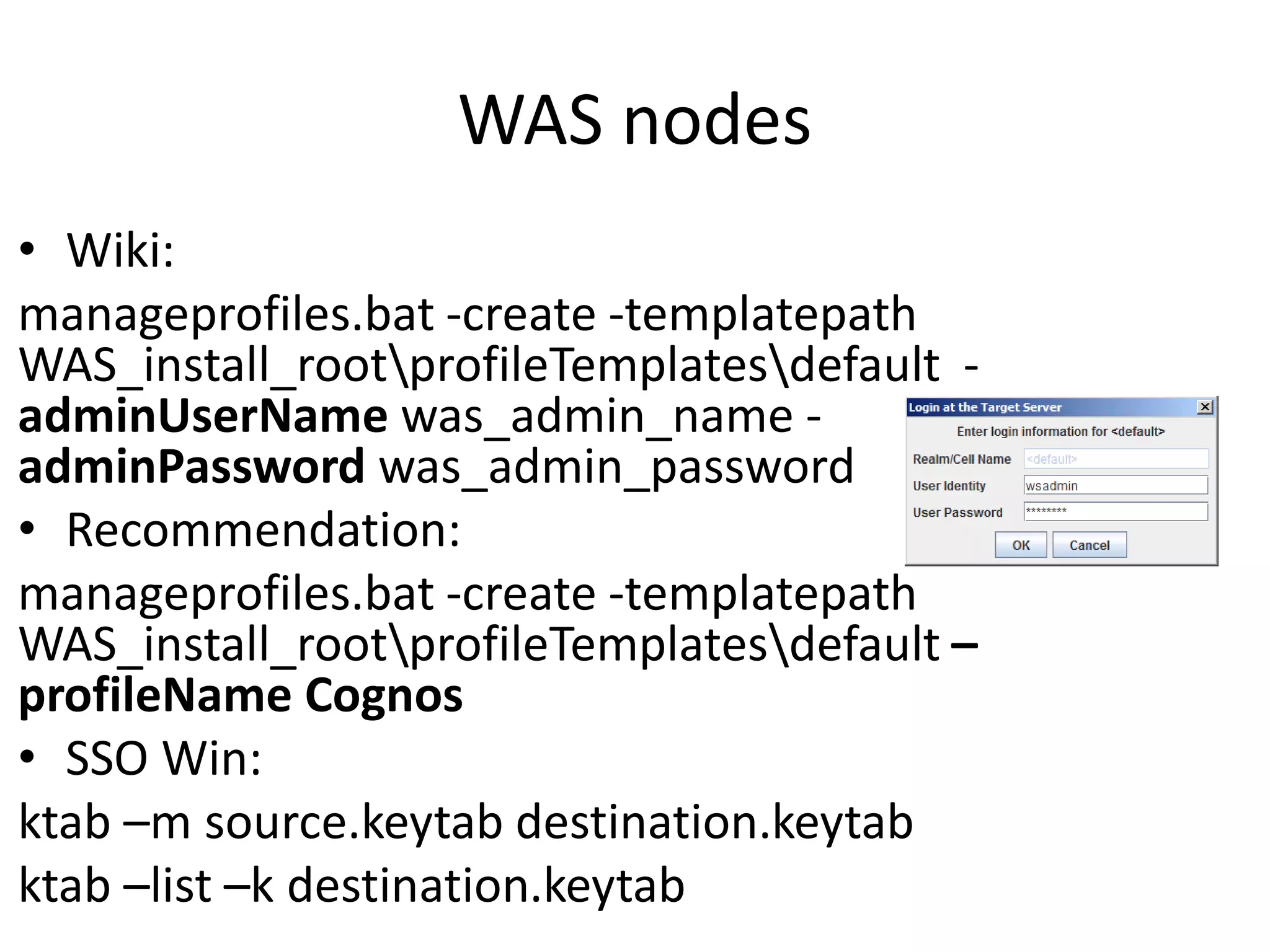
WAS nodes
• Wiki:
manageprofiles.bat -create -templatepath
WAS_install_rootprofileTemplatesdefault -
adminUserName was_admin_name -
adminPassword was_admin_password
• Recommendation:
manageprofiles.bat -create -templatepath
WAS_install_rootprofileTemplatesdefault –
profileName Cognos
• SSO Win:
ktab –m source.keytab destination.keytab
ktab –list –k destination.keytab
Product versions
The whole Cognos bundle - IBM Cognos Business
Intelligence for Connections Activities V4.0 Multilingual
Multiplatform eAssembly (CRJU4ML):
1. IBM Cognos Business Intelligence Server 10.1.1 : 64-
bit Windows (CI5VMML), 32-bit Windows (CI5VLML), 32-
bit AIX (CI5VSML), 64-bit AIX (CI5VTML), 32-bit Linux x86
(CI5W6ML), 64-bit Linux x86 (CI5W7ML), 32-bit Linux on
System z (CI5W4ML), 64-bit Linux on System z (CI5W5ML)
2. IBM Cognos Business Intelligence Transformer 10.1.1 :
Windows (CI2Q1ML), AIX (CI2Q4ML), Linux x86 CI2Q6ML,
Linux on System z (CI2QHML)
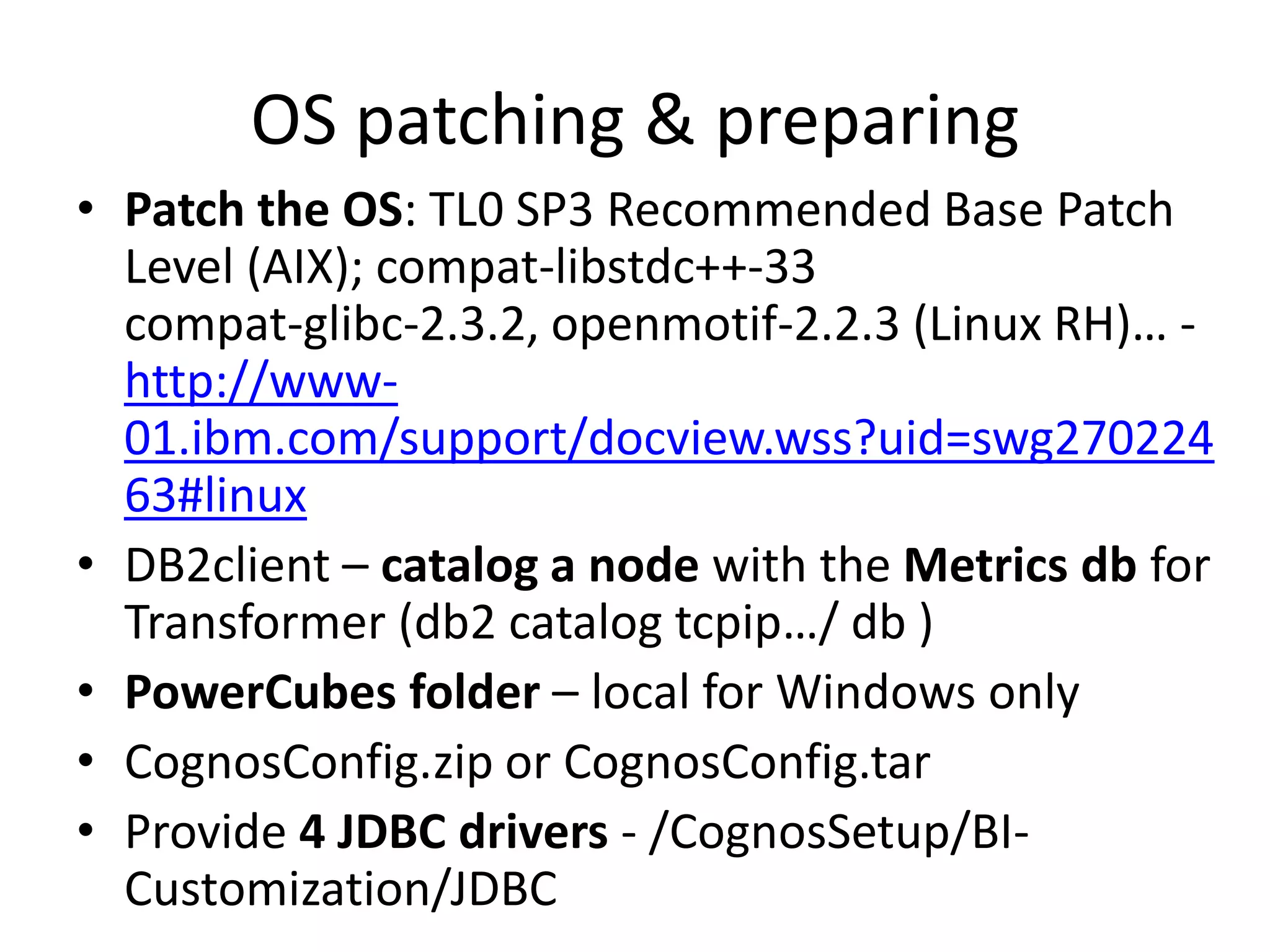
OS patching & preparing
• Patch the OS: TL0 SP3 Recommended Base Patch
  Level (AIX); compat-libstdc++-33
  compat-glibc-2.3.2, openmotif-2.2.3 (Linux RH)… -
  http://www-
  01.ibm.com/support/docview.wss?uid=swg270224
  63#linux
• DB2client – catalog a node with the Metrics db for
  Transformer (db2 catalog tcpip…/ db )
• PowerCubes folder – local for Windows only
• CognosConfig.zip or CognosConfig.tar
• Provide 4 JDBC drivers - /CognosSetup/BI-
  Customization/JDBC
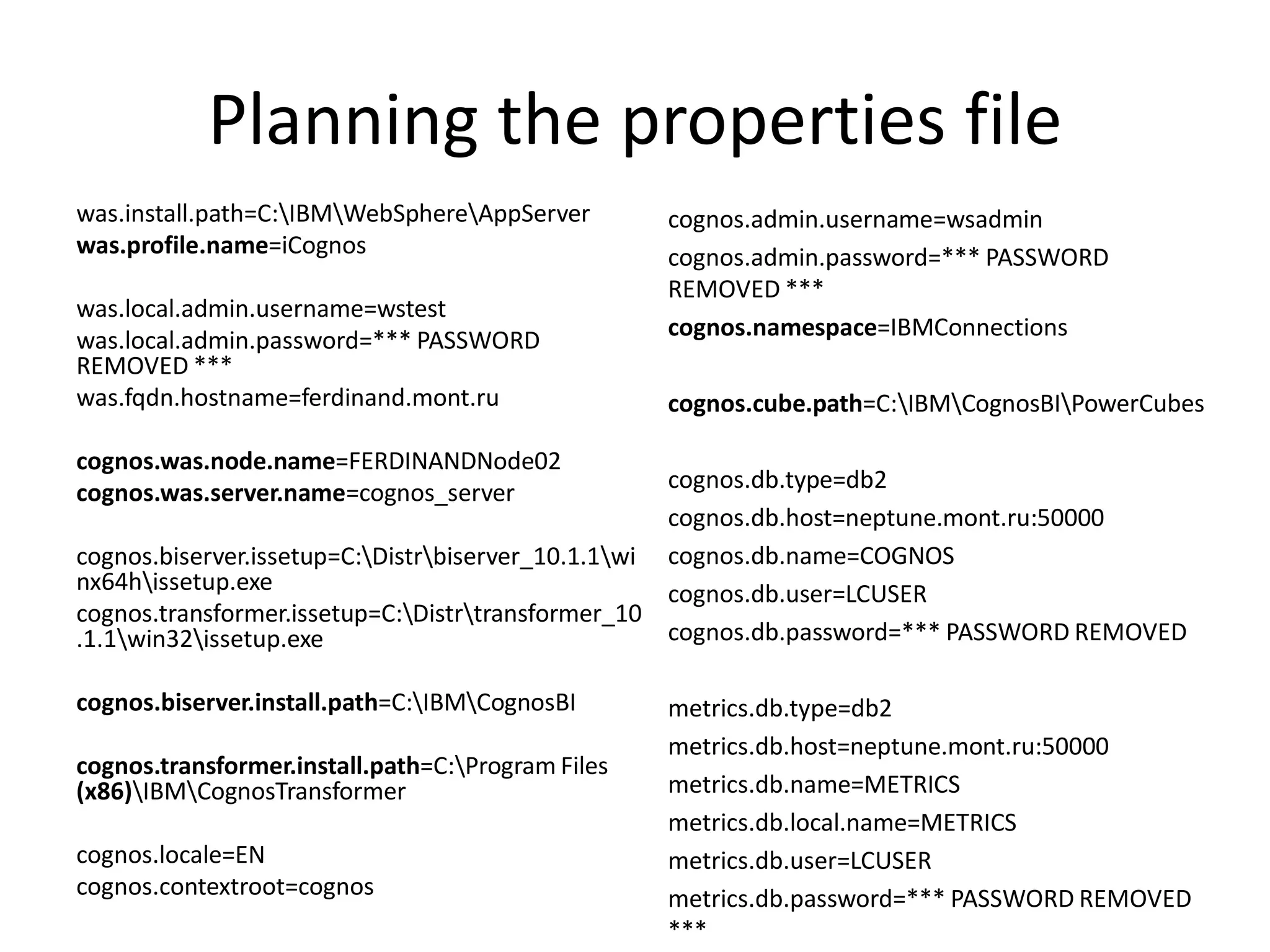
Planning the properties file
was.install.path=C:IBMWebSphereAppServer        cognos.admin.username=wsadmin
was.profile.name=iCognos                           cognos.admin.password=*** PASSWORD
                                                   REMOVED ***
was.local.admin.username=wstest
was.local.admin.password=*** PASSWORD              cognos.namespace=IBMConnections
REMOVED ***
was.fqdn.hostname=ferdinand.mont.ru                cognos.cube.path=C:IBMCognosBIPowerCubes

cognos.was.node.name=FERDINANDNode02
cognos.was.server.name=cognos_server                cognos.db.type=db2
                                                    cognos.db.host=neptune.mont.ru:50000
cognos.biserver.issetup=C:Distrbiserver_10.1.1wi cognos.db.name=COGNOS
nx64hissetup.exe                                   cognos.db.user=LCUSER
cognos.transformer.issetup=C:Distrtransformer_10
.1.1win32issetup.exe                              cognos.db.password=*** PASSWORD REMOVED

cognos.biserver.install.path=C:IBMCognosBI       metrics.db.type=db2
                                                   metrics.db.host=neptune.mont.ru:50000
cognos.transformer.install.path=C:Program Files
(x86)IBMCognosTransformer                        metrics.db.name=METRICS
                                                   metrics.db.local.name=METRICS
cognos.locale=EN                                   metrics.db.user=LCUSER
cognos.contextroot=cognos                          metrics.db.password=*** PASSWORD REMOVED
                                                   ***
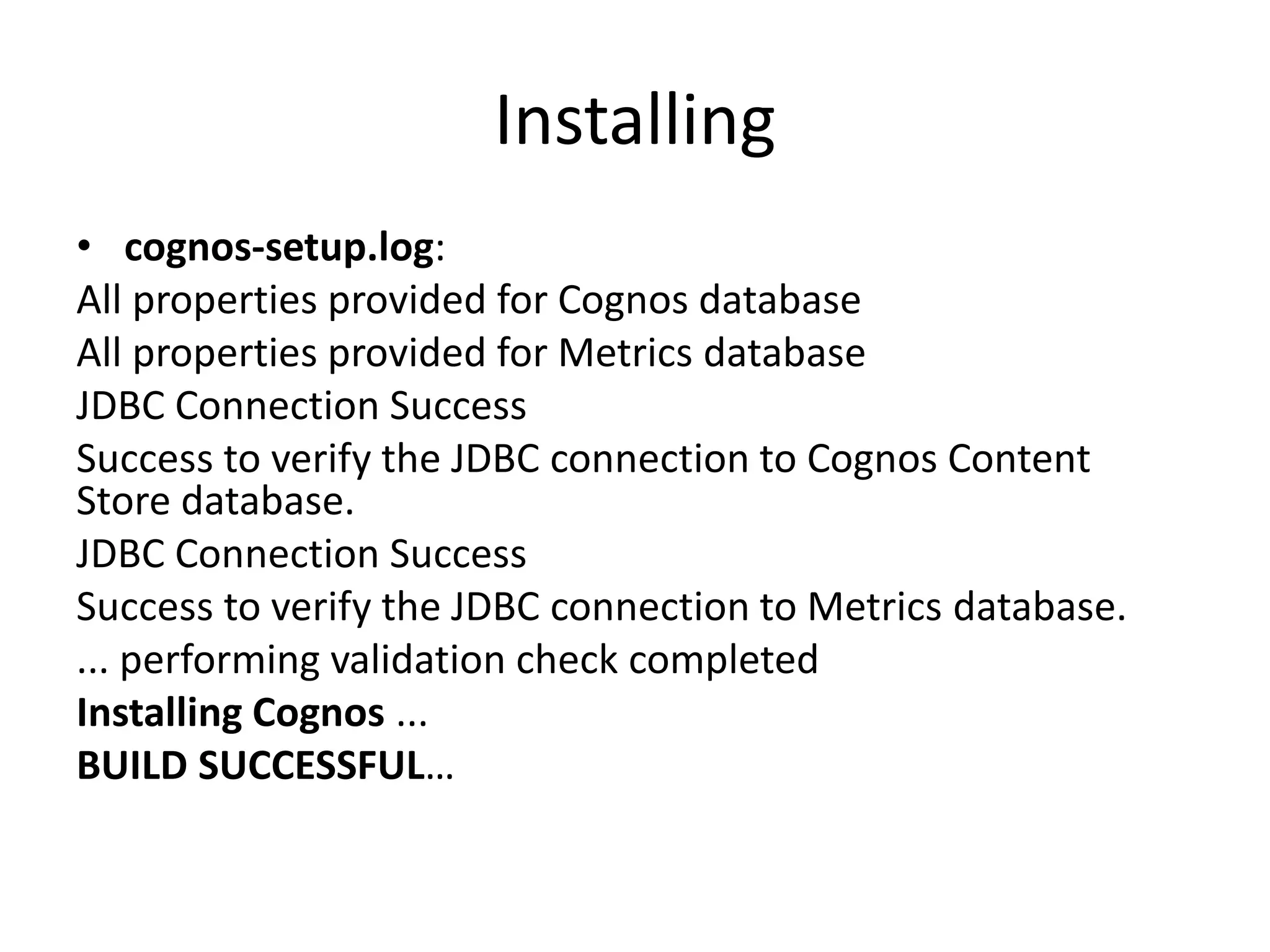
Installing
• cognos-setup.log:
All properties provided for Cognos database
All properties provided for Metrics database
JDBC Connection Success
Success to verify the JDBC connection to Cognos Content
Store database.
JDBC Connection Success
Success to verify the JDBC connection to Metrics database.
... performing validation check completed
Installing Cognos ...
BUILD SUCCESSFUL…
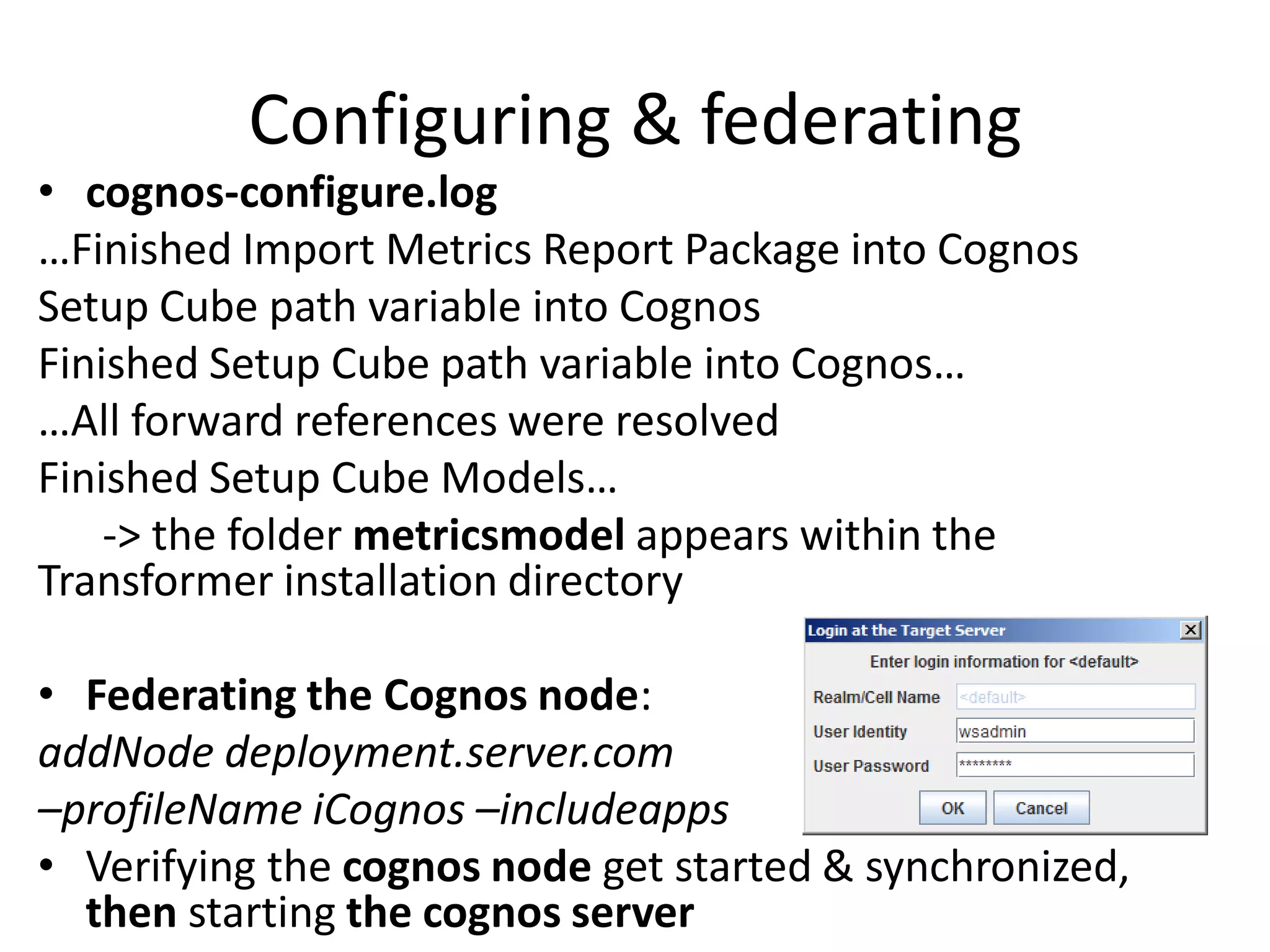
Configuring & federating
• cognos-configure.log
…Finished Import Metrics Report Package into Cognos
Setup Cube path variable into Cognos
Finished Setup Cube path variable into Cognos…
…All forward references were resolved
Finished Setup Cube Models…
    -> the folder metricsmodel appears within the
Transformer installation directory

• Federating the Cognos node:
addNode deployment.server.com
–profileName iCognos –includeapps
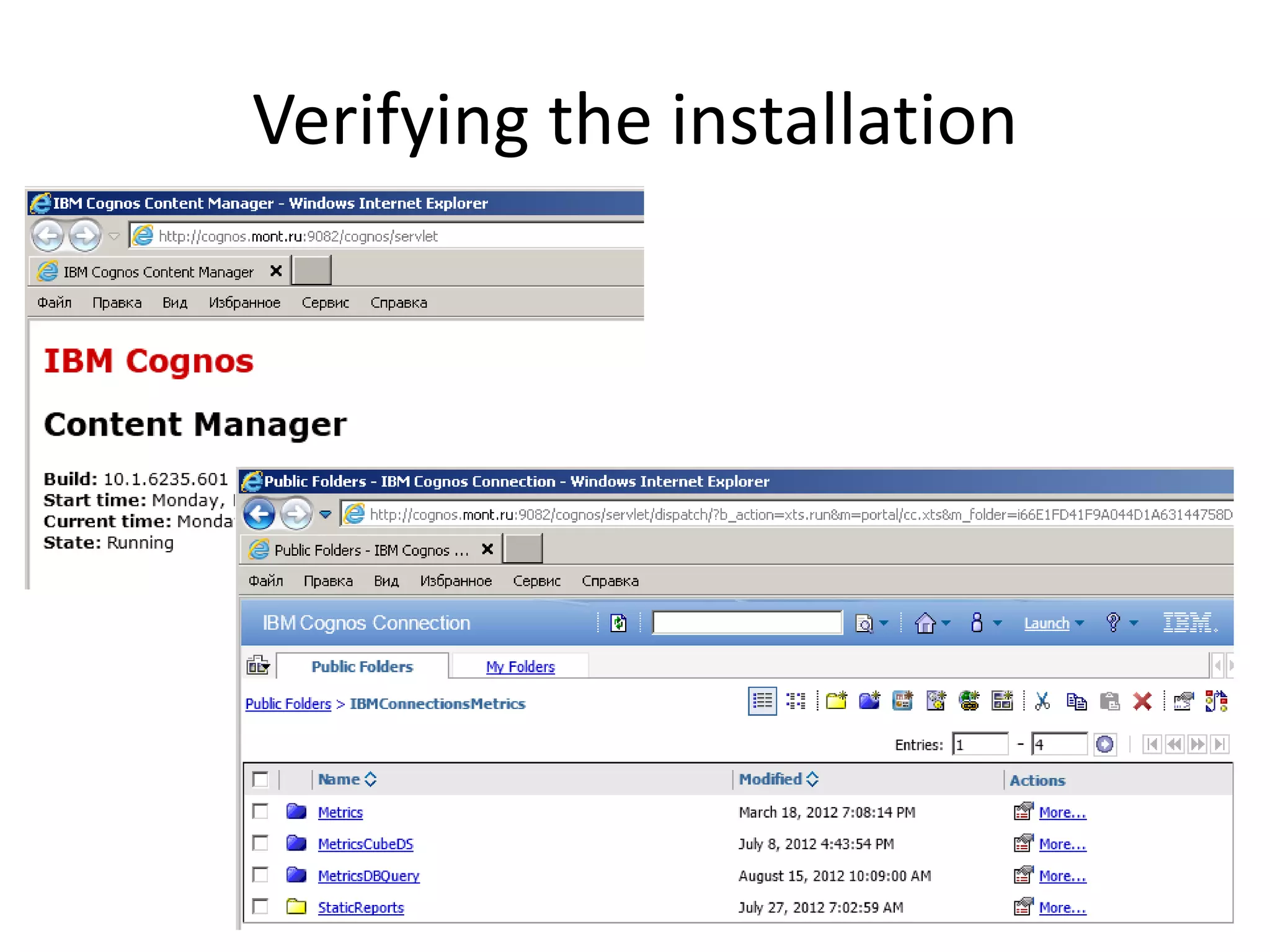
• Verifying the cognos node get started & synchronized,
  then starting the cognos server
Verifying the installation
PART II. POST-INSTALLATION
Applying fix packs
• cognos.biserver.install.path to be specified
  during installation of the fix pack
• Generating a new cognos.ear file with cognos-
  setup-update
• Replacing the “entire application” with a new
  cognos.ear on the Deployment Manager (run
  the cognos node and resynchronize)
• Updating the Cognos server configuration
  with cognos-configure-update
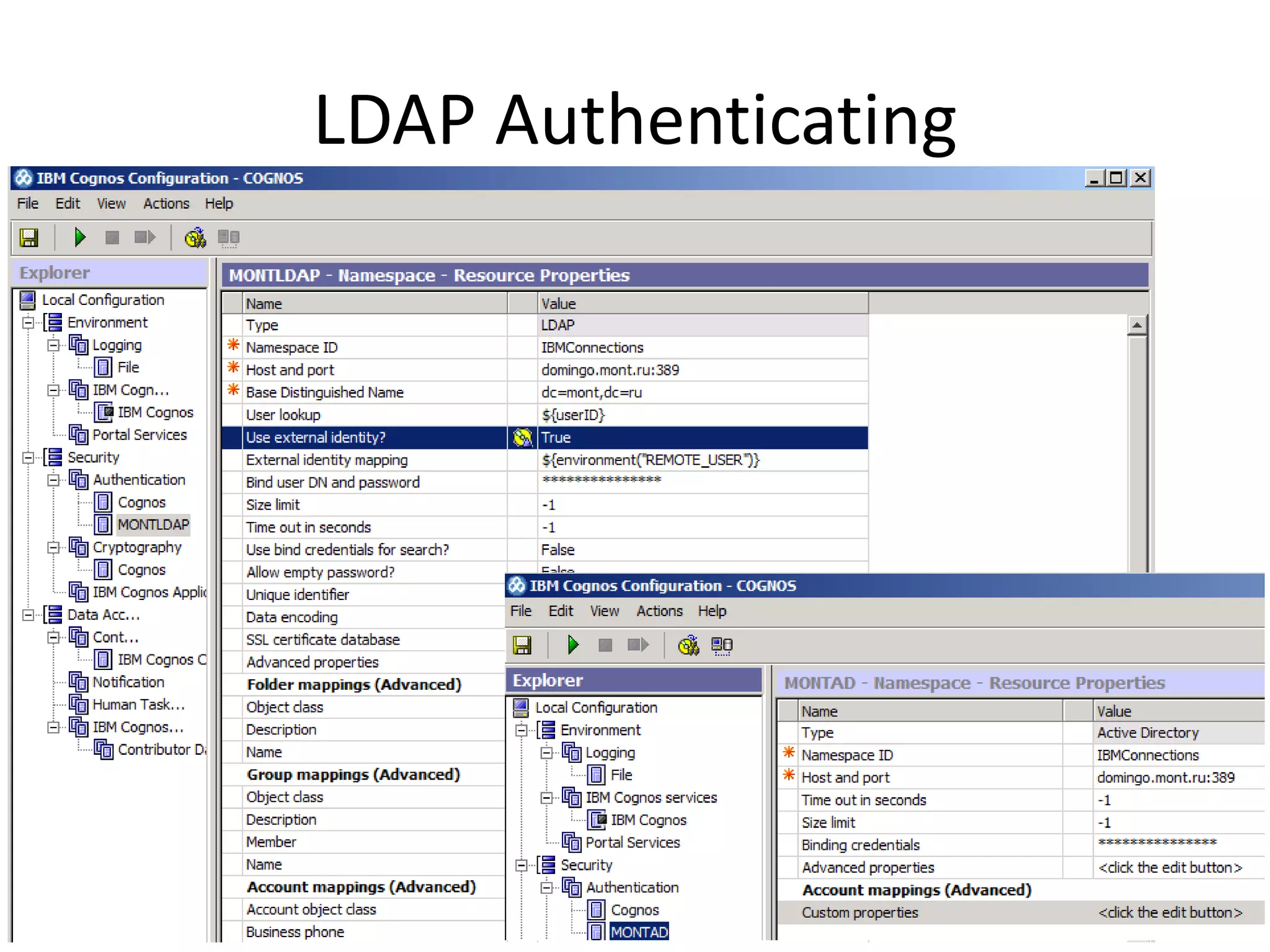
LDAP Authenticating
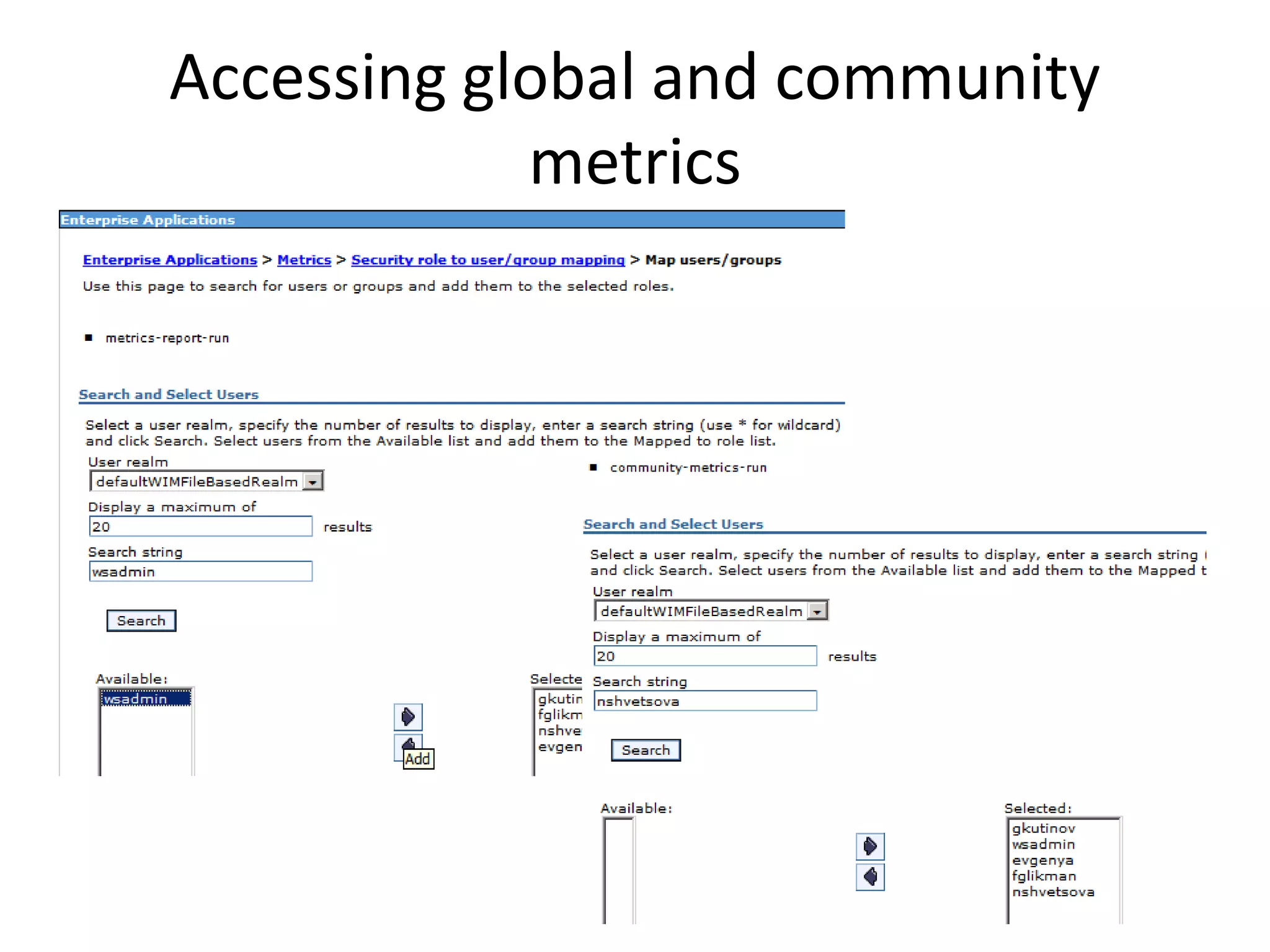
Accessing global and community
            metrics
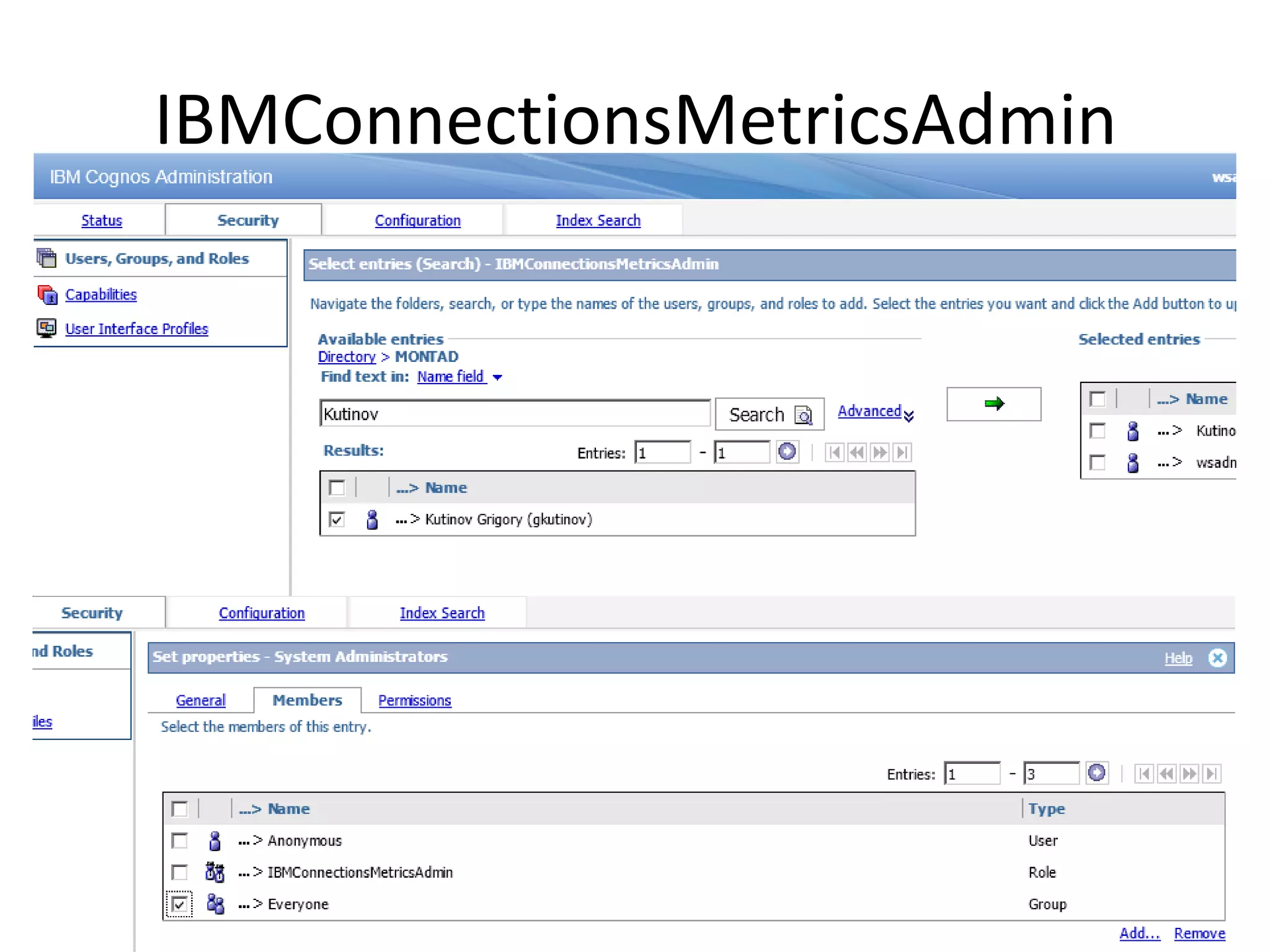
IBMConnectionsMetricsAdmin
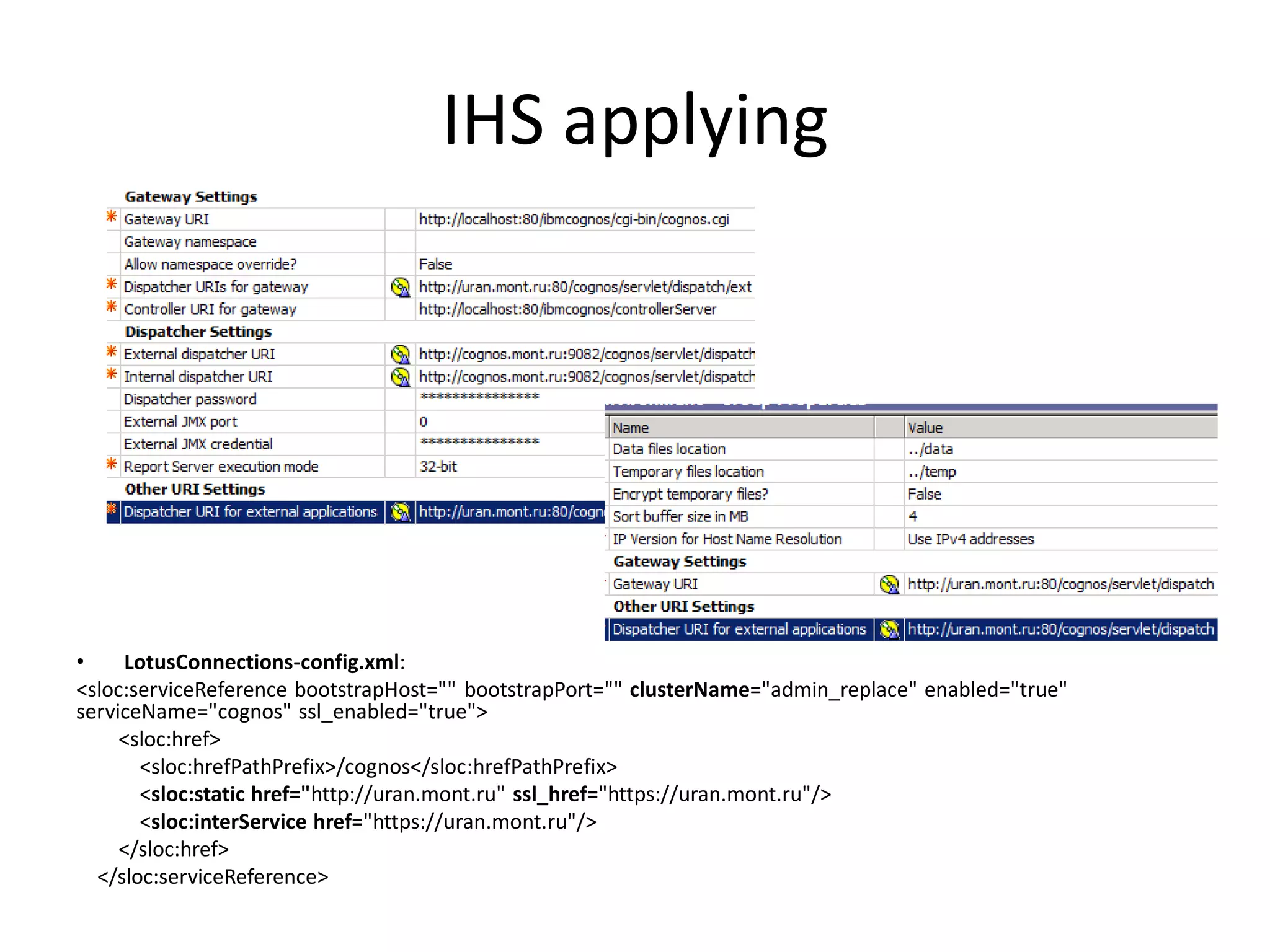
IHS applying


•    LotusConnections-config.xml:
<sloc:serviceReference bootstrapHost="" bootstrapPort="" clusterName="admin_replace" enabled="true"
serviceName="cognos" ssl_enabled="true">
     <sloc:href>
       <sloc:hrefPathPrefix>/cognos</sloc:hrefPathPrefix>
       <sloc:static href="http://uran.mont.ru" ssl_href="https://uran.mont.ru"/>
       <sloc:interService href="https://uran.mont.ru"/>
     </sloc:href>
  </sloc:serviceReference>
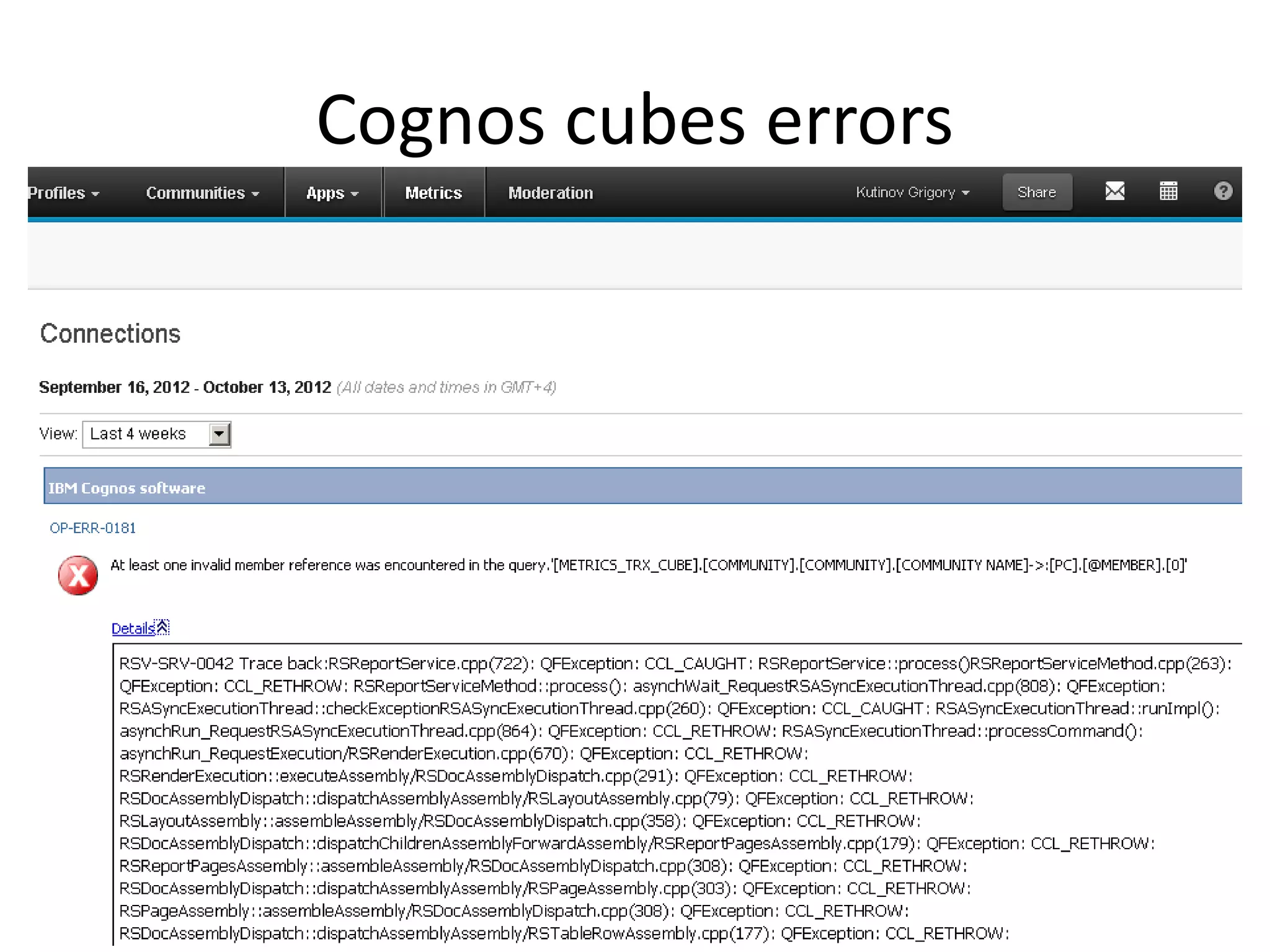
Cognos cubes errors
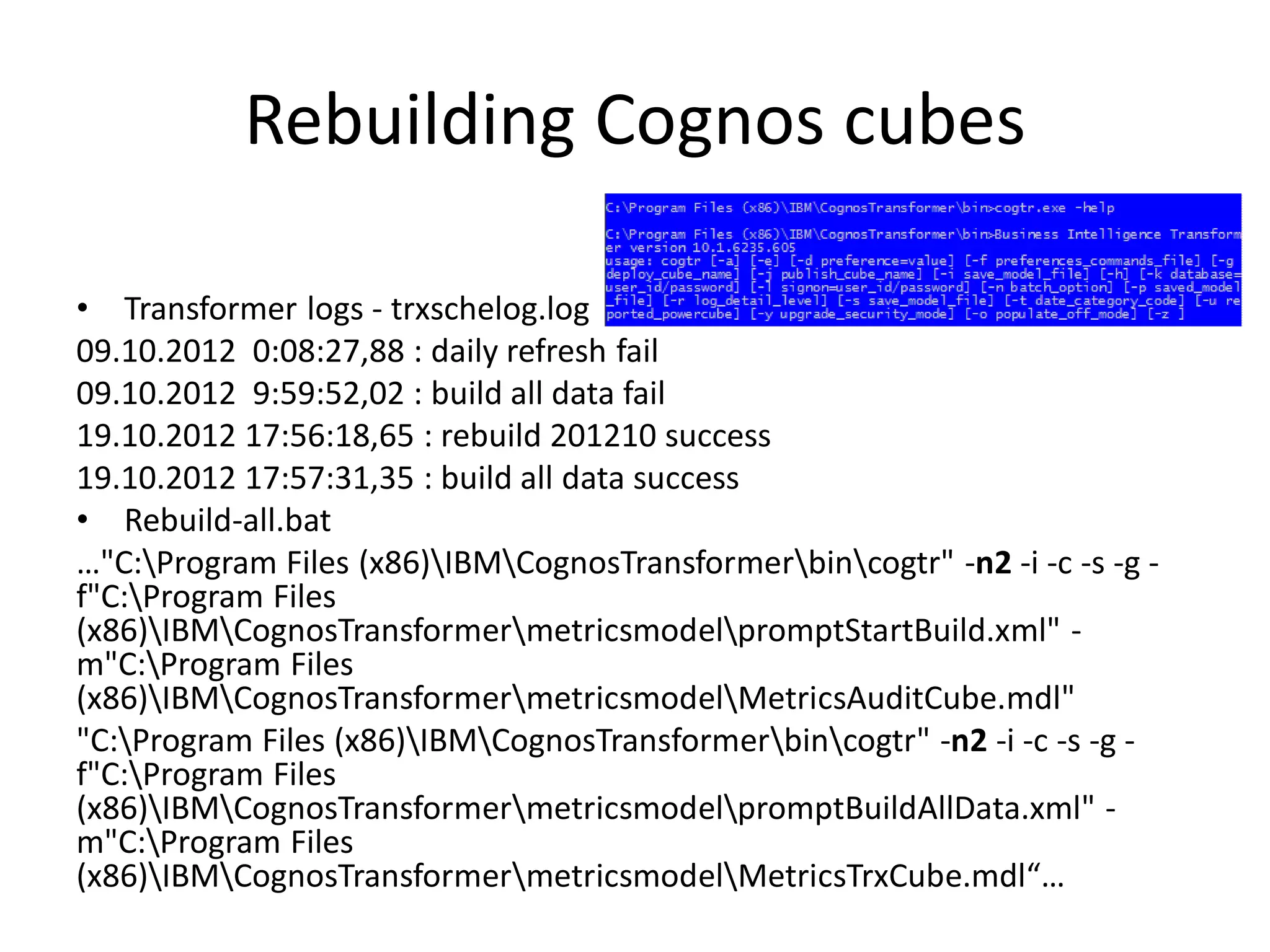
Rebuilding Cognos cubes

• Transformer logs - trxschelog.log
09.10.2012 0:08:27,88 : daily refresh fail
09.10.2012 9:59:52,02 : build all data fail
19.10.2012 17:56:18,65 : rebuild 201210 success
19.10.2012 17:57:31,35 : build all data success
• Rebuild-all.bat
…"C:Program Files (x86)IBMCognosTransformerbincogtr" -n2 -i -c -s -g -
f"C:Program Files
(x86)IBMCognosTransformermetricsmodelpromptStartBuild.xml" -
m"C:Program Files
(x86)IBMCognosTransformermetricsmodelMetricsAuditCube.mdl"
"C:Program Files (x86)IBMCognosTransformerbincogtr" -n2 -i -c -s -g -
f"C:Program Files
(x86)IBMCognosTransformermetricsmodelpromptBuildAllData.xml" -
m"C:Program Files
(x86)IBMCognosTransformermetricsmodelMetricsTrxCube.mdl“…
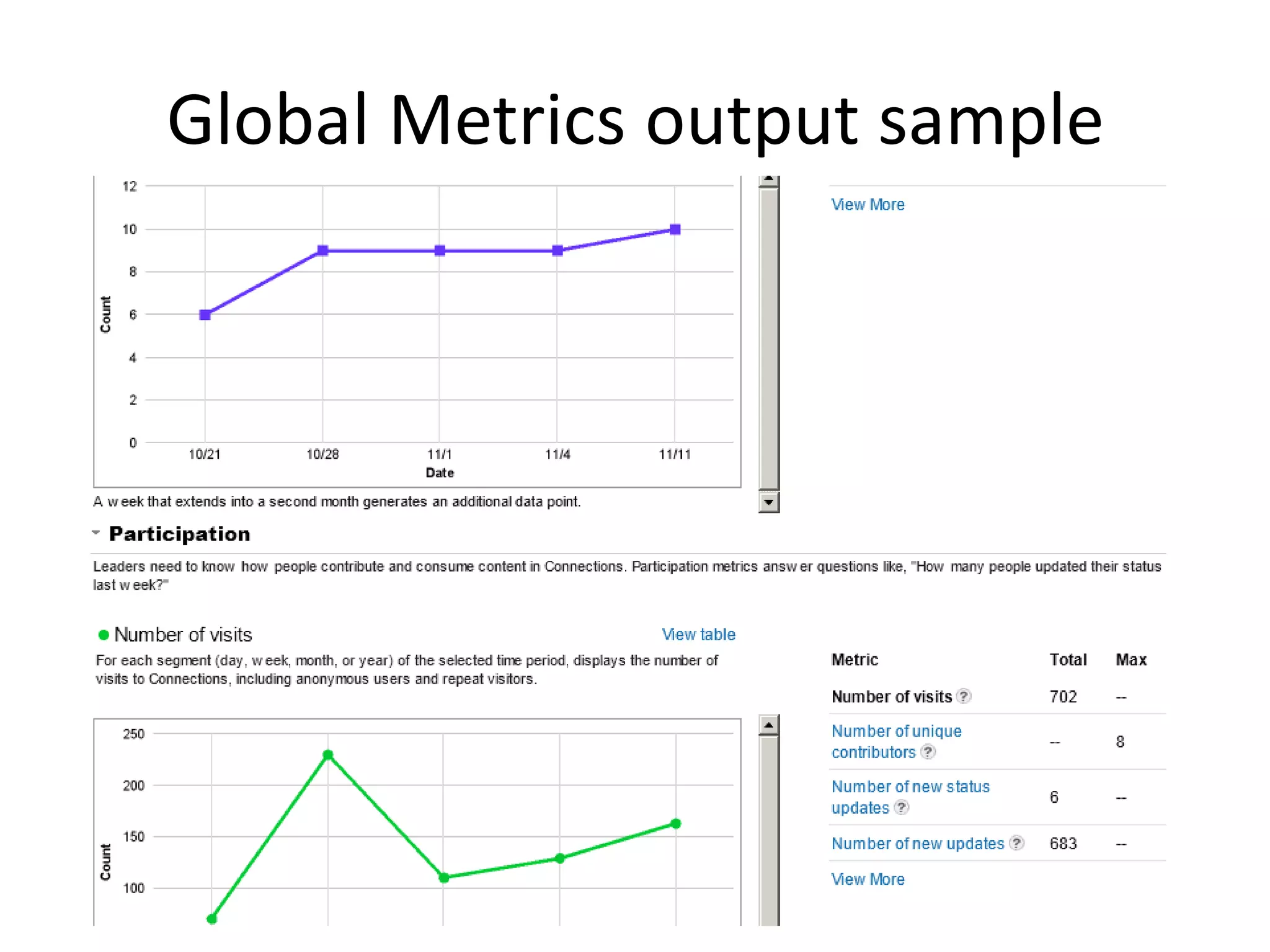
Global Metrics output sample
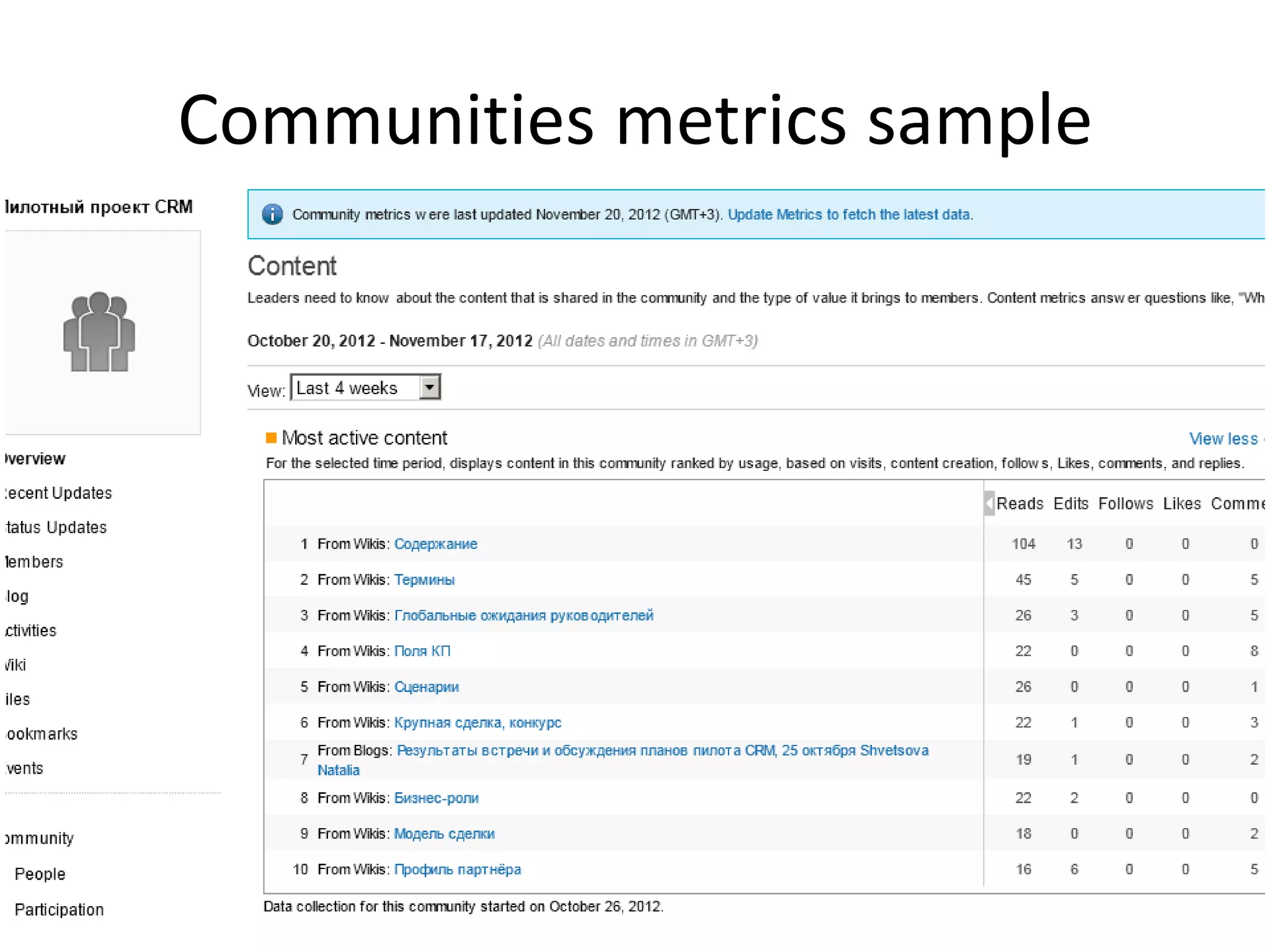
Communities metrics sample
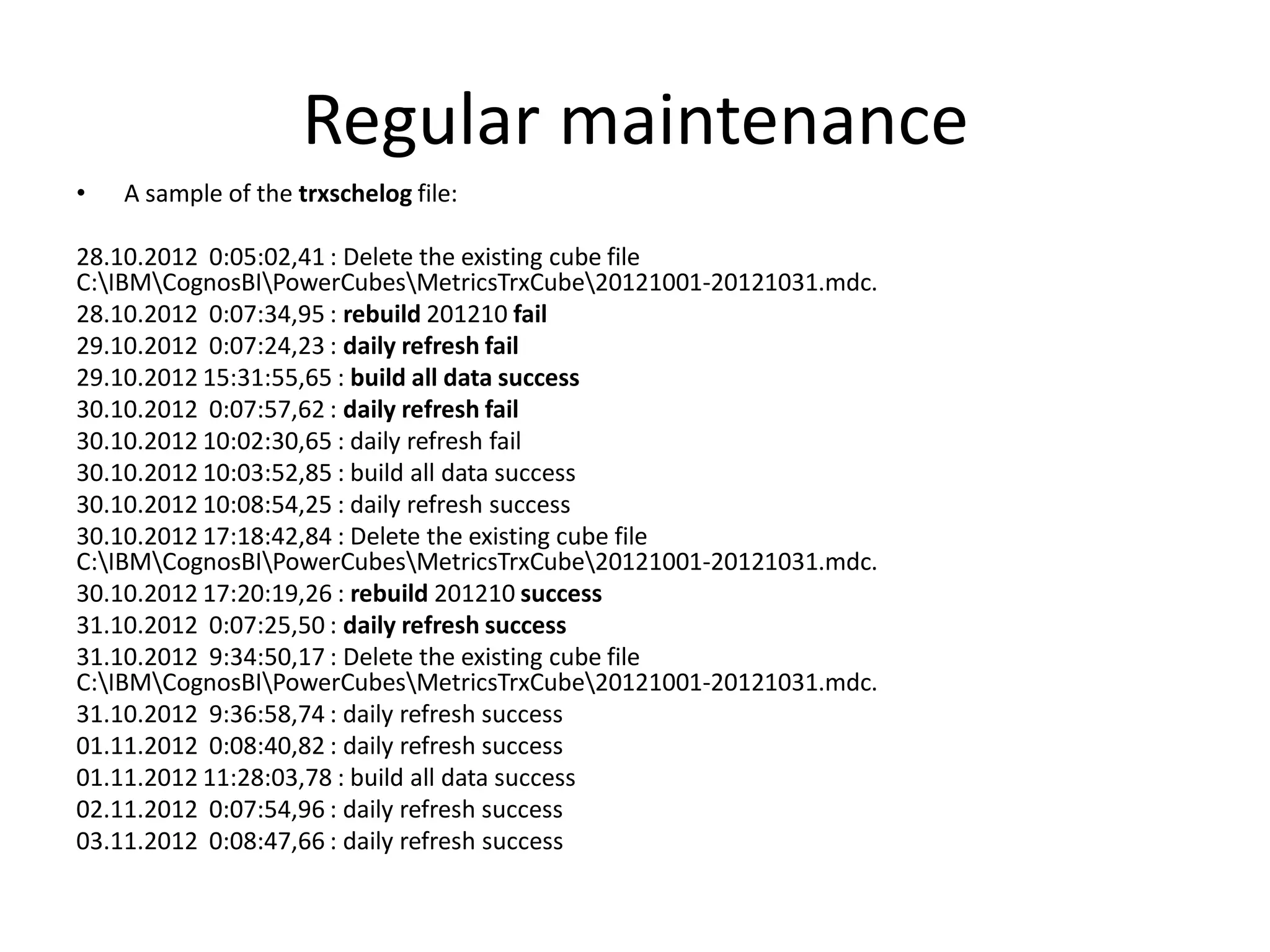
Regular maintenance
•   A sample of the trxschelog file:

28.10.2012 0:05:02,41 : Delete the existing cube file
C:IBMCognosBIPowerCubesMetricsTrxCube20121001-20121031.mdc.
28.10.2012 0:07:34,95 : rebuild 201210 fail
29.10.2012 0:07:24,23 : daily refresh fail
29.10.2012 15:31:55,65 : build all data success
30.10.2012 0:07:57,62 : daily refresh fail
30.10.2012 10:02:30,65 : daily refresh fail
30.10.2012 10:03:52,85 : build all data success
30.10.2012 10:08:54,25 : daily refresh success
30.10.2012 17:18:42,84 : Delete the existing cube file
C:IBMCognosBIPowerCubesMetricsTrxCube20121001-20121031.mdc.
30.10.2012 17:20:19,26 : rebuild 201210 success
31.10.2012 0:07:25,50 : daily refresh success
31.10.2012 9:34:50,17 : Delete the existing cube file
C:IBMCognosBIPowerCubesMetricsTrxCube20121001-20121031.mdc.
31.10.2012 9:36:58,74 : daily refresh success
01.11.2012 0:08:40,82 : daily refresh success
01.11.2012 11:28:03,78 : build all data success
02.11.2012 0:07:54,96 : daily refresh success
03.11.2012 0:08:47,66 : daily refresh success
Useful Documentation
•   Installing WebSphere Application Server for Cognos Business Intelligence
•   Installing DB client for Cognos Transformer
•   Installing required patches on the Cognos BI Server system
•   Installing Cognos Business Intelligence components
•   Configuring Cognos Business Intelligence after installation
•   Federating the Cognos server to the Deployment Manager
•   Validating the Cognos BI server installation
•   Configuring Cognos Business Intelligence
Mastering metrics and coping with cognos

Mastering metrics and coping with cognos

  • 1.
    Mastering Metrics andCoping with Cognos
  • 2.
    And you are? SharonBellamy Greg Kutinov Socialshazza Socialshazza.com 10 years WebSphere Connections since V3.0 11 years WebSphere Integrating ICS products Connections since V2 Domino development Integrating ICS products DB2 Admin Likes: Disney, Marmite & Likes: Sports – Volleyball World of Warcraft Dislikes: Very slow internet Dislikes: Melting Ice Cream connection – bores me !!
  • 3.
    Agenda • Installation • Configuring and federating • Patching • Configuring LDAP • Metric and Connections • I H S configuration • Configuring cubes • Metrics mastered
  • 4.
  • 5.
    PreRequisites • Databases –create the Cognos & Metrics DBs • WAS (7.0.0.21) – installed, patched • DB2 client installed on Cognos machine and configured to connect to the DBs above • Cognos software
  • 6.
    WAS nodes • Wiki: manageprofiles.bat-create -templatepath WAS_install_rootprofileTemplatesdefault - adminUserName was_admin_name - adminPassword was_admin_password • Recommendation: manageprofiles.bat -create -templatepath WAS_install_rootprofileTemplatesdefault – profileName Cognos • SSO Win: ktab –m source.keytab destination.keytab ktab –list –k destination.keytab
  • 7.
    Product versions The wholeCognos bundle - IBM Cognos Business Intelligence for Connections Activities V4.0 Multilingual Multiplatform eAssembly (CRJU4ML): 1. IBM Cognos Business Intelligence Server 10.1.1 : 64- bit Windows (CI5VMML), 32-bit Windows (CI5VLML), 32- bit AIX (CI5VSML), 64-bit AIX (CI5VTML), 32-bit Linux x86 (CI5W6ML), 64-bit Linux x86 (CI5W7ML), 32-bit Linux on System z (CI5W4ML), 64-bit Linux on System z (CI5W5ML) 2. IBM Cognos Business Intelligence Transformer 10.1.1 : Windows (CI2Q1ML), AIX (CI2Q4ML), Linux x86 CI2Q6ML, Linux on System z (CI2QHML)
  • 8.
    OS patching &preparing • Patch the OS: TL0 SP3 Recommended Base Patch Level (AIX); compat-libstdc++-33 compat-glibc-2.3.2, openmotif-2.2.3 (Linux RH)… - http://www- 01.ibm.com/support/docview.wss?uid=swg270224 63#linux • DB2client – catalog a node with the Metrics db for Transformer (db2 catalog tcpip…/ db ) • PowerCubes folder – local for Windows only • CognosConfig.zip or CognosConfig.tar • Provide 4 JDBC drivers - /CognosSetup/BI- Customization/JDBC
  • 9.
    Planning the propertiesfile was.install.path=C:IBMWebSphereAppServer cognos.admin.username=wsadmin was.profile.name=iCognos cognos.admin.password=*** PASSWORD REMOVED *** was.local.admin.username=wstest was.local.admin.password=*** PASSWORD cognos.namespace=IBMConnections REMOVED *** was.fqdn.hostname=ferdinand.mont.ru cognos.cube.path=C:IBMCognosBIPowerCubes cognos.was.node.name=FERDINANDNode02 cognos.was.server.name=cognos_server cognos.db.type=db2 cognos.db.host=neptune.mont.ru:50000 cognos.biserver.issetup=C:Distrbiserver_10.1.1wi cognos.db.name=COGNOS nx64hissetup.exe cognos.db.user=LCUSER cognos.transformer.issetup=C:Distrtransformer_10 .1.1win32issetup.exe cognos.db.password=*** PASSWORD REMOVED cognos.biserver.install.path=C:IBMCognosBI metrics.db.type=db2 metrics.db.host=neptune.mont.ru:50000 cognos.transformer.install.path=C:Program Files (x86)IBMCognosTransformer metrics.db.name=METRICS metrics.db.local.name=METRICS cognos.locale=EN metrics.db.user=LCUSER cognos.contextroot=cognos metrics.db.password=*** PASSWORD REMOVED ***
  • 10.
    Installing • cognos-setup.log: All propertiesprovided for Cognos database All properties provided for Metrics database JDBC Connection Success Success to verify the JDBC connection to Cognos Content Store database. JDBC Connection Success Success to verify the JDBC connection to Metrics database. ... performing validation check completed Installing Cognos ... BUILD SUCCESSFUL…
  • 11.
    Configuring & federating •cognos-configure.log …Finished Import Metrics Report Package into Cognos Setup Cube path variable into Cognos Finished Setup Cube path variable into Cognos… …All forward references were resolved Finished Setup Cube Models… -> the folder metricsmodel appears within the Transformer installation directory • Federating the Cognos node: addNode deployment.server.com –profileName iCognos –includeapps • Verifying the cognos node get started & synchronized, then starting the cognos server
  • 12.
  • 13.
  • 14.
    Applying fix packs •cognos.biserver.install.path to be specified during installation of the fix pack • Generating a new cognos.ear file with cognos- setup-update • Replacing the “entire application” with a new cognos.ear on the Deployment Manager (run the cognos node and resynchronize) • Updating the Cognos server configuration with cognos-configure-update
  • 15.
  • 16.
    Accessing global andcommunity metrics
  • 17.
  • 18.
    IHS applying • LotusConnections-config.xml: <sloc:serviceReference bootstrapHost="" bootstrapPort="" clusterName="admin_replace" enabled="true" serviceName="cognos" ssl_enabled="true"> <sloc:href> <sloc:hrefPathPrefix>/cognos</sloc:hrefPathPrefix> <sloc:static href="http://uran.mont.ru" ssl_href="https://uran.mont.ru"/> <sloc:interService href="https://uran.mont.ru"/> </sloc:href> </sloc:serviceReference>
  • 19.
  • 20.
    Rebuilding Cognos cubes •Transformer logs - trxschelog.log 09.10.2012 0:08:27,88 : daily refresh fail 09.10.2012 9:59:52,02 : build all data fail 19.10.2012 17:56:18,65 : rebuild 201210 success 19.10.2012 17:57:31,35 : build all data success • Rebuild-all.bat …"C:Program Files (x86)IBMCognosTransformerbincogtr" -n2 -i -c -s -g - f"C:Program Files (x86)IBMCognosTransformermetricsmodelpromptStartBuild.xml" - m"C:Program Files (x86)IBMCognosTransformermetricsmodelMetricsAuditCube.mdl" "C:Program Files (x86)IBMCognosTransformerbincogtr" -n2 -i -c -s -g - f"C:Program Files (x86)IBMCognosTransformermetricsmodelpromptBuildAllData.xml" - m"C:Program Files (x86)IBMCognosTransformermetricsmodelMetricsTrxCube.mdl“…
  • 21.
  • 22.
  • 23.
    Regular maintenance • A sample of the trxschelog file: 28.10.2012 0:05:02,41 : Delete the existing cube file C:IBMCognosBIPowerCubesMetricsTrxCube20121001-20121031.mdc. 28.10.2012 0:07:34,95 : rebuild 201210 fail 29.10.2012 0:07:24,23 : daily refresh fail 29.10.2012 15:31:55,65 : build all data success 30.10.2012 0:07:57,62 : daily refresh fail 30.10.2012 10:02:30,65 : daily refresh fail 30.10.2012 10:03:52,85 : build all data success 30.10.2012 10:08:54,25 : daily refresh success 30.10.2012 17:18:42,84 : Delete the existing cube file C:IBMCognosBIPowerCubesMetricsTrxCube20121001-20121031.mdc. 30.10.2012 17:20:19,26 : rebuild 201210 success 31.10.2012 0:07:25,50 : daily refresh success 31.10.2012 9:34:50,17 : Delete the existing cube file C:IBMCognosBIPowerCubesMetricsTrxCube20121001-20121031.mdc. 31.10.2012 9:36:58,74 : daily refresh success 01.11.2012 0:08:40,82 : daily refresh success 01.11.2012 11:28:03,78 : build all data success 02.11.2012 0:07:54,96 : daily refresh success 03.11.2012 0:08:47,66 : daily refresh success
  • 24.
    Useful Documentation • Installing WebSphere Application Server for Cognos Business Intelligence • Installing DB client for Cognos Transformer • Installing required patches on the Cognos BI Server system • Installing Cognos Business Intelligence components • Configuring Cognos Business Intelligence after installation • Federating the Cognos server to the Deployment Manager • Validating the Cognos BI server installation • Configuring Cognos Business Intelligence