T R A I N I N G

MASTER
Administración de Bases
de datos SQL SERVER
2012 MCSA
Microsoft Certified Solutions
Associate SQL Server 2012

c/Basílica, 19 - 28020 Mad rid - Telf.: 91 5 53 61 62 - info@cas-training.com - www.cas-training.com
T RA I N I N G

MASTER
Administración de bases de datos
SQL SERVER 2012
MCSA

El programa de certificación de Microsoft, ofrece tres niveles de certificación distintos –
Serie Tecnológico, Profesional y Arquitecto - cada uno diseñado para validar grados de
competencia en conceptos y usos de la Tecnología Microsoft. Cada nivel ofrece un marco
de referencia reconocido por la industria y que se aplica a roles de trabajo específicos.

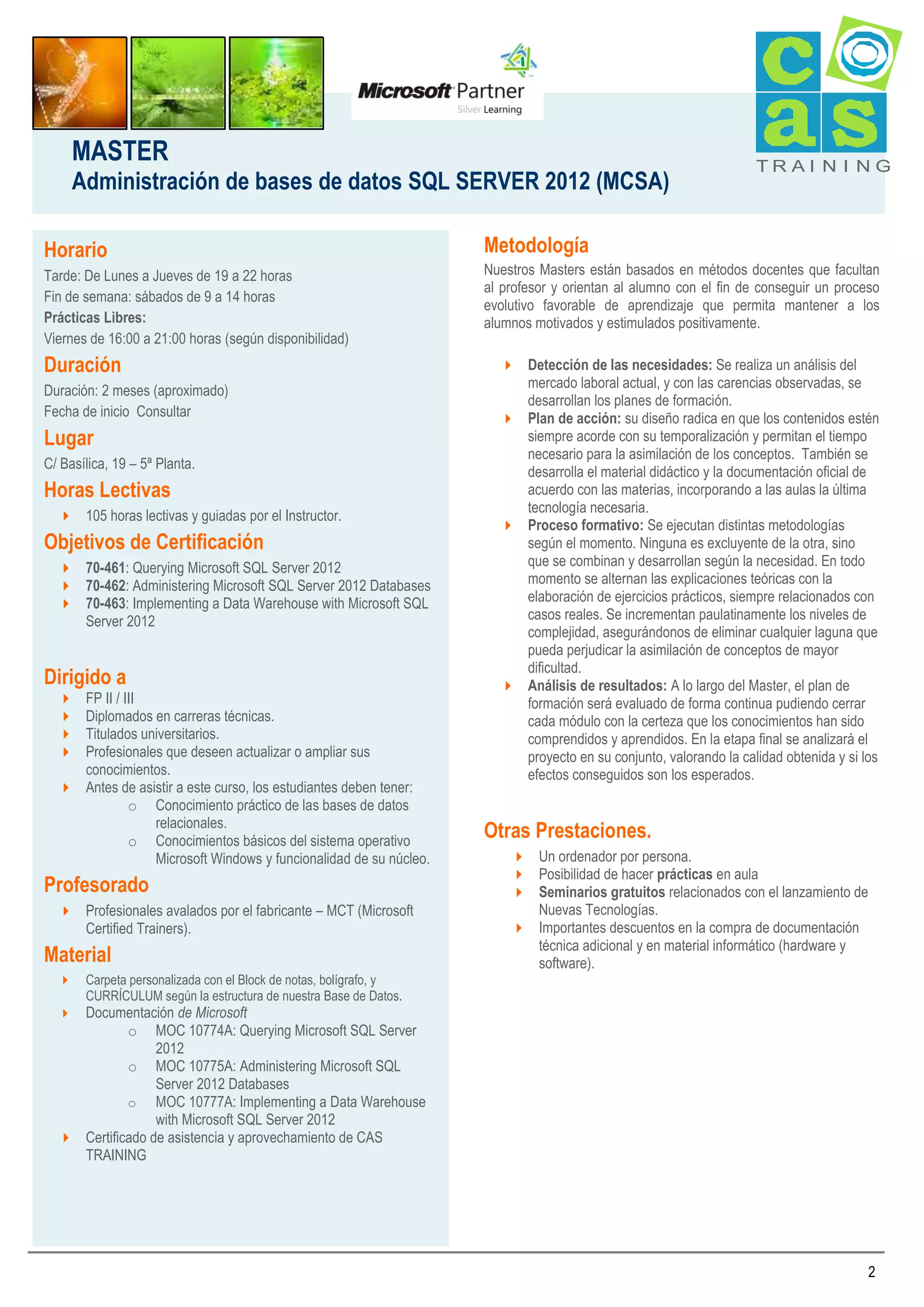
CAS TRAINING ofrece los niveles de certificación:
 La certificación Microsoft Certified Technology Specialist (MCTS), corresponde a un

nivel básico, que da las bases para dar soporte en el SS.OO. Windows.

 La certificación Microsoft Certified IT Professional (MCITP): Server Administrator

representa el experto como Administrador del Servidor Windows 2008, y que en la
nueva estructura de certificación pasa a ser MCSA (Solutions Associate)

La obtención de la Certificación MCSA acredita las aptitudes de una persona aumentando
su credibilidad profesional con reconocimiento a nivel mundial, garantizando un alto nivel
de conocimientos técnicos y experiencia en la Administración de los Servidores de
Windows 2008. Es el mejor aliado para desarrollar una prometedora carrera profesional en
el sector de las tecnologías de la información.
Los profesionales certificados como MCSA tienen una alta demanda en el mundo actual y
se espera que dicha demanda crezca por el aumento de instalaciones con tecnología
Microsoft alrededor del mundo.

.

1
MASTER
Administración de bases de datos SQL SERVER 2012 (MCSA)
Horario
Tarde: De Lunes a Jueves de 19 a 22 horas
Fin de semana: sábados de 9 a 14 horas
Prácticas Libres:
Viernes de 16:00 a 21:00 horas (según disponibilidad)

Duración
Duración: 2 meses (aproximado)
Fecha de inicio Consultar

Lugar
C/ Basílica, 19 – 5ª Planta.

Horas Lectivas
 105 horas lectivas y guiadas por el Instructor.

Objetivos de Certificación
 70-461: Querying Microsoft SQL Server 2012
 70-462: Administering Microsoft SQL Server 2012 Databases
 70-463: Implementing a Data Warehouse with Microsoft SQL
Server 2012

Dirigido a
FP II / III
Diplomados en carreras técnicas.
Titulados universitarios.
Profesionales que deseen actualizar o ampliar sus
conocimientos.
 Antes de asistir a este curso, los estudiantes deben tener:
o Conocimiento práctico de las bases de datos
relacionales.
o Conocimientos básicos del sistema operativo
Microsoft Windows y funcionalidad de su núcleo.





Profesorado
 Profesionales avalados por el fabricante – MCT (Microsoft
Certified Trainers).

Material


Carpeta personalizada con el Block de notas, bolígrafo, y
CURRÍCULUM según la estructura de nuestra Base de Datos.

TRAI N I NG

Metodología
Nuestros Masters están basados en métodos docentes que facultan
al profesor y orientan al alumno con el fin de conseguir un proceso
evolutivo favorable de aprendizaje que permita mantener a los
alumnos motivados y estimulados positivamente.
 Detección de las necesidades: Se realiza un análisis del
mercado laboral actual, y con las carencias observadas, se
desarrollan los planes de formación.
 Plan de acción: su diseño radica en que los contenidos estén
siempre acorde con su temporalización y permitan el tiempo
necesario para la asimilación de los conceptos. También se
desarrolla el material didáctico y la documentación oficial de
acuerdo con las materias, incorporando a las aulas la última
tecnología necesaria.
 Proceso formativo: Se ejecutan distintas metodologías
según el momento. Ninguna es excluyente de la otra, sino
que se combinan y desarrollan según la necesidad. En todo
momento se alternan las explicaciones teóricas con la
elaboración de ejercicios prácticos, siempre relacionados con
casos reales. Se incrementan paulatinamente los niveles de
complejidad, asegurándonos de eliminar cualquier laguna que
pueda perjudicar la asimilación de conceptos de mayor
dificultad.
 Análisis de resultados: A lo largo del Master, el plan de
formación será evaluado de forma continua pudiendo cerrar
cada módulo con la certeza que los conocimientos han sido
comprendidos y aprendidos. En la etapa final se analizará el
proyecto en su conjunto, valorando la calidad obtenida y si los
efectos conseguidos son los esperados.

Otras Prestaciones.
 Un ordenador por persona.
 Posibilidad de hacer prácticas en aula
 Seminarios gratuitos relacionados con el lanzamiento de
Nuevas Tecnologías.
 Importantes descuentos en la compra de documentación
técnica adicional y en material informático (hardware y
software).

Documentación de Microsoft
o MOC 10774A: Querying Microsoft SQL Server
2012
o MOC 10775A: Administering Microsoft SQL
Server 2012 Databases
o MOC 10777A: Implementing a Data Warehouse
with Microsoft SQL Server 2012
 Certificado de asistencia y aprovechamiento de CAS
TRAINING


2
MASTER
Administración de bases de datos SQL SERVER 2012 (MCSA)

TRAI N I NG

Instalaciones y Equipamiento
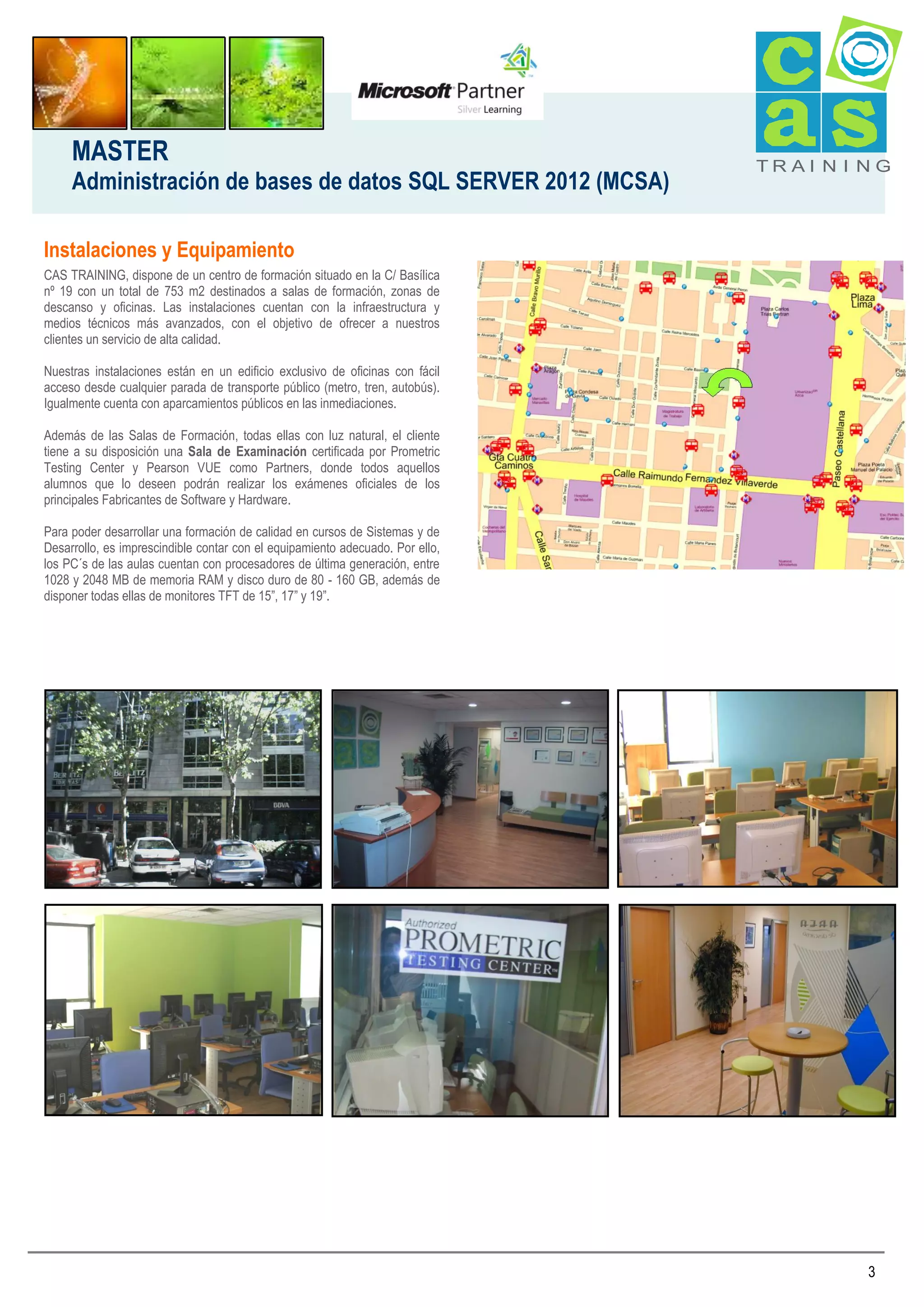
CAS TRAINING, dispone de un centro de formación situado en la C/ Basílica
nº 19 con un total de 753 m2 destinados a salas de formación, zonas de
descanso y oficinas. Las instalaciones cuentan con la infraestructura y
medios técnicos más avanzados, con el objetivo de ofrecer a nuestros
clientes un servicio de alta calidad.
Nuestras instalaciones están en un edificio exclusivo de oficinas con fácil
acceso desde cualquier parada de transporte público (metro, tren, autobús).
Igualmente cuenta con aparcamientos públicos en las inmediaciones.
Además de las Salas de Formación, todas ellas con luz natural, el cliente
tiene a su disposición una Sala de Examinación certificada por Prometric
Testing Center y Pearson VUE como Partners, donde todos aquellos
alumnos que lo deseen podrán realizar los exámenes oficiales de los
principales Fabricantes de Software y Hardware.
Para poder desarrollar una formación de calidad en cursos de Sistemas y de
Desarrollo, es imprescindible contar con el equipamiento adecuado. Por ello,
los PC´s de las aulas cuentan con procesadores de última generación, entre
1028 y 2048 MB de memoria RAM y disco duro de 80 - 160 GB, además de
disponer todas ellas de monitores TFT de 15”, 17” y 19”.

3
MASTER
Administración de bases de datos SQL SERVER 2012 (MCSA)
MCSA SQL Server 2012
MOC 10774A: Querying Microsoft SQL Server 2012
Module 1: Introduction to Microsoft SQL Server 2012
This module introduces the SQL Server platform and major tools. It
discusses editions, versions, tools used to query, documentation
sources, and the logical structure of databases.
 Introducing Microsoft SQL Server 2012
 Getting Started with SQL Server Management Studio
Module 2: Getting Started with SQL Azure
This module introduces you to the concepts of SQL Azure. If the
virtual machines in your classroom are able to connect to the internet
and you have a Windows Azure account you may be able to connect
to your Azure server and database. Many of the labs in the rest of
this course are enabled for you to perform the lab while connected to
your own Azure database in the cloud.
 Overview of SQL Azure
 Working with SQL Azure
Module 3: Introduction to T-SQL Querying
This module introduces Transact SQL as the primary querying
language of SQL Server. It discusses the basic structure of T-SQL
queries, the logical flow of a SELECT statement, and introduces
concepts such as predicates and set-based operations.
 Introducing T-SQL
 Understanding Sets
 Understanding Predicate Logic
 Understanding the Logical Order of Operations in SELECT
statements
 Describe the use of sets in SQL Server
 Describe the use of predicate logic in SQL Server
 Describe the logical order of operations in SELECT statements
Module 4: Writing SELECT Queries
This module introduces the fundamentals of the SELECT statement,
focusing on queries against a single table.
 Writing Simple SELECT Statements
 Eliminating Duplicates with DISTINCT
 Using Column and Table Aliases
 Writing Simple CASE Expressions
Module 5: Querying Multiple Tables
This module explains how to write queries which combine data from
multiple sources in SQL Server. The module introduces the use of
JOINs in T-SQL queries as a mechanism for retrieving data from
multiple tables.
 Understanding Joins
 Querying with Inner Joins
 Querying with Outer Joins
 Querying with Cross Joins and Self Joins

TRAI N I NG

Module 6: Sorting and Filtering Data
This module explains how to enhance queries to limit the rows they
return, and to control the order in which the rows are displayed. The
module also discusses how to resolve missing and unknown results.
 Sorting Data
 Filtering Data with a WHERE Clause
 Filtering with the TOP and OFFSET-FETCH Options
 Working with Unknown and Missing Values
Module 7: Working with SQL Server 2012 Data Types
This module explains the data types SQL Server uses to store data. It
introduces the many types of numeric and special-use data types. It
also explains conversions between data types, and the importance of
type precedence.
 Introducing SQL Server 2012 Data Types
 Working with Character Data
 Working with Date and Time Data
Module 8: Using Built-In Functions
This module introduces the use of functions that are built in to SQL
Server Denali, and will discuss some common usages including data
type conversion, testing for logical results and nullability.
 Writing Queries with Built-In Functions
 Using Conversion Functions
 Using Logical Functions
 Using Functions to Work with NULL
Module 9: Grouping and Aggregating Data
This module introduces methods for grouping data within a query,
aggregating the grouped data and filtering groups with HAVING. The
module is designed to help the student grasp why a SELECT clause
has restrictions placed upon column naming in the GROUP BY clause
as well as which columns may be listed in the SELECT clause.
 Using Aggregate Functions
 Using the GROUP BY Clause
 Filtering Groups with HAVING
Module 10: Using Subqueries
This module will introduce the use of subqueries in various parts of a
SELECT statement. It will include the use of scalar and multi-result
subqueries, and the use of the IN and EXISTS operators.
 Writing Self-Contained Subqueries
 Writing Correlated Subqueries
 Using the EXISTS Predicate with Subqueries
Module 11: Using Table Expressions
This module introduces T-SQL expressions which return a valid
relational table, typically for further use in the query. The module
discusses views, derived tables, common table expressions and inline
table-valued functions.
 Using Derived Tables
 Using Common Table Expressions
 Using Views
 Using Inline Table-Valued Functions
4
MASTER
Administración de bases de datos SQL SERVER 2012 (MCSA)
Module 12: Using Set Operators
This module introduces operations involving multiple sets of data. It
will cover the use of the UNION, UNION ALL, APPLY, CROSS
APPLY, OUTER APPLY operators as well as the EXCEPT and
INTERSECTS operators.
 Writing Queries with the UNION Operator
 Using EXCEPT and INTERSECT
 Using APPLY

TRAI N I NG

Module 18: Implementing Error Handling
This module introduces the use of error handlers in T-SQL code. It will
introduce the difference between compile errors and run-time errors,
and will cover how errors affect batches. The module will also cover
how to control error handling using TRY/CATCH blocks, the use of the
ERROR class of functions, and the use of the new THROW
statement.
 Using TRY / CATCH Blocks
 Working with Error Information

Module 13: Using Window Ranking, Offset and Aggregate Functions
This module introduces window functions including ranking, aggregate
and offset functions. Much of this functionality is new to SQL Server
2012. It will cover the use of T-SQL functions such as
ROW_NUMBER, RANK, DENSE_RANK, NTILE, LAG, LEAD,
FIRST_VALUE and LAST_VALUE to perform calculations against a
set, or window, of rows.
 Creating Windows with OVER
 Exploring Window Functions

Module 19: Implementing Transactions
This module introduces the concepts of transaction management in
SQL Server. It will provide a high-level overview of transaction
properties, cover the basics of marking transactions with BEGIN,
COMMIT and ROLLBACK.
 Transactions and the Database Engine
 Controlling Transactions

Module 14: Pivoting and Grouping Sets
This module discusses techniques for pivoting data in T-SQL as well
to introduce the fundamentals of the GROUPING SETS clause. It will
also cover the use of GROUP BY ROLLUP and GROUP BY CUBE
syntax in SQL Server 2012.
 Writing Queries with PIVOT and UNPIVOT
 Working with Grouping Sets

Module 20: Improving Query Performance
This module introduces the concepts of system resource usage and
the performance impact of querying SQL Server 2012. It will cover, at
a high level, the use of indexes in SQL Server, the use of execution
plans in SQL Server Management Studio, and the use of SET options
to view system resource usage when executing queries. It will also
compare set-based operations with cursor-based operations.
 Factors in Query Performance
 Displaying Query Performance Data

Module 15: Querying SQL Server Metadata
This module introduces the use of SQL Server system objects in TSQL queries. It will cover the use of system catalog views, system
stored procedures, system functions, and dynamic management
objects.
 Querying System Catalog Views and Functions
 Executing System Stored Procedures
 Querying Dynamic Management Objects
Module 16: Executing Stored Procedures
This module introduces the use of existing stored procedures in a TSQL querying environment. It discusses the use of EXECUTE, how to
pass input and output parameters to a procedure, and how to invoke
system stored procedures.
 Querying Data with Stored Procedures
 Passing Parameters to Stored Procedures
 Creating Simple Stored Procedures
 Working with Dynamic SQL
Module 17: Programming with T-SQL
This module provides a basic introduction to T-SQL programming
concepts and objects. It discusses batches, variables, control of flow
elements such as loops and conditionals, how to create and execute
dynamic SQL statements, and how to use synonyms.
 T-SQL Programming Elements
 Controlling Program Flow

MOC 10775A: Administering Microsoft SQL Server
2012 Databases
Module 1: Introduction to SQL Server 2012 and its Toolset
This module introduces the entire SQL Server platform and its major
tools. It covers editions, versions, basics of network listeners, and
concepts of services and service accounts.
 Introduction to the SQL Server Platform
 Working with SQL Server Tools
 Configuring SQL Server Services
Module 2: Preparing Systems for SQL Server 2012
This module covers planning for an installation related to SQL Server
I/O requirements, 32 bit vs 64 bit, memory configuration options and
I/O subsystem pre-installation checks using SQLIOSim and SQLIO.
 Overview of SQL Server Architecture
 Planning Server Resource Requirements
 Pre-installation Testing for SQL Server
Module 3: Installing and Configuring SQL Server 2012
This module details installing and configuring SQL Server.
 Preparing to Install SQL Server
 Installing SQL Server
 Upgrading and Automating Installation
5
MASTER
Administración de bases de datos SQL SERVER 2012 (MCSA)
Module 4: Working with Databases
This module describes how data is stored in databases, how to create
databases, and how to move databases either within a server or
between servers.
 Overview of SQL Server Databases
 Working with Files and Filegroups
 Moving Database Files
Module 5: Understanding SQL Server 2012 Recovery Models
This module describes the concept of the transaction log and SQL
Server recovery models. It introduces the different backup strategies
available with SQL Server.
 Backup Strategies
 Understanding SQL Server Transaction Logging
 Planning a SQL Server Backup Strategy
Module 6: Backup of SQL Server 2012 Databases
This module describes SQL Server Backup and the backup types.
 Backing up Databases and Transaction Logs
 Managing Database Backups
 Working with Backup Options
Module 7: Restoring SQL Server 2012 Databases
This module describes the restoration of databases.
 Understanding the Restore Process
 Restoring Databases
 Working with Point-in-time recovery
 Restoring System Databases and Individual Files
Module 8: Importing and Exporting Data
This module covers the use of the import/export wizards and explains
how they relate to SSIS. Also introduces BCP.
 Transferring Data To/From SQL Server
 Importing and Exporting Table Data
 Inserting Data in Bulk
Module 9: Authenticating and Authorizing Users
This module covers SQL Server security models, logins and users.
 Authenticating Connections to SQL Server
 Authorizing Logins to Access Databases
 Authorization Across Servers
Module 10: Assigning Server and Database Roles
This module covers fixed server roles, user-defined server roles, fixed
database roles and user-defined database roles.
 Working with Server Roles
 Working with Fixed Database Roles
 Creating User-defined Database Roles

TRAI N I NG

Module 11: Authorizing Users to Access Resources
This module covers permissions and the assignment of permissions.
 Authorizing User Access to Objects
 Authorizing Users to Execute Code
 Configuring Permissions at the Schema Level
Module 12: Auditing SQL Server Environments
This module covers SQL Server Audit.
 Options for Auditing Data Access in SQL
 Implementing SQL Server Audit
 Managing SQL Server Audit
Module 13: Automating SQL Server 2012 Management
This module covers SQL Server Agent, jobs and job history.
 Automating SQL Server Management
 Working with SQL Server Agent
 Managing SQL Server Agent Jobs
Module 14: Configuring Security for SQL Server Agent
This module covers SQL Server agent security, proxy accounts and
credentials.
 Understanding SQL Server Agent Security
 Configuring Credentials
 Configuring Proxy Accounts
Module 15: Monitoring SQL Server 2012 with Alerts and Notifications
This module covers the configuration of database mail, alerts and
notifications.
 Configuration of Database Mail
 Monitoring SQL Server Errors
 Configuring Operators, Alerts and Notifications
Module 16: Performing Ongoing Database Maintenance
This module covers database maintenance plans.
 Ensuring Database Integrity
 Maintaining Indexes
 Automating Routine Database Maintenance
Module 17: Tracing Access to SQL Server 2012
This module covers SQL Profiler and SQL Trace stored procedures.
 Capturing Activity using SQL Server Profiler
 Improving Performance with the Database Engine Tuning
Advisor
 Working with Tracing Options
Module 18: Monitoring SQL Server 2012
This module introduces DMVs and the configuration of data collection.
 Monitoring Activity
 Capturing and Managing Performance Data
 Analyzing Collected Performance Data

6
MASTER
Administración de bases de datos SQL SERVER 2012 (MCSA)
Module 19: Managing Multiple Servers
This module covers Central Management Servers and Multi-Server
queries, Virtualization of SQL Server and Data-Tier Applications.
 Working with Multiple Servers
 Virtualizing SQL Server
 Deploying and Upgrading Data-Tier Applications
Module 20: Troubleshooting Common SQL Server 2012
Administrative Issues
This module covers common issues that require troubleshooting and
gives guidance on where to start looking for solutions.
 SQL Server Troubleshooting Methodology
 Resolving Service-related Issues
 Resolving Concurrency Issues
 Resolving Login and Connectivity Issues

MOC 10777A: Implementing a Data Warehouse with
Microsoft SQL Server 2012

TRAI N I NG

and workflow logic. This module covers how to implement control
flow, and design robust ETL processes for a data warehousing
solution that coordinate data flow operations with other automated
tasks.
 Introduction to Control Flow
 Creating Dynamic Packages
 Using Containers
 Managing Consistency
Module 6: Debugging and Troubleshooting SSIS Packages
This module describes how you can debug SQL Server Integration
Services (SSIS) packages to find the cause of errors that occur during
execution. Then module then covers the logging functionality built into
SSIS you can use to log events for troubleshooting purposes. Finally,
the module describes common approaches for handling errors in
control flow and data flow.
 Debugging an SSIS Package
 Logging SSIS Package Events
 Handling Errors in an SSIS Package

Module 1: Introduction to Data Warehousing
This module provides an introduction to the key components of a data
warehousing solution and the high-level considerations you must take
into account when starting a data warehousing project.
 Overview of Data Warehousing
 Considerations for a Data Warehouse Solution

Module 7: Implementing an Incremental ETL Process
This module describes the techniques you can use to implement an
incremental data warehouse refresh process.
 Introduction to Incremental ETL
 Extracting Modified Data
 Loading Modified Data

Module 2: Data Warehouse Hardware
This module describes the characteristics of typical data warehouse
workloads, and explains how you can use reference architectures and
data warehouse appliances to ensure you build the system that is
right for your organization.
 Considerations for Building a Data Warehouse
 Data Warehouse Reference Architectures and Appliances

Module 8: Incorporating Data from the Cloud into a Data Warehouse
In this module, you will learn about how you can use cloud computing
in your data warehouse infrastructure and learn about the tools and
services available from the Microsoft Azure Marketplace.
 Overview of Cloud Data Sources
 SQL Server Database
 The Windows Azure Marketplace

Module 3: Designing and Implementing a Data Warehouse
In this module, you will learn how to implement the logical and
physical architecture of a data warehouse based on industry-proven
design principles.
 Logical Design for a Data Warehouse
 Physical Design for a Data Warehouse

Module 9: Enforcing Data Quality
Ensuring the high quality of data is essential if the results of data
analysis are to be trusted. This module explains how to use the SQL
Server 2012 Data Quality Services (DQS) to provide a computer
assisted process for cleansing data values and identifying and
removing duplicate data entities.
 Introduction to Data Quality
 Using Data Quality Services to Cleanse Data
 Using Data Quality Services to Match Data

Module 4: Creating an ETL Solution with SSIS
This module discusses considerations for implementing an ETL
process, and then focuses on SQL Server Integration Services (SSIS)
as a platform for building ETL solutions.
 Introduction to ETL with SSIS
 Exploring Source Data
 Implementing Data Flow
Module 5: Implementing Control Flow in an SSIS Package
Control flow in SQL Server Integration Services packages enables
you to implement complex ETL solutions that combine multiple tasks

Module 10: Using Master Data Services
This module introduces Master Data Services and explains the
benefits of using it in a data warehousing context. The module also
describes the key configuration options for Master Data Services, and
explains how to import and export data. Finally, the module explains
how to apply rules that help to preserve data integrity, and introduces
the new Master Data Services Add-in for Excel.
 Introduction to Master Data Services
7
MASTER
Administración de bases de datos SQL SERVER 2012 (MCSA)

TRAI N I NG

 Implementing a Master Data Services Model
 Using the Master Data Services Add-in for Excel
Module 11: Extending SQL Server Integration Services
This module describes the techniques you can use to extend SQL
Server Integration Services (SSIS). The module is not designed to
be a comprehensive guide to developing custom SSIS solutions, but
to provide an awareness of the fundamental steps required to use
custom components and scripts in an ETL process that is based on
SSIS.
 Using Custom Components in SSIS
 Using Scripts in SSIS
Module 12: Deploying and Configuring SSIS Packages
SQL Server Integration Services provides tools that make it easy to
deploy packages to another computer. The deployment tools also
manage any dependencies, such as configurations and files that the
package needs. In this module, you will learn how to use these tools
to install packages and their dependencies on a target computer.
 Overview of SSIS Deployment
 Deploying SSIS Projects
 Planning SSIS Package Execution
Module 13: Consuming Data in a Data Warehouse
This module introduces Business Intelligence (BI), describes the
components of SQL Server that you can use to create a BI solution,
and the client tools that users can use to create reports and analyze
data.
 Introduction to Business Intelligence
 Introduction to Reporting
 Introduction to Data Analysis

8

Master MCSA Administración de SQL Server 2012

  • 1.
    T R AI N I N G MASTER Administración de Bases de datos SQL SERVER 2012 MCSA Microsoft Certified Solutions Associate SQL Server 2012 c/Basílica, 19 - 28020 Mad rid - Telf.: 91 5 53 61 62 - info@cas-training.com - www.cas-training.com
  • 2.
    T RA IN I N G MASTER Administración de bases de datos SQL SERVER 2012 MCSA El programa de certificación de Microsoft, ofrece tres niveles de certificación distintos – Serie Tecnológico, Profesional y Arquitecto - cada uno diseñado para validar grados de competencia en conceptos y usos de la Tecnología Microsoft. Cada nivel ofrece un marco de referencia reconocido por la industria y que se aplica a roles de trabajo específicos. CAS TRAINING ofrece los niveles de certificación:  La certificación Microsoft Certified Technology Specialist (MCTS), corresponde a un nivel básico, que da las bases para dar soporte en el SS.OO. Windows.  La certificación Microsoft Certified IT Professional (MCITP): Server Administrator representa el experto como Administrador del Servidor Windows 2008, y que en la nueva estructura de certificación pasa a ser MCSA (Solutions Associate) La obtención de la Certificación MCSA acredita las aptitudes de una persona aumentando su credibilidad profesional con reconocimiento a nivel mundial, garantizando un alto nivel de conocimientos técnicos y experiencia en la Administración de los Servidores de Windows 2008. Es el mejor aliado para desarrollar una prometedora carrera profesional en el sector de las tecnologías de la información. Los profesionales certificados como MCSA tienen una alta demanda en el mundo actual y se espera que dicha demanda crezca por el aumento de instalaciones con tecnología Microsoft alrededor del mundo. . 1
  • 3.
    MASTER Administración de basesde datos SQL SERVER 2012 (MCSA) Horario Tarde: De Lunes a Jueves de 19 a 22 horas Fin de semana: sábados de 9 a 14 horas Prácticas Libres: Viernes de 16:00 a 21:00 horas (según disponibilidad) Duración Duración: 2 meses (aproximado) Fecha de inicio Consultar Lugar C/ Basílica, 19 – 5ª Planta. Horas Lectivas  105 horas lectivas y guiadas por el Instructor. Objetivos de Certificación  70-461: Querying Microsoft SQL Server 2012  70-462: Administering Microsoft SQL Server 2012 Databases  70-463: Implementing a Data Warehouse with Microsoft SQL Server 2012 Dirigido a FP II / III Diplomados en carreras técnicas. Titulados universitarios. Profesionales que deseen actualizar o ampliar sus conocimientos.  Antes de asistir a este curso, los estudiantes deben tener: o Conocimiento práctico de las bases de datos relacionales. o Conocimientos básicos del sistema operativo Microsoft Windows y funcionalidad de su núcleo.     Profesorado  Profesionales avalados por el fabricante – MCT (Microsoft Certified Trainers). Material  Carpeta personalizada con el Block de notas, bolígrafo, y CURRÍCULUM según la estructura de nuestra Base de Datos. TRAI N I NG Metodología Nuestros Masters están basados en métodos docentes que facultan al profesor y orientan al alumno con el fin de conseguir un proceso evolutivo favorable de aprendizaje que permita mantener a los alumnos motivados y estimulados positivamente.  Detección de las necesidades: Se realiza un análisis del mercado laboral actual, y con las carencias observadas, se desarrollan los planes de formación.  Plan de acción: su diseño radica en que los contenidos estén siempre acorde con su temporalización y permitan el tiempo necesario para la asimilación de los conceptos. También se desarrolla el material didáctico y la documentación oficial de acuerdo con las materias, incorporando a las aulas la última tecnología necesaria.  Proceso formativo: Se ejecutan distintas metodologías según el momento. Ninguna es excluyente de la otra, sino que se combinan y desarrollan según la necesidad. En todo momento se alternan las explicaciones teóricas con la elaboración de ejercicios prácticos, siempre relacionados con casos reales. Se incrementan paulatinamente los niveles de complejidad, asegurándonos de eliminar cualquier laguna que pueda perjudicar la asimilación de conceptos de mayor dificultad.  Análisis de resultados: A lo largo del Master, el plan de formación será evaluado de forma continua pudiendo cerrar cada módulo con la certeza que los conocimientos han sido comprendidos y aprendidos. En la etapa final se analizará el proyecto en su conjunto, valorando la calidad obtenida y si los efectos conseguidos son los esperados. Otras Prestaciones.  Un ordenador por persona.  Posibilidad de hacer prácticas en aula  Seminarios gratuitos relacionados con el lanzamiento de Nuevas Tecnologías.  Importantes descuentos en la compra de documentación técnica adicional y en material informático (hardware y software). Documentación de Microsoft o MOC 10774A: Querying Microsoft SQL Server 2012 o MOC 10775A: Administering Microsoft SQL Server 2012 Databases o MOC 10777A: Implementing a Data Warehouse with Microsoft SQL Server 2012  Certificado de asistencia y aprovechamiento de CAS TRAINING  2
  • 4.
    MASTER Administración de basesde datos SQL SERVER 2012 (MCSA) TRAI N I NG Instalaciones y Equipamiento CAS TRAINING, dispone de un centro de formación situado en la C/ Basílica nº 19 con un total de 753 m2 destinados a salas de formación, zonas de descanso y oficinas. Las instalaciones cuentan con la infraestructura y medios técnicos más avanzados, con el objetivo de ofrecer a nuestros clientes un servicio de alta calidad. Nuestras instalaciones están en un edificio exclusivo de oficinas con fácil acceso desde cualquier parada de transporte público (metro, tren, autobús). Igualmente cuenta con aparcamientos públicos en las inmediaciones. Además de las Salas de Formación, todas ellas con luz natural, el cliente tiene a su disposición una Sala de Examinación certificada por Prometric Testing Center y Pearson VUE como Partners, donde todos aquellos alumnos que lo deseen podrán realizar los exámenes oficiales de los principales Fabricantes de Software y Hardware. Para poder desarrollar una formación de calidad en cursos de Sistemas y de Desarrollo, es imprescindible contar con el equipamiento adecuado. Por ello, los PC´s de las aulas cuentan con procesadores de última generación, entre 1028 y 2048 MB de memoria RAM y disco duro de 80 - 160 GB, además de disponer todas ellas de monitores TFT de 15”, 17” y 19”. 3
  • 5.
    MASTER Administración de basesde datos SQL SERVER 2012 (MCSA) MCSA SQL Server 2012 MOC 10774A: Querying Microsoft SQL Server 2012 Module 1: Introduction to Microsoft SQL Server 2012 This module introduces the SQL Server platform and major tools. It discusses editions, versions, tools used to query, documentation sources, and the logical structure of databases.  Introducing Microsoft SQL Server 2012  Getting Started with SQL Server Management Studio Module 2: Getting Started with SQL Azure This module introduces you to the concepts of SQL Azure. If the virtual machines in your classroom are able to connect to the internet and you have a Windows Azure account you may be able to connect to your Azure server and database. Many of the labs in the rest of this course are enabled for you to perform the lab while connected to your own Azure database in the cloud.  Overview of SQL Azure  Working with SQL Azure Module 3: Introduction to T-SQL Querying This module introduces Transact SQL as the primary querying language of SQL Server. It discusses the basic structure of T-SQL queries, the logical flow of a SELECT statement, and introduces concepts such as predicates and set-based operations.  Introducing T-SQL  Understanding Sets  Understanding Predicate Logic  Understanding the Logical Order of Operations in SELECT statements  Describe the use of sets in SQL Server  Describe the use of predicate logic in SQL Server  Describe the logical order of operations in SELECT statements Module 4: Writing SELECT Queries This module introduces the fundamentals of the SELECT statement, focusing on queries against a single table.  Writing Simple SELECT Statements  Eliminating Duplicates with DISTINCT  Using Column and Table Aliases  Writing Simple CASE Expressions Module 5: Querying Multiple Tables This module explains how to write queries which combine data from multiple sources in SQL Server. The module introduces the use of JOINs in T-SQL queries as a mechanism for retrieving data from multiple tables.  Understanding Joins  Querying with Inner Joins  Querying with Outer Joins  Querying with Cross Joins and Self Joins TRAI N I NG Module 6: Sorting and Filtering Data This module explains how to enhance queries to limit the rows they return, and to control the order in which the rows are displayed. The module also discusses how to resolve missing and unknown results.  Sorting Data  Filtering Data with a WHERE Clause  Filtering with the TOP and OFFSET-FETCH Options  Working with Unknown and Missing Values Module 7: Working with SQL Server 2012 Data Types This module explains the data types SQL Server uses to store data. It introduces the many types of numeric and special-use data types. It also explains conversions between data types, and the importance of type precedence.  Introducing SQL Server 2012 Data Types  Working with Character Data  Working with Date and Time Data Module 8: Using Built-In Functions This module introduces the use of functions that are built in to SQL Server Denali, and will discuss some common usages including data type conversion, testing for logical results and nullability.  Writing Queries with Built-In Functions  Using Conversion Functions  Using Logical Functions  Using Functions to Work with NULL Module 9: Grouping and Aggregating Data This module introduces methods for grouping data within a query, aggregating the grouped data and filtering groups with HAVING. The module is designed to help the student grasp why a SELECT clause has restrictions placed upon column naming in the GROUP BY clause as well as which columns may be listed in the SELECT clause.  Using Aggregate Functions  Using the GROUP BY Clause  Filtering Groups with HAVING Module 10: Using Subqueries This module will introduce the use of subqueries in various parts of a SELECT statement. It will include the use of scalar and multi-result subqueries, and the use of the IN and EXISTS operators.  Writing Self-Contained Subqueries  Writing Correlated Subqueries  Using the EXISTS Predicate with Subqueries Module 11: Using Table Expressions This module introduces T-SQL expressions which return a valid relational table, typically for further use in the query. The module discusses views, derived tables, common table expressions and inline table-valued functions.  Using Derived Tables  Using Common Table Expressions  Using Views  Using Inline Table-Valued Functions 4
  • 6.
    MASTER Administración de basesde datos SQL SERVER 2012 (MCSA) Module 12: Using Set Operators This module introduces operations involving multiple sets of data. It will cover the use of the UNION, UNION ALL, APPLY, CROSS APPLY, OUTER APPLY operators as well as the EXCEPT and INTERSECTS operators.  Writing Queries with the UNION Operator  Using EXCEPT and INTERSECT  Using APPLY TRAI N I NG Module 18: Implementing Error Handling This module introduces the use of error handlers in T-SQL code. It will introduce the difference between compile errors and run-time errors, and will cover how errors affect batches. The module will also cover how to control error handling using TRY/CATCH blocks, the use of the ERROR class of functions, and the use of the new THROW statement.  Using TRY / CATCH Blocks  Working with Error Information Module 13: Using Window Ranking, Offset and Aggregate Functions This module introduces window functions including ranking, aggregate and offset functions. Much of this functionality is new to SQL Server 2012. It will cover the use of T-SQL functions such as ROW_NUMBER, RANK, DENSE_RANK, NTILE, LAG, LEAD, FIRST_VALUE and LAST_VALUE to perform calculations against a set, or window, of rows.  Creating Windows with OVER  Exploring Window Functions Module 19: Implementing Transactions This module introduces the concepts of transaction management in SQL Server. It will provide a high-level overview of transaction properties, cover the basics of marking transactions with BEGIN, COMMIT and ROLLBACK.  Transactions and the Database Engine  Controlling Transactions Module 14: Pivoting and Grouping Sets This module discusses techniques for pivoting data in T-SQL as well to introduce the fundamentals of the GROUPING SETS clause. It will also cover the use of GROUP BY ROLLUP and GROUP BY CUBE syntax in SQL Server 2012.  Writing Queries with PIVOT and UNPIVOT  Working with Grouping Sets Module 20: Improving Query Performance This module introduces the concepts of system resource usage and the performance impact of querying SQL Server 2012. It will cover, at a high level, the use of indexes in SQL Server, the use of execution plans in SQL Server Management Studio, and the use of SET options to view system resource usage when executing queries. It will also compare set-based operations with cursor-based operations.  Factors in Query Performance  Displaying Query Performance Data Module 15: Querying SQL Server Metadata This module introduces the use of SQL Server system objects in TSQL queries. It will cover the use of system catalog views, system stored procedures, system functions, and dynamic management objects.  Querying System Catalog Views and Functions  Executing System Stored Procedures  Querying Dynamic Management Objects Module 16: Executing Stored Procedures This module introduces the use of existing stored procedures in a TSQL querying environment. It discusses the use of EXECUTE, how to pass input and output parameters to a procedure, and how to invoke system stored procedures.  Querying Data with Stored Procedures  Passing Parameters to Stored Procedures  Creating Simple Stored Procedures  Working with Dynamic SQL Module 17: Programming with T-SQL This module provides a basic introduction to T-SQL programming concepts and objects. It discusses batches, variables, control of flow elements such as loops and conditionals, how to create and execute dynamic SQL statements, and how to use synonyms.  T-SQL Programming Elements  Controlling Program Flow MOC 10775A: Administering Microsoft SQL Server 2012 Databases Module 1: Introduction to SQL Server 2012 and its Toolset This module introduces the entire SQL Server platform and its major tools. It covers editions, versions, basics of network listeners, and concepts of services and service accounts.  Introduction to the SQL Server Platform  Working with SQL Server Tools  Configuring SQL Server Services Module 2: Preparing Systems for SQL Server 2012 This module covers planning for an installation related to SQL Server I/O requirements, 32 bit vs 64 bit, memory configuration options and I/O subsystem pre-installation checks using SQLIOSim and SQLIO.  Overview of SQL Server Architecture  Planning Server Resource Requirements  Pre-installation Testing for SQL Server Module 3: Installing and Configuring SQL Server 2012 This module details installing and configuring SQL Server.  Preparing to Install SQL Server  Installing SQL Server  Upgrading and Automating Installation 5
  • 7.
    MASTER Administración de basesde datos SQL SERVER 2012 (MCSA) Module 4: Working with Databases This module describes how data is stored in databases, how to create databases, and how to move databases either within a server or between servers.  Overview of SQL Server Databases  Working with Files and Filegroups  Moving Database Files Module 5: Understanding SQL Server 2012 Recovery Models This module describes the concept of the transaction log and SQL Server recovery models. It introduces the different backup strategies available with SQL Server.  Backup Strategies  Understanding SQL Server Transaction Logging  Planning a SQL Server Backup Strategy Module 6: Backup of SQL Server 2012 Databases This module describes SQL Server Backup and the backup types.  Backing up Databases and Transaction Logs  Managing Database Backups  Working with Backup Options Module 7: Restoring SQL Server 2012 Databases This module describes the restoration of databases.  Understanding the Restore Process  Restoring Databases  Working with Point-in-time recovery  Restoring System Databases and Individual Files Module 8: Importing and Exporting Data This module covers the use of the import/export wizards and explains how they relate to SSIS. Also introduces BCP.  Transferring Data To/From SQL Server  Importing and Exporting Table Data  Inserting Data in Bulk Module 9: Authenticating and Authorizing Users This module covers SQL Server security models, logins and users.  Authenticating Connections to SQL Server  Authorizing Logins to Access Databases  Authorization Across Servers Module 10: Assigning Server and Database Roles This module covers fixed server roles, user-defined server roles, fixed database roles and user-defined database roles.  Working with Server Roles  Working with Fixed Database Roles  Creating User-defined Database Roles TRAI N I NG Module 11: Authorizing Users to Access Resources This module covers permissions and the assignment of permissions.  Authorizing User Access to Objects  Authorizing Users to Execute Code  Configuring Permissions at the Schema Level Module 12: Auditing SQL Server Environments This module covers SQL Server Audit.  Options for Auditing Data Access in SQL  Implementing SQL Server Audit  Managing SQL Server Audit Module 13: Automating SQL Server 2012 Management This module covers SQL Server Agent, jobs and job history.  Automating SQL Server Management  Working with SQL Server Agent  Managing SQL Server Agent Jobs Module 14: Configuring Security for SQL Server Agent This module covers SQL Server agent security, proxy accounts and credentials.  Understanding SQL Server Agent Security  Configuring Credentials  Configuring Proxy Accounts Module 15: Monitoring SQL Server 2012 with Alerts and Notifications This module covers the configuration of database mail, alerts and notifications.  Configuration of Database Mail  Monitoring SQL Server Errors  Configuring Operators, Alerts and Notifications Module 16: Performing Ongoing Database Maintenance This module covers database maintenance plans.  Ensuring Database Integrity  Maintaining Indexes  Automating Routine Database Maintenance Module 17: Tracing Access to SQL Server 2012 This module covers SQL Profiler and SQL Trace stored procedures.  Capturing Activity using SQL Server Profiler  Improving Performance with the Database Engine Tuning Advisor  Working with Tracing Options Module 18: Monitoring SQL Server 2012 This module introduces DMVs and the configuration of data collection.  Monitoring Activity  Capturing and Managing Performance Data  Analyzing Collected Performance Data 6
  • 8.
    MASTER Administración de basesde datos SQL SERVER 2012 (MCSA) Module 19: Managing Multiple Servers This module covers Central Management Servers and Multi-Server queries, Virtualization of SQL Server and Data-Tier Applications.  Working with Multiple Servers  Virtualizing SQL Server  Deploying and Upgrading Data-Tier Applications Module 20: Troubleshooting Common SQL Server 2012 Administrative Issues This module covers common issues that require troubleshooting and gives guidance on where to start looking for solutions.  SQL Server Troubleshooting Methodology  Resolving Service-related Issues  Resolving Concurrency Issues  Resolving Login and Connectivity Issues MOC 10777A: Implementing a Data Warehouse with Microsoft SQL Server 2012 TRAI N I NG and workflow logic. This module covers how to implement control flow, and design robust ETL processes for a data warehousing solution that coordinate data flow operations with other automated tasks.  Introduction to Control Flow  Creating Dynamic Packages  Using Containers  Managing Consistency Module 6: Debugging and Troubleshooting SSIS Packages This module describes how you can debug SQL Server Integration Services (SSIS) packages to find the cause of errors that occur during execution. Then module then covers the logging functionality built into SSIS you can use to log events for troubleshooting purposes. Finally, the module describes common approaches for handling errors in control flow and data flow.  Debugging an SSIS Package  Logging SSIS Package Events  Handling Errors in an SSIS Package Module 1: Introduction to Data Warehousing This module provides an introduction to the key components of a data warehousing solution and the high-level considerations you must take into account when starting a data warehousing project.  Overview of Data Warehousing  Considerations for a Data Warehouse Solution Module 7: Implementing an Incremental ETL Process This module describes the techniques you can use to implement an incremental data warehouse refresh process.  Introduction to Incremental ETL  Extracting Modified Data  Loading Modified Data Module 2: Data Warehouse Hardware This module describes the characteristics of typical data warehouse workloads, and explains how you can use reference architectures and data warehouse appliances to ensure you build the system that is right for your organization.  Considerations for Building a Data Warehouse  Data Warehouse Reference Architectures and Appliances Module 8: Incorporating Data from the Cloud into a Data Warehouse In this module, you will learn about how you can use cloud computing in your data warehouse infrastructure and learn about the tools and services available from the Microsoft Azure Marketplace.  Overview of Cloud Data Sources  SQL Server Database  The Windows Azure Marketplace Module 3: Designing and Implementing a Data Warehouse In this module, you will learn how to implement the logical and physical architecture of a data warehouse based on industry-proven design principles.  Logical Design for a Data Warehouse  Physical Design for a Data Warehouse Module 9: Enforcing Data Quality Ensuring the high quality of data is essential if the results of data analysis are to be trusted. This module explains how to use the SQL Server 2012 Data Quality Services (DQS) to provide a computer assisted process for cleansing data values and identifying and removing duplicate data entities.  Introduction to Data Quality  Using Data Quality Services to Cleanse Data  Using Data Quality Services to Match Data Module 4: Creating an ETL Solution with SSIS This module discusses considerations for implementing an ETL process, and then focuses on SQL Server Integration Services (SSIS) as a platform for building ETL solutions.  Introduction to ETL with SSIS  Exploring Source Data  Implementing Data Flow Module 5: Implementing Control Flow in an SSIS Package Control flow in SQL Server Integration Services packages enables you to implement complex ETL solutions that combine multiple tasks Module 10: Using Master Data Services This module introduces Master Data Services and explains the benefits of using it in a data warehousing context. The module also describes the key configuration options for Master Data Services, and explains how to import and export data. Finally, the module explains how to apply rules that help to preserve data integrity, and introduces the new Master Data Services Add-in for Excel.  Introduction to Master Data Services 7
  • 9.
    MASTER Administración de basesde datos SQL SERVER 2012 (MCSA) TRAI N I NG  Implementing a Master Data Services Model  Using the Master Data Services Add-in for Excel Module 11: Extending SQL Server Integration Services This module describes the techniques you can use to extend SQL Server Integration Services (SSIS). The module is not designed to be a comprehensive guide to developing custom SSIS solutions, but to provide an awareness of the fundamental steps required to use custom components and scripts in an ETL process that is based on SSIS.  Using Custom Components in SSIS  Using Scripts in SSIS Module 12: Deploying and Configuring SSIS Packages SQL Server Integration Services provides tools that make it easy to deploy packages to another computer. The deployment tools also manage any dependencies, such as configurations and files that the package needs. In this module, you will learn how to use these tools to install packages and their dependencies on a target computer.  Overview of SSIS Deployment  Deploying SSIS Projects  Planning SSIS Package Execution Module 13: Consuming Data in a Data Warehouse This module introduces Business Intelligence (BI), describes the components of SQL Server that you can use to create a BI solution, and the client tools that users can use to create reports and analyze data.  Introduction to Business Intelligence  Introduction to Reporting  Introduction to Data Analysis 8