Downloaded 73 times
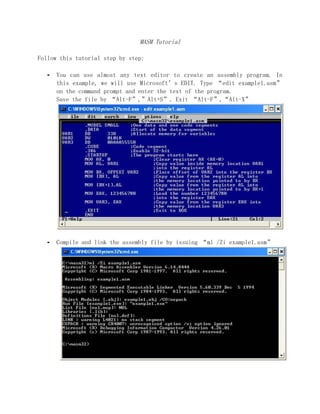
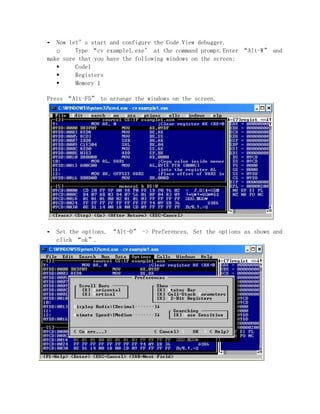
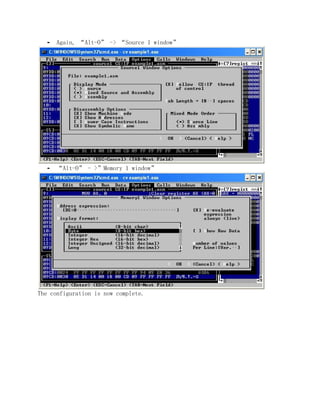
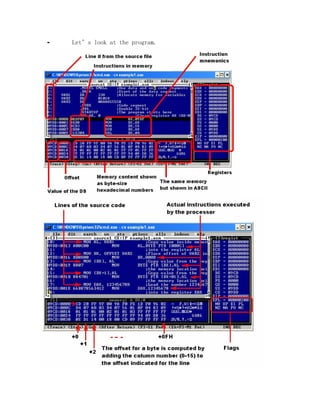
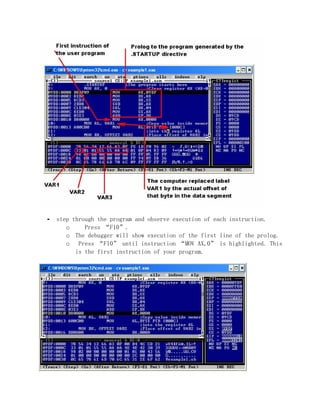
![Note that the line of the source code “MOV AL, VAR1” became
“MOV AL, [000C] where 000CH is the actual offset of VAR1 in the data
segment. You can check that this is true by checking the content of
memory location DS:000CH in the data window.
Now execute this instruction by pressing “F10”. Content of the
register AL changed, taking the value from the VAR1.
The next instruction is “MOV BX, OFFSET VAR2”. VAR2 follows VAR1 in memory
and has offset of 000DH. This is the value that will be placed into the BX
upon execution of this instruction. Press “F10” to execute.](https://image.slidesharecdn.com/masmtutorial-130125144432-phpapp01/85/Masm-tutorial-7-320.jpg)
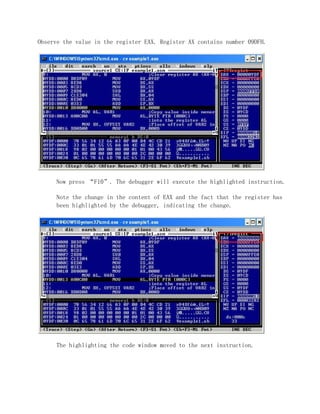
![The following instruction “MOV [BX], AL” will copy the content of AL
into the memory location pointed by BX within the data segment. After
the previous instruction BX contains the offset of the first byte of
VAR2 or 000DH. That is where the data from AL will appear. Press “F10”
to execute. Note the debugger also highlighted changes in the data
window.
Instruction “MOV [BX+1], AL” will copy the content of the register AL into
the memory location with offset equal whatever the number is in BX plus 1. In
our case BX=000DH, then the offset is 000DH+0001H=000EH. That is the second
byte of the VAR2. Press “F10” to execute. Note the change in the memory
content.](https://image.slidesharecdn.com/masmtutorial-130125144432-phpapp01/85/Masm-tutorial-8-320.jpg)
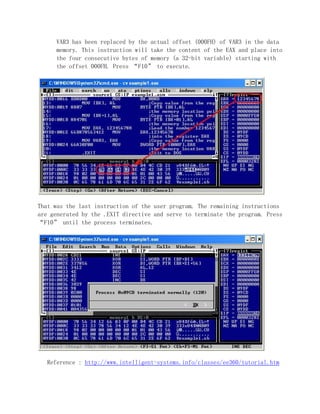
![Instruction “MOV EAX, 12345678H” will place number 12345678H into the
register EAX. Press “F10” to execute.
The instruction “MOV VAR3, EAX” became
“MOV DWORD PTR [000F], EAX”.](https://image.slidesharecdn.com/masmtutorial-130125144432-phpapp01/85/Masm-tutorial-9-320.jpg)

This document provides a tutorial on using the Microsoft Macro Assembler (MASM) to create, compile, and debug an assembly language program. It outlines the following key steps: 1. Use a text editor like EDIT to create an assembly file with the .asm extension, then compile and link it using ml. 2. Launch the CodeView debugger with the executable to configure windows for the code, registers, and memory. 3. Step through the program using F10 to observe how instructions modify registers and memory at each step. 4. View changes in registers and memory to see how the program executes at the instruction level.


