





09/17/15
MapServer #ProTips
MapServer for Power Users
A collection of tips to streamline your mapping workflow
09/17/15
#Protip: Discover performance issues,
problems, etc with DEBUG
09/17/15
DEBUGGING - Part 1
- set DEBUG level at MAP and/or LAYER level
- can see GDAL/OGR debug info with CPL_DEBUG
MAP
...
CONFIG "CPL_DEBUG" "ON"
...
LAYER
...
END
END
- use shp2img command line utility with
‘-all_debug” switch maximum debug info
09/17/15
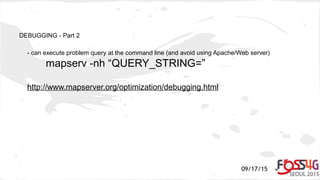
DEBUGGING - Part 2
- can execute problem query at the command line (and avoid using Apache/Web server)
mapserv -nh “QUERY_STRING=”
http://www.mapserver.org/optimization/debugging.html
09/17/15
Debugging - Part 3
- Can debug to various locations
- Web server log (default)
- External log file (MS_ERRORFILE)
- Really advanced debugging (gdb)
- Useful (but don't run production) (-DCMAKE_BUILD_TYPE=DEBUG)
- you can set breakpoints in the code and invoke via web and inspect/change variables
- can get backtraces (bt) to show developers where an error occurred
09/17/15
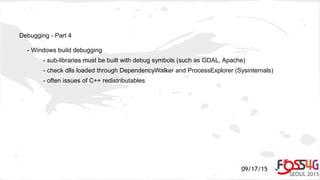
Debugging - Part 4
- Windows build debugging
- sub-libraries must be built with debug symbols (such as GDAL, Apache)
- check dlls loaded through DependencyWalker and ProcessExplorer (Sysinternals)
- often issues of C++ redistributables
09/17/15
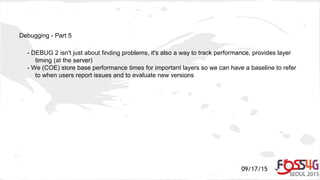
Debugging - Part 5
- DEBUG 2 isn't just about finding problems, it's also a way to track performance, provides layer
timing (at the server)
- We (COE) store base performance times for important layers so we can have a baseline to refer
to when users report issues and to evaluate new versions
09/17/15
#Protip: Secure OGC Services by IP
09/17/15
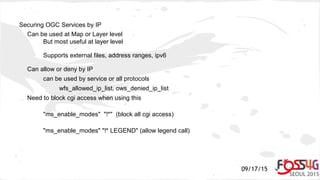
Securing OGC Services by IP
Can be used at Map or Layer level
But most useful at layer level
Supports external files, address ranges, ipv6
Can allow or deny by IP
can be used by service or all protocols
wfs_allowed_ip_list, ows_denied_ip_list
Need to block cgi access when using this
"ms_enable_modes" "!*" (block all cgi access)
"ms_enable_modes" "!* LEGEND" (allow legend call)
09/17/15
#Protip: Use of PROJECTION AUTO
09/17/15
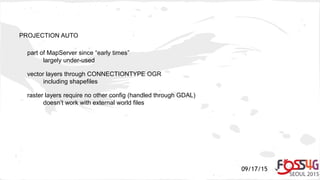
PROJECTION AUTO
part of MapServer since “early times”
largely under-used
vector layers through CONNECTIONTYPE OGR
including shapefiles
raster layers require no other config (handled through GDAL)
doesn’t work with external world files
09/17/15
PROJECTION AUTO - Vector Example
LAYER
…
CONNECTIONTYPE OGR
CONNECTION "sqlite.db"
DATA "roads"
PROJECTION
AUTO
END
..
END
09/17/15
PROJECTION AUTO - Raster Example
LAYER
…
TYPE RASTER
DATA raster.tif
PROJECTION
AUTO
END
END
09/17/15
#Protip: Use WFS 2.0
09/17/15
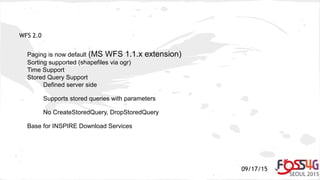
WFS 2.0
Paging is now default (MS WFS 1.1.x extension)
Sorting supported (shapefiles via ogr)
Time Support
Stored Query Support
Defined server side
Supports stored queries with parameters
No CreateStoredQuery, DropStoredQuery
Base for INSPIRE Download Services
09/17/15
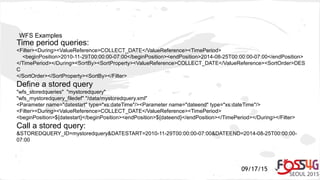
WFS Examples
Time period queries:
<Filter><During><ValueReference>COLLECT_DATE</ValueReference><TimePeriod>
<beginPosition>2010-11-29T00:00:00-07:00</beginPosition><endPosition>2014-08-25T00:00:00-07:00</endPosition>
</TimePeriod></During><SortBy><SortProperty><ValueReference>COLLECT_DATE</ValueReference><SortOrder>DES
C
</SortOrder></SortProperty><SortBy></Filter>
Define a stored query
"wfs_storedqueries" "mystoredquery"
"wfs_mystoredquery_filedef" "/data/mystoredquery.xml"
<Parameter name="datestart" type="xs:dateTime"/><Parameter name="dateend" type="xs:dateTime"/>
<Filter><During><ValueReference>COLLECT_DATE</ValueReference><TimePeriod>
<beginPosition>${datestart}</beginPosition><endPosition>${dateend}</endPosition></TimePeriod></During></Filter>
Call a stored query:
&STOREDQUERY_ID=mystoredquery&DATESTART=2010-11-29T00:00:00-07:00&DATEEND=2014-08-25T00:00:00-
07:00
09/17/15
#WFS Protip: (rfc-91)
Major changes for ogr/ database users, attribute and spatial operations pushed to database
Significant performance improvements if anything other that BBOX filters
Uses MapServer filter syntax or PROCESSING="NATIVE_FILTER=sql syntax" or embedded in
DATA statement
09/17/15
#Protip: HTML based Legends
09/17/15
HTML Legends
An alternative to img based legends
CGI only (incompatible with GetLegendGraphic)
Template based generation
Add TEMPLATE <path/to/template> in MapFile Legend Section
09/17/15
HTML Legend examples
JSON formatted: [leg_class_html opt_flag=0]
{"name": "[leg_class_name]", "icon": "[leg_icon]", "mykey" : "myvalue" },
[/leg_class_html]
HTML formatted: [leg_class_html opt_flag=0]
<img src=[leg_icon]> [leg_class_name]<br>
[/leg_class_html]
09/17/15
#Protip: Content Dependent Legends
09/17/15
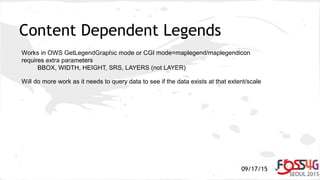
Content Dependent Legends
Works in OWS GetLegendGraphic mode or CGI mode=maplegend/maplegendicon
requires extra parameters
BBOX, WIDTH, HEIGHT, SRS, LAYERS (not LAYER)
Will do more work as it needs to query data to see if the data exists at that extent/scale
09/17/15
#Protip: Advanced Blending Modes
09/17/15
Blending Modes
7.0 introduces new LAYER->COMPOSITE blocks
replaces older OPACITY use
new COMPOP parameter
modes include: contrast, darken, difference,multiply, overlay,...
09/17/15
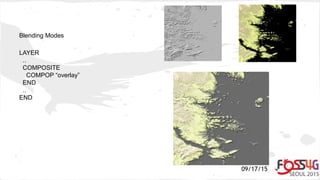
Blending Modes
LAYER
..
COMPOSITE
COMPOP “overlay”
END
..
END
09/17/15
Thank you for using MapServer!
@mapserving
@michael_smith

MapServer #ProTips 2015

  • 1.
    09/17/15 MapServer #ProTips MapServer forPower Users A collection of tips to streamline your mapping workflow
  • 2.
    09/17/15 #Protip: Discover performanceissues, problems, etc with DEBUG
  • 3.
    09/17/15 DEBUGGING - Part1 - set DEBUG level at MAP and/or LAYER level - can see GDAL/OGR debug info with CPL_DEBUG MAP ... CONFIG "CPL_DEBUG" "ON" ... LAYER ... END END - use shp2img command line utility with ‘-all_debug” switch maximum debug info
  • 4.
    09/17/15 DEBUGGING - Part2 - can execute problem query at the command line (and avoid using Apache/Web server) mapserv -nh “QUERY_STRING=” http://www.mapserver.org/optimization/debugging.html
  • 5.
    09/17/15 Debugging - Part3 - Can debug to various locations - Web server log (default) - External log file (MS_ERRORFILE) - Really advanced debugging (gdb) - Useful (but don't run production) (-DCMAKE_BUILD_TYPE=DEBUG) - you can set breakpoints in the code and invoke via web and inspect/change variables - can get backtraces (bt) to show developers where an error occurred
  • 6.
    09/17/15 Debugging - Part4 - Windows build debugging - sub-libraries must be built with debug symbols (such as GDAL, Apache) - check dlls loaded through DependencyWalker and ProcessExplorer (Sysinternals) - often issues of C++ redistributables
  • 7.
    09/17/15 Debugging - Part5 - DEBUG 2 isn't just about finding problems, it's also a way to track performance, provides layer timing (at the server) - We (COE) store base performance times for important layers so we can have a baseline to refer to when users report issues and to evaluate new versions
  • 8.
  • 9.
    09/17/15 Securing OGC Servicesby IP Can be used at Map or Layer level But most useful at layer level Supports external files, address ranges, ipv6 Can allow or deny by IP can be used by service or all protocols wfs_allowed_ip_list, ows_denied_ip_list Need to block cgi access when using this "ms_enable_modes" "!*" (block all cgi access) "ms_enable_modes" "!* LEGEND" (allow legend call)
  • 10.
    09/17/15 #Protip: Use ofPROJECTION AUTO
  • 11.
    09/17/15 PROJECTION AUTO part ofMapServer since “early times” largely under-used vector layers through CONNECTIONTYPE OGR including shapefiles raster layers require no other config (handled through GDAL) doesn’t work with external world files
  • 12.
    09/17/15 PROJECTION AUTO -Vector Example LAYER … CONNECTIONTYPE OGR CONNECTION "sqlite.db" DATA "roads" PROJECTION AUTO END .. END
  • 13.
    09/17/15 PROJECTION AUTO -Raster Example LAYER … TYPE RASTER DATA raster.tif PROJECTION AUTO END END
  • 14.
  • 15.
    09/17/15 WFS 2.0 Paging isnow default (MS WFS 1.1.x extension) Sorting supported (shapefiles via ogr) Time Support Stored Query Support Defined server side Supports stored queries with parameters No CreateStoredQuery, DropStoredQuery Base for INSPIRE Download Services
  • 16.
    09/17/15 WFS Examples Time periodqueries: <Filter><During><ValueReference>COLLECT_DATE</ValueReference><TimePeriod> <beginPosition>2010-11-29T00:00:00-07:00</beginPosition><endPosition>2014-08-25T00:00:00-07:00</endPosition> </TimePeriod></During><SortBy><SortProperty><ValueReference>COLLECT_DATE</ValueReference><SortOrder>DES C </SortOrder></SortProperty><SortBy></Filter> Define a stored query "wfs_storedqueries" "mystoredquery" "wfs_mystoredquery_filedef" "/data/mystoredquery.xml" <Parameter name="datestart" type="xs:dateTime"/><Parameter name="dateend" type="xs:dateTime"/> <Filter><During><ValueReference>COLLECT_DATE</ValueReference><TimePeriod> <beginPosition>${datestart}</beginPosition><endPosition>${dateend}</endPosition></TimePeriod></During></Filter> Call a stored query: &STOREDQUERY_ID=mystoredquery&DATESTART=2010-11-29T00:00:00-07:00&DATEEND=2014-08-25T00:00:00- 07:00
  • 17.
    09/17/15 #WFS Protip: (rfc-91) Majorchanges for ogr/ database users, attribute and spatial operations pushed to database Significant performance improvements if anything other that BBOX filters Uses MapServer filter syntax or PROCESSING="NATIVE_FILTER=sql syntax" or embedded in DATA statement
  • 18.
  • 19.
    09/17/15 HTML Legends An alternativeto img based legends CGI only (incompatible with GetLegendGraphic) Template based generation Add TEMPLATE <path/to/template> in MapFile Legend Section
  • 20.
    09/17/15 HTML Legend examples JSONformatted: [leg_class_html opt_flag=0] {"name": "[leg_class_name]", "icon": "[leg_icon]", "mykey" : "myvalue" }, [/leg_class_html] HTML formatted: [leg_class_html opt_flag=0] <img src=[leg_icon]> [leg_class_name]<br> [/leg_class_html]
  • 21.
  • 22.
    09/17/15 Content Dependent Legends Worksin OWS GetLegendGraphic mode or CGI mode=maplegend/maplegendicon requires extra parameters BBOX, WIDTH, HEIGHT, SRS, LAYERS (not LAYER) Will do more work as it needs to query data to see if the data exists at that extent/scale
  • 23.
  • 24.
    09/17/15 Blending Modes 7.0 introducesnew LAYER->COMPOSITE blocks replaces older OPACITY use new COMPOP parameter modes include: contrast, darken, difference,multiply, overlay,...
  • 25.
  • 26.
    09/17/15 Thank you forusing MapServer! @mapserving @michael_smith

Editor's Notes

  • #4 All data: shp2img -m /home/gridusr/GRiD/vendor/corpsmap/mapfiles/lidarthon.map -map_debug 3 -o test.png -l eq_cluster Limited extent: shp2img -m /home/gridusr/GRiD/vendor/corpsmap/mapfiles/lidarthon.map -map_debug 3 -o test.png -l eq_cluster -e -121 36 -118 37
  • #5 mapserv -nh QUERY_STRING=&amp;quot;map=/home/gridusr/GRiD/vendor/corpsmap/mapfiles/lidarthon.map&amp;outputformat=geojson&amp;service=wfs&amp;version=1.0.0&amp;request=getfeature&amp;typename=earthquakes_oracle2&amp;bbox=-121.793793%2C36.701393%2C-118.555573%2C37.546691&amp;quot;