Manage your external
libraries with CocoaPods
Juan Catalan
jcatalan007@gmail.com
About me
• Senior iOS developer working at Actsoft, Inc, in
sunny Tampa, FL, USA
• Started iOS development in 2009
• 20+ apps in the App Store
• Objective C veteran, Swift enthusiast
Agenda
• What is CocoaPods and why you should use it
• CocoaPods.org
• Demo: Setting up and using CocoaPods
• Alternatives to CocoaPods
What is CocoaPods?
• CocoaPods is a dependency manager for Swift and
Objective-C Cocoa projects. It has over 30 thousand
libraries and is used in over 1.9 million apps. CocoaPods
can help you scale your projects elegantly.
• A dependency manager is a tool that manages the third
party frameworks and packages you include in your Xcode
project in order to build your app.
• A framework is a reusable set of libraries or classes for a
software system
 https://cocoapods.org
What is CocoaPods?
• Apple includes many frameworks as part of the
iOS SDK, however some times you need to
implement a functionality that is not included in
the iOS SDK.
• Instead of investing a lot of time implementing a
feature by yourself, you could use a third party
library to implement the desired functionality.
Why CocoaPods?
• Using third party libraries without a dependency manager
poses some challenges:
• Updating a library to a newer version could be problematic,
specially if it depends on another library.
• Modifying a library could introduce incompatible changes
with future versions of that library
• It’s difficult to keep track of each version of a library used in
your code
• Discovering new library is difficult without a centralized
location to see all the available libraries.
Why CocoaPods?
• Cocapods provides a solution to the problems mentioned
before:
• Fetches the code for the libraries and includes it in your
Xcode project in an automated way
• Keeps track of the version of the library and its updates when
needed
• Keeps track and resolves dependencies between the different
libraries used
• Provides a centralized repository with more that 30,000
libraries
Demo: cocoapods.org
CocoaPods.org
• Homepage:
• Search
• Quick installation and getting started
• Create a pod
CocoaPods.org
• Search:
• ImagePicker with multiple images
• Facebook
• Realm, Firebase
• Zip, ISO8601
CocoaPods.org
• Guides
• Blog
• CocoaDocs: cocoadocs.org
• AFNetworking
• Facebook-iOS-SDK / FacebookCore
Demo: NASA Images
sample app
NASA Images
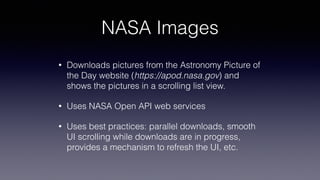
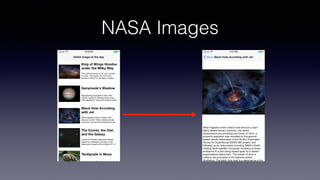
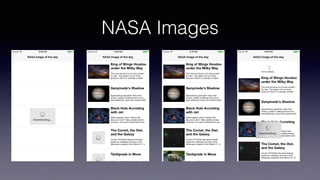
• Downloads pictures from the Astronomy Picture of
the Day website (https://apod.nasa.gov) and
shows the pictures in a scrolling list view.
• Uses NASA Open API web services
• Uses best practices: parallel downloads, smooth
UI scrolling while downloads are in progress,
provides a mechanism to refresh the UI, etc.
NASA Images
NASA Images
NASA Images
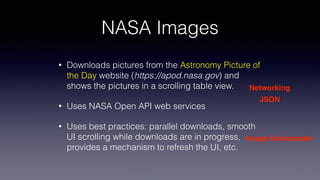
• Downloads pictures from the Astronomy Picture of
the Day website (https://apod.nasa.gov) and
shows the pictures in a scrolling table view.
• Uses NASA Open API web services
• Uses best practices: parallel downloads, smooth
UI scrolling while downloads are in progress,
provides a mechanism to refresh the UI, etc.
Networking
JSON
Image Downloader
NASA Images
UITableView
UILabel
UIImageViewUIRefreshControl
UITextView
Progress Indicator
Demo: NASA Images
sample app
NASA Images
• sudo gem install cocoapods | pod setup --verbose
• pod init -> show file system
• modify pod file
• pod install -> Show terminal, show file system
• Show Podfile.lock and explain
• Show Pods directory and explain
• close Xcode project and open Xcode workspace
• Show Xcode project file navigator
• Show podfile
• Add podfile to project (drag and drop, uncheck copy if needed, Ruby script)
• Import statements in project source files
NASA Images
• go to https://api.nasa.gov/api.html#apod
• show specifications for the endpoint
• show example JSON returned (use browser)
• show code for Alamofire GET request
• show code using SwiftyJSON
• show code for HUD
• show code for Image Downloader
Pod file examples
• podfile and podfile.lock
Best practices
• Under source control:
• podfile
• podfile.lock
• .xcworkspace
• PODS directory - controversy
• Pod install vs Pod update - be in control
Alternatives to CocoaPods
• Carthage
• A decentralized dependency manager
• Swift Package Manager
• Only available in Mac OS and Linux apps
Thanks!
• Source code
https://github.com/jcatalan007/cocoapods-talk
• Slides
https://www.slideshare.net/jcatalan007/manage-
your-external-libraries-with-cocoapods

Manage your external libraries with CocoaPods

  • 1.
    Manage your external librarieswith CocoaPods Juan Catalan jcatalan007@gmail.com
  • 2.
    About me • SenioriOS developer working at Actsoft, Inc, in sunny Tampa, FL, USA • Started iOS development in 2009 • 20+ apps in the App Store • Objective C veteran, Swift enthusiast
  • 3.
    Agenda • What isCocoaPods and why you should use it • CocoaPods.org • Demo: Setting up and using CocoaPods • Alternatives to CocoaPods
  • 4.
    What is CocoaPods? •CocoaPods is a dependency manager for Swift and Objective-C Cocoa projects. It has over 30 thousand libraries and is used in over 1.9 million apps. CocoaPods can help you scale your projects elegantly. • A dependency manager is a tool that manages the third party frameworks and packages you include in your Xcode project in order to build your app. • A framework is a reusable set of libraries or classes for a software system  https://cocoapods.org
  • 5.
    What is CocoaPods? •Apple includes many frameworks as part of the iOS SDK, however some times you need to implement a functionality that is not included in the iOS SDK. • Instead of investing a lot of time implementing a feature by yourself, you could use a third party library to implement the desired functionality.
  • 6.
    Why CocoaPods? • Usingthird party libraries without a dependency manager poses some challenges: • Updating a library to a newer version could be problematic, specially if it depends on another library. • Modifying a library could introduce incompatible changes with future versions of that library • It’s difficult to keep track of each version of a library used in your code • Discovering new library is difficult without a centralized location to see all the available libraries.
  • 7.
    Why CocoaPods? • Cocapodsprovides a solution to the problems mentioned before: • Fetches the code for the libraries and includes it in your Xcode project in an automated way • Keeps track of the version of the library and its updates when needed • Keeps track and resolves dependencies between the different libraries used • Provides a centralized repository with more that 30,000 libraries
  • 8.
  • 9.
    CocoaPods.org • Homepage: • Search •Quick installation and getting started • Create a pod
  • 10.
    CocoaPods.org • Search: • ImagePickerwith multiple images • Facebook • Realm, Firebase • Zip, ISO8601
  • 11.
    CocoaPods.org • Guides • Blog •CocoaDocs: cocoadocs.org • AFNetworking • Facebook-iOS-SDK / FacebookCore
  • 12.
  • 13.
    NASA Images • Downloadspictures from the Astronomy Picture of the Day website (https://apod.nasa.gov) and shows the pictures in a scrolling list view. • Uses NASA Open API web services • Uses best practices: parallel downloads, smooth UI scrolling while downloads are in progress, provides a mechanism to refresh the UI, etc.
  • 14.
  • 15.
  • 16.
    NASA Images • Downloadspictures from the Astronomy Picture of the Day website (https://apod.nasa.gov) and shows the pictures in a scrolling table view. • Uses NASA Open API web services • Uses best practices: parallel downloads, smooth UI scrolling while downloads are in progress, provides a mechanism to refresh the UI, etc. Networking JSON Image Downloader
  • 17.
  • 18.
  • 19.
    NASA Images • sudogem install cocoapods | pod setup --verbose • pod init -> show file system • modify pod file • pod install -> Show terminal, show file system • Show Podfile.lock and explain • Show Pods directory and explain • close Xcode project and open Xcode workspace • Show Xcode project file navigator • Show podfile • Add podfile to project (drag and drop, uncheck copy if needed, Ruby script) • Import statements in project source files
  • 20.
    NASA Images • goto https://api.nasa.gov/api.html#apod • show specifications for the endpoint • show example JSON returned (use browser) • show code for Alamofire GET request • show code using SwiftyJSON • show code for HUD • show code for Image Downloader
  • 21.
    Pod file examples •podfile and podfile.lock
  • 22.
    Best practices • Undersource control: • podfile • podfile.lock • .xcworkspace • PODS directory - controversy • Pod install vs Pod update - be in control
  • 23.
    Alternatives to CocoaPods •Carthage • A decentralized dependency manager • Swift Package Manager • Only available in Mac OS and Linux apps
  • 24.
    Thanks! • Source code https://github.com/jcatalan007/cocoapods-talk •Slides https://www.slideshare.net/jcatalan007/manage- your-external-libraries-with-cocoapods