Making Presentations Visual From  Text Slides to Simple Visual DiagramsPresentation-Process.com
Hi,We are Ram & ArteFrom Presentation-processThe people trying to put a clear process to create better business presentations
This presentation explores how slides in business presentations can be made more effective
Slides are useful for many reasons…Add insightsRepresent ideas powerfullyProvide Visual ReliefSlidesEngage multiple sensesAid memoryReinforce talk…If they are made effectively
What is the best way to represent information on slides?A practical example…
The usual text-based slide looks like this…
Guidelines to seat audience in a presentationTheater Style: If your audience is large and you cannot interact much with them, use this seating arrangement U-shaped style: For audience of 10-20 this is a great way to interact with the audience Cluster arrangement: More of a training set up where you want audience to interact with each other
Does this type of slide help present effectively?PRESENTER: Easy to present without practice or even knowing the subjectADVANTAGEAUDIENCE:  Can either listen or read text, but not both at the same time!PROBLEM( Notice how all the advantages are for the presenter)
A better alternative is to use bullet-points effectively…
Guidelines to seat audience correctlyTheater Style:large audience Low interaction with presenterU-shaped style: Audience size of 10-20High interaction with presenterCluster arrangement: Training set up Audience interact with each other
Is this type of slide more effective?PRESENTER: Provides clues for speech without revealing too much to audience. Easy to make.ADVANTAGEAUDIENCE:Does not engage visually. Becomes monotonous after a whilePROBLEM
A more‘image’ focused slide on this same topic looks like…
Guidelines to seat audience in a presentationSlide 1:Slide 2:Slide 3:Theater StyleU-ShapedCluster Seating
Do these ‘images’ help present effectively?AUDIENCE: It is more visual than any of the previous alternativesPRESENTER: Easy to make ADVANTAGEAUDIENCE: It in a ‘linear’ format where connected  information is being presented separately. This makes it difficult to recall.PROBLEM
Slide with imageRepresenting the way ideas are represented in these slides…Slide with imageSlide with imageSlide with imageSlide with image
But the way audience remember information is:The way these slides present information:Not
As humans, we understand and remember information as ‘relationships’ or connectionsGood Visual SlideHow information about animals is stored in your brainImage Source: Wikipedia
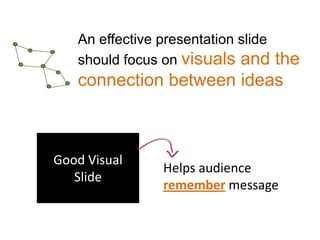
An effective presentation slide should focus on visuals and the connection between ideasGood Visual SlideHelps audience remember message
Relationships or connections can be easily captured with DIAGRAMS
For example: If we really look at the RELATIONSHIP between the information we have been trying to present…
The basis of our suggestion for audience seating arrangement is: Audience interaction with presenter: High or Low Audience size: Small or Large The relationship between the information can be captured as a MATRIX
Guidelines to seat audience in a presentationHighU-SHAPED ARRANGEMENTCLUSTER ARRANGEMENTAudience Interaction with presenterTHEATRE STYLECLASSROOM STYLELowAudience SizeSmallLarge
ADVANTAGE 1With a diagram, we found further  information that could be added to make the thought completeHighU-SHAPED ARRANGEMENTCLUSTER ARRANGEMENTAudience Interaction with presenterTHEATRE STYLECLASSROOM STYLELowAudience SizeSmallLarge
We can draw this diagram on whiteboard/ flipchart. No need for slidesADVANTAGE 2
Information is presented as ‘relationships’ or connections, which makes it easy for audience to rememberADVANTAGE 3
Once the relationship is clear, the information can always be presented with better design…
With a more professional diagram…Audience Interaction : HIGHU-Shaped ArrangementCluster ArrangementClassroom StyleTheater StyleLO WSize : SMALLLARGE
Is there a problem with this approach?The presenter needs to take the time to process his information and present it as powerful visual diagramsPROBLEMIt is very easy once the presenter knows the process
The change in presenting information visually….TextBulletsImagesDiagram+ Design
You can READ MORE about presentingbusiness ideas powerfully by creating visual diagrams here:http://www.presentation-process.com/powerpoint-diagram.htmlCONNECT:@Metamorphtrg

Why Make Presentations Visual

  • 1.
    Making Presentations VisualFrom Text Slides to Simple Visual DiagramsPresentation-Process.com
  • 2.
    Hi,We are Ram& ArteFrom Presentation-processThe people trying to put a clear process to create better business presentations
  • 3.
    This presentation exploreshow slides in business presentations can be made more effective
  • 4.
    Slides are usefulfor many reasons…Add insightsRepresent ideas powerfullyProvide Visual ReliefSlidesEngage multiple sensesAid memoryReinforce talk…If they are made effectively
  • 5.
    What is thebest way to represent information on slides?A practical example…
  • 6.
    The usual text-basedslide looks like this…
  • 7.
    Guidelines to seataudience in a presentationTheater Style: If your audience is large and you cannot interact much with them, use this seating arrangement U-shaped style: For audience of 10-20 this is a great way to interact with the audience Cluster arrangement: More of a training set up where you want audience to interact with each other
  • 8.
    Does this typeof slide help present effectively?PRESENTER: Easy to present without practice or even knowing the subjectADVANTAGEAUDIENCE: Can either listen or read text, but not both at the same time!PROBLEM( Notice how all the advantages are for the presenter)
  • 9.
    A better alternativeis to use bullet-points effectively…
  • 10.
    Guidelines to seataudience correctlyTheater Style:large audience Low interaction with presenterU-shaped style: Audience size of 10-20High interaction with presenterCluster arrangement: Training set up Audience interact with each other
  • 11.
    Is this typeof slide more effective?PRESENTER: Provides clues for speech without revealing too much to audience. Easy to make.ADVANTAGEAUDIENCE:Does not engage visually. Becomes monotonous after a whilePROBLEM
  • 12.
    A more‘image’ focusedslide on this same topic looks like…
  • 13.
    Guidelines to seataudience in a presentationSlide 1:Slide 2:Slide 3:Theater StyleU-ShapedCluster Seating
  • 14.
    Do these ‘images’help present effectively?AUDIENCE: It is more visual than any of the previous alternativesPRESENTER: Easy to make ADVANTAGEAUDIENCE: It in a ‘linear’ format where connected information is being presented separately. This makes it difficult to recall.PROBLEM
  • 15.
    Slide with imageRepresentingthe way ideas are represented in these slides…Slide with imageSlide with imageSlide with imageSlide with image
  • 16.
    But the wayaudience remember information is:The way these slides present information:Not
  • 17.
    As humans, weunderstand and remember information as ‘relationships’ or connectionsGood Visual SlideHow information about animals is stored in your brainImage Source: Wikipedia
  • 18.
    An effective presentationslide should focus on visuals and the connection between ideasGood Visual SlideHelps audience remember message
  • 19.
    Relationships or connectionscan be easily captured with DIAGRAMS
  • 20.
    For example: Ifwe really look at the RELATIONSHIP between the information we have been trying to present…
  • 21.
    The basis ofour suggestion for audience seating arrangement is: Audience interaction with presenter: High or Low Audience size: Small or Large The relationship between the information can be captured as a MATRIX
  • 22.
    Guidelines to seataudience in a presentationHighU-SHAPED ARRANGEMENTCLUSTER ARRANGEMENTAudience Interaction with presenterTHEATRE STYLECLASSROOM STYLELowAudience SizeSmallLarge
  • 23.
    ADVANTAGE 1With adiagram, we found further information that could be added to make the thought completeHighU-SHAPED ARRANGEMENTCLUSTER ARRANGEMENTAudience Interaction with presenterTHEATRE STYLECLASSROOM STYLELowAudience SizeSmallLarge
  • 24.
    We can drawthis diagram on whiteboard/ flipchart. No need for slidesADVANTAGE 2
  • 25.
    Information is presentedas ‘relationships’ or connections, which makes it easy for audience to rememberADVANTAGE 3
  • 26.
    Once the relationshipis clear, the information can always be presented with better design…
  • 27.
    With a moreprofessional diagram…Audience Interaction : HIGHU-Shaped ArrangementCluster ArrangementClassroom StyleTheater StyleLO WSize : SMALLLARGE
  • 28.
    Is there aproblem with this approach?The presenter needs to take the time to process his information and present it as powerful visual diagramsPROBLEMIt is very easy once the presenter knows the process
  • 29.
    The change inpresenting information visually….TextBulletsImagesDiagram+ Design
  • 30.
    You can READMORE about presentingbusiness ideas powerfully by creating visual diagrams here:http://www.presentation-process.com/powerpoint-diagram.htmlCONNECT:@Metamorphtrg