Getting started using the
tablets
Madrid Adults - Summer 2015
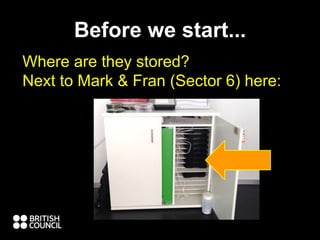
Before we start...
Where are they stored?
Next to Mark & Fran (Sector 6) here:
Before we start cont.....
Get the key for the cupboard from
Ana, Marta, James, etc
Please plug them in when you finish.
There is also a
trolley to carry them to class
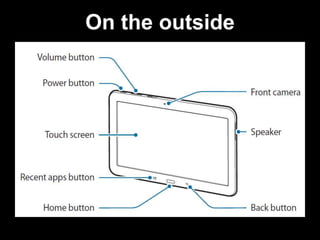
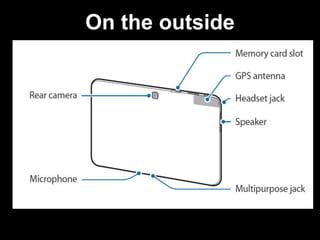
On the outside
On the outside
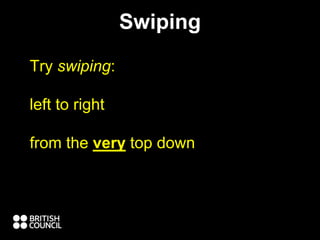
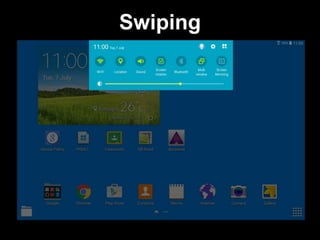
Swiping
Try swiping:
left to right
from the very top down
Swiping
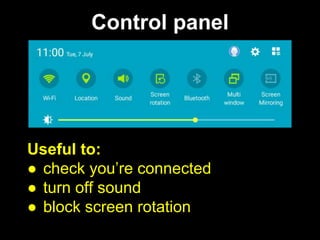
Control panel
Useful to:
● check you’re connected
● turn off sound
● block screen rotation
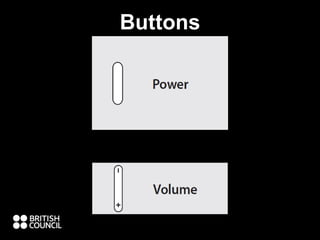
Buttons
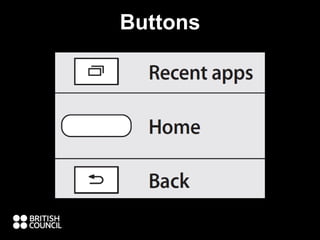
Buttons
● to use the internet:
o show students the student portal, flo-
joe, bbc, & other sites
o research (eg. for presentation) /
language practise (video, audio,
reading, speaking [recording]
Why use Tablets?
11
o class pages - google classrooms
(under construction), edmodo, etc
o learner training
o because students use tablets /
smartphones every day
o have some fun / variation
Why use Tablets………………?
12
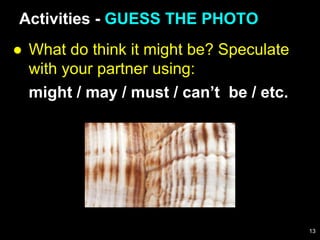
● What do think it might be? Speculate
with your partner using:
might / may / must / can’t be / etc.
Activities - GUESS THE PHOTO
13
● With a partner:
o find the camera on your tablet and
take a pic
o go and take three (or more)
close-up photos around the centre
o you have five minutes
GUESS THE PHOTO
14
● Swap tablets with another pair
● What do you think the photos could
be?
GUESS THE PHOTO
What was in the photos?
How did you decide what to
photograph?
15
A quiz activity
● go to google chrome and type this in
the address bar:
Activities - READING RACE
todaysmeet.com/tablet
16
Find the answer and post it on
todaysmeet.com/tablet
1. Who was the 12th President of the
USA?
2. Who discovered penicillin, and when?
3. Who invented the term ‘blog’, and
when?
READING RACE
17
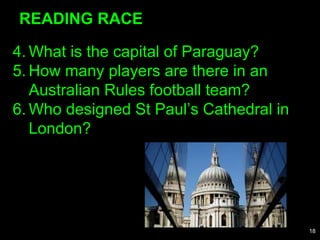
4. What is the capital of Paraguay?
5. How many players are there in an
Australian Rules football team?
6. Who designed St Paul’s Cathedral in
London?
READING RACE
18
1. Zachary Taylor
2. Scottish scientist and Nobel laureate Alexander
Fleming in 1928
3. BrE /blɒɡ/ a website where a person writes
regularly about recent events or topics that interest
them, usually with photos and links to other
websites (Oxford Advanced Learner’s)
4. Asunción
5. 18
6. Sir Christopher Wren
READING RACE - Answers
19
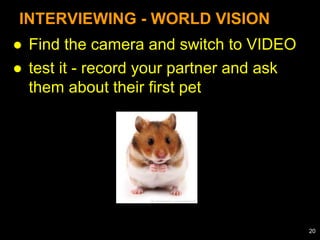
● Find the camera and switch to VIDEO
● test it - record your partner and ask
them about their first pet
INTERVIEWING - WORLD VISION
20
● Now record an interview with your
partner. THEY MUST SPEAK FOR
LONGER THAN 1 MIN (total).
● Ask them:
o What is your vision of a perfect
world?
o If you could change one thing in
the world, what would it be?
INTERVIEWING - WORLD VISION
21
● swap tablets with another pairs:
o who talks about world peace?
o who talks about diseases?
o who mentions politics?
o which message did you like most?
INTERVIEWING - WORLD VISION
22
DO RESEARCH FOR MINI
PRESENTATION
Groups:
A.thesaurus.com
B.vocabulary.com
C.quizlet.com
D.visualthesaurus.com
E.macmillandictionary.com/language-
games
23
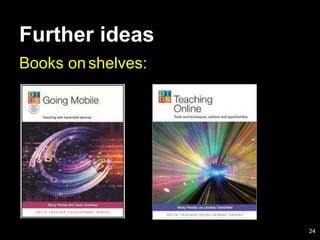
Books onshelves:
Further ideas
24

Madrid adults tablets an introduction & activities

  • 1.
    Getting started usingthe tablets Madrid Adults - Summer 2015
  • 2.
    Before we start... Whereare they stored? Next to Mark & Fran (Sector 6) here:
  • 3.
    Before we startcont..... Get the key for the cupboard from Ana, Marta, James, etc Please plug them in when you finish. There is also a trolley to carry them to class
  • 4.
  • 5.
  • 6.
    Swiping Try swiping: left toright from the very top down
  • 7.
  • 8.
    Control panel Useful to: ●check you’re connected ● turn off sound ● block screen rotation
  • 9.
  • 10.
  • 11.
    ● to usethe internet: o show students the student portal, flo- joe, bbc, & other sites o research (eg. for presentation) / language practise (video, audio, reading, speaking [recording] Why use Tablets? 11
  • 12.
    o class pages- google classrooms (under construction), edmodo, etc o learner training o because students use tablets / smartphones every day o have some fun / variation Why use Tablets………………? 12
  • 13.
    ● What dothink it might be? Speculate with your partner using: might / may / must / can’t be / etc. Activities - GUESS THE PHOTO 13
  • 14.
    ● With apartner: o find the camera on your tablet and take a pic o go and take three (or more) close-up photos around the centre o you have five minutes GUESS THE PHOTO 14
  • 15.
    ● Swap tabletswith another pair ● What do you think the photos could be? GUESS THE PHOTO What was in the photos? How did you decide what to photograph? 15
  • 16.
    A quiz activity ●go to google chrome and type this in the address bar: Activities - READING RACE todaysmeet.com/tablet 16
  • 17.
    Find the answerand post it on todaysmeet.com/tablet 1. Who was the 12th President of the USA? 2. Who discovered penicillin, and when? 3. Who invented the term ‘blog’, and when? READING RACE 17
  • 18.
    4. What isthe capital of Paraguay? 5. How many players are there in an Australian Rules football team? 6. Who designed St Paul’s Cathedral in London? READING RACE 18
  • 19.
    1. Zachary Taylor 2.Scottish scientist and Nobel laureate Alexander Fleming in 1928 3. BrE /blɒɡ/ a website where a person writes regularly about recent events or topics that interest them, usually with photos and links to other websites (Oxford Advanced Learner’s) 4. Asunción 5. 18 6. Sir Christopher Wren READING RACE - Answers 19
  • 20.
    ● Find thecamera and switch to VIDEO ● test it - record your partner and ask them about their first pet INTERVIEWING - WORLD VISION 20
  • 21.
    ● Now recordan interview with your partner. THEY MUST SPEAK FOR LONGER THAN 1 MIN (total). ● Ask them: o What is your vision of a perfect world? o If you could change one thing in the world, what would it be? INTERVIEWING - WORLD VISION 21
  • 22.
    ● swap tabletswith another pairs: o who talks about world peace? o who talks about diseases? o who mentions politics? o which message did you like most? INTERVIEWING - WORLD VISION 22
  • 23.
    DO RESEARCH FORMINI PRESENTATION Groups: A.thesaurus.com B.vocabulary.com C.quizlet.com D.visualthesaurus.com E.macmillandictionary.com/language- games 23
  • 24.

Editor's Notes

  • #2 PLUG IN TABLET WITH CABLE / OPEN TODAYSMEET.COM/TABLET /
  • #4 SHOW TROLLEY
  • #14 SHOW SS PICTURES ON TABLET CONNECTED VIA CABLE
  • #17 Open todaysmeet on tablet and show SS
  • #18 GET SS TO OPEN AN ADDITIONAL TAB AT TOP (DEMONSTRATE) AND OPEN GOOGLE