PROGRAMMING
Submitted by Jeronika Macaraeg


                                 http://eglobiotraining.com
TOPICS IN
PROGRAMMING:
SWITCH CASE
LOOPING

         http://eglobiotraining.com
LOOPING
 Programming languages provide various
  control structures that allow for more
  complicated execution paths.
 A loop statement allows us to execute a
  statement or group of statements multiple
  times and following is the general from of
  a loop statement in most of the
  programming languages.

                      http://eglobiotraining.com
looping programming
has three types:
  FOR
  WHILE
  DO WHILE


              http://eglobiotraining.com
FOR
 The statements in the for loop repeat
  continuously for aspecific number of
  times. The while and do-while loops repeat
  until a certain condition is met. The for loop
  repeats until a specific count is met. Use
  a for loop when the number of repetition is
  know, or can be supplied by the user


                        http://eglobiotraining.com
WHILE
 The while loop allows programs to repeat a
  statement or series of statements, over and
  over, as long as a certain test condition is
  true.


                        http://eglobiotraining.com
Do while
 In most computer programming languages,
  a do while loop, sometimes just called
  a while loop, is a control flow statement that
  allows code to be executed once based on a
  given Boolean condition
 Unlike for and while loops, which test the
  loop condition at the top of the loop,
  the do...while loop checks its condition at the
  bottom of the loop.

                        http://eglobiotraining.com
SWITCH CASE
 Switch case statements are a substitute for long
  if statements that compare a variable to several
  "integral" values ("integral" values are simply
  values that can be expressed as an integer, such
  as the value of a char). The basic format for using
  the switch case in the programming is outlined
  below. The value of the variable given into switch
  is compared to the value following each of the
  cases, and when one value matches the value of
  the variable, the computer continues executing
  the program from that point.

                          http://eglobiotraining.com
SWITCH CASE
 In programming,
  a switch, case, select or inspect statement is a type of
  selection control mechanism that exists in most imperative
  programming languages such
  as Pascal, Ada, C/C++, C#, Java, and so on. It is also included
  in several other types of Programming languages. Its
  purpose is to allow the value of a variable or expression to
  control the flow of program execution via a multiway
  branch (or "go to", one of several labels). The main reasons
  for using a switch include improving clarity, by reducing
  otherwise repetitive coding, and (if the heuristics permit)
  also offering the potential for faster execution through
  easier compiler optimization in many cases.


                                http://eglobiotraining.com
EXAMPLES OF SOURCE CODE IN C++
PROGRAMMING
#include <iostream>
#include <stdlib.h>
                                                                             // switch statement based on the choice variable
using namespace std;                                                          switch (choice) // notice no semicolon
void welcome();                                                               {
                                                                                case 'A': // choice was the letter A
char getChar();                                                                 case 'a': // choice was the letter a
void displayResponse(char choice);                                               cout << "your awesome dude.nn";
                                                                                 break; // this ends the statements for case A/a
int main(int argc, char *argv[])                                                case 'B': // choice was the letter b
                                                                                case 'b': // choice was the letter b
{
                                                                                 cout << "you will find your lovelife.nn";
    char choice; // declares the choice variable                                 break; // this ends the statements for case B/b
                                                                                case 'C': // choice was the letter C
    welcome(); // This calls the welcome function
                                                                                case 'c': // choice was the letter c
    choice = getChar(); // calls getChar and returns the value for choice        cout << "your will won the lottery.nn";
                                                                                 break; // this ends the statements for case C/c
    displayResponse(choice); // passes choice to displayResponse function
                                                                                  case 'D': // choice was the letter D
                                                                                case 'd': // choice was the letter d
                                                                                 cout << "your so ugly!!.nn";
    system("PAUSE");                                                             break; // this ends the statements for case D/d
    return 0;                                                                   default: // used when choice falls out of the cases covered above
                                                                                 cout << "You didn't pick a letter a, b or c.nn";
} // end main                                                                    again = getChar(); // gives the user another try
// welcome function displays an opening message to                               displayResponse(again); // recalls displayResponse with new
                                                                            character
// explain the program to the user                                               break;
                                                                              } // end of switch statement
void welcome()
                                                                            } // end displayResponse function
{
    cout << "This program displays different messages dependingn";
    cout << "on which letter is entered by the user.n";
    cout << "Pick a letter a, b, c or d to see whatn";
    cout << "the program will say.nn";
} // end of welcome function
// getChar asks the user for a letter a, b or c.
// The character is returned to where the function was called.                    http://eglobiotraining.com
EXAMPLES OF SOURCE CODE IN C++
 PROGRAMMING
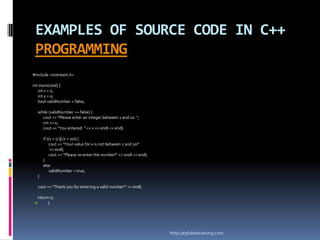
#include <iostream.h>

int main(void) {
   int x = 0;
   int y = 0;
   bool validNumber = false;

  while (validNumber == false) {
    cout << "Please enter an integer between 1 and 10: ";
    cin >> x;
    cout << "You entered: " << x << endl << endl;

      if ((x < 1) || (x > 10)) {
           cout << "Your value for x is not between 1 and 10!"
           << endl;
           cout << "Please re-enter the number!" << endl << endl;
      }
      else
           validNumber = true;
  }

  cout << "Thank you for entering a valid number!" << endl;

  return 0;
       }


                                                                    http://eglobiotraining.com
EXAMPLES OF SOURCE CODE IN C++
PROGRAMMING
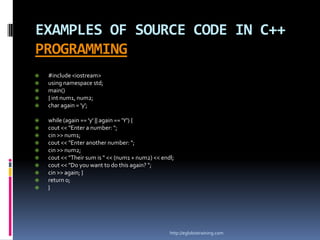
   #include <iostream>
   using namespace std;
   main()
   { int num1, num2;
   char again = 'y';

   while (again == 'y' || again == 'Y') {
   cout << "Enter a number: ";
   cin >> num1;
   cout << "Enter another number: ";
   cin >> num2;
   cout << "Their sum is " << (num1 + num2) << endl;
   cout << "Do you want to do this again? ";
   cin >> again; }
   return 0;
   }


                                                   http://eglobiotraining.com
EXAMPLES OF SOURCE CODE IN C++
         PROGRAMMING
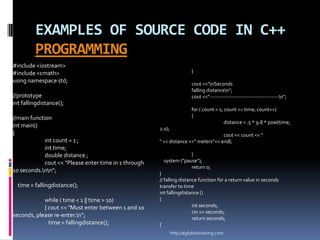
#include <iostream>
#include <cmath>                                                         }
using namespace std;                                                     cout <<"nSeconds
                                                                         falling distancen";
//prototype                                                              cout <<"---------------------------------------n";
int fallingdistance();
                                                                         for ( count = 1; count <= time; count++)
//main function                                                          {
                                                                                          distance = .5 * 9.8 * pow(time,
int main()                                             2.0);
{                                                                                   cout << count << "
             int count = 1 ;                           " << distance <<" meters"<< endl;
             int time;
             double distance ;                                       }
             cout << "Please enter time in 1 through     system ("pause");
                                                                     return 0;
10 seconds.nn";                                      }
                                                       // falling distance function for a return value in seconds
  time = fallingdistance();                            transfer to time
                                                       int fallingdistance ()
            while ( time < 1 || time > 10)             {
            { cout << "Must enter between 1 and 10                      int seconds;
                                                                        cin >> seconds;
seconds, please re-enter.n";                                           return seconds;
              time = fallingdistance();                }
                                                               http://eglobiotraining.com
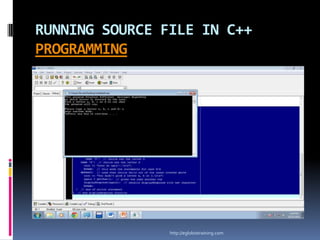
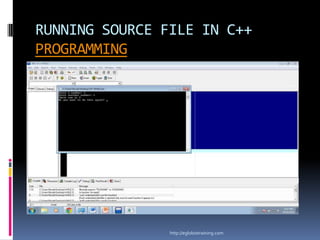
RUNNING SOURCE FILE IN C++
PROGRAMMING


                http://eglobiotraining.com
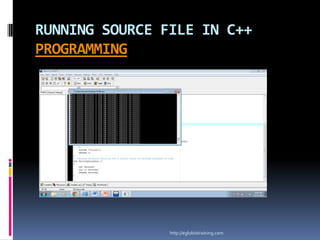
RUNNING SOURCE FILE IN C++
PROGRAMMING


                http://eglobiotraining.com
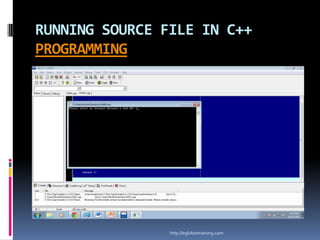
RUNNING SOURCE FILE IN C++
PROGRAMMING


                http://eglobiotraining.com
RUNNING SOURCE FILE IN C++
PROGRAMMING


                http://eglobiotraining.com
http://eglobiotraining.com


                  SUBMITTED TO:
                   EDWIN GLOBIO

                             http://eglobiotraining.com

Macaraeg

  • 1.
    PROGRAMMING Submitted by JeronikaMacaraeg http://eglobiotraining.com
  • 2.
  • 3.
    LOOPING  Programming languagesprovide various control structures that allow for more complicated execution paths.  A loop statement allows us to execute a statement or group of statements multiple times and following is the general from of a loop statement in most of the programming languages. http://eglobiotraining.com
  • 4.
    looping programming has threetypes:  FOR  WHILE  DO WHILE http://eglobiotraining.com
  • 5.
    FOR  The statementsin the for loop repeat continuously for aspecific number of times. The while and do-while loops repeat until a certain condition is met. The for loop repeats until a specific count is met. Use a for loop when the number of repetition is know, or can be supplied by the user http://eglobiotraining.com
  • 6.
    WHILE  The whileloop allows programs to repeat a statement or series of statements, over and over, as long as a certain test condition is true. http://eglobiotraining.com
  • 7.
    Do while  Inmost computer programming languages, a do while loop, sometimes just called a while loop, is a control flow statement that allows code to be executed once based on a given Boolean condition  Unlike for and while loops, which test the loop condition at the top of the loop, the do...while loop checks its condition at the bottom of the loop. http://eglobiotraining.com
  • 8.
    SWITCH CASE  Switchcase statements are a substitute for long if statements that compare a variable to several "integral" values ("integral" values are simply values that can be expressed as an integer, such as the value of a char). The basic format for using the switch case in the programming is outlined below. The value of the variable given into switch is compared to the value following each of the cases, and when one value matches the value of the variable, the computer continues executing the program from that point. http://eglobiotraining.com
  • 9.
    SWITCH CASE  Inprogramming, a switch, case, select or inspect statement is a type of selection control mechanism that exists in most imperative programming languages such as Pascal, Ada, C/C++, C#, Java, and so on. It is also included in several other types of Programming languages. Its purpose is to allow the value of a variable or expression to control the flow of program execution via a multiway branch (or "go to", one of several labels). The main reasons for using a switch include improving clarity, by reducing otherwise repetitive coding, and (if the heuristics permit) also offering the potential for faster execution through easier compiler optimization in many cases. http://eglobiotraining.com
  • 10.
    EXAMPLES OF SOURCECODE IN C++ PROGRAMMING #include <iostream> #include <stdlib.h> // switch statement based on the choice variable using namespace std; switch (choice) // notice no semicolon void welcome(); { case 'A': // choice was the letter A char getChar(); case 'a': // choice was the letter a void displayResponse(char choice); cout << "your awesome dude.nn"; break; // this ends the statements for case A/a int main(int argc, char *argv[]) case 'B': // choice was the letter b case 'b': // choice was the letter b { cout << "you will find your lovelife.nn"; char choice; // declares the choice variable break; // this ends the statements for case B/b case 'C': // choice was the letter C welcome(); // This calls the welcome function case 'c': // choice was the letter c choice = getChar(); // calls getChar and returns the value for choice cout << "your will won the lottery.nn"; break; // this ends the statements for case C/c displayResponse(choice); // passes choice to displayResponse function case 'D': // choice was the letter D case 'd': // choice was the letter d cout << "your so ugly!!.nn"; system("PAUSE"); break; // this ends the statements for case D/d return 0; default: // used when choice falls out of the cases covered above cout << "You didn't pick a letter a, b or c.nn"; } // end main again = getChar(); // gives the user another try // welcome function displays an opening message to displayResponse(again); // recalls displayResponse with new character // explain the program to the user break; } // end of switch statement void welcome() } // end displayResponse function { cout << "This program displays different messages dependingn"; cout << "on which letter is entered by the user.n"; cout << "Pick a letter a, b, c or d to see whatn"; cout << "the program will say.nn"; } // end of welcome function // getChar asks the user for a letter a, b or c. // The character is returned to where the function was called. http://eglobiotraining.com
  • 11.
    EXAMPLES OF SOURCECODE IN C++ PROGRAMMING #include <iostream.h> int main(void) { int x = 0; int y = 0; bool validNumber = false; while (validNumber == false) { cout << "Please enter an integer between 1 and 10: "; cin >> x; cout << "You entered: " << x << endl << endl; if ((x < 1) || (x > 10)) { cout << "Your value for x is not between 1 and 10!" << endl; cout << "Please re-enter the number!" << endl << endl; } else validNumber = true; } cout << "Thank you for entering a valid number!" << endl; return 0;  } http://eglobiotraining.com
  • 12.
    EXAMPLES OF SOURCECODE IN C++ PROGRAMMING  #include <iostream>  using namespace std;  main()  { int num1, num2;  char again = 'y';  while (again == 'y' || again == 'Y') {  cout << "Enter a number: ";  cin >> num1;  cout << "Enter another number: ";  cin >> num2;  cout << "Their sum is " << (num1 + num2) << endl;  cout << "Do you want to do this again? ";  cin >> again; }  return 0;  } http://eglobiotraining.com
  • 13.
    EXAMPLES OF SOURCECODE IN C++ PROGRAMMING #include <iostream> #include <cmath> } using namespace std; cout <<"nSeconds falling distancen"; //prototype cout <<"---------------------------------------n"; int fallingdistance(); for ( count = 1; count <= time; count++) //main function { distance = .5 * 9.8 * pow(time, int main() 2.0); { cout << count << " int count = 1 ; " << distance <<" meters"<< endl; int time; double distance ; } cout << "Please enter time in 1 through system ("pause"); return 0; 10 seconds.nn"; } // falling distance function for a return value in seconds time = fallingdistance(); transfer to time int fallingdistance () while ( time < 1 || time > 10) { { cout << "Must enter between 1 and 10 int seconds; cin >> seconds; seconds, please re-enter.n"; return seconds; time = fallingdistance(); } http://eglobiotraining.com
  • 14.
    RUNNING SOURCE FILEIN C++ PROGRAMMING http://eglobiotraining.com
  • 15.
    RUNNING SOURCE FILEIN C++ PROGRAMMING http://eglobiotraining.com
  • 16.
    RUNNING SOURCE FILEIN C++ PROGRAMMING http://eglobiotraining.com
  • 17.
    RUNNING SOURCE FILEIN C++ PROGRAMMING http://eglobiotraining.com
  • 18.
    http://eglobiotraining.com SUBMITTED TO: EDWIN GLOBIO http://eglobiotraining.com