
Mac OS X Applications Presented by ArrowQuick Solutions Wednesday, July 16, 2003
Internet Mail Mail application comes with Mac OS X Junk mail filtering Powerful and flexible mail rules Handles multiple accounts (.Mac, POP, IMAP) Drag and drop attachments Inline display of photos, movies, & PDFs Integrated with system wide address book Spell checking is part of Mac OS X
Internet Mail Junk Mail Filtering Mail comes with sophisticated built-in junk mail filtering that uses technology to identify and nail junk mail messages Simple controls are available to train Mail to agree with your view of what’s junk and what’s not  The “Junk” button in the Toolbar lets you label any junk messages  The “Not Junk” override that appears on any message labeled as Junk.  When you’re satisfied that you and the filter are agreeing, checking the Automatic option which sends everything the filter identifies straight to a junk mail folder
Internet Mail Mail Rules When email comes to your Inbox, rules can automate tasks: Identify junk mail and mark it automatically Move and organize messages into specific folders Play sounds to notify you of a message Automatically reply, redirect, or forward the message Flag or delete the message Rules are defined in the Mail Preferences
Internet Mail Setting Up Mail Account Must have Internet Service Provider setup mail account In Mail, the following pieces of information are needed: Account Type (most likely POP) Description (Perry’s KDSI Email) Email Address ( [email_address] ) Full Name (Perry Lund) Incoming Mail Server: (ospop.kdsi.net) User Name (lundpj) Password (********) Outgoing Mail Server (ossmtp.kdsi.net)
Address Book Features Each card can hold, display & label all your information Click on an address to ask the Web for a map showing the location Click on a home page URL to launch the web site Click on an email address to send a message iSync software from Apple will synchronize Address Book to Palm Pilot or Bluetooth-equipped cell phone Address Book is built on the industry standard vCard format for storing contact information
iChat - Instant Messaging iChat delivers control over your instant messaging Built-in compatibility with AOL Instant Messenger (AIM), you have immediate access to the more than 150 million members of America Online The Attach button lets you transmit any kind of file, and photos are displayed right in the message window There is a range of formatting options available A log file is kept that lets you check what you’ve said and makes it easy to collaborate Chat works seamlessly with the built-in Mail and system wide Address Book applications.
Safari - Web Browser Safari, the Mac OS X default Web browser, offers you outstanding performance. HTML Page Load JavaScript performance Application load time New in Safari Safari is Mac OS X default browser AutoTab loads folders quickly Sync your bookmarks with iSync Available in all Mac OS X languages Increased standards compatibility
Safari - Web Browser Built in Google Search  The SnapBack button returns you to the point where you last typed a URL Bookmark menu lists URLs found in Address Book Website accounts & passwords stored in KeyChain Safari also cleans up after itself when downloading files Automatically can eliminate popup windows
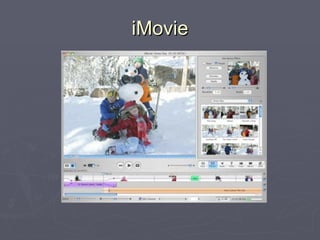
iMovie
iMovie (version 3.0.3) iMovie (video capture & editing) Control DV camcorder via FireWire interface Import video from camcorder Import audio sources from CD / MP3 / AIFF / iTunes Import graphics from iPhoto Special effects and titling available Export to camcorder or transfer to iDVD With experience and practice, iMovie can do 90% of most video work a professional would do iMovie is free!
iMovie (version 3) iMovie (video capture & editing) Special effects: Aged Film, Letterbox, Lens Flare, Electricity Add pan and zoom effect to digital still images 30 title styles: Control the timing of titles, typeface, and color Titling can be previewed Audio controls: There are now three audio tracks (used to be 2) Customization of volume levels on all three audio tracks New audio effects from Skywalker Sound
iMovie (version 3) iMovie (video capture & editing) Chapter Markers For use with your DVD projects; lets iDVD create scene selection menus so your viewers can jump directly to their favorite scenes Send your iMovie to DVD The moment you save your movie, it’s ready for iDVD — no more export processes. Additional Plug-in and Effect Video Plug-ins Gee Three, Vitrix, CSB Digital, eZedia Audio Effects Audiodish, Hollywood Edge
Mac OS X  iMovie Demo iMovie (video editing) Import some video clips Arrange in editor Apply title Apply special effect Apply transitions Play movie
iPhoto 2 iPhoto:  application for importing, organizing, editing and sharing digital photographs Enhance button lets you instantly correct any photo that’s too dark, too light, or overexposed Correct red-eye, crop photos, and even change color photos to black and white Retouch wand can be used to make blemishes disappear Create your own coffee-table books
iPhoto 2 New in iPhoto 2: Archive your iPhoto Library to CD or DVD One-button Enhance improves your photos Expanded email support for mail clients New .Mac screen effects share your slideshows New printing templates to suit your needs Integrated with iTunes, iMovie, & iDVD in package called iLife
Mac OS X  Software Mac OS X Additional Software AppleScript (programmable scripting) iCal (manage your calendars) iSync (synchronize digital contact information) AppleWorks (productivity software) Final Cut Express (professional video editing) Keynote ( presentation software) Others at:  http://www.apple.com/software/
Break Time
Mac OS X Permissions The Basics Permissions are the foundation of a multi-user file system like Mac OS X and UNIX Users and groups identify you & files you own Permissions  mark your turf The files you can see and change The programs you can run Permissions are  applied individually to each file  and define who can read, write, and execute it.
Mac OS X Permissions Users and Groups A user is someone with an account on MacOS X Users have name, password, and are able to login Users have unique identity on machine Users have home directory for personal files Password is proof of identity A group is organizational unit to which any number of users may belong. Each user must belong to a least one group MacOS X specifies a primary group automatically Groups associate a group of users to a group of files
Mac OS X Permissions Every file in the file system has a set of permissions that define who can access the file, and how. Access is defined for three classes of user: the  user  owner  the  group  owner  everybody else - termed  others .  And each user is allowed, or disallowed from:  reading the file writing to the file (or changing it in any way) executing the file (applicable to applications / programs).
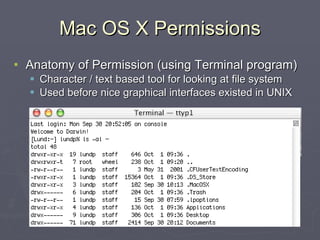
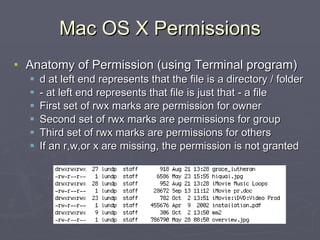
Mac OS X Permissions Anatomy of Permission (using Terminal program) Character / text based tool for looking at file system Used before nice graphical interfaces existed in UNIX
Mac OS X Permissions Anatomy of Permission (using Terminal program) d at left end represents that the file is a directory / folder - at left end represents that file is just that - a file First set of rwx marks are permission for owner Second set of rwx marks are permissions for group Third set of rwx marks are permissions for others If an r,w,or x are missing, the permission is not granted
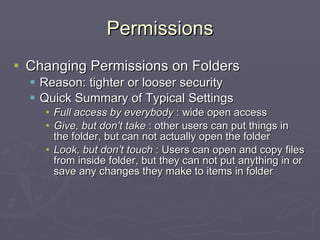
Permissions Changing Permissions on Folders Reason: tighter or looser security Quick Summary of Typical Settings Full access by everybody  : wide open access Give, but don’t take  : other users can put things in the folder, but can not actually open the folder Look, but don’t touch  : Users can open and copy files from inside folder, but they can not put anything in or save any changes they make to items in folder
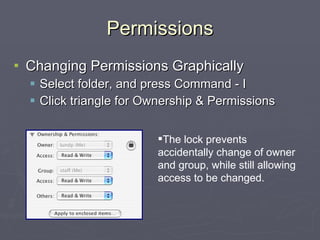
Permissions Changing Permissions Graphically Select folder, and press Command - I Click triangle for Ownership & Permissions The lock prevents accidentally change of owner and group, while still allowing access to be changed.
Mac OS X Materials Books Mac OS X Missing Manual by David Pouge Mac OS X Unleashed by J. Ray Mac OS X Hints by Rob Griffiths Training Materials Mac OS X Hands-On Training by Garrick Chow MacAcademy Mac OS X 4 volume CD set http://www.tackyshirt.com/dvd.html http://www.atomiclearning.com/
Mac OS X 10.3 News The Finder puts you at the center of your Mac with iTunes-like navigation. Slick new Exposé quickly tiles open windows and reveals files on your desktop. iChat AV offers video chat and audio calls with no extra long distance charges.  Quickly log another user into your Mac without quitting applications.
Mac OS X 10.3 News FileVault: Secure your home folder with encryption a spy would love, AES-128. Find, organize and manage all the fonts on your Mac in the new Font Book. Fax anyone in your Address Book from any application that prints. Panther also improves many of the technologies underlying Mac OS X including graphics and Windows network compatibility
Mac OS X Q&A Ask you questions!

Mac OS X Applications

  • 1.
    Mac OS XApplications Presented by ArrowQuick Solutions Wednesday, July 16, 2003
  • 2.
    Internet Mail Mailapplication comes with Mac OS X Junk mail filtering Powerful and flexible mail rules Handles multiple accounts (.Mac, POP, IMAP) Drag and drop attachments Inline display of photos, movies, & PDFs Integrated with system wide address book Spell checking is part of Mac OS X
  • 3.
    Internet Mail JunkMail Filtering Mail comes with sophisticated built-in junk mail filtering that uses technology to identify and nail junk mail messages Simple controls are available to train Mail to agree with your view of what’s junk and what’s not The “Junk” button in the Toolbar lets you label any junk messages The “Not Junk” override that appears on any message labeled as Junk. When you’re satisfied that you and the filter are agreeing, checking the Automatic option which sends everything the filter identifies straight to a junk mail folder
  • 4.
    Internet Mail MailRules When email comes to your Inbox, rules can automate tasks: Identify junk mail and mark it automatically Move and organize messages into specific folders Play sounds to notify you of a message Automatically reply, redirect, or forward the message Flag or delete the message Rules are defined in the Mail Preferences
  • 5.
    Internet Mail SettingUp Mail Account Must have Internet Service Provider setup mail account In Mail, the following pieces of information are needed: Account Type (most likely POP) Description (Perry’s KDSI Email) Email Address ( [email_address] ) Full Name (Perry Lund) Incoming Mail Server: (ospop.kdsi.net) User Name (lundpj) Password (********) Outgoing Mail Server (ossmtp.kdsi.net)
  • 6.
    Address Book FeaturesEach card can hold, display & label all your information Click on an address to ask the Web for a map showing the location Click on a home page URL to launch the web site Click on an email address to send a message iSync software from Apple will synchronize Address Book to Palm Pilot or Bluetooth-equipped cell phone Address Book is built on the industry standard vCard format for storing contact information
  • 7.
    iChat - InstantMessaging iChat delivers control over your instant messaging Built-in compatibility with AOL Instant Messenger (AIM), you have immediate access to the more than 150 million members of America Online The Attach button lets you transmit any kind of file, and photos are displayed right in the message window There is a range of formatting options available A log file is kept that lets you check what you’ve said and makes it easy to collaborate Chat works seamlessly with the built-in Mail and system wide Address Book applications.
  • 8.
    Safari - WebBrowser Safari, the Mac OS X default Web browser, offers you outstanding performance. HTML Page Load JavaScript performance Application load time New in Safari Safari is Mac OS X default browser AutoTab loads folders quickly Sync your bookmarks with iSync Available in all Mac OS X languages Increased standards compatibility
  • 9.
    Safari - WebBrowser Built in Google Search The SnapBack button returns you to the point where you last typed a URL Bookmark menu lists URLs found in Address Book Website accounts & passwords stored in KeyChain Safari also cleans up after itself when downloading files Automatically can eliminate popup windows
  • 10.
  • 11.
    iMovie (version 3.0.3)iMovie (video capture & editing) Control DV camcorder via FireWire interface Import video from camcorder Import audio sources from CD / MP3 / AIFF / iTunes Import graphics from iPhoto Special effects and titling available Export to camcorder or transfer to iDVD With experience and practice, iMovie can do 90% of most video work a professional would do iMovie is free!
  • 12.
    iMovie (version 3)iMovie (video capture & editing) Special effects: Aged Film, Letterbox, Lens Flare, Electricity Add pan and zoom effect to digital still images 30 title styles: Control the timing of titles, typeface, and color Titling can be previewed Audio controls: There are now three audio tracks (used to be 2) Customization of volume levels on all three audio tracks New audio effects from Skywalker Sound
  • 13.
    iMovie (version 3)iMovie (video capture & editing) Chapter Markers For use with your DVD projects; lets iDVD create scene selection menus so your viewers can jump directly to their favorite scenes Send your iMovie to DVD The moment you save your movie, it’s ready for iDVD — no more export processes. Additional Plug-in and Effect Video Plug-ins Gee Three, Vitrix, CSB Digital, eZedia Audio Effects Audiodish, Hollywood Edge
  • 14.
    Mac OS X iMovie Demo iMovie (video editing) Import some video clips Arrange in editor Apply title Apply special effect Apply transitions Play movie
  • 15.
    iPhoto 2 iPhoto: application for importing, organizing, editing and sharing digital photographs Enhance button lets you instantly correct any photo that’s too dark, too light, or overexposed Correct red-eye, crop photos, and even change color photos to black and white Retouch wand can be used to make blemishes disappear Create your own coffee-table books
  • 16.
    iPhoto 2 Newin iPhoto 2: Archive your iPhoto Library to CD or DVD One-button Enhance improves your photos Expanded email support for mail clients New .Mac screen effects share your slideshows New printing templates to suit your needs Integrated with iTunes, iMovie, & iDVD in package called iLife
  • 17.
    Mac OS X Software Mac OS X Additional Software AppleScript (programmable scripting) iCal (manage your calendars) iSync (synchronize digital contact information) AppleWorks (productivity software) Final Cut Express (professional video editing) Keynote ( presentation software) Others at: http://www.apple.com/software/
  • 18.
  • 19.
    Mac OS XPermissions The Basics Permissions are the foundation of a multi-user file system like Mac OS X and UNIX Users and groups identify you & files you own Permissions mark your turf The files you can see and change The programs you can run Permissions are applied individually to each file and define who can read, write, and execute it.
  • 20.
    Mac OS XPermissions Users and Groups A user is someone with an account on MacOS X Users have name, password, and are able to login Users have unique identity on machine Users have home directory for personal files Password is proof of identity A group is organizational unit to which any number of users may belong. Each user must belong to a least one group MacOS X specifies a primary group automatically Groups associate a group of users to a group of files
  • 21.
    Mac OS XPermissions Every file in the file system has a set of permissions that define who can access the file, and how. Access is defined for three classes of user: the user owner the group owner everybody else - termed others . And each user is allowed, or disallowed from: reading the file writing to the file (or changing it in any way) executing the file (applicable to applications / programs).
  • 22.
    Mac OS XPermissions Anatomy of Permission (using Terminal program) Character / text based tool for looking at file system Used before nice graphical interfaces existed in UNIX
  • 23.
    Mac OS XPermissions Anatomy of Permission (using Terminal program) d at left end represents that the file is a directory / folder - at left end represents that file is just that - a file First set of rwx marks are permission for owner Second set of rwx marks are permissions for group Third set of rwx marks are permissions for others If an r,w,or x are missing, the permission is not granted
  • 24.
    Permissions Changing Permissionson Folders Reason: tighter or looser security Quick Summary of Typical Settings Full access by everybody : wide open access Give, but don’t take : other users can put things in the folder, but can not actually open the folder Look, but don’t touch : Users can open and copy files from inside folder, but they can not put anything in or save any changes they make to items in folder
  • 25.
    Permissions Changing PermissionsGraphically Select folder, and press Command - I Click triangle for Ownership & Permissions The lock prevents accidentally change of owner and group, while still allowing access to be changed.
  • 26.
    Mac OS XMaterials Books Mac OS X Missing Manual by David Pouge Mac OS X Unleashed by J. Ray Mac OS X Hints by Rob Griffiths Training Materials Mac OS X Hands-On Training by Garrick Chow MacAcademy Mac OS X 4 volume CD set http://www.tackyshirt.com/dvd.html http://www.atomiclearning.com/
  • 27.
    Mac OS X10.3 News The Finder puts you at the center of your Mac with iTunes-like navigation. Slick new Exposé quickly tiles open windows and reveals files on your desktop. iChat AV offers video chat and audio calls with no extra long distance charges. Quickly log another user into your Mac without quitting applications.
  • 28.
    Mac OS X10.3 News FileVault: Secure your home folder with encryption a spy would love, AES-128. Find, organize and manage all the fonts on your Mac in the new Font Book. Fax anyone in your Address Book from any application that prints. Panther also improves many of the technologies underlying Mac OS X including graphics and Windows network compatibility
  • 29.
    Mac OS XQ&A Ask you questions!