LoadRunner in the Cloud
What does LoadRunner offer ? 
TruClient etc. easier scripting. Simple record / replay 
Multi-protocol support, unlike competition. 
Single tool for Mobile, Ajax, Flex, HTML (5) .Net, Java, Silverlight, SOAP, Citrix, ERP and legacy applications 
Browser and mobile device emulation built in. 
Options to extend testing with network and service virtualisation. 
Various cloud options: 
Integration with Amazon & HP Cloud or other third parties. SaaS options with StormRunnerand Performance Centre. 
Integration with multiple IDEs as well as CI and automated build systems. 
Real time analytics built in, options to extend with SiteScope. 
Diagnostic tool support, HP Diagnostics & third party tools. 
Excellent reporting.
LoadRunner and related products 
LoadRunner6.0 
PerformanceCenter 
9.0 
1990s 
On-Premise 
In-cloud 
2006 
PerformanceCenter 
LoadRunner in the CloudV1 
2008 
2010 
2014 
StormRunner 
LoadRunner in the CloudV2 
LoadRunner8.0 
LoadRunner9.0 
2012 
LoadRunner11.0 
LoadRunner12.0 
PerformanceCenter 
11.0 
PerformanceCenter 
12.0
StormRunner 
LoadRunner in the CloudV2 
LoadRunner12.0 
PerformanceCenter 
12.0 
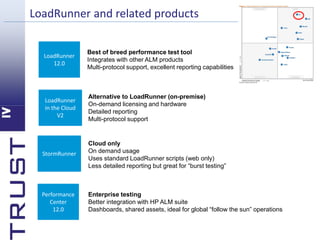
LoadRunner and related products 
Best of breed performance test tool 
Integrates with other ALM products 
Multi-protocol support, excellent reporting capabilities 
Alternative to LoadRunner (on-premise) 
On-demand licensing and hardwareDetailed reportingMulti-protocol support 
Cloud onlyOn demand usage 
Uses standard LoadRunner scripts (web only) Less detailed reporting but great for “burst testing” 
Enterprise testingBetter integration with HP ALM suite 
Dashboards, shared assets, ideal for global “follow the sun” operations
Which tool should I choose? 
•Application Under Test 
•Commsprotocols 
•vUser numbers 
•vUser locations 
•Tester locations 
•Tester skillset 
•Existing test assets 
•Script complexity 
•Test data requirements 
•Security 
•Budget 
•Timescales 
•Cloud? 
Decision factors
Choosing a cloud-based test tool 
StormRunner 
LoadRunner in the Cloud 
LoadRunner12.0 
PerformanceCenter 
SaaS 
PerformanceCenter 
On-premise 
Load Generators 
Load Generators
LoadRunner on-premise 
Load Generators 
Load Generators 
LoadRunner12.0
LoadRunner in the Cloud 
Load Generators 
Load Generators
Performance Centeron-premise 
PerformanceCenter 
On-premise 
Load Generators 
Load Generators
Performance CenterSaaS 
PerformanceCenter 
SaaS 
Load Generators 
Load Generators
StormRunner 
StormRunner 
Load Generators
Remote testers 
StormRunner 
LoadRunner 
12.0 
Performance 
Center 
SaaS 
Performance 
Center 
On-premise 
Remote tester 
 
Remote tester 
 LoadRunner 
in the Cloud
So which product should I choose? 
StormRunner 
LoadRunner in the Cloud 
LoadRunner 
PerformanceCenter 
Quick, high volume tests 
Web only 
Remote load generation 
Short-term engagement (s) 
Any protocol 
Remote and local load generationAdvanced use e.g. NV, diagnostics etc. 
More frequent testing 
C of E approach 
Remote and local load generationDetailed reporting and analysisOn-site testers 
Very frequent testing 
Larger C of E / “follow the sun” 
Dashboard for stakeholders 
Integration with ALM etc.
LoadRunner in the Cloud 
Web-based VM admin console 
•Pre-built servers 
•Controllers and Load Generators 
•CPU / RAM / HDD user configurable 
•With or without firewall support 
•LGs can be anywhere 
•NV support built in 
•UFT and other software available 
•Different license options 
•100, 200 & 500 vUsers 
•All protocols supported 
•On-demand availability and pricing 
•PayPal or Account 
•Pay for what you use 
•Efficient license use
Is “The Cloud” any good for testing? 
“Cloud computing is a model for enabling convenient, on-demandnetwork access to a shared pool of configurable computing resources that can be rapidly provisionedand released with minimal management effortor service provider interaction.” 
Source: The National Institute of Standards and Technology 
BUT…. 
•Unproven technology for testing: reliability/repeatability 
•Steep learning curve 
•Costs difficult to quantify 
•Security concerns 
•Performance
Is “The Cloud” any good for testing?
Is “The Cloud” any good for testing? 
Realism 
Repeatability 
But how will itreally perform? 
Did my change make a difference? 
Avoid pitfalls 
Repeat tests to obtain average results 
Re-validate tests with in physicaltest environments 
Use diagnostics software to drill down into application performance…..better application understanding is vital 
Use benefits of the cloud/virtualisation 
Low cost 
On-demand 
Flex up & down 
Over provision
Demonstration 
LoadRunnerin the Cloud
Contact: 
richard.bishop@trustiv.co.ukhttp://blog.trustiv.co.uk/ 
@Richard Bishop@TrustIV@VivitWorldwide

LRITC introduction

  • 1.
  • 2.
    What does LoadRunneroffer ? TruClient etc. easier scripting. Simple record / replay Multi-protocol support, unlike competition. Single tool for Mobile, Ajax, Flex, HTML (5) .Net, Java, Silverlight, SOAP, Citrix, ERP and legacy applications Browser and mobile device emulation built in. Options to extend testing with network and service virtualisation. Various cloud options: Integration with Amazon & HP Cloud or other third parties. SaaS options with StormRunnerand Performance Centre. Integration with multiple IDEs as well as CI and automated build systems. Real time analytics built in, options to extend with SiteScope. Diagnostic tool support, HP Diagnostics & third party tools. Excellent reporting.
  • 3.
    LoadRunner and relatedproducts LoadRunner6.0 PerformanceCenter 9.0 1990s On-Premise In-cloud 2006 PerformanceCenter LoadRunner in the CloudV1 2008 2010 2014 StormRunner LoadRunner in the CloudV2 LoadRunner8.0 LoadRunner9.0 2012 LoadRunner11.0 LoadRunner12.0 PerformanceCenter 11.0 PerformanceCenter 12.0
  • 4.
    StormRunner LoadRunner inthe CloudV2 LoadRunner12.0 PerformanceCenter 12.0 LoadRunner and related products Best of breed performance test tool Integrates with other ALM products Multi-protocol support, excellent reporting capabilities Alternative to LoadRunner (on-premise) On-demand licensing and hardwareDetailed reportingMulti-protocol support Cloud onlyOn demand usage Uses standard LoadRunner scripts (web only) Less detailed reporting but great for “burst testing” Enterprise testingBetter integration with HP ALM suite Dashboards, shared assets, ideal for global “follow the sun” operations
  • 5.
    Which tool shouldI choose? •Application Under Test •Commsprotocols •vUser numbers •vUser locations •Tester locations •Tester skillset •Existing test assets •Script complexity •Test data requirements •Security •Budget •Timescales •Cloud? Decision factors
  • 6.
    Choosing a cloud-basedtest tool StormRunner LoadRunner in the Cloud LoadRunner12.0 PerformanceCenter SaaS PerformanceCenter On-premise Load Generators Load Generators
  • 7.
    LoadRunner on-premise LoadGenerators Load Generators LoadRunner12.0
  • 8.
    LoadRunner in theCloud LoadRunner in the Cloud Load Generators Load Generators
  • 9.
    Performance Centeron-premise PerformanceCenter On-premise Load Generators Load Generators
  • 10.
    Performance CenterSaaS PerformanceCenter SaaS Load Generators Load Generators
  • 11.
  • 12.
    Remote testers StormRunner LoadRunner 12.0 Performance Center SaaS Performance Center On-premise Remote tester  Remote tester  LoadRunner in the Cloud
  • 13.
    So which productshould I choose? StormRunner LoadRunner in the Cloud LoadRunner PerformanceCenter Quick, high volume tests Web only Remote load generation Short-term engagement (s) Any protocol Remote and local load generationAdvanced use e.g. NV, diagnostics etc. More frequent testing C of E approach Remote and local load generationDetailed reporting and analysisOn-site testers Very frequent testing Larger C of E / “follow the sun” Dashboard for stakeholders Integration with ALM etc.
  • 14.
    LoadRunner in theCloud Web-based VM admin console •Pre-built servers •Controllers and Load Generators •CPU / RAM / HDD user configurable •With or without firewall support •LGs can be anywhere •NV support built in •UFT and other software available •Different license options •100, 200 & 500 vUsers •All protocols supported •On-demand availability and pricing •PayPal or Account •Pay for what you use •Efficient license use
  • 15.
    Is “The Cloud”any good for testing? “Cloud computing is a model for enabling convenient, on-demandnetwork access to a shared pool of configurable computing resources that can be rapidly provisionedand released with minimal management effortor service provider interaction.” Source: The National Institute of Standards and Technology BUT…. •Unproven technology for testing: reliability/repeatability •Steep learning curve •Costs difficult to quantify •Security concerns •Performance
  • 16.
    Is “The Cloud”any good for testing?
  • 17.
    Is “The Cloud”any good for testing?
  • 18.
    Is “The Cloud”any good for testing?
  • 19.
    Is “The Cloud”any good for testing? Realism Repeatability But how will itreally perform? Did my change make a difference? Avoid pitfalls Repeat tests to obtain average results Re-validate tests with in physicaltest environments Use diagnostics software to drill down into application performance…..better application understanding is vital Use benefits of the cloud/virtualisation Low cost On-demand Flex up & down Over provision
  • 20.
  • 21.