Linux and Git
Fundamentals:
Understandingthe
Core of Development
An Introduction to Linux Internals & Git
Saranya Gopal Charulatha V
Lead SW Engineer SW Engg Manager
er
Intel Technology India Pvt Ltd
2.
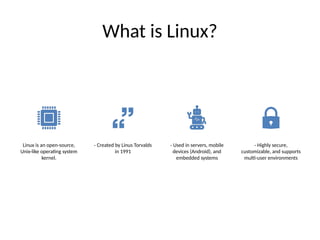
What is Linux?
Linuxis an open-source,
Unix-like operating system
kernel.
- Created by Linus Torvalds
in 1991
- Used in servers, mobile
devices (Android), and
embedded systems
- Highly secure,
customizable, and supports
multi-user environments
3.
Linux
Architecture
Four Main Layers:
1.Hardware - Physical components
(CPU, RAM, Disk, etc.)
2. Kernel - Core part managing
hardware resources
3. Middleware - System services and
libraries that can be used by apps
4. User Applications - Programs
running on Linux (Browsers, IDEs,
etc.)
4.
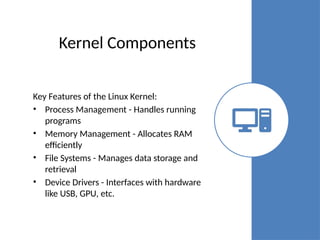
Kernel Components
Key Featuresof the Linux Kernel:
• Process Management - Handles running
programs
• Memory Management - Allocates RAM
efficiently
• File Systems - Manages data storage and
retrieval
• Device Drivers - Interfaces with hardware
like USB, GPU, etc.
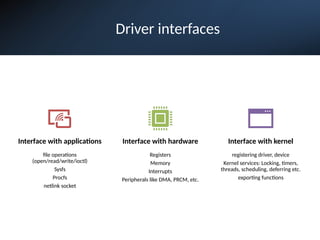
Driver interfaces
Interface withapplications
file operations
(open/read/write/ioctl)
Sysfs
Procfs
netlink socket
Interface with hardware
Registers
Memory
Interrupts
Peripherals like DMA, PRCM, etc.
Interface with kernel
registering driver, device
Kernel services: Locking, timers,
threads, scheduling, deferring etc.
exporting functions
7.
Write a simpledriver (homework )
• Put a LDM skeleton
– Struct for the driver
– For each hardware peripheral that can use this driver, create an instance of the device structure
• Add driver init() and exit() functions – called when the module is loaded
– Register the driver with the kernel:
• driver_register()
– Register to the driver class
• Basic - char driver, block driver or network driver?
• Or register to subsystem?
• Create file operation functions, and structure (f_ops)
• Register the driver with the file_operations
– Register the devices:
• device_register() … for all devices
• Add functionality f_ops and register/unregister to “class” / subsystem
• Add probe(), remove(), suspend(), resume() functions
– These functions are called once per device
• Examples widely available in net. Here’s one such example: https://www.geeksforgeeks.org/linux-kernel-module-programming-hello-world-program/
8.
Hello world
driver
#include <linux/module.h>/* Needed by all modules */
#include <linux/kernel.h> /* Needed for KERN_INFO */
#include <linux/init.h> /* Needed for the macros */
///< The license type -- this affects runtime behavior
MODULE_LICENSE("GPL");
///< The author -- visible when you use modinfo
MODULE_AUTHOR(“Saranya Gopal");
///< The description -- see modinfo
MODULE_DESCRIPTION("Hello world!");
///< The version of the module
MODULE_VERSION("0.1");
static int __init hello_start(void)
{
printk(KERN_INFO "Loading hello module...n");
printk(KERN_INFO "Hello worldn");
return 0;
}
static void __exit hello_end(void)
{
printk(KERN_INFO "Goodbyen");
}
module_init(hello_start);
module_exit(hello_end);
9.
Building the
driver
•Install thetools required to build kernel:
$sudo apt-get install build-essential linux-headers-$(uname –r)
•Create a file called Makefile and add the below content:
obj-m = hello.o
all:
make -C /lib/modules/$(shell uname -r)/build/ M=$(PWD) modules
clean:
make -C /lib/modules/$(shell uname -r)/build M=$(PWD) clean
•Build the driver:
$make
make -C /lib/modules/6.8.0-31-generic/build/
M=/home/saranya/Documents/hello-module modules
make[1]: Entering directory `/usr/src/linux-headers-6.8.0-31-generic'
CC [M] /home/saranya/Documents/hello-module/hello.o
Building modules, stage 2.
MODPOST 1 modules
CC /home/saranya/Documents/hello-module/hello.mod.o
LD [M] /home/saranya/Documents/hello-module/hello.ko
make[1]: Leaving directory `/usr/src/linux-headers-6.8.0-31-generic'
•Load the driver:
•$sudo insmod hello.ko
•Kernel logs (sudo dmesg) will show the “Hello world” and “Goodbye” messages
which we had added in the driver.
10.
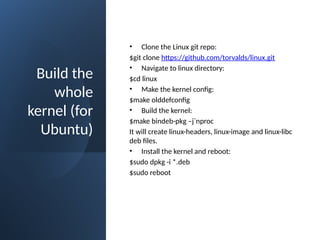
Build the
whole
kernel (for
Ubuntu)
•Clone the Linux git repo:
$git clone https://github.com/torvalds/linux.git
• Navigate to linux directory:
$cd linux
• Make the kernel config:
$make olddefconfig
• Build the kernel:
$make bindeb-pkg –j`nproc
It will create linux-headers, linux-image and linux-libc
deb files.
• Install the kernel and reboot:
$sudo dpkg -i *.deb
$sudo reboot
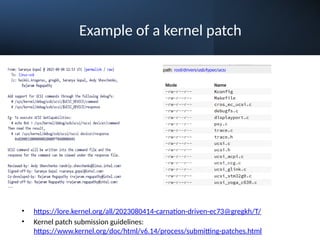
Example of akernel patch
• https://lore.kernel.org/all/2023080414-carnation-driven-ec73@gregkh/T/
• Kernel patch submission guidelines:
https://www.kernel.org/doc/html/v6.14/process/submitting-patches.html
13.
System Calls
System callsallow user-
space applications to
request kernel services. Few
examples below:
- `read()`, `write()` - File
operations
- `fork()`, `exec()` - Process
creation
- `open()`, `close()` - File
handling
14.
Process Management
Linux Processes:
•- Created using `fork()`
• - Run using `exec()`
• - Scheduled based on priority
• - Communicate via IPC (pipes, shared memory, message queues)
Common Commands:
• - `ps` - Show running processes
• - `kill` - Terminate a process
• - `top` - Monitor system performance
Introduction to Git
•Git is a distributed version control system used for tracking changes in code.
• - Created by Linus Torvalds in 2005
• - Allows multiple developers to collaborate
• - Provides history tracking, branching, and merging capabilities
• Linux kernel git:
https://web.git.kernel.org/pub/scm/linux/kernel/git/torvalds/linux.git
17.
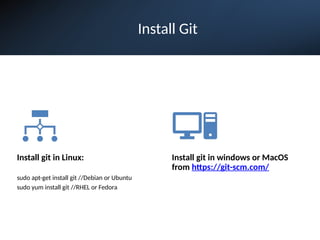
Install Git
Install gitin Linux:
sudo apt-get install git //Debian or Ubuntu
sudo yum install git //RHEL or Fedora
Install git in windows or MacOS
from https://git-scm.com/
18.
Git Workflow
1. WorkingDirectory -
Local changes before
tracking
2. Staging Area - Files
marked for commit using
`git add`
3. Local Repository -
Commits stored locally
using `git commit`
4. Remote Repository -
Pushed to GitHub/GitLab
using `git push`
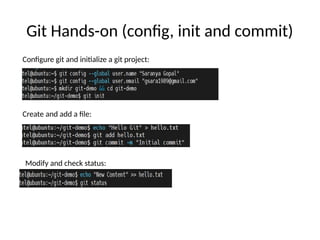
Git Hands-on (config,init and commit)
Configure git and initialize a git project:
Create and add a file:
Modify and check status:
21.
Branching and Merging
Whyuse branches?
• - Isolate features before merging
• - Allows parallel development
Common Commands:
• - `git branch <branch-name>` - Create a branch
• - `git checkout <branch-name>` - Switch branches
• - `git merge <branch-name>` - Merge a branch
• - `git rebase <branch-name>` - Reapply changes on a new base
22.
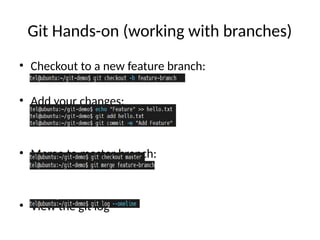
Git Hands-on (workingwith branches)
• Checkout to a new feature branch:
• Add your changes:
• Merge to master branch:
• View the git log
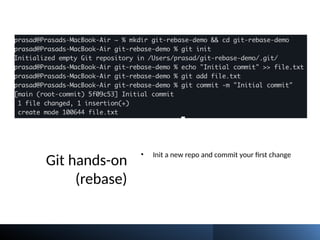
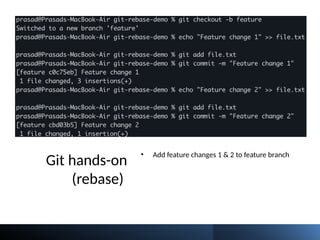
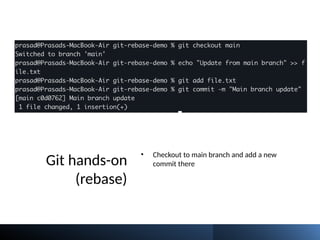
Git hands-on (rebase)
•Open the conflicting files and manually fix
them
• Once conflict is resolved, add the file to git
– git add file.txt
• Continue rebase with “git rebase –continue”
• Abort the rebase any time with “git rebase –
abort”
28.
Git Rebase vsMerge
Merge vs Rebase:
• - `git merge` - Keeps commit history, creates a merge commit
• - `git rebase` - Moves commits to a new base, keeps history linear
When to use:
• - Use merge for collaborative projects
• - Use rebase for cleaner commit history
29.
Resolving Merge Conflicts
Stepsto Resolve Merge Conflicts:
• 1. Identify conflicts using `git status`
• 2. Edit the conflicting files manually
• 3. Use `git add <file>` to mark conflicts as resolved
• 4. Commit the resolution with `git commit`
Helpful Commands:
• - `git diff` - View conflicts
• - `git mergetool` - GUI conflict resolution
30.
Git Best Practices
•- Write meaningful commit messages
• - Keep commits small and focused
• - Use feature branches for new changes
• - Regularly pull and sync with the main repository
• - Avoid committing sensitive data (use `.gitignore`)
31.
Conclusion & Resources
•Linux and Git are essential for developers.
• **Further Learning:**
• - [Linux Kernel Documentation](https://www.kernel.org/doc/)
• - [Pro Git Book](https://git-scm.com/book/en/v2)
• - Hands-on practice with GitHub/GitLab




![Building the
driver
•Install the tools required to build kernel:
$sudo apt-get install build-essential linux-headers-$(uname –r)
•Create a file called Makefile and add the below content:
obj-m = hello.o
all:
make -C /lib/modules/$(shell uname -r)/build/ M=$(PWD) modules
clean:
make -C /lib/modules/$(shell uname -r)/build M=$(PWD) clean
•Build the driver:
$make
make -C /lib/modules/6.8.0-31-generic/build/
M=/home/saranya/Documents/hello-module modules
make[1]: Entering directory `/usr/src/linux-headers-6.8.0-31-generic'
CC [M] /home/saranya/Documents/hello-module/hello.o
Building modules, stage 2.
MODPOST 1 modules
CC /home/saranya/Documents/hello-module/hello.mod.o
LD [M] /home/saranya/Documents/hello-module/hello.ko
make[1]: Leaving directory `/usr/src/linux-headers-6.8.0-31-generic'
•Load the driver:
•$sudo insmod hello.ko
•Kernel logs (sudo dmesg) will show the “Hello world” and “Goodbye” messages
which we had added in the driver.](https://image.slidesharecdn.com/linuxgitfundamentalssaranya-250814100939-8e5745be/85/Linux_Git_Fundamentals_Saranya-pptxthhyyyhh-9-320.jpg)






• - [Pro Git Book](https://git-scm.com/book/en/v2)
• - Hands-on practice with GitHub/GitLab](https://image.slidesharecdn.com/linuxgitfundamentalssaranya-250814100939-8e5745be/85/Linux_Git_Fundamentals_Saranya-pptxthhyyyhh-31-320.jpg)


![[artifactconf] Github for People Who Don't Code](https://cdn.slidesharecdn.com/ss_thumbnails/github-for-people-that-dont-code-131115221827-phpapp02-thumbnail.jpg?width=640&height=640&fit=bounds)


