Introduction
System Administration With
Webmin
A brief overview of
new era administration
tool
Prepared by
Henry Batula

12539114

Ni Xiao

12640223

Peter Greenup

12645736
What is Webmin?


Webmin is a web-based interface for system
administration for Unix/Linux. Using any
browser that supports tables and forms (and
Java for the File Manager module), you can
setup user accounts, Apache, DNS, file
sharing and so on



Often considered equivalent to windows
control panel
3
What is Webmin (cont’d)







It is a user administration tool written by Jamie
Cameron in Perl that is designed to be lightweight,
functional, and easily extensible
It has been translated to 14 languages at the moment
It has been embraced by a number of hardware and
operating system vendors as the default system
administration tool(Linux-Mandrake 7.0)
It is extremely portable, offering support for more
than 25 different Unix/Linux Operating Systems
4
What is Webmin? (cont’d)


It is very easily extended to support new
features and options, due to it's open and well
documented API
 It also happens to be a fast and easy to use
tool for general Unix/Linux system
administration
 It allows easy addition of new modules
without changing any of the existing code
5
What is required


A simple web server, and a number of CGI
programs which directly update system files
like /etc/inetd.conf and /etc/passwd.



The web server and all CGI programs must be
written in Perl version 5. This means that you
only need a Perl binary to run it.
6
Who Webmin is For


It is an excellent tool for both novice and
experienced system administrators



When run from a local machine, it can help
new users become familiar with the
capabilities of a Linux system.
7
Sections within Webmin


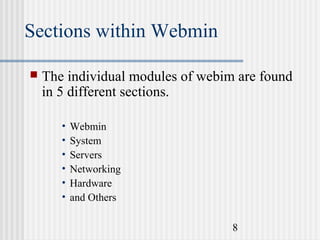
The individual modules of webim are found
in 5 different sections.
•
•
•
•
•
•

Webmin
System
Servers
Networking
Hardware
and Others
8
Interface of Webmin

9
Webmin modules






It uses modules, which are similar to plug-ins, and
easily allow you to extend the base functions of
Webmin.
It is divided into a number of modules that each
allows to administer a single aspect of system
There are Currently 127 Modules
The standard modules provide a graphical interface
for: Apache, Squid, Bind, NFS, man pages,
Sendmail, Postfix, Samba
10
Common Modules from Webmin 0.74 Modules
admi Scheduled Cron Jobs
n
NFS Exports

BIND 4 DNS Server
Internet Services and Protocols

Bootup and Shutdown Actions
Samba Windows File Sharing

Disk and Network Filesystems
Users, Groups and Passwords

Partitions on Local Disks

Running Processes

Webmin Configuration

Disk Quotas

Software Packages
Webmin Users

PPP Usernames and Passwords
Apache Webserver

Printer Administration

BIND 8 DNS Server

Sendmail Configuration

Squid Proxy Server

File Manager

Network Configuration

DHCP Server

Majordomo List Manager

Firewall Configuration

11
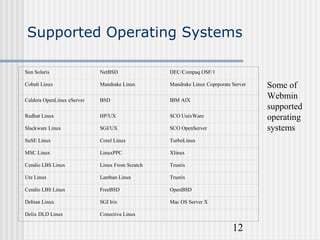
Supported Operating Systems
Sun Solaris

NetBSD

DEC/Compaq OSF/1

Cobalt Linux

Mandrake Linux

Mandrake Linux Coprporate Server

Caldera OpenLinux eServer

BSD

IBM AIX

Redhat Linux

HP/UX

SCO UnixWare

Slackware Linux

SGI/UX

SCO OpenServer

SuSE Linux

Corel Linux

TurboLinux

MSC Linux

LinuxPPC

Xlinux

Cendio LBS Linux

Linux From Scratch

Trustix

Ute Linux

Lanthan Linux

Trustix

Cendio LBS Linux

FreeBSD

OpenBSD

Debian Linux

SGI Irix

Mac OS Server X

Delix DLD Linux

Conectiva Linux

12

Some of
Webmin
supported
operating
systems
Installation of Webmin


Firstly check to see if it is currently installed. Do a
search for the webmin module. Webmin is included
with many linux operating systems, so may appear
on an installation disk.


Installation requires that Perl 5 is already installed (this is usually
included with most versions of linux).

14
Installation (Cont’d)


L-M animation of
finding package.



(you may need to
wait a few
seconds for the
animation to
start).

15
Installation of Webmin (Cont’d)


Otherwise it can be downloaded from www.webmin.com There
are a couple of different versions available, choose the one
which best suits your current system. Approximate file size is
3.6 to 4MB



If installing the RPM package run the command:
rpm -U webmin-0.87.rpm





If using the Solaris package run the following command:
pkgadd -d webmin-0.87.pkg
Begins with root username and password.

16
Installation Checks






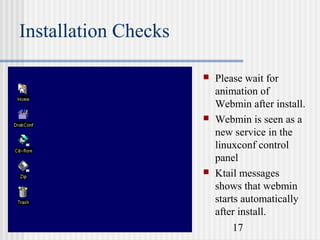
Please wait for
animation of
Webmin after install.
Webmin is seen as a
new service in the
linuxconf control
panel
Ktail messages
shows that webmin
starts automatically
after install.
17
Installation Checks (Cont’d)


Check the
following functions
for Webmin:
Stop
Start
Restart



The "messages"
log will show the
status.
Please wait for
animation.



18
Logging on


Open a web browser such as Netscape or IE,
on any machine with access to the server you
wish to log onto.
 Browse to the port 10000 of the IP address or
hostname. (as shown below)

19
Logging on (Cont’d)


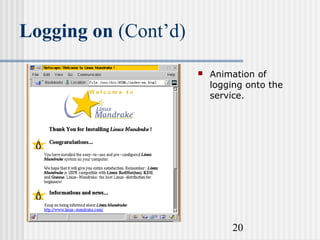
Animation of
logging onto the
service.

20
Example Modules

A brief description of some of the
commonly used modules.
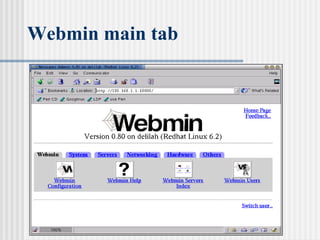
Webmin main tab

22
Webmin Configuration


This section give the user control of the webmin setup.
Allowing the adjustment to the following areas.






IP address control
Password settings
Interface control
Language used
Modules included

23
Webmin Configuration (Cont’d)


Animation of
access to IP
address

24
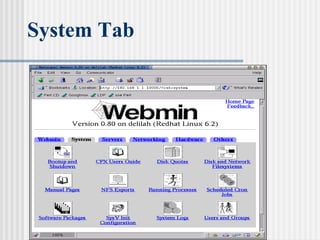
System Tab

25
System modules


Bootup and shutdown
• as name suggests



Users and Groups
• displays all users names, id’s home directory etc.
• allows editing of user settings



Manual Pages
• extensive help pages

26
System modules (Cont’d)


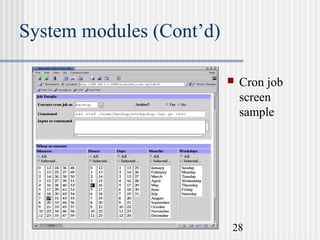
Cron Jobs
• This is one process that is greatly simplified by the
webmin interface.
• Cron is a daemon that runs constantly on most unix
machines. Allows for the scheduling of processes to
be run at set times eg. backups or scans.
• Lists all scheduled jobs
• Control access of users to cron jobs
• Add a new scheduled item
27
System modules (Cont’d)


Cron job
screen
sample

28
System modules (Cont’d)


Software packages






View all installed
packages
Search for
installed packages
Install new
packages

29
System modules (Cont’d)


30

Install
package
screen
sample
System modules (Cont’d)


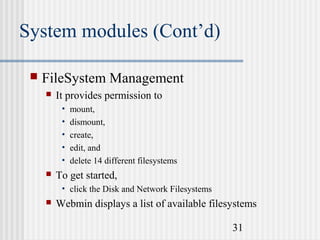
FileSystem Management


It provides permission to
•
•
•
•
•



mount,
dismount,
create,
edit, and
delete 14 different filesystems

To get started,
• click the Disk and Network Filesystems



Webmin displays a list of available filesystems
31
System modules (Cont’d)


File System Management


Display screen will show the
• mount point,
• filesystem type,
• device or location whether it is
• mounted, and
• listed in /etc/fstab.



To edit one of the listed file system,
• click its mount point, listed in the first column

32
System modules (Cont’d)


File System Management


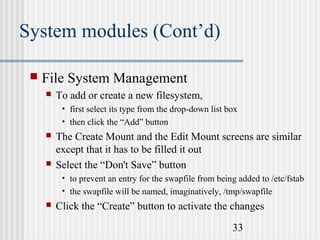
To add or create a new filesystem,
• first select its type from the drop-down list box
• then click the “Add” button





The Create Mount and the Edit Mount screens are similar
except that it has to be filled it out
Select the “Don't Save” button
• to prevent an entry for the swapfile from being added to /etc/fstab
• the swapfile will be named, imaginatively, /tmp/swapfile



Click the “Create” button to activate the changes
33
System modules (Cont’d)



The display screen
After making changes,
click
•

•

the “Apply” button to
update the /etc/fstab file
activate the changes.

34
System modules (Cont’d)


Running Processes


Webmin's process manager
• resembles a browser-based version of the famous top utility
• allows to execute an arbitrary command
• screen is obtained by
• clicking the “Running Processes” icon



The display is sorted either
•
•
•
•

by process ID or by selecting the link of
username,
memory usage, and
CPU time consumed

35
System modules (Cont’d)
 Running


Processes

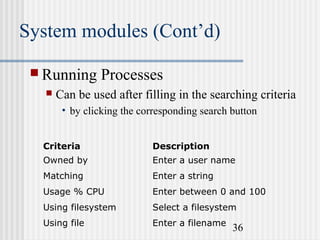
Can be used after filling in the searching criteria
• by clicking the corresponding search button

Criteria

Description

Owned by

Enter a user name

Matching

Enter a string

Usage % CPU

Enter between 0 and 100

Using filesystem

Select a filesystem

Using file

Enter a filename

36
System modules (Cont’d)
 Running


Processes

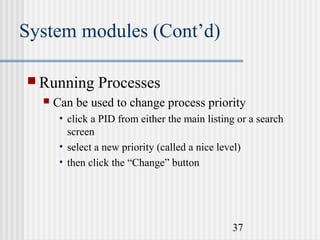
Can be used to change process priority
• click a PID from either the main listing or a search
screen
• select a new priority (called a nice level)
• then click the “Change” button

37
System modules (Cont’d)
 Running


Processes

Common process signals with webmin

Signal

Description

INT

Sends a keyboard interrupt (Ctrl+C)

QUIT

Terminates the process.

ABRT

Terminates the process and creates a memory
dump

KILL

Terminates the process

TERM

Terminates the process

STOP

Stops the process, but does not kill it

CONT

Resumes a stopped process

38

Linux webmin

  • 1.
  • 2.
    System Administration With Webmin Abrief overview of new era administration tool Prepared by Henry Batula 12539114 Ni Xiao 12640223 Peter Greenup 12645736
  • 3.
    What is Webmin?  Webminis a web-based interface for system administration for Unix/Linux. Using any browser that supports tables and forms (and Java for the File Manager module), you can setup user accounts, Apache, DNS, file sharing and so on  Often considered equivalent to windows control panel 3
  • 4.
    What is Webmin(cont’d)     It is a user administration tool written by Jamie Cameron in Perl that is designed to be lightweight, functional, and easily extensible It has been translated to 14 languages at the moment It has been embraced by a number of hardware and operating system vendors as the default system administration tool(Linux-Mandrake 7.0) It is extremely portable, offering support for more than 25 different Unix/Linux Operating Systems 4
  • 5.
    What is Webmin?(cont’d)  It is very easily extended to support new features and options, due to it's open and well documented API  It also happens to be a fast and easy to use tool for general Unix/Linux system administration  It allows easy addition of new modules without changing any of the existing code 5
  • 6.
    What is required  Asimple web server, and a number of CGI programs which directly update system files like /etc/inetd.conf and /etc/passwd.  The web server and all CGI programs must be written in Perl version 5. This means that you only need a Perl binary to run it. 6
  • 7.
    Who Webmin isFor  It is an excellent tool for both novice and experienced system administrators  When run from a local machine, it can help new users become familiar with the capabilities of a Linux system. 7
  • 8.
    Sections within Webmin  Theindividual modules of webim are found in 5 different sections. • • • • • • Webmin System Servers Networking Hardware and Others 8
  • 9.
  • 10.
    Webmin modules     It usesmodules, which are similar to plug-ins, and easily allow you to extend the base functions of Webmin. It is divided into a number of modules that each allows to administer a single aspect of system There are Currently 127 Modules The standard modules provide a graphical interface for: Apache, Squid, Bind, NFS, man pages, Sendmail, Postfix, Samba 10
  • 11.
    Common Modules fromWebmin 0.74 Modules admi Scheduled Cron Jobs n NFS Exports BIND 4 DNS Server Internet Services and Protocols Bootup and Shutdown Actions Samba Windows File Sharing Disk and Network Filesystems Users, Groups and Passwords Partitions on Local Disks Running Processes Webmin Configuration Disk Quotas Software Packages Webmin Users PPP Usernames and Passwords Apache Webserver Printer Administration BIND 8 DNS Server Sendmail Configuration Squid Proxy Server File Manager Network Configuration DHCP Server Majordomo List Manager Firewall Configuration 11
  • 12.
    Supported Operating Systems SunSolaris NetBSD DEC/Compaq OSF/1 Cobalt Linux Mandrake Linux Mandrake Linux Coprporate Server Caldera OpenLinux eServer BSD IBM AIX Redhat Linux HP/UX SCO UnixWare Slackware Linux SGI/UX SCO OpenServer SuSE Linux Corel Linux TurboLinux MSC Linux LinuxPPC Xlinux Cendio LBS Linux Linux From Scratch Trustix Ute Linux Lanthan Linux Trustix Cendio LBS Linux FreeBSD OpenBSD Debian Linux SGI Irix Mac OS Server X Delix DLD Linux Conectiva Linux 12 Some of Webmin supported operating systems
  • 13.
  • 14.
    Installation of Webmin  Firstlycheck to see if it is currently installed. Do a search for the webmin module. Webmin is included with many linux operating systems, so may appear on an installation disk.  Installation requires that Perl 5 is already installed (this is usually included with most versions of linux). 14
  • 15.
    Installation (Cont’d)  L-M animationof finding package.  (you may need to wait a few seconds for the animation to start). 15
  • 16.
    Installation of Webmin(Cont’d)  Otherwise it can be downloaded from www.webmin.com There are a couple of different versions available, choose the one which best suits your current system. Approximate file size is 3.6 to 4MB  If installing the RPM package run the command: rpm -U webmin-0.87.rpm   If using the Solaris package run the following command: pkgadd -d webmin-0.87.pkg Begins with root username and password. 16
  • 17.
    Installation Checks    Please waitfor animation of Webmin after install. Webmin is seen as a new service in the linuxconf control panel Ktail messages shows that webmin starts automatically after install. 17
  • 18.
    Installation Checks (Cont’d)  Checkthe following functions for Webmin: Stop Start Restart  The "messages" log will show the status. Please wait for animation.  18
  • 19.
    Logging on  Open aweb browser such as Netscape or IE, on any machine with access to the server you wish to log onto.  Browse to the port 10000 of the IP address or hostname. (as shown below) 19
  • 20.
    Logging on (Cont’d)  Animationof logging onto the service. 20
  • 21.
    Example Modules A briefdescription of some of the commonly used modules.
  • 22.
  • 23.
    Webmin Configuration  This sectiongive the user control of the webmin setup. Allowing the adjustment to the following areas.      IP address control Password settings Interface control Language used Modules included 23
  • 24.
  • 25.
  • 26.
    System modules  Bootup andshutdown • as name suggests  Users and Groups • displays all users names, id’s home directory etc. • allows editing of user settings  Manual Pages • extensive help pages 26
  • 27.
    System modules (Cont’d)  CronJobs • This is one process that is greatly simplified by the webmin interface. • Cron is a daemon that runs constantly on most unix machines. Allows for the scheduling of processes to be run at set times eg. backups or scans. • Lists all scheduled jobs • Control access of users to cron jobs • Add a new scheduled item 27
  • 28.
  • 29.
    System modules (Cont’d)  Softwarepackages    View all installed packages Search for installed packages Install new packages 29
  • 30.
  • 31.
    System modules (Cont’d)  FileSystemManagement  It provides permission to • • • • •  mount, dismount, create, edit, and delete 14 different filesystems To get started, • click the Disk and Network Filesystems  Webmin displays a list of available filesystems 31
  • 32.
    System modules (Cont’d)  FileSystem Management  Display screen will show the • mount point, • filesystem type, • device or location whether it is • mounted, and • listed in /etc/fstab.  To edit one of the listed file system, • click its mount point, listed in the first column 32
  • 33.
    System modules (Cont’d)  FileSystem Management  To add or create a new filesystem, • first select its type from the drop-down list box • then click the “Add” button   The Create Mount and the Edit Mount screens are similar except that it has to be filled it out Select the “Don't Save” button • to prevent an entry for the swapfile from being added to /etc/fstab • the swapfile will be named, imaginatively, /tmp/swapfile  Click the “Create” button to activate the changes 33
  • 34.
    System modules (Cont’d)   Thedisplay screen After making changes, click • • the “Apply” button to update the /etc/fstab file activate the changes. 34
  • 35.
    System modules (Cont’d)  RunningProcesses  Webmin's process manager • resembles a browser-based version of the famous top utility • allows to execute an arbitrary command • screen is obtained by • clicking the “Running Processes” icon  The display is sorted either • • • • by process ID or by selecting the link of username, memory usage, and CPU time consumed 35
  • 36.
    System modules (Cont’d) Running  Processes Can be used after filling in the searching criteria • by clicking the corresponding search button Criteria Description Owned by Enter a user name Matching Enter a string Usage % CPU Enter between 0 and 100 Using filesystem Select a filesystem Using file Enter a filename 36
  • 37.
    System modules (Cont’d) Running  Processes Can be used to change process priority • click a PID from either the main listing or a search screen • select a new priority (called a nice level) • then click the “Change” button 37
  • 38.
    System modules (Cont’d) Running  Processes Common process signals with webmin Signal Description INT Sends a keyboard interrupt (Ctrl+C) QUIT Terminates the process. ABRT Terminates the process and creates a memory dump KILL Terminates the process TERM Terminates the process STOP Stops the process, but does not kill it CONT Resumes a stopped process 38