www.oreilly.com
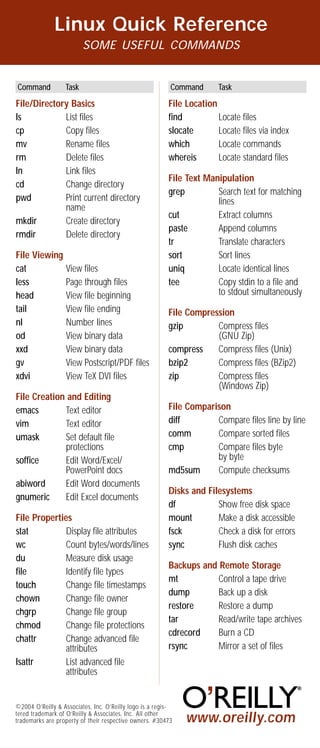
Linux Quick Reference
SOME USEFUL COMMANDS
File/Directory Basics
ls List files
cp Copy files
mv Rename files
rm Delete files
ln Link files
cd Change directory
pwd Print current directory
name
mkdir Create directory
rmdir Delete directory
File Viewing
cat View files
less Page through files
head View file beginning
tail View file ending
nl Number lines
od View binary data
xxd View binary data
gv View Postscript/PDF files
xdvi View TeX DVI files
File Creation and Editing
emacs Text editor
vim Text editor
umask Set default file
protections
soffice Edit Word/Excel/
PowerPoint docs
abiword Edit Word documents
gnumeric Edit Excel documents
File Properties
stat Display file attributes
wc Count bytes/words/lines
du Measure disk usage
file Identify file types
touch Change file timestamps
chown Change file owner
chgrp Change file group
chmod Change file protections
chattr Change advanced file
attributes
lsattr List advanced file
attributes
File Location
find Locate files
slocate Locate files via index
which Locate commands
whereis Locate standard files
File Text Manipulation
grep Search text for matching
lines
cut Extract columns
paste Append columns
tr Translate characters
sort Sort lines
uniq Locate identical lines
tee Copy stdin to a file and
to stdout simultaneously
File Compression
gzip Compress files
(GNU Zip)
compress Compress files (Unix)
bzip2 Compress files (BZip2)
zip Compress files
(Windows Zip)
File Comparison
diff Compare files line by line
comm Compare sorted files
cmp Compare files byte
by byte
md5sum Compute checksums
Disks and Filesystems
df Show free disk space
mount Make a disk accessible
fsck Check a disk for errors
sync Flush disk caches
Backups and Remote Storage
mt Control a tape drive
dump Back up a disk
restore Restore a dump
tar Read/write tape archives
cdrecord Burn a CD
rsync Mirror a set of files
Linux Quick Reference
SOME USEFUL COMMANDS
Linux Quick Reference
SOME USEFUL COMMANDS
Command Task Command Task
©2004 O’Reilly & Associates, Inc. O’Reilly logo is a regis-
tered trademark of O’Reilly & Associates, Inc. All other
trademarks are property of their respective owners. #30473 www.oreilly.com
File/Directory Basics
ls List files
cp Copy files
mv Rename files
rm Delete files
ln Link files
cd Change directory
pwd Print current directory
name
mkdir Create directory
rmdir Delete directory
File Viewing
cat View files
less Page through files
head View file beginning
tail View file ending
nl Number lines
od View binary data
xxd View binary data
gv View Postscript/PDF files
xdvi View TeX DVI files
File Creation and Editing
emacs Text editor
vim Text editor
umask Set default file
protections
soffice Edit Word/Excel/
PowerPoint docs
abiword Edit Word documents
gnumeric Edit Excel documents
File Properties
stat Display file attributes
wc Count bytes/words/lines
du Measure disk usage
file Identify file types
touch Change file timestamps
chown Change file owner
chgrp Change file group
chmod Change file protections
chattr Change advanced file
attributes
lsattr List advanced file
attributes
File Location
find Locate files
slocate Locate files via index
which Locate commands
whereis Locate standard files
File Text Manipulation
grep Search text for matching
lines
cut Extract columns
paste Append columns
tr Translate characters
sort Sort lines
uniq Locate identical lines
tee Copy stdin to a file and
to stdout simultaneously
File Compression
gzip Compress files
(GNU Zip)
compress Compress files (Unix)
bzip2 Compress files (BZip2)
zip Compress files
(Windows Zip)
File Comparison
diff Compare files line by line
comm Compare sorted files
cmp Compare files byte
by byte
md5sum Compute checksums
Disks and Filesystems
df Show free disk space
mount Make a disk accessible
fsck Check a disk for errors
sync Flush disk caches
Backups and Remote Storage
mt Control a tape drive
dump Back up a disk
restore Restore a dump
tar Read/write tape archives
cdrecord Burn a CD
rsync Mirror a set of files
Command Task Command Task
©2004 O’Reilly & Associates, Inc. O’Reilly logo is a regis-
tered trademark of O’Reilly & Associates, Inc. All other
trademarks are property of their respective owners. #30473 www.oreilly.com
File/Directory Basics
ls List files
cp Copy files
mv Rename files
rm Delete files
ln Link files
cd Change directory
pwd Print current directory
name
mkdir Create directory
rmdir Delete directory
File Viewing
cat View files
less Page through files
head View file beginning
tail View file ending
nl Number lines
od View binary data
xxd View binary data
gv View Postscript/PDF files
xdvi View TeX DVI files
File Creation and Editing
emacs Text editor
vim Text editor
umask Set default file
protections
soffice Edit Word/Excel/
PowerPoint docs
abiword Edit Word documents
gnumeric Edit Excel documents
File Properties
stat Display file attributes
wc Count bytes/words/lines
du Measure disk usage
file Identify file types
touch Change file timestamps
chown Change file owner
chgrp Change file group
chmod Change file protections
chattr Change advanced file
attributes
lsattr List advanced file
attributes
File Location
find Locate files
slocate Locate files via index
which Locate commands
whereis Locate standard files
File Text Manipulation
grep Search text for matching
lines
cut Extract columns
paste Append columns
tr Translate characters
sort Sort lines
uniq Locate identical lines
tee Copy stdin to a file and
to stdout simultaneously
File Compression
gzip Compress files
(GNU Zip)
compress Compress files (Unix)
bzip2 Compress files (BZip2)
zip Compress files
(Windows Zip)
File Comparison
diff Compare files line by line
comm Compare sorted files
cmp Compare files byte
by byte
md5sum Compute checksums
Disks and Filesystems
df Show free disk space
mount Make a disk accessible
fsck Check a disk for errors
sync Flush disk caches
Backups and Remote Storage
mt Control a tape drive
dump Back up a disk
restore Restore a dump
tar Read/write tape archives
cdrecord Burn a CD
rsync Mirror a set of files
Command Task Command Task
©2004 O’Reilly & Associates, Inc. O’Reilly logo is a regis-
tered trademark of O’Reilly & Associates, Inc. All other
trademarks are property of their respective owners. #30473
www.oreilly.com
Linux Quick Reference
SOME USEFUL COMMANDS
File/Directory Basics
ls List files
cp Copy files
mv Rename files
rm Delete files
ln Link files
cd Change directory
pwd Print current directory
name
mkdir Create directory
rmdir Delete directory
File Viewing
cat View files
less Page through files
head View file beginning
tail View file ending
nl Number lines
od View binary data
xxd View binary data
gv View Postscript/PDF files
xdvi View TeX DVI files
File Creation and Editing
emacs Text editor
vim Text editor
umask Set default file
protections
soffice Edit Word/Excel/
PowerPoint docs
abiword Edit Word documents
gnumeric Edit Excel documents
File Properties
stat Display file attributes
wc Count bytes/words/lines
du Measure disk usage
file Identify file types
touch Change file timestamps
chown Change file owner
chgrp Change file group
chmod Change file protections
chattr Change advanced file
attributes
lsattr List advanced file
attributes
File Location
find Locate files
slocate Locate files via index
which Locate commands
whereis Locate standard files
File Text Manipulation
grep Search text for matching
lines
cut Extract columns
paste Append columns
tr Translate characters
sort Sort lines
uniq Locate identical lines
tee Copy stdin to a file and
to stdout simultaneously
File Compression
gzip Compress files
(GNU Zip)
compress Compress files (Unix)
bzip2 Compress files (BZip2)
zip Compress files
(Windows Zip)
File Comparison
diff Compare files line by line
comm Compare sorted files
cmp Compare files byte
by byte
md5sum Compute checksums
Disks and Filesystems
df Show free disk space
mount Make a disk accessible
fsck Check a disk for errors
sync Flush disk caches
Backups and Remote Storage
mt Control a tape drive
dump Back up a disk
restore Restore a dump
tar Read/write tape archives
cdrecord Burn a CD
rsync Mirror a set of files
Linux Quick Reference
SOME USEFUL COMMANDS
Linux Quick Reference
SOME USEFUL COMMANDS
Command Task Command Task
©2004 O’Reilly & Associates, Inc. O’Reilly logo is a regis-
tered trademark of O’Reilly & Associates, Inc. All other
trademarks are property of their respective owners. #30473 www.oreilly.com
File/Directory Basics
ls List files
cp Copy files
mv Rename files
rm Delete files
ln Link files
cd Change directory
pwd Print current directory
name
mkdir Create directory
rmdir Delete directory
File Viewing
cat View files
less Page through files
head View file beginning
tail View file ending
nl Number lines
od View binary data
xxd View binary data
gv View Postscript/PDF files
xdvi View TeX DVI files
File Creation and Editing
emacs Text editor
vim Text editor
umask Set default file
protections
soffice Edit Word/Excel/
PowerPoint docs
abiword Edit Word documents
gnumeric Edit Excel documents
File Properties
stat Display file attributes
wc Count bytes/words/lines
du Measure disk usage
file Identify file types
touch Change file timestamps
chown Change file owner
chgrp Change file group
chmod Change file protections
chattr Change advanced file
attributes
lsattr List advanced file
attributes
File Location
find Locate files
slocate Locate files via index
which Locate commands
whereis Locate standard files
File Text Manipulation
grep Search text for matching
lines
cut Extract columns
paste Append columns
tr Translate characters
sort Sort lines
uniq Locate identical lines
tee Copy stdin to a file and
to stdout simultaneously
File Compression
gzip Compress files
(GNU Zip)
compress Compress files (Unix)
bzip2 Compress files (BZip2)
zip Compress files
(Windows Zip)
File Comparison
diff Compare files line by line
comm Compare sorted files
cmp Compare files byte
by byte
md5sum Compute checksums
Disks and Filesystems
df Show free disk space
mount Make a disk accessible
fsck Check a disk for errors
sync Flush disk caches
Backups and Remote Storage
mt Control a tape drive
dump Back up a disk
restore Restore a dump
tar Read/write tape archives
cdrecord Burn a CD
rsync Mirror a set of files
Command Task Command Task
©2004 O’Reilly & Associates, Inc. O’Reilly logo is a regis-
tered trademark of O’Reilly & Associates, Inc. All other
trademarks are property of their respective owners. #30473 www.oreilly.com
File/Directory Basics
ls List files
cp Copy files
mv Rename files
rm Delete files
ln Link files
cd Change directory
pwd Print current directory
name
mkdir Create directory
rmdir Delete directory
File Viewing
cat View files
less Page through files
head View file beginning
tail View file ending
nl Number lines
od View binary data
xxd View binary data
gv View Postscript/PDF files
xdvi View TeX DVI files
File Creation and Editing
emacs Text editor
vim Text editor
umask Set default file
protections
soffice Edit Word/Excel/
PowerPoint docs
abiword Edit Word documents
gnumeric Edit Excel documents
File Properties
stat Display file attributes
wc Count bytes/words/lines
du Measure disk usage
file Identify file types
touch Change file timestamps
chown Change file owner
chgrp Change file group
chmod Change file protections
chattr Change advanced file
attributes
lsattr List advanced file
attributes
File Location
find Locate files
slocate Locate files via index
which Locate commands
whereis Locate standard files
File Text Manipulation
grep Search text for matching
lines
cut Extract columns
paste Append columns
tr Translate characters
sort Sort lines
uniq Locate identical lines
tee Copy stdin to a file and
to stdout simultaneously
File Compression
gzip Compress files
(GNU Zip)
compress Compress files (Unix)
bzip2 Compress files (BZip2)
zip Compress files
(Windows Zip)
File Comparison
diff Compare files line by line
comm Compare sorted files
cmp Compare files byte
by byte
md5sum Compute checksums
Disks and Filesystems
df Show free disk space
mount Make a disk accessible
fsck Check a disk for errors
sync Flush disk caches
Backups and Remote Storage
mt Control a tape drive
dump Back up a disk
restore Restore a dump
tar Read/write tape archives
cdrecord Burn a CD
rsync Mirror a set of files
Command Task Command Task
©2004 O’Reilly & Associates, Inc. O’Reilly logo is a regis-
tered trademark of O’Reilly & Associates, Inc. All other
trademarks are property of their respective owners. #30473
www.oreilly.com
Excerpted from Linux Pocket Reference
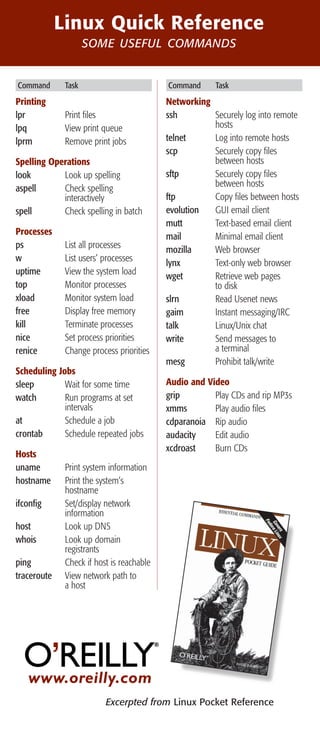
Linux Quick Reference
SOME USEFUL COMMANDS
Linux Quick Reference
SOME USEFUL COMMANDS
Printing
lpr Print files
lpq View print queue
lprm Remove print jobs
Spelling Operations
look Look up spelling
aspell Check spelling
interactively
spell Check spelling in batch
Processes
ps List all processes
w List users’ processes
uptime View the system load
top Monitor processes
xload Monitor system load
free Display free memory
kill Terminate processes
nice Set process priorities
renice Change process priorities
Scheduling Jobs
sleep Wait for some time
watch Run programs at set
intervals
at Schedule a job
crontab Schedule repeated jobs
Hosts
uname Print system information
hostname Print the system’s
hostname
ifconfig Set/display network
information
host Look up DNS
whois Look up domain
registrants
ping Check if host is reachable
traceroute View network path to
a host
Networking
ssh Securely log into remote
hosts
telnet Log into remote hosts
scp Securely copy files
between hosts
sftp Securely copy files
between hosts
ftp Copy files between hosts
evolution GUI email client
mutt Text-based email client
mail Minimal email client
mozilla Web browser
lynx Text-only web browser
wget Retrieve web pages
to disk
slrn Read Usenet news
gaim Instant messaging/IRC
talk Linux/Unix chat
write Send messages to
a terminal
mesg Prohibit talk/write
Audio and Video
grip Play CDs and rip MP3s
xmms Play audio files
cdparanoia Rip audio
audacity Edit audio
xcdroast Burn CDs
Linux Quick Reference
SOME USEFUL COMMANDS
Command Task Command Task
www.oreilly.com
Excerpted from Linux Pocket Reference
Printing
lpr Print files
lpq View print queue
lprm Remove print jobs
Spelling Operations
look Look up spelling
aspell Check spelling
interactively
spell Check spelling in batch
Processes
ps List all processes
w List users’ processes
uptime View the system load
top Monitor processes
xload Monitor system load
free Display free memory
kill Terminate processes
nice Set process priorities
renice Change process priorities
Scheduling Jobs
sleep Wait for some time
watch Run programs at set
intervals
at Schedule a job
crontab Schedule repeated jobs
Hosts
uname Print system information
hostname Print the system’s
hostname
ifconfig Set/display network
information
host Look up DNS
whois Look up domain
registrants
ping Check if host is reachable
traceroute View network path to
a host
Networking
ssh Securely log into remote
hosts
telnet Log into remote hosts
scp Securely copy files
between hosts
sftp Securely copy files
between hosts
ftp Copy files between hosts
evolution GUI email client
mutt Text-based email client
mail Minimal email client
mozilla Web browser
lynx Text-only web browser
wget Retrieve web pages
to disk
slrn Read Usenet news
gaim Instant messaging/IRC
talk Linux/Unix chat
write Send messages to
a terminal
mesg Prohibit talk/write
Audio and Video
grip Play CDs and rip MP3s
xmms Play audio files
cdparanoia Rip audio
audacity Edit audio
xcdroast Burn CDs
Command Task Command Task
www.oreilly.com
Excerpted from Linux Pocket Reference
Printing
lpr Print files
lpq View print queue
lprm Remove print jobs
Spelling Operations
look Look up spelling
aspell Check spelling
interactively
spell Check spelling in batch
Processes
ps List all processes
w List users’ processes
uptime View the system load
top Monitor processes
xload Monitor system load
free Display free memory
kill Terminate processes
nice Set process priorities
renice Change process priorities
Scheduling Jobs
sleep Wait for some time
watch Run programs at set
intervals
at Schedule a job
crontab Schedule repeated jobs
Hosts
uname Print system information
hostname Print the system’s
hostname
ifconfig Set/display network
information
host Look up DNS
whois Look up domain
registrants
ping Check if host is reachable
traceroute View network path to
a host
Networking
ssh Securely log into remote
hosts
telnet Log into remote hosts
scp Securely copy files
between hosts
sftp Securely copy files
between hosts
ftp Copy files between hosts
evolution GUI email client
mutt Text-based email client
mail Minimal email client
mozilla Web browser
lynx Text-only web browser
wget Retrieve web pages
to disk
slrn Read Usenet news
gaim Instant messaging/IRC
talk Linux/Unix chat
write Send messages to
a terminal
mesg Prohibit talk/write
Audio and Video
grip Play CDs and rip MP3s
xmms Play audio files
cdparanoia Rip audio
audacity Edit audio
xcdroast Burn CDs
Command Task Command Task

Linux referencecard

  • 1.
    www.oreilly.com Linux Quick Reference SOMEUSEFUL COMMANDS File/Directory Basics ls List files cp Copy files mv Rename files rm Delete files ln Link files cd Change directory pwd Print current directory name mkdir Create directory rmdir Delete directory File Viewing cat View files less Page through files head View file beginning tail View file ending nl Number lines od View binary data xxd View binary data gv View Postscript/PDF files xdvi View TeX DVI files File Creation and Editing emacs Text editor vim Text editor umask Set default file protections soffice Edit Word/Excel/ PowerPoint docs abiword Edit Word documents gnumeric Edit Excel documents File Properties stat Display file attributes wc Count bytes/words/lines du Measure disk usage file Identify file types touch Change file timestamps chown Change file owner chgrp Change file group chmod Change file protections chattr Change advanced file attributes lsattr List advanced file attributes File Location find Locate files slocate Locate files via index which Locate commands whereis Locate standard files File Text Manipulation grep Search text for matching lines cut Extract columns paste Append columns tr Translate characters sort Sort lines uniq Locate identical lines tee Copy stdin to a file and to stdout simultaneously File Compression gzip Compress files (GNU Zip) compress Compress files (Unix) bzip2 Compress files (BZip2) zip Compress files (Windows Zip) File Comparison diff Compare files line by line comm Compare sorted files cmp Compare files byte by byte md5sum Compute checksums Disks and Filesystems df Show free disk space mount Make a disk accessible fsck Check a disk for errors sync Flush disk caches Backups and Remote Storage mt Control a tape drive dump Back up a disk restore Restore a dump tar Read/write tape archives cdrecord Burn a CD rsync Mirror a set of files Linux Quick Reference SOME USEFUL COMMANDS Linux Quick Reference SOME USEFUL COMMANDS Command Task Command Task ©2004 O’Reilly & Associates, Inc. O’Reilly logo is a regis- tered trademark of O’Reilly & Associates, Inc. All other trademarks are property of their respective owners. #30473 www.oreilly.com File/Directory Basics ls List files cp Copy files mv Rename files rm Delete files ln Link files cd Change directory pwd Print current directory name mkdir Create directory rmdir Delete directory File Viewing cat View files less Page through files head View file beginning tail View file ending nl Number lines od View binary data xxd View binary data gv View Postscript/PDF files xdvi View TeX DVI files File Creation and Editing emacs Text editor vim Text editor umask Set default file protections soffice Edit Word/Excel/ PowerPoint docs abiword Edit Word documents gnumeric Edit Excel documents File Properties stat Display file attributes wc Count bytes/words/lines du Measure disk usage file Identify file types touch Change file timestamps chown Change file owner chgrp Change file group chmod Change file protections chattr Change advanced file attributes lsattr List advanced file attributes File Location find Locate files slocate Locate files via index which Locate commands whereis Locate standard files File Text Manipulation grep Search text for matching lines cut Extract columns paste Append columns tr Translate characters sort Sort lines uniq Locate identical lines tee Copy stdin to a file and to stdout simultaneously File Compression gzip Compress files (GNU Zip) compress Compress files (Unix) bzip2 Compress files (BZip2) zip Compress files (Windows Zip) File Comparison diff Compare files line by line comm Compare sorted files cmp Compare files byte by byte md5sum Compute checksums Disks and Filesystems df Show free disk space mount Make a disk accessible fsck Check a disk for errors sync Flush disk caches Backups and Remote Storage mt Control a tape drive dump Back up a disk restore Restore a dump tar Read/write tape archives cdrecord Burn a CD rsync Mirror a set of files Command Task Command Task ©2004 O’Reilly & Associates, Inc. O’Reilly logo is a regis- tered trademark of O’Reilly & Associates, Inc. All other trademarks are property of their respective owners. #30473 www.oreilly.com File/Directory Basics ls List files cp Copy files mv Rename files rm Delete files ln Link files cd Change directory pwd Print current directory name mkdir Create directory rmdir Delete directory File Viewing cat View files less Page through files head View file beginning tail View file ending nl Number lines od View binary data xxd View binary data gv View Postscript/PDF files xdvi View TeX DVI files File Creation and Editing emacs Text editor vim Text editor umask Set default file protections soffice Edit Word/Excel/ PowerPoint docs abiword Edit Word documents gnumeric Edit Excel documents File Properties stat Display file attributes wc Count bytes/words/lines du Measure disk usage file Identify file types touch Change file timestamps chown Change file owner chgrp Change file group chmod Change file protections chattr Change advanced file attributes lsattr List advanced file attributes File Location find Locate files slocate Locate files via index which Locate commands whereis Locate standard files File Text Manipulation grep Search text for matching lines cut Extract columns paste Append columns tr Translate characters sort Sort lines uniq Locate identical lines tee Copy stdin to a file and to stdout simultaneously File Compression gzip Compress files (GNU Zip) compress Compress files (Unix) bzip2 Compress files (BZip2) zip Compress files (Windows Zip) File Comparison diff Compare files line by line comm Compare sorted files cmp Compare files byte by byte md5sum Compute checksums Disks and Filesystems df Show free disk space mount Make a disk accessible fsck Check a disk for errors sync Flush disk caches Backups and Remote Storage mt Control a tape drive dump Back up a disk restore Restore a dump tar Read/write tape archives cdrecord Burn a CD rsync Mirror a set of files Command Task Command Task ©2004 O’Reilly & Associates, Inc. O’Reilly logo is a regis- tered trademark of O’Reilly & Associates, Inc. All other trademarks are property of their respective owners. #30473
  • 2.
    www.oreilly.com Linux Quick Reference SOMEUSEFUL COMMANDS File/Directory Basics ls List files cp Copy files mv Rename files rm Delete files ln Link files cd Change directory pwd Print current directory name mkdir Create directory rmdir Delete directory File Viewing cat View files less Page through files head View file beginning tail View file ending nl Number lines od View binary data xxd View binary data gv View Postscript/PDF files xdvi View TeX DVI files File Creation and Editing emacs Text editor vim Text editor umask Set default file protections soffice Edit Word/Excel/ PowerPoint docs abiword Edit Word documents gnumeric Edit Excel documents File Properties stat Display file attributes wc Count bytes/words/lines du Measure disk usage file Identify file types touch Change file timestamps chown Change file owner chgrp Change file group chmod Change file protections chattr Change advanced file attributes lsattr List advanced file attributes File Location find Locate files slocate Locate files via index which Locate commands whereis Locate standard files File Text Manipulation grep Search text for matching lines cut Extract columns paste Append columns tr Translate characters sort Sort lines uniq Locate identical lines tee Copy stdin to a file and to stdout simultaneously File Compression gzip Compress files (GNU Zip) compress Compress files (Unix) bzip2 Compress files (BZip2) zip Compress files (Windows Zip) File Comparison diff Compare files line by line comm Compare sorted files cmp Compare files byte by byte md5sum Compute checksums Disks and Filesystems df Show free disk space mount Make a disk accessible fsck Check a disk for errors sync Flush disk caches Backups and Remote Storage mt Control a tape drive dump Back up a disk restore Restore a dump tar Read/write tape archives cdrecord Burn a CD rsync Mirror a set of files Linux Quick Reference SOME USEFUL COMMANDS Linux Quick Reference SOME USEFUL COMMANDS Command Task Command Task ©2004 O’Reilly & Associates, Inc. O’Reilly logo is a regis- tered trademark of O’Reilly & Associates, Inc. All other trademarks are property of their respective owners. #30473 www.oreilly.com File/Directory Basics ls List files cp Copy files mv Rename files rm Delete files ln Link files cd Change directory pwd Print current directory name mkdir Create directory rmdir Delete directory File Viewing cat View files less Page through files head View file beginning tail View file ending nl Number lines od View binary data xxd View binary data gv View Postscript/PDF files xdvi View TeX DVI files File Creation and Editing emacs Text editor vim Text editor umask Set default file protections soffice Edit Word/Excel/ PowerPoint docs abiword Edit Word documents gnumeric Edit Excel documents File Properties stat Display file attributes wc Count bytes/words/lines du Measure disk usage file Identify file types touch Change file timestamps chown Change file owner chgrp Change file group chmod Change file protections chattr Change advanced file attributes lsattr List advanced file attributes File Location find Locate files slocate Locate files via index which Locate commands whereis Locate standard files File Text Manipulation grep Search text for matching lines cut Extract columns paste Append columns tr Translate characters sort Sort lines uniq Locate identical lines tee Copy stdin to a file and to stdout simultaneously File Compression gzip Compress files (GNU Zip) compress Compress files (Unix) bzip2 Compress files (BZip2) zip Compress files (Windows Zip) File Comparison diff Compare files line by line comm Compare sorted files cmp Compare files byte by byte md5sum Compute checksums Disks and Filesystems df Show free disk space mount Make a disk accessible fsck Check a disk for errors sync Flush disk caches Backups and Remote Storage mt Control a tape drive dump Back up a disk restore Restore a dump tar Read/write tape archives cdrecord Burn a CD rsync Mirror a set of files Command Task Command Task ©2004 O’Reilly & Associates, Inc. O’Reilly logo is a regis- tered trademark of O’Reilly & Associates, Inc. All other trademarks are property of their respective owners. #30473 www.oreilly.com File/Directory Basics ls List files cp Copy files mv Rename files rm Delete files ln Link files cd Change directory pwd Print current directory name mkdir Create directory rmdir Delete directory File Viewing cat View files less Page through files head View file beginning tail View file ending nl Number lines od View binary data xxd View binary data gv View Postscript/PDF files xdvi View TeX DVI files File Creation and Editing emacs Text editor vim Text editor umask Set default file protections soffice Edit Word/Excel/ PowerPoint docs abiword Edit Word documents gnumeric Edit Excel documents File Properties stat Display file attributes wc Count bytes/words/lines du Measure disk usage file Identify file types touch Change file timestamps chown Change file owner chgrp Change file group chmod Change file protections chattr Change advanced file attributes lsattr List advanced file attributes File Location find Locate files slocate Locate files via index which Locate commands whereis Locate standard files File Text Manipulation grep Search text for matching lines cut Extract columns paste Append columns tr Translate characters sort Sort lines uniq Locate identical lines tee Copy stdin to a file and to stdout simultaneously File Compression gzip Compress files (GNU Zip) compress Compress files (Unix) bzip2 Compress files (BZip2) zip Compress files (Windows Zip) File Comparison diff Compare files line by line comm Compare sorted files cmp Compare files byte by byte md5sum Compute checksums Disks and Filesystems df Show free disk space mount Make a disk accessible fsck Check a disk for errors sync Flush disk caches Backups and Remote Storage mt Control a tape drive dump Back up a disk restore Restore a dump tar Read/write tape archives cdrecord Burn a CD rsync Mirror a set of files Command Task Command Task ©2004 O’Reilly & Associates, Inc. O’Reilly logo is a regis- tered trademark of O’Reilly & Associates, Inc. All other trademarks are property of their respective owners. #30473
  • 3.
    www.oreilly.com Excerpted from LinuxPocket Reference Linux Quick Reference SOME USEFUL COMMANDS Linux Quick Reference SOME USEFUL COMMANDS Printing lpr Print files lpq View print queue lprm Remove print jobs Spelling Operations look Look up spelling aspell Check spelling interactively spell Check spelling in batch Processes ps List all processes w List users’ processes uptime View the system load top Monitor processes xload Monitor system load free Display free memory kill Terminate processes nice Set process priorities renice Change process priorities Scheduling Jobs sleep Wait for some time watch Run programs at set intervals at Schedule a job crontab Schedule repeated jobs Hosts uname Print system information hostname Print the system’s hostname ifconfig Set/display network information host Look up DNS whois Look up domain registrants ping Check if host is reachable traceroute View network path to a host Networking ssh Securely log into remote hosts telnet Log into remote hosts scp Securely copy files between hosts sftp Securely copy files between hosts ftp Copy files between hosts evolution GUI email client mutt Text-based email client mail Minimal email client mozilla Web browser lynx Text-only web browser wget Retrieve web pages to disk slrn Read Usenet news gaim Instant messaging/IRC talk Linux/Unix chat write Send messages to a terminal mesg Prohibit talk/write Audio and Video grip Play CDs and rip MP3s xmms Play audio files cdparanoia Rip audio audacity Edit audio xcdroast Burn CDs Linux Quick Reference SOME USEFUL COMMANDS Command Task Command Task www.oreilly.com Excerpted from Linux Pocket Reference Printing lpr Print files lpq View print queue lprm Remove print jobs Spelling Operations look Look up spelling aspell Check spelling interactively spell Check spelling in batch Processes ps List all processes w List users’ processes uptime View the system load top Monitor processes xload Monitor system load free Display free memory kill Terminate processes nice Set process priorities renice Change process priorities Scheduling Jobs sleep Wait for some time watch Run programs at set intervals at Schedule a job crontab Schedule repeated jobs Hosts uname Print system information hostname Print the system’s hostname ifconfig Set/display network information host Look up DNS whois Look up domain registrants ping Check if host is reachable traceroute View network path to a host Networking ssh Securely log into remote hosts telnet Log into remote hosts scp Securely copy files between hosts sftp Securely copy files between hosts ftp Copy files between hosts evolution GUI email client mutt Text-based email client mail Minimal email client mozilla Web browser lynx Text-only web browser wget Retrieve web pages to disk slrn Read Usenet news gaim Instant messaging/IRC talk Linux/Unix chat write Send messages to a terminal mesg Prohibit talk/write Audio and Video grip Play CDs and rip MP3s xmms Play audio files cdparanoia Rip audio audacity Edit audio xcdroast Burn CDs Command Task Command Task www.oreilly.com Excerpted from Linux Pocket Reference Printing lpr Print files lpq View print queue lprm Remove print jobs Spelling Operations look Look up spelling aspell Check spelling interactively spell Check spelling in batch Processes ps List all processes w List users’ processes uptime View the system load top Monitor processes xload Monitor system load free Display free memory kill Terminate processes nice Set process priorities renice Change process priorities Scheduling Jobs sleep Wait for some time watch Run programs at set intervals at Schedule a job crontab Schedule repeated jobs Hosts uname Print system information hostname Print the system’s hostname ifconfig Set/display network information host Look up DNS whois Look up domain registrants ping Check if host is reachable traceroute View network path to a host Networking ssh Securely log into remote hosts telnet Log into remote hosts scp Securely copy files between hosts sftp Securely copy files between hosts ftp Copy files between hosts evolution GUI email client mutt Text-based email client mail Minimal email client mozilla Web browser lynx Text-only web browser wget Retrieve web pages to disk slrn Read Usenet news gaim Instant messaging/IRC talk Linux/Unix chat write Send messages to a terminal mesg Prohibit talk/write Audio and Video grip Play CDs and rip MP3s xmms Play audio files cdparanoia Rip audio audacity Edit audio xcdroast Burn CDs Command Task Command Task