Copyright @ 2019 JFrog - All rights reserved.
Hardening Linux
Made Easy
Guy Barnhart-Magen, Melior Security
@barnhartguy
Who am I?
Father of two, hacker
BSidesTLV chairman and CTF Lead
(Lucky to speak at many conferences)
Today: Cyber Security Consultant
Before: Intel, Cisco and a couple of Startups
OS Hardening, Crypto, Embedded Security, Security of ML
@barnhartguy
@barnhartguy
Why Hardening?
Assumption - the attacker has a foothold in your server
At least shell access (or something that will give him access)
Can we limit what he can do?
@barnhartguy
Threat Model
Consider the following:
● Is the VM compromised?
● Do we need a scalable solution?
● Is it open to the internet?
● How do we do patch management?
● If an attacker gets a shell, what is compromised?
● If an attacker gets root access, what is compromised?
● Do we have someone to look at reports?
@barnhartguy
Threat Model
Attacker model
● Is this a targeted or opportunistic attack?
● Do I have vital business value on this VM?
● Is the system old? Any security concerns? Something signaling to attackers?
@barnhartguy
Where to focus?
@barnhartguy
Passive vs. Active
Passive - build defenses, but an attacker is not present in the system allowing for more
flexibility
Active - need to remove an attacker (or suspicion) from the system, before deploying
defenses
@barnhartguy
Shopping list?
CIS Benchmarks
Lynis
NIST - SP800-123
Other standards
@barnhartguy
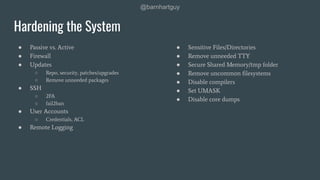
Hardening the System
● Passive vs. Active
● Firewall
● Updates
○ Repo, security, patches/upgrades
○ Remove unneeded packages
● SSH
○ 2FA
○ fail2ban
● User Accounts
○ Credentials, ACL
● Remote Logging
● Sensitive Files/Directories
● Remove unneeded TTY
● Secure Shared Memory/tmp folder
● Remove uncommon filesystems
● Disable compilers
● Set UMASK
● Disable core dumps
@barnhartguy
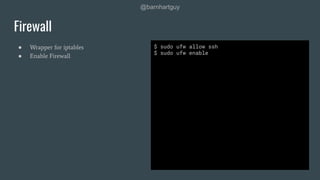
● Wrapper for iptables
● Enable Firewall
Firewall
$ sudo ufw allow ssh
$ sudo ufw enable
@barnhartguy
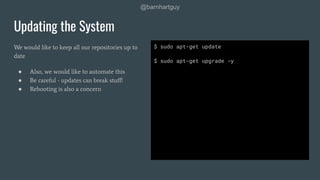
We would like to keep all our repositories up to
date
● Also, we would like to automate this
● Be careful - updates can break stuff!
● Rebooting is also a concern
Updating the System
$ sudo apt-get update
$ sudo apt-get upgrade -y
@barnhartguy
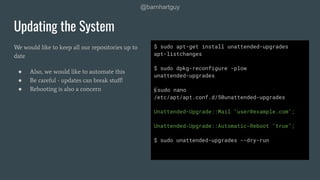
We would like to keep all our repositories up to
date
● Also, we would like to automate this
● Be careful - updates can break stuff!
● Rebooting is also a concern
Updating the System
$ sudo apt-get install unattended-upgrades
apt-listchanges
$ sudo dpkg-reconfigure -plow
unattended-upgrades
$ sudo nano
/etc/apt/apt.conf.d/50unattended-upgrades
Unattended-Upgrade::Mail "user@example.com";
Unattended-Upgrade::Automatic-Reboot "true";
$ sudo unattended-upgrades --dry-run
@barnhartguy
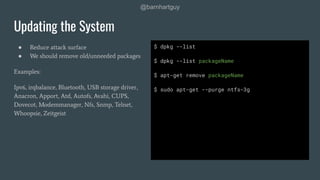
● Reduce attack surface
● We should remove old/unneeded packages
Examples:
Ipv6, irqbalance, Bluetooth, USB storage driver,
Anacron, Apport, Atd, Autofs, Avahi, CUPS,
Dovecot, Modemmanager, Nfs, Snmp, Telnet,
Whoopsie, Zeitgeist
Updating the System
$ dpkg --list
$ dpkg --list packageName
$ apt-get remove packageName
$ sudo apt-get --purge ntfs-3g
@barnhartguy
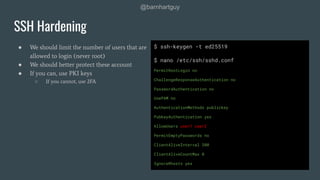
● We should limit the number of users that are
allowed to login (never root)
● We should better protect these account
● If you can, use PKI keys
○ If you cannot, use 2FA
SSH Hardening
$ ssh-keygen -t ed25519
$ nano /etc/ssh/sshd.conf
PermitRootLogin no
ChallengeResponseAuthentication no
PasswordAuthentication no
UsePAM no
AuthenticationMethods publickey
PubkeyAuthentication yes
AllowUsers user1 user2
PermitEmptyPasswords no
ClientAliveInterval 300
ClientAliveCountMax 0
IgnoreRhosts yes
@barnhartguy
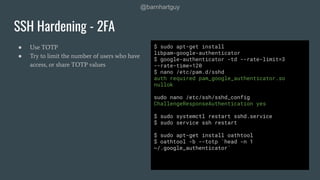
● Use TOTP
● Try to limit the number of users who have
access, or share TOTP values
SSH Hardening - 2FA
$ sudo apt-get install
libpam-google-authenticator
$ google-authenticator -td --rate-limit=3
--rate-time=120
$ nano /etc/pam.d/sshd
auth required pam_google_authenticator.so
nullok
sudo nano /etc/ssh/sshd_config
ChallengeResponseAuthentication yes
$ sudo systemctl restart sshd.service
$ sudo service ssh restart
$ sudo apt-get install oathtool
$ oathtool -b --totp `head -n 1
~/.google_authenticator`
@barnhartguy
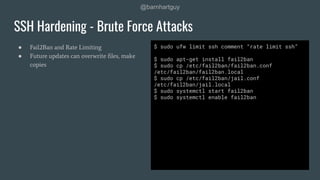
● Fail2Ban and Rate Limiting
● Future updates can overwrite files, make
copies
SSH Hardening - Brute Force Attacks
$ sudo ufw limit ssh comment “rate limit ssh”
$ sudo apt-get install fail2ban
$ sudo cp /etc/fail2ban/fail2ban.conf
/etc/fail2ban/fail2ban.local
$ sudo cp /etc/fail2ban/jail.conf
/etc/fail2ban/jail.local
$ sudo systemctl start fail2ban
$ sudo systemctl enable fail2ban
@barnhartguy
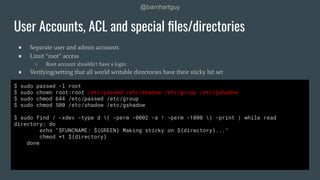
● Separate user and admin accounts
● Limit “root” access
○ Root account shouldn’t have a login
● Verifying/setting that all world writable directories have their sticky bit set
User Accounts, ACL and special files/directories
$ sudo passwd -l root
$ sudo chown root:root /etc/passwd /etc/shadow /etc/group /etc/gshadow
$ sudo chmod 644 /etc/passwd /etc/group
$ sudo chmod 500 /etc/shadow /etc/gshadow
$ sudo find / -xdev -type d ( -perm -0002 -a ! -perm -1000 ) -print | while read
directory; do
echo "$FUNCNAME: ${GREEN} Making sticky on ${directory}..."
chmod +t ${directory}
done
@barnhartguy
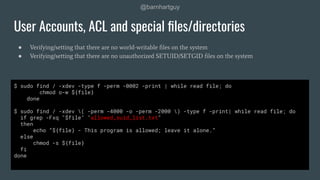
● Verifying/setting that there are no world-writable files on the system
● Verifying/setting that there are no unauthorized SETUID/SETGID files on the system
User Accounts, ACL and special files/directories
$ sudo find / -xdev -type f -perm -0002 -print | while read file; do
chmod o-w ${file}
done
$ sudo find / -xdev ( -perm -4000 -o -perm -2000 ) -type f -print| while read file; do
if grep -Fxq "$file" "allowed_suid_list.txt"
then
echo “${file} - This program is allowed; leave it alone.”
else
chmod -s ${file}
fi
done
@barnhartguy
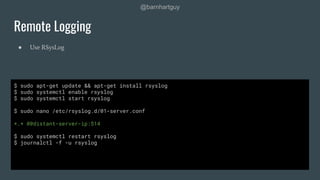
● Use RSysLog
Remote Logging
$ sudo apt-get update && apt-get install rsyslog
$ sudo systemctl enable rsyslog
$ sudo systemctl start rsyslog
$ sudo nano /etc/rsyslog.d/01-server.conf
*.* @@distant-server-ip:514
$ sudo systemctl restart rsyslog
$ journalctl -f -u rsyslog
@barnhartguy
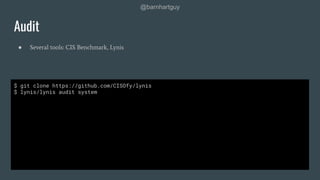
● Several tools: CIS Benchmark, Lynis
Audit
$ git clone https://github.com/CISOfy/lynis
$ lynis/lynis audit system
@barnhartguy
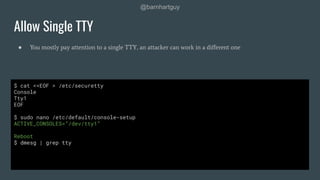
● You mostly pay attention to a single TTY, an attacker can work in a different one
Allow Single TTY
$ cat <<EOF > /etc/securetty
Console
Tty1
EOF
$ sudo nano /etc/default/console-setup
ACTIVE_CONSOLES=”/dev/tty1”
Reboot
$ dmesg | grep tty
@barnhartguy
●
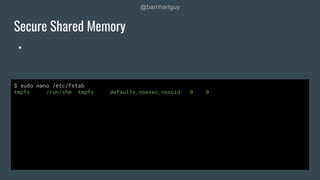
Secure Shared Memory
$ sudo nano /etc/fstab
tmpfs /run/shm tmpfs defaults,noexec,nosuid 0 0
@barnhartguy
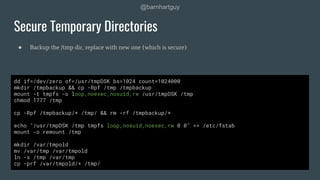
● Backup the /tmp dir, replace with new one (which is secure)
Secure Temporary Directories
dd if=/dev/zero of=/usr/tmpDSK bs=1024 count=1024000
mkdir /tmpbackup && cp -Rpf /tmp /tmpbackup
mount -t tmpfs -o loop,noexec,nosuid,rw /usr/tmpDSK /tmp
chmod 1777 /tmp
cp -Rpf /tmpbackup/* /tmp/ && rm -rf /tmpbackup/*
echo "/usr/tmpDSK /tmp tmpfs loop,nosuid,noexec,rw 0 0" >> /etc/fstab
mount -o remount /tmp
mkdir /var/tmpold
mv /var/tmp /var/tmpold
ln -s /tmp /var/tmp
cp -prf /var/tmpold/* /tmp/
@barnhartguy
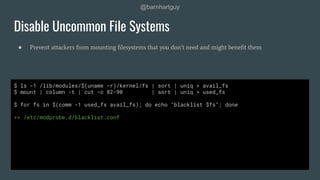
● Prevent attackers from mounting filesystems that you don’t need and might benefit them
Disable Uncommon File Systems
$ ls -1 /lib/modules/$(uname -r)/kernel/fs | sort | uniq > avail_fs
$ mount | column -t | cut -c 82-90 | sort | uniq > used_fs
$ for fs in $(comm -1 used_fs avail_fs); do echo "blacklist $fs"; done
>> /etc/modprobe.d/blacklist.conf
@barnhartguy
● Prevent attackers from compiling code to get
higher order abilities
Disable Compilers
>>
COMPILERS=(
"/usr/bin/byacc"
"/usr/bin/yacc"
"/usr/bin/bcc"
"/usr/bin/kgcc"
"/usr/bin/cc"
"/usr/bin/gcc"
"/usr/bin/c++"
"/usr/bin/g++"
)
for compiler in ${COMPILERS[@]}; do
if [ -f ${compiler} ]; then
echo "removing ${compiler}
chmod 000 ${compiler}
else
echo "missing ${compiler}
fi
done
Thank You!
@barnhartguy
I’ll be happy to answer more questions after
the talk (outside)

Linux Hardening - Made Easy

  • 1.
    Copyright @ 2019JFrog - All rights reserved. Hardening Linux Made Easy Guy Barnhart-Magen, Melior Security @barnhartguy
  • 2.
    Who am I? Fatherof two, hacker BSidesTLV chairman and CTF Lead (Lucky to speak at many conferences) Today: Cyber Security Consultant Before: Intel, Cisco and a couple of Startups OS Hardening, Crypto, Embedded Security, Security of ML @barnhartguy
  • 3.
    @barnhartguy Why Hardening? Assumption -the attacker has a foothold in your server At least shell access (or something that will give him access) Can we limit what he can do?
  • 4.
    @barnhartguy Threat Model Consider thefollowing: ● Is the VM compromised? ● Do we need a scalable solution? ● Is it open to the internet? ● How do we do patch management? ● If an attacker gets a shell, what is compromised? ● If an attacker gets root access, what is compromised? ● Do we have someone to look at reports?
  • 5.
    @barnhartguy Threat Model Attacker model ●Is this a targeted or opportunistic attack? ● Do I have vital business value on this VM? ● Is the system old? Any security concerns? Something signaling to attackers?
  • 6.
  • 7.
    @barnhartguy Passive vs. Active Passive- build defenses, but an attacker is not present in the system allowing for more flexibility Active - need to remove an attacker (or suspicion) from the system, before deploying defenses
  • 8.
  • 9.
    @barnhartguy Hardening the System ●Passive vs. Active ● Firewall ● Updates ○ Repo, security, patches/upgrades ○ Remove unneeded packages ● SSH ○ 2FA ○ fail2ban ● User Accounts ○ Credentials, ACL ● Remote Logging ● Sensitive Files/Directories ● Remove unneeded TTY ● Secure Shared Memory/tmp folder ● Remove uncommon filesystems ● Disable compilers ● Set UMASK ● Disable core dumps
  • 10.
    @barnhartguy ● Wrapper foriptables ● Enable Firewall Firewall $ sudo ufw allow ssh $ sudo ufw enable
  • 11.
    @barnhartguy We would liketo keep all our repositories up to date ● Also, we would like to automate this ● Be careful - updates can break stuff! ● Rebooting is also a concern Updating the System $ sudo apt-get update $ sudo apt-get upgrade -y
  • 12.
    @barnhartguy We would liketo keep all our repositories up to date ● Also, we would like to automate this ● Be careful - updates can break stuff! ● Rebooting is also a concern Updating the System $ sudo apt-get install unattended-upgrades apt-listchanges $ sudo dpkg-reconfigure -plow unattended-upgrades $ sudo nano /etc/apt/apt.conf.d/50unattended-upgrades Unattended-Upgrade::Mail "user@example.com"; Unattended-Upgrade::Automatic-Reboot "true"; $ sudo unattended-upgrades --dry-run
  • 13.
    @barnhartguy ● Reduce attacksurface ● We should remove old/unneeded packages Examples: Ipv6, irqbalance, Bluetooth, USB storage driver, Anacron, Apport, Atd, Autofs, Avahi, CUPS, Dovecot, Modemmanager, Nfs, Snmp, Telnet, Whoopsie, Zeitgeist Updating the System $ dpkg --list $ dpkg --list packageName $ apt-get remove packageName $ sudo apt-get --purge ntfs-3g
  • 14.
    @barnhartguy ● We shouldlimit the number of users that are allowed to login (never root) ● We should better protect these account ● If you can, use PKI keys ○ If you cannot, use 2FA SSH Hardening $ ssh-keygen -t ed25519 $ nano /etc/ssh/sshd.conf PermitRootLogin no ChallengeResponseAuthentication no PasswordAuthentication no UsePAM no AuthenticationMethods publickey PubkeyAuthentication yes AllowUsers user1 user2 PermitEmptyPasswords no ClientAliveInterval 300 ClientAliveCountMax 0 IgnoreRhosts yes
  • 15.
    @barnhartguy ● Use TOTP ●Try to limit the number of users who have access, or share TOTP values SSH Hardening - 2FA $ sudo apt-get install libpam-google-authenticator $ google-authenticator -td --rate-limit=3 --rate-time=120 $ nano /etc/pam.d/sshd auth required pam_google_authenticator.so nullok sudo nano /etc/ssh/sshd_config ChallengeResponseAuthentication yes $ sudo systemctl restart sshd.service $ sudo service ssh restart $ sudo apt-get install oathtool $ oathtool -b --totp `head -n 1 ~/.google_authenticator`
  • 16.
    @barnhartguy ● Fail2Ban andRate Limiting ● Future updates can overwrite files, make copies SSH Hardening - Brute Force Attacks $ sudo ufw limit ssh comment “rate limit ssh” $ sudo apt-get install fail2ban $ sudo cp /etc/fail2ban/fail2ban.conf /etc/fail2ban/fail2ban.local $ sudo cp /etc/fail2ban/jail.conf /etc/fail2ban/jail.local $ sudo systemctl start fail2ban $ sudo systemctl enable fail2ban
  • 17.
    @barnhartguy ● Separate userand admin accounts ● Limit “root” access ○ Root account shouldn’t have a login ● Verifying/setting that all world writable directories have their sticky bit set User Accounts, ACL and special files/directories $ sudo passwd -l root $ sudo chown root:root /etc/passwd /etc/shadow /etc/group /etc/gshadow $ sudo chmod 644 /etc/passwd /etc/group $ sudo chmod 500 /etc/shadow /etc/gshadow $ sudo find / -xdev -type d ( -perm -0002 -a ! -perm -1000 ) -print | while read directory; do echo "$FUNCNAME: ${GREEN} Making sticky on ${directory}..." chmod +t ${directory} done
  • 18.
    @barnhartguy ● Verifying/setting thatthere are no world-writable files on the system ● Verifying/setting that there are no unauthorized SETUID/SETGID files on the system User Accounts, ACL and special files/directories $ sudo find / -xdev -type f -perm -0002 -print | while read file; do chmod o-w ${file} done $ sudo find / -xdev ( -perm -4000 -o -perm -2000 ) -type f -print| while read file; do if grep -Fxq "$file" "allowed_suid_list.txt" then echo “${file} - This program is allowed; leave it alone.” else chmod -s ${file} fi done
  • 19.
    @barnhartguy ● Use RSysLog RemoteLogging $ sudo apt-get update && apt-get install rsyslog $ sudo systemctl enable rsyslog $ sudo systemctl start rsyslog $ sudo nano /etc/rsyslog.d/01-server.conf *.* @@distant-server-ip:514 $ sudo systemctl restart rsyslog $ journalctl -f -u rsyslog
  • 20.
    @barnhartguy ● Several tools:CIS Benchmark, Lynis Audit $ git clone https://github.com/CISOfy/lynis $ lynis/lynis audit system
  • 21.
    @barnhartguy ● You mostlypay attention to a single TTY, an attacker can work in a different one Allow Single TTY $ cat <<EOF > /etc/securetty Console Tty1 EOF $ sudo nano /etc/default/console-setup ACTIVE_CONSOLES=”/dev/tty1” Reboot $ dmesg | grep tty
  • 22.
    @barnhartguy ● Secure Shared Memory $sudo nano /etc/fstab tmpfs /run/shm tmpfs defaults,noexec,nosuid 0 0
  • 23.
    @barnhartguy ● Backup the/tmp dir, replace with new one (which is secure) Secure Temporary Directories dd if=/dev/zero of=/usr/tmpDSK bs=1024 count=1024000 mkdir /tmpbackup && cp -Rpf /tmp /tmpbackup mount -t tmpfs -o loop,noexec,nosuid,rw /usr/tmpDSK /tmp chmod 1777 /tmp cp -Rpf /tmpbackup/* /tmp/ && rm -rf /tmpbackup/* echo "/usr/tmpDSK /tmp tmpfs loop,nosuid,noexec,rw 0 0" >> /etc/fstab mount -o remount /tmp mkdir /var/tmpold mv /var/tmp /var/tmpold ln -s /tmp /var/tmp cp -prf /var/tmpold/* /tmp/
  • 24.
    @barnhartguy ● Prevent attackersfrom mounting filesystems that you don’t need and might benefit them Disable Uncommon File Systems $ ls -1 /lib/modules/$(uname -r)/kernel/fs | sort | uniq > avail_fs $ mount | column -t | cut -c 82-90 | sort | uniq > used_fs $ for fs in $(comm -1 used_fs avail_fs); do echo "blacklist $fs"; done >> /etc/modprobe.d/blacklist.conf
  • 25.
    @barnhartguy ● Prevent attackersfrom compiling code to get higher order abilities Disable Compilers >> COMPILERS=( "/usr/bin/byacc" "/usr/bin/yacc" "/usr/bin/bcc" "/usr/bin/kgcc" "/usr/bin/cc" "/usr/bin/gcc" "/usr/bin/c++" "/usr/bin/g++" ) for compiler in ${COMPILERS[@]}; do if [ -f ${compiler} ]; then echo "removing ${compiler} chmod 000 ${compiler} else echo "missing ${compiler} fi done
  • 26.
    Thank You! @barnhartguy I’ll behappy to answer more questions after the talk (outside)