# whoami
‫دوست‬ ‫بستان‬ ‫سعید‬
‫نویس‬ ‫برنامه‬ ‫و‬ ‫افزار‬ ‫نرم‬ ‫مهندس‬
‫سال‬ ‫از‬ ‫گنو/لینوکس‬ ‫ادمین‬ ‫سیس‬۱۳۸۵
‫شیرازکلود‬ ‫و‬ ‫شیرازالگ‬ ‫عضو‬
‫های‬ ‫انجمن‬ ‫عضو‬, , ,Red Hat Ceph HAProxy Galera
‫گروه‬ ‫بنیانگذار‬OpenStack‫شیراز‬
‫افزار‬ ‫نرم‬ ‫و‬ ‫شبکه‬ ‫امنیت‬ ‫و‬ ‫ابری‬ ‫رایانش‬ ‫و‬ ‫زیرساخت‬ ‫حوزه‬ ‫در‬ ‫فعال‬
‫های‬ ‫تکنولوژی‬ ‫و‬ ‫گنو/لینوکس‬ ‫های‬ ‫دوره‬ ‫مدرس‬Red Hat
Saeid Bostandoust
ssbostan@linuxmail.org
bostandoust.ir
Bostandoust.IR
# whereis `!!`
@ssbostan
.@bostandoust ir
Bostandoust.IR
@shirazcloud
@shirazlug
Bostandoust.IR
Linux Security and Hardening
Bostandoust.IR
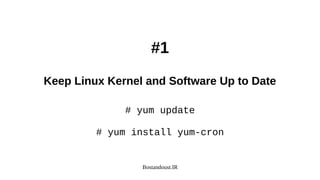
#1
Keep Linux Kernel and Software Up to Date
# yum update
# yum install yum-cron
Bostandoust.IR
#2
Minimize Software to Minimize Vulnerabilities
Remove Unwanted Software and Services
Bostandoust.IR
#3
One Network Service Per System or VM Instance
Containerized Services
Bostandoust.IR
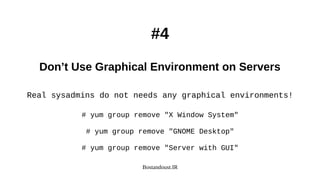
#4
Don’t Use Graphical Environment on Servers
Real sysadmins do not needs any graphical environments!
# yum group remove "X Window System"
# yum group remove "GNOME Desktop"
# yum group remove "Server with GUI"
Bostandoust.IR
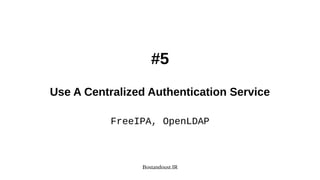
#5
Use A Centralized Authentication Service
FreeIPA, OpenLDAP
Bostandoust.IR
#6
Use Linux Security Extensions (SELinux)
# sestatus
# vi /etc/selinux/config
Bostandoust.IR
#7
Linux Kernel /etc/sysctl.conf Hardening
Bostandoust.IR
#8
Disable Memory Core Dumps
# echo * hard core 0 >> /etc/security/limits.conf
# echo fs.suid_dumpable = 0 >> /etc/sysctl.conf
Bostandoust.IR
#9
Disable USB Storage / Firewire / Thunderbolt
# echo install usb-storage /bin/true >> /etc/modprobe.d/usb-storage.conf
# echo blacklist usb-storage >> /etc/modprobe.d/usb-storage.conf
# echo blacklist firewire-core >> /etc/modprobe.d/firewire.conf
# echo blacklist thunderbolt >> /etc/modprobe.d/thunderbolt.conf
Bostandoust.IR
#10
Find and Disable Users with Empty Passwords
# awk -F: '($2 == "") {print}' /etc/shadow
# usermod -L USER
# chage -E 0 USER
Bostandoust.IR
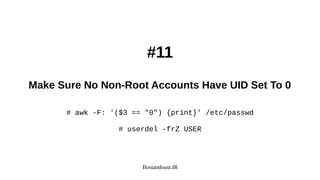
#11
Make Sure No Non-Root Accounts Have UID Set To 0
# awk -F: '($3 == "0") {print}' /etc/passwd
# userdel -frZ USER
Bostandoust.IR
#12
User Accounts Strong Password Policy
pam_pwquality.so
https://access.redhat.com/solutions/2808101
Bostandoust.IR
#13
Restricting Users from Reusing Old Passwords
pam_pwhistory.so
Don’t use pam_unix (MD5)
/etc/security/opasswd
Bostandoust.IR
#14
Password Aging For Better Security
# vi /etc/login.defs
# chage -d 0 USER
# chage -E 0 USER
# chage -M 30 -m 3 -W 3 USER
Bostandoust.IR
#15
Locking User Accounts After Login Failures
# vi /etc/pam.d/system-auth
# vi /etc/pam.d/password-auth
auth required pam_tally2.so audit deny=3 unlock_time=60 even_deny_root
account required pam_tally2.so
auth requisite pam_faillock.so preauth audit deny=3 unlock_time=60 even_deny_root
auth [default=die] pam_faillock.so authfail audit deny=3 unlock_time=60 even_deny_root
auth sufficient pam_faillock.so authsucc audit deny=3 unlock_time=60 even_deny_root
account required pam_faillock.so
# pam_tally2 --user USER --reset
# faillock --user USER --reset
Bostandoust.IR
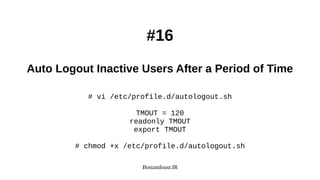
#16
Auto Logout Inactive Users After a Period of Time
# vi /etc/profile.d/autologout.sh
TMOUT = 120
readonly TMOUT
export TMOUT
# chmod +x /etc/profile.d/autologout.sh
Bostandoust.IR
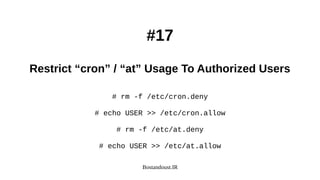
#17
Restrict “cron” / “at” Usage To Authorized Users
# rm -f /etc/cron.deny
# echo USER >> /etc/cron.allow
# rm -f /etc/at.deny
# echo USER >> /etc/at.allow
Bostandoust.IR
#18
Separate Disk Partitions For Better Security
/ defaults
/boot auto,nodev,nosuid,nouser,ro
/dev/shm auto,nodev,nosuid,nouser,rw
/home auto,nodev,nouser,rw
/root auto,nodev,nouser,rw
/tmp auto,nodev,noexec,nosuid,nouser,rw
/var auto,nodev,noexec,nosuid,nouser,rw
/var/log auto,nodev,noexec,nosuid,nouser,rw
/var/log/audit auto,nodev,noexec,nosuid,nouser,rw
/var/tmp auto,nodev,noexec,nosuid,nouser,rw
/usr auto,nodev,nouser,rw
Bostandoust.IR
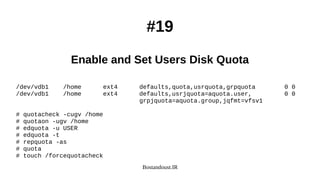
#19
Enable and Set Users Disk Quota
/dev/vdb1 /home ext4 defaults,quota,usrquota,grpquota 0 0
/dev/vdb1 /home ext4 defaults,usrjquota=aquota.user, 0 0
grpjquota=aquota.group,jqfmt=vfsv1
# quotacheck -cugv /home
# quotaon -ugv /home
# edquota -u USER
# edquota -t
# repquota -as
# quota
# touch /forcequotacheck
Bostandoust.IR
#20
Find and Remove No-owner Files
# find / -nouser -nogroup
Bostandoust.IR
#21
Disable Unwanted SUID and SGID Binaries
# find / -perm /4000
# find / -perm /2000
Bostandoust.IR
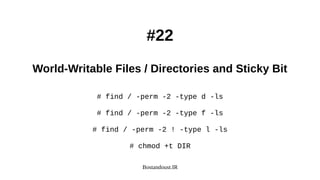
#22
World-Writable Files / Directories and Sticky Bit
# find / -perm -2 -type d -ls
# find / -perm -2 -type f -ls
# find / -perm -2 ! -type l -ls
# chmod +t DIR
Bostandoust.IR
#23
Install and Use Antivirus
# yum install clamd clamav clamav-update clamav-data
# setsebool -P antivirus_can_scan_system 1
# setsebool -P antivirus_use_jit 1
# sed -i -e "s/^Example/#Example/" /etc/clamd.d/scan.conf
# sed -i -e "s/^Example/#Example/" /etc/freshclam.conf
# freshclam -d -c 4
# systemctl enable --now clamd@scan
Bostandoust.IR
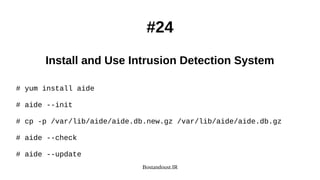
#24
Install and Use Intrusion Detection System
# yum install aide
# aide --init
# cp -p /var/lib/aide/aide.db.new.gz /var/lib/aide/aide.db.gz
# aide --check
# aide --update
Bostandoust.IR
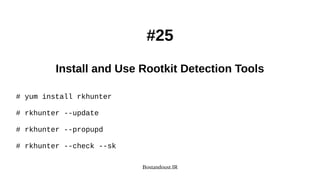
#25
Install and Use Rootkit Detection Tools
# yum install rkhunter
# rkhunter --update
# rkhunter --propupd
# rkhunter --check --sk
Bostandoust.IR
#26
Install and Use Security Auditing Tools
# yum install lynis
# lynis audit system
# cat /var/log/lynis.log
# cat /var/log/lynis-report.dat | grep suggestion
Bostandoust.IR
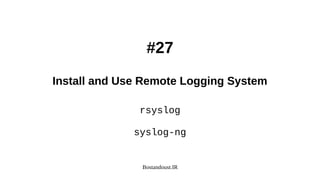
#27
Install and Use Remote Logging System
rsyslog
syslog-ng
Bostandoust.IR
#28
Linux Auditing System (auditd)
# systemctl enable --now auditd
/var/log/audit/
/etc/audit/
Bostandoust.IR
#29
Install and Use Log Management and Monitoring Software
Nagios, Graylog2, Logcheck, Logwatch, Logstash
ELK Stack, LOGalyze, Zabbix
Bostandoust.IR
#30
Encrypt Network Data Communication
● File Transfer (scp, sftp)
● Messages, Files (GnuPG)
● VPN (openvpn)
● Websites (Apache with mod_ssl)
● Encryption-less (stunnel)
Bostandoust.IR
#31
Avoid Using TFTP, Telnet, Rlogin / Rsh
# yum erase xinetd ypserv tftp-server telnet-server rsh-server
Bostandoust.IR
#32
Enable and Use Firewall on Linux Server
# firewall-cmd
firewalld, iptables, ip6tables, arptables, ebtables, nft
Bostandoust.IR
#33
Turn Off IPv6 only if you are NOT using it
# echo install ipv6 /bin/true >> /etc/modprobe.conf
GRUB_CMDLINE_LINUX=”ipv6.disable=1”
# echo net.ipv6.conf.all.disable_ipv6 = 1 >> /etc/sysctl.conf
Bostandoust.IR
#34
Secure Access to OpenSSH Server
# vi /etc/ssh/sshd_config
HostbasedAuthentication no
ChallengeResponseAuthentication no
PasswordAuthentication no
PubkeyAuthentication yes
PermitEmptyPasswords no
IgnoreRhosts yes
PermitRootLogin no
X11Forwarding no
AllowUsers USER1 USER2
Bostandoust.IR
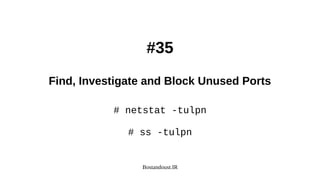
#35
Find, Investigate and Block Unused Ports
# netstat -tulpn
# ss -tulpn
Bostandoust.IR
#36
Set Timezone and Install Network Time Protocol
# timedatectl set-timezone Asia/Tehran
# yum install chrony
# systemctl enable --now chronyd
# chronyc tracking
# chronyc sources
Bostandoust.IR
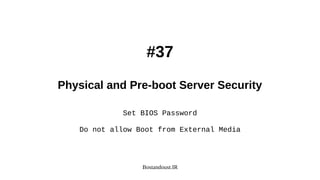
#37
Physical and Pre-boot Server Security
Set BIOS Password
Do not allow Boot from External Media
Bostandoust.IR
#38
Set GRUB Password to Prevent “Single-User Mode” Boot
# grub2-setpassword
# cat /boot/grub2/user.cfg
Bostandoust.IR
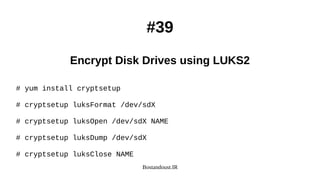
#39
Encrypt Disk Drives using LUKS2
# yum install cryptsetup
# cryptsetup luksFormat /dev/sdX
# cryptsetup luksOpen /dev/sdX NAME
# cryptsetup luksDump /dev/sdX
# cryptsetup luksClose NAME
Bostandoust.IR
#40
Disable Ctrl+Alt+Delete to Prevent Interactive Reboot
# systemctl mask ctrl-alt-del.target
# systemctl daemon-reload
Bostandoust.IR
Question?
Bostandoust.IR
.‫باشید‬ ‫پیروز‬ ‫و‬ ‫موفق‬
sudo -u#-1 poweroff

Linux Security and Hardening, 40 Tips 2019