1
Kharkiv Embedded TechTalk #1
ALSA framework
Vadym Shovkoplias
Senior Software Engineer
March 2018
2
Agenda
1. ALSA architecture
2. Audio HW examples
3. ALSA for embedded
4. ALSA Topology
33
ALSA architecture
4
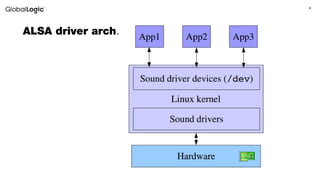
ALSA driver arch.
5
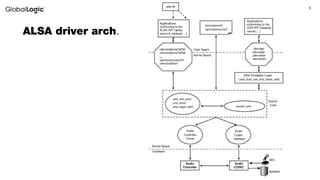
ALSA driver arch.
6
ALSA /proc interface
• /proc/asound/version
The version and date the ALSA subsystem module was built
• /proc/asound/cards
List of available sound cards:
0 [HDMI ]: HDA-Intel - HDA Intel HDMI
HDA Intel HDMI at 0xd0730000 irq 37
1 [PCH ]: HDA-Intel - HDA Intel PCH
HDA Intel PCH at 0xd0734000 irq 35
• /proc/asound/devices
List of cards devices
• /proc/asound/card<i>/id
Card identifier (Name)
• /proc/asound/card<i>/pcm[c|p]<j>/info
Information about a capture (c) or playback (p) PCM device.
7
Alsa-lib and alsa-utils
• User space library (alsa-lib) is a full-featured library used to simplify
application programming and provide higher level functionality. Alsa-
utils is a package for configuring and using ALSA (console utilities).
• For embedded platform, there is shorten version named tinyalsa. It
avoids supporting complex and unnecessary operations, that could be
dealt with at a higher level.
8
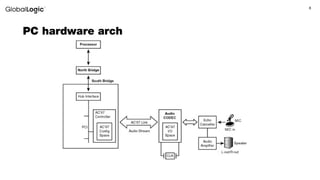
PC hardware arch
9
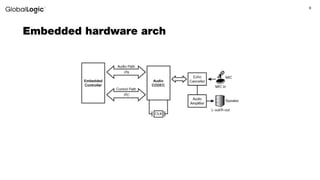
Embedded hardware arch
1010
ALSA for embedded systems
• ASoC features
• ALSA SoC layer
• DAPM
• Pops and click
• ASoC Example for OMAP4/5
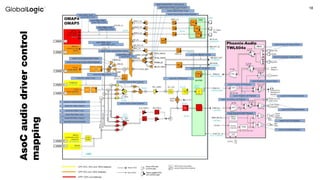
• ASoc Kernel audio driver controls mapping
• Path setting and volume setting
11
ASoC features
• Codec independence. Allows reuse of codec drivers on other
platforms and machines.
• Dynamic Audio Power Management (DAPM). DAPM automatically
sets the codec to its minimum power state at all times. This includes
powering up/down internal power blocks depending on the internal codec
audio routing and any active streams
• Pop and click reduction. Pops and clicks can be reduced by
powering the codec up/down in the correct sequence (including using
digital mute). ASoC signals the codec when to change power states.
12
13
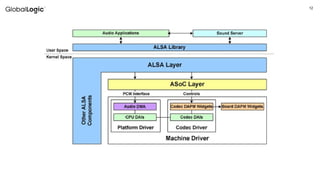
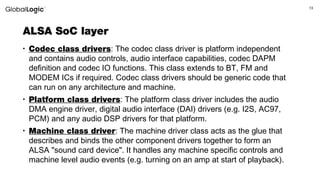
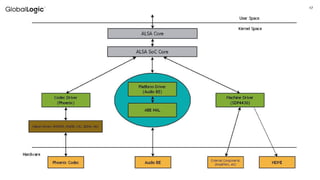
ALSA SoC layer
• Codec class drivers: The codec class driver is platform independent
and contains audio controls, audio interface capabilities, codec DAPM
definition and codec IO functions. This class extends to BT, FM and
MODEM ICs if required. Codec class drivers should be generic code that
can run on any architecture and machine.
• Platform class drivers: The platform class driver includes the audio
DMA engine driver, digital audio interface (DAI) drivers (e.g. I2S, AC97,
PCM) and any audio DSP drivers for that platform.
• Machine class driver: The machine driver class acts as the glue that
describes and binds the other component drivers together to form an
ALSA "sound card device". It handles any machine specific controls and
machine level audio events (e.g. turning on an amp at start of playback).
14
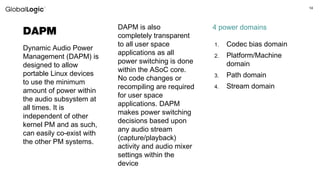
DAPM
Dynamic Audio Power
Management (DAPM) is
designed to allow
portable Linux devices
to use the minimum
amount of power within
the audio subsystem at
all times. It is
independent of other
kernel PM and as such,
can easily co-exist with
the other PM systems.
DAPM is also
completely transparent
to all user space
applications as all
power switching is done
within the ASoC core.
No code changes or
recompiling are required
for user space
applications. DAPM
makes power switching
decisions based upon
any audio stream
(capture/playback)
activity and audio mixer
settings within the
device
1. Codec bias domain
2. Platform/Machine
domain
3. Path domain
4. Stream domain
4 power domains
15
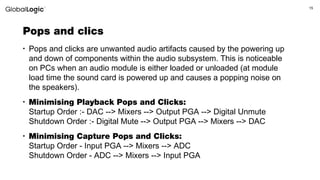
Pops and clics
• Pops and clicks are unwanted audio artifacts caused by the powering up
and down of components within the audio subsystem. This is noticeable
on PCs when an audio module is either loaded or unloaded (at module
load time the sound card is powered up and causes a popping noise on
the speakers).
• Minimising Playback Pops and Clicks:
Startup Order :- DAC --> Mixers --> Output PGA --> Digital Unmute
Shutdown Order :- Digital Mute --> Output PGA --> Mixers --> DAC
• Minimising Capture Pops and Clicks:
Startup Order - Input PGA --> Mixers --> ADC
Shutdown Order - ADC --> Mixers --> Input PGA
1616
AsoC example for OMAP4/5
17
18
AsoCaudiodrivercontrol
mapping
19
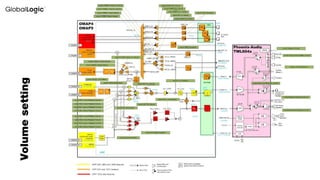
Volumesetting
20
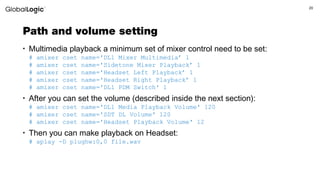
Path and volume setting
• Multimedia playback a minimum set of mixer control need to be set:
# amixer cset name='DL1 Mixer Multimedia’ 1
# amixer cset name='Sidetone Mixer Playback’ 1
# amixer cset name='Headset Left Playback’ 1
# amixer cset name='Headset Right Playback’ 1
# amixer cset name='DL1 PDM Switch' 1
• After you can set the volume (described inside the next section):
# amixer cset name='DL1 Media Playback Volume' 120
# amixer cset name='SDT DL Volume' 120
# amixer cset name='Headset Playback Volume' 12
• Then you can make playback on Headset:
# aplay -D plughw:0,0 file.wav
2121
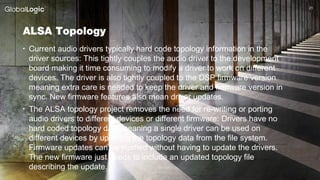
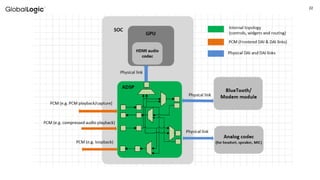
ALSA Topology
• Current audio drivers typically hard code topology information in the
driver sources: This tightly couples the audio driver to the development
board making it time consuming to modify a driver to work on different
devices. The driver is also tightly coupled to the DSP firmware version
meaning extra care is needed to keep the driver and firmware version in
sync. New firmware features also mean driver updates.
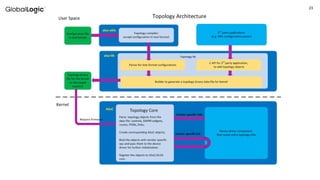
• The ALSA topology project removes the need for re-writing or porting
audio drivers to different devices or different firmware: Drivers have no
hard coded topology data meaning a single driver can be used on
different devices by updating the topology data from the file system.
Firmware updates can be pushed without having to update the drivers.
The new firmware just needs to include an updated topology file
describing the update.
22
23
24
Thank you
Vadym Shovkoplias
Senior Software Engineer, Engineering
Vadym.Shovkoplias@globallogic.com

Linux Audio Drivers. ALSA

  • 1.
    1 Kharkiv Embedded TechTalk#1 ALSA framework Vadym Shovkoplias Senior Software Engineer March 2018
  • 2.
    2 Agenda 1. ALSA architecture 2.Audio HW examples 3. ALSA for embedded 4. ALSA Topology
  • 3.
  • 4.
  • 5.
  • 6.
    6 ALSA /proc interface •/proc/asound/version The version and date the ALSA subsystem module was built • /proc/asound/cards List of available sound cards: 0 [HDMI ]: HDA-Intel - HDA Intel HDMI HDA Intel HDMI at 0xd0730000 irq 37 1 [PCH ]: HDA-Intel - HDA Intel PCH HDA Intel PCH at 0xd0734000 irq 35 • /proc/asound/devices List of cards devices • /proc/asound/card<i>/id Card identifier (Name) • /proc/asound/card<i>/pcm[c|p]<j>/info Information about a capture (c) or playback (p) PCM device.
  • 7.
    7 Alsa-lib and alsa-utils •User space library (alsa-lib) is a full-featured library used to simplify application programming and provide higher level functionality. Alsa- utils is a package for configuring and using ALSA (console utilities). • For embedded platform, there is shorten version named tinyalsa. It avoids supporting complex and unnecessary operations, that could be dealt with at a higher level.
  • 8.
  • 9.
  • 10.
    1010 ALSA for embeddedsystems • ASoC features • ALSA SoC layer • DAPM • Pops and click • ASoC Example for OMAP4/5 • ASoc Kernel audio driver controls mapping • Path setting and volume setting
  • 11.
    11 ASoC features • Codecindependence. Allows reuse of codec drivers on other platforms and machines. • Dynamic Audio Power Management (DAPM). DAPM automatically sets the codec to its minimum power state at all times. This includes powering up/down internal power blocks depending on the internal codec audio routing and any active streams • Pop and click reduction. Pops and clicks can be reduced by powering the codec up/down in the correct sequence (including using digital mute). ASoC signals the codec when to change power states.
  • 12.
  • 13.
    13 ALSA SoC layer •Codec class drivers: The codec class driver is platform independent and contains audio controls, audio interface capabilities, codec DAPM definition and codec IO functions. This class extends to BT, FM and MODEM ICs if required. Codec class drivers should be generic code that can run on any architecture and machine. • Platform class drivers: The platform class driver includes the audio DMA engine driver, digital audio interface (DAI) drivers (e.g. I2S, AC97, PCM) and any audio DSP drivers for that platform. • Machine class driver: The machine driver class acts as the glue that describes and binds the other component drivers together to form an ALSA "sound card device". It handles any machine specific controls and machine level audio events (e.g. turning on an amp at start of playback).
  • 14.
    14 DAPM Dynamic Audio Power Management(DAPM) is designed to allow portable Linux devices to use the minimum amount of power within the audio subsystem at all times. It is independent of other kernel PM and as such, can easily co-exist with the other PM systems. DAPM is also completely transparent to all user space applications as all power switching is done within the ASoC core. No code changes or recompiling are required for user space applications. DAPM makes power switching decisions based upon any audio stream (capture/playback) activity and audio mixer settings within the device 1. Codec bias domain 2. Platform/Machine domain 3. Path domain 4. Stream domain 4 power domains
  • 15.
    15 Pops and clics •Pops and clicks are unwanted audio artifacts caused by the powering up and down of components within the audio subsystem. This is noticeable on PCs when an audio module is either loaded or unloaded (at module load time the sound card is powered up and causes a popping noise on the speakers). • Minimising Playback Pops and Clicks: Startup Order :- DAC --> Mixers --> Output PGA --> Digital Unmute Shutdown Order :- Digital Mute --> Output PGA --> Mixers --> DAC • Minimising Capture Pops and Clicks: Startup Order - Input PGA --> Mixers --> ADC Shutdown Order - ADC --> Mixers --> Input PGA
  • 16.
  • 17.
  • 18.
  • 19.
  • 20.
    20 Path and volumesetting • Multimedia playback a minimum set of mixer control need to be set: # amixer cset name='DL1 Mixer Multimedia’ 1 # amixer cset name='Sidetone Mixer Playback’ 1 # amixer cset name='Headset Left Playback’ 1 # amixer cset name='Headset Right Playback’ 1 # amixer cset name='DL1 PDM Switch' 1 • After you can set the volume (described inside the next section): # amixer cset name='DL1 Media Playback Volume' 120 # amixer cset name='SDT DL Volume' 120 # amixer cset name='Headset Playback Volume' 12 • Then you can make playback on Headset: # aplay -D plughw:0,0 file.wav
  • 21.
    2121 ALSA Topology • Currentaudio drivers typically hard code topology information in the driver sources: This tightly couples the audio driver to the development board making it time consuming to modify a driver to work on different devices. The driver is also tightly coupled to the DSP firmware version meaning extra care is needed to keep the driver and firmware version in sync. New firmware features also mean driver updates. • The ALSA topology project removes the need for re-writing or porting audio drivers to different devices or different firmware: Drivers have no hard coded topology data meaning a single driver can be used on different devices by updating the topology data from the file system. Firmware updates can be pushed without having to update the drivers. The new firmware just needs to include an updated topology file describing the update.
  • 22.
  • 23.
  • 24.
    24 Thank you Vadym Shovkoplias SeniorSoftware Engineer, Engineering Vadym.Shovkoplias@globallogic.com

Editor's Notes

  • #7 ALSA /proc fs info: https://alsa.opensrc.org/Proc_asound_documentation