USER GUIDE

Wireless-N Home Router
                Model: WRT120N
About This Guide


About This Guide
Icon Descriptions
While reading through the User Guide you may see
various icons that call attention to specific items. Below is
a description of these icons:

            NOTE: This check mark indicates that there is
            a note of interest and is something that you
            should pay special attention to while using the
            product.


            WARNING: This exclamation point indicates
            that there is a caution or warning and it is
            something that could damage your property or
            product.


            WEB: This globe icon indicates a noteworthy
            website address or e-mail address.


Online Resources
Website addresses in this document are listed without
http:// in front of the address because most current web
browsers do not require it. If you use an older web browser,
you may have to add http:// in front of the web address.

 Resource            Website

 Linksys             www.linksysbycisco.com

 Linksys
                     www.linksysbycisco.com/international
 International

 Glossary            www.linksysbycisco.com/glossary

 Network Security    www.linksysbycisco.com/security


Copyright and Trademarks
                  Linksys, Cisco and the Cisco Logo are
                  registered trademarks or trademarks of
                  Cisco Systems, Inc. and/or its affiliates in
                  the U.S. and certain other countries. Other
                  brands and product names are trademarks
                  or registered trademarks of their respective
                  holders. Copyright © 2009 Cisco Systems,
                  Inc. All rights reserved.


Wireless-N Home Router                                                          i
Table of Contents


                         Chapter 1: Product Overview	                                                                                                                                        1
                            Front Panel .  .  .  .  .  .  .  .  .  .  .  .  .  .  .  .  .  .  .  .  .  .  .  .  .  .  .  .  .  .  .  .  .  .  .  .  .  .  .  .  .  .  .  .  .  .  .  .  .  . 1
                            Back Panel .  .  .  .  .  .  .  .  .  .  .  .  .  .  .  .  .  .  .  .  .  .  .  .  .  .  .  .  .  .  .  .  .  .  .  .  .  .  .  .  .  .  .  .  .  .  .  .  .  .  . 1

                         Chapter 2: Wireless Security Checklist	                                                                                                                             3
                            General Network Security Guidelines  .  .  .  .  .  .  .  .  .  .  .  .  .  .  .  .  .  .  .  .  .  .  .  .  .  .  .  .  .  .  .  .  . 3
                            Additional Security Tips  .  .  .  .  .  .  .  .  .  .  .  .  .  .  .  .  .  .  .  .  .  .  .  .  .  .  .  .  .  .  .  .  .  .  .  .  .  .  .  .  .  . 3

                         Chapter 3: Advanced Configuration	                                                                                                                                  4
                            Setup > Basic Setup .  .  .  .  .  .  .  .  .  .  .  .  .  .  .  .  .  .  .  .  .  .  .  .  .  .  .  .  .  .  .  .  .  .  .  .  .  .  .  .  .  .  .  .  . 4
                            Setup > DDNS .  .  .  .  .  .  .  .  .  .  .  .  .  .  .  .  .  .  .  .  .  .  .  .  .  .  .  .  .  .  .  .  .  .  .  .  .  .  .  .  .  .  .  .  .  .  .  . 8
                            Setup > MAC Address Clone .  .  .  .  .  .  .  .  .  .  .  .  .  .  .  .  .  .  .  .  .  .  .  .  .  .  .  .  .  .  .  .  .  .  .  .  .  .  . 9
                            Setup > Advanced Routing .  .  .  .  .  .  .  .  .  .  .  .  .  .  .  .  .  .  .  .  .  .  .  .  .  .  .  .  .  .  .  .  .  .  .  .  .  .  .  . 9
                            Wireless > Basic Wireless Settings .  .  .  .  .  .  .  .  .  .  .  .  .  .  .  .  .  .  .  .  .  .  .  .  .  .  .  .  .  .  .  .  .  .  . 10
                            Wireless > Wireless Security .  .  .  .  .  .  .  .  .  .  .  .  .  .  .  .  .  .  .  .  .  .  .  .  .  .  .  .  .  .  .  .  .  .  .  .  .  .  . 12
                            Wireless > Wireless MAC Filter .  .  .  .  .  .  .  .  .  .  .  .  .  .  .  .  .  .  .  .  .  .  .  .  .  .  .  .  .  .  .  .  .  .  .  .  . 14
                            Wireless > Advanced Wireless Settings .  .  .  .  .  .  .  .  .  .  .  .  .  .  .  .  .  .  .  .  .  .  .  .  .  .  .  .  .  .  .  . 15
                            Security > Firewall .  .  .  .  .  .  .  .  .  .  .  .  .  .  .  .  .  .  .  .  .  .  .  .  .  .  .  .  .  .  .  .  .  .  .  .  .  .  .  .  .  .  .  .  . 16
                            Security > VPN Passthrough  .  .  .  .  .  .  .  .  .  .  .  .  .  .  .  .  .  .  .  .  .  .  .  .  .  .  .  .  .  .  .  .  .  .  .  .  .  . 17
                            Access Restrictions > Internet Access .  .  .  .  .  .  .  .  .  .  .  .  .  .  .  .  .  .  .  .  .  .  .  .  .  .  .  .  .  .  .  .  . 17
                            Applications and Gaming > Single Port Forwarding .  .  .  .  .  .  .  .  .  .  .  .  .  .  .  .  .  .  .  .  .  .  . 19
                            Applications and Gaming > Port Range Forwarding  .  .  .  .  .  .  .  .  .  .  .  .  .  .  .  .  .  .  .  .  .  .  . 19
                            Applications & Gaming > Port Range Triggering . . . . . . . . . . . . . . . . . . . . . . . . . .20
                            Applications and Gaming > DMZ  .  .  .  .  .  .  .  .  .  .  .  .  .  .  .  .  .  .  .  .  .  .  .  .  .  .  .  .  .  .  .  .  .  .  . 20
                            Applications and Gaming > QoS .  .  .  .  .  .  .  .  .  .  .  .  .  .  .  .  .  .  .  .  .  .  .  .  .  .  .  .  .  .  .  .  .  .  .  . 21
                            Administration > Management .  .  .  .  .  .  .  .  .  .  .  .  .  .  .  .  .  .  .  .  .  .  .  .  .  .  .  .  .  .  .  .  .  .  .  . 23
                            Administration > Log .  .  .  .  .  .  .  .  .  .  .  .  .  .  .  .  .  .  .  .  .  .  .  .  .  .  .  .  .  .  .  .  .  .  .  .  .  .  .  .  .  .  . 24
                            Administration > Diagnostics .  .  .  .  .  .  .  .  .  .  .  .  .  .  .  .  .  .  .  .  .  .  .  .  .  .  .  .  .  .  .  .  .  .  .  .  .  . 24
                            Administration > Factory Defaults  .  .  .  .  .  .  .  .  .  .  .  .  .  .  .  .  .  .  .  .  .  .  .  .  .  .  .  .  .  .  .  .  .  . 25
                            Administration > Firmware Upgrade .  .  .  .  .  .  .  .  .  .  .  .  .  .  .  .  .  .  .  .  .  .  .  .  .  .  .  .  .  .  .  .  . 25
                            Status > Router .  .  .  .  .  .  .  .  .  .  .  .  .  .  .  .  .  .  .  .  .  .  .  .  .  .  .  .  .  .  .  .  .  .  .  .  .  .  .  .  .  .  .  .  .  .  . 26
                            Status > Local Network . . . . . . . . . . . . . . . . . . . . . . . . . . . . . . . . . . . . . . . . . .26
                            Status > Wireless Network .  .  .  .  .  .  .  .  .  .  .  .  .  .  .  .  .  .  .  .  .  .  .  .  .  .  .  .  .  .  .  .  .  .  .  .  .  .  .  . 27

                         Appendix A: Troubleshooting	                                                                                                                                     28
                         Appendix B: Specifications	                                                                                                                                      29
                         Appendix C: Warranty Information	                                                                                                                                30
                            Limited Warranty  .  .  .  .  .  .  .  .  .  .  .  .  .  .  .  .  .  .  .  .  .  .  .  .  .  .  .  .  .  .  .  .  .  .  .  .  .  .  .  .  .  .  .  .  . 30


Wireless-N Home Router                                                                                                                                                                        ii
Table of Contents


                         Appendix D: Regulatory Information	                                                                                                                       32
                            FCC Statement .  .  .  .  .  .  .  .  .  .  .  .  .  .  .  .  .  .  .  .  .  .  .  .  .  .  .  .  .  .  .  .  .  .  .  .  .  .  .  .  .  .  .  .  .  .  . 32
                            FCC Radiation Exposure Statement .  .  .  .  .  .  .  .  .  .  .  .  .  .  .  .  .  .  .  .  .  .  .  .  .  .  .  .  .  .  .  .  .  . 32
                            Safety Notices .  .  .  .  .  .  .  .  .  .  .  .  .  .  .  .  .  .  .  .  .  .  .  .  .  .  .  .  .  .  .  .  .  .  .  .  .  .  .  .  .  .  .  .  .  .  . 32
                            Industry Canada Statement .  .  .  .  .  .  .  .  .  .  .  .  .  .  .  .  .  .  .  .  .  .  .  .  .  .  .  .  .  .  .  .  .  .  .  .  .  .  . 32
                            Avis d’Industrie Canada .  .  .  .  .  .  .  .  .  .  .  .  .  .  .  .  .  .  .  .  .  .  .  .  .  .  .  .  .  .  .  .  .  .  .  .  .  .  .  .  . 33
                            Wireless Disclaimer  .  .  .  .  .  .  .  .  .  .  .  .  .  .  .  .  .  .  .  .  .  .  .  .  .  .  .  .  .  .  .  .  .  .  .  .  .  .  .  .  .  .  .  . 33
                            Avis de non-responsabilité concernant les appareils sans fil  .  .  .  .  .  .  .  .  .  .  .  .  .  .  .  .  .  . 33
                            User Information for Consumer Products Covered by EU Directive 2002/96/EC on Waste
                            Electric and Electronic Equipment (WEEE)  .  .  .  .  .  .  .  .  .  .  .  .  .  .  .  .  .  .  .  .  .  .  .  .  .  .  .  .  . 34

                         Appendix E: Software End User License Agreement	                                                                                                          38
                            Cisco Products .  .  .  .  .  .  .  .  .  .  .  .  .  .  .  .  .  .  .  .  .  .  .  .  .  .  .  .  .  .  .  .  .  .  .  .  .  .  .  .  .  .  .  .  .  .  . 38
                            Software Licenses .  .  .  .  .  .  .  .  .  .  .  .  .  .  .  .  .  .  .  .  .  .  .  .  .  .  .  .  .  .  .  .  .  .  .  .  .  .  .  .  .  .  .  .  . 38


Wireless-N Home Router                                                                                                                                                                iii
Chapter 1                                                                                      Product Overview


Chapter 1:                                                              Wireless  (Blue)  The Wireless LED lights up
                                                                        when the wireless feature is enabled. If the LED
Product Overview                                                        is flashing, the Router is sending or receiving
                                                                        data over the network.
Thank you for choosing the Linksys by Cisco Wireless-N                  Internet  (Blue)  The Internet LED lights up
Home Router. The Router lets you access the Internet via                when there is a connection made through the
a wireless connection or through one of its four switched               Internet port. It flashes to indicate network
ports. You can also use the Router to share resources                   activity over the Internet port.
such as computers, printers and files. A variety of security
features help to protect your data and your privacy                     Power  (Blue)  The Power LED lights up and will
while you are online. Security features include WPA2                    stay on while the Router is powered on. When
security, a Stateful Packet Inspection (SPI) firewall, and              the Router goes through its self-diagnostic
NAT technology. Configuring the Router is easy using the                mode during every boot-up, this LED will flash.
provided browser–based utility.                                         When the diagnostic is complete, the LED will
                                                                        be solidly lit.
Front Panel
                                                                Back Panel


        1, 2, 3, 4  (Blue)  These numbered LEDs,
        corresponding with the numbered ports on the                   Internet  The Internet port is where you will
        Router’s back panel, serve two purposes. If the                connect your cable or DSL Internet connection.
        LED is continuously lit, the Router is successfully
        connected to a device through that port. A                     4, 3, 2, 1  These Ethernet ports (4, 3, 2, 1)
        flashing LED indicates network activity over                   connect the Router to computers on your wired
        that port.                                                     network and other Ethernet network devices.
        Wi-Fi Protected Setup Button  If you have                      Reset  The Reset button is located on the
        client devices, such as wireless adapters, that                right side of the product label. There are two
        support Wi-Fi Protected Setup, then you can                    ways to reset the Router to its factory defaults.
        use Wi-Fi Protected Setup to automatically                     Either press and hold the Reset button for
        configure wireless security for your wireless                  approximately five seconds, or restore the
        network.                                                       defaults from the Administration > Factory
                                                                       Defaults screen of the Router’s browser‑based
        To use Wi-Fi Protected Setup, run the Setup                    utility.
        Wizard, or refer to Wi-Fi Protected Setup, page
                                                                       Power  The Power port connects to the included
        11.
                                                                       power adapter.
        Wi-Fi     Protected     Setup     LED  (Blue/
        Amber)  The LED lights up blue when wireless
        security is enabled. It flashes blue for two            Horizontal Placement
        minutes during Wi-Fi Protected Setup.
                                                                The Router has four rubber feet on its bottom panel. Place
        The LED lights up amber if there is an error            the Router on a level surface near an electrical outlet.
        during the Wi‑Fi Protected Setup process. Make
        sure the client device supports Wi‑Fi Protected
        Setup. Wait until the LED is off, and then try again.

        The LED flashes when a Wi‑Fi Protected Setup
        session is active. The Router supports one
        session at a time. Wait until the LED is solidly lit,
        or off before starting the next Wi-Fi Protected
        Setup session.


Wireless-N Home Router                                                                                                     1
Chapter 1                                                                                                    Product Overview


Wall-Mounting Placement
The Router has two wall-mount slots on its bottom
panel. The distance between the slots is 152 mm
(6 inches).
Two screws are needed to mount the Router.

 Suggested Mounting Hardware


                                            2.5-3.0 mm
      4-5 mm               1-1.5 mm

 ††Note: Mounting hardware illustrations are not
  true to scale.


            NOTE: Linksys is not responsible for damages
            incurred by insecure wall-mounting hardware.

Follow these instructions:
1.	 Determine where you want to mount the Router. Make
    sure that the wall you use is smooth, flat, dry, and
    sturdy. Also make sure the location is within reach of
    an electrical outlet.
2.	 Drill two holes into the wall. Make sure the holes are
    152 mm (6 inches) apart.
3.	 Insert a screw into each hole and leave 3 mm
    (0.12 inches) of its head exposed.
4.	 Maneuver the Router so the wall-mount slots line up
    with the two screws.
5.	 Place the wall-mount slots over the screws and slide
    the Router down until the screws fit snugly into the
    wall-mount slots.


                                                                 152 mm


                                      Print this page at 100% size.
                                      Cut along the dotted line, and place on the wall to drill precise spacing.

                                                            Wall-Mounting Template

Wireless-N Home Router                                                                                                      2
Chapter 2                                                                       Wireless Security Checklist


Chapter 2:                                                             4. 	Enable encryption
Wireless Security Checklist                                   Encryption protects data transmitted over a wireless
Wireless networks are convenient and easy to install, so      network. Wi-Fi Protected Access (WPA/WPA2) and Wired
homes with high-speed Internet access are adopting them       Equivalent Privacy (WEP) offer different levels of security
at a rapid pace. Because wireless networking operates by      for wireless communication.
sending information over radio waves, it can be more          A network encrypted with WPA/WPA2 is more secure
vulnerable to intruders than a traditional wired network.     than a network encrypted with WEP, because WPA/WPA2
Like signals from your cellular or cordless phones, signals   uses dynamic key encryption. To protect the information
from your wireless network can also be intercepted. Since     as it passes over the airwaves, you should enable the
you cannot physically prevent someone from connecting         highest level of encryption supported by your network
to your wireless network, you need to take some additional    equipment.
steps to keep your network secure.
                                                              WEP is an older encryption standard and may be the
                                                              only option available on some older devices that do not
         1.	 Change the default wireless 	                    support WPA.
         	 network name or SSID
                                                              General Network Security Guidelines
Wireless devices have a default wireless network name
or Service Set Identifier (SSID) set by the factory. This     Wireless network security is useless if the underlying
is the name of your wireless network, and can be up           network is not secure.
to 32 characters in length. Linksys wireless products         •• Password protect all computers on the network and
use linksys as the default wireless network name. You            individually password protect sensitive files.
should change the wireless network name to something
unique to distinguish your wireless network from other        •• Change passwords on a regular basis.
wireless networks that may exist around you, but do not       •• Install anti-virus software and personal firewall
use personal information (such as your Social Security           software.
number) because this information may be available for
anyone to see when browsing for wireless networks.            •• Disable file sharing (peer-to-peer). Some applications
                                                                 may open file sharing without your consent and/or
                                                                 knowledge.
         2. 	Change the default password
                                                              Additional Security Tips
For wireless products such as access points and routers,
                                                              •• Keep wireless routers, access points, or gateways away
you will be asked for a password when you want to change
                                                                 from exterior walls and windows.
their settings. These devices have a default password set
by the factory. The Linksys default password is admin.        •• Turn wireless routers, access points, or gateways
Hackers know these defaults and may try to use them              off when they are not being used (at night, during
to access your wireless device and change your network           vacations).
settings. To thwart any unauthorized changes, customize
                                                              •• Use strong passphrases that are at least eight characters
the device’s password so it will be hard to guess.
                                                                 in length. Combine letters and numbers to avoid using
                                                                 standard words that can be found in the dictionary.
         3. 	Enable MAC address filtering
                                                                       WEB: For more information on wireless security,
Linksys routers give you the ability to enable Media Access            visit www.linksysbycisco.com/security
Control (MAC) address filtering. The MAC address is a
unique series of numbers and letters assigned to every
networking device. With MAC address filtering enabled,
wireless network access is provided solely for wireless
devices with specific MAC addresses. For example, you can
specify the MAC address of each computer in your home
so that only those computers can access your wireless
network.


Wireless-N Home Router                                                                                                  3
Chapter 3                                                                             Advanced Configuration


Chapter 3:
Advanced Configuration
After setting up the Router with the Setup Wizard (located
on the CD-ROM), the Router will be ready for use. However,
if you want to change its advanced settings, use the
Router’s browser-based utility. This chapter describes each
web page of the utility and each page’s key functions. You
can access the utility via a web browser on a computer
connected to the Router.
The browser-based utility has these main tabs: Setup,
Wireless, Security, Access Restrictions, Applications &
Gaming, Administration, and Status. Additional tabs will
be available after you click one of the main tabs.

         NOTE: When first installing the Router, you
         should use the Setup Wizard on the Setup
         CD-ROM. If you want to configure advanced
         settings, use this chapter to learn about the
         browser-based utility.
                                                                                      Setup > Basic Setup

Access the Browser-Based Utility                                Language
To access the browser-based utility, launch the web             Select your language  To use a different language, select
browser on your computer, and enter the Router’s default        one from the drop-down menu. The language of the
IP address, 192.168.1.1, in the Address field. Then press       browser‑based utility will change five seconds after you
Enter.                                                          select another language.
A login screen will appear. (Non-Windows XP users will          Click Save Settings to apply your changes, or click Cancel
see a similar screen.) Leave the User name field blank.         Changes to clear your changes.
The first time you open the browser-based utility, use the
default password admin. (You can set a new password             Internet Setup
from the Administration > Management screen.) Click OK
to continue.                                                    The Internet Setup section configures the Router to your
                                                                Internet connection. Most of this information can be
                                                                obtained through your Internet Service Provider (ISP).

                                                                Internet Connection Type
                                                                Select the type of Internet connection your ISP provides
                                                                from the drop-down menu. These are the available types:
                                                                 ••   Automatic Configuration - DHCP
                                                                 ••   Static IP
                                                                 ••   PPPoE
                                                                 ••   PPTP
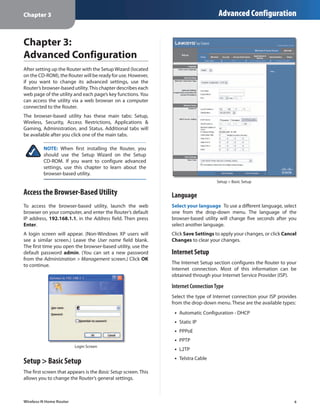
                         Login Screen
                                                                 ••   L2TP
                                                                      Telstra Cable
Setup > Basic Setup                                              ••


The first screen that appears is the Basic Setup screen. This
allows you to change the Router’s general settings.


Wireless-N Home Router                                                                                                  4
Chapter 3                                                                                 Advanced Configuration

Automatic Configuration - DHCP                                   Service Name (Optional)  If provided by your ISP, enter
                                                                 the Service Name.
By default, the Router’s Internet Connection Type is set
to Automatic configuration - DHCP, which should be               Connect on Demand: Max Idle Time  You can configure
kept only if your ISP supports DHCP or you are connecting        the Router to cut the Internet connection after it has been
through a dynamic IP address. (This option usually applies       inactive for a specified period of time (Max Idle Time). If
to cable connections.)                                           your Internet connection has been terminated due to
                                                                 inactivity, Connect on Demand enables the Router to
                                                                 automatically re-establish your connection as soon as you
                                                                 attempt to access the Internet again. To use this option,
                                                                 select Connect on Demand. In the Max Idle Time field,
     Internet Connection Type > Automatic Configuration - DHCP
                                                                 enter the number of minutes you want to have elapsed
                                                                 before your Internet connection terminates. The default
Static IP
                                                                 Max Idle Time is 5 minutes.
If you are required to use a permanent IP address to             Keep Alive: Redial Period  If you select this option,
connect to the Internet, select Static IP.                       the Router will periodically check your Internet
                                                                 connection. If you are disconnected, then the Router
                                                                 will automatically re-establish your connection. To use
                                                                 this option, select Keep Alive. In the Redial Period field,
                                                                 you specify how often you want the Router to check
                                                                 the Internet connection. The default Redial Period is
                                                                 30 seconds.

                                                                 PPTP
                Internet Connection Type > Static IP             Point-to-Point Tunneling Protocol (PPTP) is a service that
                                                                 applies to connections in Europe only.
Internet IP Address  This is the Router’s IP address, when
seen from the Internet. Your ISP will provide you with the
IP Address you need to specify here.
Subnet Mask  This is the Router’s Subnet Mask, as seen
by users on the Internet (including your ISP). Your ISP will
provide you with the Subnet Mask.
Default Gateway  Your ISP will provide you with the IP
address of the ISP server.
DNS 1-3  Your ISP will provide you with at least one DNS
(Domain Name System) server IP address.

PPPoE
Some DSL-based ISPs use PPPoE (Point-to-Point Protocol                             Internet Connection Type > PPTP
over Ethernet) to establish Internet connections. If you are
connected to the Internet through a DSL line, check with         If your ISP supports DHCP or you are connecting through
your ISP to see if they use PPPoE. If they do, you will have     a dynamic IP address, then select Obtain an IP Address
to enable PPPoE.                                                 Automatically. If you are required to use a permanent IP
                                                                 address to connect to the Internet, then select Specify an
                                                                 IP Address. Then configure the following:
                                                                  ••   Specify an IP Address  This is the Router’s IP address,
                                                                       as seen from the Internet. Your ISP will provide you
                                                                       with the IP Address you need to specify here.
                                                                  ••   Subnet Mask  This is the Router’s Subnet Mask, as
                                                                       seen by users on the Internet (including your ISP). Your
                 Internet Connection Type > PPPoE                      ISP will provide you with the Subnet Mask.

Username and Password  Enter the Username and                     ••   Default Gateway  Your ISP will provide you with the
Password provided by your ISP.                                         IP address of the ISP server.


Wireless-N Home Router                                                                                                       5
Chapter 3                                                                                  Advanced Configuration

 ••   DNS 1-3  Your ISP will provide you with at least one      Keep Alive: Redial Period  If you select this option,
      DNS (Domain Name System) server IP address.               the Router will periodically check your Internet
                                                                connection. If you are disconnected, then the Router
PPTP Server IP Address  Your ISP will provide you with
                                                                will automatically re-establish your connection. To use
the IP address of the PPTP server.
                                                                this option, select Keep Alive. In the Redial Period field,
Username and Password  Enter the Username and                   you specify how often you want the Router to check
Password provided by your ISP.                                  the Internet connection. The default Redial Period is
Connect on Demand: Max Idle Time  You can configure             30 seconds.
the Router to cut the Internet connection after it has been     Telstra Cable
inactive for a specified period of time (Max Idle Time). If
your Internet connection has been terminated due to             Telstra Cable is a service that applies to connections in
inactivity, Connect on Demand enables the Router to             Australia only.
automatically re-establish your connection as soon as you
attempt to access the Internet again. To use this option,
select Connect on Demand. In the Max Idle Time field,
enter the number of minutes you want to have elapsed
before your Internet connection terminates. The default
Max Idle Time is 5 minutes.
Keep Alive: Redial Period  If you select this option, the
Router will periodically check your Internet connection. If                     Internet Connection Type > Telstra Cable
you are disconnected, then the Router will automatically
re-establish your connection. To use this option, select        Server IP Address  This is the IP address of the Heartbeat
Keep Alive. In the Redial Period field, you specify how often   Server. Your ISP will provide you with the IP Address you
you want the Router to check the Internet connection. The       need to specify here.
default value is 30 seconds.                                    Username and Password  Enter the Username and
                                                                Password provided by your ISP.
L2TP
                                                                Connect on Demand: Max Idle Time  You can configure
L2TP is a service that applies to connections in Israel only.   the Router to cut the Internet connection after it has been
                                                                inactive for a specified period of time (Max Idle Time). If
                                                                your Internet connection has been terminated due to
                                                                inactivity, Connect on Demand enables the Router to
                                                                automatically re-establish your connection as soon as you
                                                                attempt to access the Internet again. To use this option,
                                                                select Connect on Demand. In the Max Idle Time field,
                                                                enter the number of minutes you want to have elapsed
                 Internet Connection Type > L2TP                before your Internet connection terminates. The default
                                                                Max Idle Time is 5 minutes.
Server IP Address  This is the IP address of the L2TP
Server. Your ISP will provide you with the IP Address you       Keep Alive: Redial Period  If you select this option,
need to specify here.                                           the Router will periodically check your Internet
                                                                connection. If you are disconnected, then the Router
Username and Password  Enter the Username and                   will automatically re-establish your connection. To use
Password provided by your ISP.                                  this option, select Keep Alive. In the Redial Period field,
Connect on Demand: Max Idle Time  You can configure             you specify how often you want the Router to check
the Router to cut the Internet connection after it has been     the Internet connection. The default Redial Period is
inactive for a specified period of time (Max Idle Time). If     30 seconds.
your Internet connection has been terminated due to
inactivity, Connect on Demand enables the Router to             Optional Settings
automatically re-establish your connection as soon as you       Some of these settings may be required by your ISP. Verify
attempt to access the Internet again. To use this option,       with your ISP before making any changes.
select Connect on Demand. In the Max Idle Time field,
enter the number of minutes you want to have elapsed
before your Internet connection terminates. The default
Max Idle Time is 5 minutes.

                                                                                           Optional Settings

Wireless-N Home Router                                                                                                     6
Chapter 3                                                                                 Advanced Configuration

Host Name and Domain Name  These fields allow you to           DHCP Server  DHCP is enabled by factory default. If you
supply a host and domain name for the Router. Some ISPs,       already have a DHCP server on your network, or you do
usually cable ISPs, require these names as identification.     not want a DHCP server, then select Disabled (no other
You may have to check with your ISP to see if your             DHCP features will be available).
broadband Internet service has been configured with a
                                                               DHCP Reservation  Click this button if you want to assign
host and domain name. In most cases, leaving these fields
                                                               a fixed local IP address to a MAC address.
blank will work.
MTU  MTU is the Maximum Transmission Unit. It specifies        DHCP Reservation
the largest packet size permitted for Internet transmission.         You will see a list of DHCP clients with the following
Select Manual if you want to manually enter the largest              information: Client Name, Interface, IP Address, and
packet size that is transmitted. To have the Router select           MAC Address.
the best MTU for your Internet connection, keep the
default, Auto.
Size  When Manual is selected in the MTU field, this option
is enabled. Leave this value in the 1200 to 1500 range. The
default size depends on the Internet Connection Type:
 ••   DHCP, Static IP, or Telstra: 1500
 ••   PPPoE: 1492
 ••   PPTP or L2TP: 1460

Network Setup
The Network Setup section changes the settings of the
local network. Wireless setup is performed through the
Wireless tab.

Router IP                                                                                 DHCP Reservation
This presents both the Router’s Local IP Address and
Subnet Mask as seen by your network.                            ••   Select Clients from DHCP Table  Click the Select
                                                                     check box to reserve a client’s IP address. Then click
                                                                     Add Clients.
                                                                ••   Manually Adding Client  To manually assign an IP
                             Router IP                               address, enter the client’s name in the Enter Client
                                                                     Name field. Enter the IP address you want it to have in
DHCP Server Setting                                                  the Assign IP Address field. Enter its MAC address in the
                                                                     To This MAC Address field. Then click Add.
The settings allow you to configure the Router’s Dynamic
Host Configuration Protocol (DHCP) server function. The        Clients Already Reserved
Router can be used as a DHCP server for your network. A
                                                                     A list of DHCP clients and their fixed local IP addresses
DHCP server automatically assigns an IP address to each
                                                                     will be displayed at the bottom of the screen. If you
computer on your network. If you choose to enable the
                                                                     want to remove a client from this list, click Remove.
Router’s DHCP server option, make sure there is no other
DHCP server on your network.                                         Click Save Settings to apply your changes, or click
                                                                     Cancel Changes to clear your changes. To update the
                                                                     on-screen information, click Refresh. To exit this screen
                                                                     and return to the Basic Setup screen, click Close.
                                                               Start IP Address  Enter a value for the DHCP server to
                                                               start with when issuing IP addresses. Because the Router’s
                                                               default IP address is 192.168.1.1, the Start IP Address must
                                                               be 192.168.1.2 or greater, but smaller than 192.168.1.253.
                                                               The default is 192.168.1.100.
                                                               Maximum Number of Users  Enter the maximum number
                        DHCP Server Setting
                                                               of computers that you want the DHCP server to assign IP


Wireless-N Home Router                                                                                                      7
Chapter 3                                                                              Advanced Configuration

addresses to. This number cannot be greater than 253.            The features available on the DDNS screen will vary,
The default is 50.                                               depending on which DDNS service provider you use.
IP Address Range  Displayed here is the range of available       DynDNS.org
IP addresses.
Client Lease Time  The Client Lease Time is the amount
of time a network user will be allowed connection to the
Router with their current dynamic IP address. Enter the
amount of time, in minutes, that the user will be “leased”
this dynamic IP address. After the time has expired, the
user will be automatically assigned a new dynamic IP
address, or the lease will be renewed. The default is 0
minutes, which means one day.
Static DNS 1-3  The Domain Name System (DNS) is how
the Internet translates domain or website names into
Internet addresses or URLs. Your ISP will provide you with at
least one DNS Server IP Address. If you wish to use another,
enter that IP Address in one of these fields. You can enter up
to three DNS Server IP Addresses here. The Router will use                          Setup > DDNS > DynDNS
these for quicker access to functioning DNS servers.
                                                                 Username  Enter the Username for your DDNS account.
WINS  The Windows Internet Naming Service (WINS)
                                                                 Password  Enter the Password for your DDNS account.
manages each computer’s interaction with the Internet. If
you use a WINS server, enter that server’s IP Address here.      Host Name  The is the DDNS URL assigned by the DDNS
Otherwise, leave this blank.                                     service.

Time Settings                                                    System  Select the DynDNS service you use: Dynamic,
                                                                 Static, or Custom. The default selection is Dynamic.
Time Zone  Select the time zone in which your network
                                                                 Mail Exchange (Optional)  Enter the address of your mail
functions from this drop-down menu. (You can even
                                                                 exchange server, so e-mails to your DynDNS address go to
automatically adjust for daylight saving time.)
                                                                 your mail server.
                                                                 Backup MX  This feature allows the mail exchange server
                                                                 to be a backup. To disable this feature, keep the default,
                         Time Settings                           Disabled. To enable the feature, select Enabled. If you
                                                                 are not sure which setting to select, keep the default,
Click Save Settings to apply your changes, or click Cancel       Disabled.
Changes to clear your changes.
                                                                 Wildcard  This setting enables or disables wildcards
                                                                 for your host. For example, if your DDNS address is
Setup > DDNS                                                     myplace.dyndns.org and you enable wildcards, then
The Router offers a Dynamic Domain Name System (DDNS)            x.myplace.dyndns.org will work as well (x is the wildcard).
feature. DDNS lets you assign a fixed host and domain            To disable wildcards, keep the default, Disabled. To enable
name to a dynamic Internet IP address. It is useful when         wildcards, select Enabled. If you are not sure which setting
you are hosting your own website, FTP server, or other           to select, keep the default, Disabled.
server behind the Router.                                        Internet IP Address  The Router’s Internet IP address is
Before you can use this feature, you need to sign                displayed here. Because it is dynamic, it will change.
up for DDNS service with a DDNS service provider,                Status  The status of the DDNS service connection is
www.dyndns.org or www.TZO.com. If you do not want                displayed here.
to use this feature, keep the default, Disabled.
                                                                 Update  To manually trigger an update, click this button.
DDNS                                                             Click Save Settings to apply your changes, or click Cancel
                                                                 Changes to clear your changes.
DDNS Service
If your DDNS service is provided by DynDNS.org, then
select DynDNS.org from the drop-down menu. If your
DDNS service is provided by TZO, then select TZO.com.
Wireless-N Home Router                                                                                                     8
Chapter 3                                                                              Advanced Configuration

TZO.com                                                        Click Save Settings to apply your changes, or click Cancel
                                                               Changes to clear your changes.

                                                               Setup > Advanced Routing
                                                               This screen is used to set up the Router’s advanced
                                                               functions. Operating Mode allows you to select the
                                                               type(s) of advanced functions you use. Dynamic Routing
                                                               automatically adjusts how packets travel on your network.
                                                               Static Routing sets up a fixed route to another network
                                                               destination.


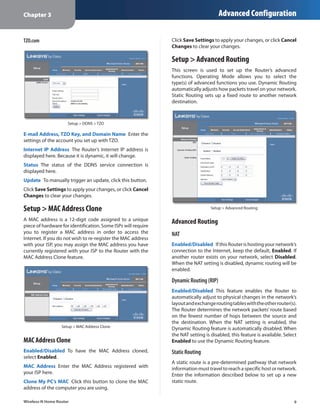
                     Setup > DDNS > TZO

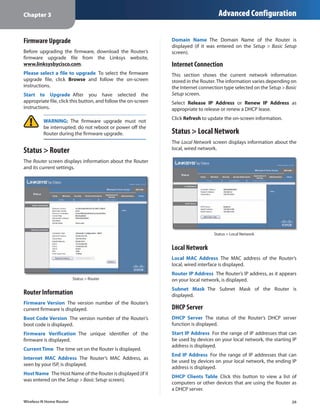
E-mail Address, TZO Key, and Domain Name  Enter the
settings of the account you set up with TZO.
Internet IP Address  The Router’s Internet IP address is
displayed here. Because it is dynamic, it will change.
Status  The status of the DDNS service connection is
displayed here.
Update  To manually trigger an update, click this button.
Click Save Settings to apply your changes, or click Cancel
Changes to clear your changes.

Setup > MAC Address Clone                                                         Setup > Advanced Routing

A MAC address is a 12-digit code assigned to a unique          Advanced Routing
piece of hardware for identification. Some ISPs will require
you to register a MAC address in order to access the           NAT
Internet. If you do not wish to re-register the MAC address
with your ISP, you may assign the MAC address you have         Enabled/Disabled  If this Router is hosting your network’s
currently registered with your ISP to the Router with the      connection to the Internet, keep the default, Enabled. If
MAC Address Clone feature.                                     another router exists on your network, select Disabled.
                                                               When the NAT setting is disabled, dynamic routing will be
                                                               enabled.

                                                               Dynamic Routing (RIP)
                                                               Enabled/Disabled  This feature enables the Router to
                                                               automatically adjust to physical changes in the network’s
                                                               layout and exchange routing tables with the other router(s).
                                                               The Router determines the network packets’ route based
                                                               on the fewest number of hops between the source and
                                                               the destination. When the NAT setting is enabled, the
                  Setup > MAC Address Clone
                                                               Dynamic Routing feature is automatically disabled. When
                                                               the NAT setting is disabled, this feature is available. Select
MAC Address Clone                                              Enabled to use the Dynamic Routing feature.
Enabled/Disabled  To have the MAC Address cloned,              Static Routing
select Enabled.
                                                               A static route is a pre-determined pathway that network
MAC Address  Enter the MAC Address registered with             information must travel to reach a specific host or network.
your ISP here.                                                 Enter the information described below to set up a new
Clone My PC’s MAC  Click this button to clone the MAC          static route.
address of the computer you are using.

Wireless-N Home Router                                                                                                     9
Chapter 3                                                                              Advanced Configuration

Route Entries  To set up a static route between the Router     as wireless adapters, that support Wi-Fi Protected Setup,
and another network, select a number from the drop-            then you can use Wi-Fi Protected Setup.
down list. Click Delete This Entry to delete a static route.
                                                               Configuration View  To manually configure your wireless
Enter Route Name  Enter a name for the Route here,             network, select Manual. Proceed to Basic Wireless
using a maximum of 25 alphanumeric characters.                 Settings (Manual), page 10. To use Wi-Fi Protected
                                                               Setup, select Wi-Fi Protected Setup. Proceed to Wi-Fi
Destination LAN IP  The Destination LAN IP is the address
                                                               Protected Setup, page 11.
of the remote network or host to which you want to assign
a static route.
                                                               Basic Wireless Settings (Manual)
Subnet Mask  The Subnet Mask determines which
portion of a Destination LAN IP address is the network
portion, and which portion is the host portion.
Default Gateway  This is the IP address of the gateway
device that allows for contact between the Router and the
remote network or host.
Interface  This interface tells you whether the Destination
IP Address is on the LAN & Wireless (Ethernet and wireless
networks) or the WAN (Internet).
Click Show Routing Table to view the static routes you
have already set up.
                                                                        Wireless > Basic Wireless Settings (Manual Setup)

                                                               Network Mode  From this drop-down menu, you can
                                                               select the wireless standards running on your network. If
                                                               you have Wireless-N, Wireless-G, and Wireless-B devices in
                                                               your network, keep the default, Mixed. If you have only
                                                               Wireless-G and Wireless-B devices in your network, select
                                                               BG-Mixed. If you have only Wireless-N devices, select
                                                               Wireless-N Only. If you have only Wireless-G devices,
                                                               select Wireless-G Only. If you have only Wireless-B
                                                               devices, select Wireless-B Only. If you do not have any
                                                               wireless devices in your network, select Disabled.
                                                               Network Name (SSID)  The SSID is the network name
                Advanced Routing > Routing Table               shared among all points in a wireless network. The
                                                               SSID must be identical for all devices in the wireless
Routing Table                                                  network. It is case-sensitive and must not exceed
                                                               32 characters (use any of the characters on the keyboard).
   For each route, the Destination LAN IP address, Subnet      Make sure this setting is the same for all points in your
   Mask, Gateway, and Interface are displayed. To update       wireless network. For added security, you should change
   the information, click Refresh. To exit this screen and     the default SSID (linksys) to a unique name.
   return to the Advanced Routing screen, click Close.
                                                               Channel Width  For best performance in a Wireless-N
Click Save Settings to apply your changes, or click Cancel     network, select 40MHz only. For Wireless-G and Wireless-B
Changes to clear your changes.                                 networking only, keep the default, 20MHz only. If you
                                                               are not sure which option to use, select Auto (20MHz or
Wireless > Basic Wireless Settings                             40MHz).
The basic settings for wireless networking are set on this
                                                                        NOTE: If you select 40MHz only for the Channel
screen.
                                                                        Width setting, then Wireless-N can use two
There are two ways to configure the Router’s wireless                   channels: a primary one (Wide Channel) and
network(s), manual and Wi-Fi Protected Setup.                           a secondary one (Standard Channel). This will
Wi-Fi Protected Setup is a feature that makes it easy to set            enhance Wireless-N performance.
up your wireless network. If you have client devices, such
                                                               Wide Channel  If 40MHz only is the Channel Width
                                                               setting, then this setting will be available for your primary
Wireless-N Home Router                                                                                                      10
Chapter 3                                                                                 Advanced Configuration

Wireless-N channel. Select any channel from the drop-
down menu. If you are not sure which channel to select,
keep the default, Auto.
Standard Channel  If 20MHz only is the Channel Width
setting, then select the appropriate channel for your
wireless network. If you are not sure which channel to
select, then keep the default, Auto.
If 40MHz only is the Channel Width setting, then the
Standard Channel will be a secondary channel for
Wireless-N (2.4 GHz). If you selected a specific channel
for the Wide Channel setting, then the Standard Channel
options will be available. Select the appropriate channel
for your wireless network.
SSID Broadcast  When wireless clients survey the local
area for wireless networks to associate with, they will
detect the SSID broadcast by the Router. To broadcast the
Router’s SSID, keep the default, Enabled. If you do not want
to broadcast the Router’s SSID, then select Disabled.                              Wi-Fi Protected Setup Configured

Click Save Settings to apply your changes, or click Cancel
Changes to clear your changes.                                              NOTE: Wi-Fi Protected Setup configures one
                                                                            client device at a time. Repeat the instructions
Wi-Fi Protected Setup                                                       for each client device that supports Wi-Fi
                                                                            Protected Setup.
There are three methods available. Use the method that
applies to the client device you are configuring.
                                                                   Method #1
                                                                   Use this method if your client device has a Wi-Fi Protected
                                                                   Setup button.
                                                                   1.	 Click or press the Wi-Fi Protected Setup button on
                                                                       the client device.
                                                                   2.	 Click the Wi‑Fi Protected Setup button on this
                                                                       screen.
                                                                   3.	 After the client device has been configured, click
                                                                       OK. Then refer back to your client device or its
                                                                       documentation for further instructions.


      Wireless > Basic Wireless Settings (Wi-Fi Protected Setup)
                                                                                Wi-Fi Protected Setup > Congratulations


                                                                   Method #2
                                                                   Use this method if your client device has a Wi-Fi Protected
                                                                   Setup PIN number.
                                                                   1.	 Enter the PIN number in the field on this screen.
                                                                   2.	 Click Register.
                                                                   3.	 After the client device has been configured, click
                                                                       OK. Then refer back to your client device or its
                                                                       documentation for further instructions.
Wireless-N Home Router                                                                                                     11
Chapter 3                                                                           Advanced Configuration

Method #3                                                     WPA Personal
Use this method if your client device asks for the Router’s
PIN number.                                                            NOTE: If you are using WPA, then each device in
                                                                       your wireless network MUST use the same WPA
1.	 Enter the PIN number listed on this screen. (It is also            method and shared key, or else the network will
    listed on the label on the bottom of the Router.)                  not function properly.
2.	 After the client device has been configured, click
    OK. Then refer back to your client device or its
    documentation for further instructions.
The Wi-Fi Protected Setup Status, Network Name (SSID),
Security, Encryption, and Passphrase are displayed at the
bottom of the screen.

        NOTE: If you have client devices that do not
        support Wi-Fi Protected Setup, note the wireless
        settings, and then manually configure those
        client devices.
                                                                              Security Mode > WPA Personal

Wireless > Wireless Security                                  Passphrase  Enter a Passphrase of 8-63 characters.
The Wireless Security screen configures the security of       Key Renewal  Enter a Key Renewal period, which instructs
your wireless network. There are six wireless security        the Router how often it should change the encryption
mode options supported by the Router: WPA Personal,           keys. The default is 3600 seconds.
WPA Enterprise, WPA2 Personal, WPA2 Enterprise, RADIUS,
and WEP. (WPA stands for Wi-Fi Protected Access, which        WPA2 Personal
is a security standard stronger than WEP encryption. WEP
stands for Wired Equivalent Privacy, while RADIUS stands
for Remote Authentication Dial-In User Service.) These
six are briefly discussed here. For detailed instructions
on configuring wireless security for the Router, refer to
Chapter 2:  Wireless Security Checklist, page 3.

Wireless Security
Security Mode
Select the security method for your wireless network. If
you do not want to use wireless security, keep the default,                   Security Mode > WPA2 Personal
Disabled.
                                                              Encryption  WPA2 supports two encryption methods,
                                                              TKIP and AES, with dynamic encryption keys. Select the
                                                              type of algorithm, AES or TKIP or AES. The default is TKIP
                                                              or AES.
                                                              Passphrase  Enter a Passphrase of 8-63 characters.
                                                              Key Renewal  Enter a Key Renewal period, which instructs
                                                              the Router how often it should change the encryption
                                                              keys. The default is 3600 seconds.


Wireless-N Home Router                                                                                               12
Chapter 3                                                                          Advanced Configuration

WPA Enterprise                                               Shared Secret  Enter the key shared between the Router
                                                             and the server.
This option features WPA used with a RADIUS server. (This
should only be used when a RADIUS server is connected        Key Renewal  Enter a Key Renewal period, which instructs
to the Router.)                                              the Router how often it should change the encryption
                                                             keys. The default is 3600 seconds.

                                                             RADIUS
                                                             This option features WEP used with a RADIUS server. (This
                                                             should only be used when a RADIUS server is connected
                                                             to the Router.)

                                                                      IMPORTANT: If you are using WEP, then each
                                                                      device in your wireless network MUST use the
                                                                      same WEP encryption method and key, or else
                                                                      the network will not function properly.

                  Security Mode > WPA Enterprise

RADIUS Server  Enter the IP address of the server.
RADIUS Port  Enter the port number of the server. The
default is 1812.
Shared Secret  Enter the key shared between the Router
and the server.
Key Renewal  Enter a Key Renewal period, which instructs
the Router how often it should change the encryption
keys. The default is 3600 seconds.

WPA2 Enterprise
This option features WPA2 used with a RADIUS server. (This
should only be used when a RADIUS server is connected                           Security Mode > RADIUS
to the Router.)
                                                             RADIUS Server  Enter the IP address of the server.
                                                             RADIUS Port  Enter the port number of the server. The
                                                             default is 1812.
                                                             Shared Secret  Enter the key shared between the Router
                                                             and the server.
                                                             Encryption  Select a level of WEP encryption,
                                                             40/64 bits (10 hex digits) or 104/128 bits (26 hex digits).
                                                             The default is 40/64 bits (10 hex digits).
                                                             Passphrase  Enter a Passphrase to automatically generate
                                                             WEP keys. Then click Generate.
                                                             Key 1  If you did not enter a Passphrase, enter the WEP
                  Security Mode > WPA2 Enterprise            key manually.
Encryption  WPA2 supports two encryption methods,            TX Key  TX (Transmit) Key 1 is used.
TKIP and AES, with dynamic encryption keys. Select the
type of algorithm, AES or TKIP or AES. The default is TKIP
or AES.
RADIUS Server  Enter the IP address of the server.
RADIUS Port  Enter the port number of the server. The
default is 1812.

Wireless-N Home Router                                                                                               13
Chapter 3                                                                               Advanced Configuration

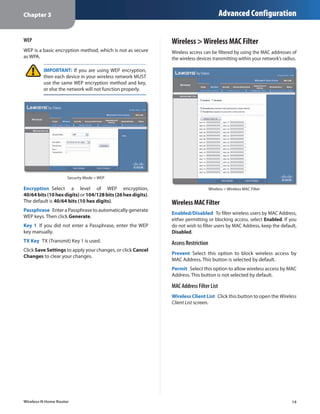
WEP                                                           Wireless > Wireless MAC Filter
WEP is a basic encryption method, which is not as secure      Wireless access can be filtered by using the MAC addresses of
as WPA.                                                       the wireless devices transmitting within your network’s radius.

         IMPORTANT: If you are using WEP encryption,
         then each device in your wireless network MUST
         use the same WEP encryption method and key,
         or else the network will not function properly.


                     Security Mode > WEP

Encryption  Select a level of WEP encryption,                                      Wireless > Wireless MAC Filter
40/64 bits (10 hex digits) or 104/128 bits (26 hex digits).
The default is 40/64 bits (10 hex digits).                    Wireless MAC Filter
Passphrase  Enter a Passphrase to automatically generate
                                                              Enabled/Disabled  To filter wireless users by MAC Address,
WEP keys. Then click Generate.
                                                              either permitting or blocking access, select Enabled. If you
Key 1  If you did not enter a Passphrase, enter the WEP       do not wish to filter users by MAC Address, keep the default,
key manually.                                                 Disabled.
TX Key  TX (Transmit) Key 1 is used.                          Access Restriction
Click Save Settings to apply your changes, or click Cancel
                                                              Prevent  Select this option to block wireless access by
Changes to clear your changes.
                                                              MAC Address. This button is selected by default.
                                                              Permit  Select this option to allow wireless access by MAC
                                                              Address. This button is not selected by default.

                                                              MAC Address Filter List
                                                              Wireless Client List  Click this button to open the Wireless
                                                              Client List screen.


Wireless-N Home Router                                                                                                    14
Chapter 3                                                                              Advanced Configuration


                                                                Advanced Wireless
                                                                AP Isolation  This option isolates all wireless clients and
                                                                wireless devices on your network from each other. Wireless
                                                                devices will be able to communicate with the Router but
                                                                not with each other. To use this option, select Enable. AP
                                                                Isolation is disabled by default.
                                                                Frame Burst  This option should provide your network
                                                                with greater performance, depending on the manufacturer
                         Wireless Client List                   of your wireless products. To use this option, keep the
                                                                default, Enable. To disable this option, select Disable.
Wireless Client List                                            Authentication Type  The Authentication Type setting
                                                                is available if the Security Mode is RADIUS or WEP. The
    This screen shows computers and other devices on
                                                                default is set to Auto, which allows either Open System
    the wireless network. The list can be sorted by Client
                                                                or Shared Key authentication to be used. With Open
    Name, IP Address, MAC Address, and Status.
                                                                System authentication, the sender and the recipient do
    Select Save to MAC Address Filter List for any device       NOT use a WEP key for authentication. With Shared Key
    you want to add to the MAC Address Filter List. Then        authentication, the sender and recipient use a WEP key for
    click Add.                                                  authentication. Select Shared Key to only use Shared Key
    To update the on-screen information, click Refresh.         authentication.
    To exit this screen and return to the Wireless MAC Filter   Basic Rate  The Basic Rate setting is not actually one rate
    screen, click Close.                                        of transmission but a series of rates at which the Router
MAC 01-32  Enter the MAC addresses of the devices               can transmit. (The Basic Rate is not the actual rate of
whose wireless access you want to block or allow.               data transmission. If you want to specify the Router’s rate
                                                                of data transmission, configure the Transmission Rate
Click Save Settings to apply your changes, or click Cancel      setting.) The Router will advertise its Basic Rate to the other
Changes to clear your changes.                                  wireless devices in your network, so they know which
                                                                rates will be used. The Router will also advertise that it will
Wireless > Advanced Wireless Settings                           automatically select the best rate for transmission. The
                                                                default setting is Auto, when the Router can transmit at
This Advanced Wireless Settings screen is used to set up        all standard wireless rates (1-2 Mbps, 5.5 Mbps, 11 Mbps,
the Router’s advanced wireless functions. These settings        18 Mbps, and 24Mbps). Select 1-2Mbps for use with older
should only be adjusted by an expert administrator as           wireless technology. Select All, when the Router can
incorrect settings can reduce wireless performance.             transmit at all wireless rates.
                                                                Transmission Rate  The Transmission setting is available
                                                                if the Network Mode is BG-Mixed, Wireless-G Only, or
                                                                Wireless-B Only. The rate of data transmission should be set
                                                                depending on the speed of your wireless network. Select
                                                                from a range of transmission speeds, or keep the default,
                                                                Auto, to have the Router automatically use the fastest
                                                                possible data rate and enable the Auto-Fallback feature.
                                                                Auto-Fallback will negotiate the best possible connection
                                                                speed between the Router and a wireless client.
                                                                N Transmission Rate  The N Transmission setting is
                                                                available if the Network Mode is Mixed or Wireless-N Only.
                                                                The rate of data transmission should be set depending
                                                                on the speed of your Wireless-N networking. Select from
                                                                a range of transmission speeds, or keep the default,
                                                                Auto, to have the Router automatically use the fastest
                                                                possible data rate and enable the Auto-Fallback feature.
                Wireless > Advanced Wireless Settings
                                                                Auto‑Fallback will negotiate the best possible connection
                                                                speed between the Router and a wireless client.
                                                                CTS Protection Mode  The Router automatically uses CTS
                                                                (Clear-To-Send) Protection Mode when your Wireless-N and

Wireless-N Home Router                                                                                                      15
Chapter 3                                                                            Advanced Configuration

Wireless-G devices are experiencing severe problems and
are not able to transmit to the Router in an environment
with heavy 802.11b traffic. This option boosts the Router’s
ability to catch all Wireless-N and Wireless-G transmissions
but severely decreases performance. To use this option,
keep the default, Auto. To disable this option, select
Disabled.
Beacon Interval  Enter a value between 1 and 65,535
milliseconds. The Beacon Interval value indicates the
frequency interval of the beacon. A beacon is a packet
broadcast by the Router to synchronize the wireless
network. The default is 100 milliseconds.
DTIM Interval  This value, between 1 and 255, indicates
                                                                                     Security > Firewall
the interval of the Delivery Traffic Indication Message
(DTIM). A DTIM field is a countdown field informing
clients of the next window for listening to broadcast          Firewall
and multicast messages. When the Router has buffered
                                                               SPI Firewall Protection  To use firewall protection,
broadcast or multicast messages for associated clients, it
                                                               keep the default selection, Enabled. To turn off firewall
sends the next DTIM with a DTIM Interval value. Its clients
                                                               protection, select Disabled.
hear the beacons and awaken to receive the broadcast
and multicast messages. The default value is 1.
                                                               Internet Filter
Fragmentation Threshold  This value specifies the
maximum size for a packet before data is fragmented            For the following options, select the option to enable it, or
into multiple packets. If you experience a high packet         deselect the option to disable it.
error rate, you may slightly increase the Fragmentation        Filter Anonymous Internet Requests  This feature makes
Threshold. Setting the Fragmentation Threshold too low         it more difficult for outside users to work their way into
may result in poor network performance. Only minor             your network. This feature is enabled by default. Deselect
reduction of the default value is recommended. In most         this option to allow anonymous Internet requests.
cases, it should remain at its default value of 2346.
                                                               Filter Multicast  Multicasting allows for multiple
RTS Threshold  Should you encounter inconsistent data          transmissions to specific recipients at the same time. If
flow, only minor reduction of the default value, 2347, is      multicasting is permitted, then the Router will allow IP
recommended. If a network packet is smaller than the           multicast packets to be forwarded to the appropriate
preset RTS threshold size, the RTS/CTS mechanism will          computers. Select this option to filter multicasting. This
not be enabled. The Router sends Request to Send (RTS)         option is disabled by default.
frames to a particular receiving station and negotiates
                                                               Filter Internet NAT Redirection  This feature uses port
the sending of a data frame. After receiving an RTS, the
                                                               forwarding to block access to local servers from local
wireless station responds with a Clear to Send (CTS) frame
                                                               networked computers. Select this option to filter Internet
to acknowledge the right to begin transmission. The RTS
                                                               NAT redirection. This option is disabled by default.
Threshold value should remain at its default value of
2347.                                                          Filter IDENT (Port 113)  This feature keeps port 113 from
                                                               being scanned by devices outside of your local network.
Click Save Settings to apply your changes, or click Cancel
                                                               This feature is enabled by default. Deselect this option to
Changes to clear your changes.
                                                               disable it.

Security > Firewall                                            Web Filter
The Firewall screen is used to configure a firewall that can   For the following options, select the option to enable it, or
filter out various types of unwanted traffic on the Router’s   deselect the option to disable it.
local network.
                                                               Proxy  Use of WAN proxy servers may compromise the
                                                               Gateway’s security. Denying Proxy will disable access to
                                                               any WAN proxy servers. Select this option to enable proxy
                                                               filtering. This option is disabled by default.
                                                               Java  Java is a programming language for websites. If you
                                                               deny Java, you run the risk of not having access to Internet
                                                               sites created using this programming language. Select
Wireless-N Home Router                                                                                                   16
Chapter 3                                                                               Advanced Configuration

this option to enable Java filtering. This option is disabled
by default.
                                                                Access Restrictions > Internet Access
                                                                The Internet Access screen allows you to block or allow
ActiveX  ActiveX is a programming language for websites.
                                                                specific kinds of Internet usage and traffic, such as Internet
If you deny ActiveX, you run the risk of not having access to
                                                                access, designated services, and websites during specific
Internet sites created using this programming language.
                                                                days and times.
Select this option to enable ActiveX filtering. This option
is disabled by default.
Cookies  A cookie is data stored on your computer and
used by Internet sites when you interact with them. Select
this option to filter cookies. This option is disabled by
default.
Click Save Settings to apply your changes, or click Cancel
Changes to clear your changes.

Security > VPN Passthrough
The VPN Passthrough screen allows you to enable VPN
tunnels using IPSec, PPTP, or L2TP protocols to pass through
the Router’s firewall.


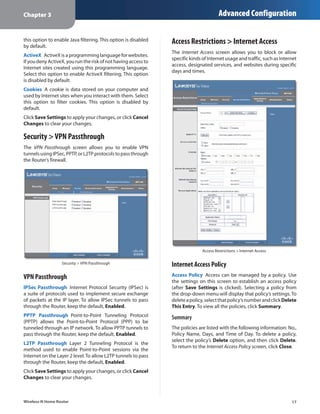
                                                                               Access Restrictions > Internet Access

                  Security > VPN Passthrough                    Internet Access Policy
VPN Passthrough                                                 Access Policy  Access can be managed by a policy. Use
                                                                the settings on this screen to establish an access policy
IPSec Passthrough  Internet Protocol Security (IPSec) is        (after Save Settings is clicked). Selecting a policy from
a suite of protocols used to implement secure exchange          the drop‑down menu will display that policy’s settings. To
of packets at the IP layer. To allow IPSec tunnels to pass      delete a policy, select that policy’s number and click Delete
through the Router, keep the default, Enabled.                  This Entry. To view all the policies, click Summary.
PPTP Passthrough  Point-to-Point Tunneling Protocol             Summary
(PPTP) allows the Point-to-Point Protocol (PPP) to be
tunneled through an IP network. To allow PPTP tunnels to        The policies are listed with the following information: No.,
pass through the Router, keep the default, Enabled.             Policy Name, Days, and Time of Day. To delete a policy,
                                                                select the policy’s Delete option, and then click Delete.
L2TP Passthrough  Layer 2 Tunneling Protocol is the
                                                                To return to the Internet Access Policy screen, click Close.
method used to enable Point-to-Point sessions via the
Internet on the Layer 2 level. To allow L2TP tunnels to pass
through the Router, keep the default, Enabled.
Click Save Settings to apply your changes, or click Cancel
Changes to clear your changes.


Wireless-N Home Router                                                                                                     17
Chapter 3                                                                               Advanced Configuration


                          Summary

Status  Policies are disabled by default. To enable a policy,
select the policy number from the drop-down menu, and
select Enabled.
To create a policy, follow steps 1-11. Repeat these steps to                          Internet Access PC List
create additional policies, one at a time.
                                                                 5.	 Select the appropriate option, Deny or Allow,
1.	 Select a number from the Access Policy drop-down                 depending on whether you want to block or allow
    menu.                                                            Internet access for the computers you listed on the
2.	 Enter a Policy Name in the field provided.                       Internet Access PC List screen.
3.	 To enable this policy, select Enabled.                       6.	 Decide which days and what times you want this policy
4.	 Click Edit List to select which computers will be                to be enforced. Select the individual days during which
    affected by the policy. The Internet Access PC List screen       the policy will be in effect, or select Everyday. Then
    appears. You can select a computer by MAC address or             enter a range of hours and minutes during which the
    IP address. You can also enter a range of IP addresses           policy will be in effect, or select 24 Hours.
    if you want this policy to affect a group of computers.      7.	 You can block websites with specific URL addresses.
    After making your changes, click Save Settings to                Enter each URL in a separate Website Blocking by URL
    apply your changes, or click Cancel Changes to clear             Address field.
    your changes. Then click Close.                              8.	 You can also block websites using specific keywords.
                                                                     Enter each keyword in a separate Website Blocking by
                                                                     Keyword field.
                                                                 9.	 You can filter access to various services accessed
                                                                     over the Internet, such as FTP or telnet. (You
                                                                     can block up to three applications per policy.)

                                                                    From the Applications list, select the application you
                                                                    want to block. Then click the >> button to move it to
                                                                    the Blocked List. To remove an application from the
                                                                    Blocked List, select it and click the << button.
                                                                 10.	If the application you want to block is not listed or you
                                                                     want to edit a service’s settings, enter the application’s
                                                                     name in the Application Name field. Enter its range
                                                                     in the Port Range fields. Select its protocol from the
                                                                     Protocol drop-down menu. Then click Add.
                                                                    To modify a service, select it from the Application list.
                                                                    Change its name, port range, and/or protocol setting.
                                                                    Then click Modify.

Wireless-N Home Router                                                                                                      18
Chapter 3                                                                             Advanced Configuration

   To delete a service, select it from the Application list.   To IP Address  For each application, enter the IP address
   Then click Delete.                                          of the computer that should receive the requests. If you
                                                               assigned a static IP address to the computer, then you
11.	Click Save Settings to save the policy’s settings, or
                                                               can look up its IP address; click DHCP Reservation on the
    click Cancel Changes to clear the changes.
                                                               Basic Setup screen (refer to DHCP Reservation, page 7).
Applications and Gaming > Single Port                          Enabled  For each application, select Enabled to enable
                                                               port forwarding.
Forwarding
                                                               Click Save Settings to apply your changes, or click Cancel
The Single Port Forwarding screen allows you to customize      Changes to clear your changes.
port services for common applications on this screen.
When users send these types of requests to your network via    Applications and Gaming > Port Range
the Internet, the Router will forward those requests to the
appropriate servers (computers). Before using forwarding,
                                                               Forwarding
you should assign static IP addresses to the designated        The Port Range Forwarding screen allows you to set up
servers (use the DHCP Reservation feature on the Basic Setup   public services on your network, such as web servers,
screen; refer to DHCP Reservation, page 7).                    ftp servers, e-mail servers, or other specialized Internet
                                                               applications. (Specialized Internet applications are any
                                                               applications that use Internet access to perform functions
                                                               such as videoconferencing or online gaming. Some Internet
                                                               applications may not require any forwarding.)
                                                               When users send these types of requests to your network via
                                                               the Internet, the Router will forward those requests to the
                                                               appropriate servers (computers). Before using forwarding,
                                                               you should assign static IP addresses to the designated
                                                               servers (use the DHCP Reservation feature on the Basic Setup
                                                               screen; refer to DHCP Reservation, page 7).
                                                               If you need to forward all ports to one computer, click the
                                                               DMZ tab.


        Applications and Gaming > Single Port Forwarding


Single Port Forwarding
Common applications are available for the first five
entries. Select the appropriate application. Then enter the
IP address of the server that should receive these requests.
Select Enabled to activate this entry.
For additional applications, complete the following fields:
Application Name  Enter the name you wish to give the                  Applications and Gaming > Port Range Forwarding
application. Each name can be up to 12 characters.
External Port  Enter the external port number used by          Port Range Forwarding
the server or Internet application. Check with the Internet
application documentation for more information.                To forward a port, enter the information on each line for
                                                               the criteria required.
Internal Port  Enter the internal port number used by
the server or Internet application. Check with the Internet    Application Name  In this field, enter the name you
application documentation for more information.                wish to give the application. Each name can be up to 12
                                                               characters.
Protocol  Select the protocol(s) used for this application,
TCP, UDP, or Both.
Wireless-N Home Router                                                                                                   19
Chapter 3                                                                           Advanced Configuration

Start~End Port  Enter the number or range of port(s)          Forwarded Range  For each application, enter the starting
used by the server or Internet applications. Check            and ending port numbers of the forwarded port number
with the Internet application documentation for more          range. Check with the Internet application documentation
information.                                                  for the port number(s) needed.
Protocol  Select the protocol(s) used for this application,   Enabled  Select Enabled to enable port triggering for the
TCP, UDP, or Both.                                            applications you have defined.
To IP Address  For each application, enter the IP address     Click Save Settings to apply your changes, or click Cancel
of the computer that should receive the requests. If you      Changes to clear your changes.
assigned a static IP address to the computer, then you
can look up its IP address; click DHCP Reservation on the     Applications and Gaming > DMZ
Basic Setup screen (refer to DHCP Reservation, page 7).
                                                              The DMZ feature allows one network computer to be
Enabled  Select Enabled to enable port forwarding for         exposed to the Internet for use of a special-purpose
the applications you have defined.                            service such as Internet gaming or videoconferencing.
Click Save Settings to apply your changes, or click Cancel    DMZ hosting forwards all the ports at the same time to
Changes to clear your changes.                                one computer. The Port Range Forwarding feature is more
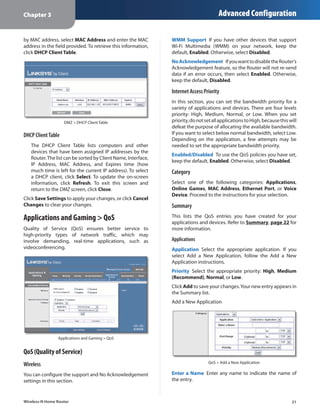
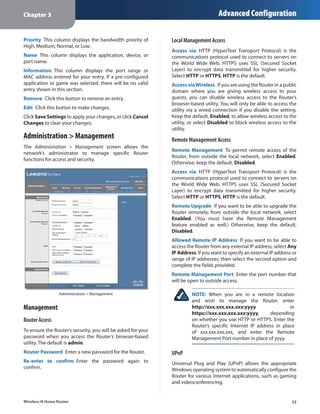
                                                              secure because it only opens the ports you want to have
Applications & Gaming > Port Range                            opened, while DMZ hosting opens all the ports of one
                                                              computer, exposing the computer to the Internet.
Triggering
The Port Range Triggering screen allows the Router to
watch outgoing data for specific port numbers. The IP
address of the computer that sends the matching data is
remembered by the Router, so that when the requested
data returns through the Router, the data is pulled back
to the proper computer by way of IP address and port
mapping rules.


                                                                              Applications and Gaming > DMZ


                                                              DMZ
                                                              Any computer whose port is being forwarded must have
                                                              its DHCP client function disabled and should have a new
                                                              static IP address assigned to it because its IP address may
                                                              change when using the DHCP function.
         Applications and Gaming > Port Range Triggering      Enabled/Disabled  To disable DMZ hosting, select
                                                              Disabled. To expose one computer, select Enabled. Then
Port Range Triggering                                         configure the following settings:
                                                              Source IP Address  If you want any IP address to be the
Application Name  Enter the application name of the
                                                              source, select Any IP Address. If you want to specify an IP
trigger.
                                                              address or range of IP addresses as the designated source,
Triggered Range  For each application, enter the starting     select and complete the IP address range fields.
and ending port numbers of the triggered port number
                                                              Destination  If you want to specify the DMZ host by IP
range. Check with the Internet application documentation
                                                              address, select IP Address and enter the IP address in
for the port number(s) needed.
                                                              the field provided. If you want to specify the DMZ host

Wireless-N Home Router                                                                                                20
Chapter 3                                                                              Advanced Configuration

by MAC address, select MAC Address and enter the MAC           WMM Support  If you have other devices that support
address in the field provided. To retrieve this information,   Wi‑Fi Multimedia (WMM) on your network, keep the
click DHCP Client Table.                                       default, Enabled. Otherwise, select Disabled.
                                                               No Acknowledgement  If you want to disable the Router’s
                                                               Acknowledgement feature, so the Router will not re-send
                                                               data if an error occurs, then select Enabled. Otherwise,
                                                               keep the default, Disabled.

                                                               Internet Access Priority
                                                               In this section, you can set the bandwidth priority for a
                                                               variety of applications and devices. There are four levels
                                                               priority: High, Medium, Normal, or Low. When you set
                    DMZ > DHCP Client Table                    priority, do not set all applications to High, because this will
                                                               defeat the purpose of allocating the available bandwidth.
DHCP Client Table                                              If you want to select below normal bandwidth, select Low.
                                                               Depending on the application, a few attempts may be
   The DHCP Client Table lists computers and other             needed to set the appropriate bandwidth priority.
   devices that have been assigned IP addresses by the
                                                               Enabled/Disabled  To use the QoS policies you have set,
   Router. The list can be sorted by Client Name, Interface,
                                                               keep the default, Enabled. Otherwise, select Disabled.
   IP Address, MAC Address, and Expires time (how
   much time is left for the current IP address). To select    Category
   a DHCP client, click Select. To update the on‑screen
   information, click Refresh. To exit this screen and         Select one of the following categories: Applications,
   return to the DMZ screen, click Close.                      Online Games, MAC Address, Ethernet Port, or Voice
                                                               Device. Proceed to the instructions for your selection.
Click Save Settings to apply your changes, or click Cancel
Changes to clear your changes.                                 Summary
Applications and Gaming > QoS                                  This lists the QoS entries you have created for your
                                                               applications and devices. Refer to Summary, page 22 for
Quality of Service (QoS) ensures better service to             more information.
high-priority types of network traffic, which may
involve demanding, real-time applications, such as             Applications
videoconferencing.                                             Application  Select the appropriate application. If you
                                                               select Add a New Application, follow the Add a New
                                                               Application instructions.
                                                               Priority  Select the appropriate priority: High, Medium
                                                               (Recommend), Normal, or Low.
                                                               Click Add to save your changes. Your new entry appears in
                                                               the Summary list.
                                                               Add a New Application


                Applications and Gaming > QoS


QoS (Quality of Service)
                                                                                 QoS > Add a New Application
Wireless
You can configure the support and No Acknowledgement           Enter a Name  Enter any name to indicate the name of
settings in this section.                                      the entry.


Wireless-N Home Router                                                                                                      21
Chapter 3                                                                         Advanced Configuration

Port Range  Enter the port range that the application will   MAC Address
be using. For example, if you want to allocate bandwidth
for FTP, you can enter 21-21. If you need services for an
application that uses from 1000 to 1250, you enter 1000-
1250 as your settings. You can have up to three ranges
to define for this bandwidth allocation. Port numbers
can range from 1 to 65535. Check your application’s
documentation for details on the service ports used.                             QoS > MAC Address
Select the protocol TCP or UDP, or select Both.
                                                             Enter a Name  Enter a name for your device.
Priority  Select the appropriate priority: High, Medium
                                                             MAC Address  Enter the MAC address of your device.
(Recommend), Normal, or Low.
                                                             Priority  Select the appropriate priority: High, Medium
Click Add to save your changes. Your new entry appears in
                                                             (Recommend), Normal, or Low.
the Summary list.
                                                             Click Add to save your changes. Your new entry appears in
Online Games                                                 the Summary list.

                                                             Ethernet Port


                     QoS > Online Games

Game  Select the appropriate game. If you select Add a                           QoS > Ethernet Port
New Game, follow the Add a New Game instructions.
Priority  Select the appropriate priority: High, Medium      Ethernet  Select the appropriate Ethernet port.
(Recommend), Normal, or Low.                                 Priority  Select the appropriate priority: High, Medium
Click Add to save your changes. Your new entry appears in    (Recommend), Normal, or Low.
the Summary list.                                            Click Add to save your changes. Your new entry appears in
Add a New Game                                               the Summary list.

                                                             Voice Device


                                                                                 QoS > Voice Device

                    QoS > Add a New Game
                                                             My Voice Device’s MAC Address  The MAC address of
Enter a Name  Enter any name to indicate the name of         your voice device is automatically displayed.
the entry.                                                   Enter a Name  Enter a name for your voice device.
Port Range  Enter the port range that the game will be       MAC Address  Enter the MAC address of your voice
using. You can have up to three ranges to define for this    device.
bandwidth allocation. Port numbers can range from 1 to
                                                             Priority  Select the appropriate priority:          High
65535. Check your application’s documentation for details
                                                             (Recommend), Medium, Normal, or Low.
on the service ports used.
                                                             Click Add to save your changes. Your new entry appears in
Select the protocol TCP or UDP, or select Both.
                                                             the Summary list.
Priority  Select the appropriate priority: High, Medium
(Recommend), Normal, or Low.                                 Summary
Click Add to save your changes. Your new entry appears in    This lists the QoS entries you have created for your
the Summary list.                                            applications and devices.


Wireless-N Home Router                                                                                             22
Chapter 3                                                                           Advanced Configuration

Priority  This column displays the bandwidth priority of      Local Management Access
High, Medium, Normal, or Low.
                                                              Access via  HTTP (HyperText Transport Protocol) is the
Name  This column displays the application, device, or        communications protocol used to connect to servers on
port name.                                                    the World Wide Web. HTTPS uses SSL (Secured Socket
Information  This column displays the port range or           Layer) to encrypt data transmitted for higher security.
MAC address entered for your entry. If a pre-configured       Select HTTP or HTTPS. HTTP is the default.
application or game was selected, there will be no valid      Access via Wireless  If you are using the Router in a public
entry shown in this section.                                  domain where you are giving wireless access to your
Remove  Click this button to remove an entry.                 guests, you can disable wireless access to the Router’s
                                                              browser-based utility. You will only be able to access the
Edit  Click this button to make changes.                      utility via a wired connection if you disable the setting.
Click Save Settings to apply your changes, or click Cancel    Keep the default, Enabled, to allow wireless access to the
Changes to clear your changes.                                utility, or select Disabled to block wireless access to the
                                                              utility.
Administration > Management                                   Remote Management Access
The Administration > Management screen allows the
                                                              Remote Management  To permit remote access of the
network’s administrator to manage specific Router
                                                              Router, from outside the local network, select Enabled.
functions for access and security.
                                                              Otherwise, keep the default, Disabled.
                                                              Access via  HTTP (HyperText Transport Protocol) is the
                                                              communications protocol used to connect to servers on
                                                              the World Wide Web. HTTPS uses SSL (Secured Socket
                                                              Layer) to encrypt data transmitted for higher security.
                                                              Select HTTP or HTTPS. HTTP is the default.
                                                              Remote Upgrade  If you want to be able to upgrade the
                                                              Router remotely, from outside the local network, select
                                                              Enabled. (You must have the Remote Management
                                                              feature enabled as well.) Otherwise, keep the default,
                                                              Disabled.
                                                              Allowed Remote IP Address  If you want to be able to
                                                              access the Router from any external IP address, select Any
                                                              IP Address. If you want to specify an external IP address or
                                                              range of IP addresses, then select the second option and
                                                              complete the fields provided.
                                                              Remote Management Port  Enter the port number that
                                                              will be open to outside access.

                 Administration > Management                           NOTE: When you are in a remote location
                                                                       and wish to manage the Router, enter
Management                                                             http://xxx.xxx.xxx.xxx:yyyy                 or
                                                                       https://xxx.xxx.xxx.xxx:yyyy,      depending
Router Access                                                          on whether you use HTTP or HTTPS. Enter the
                                                                       Router’s specific Internet IP address in place
To ensure the Router’s security, you will be asked for your            of xxx.xxx.xxx.xxx, and enter the Remote
password when you access the Router’s browser-based                    Management Port number in place of yyyy.
utility. The default is admin.
Router Password  Enter a new password for the Router.         UPnP
Re-enter to confirm  Enter the password again to              Universal Plug and Play (UPnP) allows the appropriate
confirm.                                                      Windows operating system to automatically configure the
                                                              Router for various Internet applications, such as gaming
                                                              and videoconferencing.


Wireless-N Home Router                                                                                                 23
Chapter 3                                                                             Advanced Configuration

UPnP  To use UPnP, keep the default, Enabled. Otherwise,
select Disabled.
Allow Users to Configure  Keep the default, Enabled,
if you want to be able to make manual changes to the
Router while using the UPnP feature. Otherwise, select
Disabled.
Allow Users to Disable Internet Access  Select Enabled,
if you want to be able to prohibit any and all Internet                                Log > View Log
connections. Otherwise, keep the default, Disabled.

Backup and Restore                                           Log
Backup Configuration  To back up the Router’s                 ••   Type  Select Incoming Log, Outgoing Log, Security
configuration settings, click this button and follow the           Log, or DHCP Client Log.
on‑screen instructions.                                       ••   <Type> Log  The Incoming Log displays a temporary
Restore Configuration  To restore the Router’s                     log of the source IP addresses and destination
configuration settings, click this button and follow the           port numbers for the incoming Internet traffic. The
on‑screen instructions. (You must have previously backed           Outgoing Log displays a temporary log of the local IP
up the Router’s configuration settings.)                           addresses, destination URLs/IP addresses, and service/
                                                                   port numbers for the outgoing Internet traffic. The
System Reboot                                                      Security log displays the login information for the
                                                                   browser-based utility. The DHCP Client Log displays
Start to Reboot  If you need to restart the Router, click          the LAN DHCP server status information.
this button.
                                                                   Click Save the Log to save this information to a file on
Click Save Settings to apply your changes, or click Cancel         your computer’s hard drive. Click Refresh to update
Changes to clear your changes.                                     the log. Click Clear to clear all the information that is
                                                                   displayed.
Administration > Log                                         Click Save Settings to apply your changes, or click Cancel
The Router can keep logs of all traffic for your Internet    Changes to clear your changes.
connection.
                                                             Administration > Diagnostics
                                                             The diagnostic tests (Ping and Traceroute) allow you to
                                                             check the connections of your network devices, including
                                                             connection to the Internet.


                     Administration > Log


Log
Enabled/Disabled  To disable the Log function, select
Disabled. To monitor traffic between the network and the
Internet, keep the default, Enabled. With logging enabled,
you can choose to view temporary logs.
                                                                                 Administration > Diagnostics
View Log  To view the logs, click View Log.


Wireless-N Home Router                                                                                                   24
Chapter 3                                                                               Advanced Configuration


Diagnostics                                                      Administration > Factory Defaults
Ping Test                                                        Restore the Router to its factory default settings.

Ping checks the status of a connection.
IP or URL Address  Enter the address of the computer
whose connection you wish to test.
Packet Size  Enter the packet size you want to use. The
default is 32 bytes.
Number to Ping  Enter the number of times you wish to
test the connection. The default is 5.
                                                                                 Administration > Factory Defaults
Start to Ping  To run the test, click this button. The Ping
screen shows if the test is successful. Click Close to return
                                                                          NOTE: Do not restore the factory defaults unless
to the Diagnostics screen.
                                                                          you are having difficulties with the Router and
                                                                          have exhausted all other troubleshooting
                                                                          measures. Once the Router is reset, you will have
                                                                          to re-enter all of your configuration settings.


                                                                 Factory Defaults
                                                                 Restore All Settings  To reset the Router’s settings to the
                                                                 defaults, click this button and then follow the on‑screen
                                                                 instructions. Any custom settings you have saved will be
                                                                 lost when the default settings are restored.

                                                                 Administration > Firmware Upgrade
                         Diagnostics > Ping
                                                                 The Firmware Upgrade screen allows you to upgrade the
Traceroute Test                                                  Router’s firmware. Do not upgrade the firmware unless
                                                                 you are experiencing problems with the Router or the new
Traceroute checks the performance of a connection.               firmware has a feature you want to use.
IP or URL Address  Enter the address of the computer
whose connection you wish to test.
Start to Traceroute  To run the test, click this button. The
Traceroute screen shows if the test is successful. Click Close
to return to the Diagnostics screen.


                                                                                Administration > Firmware Upgrade


                                                                          NOTE: The Router may lose the settings you
                                                                          have customized. Before you upgrade its
                    Diagnostics > Traceroute                              firmware, write down all of your custom settings.
                                                                          After you upgrade its firmware, you may have to
                                                                          re‑enter all of your configuration settings.


Wireless-N Home Router                                                                                                   25
Chapter 3                                                                            Advanced Configuration


Firmware Upgrade                                                Domain Name  The Domain Name of the Router is
                                                                displayed (if it was entered on the Setup > Basic Setup
Before upgrading the firmware, download the Router’s            screen).
firmware upgrade file from the Linksys website,
www.linksysbycisco.com.                                         Internet Connection
Please select a file to upgrade  To select the firmware         This section shows the current network information
upgrade file, click Browse and follow the on-screen             stored in the Router. The information varies depending on
instructions.                                                   the Internet connection type selected on the Setup > Basic
Start to Upgrade  After you have selected the                   Setup screen.
appropriate file, click this button, and follow the on-screen   Select Release IP Address or Renew IP Address as
instructions.                                                   appropriate to release or renew a DHCP lease.
                                                                Click Refresh to update the on-screen information.
         WARNING: The firmware upgrade must not
         be interrupted; do not reboot or power off the
         Router during the firmware upgrade.                    Status > Local Network
                                                                The Local Network screen displays information about the
Status > Router                                                 local, wired network.

The Router screen displays information about the Router
and its current settings.


                                                                                   Status > Local Network


                                                                Local Network
                                                                Local MAC Address  The MAC address of the Router’s
                                                                local, wired interface is displayed.
                                                                Router IP Address  The Router’s IP address, as it appears
                         Status > Router                        on your local network, is displayed.
                                                                Subnet Mask  The Subnet Mask of the Router is
Router Information                                              displayed.
Firmware Version  The version number of the Router’s
current firmware is displayed.                                  DHCP Server
Boot Code Version  The version number of the Router’s           DHCP Server  The status of the Router’s DHCP server
boot code is displayed.                                         function is displayed.
Firmware Verification  The unique identifier of the             Start IP Address  For the range of IP addresses that can
firmware is displayed.                                          be used by devices on your local network, the starting IP
                                                                address is displayed.
Current Time  The time set on the Router is displayed.
                                                                End IP Address  For the range of IP addresses that can
Internet MAC Address  The Router’s MAC Address, as
                                                                be used by devices on your local network, the ending IP
seen by your ISP, is displayed.
                                                                address is displayed.
Host Name  The Host Name of the Router is displayed (if it
                                                                DHCP Clients Table  Click this button to view a list of
was entered on the Setup > Basic Setup screen).
                                                                computers or other devices that are using the Router as
                                                                a DHCP server.

Wireless-N Home Router                                                                                                 26
Chapter 3                                                                           Advanced Configuration

                                                               Security  The wireless security method used by the Router
                                                               is displayed.
                                                               SSID Broadcast  The status of the SSID Broadcast feature
                                                               is displayed.


                         DHCP Clients Table


DHCP Client Table
   The DHCP Client Table lists computers and other
   devices that have been assigned IP addresses by the
   Router. The list can be sorted by IP Address, MAC
   Address, Interface, and Client Name. To remove a
   DHCP client, click Delete. To update the on-screen
   information, click Refresh. To exit this screen and
   return to the Local Network screen, click Close.

Status > Wireless Network
The Wireless Network screen displays information about
your wireless network.


                          Status > Wireless


Wireless Network
MAC Address  The MAC address of the Router’s local,
wireless interface is displayed.
Mode  The wireless mode used by the network is
displayed.
Network Name (SSID)  The name of the wireless network,
which is also called the SSID, is displayed.
Channel Width  The Channel Width setting (selected on
the Wireless > Basic Wireless Settings screen) is displayed.
Wide Channel  The Wide Channel setting (selected on
the Wireless > Basic Wireless Settings screen) is displayed.
Standard Channel  The Standard Channel setting
(selected on the Wireless > Basic Wireless Settings screen)
is displayed.


Wireless-N Home Router                                                                                               27
Appendix A                                                                                        Troubleshooting


Appendix A:                                                      4.	 Click OK.

                                                                 The Router does not have a coaxial port for the cable
Troubleshooting                                                  connection.
                                                                 The Router does not replace your modem. You still need
Your computer cannot connect to the Internet.                    your cable modem in order to use the Router. Connect
Follow these instructions until your computer can connect        your cable connection to the cable modem, and then
to the Internet:                                                 insert the setup CD into your computer. Click Setup and
                                                                 follow the on‑screen instructions.
••   Make sure that the Router is powered on. The Power
     LED should be lit and not flashing.                         The computer cannot connect wirelessly to the network.
••   If the Power LED is flashing, then power off all of         Make sure the wireless network name or SSID is the same
     your network devices, including the modem, Router,          on both the computer and the Router. If you have enabled
     and computers. Then power on each device in the             wireless security, then make sure the same security
     following order:                                            method and key are used by both the computer and the
     1.	 Cable or DSL modem                                      Router.

     2.	 Router                                                  You need to modify the settings on the Router.
     3.	 Computer                                                Open the web browser (for example, Internet Explorer or
••   Check the cable connections. The computer should            Firefox), and enter the Router’s IP address in the address
     be connected to one of the ports numbered 1-4 on            field (the default IP address is 192.168.1.1). When
     the Router, and the modem must be connected to the          prompted, enter the password to the Router (the default is
     Internet port on the Router.                                admin). Click the appropriate tab to change the settings.

The modem does not have an Ethernet port.                                 WEB: If your questions are not addressed
The modem is a dial-up modem for traditional dial-up                      here, refer to the Linksys website,
service. To use the Router, you need a cable/DSL modem                    www.linksysbycisco.com
and high-speed Internet connection.

You cannot use the DSL service to connect manually to
the Internet.
After you have installed the Router, it will automatically
connect to your Internet Service Provider (ISP), so you no
longer need to connect manually.

The DSL telephone line does not fit into the Router’s
Internet port.
The Router does not replace your modem. You still need
your DSL modem in order to use the Router. Connect the
telephone line to the DSL modem, and then insert the
setup CD into your computer. Click Setup and follow the
on‑screen instructions.

When you double-click the web browser, you are
prompted for a username and password. If you want to
get rid of the prompt, follow these instructions.
Launch the web browser and perform the following steps
(these steps are specific to Internet Explorer but are similar
for other browsers):
1.	 Select Tools > Internet Options.
2.	 Click the Connections tab.
3.	 Select Never dial a connection.

Wireless-N Home Router                                                                                                  28
Appendix B                                                                                                  Specifications


Appendix B:                                                   Operating Humidity	 10 to 80%, Noncondensing
                                                              Storage Humidity	          5 to 90% Noncondensing
Specifications
                                                              Specifications are subject to change without notice.
Model	                   WRT120N
Standards	               IEEE 802.3u, 802.11g, 802.11b,
	                        Draft 802.11n
LEDs	                    Power, Internet, Wireless, Wi-Fi
	                        Protected Setup™, Ethernet (1-4)
Ports	                   Internet, Ethernet (1-4), Power
Buttons	                 Reset, Wi-Fi Protected Setup™
Cabling Type	            Cat 5
# of Antennas	           2 (internal)
Detachable (y/n)	        No
Modulations	             802.11b: CCK/QPSK, BPSK
	                        802.11g: OFDM/BPSK, QPSK,
	                        16-QAM, 64-QAM
	                        802.11n: OFDM/BPSK, QPSK,
	                        16-QAM, 64-QAM
Transmitted Power
in dBm	                  802.11b: 16.5 ± 1.5 dBm (typical)
	                        802.11g: 13.5 ± 1.5 dBm (typical)
	                        802.11n: 13.5 ± 1.5 dBm (typical)
Receive Sensitivity
in dBm	                  -94 dBm (typical) @ 1 Mbps
	                        -90 dBm (typical) @ 11 Mbps
	                        -75 dBm (typical) @ 54 Mbps
	                        -66 dBm (typical) @ 270 Mbps
Antenna Gain in dBi	 2.0 (max)
UPnP able/cert	          Able
Wireless Security	       Wi-Fi Protected Access™ 2 (WPA2),
	                        WEP, Wireless MAC Filtering
Security Key Bits	       Up to 128-Bit Encryption
OS Requirements	         Windows XP, Vista, or Vista 64-Bit
	                        Edition with Latest Updates (for
	                        Network Magic and Setup Wizard)
	                        Mac OS X 10.4 or higher (for
	                        Setup Wizard)
Environmental
Dimensions	              7.99" x 1.38" x 6.30"
	                        (203 x 35 x 160 mm)
Unit Weight	             8.4 oz (238 g)
Power	                   12V, 1A
Certifications	          FCC, UL/cUL, ICES-003, RSS210, CE,
	                        Wi-Fi (IEEE 802.11b/g), WPA2™,
	                        WMM®, Wi-Fi Protected Setup™
Operating Temp.	         0 to 40°C (32 to 104°F)
Storage Temp.	           -20 to 60°C (-4 to 140°F)


Wireless-N Home Router                                                                                                  29
Appendix C                                                                               Warranty Information


Appendix C:                                                     not warrant that the operation of the product or software
                                                                will be uninterrupted or error free. Also, due to the
Warranty Information                                            continual development of new techniques for intruding
                                                                upon and attacking networks, Linksys does not warrant
                                                                that the product, software or any equipment, system or
Limited Warranty                                                network on which the product or software is used will be
                                                                free of vulnerability to intrusion or attack. The product
Linksys warrants this Linksys hardware product against          may include or be bundled with third party software or
defects in materials and workmanship under normal               service offerings. This limited warranty shall not apply to
use for the Warranty Period, which begins on the date of        such third party software or service offerings. This limited
purchase by the original end-user purchaser and lasts for       warranty does not guarantee any continued availability
the period specified below:                                     of a third party’s service for which this product’s use or
                                                                operation may require.
•• One (1) year for new product
                                                                TO THE EXTENT NOT PROHIBITED BY APPLICABLE
•• Ninety (90) days for refurbished product                     LAW, ALL IMPLIED WARRANTIES AND CONDITIONS
Your exclusive remedy and Linksys’ entire liability under       OF MERCHANTABILITY, SATISFACTORY QUALITY OR
this limited warranty will be for Linksys, at its option, to    FITNESS FOR A PARTICULAR PURPOSE ARE LIMITED TO
(a)  repair the product with new or refurbished parts,          THE DURATION OF THE WARRANTY PERIOD. ALL OTHER
(b)  replace the product with a reasonably available            EXPRESS OR IMPLIED CONDITIONS, REPRESENTATIONS
equivalent new or refurbished Linksys product, or (c) refund    AND WARRANTIES ARE DISCLAIMED. Some jurisdictions
the purchase price of the product less any rebates. Any         do not allow limitations on how long an implied warranty
repaired or replacement products will be warranted for          lasts, so the above limitation may not apply to you. This
the remainder of the original Warranty Period or thirty (30)    limited warranty gives you specific legal rights, and you
days, whichever is longer. All products and parts that are      may also have other rights which vary by jurisdiction.
replaced become the property of Linksys.
                                                                TO THE EXTENT NOT PROHIBITED BY APPLICABLE LAW,
Linksys additionally warrants that any media on which           IN NO EVENT WILL LINKSYS BE LIABLE FOR ANY LOST
the software may be provided will be free from defects in       DATA, REVENUE OR PROFIT, OR FOR SPECIAL, INDIRECT,
materials and workmanship under normal use for a period         CONSEQUENTIAL, INCIDENTAL OR PUNITIVE DAMAGES,
of ninety (90) days from the date of original purchase.         REGARDLESS OF THE THEORY OF LIABILITY (INCLUDING
Your exclusive remedy and Linksys’ entire liability under       NEGLIGENCE), ARISING OUT OF OR RELATED TO THE USE
this limited warranty will be for Linksys, at its option, to    OF OR INABILITY TO USE THE PRODUCT, SOFTWARE OR
(a) replace the software media, or (b) refund the purchase      ANY SERVICES PROVIDED IN RESPECT OF SUCH PRODUCT
price of the software media.                                    OR SOFTWARE, EVEN IF LINKSYS HAS BEEN ADVISED OF
                                                                THE POSSIBILITY OF SUCH DAMAGES. TO THE EXTENT
Exclusions and Limitations                                      NOT PROHIBITED BY APPLICABLE LAW, IN NO EVENT WILL
                                                                LINKSYS’ LIABILITY EXCEED THE AMOUNT PAID BY YOU
This limited warranty does not apply if: (a)  the product
                                                                FOR THE PRODUCT. The foregoing limitations will apply
assembly seal has been removed or damaged, (b)  the
                                                                even if any warranty or remedy provided under this limited
product has been altered or modified, except by Linksys,
                                                                warranty fails of its essential purpose. Some jurisdictions
(c)  the product damage was caused by use with non-
                                                                do not allow the exclusion or limitation of incidental
Linksys products, (d) the product has not been installed,
                                                                or consequential damages, so the above limitation or
operated, repaired, or maintained in accordance with
                                                                exclusion may not apply to you.
instructions supplied by Linksys, (e)  the product has
been subjected to abnormal physical or electrical stress,
misuse, negligence, or accident, (f ) the serial number on
                                                                Obtaining Warranty Service
the Product has been altered, defaced, or removed, or           If you have a question about your product
(g) the product is supplied or licensed for beta, evaluation,   or experience a problem with it, please go to
testing or demonstration purposes for which Linksys does        www.linksysbycisco.com/support where you will find a
not charge a purchase price or license fee.                     variety of online support tools and information to assist
EXCEPT FOR THE LIMITED WARRANTY ON MEDIA SET FORTH              you with your product. If the product proves defective
ABOVE AND TO THE MAXIMUM EXTENT PERMITTED BY                    during the Warranty Period, contact Linksys Technical
APPLICABLE LAW, ALL SOFTWARE PROVIDED BY LINKSYS                Support for instructions on how to obtain warranty service.
WITH THE PRODUCT, WHETHER FACTORY LOADED ON THE                 The telephone number for Linksys Technical Support in
PRODUCT OR CONTAINED ON MEDIA ACCOMPANYING                      your area can be found in the product User Guide and
THE PRODUCT, IS PROVIDED “AS IS” WITHOUT WARRANTY               at www.linksysbycisco.com. Have your product serial
OF ANY KIND. Without limiting the foregoing, Linksys does       number and proof of purchase on hand when calling. A

Wireless-N Home Router                                                                                                   30
Appendix C                                                         Warranty Information

DATED PROOF OF ORIGINAL PURCHASE IS REQUIRED TO
PROCESS WARRANTY CLAIMS. If you are requested to
return your product, you will be given a Return Materials
Authorization (RMA) number. You are responsible for
properly packaging and shipping your product to Linksys
at your cost and risk. You must include the RMA number
and a copy of your dated proof of original purchase when
returning your product. Products received without a RMA
number and dated proof of original purchase will be
rejected. Do not include any other items with the product
you are returning to Linksys. Defective product covered
by this limited warranty will be repaired or replaced and
returned to you without charge. Customers outside of
the United States of America and Canada are responsible
for all shipping and handling charges, custom duties,
VAT and other associated taxes and charges. Repairs or
replacements not covered under this limited warranty will
be subject to charge at Linksys’ then-current rates.

Technical Support
This limited warranty is neither a service nor a
support contract. Information about Linksys’ current
technical support offerings and policies (including
any fees for support services) can be found at
www.linksysbycisco.com/support.
This limited warranty is governed by the laws of the
jurisdiction in which the Product was purchased by you.
Please direct all inquiries to: Linksys, P.O. Box 18558, Irvine,
CA 92623.


Wireless-N Home Router                                                               31
Appendix D                                                                            Regulatory Information


Appendix D:                                                     Safety Notices
Regulatory Information                                                   WARNING: Do not use this product near water,
                                                                         for example, in a wet basement or near a
                                                                         swimming pool.
FCC Statement
This device complies with Part 15 of the FCC Rules.
Operation is subject to the following two conditions: (1)                WARNING: Avoid using this product during an
This device may not cause harmful interference, and (2) this             electrical storm. There may be a remote risk of
device must accept any interference received, including                  electric shock from lightning.
interference that may cause undesired operation.
This product has been tested and complies with the
                                                                         WARNING: This product contains lead, known
specifications for a Class B digital device, pursuant to Part
                                                                         to the State of California to cause cancer, and
15 of the FCC Rules. These limits are designed to provide
                                                                         birth defects or other reproductive harm. Wash
reasonable protection against harmful interference in
                                                                         hands after handling.
a residential installation. This equipment generates,
uses, and can radiate radio frequency energy and, if not
installed and used according to the instructions, may           Industry Canada Statement
cause harmful interference to radio communications.
However, there is no guarantee that interference will not       This Class B digital apparatus complies with Canadian
occur in a particular installation. If this equipment does      ICES-003 and RSS210.
cause harmful interference to radio or television reception,    Operation is subject to the following two conditions:
which is found by turning the equipment off and on, the
user is encouraged to try to correct the interference by        1.	 This device may not cause interference and
one or more of the following measures:                          2.	 This device must accept any interference, including
                                                                    interference that may cause undesired operation of
•• Reorient or relocate the receiving antenna
                                                                    the device. This device has been designed to operate
•• Increase the separation between the equipment or                 with an antenna having a maximum gain of 2.0 dBi.
   devices                                                          Antenna having a higher gain is strictly prohibited per
                                                                    regulations of Industry Canada. The required antenna
•• Connect the equipment to an outlet other than the
                                                                    impedance is 50 ohms.
   receiver’s
•• Consult a dealer or an experienced radio/TV technician       Industry Canada Radiation Exposure Statement:
   for assistance
                                                                This equipment complies with IC radiation exposure limits
FCC Caution: Any changes or modifications not expressly         set forth for an uncontrolled environment. This equipment
approved by the party responsible for compliance could          should be installed and operated with minimum distance
void the user’s authority to operate this equipment.            20 cm between the radiator & your body.

FCC Radiation Exposure Statement                                This transmitter must not be co-located or operating in
                                                                conjunction with any other antenna or transmitter.
This equipment complies with FCC radiation exposure
limits set forth for an uncontrolled environment. This
equipment should be installed and operated with
minimum distance 20 cm between the radiator and your
body.
This transmitter must not be co-located or operating in
conjunction with any other antenna or transmitter. IEEE
802.11b or 802.11g operation of this product in the USA is
firmware-limited to channels 1 through 11.


Wireless-N Home Router                                                                                                  32
Appendix D                                                                          Regulatory Information


Avis d’Industrie Canada                                       Wireless Disclaimer
Cet appareil numérique de la classe B est conforme aux        The maximum performance for wireless is derived from
normes NMB-003 et RSS210 du Canada.                           IEEE Standard 802.11 specifications. Actual performance
                                                              can vary, including lower wireless network capacity,
L’utilisation de ce dispositif est autorisée seulement aux
                                                              data throughput rate, range and coverage. Performance
conditions suivantes :
                                                              depends on many factors, conditions and variables,
1.	 il ne doit pas produire de brouillage et                  including distance from the access point, volume of
2.	 	l doit accepter tout brouillage radioélectrique reçu,
    i                                                         network traffic, building materials and construction,
    même si ce brouillage est susceptible de compromettre     operating system used, mix of wireless products used,
    le fonctionnement du dispositif. Le dispositif a été      interference and other adverse conditions.
    conçu pour fonctionner avec une antenne ayant un
    gain maximum de 2,0 dBi. Les règlements d’Industrie       Avis de non-responsabilité concernant les
    Canada interdisent strictement l’utilisation d’antennes
    dont le gain est supérieur à cette limite. L’impédance    appareils sans fil
    requise de l’antenne est de 50 ohms.                      Les performances maximales pour les réseaux sans fil
                                                              sont tirées des spécifications de la norme IEEE 802.11.
Avis d’Industrie Canada concernant l’exposition               Les performances réelles peuvent varier, notamment
aux radiofréquences :                                         en fonction de la capacité du réseau sans fil, du débit
                                                              de la transmission de données, de la portée et de la
Ce matériel est conforme aux limites établies par IC          couverture. Les performances dépendent de facteurs,
en matière d’exposition aux radiofréquences dans un           conditions et variables multiples, en particulier de la
environnement non contrôlé. Ce matériel doit être installé    distance par rapport au point d’accès, du volume du trafic
et utilisé à une distance d’au moins 20 cm entre l’antenne    réseau, des matériaux utilisés dans le bâtiment et du
et le corps de l’utilisateur.                                 type de construction, du système d’exploitation et de la
L’émetteur ne doit pas être placé près d’une autre antenne    combinaison de produits sans fil utilisés, des interférences
ou d’un autre émetteur, ou fonctionner avec une autre         et de toute autre condition défavorable.
antenne ou un autre émetteur.


Wireless-N Home Router                                                                                                 33
Appendix D                                                                                    Regulatory Information


User Information for Consumer Products                                Čeština (Czech) - Informace o ochraně životního
                                                                      prostředí pro zákazníky v zemích Evropské unie
Covered by EU Directive 2002/96/EC on                                 Evropská směrnice 2002/96/ES zakazuje, aby zařízení označené
Waste Electric and Electronic Equipment                               tímto symbolem na produktu anebo na obalu bylo likvidováno
                                                                      s netříděným komunálním odpadem. Tento symbol udává,
(WEEE)                                                                že daný produkt musí být likvidován odděleně od běžného
                                                                      komunálního odpadu. Odpovídáte za likvidaci tohoto produktu
This document contains important information for users                a dalších elektrických a elektronických zařízení prostřednictvím
with regards to the proper disposal and recycling of                  určených sběrných míst stanovených vládou nebo místními
                                                                      úřady. Správná likvidace a recyklace pomáhá předcházet
Linksys products. Consumers are required to comply with
                                                                      potenciálním negativním dopadům na životní prostředí a lidské
this notice for all electronic products bearing the following         zdraví. Podrobnější informace o likvidaci starého vybavení si
symbol:                                                               laskavě vyžádejte od místních úřadů, podniku zabývajícího se
                                                                      likvidací komunálních odpadů nebo obchodu, kde jste produkt
                                                                      zakoupili.


                                                                      Dansk (Danish) - Miljøinformation for kunder i EU
                                                                      EU-direktiv 2002/96/EF kræver, at udstyr der bærer dette symbol
                                                                        på produktet og/eller emballagen ikke må bortskaffes som
                                                                      usorteret kommunalt affald. Symbolet betyder, at dette produkt
                                                                      skal bortskaffes adskilt fra det almindelige husholdningsaffald.
                                                                      Det er dit ansvar at bortskaffe dette og andet elektrisk og
English - Environmental Information for Customers in                  elektronisk udstyr via bestemte indsamlingssteder udpeget
the European Union                                                    af staten eller de lokale myndigheder. Korrekt bortskaffelse
European Directive 2002/96/EC requires that the equipment             og genvinding vil hjælpe med til at undgå mulige skader for
bearing this symbol on the product and/or its packaging must          miljøet og menneskers sundhed. Kontakt venligst de lokale
not be disposed of with unsorted municipal waste. The symbol          myndigheder, renovationstjenesten eller den butik, hvor du
indicates that this product should be disposed of separately          har købt produktet, angående mere detaljeret information om
from regular household waste streams. It is your responsibility to    bortskaffelse af dit gamle udstyr.
dispose of this and other electric and electronic equipment via
designated collection facilities appointed by the government or
local authorities. Correct disposal and recycling will help prevent   Deutsch (German) - Umweltinformation für Kunden
potential negative consequences to the environment and                innerhalb der Europäischen Union
human health. For more detailed information about the disposal        Die Europäische Richtlinie 2002/96/EC verlangt, dass technische
of your old equipment, please contact your local authorities,         Ausrüstung, die direkt am Gerät und/oder an der Verpackung mit
waste disposal service, or the shop where you purchased the           diesem Symbol versehen ist , nicht zusammen mit unsortiertem
product.                                                              Gemeindeabfall entsorgt werden darf. Das Symbol weist darauf
                                                                      hin, dass das Produkt von regulärem Haushaltmüll getrennt
                                                                      entsorgt werden sollte. Es liegt in Ihrer Verantwortung, dieses
Български (Bulgarian) - Информация относно                            Gerät und andere elektrische und elektronische Geräte über
опазването на околната среда за потребители в                         die dafür zuständigen und von der Regierung oder örtlichen
Европейския съюз                                                      Behörden dazu bestimmten Sammelstellen zu entsorgen.
Европейска директива 2002/96/EC изисква уредите, носещи               Ordnungsgemäßes Entsorgen und Recyceln trägt dazu bei,
този символ върху изделието и/или опаковката му, да не                potentielle negative Folgen für Umwelt und die menschliche
се изхвърля т с несортирани битови отпадъци. Символът                 Gesundheit zu vermeiden. Wenn Sie weitere Informationen zur
обозначава, че изделието трябва да се изхвърля отделно от             Entsorgung Ihrer Altgeräte benötigen, wenden Sie sich bitte an
сметосъбирането на обикновените битови отпадъци. Ваша                 die örtlichen Behörden oder städtischen Entsorgungsdienste
е отговорността този и другите електрически и електронни              oder an den Händler, bei dem Sie das Produkt erworben haben.
уреди да се изхвърлят в предварително определени от
държавните или общински органи специализирани пунктове
за събиране. Правилното изхвърляне и рециклиране
ще спомогнат да се предотвратят евентуални вредни за
околната среда и здравето на населението последствия. За
по-подробна информация относно изхвърлянето на вашите
стари уреди се обърнете към местните власти, службите за
сметосъбиране или магазина, от който сте закупили уреда.


Wireless-N Home Router                                                                                                             34
Appendix D                                                                                     Regulatory Information

Eesti (Estonian) - Keskkonnaalane informatsioon                       Français (French) - Informations environnementales
Euroopa Liidus asuvatele klientidele                                  pour les clients de l’Union européenne
Euroopa Liidu direktiivi 2002/96/EÜ nõuete kohaselt on                La directive européenne 2002/96/CE exige que l’équipement
seadmeid, millel on tootel või pakendil käesolev sümbol ,             sur lequel est apposé ce symbole sur le produit et/ou son
keelatud kõrvaldada koos sorteerimata olmejäätmetega. See             emballage ne soit pas jeté avec les autres ordures ménagères. Ce
sümbol näitab, et toode tuleks kõrvaldada eraldi tavalistest          symbole indique que le produit doit être éliminé dans un circuit
olmejäätmevoogudest. Olete kohustatud kõrvaldama käesoleva            distinct de celui pour les déchets des ménages. Il est de votre
ja ka muud elektri- ja elektroonikaseadmed riigi või kohalike         responsabilité de jeter ce matériel ainsi que tout autre matériel
ametiasutuste poolt ette nähtud kogumispunktide kaudu.                électrique ou électronique par les moyens de collecte indiqués
Seadmete korrektne kõrvaldamine ja ringlussevõtt aitab vältida        par le gouvernement et les pouvoirs publics des collectivités
võimalikke negatiivseid tagajärgi keskkonnale ning inimeste           territoriales. L’élimination et le recyclage en bonne et due forme
tervisele. Vanade seadmete kõrvaldamise kohta täpsema                 ont pour but de lutter contre l’impact néfaste potentiel de ce
informatsiooni saamiseks võtke palun ühendust kohalike                type de produits sur l’environnement et la santé publique. Pour
ametiasutustega, jäätmekäitlusfirmaga või kauplusega, kust te         plus d’informations sur le mode d’élimination de votre ancien
toote ostsite.                                                        équipement, veuillez prendre contact avec les pouvoirs publics
                                                                      locaux, le service de traitement des déchets, ou l’endroit où vous
                                                                      avez acheté le produit.
Español (Spanish) - Información medioambiental para
clientes de la Unión Europea
La Directiva 2002/96/CE de la UE exige que los equipos que            Italiano (Italian) - Informazioni relative all’ambiente
lleven este símbolo en el propio aparato y/o en su embalaje           per i clienti residenti nell’Unione Europea
no deben eliminarse junto con otros residuos urbanos no               La direttiva europea 2002/96/EC richiede che le apparecchiature
seleccionados. El símbolo indica que el producto en cuestión          contrassegnate con questo simbolo             sul prodotto e/o
debe separarse de los residuos domésticos convencionales con          sull’imballaggio non siano smaltite insieme ai rifiuti urbani
vistas a su eliminación. Es responsabilidad suya desechar este y      non differenziati. Il simbolo indica che questo prodotto non
cualesquiera otros aparatos eléctricos y electrónicos a través de     deve essere smaltito insieme ai normali rifiuti domestici. È
los puntos de recogida que ponen a su disposición el gobierno y       responsabilità del proprietario smaltire sia questi prodotti sia
las autoridades locales. Al desechar y reciclar correctamente estos   le altre apparecchiature elettriche ed elettroniche mediante
aparatos estará contribuyendo a evitar posibles consecuencias         le specifiche strutture di raccolta indicate dal governo o dagli
negativas para el medio ambiente y la salud de las personas. Si       enti pubblici locali. Il corretto smaltimento ed il riciclaggio
desea obtener información más detallada sobre la eliminación          aiuteranno a prevenire conseguenze potenzialmente negative
segura de su aparato usado, consulte a las autoridades locales,       per l’ambiente e per la salute dell’essere umano. Per ricevere
al servicio de recogida y eliminación de residuos de su zona o        informazioni più dettagliate circa lo smaltimento delle vecchie
pregunte en la tienda donde adquirió el producto.                     apparecchiature in Vostro possesso, Vi invitiamo a contattare gli
                                                                      enti pubblici di competenza, il servizio di smaltimento rifiuti o il
                                                                      negozio nel quale avete acquistato il prodotto.
Ελληνικά (Greek) - Στοιχεία περιβαλλοντικής
προστασίας για πελάτες εντός της Ευρωπαϊκής
Ένωσης                                                                Latviešu valoda (Latvian) - Ekoloģiska informācija
Σύμφωνα με την Κοινοτική Οδηγία 2002/96/EC, ο εξοπλισμός που          klientiem Eiropas Savienības jurisdikcijā
φέρει αυτό το σύμβολο στο προϊόν ή/και τη συσκευασία του              Direktīvā 2002/96/EK ir prasība, ka aprīkojumu, kam pievienota
δεν πρέπει να απορρίπτεται μαζί με τα μη διαχωρισμένα αστικά          zīme uz paša izstrādājuma vai uz tā iesaiņojuma, nedrīkst
απορρίμματα. Το σύμβολο υποδεικνύει ότι αυτό το προϊόν θα             izmest nešķirotā veidā kopā ar komunālajiem atkritumiem
πρέπει να απορρίπτεται ξεχωριστά από τα συνήθη οικιακά                (tiem, ko rada vietēji iedzīvotāji un uzņēmumi). Šī zīme nozīmē
απορρίμματα. Είστε υπεύθυνος για την απόρριψη του παρόντος            to, ka šī ierīce ir jāizmet atkritumos tā, lai tā nenonāktu kopā ar
και άλλου ηλεκτρικού και ηλεκτρονικού εξοπλισμού μέσω των             parastiem mājsaimniecības atkritumiem. Jūsu pienākums ir šo
καθορισμένων εγκαταστάσεων συγκέντρωσης απορριμμάτων,                 un citas elektriskas un elektroniskas ierīces izmest atkritumos,
οι οποίες ορίζονται από το κράτος ή τις αρμόδιες τοπικές αρχές.       izmantojot īpašus atkritumu savākšanas veidus un līdzekļus, ko
Η σωστή απόρριψη και ανακύκλωση συμβάλλει στην πρόληψη                nodrošina valsts un pašvaldību iestādes. Ja izmešana atkritumos
ενδεχόμενων αρνητικών επιπτώσεων στο περιβάλλον και την               un pārstrāde tiek veikta pareizi, tad mazinās iespējamais
υγεία. Για περισσότερες πληροφορίες σχετικά με την απόρριψη           kaitējums dabai un cilvēku veselībai. Sīkākas ziņas par
του παλαιού σας εξοπλισμού, επικοινωνήστε με τις τοπικές αρχές,       novecojuša aprīkojuma izmešanu atkritumos jūs varat saņemt
τις υπηρεσίες αποκομιδής απορριμμάτων ή το κατάστημα από              vietējā pašvaldībā, atkritumu savākšanas dienestā, kā arī veikalā,
το οποίο αγοράσατε το προϊόν.                                         kur iegādājāties šo izstrādājumu.


Wireless-N Home Router                                                                                                                 35
Appendix D                                                                                          Regulatory Information

Lietuvškai (Lithuanian) - Aplinkosaugos informacija,                        Nederlands (Dutch) - Milieu-informatie voor klanten
skirta Europos Sąjungos vartotojams                                         in de Europese Unie
Europos direktyva 2002/96/EC numato, kad įrangos, kuri ir                   De Europese Richtlijn 2002/96/EC schrijft voor dat apparatuur die
kurios pakuotė yra pažymėta šiuo simboliu (įveskite simbolį),               is voorzien van dit symbool op het product of de verpakking,
negalima šalinti kartu su nerūšiuotomis komunalinėmis                       niet mag worden ingezameld met niet-gescheiden huishoudelijk
atliekomis. Šis simbolis rodo, kad gaminį reikia šalinti atskirai           afval. Dit symbool geeft aan dat het product apart moet worden
nuo bendro buitinių atliekų srauto. Jūs privalote užtikrinti, kad           ingezameld. U bent zelf verantwoordelijk voor de vernietiging
ši ir kita elektros ar elektroninė įranga būtų šalinama per tam             van deze en andere elektrische en elektronische apparatuur via de
tikras nacionalinės ar vietinės valdžios nustatytas atliekų rinkimo         daarvoor door de landelijke of plaatselijke overheid aangewezen
sistemas. Tinkamai šalinant ir perdirbant atliekas, bus išvengta            inzamelingskanalen. De juiste vernietiging en recycling van
galimos žalos aplinkai ir žmonių sveikatai. Daugiau informacijos            deze apparatuur voorkomt mogelijke negatieve gevolgen voor
apie jūsų senos įrangos šalinimą gali pateikti vietinės valdžios            het milieu en de gezondheid. Voor meer informatie over het
institucijos, atliekų šalinimo tarnybos arba parduotuvės, kuriose           vernietigen van uw oude apparatuur neemt u contact op met
įsigijote tą gaminį.                                                        de plaatselijke autoriteiten of afvalverwerkingsdienst, of met de
                                                                            winkel waar u het product hebt aangeschaft.

Malti (Maltese) - Informazzjoni Ambjentali għal Klijenti
fl-Unjoni Ewropea	                                                          Norsk (Norwegian) - Miljøinformasjon for kunder i EU
Id-Direttiva Ewropea 2002/96/KE titlob li t-tagħmir li jkun fih is-         EU-direktiv 2002/96/EF krever at utstyr med følgende symbol
simbolu fuq il-prodott u/jew fuq l-ippakkjar ma jistax jintrema                avbildet på produktet og/eller pakningen, ikke må kastes
ma’ skart muniċipali li ma ġiex isseparat. Is-simbolu jindika               sammen med usortert avfall. Symbolet indikerer at dette
li dan il-prodott għandu jintrema separatament minn ma’ l-                  produktet skal håndteres atskilt fra ordinær avfallsinnsamling
iskart domestiku regolari. Hija responsabbiltà tiegħek li tarmi             for husholdningsavfall. Det er ditt ansvar å kvitte deg med
dan it-tagħmir u kull tagħmir ieħor ta’ l-elettriku u elettroniku           dette produktet og annet elektrisk og elektronisk avfall via egne
permezz ta’ faċilitajiet ta’ ġbir appuntati apposta mill-gvern jew          innsamlingsordninger slik myndighetene eller kommunene
mill-awtoritajiet lokali. Ir-rimi b’mod korrett u r-riċiklaġġ jgħin         bestemmer. Korrekt avfallshåndtering og gjenvinning vil
jipprevjeni konsegwenzi negattivi potenzjali għall-ambjent u                være med på å forhindre mulige negative konsekvenser for
għas-saħħa tal-bniedem. Għal aktar informazzjoni dettaljata                 miljø og helse. For nærmere informasjon om håndtering av
dwar ir-rimi tat-tagħmir antik tiegħek, jekk jogħġbok ikkuntattja           det kasserte utstyret ditt, kan du ta kontakt med kommunen,
lill-awtoritajiet lokali tiegħek, is-servizzi għar-rimi ta’ l-iskart, jew   en innsamlingsstasjon for avfall eller butikken der du kjøpte
il-ħanut minn fejn xtrajt il-prodott.                                       produktet.


Magyar (Hungarian) - Környezetvédelmi információ az                         Polski (Polish) - Informacja dla klientów w Unii
európai uniós vásárlók számára                                              Europejskiej o przepisach dotyczących ochrony
A 2002/96/EC számú európai uniós irányelv megkívánja, hogy                  środowiska
azokat a termékeket, amelyeken, és/vagy amelyek csomagolásán                Dyrektywa Europejska 2002/96/EC wymaga, aby sprzęt
az alábbi címke megjelenik, tilos a többi szelektálatlan lakossági          oznaczony symbolem znajdującym się na produkcie i/lub jego
hulladékkal együtt kidobni. A címke azt jelöli, hogy az adott               opakowaniu nie był wyrzucany razem z innymi niesortowanymi
termék kidobásakor a szokványos háztartási hulladékelszállítási             odpadami komunalnymi. Symbol ten wskazuje, że produkt
rendszerektõl elkülönített eljárást kell alkalmazni. Az Ön                  nie powinien być usuwany razem ze zwykłymi odpadami z
felelõssége, hogy ezt, és más elektromos és elektronikus                    gospodarstw domowych. Na Państwu spoczywa obowiązek
berendezéseit a kormányzati vagy a helyi hatóságok által                    wyrzucania tego i innych urządzeń elektrycznych oraz
kijelölt gyűjtõredszereken keresztül számolja fel. A megfelelõ              elektronicznych w punktach odbioru wyznaczonych przez władze
hulladékfeldolgozás segít a környezetre és az emberi egészségre             krajowe lub lokalne. Pozbywanie się sprzętu we właściwy sposób
potenciálisan ártalmas negatív hatások megelõzésében. Ha                    i jego recykling pomogą zapobiec potencjalnie negatywnym
elavult berendezéseinek felszámolásához további részletes                   konsekwencjom dla środowiska i zdrowia ludzkiego. W celu
információra van szüksége, kérjük, lépjen kapcsolatba a helyi               uzyskania szczegółowych informacji o usuwaniu starego sprzętu,
hatóságokkal, a hulladékfeldolgozási szolgálattal, vagy azzal               prosimy zwrócić się do lokalnych władz, służb oczyszczania
üzlettel, ahol a terméket vásárolta.                                        miasta lub sklepu, w którym produkt został nabyty.


Wireless-N Home Router                                                                                                                    36
Appendix D                                                                                      Regulatory Information

Português (Portuguese) - Informação ambiental para                    Slovenščina (Slovene) - Okoljske informacije za stranke
clientes da União Europeia                                            v Evropski uniji
A Directiva Europeia 2002/96/CE exige que o equipamento               Evropska direktiva 2002/96/ES prepoveduje odlaganje opreme s
que exibe este símbolo no produto e/ou na sua embalagem               tem simbolom – na izdelku in/ali na embalaži z nesortiranimi
não seja eliminado junto com os resíduos municipais não               komunalnimi odpadki. Ta simbol opozarja, da je treba izdelek
separados. O símbolo indica que este produto deve ser                 zavreči ločeno od preostalih gospodinjskih odpadkov. Vaša
eliminado separadamente dos resíduos domésticos regulares.            odgovornost je, da to in preostalo električno in elektronsko
É da sua responsabilidade eliminar este e qualquer outro              opremo oddate na posebna zbirališča, ki jih določijo državne
equipamento eléctrico e electrónico através das instalações           ustanove ali lokalne oblasti. S pravilnim odlaganjem in
de recolha designadas pelas autoridades governamentais ou             recikliranjem boste preprečili morebitne škodljive vplive na
locais. A eliminação e reciclagem correctas ajudarão a prevenir       okolje in zdravje ljudi. Če želite izvedeti več o odlaganju stare
as consequências negativas para o ambiente e para a saúde             opreme, se obrnite na lokalne oblasti, odlagališče odpadkov ali
humana. Para obter informações mais detalhadas sobre a                trgovino, kjer ste izdelek kupili.
forma de eliminar o seu equipamento antigo, contacte as
autoridades locais, os serviços de eliminação de resíduos ou o
estabelecimento comercial onde adquiriu o produto.                    Suomi (Finnish) - Ympäristöä koskevia tietoja EU-
                                                                      alueen asiakkaille
                                                                      EU-direktiivi 2002/96/EY edellyttää, että jos laitteistossa on tämä
Română (Romanian) - Informaţii de mediu pentru                        symboli     itse tuotteessa ja/tai sen pakkauksessa, laitteistoa
clienţii din Uniunea Europeană                                        ei saa hävittää lajittelemattoman yhdyskuntajätteen mukana.
Directiva europeană 2002/96/CE impune ca echipamentele care           Symboli merkitsee sitä, että tämä tuote on hävitettävä erillään
prezintă acest simbol pe produs şi/sau pe ambalajul acestuia să       tavallisesta kotitalousjätteestä. Sinun vastuullasi on hävittää
nu fie casate împreună cu gunoiul menajer municipal. Simbolul         tämä elektroniikkatuote ja muut vastaavat elektroniikkatuotteet
indică faptul că acest produs trebuie să fie casat separat de         viemällä tuote tai tuotteet viranomaisten määräämään
gunoiul menajer obişnuit. Este responsabilitatea dvs. să casaţi       keräyspisteeseen. Laitteiston oikea hävittäminen estää
acest produs şi alte echipamente electrice şi electronice prin        mahdolliset kielteiset vaikutukset ympäristöön ja ihmisten
intermediul unităţilor de colectare special desemnate de guvern       terveyteen. Lisätietoja vanhan laitteiston oikeasta hävitystavasta
sau de autorităţile locale. Casarea şi reciclarea corecte vor ajuta   saa paikallisilta viranomaisilta, jätteenhävityspalvelusta tai siitä
la prevenirea potenţialelor consecinţe negative asupra sănătăţii      myymälästä, josta ostit tuotteen.
mediului şi a oamenilor. Pentru mai multe informaţii detaliate
cu privire la casarea acestui echipament vechi, contactaţi
autorităţile locale, serviciul de salubrizare sau magazinul de la     Svenska (Swedish) - Miljöinformation för kunder i
care aţi achiziţionat produsul.                                       Europeiska unionen
                                                                      Det europeiska direktivet 2002/96/EC kräver att utrustning med
                                                                      denna symbol på produkten och/eller förpackningen inte får
Slovenčina (Slovak) - Informácie o ochrane životného                  kastas med osorterat kommunalt avfall. Symbolen visar att denna
prostredia pre zákazníkov v Európskej únii                            produkt bör kastas efter att den avskiljts från vanligt hushållsavfall.
Podľa európskej smernice 2002/96/ES zariadenie s týmto                Det faller på ditt ansvar att kasta denna och annan elektrisk och
symbolom       na produkte a/alebo jeho balení nesmie byť             elektronisk utrustning på fastställda insamlingsplatser utsedda
likvidované spolu s netriedeným komunálnym odpadom.                   av regeringen eller lokala myndigheter. Korrekt kassering och
Symbol znamená, že produkt by sa mal likvidovať oddelene              återvinning skyddar mot eventuella negativa konsekvenser
od bežného odpadu z domácností. Je vašou povinnosťou                  för miljön och personhälsa. För mer detaljerad information om
likvidovať toto i ostatné elektrické a elektronické zariadenia        kassering av din gamla utrustning kontaktar du dina lokala
prostredníctvom špecializovaných zberných zariadení určených          myndigheter, avfallshanteringen eller butiken där du köpte
vládou alebo miestnymi orgánmi. Správna likvidácia a recyklácia       produkten.
pomôže zabrániť prípadným negatívnym dopadom na životné
prostredie a zdravie ľudí. Ak máte záujem o podrobnejšie
informácie o likvidácii starého zariadenia, obráťte sa, prosím, na               WEB: For additional information, please visit
miestne orgány, organizácie zaoberajúce sa likvidáciou odpadov                   www.linksysbycisco.com
alebo obchod, v ktorom ste si produkt zakúpili.


Wireless-N Home Router                                                                                                                    37
Appendix E                                                        Software End User License Agreement


Appendix E: Software End                                         THE RETURN PROCESS AND POLICIES OF THE PARTY FROM
                                                                 WHICH YOU PURCHASED SUCH PRODUCT OR SOFTWARE.
User License Agreement                                           IN THE EVENT THAT YOU HAVE ELECTED TO OBTAIN A
                                                                 SUBSCRIPTION LICENSE, AS INDICATED IN YOUR ORDER,
                                                                 YOU ADDITIONALLY AGREE TO BE BOUND BY THE “TERMS
Cisco Products                                                   OF SERVICE” SET FORTH IN SCHEDULE 2 IF APPLICABLE.
This product from Cisco Systems, Inc. or its subsidiary
licensing the Software instead of Cisco Systems, Inc.            Software Licenses
(“Cisco”) contains software (including firmware) originating     The software licenses applicable to software
from Cisco and its suppliers and may also contain software       from Cisco are made available at the Cisco public
from the open source community.                                  web      site   at:     www.linksysbycisco.com         and
Any software originating from Cisco and its suppliers is         www.linksysbycisco.com/gpl/ respectively. For your
licensed under the Cisco Software License Agreement              convenience of reference, a copy of the Cisco Software
contained at Schedule 1 below. You may also be prompted          License Agreement and the main open source code
to review and accept the Cisco Software License Agreement        licenses used by Cisco in its products are contained in the
upon installation of the software. Separate terms and            Schedules below.
features of Network Magic, a Cisco Software product, are
set forth in Schedule 2 below.                                   Schedule 1
Any software from the open source community is licensed          Cisco Software License Agreement
under the specific license terms applicable to that software     License. Subject to the terms and conditions of this
made available by Cisco at www.linksysbycisco.com/gpl            Agreement, Cisco grants the original end user purchaser of
or as provided for in Schedule 3 below. By using the Software,   the Software a nonexclusive license to (i) use the Software
you acknowledge that you have reviewed such license              solely as embedded in, as a stand-alone application or
terms and that you agree to be bound by the terms of             (where authorized in the applicable documentation) for
such licenses. Where such specific license terms entitle         communication with such product, each solely at Cisco’s
you to the source code of such software, that source             discretion; (ii) if the Software is purchased separately
code is available upon request at cost from Cisco for            from any Cisco Product, install the Software on personal
at least three years from the purchase date of this              computers within a single household or business
product and may also be available for download from              location according to the maximum number of licenses
www.linksysbycisco.com/gpl. For detailed license terms           you have purchased; and (iii) make one copy of the
and additional information on open source software in            Software in machine-readable form and one copy of the
Cisco products please look at the Cisco public web site at:      Documentation, solely for backup purposes. This license
www.linksysbycisco.com/gpl/ or Schedule 3 below as               may not be sublicensed, and is not transferable except
applicable. If you would like a copy of the GPL or certain       to a person or entity to which you transfer ownership of
other open source code in this Software on a CD, Cisco will      the complete Cisco product containing the Software or
mail to you a CD with such code for $9.99 plus the cost of       complete Software product, provided you permanently
shipping, upon request.                                          transfer all rights under this Agreement and do not retain
THIS SOFTWARE END USER LICENSE AGREEMENT IS                      any full or partial copies of the Software, and the recipient
A LEGAL AGREEMENT BETWEEN YOU AND CISCO.                         agrees to the terms of this Agreement.
READ IT CAREFULLY BEFORE INSTALLING AND USING                    “Software” includes, and this Agreement will apply to (a)
THE SOFTWARE. IT PROVIDES A LICENSE TO USE THE                   the software of Cisco or its suppliers purchased separately
SOFTWARE AND CONTAINS WARRANTY INFORMATION                       or provided in or with the applicable Cisco product, and
AND LIABILITY DISCLAIMERS. BY CHECKING THE “NEXT”                (b) any upgrades, updates, bug fixes or modified versions
BOX, DOWNLOADING, INSTALLING OR USING THE                        (“Upgrades”) or backup copies of the Software supplied
SOFTWARE, OR USING THE PRODUCT CONTAINING THE                    to you by Cisco or an authorized reseller (whether or not
SOFTWARE, YOU ARE CONFIRMING YOUR ACCEPTANCE                     for a fee), provided you already hold a valid license to the
OF THE SOFTWARE AND CONSENTING TO BE BOUND                       original software and have paid any applicable fee for the
BY THIS AGREEMENT. IF YOU DO NOT AGREE TO ALL                    Upgrade.
OF THESE TERMS, THEN DO NOT CLICK ON THE “NEXT”
BUTTON AND DO NOT DOWNLOAD, INSTALL OR USE THE                   “Documentation” means all documentation and other
SOFTWARE. YOU MAY RETURN UNUSED SOFTWARE (OR,                    related materials supplied by Cisco to you pursuant to this
IF THE SOFTWARE IS SUPPLIED AS PART OF ANOTHER                   Agreement.
PRODUCT, THE UNUSED PRODUCT) FOR A FULL REFUND
UP TO 30 DAYS AFTER ORIGINAL PURCHASE, SUBJECT TO

Wireless-N Home Router                                                                                                     38
Appendix E                                                        Software End User License Agreement

License Restrictions. Other than as set forth in this            suitability, functionality, or legality of any sites or products
Agreement, you may not (i) make or distribute copies             to which links may be provided or third party services, and
of the Software or its related Documentation, or                 you hereby waive any claim you might have against Cisco
electronically transfer the Software or Documentation            with respect to such sites or third party software products
from one computer to another or over a network; (ii) alter,      or services. Your correspondence or business dealings
merge, modify, adapt, decrypt or translate the Software or       with, or participation in promotions of third parties found
related Documentation, or decompile, reverse engineer,           through the Software and any other terms, conditions,
disassemble, or otherwise reduce the Software to a               warranties, or representations associated with such
human-perceivable form (except to the extent expressly           dealings, are solely between you and such third party. You
permitted by law notwithstanding this provision); (iii)          agree that Cisco is not responsible or liable for any loss
share, sell, rent, lease, or sublicense the Software or          or damage of any sort incurred as the result of any such
related Documentation; (iv) modify the Software or create        dealings or as the result of the presence of such third party
derivative works based upon the Software; (v) if you             links, products or services in the Cisco Software, and Cisco
make a backup copy of the Software and Documentation,            may discontinue or modify the services or links offered at
you must reproduce all copyright notices and any other           any time.
proprietary legends found on the original Software and
                                                                 Collection and Processing of Information. You agree
Documentation; (vi) use the Software for management
                                                                 that Cisco and/or its affiliates may, from time to time,
of a business network with more than 8 computers; (vii)
                                                                 collect and process information about your Cisco product
use the Software under any circumstances for competitive
                                                                 and/or the Software and/or your use of either in order
evaluation, including developing competing software;
                                                                 (i) to enable Cisco to offer you Upgrades; (ii) to provide
(ix) to the extent permitted under applicable law, assign,
                                                                 support and assistance with your product and/or the
sublicense or otherwise transfer the Software unless
                                                                 Software; (iii) to ensure that your Cisco product and/or
the prospective assignee, sublicensee or transferee
                                                                 the Software is being used in accordance with the terms
expressly agrees to all the terms and conditions under this
                                                                 of this Agreement; (iv) to provide improvements to the
Agreement.
                                                                 way Cisco delivers technology to you and to other Cisco
The Software and Documentation contain trade secrets             customers; (v) to provide reports regarding the status
and/or copyrighted materials of Cisco or its suppliers. You      and health of the network, including network traffic and
will not disclose or make available such trade secrets or        application usage; (vi) to enable Cisco to comply with
copyrighted material in any form to any third party.             the terms of any agreements it has with any third parties
                                                                 regarding your Cisco product and/or Software; and/or
In the event that you fail to comply with this Agreement,
                                                                 (vii) to enable Cisco to comply with all applicable laws
the license granted to you will automatically terminate,
                                                                 and/or regulations, or the requirements of any regulatory
at which time you must immediately (i) stop using the
                                                                 authority or government agency. Cisco and/ or its affiliates
Cisco Product in which the Software is embedded, or
                                                                 may collect and process this information provided that it
(ii) uninstall the Software and destroy all copies of the
                                                                 does not identify you personally. You agree that Cisco has
Software and Documentation where the Software is
                                                                 no responsibility or liability for the deletion of or failure to
purchased separately. All other rights of both parties and
                                                                 store any data or other information related to your Cisco
all other provisions of this Agreement will survive this
                                                                 product, Software or related Services.
termination.
                                                                 The reports feature of certain Software allows you to
Ownership. The Software and Documentation are
                                                                 monitor the activity of computers running the Software in
licensed and not sold to you by Cisco and the relevant
                                                                 your home or small office. You must activate this feature in
third parties set forth in Schedule 3. Cisco and its licensors
                                                                 order to receive reports. If you activate the reports feature,
retain all right, title and interest, including all copyright
                                                                 you agree to the following: (a) the Software tracks and
and intellectual property rights, in and to, the Software
                                                                 monitors the following components and activities in your
and Documentation and all copies and portions thereof.
                                                                 home or office: network traffic (e.g. megabytes per hour),
All rights not specifically granted to you in this Agreement
                                                                 application usage (the foreground window is tracked and
are reserved by Cisco and its licensors. Your use of any
                                                                 the time each application is in the foreground during
software product from an entity other than Cisco that may
                                                                 active usage of the computer) and internet history. (b)
have been recommended by Cisco is governed by such
                                                                 For all computers on which reports feature is enabled, the
software product’s end user license agreement.
                                                                 above information is transmitted to servers at Cisco and/
Third Party Services, Links and Advertising. Cisco may           or a third party at periodic intervals while the computer
provide from within the Software links to websites or            is online. This information is associated and stored with
third party software products. In addition, third party          the email address supplied by you when you activated
services may be provided with the Software which may be          the reports feature. This information is summarized into
subject to terms and conditions from the provider of the         a formal report and is emailed to the identified email
service. Cisco makes no representations as to the quality,       address. © Any computer on the network running the

Wireless-N Home Router                                                                                                        39
Appendix E                                                       Software End User License Agreement

Software can enable any other computer (on the same             part of the installation process or by requesting a change
primary network) to generate reports. When a computer           to your software settings in the error process. Installing
is enabled, that computer shows a notification that it is       the software and changing these software settings may
being monitored. As long as that computer is enabled,           conflict with license agreements you have entered into
each time the Software is started the user of that particular   with other entities, such as your Internet service provider.
computer will see a notification that it is being monitored     Error queries that are libelous, slanderous, defamatory or
by the reports feature. Any computer on the network with        that may violate the intellectual property rights of others
the Software installed can enable or disable any other          may not be processed by Cisco or its suppliers.
computer from the reports feature.
                                                                Term and Termination. You may terminate this License
In addition, Cisco may collect and store detailed               at any time by destroying all copies of the Software
information regarding your network configuration                and documentation. Your rights under this License will
and usage for the purpose of providing you technical            terminate immediately without notice from Cisco if you
networking support. The information is associated with          fail to comply with any provision of this Agreement.
you only when you provide a unique ID number to the
                                                                Limited Warranty. Cisco additionally warrants that any
support representative while you are receiving help. The
                                                                media on which the Software may be provided will be
unique ID is generated randomly on your computer upon
                                                                free from defects in materials and workmanship under
installation and is completely under your control.
                                                                normal use for a period of ninety (90) days from the date
Your use of your Cisco product and/or the Software              of original purchase. Your exclusive remedy and Cisco’s
constitutes consent by you to Cisco’s and/or its affiliates’    entire liability under this limited warranty will be for Cisco,
collection and use of such information and, for European        at its option, to (a) replace the Software media, or (b)
Economic Area (EEA) customers, to the transfer of such          refund the purchase price of the Software media.
information to a location outside the EEA. Any information
                                                                EXCEPT FOR THE LIMITED WARRANTY ON MEDIA
collected by your Cisco product and/or the Software is
                                                                SET FORTH ABOVE AND TO THE MAXIMUM EXTENT
done and utilized in accordance with our Privacy Policy
                                                                PERMITTED BY APPLICABLE LAW, ALL SOFTWARE AND
available at Privacy Statement. Your election to use the
                                                                SERVICES PROVIDED BY CISCO ARE PROVIDED “AS IS” WITH
Cisco product and/or Software indicates your acceptance
                                                                ALL FAULTS AND WITHOUT WARRANTY OF ANY KIND.
of the terms of the Cisco Privacy Policy, so please review
                                                                Without limiting the foregoing, Cisco does not warrant
the policy carefully and check the Web site above to
                                                                that the operation of the product, software or services will
review updates to it.
                                                                be uninterrupted or error free. Also, due to the continual
Software Upgrades etc. If the Software enables you to           development of new techniques for intruding upon and
receive Upgrades, you may elect at any time to receive          attacking networks, Cisco does not warrant that the
these Upgrades either automatically or manually. If you         product, software or services, or any equipment, system
elect to receive Upgrades manually or you otherwise             or network on which the product, software or services
elect not to receive or be notified of any Upgrades, you        are used will be free of vulnerability to intrusion or attack.
may expose your Cisco product and/or the Software to            The product may include or be bundled with third party
serious security threats and/or some features within your       software or service offerings. This limited warranty shall
Cisco product and/or Software may become inaccessible.          not apply to such third party software or service offerings.
There may be circumstances where we apply an Upgrade            This limited warranty does not guarantee any continued
automatically in order to comply with changes in                availability of a third party’s service for which this product’s
legislation, legal, security or regulatory requirements or      use or operation may require.
as a result of requirements to comply with the terms of
                                                                TO THE EXTENT NOT PROHIBITED BY APPLICABLE
any agreements Cisco has with any third parties regarding
                                                                LAW, ALL IMPLIED WARRANTIES AND CONDITIONS
your Cisco product and/or the Software. You will always
                                                                OF     MERCHANTABILITY,        SATISFACTORY   QUALITY,
be notified of any Upgrades being delivered to you. The
                                                                NONINFRINGEMENT OR FITNESS FOR A PARTICULAR
terms of this license will apply to any such Upgrade unless
                                                                PURPOSE ARE LIMITED TO THE DURATION OF THE
the Upgrade in question is accompanied by a separate
                                                                WARRANTY PERIOD. ALL OTHER EXPRESS OR IMPLIED
license, in which event the terms of that license will
                                                                CONDITIONS, REPRESENTATIONS AND WARRANTIES ARE
apply.
                                                                DISCLAIMED. Some jurisdictions do not allow limitations
Changes to Browser Settings and Error Processing. By            on how long an implied warranty lasts, so the above
installing the Software, you acknowledge and agree that         limitation may not apply to you. This limited warranty
the Software may change certain settings in your Internet       gives you specific legal rights, and you may also have
browser software, including the default settings for search     other rights which vary by jurisdiction.
provider and source of DNS error pages and may direct
erroneous URLs to an error landing page hosted by Cisco.
You may opt out of these settings by not accepting them as

Wireless-N Home Router                                                                                                       40
Appendix E                                                       Software End User License Agreement

Disclaimer of Liabilities. TO THE EXTENT NOT PROHIBITED         supersedes any conflicting or additional terms contained
BY APPLICABLE LAW, IN NO EVENT WILL CISCO BE LIABLE             in any purchase order or elsewhere.
FOR ANY LOST DATA, REVENUE OR PROFIT, OR FOR SPECIAL,
                                                                Linksys, Cisco and the Cisco Logo and other trademarks
INDIRECT, CONSEQUENTIAL, INCIDENTAL OR PUNITIVE
                                                                contained in the Software and Documentation are
DAMAGES, REGARDLESS OF THE THEORY OF LIABILITY
                                                                trademarks or registered trademarks of Linksys, Cisco,
(INCLUDING NEGLIGENCE), ARISING OUT OF OR RELATED
                                                                its licensors and third parties, as the case may be. You
TO THE USE OF OR INABILITY TO USE THE PRODUCT,
                                                                may not remove or alter any trademark, trade names,
SOFTWARE OR ANY SERVICES PROVIDED IN RESPECT
                                                                product names, logo, copyright or other proprietary
OF SUCH PRODUCT OR SOFTWARE, EVEN IF CISCO HAS
                                                                notices, legends, symbols or labels in the Software and
BEEN ADVISED OF THE POSSIBILITY OF SUCH DAMAGES.
                                                                Documentation. This Agreement does not authorize
TO THE EXTENT NOT PROHIBITED BY APPLICABLE LAW,
                                                                you to use Cisco’s or its licensors’ names or respective
IN NO EVENT WILL CISCO’S LIABILITY EXCEED THE
                                                                trademarks.
AMOUNT PAID BY YOU FOR THE PRODUCT. IF YOU LIVE
IN THE EUROPEAN UNION, REFERENCES TO “SPECIAL,                  END OF SCHEDULE 1
INDIRECT, CONSEQUENTIAL, PUNITIVE OR INCIDENTAL
DAMAGES” SHALL MEAN ANY LOSSES WHICH (i) WERE NOT               Schedule 2
REASONABLY FORESEEABLE BY BOTH PARTIES, AND/OR (ii)             Network Magic Features
WERE KNOWN TO YOU BUT NOT TO US AND/OR (iii) WERE
REASONABLY FORESEEABLE BY BOTH PARTIES BUT COULD                Network Magic License Restrictions. Other than as
HAVE BEEN PREVENTED BY YOU SUCH AS, FOR EXAMPLE                 set forth in this Agreement or as otherwise permitted
(BUT WITHOUT LIMITATION), LOSSES CAUSED BY VIRUSES,             by Cisco, you may not install or execute the Network
TROJANS OR OTHER MALICIOUS PROGRAMS, OR LOSS OF                 Magic Software on any non-personal computer product,
OR DAMAGE TO YOUR DATA. The foregoing limitations will          including, but not limited to, a Web appliance, set top box,
apply even if any warranty or remedy provided under this        handheld device, phone, Web pad device, or any device
limited warranty fails of its essential purpose.                running the Microsoft Windows CE operating system.
Technical Support. This limited warranty is neither             Terms of Service for Subscription Licenses. These Terms
a service nor a support contract. Information about             of Service only apply if you have obtained a subscription
Cisco’s current technical support offerings and policies        license to Network Magic as specified in your order. Such
(including any fees for support services) can be found at       subscription licenses may subject you to fees which you
www.linksysbycisco.com/support.                                 are responsible for paying in order to continue to subscribe
                                                                to the Services.
Export. Software, including technical data, may be subject
to U.S. export control laws and regulations and/or export       1. Network Magic Cancellation. You may cancel the
or import regulations in other countries. You agree to          Services at any time. If you cancel the Services, Cisco
comply strictly with all such laws and regulations.             will not be obligated to provide you any Network Magic
                                                                product Upgrades. If you cancel the Services, Cisco may
U.S. Government Users. The Software and Documentation
                                                                delete data relating to you or your use of the Services
qualify as “commercial items” as defined at 48 C.F.R. 2.101
                                                                from Cisco or its suppliers’ servers. To the extent not
and 48 C.F.R. 12.212. All Government users acquire the
                                                                prohibited by applicable law, you understand and agree
Software and Documentation with only those rights
                                                                that cancellation of your Services is your sole remedy with
herein that apply to non-governmental customers. Use of
                                                                respect to any dispute with Cisco.
either the Software or Documentation or both constitutes
agreement by the Government that the Software and               2. Modifications. Cisco may modify or cancel the terms
Documentation are “commercial computer software”                of this Agreement or the price, content, or nature of the
and “commercial computer software documentation,”               Services (including discontinuing the Services program),
and constitutes acceptance of the rights and restrictions       upon notice to you. If Cisco modifies any of these
herein.                                                         terms, you may cancel the Service by providing written
                                                                notice to Cisco via www.networkmagic.com/support
General Terms. This Agreement will be governed by and
                                                                of such cancellation and uninstalling the Software and
construed in accordance with the laws of the State of
                                                                discontinuing your use of the Service. Cisco may provide
California, without reference to conflict of laws principles.
                                                                notice by e-mail, via Network Magic, or by publishing the
The United Nations Convention on Contracts for the
                                                                changes on its Web site.
International Sale of Goods will not apply. If any portion
of this Agreement is found to be void or unenforceable,         3. Email Notification. Cisco may send you email from
the remaining provisions will remain in full force and          time to time to let you know about new products and
effect. This Agreement constitutes the entire agreement         services that are available to you. You will be able to opt-
between the parties with respect to the Software and            out of receiving these emails using the link provided
                                                                within the email. Cisco reserves the right, however, to

Wireless-N Home Router                                                                                                   41
Appendix E                                                          Software End User License Agreement

send you Service related email messages as long as you             For example, if you distribute copies of such a program,
are a subscriber to the Service. If you wish to opt-out            whether gratis or for a fee, you must give the recipients
of receiving Service related email messages, you may               all the rights that you have. You must make sure that they,
cancel the Service by providing written notice via www.            too, receive or can get the source code. And you must
networkmagic.com/support to Cisco of such cancellation             show them these terms so they know their rights.
and uninstalling the Software and discontinuing your use
                                                                   We protect your rights with two steps: (1) copyright the
of the Service.
                                                                   software, and (2) offer you this license which gives you
END OF SCHEDULE 2                                                  legal permission to copy, distribute and/or modify the
                                                                   software.
Schedule 3                                                         Also, for each author’s protection and ours, we want to
Open Source and Third Party Licenses                               make certain that everyone understands that there is no
                                                                   warranty for this free software. If the software is modified
Schedule 3-A                                                       by someone else and passed on, we want its recipients
                                                                   to know that what they have is not the original, so that
If this Cisco product contains open source software
                                                                   any problems introduced by others will not reflect on the
licensed under Version 2 of the “GNU General Public
                                                                   original authors’ reputations.
License” then the license terms below in this Schedule 3-A
will apply to that open source software. The license terms         Finally, any free program is threatened constantly by
below in this Schedule 3-A are from the public web site at         software patents. We wish to avoid the danger that
http://www.gnu.org/licenses/old-licenses/gpl-2.0.html              redistributors of a free program will individually obtain
                                                                   patent licenses, in effect making the program proprietary.
GNU GENERAL PUBLIC LICENSE                                         To prevent this, we have made it clear that any patent must
Version 2, June 1991                                               be licensed for everyone’s free use or not licensed at all.

Copyright © 1989, 1991 Free Software Foundation, Inc.              The precise terms and conditions for copying, distribution
51 Franklin Street, Fifth Floor, Boston, MA 02110-1301,            and modification follow.
USA                                                                TERMS AND CONDITIONS FOR COPYING, DISTRIBUTION AND
Everyone is permitted to copy and distribute verbatim              MODIFICATION
copies of this license document, but changing it is not
allowed.                                                           0.	 This License applies to any program or other work
                                                                       which contains a notice placed by the copyright
Preamble                                                               holder saying it may be distributed under the terms
                                                                       of this General Public License. The “Program”, below,
The licenses for most software are designed to take away               refers to any such program or work, and a “work
your freedom to share and change it. By contrast, the                  based on the Program” means either the Program
GNU General Public License is intended to guarantee your               or any derivative work under copyright law: that is
freedom to share and change free software—to make                      to say, a work containing the Program or a portion
sure the software is free for all its users. This General Public       of it, either verbatim or with modifications and/
License applies to most of the Free Software Foundation’s              or translated into another language. (Hereinafter,
software and to any other program whose authors                        translation is included without limitation in the term
commit to using it. (Some other Free Software Foundation               “modification”.) Each licensee is addressed as “you”.
software is covered by the GNU Lesser General Public
License instead.) You can apply it to your programs, too.             Activities other than copying, distribution and
When we speak of free software, we are referring to                   modification are not covered by this License; they
freedom, not price. Our General Public Licenses are                   are outside its scope. The act of running the Program
designed to make sure that you have the freedom to                    is not restricted, and the output from the Program is
distribute copies of free software (and charge for this               covered only if its contents constitute a work based on
service if you wish), that you receive source code or can             the Program (independent of having been made by
get it if you want it, that you can change the software or            running the Program). Whether that is true depends
use pieces of it in new free programs; and that you know              on what the Program does.
you can do these things.
To protect your rights, we need to make restrictions that
forbid anyone to deny you these rights or to ask you to
surrender the rights. These restrictions translate to certain
responsibilities for you if you distribute copies of the
software, or if you modify it.

Wireless-N Home Router                                                                                                      42
Appendix E                                                       Software End User License Agreement

1.	 You may copy and distribute verbatim copies of the             distribution of derivative or collective works based on
    Program’s source code as you receive it, in any medium,        the Program.
    provided that you conspicuously and appropriately
                                                                   In addition, mere aggregation of another work not
    publish on each copy an appropriate copyright notice
                                                                   based on the Program with the Program (or with a
    and disclaimer of warranty; keep intact all the notices
                                                                   work based on the Program) on a volume of a storage
    that refer to this License and to the absence of any
                                                                   or distribution medium does not bring the other work
    warranty; and give any other recipients of the Program
                                                                   under the scope of this License.
    a copy of this License along with the Program.
                                                                3.	 You may copy and distribute the Program (or a
   You may charge a fee for the physical act of transferring        work based on it, under Section 2) in object code or
   a copy, and you may at your option offer warranty                executable form under the terms of Sections 1 and 2
   protection in exchange for a fee. .                              above provided that you also do one of the following:
2.	 You may modify your copy or copies of the Program              a)	 Accompany it with the complete corresponding
    or any portion of it, thus forming a work based on the             machine-readable source code, which must be
    Program, and copy and distribute such modifications                distributed under the terms of Sections 1 and 2
    or work under the terms of Section 1 above, provided               above on a medium customarily used for software
    that you also meet all of these conditions:                        interchange; or,
   a)	 You must cause the modified files to carry                  b)	 Accompany it with a written offer, valid for at least
       prominent notices stating that you changed the                  three years, to give any third party, for a charge
       files and the date of any change.                               no more than your cost of physically performing
   b)	 You must cause any work that you distribute or                  source distribution, a complete machine-readable
       publish, that in whole or in part contains or is                copy of the corresponding source code, to be
       derived from the Program or any part thereof, to be             distributed under the terms of Sections 1 and 2
       licensed as a whole at no charge to all third parties           above on a medium customarily used for software
       under the terms of this License.                                interchange; or,

   c)	 If the modified program normally reads commands             c)	 Accompany it with the information you received as
       interactively when run, you must cause it, when                 to the offer to distribute corresponding source code.
       started running for such interactive use in the most            (This alternative is allowed only for noncommercial
       ordinary way, to print or display an announcement               distribution and only if you received the program
       including an appropriate copyright notice and                   in object code or executable form with such an
       a notice that there is no warranty (or else, saying             offer, in accord with Subsection b above.)
       that you provide a warranty) and that users may             The source code for a work means the preferred form
       redistribute the program under these conditions,            of the work for making modifications to it. For an
       and telling the user how to view a copy of                  executable work, complete source code means all
       this License. (Exception: if the Program itself is          the source code for all modules it contains, plus any
       interactive but does not normally print such an             associated interface definition files, plus the scripts
       announcement, your work based on the Program                used to control compilation and installation of the
       is not required to print an announcement.)                  executable. However, as a special exception, the source
   These requirements apply to the modified work as                code distributed need not include anything that is
   a whole. If identifiable sections of that work are not          normally distributed (in either source or binary form)
   derived from the Program, and can be reasonably                 with the major components (compiler, kernel, and so
   considered independent and separate works in                    on) of the operating system on which the executable
   themselves, then this License, and its terms, do not            runs, unless that component itself accompanies the
   apply to those sections when you distribute them as             executable.
   separate works. But when you distribute the same                If distribution of executable or object code is made
   sections as part of a whole which is a work based on            by offering access to copy from a designated place,
   the Program, the distribution of the whole must be on           then offering equivalent access to copy the source
   the terms of this License, whose permissions for other          code from the same place counts as distribution of
   licensees extend to the entire whole, and thus to each          the source code, even though third parties are not
   and every part regardless of who wrote it.                      compelled to copy the source along with the object
   Thus, it is not the intent of this section to claim rights      code.
   or contest your rights to work written entirely by you;
   rather, the intent is to exercise the right to control the


Wireless-N Home Router                                                                                                   43
Appendix E                                                      Software End User License Agreement

4.	 You may not copy, modify, sublicense, or distribute           on consistent application of that system; it is up to
    the Program except as expressly provided under                the author/donor to decide if he or she is willing to
    this License. Any attempt otherwise to copy, modify,          distribute software through any other system and a
    sublicense or distribute the Program is void, and will        licensee cannot impose that choice.
    automatically terminate your rights under this License.
                                                                  This section is intended to make thoroughly clear
    However, parties who have received copies, or rights,
                                                                  what is believed to be a consequence of the rest of this
    from you under this License will not have their licenses
                                                                  License.
    terminated so long as such parties remain in full
    compliance.                                                8.	 If the distribution and/or use of the Program is
5.	 You are not required to accept this License, since you         restricted in certain countries either by patents or by
    have not signed it. However, nothing else grants you           copyrighted interfaces, the original copyright holder
    permission to modify or distribute the Program or its          who places the Program under this License may add an
    derivative works. These actions are prohibited by law if       explicit geographical distribution limitation excluding
    you do not accept this License. Therefore, by modifying        those countries, so that distribution is permitted only
    or distributing the Program (or any work based on the          in or among countries not thus excluded. In such case,
    Program), you indicate your acceptance of this License         this License incorporates the limitation as if written in
    to do so, and all its terms and conditions for copying,        the body of this License.
    distributing or modifying the Program or works based       9.	 The Free Software Foundation may publish revised
    on it.                                                         and/or new versions of the General Public License
6.	 Each time you redistribute the Program (or any work            from time to time. Such new versions will be similar in
    based on the Program), the recipient automatically             spirit to the present version, but may differ in detail to
    receives a license from the original licensor to copy,         address new problems or concerns.
    distribute or modify the Program subject to these             Each version is given a distinguishing version number.
    terms and conditions. You may not impose any further          If the Program specifies a version number of this
    restrictions on the recipients’ exercise of the rights        License which applies to it and “any later version”, you
    granted herein. You are not responsible for enforcing         have the option of following the terms and conditions
    compliance by third parties to this License.                  either of that version or of any later version published
7.	 If, as a consequence of a court judgment or allegation        by the Free Software Foundation. If the Program does
    of patent infringement or for any other reason (not           not specify a version number of this License, you
    limited to patent issues), conditions are imposed on          may choose any version ever published by the Free
    you (whether by court order, agreement or otherwise)          Software Foundation.
    that contradict the conditions of this License, they do    10.	If you wish to incorporate parts of the Program into
    not excuse you from the conditions of this License. If         other free programs whose distribution conditions are
    you cannot distribute so as to satisfy simultaneously          different, write to the author to ask for permission. For
    your obligations under this License and any other              software which is copyrighted by the Free Software
    pertinent obligations, then as a consequence you               Foundation, write to the Free Software Foundation; we
    may not distribute the Program at all. For example,            sometimes make exceptions for this. Our decision will
    if a patent license would not permit royalty-free              be guided by the two goals of preserving the free status
    redistribution of the Program by all those who receive         of all derivatives of our free software and of promoting
    copies directly or indirectly through you, then the only       the sharing and reuse of software generally.
    way you could satisfy both it and this License would be
    to refrain entirely from distribution of the Program.      NO WARRANTY
   If any portion of this section is held invalid or           11.	BECAUSE THE PROGRAM IS LICENSED FREE OF CHARGE,
   unenforceable under any particular circumstance,                THERE IS NO WARRANTY FOR THE PROGRAM, TO THE
   the balance of the section is intended to apply and             EXTENT PERMITTED BY APPLICABLE LAW. EXCEPT
   the section as a whole is intended to apply in other            WHEN OTHERWISE STATED IN WRITING THE COPYRIGHT
   circumstances.                                                  HOLDERS AND/OR OTHER PARTIES PROVIDE THE
                                                                   PROGRAM “AS IS” WITHOUT WARRANTY OF ANY
   It is not the purpose of this section to induce you to
                                                                   KIND, EITHER EXPRESSED OR IMPLIED, INCLUDING,
   infringe any patents or other property right claims or
                                                                   BUT NOT LIMITED TO, THE IMPLIED WARRANTIES OF
   to contest validity of any such claims; this section has
                                                                   MERCHANTABILITY AND FITNESS FOR A PARTICULAR
   the sole purpose of protecting the integrity of the free
                                                                   PURPOSE. THE ENTIRE RISK AS TO THE QUALITY AND
   software distribution system, which is implemented
                                                                   PERFORMANCE OF THE PROGRAM IS WITH YOU.
   by public license practices. Many people have
                                                                   SHOULD THE PROGRAM PROVE DEFECTIVE, YOU
   made generous contributions to the wide range of
                                                                   ASSUME THE COST OF ALL NECESSARY SERVICING,
   software distributed through that system in reliance
                                                                   REPAIR OR CORRECTION.
Wireless-N Home Router                                                                                                    44
Appendix E                                                        Software End User License Agreement

12.	IN NO EVENT UNLESS REQUIRED BY APPLICABLE LAW OR             When we speak of free software, we are referring to
    AGREED TO IN WRITING WILL ANY COPYRIGHT HOLDER,              freedom of use, not price. Our General Public Licenses
    OR ANY OTHER PARTY WHO MAY MODIFY AND/OR                     are designed to make sure that you have the freedom
    REDISTRIBUTE THE PROGRAM AS PERMITTED ABOVE,                 to distribute copies of free software (and charge for this
    BE LIABLE TO YOU FOR DAMAGES, INCLUDING ANY                  service if you wish); that you receive source code or can
    GENERAL, SPECIAL, INCIDENTAL OR CONSEQUENTIAL                get it if you want it; that you can change the software and
    DAMAGES ARISING OUT OF THE USE OR INABILITY TO               use pieces of it in new free programs; and that you are
    USE THE PROGRAM (INCLUDING BUT NOT LIMITED TO                informed that you can do these things.
    LOSS OF DATA OR DATA BEING RENDERED INACCURATE
                                                                 To protect your rights, we need to make restrictions that
    OR LOSSES SUSTAINED BY YOU OR THIRD PARTIES OR
                                                                 forbid distributors to deny you these rights or to ask you
    A FAILURE OF THE PROGRAM TO OPERATE WITH ANY
                                                                 to surrender these rights. These restrictions translate to
    OTHER PROGRAMS), EVEN IF SUCH HOLDER OR OTHER
                                                                 certain responsibilities for you if you distribute copies of
    PARTY HAS BEEN ADVISED OF THE POSSIBILITY OF
                                                                 the library or if you modify it.
    SUCH DAMAGES
END OF TERMS AND CONDITIONS                                      For example, if you distribute copies of the library,
                                                                 whether gratis or for a fee, you must give the recipients
END OF SCHEDULE 3-A                                              all the rights that we gave you. You must make sure that
                                                                 they, too, receive or can get the source code. If you link
Schedule 3-B                                                     other code with the library, you must provide complete
                                                                 object files to the recipients, so that they can relink them
If this Cisco product contains open source software licensed     with the library after making changes to the library and
under Version 2.1 of the “GNU Lesser General Public              recompiling it. And you must show them these terms so
License” then the license terms below in this Schedule 3-B       they know their rights.
will apply to that open source software. The license terms
below in this Schedule 3-B are from the public web site at       We protect your rights with a two-step method: (1) we
http://www.gnu.org/licenses/old-licenses/lgpl-2.1.html           copyright the library, and (2) we offer you this license,
                                                                 which gives you legal permission to copy, distribute and/
GNU LESSER GENERAL PUBLIC LICENSE                                or modify the library.
Version 2.1, February 1999                                       To protect each distributor, we want to make it very clear
                                                                 that there is no warranty for the free library. Also, if the
Copyright © 1991, 1999 Free Software Foundation, Inc.
                                                                 library is modified by someone else and passed on, the
51 Franklin Street, Fifth Floor, Boston, MA 02110-1301
                                                                 recipients should know that what they have is not the
USA
                                                                 original version, so that the original author’s reputation
Everyone is permitted to copy and distribute verbatim            will not be affected by problems that might be introduced
copies of this license document, but changing it is not          by others.
allowed.
                                                                 Finally, software patents pose a constant threat to the
[This is the first released version of the Lesser GPL. It also   existence of any free program. We wish to make sure
counts as the successor of the GNU Library Public License,       that a company cannot effectively restrict the users of
version 2, hence the version number 2.1.]                        a free program by obtaining a restrictive license from a
                                                                 patent holder. Therefore, we insist that any patent license
Preamble                                                         obtained for a version of the library must be consistent
The licenses for most software are designed to take away         with the full freedom of use specified in this license.
your freedom to share and change it. By contrast, the GNU        Most GNU software, including some libraries, is covered
General Public Licenses are intended to guarantee your           by the ordinary GNU General Public License. This license,
freedom to share and change free software—to make                the GNU Lesser General Public License, applies to certain
sure the software is free for all its users.                     designated libraries, and is quite different from the
This license, the Lesser General Public License, applies to      ordinary General Public License. We use this license for
some specially designated software packages—typically            certain libraries in order to permit linking those libraries
libraries—of the Free Software Foundation and other              into non-free programs.
authors who decide to use it. You can use it too, but we         When a program is linked with a library, whether
suggest you first think carefully about whether this license     statically or using a shared library, the combination of
or the ordinary General Public License is the better strategy    the two is legally speaking a combined work, a derivative
to use in any particular case, based on the explanations         of the original library. The ordinary General Public
below.                                                           License therefore permits such linking only if the entire
                                                                 combination fits its criteria of freedom. The Lesser General

Wireless-N Home Router                                                                                                    45
Appendix E                                                        Software End User License Agreement

Public License permits more lax criteria for linking other          either verbatim or with modifications and/or translated
code with the library.                                              straightforwardly into another language. (Hereinafter,
                                                                    translation is included without limitation in the term
We call this license the “Lesser” General Public License
                                                                    “modification”.)
because it does Less to protect the user’s freedom than
the ordinary General Public License. It also provides               “Source code” for a work means the preferred form of
other free software developers Less of an advantage over            the work for making modifications to it. For a library,
competing non-free programs. These disadvantages are                complete source code means all the source code for
the reason we use the ordinary General Public License               all modules it contains, plus any associated interface
for many libraries. However, the Lesser license provides            definition files, plus the scripts used to control
advantages in certain special circumstances.                        compilation and installation of the library.
For example, on rare occasions, there may be a special              Activities other than copying, distribution and
need to encourage the widest possible use of a certain              modification are not covered by this License; they are
library, so that it becomes a de-facto standard. To achieve         outside its scope. The act of running a program using
this, non-free programs must be allowed to use the library.         the Library is not restricted, and output from such a
A more frequent case is that a free library does the same           program is covered only if its contents constitute a
job as widely used non-free libraries. In this case, there is       work based on the Library (independent of the use
little to gain by limiting the free library to free software        of the Library in a tool for writing it). Whether that is
only, so we use the Lesser General Public License.                  true depends on what the Library does and what the
                                                                    program that uses the Library does.
In other cases, permission to use a particular library in non-
free programs enables a greater number of people to use          1.	 You may copy and distribute verbatim copies of the
a large body of free software. For example, permission to            Library’s complete source code as you receive it, in
use the GNU C Library in non-free programs enables many              any medium, provided that you conspicuously and
more people to use the whole GNU operating system, as                appropriately publish on each copy an appropriate
well as its variant, the GNU/Linux operating system.                 copyright notice and disclaimer of warranty; keep
                                                                     intact all the notices that refer to this License and to
Although the Lesser General Public License is Less
                                                                     the absence of any warranty; and distribute a copy of
protective of the users’ freedom, it does ensure that the
                                                                     this License along with the Library.
user of a program that is linked with the Library has the
freedom and the wherewithal to run that program using a             You may charge a fee for the physical act of transferring
modified version of the Library.                                    a copy, and you may at your option offer warranty
                                                                    protection in exchange for a fee.
The precise terms and conditions for copying, distribution
and modification follow. Pay close attention to the              2.	 You may modify your copy or copies of the Library or
difference between a “work based on the library” and a               any portion of it, thus forming a work based on the
“work that uses the library”. The former contains code               Library, and copy and distribute such modifications
derived from the library, whereas the latter must be                 or work under the terms of Section 1 above, provided
combined with the library in order to run.                           that you also meet all of these conditions:
GNU LESSER GENERAL PUBLIC LICENSE                                   a)	 The modified work must itself be a software
                                                                        library.
TERMS AND CONDITIONS FOR COPYING, DISTRIBUTION
AND MODIFICATION                                                    b)	 You must cause the files modified to carry
                                                                        prominent notices stating that you changed the
0.	 This License Agreement applies to any software library              files and the date of any change.
    or other program which contains a notice placed by
    the copyright holder or other authorized party saying           c)	 You must cause the whole of the work to be
    it may be distributed under the terms of this Lesser                licensed at no charge to all third parties under the
    General Public License (also called “this License”). Each           terms of this License.
    licensee is addressed as “you”.                                 d)	 If a facility in the modified Library refers to a function
   A “library” means a collection of software functions                 or a table of data to be supplied by an application
   and/or data prepared so as to be conveniently linked                 program that uses the facility, other than as an
   with application programs (which use some of those                   argument passed when the facility is invoked, then
   functions and data) to form executables.                             you must make a good faith effort to ensure that,
                                                                        in the event an application does not supply such
   The “Library”, below, refers to any such software library            function or table, the facility still operates, and
   or work which has been distributed under these terms.                performs whatever part of its purpose remains
   A “work based on the Library” means either the Library               meaningful.
   or any derivative work under copyright law: that is to
   say, a work containing the Library or a portion of it,
Wireless-N Home Router                                                                                                         46
Appendix E                                                        Software End User License Agreement

   (For example, a function in a library to compute square          If distribution of object code is made by offering
   roots has a purpose that is entirely well-defined                access to copy from a designated place, then offering
   independent of the application. Therefore, Subsection            equivalent access to copy the source code from the
   2d requires that any application-supplied function or            same place satisfies the requirement to distribute
   table used by this function must be optional: if the             the source code, even though third parties are not
   application does not supply it, the square root function         compelled to copy the source along with the object
   must still compute square roots.)                                code.
   These requirements apply to the modified work as              5.	 A program that contains no derivative of any portion
   a whole. If identifiable sections of that work are not            of the Library, but is designed to work with the Library
   derived from the Library, and can be reasonably                   by being compiled or linked with it, is called a “work
   considered independent and separate works in                      that uses the Library”. Such a work, in isolation, is not
   themselves, then this License, and its terms, do not              a derivative work of the Library, and therefore falls
   apply to those sections when you distribute them as               outside the scope of this License.
   separate works. But when you distribute the same                 However, linking a “work that uses the Library” with
   sections as part of a whole which is a work based on             the Library creates an executable that is a derivative
   the Library, the distribution of the whole must be on            of the Library (because it contains portions of the
   the terms of this License, whose permissions for other           Library), rather than a “work that uses the library”. The
   licensees extend to the entire whole, and thus to each           executable is therefore covered by this License. Section
   and every part regardless of who wrote it.                       6 states terms for distribution of such executables.
   Thus, it is not the intent of this section to claim rights       When a “work that uses the Library” uses material from
   or contest your rights to work written entirely by you;          a header file that is part of the Library, the object code
   rather, the intent is to exercise the right to control the       for the work may be a derivative work of the Library
   distribution of derivative or collective works based on          even though the source code is not. Whether this is
   the Library.                                                     true is especially significant if the work can be linked
   In addition, mere aggregation of another work not                without the Library, or if the work is itself a library. The
   based on the Library with the Library (or with a work            threshold for this to be true is not precisely defined by
   based on the Library) on a volume of a storage or                law.
   distribution medium does not bring the other work                If such an object file uses only numerical parameters,
   under the scope of this License.                                 data structure layouts and accessors, and small macros
3.	 You may opt to apply the terms of the ordinary GNU              and small inline functions (ten lines or less in length),
    General Public License instead of this License to a             then the use of the object file is unrestricted, regardless
    given copy of the Library. To do this, you must alter all       of whether it is legally a derivative work. (Executables
    the notices that refer to this License, so that they refer      containing this object code plus portions of the Library
    to the ordinary GNU General Public License, version             will still fall under Section 6.)
    2, instead of to this License. (If a newer version than         Otherwise, if the work is a derivative of the Library, you
    version 2 of the ordinary GNU General Public License            may distribute the object code for the work under the
    has appeared, then you can specify that version                 terms of Section 6. Any executables containing that
    instead if you wish.) Do not make any other change in           work also fall under Section 6, whether or not they are
    these notices.                                                  linked directly with the Library itself.
   Once this change is made in a given copy, it is
                                                                 6.	 As an exception to the Sections above, you may also
   irreversible for that copy, so the ordinary GNU General
                                                                     combine or link a “work that uses the Library” with the
   Public License applies to all subsequent copies and
                                                                     Library to produce a work containing portions of the
   derivative works made from that copy.
                                                                     Library, and distribute that work under terms of your
   This option is useful when you wish to copy part of the           choice, provided that the terms permit modification
   code of the Library into a program that is not a library.         of the work for the customer’s own use and reverse
                                                                     engineering for debugging such modifications.
4.	 You may copy and distribute the Library (or a portion
    or derivative of it, under Section 2) in object code or         You must give prominent notice with each copy of
    executable form under the terms of Sections 1 and               the work that the Library is used in it and that the
    2 above provided that you accompany it with the                 Library and its use are covered by this License. You
    complete corresponding machine-readable source                  must supply a copy of this License. If the work during
    code, which must be distributed under the terms of              execution displays copyright notices, you must include
    Sections 1 and 2 above on a medium customarily used             the copyright notice for the Library among them, as
    for software interchange.                                       well as a reference directing the user to the copy of this
                                                                    License. Also, you must do one of these things:

Wireless-N Home Router                                                                                                       47
Appendix E                                                       Software End User License Agreement

   a)	 Accompany the work with the complete                     7.	 You may place library facilities that are a work based
       corresponding machine-readable source code                   on the Library side-by-side in a single library together
       for the Library including whatever changes were              with other library facilities not covered by this License,
       used in the work (which must be distributed                  and distribute such a combined library, provided that
       under Sections 1 and 2 above); and, if the work              the separate distribution of the work based on the
       is an executable linked with the Library, with the           Library and of the other library facilities is otherwise
       complete machine-readable “work that uses the                permitted, and provided that you do these two things:
       Library”, as object code and/or source code, so that        a)	 Accompany the combined library with a copy of the
       the user can modify the Library and then relink                 same work based on the Library, uncombined with
       to produce a modified executable containing the                 any other library facilities. This must be distributed
       modified Library. (It is understood that the user               under the terms of the Sections above.
       who changes the contents of definitions files in the
       Library will not necessarily be able to recompile the       b)	 Give prominent notice with the combined library of
       application to use the modified definitions.)                   the fact that part of it is a work based on the Library,
                                                                       and explaining where to find the accompanying
   b)	 Use a suitable shared library mechanism for linking             uncombined form of the same work.
       with the Library. A suitable mechanism is one that
       (1) uses at run time a copy of the library already       8.	 You may not copy, modify, sublicense, link with, or
       present on the user’s computer system, rather than           distribute the Library except as expressly provided
       copying library functions into the executable, and           under this License. Any attempt otherwise to copy,
       (2) will operate properly with a modified version of         modify, sublicense, link with, or distribute the Library
       the library, if the user installs one, as long as the        is void, and will automatically terminate your rights
       modified version is interface-compatible with the            under this License. However, parties who have received
       version that the work was made with.                         copies, or rights, from you under this License will not
                                                                    have their licenses terminated so long as such parties
   c)	 Accompany the work with a written offer, valid               remain in full compliance.
       for at least three years, to give the same user the
       materials specified in Subsection 6a, above, for a       9.	 You are not required to accept this License, since you
       charge no more than the cost of performing this              have not signed it. However, nothing else grants you
       distribution.                                                permission to modify or distribute the Library or its
                                                                    derivative works. These actions are prohibited by law if
   d)	 If distribution of the work is made by offering access       you do not accept this License. Therefore, by modifying
       to copy from a designated place, offer equivalent            or distributing the Library (or any work based on the
       access to copy the above specified materials from            Library), you indicate your acceptance of this License
       the same place.                                              to do so, and all its terms and conditions for copying,
   e)	 Verify that the user has already received a copy of          distributing or modifying the Library or works based
       these materials or that you have already sent this           on it.
       user a copy.                                             10.	Each time you redistribute the Library (or any work
                                                                    based on the Library), the recipient automatically
   For an executable, the required form of the “work that
                                                                    receives a license from the original licensor to copy,
   uses the Library” must include any data and utility
                                                                    distribute, link with or modify the Library subject
   programs needed for reproducing the executable from
                                                                    to these terms and conditions. You may not impose
   it. However, as a special exception, the materials to be
                                                                    any further restrictions on the recipients’ exercise of
   distributed need not include anything that is normally
                                                                    the rights granted herein. You are not responsible
   distributed (in either source or binary form) with the
                                                                    for enforcing compliance by third parties with this
   major components (compiler, kernel, and so on) of the
                                                                    License.
   operating system on which the executable runs, unless
   that component itself accompanies the executable.
   It may happen that this requirement contradicts the
   license restrictions of other proprietary libraries that
   do not normally accompany the operating system.
   Such a contradiction means you cannot use both
   them and the Library together in an executable that
   you distribute.


Wireless-N Home Router                                                                                                      48
Appendix E                                                         Software End User License Agreement

11.	If, as a consequence of a court judgment or allegation           license version number, you may choose any version
    of patent infringement or for any other reason (not              ever published by the Free Software Foundation.
    limited to patent issues), conditions are imposed on
                                                                  14.	If you wish to incorporate parts of the Library into
    you (whether by court order, agreement or otherwise)
                                                                      other free programs whose distribution conditions are
    that contradict the conditions of this License, they do
                                                                      incompatible with these, write to the author to ask for
    not excuse you from the conditions of this License. If
                                                                      permission. For software which is copyrighted by the
    you cannot distribute so as to satisfy simultaneously
                                                                      Free Software Foundation, write to the Free Software
    your obligations under this License and any other
                                                                      Foundation; we sometimes make exceptions for
    pertinent obligations, then as a consequence you may
                                                                      this. Our decision will be guided by the two goals of
    not distribute the Library at all. For example, if a patent
                                                                      preserving the free status of all derivatives of our free
    license would not permit royalty-free redistribution of
                                                                      software and of promoting the sharing and reuse of
    the Library by all those who receive copies directly or
                                                                      software generally.
    indirectly through you, then the only way you could
    satisfy both it and this License would be to refrain             NO WARRANTY
    entirely from distribution of the Library.                    15.	BECAUSE THE LIBRARY IS LICENSED FREE OF CHARGE,
   If any portion of this section is held invalid or                  THERE IS NO WARRANTY FOR THE LIBRARY, TO THE
   unenforceable under any particular circumstance,                   EXTENT PERMITTED BY APPLICABLE LAW. EXCEPT
   the balance of the section is intended to apply, and               WHEN OTHERWISE STATED IN WRITING THE COPYRIGHT
   the section as a whole is intended to apply in other               HOLDERS AND/OR OTHER PARTIES PROVIDE THE
   circumstances.                                                     LIBRARY “AS IS” WITHOUT WARRANTY OF ANY KIND,
                                                                      EITHER EXPRESSED OR IMPLIED, INCLUDING, BUT
   It is not the purpose of this section to induce you to
                                                                      NOT LIMITED TO, THE IMPLIED WARRANTIES OF
   infringe any patents or other property right claims or
                                                                      MERCHANTABILITY AND FITNESS FOR A PARTICULAR
   to contest validity of any such claims; this section has
                                                                      PURPOSE. THE ENTIRE RISK AS TO THE QUALITY AND
   the sole purpose of protecting the integrity of the free
                                                                      PERFORMANCE OF THE LIBRARY IS WITH YOU. SHOULD
   software distribution system which is implemented
                                                                      THE LIBRARY PROVE DEFECTIVE, YOU ASSUME THE
   by public license practices. Many people have
                                                                      COST OF ALL NECESSARY SERVICING, REPAIR OR
   made generous contributions to the wide range of
                                                                      CORRECTION.
   software distributed through that system in reliance
   on consistent application of that system; it is up to          16.	IN NO EVENT UNLESS REQUIRED BY APPLICABLE LAW
   the author/donor to decide if he or she is willing to              OR AGREED TO IN WRITING WILL ANY COPYRIGHT
   distribute software through any other system and a                 HOLDER, OR ANY OTHER PARTY WHO MAY MODIFY
   licensee cannot impose that choice.                                AND/OR REDISTRIBUTE THE LIBRARY AS PERMITTED
                                                                      ABOVE, BE LIABLE TO YOU FOR DAMAGES,
   This section is intended to make thoroughly clear                  INCLUDING ANY GENERAL, SPECIAL, INCIDENTAL OR
   what is believed to be a consequence of the rest of this           CONSEQUENTIAL DAMAGES ARISING OUT OF THE
   License.                                                           USE OR INABILITY TO USE THE LIBRARY (INCLUDING
12.	If the distribution and/or use of the Library is restricted       BUT NOT LIMITED TO LOSS OF DATA OR DATA BEING
    in certain countries either by patents or by copyrighted          RENDERED INACCURATE OR LOSSES SUSTAINED BY
    interfaces, the original copyright holder who places              YOU OR THIRD PARTIES OR A FAILURE OF THE LIBRARY
    the Library under this License may add an explicit                TO OPERATE WITH ANY OTHER SOFTWARE), EVEN IF
    geographical distribution limitation excluding those              SUCH HOLDER OR OTHER PARTY HAS BEEN ADVISED
    countries, so that distribution is permitted only in or           OF THE POSSIBILITY OF SUCH DAMAGES.
    among countries not thus excluded. In such case, this         END OF TERMS AND CONDITIONS
    License incorporates the limitation as if written in the
    body of this License.                                         END OF SCHEDULE 3-B
13.	The Free Software Foundation may publish revised
    and/or new versions of the Lesser General Public
    License from time to time. Such new versions will be
    similar in spirit to the present version, but may differ in
    detail to address new problems or concerns.
   Each version is given a distinguishing version number.
   If the Library specifies a version number of this License
   which applies to it and “any later version”, you have the
   option of following the terms and conditions either of
   that version or of any later version published by the Free
   Software Foundation. If the Library does not specify a
Wireless-N Home Router                                                                                                      49
Appendix E                                                     Software End User License Agreement

Schedule 3-C                                                  6.	 Redistributions of any form whatsoever must retain
OPENSSL LICENSE                                                   the following acknowledgment: “This product includes
                                                                  software developed by the OpenSSL Project for use in
If this Cisco product contains open source software               the OpenSSL Toolkit (http://www.openssl.org/)”
licensed under the OpenSSL license:                           THIS SOFTWARE IS PROVIDED BY THE OpenSSL PROJECT
   This product includes software developed by the            ``AS IS’’ AND ANY EXPRESSED OR IMPLIED WARRANTIES,
   OpenSSL Project for use in the OpenSSL Toolkit.            INCLUDING, BUT NOT LIMITED TO, THE IMPLIED
   (http://www.openssl.org/).                                 WARRANTIES OF MERCHANTABILITY AND FITNESS FOR
                                                              A PARTICULAR PURPOSE ARE DISCLAIMED. IN NO EVENT
   This product includes cryptographic software written
                                                              SHALL THE OpenSSL PROJECT OR ITS CONTRIBUTORS BE
   by Eric Young (eay@cryptsoft.com).
                                                              LIABLE FOR ANY DIRECT, INDIRECT, INCIDENTAL, SPECIAL,
   This product includes software written by Tim Hudson       EXEMPLARY, OR CONSEQUENTIAL DAMAGES (INCLUDING,
   (tjh@cryptsoft.com).                                       BUT NOT LIMITED TO, PROCUREMENT OF SUBSTITUTE
                                                              GOODS OR SERVICES; LOSS OF USE, DATA, OR PROFITS;
In addition, if this Cisco product contains open source
                                                              OR BUSINESS INTERRUPTION) HOWEVER CAUSED AND
software licensed under the OpenSSL license then the
                                                              ON ANY THEORY OF LIABILITY, WHETHER IN CONTRACT,
license terms below in this Schedule 3-C will apply to
                                                              STRICT LIABILITY, OR TORT (INCLUDING NEGLIGENCE OR
that open source software. The license terms below
                                                              OTHERWISE) ARISING IN ANY WAY OUT OF THE USE OF
in this Schedule 3-C are from the public web site at
                                                              THIS SOFTWARE, EVEN IF ADVISED OF THE POSSIBILITY OF
http://www.openssl.org/source/license.html.
                                                              SUCH DAMAGE
The OpenSSL toolkit stays under a dual license, i.e. both
                                                              This product includes cryptographic software written by
the conditions of the OpenSSL License and the original
                                                              Eric Young (eay@cryptsoft.com). This product includes
SSLeay license apply to the toolkit. See below for the
                                                              software written by Tim Hudson (tjh@cryptsoft.com).
actual license texts. Actually both licenses are BSD-style
Open Source licenses. In case of any license issues related   Original SSLeay License
to OpenSSL please contact openssl-core@openssl.org.
                                                              Copyright © 1995-1998 Eric Young (eay@cryptsoft.com)
OpenSSL License                                               All rights reserved.
Copyright © 1998-2007 The OpenSSL Project. All rights         This package is an SSL implementation written by Eric
reserved.                                                     Young (eay@cryptsoft.com).
Redistribution and use in source and binary forms, with       The implementation was written so as to conform with
or without modification, are permitted provided that the      Netscape’s SSL.
following conditions are met:
                                                              This library is free for commercial and non-commercial
1.	 Redistributions of source code must retain the above      use as long as the following conditions are adhered to.
    copyright notice, this list of conditions and the         The following conditions apply to all code found in this
    following disclaimer.                                     distribution, be it the RC4, RSA, lhash, DES, etc., code; not
2.	 Redistributions in binary form must reproduce the         just the SSL code. The SSL documentation included with
    above copyright notice, this list of conditions and the   this distribution is covered by the same copyright terms
    following disclaimer in the documentation and/or          except that the holder is Tim Hudson (tjh@cryptsoft.
    other materials provided with the distribution.           com).
3.	 All advertising materials mentioning features or          Copyright remains Eric Young’s, and as such any Copyright
    use of this software must display the following           notices in the code are not to be removed.
    acknowledgment: “This product includes software           If this package is used in a product, Eric Young should be
    developed by the OpenSSL Project for use in the           given attribution as the author of the parts of the library
    OpenSSL Toolkit. (http://www.openssl.org/)”               used. This can be in the form of a textual message at
4.	 The names “OpenSSL Toolkit” and “OpenSSL Project”         program startup or in documentation (online or textual)
    must not be used to endorse or promote products           provided with the package.
    derived from this software without prior written
                                                              Redistribution and use in source and binary forms, with
    permission. For written permission, please contact
                                                              or without modification, are permitted provided that the
    openssl-core@openssl.org.
                                                              following conditions are met:
5.	 Products derived from this software may not be called
    “OpenSSL” nor may “OpenSSL” appear in their names         1.	 Redistributions of source code must retain the
    without prior written permission of the OpenSSL               copyright notice, this list of conditions and the
    Project.                                                      following disclaimer.

Wireless-N Home Router                                                                                                  50
Appendix E                                                      Software End User License Agreement

2.	 Redistributions in binary form must reproduce the
    above copyright notice, this list of conditions and the
    following disclaimer in the documentation and/or
    other materials provided with the distribution.
3.	 All advertising materials mentioning features or
    use of this software must display the following
    acknowledgement:
   “This product includes cryptographic software written
   by Eric Young (eay@cryptsoft.com)”
    The word ‘cryptographic’ can be left out if the routines
   from the library being used are not cryptographic
   related.
4.	 If you include any Windows specific code (or a derivative
    thereof ) from the apps directory (application code)
    you must include an acknowledgement: “This product
    includes software written by Tim Hudson (tjh@
    cryptsoft.com)”
THIS SOFTWARE IS PROVIDED BY ERIC YOUNG ``AS IS’’
AND ANY EXPRESS OR IMPLIED WARRANTIES, INCLUDING,
BUT NOT LIMITED TO, THE IMPLIED WARRANTIES OF
MERCHANTABILITY AND FITNESS FOR A PARTICULAR
PURPOSE ARE DISCLAIMED. IN NO EVENT SHALL THE
AUTHOR OR CONTRIBUTORS BE LIABLE FOR ANY
DIRECT, INDIRECT, INCIDENTAL, SPECIAL, EXEMPLARY,
OR CONSEQUENTIAL DAMAGES (INCLUDING, BUT NOT
LIMITED TO, PROCUREMENT OF SUBSTITUTE GOODS OR
SERVICES; LOSS OF USE, DATA, OR PROFITS; OR BUSINESS
INTERRUPTION) HOWEVER CAUSED AND ON ANY THEORY
OF LIABILITY, WHETHER IN CONTRACT, STRICT LIABILITY,
OR TORT (INCLUDING NEGLIGENCE OR OTHERWISE)
ARISING IN ANY WAY OUT OF THE USE OF THIS SOFTWARE,
EVEN IF ADVISED OF THE POSSIBILITY OF SUCH DAMAGE.
The license and distribution terms for any publicly available
version or derivative of this code cannot be changed. i.e.
this code cannot simply be copied and put under another
distribution license [including the GNU Public License.]

END OF SCHEDULE 3-C


                                                                                           9042810NC-JL
Wireless-N Home Router                                                                              51

Linksys wrt120 n

  • 1.
    USER GUIDE Wireless-N HomeRouter Model: WRT120N
  • 2.
    About This Guide AboutThis Guide Icon Descriptions While reading through the User Guide you may see various icons that call attention to specific items. Below is a description of these icons: NOTE: This check mark indicates that there is a note of interest and is something that you should pay special attention to while using the product. WARNING: This exclamation point indicates that there is a caution or warning and it is something that could damage your property or product. WEB: This globe icon indicates a noteworthy website address or e-mail address. Online Resources Website addresses in this document are listed without http:// in front of the address because most current web browsers do not require it. If you use an older web browser, you may have to add http:// in front of the web address. Resource Website Linksys www.linksysbycisco.com Linksys www.linksysbycisco.com/international International Glossary www.linksysbycisco.com/glossary Network Security www.linksysbycisco.com/security Copyright and Trademarks Linksys, Cisco and the Cisco Logo are registered trademarks or trademarks of Cisco Systems, Inc. and/or its affiliates in the U.S. and certain other countries. Other brands and product names are trademarks or registered trademarks of their respective holders. Copyright © 2009 Cisco Systems, Inc. All rights reserved. Wireless-N Home Router i
  • 3.
    Table of Contents Chapter 1: Product Overview 1 Front Panel . . . . . . . . . . . . . . . . . . . . . . . . . . . . . . . . . . . . . . . . . . . . . . . . . . 1 Back Panel . . . . . . . . . . . . . . . . . . . . . . . . . . . . . . . . . . . . . . . . . . . . . . . . . . . 1 Chapter 2: Wireless Security Checklist 3 General Network Security Guidelines . . . . . . . . . . . . . . . . . . . . . . . . . . . . . . . . . 3 Additional Security Tips . . . . . . . . . . . . . . . . . . . . . . . . . . . . . . . . . . . . . . . . . . 3 Chapter 3: Advanced Configuration 4 Setup > Basic Setup . . . . . . . . . . . . . . . . . . . . . . . . . . . . . . . . . . . . . . . . . . . . . 4 Setup > DDNS . . . . . . . . . . . . . . . . . . . . . . . . . . . . . . . . . . . . . . . . . . . . . . . . 8 Setup > MAC Address Clone . . . . . . . . . . . . . . . . . . . . . . . . . . . . . . . . . . . . . . . 9 Setup > Advanced Routing . . . . . . . . . . . . . . . . . . . . . . . . . . . . . . . . . . . . . . . . 9 Wireless > Basic Wireless Settings . . . . . . . . . . . . . . . . . . . . . . . . . . . . . . . . . . . 10 Wireless > Wireless Security . . . . . . . . . . . . . . . . . . . . . . . . . . . . . . . . . . . . . . . 12 Wireless > Wireless MAC Filter . . . . . . . . . . . . . . . . . . . . . . . . . . . . . . . . . . . . . 14 Wireless > Advanced Wireless Settings . . . . . . . . . . . . . . . . . . . . . . . . . . . . . . . . 15 Security > Firewall . . . . . . . . . . . . . . . . . . . . . . . . . . . . . . . . . . . . . . . . . . . . . 16 Security > VPN Passthrough . . . . . . . . . . . . . . . . . . . . . . . . . . . . . . . . . . . . . . 17 Access Restrictions > Internet Access . . . . . . . . . . . . . . . . . . . . . . . . . . . . . . . . . 17 Applications and Gaming > Single Port Forwarding . . . . . . . . . . . . . . . . . . . . . . . 19 Applications and Gaming > Port Range Forwarding . . . . . . . . . . . . . . . . . . . . . . . 19 Applications & Gaming > Port Range Triggering . . . . . . . . . . . . . . . . . . . . . . . . . .20 Applications and Gaming > DMZ . . . . . . . . . . . . . . . . . . . . . . . . . . . . . . . . . . . 20 Applications and Gaming > QoS . . . . . . . . . . . . . . . . . . . . . . . . . . . . . . . . . . . . 21 Administration > Management . . . . . . . . . . . . . . . . . . . . . . . . . . . . . . . . . . . . 23 Administration > Log . . . . . . . . . . . . . . . . . . . . . . . . . . . . . . . . . . . . . . . . . . . 24 Administration > Diagnostics . . . . . . . . . . . . . . . . . . . . . . . . . . . . . . . . . . . . . . 24 Administration > Factory Defaults . . . . . . . . . . . . . . . . . . . . . . . . . . . . . . . . . . 25 Administration > Firmware Upgrade . . . . . . . . . . . . . . . . . . . . . . . . . . . . . . . . . 25 Status > Router . . . . . . . . . . . . . . . . . . . . . . . . . . . . . . . . . . . . . . . . . . . . . . . 26 Status > Local Network . . . . . . . . . . . . . . . . . . . . . . . . . . . . . . . . . . . . . . . . . .26 Status > Wireless Network . . . . . . . . . . . . . . . . . . . . . . . . . . . . . . . . . . . . . . . . 27 Appendix A: Troubleshooting 28 Appendix B: Specifications 29 Appendix C: Warranty Information 30 Limited Warranty . . . . . . . . . . . . . . . . . . . . . . . . . . . . . . . . . . . . . . . . . . . . . 30 Wireless-N Home Router ii
  • 4.
    Table of Contents Appendix D: Regulatory Information 32 FCC Statement . . . . . . . . . . . . . . . . . . . . . . . . . . . . . . . . . . . . . . . . . . . . . . . 32 FCC Radiation Exposure Statement . . . . . . . . . . . . . . . . . . . . . . . . . . . . . . . . . . 32 Safety Notices . . . . . . . . . . . . . . . . . . . . . . . . . . . . . . . . . . . . . . . . . . . . . . . 32 Industry Canada Statement . . . . . . . . . . . . . . . . . . . . . . . . . . . . . . . . . . . . . . . 32 Avis d’Industrie Canada . . . . . . . . . . . . . . . . . . . . . . . . . . . . . . . . . . . . . . . . . 33 Wireless Disclaimer . . . . . . . . . . . . . . . . . . . . . . . . . . . . . . . . . . . . . . . . . . . . 33 Avis de non-responsabilité concernant les appareils sans fil . . . . . . . . . . . . . . . . . . 33 User Information for Consumer Products Covered by EU Directive 2002/96/EC on Waste Electric and Electronic Equipment (WEEE) . . . . . . . . . . . . . . . . . . . . . . . . . . . . . 34 Appendix E: Software End User License Agreement 38 Cisco Products . . . . . . . . . . . . . . . . . . . . . . . . . . . . . . . . . . . . . . . . . . . . . . . 38 Software Licenses . . . . . . . . . . . . . . . . . . . . . . . . . . . . . . . . . . . . . . . . . . . . . 38 Wireless-N Home Router iii
  • 5.
    Chapter 1 Product Overview Chapter 1: Wireless  (Blue)  The Wireless LED lights up when the wireless feature is enabled. If the LED Product Overview is flashing, the Router is sending or receiving data over the network. Thank you for choosing the Linksys by Cisco Wireless-N Internet  (Blue)  The Internet LED lights up Home Router. The Router lets you access the Internet via when there is a connection made through the a wireless connection or through one of its four switched Internet port. It flashes to indicate network ports. You can also use the Router to share resources activity over the Internet port. such as computers, printers and files. A variety of security features help to protect your data and your privacy Power  (Blue)  The Power LED lights up and will while you are online. Security features include WPA2 stay on while the Router is powered on. When security, a Stateful Packet Inspection (SPI) firewall, and the Router goes through its self-diagnostic NAT technology. Configuring the Router is easy using the mode during every boot-up, this LED will flash. provided browser–based utility. When the diagnostic is complete, the LED will be solidly lit. Front Panel Back Panel 1, 2, 3, 4  (Blue)  These numbered LEDs, corresponding with the numbered ports on the Internet  The Internet port is where you will Router’s back panel, serve two purposes. If the connect your cable or DSL Internet connection. LED is continuously lit, the Router is successfully connected to a device through that port. A 4, 3, 2, 1  These Ethernet ports (4, 3, 2, 1) flashing LED indicates network activity over connect the Router to computers on your wired that port. network and other Ethernet network devices. Wi-Fi Protected Setup Button  If you have Reset  The Reset button is located on the client devices, such as wireless adapters, that right side of the product label. There are two support Wi-Fi Protected Setup, then you can ways to reset the Router to its factory defaults. use Wi-Fi Protected Setup to automatically Either press and hold the Reset button for configure wireless security for your wireless approximately five seconds, or restore the network. defaults from the Administration > Factory Defaults screen of the Router’s browser‑based To use Wi-Fi Protected Setup, run the Setup utility. Wizard, or refer to Wi-Fi Protected Setup, page Power  The Power port connects to the included 11. power adapter. Wi-Fi Protected Setup LED  (Blue/ Amber)  The LED lights up blue when wireless security is enabled. It flashes blue for two Horizontal Placement minutes during Wi-Fi Protected Setup. The Router has four rubber feet on its bottom panel. Place The LED lights up amber if there is an error the Router on a level surface near an electrical outlet. during the Wi‑Fi Protected Setup process. Make sure the client device supports Wi‑Fi Protected Setup. Wait until the LED is off, and then try again. The LED flashes when a Wi‑Fi Protected Setup session is active. The Router supports one session at a time. Wait until the LED is solidly lit, or off before starting the next Wi-Fi Protected Setup session. Wireless-N Home Router 1
  • 6.
    Chapter 1 Product Overview Wall-Mounting Placement The Router has two wall-mount slots on its bottom panel. The distance between the slots is 152 mm (6 inches). Two screws are needed to mount the Router. Suggested Mounting Hardware 2.5-3.0 mm 4-5 mm 1-1.5 mm ††Note: Mounting hardware illustrations are not true to scale. NOTE: Linksys is not responsible for damages incurred by insecure wall-mounting hardware. Follow these instructions: 1. Determine where you want to mount the Router. Make sure that the wall you use is smooth, flat, dry, and sturdy. Also make sure the location is within reach of an electrical outlet. 2. Drill two holes into the wall. Make sure the holes are 152 mm (6 inches) apart. 3. Insert a screw into each hole and leave 3 mm (0.12 inches) of its head exposed. 4. Maneuver the Router so the wall-mount slots line up with the two screws. 5. Place the wall-mount slots over the screws and slide the Router down until the screws fit snugly into the wall-mount slots. 152 mm Print this page at 100% size. Cut along the dotted line, and place on the wall to drill precise spacing. Wall-Mounting Template Wireless-N Home Router 2
  • 7.
    Chapter 2 Wireless Security Checklist Chapter 2: 4. Enable encryption Wireless Security Checklist Encryption protects data transmitted over a wireless Wireless networks are convenient and easy to install, so network. Wi-Fi Protected Access (WPA/WPA2) and Wired homes with high-speed Internet access are adopting them Equivalent Privacy (WEP) offer different levels of security at a rapid pace. Because wireless networking operates by for wireless communication. sending information over radio waves, it can be more A network encrypted with WPA/WPA2 is more secure vulnerable to intruders than a traditional wired network. than a network encrypted with WEP, because WPA/WPA2 Like signals from your cellular or cordless phones, signals uses dynamic key encryption. To protect the information from your wireless network can also be intercepted. Since as it passes over the airwaves, you should enable the you cannot physically prevent someone from connecting highest level of encryption supported by your network to your wireless network, you need to take some additional equipment. steps to keep your network secure. WEP is an older encryption standard and may be the only option available on some older devices that do not 1. Change the default wireless support WPA. network name or SSID General Network Security Guidelines Wireless devices have a default wireless network name or Service Set Identifier (SSID) set by the factory. This Wireless network security is useless if the underlying is the name of your wireless network, and can be up network is not secure. to 32 characters in length. Linksys wireless products •• Password protect all computers on the network and use linksys as the default wireless network name. You individually password protect sensitive files. should change the wireless network name to something unique to distinguish your wireless network from other •• Change passwords on a regular basis. wireless networks that may exist around you, but do not •• Install anti-virus software and personal firewall use personal information (such as your Social Security software. number) because this information may be available for anyone to see when browsing for wireless networks. •• Disable file sharing (peer-to-peer). Some applications may open file sharing without your consent and/or knowledge. 2. Change the default password Additional Security Tips For wireless products such as access points and routers, •• Keep wireless routers, access points, or gateways away you will be asked for a password when you want to change from exterior walls and windows. their settings. These devices have a default password set by the factory. The Linksys default password is admin. •• Turn wireless routers, access points, or gateways Hackers know these defaults and may try to use them off when they are not being used (at night, during to access your wireless device and change your network vacations). settings. To thwart any unauthorized changes, customize •• Use strong passphrases that are at least eight characters the device’s password so it will be hard to guess. in length. Combine letters and numbers to avoid using standard words that can be found in the dictionary. 3. Enable MAC address filtering WEB: For more information on wireless security, Linksys routers give you the ability to enable Media Access visit www.linksysbycisco.com/security Control (MAC) address filtering. The MAC address is a unique series of numbers and letters assigned to every networking device. With MAC address filtering enabled, wireless network access is provided solely for wireless devices with specific MAC addresses. For example, you can specify the MAC address of each computer in your home so that only those computers can access your wireless network. Wireless-N Home Router 3
  • 8.
    Chapter 3 Advanced Configuration Chapter 3: Advanced Configuration After setting up the Router with the Setup Wizard (located on the CD-ROM), the Router will be ready for use. However, if you want to change its advanced settings, use the Router’s browser-based utility. This chapter describes each web page of the utility and each page’s key functions. You can access the utility via a web browser on a computer connected to the Router. The browser-based utility has these main tabs: Setup, Wireless, Security, Access Restrictions, Applications & Gaming, Administration, and Status. Additional tabs will be available after you click one of the main tabs. NOTE: When first installing the Router, you should use the Setup Wizard on the Setup CD-ROM. If you want to configure advanced settings, use this chapter to learn about the browser-based utility. Setup > Basic Setup Access the Browser-Based Utility Language To access the browser-based utility, launch the web Select your language  To use a different language, select browser on your computer, and enter the Router’s default one from the drop-down menu. The language of the IP address, 192.168.1.1, in the Address field. Then press browser‑based utility will change five seconds after you Enter. select another language. A login screen will appear. (Non-Windows XP users will Click Save Settings to apply your changes, or click Cancel see a similar screen.) Leave the User name field blank. Changes to clear your changes. The first time you open the browser-based utility, use the default password admin. (You can set a new password Internet Setup from the Administration > Management screen.) Click OK to continue. The Internet Setup section configures the Router to your Internet connection. Most of this information can be obtained through your Internet Service Provider (ISP). Internet Connection Type Select the type of Internet connection your ISP provides from the drop-down menu. These are the available types: •• Automatic Configuration - DHCP •• Static IP •• PPPoE •• PPTP Login Screen •• L2TP Telstra Cable Setup > Basic Setup •• The first screen that appears is the Basic Setup screen. This allows you to change the Router’s general settings. Wireless-N Home Router 4
  • 9.
    Chapter 3 Advanced Configuration Automatic Configuration - DHCP Service Name (Optional)  If provided by your ISP, enter the Service Name. By default, the Router’s Internet Connection Type is set to Automatic configuration - DHCP, which should be Connect on Demand: Max Idle Time  You can configure kept only if your ISP supports DHCP or you are connecting the Router to cut the Internet connection after it has been through a dynamic IP address. (This option usually applies inactive for a specified period of time (Max Idle Time). If to cable connections.) your Internet connection has been terminated due to inactivity, Connect on Demand enables the Router to automatically re-establish your connection as soon as you attempt to access the Internet again. To use this option, select Connect on Demand. In the Max Idle Time field, Internet Connection Type > Automatic Configuration - DHCP enter the number of minutes you want to have elapsed before your Internet connection terminates. The default Static IP Max Idle Time is 5 minutes. If you are required to use a permanent IP address to Keep Alive: Redial Period  If you select this option, connect to the Internet, select Static IP. the Router will periodically check your Internet connection. If you are disconnected, then the Router will automatically re-establish your connection. To use this option, select Keep Alive. In the Redial Period field, you specify how often you want the Router to check the Internet connection. The default Redial Period is 30 seconds. PPTP Internet Connection Type > Static IP Point-to-Point Tunneling Protocol (PPTP) is a service that applies to connections in Europe only. Internet IP Address  This is the Router’s IP address, when seen from the Internet. Your ISP will provide you with the IP Address you need to specify here. Subnet Mask  This is the Router’s Subnet Mask, as seen by users on the Internet (including your ISP). Your ISP will provide you with the Subnet Mask. Default Gateway  Your ISP will provide you with the IP address of the ISP server. DNS 1-3  Your ISP will provide you with at least one DNS (Domain Name System) server IP address. PPPoE Some DSL-based ISPs use PPPoE (Point-to-Point Protocol Internet Connection Type > PPTP over Ethernet) to establish Internet connections. If you are connected to the Internet through a DSL line, check with If your ISP supports DHCP or you are connecting through your ISP to see if they use PPPoE. If they do, you will have a dynamic IP address, then select Obtain an IP Address to enable PPPoE. Automatically. If you are required to use a permanent IP address to connect to the Internet, then select Specify an IP Address. Then configure the following: •• Specify an IP Address  This is the Router’s IP address, as seen from the Internet. Your ISP will provide you with the IP Address you need to specify here. •• Subnet Mask  This is the Router’s Subnet Mask, as seen by users on the Internet (including your ISP). Your Internet Connection Type > PPPoE ISP will provide you with the Subnet Mask. Username and Password  Enter the Username and •• Default Gateway  Your ISP will provide you with the Password provided by your ISP. IP address of the ISP server. Wireless-N Home Router 5
  • 10.
    Chapter 3 Advanced Configuration •• DNS 1-3  Your ISP will provide you with at least one Keep Alive: Redial Period  If you select this option, DNS (Domain Name System) server IP address. the Router will periodically check your Internet connection. If you are disconnected, then the Router PPTP Server IP Address  Your ISP will provide you with will automatically re-establish your connection. To use the IP address of the PPTP server. this option, select Keep Alive. In the Redial Period field, Username and Password  Enter the Username and you specify how often you want the Router to check Password provided by your ISP. the Internet connection. The default Redial Period is Connect on Demand: Max Idle Time  You can configure 30 seconds. the Router to cut the Internet connection after it has been Telstra Cable inactive for a specified period of time (Max Idle Time). If your Internet connection has been terminated due to Telstra Cable is a service that applies to connections in inactivity, Connect on Demand enables the Router to Australia only. automatically re-establish your connection as soon as you attempt to access the Internet again. To use this option, select Connect on Demand. In the Max Idle Time field, enter the number of minutes you want to have elapsed before your Internet connection terminates. The default Max Idle Time is 5 minutes. Keep Alive: Redial Period  If you select this option, the Router will periodically check your Internet connection. If Internet Connection Type > Telstra Cable you are disconnected, then the Router will automatically re-establish your connection. To use this option, select Server IP Address  This is the IP address of the Heartbeat Keep Alive. In the Redial Period field, you specify how often Server. Your ISP will provide you with the IP Address you you want the Router to check the Internet connection. The need to specify here. default value is 30 seconds. Username and Password  Enter the Username and Password provided by your ISP. L2TP Connect on Demand: Max Idle Time  You can configure L2TP is a service that applies to connections in Israel only. the Router to cut the Internet connection after it has been inactive for a specified period of time (Max Idle Time). If your Internet connection has been terminated due to inactivity, Connect on Demand enables the Router to automatically re-establish your connection as soon as you attempt to access the Internet again. To use this option, select Connect on Demand. In the Max Idle Time field, enter the number of minutes you want to have elapsed Internet Connection Type > L2TP before your Internet connection terminates. The default Max Idle Time is 5 minutes. Server IP Address  This is the IP address of the L2TP Server. Your ISP will provide you with the IP Address you Keep Alive: Redial Period  If you select this option, need to specify here. the Router will periodically check your Internet connection. If you are disconnected, then the Router Username and Password  Enter the Username and will automatically re-establish your connection. To use Password provided by your ISP. this option, select Keep Alive. In the Redial Period field, Connect on Demand: Max Idle Time  You can configure you specify how often you want the Router to check the Router to cut the Internet connection after it has been the Internet connection. The default Redial Period is inactive for a specified period of time (Max Idle Time). If 30 seconds. your Internet connection has been terminated due to inactivity, Connect on Demand enables the Router to Optional Settings automatically re-establish your connection as soon as you Some of these settings may be required by your ISP. Verify attempt to access the Internet again. To use this option, with your ISP before making any changes. select Connect on Demand. In the Max Idle Time field, enter the number of minutes you want to have elapsed before your Internet connection terminates. The default Max Idle Time is 5 minutes. Optional Settings Wireless-N Home Router 6
  • 11.
    Chapter 3 Advanced Configuration Host Name and Domain Name  These fields allow you to DHCP Server  DHCP is enabled by factory default. If you supply a host and domain name for the Router. Some ISPs, already have a DHCP server on your network, or you do usually cable ISPs, require these names as identification. not want a DHCP server, then select Disabled (no other You may have to check with your ISP to see if your DHCP features will be available). broadband Internet service has been configured with a DHCP Reservation  Click this button if you want to assign host and domain name. In most cases, leaving these fields a fixed local IP address to a MAC address. blank will work. MTU  MTU is the Maximum Transmission Unit. It specifies DHCP Reservation the largest packet size permitted for Internet transmission. You will see a list of DHCP clients with the following Select Manual if you want to manually enter the largest information: Client Name, Interface, IP Address, and packet size that is transmitted. To have the Router select MAC Address. the best MTU for your Internet connection, keep the default, Auto. Size  When Manual is selected in the MTU field, this option is enabled. Leave this value in the 1200 to 1500 range. The default size depends on the Internet Connection Type: •• DHCP, Static IP, or Telstra: 1500 •• PPPoE: 1492 •• PPTP or L2TP: 1460 Network Setup The Network Setup section changes the settings of the local network. Wireless setup is performed through the Wireless tab. Router IP DHCP Reservation This presents both the Router’s Local IP Address and Subnet Mask as seen by your network. •• Select Clients from DHCP Table  Click the Select check box to reserve a client’s IP address. Then click Add Clients. •• Manually Adding Client  To manually assign an IP Router IP address, enter the client’s name in the Enter Client Name field. Enter the IP address you want it to have in DHCP Server Setting the Assign IP Address field. Enter its MAC address in the To This MAC Address field. Then click Add. The settings allow you to configure the Router’s Dynamic Host Configuration Protocol (DHCP) server function. The Clients Already Reserved Router can be used as a DHCP server for your network. A A list of DHCP clients and their fixed local IP addresses DHCP server automatically assigns an IP address to each will be displayed at the bottom of the screen. If you computer on your network. If you choose to enable the want to remove a client from this list, click Remove. Router’s DHCP server option, make sure there is no other DHCP server on your network. Click Save Settings to apply your changes, or click Cancel Changes to clear your changes. To update the on-screen information, click Refresh. To exit this screen and return to the Basic Setup screen, click Close. Start IP Address  Enter a value for the DHCP server to start with when issuing IP addresses. Because the Router’s default IP address is 192.168.1.1, the Start IP Address must be 192.168.1.2 or greater, but smaller than 192.168.1.253. The default is 192.168.1.100. Maximum Number of Users  Enter the maximum number DHCP Server Setting of computers that you want the DHCP server to assign IP Wireless-N Home Router 7
  • 12.
    Chapter 3 Advanced Configuration addresses to. This number cannot be greater than 253. The features available on the DDNS screen will vary, The default is 50. depending on which DDNS service provider you use. IP Address Range  Displayed here is the range of available DynDNS.org IP addresses. Client Lease Time  The Client Lease Time is the amount of time a network user will be allowed connection to the Router with their current dynamic IP address. Enter the amount of time, in minutes, that the user will be “leased” this dynamic IP address. After the time has expired, the user will be automatically assigned a new dynamic IP address, or the lease will be renewed. The default is 0 minutes, which means one day. Static DNS 1-3  The Domain Name System (DNS) is how the Internet translates domain or website names into Internet addresses or URLs. Your ISP will provide you with at least one DNS Server IP Address. If you wish to use another, enter that IP Address in one of these fields. You can enter up to three DNS Server IP Addresses here. The Router will use Setup > DDNS > DynDNS these for quicker access to functioning DNS servers. Username  Enter the Username for your DDNS account. WINS  The Windows Internet Naming Service (WINS) Password  Enter the Password for your DDNS account. manages each computer’s interaction with the Internet. If you use a WINS server, enter that server’s IP Address here. Host Name  The is the DDNS URL assigned by the DDNS Otherwise, leave this blank. service. Time Settings System  Select the DynDNS service you use: Dynamic, Static, or Custom. The default selection is Dynamic. Time Zone  Select the time zone in which your network Mail Exchange (Optional)  Enter the address of your mail functions from this drop-down menu. (You can even exchange server, so e-mails to your DynDNS address go to automatically adjust for daylight saving time.) your mail server. Backup MX  This feature allows the mail exchange server to be a backup. To disable this feature, keep the default, Time Settings Disabled. To enable the feature, select Enabled. If you are not sure which setting to select, keep the default, Click Save Settings to apply your changes, or click Cancel Disabled. Changes to clear your changes. Wildcard  This setting enables or disables wildcards for your host. For example, if your DDNS address is Setup > DDNS myplace.dyndns.org and you enable wildcards, then The Router offers a Dynamic Domain Name System (DDNS) x.myplace.dyndns.org will work as well (x is the wildcard). feature. DDNS lets you assign a fixed host and domain To disable wildcards, keep the default, Disabled. To enable name to a dynamic Internet IP address. It is useful when wildcards, select Enabled. If you are not sure which setting you are hosting your own website, FTP server, or other to select, keep the default, Disabled. server behind the Router. Internet IP Address  The Router’s Internet IP address is Before you can use this feature, you need to sign displayed here. Because it is dynamic, it will change. up for DDNS service with a DDNS service provider, Status  The status of the DDNS service connection is www.dyndns.org or www.TZO.com. If you do not want displayed here. to use this feature, keep the default, Disabled. Update  To manually trigger an update, click this button. DDNS Click Save Settings to apply your changes, or click Cancel Changes to clear your changes. DDNS Service If your DDNS service is provided by DynDNS.org, then select DynDNS.org from the drop-down menu. If your DDNS service is provided by TZO, then select TZO.com. Wireless-N Home Router 8
  • 13.
    Chapter 3 Advanced Configuration TZO.com Click Save Settings to apply your changes, or click Cancel Changes to clear your changes. Setup > Advanced Routing This screen is used to set up the Router’s advanced functions. Operating Mode allows you to select the type(s) of advanced functions you use. Dynamic Routing automatically adjusts how packets travel on your network. Static Routing sets up a fixed route to another network destination. Setup > DDNS > TZO E-mail Address, TZO Key, and Domain Name  Enter the settings of the account you set up with TZO. Internet IP Address  The Router’s Internet IP address is displayed here. Because it is dynamic, it will change. Status  The status of the DDNS service connection is displayed here. Update  To manually trigger an update, click this button. Click Save Settings to apply your changes, or click Cancel Changes to clear your changes. Setup > MAC Address Clone Setup > Advanced Routing A MAC address is a 12-digit code assigned to a unique Advanced Routing piece of hardware for identification. Some ISPs will require you to register a MAC address in order to access the NAT Internet. If you do not wish to re-register the MAC address with your ISP, you may assign the MAC address you have Enabled/Disabled  If this Router is hosting your network’s currently registered with your ISP to the Router with the connection to the Internet, keep the default, Enabled. If MAC Address Clone feature. another router exists on your network, select Disabled. When the NAT setting is disabled, dynamic routing will be enabled. Dynamic Routing (RIP) Enabled/Disabled  This feature enables the Router to automatically adjust to physical changes in the network’s layout and exchange routing tables with the other router(s). The Router determines the network packets’ route based on the fewest number of hops between the source and the destination. When the NAT setting is enabled, the Setup > MAC Address Clone Dynamic Routing feature is automatically disabled. When the NAT setting is disabled, this feature is available. Select MAC Address Clone Enabled to use the Dynamic Routing feature. Enabled/Disabled  To have the MAC Address cloned, Static Routing select Enabled. A static route is a pre-determined pathway that network MAC Address  Enter the MAC Address registered with information must travel to reach a specific host or network. your ISP here. Enter the information described below to set up a new Clone My PC’s MAC  Click this button to clone the MAC static route. address of the computer you are using. Wireless-N Home Router 9
  • 14.
    Chapter 3 Advanced Configuration Route Entries  To set up a static route between the Router as wireless adapters, that support Wi-Fi Protected Setup, and another network, select a number from the drop- then you can use Wi-Fi Protected Setup. down list. Click Delete This Entry to delete a static route. Configuration View  To manually configure your wireless Enter Route Name  Enter a name for the Route here, network, select Manual. Proceed to Basic Wireless using a maximum of 25 alphanumeric characters. Settings (Manual), page 10. To use Wi-Fi Protected Setup, select Wi-Fi Protected Setup. Proceed to Wi-Fi Destination LAN IP  The Destination LAN IP is the address Protected Setup, page 11. of the remote network or host to which you want to assign a static route. Basic Wireless Settings (Manual) Subnet Mask  The Subnet Mask determines which portion of a Destination LAN IP address is the network portion, and which portion is the host portion. Default Gateway  This is the IP address of the gateway device that allows for contact between the Router and the remote network or host. Interface  This interface tells you whether the Destination IP Address is on the LAN & Wireless (Ethernet and wireless networks) or the WAN (Internet). Click Show Routing Table to view the static routes you have already set up. Wireless > Basic Wireless Settings (Manual Setup) Network Mode  From this drop-down menu, you can select the wireless standards running on your network. If you have Wireless-N, Wireless-G, and Wireless-B devices in your network, keep the default, Mixed. If you have only Wireless-G and Wireless-B devices in your network, select BG-Mixed. If you have only Wireless-N devices, select Wireless-N Only. If you have only Wireless-G devices, select Wireless-G Only. If you have only Wireless-B devices, select Wireless-B Only. If you do not have any wireless devices in your network, select Disabled. Network Name (SSID)  The SSID is the network name Advanced Routing > Routing Table shared among all points in a wireless network. The SSID must be identical for all devices in the wireless Routing Table network. It is case-sensitive and must not exceed 32 characters (use any of the characters on the keyboard). For each route, the Destination LAN IP address, Subnet Make sure this setting is the same for all points in your Mask, Gateway, and Interface are displayed. To update wireless network. For added security, you should change the information, click Refresh. To exit this screen and the default SSID (linksys) to a unique name. return to the Advanced Routing screen, click Close. Channel Width  For best performance in a Wireless-N Click Save Settings to apply your changes, or click Cancel network, select 40MHz only. For Wireless-G and Wireless-B Changes to clear your changes. networking only, keep the default, 20MHz only. If you are not sure which option to use, select Auto (20MHz or Wireless > Basic Wireless Settings 40MHz). The basic settings for wireless networking are set on this NOTE: If you select 40MHz only for the Channel screen. Width setting, then Wireless-N can use two There are two ways to configure the Router’s wireless channels: a primary one (Wide Channel) and network(s), manual and Wi-Fi Protected Setup. a secondary one (Standard Channel). This will Wi-Fi Protected Setup is a feature that makes it easy to set enhance Wireless-N performance. up your wireless network. If you have client devices, such Wide Channel  If 40MHz only is the Channel Width setting, then this setting will be available for your primary Wireless-N Home Router 10
  • 15.
    Chapter 3 Advanced Configuration Wireless-N channel. Select any channel from the drop- down menu. If you are not sure which channel to select, keep the default, Auto. Standard Channel  If 20MHz only is the Channel Width setting, then select the appropriate channel for your wireless network. If you are not sure which channel to select, then keep the default, Auto. If 40MHz only is the Channel Width setting, then the Standard Channel will be a secondary channel for Wireless-N (2.4 GHz). If you selected a specific channel for the Wide Channel setting, then the Standard Channel options will be available. Select the appropriate channel for your wireless network. SSID Broadcast  When wireless clients survey the local area for wireless networks to associate with, they will detect the SSID broadcast by the Router. To broadcast the Router’s SSID, keep the default, Enabled. If you do not want to broadcast the Router’s SSID, then select Disabled. Wi-Fi Protected Setup Configured Click Save Settings to apply your changes, or click Cancel Changes to clear your changes. NOTE: Wi-Fi Protected Setup configures one client device at a time. Repeat the instructions Wi-Fi Protected Setup for each client device that supports Wi-Fi Protected Setup. There are three methods available. Use the method that applies to the client device you are configuring. Method #1 Use this method if your client device has a Wi-Fi Protected Setup button. 1. Click or press the Wi-Fi Protected Setup button on the client device. 2. Click the Wi‑Fi Protected Setup button on this screen. 3. After the client device has been configured, click OK. Then refer back to your client device or its documentation for further instructions. Wireless > Basic Wireless Settings (Wi-Fi Protected Setup) Wi-Fi Protected Setup > Congratulations Method #2 Use this method if your client device has a Wi-Fi Protected Setup PIN number. 1. Enter the PIN number in the field on this screen. 2. Click Register. 3. After the client device has been configured, click OK. Then refer back to your client device or its documentation for further instructions. Wireless-N Home Router 11
  • 16.
    Chapter 3 Advanced Configuration Method #3 WPA Personal Use this method if your client device asks for the Router’s PIN number. NOTE: If you are using WPA, then each device in your wireless network MUST use the same WPA 1. Enter the PIN number listed on this screen. (It is also method and shared key, or else the network will listed on the label on the bottom of the Router.) not function properly. 2. After the client device has been configured, click OK. Then refer back to your client device or its documentation for further instructions. The Wi-Fi Protected Setup Status, Network Name (SSID), Security, Encryption, and Passphrase are displayed at the bottom of the screen. NOTE: If you have client devices that do not support Wi-Fi Protected Setup, note the wireless settings, and then manually configure those client devices. Security Mode > WPA Personal Wireless > Wireless Security Passphrase  Enter a Passphrase of 8-63 characters. The Wireless Security screen configures the security of Key Renewal  Enter a Key Renewal period, which instructs your wireless network. There are six wireless security the Router how often it should change the encryption mode options supported by the Router: WPA Personal, keys. The default is 3600 seconds. WPA Enterprise, WPA2 Personal, WPA2 Enterprise, RADIUS, and WEP. (WPA stands for Wi-Fi Protected Access, which WPA2 Personal is a security standard stronger than WEP encryption. WEP stands for Wired Equivalent Privacy, while RADIUS stands for Remote Authentication Dial-In User Service.) These six are briefly discussed here. For detailed instructions on configuring wireless security for the Router, refer to Chapter 2:  Wireless Security Checklist, page 3. Wireless Security Security Mode Select the security method for your wireless network. If you do not want to use wireless security, keep the default, Security Mode > WPA2 Personal Disabled. Encryption  WPA2 supports two encryption methods, TKIP and AES, with dynamic encryption keys. Select the type of algorithm, AES or TKIP or AES. The default is TKIP or AES. Passphrase  Enter a Passphrase of 8-63 characters. Key Renewal  Enter a Key Renewal period, which instructs the Router how often it should change the encryption keys. The default is 3600 seconds. Wireless-N Home Router 12
  • 17.
    Chapter 3 Advanced Configuration WPA Enterprise Shared Secret  Enter the key shared between the Router and the server. This option features WPA used with a RADIUS server. (This should only be used when a RADIUS server is connected Key Renewal  Enter a Key Renewal period, which instructs to the Router.) the Router how often it should change the encryption keys. The default is 3600 seconds. RADIUS This option features WEP used with a RADIUS server. (This should only be used when a RADIUS server is connected to the Router.) IMPORTANT: If you are using WEP, then each device in your wireless network MUST use the same WEP encryption method and key, or else the network will not function properly. Security Mode > WPA Enterprise RADIUS Server  Enter the IP address of the server. RADIUS Port  Enter the port number of the server. The default is 1812. Shared Secret  Enter the key shared between the Router and the server. Key Renewal  Enter a Key Renewal period, which instructs the Router how often it should change the encryption keys. The default is 3600 seconds. WPA2 Enterprise This option features WPA2 used with a RADIUS server. (This should only be used when a RADIUS server is connected Security Mode > RADIUS to the Router.) RADIUS Server  Enter the IP address of the server. RADIUS Port  Enter the port number of the server. The default is 1812. Shared Secret  Enter the key shared between the Router and the server. Encryption  Select a level of WEP encryption, 40/64 bits (10 hex digits) or 104/128 bits (26 hex digits). The default is 40/64 bits (10 hex digits). Passphrase  Enter a Passphrase to automatically generate WEP keys. Then click Generate. Key 1  If you did not enter a Passphrase, enter the WEP Security Mode > WPA2 Enterprise key manually. Encryption  WPA2 supports two encryption methods, TX Key  TX (Transmit) Key 1 is used. TKIP and AES, with dynamic encryption keys. Select the type of algorithm, AES or TKIP or AES. The default is TKIP or AES. RADIUS Server  Enter the IP address of the server. RADIUS Port  Enter the port number of the server. The default is 1812. Wireless-N Home Router 13
  • 18.
    Chapter 3 Advanced Configuration WEP Wireless > Wireless MAC Filter WEP is a basic encryption method, which is not as secure Wireless access can be filtered by using the MAC addresses of as WPA. the wireless devices transmitting within your network’s radius. IMPORTANT: If you are using WEP encryption, then each device in your wireless network MUST use the same WEP encryption method and key, or else the network will not function properly. Security Mode > WEP Encryption  Select a level of WEP encryption, Wireless > Wireless MAC Filter 40/64 bits (10 hex digits) or 104/128 bits (26 hex digits). The default is 40/64 bits (10 hex digits). Wireless MAC Filter Passphrase  Enter a Passphrase to automatically generate Enabled/Disabled  To filter wireless users by MAC Address, WEP keys. Then click Generate. either permitting or blocking access, select Enabled. If you Key 1  If you did not enter a Passphrase, enter the WEP do not wish to filter users by MAC Address, keep the default, key manually. Disabled. TX Key  TX (Transmit) Key 1 is used. Access Restriction Click Save Settings to apply your changes, or click Cancel Prevent  Select this option to block wireless access by Changes to clear your changes. MAC Address. This button is selected by default. Permit  Select this option to allow wireless access by MAC Address. This button is not selected by default. MAC Address Filter List Wireless Client List  Click this button to open the Wireless Client List screen. Wireless-N Home Router 14
  • 19.
    Chapter 3 Advanced Configuration Advanced Wireless AP Isolation  This option isolates all wireless clients and wireless devices on your network from each other. Wireless devices will be able to communicate with the Router but not with each other. To use this option, select Enable. AP Isolation is disabled by default. Frame Burst  This option should provide your network with greater performance, depending on the manufacturer Wireless Client List of your wireless products. To use this option, keep the default, Enable. To disable this option, select Disable. Wireless Client List Authentication Type  The Authentication Type setting is available if the Security Mode is RADIUS or WEP. The This screen shows computers and other devices on default is set to Auto, which allows either Open System the wireless network. The list can be sorted by Client or Shared Key authentication to be used. With Open Name, IP Address, MAC Address, and Status. System authentication, the sender and the recipient do Select Save to MAC Address Filter List for any device NOT use a WEP key for authentication. With Shared Key you want to add to the MAC Address Filter List. Then authentication, the sender and recipient use a WEP key for click Add. authentication. Select Shared Key to only use Shared Key To update the on-screen information, click Refresh. authentication. To exit this screen and return to the Wireless MAC Filter Basic Rate  The Basic Rate setting is not actually one rate screen, click Close. of transmission but a series of rates at which the Router MAC 01-32  Enter the MAC addresses of the devices can transmit. (The Basic Rate is not the actual rate of whose wireless access you want to block or allow. data transmission. If you want to specify the Router’s rate of data transmission, configure the Transmission Rate Click Save Settings to apply your changes, or click Cancel setting.) The Router will advertise its Basic Rate to the other Changes to clear your changes. wireless devices in your network, so they know which rates will be used. The Router will also advertise that it will Wireless > Advanced Wireless Settings automatically select the best rate for transmission. The default setting is Auto, when the Router can transmit at This Advanced Wireless Settings screen is used to set up all standard wireless rates (1-2 Mbps, 5.5 Mbps, 11 Mbps, the Router’s advanced wireless functions. These settings 18 Mbps, and 24Mbps). Select 1-2Mbps for use with older should only be adjusted by an expert administrator as wireless technology. Select All, when the Router can incorrect settings can reduce wireless performance. transmit at all wireless rates. Transmission Rate  The Transmission setting is available if the Network Mode is BG-Mixed, Wireless-G Only, or Wireless-B Only. The rate of data transmission should be set depending on the speed of your wireless network. Select from a range of transmission speeds, or keep the default, Auto, to have the Router automatically use the fastest possible data rate and enable the Auto-Fallback feature. Auto-Fallback will negotiate the best possible connection speed between the Router and a wireless client. N Transmission Rate  The N Transmission setting is available if the Network Mode is Mixed or Wireless-N Only. The rate of data transmission should be set depending on the speed of your Wireless-N networking. Select from a range of transmission speeds, or keep the default, Auto, to have the Router automatically use the fastest possible data rate and enable the Auto-Fallback feature. Wireless > Advanced Wireless Settings Auto‑Fallback will negotiate the best possible connection speed between the Router and a wireless client. CTS Protection Mode  The Router automatically uses CTS (Clear-To-Send) Protection Mode when your Wireless-N and Wireless-N Home Router 15
  • 20.
    Chapter 3 Advanced Configuration Wireless-G devices are experiencing severe problems and are not able to transmit to the Router in an environment with heavy 802.11b traffic. This option boosts the Router’s ability to catch all Wireless-N and Wireless-G transmissions but severely decreases performance. To use this option, keep the default, Auto. To disable this option, select Disabled. Beacon Interval  Enter a value between 1 and 65,535 milliseconds. The Beacon Interval value indicates the frequency interval of the beacon. A beacon is a packet broadcast by the Router to synchronize the wireless network. The default is 100 milliseconds. DTIM Interval  This value, between 1 and 255, indicates Security > Firewall the interval of the Delivery Traffic Indication Message (DTIM). A DTIM field is a countdown field informing clients of the next window for listening to broadcast Firewall and multicast messages. When the Router has buffered SPI Firewall Protection  To use firewall protection, broadcast or multicast messages for associated clients, it keep the default selection, Enabled. To turn off firewall sends the next DTIM with a DTIM Interval value. Its clients protection, select Disabled. hear the beacons and awaken to receive the broadcast and multicast messages. The default value is 1. Internet Filter Fragmentation Threshold  This value specifies the maximum size for a packet before data is fragmented For the following options, select the option to enable it, or into multiple packets. If you experience a high packet deselect the option to disable it. error rate, you may slightly increase the Fragmentation Filter Anonymous Internet Requests  This feature makes Threshold. Setting the Fragmentation Threshold too low it more difficult for outside users to work their way into may result in poor network performance. Only minor your network. This feature is enabled by default. Deselect reduction of the default value is recommended. In most this option to allow anonymous Internet requests. cases, it should remain at its default value of 2346. Filter Multicast  Multicasting allows for multiple RTS Threshold  Should you encounter inconsistent data transmissions to specific recipients at the same time. If flow, only minor reduction of the default value, 2347, is multicasting is permitted, then the Router will allow IP recommended. If a network packet is smaller than the multicast packets to be forwarded to the appropriate preset RTS threshold size, the RTS/CTS mechanism will computers. Select this option to filter multicasting. This not be enabled. The Router sends Request to Send (RTS) option is disabled by default. frames to a particular receiving station and negotiates Filter Internet NAT Redirection  This feature uses port the sending of a data frame. After receiving an RTS, the forwarding to block access to local servers from local wireless station responds with a Clear to Send (CTS) frame networked computers. Select this option to filter Internet to acknowledge the right to begin transmission. The RTS NAT redirection. This option is disabled by default. Threshold value should remain at its default value of 2347. Filter IDENT (Port 113)  This feature keeps port 113 from being scanned by devices outside of your local network. Click Save Settings to apply your changes, or click Cancel This feature is enabled by default. Deselect this option to Changes to clear your changes. disable it. Security > Firewall Web Filter The Firewall screen is used to configure a firewall that can For the following options, select the option to enable it, or filter out various types of unwanted traffic on the Router’s deselect the option to disable it. local network. Proxy  Use of WAN proxy servers may compromise the Gateway’s security. Denying Proxy will disable access to any WAN proxy servers. Select this option to enable proxy filtering. This option is disabled by default. Java  Java is a programming language for websites. If you deny Java, you run the risk of not having access to Internet sites created using this programming language. Select Wireless-N Home Router 16
  • 21.
    Chapter 3 Advanced Configuration this option to enable Java filtering. This option is disabled by default. Access Restrictions > Internet Access The Internet Access screen allows you to block or allow ActiveX  ActiveX is a programming language for websites. specific kinds of Internet usage and traffic, such as Internet If you deny ActiveX, you run the risk of not having access to access, designated services, and websites during specific Internet sites created using this programming language. days and times. Select this option to enable ActiveX filtering. This option is disabled by default. Cookies  A cookie is data stored on your computer and used by Internet sites when you interact with them. Select this option to filter cookies. This option is disabled by default. Click Save Settings to apply your changes, or click Cancel Changes to clear your changes. Security > VPN Passthrough The VPN Passthrough screen allows you to enable VPN tunnels using IPSec, PPTP, or L2TP protocols to pass through the Router’s firewall. Access Restrictions > Internet Access Security > VPN Passthrough Internet Access Policy VPN Passthrough Access Policy  Access can be managed by a policy. Use the settings on this screen to establish an access policy IPSec Passthrough  Internet Protocol Security (IPSec) is (after Save Settings is clicked). Selecting a policy from a suite of protocols used to implement secure exchange the drop‑down menu will display that policy’s settings. To of packets at the IP layer. To allow IPSec tunnels to pass delete a policy, select that policy’s number and click Delete through the Router, keep the default, Enabled. This Entry. To view all the policies, click Summary. PPTP Passthrough  Point-to-Point Tunneling Protocol Summary (PPTP) allows the Point-to-Point Protocol (PPP) to be tunneled through an IP network. To allow PPTP tunnels to The policies are listed with the following information: No., pass through the Router, keep the default, Enabled. Policy Name, Days, and Time of Day. To delete a policy, select the policy’s Delete option, and then click Delete. L2TP Passthrough  Layer 2 Tunneling Protocol is the To return to the Internet Access Policy screen, click Close. method used to enable Point-to-Point sessions via the Internet on the Layer 2 level. To allow L2TP tunnels to pass through the Router, keep the default, Enabled. Click Save Settings to apply your changes, or click Cancel Changes to clear your changes. Wireless-N Home Router 17
  • 22.
    Chapter 3 Advanced Configuration Summary Status  Policies are disabled by default. To enable a policy, select the policy number from the drop-down menu, and select Enabled. To create a policy, follow steps 1-11. Repeat these steps to Internet Access PC List create additional policies, one at a time. 5. Select the appropriate option, Deny or Allow, 1. Select a number from the Access Policy drop-down depending on whether you want to block or allow menu. Internet access for the computers you listed on the 2. Enter a Policy Name in the field provided. Internet Access PC List screen. 3. To enable this policy, select Enabled. 6. Decide which days and what times you want this policy 4. Click Edit List to select which computers will be to be enforced. Select the individual days during which affected by the policy. The Internet Access PC List screen the policy will be in effect, or select Everyday. Then appears. You can select a computer by MAC address or enter a range of hours and minutes during which the IP address. You can also enter a range of IP addresses policy will be in effect, or select 24 Hours. if you want this policy to affect a group of computers. 7. You can block websites with specific URL addresses. After making your changes, click Save Settings to Enter each URL in a separate Website Blocking by URL apply your changes, or click Cancel Changes to clear Address field. your changes. Then click Close. 8. You can also block websites using specific keywords. Enter each keyword in a separate Website Blocking by Keyword field. 9. You can filter access to various services accessed over the Internet, such as FTP or telnet. (You can block up to three applications per policy.) From the Applications list, select the application you want to block. Then click the >> button to move it to the Blocked List. To remove an application from the Blocked List, select it and click the << button. 10. If the application you want to block is not listed or you want to edit a service’s settings, enter the application’s name in the Application Name field. Enter its range in the Port Range fields. Select its protocol from the Protocol drop-down menu. Then click Add. To modify a service, select it from the Application list. Change its name, port range, and/or protocol setting. Then click Modify. Wireless-N Home Router 18
  • 23.
    Chapter 3 Advanced Configuration To delete a service, select it from the Application list. To IP Address  For each application, enter the IP address Then click Delete. of the computer that should receive the requests. If you assigned a static IP address to the computer, then you 11. Click Save Settings to save the policy’s settings, or can look up its IP address; click DHCP Reservation on the click Cancel Changes to clear the changes. Basic Setup screen (refer to DHCP Reservation, page 7). Applications and Gaming > Single Port Enabled  For each application, select Enabled to enable port forwarding. Forwarding Click Save Settings to apply your changes, or click Cancel The Single Port Forwarding screen allows you to customize Changes to clear your changes. port services for common applications on this screen. When users send these types of requests to your network via Applications and Gaming > Port Range the Internet, the Router will forward those requests to the appropriate servers (computers). Before using forwarding, Forwarding you should assign static IP addresses to the designated The Port Range Forwarding screen allows you to set up servers (use the DHCP Reservation feature on the Basic Setup public services on your network, such as web servers, screen; refer to DHCP Reservation, page 7). ftp servers, e-mail servers, or other specialized Internet applications. (Specialized Internet applications are any applications that use Internet access to perform functions such as videoconferencing or online gaming. Some Internet applications may not require any forwarding.) When users send these types of requests to your network via the Internet, the Router will forward those requests to the appropriate servers (computers). Before using forwarding, you should assign static IP addresses to the designated servers (use the DHCP Reservation feature on the Basic Setup screen; refer to DHCP Reservation, page 7). If you need to forward all ports to one computer, click the DMZ tab. Applications and Gaming > Single Port Forwarding Single Port Forwarding Common applications are available for the first five entries. Select the appropriate application. Then enter the IP address of the server that should receive these requests. Select Enabled to activate this entry. For additional applications, complete the following fields: Application Name  Enter the name you wish to give the Applications and Gaming > Port Range Forwarding application. Each name can be up to 12 characters. External Port  Enter the external port number used by Port Range Forwarding the server or Internet application. Check with the Internet application documentation for more information. To forward a port, enter the information on each line for the criteria required. Internal Port  Enter the internal port number used by the server or Internet application. Check with the Internet Application Name  In this field, enter the name you application documentation for more information. wish to give the application. Each name can be up to 12 characters. Protocol  Select the protocol(s) used for this application, TCP, UDP, or Both. Wireless-N Home Router 19
  • 24.
    Chapter 3 Advanced Configuration Start~End Port  Enter the number or range of port(s) Forwarded Range  For each application, enter the starting used by the server or Internet applications. Check and ending port numbers of the forwarded port number with the Internet application documentation for more range. Check with the Internet application documentation information. for the port number(s) needed. Protocol  Select the protocol(s) used for this application, Enabled  Select Enabled to enable port triggering for the TCP, UDP, or Both. applications you have defined. To IP Address  For each application, enter the IP address Click Save Settings to apply your changes, or click Cancel of the computer that should receive the requests. If you Changes to clear your changes. assigned a static IP address to the computer, then you can look up its IP address; click DHCP Reservation on the Applications and Gaming > DMZ Basic Setup screen (refer to DHCP Reservation, page 7). The DMZ feature allows one network computer to be Enabled  Select Enabled to enable port forwarding for exposed to the Internet for use of a special-purpose the applications you have defined. service such as Internet gaming or videoconferencing. Click Save Settings to apply your changes, or click Cancel DMZ hosting forwards all the ports at the same time to Changes to clear your changes. one computer. The Port Range Forwarding feature is more secure because it only opens the ports you want to have Applications & Gaming > Port Range opened, while DMZ hosting opens all the ports of one computer, exposing the computer to the Internet. Triggering The Port Range Triggering screen allows the Router to watch outgoing data for specific port numbers. The IP address of the computer that sends the matching data is remembered by the Router, so that when the requested data returns through the Router, the data is pulled back to the proper computer by way of IP address and port mapping rules. Applications and Gaming > DMZ DMZ Any computer whose port is being forwarded must have its DHCP client function disabled and should have a new static IP address assigned to it because its IP address may change when using the DHCP function. Applications and Gaming > Port Range Triggering Enabled/Disabled  To disable DMZ hosting, select Disabled. To expose one computer, select Enabled. Then Port Range Triggering configure the following settings: Source IP Address  If you want any IP address to be the Application Name  Enter the application name of the source, select Any IP Address. If you want to specify an IP trigger. address or range of IP addresses as the designated source, Triggered Range  For each application, enter the starting select and complete the IP address range fields. and ending port numbers of the triggered port number Destination  If you want to specify the DMZ host by IP range. Check with the Internet application documentation address, select IP Address and enter the IP address in for the port number(s) needed. the field provided. If you want to specify the DMZ host Wireless-N Home Router 20
  • 25.
    Chapter 3 Advanced Configuration by MAC address, select MAC Address and enter the MAC WMM Support  If you have other devices that support address in the field provided. To retrieve this information, Wi‑Fi Multimedia (WMM) on your network, keep the click DHCP Client Table. default, Enabled. Otherwise, select Disabled. No Acknowledgement  If you want to disable the Router’s Acknowledgement feature, so the Router will not re-send data if an error occurs, then select Enabled. Otherwise, keep the default, Disabled. Internet Access Priority In this section, you can set the bandwidth priority for a variety of applications and devices. There are four levels priority: High, Medium, Normal, or Low. When you set DMZ > DHCP Client Table priority, do not set all applications to High, because this will defeat the purpose of allocating the available bandwidth. DHCP Client Table If you want to select below normal bandwidth, select Low. Depending on the application, a few attempts may be The DHCP Client Table lists computers and other needed to set the appropriate bandwidth priority. devices that have been assigned IP addresses by the Enabled/Disabled  To use the QoS policies you have set, Router. The list can be sorted by Client Name, Interface, keep the default, Enabled. Otherwise, select Disabled. IP Address, MAC Address, and Expires time (how much time is left for the current IP address). To select Category a DHCP client, click Select. To update the on‑screen information, click Refresh. To exit this screen and Select one of the following categories: Applications, return to the DMZ screen, click Close. Online Games, MAC Address, Ethernet Port, or Voice Device. Proceed to the instructions for your selection. Click Save Settings to apply your changes, or click Cancel Changes to clear your changes. Summary Applications and Gaming > QoS This lists the QoS entries you have created for your applications and devices. Refer to Summary, page 22 for Quality of Service (QoS) ensures better service to more information. high-priority types of network traffic, which may involve demanding, real-time applications, such as Applications videoconferencing. Application  Select the appropriate application. If you select Add a New Application, follow the Add a New Application instructions. Priority  Select the appropriate priority: High, Medium (Recommend), Normal, or Low. Click Add to save your changes. Your new entry appears in the Summary list. Add a New Application Applications and Gaming > QoS QoS (Quality of Service) QoS > Add a New Application Wireless You can configure the support and No Acknowledgement Enter a Name  Enter any name to indicate the name of settings in this section. the entry. Wireless-N Home Router 21
  • 26.
    Chapter 3 Advanced Configuration Port Range  Enter the port range that the application will MAC Address be using. For example, if you want to allocate bandwidth for FTP, you can enter 21-21. If you need services for an application that uses from 1000 to 1250, you enter 1000- 1250 as your settings. You can have up to three ranges to define for this bandwidth allocation. Port numbers can range from 1 to 65535. Check your application’s documentation for details on the service ports used. QoS > MAC Address Select the protocol TCP or UDP, or select Both. Enter a Name  Enter a name for your device. Priority  Select the appropriate priority: High, Medium MAC Address  Enter the MAC address of your device. (Recommend), Normal, or Low. Priority  Select the appropriate priority: High, Medium Click Add to save your changes. Your new entry appears in (Recommend), Normal, or Low. the Summary list. Click Add to save your changes. Your new entry appears in Online Games the Summary list. Ethernet Port QoS > Online Games Game  Select the appropriate game. If you select Add a QoS > Ethernet Port New Game, follow the Add a New Game instructions. Priority  Select the appropriate priority: High, Medium Ethernet  Select the appropriate Ethernet port. (Recommend), Normal, or Low. Priority  Select the appropriate priority: High, Medium Click Add to save your changes. Your new entry appears in (Recommend), Normal, or Low. the Summary list. Click Add to save your changes. Your new entry appears in Add a New Game the Summary list. Voice Device QoS > Voice Device QoS > Add a New Game My Voice Device’s MAC Address  The MAC address of Enter a Name  Enter any name to indicate the name of your voice device is automatically displayed. the entry. Enter a Name  Enter a name for your voice device. Port Range  Enter the port range that the game will be MAC Address  Enter the MAC address of your voice using. You can have up to three ranges to define for this device. bandwidth allocation. Port numbers can range from 1 to Priority  Select the appropriate priority: High 65535. Check your application’s documentation for details (Recommend), Medium, Normal, or Low. on the service ports used. Click Add to save your changes. Your new entry appears in Select the protocol TCP or UDP, or select Both. the Summary list. Priority  Select the appropriate priority: High, Medium (Recommend), Normal, or Low. Summary Click Add to save your changes. Your new entry appears in This lists the QoS entries you have created for your the Summary list. applications and devices. Wireless-N Home Router 22
  • 27.
    Chapter 3 Advanced Configuration Priority  This column displays the bandwidth priority of Local Management Access High, Medium, Normal, or Low. Access via  HTTP (HyperText Transport Protocol) is the Name  This column displays the application, device, or communications protocol used to connect to servers on port name. the World Wide Web. HTTPS uses SSL (Secured Socket Information  This column displays the port range or Layer) to encrypt data transmitted for higher security. MAC address entered for your entry. If a pre-configured Select HTTP or HTTPS. HTTP is the default. application or game was selected, there will be no valid Access via Wireless  If you are using the Router in a public entry shown in this section. domain where you are giving wireless access to your Remove  Click this button to remove an entry. guests, you can disable wireless access to the Router’s browser-based utility. You will only be able to access the Edit  Click this button to make changes. utility via a wired connection if you disable the setting. Click Save Settings to apply your changes, or click Cancel Keep the default, Enabled, to allow wireless access to the Changes to clear your changes. utility, or select Disabled to block wireless access to the utility. Administration > Management Remote Management Access The Administration > Management screen allows the Remote Management  To permit remote access of the network’s administrator to manage specific Router Router, from outside the local network, select Enabled. functions for access and security. Otherwise, keep the default, Disabled. Access via  HTTP (HyperText Transport Protocol) is the communications protocol used to connect to servers on the World Wide Web. HTTPS uses SSL (Secured Socket Layer) to encrypt data transmitted for higher security. Select HTTP or HTTPS. HTTP is the default. Remote Upgrade  If you want to be able to upgrade the Router remotely, from outside the local network, select Enabled. (You must have the Remote Management feature enabled as well.) Otherwise, keep the default, Disabled. Allowed Remote IP Address  If you want to be able to access the Router from any external IP address, select Any IP Address. If you want to specify an external IP address or range of IP addresses, then select the second option and complete the fields provided. Remote Management Port  Enter the port number that will be open to outside access. Administration > Management NOTE: When you are in a remote location and wish to manage the Router, enter Management http://xxx.xxx.xxx.xxx:yyyy or https://xxx.xxx.xxx.xxx:yyyy, depending Router Access on whether you use HTTP or HTTPS. Enter the Router’s specific Internet IP address in place To ensure the Router’s security, you will be asked for your of xxx.xxx.xxx.xxx, and enter the Remote password when you access the Router’s browser-based Management Port number in place of yyyy. utility. The default is admin. Router Password  Enter a new password for the Router. UPnP Re-enter to confirm  Enter the password again to Universal Plug and Play (UPnP) allows the appropriate confirm. Windows operating system to automatically configure the Router for various Internet applications, such as gaming and videoconferencing. Wireless-N Home Router 23
  • 28.
    Chapter 3 Advanced Configuration UPnP  To use UPnP, keep the default, Enabled. Otherwise, select Disabled. Allow Users to Configure  Keep the default, Enabled, if you want to be able to make manual changes to the Router while using the UPnP feature. Otherwise, select Disabled. Allow Users to Disable Internet Access  Select Enabled, if you want to be able to prohibit any and all Internet Log > View Log connections. Otherwise, keep the default, Disabled. Backup and Restore Log Backup Configuration  To back up the Router’s •• Type  Select Incoming Log, Outgoing Log, Security configuration settings, click this button and follow the Log, or DHCP Client Log. on‑screen instructions. •• <Type> Log  The Incoming Log displays a temporary Restore Configuration  To restore the Router’s log of the source IP addresses and destination configuration settings, click this button and follow the port numbers for the incoming Internet traffic. The on‑screen instructions. (You must have previously backed Outgoing Log displays a temporary log of the local IP up the Router’s configuration settings.) addresses, destination URLs/IP addresses, and service/ port numbers for the outgoing Internet traffic. The System Reboot Security log displays the login information for the browser-based utility. The DHCP Client Log displays Start to Reboot  If you need to restart the Router, click the LAN DHCP server status information. this button. Click Save the Log to save this information to a file on Click Save Settings to apply your changes, or click Cancel your computer’s hard drive. Click Refresh to update Changes to clear your changes. the log. Click Clear to clear all the information that is displayed. Administration > Log Click Save Settings to apply your changes, or click Cancel The Router can keep logs of all traffic for your Internet Changes to clear your changes. connection. Administration > Diagnostics The diagnostic tests (Ping and Traceroute) allow you to check the connections of your network devices, including connection to the Internet. Administration > Log Log Enabled/Disabled  To disable the Log function, select Disabled. To monitor traffic between the network and the Internet, keep the default, Enabled. With logging enabled, you can choose to view temporary logs. Administration > Diagnostics View Log  To view the logs, click View Log. Wireless-N Home Router 24
  • 29.
    Chapter 3 Advanced Configuration Diagnostics Administration > Factory Defaults Ping Test Restore the Router to its factory default settings. Ping checks the status of a connection. IP or URL Address  Enter the address of the computer whose connection you wish to test. Packet Size  Enter the packet size you want to use. The default is 32 bytes. Number to Ping  Enter the number of times you wish to test the connection. The default is 5. Administration > Factory Defaults Start to Ping  To run the test, click this button. The Ping screen shows if the test is successful. Click Close to return NOTE: Do not restore the factory defaults unless to the Diagnostics screen. you are having difficulties with the Router and have exhausted all other troubleshooting measures. Once the Router is reset, you will have to re-enter all of your configuration settings. Factory Defaults Restore All Settings  To reset the Router’s settings to the defaults, click this button and then follow the on‑screen instructions. Any custom settings you have saved will be lost when the default settings are restored. Administration > Firmware Upgrade Diagnostics > Ping The Firmware Upgrade screen allows you to upgrade the Traceroute Test Router’s firmware. Do not upgrade the firmware unless you are experiencing problems with the Router or the new Traceroute checks the performance of a connection. firmware has a feature you want to use. IP or URL Address  Enter the address of the computer whose connection you wish to test. Start to Traceroute  To run the test, click this button. The Traceroute screen shows if the test is successful. Click Close to return to the Diagnostics screen. Administration > Firmware Upgrade NOTE: The Router may lose the settings you have customized. Before you upgrade its Diagnostics > Traceroute firmware, write down all of your custom settings. After you upgrade its firmware, you may have to re‑enter all of your configuration settings. Wireless-N Home Router 25
  • 30.
    Chapter 3 Advanced Configuration Firmware Upgrade Domain Name  The Domain Name of the Router is displayed (if it was entered on the Setup > Basic Setup Before upgrading the firmware, download the Router’s screen). firmware upgrade file from the Linksys website, www.linksysbycisco.com. Internet Connection Please select a file to upgrade  To select the firmware This section shows the current network information upgrade file, click Browse and follow the on-screen stored in the Router. The information varies depending on instructions. the Internet connection type selected on the Setup > Basic Start to Upgrade  After you have selected the Setup screen. appropriate file, click this button, and follow the on-screen Select Release IP Address or Renew IP Address as instructions. appropriate to release or renew a DHCP lease. Click Refresh to update the on-screen information. WARNING: The firmware upgrade must not be interrupted; do not reboot or power off the Router during the firmware upgrade. Status > Local Network The Local Network screen displays information about the Status > Router local, wired network. The Router screen displays information about the Router and its current settings. Status > Local Network Local Network Local MAC Address  The MAC address of the Router’s local, wired interface is displayed. Router IP Address  The Router’s IP address, as it appears Status > Router on your local network, is displayed. Subnet Mask  The Subnet Mask of the Router is Router Information displayed. Firmware Version  The version number of the Router’s current firmware is displayed. DHCP Server Boot Code Version  The version number of the Router’s DHCP Server  The status of the Router’s DHCP server boot code is displayed. function is displayed. Firmware Verification  The unique identifier of the Start IP Address  For the range of IP addresses that can firmware is displayed. be used by devices on your local network, the starting IP address is displayed. Current Time  The time set on the Router is displayed. End IP Address  For the range of IP addresses that can Internet MAC Address  The Router’s MAC Address, as be used by devices on your local network, the ending IP seen by your ISP, is displayed. address is displayed. Host Name  The Host Name of the Router is displayed (if it DHCP Clients Table  Click this button to view a list of was entered on the Setup > Basic Setup screen). computers or other devices that are using the Router as a DHCP server. Wireless-N Home Router 26
  • 31.
    Chapter 3 Advanced Configuration Security  The wireless security method used by the Router is displayed. SSID Broadcast  The status of the SSID Broadcast feature is displayed. DHCP Clients Table DHCP Client Table The DHCP Client Table lists computers and other devices that have been assigned IP addresses by the Router. The list can be sorted by IP Address, MAC Address, Interface, and Client Name. To remove a DHCP client, click Delete. To update the on-screen information, click Refresh. To exit this screen and return to the Local Network screen, click Close. Status > Wireless Network The Wireless Network screen displays information about your wireless network. Status > Wireless Wireless Network MAC Address  The MAC address of the Router’s local, wireless interface is displayed. Mode  The wireless mode used by the network is displayed. Network Name (SSID)  The name of the wireless network, which is also called the SSID, is displayed. Channel Width  The Channel Width setting (selected on the Wireless > Basic Wireless Settings screen) is displayed. Wide Channel  The Wide Channel setting (selected on the Wireless > Basic Wireless Settings screen) is displayed. Standard Channel  The Standard Channel setting (selected on the Wireless > Basic Wireless Settings screen) is displayed. Wireless-N Home Router 27
  • 32.
    Appendix A Troubleshooting Appendix A: 4. Click OK. The Router does not have a coaxial port for the cable Troubleshooting connection. The Router does not replace your modem. You still need Your computer cannot connect to the Internet. your cable modem in order to use the Router. Connect Follow these instructions until your computer can connect your cable connection to the cable modem, and then to the Internet: insert the setup CD into your computer. Click Setup and follow the on‑screen instructions. •• Make sure that the Router is powered on. The Power LED should be lit and not flashing. The computer cannot connect wirelessly to the network. •• If the Power LED is flashing, then power off all of Make sure the wireless network name or SSID is the same your network devices, including the modem, Router, on both the computer and the Router. If you have enabled and computers. Then power on each device in the wireless security, then make sure the same security following order: method and key are used by both the computer and the 1. Cable or DSL modem Router. 2. Router You need to modify the settings on the Router. 3. Computer Open the web browser (for example, Internet Explorer or •• Check the cable connections. The computer should Firefox), and enter the Router’s IP address in the address be connected to one of the ports numbered 1-4 on field (the default IP address is 192.168.1.1). When the Router, and the modem must be connected to the prompted, enter the password to the Router (the default is Internet port on the Router. admin). Click the appropriate tab to change the settings. The modem does not have an Ethernet port. WEB: If your questions are not addressed The modem is a dial-up modem for traditional dial-up here, refer to the Linksys website, service. To use the Router, you need a cable/DSL modem www.linksysbycisco.com and high-speed Internet connection. You cannot use the DSL service to connect manually to the Internet. After you have installed the Router, it will automatically connect to your Internet Service Provider (ISP), so you no longer need to connect manually. The DSL telephone line does not fit into the Router’s Internet port. The Router does not replace your modem. You still need your DSL modem in order to use the Router. Connect the telephone line to the DSL modem, and then insert the setup CD into your computer. Click Setup and follow the on‑screen instructions. When you double-click the web browser, you are prompted for a username and password. If you want to get rid of the prompt, follow these instructions. Launch the web browser and perform the following steps (these steps are specific to Internet Explorer but are similar for other browsers): 1. Select Tools > Internet Options. 2. Click the Connections tab. 3. Select Never dial a connection. Wireless-N Home Router 28
  • 33.
    Appendix B Specifications Appendix B: Operating Humidity 10 to 80%, Noncondensing Storage Humidity 5 to 90% Noncondensing Specifications Specifications are subject to change without notice. Model WRT120N Standards IEEE 802.3u, 802.11g, 802.11b, Draft 802.11n LEDs Power, Internet, Wireless, Wi-Fi Protected Setup™, Ethernet (1-4) Ports Internet, Ethernet (1-4), Power Buttons Reset, Wi-Fi Protected Setup™ Cabling Type Cat 5 # of Antennas 2 (internal) Detachable (y/n) No Modulations 802.11b: CCK/QPSK, BPSK 802.11g: OFDM/BPSK, QPSK, 16-QAM, 64-QAM 802.11n: OFDM/BPSK, QPSK, 16-QAM, 64-QAM Transmitted Power in dBm 802.11b: 16.5 ± 1.5 dBm (typical) 802.11g: 13.5 ± 1.5 dBm (typical) 802.11n: 13.5 ± 1.5 dBm (typical) Receive Sensitivity in dBm -94 dBm (typical) @ 1 Mbps -90 dBm (typical) @ 11 Mbps -75 dBm (typical) @ 54 Mbps -66 dBm (typical) @ 270 Mbps Antenna Gain in dBi 2.0 (max) UPnP able/cert Able Wireless Security Wi-Fi Protected Access™ 2 (WPA2), WEP, Wireless MAC Filtering Security Key Bits Up to 128-Bit Encryption OS Requirements Windows XP, Vista, or Vista 64-Bit Edition with Latest Updates (for Network Magic and Setup Wizard) Mac OS X 10.4 or higher (for Setup Wizard) Environmental Dimensions 7.99" x 1.38" x 6.30" (203 x 35 x 160 mm) Unit Weight 8.4 oz (238 g) Power 12V, 1A Certifications FCC, UL/cUL, ICES-003, RSS210, CE, Wi-Fi (IEEE 802.11b/g), WPA2™, WMM®, Wi-Fi Protected Setup™ Operating Temp. 0 to 40°C (32 to 104°F) Storage Temp. -20 to 60°C (-4 to 140°F) Wireless-N Home Router 29
  • 34.
    Appendix C Warranty Information Appendix C: not warrant that the operation of the product or software will be uninterrupted or error free. Also, due to the Warranty Information continual development of new techniques for intruding upon and attacking networks, Linksys does not warrant that the product, software or any equipment, system or Limited Warranty network on which the product or software is used will be free of vulnerability to intrusion or attack. The product Linksys warrants this Linksys hardware product against may include or be bundled with third party software or defects in materials and workmanship under normal service offerings. This limited warranty shall not apply to use for the Warranty Period, which begins on the date of such third party software or service offerings. This limited purchase by the original end-user purchaser and lasts for warranty does not guarantee any continued availability the period specified below: of a third party’s service for which this product’s use or operation may require. •• One (1) year for new product TO THE EXTENT NOT PROHIBITED BY APPLICABLE •• Ninety (90) days for refurbished product LAW, ALL IMPLIED WARRANTIES AND CONDITIONS Your exclusive remedy and Linksys’ entire liability under OF MERCHANTABILITY, SATISFACTORY QUALITY OR this limited warranty will be for Linksys, at its option, to FITNESS FOR A PARTICULAR PURPOSE ARE LIMITED TO (a)  repair the product with new or refurbished parts, THE DURATION OF THE WARRANTY PERIOD. ALL OTHER (b)  replace the product with a reasonably available EXPRESS OR IMPLIED CONDITIONS, REPRESENTATIONS equivalent new or refurbished Linksys product, or (c) refund AND WARRANTIES ARE DISCLAIMED. Some jurisdictions the purchase price of the product less any rebates. Any do not allow limitations on how long an implied warranty repaired or replacement products will be warranted for lasts, so the above limitation may not apply to you. This the remainder of the original Warranty Period or thirty (30) limited warranty gives you specific legal rights, and you days, whichever is longer. All products and parts that are may also have other rights which vary by jurisdiction. replaced become the property of Linksys. TO THE EXTENT NOT PROHIBITED BY APPLICABLE LAW, Linksys additionally warrants that any media on which IN NO EVENT WILL LINKSYS BE LIABLE FOR ANY LOST the software may be provided will be free from defects in DATA, REVENUE OR PROFIT, OR FOR SPECIAL, INDIRECT, materials and workmanship under normal use for a period CONSEQUENTIAL, INCIDENTAL OR PUNITIVE DAMAGES, of ninety (90) days from the date of original purchase. REGARDLESS OF THE THEORY OF LIABILITY (INCLUDING Your exclusive remedy and Linksys’ entire liability under NEGLIGENCE), ARISING OUT OF OR RELATED TO THE USE this limited warranty will be for Linksys, at its option, to OF OR INABILITY TO USE THE PRODUCT, SOFTWARE OR (a) replace the software media, or (b) refund the purchase ANY SERVICES PROVIDED IN RESPECT OF SUCH PRODUCT price of the software media. OR SOFTWARE, EVEN IF LINKSYS HAS BEEN ADVISED OF THE POSSIBILITY OF SUCH DAMAGES. TO THE EXTENT Exclusions and Limitations NOT PROHIBITED BY APPLICABLE LAW, IN NO EVENT WILL LINKSYS’ LIABILITY EXCEED THE AMOUNT PAID BY YOU This limited warranty does not apply if: (a)  the product FOR THE PRODUCT. The foregoing limitations will apply assembly seal has been removed or damaged, (b)  the even if any warranty or remedy provided under this limited product has been altered or modified, except by Linksys, warranty fails of its essential purpose. Some jurisdictions (c)  the product damage was caused by use with non- do not allow the exclusion or limitation of incidental Linksys products, (d) the product has not been installed, or consequential damages, so the above limitation or operated, repaired, or maintained in accordance with exclusion may not apply to you. instructions supplied by Linksys, (e)  the product has been subjected to abnormal physical or electrical stress, misuse, negligence, or accident, (f ) the serial number on Obtaining Warranty Service the Product has been altered, defaced, or removed, or If you have a question about your product (g) the product is supplied or licensed for beta, evaluation, or experience a problem with it, please go to testing or demonstration purposes for which Linksys does www.linksysbycisco.com/support where you will find a not charge a purchase price or license fee. variety of online support tools and information to assist EXCEPT FOR THE LIMITED WARRANTY ON MEDIA SET FORTH you with your product. If the product proves defective ABOVE AND TO THE MAXIMUM EXTENT PERMITTED BY during the Warranty Period, contact Linksys Technical APPLICABLE LAW, ALL SOFTWARE PROVIDED BY LINKSYS Support for instructions on how to obtain warranty service. WITH THE PRODUCT, WHETHER FACTORY LOADED ON THE The telephone number for Linksys Technical Support in PRODUCT OR CONTAINED ON MEDIA ACCOMPANYING your area can be found in the product User Guide and THE PRODUCT, IS PROVIDED “AS IS” WITHOUT WARRANTY at www.linksysbycisco.com. Have your product serial OF ANY KIND. Without limiting the foregoing, Linksys does number and proof of purchase on hand when calling. A Wireless-N Home Router 30
  • 35.
    Appendix C Warranty Information DATED PROOF OF ORIGINAL PURCHASE IS REQUIRED TO PROCESS WARRANTY CLAIMS. If you are requested to return your product, you will be given a Return Materials Authorization (RMA) number. You are responsible for properly packaging and shipping your product to Linksys at your cost and risk. You must include the RMA number and a copy of your dated proof of original purchase when returning your product. Products received without a RMA number and dated proof of original purchase will be rejected. Do not include any other items with the product you are returning to Linksys. Defective product covered by this limited warranty will be repaired or replaced and returned to you without charge. Customers outside of the United States of America and Canada are responsible for all shipping and handling charges, custom duties, VAT and other associated taxes and charges. Repairs or replacements not covered under this limited warranty will be subject to charge at Linksys’ then-current rates. Technical Support This limited warranty is neither a service nor a support contract. Information about Linksys’ current technical support offerings and policies (including any fees for support services) can be found at www.linksysbycisco.com/support. This limited warranty is governed by the laws of the jurisdiction in which the Product was purchased by you. Please direct all inquiries to: Linksys, P.O. Box 18558, Irvine, CA 92623. Wireless-N Home Router 31
  • 36.
    Appendix D Regulatory Information Appendix D: Safety Notices Regulatory Information WARNING: Do not use this product near water, for example, in a wet basement or near a swimming pool. FCC Statement This device complies with Part 15 of the FCC Rules. Operation is subject to the following two conditions: (1) WARNING: Avoid using this product during an This device may not cause harmful interference, and (2) this electrical storm. There may be a remote risk of device must accept any interference received, including electric shock from lightning. interference that may cause undesired operation. This product has been tested and complies with the WARNING: This product contains lead, known specifications for a Class B digital device, pursuant to Part to the State of California to cause cancer, and 15 of the FCC Rules. These limits are designed to provide birth defects or other reproductive harm. Wash reasonable protection against harmful interference in hands after handling. a residential installation. This equipment generates, uses, and can radiate radio frequency energy and, if not installed and used according to the instructions, may Industry Canada Statement cause harmful interference to radio communications. However, there is no guarantee that interference will not This Class B digital apparatus complies with Canadian occur in a particular installation. If this equipment does ICES-003 and RSS210. cause harmful interference to radio or television reception, Operation is subject to the following two conditions: which is found by turning the equipment off and on, the user is encouraged to try to correct the interference by 1. This device may not cause interference and one or more of the following measures: 2. This device must accept any interference, including interference that may cause undesired operation of •• Reorient or relocate the receiving antenna the device. This device has been designed to operate •• Increase the separation between the equipment or with an antenna having a maximum gain of 2.0 dBi. devices Antenna having a higher gain is strictly prohibited per regulations of Industry Canada. The required antenna •• Connect the equipment to an outlet other than the impedance is 50 ohms. receiver’s •• Consult a dealer or an experienced radio/TV technician Industry Canada Radiation Exposure Statement: for assistance This equipment complies with IC radiation exposure limits FCC Caution: Any changes or modifications not expressly set forth for an uncontrolled environment. This equipment approved by the party responsible for compliance could should be installed and operated with minimum distance void the user’s authority to operate this equipment. 20 cm between the radiator & your body. FCC Radiation Exposure Statement This transmitter must not be co-located or operating in conjunction with any other antenna or transmitter. This equipment complies with FCC radiation exposure limits set forth for an uncontrolled environment. This equipment should be installed and operated with minimum distance 20 cm between the radiator and your body. This transmitter must not be co-located or operating in conjunction with any other antenna or transmitter. IEEE 802.11b or 802.11g operation of this product in the USA is firmware-limited to channels 1 through 11. Wireless-N Home Router 32
  • 37.
    Appendix D Regulatory Information Avis d’Industrie Canada Wireless Disclaimer Cet appareil numérique de la classe B est conforme aux The maximum performance for wireless is derived from normes NMB-003 et RSS210 du Canada. IEEE Standard 802.11 specifications. Actual performance can vary, including lower wireless network capacity, L’utilisation de ce dispositif est autorisée seulement aux data throughput rate, range and coverage. Performance conditions suivantes : depends on many factors, conditions and variables, 1. il ne doit pas produire de brouillage et including distance from the access point, volume of 2. l doit accepter tout brouillage radioélectrique reçu, i network traffic, building materials and construction, même si ce brouillage est susceptible de compromettre operating system used, mix of wireless products used, le fonctionnement du dispositif. Le dispositif a été interference and other adverse conditions. conçu pour fonctionner avec une antenne ayant un gain maximum de 2,0 dBi. Les règlements d’Industrie Avis de non-responsabilité concernant les Canada interdisent strictement l’utilisation d’antennes dont le gain est supérieur à cette limite. L’impédance appareils sans fil requise de l’antenne est de 50 ohms. Les performances maximales pour les réseaux sans fil sont tirées des spécifications de la norme IEEE 802.11. Avis d’Industrie Canada concernant l’exposition Les performances réelles peuvent varier, notamment aux radiofréquences : en fonction de la capacité du réseau sans fil, du débit de la transmission de données, de la portée et de la Ce matériel est conforme aux limites établies par IC couverture. Les performances dépendent de facteurs, en matière d’exposition aux radiofréquences dans un conditions et variables multiples, en particulier de la environnement non contrôlé. Ce matériel doit être installé distance par rapport au point d’accès, du volume du trafic et utilisé à une distance d’au moins 20 cm entre l’antenne réseau, des matériaux utilisés dans le bâtiment et du et le corps de l’utilisateur. type de construction, du système d’exploitation et de la L’émetteur ne doit pas être placé près d’une autre antenne combinaison de produits sans fil utilisés, des interférences ou d’un autre émetteur, ou fonctionner avec une autre et de toute autre condition défavorable. antenne ou un autre émetteur. Wireless-N Home Router 33
  • 38.
    Appendix D Regulatory Information User Information for Consumer Products Čeština (Czech) - Informace o ochraně životního prostředí pro zákazníky v zemích Evropské unie Covered by EU Directive 2002/96/EC on Evropská směrnice 2002/96/ES zakazuje, aby zařízení označené Waste Electric and Electronic Equipment tímto symbolem na produktu anebo na obalu bylo likvidováno s netříděným komunálním odpadem. Tento symbol udává, (WEEE) že daný produkt musí být likvidován odděleně od běžného komunálního odpadu. Odpovídáte za likvidaci tohoto produktu This document contains important information for users a dalších elektrických a elektronických zařízení prostřednictvím with regards to the proper disposal and recycling of určených sběrných míst stanovených vládou nebo místními úřady. Správná likvidace a recyklace pomáhá předcházet Linksys products. Consumers are required to comply with potenciálním negativním dopadům na životní prostředí a lidské this notice for all electronic products bearing the following zdraví. Podrobnější informace o likvidaci starého vybavení si symbol: laskavě vyžádejte od místních úřadů, podniku zabývajícího se likvidací komunálních odpadů nebo obchodu, kde jste produkt zakoupili. Dansk (Danish) - Miljøinformation for kunder i EU EU-direktiv 2002/96/EF kræver, at udstyr der bærer dette symbol på produktet og/eller emballagen ikke må bortskaffes som usorteret kommunalt affald. Symbolet betyder, at dette produkt skal bortskaffes adskilt fra det almindelige husholdningsaffald. Det er dit ansvar at bortskaffe dette og andet elektrisk og English - Environmental Information for Customers in elektronisk udstyr via bestemte indsamlingssteder udpeget the European Union af staten eller de lokale myndigheder. Korrekt bortskaffelse European Directive 2002/96/EC requires that the equipment og genvinding vil hjælpe med til at undgå mulige skader for bearing this symbol on the product and/or its packaging must miljøet og menneskers sundhed. Kontakt venligst de lokale not be disposed of with unsorted municipal waste. The symbol myndigheder, renovationstjenesten eller den butik, hvor du indicates that this product should be disposed of separately har købt produktet, angående mere detaljeret information om from regular household waste streams. It is your responsibility to bortskaffelse af dit gamle udstyr. dispose of this and other electric and electronic equipment via designated collection facilities appointed by the government or local authorities. Correct disposal and recycling will help prevent Deutsch (German) - Umweltinformation für Kunden potential negative consequences to the environment and innerhalb der Europäischen Union human health. For more detailed information about the disposal Die Europäische Richtlinie 2002/96/EC verlangt, dass technische of your old equipment, please contact your local authorities, Ausrüstung, die direkt am Gerät und/oder an der Verpackung mit waste disposal service, or the shop where you purchased the diesem Symbol versehen ist , nicht zusammen mit unsortiertem product. Gemeindeabfall entsorgt werden darf. Das Symbol weist darauf hin, dass das Produkt von regulärem Haushaltmüll getrennt entsorgt werden sollte. Es liegt in Ihrer Verantwortung, dieses Български (Bulgarian) - Информация относно Gerät und andere elektrische und elektronische Geräte über опазването на околната среда за потребители в die dafür zuständigen und von der Regierung oder örtlichen Европейския съюз Behörden dazu bestimmten Sammelstellen zu entsorgen. Европейска директива 2002/96/EC изисква уредите, носещи Ordnungsgemäßes Entsorgen und Recyceln trägt dazu bei, този символ върху изделието и/или опаковката му, да не potentielle negative Folgen für Umwelt und die menschliche се изхвърля т с несортирани битови отпадъци. Символът Gesundheit zu vermeiden. Wenn Sie weitere Informationen zur обозначава, че изделието трябва да се изхвърля отделно от Entsorgung Ihrer Altgeräte benötigen, wenden Sie sich bitte an сметосъбирането на обикновените битови отпадъци. Ваша die örtlichen Behörden oder städtischen Entsorgungsdienste е отговорността този и другите електрически и електронни oder an den Händler, bei dem Sie das Produkt erworben haben. уреди да се изхвърлят в предварително определени от държавните или общински органи специализирани пунктове за събиране. Правилното изхвърляне и рециклиране ще спомогнат да се предотвратят евентуални вредни за околната среда и здравето на населението последствия. За по-подробна информация относно изхвърлянето на вашите стари уреди се обърнете към местните власти, службите за сметосъбиране или магазина, от който сте закупили уреда. Wireless-N Home Router 34
  • 39.
    Appendix D Regulatory Information Eesti (Estonian) - Keskkonnaalane informatsioon Français (French) - Informations environnementales Euroopa Liidus asuvatele klientidele pour les clients de l’Union européenne Euroopa Liidu direktiivi 2002/96/EÜ nõuete kohaselt on La directive européenne 2002/96/CE exige que l’équipement seadmeid, millel on tootel või pakendil käesolev sümbol , sur lequel est apposé ce symbole sur le produit et/ou son keelatud kõrvaldada koos sorteerimata olmejäätmetega. See emballage ne soit pas jeté avec les autres ordures ménagères. Ce sümbol näitab, et toode tuleks kõrvaldada eraldi tavalistest symbole indique que le produit doit être éliminé dans un circuit olmejäätmevoogudest. Olete kohustatud kõrvaldama käesoleva distinct de celui pour les déchets des ménages. Il est de votre ja ka muud elektri- ja elektroonikaseadmed riigi või kohalike responsabilité de jeter ce matériel ainsi que tout autre matériel ametiasutuste poolt ette nähtud kogumispunktide kaudu. électrique ou électronique par les moyens de collecte indiqués Seadmete korrektne kõrvaldamine ja ringlussevõtt aitab vältida par le gouvernement et les pouvoirs publics des collectivités võimalikke negatiivseid tagajärgi keskkonnale ning inimeste territoriales. L’élimination et le recyclage en bonne et due forme tervisele. Vanade seadmete kõrvaldamise kohta täpsema ont pour but de lutter contre l’impact néfaste potentiel de ce informatsiooni saamiseks võtke palun ühendust kohalike type de produits sur l’environnement et la santé publique. Pour ametiasutustega, jäätmekäitlusfirmaga või kauplusega, kust te plus d’informations sur le mode d’élimination de votre ancien toote ostsite. équipement, veuillez prendre contact avec les pouvoirs publics locaux, le service de traitement des déchets, ou l’endroit où vous avez acheté le produit. Español (Spanish) - Información medioambiental para clientes de la Unión Europea La Directiva 2002/96/CE de la UE exige que los equipos que Italiano (Italian) - Informazioni relative all’ambiente lleven este símbolo en el propio aparato y/o en su embalaje per i clienti residenti nell’Unione Europea no deben eliminarse junto con otros residuos urbanos no La direttiva europea 2002/96/EC richiede che le apparecchiature seleccionados. El símbolo indica que el producto en cuestión contrassegnate con questo simbolo sul prodotto e/o debe separarse de los residuos domésticos convencionales con sull’imballaggio non siano smaltite insieme ai rifiuti urbani vistas a su eliminación. Es responsabilidad suya desechar este y non differenziati. Il simbolo indica che questo prodotto non cualesquiera otros aparatos eléctricos y electrónicos a través de deve essere smaltito insieme ai normali rifiuti domestici. È los puntos de recogida que ponen a su disposición el gobierno y responsabilità del proprietario smaltire sia questi prodotti sia las autoridades locales. Al desechar y reciclar correctamente estos le altre apparecchiature elettriche ed elettroniche mediante aparatos estará contribuyendo a evitar posibles consecuencias le specifiche strutture di raccolta indicate dal governo o dagli negativas para el medio ambiente y la salud de las personas. Si enti pubblici locali. Il corretto smaltimento ed il riciclaggio desea obtener información más detallada sobre la eliminación aiuteranno a prevenire conseguenze potenzialmente negative segura de su aparato usado, consulte a las autoridades locales, per l’ambiente e per la salute dell’essere umano. Per ricevere al servicio de recogida y eliminación de residuos de su zona o informazioni più dettagliate circa lo smaltimento delle vecchie pregunte en la tienda donde adquirió el producto. apparecchiature in Vostro possesso, Vi invitiamo a contattare gli enti pubblici di competenza, il servizio di smaltimento rifiuti o il negozio nel quale avete acquistato il prodotto. Ελληνικά (Greek) - Στοιχεία περιβαλλοντικής προστασίας για πελάτες εντός της Ευρωπαϊκής Ένωσης Latviešu valoda (Latvian) - Ekoloģiska informācija Σύμφωνα με την Κοινοτική Οδηγία 2002/96/EC, ο εξοπλισμός που klientiem Eiropas Savienības jurisdikcijā φέρει αυτό το σύμβολο στο προϊόν ή/και τη συσκευασία του Direktīvā 2002/96/EK ir prasība, ka aprīkojumu, kam pievienota δεν πρέπει να απορρίπτεται μαζί με τα μη διαχωρισμένα αστικά zīme uz paša izstrādājuma vai uz tā iesaiņojuma, nedrīkst απορρίμματα. Το σύμβολο υποδεικνύει ότι αυτό το προϊόν θα izmest nešķirotā veidā kopā ar komunālajiem atkritumiem πρέπει να απορρίπτεται ξεχωριστά από τα συνήθη οικιακά (tiem, ko rada vietēji iedzīvotāji un uzņēmumi). Šī zīme nozīmē απορρίμματα. Είστε υπεύθυνος για την απόρριψη του παρόντος to, ka šī ierīce ir jāizmet atkritumos tā, lai tā nenonāktu kopā ar και άλλου ηλεκτρικού και ηλεκτρονικού εξοπλισμού μέσω των parastiem mājsaimniecības atkritumiem. Jūsu pienākums ir šo καθορισμένων εγκαταστάσεων συγκέντρωσης απορριμμάτων, un citas elektriskas un elektroniskas ierīces izmest atkritumos, οι οποίες ορίζονται από το κράτος ή τις αρμόδιες τοπικές αρχές. izmantojot īpašus atkritumu savākšanas veidus un līdzekļus, ko Η σωστή απόρριψη και ανακύκλωση συμβάλλει στην πρόληψη nodrošina valsts un pašvaldību iestādes. Ja izmešana atkritumos ενδεχόμενων αρνητικών επιπτώσεων στο περιβάλλον και την un pārstrāde tiek veikta pareizi, tad mazinās iespējamais υγεία. Για περισσότερες πληροφορίες σχετικά με την απόρριψη kaitējums dabai un cilvēku veselībai. Sīkākas ziņas par του παλαιού σας εξοπλισμού, επικοινωνήστε με τις τοπικές αρχές, novecojuša aprīkojuma izmešanu atkritumos jūs varat saņemt τις υπηρεσίες αποκομιδής απορριμμάτων ή το κατάστημα από vietējā pašvaldībā, atkritumu savākšanas dienestā, kā arī veikalā, το οποίο αγοράσατε το προϊόν. kur iegādājāties šo izstrādājumu. Wireless-N Home Router 35
  • 40.
    Appendix D Regulatory Information Lietuvškai (Lithuanian) - Aplinkosaugos informacija, Nederlands (Dutch) - Milieu-informatie voor klanten skirta Europos Sąjungos vartotojams in de Europese Unie Europos direktyva 2002/96/EC numato, kad įrangos, kuri ir De Europese Richtlijn 2002/96/EC schrijft voor dat apparatuur die kurios pakuotė yra pažymėta šiuo simboliu (įveskite simbolį), is voorzien van dit symbool op het product of de verpakking, negalima šalinti kartu su nerūšiuotomis komunalinėmis niet mag worden ingezameld met niet-gescheiden huishoudelijk atliekomis. Šis simbolis rodo, kad gaminį reikia šalinti atskirai afval. Dit symbool geeft aan dat het product apart moet worden nuo bendro buitinių atliekų srauto. Jūs privalote užtikrinti, kad ingezameld. U bent zelf verantwoordelijk voor de vernietiging ši ir kita elektros ar elektroninė įranga būtų šalinama per tam van deze en andere elektrische en elektronische apparatuur via de tikras nacionalinės ar vietinės valdžios nustatytas atliekų rinkimo daarvoor door de landelijke of plaatselijke overheid aangewezen sistemas. Tinkamai šalinant ir perdirbant atliekas, bus išvengta inzamelingskanalen. De juiste vernietiging en recycling van galimos žalos aplinkai ir žmonių sveikatai. Daugiau informacijos deze apparatuur voorkomt mogelijke negatieve gevolgen voor apie jūsų senos įrangos šalinimą gali pateikti vietinės valdžios het milieu en de gezondheid. Voor meer informatie over het institucijos, atliekų šalinimo tarnybos arba parduotuvės, kuriose vernietigen van uw oude apparatuur neemt u contact op met įsigijote tą gaminį. de plaatselijke autoriteiten of afvalverwerkingsdienst, of met de winkel waar u het product hebt aangeschaft. Malti (Maltese) - Informazzjoni Ambjentali għal Klijenti fl-Unjoni Ewropea Norsk (Norwegian) - Miljøinformasjon for kunder i EU Id-Direttiva Ewropea 2002/96/KE titlob li t-tagħmir li jkun fih is- EU-direktiv 2002/96/EF krever at utstyr med følgende symbol simbolu fuq il-prodott u/jew fuq l-ippakkjar ma jistax jintrema avbildet på produktet og/eller pakningen, ikke må kastes ma’ skart muniċipali li ma ġiex isseparat. Is-simbolu jindika sammen med usortert avfall. Symbolet indikerer at dette li dan il-prodott għandu jintrema separatament minn ma’ l- produktet skal håndteres atskilt fra ordinær avfallsinnsamling iskart domestiku regolari. Hija responsabbiltà tiegħek li tarmi for husholdningsavfall. Det er ditt ansvar å kvitte deg med dan it-tagħmir u kull tagħmir ieħor ta’ l-elettriku u elettroniku dette produktet og annet elektrisk og elektronisk avfall via egne permezz ta’ faċilitajiet ta’ ġbir appuntati apposta mill-gvern jew innsamlingsordninger slik myndighetene eller kommunene mill-awtoritajiet lokali. Ir-rimi b’mod korrett u r-riċiklaġġ jgħin bestemmer. Korrekt avfallshåndtering og gjenvinning vil jipprevjeni konsegwenzi negattivi potenzjali għall-ambjent u være med på å forhindre mulige negative konsekvenser for għas-saħħa tal-bniedem. Għal aktar informazzjoni dettaljata miljø og helse. For nærmere informasjon om håndtering av dwar ir-rimi tat-tagħmir antik tiegħek, jekk jogħġbok ikkuntattja det kasserte utstyret ditt, kan du ta kontakt med kommunen, lill-awtoritajiet lokali tiegħek, is-servizzi għar-rimi ta’ l-iskart, jew en innsamlingsstasjon for avfall eller butikken der du kjøpte il-ħanut minn fejn xtrajt il-prodott. produktet. Magyar (Hungarian) - Környezetvédelmi információ az Polski (Polish) - Informacja dla klientów w Unii európai uniós vásárlók számára Europejskiej o przepisach dotyczących ochrony A 2002/96/EC számú európai uniós irányelv megkívánja, hogy środowiska azokat a termékeket, amelyeken, és/vagy amelyek csomagolásán Dyrektywa Europejska 2002/96/EC wymaga, aby sprzęt az alábbi címke megjelenik, tilos a többi szelektálatlan lakossági oznaczony symbolem znajdującym się na produkcie i/lub jego hulladékkal együtt kidobni. A címke azt jelöli, hogy az adott opakowaniu nie był wyrzucany razem z innymi niesortowanymi termék kidobásakor a szokványos háztartási hulladékelszállítási odpadami komunalnymi. Symbol ten wskazuje, że produkt rendszerektõl elkülönített eljárást kell alkalmazni. Az Ön nie powinien być usuwany razem ze zwykłymi odpadami z felelõssége, hogy ezt, és más elektromos és elektronikus gospodarstw domowych. Na Państwu spoczywa obowiązek berendezéseit a kormányzati vagy a helyi hatóságok által wyrzucania tego i innych urządzeń elektrycznych oraz kijelölt gyűjtõredszereken keresztül számolja fel. A megfelelõ elektronicznych w punktach odbioru wyznaczonych przez władze hulladékfeldolgozás segít a környezetre és az emberi egészségre krajowe lub lokalne. Pozbywanie się sprzętu we właściwy sposób potenciálisan ártalmas negatív hatások megelõzésében. Ha i jego recykling pomogą zapobiec potencjalnie negatywnym elavult berendezéseinek felszámolásához további részletes konsekwencjom dla środowiska i zdrowia ludzkiego. W celu információra van szüksége, kérjük, lépjen kapcsolatba a helyi uzyskania szczegółowych informacji o usuwaniu starego sprzętu, hatóságokkal, a hulladékfeldolgozási szolgálattal, vagy azzal prosimy zwrócić się do lokalnych władz, służb oczyszczania üzlettel, ahol a terméket vásárolta. miasta lub sklepu, w którym produkt został nabyty. Wireless-N Home Router 36
  • 41.
    Appendix D Regulatory Information Português (Portuguese) - Informação ambiental para Slovenščina (Slovene) - Okoljske informacije za stranke clientes da União Europeia v Evropski uniji A Directiva Europeia 2002/96/CE exige que o equipamento Evropska direktiva 2002/96/ES prepoveduje odlaganje opreme s que exibe este símbolo no produto e/ou na sua embalagem tem simbolom – na izdelku in/ali na embalaži z nesortiranimi não seja eliminado junto com os resíduos municipais não komunalnimi odpadki. Ta simbol opozarja, da je treba izdelek separados. O símbolo indica que este produto deve ser zavreči ločeno od preostalih gospodinjskih odpadkov. Vaša eliminado separadamente dos resíduos domésticos regulares. odgovornost je, da to in preostalo električno in elektronsko É da sua responsabilidade eliminar este e qualquer outro opremo oddate na posebna zbirališča, ki jih določijo državne equipamento eléctrico e electrónico através das instalações ustanove ali lokalne oblasti. S pravilnim odlaganjem in de recolha designadas pelas autoridades governamentais ou recikliranjem boste preprečili morebitne škodljive vplive na locais. A eliminação e reciclagem correctas ajudarão a prevenir okolje in zdravje ljudi. Če želite izvedeti več o odlaganju stare as consequências negativas para o ambiente e para a saúde opreme, se obrnite na lokalne oblasti, odlagališče odpadkov ali humana. Para obter informações mais detalhadas sobre a trgovino, kjer ste izdelek kupili. forma de eliminar o seu equipamento antigo, contacte as autoridades locais, os serviços de eliminação de resíduos ou o estabelecimento comercial onde adquiriu o produto. Suomi (Finnish) - Ympäristöä koskevia tietoja EU- alueen asiakkaille EU-direktiivi 2002/96/EY edellyttää, että jos laitteistossa on tämä Română (Romanian) - Informaţii de mediu pentru symboli itse tuotteessa ja/tai sen pakkauksessa, laitteistoa clienţii din Uniunea Europeană ei saa hävittää lajittelemattoman yhdyskuntajätteen mukana. Directiva europeană 2002/96/CE impune ca echipamentele care Symboli merkitsee sitä, että tämä tuote on hävitettävä erillään prezintă acest simbol pe produs şi/sau pe ambalajul acestuia să tavallisesta kotitalousjätteestä. Sinun vastuullasi on hävittää nu fie casate împreună cu gunoiul menajer municipal. Simbolul tämä elektroniikkatuote ja muut vastaavat elektroniikkatuotteet indică faptul că acest produs trebuie să fie casat separat de viemällä tuote tai tuotteet viranomaisten määräämään gunoiul menajer obişnuit. Este responsabilitatea dvs. să casaţi keräyspisteeseen. Laitteiston oikea hävittäminen estää acest produs şi alte echipamente electrice şi electronice prin mahdolliset kielteiset vaikutukset ympäristöön ja ihmisten intermediul unităţilor de colectare special desemnate de guvern terveyteen. Lisätietoja vanhan laitteiston oikeasta hävitystavasta sau de autorităţile locale. Casarea şi reciclarea corecte vor ajuta saa paikallisilta viranomaisilta, jätteenhävityspalvelusta tai siitä la prevenirea potenţialelor consecinţe negative asupra sănătăţii myymälästä, josta ostit tuotteen. mediului şi a oamenilor. Pentru mai multe informaţii detaliate cu privire la casarea acestui echipament vechi, contactaţi autorităţile locale, serviciul de salubrizare sau magazinul de la Svenska (Swedish) - Miljöinformation för kunder i care aţi achiziţionat produsul. Europeiska unionen Det europeiska direktivet 2002/96/EC kräver att utrustning med denna symbol på produkten och/eller förpackningen inte får Slovenčina (Slovak) - Informácie o ochrane životného kastas med osorterat kommunalt avfall. Symbolen visar att denna prostredia pre zákazníkov v Európskej únii produkt bör kastas efter att den avskiljts från vanligt hushållsavfall. Podľa európskej smernice 2002/96/ES zariadenie s týmto Det faller på ditt ansvar att kasta denna och annan elektrisk och symbolom na produkte a/alebo jeho balení nesmie byť elektronisk utrustning på fastställda insamlingsplatser utsedda likvidované spolu s netriedeným komunálnym odpadom. av regeringen eller lokala myndigheter. Korrekt kassering och Symbol znamená, že produkt by sa mal likvidovať oddelene återvinning skyddar mot eventuella negativa konsekvenser od bežného odpadu z domácností. Je vašou povinnosťou för miljön och personhälsa. För mer detaljerad information om likvidovať toto i ostatné elektrické a elektronické zariadenia kassering av din gamla utrustning kontaktar du dina lokala prostredníctvom špecializovaných zberných zariadení určených myndigheter, avfallshanteringen eller butiken där du köpte vládou alebo miestnymi orgánmi. Správna likvidácia a recyklácia produkten. pomôže zabrániť prípadným negatívnym dopadom na životné prostredie a zdravie ľudí. Ak máte záujem o podrobnejšie informácie o likvidácii starého zariadenia, obráťte sa, prosím, na WEB: For additional information, please visit miestne orgány, organizácie zaoberajúce sa likvidáciou odpadov www.linksysbycisco.com alebo obchod, v ktorom ste si produkt zakúpili. Wireless-N Home Router 37
  • 42.
    Appendix E Software End User License Agreement Appendix E: Software End THE RETURN PROCESS AND POLICIES OF THE PARTY FROM WHICH YOU PURCHASED SUCH PRODUCT OR SOFTWARE. User License Agreement IN THE EVENT THAT YOU HAVE ELECTED TO OBTAIN A SUBSCRIPTION LICENSE, AS INDICATED IN YOUR ORDER, YOU ADDITIONALLY AGREE TO BE BOUND BY THE “TERMS Cisco Products OF SERVICE” SET FORTH IN SCHEDULE 2 IF APPLICABLE. This product from Cisco Systems, Inc. or its subsidiary licensing the Software instead of Cisco Systems, Inc. Software Licenses (“Cisco”) contains software (including firmware) originating The software licenses applicable to software from Cisco and its suppliers and may also contain software from Cisco are made available at the Cisco public from the open source community. web site at: www.linksysbycisco.com and Any software originating from Cisco and its suppliers is www.linksysbycisco.com/gpl/ respectively. For your licensed under the Cisco Software License Agreement convenience of reference, a copy of the Cisco Software contained at Schedule 1 below. You may also be prompted License Agreement and the main open source code to review and accept the Cisco Software License Agreement licenses used by Cisco in its products are contained in the upon installation of the software. Separate terms and Schedules below. features of Network Magic, a Cisco Software product, are set forth in Schedule 2 below. Schedule 1 Any software from the open source community is licensed Cisco Software License Agreement under the specific license terms applicable to that software License. Subject to the terms and conditions of this made available by Cisco at www.linksysbycisco.com/gpl Agreement, Cisco grants the original end user purchaser of or as provided for in Schedule 3 below. By using the Software, the Software a nonexclusive license to (i) use the Software you acknowledge that you have reviewed such license solely as embedded in, as a stand-alone application or terms and that you agree to be bound by the terms of (where authorized in the applicable documentation) for such licenses. Where such specific license terms entitle communication with such product, each solely at Cisco’s you to the source code of such software, that source discretion; (ii) if the Software is purchased separately code is available upon request at cost from Cisco for from any Cisco Product, install the Software on personal at least three years from the purchase date of this computers within a single household or business product and may also be available for download from location according to the maximum number of licenses www.linksysbycisco.com/gpl. For detailed license terms you have purchased; and (iii) make one copy of the and additional information on open source software in Software in machine-readable form and one copy of the Cisco products please look at the Cisco public web site at: Documentation, solely for backup purposes. This license www.linksysbycisco.com/gpl/ or Schedule 3 below as may not be sublicensed, and is not transferable except applicable. If you would like a copy of the GPL or certain to a person or entity to which you transfer ownership of other open source code in this Software on a CD, Cisco will the complete Cisco product containing the Software or mail to you a CD with such code for $9.99 plus the cost of complete Software product, provided you permanently shipping, upon request. transfer all rights under this Agreement and do not retain THIS SOFTWARE END USER LICENSE AGREEMENT IS any full or partial copies of the Software, and the recipient A LEGAL AGREEMENT BETWEEN YOU AND CISCO. agrees to the terms of this Agreement. READ IT CAREFULLY BEFORE INSTALLING AND USING “Software” includes, and this Agreement will apply to (a) THE SOFTWARE. IT PROVIDES A LICENSE TO USE THE the software of Cisco or its suppliers purchased separately SOFTWARE AND CONTAINS WARRANTY INFORMATION or provided in or with the applicable Cisco product, and AND LIABILITY DISCLAIMERS. BY CHECKING THE “NEXT” (b) any upgrades, updates, bug fixes or modified versions BOX, DOWNLOADING, INSTALLING OR USING THE (“Upgrades”) or backup copies of the Software supplied SOFTWARE, OR USING THE PRODUCT CONTAINING THE to you by Cisco or an authorized reseller (whether or not SOFTWARE, YOU ARE CONFIRMING YOUR ACCEPTANCE for a fee), provided you already hold a valid license to the OF THE SOFTWARE AND CONSENTING TO BE BOUND original software and have paid any applicable fee for the BY THIS AGREEMENT. IF YOU DO NOT AGREE TO ALL Upgrade. OF THESE TERMS, THEN DO NOT CLICK ON THE “NEXT” BUTTON AND DO NOT DOWNLOAD, INSTALL OR USE THE “Documentation” means all documentation and other SOFTWARE. YOU MAY RETURN UNUSED SOFTWARE (OR, related materials supplied by Cisco to you pursuant to this IF THE SOFTWARE IS SUPPLIED AS PART OF ANOTHER Agreement. PRODUCT, THE UNUSED PRODUCT) FOR A FULL REFUND UP TO 30 DAYS AFTER ORIGINAL PURCHASE, SUBJECT TO Wireless-N Home Router 38
  • 43.
    Appendix E Software End User License Agreement License Restrictions. Other than as set forth in this suitability, functionality, or legality of any sites or products Agreement, you may not (i) make or distribute copies to which links may be provided or third party services, and of the Software or its related Documentation, or you hereby waive any claim you might have against Cisco electronically transfer the Software or Documentation with respect to such sites or third party software products from one computer to another or over a network; (ii) alter, or services. Your correspondence or business dealings merge, modify, adapt, decrypt or translate the Software or with, or participation in promotions of third parties found related Documentation, or decompile, reverse engineer, through the Software and any other terms, conditions, disassemble, or otherwise reduce the Software to a warranties, or representations associated with such human-perceivable form (except to the extent expressly dealings, are solely between you and such third party. You permitted by law notwithstanding this provision); (iii) agree that Cisco is not responsible or liable for any loss share, sell, rent, lease, or sublicense the Software or or damage of any sort incurred as the result of any such related Documentation; (iv) modify the Software or create dealings or as the result of the presence of such third party derivative works based upon the Software; (v) if you links, products or services in the Cisco Software, and Cisco make a backup copy of the Software and Documentation, may discontinue or modify the services or links offered at you must reproduce all copyright notices and any other any time. proprietary legends found on the original Software and Collection and Processing of Information. You agree Documentation; (vi) use the Software for management that Cisco and/or its affiliates may, from time to time, of a business network with more than 8 computers; (vii) collect and process information about your Cisco product use the Software under any circumstances for competitive and/or the Software and/or your use of either in order evaluation, including developing competing software; (i) to enable Cisco to offer you Upgrades; (ii) to provide (ix) to the extent permitted under applicable law, assign, support and assistance with your product and/or the sublicense or otherwise transfer the Software unless Software; (iii) to ensure that your Cisco product and/or the prospective assignee, sublicensee or transferee the Software is being used in accordance with the terms expressly agrees to all the terms and conditions under this of this Agreement; (iv) to provide improvements to the Agreement. way Cisco delivers technology to you and to other Cisco The Software and Documentation contain trade secrets customers; (v) to provide reports regarding the status and/or copyrighted materials of Cisco or its suppliers. You and health of the network, including network traffic and will not disclose or make available such trade secrets or application usage; (vi) to enable Cisco to comply with copyrighted material in any form to any third party. the terms of any agreements it has with any third parties regarding your Cisco product and/or Software; and/or In the event that you fail to comply with this Agreement, (vii) to enable Cisco to comply with all applicable laws the license granted to you will automatically terminate, and/or regulations, or the requirements of any regulatory at which time you must immediately (i) stop using the authority or government agency. Cisco and/ or its affiliates Cisco Product in which the Software is embedded, or may collect and process this information provided that it (ii) uninstall the Software and destroy all copies of the does not identify you personally. You agree that Cisco has Software and Documentation where the Software is no responsibility or liability for the deletion of or failure to purchased separately. All other rights of both parties and store any data or other information related to your Cisco all other provisions of this Agreement will survive this product, Software or related Services. termination. The reports feature of certain Software allows you to Ownership. The Software and Documentation are monitor the activity of computers running the Software in licensed and not sold to you by Cisco and the relevant your home or small office. You must activate this feature in third parties set forth in Schedule 3. Cisco and its licensors order to receive reports. If you activate the reports feature, retain all right, title and interest, including all copyright you agree to the following: (a) the Software tracks and and intellectual property rights, in and to, the Software monitors the following components and activities in your and Documentation and all copies and portions thereof. home or office: network traffic (e.g. megabytes per hour), All rights not specifically granted to you in this Agreement application usage (the foreground window is tracked and are reserved by Cisco and its licensors. Your use of any the time each application is in the foreground during software product from an entity other than Cisco that may active usage of the computer) and internet history. (b) have been recommended by Cisco is governed by such For all computers on which reports feature is enabled, the software product’s end user license agreement. above information is transmitted to servers at Cisco and/ Third Party Services, Links and Advertising. Cisco may or a third party at periodic intervals while the computer provide from within the Software links to websites or is online. This information is associated and stored with third party software products. In addition, third party the email address supplied by you when you activated services may be provided with the Software which may be the reports feature. This information is summarized into subject to terms and conditions from the provider of the a formal report and is emailed to the identified email service. Cisco makes no representations as to the quality, address. © Any computer on the network running the Wireless-N Home Router 39
  • 44.
    Appendix E Software End User License Agreement Software can enable any other computer (on the same part of the installation process or by requesting a change primary network) to generate reports. When a computer to your software settings in the error process. Installing is enabled, that computer shows a notification that it is the software and changing these software settings may being monitored. As long as that computer is enabled, conflict with license agreements you have entered into each time the Software is started the user of that particular with other entities, such as your Internet service provider. computer will see a notification that it is being monitored Error queries that are libelous, slanderous, defamatory or by the reports feature. Any computer on the network with that may violate the intellectual property rights of others the Software installed can enable or disable any other may not be processed by Cisco or its suppliers. computer from the reports feature. Term and Termination. You may terminate this License In addition, Cisco may collect and store detailed at any time by destroying all copies of the Software information regarding your network configuration and documentation. Your rights under this License will and usage for the purpose of providing you technical terminate immediately without notice from Cisco if you networking support. The information is associated with fail to comply with any provision of this Agreement. you only when you provide a unique ID number to the Limited Warranty. Cisco additionally warrants that any support representative while you are receiving help. The media on which the Software may be provided will be unique ID is generated randomly on your computer upon free from defects in materials and workmanship under installation and is completely under your control. normal use for a period of ninety (90) days from the date Your use of your Cisco product and/or the Software of original purchase. Your exclusive remedy and Cisco’s constitutes consent by you to Cisco’s and/or its affiliates’ entire liability under this limited warranty will be for Cisco, collection and use of such information and, for European at its option, to (a) replace the Software media, or (b) Economic Area (EEA) customers, to the transfer of such refund the purchase price of the Software media. information to a location outside the EEA. Any information EXCEPT FOR THE LIMITED WARRANTY ON MEDIA collected by your Cisco product and/or the Software is SET FORTH ABOVE AND TO THE MAXIMUM EXTENT done and utilized in accordance with our Privacy Policy PERMITTED BY APPLICABLE LAW, ALL SOFTWARE AND available at Privacy Statement. Your election to use the SERVICES PROVIDED BY CISCO ARE PROVIDED “AS IS” WITH Cisco product and/or Software indicates your acceptance ALL FAULTS AND WITHOUT WARRANTY OF ANY KIND. of the terms of the Cisco Privacy Policy, so please review Without limiting the foregoing, Cisco does not warrant the policy carefully and check the Web site above to that the operation of the product, software or services will review updates to it. be uninterrupted or error free. Also, due to the continual Software Upgrades etc. If the Software enables you to development of new techniques for intruding upon and receive Upgrades, you may elect at any time to receive attacking networks, Cisco does not warrant that the these Upgrades either automatically or manually. If you product, software or services, or any equipment, system elect to receive Upgrades manually or you otherwise or network on which the product, software or services elect not to receive or be notified of any Upgrades, you are used will be free of vulnerability to intrusion or attack. may expose your Cisco product and/or the Software to The product may include or be bundled with third party serious security threats and/or some features within your software or service offerings. This limited warranty shall Cisco product and/or Software may become inaccessible. not apply to such third party software or service offerings. There may be circumstances where we apply an Upgrade This limited warranty does not guarantee any continued automatically in order to comply with changes in availability of a third party’s service for which this product’s legislation, legal, security or regulatory requirements or use or operation may require. as a result of requirements to comply with the terms of TO THE EXTENT NOT PROHIBITED BY APPLICABLE any agreements Cisco has with any third parties regarding LAW, ALL IMPLIED WARRANTIES AND CONDITIONS your Cisco product and/or the Software. You will always OF MERCHANTABILITY, SATISFACTORY QUALITY, be notified of any Upgrades being delivered to you. The NONINFRINGEMENT OR FITNESS FOR A PARTICULAR terms of this license will apply to any such Upgrade unless PURPOSE ARE LIMITED TO THE DURATION OF THE the Upgrade in question is accompanied by a separate WARRANTY PERIOD. ALL OTHER EXPRESS OR IMPLIED license, in which event the terms of that license will CONDITIONS, REPRESENTATIONS AND WARRANTIES ARE apply. DISCLAIMED. Some jurisdictions do not allow limitations Changes to Browser Settings and Error Processing. By on how long an implied warranty lasts, so the above installing the Software, you acknowledge and agree that limitation may not apply to you. This limited warranty the Software may change certain settings in your Internet gives you specific legal rights, and you may also have browser software, including the default settings for search other rights which vary by jurisdiction. provider and source of DNS error pages and may direct erroneous URLs to an error landing page hosted by Cisco. You may opt out of these settings by not accepting them as Wireless-N Home Router 40
  • 45.
    Appendix E Software End User License Agreement Disclaimer of Liabilities. TO THE EXTENT NOT PROHIBITED supersedes any conflicting or additional terms contained BY APPLICABLE LAW, IN NO EVENT WILL CISCO BE LIABLE in any purchase order or elsewhere. FOR ANY LOST DATA, REVENUE OR PROFIT, OR FOR SPECIAL, Linksys, Cisco and the Cisco Logo and other trademarks INDIRECT, CONSEQUENTIAL, INCIDENTAL OR PUNITIVE contained in the Software and Documentation are DAMAGES, REGARDLESS OF THE THEORY OF LIABILITY trademarks or registered trademarks of Linksys, Cisco, (INCLUDING NEGLIGENCE), ARISING OUT OF OR RELATED its licensors and third parties, as the case may be. You TO THE USE OF OR INABILITY TO USE THE PRODUCT, may not remove or alter any trademark, trade names, SOFTWARE OR ANY SERVICES PROVIDED IN RESPECT product names, logo, copyright or other proprietary OF SUCH PRODUCT OR SOFTWARE, EVEN IF CISCO HAS notices, legends, symbols or labels in the Software and BEEN ADVISED OF THE POSSIBILITY OF SUCH DAMAGES. Documentation. This Agreement does not authorize TO THE EXTENT NOT PROHIBITED BY APPLICABLE LAW, you to use Cisco’s or its licensors’ names or respective IN NO EVENT WILL CISCO’S LIABILITY EXCEED THE trademarks. AMOUNT PAID BY YOU FOR THE PRODUCT. IF YOU LIVE IN THE EUROPEAN UNION, REFERENCES TO “SPECIAL, END OF SCHEDULE 1 INDIRECT, CONSEQUENTIAL, PUNITIVE OR INCIDENTAL DAMAGES” SHALL MEAN ANY LOSSES WHICH (i) WERE NOT Schedule 2 REASONABLY FORESEEABLE BY BOTH PARTIES, AND/OR (ii) Network Magic Features WERE KNOWN TO YOU BUT NOT TO US AND/OR (iii) WERE REASONABLY FORESEEABLE BY BOTH PARTIES BUT COULD Network Magic License Restrictions. Other than as HAVE BEEN PREVENTED BY YOU SUCH AS, FOR EXAMPLE set forth in this Agreement or as otherwise permitted (BUT WITHOUT LIMITATION), LOSSES CAUSED BY VIRUSES, by Cisco, you may not install or execute the Network TROJANS OR OTHER MALICIOUS PROGRAMS, OR LOSS OF Magic Software on any non-personal computer product, OR DAMAGE TO YOUR DATA. The foregoing limitations will including, but not limited to, a Web appliance, set top box, apply even if any warranty or remedy provided under this handheld device, phone, Web pad device, or any device limited warranty fails of its essential purpose. running the Microsoft Windows CE operating system. Technical Support. This limited warranty is neither Terms of Service for Subscription Licenses. These Terms a service nor a support contract. Information about of Service only apply if you have obtained a subscription Cisco’s current technical support offerings and policies license to Network Magic as specified in your order. Such (including any fees for support services) can be found at subscription licenses may subject you to fees which you www.linksysbycisco.com/support. are responsible for paying in order to continue to subscribe to the Services. Export. Software, including technical data, may be subject to U.S. export control laws and regulations and/or export 1. Network Magic Cancellation. You may cancel the or import regulations in other countries. You agree to Services at any time. If you cancel the Services, Cisco comply strictly with all such laws and regulations. will not be obligated to provide you any Network Magic product Upgrades. If you cancel the Services, Cisco may U.S. Government Users. The Software and Documentation delete data relating to you or your use of the Services qualify as “commercial items” as defined at 48 C.F.R. 2.101 from Cisco or its suppliers’ servers. To the extent not and 48 C.F.R. 12.212. All Government users acquire the prohibited by applicable law, you understand and agree Software and Documentation with only those rights that cancellation of your Services is your sole remedy with herein that apply to non-governmental customers. Use of respect to any dispute with Cisco. either the Software or Documentation or both constitutes agreement by the Government that the Software and 2. Modifications. Cisco may modify or cancel the terms Documentation are “commercial computer software” of this Agreement or the price, content, or nature of the and “commercial computer software documentation,” Services (including discontinuing the Services program), and constitutes acceptance of the rights and restrictions upon notice to you. If Cisco modifies any of these herein. terms, you may cancel the Service by providing written notice to Cisco via www.networkmagic.com/support General Terms. This Agreement will be governed by and of such cancellation and uninstalling the Software and construed in accordance with the laws of the State of discontinuing your use of the Service. Cisco may provide California, without reference to conflict of laws principles. notice by e-mail, via Network Magic, or by publishing the The United Nations Convention on Contracts for the changes on its Web site. International Sale of Goods will not apply. If any portion of this Agreement is found to be void or unenforceable, 3. Email Notification. Cisco may send you email from the remaining provisions will remain in full force and time to time to let you know about new products and effect. This Agreement constitutes the entire agreement services that are available to you. You will be able to opt- between the parties with respect to the Software and out of receiving these emails using the link provided within the email. Cisco reserves the right, however, to Wireless-N Home Router 41
  • 46.
    Appendix E Software End User License Agreement send you Service related email messages as long as you For example, if you distribute copies of such a program, are a subscriber to the Service. If you wish to opt-out whether gratis or for a fee, you must give the recipients of receiving Service related email messages, you may all the rights that you have. You must make sure that they, cancel the Service by providing written notice via www. too, receive or can get the source code. And you must networkmagic.com/support to Cisco of such cancellation show them these terms so they know their rights. and uninstalling the Software and discontinuing your use We protect your rights with two steps: (1) copyright the of the Service. software, and (2) offer you this license which gives you END OF SCHEDULE 2 legal permission to copy, distribute and/or modify the software. Schedule 3 Also, for each author’s protection and ours, we want to Open Source and Third Party Licenses make certain that everyone understands that there is no warranty for this free software. If the software is modified Schedule 3-A by someone else and passed on, we want its recipients to know that what they have is not the original, so that If this Cisco product contains open source software any problems introduced by others will not reflect on the licensed under Version 2 of the “GNU General Public original authors’ reputations. License” then the license terms below in this Schedule 3-A will apply to that open source software. The license terms Finally, any free program is threatened constantly by below in this Schedule 3-A are from the public web site at software patents. We wish to avoid the danger that http://www.gnu.org/licenses/old-licenses/gpl-2.0.html redistributors of a free program will individually obtain patent licenses, in effect making the program proprietary. GNU GENERAL PUBLIC LICENSE To prevent this, we have made it clear that any patent must Version 2, June 1991 be licensed for everyone’s free use or not licensed at all. Copyright © 1989, 1991 Free Software Foundation, Inc. The precise terms and conditions for copying, distribution 51 Franklin Street, Fifth Floor, Boston, MA 02110-1301, and modification follow. USA TERMS AND CONDITIONS FOR COPYING, DISTRIBUTION AND Everyone is permitted to copy and distribute verbatim MODIFICATION copies of this license document, but changing it is not allowed. 0. This License applies to any program or other work which contains a notice placed by the copyright Preamble holder saying it may be distributed under the terms of this General Public License. The “Program”, below, The licenses for most software are designed to take away refers to any such program or work, and a “work your freedom to share and change it. By contrast, the based on the Program” means either the Program GNU General Public License is intended to guarantee your or any derivative work under copyright law: that is freedom to share and change free software—to make to say, a work containing the Program or a portion sure the software is free for all its users. This General Public of it, either verbatim or with modifications and/ License applies to most of the Free Software Foundation’s or translated into another language. (Hereinafter, software and to any other program whose authors translation is included without limitation in the term commit to using it. (Some other Free Software Foundation “modification”.) Each licensee is addressed as “you”. software is covered by the GNU Lesser General Public License instead.) You can apply it to your programs, too. Activities other than copying, distribution and When we speak of free software, we are referring to modification are not covered by this License; they freedom, not price. Our General Public Licenses are are outside its scope. The act of running the Program designed to make sure that you have the freedom to is not restricted, and the output from the Program is distribute copies of free software (and charge for this covered only if its contents constitute a work based on service if you wish), that you receive source code or can the Program (independent of having been made by get it if you want it, that you can change the software or running the Program). Whether that is true depends use pieces of it in new free programs; and that you know on what the Program does. you can do these things. To protect your rights, we need to make restrictions that forbid anyone to deny you these rights or to ask you to surrender the rights. These restrictions translate to certain responsibilities for you if you distribute copies of the software, or if you modify it. Wireless-N Home Router 42
  • 47.
    Appendix E Software End User License Agreement 1. You may copy and distribute verbatim copies of the distribution of derivative or collective works based on Program’s source code as you receive it, in any medium, the Program. provided that you conspicuously and appropriately In addition, mere aggregation of another work not publish on each copy an appropriate copyright notice based on the Program with the Program (or with a and disclaimer of warranty; keep intact all the notices work based on the Program) on a volume of a storage that refer to this License and to the absence of any or distribution medium does not bring the other work warranty; and give any other recipients of the Program under the scope of this License. a copy of this License along with the Program. 3. You may copy and distribute the Program (or a You may charge a fee for the physical act of transferring work based on it, under Section 2) in object code or a copy, and you may at your option offer warranty executable form under the terms of Sections 1 and 2 protection in exchange for a fee. . above provided that you also do one of the following: 2. You may modify your copy or copies of the Program a) Accompany it with the complete corresponding or any portion of it, thus forming a work based on the machine-readable source code, which must be Program, and copy and distribute such modifications distributed under the terms of Sections 1 and 2 or work under the terms of Section 1 above, provided above on a medium customarily used for software that you also meet all of these conditions: interchange; or, a) You must cause the modified files to carry b) Accompany it with a written offer, valid for at least prominent notices stating that you changed the three years, to give any third party, for a charge files and the date of any change. no more than your cost of physically performing b) You must cause any work that you distribute or source distribution, a complete machine-readable publish, that in whole or in part contains or is copy of the corresponding source code, to be derived from the Program or any part thereof, to be distributed under the terms of Sections 1 and 2 licensed as a whole at no charge to all third parties above on a medium customarily used for software under the terms of this License. interchange; or, c) If the modified program normally reads commands c) Accompany it with the information you received as interactively when run, you must cause it, when to the offer to distribute corresponding source code. started running for such interactive use in the most (This alternative is allowed only for noncommercial ordinary way, to print or display an announcement distribution and only if you received the program including an appropriate copyright notice and in object code or executable form with such an a notice that there is no warranty (or else, saying offer, in accord with Subsection b above.) that you provide a warranty) and that users may The source code for a work means the preferred form redistribute the program under these conditions, of the work for making modifications to it. For an and telling the user how to view a copy of executable work, complete source code means all this License. (Exception: if the Program itself is the source code for all modules it contains, plus any interactive but does not normally print such an associated interface definition files, plus the scripts announcement, your work based on the Program used to control compilation and installation of the is not required to print an announcement.) executable. However, as a special exception, the source These requirements apply to the modified work as code distributed need not include anything that is a whole. If identifiable sections of that work are not normally distributed (in either source or binary form) derived from the Program, and can be reasonably with the major components (compiler, kernel, and so considered independent and separate works in on) of the operating system on which the executable themselves, then this License, and its terms, do not runs, unless that component itself accompanies the apply to those sections when you distribute them as executable. separate works. But when you distribute the same If distribution of executable or object code is made sections as part of a whole which is a work based on by offering access to copy from a designated place, the Program, the distribution of the whole must be on then offering equivalent access to copy the source the terms of this License, whose permissions for other code from the same place counts as distribution of licensees extend to the entire whole, and thus to each the source code, even though third parties are not and every part regardless of who wrote it. compelled to copy the source along with the object Thus, it is not the intent of this section to claim rights code. or contest your rights to work written entirely by you; rather, the intent is to exercise the right to control the Wireless-N Home Router 43
  • 48.
    Appendix E Software End User License Agreement 4. You may not copy, modify, sublicense, or distribute on consistent application of that system; it is up to the Program except as expressly provided under the author/donor to decide if he or she is willing to this License. Any attempt otherwise to copy, modify, distribute software through any other system and a sublicense or distribute the Program is void, and will licensee cannot impose that choice. automatically terminate your rights under this License. This section is intended to make thoroughly clear However, parties who have received copies, or rights, what is believed to be a consequence of the rest of this from you under this License will not have their licenses License. terminated so long as such parties remain in full compliance. 8. If the distribution and/or use of the Program is 5. You are not required to accept this License, since you restricted in certain countries either by patents or by have not signed it. However, nothing else grants you copyrighted interfaces, the original copyright holder permission to modify or distribute the Program or its who places the Program under this License may add an derivative works. These actions are prohibited by law if explicit geographical distribution limitation excluding you do not accept this License. Therefore, by modifying those countries, so that distribution is permitted only or distributing the Program (or any work based on the in or among countries not thus excluded. In such case, Program), you indicate your acceptance of this License this License incorporates the limitation as if written in to do so, and all its terms and conditions for copying, the body of this License. distributing or modifying the Program or works based 9. The Free Software Foundation may publish revised on it. and/or new versions of the General Public License 6. Each time you redistribute the Program (or any work from time to time. Such new versions will be similar in based on the Program), the recipient automatically spirit to the present version, but may differ in detail to receives a license from the original licensor to copy, address new problems or concerns. distribute or modify the Program subject to these Each version is given a distinguishing version number. terms and conditions. You may not impose any further If the Program specifies a version number of this restrictions on the recipients’ exercise of the rights License which applies to it and “any later version”, you granted herein. You are not responsible for enforcing have the option of following the terms and conditions compliance by third parties to this License. either of that version or of any later version published 7. If, as a consequence of a court judgment or allegation by the Free Software Foundation. If the Program does of patent infringement or for any other reason (not not specify a version number of this License, you limited to patent issues), conditions are imposed on may choose any version ever published by the Free you (whether by court order, agreement or otherwise) Software Foundation. that contradict the conditions of this License, they do 10. If you wish to incorporate parts of the Program into not excuse you from the conditions of this License. If other free programs whose distribution conditions are you cannot distribute so as to satisfy simultaneously different, write to the author to ask for permission. For your obligations under this License and any other software which is copyrighted by the Free Software pertinent obligations, then as a consequence you Foundation, write to the Free Software Foundation; we may not distribute the Program at all. For example, sometimes make exceptions for this. Our decision will if a patent license would not permit royalty-free be guided by the two goals of preserving the free status redistribution of the Program by all those who receive of all derivatives of our free software and of promoting copies directly or indirectly through you, then the only the sharing and reuse of software generally. way you could satisfy both it and this License would be to refrain entirely from distribution of the Program. NO WARRANTY If any portion of this section is held invalid or 11. BECAUSE THE PROGRAM IS LICENSED FREE OF CHARGE, unenforceable under any particular circumstance, THERE IS NO WARRANTY FOR THE PROGRAM, TO THE the balance of the section is intended to apply and EXTENT PERMITTED BY APPLICABLE LAW. EXCEPT the section as a whole is intended to apply in other WHEN OTHERWISE STATED IN WRITING THE COPYRIGHT circumstances. HOLDERS AND/OR OTHER PARTIES PROVIDE THE PROGRAM “AS IS” WITHOUT WARRANTY OF ANY It is not the purpose of this section to induce you to KIND, EITHER EXPRESSED OR IMPLIED, INCLUDING, infringe any patents or other property right claims or BUT NOT LIMITED TO, THE IMPLIED WARRANTIES OF to contest validity of any such claims; this section has MERCHANTABILITY AND FITNESS FOR A PARTICULAR the sole purpose of protecting the integrity of the free PURPOSE. THE ENTIRE RISK AS TO THE QUALITY AND software distribution system, which is implemented PERFORMANCE OF THE PROGRAM IS WITH YOU. by public license practices. Many people have SHOULD THE PROGRAM PROVE DEFECTIVE, YOU made generous contributions to the wide range of ASSUME THE COST OF ALL NECESSARY SERVICING, software distributed through that system in reliance REPAIR OR CORRECTION. Wireless-N Home Router 44
  • 49.
    Appendix E Software End User License Agreement 12. IN NO EVENT UNLESS REQUIRED BY APPLICABLE LAW OR When we speak of free software, we are referring to AGREED TO IN WRITING WILL ANY COPYRIGHT HOLDER, freedom of use, not price. Our General Public Licenses OR ANY OTHER PARTY WHO MAY MODIFY AND/OR are designed to make sure that you have the freedom REDISTRIBUTE THE PROGRAM AS PERMITTED ABOVE, to distribute copies of free software (and charge for this BE LIABLE TO YOU FOR DAMAGES, INCLUDING ANY service if you wish); that you receive source code or can GENERAL, SPECIAL, INCIDENTAL OR CONSEQUENTIAL get it if you want it; that you can change the software and DAMAGES ARISING OUT OF THE USE OR INABILITY TO use pieces of it in new free programs; and that you are USE THE PROGRAM (INCLUDING BUT NOT LIMITED TO informed that you can do these things. LOSS OF DATA OR DATA BEING RENDERED INACCURATE To protect your rights, we need to make restrictions that OR LOSSES SUSTAINED BY YOU OR THIRD PARTIES OR forbid distributors to deny you these rights or to ask you A FAILURE OF THE PROGRAM TO OPERATE WITH ANY to surrender these rights. These restrictions translate to OTHER PROGRAMS), EVEN IF SUCH HOLDER OR OTHER certain responsibilities for you if you distribute copies of PARTY HAS BEEN ADVISED OF THE POSSIBILITY OF the library or if you modify it. SUCH DAMAGES END OF TERMS AND CONDITIONS For example, if you distribute copies of the library, whether gratis or for a fee, you must give the recipients END OF SCHEDULE 3-A all the rights that we gave you. You must make sure that they, too, receive or can get the source code. If you link Schedule 3-B other code with the library, you must provide complete object files to the recipients, so that they can relink them If this Cisco product contains open source software licensed with the library after making changes to the library and under Version 2.1 of the “GNU Lesser General Public recompiling it. And you must show them these terms so License” then the license terms below in this Schedule 3-B they know their rights. will apply to that open source software. The license terms below in this Schedule 3-B are from the public web site at We protect your rights with a two-step method: (1) we http://www.gnu.org/licenses/old-licenses/lgpl-2.1.html copyright the library, and (2) we offer you this license, which gives you legal permission to copy, distribute and/ GNU LESSER GENERAL PUBLIC LICENSE or modify the library. Version 2.1, February 1999 To protect each distributor, we want to make it very clear that there is no warranty for the free library. Also, if the Copyright © 1991, 1999 Free Software Foundation, Inc. library is modified by someone else and passed on, the 51 Franklin Street, Fifth Floor, Boston, MA 02110-1301 recipients should know that what they have is not the USA original version, so that the original author’s reputation Everyone is permitted to copy and distribute verbatim will not be affected by problems that might be introduced copies of this license document, but changing it is not by others. allowed. Finally, software patents pose a constant threat to the [This is the first released version of the Lesser GPL. It also existence of any free program. We wish to make sure counts as the successor of the GNU Library Public License, that a company cannot effectively restrict the users of version 2, hence the version number 2.1.] a free program by obtaining a restrictive license from a patent holder. Therefore, we insist that any patent license Preamble obtained for a version of the library must be consistent The licenses for most software are designed to take away with the full freedom of use specified in this license. your freedom to share and change it. By contrast, the GNU Most GNU software, including some libraries, is covered General Public Licenses are intended to guarantee your by the ordinary GNU General Public License. This license, freedom to share and change free software—to make the GNU Lesser General Public License, applies to certain sure the software is free for all its users. designated libraries, and is quite different from the This license, the Lesser General Public License, applies to ordinary General Public License. We use this license for some specially designated software packages—typically certain libraries in order to permit linking those libraries libraries—of the Free Software Foundation and other into non-free programs. authors who decide to use it. You can use it too, but we When a program is linked with a library, whether suggest you first think carefully about whether this license statically or using a shared library, the combination of or the ordinary General Public License is the better strategy the two is legally speaking a combined work, a derivative to use in any particular case, based on the explanations of the original library. The ordinary General Public below. License therefore permits such linking only if the entire combination fits its criteria of freedom. The Lesser General Wireless-N Home Router 45
  • 50.
    Appendix E Software End User License Agreement Public License permits more lax criteria for linking other either verbatim or with modifications and/or translated code with the library. straightforwardly into another language. (Hereinafter, translation is included without limitation in the term We call this license the “Lesser” General Public License “modification”.) because it does Less to protect the user’s freedom than the ordinary General Public License. It also provides “Source code” for a work means the preferred form of other free software developers Less of an advantage over the work for making modifications to it. For a library, competing non-free programs. These disadvantages are complete source code means all the source code for the reason we use the ordinary General Public License all modules it contains, plus any associated interface for many libraries. However, the Lesser license provides definition files, plus the scripts used to control advantages in certain special circumstances. compilation and installation of the library. For example, on rare occasions, there may be a special Activities other than copying, distribution and need to encourage the widest possible use of a certain modification are not covered by this License; they are library, so that it becomes a de-facto standard. To achieve outside its scope. The act of running a program using this, non-free programs must be allowed to use the library. the Library is not restricted, and output from such a A more frequent case is that a free library does the same program is covered only if its contents constitute a job as widely used non-free libraries. In this case, there is work based on the Library (independent of the use little to gain by limiting the free library to free software of the Library in a tool for writing it). Whether that is only, so we use the Lesser General Public License. true depends on what the Library does and what the program that uses the Library does. In other cases, permission to use a particular library in non- free programs enables a greater number of people to use 1. You may copy and distribute verbatim copies of the a large body of free software. For example, permission to Library’s complete source code as you receive it, in use the GNU C Library in non-free programs enables many any medium, provided that you conspicuously and more people to use the whole GNU operating system, as appropriately publish on each copy an appropriate well as its variant, the GNU/Linux operating system. copyright notice and disclaimer of warranty; keep intact all the notices that refer to this License and to Although the Lesser General Public License is Less the absence of any warranty; and distribute a copy of protective of the users’ freedom, it does ensure that the this License along with the Library. user of a program that is linked with the Library has the freedom and the wherewithal to run that program using a You may charge a fee for the physical act of transferring modified version of the Library. a copy, and you may at your option offer warranty protection in exchange for a fee. The precise terms and conditions for copying, distribution and modification follow. Pay close attention to the 2. You may modify your copy or copies of the Library or difference between a “work based on the library” and a any portion of it, thus forming a work based on the “work that uses the library”. The former contains code Library, and copy and distribute such modifications derived from the library, whereas the latter must be or work under the terms of Section 1 above, provided combined with the library in order to run. that you also meet all of these conditions: GNU LESSER GENERAL PUBLIC LICENSE a) The modified work must itself be a software library. TERMS AND CONDITIONS FOR COPYING, DISTRIBUTION AND MODIFICATION b) You must cause the files modified to carry prominent notices stating that you changed the 0. This License Agreement applies to any software library files and the date of any change. or other program which contains a notice placed by the copyright holder or other authorized party saying c) You must cause the whole of the work to be it may be distributed under the terms of this Lesser licensed at no charge to all third parties under the General Public License (also called “this License”). Each terms of this License. licensee is addressed as “you”. d) If a facility in the modified Library refers to a function A “library” means a collection of software functions or a table of data to be supplied by an application and/or data prepared so as to be conveniently linked program that uses the facility, other than as an with application programs (which use some of those argument passed when the facility is invoked, then functions and data) to form executables. you must make a good faith effort to ensure that, in the event an application does not supply such The “Library”, below, refers to any such software library function or table, the facility still operates, and or work which has been distributed under these terms. performs whatever part of its purpose remains A “work based on the Library” means either the Library meaningful. or any derivative work under copyright law: that is to say, a work containing the Library or a portion of it, Wireless-N Home Router 46
  • 51.
    Appendix E Software End User License Agreement (For example, a function in a library to compute square If distribution of object code is made by offering roots has a purpose that is entirely well-defined access to copy from a designated place, then offering independent of the application. Therefore, Subsection equivalent access to copy the source code from the 2d requires that any application-supplied function or same place satisfies the requirement to distribute table used by this function must be optional: if the the source code, even though third parties are not application does not supply it, the square root function compelled to copy the source along with the object must still compute square roots.) code. These requirements apply to the modified work as 5. A program that contains no derivative of any portion a whole. If identifiable sections of that work are not of the Library, but is designed to work with the Library derived from the Library, and can be reasonably by being compiled or linked with it, is called a “work considered independent and separate works in that uses the Library”. Such a work, in isolation, is not themselves, then this License, and its terms, do not a derivative work of the Library, and therefore falls apply to those sections when you distribute them as outside the scope of this License. separate works. But when you distribute the same However, linking a “work that uses the Library” with sections as part of a whole which is a work based on the Library creates an executable that is a derivative the Library, the distribution of the whole must be on of the Library (because it contains portions of the the terms of this License, whose permissions for other Library), rather than a “work that uses the library”. The licensees extend to the entire whole, and thus to each executable is therefore covered by this License. Section and every part regardless of who wrote it. 6 states terms for distribution of such executables. Thus, it is not the intent of this section to claim rights When a “work that uses the Library” uses material from or contest your rights to work written entirely by you; a header file that is part of the Library, the object code rather, the intent is to exercise the right to control the for the work may be a derivative work of the Library distribution of derivative or collective works based on even though the source code is not. Whether this is the Library. true is especially significant if the work can be linked In addition, mere aggregation of another work not without the Library, or if the work is itself a library. The based on the Library with the Library (or with a work threshold for this to be true is not precisely defined by based on the Library) on a volume of a storage or law. distribution medium does not bring the other work If such an object file uses only numerical parameters, under the scope of this License. data structure layouts and accessors, and small macros 3. You may opt to apply the terms of the ordinary GNU and small inline functions (ten lines or less in length), General Public License instead of this License to a then the use of the object file is unrestricted, regardless given copy of the Library. To do this, you must alter all of whether it is legally a derivative work. (Executables the notices that refer to this License, so that they refer containing this object code plus portions of the Library to the ordinary GNU General Public License, version will still fall under Section 6.) 2, instead of to this License. (If a newer version than Otherwise, if the work is a derivative of the Library, you version 2 of the ordinary GNU General Public License may distribute the object code for the work under the has appeared, then you can specify that version terms of Section 6. Any executables containing that instead if you wish.) Do not make any other change in work also fall under Section 6, whether or not they are these notices. linked directly with the Library itself. Once this change is made in a given copy, it is 6. As an exception to the Sections above, you may also irreversible for that copy, so the ordinary GNU General combine or link a “work that uses the Library” with the Public License applies to all subsequent copies and Library to produce a work containing portions of the derivative works made from that copy. Library, and distribute that work under terms of your This option is useful when you wish to copy part of the choice, provided that the terms permit modification code of the Library into a program that is not a library. of the work for the customer’s own use and reverse engineering for debugging such modifications. 4. You may copy and distribute the Library (or a portion or derivative of it, under Section 2) in object code or You must give prominent notice with each copy of executable form under the terms of Sections 1 and the work that the Library is used in it and that the 2 above provided that you accompany it with the Library and its use are covered by this License. You complete corresponding machine-readable source must supply a copy of this License. If the work during code, which must be distributed under the terms of execution displays copyright notices, you must include Sections 1 and 2 above on a medium customarily used the copyright notice for the Library among them, as for software interchange. well as a reference directing the user to the copy of this License. Also, you must do one of these things: Wireless-N Home Router 47
  • 52.
    Appendix E Software End User License Agreement a) Accompany the work with the complete 7. You may place library facilities that are a work based corresponding machine-readable source code on the Library side-by-side in a single library together for the Library including whatever changes were with other library facilities not covered by this License, used in the work (which must be distributed and distribute such a combined library, provided that under Sections 1 and 2 above); and, if the work the separate distribution of the work based on the is an executable linked with the Library, with the Library and of the other library facilities is otherwise complete machine-readable “work that uses the permitted, and provided that you do these two things: Library”, as object code and/or source code, so that a) Accompany the combined library with a copy of the the user can modify the Library and then relink same work based on the Library, uncombined with to produce a modified executable containing the any other library facilities. This must be distributed modified Library. (It is understood that the user under the terms of the Sections above. who changes the contents of definitions files in the Library will not necessarily be able to recompile the b) Give prominent notice with the combined library of application to use the modified definitions.) the fact that part of it is a work based on the Library, and explaining where to find the accompanying b) Use a suitable shared library mechanism for linking uncombined form of the same work. with the Library. A suitable mechanism is one that (1) uses at run time a copy of the library already 8. You may not copy, modify, sublicense, link with, or present on the user’s computer system, rather than distribute the Library except as expressly provided copying library functions into the executable, and under this License. Any attempt otherwise to copy, (2) will operate properly with a modified version of modify, sublicense, link with, or distribute the Library the library, if the user installs one, as long as the is void, and will automatically terminate your rights modified version is interface-compatible with the under this License. However, parties who have received version that the work was made with. copies, or rights, from you under this License will not have their licenses terminated so long as such parties c) Accompany the work with a written offer, valid remain in full compliance. for at least three years, to give the same user the materials specified in Subsection 6a, above, for a 9. You are not required to accept this License, since you charge no more than the cost of performing this have not signed it. However, nothing else grants you distribution. permission to modify or distribute the Library or its derivative works. These actions are prohibited by law if d) If distribution of the work is made by offering access you do not accept this License. Therefore, by modifying to copy from a designated place, offer equivalent or distributing the Library (or any work based on the access to copy the above specified materials from Library), you indicate your acceptance of this License the same place. to do so, and all its terms and conditions for copying, e) Verify that the user has already received a copy of distributing or modifying the Library or works based these materials or that you have already sent this on it. user a copy. 10. Each time you redistribute the Library (or any work based on the Library), the recipient automatically For an executable, the required form of the “work that receives a license from the original licensor to copy, uses the Library” must include any data and utility distribute, link with or modify the Library subject programs needed for reproducing the executable from to these terms and conditions. You may not impose it. However, as a special exception, the materials to be any further restrictions on the recipients’ exercise of distributed need not include anything that is normally the rights granted herein. You are not responsible distributed (in either source or binary form) with the for enforcing compliance by third parties with this major components (compiler, kernel, and so on) of the License. operating system on which the executable runs, unless that component itself accompanies the executable. It may happen that this requirement contradicts the license restrictions of other proprietary libraries that do not normally accompany the operating system. Such a contradiction means you cannot use both them and the Library together in an executable that you distribute. Wireless-N Home Router 48
  • 53.
    Appendix E Software End User License Agreement 11. If, as a consequence of a court judgment or allegation license version number, you may choose any version of patent infringement or for any other reason (not ever published by the Free Software Foundation. limited to patent issues), conditions are imposed on 14. If you wish to incorporate parts of the Library into you (whether by court order, agreement or otherwise) other free programs whose distribution conditions are that contradict the conditions of this License, they do incompatible with these, write to the author to ask for not excuse you from the conditions of this License. If permission. For software which is copyrighted by the you cannot distribute so as to satisfy simultaneously Free Software Foundation, write to the Free Software your obligations under this License and any other Foundation; we sometimes make exceptions for pertinent obligations, then as a consequence you may this. Our decision will be guided by the two goals of not distribute the Library at all. For example, if a patent preserving the free status of all derivatives of our free license would not permit royalty-free redistribution of software and of promoting the sharing and reuse of the Library by all those who receive copies directly or software generally. indirectly through you, then the only way you could satisfy both it and this License would be to refrain NO WARRANTY entirely from distribution of the Library. 15. BECAUSE THE LIBRARY IS LICENSED FREE OF CHARGE, If any portion of this section is held invalid or THERE IS NO WARRANTY FOR THE LIBRARY, TO THE unenforceable under any particular circumstance, EXTENT PERMITTED BY APPLICABLE LAW. EXCEPT the balance of the section is intended to apply, and WHEN OTHERWISE STATED IN WRITING THE COPYRIGHT the section as a whole is intended to apply in other HOLDERS AND/OR OTHER PARTIES PROVIDE THE circumstances. LIBRARY “AS IS” WITHOUT WARRANTY OF ANY KIND, EITHER EXPRESSED OR IMPLIED, INCLUDING, BUT It is not the purpose of this section to induce you to NOT LIMITED TO, THE IMPLIED WARRANTIES OF infringe any patents or other property right claims or MERCHANTABILITY AND FITNESS FOR A PARTICULAR to contest validity of any such claims; this section has PURPOSE. THE ENTIRE RISK AS TO THE QUALITY AND the sole purpose of protecting the integrity of the free PERFORMANCE OF THE LIBRARY IS WITH YOU. SHOULD software distribution system which is implemented THE LIBRARY PROVE DEFECTIVE, YOU ASSUME THE by public license practices. Many people have COST OF ALL NECESSARY SERVICING, REPAIR OR made generous contributions to the wide range of CORRECTION. software distributed through that system in reliance on consistent application of that system; it is up to 16. IN NO EVENT UNLESS REQUIRED BY APPLICABLE LAW the author/donor to decide if he or she is willing to OR AGREED TO IN WRITING WILL ANY COPYRIGHT distribute software through any other system and a HOLDER, OR ANY OTHER PARTY WHO MAY MODIFY licensee cannot impose that choice. AND/OR REDISTRIBUTE THE LIBRARY AS PERMITTED ABOVE, BE LIABLE TO YOU FOR DAMAGES, This section is intended to make thoroughly clear INCLUDING ANY GENERAL, SPECIAL, INCIDENTAL OR what is believed to be a consequence of the rest of this CONSEQUENTIAL DAMAGES ARISING OUT OF THE License. USE OR INABILITY TO USE THE LIBRARY (INCLUDING 12. If the distribution and/or use of the Library is restricted BUT NOT LIMITED TO LOSS OF DATA OR DATA BEING in certain countries either by patents or by copyrighted RENDERED INACCURATE OR LOSSES SUSTAINED BY interfaces, the original copyright holder who places YOU OR THIRD PARTIES OR A FAILURE OF THE LIBRARY the Library under this License may add an explicit TO OPERATE WITH ANY OTHER SOFTWARE), EVEN IF geographical distribution limitation excluding those SUCH HOLDER OR OTHER PARTY HAS BEEN ADVISED countries, so that distribution is permitted only in or OF THE POSSIBILITY OF SUCH DAMAGES. among countries not thus excluded. In such case, this END OF TERMS AND CONDITIONS License incorporates the limitation as if written in the body of this License. END OF SCHEDULE 3-B 13. The Free Software Foundation may publish revised and/or new versions of the Lesser General Public License from time to time. Such new versions will be similar in spirit to the present version, but may differ in detail to address new problems or concerns. Each version is given a distinguishing version number. If the Library specifies a version number of this License which applies to it and “any later version”, you have the option of following the terms and conditions either of that version or of any later version published by the Free Software Foundation. If the Library does not specify a Wireless-N Home Router 49
  • 54.
    Appendix E Software End User License Agreement Schedule 3-C 6. Redistributions of any form whatsoever must retain OPENSSL LICENSE the following acknowledgment: “This product includes software developed by the OpenSSL Project for use in If this Cisco product contains open source software the OpenSSL Toolkit (http://www.openssl.org/)” licensed under the OpenSSL license: THIS SOFTWARE IS PROVIDED BY THE OpenSSL PROJECT This product includes software developed by the ``AS IS’’ AND ANY EXPRESSED OR IMPLIED WARRANTIES, OpenSSL Project for use in the OpenSSL Toolkit. INCLUDING, BUT NOT LIMITED TO, THE IMPLIED (http://www.openssl.org/). WARRANTIES OF MERCHANTABILITY AND FITNESS FOR A PARTICULAR PURPOSE ARE DISCLAIMED. IN NO EVENT This product includes cryptographic software written SHALL THE OpenSSL PROJECT OR ITS CONTRIBUTORS BE by Eric Young (eay@cryptsoft.com). LIABLE FOR ANY DIRECT, INDIRECT, INCIDENTAL, SPECIAL, This product includes software written by Tim Hudson EXEMPLARY, OR CONSEQUENTIAL DAMAGES (INCLUDING, (tjh@cryptsoft.com). BUT NOT LIMITED TO, PROCUREMENT OF SUBSTITUTE GOODS OR SERVICES; LOSS OF USE, DATA, OR PROFITS; In addition, if this Cisco product contains open source OR BUSINESS INTERRUPTION) HOWEVER CAUSED AND software licensed under the OpenSSL license then the ON ANY THEORY OF LIABILITY, WHETHER IN CONTRACT, license terms below in this Schedule 3-C will apply to STRICT LIABILITY, OR TORT (INCLUDING NEGLIGENCE OR that open source software. The license terms below OTHERWISE) ARISING IN ANY WAY OUT OF THE USE OF in this Schedule 3-C are from the public web site at THIS SOFTWARE, EVEN IF ADVISED OF THE POSSIBILITY OF http://www.openssl.org/source/license.html. SUCH DAMAGE The OpenSSL toolkit stays under a dual license, i.e. both This product includes cryptographic software written by the conditions of the OpenSSL License and the original Eric Young (eay@cryptsoft.com). This product includes SSLeay license apply to the toolkit. See below for the software written by Tim Hudson (tjh@cryptsoft.com). actual license texts. Actually both licenses are BSD-style Open Source licenses. In case of any license issues related Original SSLeay License to OpenSSL please contact openssl-core@openssl.org. Copyright © 1995-1998 Eric Young (eay@cryptsoft.com) OpenSSL License All rights reserved. Copyright © 1998-2007 The OpenSSL Project. All rights This package is an SSL implementation written by Eric reserved. Young (eay@cryptsoft.com). Redistribution and use in source and binary forms, with The implementation was written so as to conform with or without modification, are permitted provided that the Netscape’s SSL. following conditions are met: This library is free for commercial and non-commercial 1. Redistributions of source code must retain the above use as long as the following conditions are adhered to. copyright notice, this list of conditions and the The following conditions apply to all code found in this following disclaimer. distribution, be it the RC4, RSA, lhash, DES, etc., code; not 2. Redistributions in binary form must reproduce the just the SSL code. The SSL documentation included with above copyright notice, this list of conditions and the this distribution is covered by the same copyright terms following disclaimer in the documentation and/or except that the holder is Tim Hudson (tjh@cryptsoft. other materials provided with the distribution. com). 3. All advertising materials mentioning features or Copyright remains Eric Young’s, and as such any Copyright use of this software must display the following notices in the code are not to be removed. acknowledgment: “This product includes software If this package is used in a product, Eric Young should be developed by the OpenSSL Project for use in the given attribution as the author of the parts of the library OpenSSL Toolkit. (http://www.openssl.org/)” used. This can be in the form of a textual message at 4. The names “OpenSSL Toolkit” and “OpenSSL Project” program startup or in documentation (online or textual) must not be used to endorse or promote products provided with the package. derived from this software without prior written Redistribution and use in source and binary forms, with permission. For written permission, please contact or without modification, are permitted provided that the openssl-core@openssl.org. following conditions are met: 5. Products derived from this software may not be called “OpenSSL” nor may “OpenSSL” appear in their names 1. Redistributions of source code must retain the without prior written permission of the OpenSSL copyright notice, this list of conditions and the Project. following disclaimer. Wireless-N Home Router 50
  • 55.
    Appendix E Software End User License Agreement 2. Redistributions in binary form must reproduce the above copyright notice, this list of conditions and the following disclaimer in the documentation and/or other materials provided with the distribution. 3. All advertising materials mentioning features or use of this software must display the following acknowledgement: “This product includes cryptographic software written by Eric Young (eay@cryptsoft.com)” The word ‘cryptographic’ can be left out if the routines from the library being used are not cryptographic related. 4. If you include any Windows specific code (or a derivative thereof ) from the apps directory (application code) you must include an acknowledgement: “This product includes software written by Tim Hudson (tjh@ cryptsoft.com)” THIS SOFTWARE IS PROVIDED BY ERIC YOUNG ``AS IS’’ AND ANY EXPRESS OR IMPLIED WARRANTIES, INCLUDING, BUT NOT LIMITED TO, THE IMPLIED WARRANTIES OF MERCHANTABILITY AND FITNESS FOR A PARTICULAR PURPOSE ARE DISCLAIMED. IN NO EVENT SHALL THE AUTHOR OR CONTRIBUTORS BE LIABLE FOR ANY DIRECT, INDIRECT, INCIDENTAL, SPECIAL, EXEMPLARY, OR CONSEQUENTIAL DAMAGES (INCLUDING, BUT NOT LIMITED TO, PROCUREMENT OF SUBSTITUTE GOODS OR SERVICES; LOSS OF USE, DATA, OR PROFITS; OR BUSINESS INTERRUPTION) HOWEVER CAUSED AND ON ANY THEORY OF LIABILITY, WHETHER IN CONTRACT, STRICT LIABILITY, OR TORT (INCLUDING NEGLIGENCE OR OTHERWISE) ARISING IN ANY WAY OUT OF THE USE OF THIS SOFTWARE, EVEN IF ADVISED OF THE POSSIBILITY OF SUCH DAMAGE. The license and distribution terms for any publicly available version or derivative of this code cannot be changed. i.e. this code cannot simply be copied and put under another distribution license [including the GNU Public License.] END OF SCHEDULE 3-C 9042810NC-JL Wireless-N Home Router 51