© 2011 GROWTH STRATEGIES


LinkedIn Checklist
TIP: Use this checklist to develop your LinkedIn profile and take advantage of its value. There are even more advanced
ways to work the LinkedIn network, but this checklist will get you well on your way to becoming a power user.

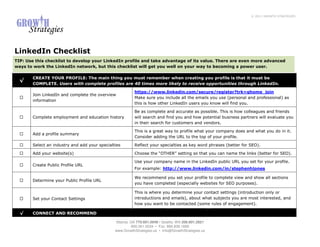
       CREATE YOUR PROFILE: The main thing you must remember when creating you profile is that it must be
  √
       COMPLETE. Users with complete profiles are 40 times more likely to receive opportunities through LinkedIn.

                                                          https://www.linkedin.com/secure/register?trk=ghome_join
       Join LinkedIn and complete the overview
                                                          Make sure you include all the emails you use (personal and professional) as
       information
                                                          this is how other LinkedIn users you know will find you.

                                                          Be as complete and accurate as possible. This is how colleagues and friends
       Complete employment and education history          will search and find you and how potential business partners will evaluate you
                                                          in their search for customers and vendors.

                                                          This is a great way to profile what your company does and what you do in it.
       Add a profile summary
                                                          Consider adding the URL to the top of your profile.

       Select an industry and add your specialties        Reflect your specialties as key word phrases (better for SEO).

       Add your website(s)                                Choose the “OTHER” setting so that you can name the links (better for SEO).

                                                          Use your company name in the LinkedIn public URL you set for your profile.
       Create Public Profile URL
                                                          For example: http://www.linkedin.com/in/stephenhjones

                                                          We recommend you set your profile to complete view and show all sections
       Determine your Public Profile URL
                                                          you have completed (especially websites for SEO purposes).

                                                          This is where you determine your contact settings (introduction only or
       Set your Contact Settings                          introductions and emails), about what subjects you are most interested, and
                                                          how you want to be contacted (some rules of engagement).

  √    CONNECT AND RECOMMEND

                                               Atlanta, GA 770.601.0949 • Seattle, WA 206.601.2821
                                                         800.261.5034 • Fax: 866.839.1668
                                               www.GrowthStrategies.us • Info@GrowthStrategies.us
© 2011 GROWTH STRATEGIES


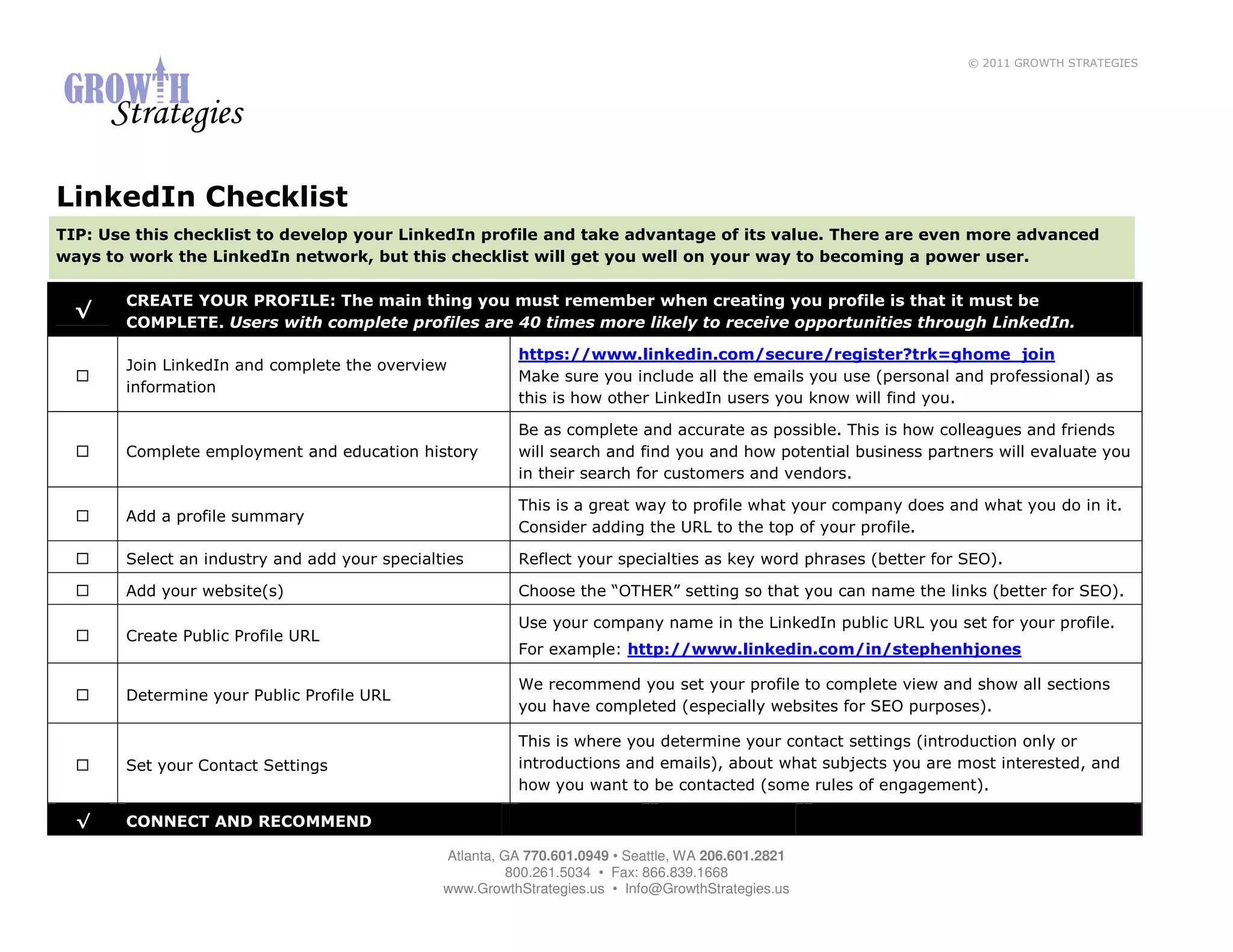
                                                       LinkedIn has a great tool for uploading the contacts you have stored in your
     Upload your Contacts from your email client       email client already and matching them with other LinkedIn users who have
                                                       already set profiles. You can also add your contacts manually.
                                                       Use the built in tool to invite your contacts you’ve uploaded to accept a
                                                       “connection” via LinkedIn. We find the best way to do this is to include as
                                                       personal a message as possible! This may take a little more time, but it is
                                                       well worth it, as it improves the response of those who accept your
     Make introductions to connect via LinkedIn        connections, as well as improves the quality of the connection itself.
                                                       You should also do a search on the LinkedIn site for those users who were
                                                       employed by your past employers during the same time you were. These are
                                                       connections you can make and rekindle via a LinkedIn invitation.
                                                       This is an ongoing task that needs to be redone every month or so.
                                                       Once your contacts have accepted your invitation, request a recommendation
     Collect at least 3 recommendations from           from them. You need at least 3 to “complete your profile,” but the more the
     your “network”                                    merrier. Try to ensure you have a few for your current company and at least
                                                       one recommendation for each past position.
                                                       Remember, networking is largely a give/get process and LinkedIn is no
                                                       exception. When someone gives you a recommendation, return the favor!
     Give and you shall receive!                       Also, be proactive…give the recommendation to some of your connections
                                                       before they ask.

√   ASK AND ANSWER

                                                       Thought Leadership is one of your greatest sales and marketing tools.
                                                       LinkedIn users have the ability to ask the network questions they are facing
    Regularly monitor the Q&A section for questions    that by your answering you present yourself as an expert in that field. Be
    you are uniquely able to answer                    sure to truly answer the question, do not promote yourself, but always use
                                                       the link feature to link back to your site (helps with SEO). If your answer is
                                                       chosen as the best answer this will elevate you in LinkedIn searches as well.

                                                       Use this same tool to poise questions to the network for challenges you face
    Ask questions that can help you do your job.       in your job. This can be a great way to validate assumptions and get expert
                                                       advice for no cost!


                                            Atlanta, GA 770.601.0949 • Seattle, WA 206.601.2821
                                                      800.261.5034 • Fax: 866.839.1668
                                            www.GrowthStrategies.us • Info@GrowthStrategies.us
© 2011 GROWTH STRATEGIES


√   JOIN GROUPS
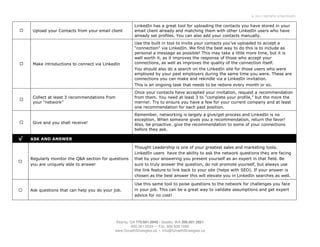
                                                          LinkedIn offers a platform for networking groups of like interests to connect.
                                                          Some of the networking associations you already belong to may already be
                                                          on LinkedIn. You can search the directory within LinkedIn to see what groups
    Identify networking groups within LinkedIn            may be for you (for both industry and alumni). Also, as you review the profile
                                                          of your connections, take note of the LinkedIn groups they belong to and
                                                          evaluate if you should join to! Once you are in a LinkedIn group you’ll be able
                                                          to search, find, and contact fellow group members.
    Work your LinkedIn groups                             Start discussions. Comment on other discussions. Submit articles!

√   MAINTAIN

                                                          Make your interaction with LinkedIn a scheduled task. We recommend daily,
                                                          but for some…weekly is as good as they can do. Put it on your calendar and
    Set a Calendar item to “work” your LinkedIn           make sure you are disciplined about logging in, making new connections,
                                                          answering questions on your topic of expertise, etc. It won’t work for you, if
                                                          you don’t work it.
                                                          You may include examples, teasers, links, and other information about
    Update your status with current information on        projects you have recently completed or are now working on. Also use your
    recent work and/or to share useful resources.         status to share relevant information you have discovered and recommend
                                                          that is not authored by you. This builds credibility with your connections.
    Sync your LinkedIn and Twitter accounts.              Maximize your status updates by posting to both LinkedIn and Twitter.
                                                          Through LinkedIn’s productivity tools you can stay connected with LinkedIn
                                                          while not on the website. The Outlook Toolbar lets you build your network
    Use LinkedIn Productivity Tools (Outlook Toolbar      from frequent contacts and then manage it through Outlook. This includes
    and Browser Toolbar).                                 seeing suggestions of who to invite based on how frequently you email them
                                                          and well as using 1-click invitations. The Browser Toolbar lets you search
                                                          LinkedIn from anywhere and gives you one-click access to LinkedIn.
                                                          Let your colleagues, customers and prospects know that you can be found on
    Put your LinkedIn URL everywhere you put your
                                                          LinkedIn. This will help build your network and raise your profile on the site.
    contact information (email signatures,
                                                          Note: LinkedIn has an email signature tool to help you at:
    marketing collateral, business cards)
                                                          http://www.linkedin.com/static?key=tools&trk=hb_ft_tools.


                                               Atlanta, GA 770.601.0949 • Seattle, WA 206.601.2821
                                                         800.261.5034 • Fax: 866.839.1668
                                               www.GrowthStrategies.us • Info@GrowthStrategies.us
© 2011 GROWTH STRATEGIES


 √     ADVERTISE
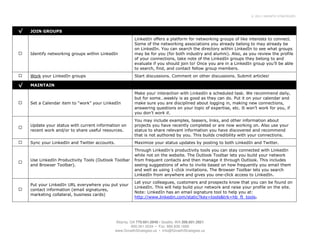
                                                            LinkedIn offers direct advertising programs where you pay by clicks or
                                                            impressions without any long-term contracts. Advertising on LinkedIn will put
       LinkedIn Direct Ads allow you to target specific
                                                            your ad directly in front of active and influential professionals, which may be
       prospects by geography, job function and
                                                            a more appropriate choice for some types of businesses rather than Facebook
       seniority, industry and company size, gender
                                                            or Google advertising programs. More information can be found at:
       and age.
                                                            https://www.linkedin.com/ads/. Note: you will need to have a LinkedIn
                                                            account to participate in their ad program.


REMEMBER: You have to continue to add clients and contacts to your LinkedIn connections as you go. If you meet a prospective
customer…go back to the office and search for them on LinkedIn. If you see a presenter at a networking event, check if they are on LinkedIn.
If appropriate, ask them to connect to you! It will make your effort to build business relationships infinitely easier and stronger.


                                                 Atlanta, GA 770.601.0949 • Seattle, WA 206.601.2821
                                                           800.261.5034 • Fax: 866.839.1668
                                                 www.GrowthStrategies.us • Info@GrowthStrategies.us

LinkedIn Checklist

  • 1.
    © 2011 GROWTHSTRATEGIES LinkedIn Checklist TIP: Use this checklist to develop your LinkedIn profile and take advantage of its value. There are even more advanced ways to work the LinkedIn network, but this checklist will get you well on your way to becoming a power user. CREATE YOUR PROFILE: The main thing you must remember when creating you profile is that it must be √ COMPLETE. Users with complete profiles are 40 times more likely to receive opportunities through LinkedIn. https://www.linkedin.com/secure/register?trk=ghome_join Join LinkedIn and complete the overview Make sure you include all the emails you use (personal and professional) as information this is how other LinkedIn users you know will find you. Be as complete and accurate as possible. This is how colleagues and friends Complete employment and education history will search and find you and how potential business partners will evaluate you in their search for customers and vendors. This is a great way to profile what your company does and what you do in it. Add a profile summary Consider adding the URL to the top of your profile. Select an industry and add your specialties Reflect your specialties as key word phrases (better for SEO). Add your website(s) Choose the “OTHER” setting so that you can name the links (better for SEO). Use your company name in the LinkedIn public URL you set for your profile. Create Public Profile URL For example: http://www.linkedin.com/in/stephenhjones We recommend you set your profile to complete view and show all sections Determine your Public Profile URL you have completed (especially websites for SEO purposes). This is where you determine your contact settings (introduction only or Set your Contact Settings introductions and emails), about what subjects you are most interested, and how you want to be contacted (some rules of engagement). √ CONNECT AND RECOMMEND Atlanta, GA 770.601.0949 • Seattle, WA 206.601.2821 800.261.5034 • Fax: 866.839.1668 www.GrowthStrategies.us • Info@GrowthStrategies.us
  • 2.
    © 2011 GROWTHSTRATEGIES LinkedIn has a great tool for uploading the contacts you have stored in your Upload your Contacts from your email client email client already and matching them with other LinkedIn users who have already set profiles. You can also add your contacts manually. Use the built in tool to invite your contacts you’ve uploaded to accept a “connection” via LinkedIn. We find the best way to do this is to include as personal a message as possible! This may take a little more time, but it is well worth it, as it improves the response of those who accept your Make introductions to connect via LinkedIn connections, as well as improves the quality of the connection itself. You should also do a search on the LinkedIn site for those users who were employed by your past employers during the same time you were. These are connections you can make and rekindle via a LinkedIn invitation. This is an ongoing task that needs to be redone every month or so. Once your contacts have accepted your invitation, request a recommendation Collect at least 3 recommendations from from them. You need at least 3 to “complete your profile,” but the more the your “network” merrier. Try to ensure you have a few for your current company and at least one recommendation for each past position. Remember, networking is largely a give/get process and LinkedIn is no exception. When someone gives you a recommendation, return the favor! Give and you shall receive! Also, be proactive…give the recommendation to some of your connections before they ask. √ ASK AND ANSWER Thought Leadership is one of your greatest sales and marketing tools. LinkedIn users have the ability to ask the network questions they are facing Regularly monitor the Q&A section for questions that by your answering you present yourself as an expert in that field. Be you are uniquely able to answer sure to truly answer the question, do not promote yourself, but always use the link feature to link back to your site (helps with SEO). If your answer is chosen as the best answer this will elevate you in LinkedIn searches as well. Use this same tool to poise questions to the network for challenges you face Ask questions that can help you do your job. in your job. This can be a great way to validate assumptions and get expert advice for no cost! Atlanta, GA 770.601.0949 • Seattle, WA 206.601.2821 800.261.5034 • Fax: 866.839.1668 www.GrowthStrategies.us • Info@GrowthStrategies.us
  • 3.
    © 2011 GROWTHSTRATEGIES √ JOIN GROUPS LinkedIn offers a platform for networking groups of like interests to connect. Some of the networking associations you already belong to may already be on LinkedIn. You can search the directory within LinkedIn to see what groups Identify networking groups within LinkedIn may be for you (for both industry and alumni). Also, as you review the profile of your connections, take note of the LinkedIn groups they belong to and evaluate if you should join to! Once you are in a LinkedIn group you’ll be able to search, find, and contact fellow group members. Work your LinkedIn groups Start discussions. Comment on other discussions. Submit articles! √ MAINTAIN Make your interaction with LinkedIn a scheduled task. We recommend daily, but for some…weekly is as good as they can do. Put it on your calendar and Set a Calendar item to “work” your LinkedIn make sure you are disciplined about logging in, making new connections, answering questions on your topic of expertise, etc. It won’t work for you, if you don’t work it. You may include examples, teasers, links, and other information about Update your status with current information on projects you have recently completed or are now working on. Also use your recent work and/or to share useful resources. status to share relevant information you have discovered and recommend that is not authored by you. This builds credibility with your connections. Sync your LinkedIn and Twitter accounts. Maximize your status updates by posting to both LinkedIn and Twitter. Through LinkedIn’s productivity tools you can stay connected with LinkedIn while not on the website. The Outlook Toolbar lets you build your network Use LinkedIn Productivity Tools (Outlook Toolbar from frequent contacts and then manage it through Outlook. This includes and Browser Toolbar). seeing suggestions of who to invite based on how frequently you email them and well as using 1-click invitations. The Browser Toolbar lets you search LinkedIn from anywhere and gives you one-click access to LinkedIn. Let your colleagues, customers and prospects know that you can be found on Put your LinkedIn URL everywhere you put your LinkedIn. This will help build your network and raise your profile on the site. contact information (email signatures, Note: LinkedIn has an email signature tool to help you at: marketing collateral, business cards) http://www.linkedin.com/static?key=tools&trk=hb_ft_tools. Atlanta, GA 770.601.0949 • Seattle, WA 206.601.2821 800.261.5034 • Fax: 866.839.1668 www.GrowthStrategies.us • Info@GrowthStrategies.us
  • 4.
    © 2011 GROWTHSTRATEGIES √ ADVERTISE LinkedIn offers direct advertising programs where you pay by clicks or impressions without any long-term contracts. Advertising on LinkedIn will put LinkedIn Direct Ads allow you to target specific your ad directly in front of active and influential professionals, which may be prospects by geography, job function and a more appropriate choice for some types of businesses rather than Facebook seniority, industry and company size, gender or Google advertising programs. More information can be found at: and age. https://www.linkedin.com/ads/. Note: you will need to have a LinkedIn account to participate in their ad program. REMEMBER: You have to continue to add clients and contacts to your LinkedIn connections as you go. If you meet a prospective customer…go back to the office and search for them on LinkedIn. If you see a presenter at a networking event, check if they are on LinkedIn. If appropriate, ask them to connect to you! It will make your effort to build business relationships infinitely easier and stronger. Atlanta, GA 770.601.0949 • Seattle, WA 206.601.2821 800.261.5034 • Fax: 866.839.1668 www.GrowthStrategies.us • Info@GrowthStrategies.us