Link in to
September 26| Career Services
Benefits of
• Create and promote your professional brand
• Connect with professionals/build a professional presence online
• Conduct company, industry, and graduate program research
• Receive recommendations and endorsements from connections
you’ve worked with academically or professionally
• Allows employers to find you. Today, nearly all organizations
look for talented candidates on social networking platforms like
LinkedIn
• Find and apply to positions posted on LinkedIn
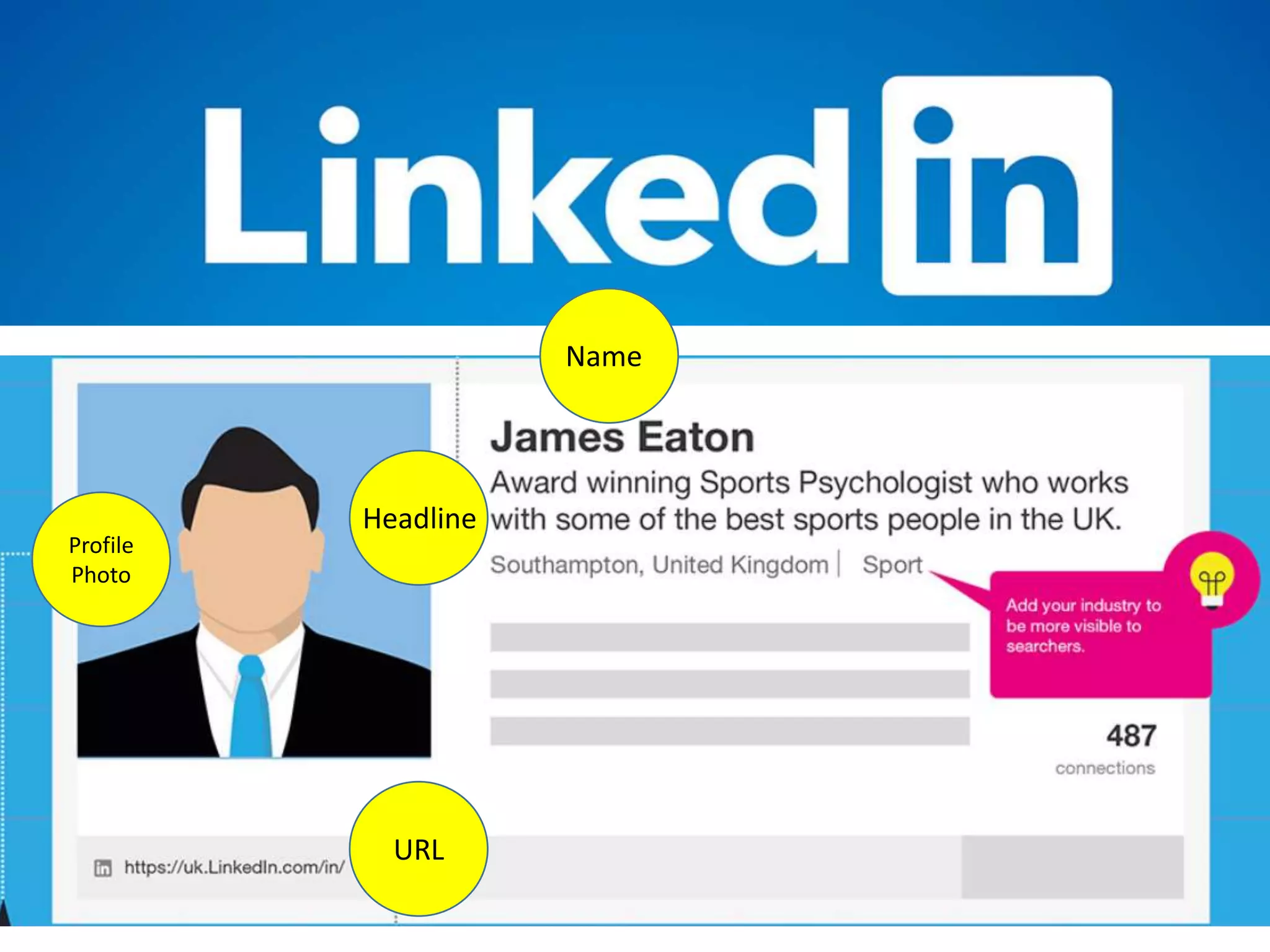
Headline
Name
URL
Profile
Photo
Name and Headline
Name
• Include your first, last, and middle name (optional).
• No nicknames or humorous references to job titles (the bomb
businessman, king of engineering, flight ninja)
Headline:
• 120 characters
• IMPORTANT- this is the first thing people will read about you
• Be succinct, creative, and include key terms that make it easy for
others to define YOUR ROLE within YOUR INDUSTRY.
Profile Photo
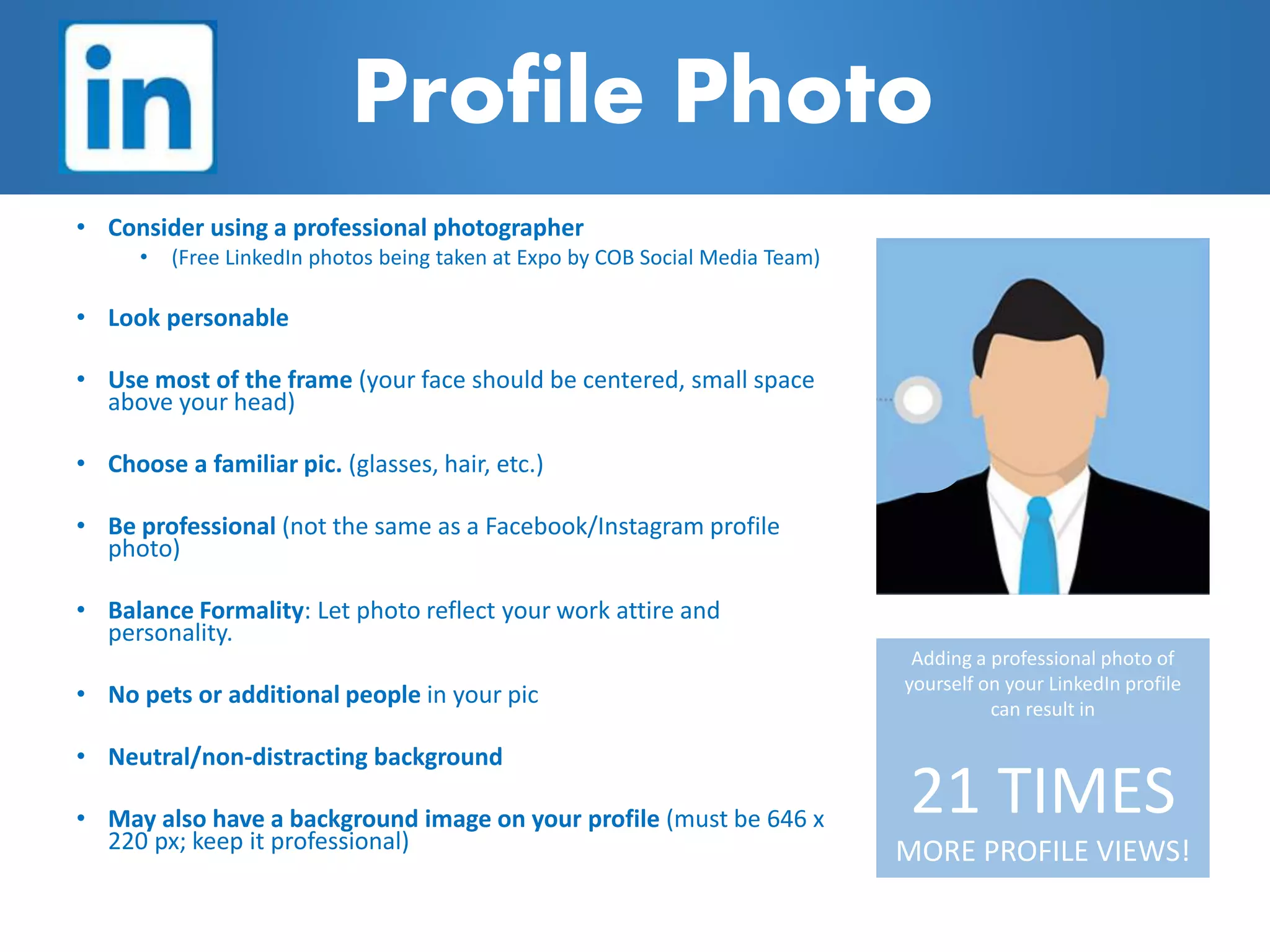
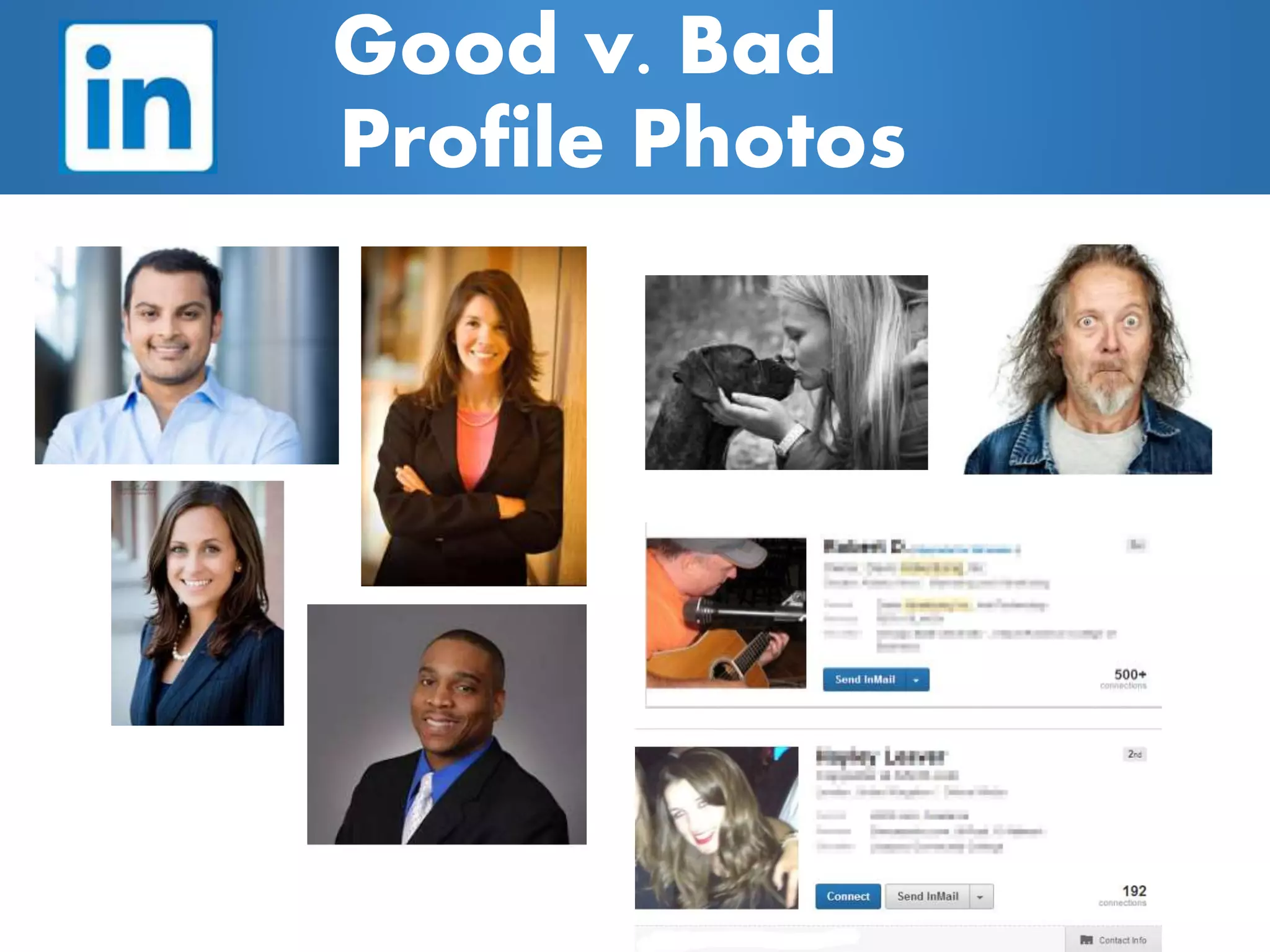
• Consider using a professional photographer
• (Free LinkedIn photos being taken at Expo by COB Social Media Team)
• Look personable
• Use most of the frame (your face should be centered, small space
above your head)
• Choose a familiar pic. (glasses, hair, etc.)
• Be professional (not the same as a Facebook/Instagram profile
photo)
• Balance Formality: Let photo reflect your work attire and
personality.
• No pets or additional people in your pic
• Neutral/non-distracting background
• May also have a background image on your profile (must be 646 x
220 px; keep it professional)
Adding a professional photo of
yourself on your LinkedIn profile
can result in
21 TIMES
MORE PROFILE VIEWS!
Good v. Bad
Profile Photos
Profile URL
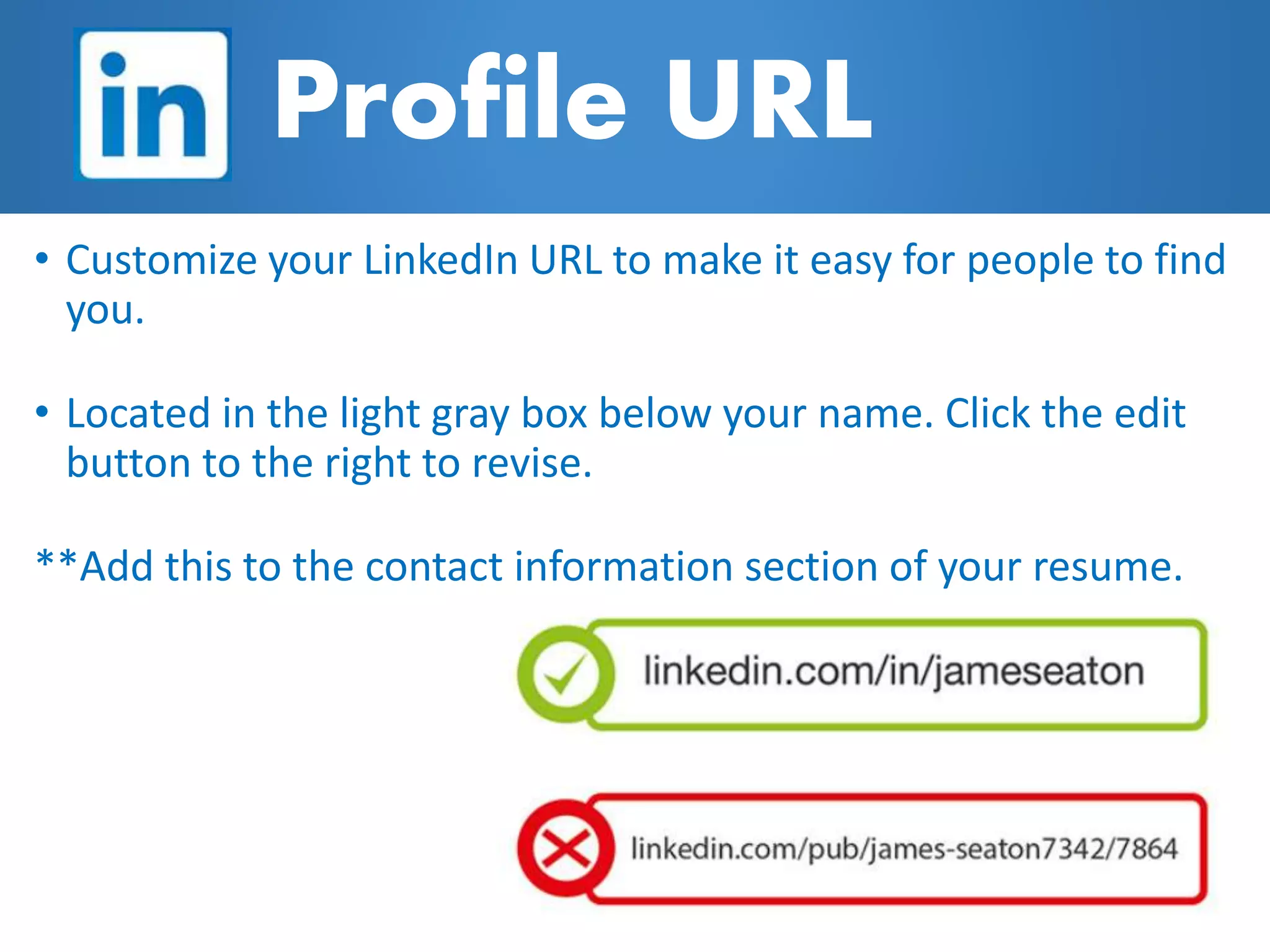
• Customize your LinkedIn URL to make it easy for people to find
you.
• Located in the light gray box below your name. Click the edit
button to the right to revise.
**Add this to the contact information section of your resume.
Background
Summary
• 2000 characters max
• Write a succinct description, including your present job/position
and future professional ambitions.
• You can add additional points of contact: cell phone number, email
address, etc.
• Adding media to your summary can support your credibility. You
can provide links to slides, videos, podcasts, blog posts, etc. Be
precise in describing past and current job descriptions. Keep it
positive and highlight skills and accomplishments.
Buzzword examples:
creative,
passionate,
innovative, strategic,
organizational,
motivated, extensive
experience, driven,
expert, track record,
dynamic
• Experience/Position Title: 100 characters
• Experience/Position Description: 2000 characters
• Be precise in your past experiences/current roles and
don’t be afraid to use detail.
• Complement resume information with video clips, in-
article quotes, slides, and over content you created
relevant to your professional goals
• Try to intrigue your viewers; the longer they view your
profile, the stronger the chance you have of making a
business connection.
• Avoid using ‘buzzwords’ and remember to show (versus
tell) about your skills and talents.
Experience
As students, you can list experiences
you’ve had working with projects in
your work experiences, internship
experiences, extracurricular
organizations, research, and course
projects.
• Add projects to demonstrate skills and reinforce
statements in your position descriptions
• Add links to current projects. It is important to
show how you’ve used your skills versus simply
listing them.
• Include slideshows and/or videos or photos
whenever possible
Projects
Education
• 100 characters
• This section is critical for entry-level job seekers.
• Displaying your academic background will be required to gain entry into
LinkedIn Alumni Association oriented groups, and it is important for
networking.
• Include information about degrees acquired and school attended. There
is also a section to list out your coursework.
• Including educational information provides opportunity to make
connections with other alumni and impress other interested employers
Education
• Be strategic in making connections with coworkers, peers in
your industry, faculty/staff, and present and past individuals you
have worked with.
• When connecting with individuals, include a personal message
that explains why you are requesting to connect. As a student,
let recruiters request to connect with you first. ERAU alumni are
relatively fair game.
• Join groups to maximize Linkedin’s networking potential and
utilize the ability to contact other group members.
• There are thousands of groups to choose from. Most
professional organizations and alumni associations have a
presence on LinkedIn. So does ERAU Career Services. 
Connections & Groups
• Recommendations are written by other LinkedIn members as
a way to recognize or applaud a business partner or colleague
• Recommendations can add credibility to your profile
• Be specific in what you’d like to be recommended for (skills,
qualities, etc.)
• To request a recommendation:
1. Go to your profile and click the down arrow to the right of
the button near your profile picture.
2. Click Ask to be recommended from the dropdown.
3. Follow the prompts to request the recommendation.
4. Click Send.
Recommendations vs.
Skills & Endorsements
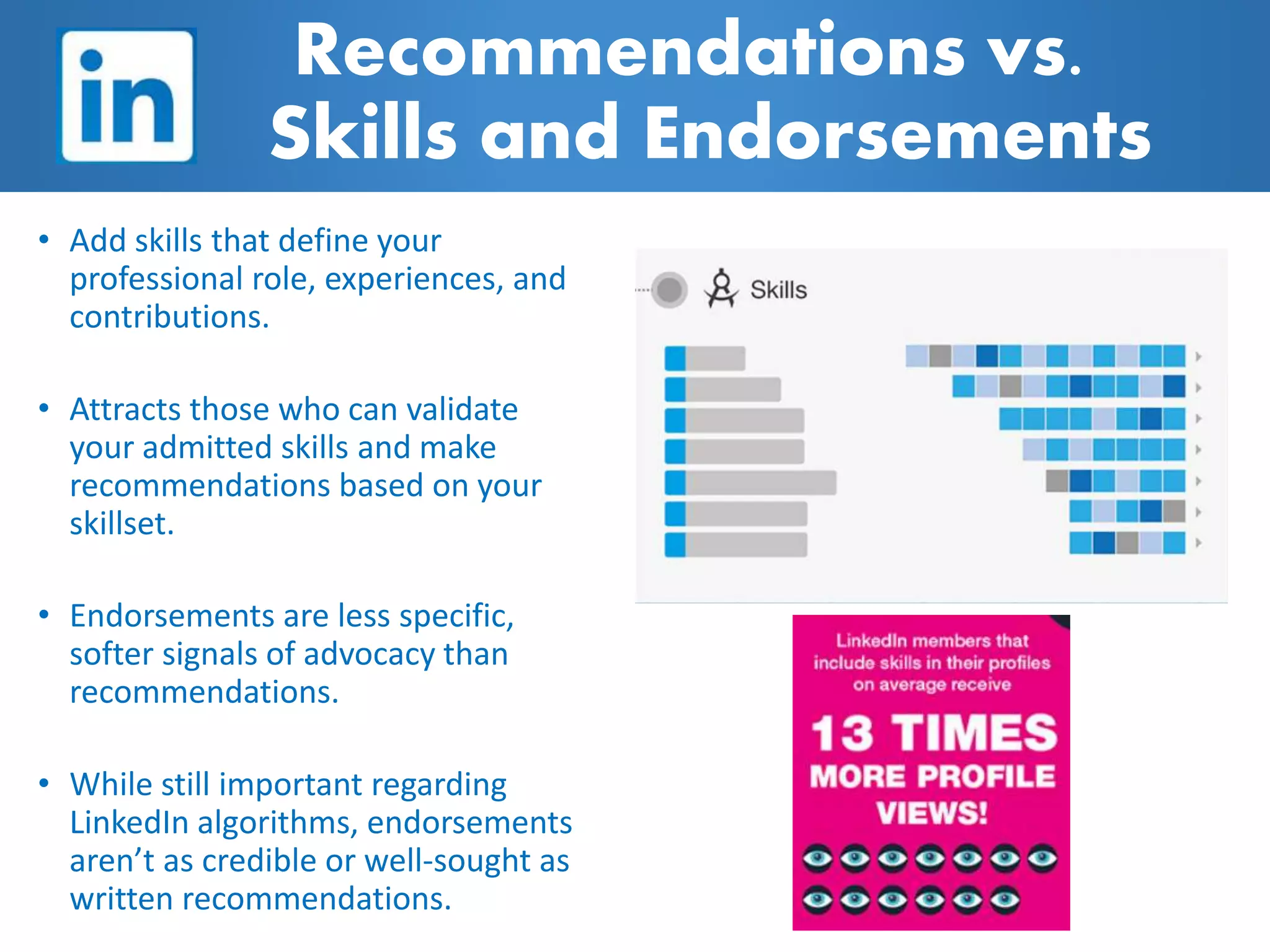
• Add skills that define your
professional role, experiences, and
contributions.
• Attracts those who can validate
your admitted skills and make
recommendations based on your
skillset.
• Endorsements are less specific,
softer signals of advocacy than
recommendations.
• While still important regarding
LinkedIn algorithms, endorsements
aren’t as credible or well-sought as
written recommendations.
Recommendations vs.
Skills and Endorsements
• Similar to Facebook, but professional in nature.
• Use it to share successes, projects, industry news,
etc. Can send to specific people or make public. Tag
connections and companies when relevant for
greater impact.
• Great place to find industry news, company news,
and updates about individuals you are following.
Newsfeed
• You can apply to jobs through LinkedIn directly or
through the LinkedIn Students app.
• Do not begin applying for positions via LinkedIn until
you have thoroughly completed your profile and had it
reviewed by Career Services, a faculty member, peer,
and/or individual in industry
• Can save jobs of interest and keep track of jobs you’ve
applied to; jobs show up that are a match to your
skillsets based on your profile
• There are 3M active jobs on LinkedIn
Jobs
LinkedIn Demo
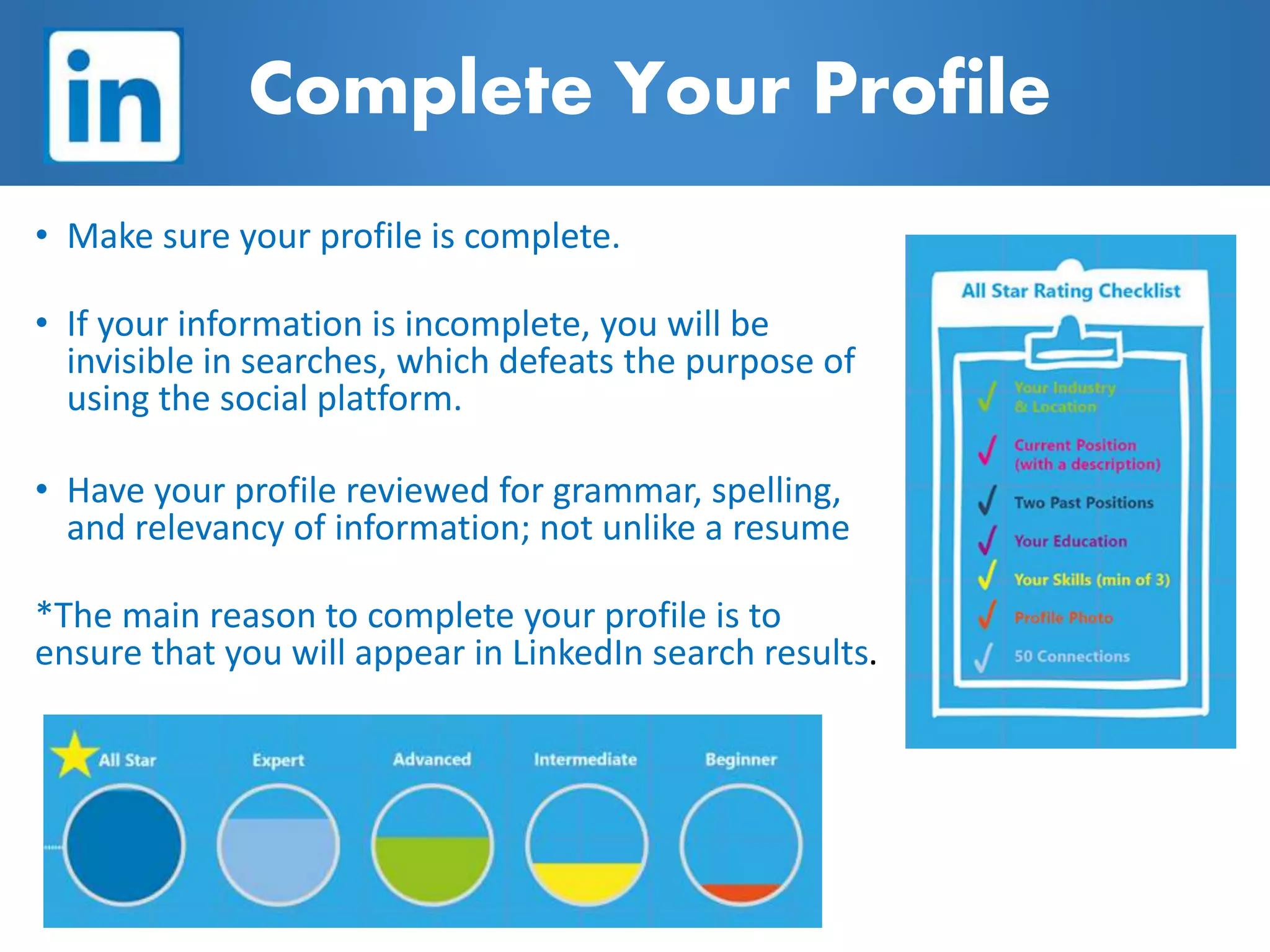
• Make sure your profile is complete.
• If your information is incomplete, you will be
invisible in searches, which defeats the purpose of
using the social platform.
• Have your profile reviewed for grammar, spelling,
and relevancy of information; not unlike a resume
*The main reason to complete your profile is to
ensure that you will appear in LinkedIn search results.
Complete Your Profile
Stay Connected to Career Services
Career Services Website
EagleHire
ERNIE/My Team Sites
Facebook
Going Places Career Blog
LinkedIn
Twitter
Instagram
Industry/Career Expo
Thursday, October 12
9:00 am – 4:00 pm
ICI Center
Please bring Eagle Card.
Professional dress required.
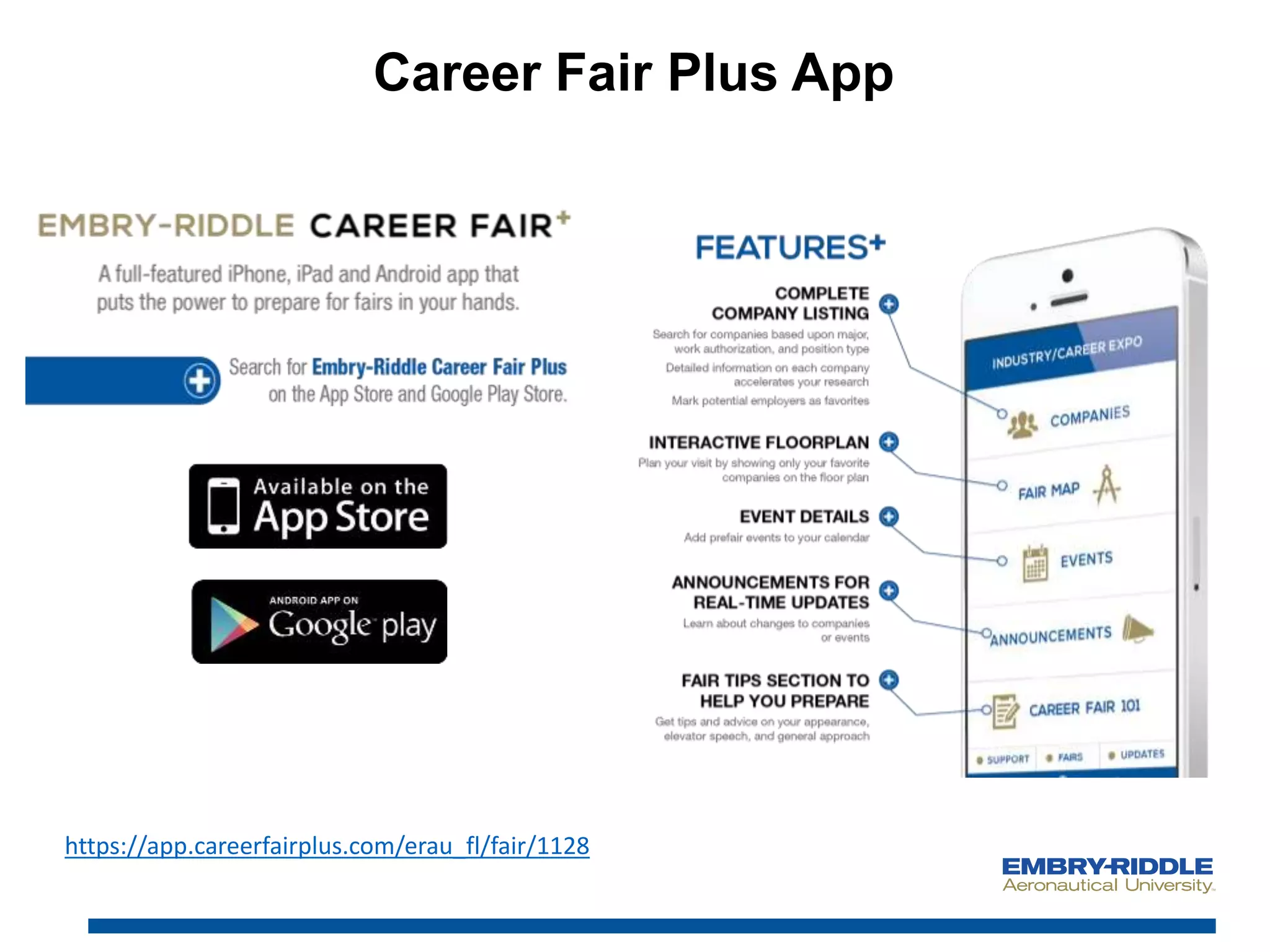
Career Fair Plus App
https://app.careerfairplus.com/erau_fl/fair/1128
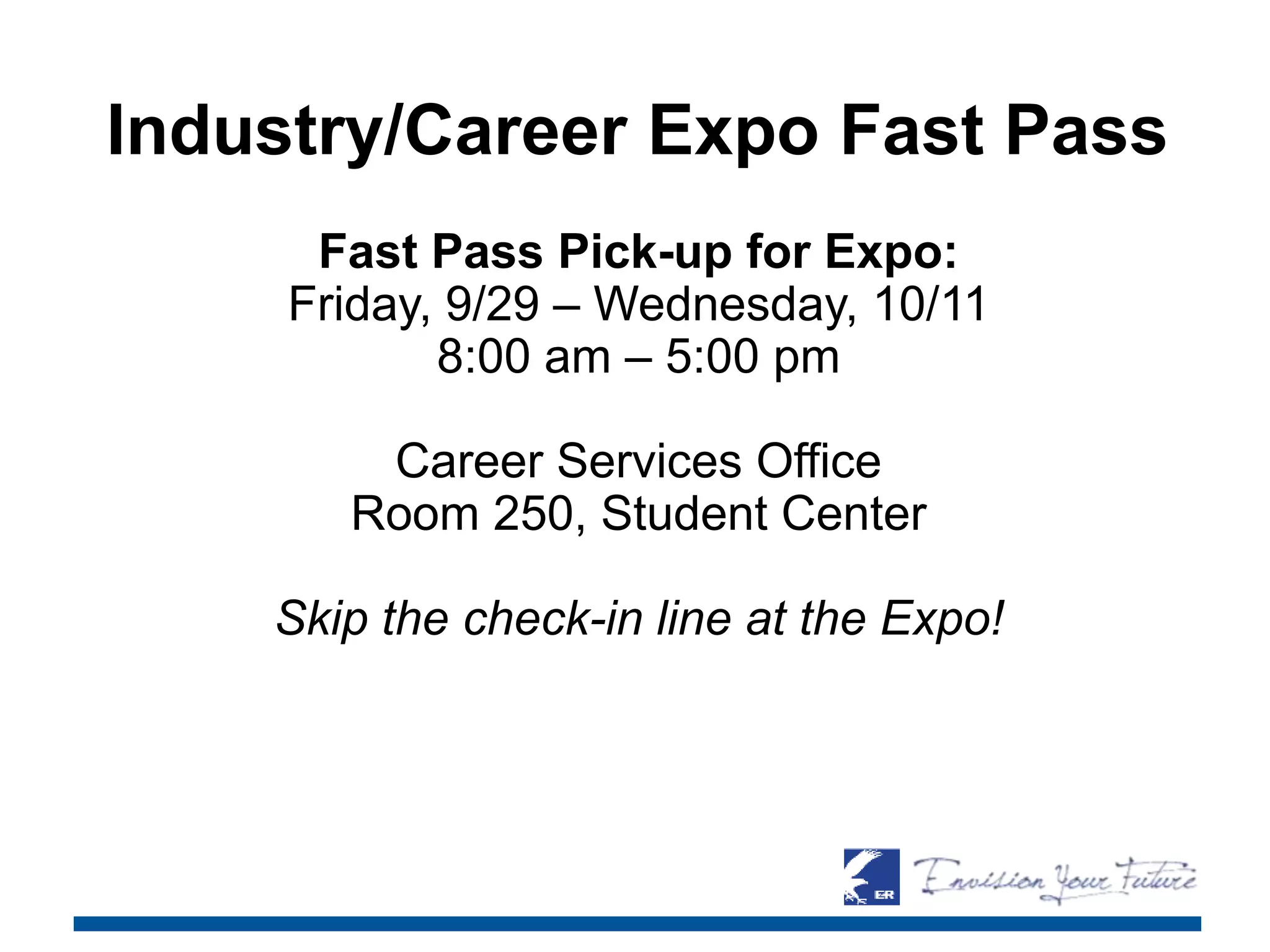
Industry/Career Expo Fast Pass
Fast Pass Pick-up for Expo:
Friday, 9/29 – Wednesday, 10/11
8:00 am – 5:00 pm
Career Services Office
Room 250, Student Center
Skip the check-in line at the Expo!
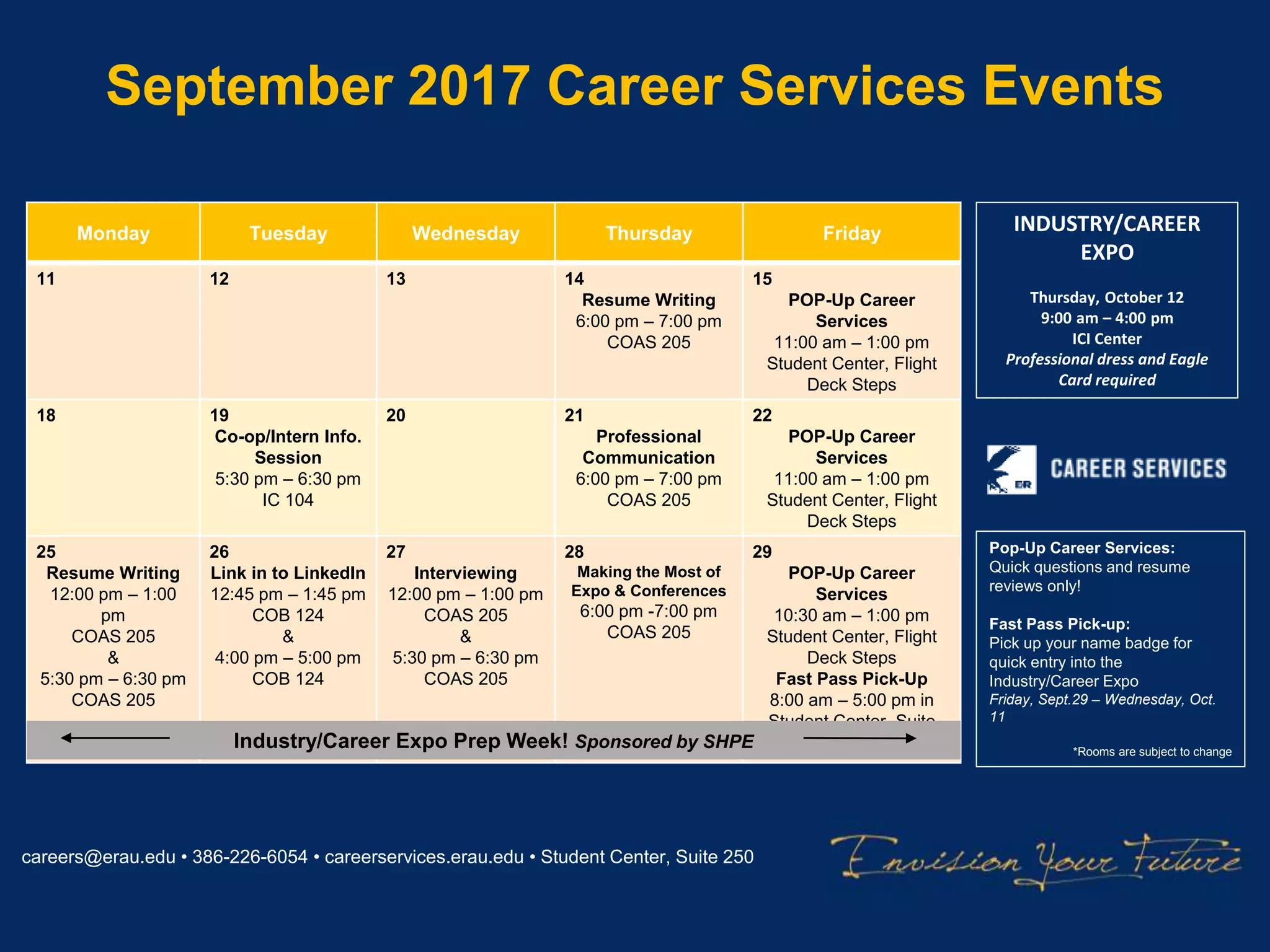
September 2017 Career Services Events
careers@erau.edu • 386-226-6054 • careerservices.erau.edu • Student Center, Suite 250
Monday Tuesday Wednesday Thursday Friday
11 12 13 14
Resume Writing
6:00 pm – 7:00 pm
COAS 205
15
POP-Up Career
Services
11:00 am – 1:00 pm
Student Center, Flight
Deck Steps
18 19
Co-op/Intern Info.
Session
5:30 pm – 6:30 pm
IC 104
20 21
Professional
Communication
6:00 pm – 7:00 pm
COAS 205
22
POP-Up Career
Services
11:00 am – 1:00 pm
Student Center, Flight
Deck Steps
25
Resume Writing
12:00 pm – 1:00
pm
COAS 205
&
5:30 pm – 6:30 pm
COAS 205
26
Link in to LinkedIn
12:45 pm – 1:45 pm
COB 124
&
4:00 pm – 5:00 pm
COB 124
27
Interviewing
12:00 pm – 1:00 pm
COAS 205
&
5:30 pm – 6:30 pm
COAS 205
28
Making the Most of
Expo & Conferences
6:00 pm -7:00 pm
COAS 205
29
POP-Up Career
Services
10:30 am – 1:00 pm
Student Center, Flight
Deck Steps
Fast Pass Pick-Up
8:00 am – 5:00 pm in
Student Center, Suite
250Industry/Career Expo Prep Week! Sponsored by SHPE
Pop-Up Career Services:
Quick questions and resume
reviews only!
Fast Pass Pick-up:
Pick up your name badge for
quick entry into the
Industry/Career Expo
Friday, Sept.29 – Wednesday, Oct.
11
*Rooms are subject to change
INDUSTRY/CAREER
EXPO
Thursday, October 12
9:00 am – 4:00 pm
ICI Center
Professional dress and Eagle
Card required
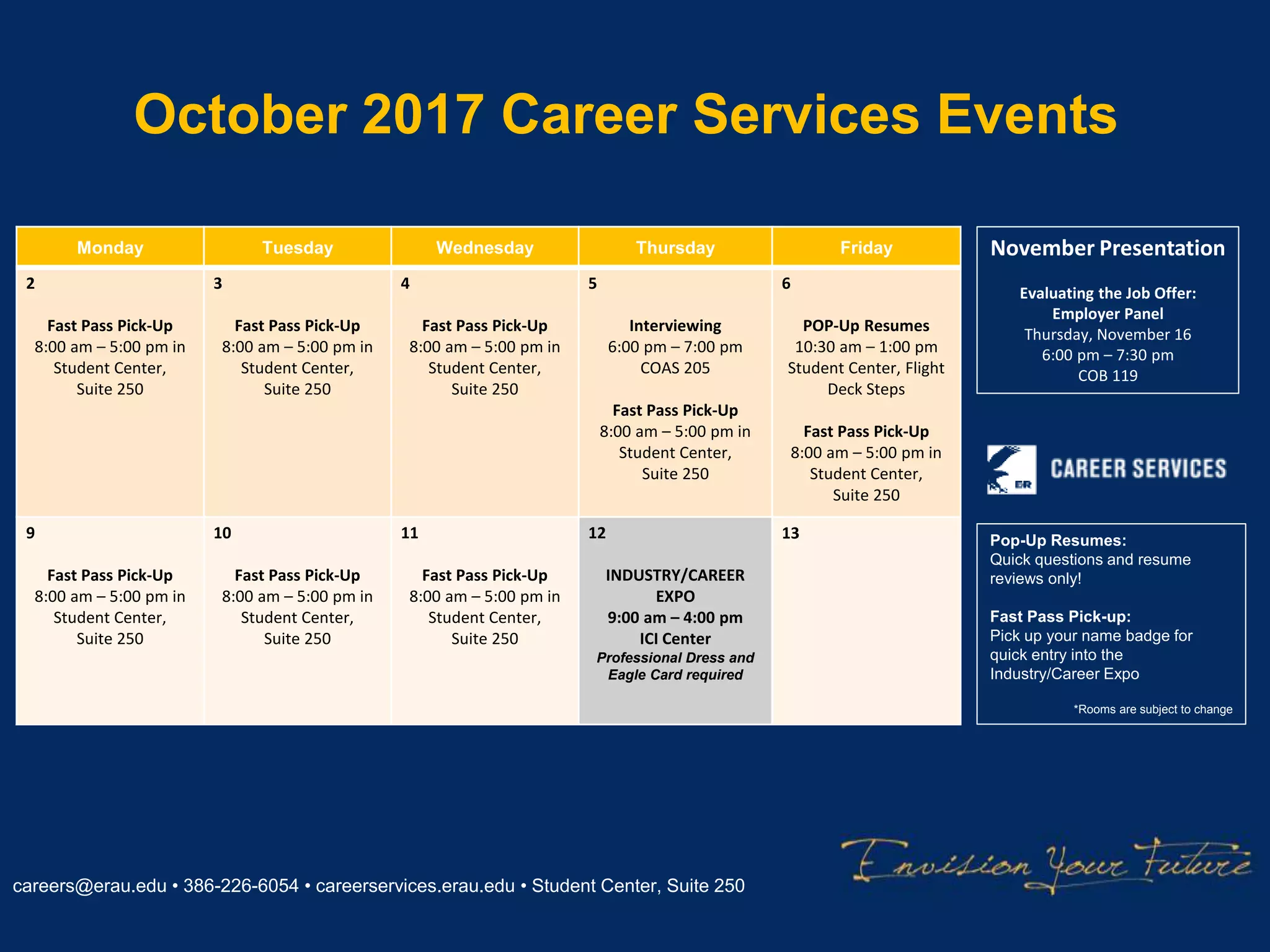
October 2017 Career Services Events
careers@erau.edu • 386-226-6054 • careerservices.erau.edu • Student Center, Suite 250
Monday Tuesday Wednesday Thursday Friday
2
Fast Pass Pick-Up
8:00 am – 5:00 pm in
Student Center,
Suite 250
3
Fast Pass Pick-Up
8:00 am – 5:00 pm in
Student Center,
Suite 250
4
Fast Pass Pick-Up
8:00 am – 5:00 pm in
Student Center,
Suite 250
5
Interviewing
6:00 pm – 7:00 pm
COAS 205
Fast Pass Pick-Up
8:00 am – 5:00 pm in
Student Center,
Suite 250
6
POP-Up Resumes
10:30 am – 1:00 pm
Student Center, Flight
Deck Steps
Fast Pass Pick-Up
8:00 am – 5:00 pm in
Student Center,
Suite 250
9
Fast Pass Pick-Up
8:00 am – 5:00 pm in
Student Center,
Suite 250
10
Fast Pass Pick-Up
8:00 am – 5:00 pm in
Student Center,
Suite 250
11
Fast Pass Pick-Up
8:00 am – 5:00 pm in
Student Center,
Suite 250
12
INDUSTRY/CAREER
EXPO
9:00 am – 4:00 pm
ICI Center
Professional Dress and
Eagle Card required
13 Pop-Up Resumes:
Quick questions and resume
reviews only!
Fast Pass Pick-up:
Pick up your name badge for
quick entry into the
Industry/Career Expo
*Rooms are subject to change
November Presentation
Evaluating the Job Offer:
Employer Panel
Thursday, November 16
6:00 pm – 7:30 pm
COB 119
Questions?
Thank you for attending! Please
take a few moments to fill out the
survey.

Link in to LinkedIn

  • 1.
    Link in to September26| Career Services
  • 3.
    Benefits of • Createand promote your professional brand • Connect with professionals/build a professional presence online • Conduct company, industry, and graduate program research • Receive recommendations and endorsements from connections you’ve worked with academically or professionally • Allows employers to find you. Today, nearly all organizations look for talented candidates on social networking platforms like LinkedIn • Find and apply to positions posted on LinkedIn
  • 4.
  • 5.
    Name and Headline Name •Include your first, last, and middle name (optional). • No nicknames or humorous references to job titles (the bomb businessman, king of engineering, flight ninja) Headline: • 120 characters • IMPORTANT- this is the first thing people will read about you • Be succinct, creative, and include key terms that make it easy for others to define YOUR ROLE within YOUR INDUSTRY.
  • 6.
    Profile Photo • Considerusing a professional photographer • (Free LinkedIn photos being taken at Expo by COB Social Media Team) • Look personable • Use most of the frame (your face should be centered, small space above your head) • Choose a familiar pic. (glasses, hair, etc.) • Be professional (not the same as a Facebook/Instagram profile photo) • Balance Formality: Let photo reflect your work attire and personality. • No pets or additional people in your pic • Neutral/non-distracting background • May also have a background image on your profile (must be 646 x 220 px; keep it professional) Adding a professional photo of yourself on your LinkedIn profile can result in 21 TIMES MORE PROFILE VIEWS!
  • 7.
  • 8.
    Profile URL • Customizeyour LinkedIn URL to make it easy for people to find you. • Located in the light gray box below your name. Click the edit button to the right to revise. **Add this to the contact information section of your resume.
  • 9.
    Background Summary • 2000 charactersmax • Write a succinct description, including your present job/position and future professional ambitions. • You can add additional points of contact: cell phone number, email address, etc. • Adding media to your summary can support your credibility. You can provide links to slides, videos, podcasts, blog posts, etc. Be precise in describing past and current job descriptions. Keep it positive and highlight skills and accomplishments.
  • 10.
    Buzzword examples: creative, passionate, innovative, strategic, organizational, motivated,extensive experience, driven, expert, track record, dynamic • Experience/Position Title: 100 characters • Experience/Position Description: 2000 characters • Be precise in your past experiences/current roles and don’t be afraid to use detail. • Complement resume information with video clips, in- article quotes, slides, and over content you created relevant to your professional goals • Try to intrigue your viewers; the longer they view your profile, the stronger the chance you have of making a business connection. • Avoid using ‘buzzwords’ and remember to show (versus tell) about your skills and talents. Experience As students, you can list experiences you’ve had working with projects in your work experiences, internship experiences, extracurricular organizations, research, and course projects.
  • 11.
    • Add projectsto demonstrate skills and reinforce statements in your position descriptions • Add links to current projects. It is important to show how you’ve used your skills versus simply listing them. • Include slideshows and/or videos or photos whenever possible Projects
  • 12.
    Education • 100 characters •This section is critical for entry-level job seekers. • Displaying your academic background will be required to gain entry into LinkedIn Alumni Association oriented groups, and it is important for networking. • Include information about degrees acquired and school attended. There is also a section to list out your coursework. • Including educational information provides opportunity to make connections with other alumni and impress other interested employers Education
  • 13.
    • Be strategicin making connections with coworkers, peers in your industry, faculty/staff, and present and past individuals you have worked with. • When connecting with individuals, include a personal message that explains why you are requesting to connect. As a student, let recruiters request to connect with you first. ERAU alumni are relatively fair game. • Join groups to maximize Linkedin’s networking potential and utilize the ability to contact other group members. • There are thousands of groups to choose from. Most professional organizations and alumni associations have a presence on LinkedIn. So does ERAU Career Services.  Connections & Groups
  • 14.
    • Recommendations arewritten by other LinkedIn members as a way to recognize or applaud a business partner or colleague • Recommendations can add credibility to your profile • Be specific in what you’d like to be recommended for (skills, qualities, etc.) • To request a recommendation: 1. Go to your profile and click the down arrow to the right of the button near your profile picture. 2. Click Ask to be recommended from the dropdown. 3. Follow the prompts to request the recommendation. 4. Click Send. Recommendations vs. Skills & Endorsements
  • 15.
    • Add skillsthat define your professional role, experiences, and contributions. • Attracts those who can validate your admitted skills and make recommendations based on your skillset. • Endorsements are less specific, softer signals of advocacy than recommendations. • While still important regarding LinkedIn algorithms, endorsements aren’t as credible or well-sought as written recommendations. Recommendations vs. Skills and Endorsements
  • 16.
    • Similar toFacebook, but professional in nature. • Use it to share successes, projects, industry news, etc. Can send to specific people or make public. Tag connections and companies when relevant for greater impact. • Great place to find industry news, company news, and updates about individuals you are following. Newsfeed
  • 17.
    • You canapply to jobs through LinkedIn directly or through the LinkedIn Students app. • Do not begin applying for positions via LinkedIn until you have thoroughly completed your profile and had it reviewed by Career Services, a faculty member, peer, and/or individual in industry • Can save jobs of interest and keep track of jobs you’ve applied to; jobs show up that are a match to your skillsets based on your profile • There are 3M active jobs on LinkedIn Jobs
  • 18.
  • 19.
    • Make sureyour profile is complete. • If your information is incomplete, you will be invisible in searches, which defeats the purpose of using the social platform. • Have your profile reviewed for grammar, spelling, and relevancy of information; not unlike a resume *The main reason to complete your profile is to ensure that you will appear in LinkedIn search results. Complete Your Profile
  • 20.
    Stay Connected toCareer Services Career Services Website EagleHire ERNIE/My Team Sites Facebook Going Places Career Blog LinkedIn Twitter Instagram
  • 21.
    Industry/Career Expo Thursday, October12 9:00 am – 4:00 pm ICI Center Please bring Eagle Card. Professional dress required.
  • 22.
    Career Fair PlusApp https://app.careerfairplus.com/erau_fl/fair/1128
  • 23.
    Industry/Career Expo FastPass Fast Pass Pick-up for Expo: Friday, 9/29 – Wednesday, 10/11 8:00 am – 5:00 pm Career Services Office Room 250, Student Center Skip the check-in line at the Expo!
  • 24.
    September 2017 CareerServices Events careers@erau.edu • 386-226-6054 • careerservices.erau.edu • Student Center, Suite 250 Monday Tuesday Wednesday Thursday Friday 11 12 13 14 Resume Writing 6:00 pm – 7:00 pm COAS 205 15 POP-Up Career Services 11:00 am – 1:00 pm Student Center, Flight Deck Steps 18 19 Co-op/Intern Info. Session 5:30 pm – 6:30 pm IC 104 20 21 Professional Communication 6:00 pm – 7:00 pm COAS 205 22 POP-Up Career Services 11:00 am – 1:00 pm Student Center, Flight Deck Steps 25 Resume Writing 12:00 pm – 1:00 pm COAS 205 & 5:30 pm – 6:30 pm COAS 205 26 Link in to LinkedIn 12:45 pm – 1:45 pm COB 124 & 4:00 pm – 5:00 pm COB 124 27 Interviewing 12:00 pm – 1:00 pm COAS 205 & 5:30 pm – 6:30 pm COAS 205 28 Making the Most of Expo & Conferences 6:00 pm -7:00 pm COAS 205 29 POP-Up Career Services 10:30 am – 1:00 pm Student Center, Flight Deck Steps Fast Pass Pick-Up 8:00 am – 5:00 pm in Student Center, Suite 250Industry/Career Expo Prep Week! Sponsored by SHPE Pop-Up Career Services: Quick questions and resume reviews only! Fast Pass Pick-up: Pick up your name badge for quick entry into the Industry/Career Expo Friday, Sept.29 – Wednesday, Oct. 11 *Rooms are subject to change INDUSTRY/CAREER EXPO Thursday, October 12 9:00 am – 4:00 pm ICI Center Professional dress and Eagle Card required
  • 25.
    October 2017 CareerServices Events careers@erau.edu • 386-226-6054 • careerservices.erau.edu • Student Center, Suite 250 Monday Tuesday Wednesday Thursday Friday 2 Fast Pass Pick-Up 8:00 am – 5:00 pm in Student Center, Suite 250 3 Fast Pass Pick-Up 8:00 am – 5:00 pm in Student Center, Suite 250 4 Fast Pass Pick-Up 8:00 am – 5:00 pm in Student Center, Suite 250 5 Interviewing 6:00 pm – 7:00 pm COAS 205 Fast Pass Pick-Up 8:00 am – 5:00 pm in Student Center, Suite 250 6 POP-Up Resumes 10:30 am – 1:00 pm Student Center, Flight Deck Steps Fast Pass Pick-Up 8:00 am – 5:00 pm in Student Center, Suite 250 9 Fast Pass Pick-Up 8:00 am – 5:00 pm in Student Center, Suite 250 10 Fast Pass Pick-Up 8:00 am – 5:00 pm in Student Center, Suite 250 11 Fast Pass Pick-Up 8:00 am – 5:00 pm in Student Center, Suite 250 12 INDUSTRY/CAREER EXPO 9:00 am – 4:00 pm ICI Center Professional Dress and Eagle Card required 13 Pop-Up Resumes: Quick questions and resume reviews only! Fast Pass Pick-up: Pick up your name badge for quick entry into the Industry/Career Expo *Rooms are subject to change November Presentation Evaluating the Job Offer: Employer Panel Thursday, November 16 6:00 pm – 7:30 pm COB 119
  • 27.
  • 28.
    Thank you forattending! Please take a few moments to fill out the survey.

Editor's Notes

  • #4 What we are specifically talking about today is building your LinkedIn profile. Once you have that, then comes the networking and job search component.