Video Conferencing
Fundamentally Transformed
Lifesize®
Icon 600™
The Experience
Begins with You
Lifesize Icon 600 is a video system designed on one
fundamental principle: simplicity. Setup takes minutes and
starting a video call takes seconds. You will discover that making
and receiving videos calls is as easy as using your smartphone.
We think you will find yourself preferring video over voice.
Video accelerates connected relationships with your customers,
partners, suppliers and colleagues through regular, face-to-face
business conversations. When you have a question for one of
your suppliers, just find them in your directory and call. Video
is personal and powerful. You will get quick results, and your
suppliers, partners and customers will be happier.
Seeing Is Believing—
Lifesize Icon Is Easy to Use
•	 New! Escalating to a multiparty call couldn’t be easier.
Simply accept an incoming call or click on a contact in
your directory to add participants.
•	 Record meetings and stream them live to any number
of viewers with the push of a button.
•	 Meeting reminders pop up, just like calendar meeting
notices, so your meeting starts on time.
•	 Ad-hoc meetings begin in the unified directory. Search
for a name, click and call.
•	 Enjoy the same user experience in and out of
multiparty calls. With the unified user experience,
every call looks and feels the same.
•	 The icons on the onscreen menu clearly convey
the function or operation so you can click and
complete quickly.
•	 Your meeting schedule is always visible
on the home screen.
•	 Pin contacts as favorites for quick and easy starts to
video calls.
•	 We thought of the IT pros, too, by making Lifesize Icon
600 as simple to install and configure as a PC.
•	 Lifesize Icon 600 is designed for maximum simplicity,
flexibility and value.
Lifesize®
Icon 600™
2
Leveraging the Lifesize UVC Core Applications*
Lifesize Icon 600 lets you capitalize on the power of our Lifesize UVC
core applications running on the UVC Platform to deliver even more
substantial benefits to your business. For the users, multiparty and
mobile calling and streaming and recording are strong enticements
to hold meetings via video. For your IT pro, simplified setup through
auto-provisioning, video network management and secure NAT/firewall
traversal will seal the deal.
The Ultimate Communication Experience
Lifesize firmly believes that video calls should be rewarding
experiences. That means getting the technology out of the way and
making it about realizing the user’s meeting objectives.
Lifesize Icon 600 achieves that goal. The simplified remote and the
user interface get you into your meeting quickly. The HD image and
crystal clear sound erase distance and put everyone into the same
space. Meetings are more productive, and everyone leaves happy.
That’s what we call The Ultimate Communication Experience.
AT-A-GLANCE
Seamless Call
Escalation
Accept requests to join your
call or add others via your
directory with one simple click
of your remote
Streamlined
Intuitive UI
Calendar integration, meeting
directory, unified user interface
during multiparty calls, unified
directory, name-based dialing,
search and favorites
Integrated with
Lifesize UVC core
applications*
Easily add powerful video
capabilities by turning on
mobile video calling, multiparty
calling, streaming/recording
and more
Remote Control Sleek, new design for quick and
easy navigation by any user
Video Quality Up to 1080p60
Presentation
Quality & Sharing
Up to 1080p; physical data port
HD Monitors Connect up to two displays
HD Camera Pan, tilt and zoom camera
options, including support for
up to 1080p60 HD and up to
10x zoom capability
Phone Touchscreen powers both audio
and video
Digital MicPod 360° triple microphone beam-
forming technology for superior
voice pickup
Place Anywhere Mountable option for wall
(VESA) or display
*Requires Lifesize UVC Platform, available as virtual machine
software or hardware
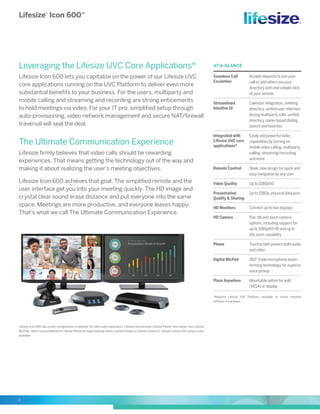
Lifesize Icon 600 two screen configuration is optional. For best audio experience, Lifesize recommends Lifesize Phone. Also shown, two Lifesize
MicPods, which can be tethered to Lifesize Phone for large meeting rooms. Camera shown is Lifesize Camera S. Lifesize Camera 10x option is also
available.
Lifesize®
Icon 600™
Product Specifications
HEADQUARTERS
Austin, Texas, USA
+1 512 347 9300
Toll Free US +1 877 543 3749
EMEA REGIONAL OFFICE
Munich, Germany
+49 89 20 70 76 0
Toll Free Europe +00 8000 999 09 799
APAC REGIONAL OFFICE
Singapore
+65 6303 8370 www.lifesize.com	
E-mail: info@lifesize.com
© 2014 Lifesize, a division of Logitech. All rights reserved. Information contained in this
document is subject to change without notice. Lifesize is the registered trademark or
trademark of Logitech. All other trademarks are the property of their respective owners.
DS_Icon2.0_EN_0614
SYSTEM COMPONENTS
Lifesize Icon 600 video system
Lifesize Camera S or Lifesize Camera 10x
Lifesize Digital MicPod or Lifesize Phone,
2nd Generation
Remote control
Power supply/cables
COMMUNICATIONS
SIP, H.323, 128 Kbps–6.0 Mbps
1x RJ-45 Network LAN 10/100/1000
1x Lifesize Link for 2x Lifesize Digital MicPod and/or Lifesize
Phone, 2nd Generation
SUPPORT FOR UP TO TWO DISPLAYS
Any 720p or 1080p HD displays supporting HDMI input
HD 1080P60 PTZ CAMERA
(LIFESIZE CAMERA S)
Wide-angle zoom lens with 70-degree field of view
Up to 3x optical zoom
Auto focus/automatic gain control
10 camera presets (near or far end)
Standard 3.0 m HDMI cable
HD 1080P60 PTZ CAMERA
(LIFESIZE CAMERA 10X)
Wide-angle zoom lens with 70-degree field of view
Up to 10x optical zoom
Auto focus/automatic gain control
10 camera presets (near or far end)
Standard 3.0 m HDMI cable
VIDEO SPECIFICATIONS
Maximum resolution 1920x1080, 16:9 aspect ratio
All resolutions progressive scanning up to 60 frames
per second
Over 200 resolutions supported
Example bitrates and resolutions (H.264 High Profile, AAC-LD):
––600 Kbps (720p30)
––820 Kbps (720p60)
––1.2 Mbps (1080p30)
––1.7 Mbps (1080p60)
VIDEO STANDARDS
H.264 High Profile, H.264 Baseline Profile, H.263+,
H.263
VIDEO INPUTS (2 INPUTS)
1 x HD Video In (up to 1080p60) HDMI enabled
1 x DVI-I In (up to 1080p60) HDMI/VGA enabled
VIDEO OUTPUTS (2 OUTPUTS)
1 x HD Video Out (up to 1080p60) HDMI enabled—
primary display
1 x DVI-I Out (up to 1080p60) HDMI/VGA enabled—
secondary display
FULLY INTEGRATED,
HD AUDIO CONFERENCE PHONE
90 Hz up to 22 kHz frequency support
Audio pickup range up to 4.57 m (15 ft)
Powered by Lifesize Icon 600 directly through Lifesize
Link Cable
Touchscreen user interface
Manage HD video, audio and presentation
Additional support for up to two Lifesize Digital MicPods
Optional 4 m and 15 m cables available
FULLY INTEGRATED, HD AUDIO
DIGITAL MICPOD
90 Hz up to 22 kHz
Audio pickup range up to 4.57 m (15 ft)
Powered by video codec directly through 4 m Lifesize Link cable
Support for up to two Lifesize Digital MicPods
Optional 9 m and 15 m cables available
AUDIO FEATURES
WebRTC NetEQ packet loss concealment
Full duplex for natural conversations
Echo cancellation for echo-free calls
Automatic gain control
Automatic noise reduction
AUDIO STANDARDS
G.711, G.722, G.722.1 and G.722.1C licensed from Polycom®
,
MPEG-4-AAC-LC, MPEG-4 AAC-LD
AUDIO INPUTS (4 INPUTS)
1 x Mic/Line In (3.5 mm)
1 x Lifesize Link (Lifesize Digital MicPods or Lifesize Phone, 2nd
Generation with optional Lifesize Digital MicPods)
1 x HD Video In
1 x DVI-I In
AUDIO OUTPUTS (4 OUTPUTS)
1 x Line Out/Headset
1 x Lifesize Link (Lifesize Phone, 2nd Generation)
1 x HD Video Out
1 x DVI-I Out
OTHER SUPPORTED STANDARDS
H.221, H.224, H.225, H.231, H.239/BFCP, H.241, H.242, H.245,
H.281, RFC 3261, RFC 3264, RFC 2190, RFC 3407, RFC 2833
USER INTERFACE & FEATURES
Simplified user interface
Heads up remote control
Seamless call escalation to a multiparty call
Graphical user interface administration console
Multiple languages supported
Do Not Disturb mode
Video mute
Picture-in-picture
UVC CORE APPLICATIONS*
Seamless call escalation for video and voice participants
Calendar, meeting directory, favorites, unified searchable directory
Single button streaming and recording
Mobile calling
Video network management
Secure firewall traversal, plus NAT
Microsoft®
Lync®
integration
SECURITY
Ability to disable HTTP, SSH services
H.235 (AES) encryption support including strict compliance
TLS/SRTP support
Kensington Security Slot
INTELLIGENT NETWORKING FEATURES
Adaptive motion control (AMC) including forward error correction
(FEC) for superior video quality in all network conditions
NAT/firewall traversal (H.460/SIP)
Auto bandwidth detection
DIRECTORY AND ADDRESS BOOK
Up to 100,000 directory entries
Global search tool
LDAP support/H.350 compliant
Calendar/meeting directory support
H.323 URI dialing support (Annex O)
SYSTEM MANAGEMENT
Web interface
Auto configuration
Backup and restore capability
2x USB 3.0
––Serial support
––VISCA™
support
POWER
AC voltage 100–240V, 50–60 Hz, 2.5A via external power supply
ENVIRONMENTAL DATA
Operating temperature: 0°C (32°F) to 40°C (104°F)
Operating humidity: 15% to 85%, noncondensing
Storage temperature: –20°C (–4°F) to 60°C (140°F)
Storage humidity: 10% to 90%, noncondensing
VIDEO DEVICE DIMENSIONS
Width: 365 mm (14.37”)
Depth: 163 mm (6.42”)
Height: 43.8 mm (1.72”)
Weight: 1.53 Kg (3.37 lbs)
MOUNTING OPTIONS
Mounting holes: 2 x M5 screw holes 307 mm (12 in) apart
Mounting screws: 2 x M5 screws (Max length: 9 mm, Min length:
4 mm)
Regulatory Number: LFZ-023
*Requires Lifesize UVC Platform

Lifesize icon 600 datasheet en

  • 1.
    Video Conferencing Fundamentally Transformed Lifesize® Icon600™ The Experience Begins with You Lifesize Icon 600 is a video system designed on one fundamental principle: simplicity. Setup takes minutes and starting a video call takes seconds. You will discover that making and receiving videos calls is as easy as using your smartphone. We think you will find yourself preferring video over voice. Video accelerates connected relationships with your customers, partners, suppliers and colleagues through regular, face-to-face business conversations. When you have a question for one of your suppliers, just find them in your directory and call. Video is personal and powerful. You will get quick results, and your suppliers, partners and customers will be happier. Seeing Is Believing— Lifesize Icon Is Easy to Use • New! Escalating to a multiparty call couldn’t be easier. Simply accept an incoming call or click on a contact in your directory to add participants. • Record meetings and stream them live to any number of viewers with the push of a button. • Meeting reminders pop up, just like calendar meeting notices, so your meeting starts on time. • Ad-hoc meetings begin in the unified directory. Search for a name, click and call. • Enjoy the same user experience in and out of multiparty calls. With the unified user experience, every call looks and feels the same. • The icons on the onscreen menu clearly convey the function or operation so you can click and complete quickly. • Your meeting schedule is always visible on the home screen. • Pin contacts as favorites for quick and easy starts to video calls. • We thought of the IT pros, too, by making Lifesize Icon 600 as simple to install and configure as a PC. • Lifesize Icon 600 is designed for maximum simplicity, flexibility and value.
  • 2.
    Lifesize® Icon 600™ 2 Leveraging theLifesize UVC Core Applications* Lifesize Icon 600 lets you capitalize on the power of our Lifesize UVC core applications running on the UVC Platform to deliver even more substantial benefits to your business. For the users, multiparty and mobile calling and streaming and recording are strong enticements to hold meetings via video. For your IT pro, simplified setup through auto-provisioning, video network management and secure NAT/firewall traversal will seal the deal. The Ultimate Communication Experience Lifesize firmly believes that video calls should be rewarding experiences. That means getting the technology out of the way and making it about realizing the user’s meeting objectives. Lifesize Icon 600 achieves that goal. The simplified remote and the user interface get you into your meeting quickly. The HD image and crystal clear sound erase distance and put everyone into the same space. Meetings are more productive, and everyone leaves happy. That’s what we call The Ultimate Communication Experience. AT-A-GLANCE Seamless Call Escalation Accept requests to join your call or add others via your directory with one simple click of your remote Streamlined Intuitive UI Calendar integration, meeting directory, unified user interface during multiparty calls, unified directory, name-based dialing, search and favorites Integrated with Lifesize UVC core applications* Easily add powerful video capabilities by turning on mobile video calling, multiparty calling, streaming/recording and more Remote Control Sleek, new design for quick and easy navigation by any user Video Quality Up to 1080p60 Presentation Quality & Sharing Up to 1080p; physical data port HD Monitors Connect up to two displays HD Camera Pan, tilt and zoom camera options, including support for up to 1080p60 HD and up to 10x zoom capability Phone Touchscreen powers both audio and video Digital MicPod 360° triple microphone beam- forming technology for superior voice pickup Place Anywhere Mountable option for wall (VESA) or display *Requires Lifesize UVC Platform, available as virtual machine software or hardware Lifesize Icon 600 two screen configuration is optional. For best audio experience, Lifesize recommends Lifesize Phone. Also shown, two Lifesize MicPods, which can be tethered to Lifesize Phone for large meeting rooms. Camera shown is Lifesize Camera S. Lifesize Camera 10x option is also available.
  • 3.
    Lifesize® Icon 600™ Product Specifications HEADQUARTERS Austin,Texas, USA +1 512 347 9300 Toll Free US +1 877 543 3749 EMEA REGIONAL OFFICE Munich, Germany +49 89 20 70 76 0 Toll Free Europe +00 8000 999 09 799 APAC REGIONAL OFFICE Singapore +65 6303 8370 www.lifesize.com E-mail: info@lifesize.com © 2014 Lifesize, a division of Logitech. All rights reserved. Information contained in this document is subject to change without notice. Lifesize is the registered trademark or trademark of Logitech. All other trademarks are the property of their respective owners. DS_Icon2.0_EN_0614 SYSTEM COMPONENTS Lifesize Icon 600 video system Lifesize Camera S or Lifesize Camera 10x Lifesize Digital MicPod or Lifesize Phone, 2nd Generation Remote control Power supply/cables COMMUNICATIONS SIP, H.323, 128 Kbps–6.0 Mbps 1x RJ-45 Network LAN 10/100/1000 1x Lifesize Link for 2x Lifesize Digital MicPod and/or Lifesize Phone, 2nd Generation SUPPORT FOR UP TO TWO DISPLAYS Any 720p or 1080p HD displays supporting HDMI input HD 1080P60 PTZ CAMERA (LIFESIZE CAMERA S) Wide-angle zoom lens with 70-degree field of view Up to 3x optical zoom Auto focus/automatic gain control 10 camera presets (near or far end) Standard 3.0 m HDMI cable HD 1080P60 PTZ CAMERA (LIFESIZE CAMERA 10X) Wide-angle zoom lens with 70-degree field of view Up to 10x optical zoom Auto focus/automatic gain control 10 camera presets (near or far end) Standard 3.0 m HDMI cable VIDEO SPECIFICATIONS Maximum resolution 1920x1080, 16:9 aspect ratio All resolutions progressive scanning up to 60 frames per second Over 200 resolutions supported Example bitrates and resolutions (H.264 High Profile, AAC-LD): ––600 Kbps (720p30) ––820 Kbps (720p60) ––1.2 Mbps (1080p30) ––1.7 Mbps (1080p60) VIDEO STANDARDS H.264 High Profile, H.264 Baseline Profile, H.263+, H.263 VIDEO INPUTS (2 INPUTS) 1 x HD Video In (up to 1080p60) HDMI enabled 1 x DVI-I In (up to 1080p60) HDMI/VGA enabled VIDEO OUTPUTS (2 OUTPUTS) 1 x HD Video Out (up to 1080p60) HDMI enabled— primary display 1 x DVI-I Out (up to 1080p60) HDMI/VGA enabled— secondary display FULLY INTEGRATED, HD AUDIO CONFERENCE PHONE 90 Hz up to 22 kHz frequency support Audio pickup range up to 4.57 m (15 ft) Powered by Lifesize Icon 600 directly through Lifesize Link Cable Touchscreen user interface Manage HD video, audio and presentation Additional support for up to two Lifesize Digital MicPods Optional 4 m and 15 m cables available FULLY INTEGRATED, HD AUDIO DIGITAL MICPOD 90 Hz up to 22 kHz Audio pickup range up to 4.57 m (15 ft) Powered by video codec directly through 4 m Lifesize Link cable Support for up to two Lifesize Digital MicPods Optional 9 m and 15 m cables available AUDIO FEATURES WebRTC NetEQ packet loss concealment Full duplex for natural conversations Echo cancellation for echo-free calls Automatic gain control Automatic noise reduction AUDIO STANDARDS G.711, G.722, G.722.1 and G.722.1C licensed from Polycom® , MPEG-4-AAC-LC, MPEG-4 AAC-LD AUDIO INPUTS (4 INPUTS) 1 x Mic/Line In (3.5 mm) 1 x Lifesize Link (Lifesize Digital MicPods or Lifesize Phone, 2nd Generation with optional Lifesize Digital MicPods) 1 x HD Video In 1 x DVI-I In AUDIO OUTPUTS (4 OUTPUTS) 1 x Line Out/Headset 1 x Lifesize Link (Lifesize Phone, 2nd Generation) 1 x HD Video Out 1 x DVI-I Out OTHER SUPPORTED STANDARDS H.221, H.224, H.225, H.231, H.239/BFCP, H.241, H.242, H.245, H.281, RFC 3261, RFC 3264, RFC 2190, RFC 3407, RFC 2833 USER INTERFACE & FEATURES Simplified user interface Heads up remote control Seamless call escalation to a multiparty call Graphical user interface administration console Multiple languages supported Do Not Disturb mode Video mute Picture-in-picture UVC CORE APPLICATIONS* Seamless call escalation for video and voice participants Calendar, meeting directory, favorites, unified searchable directory Single button streaming and recording Mobile calling Video network management Secure firewall traversal, plus NAT Microsoft® Lync® integration SECURITY Ability to disable HTTP, SSH services H.235 (AES) encryption support including strict compliance TLS/SRTP support Kensington Security Slot INTELLIGENT NETWORKING FEATURES Adaptive motion control (AMC) including forward error correction (FEC) for superior video quality in all network conditions NAT/firewall traversal (H.460/SIP) Auto bandwidth detection DIRECTORY AND ADDRESS BOOK Up to 100,000 directory entries Global search tool LDAP support/H.350 compliant Calendar/meeting directory support H.323 URI dialing support (Annex O) SYSTEM MANAGEMENT Web interface Auto configuration Backup and restore capability 2x USB 3.0 ––Serial support ––VISCA™ support POWER AC voltage 100–240V, 50–60 Hz, 2.5A via external power supply ENVIRONMENTAL DATA Operating temperature: 0°C (32°F) to 40°C (104°F) Operating humidity: 15% to 85%, noncondensing Storage temperature: –20°C (–4°F) to 60°C (140°F) Storage humidity: 10% to 90%, noncondensing VIDEO DEVICE DIMENSIONS Width: 365 mm (14.37”) Depth: 163 mm (6.42”) Height: 43.8 mm (1.72”) Weight: 1.53 Kg (3.37 lbs) MOUNTING OPTIONS Mounting holes: 2 x M5 screw holes 307 mm (12 in) apart Mounting screws: 2 x M5 screws (Max length: 9 mm, Min length: 4 mm) Regulatory Number: LFZ-023 *Requires Lifesize UVC Platform