Let’s Write a JPEG Decoder
derekb@vimeo.com
@daemon404
Derek Buitenhuis
12 December 2018
New York, USA / The Internet
JPEG? Who cares?
112 December 2018
• Good as a first step into codecs
• Extremely simple
• Doesn’t even have spatial prediction
• Convince people DCTs aren’t scary
• In extremely wide use and will continue to be for the foreseeable future
• Writing a JPEG encoder is a good hands on way to get into hacking on multimedia code
• Real, viewable results
Vimeo Lunch Talks
212 December 2018 Vimeo Lunch Talks
Encoding
Step 0: RGB to Y’CbCr
312 December 2018
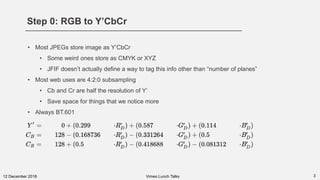
• Most JPEGs store image as Y’CbCr
• Some weird ones store as CMYK or XYZ
• JFIF doesn’t actually define a way to tag this info other than “number of planes”
• Most web uses are 4:2:0 subsampling
• Cb and Cr are half the resolution of Y’
• Save space for things that we notice more
• Always BT.601
Vimeo Lunch Talks
Step 1: Shift
412 December 2018
• Subtract 128 from all values
• DCT = Discrete Cosine Transform
• Think of Cosine’s range: [-1,1]
• Implementation note: Be careful with implicit type conversions here (uint8 / int8)
Vimeo Lunch Talks
60 → -68
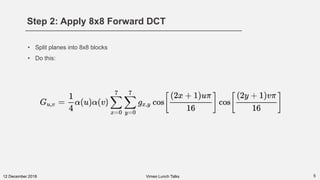
Step 2: Apply 8x8 Forward DCT
512 December 2018
• Split planes into 8x8 blocks
• Do this:
Vimeo Lunch Talks
5 Second Overview of DSP
612 December 2018
• Background:
• Convert the sample values into the frequency domain using a reversible transform
• Higher frequencies = Finer (less noticeable) details
• Lower frequencies = Less granular details (e.g. solid rectangles)
• DCT chosen over DFT because DCT happens to have a nice property where its energy is
concentrated into a smaller set of coefficients, which is better of data compression.
• Intelligently drop higher frequencies we shouldn’t notice
• Intelligently reduce precision
Vimeo Lunch Talks
712 December 2018 Vimeo Lunch Talks
Don’t Run!
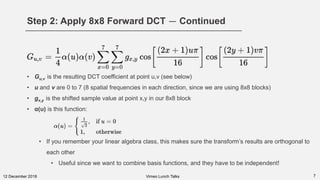
Step 2: Apply 8x8 Forward DCT — Continued
712 December 2018
• Gu,v is the resulting DCT coefficient at point u,v (see below)
• u and v are 0 to 7 (8 spatial frequencies in each direction, since we are using 8x8 blocks)
• gx,y is the shifted sample value at point x,y in our 8x8 block
• α(u) is this function:
• If you remember your linear algebra class, this makes sure the transform’s results are orthogonal to
each other
• Useful since we want to combine basis functions, and they have to be independent!
Vimeo Lunch Talks
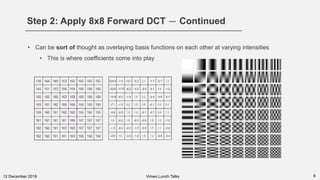
Step 2: Apply 8x8 Forward DCT — Continued
812 December 2018
• Can be sort of thought as overlaying basis functions on each other at varying intensities
• This is where coefficients come into play
Vimeo Lunch Talks
Step 3: Zig-zag
912 December 2018
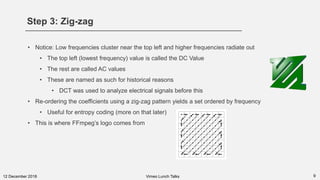
• Notice: Low frequencies cluster near the top left and higher frequencies radiate out
• The top left (lowest frequency) value is called the DC Value
• The rest are called AC values
• These are named as such for historical reasons
• DCT was used to analyze electrical signals before this
• Re-ordering the coefficients using a zig-zag pattern yields a set ordered by frequency
• Useful for entropy coding (more on that later)
• This is where FFmpeg’s logo comes from
Vimeo Lunch Talks
Step 4: Quantization
1012 December 2018
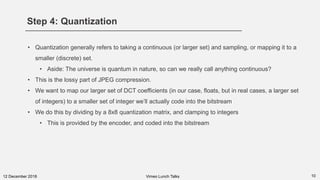
• Quantization generally refers to taking a continuous (or larger set) and sampling, or mapping it to a
smaller (discrete) set.
• Aside: The universe is quantum in nature, so can we really call anything continuous?
• This is the lossy part of JPEG compression.
• We want to map our larger set of DCT coefficients (in our case, floats, but in real cases, a larger set
of integers) to a smaller set of integer we’ll actually code into the bitstream
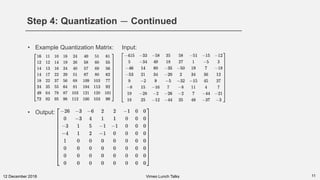
• We do this by dividing by a 8x8 quantization matrix, and clamping to integers
• This is provided by the encoder, and coded into the bitstream
Vimeo Lunch Talks
Step 4: Quantization — Continued
1112 December 2018
• Example Quantization Matrix: Input:
• Output:
Vimeo Lunch Talks
Step 5: Run Length Encode Zeroes
1212 December 2018
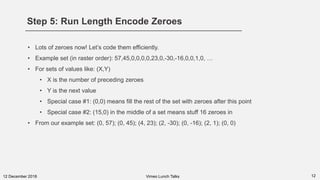
• Lots of zeroes now! Let’s code them efficiently.
• Example set (in raster order): 57,45,0,0,0,0,23,0,-30,-16,0,0,1,0, …
• For sets of values like: (X,Y)
• X is the number of preceding zeroes
• Y is the next value
• Special case #1: (0,0) means fill the rest of the set with zeroes after this point
• Special case #2: (15,0) in the middle of a set means stuff 16 zeroes in
• From our example set: (0, 57); (0, 45); (4, 23); (2, -30); (0, -16); (2, 1); (0, 0)
Vimeo Lunch Talks
Step 6: DC Prediction
1312 December 2018
• Prediction means “predicting” a current value based off of other values
• The “other” values can be separated by space (different parts of the same time), or for video,
time (different parts of previous or future images)
• Most prediction is done before DCT, on raw sample values
• JPEG does prediction post-DCT, but only on DC values
• Someone working on JPEG noticed DC values for subsequent block were kind of similar
• So instead of coding the DC value directly, code its diff to the previous block’s (in raster order)
DC value
• First block predicts for an initial value of 0
• Next block is differed to previous block
• So if you have e.g. 3 blocks with DCs of 10, 12, 10, you end up coding 10, 2, -2
Vimeo Lunch Talks
Step 7: Huffman Coding
1412 December 2018
• Simple idea: Values that appear frequently in our data get assigned codes
• Codes are variable length (sometimes called VLCs, or Variable Length Codes)
• JPEG writes lengths of these codes, and these can be generated using a known algorithm once
read.
• AC and DC coefficients have separate length tables coded (remember we predicted the DC value!)
• How we assign values to codes can be optimized “cleverly” in the encoder:
• Example: mozjpeg uses something akin to Viterbi
• These lengths are written as static tables in the JPEG
• The number of Huffman codes of each length (1 to 16 bits long) along with a sorted table of the byte
values of each code.
• This will make more sense when you see the decoder code
Vimeo Lunch Talks
1512 December 2018 Vimeo Lunch Talks
Decoding
.jpeg isn’t JPEG
1612 December 2018
• What we think of as a “JPEG file” isn’t actually JPEG
• Called JFIF, and several versions exists; we’re covering 1.01
• This format is both extremely simple and way too flexible
• Allows for all sorts of crazy crap, while simultaneously being underspecified (APPN
markers)
• The decoder we’re writing today makes a lot of assumptions about files being “good”
• It’s also very slow, since we’re going more for naivety rather than optimization
Vimeo Lunch Talks
JFIF
1712 December 2018
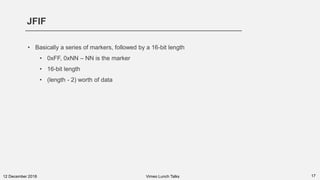
• Basically a series of markers, followed by a 16-bit length
• 0xFF, 0xNN – NN is the marker
• 16-bit length
• (length - 2) worth of data
Vimeo Lunch Talks
1812 December 2018 Vimeo Lunch Talks
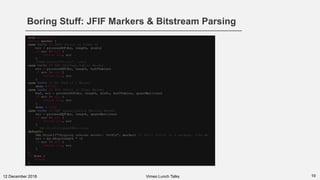
Before anything:
You need a
bitstream reader
Boring Stuff: JFIF Markers & Bitstream Parsing
1912 December 2018 Vimeo Lunch Talks
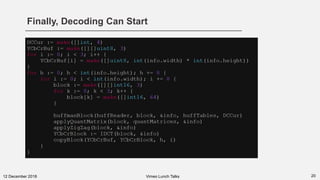
Finally, Decoding Can Start
2012 December 2018 Vimeo Lunch Talks
IDCT
2112 December 2018 Vimeo Lunch Talks
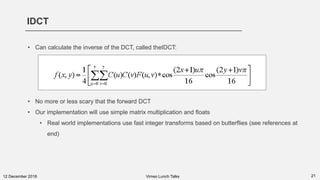
• Can calculate the inverse of the DCT, called theIDCT:
• No more or less scary that the forward DCT
• Our implementation will use simple matrix multiplication and floats
• Real world implementations use fast integer transforms based on butterflies (see references at
end)
Links & References to Read
2212 December 2018 Vimeo Lunch Talks
• Start from nothing: https://dspguide.com/pdfbook.html
• Very good intro to JFIF and JPEG: http://www.opennet.ru/docs/formats/jpeg.txt
• More advanced background (where AA&N fast DCT came from, and why, and why things are the
way there are (AC/DC)): https://www.amazon.com/JPEG-Compression-Standard-Multimedia-
Standards/dp/0442012721/
• THE intro to video codecs: https://www.amazon.com/H-264-Advanced-Video-Compression-
Standard/dp/0470516925/ (can be found digitally)

Let's Write a JPEG Decoder (Vimeo Lunch Talks)

  • 1.
    Let’s Write aJPEG Decoder derekb@vimeo.com @daemon404 Derek Buitenhuis 12 December 2018 New York, USA / The Internet
  • 2.
    JPEG? Who cares? 112December 2018 • Good as a first step into codecs • Extremely simple • Doesn’t even have spatial prediction • Convince people DCTs aren’t scary • In extremely wide use and will continue to be for the foreseeable future • Writing a JPEG encoder is a good hands on way to get into hacking on multimedia code • Real, viewable results Vimeo Lunch Talks
  • 3.
    212 December 2018Vimeo Lunch Talks Encoding
  • 4.
    Step 0: RGBto Y’CbCr 312 December 2018 • Most JPEGs store image as Y’CbCr • Some weird ones store as CMYK or XYZ • JFIF doesn’t actually define a way to tag this info other than “number of planes” • Most web uses are 4:2:0 subsampling • Cb and Cr are half the resolution of Y’ • Save space for things that we notice more • Always BT.601 Vimeo Lunch Talks
  • 5.
    Step 1: Shift 412December 2018 • Subtract 128 from all values • DCT = Discrete Cosine Transform • Think of Cosine’s range: [-1,1] • Implementation note: Be careful with implicit type conversions here (uint8 / int8) Vimeo Lunch Talks 60 → -68
  • 6.
    Step 2: Apply8x8 Forward DCT 512 December 2018 • Split planes into 8x8 blocks • Do this: Vimeo Lunch Talks
  • 7.
    5 Second Overviewof DSP 612 December 2018 • Background: • Convert the sample values into the frequency domain using a reversible transform • Higher frequencies = Finer (less noticeable) details • Lower frequencies = Less granular details (e.g. solid rectangles) • DCT chosen over DFT because DCT happens to have a nice property where its energy is concentrated into a smaller set of coefficients, which is better of data compression. • Intelligently drop higher frequencies we shouldn’t notice • Intelligently reduce precision Vimeo Lunch Talks
  • 8.
    712 December 2018Vimeo Lunch Talks Don’t Run!
  • 9.
    Step 2: Apply8x8 Forward DCT — Continued 712 December 2018 • Gu,v is the resulting DCT coefficient at point u,v (see below) • u and v are 0 to 7 (8 spatial frequencies in each direction, since we are using 8x8 blocks) • gx,y is the shifted sample value at point x,y in our 8x8 block • α(u) is this function: • If you remember your linear algebra class, this makes sure the transform’s results are orthogonal to each other • Useful since we want to combine basis functions, and they have to be independent! Vimeo Lunch Talks
  • 10.
    Step 2: Apply8x8 Forward DCT — Continued 812 December 2018 • Can be sort of thought as overlaying basis functions on each other at varying intensities • This is where coefficients come into play Vimeo Lunch Talks
  • 11.
    Step 3: Zig-zag 912December 2018 • Notice: Low frequencies cluster near the top left and higher frequencies radiate out • The top left (lowest frequency) value is called the DC Value • The rest are called AC values • These are named as such for historical reasons • DCT was used to analyze electrical signals before this • Re-ordering the coefficients using a zig-zag pattern yields a set ordered by frequency • Useful for entropy coding (more on that later) • This is where FFmpeg’s logo comes from Vimeo Lunch Talks
  • 12.
    Step 4: Quantization 1012December 2018 • Quantization generally refers to taking a continuous (or larger set) and sampling, or mapping it to a smaller (discrete) set. • Aside: The universe is quantum in nature, so can we really call anything continuous? • This is the lossy part of JPEG compression. • We want to map our larger set of DCT coefficients (in our case, floats, but in real cases, a larger set of integers) to a smaller set of integer we’ll actually code into the bitstream • We do this by dividing by a 8x8 quantization matrix, and clamping to integers • This is provided by the encoder, and coded into the bitstream Vimeo Lunch Talks
  • 13.
    Step 4: Quantization— Continued 1112 December 2018 • Example Quantization Matrix: Input: • Output: Vimeo Lunch Talks
  • 14.
    Step 5: RunLength Encode Zeroes 1212 December 2018 • Lots of zeroes now! Let’s code them efficiently. • Example set (in raster order): 57,45,0,0,0,0,23,0,-30,-16,0,0,1,0, … • For sets of values like: (X,Y) • X is the number of preceding zeroes • Y is the next value • Special case #1: (0,0) means fill the rest of the set with zeroes after this point • Special case #2: (15,0) in the middle of a set means stuff 16 zeroes in • From our example set: (0, 57); (0, 45); (4, 23); (2, -30); (0, -16); (2, 1); (0, 0) Vimeo Lunch Talks
  • 15.
    Step 6: DCPrediction 1312 December 2018 • Prediction means “predicting” a current value based off of other values • The “other” values can be separated by space (different parts of the same time), or for video, time (different parts of previous or future images) • Most prediction is done before DCT, on raw sample values • JPEG does prediction post-DCT, but only on DC values • Someone working on JPEG noticed DC values for subsequent block were kind of similar • So instead of coding the DC value directly, code its diff to the previous block’s (in raster order) DC value • First block predicts for an initial value of 0 • Next block is differed to previous block • So if you have e.g. 3 blocks with DCs of 10, 12, 10, you end up coding 10, 2, -2 Vimeo Lunch Talks
  • 16.
    Step 7: HuffmanCoding 1412 December 2018 • Simple idea: Values that appear frequently in our data get assigned codes • Codes are variable length (sometimes called VLCs, or Variable Length Codes) • JPEG writes lengths of these codes, and these can be generated using a known algorithm once read. • AC and DC coefficients have separate length tables coded (remember we predicted the DC value!) • How we assign values to codes can be optimized “cleverly” in the encoder: • Example: mozjpeg uses something akin to Viterbi • These lengths are written as static tables in the JPEG • The number of Huffman codes of each length (1 to 16 bits long) along with a sorted table of the byte values of each code. • This will make more sense when you see the decoder code Vimeo Lunch Talks
  • 17.
    1512 December 2018Vimeo Lunch Talks Decoding
  • 18.
    .jpeg isn’t JPEG 1612December 2018 • What we think of as a “JPEG file” isn’t actually JPEG • Called JFIF, and several versions exists; we’re covering 1.01 • This format is both extremely simple and way too flexible • Allows for all sorts of crazy crap, while simultaneously being underspecified (APPN markers) • The decoder we’re writing today makes a lot of assumptions about files being “good” • It’s also very slow, since we’re going more for naivety rather than optimization Vimeo Lunch Talks
  • 19.
    JFIF 1712 December 2018 •Basically a series of markers, followed by a 16-bit length • 0xFF, 0xNN – NN is the marker • 16-bit length • (length - 2) worth of data Vimeo Lunch Talks
  • 20.
    1812 December 2018Vimeo Lunch Talks Before anything: You need a bitstream reader
  • 21.
    Boring Stuff: JFIFMarkers & Bitstream Parsing 1912 December 2018 Vimeo Lunch Talks
  • 22.
    Finally, Decoding CanStart 2012 December 2018 Vimeo Lunch Talks
  • 23.
    IDCT 2112 December 2018Vimeo Lunch Talks • Can calculate the inverse of the DCT, called theIDCT: • No more or less scary that the forward DCT • Our implementation will use simple matrix multiplication and floats • Real world implementations use fast integer transforms based on butterflies (see references at end)
  • 24.
    Links & Referencesto Read 2212 December 2018 Vimeo Lunch Talks • Start from nothing: https://dspguide.com/pdfbook.html • Very good intro to JFIF and JPEG: http://www.opennet.ru/docs/formats/jpeg.txt • More advanced background (where AA&N fast DCT came from, and why, and why things are the way there are (AC/DC)): https://www.amazon.com/JPEG-Compression-Standard-Multimedia- Standards/dp/0442012721/ • THE intro to video codecs: https://www.amazon.com/H-264-Advanced-Video-Compression- Standard/dp/0470516925/ (can be found digitally)