Abdullatif Tarakji
abdotarakji@gmail.com
Set report controls
‫التقرير‬ ‫تحكم‬ ‫عناصر‬ ‫تعيين‬
Adding controls to a report
Managing report fields and properties
Formatting report controls
Working with labels
Modifying data sources
Grouping and sorting fields
‫التقرير‬ ‫الى‬ ‫تحكم‬ ‫عناصر‬ ‫إضافة‬
‫و‬ ‫التقرير‬ ‫حقول‬ ‫إدارة‬‫خصائصها‬
‫التقرير‬ ‫تحكم‬ ‫عناصر‬ ‫تنسيق‬
‫التسميات‬ ‫مع‬ ‫العمل‬
‫البيانات‬ ‫مصادر‬ ‫تعديل‬
‫الحقول‬ ‫فرز‬ ‫و‬ ‫تجميع‬
Abdullatif Tarakji
abdotarakji@gmail.com
Set report controls
‫التقرير‬ ‫تحكم‬ ‫عناصر‬ ‫تعيين‬
This section describes how to work with fields and controls on a report. It
explains how to add controls, select fields to group and sort records, and
how to manage a report’s data source. This section also covers some of
the report and control properties you can set in the property sheet.
‫التقرير‬ ‫في‬ ‫التحكم‬ ‫وعناصر‬ ‫الحقول‬ ‫مع‬ ‫العمل‬ ‫كيفية‬ ‫القسم‬ ‫هذا‬ ‫يصف‬.‫كيف‬ ‫يشرح‬‫إضافة‬ ‫ية‬
‫البي‬ ‫مصدر‬ ‫إدارة‬ ‫وكيفية‬ ،‫السجالت‬ ‫وفرز‬ ‫لتجميع‬ ‫الحقول‬ ‫واختيار‬ ،‫التحكم‬ ‫عناصر‬‫في‬ ‫انات‬
‫التقرير‬.‫ي‬ ‫التي‬ ‫التحكم‬ ‫وعنصر‬ ‫التقرير‬ ‫خصائص‬ ‫من‬ ‫بعض‬ ‫أيضا‬ ‫القسم‬ ‫هذا‬ ‫يغطي‬‫تعيينها‬ ‫مكن‬
‫الخصائص‬ ‫صفحة‬ ‫من‬.
Abdullatif Tarakji
abdotarakji@gmail.com Adding controls to a report
‫التقرير‬ ‫الى‬ ‫تحكم‬ ‫عناصر‬ ‫إضافة‬
• Reports are designed primarily to present and
share data (unlike forms or tables, which you
use to enter, update, and delete data). You
often work only with label and text box
controls to identify and present data in a
report. For example, you might add a label to
identify a summary field in a group header
section or to provide a title in the Report
Header section. You can add a text box to a
report and then write an expression to create a
calculated field. You can add an image control
to enhance the appearance of a report.
• Although the data in a report is more static
than in a form or a table, you can use a
command button to perform an action related
to the report or add a hyperlink control to
display a website or an email address. In
Report view, command buttons and hyperlinks
are operational. In Print Preview, Access
doesn’t display a command button, and a
hyperlink appears as static text.
•‫ا‬ ‫وتبادل‬ ‫لتقديم‬ ‫رئيسي‬ ‫بشكل‬ ‫التقارير‬ ‫تصمم‬‫لبيانات‬
(‫استخد‬ ‫يمكنك‬ ‫والتي‬ ،‫الجداول‬ ‫أو‬ ‫النماذج‬ ‫عكس‬ ‫على‬‫امها‬
‫البيانات‬ ‫وحذف‬ ‫وتحديث‬ ‫إلدخال‬.)‫فقط‬ ‫نعمل‬ ً‫ا‬‫غالب‬‫مع‬
‫لتعريف‬ ‫النص‬ ‫ومربع‬ ‫التسمية‬ ‫تحكم‬ ‫عناصر‬ ‫وجود‬‫و‬
‫التقرير‬ ‫في‬ ‫الموجودة‬ ‫البيانات‬ ‫عرض‬.‫سبيل‬ ‫على‬،‫المثال‬
‫ر‬ ‫مقطع‬ ‫في‬ ‫تلخيص‬ ‫حقل‬ ‫لتحديد‬ ‫التسمية‬ ‫إضافة‬‫أس‬
‫التقرير‬ ‫رأس‬ ‫مقطع‬ ‫في‬ ‫عنوان‬ ‫لتوفير‬ ‫أو‬ ‫المجموعة‬.
‫ت‬ ‫كتابة‬ ‫ثم‬ ‫ومن‬ ‫لتقرير‬ ‫نص‬ ‫مربع‬ ‫إضافة‬ ‫يمكنك‬‫عبير‬
‫محسوب‬ ‫حقل‬ ‫إلنشاء‬.‫تحكم‬ ‫عنصر‬ ‫إضافة‬ ‫يمكنك‬
‫التقرير‬ ‫مظهر‬ ‫لتحسين‬ ‫الصورة‬.
•‫م‬ ‫ثابتة‬ ‫هي‬ ‫التقرير‬ ‫في‬ ‫البيانات‬ ‫أن‬ ‫من‬ ‫الرغم‬ ‫على‬‫عليه‬ ‫ما‬
‫لتنف‬ ‫أمر‬ ‫زر‬ ‫استخدام‬ ‫يمكنك‬ ،‫الجدول‬ ‫أو‬ ‫النموذج‬ ‫في‬‫يذ‬
‫االر‬ ‫تحكم‬ ‫عنصر‬ ‫إضافة‬ ‫أو‬ ‫بالتقرير‬ ‫متعلق‬ ‫إجراء‬‫تباط‬
‫اإللك‬ ‫البريد‬ ‫عنوان‬ ‫أو‬ ‫ويب‬ ‫موقع‬ ‫لعرض‬ ‫التشعبي‬‫تروني‬.
‫الت‬ ‫واالرتباطات‬ ‫األوامر‬ ‫أزرار‬ ،‫التقرير‬ ‫معاينة‬ ‫في‬‫شعبية‬
‫عملية‬ ‫هي‬.‫ي‬ ‫ال‬ ‫األكسيس‬ ،‫الطباعة‬ ‫قبل‬ ‫معاينة‬ ‫في‬‫عرض‬
‫ثابت‬ ‫كنص‬ ‫التشعبي‬ ‫االرتباط‬ ‫ويظهر‬ ،‫األمر‬ ‫زر‬.
Abdullatif Tarakji
abdotarakji@gmail.com
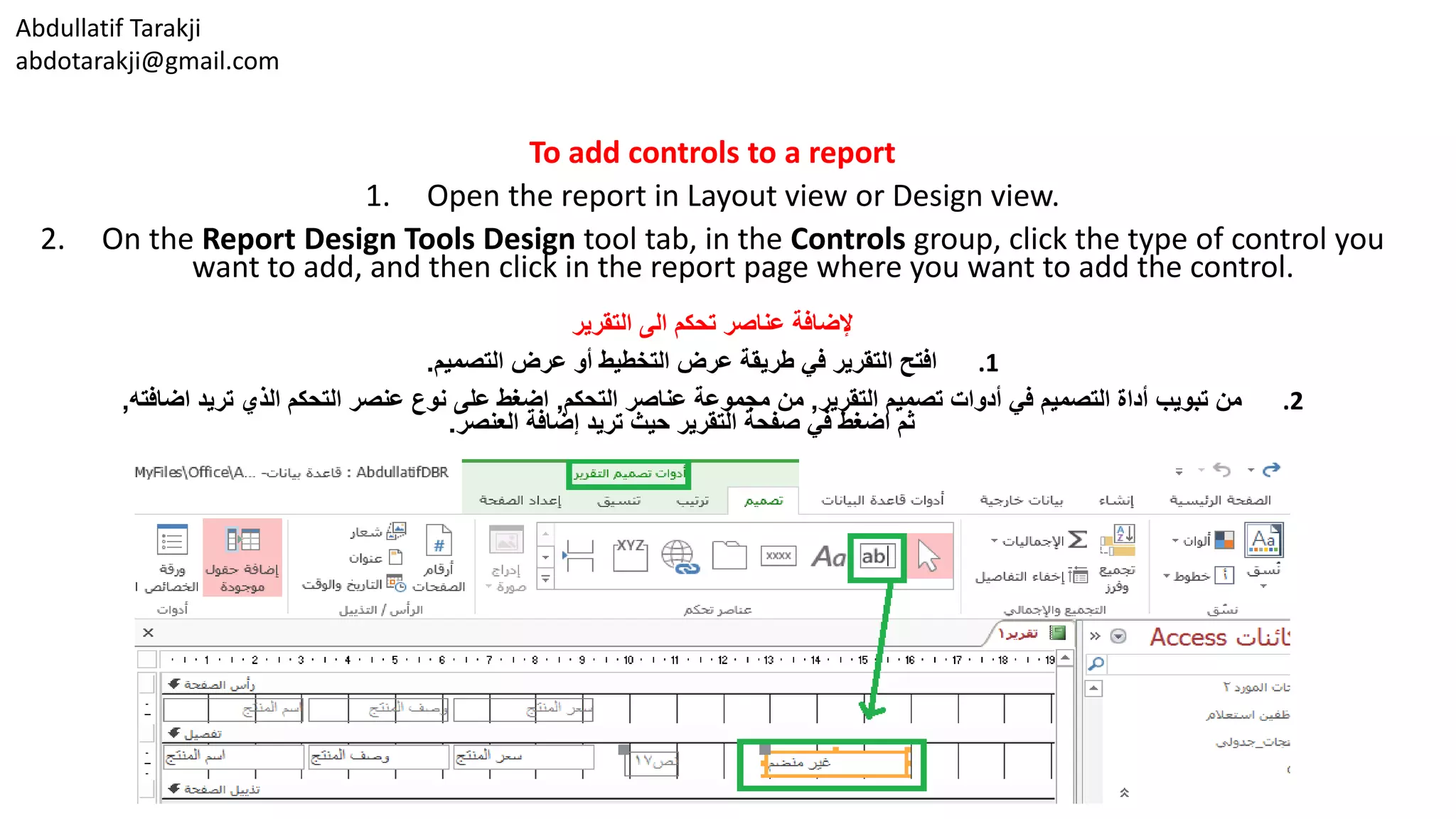
To add controls to a report
1. Open the report in Layout view or Design view.
2. On the Report Design Tools Design tool tab, in the Controls group, click the type of control you
want to add, and then click in the report page where you want to add the control.
‫التقرير‬ ‫الى‬ ‫تحكم‬ ‫عناصر‬ ‫إلضافة‬
.1‫التصميم‬ ‫عرض‬ ‫أو‬ ‫التخطيط‬ ‫عرض‬ ‫طريقة‬ ‫في‬ ‫التقرير‬ ‫افتح‬.
.2‫التقرير‬ ‫تصميم‬ ‫أدوات‬ ‫في‬ ‫التصميم‬ ‫أداة‬ ‫تبويب‬ ‫من‬,‫التحكم‬ ‫عناصر‬ ‫مجموعة‬ ‫من‬,‫اضافته‬ ‫تريد‬ ‫الذي‬ ‫التحكم‬ ‫عنصر‬ ‫نوع‬ ‫على‬ ‫اضغط‬,
‫العنصر‬ ‫إضافة‬ ‫تريد‬ ‫حيث‬ ‫التقرير‬ ‫صفحة‬ ‫في‬ ‫اضغط‬ ‫ثم‬.
Abdullatif Tarakji
abdotarakji@gmail.com Managing report fields and properties
‫خصائصها‬ ‫و‬ ‫التقرير‬ ‫حقول‬ ‫إدارة‬
• Each control on a report, each report section,
and the report itself has a group of properties
that you can work with on the property sheet.
(Click Property Sheet on the Report Design Tools
Design tool tab to display the property sheet.)
For example, you can set properties on the
property sheet’s Format tab to fine-tune the
formatting for a control. For a text box, you can
set properties such as Width, Height, Back Color,
Border Style, Border Color, Font Name, Font Size,
and Text Align.
• For report sections (such as Detail, Page Header,
and Page Footer), you can set the Height
property to 0” to hide the section. For the Detail
section, set the Can Grow and Can Shrink
properties to Yes if you want the size of the
Detail section to increase and decrease
depending on the amount of information it
displays for a particular record. The Report
Header and Report Footer sections also have
these properties.
•‫ل‬ ‫نفسه‬ ‫والتقرير‬ ،‫تقرير‬ ‫مقطع‬ ‫كل‬ ،‫التقرير‬ ‫في‬ ‫تحكم‬ ‫عنصر‬ ‫كل‬‫مجموعة‬ ‫ديه‬
‫الخصائص‬ ‫صفحة‬ ‫من‬ ‫بها‬ ‫العمل‬ ‫يمكن‬ ‫التي‬ ‫الخصائص‬ ‫من‬.
(‫أدوات‬ ‫من‬ ‫التصميم‬ ‫أداة‬ ‫التبويب‬ ‫عالمة‬ ‫في‬ ‫الخصائص‬ ‫ورقة‬ ‫فوق‬ ‫انقر‬‫تصميم‬
‫الخصائص‬ ‫صفحة‬ ‫لعرض‬ ‫التقرير‬).‫تعي‬ ‫يمكنك‬ ،‫المثال‬ ‫سبيل‬ ‫على‬‫ين‬
‫تن‬ ‫لصقل‬ ‫الخصائص‬ ‫صفحة‬ ‫تنسيق‬ ‫التبويب‬ ‫عالمة‬ ‫من‬ ‫الخصائص‬‫لعنصر‬ ‫سيق‬
‫التحكم‬.‫االرتف‬ ‫و‬ ‫العرض‬ ‫مثل‬ ‫خصائص‬ ‫تعيين‬ ‫يمكنك‬ ،‫النص‬ ‫لمربع‬‫لون‬ ،‫اع‬
‫النص‬ ‫ومحاذاة‬ ،‫الخط‬ ‫حجم‬ ،‫الخط‬ ‫اسم‬ ،‫الحدود‬ ‫لون‬ ،‫الحدود‬ ‫نمط‬ ،‫الخلفية‬.
•‫التقرير‬ ‫ألقسام‬(‫الصفحة‬ ‫وتذييل‬ ،‫الصفحة‬ ‫رأس‬ ،‫التفصيل‬ ‫مثل‬)،‫تعيين‬ ‫يمكنك‬
‫إلى‬ ‫االرتفاع‬ ‫الخاصية‬0‫القسم‬ ‫إلخفاء‬.
‫إل‬ ‫التقلص‬ ‫وتمكين‬ ‫النمو‬ ‫تمكين‬ ‫خاصية‬ ‫تعيين‬ ،‫التفصيل‬ ‫لمقطع‬‫كنت‬ ‫إذا‬ ‫نعم‬ ‫ى‬
‫المعلو‬ ‫لكمية‬ ‫تبعا‬ ‫والنقصان‬ ‫الزيادة‬ ‫إلى‬ ‫التفصيل‬ ‫مقطع‬ ‫حجم‬ ‫تريد‬‫فإنه‬ ‫مات‬
‫معين‬ ‫لسجل‬ ‫يعرض‬.‫التقري‬ ‫وتذييل‬ ‫تقرير‬ ‫رأس‬ ً‫ا‬‫أيض‬ ‫أقسام‬ ‫لديها‬‫ر‬.
Abdullatif Tarakji
abdotarakji@gmail.com
• For the Report Header and Report Footer sections and the Page Header and Page
Footer sections, you can also set the Display When property to Always, Print Only,
or Screen Only. If you add page numbers to the Page Footer section,
for example, set Display When to Print Only to show the page numbers only
when you print the report.
• Report properties include the Default View property, which controls whether the
report opens in Print Preview or Report view by default. (The report opens in the
view you specify for the Default View property when you right-click a report in
the Navigation pane and then click Open.) The Grid Y and Grid X properties
control the number and spacing of the dots in the design grid in Design view. If
you use Design view frequently, set the values for Grid Y and Grid X to 10 or to 12
to more easily align controls on the grid.
• You can view and alter the Record Source property for a report by displaying the
property sheet’s Data tab, clicking in the Record Source property box, and then
pressing Shift+F2 to open the Zoom dialog box or clicking the ellipsis button
(…) to view and change the record source in the Query Builder.
•‫تعيي‬ ‫أيضا‬ ‫يمكنك‬ ،‫الصفحة‬ ‫وتذييل‬ ‫رأس‬ ‫ومقاطع‬ ‫التقرير‬ ‫وتذييل‬ ‫رأس‬ ‫لمقاطع‬‫عند‬ ‫العرض‬ ‫ن‬
‫فقط‬ ‫الشاشة‬ ‫أو‬ ،‫فقط‬ ‫طباعة‬ ،‫دوما‬ ‫إلى‬ ‫الخاصية‬ ‫تعيين‬.‫الص‬ ‫أرقام‬ ‫بإضافة‬ ‫قمت‬ ‫إذا‬‫فحات‬
‫إل‬ ‫فقط‬ ‫لطباعة‬ ‫عند‬ ‫العرض‬ ‫تعيين‬ ،‫المثال‬ ‫سبيل‬ ‫على‬ ،‫الصفحة‬ ‫تذييل‬ ‫قسم‬ ‫إلى‬‫أرقام‬ ‫ظهار‬
‫التقرير‬ ‫طباعة‬ ‫عند‬ ‫فقط‬ ‫الصفحات‬.
•‫كن‬ ‫إذا‬ ‫فيما‬ ‫تتحكم‬ ‫التي‬ ،‫عرض‬ ‫االفتراضية‬ ‫الخاصية‬ ‫التقرير‬ ‫خصائص‬ ‫وتشمل‬‫ستفتح‬ ‫ت‬
‫التقرير‬ ‫عرض‬ ‫طريقة‬ ‫أو‬ ‫الطباعة‬ ‫قبل‬ ‫معاينة‬ ‫في‬ ‫التقرير‬‫افتراضيا‬.
(‫الن‬ ‫عند‬ ‫مشاهدة‬ ‫افتراضي‬ ‫للخاصية‬ ‫تحدد‬ ‫التي‬ ‫العرض‬ ‫طريقة‬ ‫في‬ ‫التقرير‬ ‫فتح‬‫الماوس‬ ‫بزر‬ ‫قر‬
‫فتح‬ ‫فوق‬ ‫انقر‬ ‫ثم‬ ‫التنقل‬ ‫جزء‬ ‫في‬ ‫التقرير‬ ‫فوق‬ ‫األيمن‬).
‫الشبكة‬ ‫خصائص‬X‫والشبكة‬Y‫ف‬ ‫التصميم‬ ‫شبكة‬ ‫في‬ ‫النقاط‬ ‫بين‬ ‫وتباعد‬ ‫بعدد‬ ‫تتحكم‬‫طريقة‬ ‫ي‬
‫التصميم‬ ‫عرض‬.،‫األحيان‬ ‫من‬ ‫كثير‬ ‫في‬ ‫التصميم‬ ‫عرض‬ ‫طريقة‬ ‫تستخدم‬ ‫كنت‬ ‫إذا‬
‫لشبكة‬ ‫قيم‬ ‫تعيين‬Y‫والشبكة‬X‫إلى‬10‫أو‬12‫بالشبكة‬ ‫للتحكم‬ ‫سهولة‬ ‫أكثر‬ ‫لمحاذاة‬.
•‫عرض‬ ‫طريق‬ ‫عن‬ ‫تقرير‬ ‫على‬ ‫للحصول‬ ‫السجل‬ ‫مصدر‬ ‫خاصية‬ ‫وتغيير‬ ‫عرض‬ ‫يمكنك‬‫عالمة‬
‫السج‬ ‫مصدر‬ ‫الخاصية‬ ‫مربع‬ ‫في‬ ‫والنقر‬ ،‫الخصائص‬ ‫صفحة‬ ‫في‬ ‫بيانات‬ ‫التبويب‬،‫الت‬
‫على‬ ‫الضغط‬ ‫ثم‬Shift + F2‫زر‬ ‫على‬ ‫النقر‬ ‫أو‬ ‫تكبير‬ ‫الحوار‬ ‫مربع‬ ‫لفتح‬)...(‫وت‬ ‫لعرض‬‫غيير‬
‫االستعالم‬ ‫منشئ‬ ‫في‬ ‫السجل‬ ‫مصدر‬.
Abdullatif Tarakji
abdotarakji@gmail.com To set control and report properties
‫التقرير‬ ‫و‬ ‫تحكم‬ ‫عنصر‬ ‫خصائص‬ ‫لتعيين‬
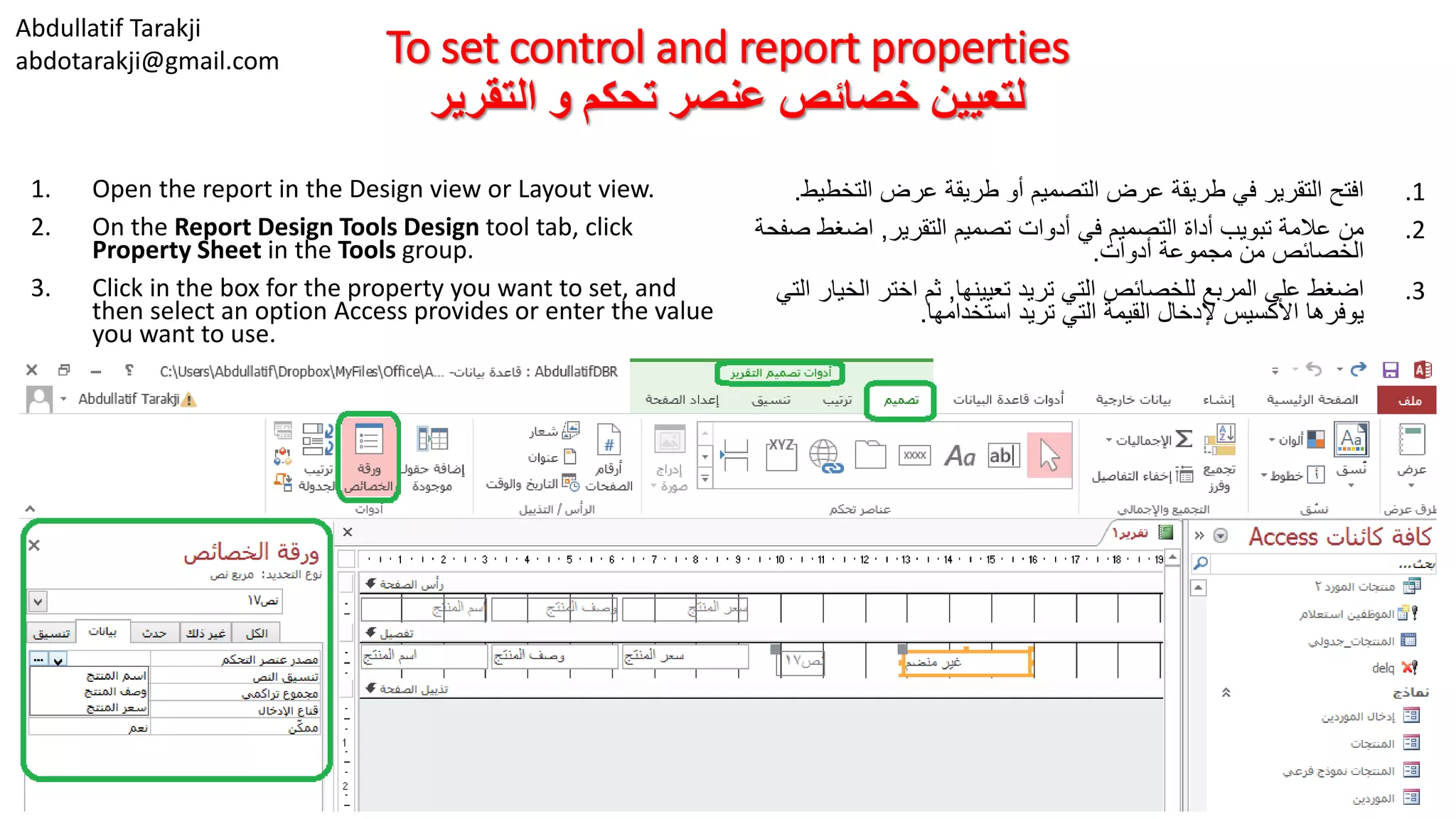
1. Open the report in the Design view or Layout view.
2. On the Report Design Tools Design tool tab, click
Property Sheet in the Tools group.
3. Click in the box for the property you want to set, and
then select an option Access provides or enter the value
you want to use.
.1‫التخط‬ ‫عرض‬ ‫طريقة‬ ‫أو‬ ‫التصميم‬ ‫عرض‬ ‫طريقة‬ ‫في‬ ‫التقرير‬ ‫افتح‬‫يط‬.
.2‫التقرير‬ ‫تصميم‬ ‫أدوات‬ ‫في‬ ‫التصميم‬ ‫أداة‬ ‫تبويب‬ ‫عالمة‬ ‫من‬,‫اضغط‬‫صفحة‬
‫أدوات‬ ‫مجموعة‬ ‫من‬ ‫الخصائص‬.
.3‫تعيينها‬ ‫تريد‬ ‫التي‬ ‫للخصائص‬ ‫المربع‬ ‫على‬ ‫اضغط‬,‫الخ‬ ‫اختر‬ ‫ثم‬‫التي‬ ‫يار‬
‫استخدامها‬ ‫تريد‬ ‫التي‬ ‫القيمة‬ ‫إلدخال‬ ‫األكسيس‬ ‫يوفرها‬.
Abdullatif Tarakji
abdotarakji@gmail.com Formatting report controls
‫التقرير‬ ‫تحكم‬ ‫عناصر‬ ‫تنسيق‬
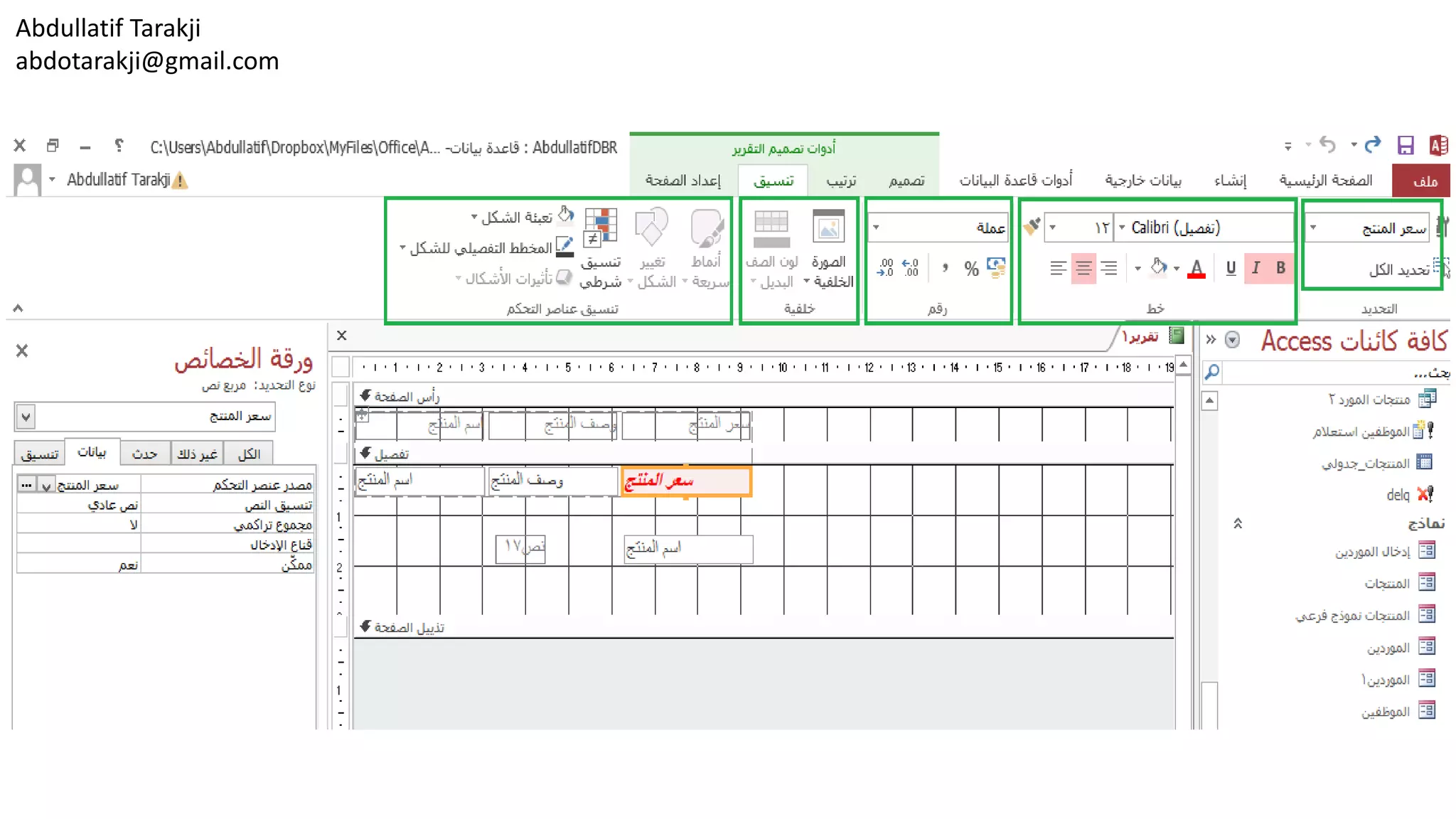
• By working with the commands in the Font group on
the Report Design Tools Format tool tab, you can
make changes to font properties for labels and other
controls on a report.
• For example, click a label on a report and then select
the font you want to use from the Font list. You can
also change the size of the font, choose a different
font color, or apply a background color to a control.
Use the alignment buttons to position the text left,
right, or centered.
• In the Number group, you can apply a format to
fields that use the Number, Currency, or Date/Time
data type. For example, select a date field in the
report, and then choose a format from the list
provided. The format you choose here affects how
the date is displayed, but it doesn’t change the date
format specified for the field in the table.
• With the commands in the Control Formatting group,
you can format controls in other ways. Use the Shape
Fill command to add a background color to a control
such as the report’s title. The Shape Outline
command lets you modify the color and style of a
control’s borders.
•‫تبويب‬ ‫عالمة‬ ‫في‬ ‫خط‬ ‫مجموعة‬ ‫في‬ ‫األوامر‬ ‫مع‬ ‫العمل‬ ‫خالل‬ ‫من‬
‫تغيير‬ ‫إجراء‬ ‫يمكنك‬ ،‫التقرير‬ ‫تصميم‬ ‫أدوات‬ ‫من‬ ‫تنسيق‬‫على‬ ‫ات‬
‫ال‬ ‫في‬ ‫األخرى‬ ‫التحكم‬ ‫وعناصر‬ ‫التسميات‬ ‫خصائص‬ ‫الخط‬‫تقرير‬.
•‫وثم‬ ‫التقرير‬ ‫في‬ ‫تسمية‬ ‫فوق‬ ‫انقر‬ ،‫المثال‬ ‫سبيل‬ ‫على‬‫الخط‬ ‫حدد‬
‫الخط‬ ‫القائمة‬ ‫من‬ ‫استخدامه‬ ‫تريد‬ ‫الذي‬.‫تغيي‬ ‫أيضا‬ ‫يمكنك‬‫حجم‬ ‫ر‬
‫ل‬ ‫الخلفية‬ ‫لون‬ ‫تطبيق‬ ‫أو‬ ،‫مختلف‬ ‫خط‬ ‫لون‬ ‫اختيار‬ ،‫الخط‬‫عنصر‬
‫التحكم‬.‫النص‬ ‫لوضع‬ ‫المحاذاة‬ ‫أزرار‬ ‫استخدام‬
‫توسيط‬ ‫أو‬ ،‫يمين‬ ،‫يسار‬.
•‫التي‬ ‫للحقول‬ ‫تنسيق‬ ‫تطبيق‬ ‫يمكنك‬ ،‫رقم‬ ‫المجموعة‬ ‫في‬‫تستخدم‬
‫تاريخ‬ ‫أو‬ ،‫عملة‬ ،‫رقم‬ ‫البيانات‬ ‫نوع‬/‫الوقت‬.‫ال‬ ‫سبيل‬ ‫على‬،‫مثال‬
‫الق‬ ‫من‬ ‫تنسيق‬ ‫اختر‬ ‫ثم‬ ،‫التقرير‬ ‫في‬ ‫التاريخ‬ ‫حقل‬ ‫حدد‬‫ائمة‬
‫المتاحة‬.‫ع‬ ‫كيفية‬ ‫على‬ ‫يؤثر‬ ‫هنا‬ ‫تختاره‬ ‫الذي‬ ‫التنسيق‬‫رض‬
‫للحقل‬ ‫المحدد‬ ‫التاريخ‬ ‫تنسيق‬ ‫تغير‬ ‫ال‬ ‫ولكن‬ ،‫التاريخ‬‫الجدول‬ ‫في‬.
•‫ع‬ ‫تنسيق‬ ‫يمكنك‬ ،‫التحكم‬ ‫تنسيق‬ ‫مجموعة‬ ‫في‬ ‫األوامر‬ ‫مع‬‫ناصر‬
‫أخرى‬ ‫بطرق‬ ‫التحكم‬.‫إلضاف‬ ‫التعبئة‬ ‫شكل‬ ‫األمر‬ ‫استخدم‬‫لون‬ ‫ة‬
‫التقرير‬ ‫عنوان‬ ‫مثل‬ ‫التحكم‬ ‫عنصر‬ ‫إلى‬ ‫الخلفية‬.‫يتيح‬‫شكل‬ ‫األمر‬
‫ال‬ ‫عنصر‬ ‫حدود‬ ‫ونمط‬ ‫اللون‬ ‫تعديل‬ ‫يمكن‬ ‫المفصلة‬ ‫الخطوط‬‫تحكم‬
Abdullatif Tarakji
abdotarakji@gmail.com To format report controls
‫التقرير‬ ‫تحكم‬ ‫عناصر‬ ‫لتنسيق‬
1. Open the form in Layout view or Design view.
2. Click the Report Design Tools Format tool tab
3. In the Selection group, select the control you
want to format or click Select All.
4. In the Font group, choose a new font, font
size, or font color; apply bold, italic, or
underline formatting; add a background fill
color; and align the text.
5. For number, currency, and date and time
fields, use the Number group to apply
formatting to the field.
6. In the Control Formatting group, do the
following:
1. Use the Shape Fill command to add a background
fill color to a control.
2. Use the Shape Outline command to apply line
styles and colors to the control’s borders.
.1‫طر‬ ‫أو‬ ‫التخطيط‬ ‫عرض‬ ‫طريقة‬ ‫في‬ ‫التقرير‬ ‫افتح‬‫يقة‬
‫التصميم‬ ‫عرض‬.
.2‫تص‬ ‫أدوات‬ ‫في‬ ‫التنسيق‬ ‫أداة‬ ‫تبويب‬ ‫على‬ ‫اضغط‬‫ميم‬
‫التقرير‬.
.3‫التحديد‬ ‫مجموعة‬ ‫من‬,‫تريد‬ ‫الذي‬ ‫التحكم‬ ‫عنصر‬ ‫حدد‬
‫الكل‬ ‫تحديد‬ ‫اختر‬ ‫أو‬ ‫تنسيقه‬.
.4‫جديد‬ ‫خط‬ ‫اختر‬ ‫الخط‬ ‫مجموعة‬ ‫من‬,‫خط‬ ‫حجم‬,
‫الخط‬ ‫لون‬ ‫أو‬,‫الخط‬ ‫نمط‬(‫غامق‬,‫مائل‬,‫تسطير‬),
‫الخلفية‬ ‫لون‬ ‫تعبئة‬ ‫اختر‬,‫ا‬ ‫محاذاة‬ ‫اختر‬ ً‫ا‬‫أيض‬ ‫و‬‫لنص‬
(‫يمين‬,‫وسط‬,‫يسار‬.)
.5‫األرقام‬ ‫لحقول‬,‫العملة‬,‫استخد‬ ‫الوقت‬ ‫و‬ ‫التاريخ‬ ‫و‬‫م‬
‫عليها‬ ‫التنسيق‬ ‫لتطبيق‬ ‫الرقم‬ ‫مجموعة‬.
.6‫التحكم‬ ‫عناصر‬ ‫تنسيق‬ ‫مجموعة‬ ‫من‬,‫التالي‬ ‫اختر‬:
.1‫لعنص‬ ‫لون‬ ‫خلفية‬ ‫إلضافة‬ ‫الشكل‬ ‫تعبئة‬ ‫أمر‬ ‫استخدم‬‫التحكم‬ ‫ر‬.
.2‫نمط‬ ‫لتطبيق‬ ‫للشكل‬ ‫التفصيلي‬ ‫المخطط‬ ‫أمر‬ ‫استخدم‬‫لون‬ ‫و‬
‫التحكم‬ ‫عناصر‬ ‫لحدود‬ ‫الخط‬.
Abdullatif Tarakji
abdotarakji@gmail.com
Abdullatif Tarakji
abdotarakji@gmail.com Working with labels
‫التسميات‬ ‫مع‬ ‫العمل‬
• When you add a text, number, or date field to a
report, Access creates a text box to display the
field’s data and creates an associated label to
display the field’s name or caption. (Access also
creates an associated label for other types of
fields, including lookup fields and fields that use
the AutoNumber data type). You can then use
the techniques described earlier in this chapter
to format, size, and position the labels to fit the
report’s design.
• To work with the full range of properties
available for a label control, open the property
sheet (from the Report Design Tools Design tool
tab). Specify values on the property sheet’s
Format tab for properties such as Width, Height,
Back Style, Special Effect, and Font Size.
On the property sheet’s Other tab,
add a name for the label to replace the default
name Access provides.
•‫األكسيس‬ ‫ينشئ‬ ،‫لتقرير‬ ‫تاريخ‬ ‫حقل‬ ‫أو‬ ‫رقم‬ ‫أو‬ ‫نص‬ ‫إضافة‬ ‫عند‬‫لعرض‬ ‫النص‬ ‫مربع‬
‫ال‬ ‫التسمية‬ ‫أو‬ ‫الحقل‬ ‫اسم‬ ‫لعرض‬ ‫المرتبطة‬ ‫التسمية‬ ‫وينشئ‬ ‫للحقل‬ ‫البيانات‬‫توضيحية‬.
(‫في‬ ‫بما‬ ،‫الحقول‬ ‫من‬ ‫أخرى‬ ‫ألنواع‬ ‫بها‬ ‫المرتبطة‬ ‫تسمية‬ ‫األكسيس‬ ‫أيضا‬ ‫ينشئ‬‫ذلك‬
‫تلقائي‬ ‫ترقيم‬ ‫البيانات‬ ‫نوع‬ ‫تستخدم‬ ‫التي‬ ‫والحقول‬ ‫البحث‬ ‫حقول‬.)‫يمكنك‬‫استخدام‬ ‫ذلك‬ ‫بعد‬
‫التسميات‬ ‫وموضع‬ ،‫وحجم‬ ،‫تنسيق‬ ‫إلى‬ ‫الفصل‬ ‫هذا‬ ‫في‬ ‫سابقا‬ ‫موضحة‬ ‫تقنيات‬‫لتناسب‬
‫التقرير‬ ‫تصميم‬.
•‫وفت‬ ،‫التسمية‬ ‫تحكم‬ ‫لعنصر‬ ‫المتوفرة‬ ‫الخصائص‬ ‫من‬ ‫كاملة‬ ‫مجموعة‬ ‫مع‬ ‫للعمل‬‫صفحة‬ ‫ح‬
‫الخصائص‬(‫التقرير‬ ‫تصميم‬ ‫أدوات‬ ‫في‬ ‫التصميم‬ ‫أداة‬ ‫تبويب‬ ‫من‬.)‫الق‬ ‫تحديد‬‫على‬ ‫يم‬
‫االرتف‬ ‫و‬ ‫العرض‬ ‫مثل‬ ‫لخصائص‬ ‫الخصائص‬ ‫صفحة‬ ‫تنسيق‬ ‫التبويب‬ ‫عالمة‬‫نمط‬ ،‫اع‬
‫الخط‬ ‫وحجم‬ ،‫خاص‬ ‫تأثير‬ ،‫الخلفية‬.‫ذ‬ ‫غير‬ ‫التبويب‬ ‫عالمة‬ ‫الخصائص‬ ‫ورقة‬ ‫من‬،‫لك‬
‫األكسيس‬ ‫يوفرها‬ ‫التي‬ ‫االفتراضي‬ ‫االسم‬ ‫الستبدال‬ ‫للتسمية‬ ‫اسم‬ ‫إضافة‬.
Abdullatif Tarakji
abdotarakji@gmail.com
• You can also add labels to a report (or a form) that
aren’t associated with fields. You might use a
freestanding label to provide instructional text on a
form or to provide a heading or other display text in
a report.
• When you add a label to the Detail section of a
report by clicking Label in the Design tool tab’s
Controls gallery and then clicking the report, Access
by default displays a trace error button. In the Detail
section, labels in most cases are associated with
controls that display data, so Access considers the
addition of the label an error because it detects that
the label is not associated with another control.
Click this button, and then click Ignore Error if you
don’t want to create an association for this label. If
you do want to create an association, click Associate
Label With A Control to open the Associate Label
dialog box. In the dialog box, select the control you
want to associate with the label.
• You can turn off the error-checking options related
to labels in the Access Options dialog box. These
options appear on the Object Designers page.
•‫لتقرير‬ ‫تسميات‬ ‫إضافة‬ ‫أيضا‬ ‫يمكنك‬(‫النموذج‬ ‫أو‬)‫ترتبط‬ ‫ال‬ ‫التي‬‫الحقول‬ ‫مع‬.
‫النموذج‬ ‫في‬ ‫تعليمات‬ ‫نص‬ ‫لتوفير‬ ‫بذاته‬ ‫قائما‬ ‫تسمية‬ ‫تستخدم‬ ‫قد‬‫لتوفير‬ ‫أو‬
‫التقرير‬ ‫في‬ ‫النص‬ ‫عرض‬ ‫من‬ ‫غيرها‬ ‫أو‬ ‫عنوان‬.
•‫على‬ ‫بالضغط‬ ‫التقرير‬ ‫من‬ ‫التفصيل‬ ‫مقطع‬ ‫إلى‬ ‫تسمية‬ ‫إضافة‬ ‫عند‬‫في‬ ‫تسمية‬
‫ا‬ ‫في‬ ‫النقر‬ ‫وثم‬ ‫التحكم‬ ‫عناصر‬ ‫معرض‬ ‫التبويب‬ ‫عالمات‬ ‫تصميم‬ ‫أداة‬،‫لتقرير‬
‫التتبع‬ ‫خطأ‬ ‫زر‬ ‫يعرض‬ ‫افتراضي‬ ‫بشكل‬ ‫األكسيس‬.‫التف‬ ‫مقطع‬ ‫في‬،‫صيل‬
‫ال‬ ‫تعرض‬ ‫التي‬ ‫التحكم‬ ‫عناصر‬ ‫مع‬ ‫محددة‬ ‫الحاالت‬ ‫معظم‬ ‫في‬ ‫التسميات‬،‫بيانات‬
‫ال‬ ‫التسمية‬ ‫أن‬ ‫يكتشف‬ ‫ألنه‬ ‫خطأ‬ ‫التسمية‬ ‫إضافة‬ ‫األكسيس‬ ‫يعتبر‬‫مع‬ ‫ترتبط‬
‫آخر‬ ‫تحكم‬ ‫عنصر‬.،‫الزر‬ ‫هذا‬ ‫على‬ ‫انقر‬
‫الت‬ ‫لهذه‬ ‫رابطة‬ ‫إنشاء‬ ‫في‬ ‫ترغب‬ ‫ال‬ ‫كنت‬ ‫إذا‬ ‫الخطأ‬ ‫تجاهل‬ ‫فوق‬ ‫انقر‬ ‫ثم‬‫سمية‬.
‫ب‬ ‫مقترنة‬ ‫تسمية‬ ‫فوق‬ ‫انقر‬ ،‫مقترنة‬ ‫تسمية‬ ‫إنشاء‬ ‫في‬ ‫ترغب‬ ‫كنت‬ ‫إذا‬‫عنصر‬
‫مشاركة‬ ‫تسمية‬ ‫الحوار‬ ‫مربع‬ ‫لفتح‬ ‫التحكم‬.‫عن‬ ‫حدد‬ ،‫الحوار‬ ‫مربع‬ ‫في‬‫صر‬
‫التسمية‬ ‫مع‬ ‫اقترانه‬ ‫تريد‬ ‫الذي‬ ‫التحكم‬.
•‫مر‬ ‫في‬ ‫بالتسميات‬ ‫المتعلقة‬ ‫األخطاء‬ ‫تدقيق‬ ‫الخيارات‬ ‫إيقاف‬ ‫يمكنك‬‫الحوار‬ ‫بع‬
‫األكسيس‬ ‫خيارات‬.‫الكائنات‬ ‫مصممو‬ ‫صفحة‬ ‫على‬ ‫الخيارات‬ ‫هذه‬ ‫تظهر‬.
Abdullatif Tarakji
abdotarakji@gmail.com
To turn off error checking for labels
‫للتسميات‬ ‫الخطأ‬ ‫تدقيق‬ ‫إليقاف‬
1. Click the File tab, and then click Options.
2. In the Access Options dialog box, click
the Object Designers category.
3. In the Error checking in form and report
design view section,
clear the Check for unassociated label
and control and Check for new
unassociated labels check boxes.
.1‫ملف‬ ‫قائمة‬ ‫من‬,‫خيارات‬ ‫على‬ ‫اضغط‬.
.2‫األكسيس‬ ‫خصائص‬ ‫حوار‬ ‫مربع‬ ‫من‬,‫ف‬ ‫على‬ ‫اضغط‬‫ئة‬
‫الكائنات‬ ‫مصممو‬.
.3‫تصم‬ ‫عرض‬ ‫طريقة‬ ‫في‬ ‫األخطاء‬ ‫تدقيق‬ ‫قائمة‬ ‫في‬‫يم‬
‫من‬ ‫الصح‬ ‫إشارة‬ ‫بإزالة‬ ‫قم‬ ‫التقارير‬ ‫و‬ ‫النماذج‬:
‫مقترن‬ ‫غير‬ ‫تحكم‬ ‫عنصر‬ ‫و‬ ‫تسمية‬ ‫من‬ ‫التحقق‬,
‫جديدة‬ ‫مقترنة‬ ‫غير‬ ‫تسميات‬ ‫من‬ ‫التحقق‬.
Abdullatif Tarakji
abdotarakji@gmail.com
Abdullatif Tarakji
abdotarakji@gmail.com Modifying data sources
‫البيانات‬ ‫مصادر‬ ‫تعديل‬
• A report is tied to the data in a single table, multiple tables,
or a query (which is itself based on one or more tables).
Many report controls are bound to specific fields in the
report’s record source (also called its data source). When
you create a report, Access builds the record source
depending on tables and fields you select. You can also
specify the record source yourself when you work in Design
view or Layout view. The data source for a specific control is
governed by its Control Source property. The Control
Source property can be set to a specific field in the report’s
record source or to an expression. For example, you can
add a text box to a report and then enter an expression
such as =[City] & “, “ & [State] & [Postal Code] to create the
last line of an address block.
• You can base a report (or multiple reports) on a query that
you’ve designed and saved as an object in your database.
However, if you modify the query, you might also affect the
design of the report. To work around this possibility, you
can embed a query in the report’s Record Source property.
An embedded query is not saved as a separate object, so
any changes you make to the embedded query are also
reflected in the report. Access creates an embedded query
when you build a report in Layout view or Design view by
adding fields from the field list.
The Report wizard creates an embedded query when you
select fields from more than one table.
•‫استعالم‬ ‫أو‬ ،‫متعددة‬ ‫جداول‬ ،‫واحد‬ ‫جدول‬ ‫في‬ ‫بالبيانات‬ ‫تقرير‬ ‫يرتبط‬(‫الذي‬‫في‬ ‫هو‬
‫جدول‬ ‫من‬ ‫أكثر‬ ‫أو‬ ‫واحد‬ ‫جدول‬ ‫أساس‬ ‫على‬ ‫ذاته‬ ‫حد‬.)‫تحكم‬ ‫عناصر‬ ‫من‬ ‫العديد‬
‫التقرير‬ ‫سجل‬ ‫مصدر‬ ‫في‬ ‫بحقول‬ ‫مرتبطة‬ ‫التقرير‬(‫ا‬ ‫مصدر‬ ‫أيضا‬ ‫وتسمى‬‫لبيانات‬
‫به‬ ‫الخاص‬.)‫على‬ ‫اعتمادا‬ ‫السجل‬ ‫مصدر‬ ‫األكسيس‬ ‫ينشئ‬ ،‫تقرير‬ ‫إنشاء‬ ‫عند‬‫الجداول‬
‫تختارها‬ ‫التي‬ ‫والحقول‬.‫الع‬ ‫عند‬ ‫بنفسك‬ ‫سجل‬ ‫مصدر‬ ‫تحديد‬ ‫أيضا‬ ‫يمكنك‬‫في‬ ‫مل‬
‫تخطيط‬ ‫عرض‬ ‫أو‬ ‫التصميم‬ ‫عرض‬ ‫طريقة‬.‫لعنص‬ ‫البيانات‬ ‫مصدر‬ ‫ويخضع‬‫تحكم‬ ‫ر‬
‫التحكم‬ ‫عنصر‬ ‫مصدر‬ ‫خصائص‬ ‫من‬ ‫محددة‬.‫عن‬ ‫مصدر‬ ‫الخاصية‬ ‫تعيين‬ ‫يمكن‬‫صر‬
‫تعبير‬ ‫أو‬ ‫التقرير‬ ‫سجل‬ ‫مصدر‬ ‫في‬ ‫معين‬ ‫حقل‬ ‫إلى‬ ‫التحكم‬.‫ا‬ ‫سبيل‬ ‫على‬،‫لمثال‬
‫مثل‬ ‫التعبير‬ ‫أدخال‬ ‫وثم‬ ‫لتقرير‬ ‫نص‬ ‫مربع‬ ‫إضافة‬ ‫يمكنك‬
=[City] & “, “ & [State] & [Postal Code]
‫العنوان‬ ‫كتلة‬ ‫من‬ ‫األخير‬ ‫السطر‬ ‫إلنشاء‬.
•‫تقرير‬ ‫إسناد‬ ‫يمكنك‬(‫متعددة‬ ‫تقارير‬ ‫أو‬)‫بتصم‬ ‫قمت‬ ‫الذي‬ ‫االستعالم‬ ‫على‬‫وحفظها‬ ‫يمه‬
‫بك‬ ‫الخاصة‬ ‫البيانات‬ ‫قاعدة‬ ‫في‬ ‫ككائن‬.‫االستع‬ ‫بتعديل‬ ‫قمت‬ ‫إذا‬ ،‫ذلك‬ ‫ومع‬‫قد‬ ،‫الم‬
‫التقرير‬ ‫تصميم‬ ‫على‬ ‫أيضا‬ ‫تؤثر‬.،‫االحتمال‬ ‫هذا‬ ‫على‬ ‫للتغلب‬ ‫كمحاولة‬
‫التقرير‬ ‫في‬ ‫السجالت‬ ‫مصدر‬ ‫خصائص‬ ‫في‬ ‫استعالم‬ ‫تضمين‬ ‫يمكنك‬.‫ي‬ ‫ال‬‫حفظ‬ ‫تم‬
‫ع‬ ‫تجريها‬ ‫تغييرات‬ ‫أية‬ ‫تنعكس‬ ‫لذلك‬ ،‫مستقل‬ ‫ككائن‬ ‫المضمن‬ ‫االستعالم‬‫االستعالم‬ ‫لى‬
‫التقرير‬ ‫في‬ ‫أيضا‬ ‫المضمن‬.
‫تخطيط‬ ‫عرض‬ ‫في‬ ‫تقرير‬ ‫إنشاء‬ ‫عند‬ ‫المضمن‬ ‫االستعالم‬ ‫األكسيس‬ ‫ينشئ‬‫طريقة‬ ‫أو‬
‫الحقول‬ ‫قائمة‬ ‫من‬ ‫الحقول‬ ‫إضافة‬ ‫طريق‬ ‫عن‬ ‫التصميم‬ ‫عرض‬.‫المعالج‬ ‫تقرير‬‫بإنشاء‬
‫واحد‬ ‫جدول‬ ‫من‬ ‫أكثر‬ ‫من‬ ‫الحقول‬ ‫تحديد‬ ‫عند‬ ‫من‬ ‫مضمن‬ ‫استعالم‬.
Abdullatif Tarakji
abdotarakji@gmail.com
• To create or modify the record source for a report, open the
property sheet and then click the property sheet’s Data tab.
You can choose a different table or query by clicking in the
Record Source box and then selecting an object from the list
of tables and queries in the database.
Click the ellipsis button in the Record Source box to open
the Query Builder. Use the Query Builder to add or remove
fields for the current record source or to create the record
source yourself.
• When you open the Query Builder in a report that is based
on a single table, Access prompts you to create a query
based on the table, which converts the report’s record
source to an embedded query. In the Query Builder, drag
the fields you want to include in the report from the table
to the Field row in the design grid. (You can also double-
click a field to add it to the design grid.) If you want to add
fields from a related table, click Show Table on the Query
Tools Design tool tab to open the Show Table dialog box.
You can then select other tables or queries to add to the
report’s record source. After updating the record source,
test the query by clicking Run on the Query Tools Design
tool tab to open the query in Datasheet view.
• To modify the Control Source property for a specific control,
open the property sheet and display its Data tab. Click in
the Control Source box and then pick another field from the
report’s record source, or click the ellipsis to open the
Expression Builder, which you can use to create an
expression for a calculated control.
•‫ث‬ ‫الخصائص‬ ‫صفحة‬ ‫افتح‬ ،‫للتقرير‬ ‫السجل‬ ‫مصدر‬ ‫تعديل‬ ‫أو‬ ‫إلنشاء‬‫فوق‬ ‫انقر‬ ‫م‬
‫الخصائص‬ ‫صفحة‬ ‫بيانات‬ ‫التبويب‬ ‫عالمة‬.‫اس‬ ‫أو‬ ‫جدول‬ ‫اختيار‬ ‫يمكنك‬‫تعالم‬
‫ق‬ ‫من‬ ‫كائن‬ ‫تحديد‬ ‫ثم‬ ‫السجالت‬ ‫مصدر‬ ‫مربع‬ ‫في‬ ‫النقر‬ ‫طريق‬ ‫عن‬ ‫مختلف‬‫ائمة‬
‫البيانات‬ ‫قاعدة‬ ‫في‬ ‫واالستعالمات‬ ‫الجداول‬.‫عالمة‬ ‫زر‬ ‫فوق‬ ‫انقر‬)...(‫في‬‫مربع‬
‫االستعالم‬ ‫منشئ‬ ‫لفتح‬ ‫السجالت‬ ‫مصدر‬.
‫الحال‬ ‫السجل‬ ‫لمصدر‬ ‫الحقول‬ ‫إزالة‬ ‫أو‬ ‫إلضافة‬ ‫االستعالم‬ ‫منشئ‬ ‫استخدام‬‫أو‬ ‫ي‬
‫بنفسك‬ ‫السجل‬ ‫مصدر‬ ‫إلنشاء‬.
•‫يطالب‬ ،‫واحد‬ ‫جدول‬ ‫الى‬ ‫يستند‬ ‫تقرير‬ ‫في‬ ‫االستعالم‬ ‫منشئ‬ ‫فتح‬ ‫عند‬‫األكسيس‬ ‫ك‬
‫إ‬ ‫التقرير‬ ‫سجل‬ ‫مصدر‬ ‫يحول‬ ‫والذي‬ ،‫جدول‬ ‫إلى‬ ‫يستند‬ ‫استعالم‬ ‫بإنشاء‬‫لى‬
‫مضمن‬ ‫استعالم‬.‫تض‬ ‫تريد‬ ‫التي‬ ‫الحقول‬ ‫اسحب‬ ،‫االستعالم‬ ‫منشئ‬ ‫في‬‫في‬ ‫مينها‬
‫التصميم‬ ‫شبكة‬ ‫في‬ ‫الحقول‬ ‫صف‬ ‫إلى‬ ‫الجدول‬ ‫من‬ ‫التقرير‬( .‫أي‬ ‫يمكنك‬‫النقر‬ ‫ضا‬
‫التصميم‬ ‫شبكة‬ ‫إلى‬ ‫إلضافته‬ ‫حقل‬ ‫فوق‬ ‫مزدوجا‬ ‫نقرا‬).‫ف‬ ‫ترغب‬ ‫كنت‬ ‫إذا‬‫ي‬
‫التبويب‬ ‫عالمة‬ ‫على‬ ‫جدول‬ ‫إظهار‬ ‫فوق‬ ‫انقر‬ ،‫مرتبط‬ ‫جدول‬ ‫من‬ ‫حقول‬ ‫إضافة‬
‫جدول‬ ‫إظهار‬ ‫الحوار‬ ‫مربع‬ ‫لفتح‬ ‫تصميم‬ ‫أداة‬ ‫استعالم‬ ‫أدوات‬.‫ت‬ ‫يمكنك‬ ‫ثم‬‫حديد‬
‫التقرير‬ ‫سجل‬ ‫مصدر‬ ‫إلى‬ ‫تضاف‬ ‫التي‬ ‫األخرى‬ ‫االستعالمات‬ ‫أو‬ ‫الجداول‬.
‫تش‬ ‫فوق‬ ‫النقر‬ ‫بواسطة‬ ‫االستعالم‬ ‫واختبار‬ ،‫السجل‬ ‫مصدر‬ ‫تحديث‬ ‫بعد‬‫في‬ ‫غيل‬
‫طريق‬ ‫في‬ ‫االستعالم‬ ‫لفتح‬ ‫تصميم‬ ‫أداة‬ ‫استعالم‬ ‫أدوات‬ ‫التبويب‬ ‫عالمة‬‫عرض‬ ‫ة‬
‫البيانات‬ ‫ورقة‬.
•‫صف‬ ‫وفتح‬ ،‫محددة‬ ‫تحكم‬ ‫لعنصر‬ ‫التحكم‬ ‫عنصر‬ ‫مصدر‬ ‫خاصية‬ ‫تعديل‬‫حة‬
‫به‬ ‫الخاصة‬ ‫البيانات‬ ‫تبويب‬ ‫عالمة‬ ‫وعرض‬ ‫الخصائص‬.
‫س‬ ‫مصدر‬ ‫من‬ ‫آخر‬ ‫حقل‬ ‫اختيار‬ ‫ثم‬ ‫التحكم‬ ‫عنصر‬ ‫مصدر‬ ‫المربع‬ ‫فوق‬ ‫انقر‬‫جل‬
‫فوق‬ ‫انقر‬ ‫أو‬ ،‫التقرير‬)...(،‫التعبير‬ ‫منشئ‬ ‫لفتح‬
‫محسوب‬ ‫تحكم‬ ‫عنصر‬ ‫عن‬ ‫تعبير‬ ‫إلنشاء‬ ‫استخدامها‬ ‫يمكنك‬ ‫والتي‬.
Abdullatif Tarakji
abdotarakji@gmail.com
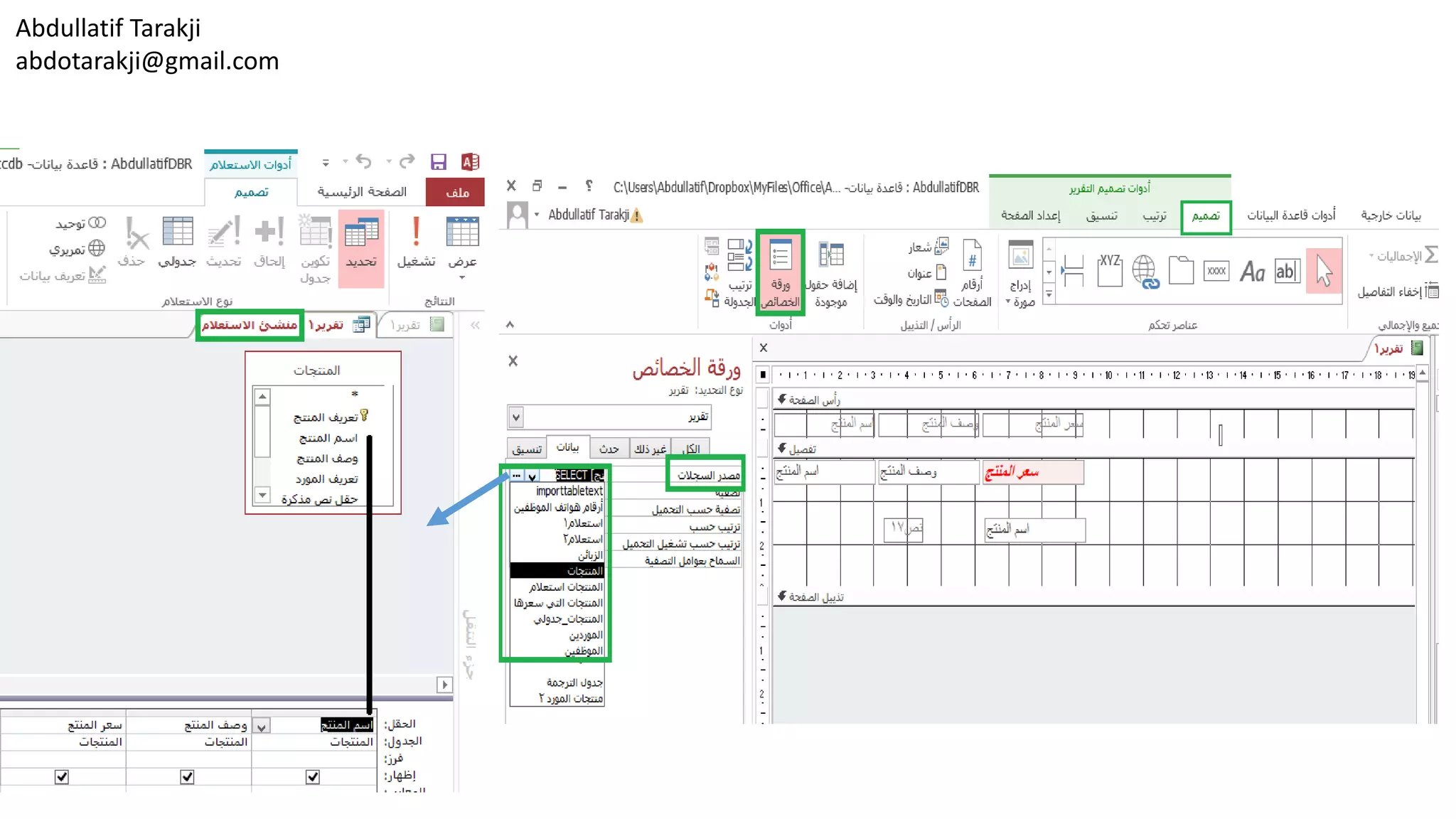
To modify a report’s record source
‫التقرير‬ ‫سجل‬ ‫مصدر‬ ‫لتعديل‬
1. Open the report in Design view or Layout view.
2. On the Report Design Tools Design tool tab,
in the Tools group, click Property Sheet.
3. On the property sheet’s Data tab, click in the
Record Source box.
4. Select a different table or query from the list in
the property box
Or
Click the ellipsis to open the Query Builder, use the
Query Builder to modify the fields in the form’s
record source, and then close the Query Builder.
.1‫التخ‬ ‫عرض‬ ‫أو‬ ‫التصميم‬ ‫عرض‬ ‫طريقة‬ ‫في‬ ‫التقرير‬ ‫افتح‬‫طيط‬.
.2‫التقرير‬ ‫تصميم‬ ‫أدوات‬ ‫في‬ ‫التصميم‬ ‫أداة‬ ‫تبويب‬ ‫عالمة‬ ‫من‬,‫من‬
‫أدوات‬ ‫مجموعة‬,‫الخصائص‬ ‫صفحة‬ ‫اضغط‬.
.3‫الخصائص‬ ‫صفحة‬ ‫في‬ ‫بيانات‬ ‫التبويب‬ ‫عالمة‬ ‫من‬,‫اضغط‬‫على‬
‫السجل‬ ‫مصدر‬ ‫مربع‬.
.4‫الخصائص‬ ‫مربع‬ ‫قائمة‬ ‫من‬ ‫مختلف‬ ‫استعالم‬ ‫أو‬ ‫جدول‬ ‫اختر‬.
‫أو‬
‫على‬ ‫اضغط‬)...(‫االستعالم‬ ‫منشئ‬ ‫لفتح‬,‫االست‬ ‫منشئ‬ ‫استخدم‬‫عالم‬
‫النموذج‬ ‫سجل‬ ‫مصدر‬ ‫في‬ ‫الحقول‬ ‫لتعديل‬,‫االست‬ ‫منشئ‬ ‫أغلق‬ ‫ثم‬‫عالم‬.
Abdullatif Tarakji
abdotarakji@gmail.com
Abdullatif Tarakji
abdotarakji@gmail.com
To modify the Control Source property
‫التحكم‬ ‫عنصر‬ ‫مصدر‬ ‫خصائص‬ ‫لتعديل‬
1. Open the report in Design view
or Layout view.
2. On the Design tool tab, in the
Tools group, click Property Sheet.
3. On the property sheet’s Data tab,
click in the Control Source box.
4. Select a different field from the list
in the property box, or click the
ellipsis to open the Expression
Builder to create an expression
for the control.
.1‫التصم‬ ‫عرض‬ ‫طريقة‬ ‫في‬ ‫التقرير‬ ‫افتح‬‫يم‬
‫التخطيط‬ ‫عرض‬ ‫أو‬.
.2‫التصميم‬ ‫أداة‬ ‫تبويب‬ ‫من‬,‫أدوات‬ ‫مجموعة‬ ‫في‬,
‫الخصائص‬ ‫صفحة‬ ‫اضغط‬.
.3‫الخصائص‬ ‫صفحة‬ ‫في‬ ‫بيانات‬ ‫تبويب‬ ‫من‬,
‫التحكم‬ ‫عنصر‬ ‫مصدر‬ ‫مربع‬ ‫اضغط‬.
.4‫الخصائ‬ ‫مربع‬ ‫قائمة‬ ‫من‬ ‫مختلف‬ ‫حقل‬ ‫اختر‬‫ص‬,
‫اضغط‬ ‫أو‬)...(‫إلنش‬ ‫التعبير‬ ‫منشئ‬ ‫لفتح‬‫اء‬
‫التحكم‬ ‫لعنصر‬ ‫تعبير‬.
Abdullatif Tarakji
abdotarakji@gmail.com
Abdullatif Tarakji
abdotarakji@gmail.com Grouping and sorting fields
‫الحقول‬ ‫فرز‬ ‫و‬ ‫تجميع‬
• Specifying how records are grouped in a report is an
important aspect of the report’s design. You can set
grouping levels when you use the Report wizard and by
using the Group & Sort command when you create a report
in Layout view or Design view. The Grouping & Totals group
on the Report Design Tools Design tool tab also includes the
Totals command,
which you use to summarize field values in a report.
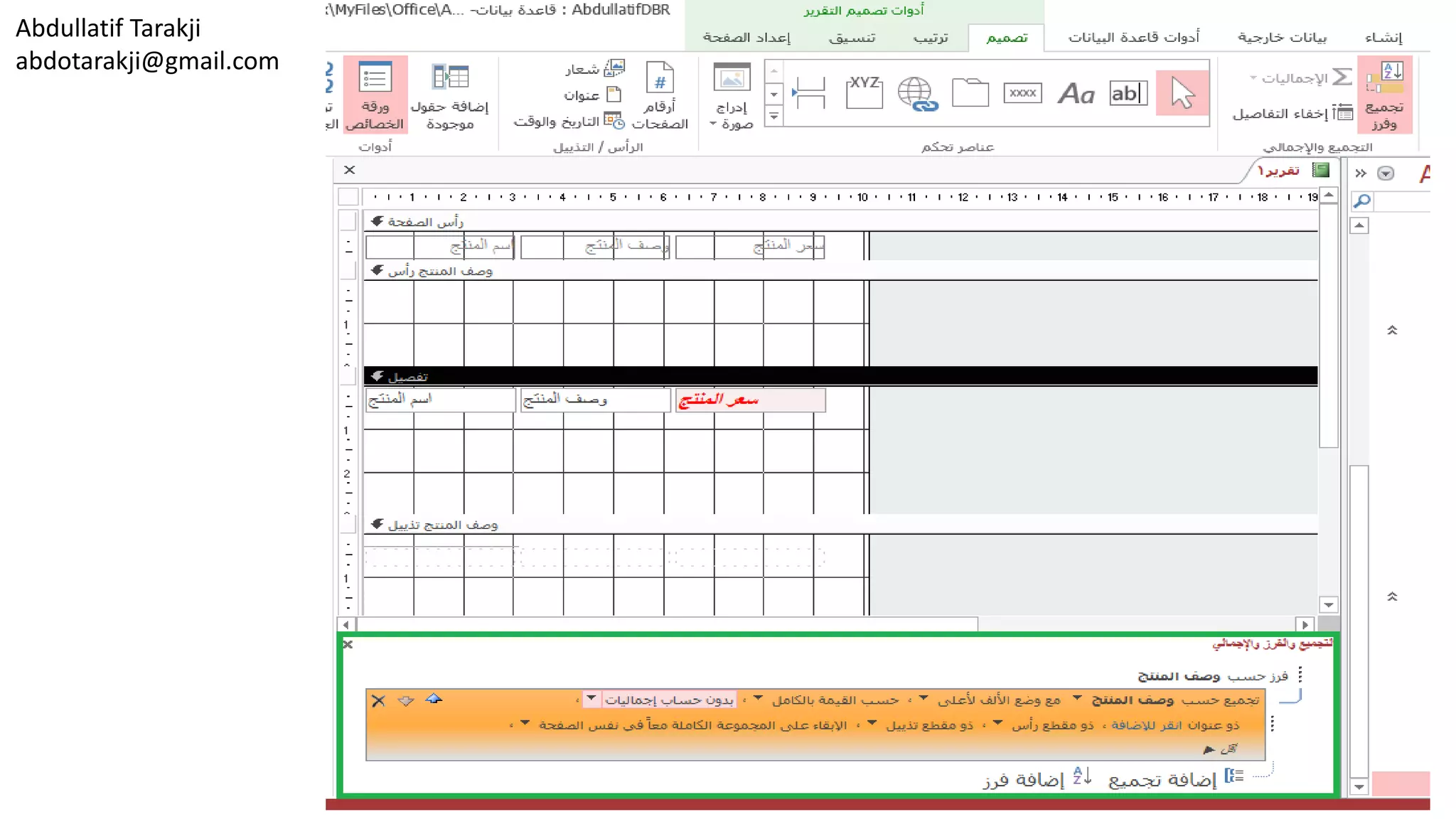
• When you click Group & Sort, Access displays the Group,
Sort, And Total pane at the bottom of the report window.
Click Add A Group, and then select the field you want to use
for grouping. Access adds a group header section to the
report that uses the name of the field you select.
To add a grouping level, click Add A Group again and select
another field.
• If you work in Layout view, Access displays more clearly how
the selections you make in the Group, Sort, And Total pane
affect the report’s organization. Access doesn’t show this
level of detail in Design view.
• Click Add A Sort in the Group, Sort, And Total pane to sort
records within each grouping level. For example, in a budget
report, you could group records first by country or region
and then sort records within that group by expense
category. You could also group by expense category and sort
records within that group by the date of the expense.
•‫ت‬ ‫جوانب‬ ‫من‬ ‫هام‬ ‫جانب‬ ‫هو‬ ‫التقرير‬ ‫في‬ ‫السجالت‬ ‫تجميع‬ ‫يتم‬ ‫كيف‬ ‫تحديد‬‫صميم‬
‫التقرير‬.‫التقري‬ ‫معالج‬ ‫استخدام‬ ‫عند‬ ‫التجميع‬ ‫مستويات‬ ‫ضبط‬ ‫يمكنك‬‫وباستخدام‬ ‫ر‬
‫عرض‬ ‫طريقة‬ ‫أو‬ ‫تخطيط‬ ‫عرض‬ ‫في‬ ‫تقرير‬ ‫إنشاء‬ ‫عند‬ ‫األوامر‬ ‫وفرز‬ ‫مجموعة‬
‫التصميم‬.‫أداة‬ ‫التبويب‬ ‫عالمة‬ ‫على‬ ‫والمجاميع‬ ‫التجميع‬ ‫المجموعة‬ ‫وتضم‬‫التصميم‬
‫التقرير‬ ‫تصميم‬ ‫أدوات‬ ‫في‬.‫استخ‬ ‫يمكنك‬ ‫والتي‬ ،‫المجاميع‬ ‫األمر‬ ‫أيضا‬‫دامها‬
‫التقرير‬ ‫في‬ ‫الحقول‬ ‫قيم‬ ‫لتلخيص‬.
•‫األكسيس‬ ‫يعرض‬ ،‫الفرز‬ ‫و‬ ‫التجميع‬ ‫فوق‬ ‫النقر‬ ‫عند‬‫االجمالي‬ ‫و‬ ‫الفرز‬ ‫و‬ ‫التجميع‬
‫التقرير‬ ‫نافذة‬ ‫من‬ ‫السفلي‬ ‫الجزء‬ ‫في‬.‫حد‬ ‫ثم‬ ،‫مجموعة‬ ‫إضافة‬ ‫فوق‬ ‫انقر‬‫الحقل‬ ‫د‬
‫للتجميع‬ ‫استخدامه‬ ‫تريد‬ ‫الذي‬.‫المجم‬ ‫رأس‬ ‫مقطع‬ ‫إلى‬ ‫األكسيس‬ ‫ويضيف‬‫وعة‬
‫تحدده‬ ‫الذي‬ ‫الحقل‬ ‫اسم‬ ‫يستخدم‬ ‫الذي‬ ‫للتقرير‬.‫التجمي‬ ‫مستوى‬ ‫إلضافة‬،‫ع‬
‫آخر‬ ‫حقل‬ ‫وحدد‬ ‫أخرى‬ ‫مرة‬ ‫مجموعة‬ ‫إضافة‬ ‫فوق‬ ‫انقر‬.
•‫األكسيس‬ ‫يعرض‬ ،‫تخطيط‬ ‫عرض‬ ‫في‬ ‫تعمل‬ ‫كنت‬ ‫إذا‬‫كيفية‬ ‫وضوحا‬ ‫أكثر‬ ‫بشكل‬
‫عل‬ ‫يؤثر‬ ‫جزء‬ ‫والمجاميع‬ ،‫الترتيب‬ ،‫التجميع‬ ‫تجريها‬ ‫التي‬ ‫التحديدات‬‫منظم‬ ‫ى‬
‫التقرير‬.‫التفصيل‬ ‫من‬ ‫المستوى‬ ‫هذا‬ ‫يظهر‬ ‫ال‬ ‫األكسيس‬
‫التصميم‬ ‫عرض‬ ‫طريقة‬ ‫في‬.
•‫الس‬ ‫لفرز‬ ‫جزء‬ ‫واالجمالي‬ ،‫الفرز‬ ،‫التجميع‬ ‫في‬ ‫الفرز‬ ‫إضافة‬ ‫فوق‬ ‫انقر‬‫جالت‬
‫التجميع‬ ‫مستوى‬ ‫كل‬ ‫داخل‬.‫ي‬ ،‫الميزانية‬ ‫تقرير‬ ‫في‬ ،‫المثال‬ ‫سبيل‬ ‫على‬‫أن‬ ‫مكن‬
‫تل‬ ‫ضمن‬ ‫السجالت‬ ‫فرز‬ ‫ثم‬ ‫المنطقة‬ ‫أو‬ ‫البلد‬ ‫حسب‬ ‫أوال‬ ‫السجالت‬ ‫تجميع‬‫ك‬
‫التكلفة‬ ‫فئة‬ ‫حسب‬ ‫المجموعة‬.‫التكلف‬ ‫فئة‬ ‫حسب‬ ‫تجميع‬ ‫أيضا‬ ‫يمكنك‬‫وفرز‬ ‫ة‬
‫التكلفة‬ ‫موعد‬ ‫بحلول‬ ‫المجموعة‬ ‫تلك‬ ‫ضمن‬ ‫السجالت‬.
Abdullatif Tarakji
abdotarakji@gmail.com
When you click More in the Group, Sort, And Total pane,
Access displays additional options that you can set for
grouping and sorting fields:
• Sort Order Use this option to specify the sort order, either
ascending or descending.
• Group Interval Use this option to specify how records are
grouped. You can group a text field on the first letter, for
example, which would group all A items together, all B
items, and so on. Date fields can be grouped by day, week,
month, quarter, or an interval you define.
• Totals You can add totals for multiple fields and apply
different summary functions (Sum and Avg or Min and
Max, for example) to the same field. Use the Total On list to
select a field, use the Type list to select the function, and
then select the options you want to use to show the totals.
• Title Use this option to change the title of the field being
summarized. The title is used for the column heading and
for labeling summary fields in headers and footers. Click
the field link, and then enter the new title in the Zoom
dialog box.
‫ي‬ ،‫اإلجمالي‬ ،‫الفرز‬ ،‫التجميع‬ ‫جزء‬ ‫في‬ ‫أكثر‬ ‫فوق‬ ‫النقر‬ ‫عند‬‫عرض‬
‫األكسيس‬‫تعيينها‬ ‫يمكنك‬ ‫التي‬ ‫اإلضافية‬ ‫الخيارات‬
‫الحقول‬ ‫وفرز‬ ‫لتجميع‬:
‫ترتيب‬‫ت‬ ‫أو‬ ‫تصاعدي‬ ‫إما‬ ،‫الفرز‬ ‫لتحديد‬ ‫الخيار‬ ‫هذا‬ ‫استخدم‬‫نازلي‬.
‫الزمني‬ ‫الفاصل‬ ‫مجموعة‬‫يت‬ ‫كيف‬ ‫لتحديد‬ ‫الخيار‬ ‫هذا‬ ‫استخدم‬‫تجميع‬ ‫م‬
‫السجالت‬.‫س‬ ‫على‬ ،‫األول‬ ‫الحرف‬ ‫على‬ ‫نص‬ ‫حقل‬ ‫تجميع‬ ‫يمكنك‬‫بيل‬
‫البن‬ ‫وجميع‬ ،‫معا‬ ‫البنود‬ ‫كافة‬ ‫تجميع‬ ‫شأنه‬ ‫من‬ ‫والذي‬ ،‫المثال‬‫ود‬B،
‫جرا‬ ‫وهلم‬.،‫أسبوع‬ ،‫يوم‬ ‫بعد‬ ‫التاريخ‬ ‫حقول‬ ‫تصنيف‬ ‫ويمكن‬،‫شهر‬
‫تحددها‬ ‫فاصل‬ ‫أو‬ ،‫ربع‬.
‫االجمالي‬‫داالت‬ ‫وتطبيق‬ ‫متعددة‬ ‫لحقول‬ ‫اجمالي‬ ‫إضافة‬ ‫يمكنك‬
‫مختلفة‬ ‫تلخيص‬(‫​أو‬​ ‫ومتوسط‬ ‫مجموع‬Min‫و‬Max،‫سبيل‬ ‫على‬
‫المثال‬)‫الحقل‬ ‫نفس‬ ‫إلى‬.‫لتحدي‬ ‫القائمة‬ ‫من‬ ‫اإلجمالي‬ ‫استخدام‬،‫حقل‬ ‫د‬
‫تر‬ ‫التي‬ ‫الخيارات‬ ‫حدد‬ ‫ثم‬ ،‫دالة‬ ‫لتحديد‬ ‫القائمة‬ ‫نوع‬ ‫استخدم‬‫يد‬
‫المجاميع‬ ‫إلظهار‬ ‫استخدامها‬.
‫عنوان‬‫تل‬ ‫تم‬ ‫التي‬ ‫الحقل‬ ‫عنوان‬ ‫لتغيير‬ ‫الخيار‬ ‫هذا‬ ‫استخدم‬‫خيصها‬.
‫في‬ ‫الملخصة‬ ‫الحقول‬ ‫ولوصف‬ ‫العمود‬ ‫لرأس‬ ‫العنوان‬ ‫يستخدم‬
‫الرؤوس‬‫والتذييالت‬.‫أدخل‬ ‫ثم‬ ‫ومن‬ ،‫الحقل‬ ‫رابط‬ ‫على‬ ‫اضغط‬
‫التكبير‬ ‫الحوار‬ ‫مربع‬ ‫في‬ ‫جديد‬ ‫عنوان‬.
Abdullatif Tarakji
abdotarakji@gmail.com
• With/Without A Header Section Use this setting to add or
remove the header section for each group. Access moves
the grouping field to the header when you add the header
section. Access prompts you to remove any controls (other
than the grouping field) from the header when you
remove it.
• With/Without A Footer Section Use this setting to add or
remove the footer section that follows each group. When
you remove a footer section that contains controls, Access
asks for confirmation to delete the controls.
• Keep Group Together The settings for this option
determine how groups are laid out on the page when the
report is printed.
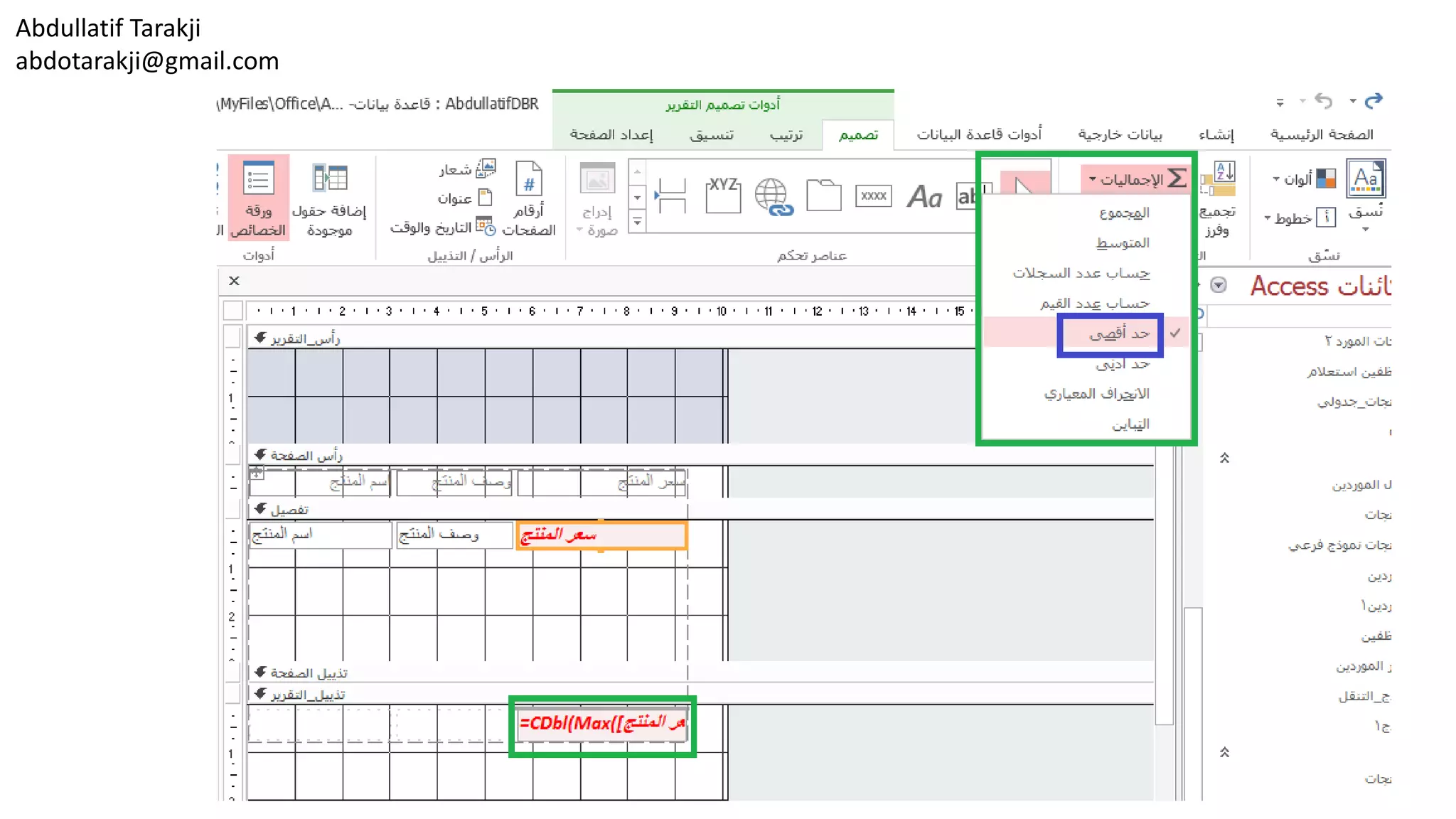
To summarize the values in a field and add a text box that
displays the summary value, click in the field you want to
summarize and then click Totals in the Grouping & Totals
group. The options available depend on the data type of the
field you select. For numeric fields, the range of options
include Sum, Average, Count, Max, and Min. For text and
Date/Time fields, the Count options are available.
•‫مع‬/‫الرأس‬ ‫مقطع‬ ‫بدون‬‫إزالة‬ ‫أو‬ ‫إلضافة‬ ‫اإلعداد‬ ‫هذا‬ ‫استخدم‬
‫مجموعة‬ ‫لكل‬ ‫الرأس‬ ‫مقطع‬.‫إلى‬ ‫التجميع‬ ‫حقل‬ ‫ينقل‬ ‫أكسيس‬
‫الرأس‬ ‫مقطع‬ ‫إضافة‬ ‫عند‬ ‫الرأس‬.‫أ‬ ‫بإزالة‬ ‫األكسيس‬ ‫يطالبك‬‫ي‬
‫تحكم‬ ‫عناصر‬(‫التجميع‬ ‫حقل‬ ‫بخالف‬)‫إزالت‬ ‫عند‬ ‫الرأس‬ ‫من‬‫ه‬.
•‫مع‬/‫التذييل‬ ‫مقطع‬ ‫بدون‬‫إزال‬ ‫أو‬ ‫إلضافة‬ ‫اإلعداد‬ ‫هذا‬ ‫استخدم‬‫ة‬
‫مجموعة‬ ‫كل‬ ‫يتبع‬ ‫الذي‬ ‫التذييل‬ ‫مقطع‬.‫الت‬ ‫مقطع‬ ‫إزالة‬ ‫عند‬‫ذييل‬
‫للتأكي‬ ‫األكسيس‬ ‫يسأل‬ ،‫تحكم‬ ‫عناصر‬ ‫على‬ ‫يحتوي‬ ‫الذي‬‫على‬ ‫د‬
‫التحكم‬ ‫عناصر‬ ‫حذف‬.
•‫معا‬ ‫المجموعة‬ ‫إبقاء‬‫وضع‬ ‫كيفية‬ ‫تحدد‬ ‫الخيار‬ ‫هذا‬ ‫إعدادات‬
‫التقرير‬ ‫طباعة‬ ‫عند‬ ‫الصفحة‬ ‫على‬ ‫من‬ ‫مجموعات‬.
‫يعرض‬ ‫الذي‬ ‫النص‬ ‫مربع‬ ‫وإضافة‬ ‫حقل‬ ‫في‬ ‫القيم‬ ‫لتلخيص‬‫قيمة‬
‫ف‬ ‫انقر‬ ‫ثم‬ ‫تلخيصه‬ ‫تريد‬ ‫الذي‬ ‫الحقل‬ ‫في‬ ‫انقر‬ ،‫التلخيص‬‫وق‬
‫واالجمالي‬ ‫التجميع‬ ‫المجموعة‬ ‫في‬ ‫إجماليات‬.‫المتاح‬ ‫الخيارات‬‫ة‬
‫تختارها‬ ‫التي‬ ‫الحقل‬ ‫بيانات‬ ‫نوع‬ ‫على‬ ‫تعتمد‬.‫الر‬ ‫للحقول‬،‫قمية‬
‫أكبر‬ ،‫العدد‬ ،‫المتوسط‬ ،‫المجموع‬ ‫تتضمن‬ ‫خيارات‬ ‫من‬ ‫ومجموعة‬
‫قيمة‬ ‫وأدنى‬ ،‫قيمة‬.
‫والتاريخ‬ ‫النص‬ ‫لحقول‬/‫العدد‬ ‫خيارات‬ ‫تتوفر‬ ،‫الوقت‬.
Abdullatif Tarakji
abdotarakji@gmail.com To group and sort records in a report
‫التقرير‬ ‫في‬ ‫السجالت‬ ‫فرز‬ ‫و‬ ‫لتجميع‬
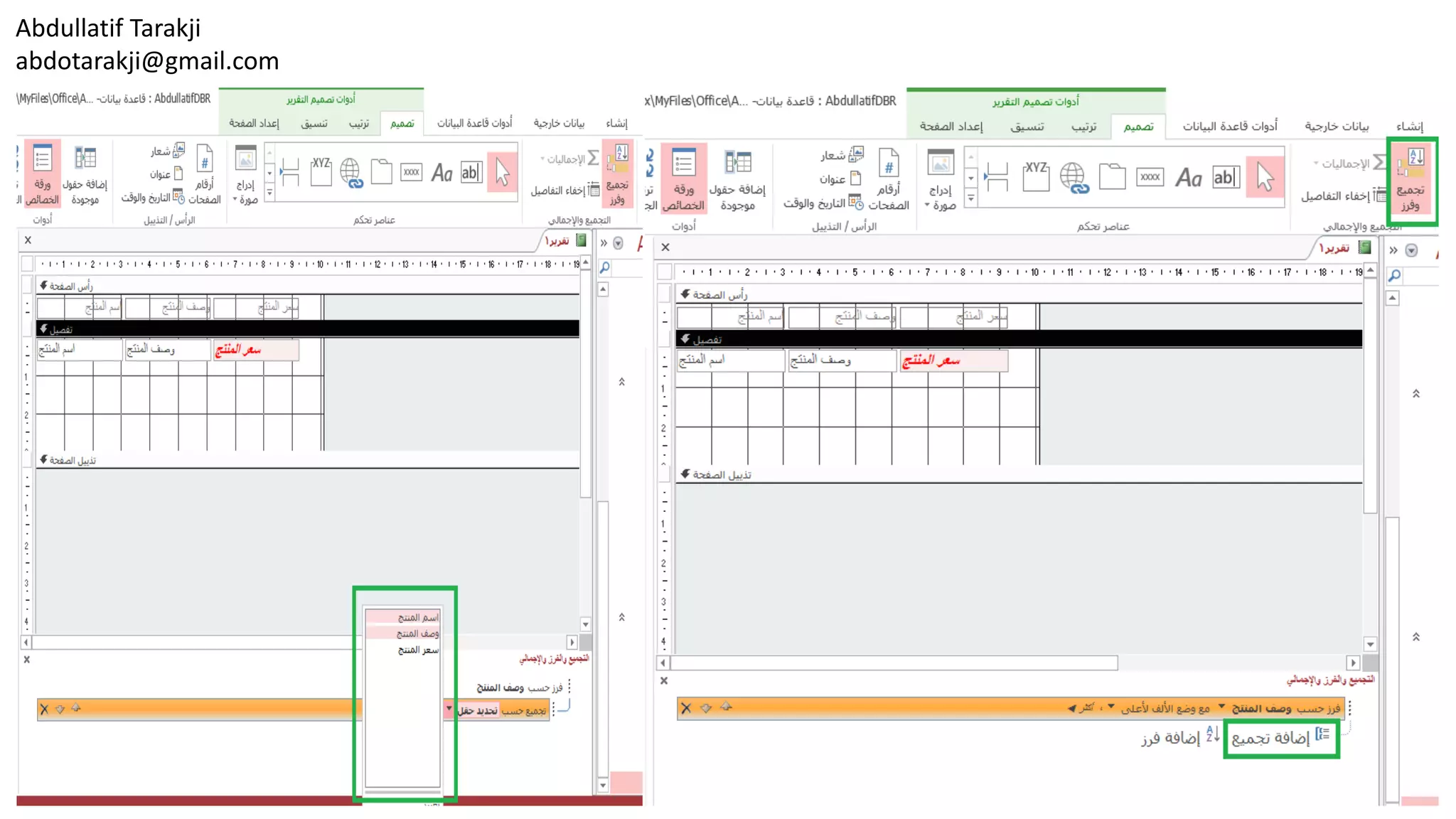
1. Open the report in Layout view
or Design view.
2. On the Report Design Tools Design tool
tab, click Group & Sort.
3. In the Group, Sort, and Total pane, click
Add a group, and then select the field
to group by.
4. In the Group, Sort, and Total pane, click
More, and then specify settings for
sorting, grouping intervals, totals, title,
header and footer sections, and how to
keep groups together on the page.
.1‫الت‬ ‫عرض‬ ‫أو‬ ‫التصميم‬ ‫عرض‬ ‫في‬ ‫التقرير‬ ‫افتح‬‫خطيط‬.
.2‫التق‬ ‫تصميم‬ ‫أدوات‬ ‫في‬ ‫التصميم‬ ‫أداة‬ ‫تبويب‬ ‫من‬‫رير‬,
‫الفرز‬ ‫و‬ ‫التجميع‬ ‫اضغط‬.
.3‫التجميع‬ ‫جزء‬ ‫من‬,‫الفرز‬,‫اإلجمالي‬ ‫و‬,‫إضاف‬ ‫اضغط‬‫ة‬
‫التجميع‬,‫حسب‬ ‫للتجميع‬ ‫الحقل‬ ‫اختر‬ ‫ثم‬.
.4‫التجميع‬ ‫جزء‬ ‫من‬,‫الفرز‬,‫اإلجمالي‬ ‫و‬,‫أكثر‬ ‫اضغط‬,‫ثم‬
‫للفرز‬ ‫االعدادات‬ ‫حدد‬,‫التجميع‬ ‫و‬,‫اإلجمالي‬ ‫و‬,
‫العنوان‬,‫التذييل‬ ‫و‬ ‫الرأس‬ ‫مقاطع‬,‫االحت‬ ‫كيفية‬ ‫و‬‫فاظ‬
‫الصفحة‬ ‫على‬ ً‫ا‬‫مع‬ ‫بالمجموعات‬.
Abdullatif Tarakji
abdotarakji@gmail.com
Abdullatif Tarakji
abdotarakji@gmail.com
Abdullatif Tarakji
abdotarakji@gmail.com
To summarize values on a report
‫التقرير‬ ‫في‬ ‫القيم‬ ‫لتلخيص‬
1. Open the report in Layout view or Design view.
2. In the report, select the field you want to summarize.
3. On the Design tool tab, in the Grouping & Totals group, click Totals,
and then choose the summary function you want to apply.
.1‫التخطيط‬ ‫عرض‬ ‫أو‬ ‫التصميم‬ ‫عرض‬ ‫طريقة‬ ‫في‬ ‫التقرير‬ ‫افتح‬.
.2‫التقرير‬ ‫في‬,‫تلخيصه‬ ‫تريد‬ ‫الذي‬ ‫الحقل‬ ‫اختر‬.
.3‫التصميم‬ ‫أداة‬ ‫تبويب‬ ‫من‬,‫اإلجمالي‬ ‫و‬ ‫التجميع‬ ‫مجموعة‬ ‫في‬,‫االجماليات‬ ‫اضغط‬,
‫تطبيقها‬ ‫تريد‬ ‫التي‬ ‫التلخيص‬ ‫دالة‬ ‫اختر‬ ‫ثم‬.
Abdullatif Tarakji
abdotarakji@gmail.com

Lesson18 Set Report Controls

  • 1.
    Abdullatif Tarakji abdotarakji@gmail.com Set reportcontrols ‫التقرير‬ ‫تحكم‬ ‫عناصر‬ ‫تعيين‬ Adding controls to a report Managing report fields and properties Formatting report controls Working with labels Modifying data sources Grouping and sorting fields ‫التقرير‬ ‫الى‬ ‫تحكم‬ ‫عناصر‬ ‫إضافة‬ ‫و‬ ‫التقرير‬ ‫حقول‬ ‫إدارة‬‫خصائصها‬ ‫التقرير‬ ‫تحكم‬ ‫عناصر‬ ‫تنسيق‬ ‫التسميات‬ ‫مع‬ ‫العمل‬ ‫البيانات‬ ‫مصادر‬ ‫تعديل‬ ‫الحقول‬ ‫فرز‬ ‫و‬ ‫تجميع‬
  • 2.
    Abdullatif Tarakji abdotarakji@gmail.com Set reportcontrols ‫التقرير‬ ‫تحكم‬ ‫عناصر‬ ‫تعيين‬ This section describes how to work with fields and controls on a report. It explains how to add controls, select fields to group and sort records, and how to manage a report’s data source. This section also covers some of the report and control properties you can set in the property sheet. ‫التقرير‬ ‫في‬ ‫التحكم‬ ‫وعناصر‬ ‫الحقول‬ ‫مع‬ ‫العمل‬ ‫كيفية‬ ‫القسم‬ ‫هذا‬ ‫يصف‬.‫كيف‬ ‫يشرح‬‫إضافة‬ ‫ية‬ ‫البي‬ ‫مصدر‬ ‫إدارة‬ ‫وكيفية‬ ،‫السجالت‬ ‫وفرز‬ ‫لتجميع‬ ‫الحقول‬ ‫واختيار‬ ،‫التحكم‬ ‫عناصر‬‫في‬ ‫انات‬ ‫التقرير‬.‫ي‬ ‫التي‬ ‫التحكم‬ ‫وعنصر‬ ‫التقرير‬ ‫خصائص‬ ‫من‬ ‫بعض‬ ‫أيضا‬ ‫القسم‬ ‫هذا‬ ‫يغطي‬‫تعيينها‬ ‫مكن‬ ‫الخصائص‬ ‫صفحة‬ ‫من‬.
  • 3.
    Abdullatif Tarakji abdotarakji@gmail.com Addingcontrols to a report ‫التقرير‬ ‫الى‬ ‫تحكم‬ ‫عناصر‬ ‫إضافة‬ • Reports are designed primarily to present and share data (unlike forms or tables, which you use to enter, update, and delete data). You often work only with label and text box controls to identify and present data in a report. For example, you might add a label to identify a summary field in a group header section or to provide a title in the Report Header section. You can add a text box to a report and then write an expression to create a calculated field. You can add an image control to enhance the appearance of a report. • Although the data in a report is more static than in a form or a table, you can use a command button to perform an action related to the report or add a hyperlink control to display a website or an email address. In Report view, command buttons and hyperlinks are operational. In Print Preview, Access doesn’t display a command button, and a hyperlink appears as static text. •‫ا‬ ‫وتبادل‬ ‫لتقديم‬ ‫رئيسي‬ ‫بشكل‬ ‫التقارير‬ ‫تصمم‬‫لبيانات‬ (‫استخد‬ ‫يمكنك‬ ‫والتي‬ ،‫الجداول‬ ‫أو‬ ‫النماذج‬ ‫عكس‬ ‫على‬‫امها‬ ‫البيانات‬ ‫وحذف‬ ‫وتحديث‬ ‫إلدخال‬.)‫فقط‬ ‫نعمل‬ ً‫ا‬‫غالب‬‫مع‬ ‫لتعريف‬ ‫النص‬ ‫ومربع‬ ‫التسمية‬ ‫تحكم‬ ‫عناصر‬ ‫وجود‬‫و‬ ‫التقرير‬ ‫في‬ ‫الموجودة‬ ‫البيانات‬ ‫عرض‬.‫سبيل‬ ‫على‬،‫المثال‬ ‫ر‬ ‫مقطع‬ ‫في‬ ‫تلخيص‬ ‫حقل‬ ‫لتحديد‬ ‫التسمية‬ ‫إضافة‬‫أس‬ ‫التقرير‬ ‫رأس‬ ‫مقطع‬ ‫في‬ ‫عنوان‬ ‫لتوفير‬ ‫أو‬ ‫المجموعة‬. ‫ت‬ ‫كتابة‬ ‫ثم‬ ‫ومن‬ ‫لتقرير‬ ‫نص‬ ‫مربع‬ ‫إضافة‬ ‫يمكنك‬‫عبير‬ ‫محسوب‬ ‫حقل‬ ‫إلنشاء‬.‫تحكم‬ ‫عنصر‬ ‫إضافة‬ ‫يمكنك‬ ‫التقرير‬ ‫مظهر‬ ‫لتحسين‬ ‫الصورة‬. •‫م‬ ‫ثابتة‬ ‫هي‬ ‫التقرير‬ ‫في‬ ‫البيانات‬ ‫أن‬ ‫من‬ ‫الرغم‬ ‫على‬‫عليه‬ ‫ما‬ ‫لتنف‬ ‫أمر‬ ‫زر‬ ‫استخدام‬ ‫يمكنك‬ ،‫الجدول‬ ‫أو‬ ‫النموذج‬ ‫في‬‫يذ‬ ‫االر‬ ‫تحكم‬ ‫عنصر‬ ‫إضافة‬ ‫أو‬ ‫بالتقرير‬ ‫متعلق‬ ‫إجراء‬‫تباط‬ ‫اإللك‬ ‫البريد‬ ‫عنوان‬ ‫أو‬ ‫ويب‬ ‫موقع‬ ‫لعرض‬ ‫التشعبي‬‫تروني‬. ‫الت‬ ‫واالرتباطات‬ ‫األوامر‬ ‫أزرار‬ ،‫التقرير‬ ‫معاينة‬ ‫في‬‫شعبية‬ ‫عملية‬ ‫هي‬.‫ي‬ ‫ال‬ ‫األكسيس‬ ،‫الطباعة‬ ‫قبل‬ ‫معاينة‬ ‫في‬‫عرض‬ ‫ثابت‬ ‫كنص‬ ‫التشعبي‬ ‫االرتباط‬ ‫ويظهر‬ ،‫األمر‬ ‫زر‬.
  • 4.
    Abdullatif Tarakji abdotarakji@gmail.com To addcontrols to a report 1. Open the report in Layout view or Design view. 2. On the Report Design Tools Design tool tab, in the Controls group, click the type of control you want to add, and then click in the report page where you want to add the control. ‫التقرير‬ ‫الى‬ ‫تحكم‬ ‫عناصر‬ ‫إلضافة‬ .1‫التصميم‬ ‫عرض‬ ‫أو‬ ‫التخطيط‬ ‫عرض‬ ‫طريقة‬ ‫في‬ ‫التقرير‬ ‫افتح‬. .2‫التقرير‬ ‫تصميم‬ ‫أدوات‬ ‫في‬ ‫التصميم‬ ‫أداة‬ ‫تبويب‬ ‫من‬,‫التحكم‬ ‫عناصر‬ ‫مجموعة‬ ‫من‬,‫اضافته‬ ‫تريد‬ ‫الذي‬ ‫التحكم‬ ‫عنصر‬ ‫نوع‬ ‫على‬ ‫اضغط‬, ‫العنصر‬ ‫إضافة‬ ‫تريد‬ ‫حيث‬ ‫التقرير‬ ‫صفحة‬ ‫في‬ ‫اضغط‬ ‫ثم‬.
  • 5.
    Abdullatif Tarakji abdotarakji@gmail.com Managingreport fields and properties ‫خصائصها‬ ‫و‬ ‫التقرير‬ ‫حقول‬ ‫إدارة‬ • Each control on a report, each report section, and the report itself has a group of properties that you can work with on the property sheet. (Click Property Sheet on the Report Design Tools Design tool tab to display the property sheet.) For example, you can set properties on the property sheet’s Format tab to fine-tune the formatting for a control. For a text box, you can set properties such as Width, Height, Back Color, Border Style, Border Color, Font Name, Font Size, and Text Align. • For report sections (such as Detail, Page Header, and Page Footer), you can set the Height property to 0” to hide the section. For the Detail section, set the Can Grow and Can Shrink properties to Yes if you want the size of the Detail section to increase and decrease depending on the amount of information it displays for a particular record. The Report Header and Report Footer sections also have these properties. •‫ل‬ ‫نفسه‬ ‫والتقرير‬ ،‫تقرير‬ ‫مقطع‬ ‫كل‬ ،‫التقرير‬ ‫في‬ ‫تحكم‬ ‫عنصر‬ ‫كل‬‫مجموعة‬ ‫ديه‬ ‫الخصائص‬ ‫صفحة‬ ‫من‬ ‫بها‬ ‫العمل‬ ‫يمكن‬ ‫التي‬ ‫الخصائص‬ ‫من‬. (‫أدوات‬ ‫من‬ ‫التصميم‬ ‫أداة‬ ‫التبويب‬ ‫عالمة‬ ‫في‬ ‫الخصائص‬ ‫ورقة‬ ‫فوق‬ ‫انقر‬‫تصميم‬ ‫الخصائص‬ ‫صفحة‬ ‫لعرض‬ ‫التقرير‬).‫تعي‬ ‫يمكنك‬ ،‫المثال‬ ‫سبيل‬ ‫على‬‫ين‬ ‫تن‬ ‫لصقل‬ ‫الخصائص‬ ‫صفحة‬ ‫تنسيق‬ ‫التبويب‬ ‫عالمة‬ ‫من‬ ‫الخصائص‬‫لعنصر‬ ‫سيق‬ ‫التحكم‬.‫االرتف‬ ‫و‬ ‫العرض‬ ‫مثل‬ ‫خصائص‬ ‫تعيين‬ ‫يمكنك‬ ،‫النص‬ ‫لمربع‬‫لون‬ ،‫اع‬ ‫النص‬ ‫ومحاذاة‬ ،‫الخط‬ ‫حجم‬ ،‫الخط‬ ‫اسم‬ ،‫الحدود‬ ‫لون‬ ،‫الحدود‬ ‫نمط‬ ،‫الخلفية‬. •‫التقرير‬ ‫ألقسام‬(‫الصفحة‬ ‫وتذييل‬ ،‫الصفحة‬ ‫رأس‬ ،‫التفصيل‬ ‫مثل‬)،‫تعيين‬ ‫يمكنك‬ ‫إلى‬ ‫االرتفاع‬ ‫الخاصية‬0‫القسم‬ ‫إلخفاء‬. ‫إل‬ ‫التقلص‬ ‫وتمكين‬ ‫النمو‬ ‫تمكين‬ ‫خاصية‬ ‫تعيين‬ ،‫التفصيل‬ ‫لمقطع‬‫كنت‬ ‫إذا‬ ‫نعم‬ ‫ى‬ ‫المعلو‬ ‫لكمية‬ ‫تبعا‬ ‫والنقصان‬ ‫الزيادة‬ ‫إلى‬ ‫التفصيل‬ ‫مقطع‬ ‫حجم‬ ‫تريد‬‫فإنه‬ ‫مات‬ ‫معين‬ ‫لسجل‬ ‫يعرض‬.‫التقري‬ ‫وتذييل‬ ‫تقرير‬ ‫رأس‬ ً‫ا‬‫أيض‬ ‫أقسام‬ ‫لديها‬‫ر‬.
  • 6.
    Abdullatif Tarakji abdotarakji@gmail.com • Forthe Report Header and Report Footer sections and the Page Header and Page Footer sections, you can also set the Display When property to Always, Print Only, or Screen Only. If you add page numbers to the Page Footer section, for example, set Display When to Print Only to show the page numbers only when you print the report. • Report properties include the Default View property, which controls whether the report opens in Print Preview or Report view by default. (The report opens in the view you specify for the Default View property when you right-click a report in the Navigation pane and then click Open.) The Grid Y and Grid X properties control the number and spacing of the dots in the design grid in Design view. If you use Design view frequently, set the values for Grid Y and Grid X to 10 or to 12 to more easily align controls on the grid. • You can view and alter the Record Source property for a report by displaying the property sheet’s Data tab, clicking in the Record Source property box, and then pressing Shift+F2 to open the Zoom dialog box or clicking the ellipsis button (…) to view and change the record source in the Query Builder. •‫تعيي‬ ‫أيضا‬ ‫يمكنك‬ ،‫الصفحة‬ ‫وتذييل‬ ‫رأس‬ ‫ومقاطع‬ ‫التقرير‬ ‫وتذييل‬ ‫رأس‬ ‫لمقاطع‬‫عند‬ ‫العرض‬ ‫ن‬ ‫فقط‬ ‫الشاشة‬ ‫أو‬ ،‫فقط‬ ‫طباعة‬ ،‫دوما‬ ‫إلى‬ ‫الخاصية‬ ‫تعيين‬.‫الص‬ ‫أرقام‬ ‫بإضافة‬ ‫قمت‬ ‫إذا‬‫فحات‬ ‫إل‬ ‫فقط‬ ‫لطباعة‬ ‫عند‬ ‫العرض‬ ‫تعيين‬ ،‫المثال‬ ‫سبيل‬ ‫على‬ ،‫الصفحة‬ ‫تذييل‬ ‫قسم‬ ‫إلى‬‫أرقام‬ ‫ظهار‬ ‫التقرير‬ ‫طباعة‬ ‫عند‬ ‫فقط‬ ‫الصفحات‬. •‫كن‬ ‫إذا‬ ‫فيما‬ ‫تتحكم‬ ‫التي‬ ،‫عرض‬ ‫االفتراضية‬ ‫الخاصية‬ ‫التقرير‬ ‫خصائص‬ ‫وتشمل‬‫ستفتح‬ ‫ت‬ ‫التقرير‬ ‫عرض‬ ‫طريقة‬ ‫أو‬ ‫الطباعة‬ ‫قبل‬ ‫معاينة‬ ‫في‬ ‫التقرير‬‫افتراضيا‬. (‫الن‬ ‫عند‬ ‫مشاهدة‬ ‫افتراضي‬ ‫للخاصية‬ ‫تحدد‬ ‫التي‬ ‫العرض‬ ‫طريقة‬ ‫في‬ ‫التقرير‬ ‫فتح‬‫الماوس‬ ‫بزر‬ ‫قر‬ ‫فتح‬ ‫فوق‬ ‫انقر‬ ‫ثم‬ ‫التنقل‬ ‫جزء‬ ‫في‬ ‫التقرير‬ ‫فوق‬ ‫األيمن‬). ‫الشبكة‬ ‫خصائص‬X‫والشبكة‬Y‫ف‬ ‫التصميم‬ ‫شبكة‬ ‫في‬ ‫النقاط‬ ‫بين‬ ‫وتباعد‬ ‫بعدد‬ ‫تتحكم‬‫طريقة‬ ‫ي‬ ‫التصميم‬ ‫عرض‬.،‫األحيان‬ ‫من‬ ‫كثير‬ ‫في‬ ‫التصميم‬ ‫عرض‬ ‫طريقة‬ ‫تستخدم‬ ‫كنت‬ ‫إذا‬ ‫لشبكة‬ ‫قيم‬ ‫تعيين‬Y‫والشبكة‬X‫إلى‬10‫أو‬12‫بالشبكة‬ ‫للتحكم‬ ‫سهولة‬ ‫أكثر‬ ‫لمحاذاة‬. •‫عرض‬ ‫طريق‬ ‫عن‬ ‫تقرير‬ ‫على‬ ‫للحصول‬ ‫السجل‬ ‫مصدر‬ ‫خاصية‬ ‫وتغيير‬ ‫عرض‬ ‫يمكنك‬‫عالمة‬ ‫السج‬ ‫مصدر‬ ‫الخاصية‬ ‫مربع‬ ‫في‬ ‫والنقر‬ ،‫الخصائص‬ ‫صفحة‬ ‫في‬ ‫بيانات‬ ‫التبويب‬،‫الت‬ ‫على‬ ‫الضغط‬ ‫ثم‬Shift + F2‫زر‬ ‫على‬ ‫النقر‬ ‫أو‬ ‫تكبير‬ ‫الحوار‬ ‫مربع‬ ‫لفتح‬)...(‫وت‬ ‫لعرض‬‫غيير‬ ‫االستعالم‬ ‫منشئ‬ ‫في‬ ‫السجل‬ ‫مصدر‬.
  • 7.
    Abdullatif Tarakji abdotarakji@gmail.com Toset control and report properties ‫التقرير‬ ‫و‬ ‫تحكم‬ ‫عنصر‬ ‫خصائص‬ ‫لتعيين‬ 1. Open the report in the Design view or Layout view. 2. On the Report Design Tools Design tool tab, click Property Sheet in the Tools group. 3. Click in the box for the property you want to set, and then select an option Access provides or enter the value you want to use. .1‫التخط‬ ‫عرض‬ ‫طريقة‬ ‫أو‬ ‫التصميم‬ ‫عرض‬ ‫طريقة‬ ‫في‬ ‫التقرير‬ ‫افتح‬‫يط‬. .2‫التقرير‬ ‫تصميم‬ ‫أدوات‬ ‫في‬ ‫التصميم‬ ‫أداة‬ ‫تبويب‬ ‫عالمة‬ ‫من‬,‫اضغط‬‫صفحة‬ ‫أدوات‬ ‫مجموعة‬ ‫من‬ ‫الخصائص‬. .3‫تعيينها‬ ‫تريد‬ ‫التي‬ ‫للخصائص‬ ‫المربع‬ ‫على‬ ‫اضغط‬,‫الخ‬ ‫اختر‬ ‫ثم‬‫التي‬ ‫يار‬ ‫استخدامها‬ ‫تريد‬ ‫التي‬ ‫القيمة‬ ‫إلدخال‬ ‫األكسيس‬ ‫يوفرها‬.
  • 8.
    Abdullatif Tarakji abdotarakji@gmail.com Formattingreport controls ‫التقرير‬ ‫تحكم‬ ‫عناصر‬ ‫تنسيق‬ • By working with the commands in the Font group on the Report Design Tools Format tool tab, you can make changes to font properties for labels and other controls on a report. • For example, click a label on a report and then select the font you want to use from the Font list. You can also change the size of the font, choose a different font color, or apply a background color to a control. Use the alignment buttons to position the text left, right, or centered. • In the Number group, you can apply a format to fields that use the Number, Currency, or Date/Time data type. For example, select a date field in the report, and then choose a format from the list provided. The format you choose here affects how the date is displayed, but it doesn’t change the date format specified for the field in the table. • With the commands in the Control Formatting group, you can format controls in other ways. Use the Shape Fill command to add a background color to a control such as the report’s title. The Shape Outline command lets you modify the color and style of a control’s borders. •‫تبويب‬ ‫عالمة‬ ‫في‬ ‫خط‬ ‫مجموعة‬ ‫في‬ ‫األوامر‬ ‫مع‬ ‫العمل‬ ‫خالل‬ ‫من‬ ‫تغيير‬ ‫إجراء‬ ‫يمكنك‬ ،‫التقرير‬ ‫تصميم‬ ‫أدوات‬ ‫من‬ ‫تنسيق‬‫على‬ ‫ات‬ ‫ال‬ ‫في‬ ‫األخرى‬ ‫التحكم‬ ‫وعناصر‬ ‫التسميات‬ ‫خصائص‬ ‫الخط‬‫تقرير‬. •‫وثم‬ ‫التقرير‬ ‫في‬ ‫تسمية‬ ‫فوق‬ ‫انقر‬ ،‫المثال‬ ‫سبيل‬ ‫على‬‫الخط‬ ‫حدد‬ ‫الخط‬ ‫القائمة‬ ‫من‬ ‫استخدامه‬ ‫تريد‬ ‫الذي‬.‫تغيي‬ ‫أيضا‬ ‫يمكنك‬‫حجم‬ ‫ر‬ ‫ل‬ ‫الخلفية‬ ‫لون‬ ‫تطبيق‬ ‫أو‬ ،‫مختلف‬ ‫خط‬ ‫لون‬ ‫اختيار‬ ،‫الخط‬‫عنصر‬ ‫التحكم‬.‫النص‬ ‫لوضع‬ ‫المحاذاة‬ ‫أزرار‬ ‫استخدام‬ ‫توسيط‬ ‫أو‬ ،‫يمين‬ ،‫يسار‬. •‫التي‬ ‫للحقول‬ ‫تنسيق‬ ‫تطبيق‬ ‫يمكنك‬ ،‫رقم‬ ‫المجموعة‬ ‫في‬‫تستخدم‬ ‫تاريخ‬ ‫أو‬ ،‫عملة‬ ،‫رقم‬ ‫البيانات‬ ‫نوع‬/‫الوقت‬.‫ال‬ ‫سبيل‬ ‫على‬،‫مثال‬ ‫الق‬ ‫من‬ ‫تنسيق‬ ‫اختر‬ ‫ثم‬ ،‫التقرير‬ ‫في‬ ‫التاريخ‬ ‫حقل‬ ‫حدد‬‫ائمة‬ ‫المتاحة‬.‫ع‬ ‫كيفية‬ ‫على‬ ‫يؤثر‬ ‫هنا‬ ‫تختاره‬ ‫الذي‬ ‫التنسيق‬‫رض‬ ‫للحقل‬ ‫المحدد‬ ‫التاريخ‬ ‫تنسيق‬ ‫تغير‬ ‫ال‬ ‫ولكن‬ ،‫التاريخ‬‫الجدول‬ ‫في‬. •‫ع‬ ‫تنسيق‬ ‫يمكنك‬ ،‫التحكم‬ ‫تنسيق‬ ‫مجموعة‬ ‫في‬ ‫األوامر‬ ‫مع‬‫ناصر‬ ‫أخرى‬ ‫بطرق‬ ‫التحكم‬.‫إلضاف‬ ‫التعبئة‬ ‫شكل‬ ‫األمر‬ ‫استخدم‬‫لون‬ ‫ة‬ ‫التقرير‬ ‫عنوان‬ ‫مثل‬ ‫التحكم‬ ‫عنصر‬ ‫إلى‬ ‫الخلفية‬.‫يتيح‬‫شكل‬ ‫األمر‬ ‫ال‬ ‫عنصر‬ ‫حدود‬ ‫ونمط‬ ‫اللون‬ ‫تعديل‬ ‫يمكن‬ ‫المفصلة‬ ‫الخطوط‬‫تحكم‬
  • 9.
    Abdullatif Tarakji abdotarakji@gmail.com Toformat report controls ‫التقرير‬ ‫تحكم‬ ‫عناصر‬ ‫لتنسيق‬ 1. Open the form in Layout view or Design view. 2. Click the Report Design Tools Format tool tab 3. In the Selection group, select the control you want to format or click Select All. 4. In the Font group, choose a new font, font size, or font color; apply bold, italic, or underline formatting; add a background fill color; and align the text. 5. For number, currency, and date and time fields, use the Number group to apply formatting to the field. 6. In the Control Formatting group, do the following: 1. Use the Shape Fill command to add a background fill color to a control. 2. Use the Shape Outline command to apply line styles and colors to the control’s borders. .1‫طر‬ ‫أو‬ ‫التخطيط‬ ‫عرض‬ ‫طريقة‬ ‫في‬ ‫التقرير‬ ‫افتح‬‫يقة‬ ‫التصميم‬ ‫عرض‬. .2‫تص‬ ‫أدوات‬ ‫في‬ ‫التنسيق‬ ‫أداة‬ ‫تبويب‬ ‫على‬ ‫اضغط‬‫ميم‬ ‫التقرير‬. .3‫التحديد‬ ‫مجموعة‬ ‫من‬,‫تريد‬ ‫الذي‬ ‫التحكم‬ ‫عنصر‬ ‫حدد‬ ‫الكل‬ ‫تحديد‬ ‫اختر‬ ‫أو‬ ‫تنسيقه‬. .4‫جديد‬ ‫خط‬ ‫اختر‬ ‫الخط‬ ‫مجموعة‬ ‫من‬,‫خط‬ ‫حجم‬, ‫الخط‬ ‫لون‬ ‫أو‬,‫الخط‬ ‫نمط‬(‫غامق‬,‫مائل‬,‫تسطير‬), ‫الخلفية‬ ‫لون‬ ‫تعبئة‬ ‫اختر‬,‫ا‬ ‫محاذاة‬ ‫اختر‬ ً‫ا‬‫أيض‬ ‫و‬‫لنص‬ (‫يمين‬,‫وسط‬,‫يسار‬.) .5‫األرقام‬ ‫لحقول‬,‫العملة‬,‫استخد‬ ‫الوقت‬ ‫و‬ ‫التاريخ‬ ‫و‬‫م‬ ‫عليها‬ ‫التنسيق‬ ‫لتطبيق‬ ‫الرقم‬ ‫مجموعة‬. .6‫التحكم‬ ‫عناصر‬ ‫تنسيق‬ ‫مجموعة‬ ‫من‬,‫التالي‬ ‫اختر‬: .1‫لعنص‬ ‫لون‬ ‫خلفية‬ ‫إلضافة‬ ‫الشكل‬ ‫تعبئة‬ ‫أمر‬ ‫استخدم‬‫التحكم‬ ‫ر‬. .2‫نمط‬ ‫لتطبيق‬ ‫للشكل‬ ‫التفصيلي‬ ‫المخطط‬ ‫أمر‬ ‫استخدم‬‫لون‬ ‫و‬ ‫التحكم‬ ‫عناصر‬ ‫لحدود‬ ‫الخط‬.
  • 10.
  • 11.
    Abdullatif Tarakji abdotarakji@gmail.com Workingwith labels ‫التسميات‬ ‫مع‬ ‫العمل‬ • When you add a text, number, or date field to a report, Access creates a text box to display the field’s data and creates an associated label to display the field’s name or caption. (Access also creates an associated label for other types of fields, including lookup fields and fields that use the AutoNumber data type). You can then use the techniques described earlier in this chapter to format, size, and position the labels to fit the report’s design. • To work with the full range of properties available for a label control, open the property sheet (from the Report Design Tools Design tool tab). Specify values on the property sheet’s Format tab for properties such as Width, Height, Back Style, Special Effect, and Font Size. On the property sheet’s Other tab, add a name for the label to replace the default name Access provides. •‫األكسيس‬ ‫ينشئ‬ ،‫لتقرير‬ ‫تاريخ‬ ‫حقل‬ ‫أو‬ ‫رقم‬ ‫أو‬ ‫نص‬ ‫إضافة‬ ‫عند‬‫لعرض‬ ‫النص‬ ‫مربع‬ ‫ال‬ ‫التسمية‬ ‫أو‬ ‫الحقل‬ ‫اسم‬ ‫لعرض‬ ‫المرتبطة‬ ‫التسمية‬ ‫وينشئ‬ ‫للحقل‬ ‫البيانات‬‫توضيحية‬. (‫في‬ ‫بما‬ ،‫الحقول‬ ‫من‬ ‫أخرى‬ ‫ألنواع‬ ‫بها‬ ‫المرتبطة‬ ‫تسمية‬ ‫األكسيس‬ ‫أيضا‬ ‫ينشئ‬‫ذلك‬ ‫تلقائي‬ ‫ترقيم‬ ‫البيانات‬ ‫نوع‬ ‫تستخدم‬ ‫التي‬ ‫والحقول‬ ‫البحث‬ ‫حقول‬.)‫يمكنك‬‫استخدام‬ ‫ذلك‬ ‫بعد‬ ‫التسميات‬ ‫وموضع‬ ،‫وحجم‬ ،‫تنسيق‬ ‫إلى‬ ‫الفصل‬ ‫هذا‬ ‫في‬ ‫سابقا‬ ‫موضحة‬ ‫تقنيات‬‫لتناسب‬ ‫التقرير‬ ‫تصميم‬. •‫وفت‬ ،‫التسمية‬ ‫تحكم‬ ‫لعنصر‬ ‫المتوفرة‬ ‫الخصائص‬ ‫من‬ ‫كاملة‬ ‫مجموعة‬ ‫مع‬ ‫للعمل‬‫صفحة‬ ‫ح‬ ‫الخصائص‬(‫التقرير‬ ‫تصميم‬ ‫أدوات‬ ‫في‬ ‫التصميم‬ ‫أداة‬ ‫تبويب‬ ‫من‬.)‫الق‬ ‫تحديد‬‫على‬ ‫يم‬ ‫االرتف‬ ‫و‬ ‫العرض‬ ‫مثل‬ ‫لخصائص‬ ‫الخصائص‬ ‫صفحة‬ ‫تنسيق‬ ‫التبويب‬ ‫عالمة‬‫نمط‬ ،‫اع‬ ‫الخط‬ ‫وحجم‬ ،‫خاص‬ ‫تأثير‬ ،‫الخلفية‬.‫ذ‬ ‫غير‬ ‫التبويب‬ ‫عالمة‬ ‫الخصائص‬ ‫ورقة‬ ‫من‬،‫لك‬ ‫األكسيس‬ ‫يوفرها‬ ‫التي‬ ‫االفتراضي‬ ‫االسم‬ ‫الستبدال‬ ‫للتسمية‬ ‫اسم‬ ‫إضافة‬.
  • 12.
    Abdullatif Tarakji abdotarakji@gmail.com • Youcan also add labels to a report (or a form) that aren’t associated with fields. You might use a freestanding label to provide instructional text on a form or to provide a heading or other display text in a report. • When you add a label to the Detail section of a report by clicking Label in the Design tool tab’s Controls gallery and then clicking the report, Access by default displays a trace error button. In the Detail section, labels in most cases are associated with controls that display data, so Access considers the addition of the label an error because it detects that the label is not associated with another control. Click this button, and then click Ignore Error if you don’t want to create an association for this label. If you do want to create an association, click Associate Label With A Control to open the Associate Label dialog box. In the dialog box, select the control you want to associate with the label. • You can turn off the error-checking options related to labels in the Access Options dialog box. These options appear on the Object Designers page. •‫لتقرير‬ ‫تسميات‬ ‫إضافة‬ ‫أيضا‬ ‫يمكنك‬(‫النموذج‬ ‫أو‬)‫ترتبط‬ ‫ال‬ ‫التي‬‫الحقول‬ ‫مع‬. ‫النموذج‬ ‫في‬ ‫تعليمات‬ ‫نص‬ ‫لتوفير‬ ‫بذاته‬ ‫قائما‬ ‫تسمية‬ ‫تستخدم‬ ‫قد‬‫لتوفير‬ ‫أو‬ ‫التقرير‬ ‫في‬ ‫النص‬ ‫عرض‬ ‫من‬ ‫غيرها‬ ‫أو‬ ‫عنوان‬. •‫على‬ ‫بالضغط‬ ‫التقرير‬ ‫من‬ ‫التفصيل‬ ‫مقطع‬ ‫إلى‬ ‫تسمية‬ ‫إضافة‬ ‫عند‬‫في‬ ‫تسمية‬ ‫ا‬ ‫في‬ ‫النقر‬ ‫وثم‬ ‫التحكم‬ ‫عناصر‬ ‫معرض‬ ‫التبويب‬ ‫عالمات‬ ‫تصميم‬ ‫أداة‬،‫لتقرير‬ ‫التتبع‬ ‫خطأ‬ ‫زر‬ ‫يعرض‬ ‫افتراضي‬ ‫بشكل‬ ‫األكسيس‬.‫التف‬ ‫مقطع‬ ‫في‬،‫صيل‬ ‫ال‬ ‫تعرض‬ ‫التي‬ ‫التحكم‬ ‫عناصر‬ ‫مع‬ ‫محددة‬ ‫الحاالت‬ ‫معظم‬ ‫في‬ ‫التسميات‬،‫بيانات‬ ‫ال‬ ‫التسمية‬ ‫أن‬ ‫يكتشف‬ ‫ألنه‬ ‫خطأ‬ ‫التسمية‬ ‫إضافة‬ ‫األكسيس‬ ‫يعتبر‬‫مع‬ ‫ترتبط‬ ‫آخر‬ ‫تحكم‬ ‫عنصر‬.،‫الزر‬ ‫هذا‬ ‫على‬ ‫انقر‬ ‫الت‬ ‫لهذه‬ ‫رابطة‬ ‫إنشاء‬ ‫في‬ ‫ترغب‬ ‫ال‬ ‫كنت‬ ‫إذا‬ ‫الخطأ‬ ‫تجاهل‬ ‫فوق‬ ‫انقر‬ ‫ثم‬‫سمية‬. ‫ب‬ ‫مقترنة‬ ‫تسمية‬ ‫فوق‬ ‫انقر‬ ،‫مقترنة‬ ‫تسمية‬ ‫إنشاء‬ ‫في‬ ‫ترغب‬ ‫كنت‬ ‫إذا‬‫عنصر‬ ‫مشاركة‬ ‫تسمية‬ ‫الحوار‬ ‫مربع‬ ‫لفتح‬ ‫التحكم‬.‫عن‬ ‫حدد‬ ،‫الحوار‬ ‫مربع‬ ‫في‬‫صر‬ ‫التسمية‬ ‫مع‬ ‫اقترانه‬ ‫تريد‬ ‫الذي‬ ‫التحكم‬. •‫مر‬ ‫في‬ ‫بالتسميات‬ ‫المتعلقة‬ ‫األخطاء‬ ‫تدقيق‬ ‫الخيارات‬ ‫إيقاف‬ ‫يمكنك‬‫الحوار‬ ‫بع‬ ‫األكسيس‬ ‫خيارات‬.‫الكائنات‬ ‫مصممو‬ ‫صفحة‬ ‫على‬ ‫الخيارات‬ ‫هذه‬ ‫تظهر‬.
  • 13.
    Abdullatif Tarakji abdotarakji@gmail.com To turnoff error checking for labels ‫للتسميات‬ ‫الخطأ‬ ‫تدقيق‬ ‫إليقاف‬ 1. Click the File tab, and then click Options. 2. In the Access Options dialog box, click the Object Designers category. 3. In the Error checking in form and report design view section, clear the Check for unassociated label and control and Check for new unassociated labels check boxes. .1‫ملف‬ ‫قائمة‬ ‫من‬,‫خيارات‬ ‫على‬ ‫اضغط‬. .2‫األكسيس‬ ‫خصائص‬ ‫حوار‬ ‫مربع‬ ‫من‬,‫ف‬ ‫على‬ ‫اضغط‬‫ئة‬ ‫الكائنات‬ ‫مصممو‬. .3‫تصم‬ ‫عرض‬ ‫طريقة‬ ‫في‬ ‫األخطاء‬ ‫تدقيق‬ ‫قائمة‬ ‫في‬‫يم‬ ‫من‬ ‫الصح‬ ‫إشارة‬ ‫بإزالة‬ ‫قم‬ ‫التقارير‬ ‫و‬ ‫النماذج‬: ‫مقترن‬ ‫غير‬ ‫تحكم‬ ‫عنصر‬ ‫و‬ ‫تسمية‬ ‫من‬ ‫التحقق‬, ‫جديدة‬ ‫مقترنة‬ ‫غير‬ ‫تسميات‬ ‫من‬ ‫التحقق‬.
  • 14.
  • 15.
    Abdullatif Tarakji abdotarakji@gmail.com Modifyingdata sources ‫البيانات‬ ‫مصادر‬ ‫تعديل‬ • A report is tied to the data in a single table, multiple tables, or a query (which is itself based on one or more tables). Many report controls are bound to specific fields in the report’s record source (also called its data source). When you create a report, Access builds the record source depending on tables and fields you select. You can also specify the record source yourself when you work in Design view or Layout view. The data source for a specific control is governed by its Control Source property. The Control Source property can be set to a specific field in the report’s record source or to an expression. For example, you can add a text box to a report and then enter an expression such as =[City] & “, “ & [State] & [Postal Code] to create the last line of an address block. • You can base a report (or multiple reports) on a query that you’ve designed and saved as an object in your database. However, if you modify the query, you might also affect the design of the report. To work around this possibility, you can embed a query in the report’s Record Source property. An embedded query is not saved as a separate object, so any changes you make to the embedded query are also reflected in the report. Access creates an embedded query when you build a report in Layout view or Design view by adding fields from the field list. The Report wizard creates an embedded query when you select fields from more than one table. •‫استعالم‬ ‫أو‬ ،‫متعددة‬ ‫جداول‬ ،‫واحد‬ ‫جدول‬ ‫في‬ ‫بالبيانات‬ ‫تقرير‬ ‫يرتبط‬(‫الذي‬‫في‬ ‫هو‬ ‫جدول‬ ‫من‬ ‫أكثر‬ ‫أو‬ ‫واحد‬ ‫جدول‬ ‫أساس‬ ‫على‬ ‫ذاته‬ ‫حد‬.)‫تحكم‬ ‫عناصر‬ ‫من‬ ‫العديد‬ ‫التقرير‬ ‫سجل‬ ‫مصدر‬ ‫في‬ ‫بحقول‬ ‫مرتبطة‬ ‫التقرير‬(‫ا‬ ‫مصدر‬ ‫أيضا‬ ‫وتسمى‬‫لبيانات‬ ‫به‬ ‫الخاص‬.)‫على‬ ‫اعتمادا‬ ‫السجل‬ ‫مصدر‬ ‫األكسيس‬ ‫ينشئ‬ ،‫تقرير‬ ‫إنشاء‬ ‫عند‬‫الجداول‬ ‫تختارها‬ ‫التي‬ ‫والحقول‬.‫الع‬ ‫عند‬ ‫بنفسك‬ ‫سجل‬ ‫مصدر‬ ‫تحديد‬ ‫أيضا‬ ‫يمكنك‬‫في‬ ‫مل‬ ‫تخطيط‬ ‫عرض‬ ‫أو‬ ‫التصميم‬ ‫عرض‬ ‫طريقة‬.‫لعنص‬ ‫البيانات‬ ‫مصدر‬ ‫ويخضع‬‫تحكم‬ ‫ر‬ ‫التحكم‬ ‫عنصر‬ ‫مصدر‬ ‫خصائص‬ ‫من‬ ‫محددة‬.‫عن‬ ‫مصدر‬ ‫الخاصية‬ ‫تعيين‬ ‫يمكن‬‫صر‬ ‫تعبير‬ ‫أو‬ ‫التقرير‬ ‫سجل‬ ‫مصدر‬ ‫في‬ ‫معين‬ ‫حقل‬ ‫إلى‬ ‫التحكم‬.‫ا‬ ‫سبيل‬ ‫على‬،‫لمثال‬ ‫مثل‬ ‫التعبير‬ ‫أدخال‬ ‫وثم‬ ‫لتقرير‬ ‫نص‬ ‫مربع‬ ‫إضافة‬ ‫يمكنك‬ =[City] & “, “ & [State] & [Postal Code] ‫العنوان‬ ‫كتلة‬ ‫من‬ ‫األخير‬ ‫السطر‬ ‫إلنشاء‬. •‫تقرير‬ ‫إسناد‬ ‫يمكنك‬(‫متعددة‬ ‫تقارير‬ ‫أو‬)‫بتصم‬ ‫قمت‬ ‫الذي‬ ‫االستعالم‬ ‫على‬‫وحفظها‬ ‫يمه‬ ‫بك‬ ‫الخاصة‬ ‫البيانات‬ ‫قاعدة‬ ‫في‬ ‫ككائن‬.‫االستع‬ ‫بتعديل‬ ‫قمت‬ ‫إذا‬ ،‫ذلك‬ ‫ومع‬‫قد‬ ،‫الم‬ ‫التقرير‬ ‫تصميم‬ ‫على‬ ‫أيضا‬ ‫تؤثر‬.،‫االحتمال‬ ‫هذا‬ ‫على‬ ‫للتغلب‬ ‫كمحاولة‬ ‫التقرير‬ ‫في‬ ‫السجالت‬ ‫مصدر‬ ‫خصائص‬ ‫في‬ ‫استعالم‬ ‫تضمين‬ ‫يمكنك‬.‫ي‬ ‫ال‬‫حفظ‬ ‫تم‬ ‫ع‬ ‫تجريها‬ ‫تغييرات‬ ‫أية‬ ‫تنعكس‬ ‫لذلك‬ ،‫مستقل‬ ‫ككائن‬ ‫المضمن‬ ‫االستعالم‬‫االستعالم‬ ‫لى‬ ‫التقرير‬ ‫في‬ ‫أيضا‬ ‫المضمن‬. ‫تخطيط‬ ‫عرض‬ ‫في‬ ‫تقرير‬ ‫إنشاء‬ ‫عند‬ ‫المضمن‬ ‫االستعالم‬ ‫األكسيس‬ ‫ينشئ‬‫طريقة‬ ‫أو‬ ‫الحقول‬ ‫قائمة‬ ‫من‬ ‫الحقول‬ ‫إضافة‬ ‫طريق‬ ‫عن‬ ‫التصميم‬ ‫عرض‬.‫المعالج‬ ‫تقرير‬‫بإنشاء‬ ‫واحد‬ ‫جدول‬ ‫من‬ ‫أكثر‬ ‫من‬ ‫الحقول‬ ‫تحديد‬ ‫عند‬ ‫من‬ ‫مضمن‬ ‫استعالم‬.
  • 16.
    Abdullatif Tarakji abdotarakji@gmail.com • Tocreate or modify the record source for a report, open the property sheet and then click the property sheet’s Data tab. You can choose a different table or query by clicking in the Record Source box and then selecting an object from the list of tables and queries in the database. Click the ellipsis button in the Record Source box to open the Query Builder. Use the Query Builder to add or remove fields for the current record source or to create the record source yourself. • When you open the Query Builder in a report that is based on a single table, Access prompts you to create a query based on the table, which converts the report’s record source to an embedded query. In the Query Builder, drag the fields you want to include in the report from the table to the Field row in the design grid. (You can also double- click a field to add it to the design grid.) If you want to add fields from a related table, click Show Table on the Query Tools Design tool tab to open the Show Table dialog box. You can then select other tables or queries to add to the report’s record source. After updating the record source, test the query by clicking Run on the Query Tools Design tool tab to open the query in Datasheet view. • To modify the Control Source property for a specific control, open the property sheet and display its Data tab. Click in the Control Source box and then pick another field from the report’s record source, or click the ellipsis to open the Expression Builder, which you can use to create an expression for a calculated control. •‫ث‬ ‫الخصائص‬ ‫صفحة‬ ‫افتح‬ ،‫للتقرير‬ ‫السجل‬ ‫مصدر‬ ‫تعديل‬ ‫أو‬ ‫إلنشاء‬‫فوق‬ ‫انقر‬ ‫م‬ ‫الخصائص‬ ‫صفحة‬ ‫بيانات‬ ‫التبويب‬ ‫عالمة‬.‫اس‬ ‫أو‬ ‫جدول‬ ‫اختيار‬ ‫يمكنك‬‫تعالم‬ ‫ق‬ ‫من‬ ‫كائن‬ ‫تحديد‬ ‫ثم‬ ‫السجالت‬ ‫مصدر‬ ‫مربع‬ ‫في‬ ‫النقر‬ ‫طريق‬ ‫عن‬ ‫مختلف‬‫ائمة‬ ‫البيانات‬ ‫قاعدة‬ ‫في‬ ‫واالستعالمات‬ ‫الجداول‬.‫عالمة‬ ‫زر‬ ‫فوق‬ ‫انقر‬)...(‫في‬‫مربع‬ ‫االستعالم‬ ‫منشئ‬ ‫لفتح‬ ‫السجالت‬ ‫مصدر‬. ‫الحال‬ ‫السجل‬ ‫لمصدر‬ ‫الحقول‬ ‫إزالة‬ ‫أو‬ ‫إلضافة‬ ‫االستعالم‬ ‫منشئ‬ ‫استخدام‬‫أو‬ ‫ي‬ ‫بنفسك‬ ‫السجل‬ ‫مصدر‬ ‫إلنشاء‬. •‫يطالب‬ ،‫واحد‬ ‫جدول‬ ‫الى‬ ‫يستند‬ ‫تقرير‬ ‫في‬ ‫االستعالم‬ ‫منشئ‬ ‫فتح‬ ‫عند‬‫األكسيس‬ ‫ك‬ ‫إ‬ ‫التقرير‬ ‫سجل‬ ‫مصدر‬ ‫يحول‬ ‫والذي‬ ،‫جدول‬ ‫إلى‬ ‫يستند‬ ‫استعالم‬ ‫بإنشاء‬‫لى‬ ‫مضمن‬ ‫استعالم‬.‫تض‬ ‫تريد‬ ‫التي‬ ‫الحقول‬ ‫اسحب‬ ،‫االستعالم‬ ‫منشئ‬ ‫في‬‫في‬ ‫مينها‬ ‫التصميم‬ ‫شبكة‬ ‫في‬ ‫الحقول‬ ‫صف‬ ‫إلى‬ ‫الجدول‬ ‫من‬ ‫التقرير‬( .‫أي‬ ‫يمكنك‬‫النقر‬ ‫ضا‬ ‫التصميم‬ ‫شبكة‬ ‫إلى‬ ‫إلضافته‬ ‫حقل‬ ‫فوق‬ ‫مزدوجا‬ ‫نقرا‬).‫ف‬ ‫ترغب‬ ‫كنت‬ ‫إذا‬‫ي‬ ‫التبويب‬ ‫عالمة‬ ‫على‬ ‫جدول‬ ‫إظهار‬ ‫فوق‬ ‫انقر‬ ،‫مرتبط‬ ‫جدول‬ ‫من‬ ‫حقول‬ ‫إضافة‬ ‫جدول‬ ‫إظهار‬ ‫الحوار‬ ‫مربع‬ ‫لفتح‬ ‫تصميم‬ ‫أداة‬ ‫استعالم‬ ‫أدوات‬.‫ت‬ ‫يمكنك‬ ‫ثم‬‫حديد‬ ‫التقرير‬ ‫سجل‬ ‫مصدر‬ ‫إلى‬ ‫تضاف‬ ‫التي‬ ‫األخرى‬ ‫االستعالمات‬ ‫أو‬ ‫الجداول‬. ‫تش‬ ‫فوق‬ ‫النقر‬ ‫بواسطة‬ ‫االستعالم‬ ‫واختبار‬ ،‫السجل‬ ‫مصدر‬ ‫تحديث‬ ‫بعد‬‫في‬ ‫غيل‬ ‫طريق‬ ‫في‬ ‫االستعالم‬ ‫لفتح‬ ‫تصميم‬ ‫أداة‬ ‫استعالم‬ ‫أدوات‬ ‫التبويب‬ ‫عالمة‬‫عرض‬ ‫ة‬ ‫البيانات‬ ‫ورقة‬. •‫صف‬ ‫وفتح‬ ،‫محددة‬ ‫تحكم‬ ‫لعنصر‬ ‫التحكم‬ ‫عنصر‬ ‫مصدر‬ ‫خاصية‬ ‫تعديل‬‫حة‬ ‫به‬ ‫الخاصة‬ ‫البيانات‬ ‫تبويب‬ ‫عالمة‬ ‫وعرض‬ ‫الخصائص‬. ‫س‬ ‫مصدر‬ ‫من‬ ‫آخر‬ ‫حقل‬ ‫اختيار‬ ‫ثم‬ ‫التحكم‬ ‫عنصر‬ ‫مصدر‬ ‫المربع‬ ‫فوق‬ ‫انقر‬‫جل‬ ‫فوق‬ ‫انقر‬ ‫أو‬ ،‫التقرير‬)...(،‫التعبير‬ ‫منشئ‬ ‫لفتح‬ ‫محسوب‬ ‫تحكم‬ ‫عنصر‬ ‫عن‬ ‫تعبير‬ ‫إلنشاء‬ ‫استخدامها‬ ‫يمكنك‬ ‫والتي‬.
  • 17.
    Abdullatif Tarakji abdotarakji@gmail.com To modifya report’s record source ‫التقرير‬ ‫سجل‬ ‫مصدر‬ ‫لتعديل‬ 1. Open the report in Design view or Layout view. 2. On the Report Design Tools Design tool tab, in the Tools group, click Property Sheet. 3. On the property sheet’s Data tab, click in the Record Source box. 4. Select a different table or query from the list in the property box Or Click the ellipsis to open the Query Builder, use the Query Builder to modify the fields in the form’s record source, and then close the Query Builder. .1‫التخ‬ ‫عرض‬ ‫أو‬ ‫التصميم‬ ‫عرض‬ ‫طريقة‬ ‫في‬ ‫التقرير‬ ‫افتح‬‫طيط‬. .2‫التقرير‬ ‫تصميم‬ ‫أدوات‬ ‫في‬ ‫التصميم‬ ‫أداة‬ ‫تبويب‬ ‫عالمة‬ ‫من‬,‫من‬ ‫أدوات‬ ‫مجموعة‬,‫الخصائص‬ ‫صفحة‬ ‫اضغط‬. .3‫الخصائص‬ ‫صفحة‬ ‫في‬ ‫بيانات‬ ‫التبويب‬ ‫عالمة‬ ‫من‬,‫اضغط‬‫على‬ ‫السجل‬ ‫مصدر‬ ‫مربع‬. .4‫الخصائص‬ ‫مربع‬ ‫قائمة‬ ‫من‬ ‫مختلف‬ ‫استعالم‬ ‫أو‬ ‫جدول‬ ‫اختر‬. ‫أو‬ ‫على‬ ‫اضغط‬)...(‫االستعالم‬ ‫منشئ‬ ‫لفتح‬,‫االست‬ ‫منشئ‬ ‫استخدم‬‫عالم‬ ‫النموذج‬ ‫سجل‬ ‫مصدر‬ ‫في‬ ‫الحقول‬ ‫لتعديل‬,‫االست‬ ‫منشئ‬ ‫أغلق‬ ‫ثم‬‫عالم‬.
  • 18.
  • 19.
    Abdullatif Tarakji abdotarakji@gmail.com To modifythe Control Source property ‫التحكم‬ ‫عنصر‬ ‫مصدر‬ ‫خصائص‬ ‫لتعديل‬ 1. Open the report in Design view or Layout view. 2. On the Design tool tab, in the Tools group, click Property Sheet. 3. On the property sheet’s Data tab, click in the Control Source box. 4. Select a different field from the list in the property box, or click the ellipsis to open the Expression Builder to create an expression for the control. .1‫التصم‬ ‫عرض‬ ‫طريقة‬ ‫في‬ ‫التقرير‬ ‫افتح‬‫يم‬ ‫التخطيط‬ ‫عرض‬ ‫أو‬. .2‫التصميم‬ ‫أداة‬ ‫تبويب‬ ‫من‬,‫أدوات‬ ‫مجموعة‬ ‫في‬, ‫الخصائص‬ ‫صفحة‬ ‫اضغط‬. .3‫الخصائص‬ ‫صفحة‬ ‫في‬ ‫بيانات‬ ‫تبويب‬ ‫من‬, ‫التحكم‬ ‫عنصر‬ ‫مصدر‬ ‫مربع‬ ‫اضغط‬. .4‫الخصائ‬ ‫مربع‬ ‫قائمة‬ ‫من‬ ‫مختلف‬ ‫حقل‬ ‫اختر‬‫ص‬, ‫اضغط‬ ‫أو‬)...(‫إلنش‬ ‫التعبير‬ ‫منشئ‬ ‫لفتح‬‫اء‬ ‫التحكم‬ ‫لعنصر‬ ‫تعبير‬.
  • 20.
  • 21.
    Abdullatif Tarakji abdotarakji@gmail.com Groupingand sorting fields ‫الحقول‬ ‫فرز‬ ‫و‬ ‫تجميع‬ • Specifying how records are grouped in a report is an important aspect of the report’s design. You can set grouping levels when you use the Report wizard and by using the Group & Sort command when you create a report in Layout view or Design view. The Grouping & Totals group on the Report Design Tools Design tool tab also includes the Totals command, which you use to summarize field values in a report. • When you click Group & Sort, Access displays the Group, Sort, And Total pane at the bottom of the report window. Click Add A Group, and then select the field you want to use for grouping. Access adds a group header section to the report that uses the name of the field you select. To add a grouping level, click Add A Group again and select another field. • If you work in Layout view, Access displays more clearly how the selections you make in the Group, Sort, And Total pane affect the report’s organization. Access doesn’t show this level of detail in Design view. • Click Add A Sort in the Group, Sort, And Total pane to sort records within each grouping level. For example, in a budget report, you could group records first by country or region and then sort records within that group by expense category. You could also group by expense category and sort records within that group by the date of the expense. •‫ت‬ ‫جوانب‬ ‫من‬ ‫هام‬ ‫جانب‬ ‫هو‬ ‫التقرير‬ ‫في‬ ‫السجالت‬ ‫تجميع‬ ‫يتم‬ ‫كيف‬ ‫تحديد‬‫صميم‬ ‫التقرير‬.‫التقري‬ ‫معالج‬ ‫استخدام‬ ‫عند‬ ‫التجميع‬ ‫مستويات‬ ‫ضبط‬ ‫يمكنك‬‫وباستخدام‬ ‫ر‬ ‫عرض‬ ‫طريقة‬ ‫أو‬ ‫تخطيط‬ ‫عرض‬ ‫في‬ ‫تقرير‬ ‫إنشاء‬ ‫عند‬ ‫األوامر‬ ‫وفرز‬ ‫مجموعة‬ ‫التصميم‬.‫أداة‬ ‫التبويب‬ ‫عالمة‬ ‫على‬ ‫والمجاميع‬ ‫التجميع‬ ‫المجموعة‬ ‫وتضم‬‫التصميم‬ ‫التقرير‬ ‫تصميم‬ ‫أدوات‬ ‫في‬.‫استخ‬ ‫يمكنك‬ ‫والتي‬ ،‫المجاميع‬ ‫األمر‬ ‫أيضا‬‫دامها‬ ‫التقرير‬ ‫في‬ ‫الحقول‬ ‫قيم‬ ‫لتلخيص‬. •‫األكسيس‬ ‫يعرض‬ ،‫الفرز‬ ‫و‬ ‫التجميع‬ ‫فوق‬ ‫النقر‬ ‫عند‬‫االجمالي‬ ‫و‬ ‫الفرز‬ ‫و‬ ‫التجميع‬ ‫التقرير‬ ‫نافذة‬ ‫من‬ ‫السفلي‬ ‫الجزء‬ ‫في‬.‫حد‬ ‫ثم‬ ،‫مجموعة‬ ‫إضافة‬ ‫فوق‬ ‫انقر‬‫الحقل‬ ‫د‬ ‫للتجميع‬ ‫استخدامه‬ ‫تريد‬ ‫الذي‬.‫المجم‬ ‫رأس‬ ‫مقطع‬ ‫إلى‬ ‫األكسيس‬ ‫ويضيف‬‫وعة‬ ‫تحدده‬ ‫الذي‬ ‫الحقل‬ ‫اسم‬ ‫يستخدم‬ ‫الذي‬ ‫للتقرير‬.‫التجمي‬ ‫مستوى‬ ‫إلضافة‬،‫ع‬ ‫آخر‬ ‫حقل‬ ‫وحدد‬ ‫أخرى‬ ‫مرة‬ ‫مجموعة‬ ‫إضافة‬ ‫فوق‬ ‫انقر‬. •‫األكسيس‬ ‫يعرض‬ ،‫تخطيط‬ ‫عرض‬ ‫في‬ ‫تعمل‬ ‫كنت‬ ‫إذا‬‫كيفية‬ ‫وضوحا‬ ‫أكثر‬ ‫بشكل‬ ‫عل‬ ‫يؤثر‬ ‫جزء‬ ‫والمجاميع‬ ،‫الترتيب‬ ،‫التجميع‬ ‫تجريها‬ ‫التي‬ ‫التحديدات‬‫منظم‬ ‫ى‬ ‫التقرير‬.‫التفصيل‬ ‫من‬ ‫المستوى‬ ‫هذا‬ ‫يظهر‬ ‫ال‬ ‫األكسيس‬ ‫التصميم‬ ‫عرض‬ ‫طريقة‬ ‫في‬. •‫الس‬ ‫لفرز‬ ‫جزء‬ ‫واالجمالي‬ ،‫الفرز‬ ،‫التجميع‬ ‫في‬ ‫الفرز‬ ‫إضافة‬ ‫فوق‬ ‫انقر‬‫جالت‬ ‫التجميع‬ ‫مستوى‬ ‫كل‬ ‫داخل‬.‫ي‬ ،‫الميزانية‬ ‫تقرير‬ ‫في‬ ،‫المثال‬ ‫سبيل‬ ‫على‬‫أن‬ ‫مكن‬ ‫تل‬ ‫ضمن‬ ‫السجالت‬ ‫فرز‬ ‫ثم‬ ‫المنطقة‬ ‫أو‬ ‫البلد‬ ‫حسب‬ ‫أوال‬ ‫السجالت‬ ‫تجميع‬‫ك‬ ‫التكلفة‬ ‫فئة‬ ‫حسب‬ ‫المجموعة‬.‫التكلف‬ ‫فئة‬ ‫حسب‬ ‫تجميع‬ ‫أيضا‬ ‫يمكنك‬‫وفرز‬ ‫ة‬ ‫التكلفة‬ ‫موعد‬ ‫بحلول‬ ‫المجموعة‬ ‫تلك‬ ‫ضمن‬ ‫السجالت‬.
  • 22.
    Abdullatif Tarakji abdotarakji@gmail.com When youclick More in the Group, Sort, And Total pane, Access displays additional options that you can set for grouping and sorting fields: • Sort Order Use this option to specify the sort order, either ascending or descending. • Group Interval Use this option to specify how records are grouped. You can group a text field on the first letter, for example, which would group all A items together, all B items, and so on. Date fields can be grouped by day, week, month, quarter, or an interval you define. • Totals You can add totals for multiple fields and apply different summary functions (Sum and Avg or Min and Max, for example) to the same field. Use the Total On list to select a field, use the Type list to select the function, and then select the options you want to use to show the totals. • Title Use this option to change the title of the field being summarized. The title is used for the column heading and for labeling summary fields in headers and footers. Click the field link, and then enter the new title in the Zoom dialog box. ‫ي‬ ،‫اإلجمالي‬ ،‫الفرز‬ ،‫التجميع‬ ‫جزء‬ ‫في‬ ‫أكثر‬ ‫فوق‬ ‫النقر‬ ‫عند‬‫عرض‬ ‫األكسيس‬‫تعيينها‬ ‫يمكنك‬ ‫التي‬ ‫اإلضافية‬ ‫الخيارات‬ ‫الحقول‬ ‫وفرز‬ ‫لتجميع‬: ‫ترتيب‬‫ت‬ ‫أو‬ ‫تصاعدي‬ ‫إما‬ ،‫الفرز‬ ‫لتحديد‬ ‫الخيار‬ ‫هذا‬ ‫استخدم‬‫نازلي‬. ‫الزمني‬ ‫الفاصل‬ ‫مجموعة‬‫يت‬ ‫كيف‬ ‫لتحديد‬ ‫الخيار‬ ‫هذا‬ ‫استخدم‬‫تجميع‬ ‫م‬ ‫السجالت‬.‫س‬ ‫على‬ ،‫األول‬ ‫الحرف‬ ‫على‬ ‫نص‬ ‫حقل‬ ‫تجميع‬ ‫يمكنك‬‫بيل‬ ‫البن‬ ‫وجميع‬ ،‫معا‬ ‫البنود‬ ‫كافة‬ ‫تجميع‬ ‫شأنه‬ ‫من‬ ‫والذي‬ ،‫المثال‬‫ود‬B، ‫جرا‬ ‫وهلم‬.،‫أسبوع‬ ،‫يوم‬ ‫بعد‬ ‫التاريخ‬ ‫حقول‬ ‫تصنيف‬ ‫ويمكن‬،‫شهر‬ ‫تحددها‬ ‫فاصل‬ ‫أو‬ ،‫ربع‬. ‫االجمالي‬‫داالت‬ ‫وتطبيق‬ ‫متعددة‬ ‫لحقول‬ ‫اجمالي‬ ‫إضافة‬ ‫يمكنك‬ ‫مختلفة‬ ‫تلخيص‬(‫​أو‬​ ‫ومتوسط‬ ‫مجموع‬Min‫و‬Max،‫سبيل‬ ‫على‬ ‫المثال‬)‫الحقل‬ ‫نفس‬ ‫إلى‬.‫لتحدي‬ ‫القائمة‬ ‫من‬ ‫اإلجمالي‬ ‫استخدام‬،‫حقل‬ ‫د‬ ‫تر‬ ‫التي‬ ‫الخيارات‬ ‫حدد‬ ‫ثم‬ ،‫دالة‬ ‫لتحديد‬ ‫القائمة‬ ‫نوع‬ ‫استخدم‬‫يد‬ ‫المجاميع‬ ‫إلظهار‬ ‫استخدامها‬. ‫عنوان‬‫تل‬ ‫تم‬ ‫التي‬ ‫الحقل‬ ‫عنوان‬ ‫لتغيير‬ ‫الخيار‬ ‫هذا‬ ‫استخدم‬‫خيصها‬. ‫في‬ ‫الملخصة‬ ‫الحقول‬ ‫ولوصف‬ ‫العمود‬ ‫لرأس‬ ‫العنوان‬ ‫يستخدم‬ ‫الرؤوس‬‫والتذييالت‬.‫أدخل‬ ‫ثم‬ ‫ومن‬ ،‫الحقل‬ ‫رابط‬ ‫على‬ ‫اضغط‬ ‫التكبير‬ ‫الحوار‬ ‫مربع‬ ‫في‬ ‫جديد‬ ‫عنوان‬.
  • 23.
    Abdullatif Tarakji abdotarakji@gmail.com • With/WithoutA Header Section Use this setting to add or remove the header section for each group. Access moves the grouping field to the header when you add the header section. Access prompts you to remove any controls (other than the grouping field) from the header when you remove it. • With/Without A Footer Section Use this setting to add or remove the footer section that follows each group. When you remove a footer section that contains controls, Access asks for confirmation to delete the controls. • Keep Group Together The settings for this option determine how groups are laid out on the page when the report is printed. To summarize the values in a field and add a text box that displays the summary value, click in the field you want to summarize and then click Totals in the Grouping & Totals group. The options available depend on the data type of the field you select. For numeric fields, the range of options include Sum, Average, Count, Max, and Min. For text and Date/Time fields, the Count options are available. •‫مع‬/‫الرأس‬ ‫مقطع‬ ‫بدون‬‫إزالة‬ ‫أو‬ ‫إلضافة‬ ‫اإلعداد‬ ‫هذا‬ ‫استخدم‬ ‫مجموعة‬ ‫لكل‬ ‫الرأس‬ ‫مقطع‬.‫إلى‬ ‫التجميع‬ ‫حقل‬ ‫ينقل‬ ‫أكسيس‬ ‫الرأس‬ ‫مقطع‬ ‫إضافة‬ ‫عند‬ ‫الرأس‬.‫أ‬ ‫بإزالة‬ ‫األكسيس‬ ‫يطالبك‬‫ي‬ ‫تحكم‬ ‫عناصر‬(‫التجميع‬ ‫حقل‬ ‫بخالف‬)‫إزالت‬ ‫عند‬ ‫الرأس‬ ‫من‬‫ه‬. •‫مع‬/‫التذييل‬ ‫مقطع‬ ‫بدون‬‫إزال‬ ‫أو‬ ‫إلضافة‬ ‫اإلعداد‬ ‫هذا‬ ‫استخدم‬‫ة‬ ‫مجموعة‬ ‫كل‬ ‫يتبع‬ ‫الذي‬ ‫التذييل‬ ‫مقطع‬.‫الت‬ ‫مقطع‬ ‫إزالة‬ ‫عند‬‫ذييل‬ ‫للتأكي‬ ‫األكسيس‬ ‫يسأل‬ ،‫تحكم‬ ‫عناصر‬ ‫على‬ ‫يحتوي‬ ‫الذي‬‫على‬ ‫د‬ ‫التحكم‬ ‫عناصر‬ ‫حذف‬. •‫معا‬ ‫المجموعة‬ ‫إبقاء‬‫وضع‬ ‫كيفية‬ ‫تحدد‬ ‫الخيار‬ ‫هذا‬ ‫إعدادات‬ ‫التقرير‬ ‫طباعة‬ ‫عند‬ ‫الصفحة‬ ‫على‬ ‫من‬ ‫مجموعات‬. ‫يعرض‬ ‫الذي‬ ‫النص‬ ‫مربع‬ ‫وإضافة‬ ‫حقل‬ ‫في‬ ‫القيم‬ ‫لتلخيص‬‫قيمة‬ ‫ف‬ ‫انقر‬ ‫ثم‬ ‫تلخيصه‬ ‫تريد‬ ‫الذي‬ ‫الحقل‬ ‫في‬ ‫انقر‬ ،‫التلخيص‬‫وق‬ ‫واالجمالي‬ ‫التجميع‬ ‫المجموعة‬ ‫في‬ ‫إجماليات‬.‫المتاح‬ ‫الخيارات‬‫ة‬ ‫تختارها‬ ‫التي‬ ‫الحقل‬ ‫بيانات‬ ‫نوع‬ ‫على‬ ‫تعتمد‬.‫الر‬ ‫للحقول‬،‫قمية‬ ‫أكبر‬ ،‫العدد‬ ،‫المتوسط‬ ،‫المجموع‬ ‫تتضمن‬ ‫خيارات‬ ‫من‬ ‫ومجموعة‬ ‫قيمة‬ ‫وأدنى‬ ،‫قيمة‬. ‫والتاريخ‬ ‫النص‬ ‫لحقول‬/‫العدد‬ ‫خيارات‬ ‫تتوفر‬ ،‫الوقت‬.
  • 24.
    Abdullatif Tarakji abdotarakji@gmail.com Togroup and sort records in a report ‫التقرير‬ ‫في‬ ‫السجالت‬ ‫فرز‬ ‫و‬ ‫لتجميع‬ 1. Open the report in Layout view or Design view. 2. On the Report Design Tools Design tool tab, click Group & Sort. 3. In the Group, Sort, and Total pane, click Add a group, and then select the field to group by. 4. In the Group, Sort, and Total pane, click More, and then specify settings for sorting, grouping intervals, totals, title, header and footer sections, and how to keep groups together on the page. .1‫الت‬ ‫عرض‬ ‫أو‬ ‫التصميم‬ ‫عرض‬ ‫في‬ ‫التقرير‬ ‫افتح‬‫خطيط‬. .2‫التق‬ ‫تصميم‬ ‫أدوات‬ ‫في‬ ‫التصميم‬ ‫أداة‬ ‫تبويب‬ ‫من‬‫رير‬, ‫الفرز‬ ‫و‬ ‫التجميع‬ ‫اضغط‬. .3‫التجميع‬ ‫جزء‬ ‫من‬,‫الفرز‬,‫اإلجمالي‬ ‫و‬,‫إضاف‬ ‫اضغط‬‫ة‬ ‫التجميع‬,‫حسب‬ ‫للتجميع‬ ‫الحقل‬ ‫اختر‬ ‫ثم‬. .4‫التجميع‬ ‫جزء‬ ‫من‬,‫الفرز‬,‫اإلجمالي‬ ‫و‬,‫أكثر‬ ‫اضغط‬,‫ثم‬ ‫للفرز‬ ‫االعدادات‬ ‫حدد‬,‫التجميع‬ ‫و‬,‫اإلجمالي‬ ‫و‬, ‫العنوان‬,‫التذييل‬ ‫و‬ ‫الرأس‬ ‫مقاطع‬,‫االحت‬ ‫كيفية‬ ‫و‬‫فاظ‬ ‫الصفحة‬ ‫على‬ ً‫ا‬‫مع‬ ‫بالمجموعات‬.
  • 25.
  • 26.
  • 27.
    Abdullatif Tarakji abdotarakji@gmail.com To summarizevalues on a report ‫التقرير‬ ‫في‬ ‫القيم‬ ‫لتلخيص‬ 1. Open the report in Layout view or Design view. 2. In the report, select the field you want to summarize. 3. On the Design tool tab, in the Grouping & Totals group, click Totals, and then choose the summary function you want to apply. .1‫التخطيط‬ ‫عرض‬ ‫أو‬ ‫التصميم‬ ‫عرض‬ ‫طريقة‬ ‫في‬ ‫التقرير‬ ‫افتح‬. .2‫التقرير‬ ‫في‬,‫تلخيصه‬ ‫تريد‬ ‫الذي‬ ‫الحقل‬ ‫اختر‬. .3‫التصميم‬ ‫أداة‬ ‫تبويب‬ ‫من‬,‫اإلجمالي‬ ‫و‬ ‫التجميع‬ ‫مجموعة‬ ‫في‬,‫االجماليات‬ ‫اضغط‬, ‫تطبيقها‬ ‫تريد‬ ‫التي‬ ‫التلخيص‬ ‫دالة‬ ‫اختر‬ ‫ثم‬.
  • 28.