Developing Editing
Film and TV
Power of editing- Recap
Class- List reasons why we edit
Today’s Aims:
• All of you will be able to discuss
the reasons for editing
• Most of you will be able to add
techniques to your edit
• Some of you will be able to edit
confidently
Pass
Excellent
Outstanding
Activity
Place the images in the order you
would edit them and discuss why you
chose this order.
• What does each image tell you?
• What would you do to enhance the edit?
Go to Lesson 3- Open up Adobe Premiere
and Create a New project to follow the tutorial
• Open Adobe Premiere
• Watch the tutorial
• Have a go at creating the
techniques yourself.
• Add techniques to your
own edit
Using Adobe Premiere Elements
What can you remember from last
week?
Transition
The word transition means…..
Crossing over from one image to the
next.
There are many different ways to do this
with editing.
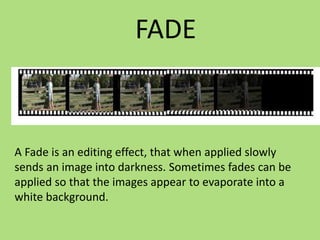
FADE
A Fade is an editing effect, that when applied slowly
sends an image into darkness. Sometimes fades can be
applied so that the images appear to evaporate into a
white background.
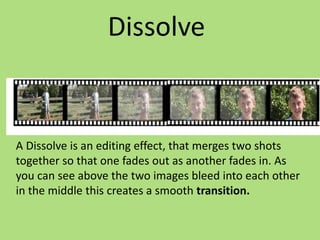
Dissolve
A Dissolve is an editing effect, that merges two shots
together so that one fades out as another fades in. As
you can see above the two images bleed into each other
in the middle this creates a smooth transition.
Graphic Match
A Jump Cut is when parts of the action are removed to give
the impression of a jump in the movement. A Jump cut can
also be from one scene to the next, as it removes
unnecessary movement and parts of the story we don’t
need to see.
Montage
A Montage is when lots of different shots are put together to
transition from one shot to the next repeatedly.
How can you create the following
transitions in Adobe Premiere Elements?
• Fade
• Dissolve
• Graphic Match
• Montage
TASK: USE ONE OF THESE
TECHNIQUES
• Add a new technique to
your edit
• At the end of the session
you should be able to
show how you create the
editing technique to the
rest of the class.
4 Pictures 1 word : Editing Terms
The Aim:
• Use the pictures as a hint to guess the editing term.
Rules:
• Each person must write down their answer on a sheet
of paper in big writing and hold it up with their answer.
• No one should give away the answer by shouting out.
_ _ _
T A Z U S J E C I F X Q P D I
_ _ _ _ _ _ _ _
S T J A V O L N U S U I D O M C E
_ _ _ _ _ _ _
S T J A V O L Y U W U I A A M C E
_ _ _ _ _ _ _ _ _ _ _ _
S T H A R O L P U W U I C A M C E
_ _ _ _ _ _ _ _ _ _ _ _
_ _ _ _ _ _ _
I C O T T U W N I G N O A T C A H C E T
_ _ _ _ _ _ _
I C O T T U W N M G N O A T C A H C E
S T J A Z O L N U S U W O M C P
I C O T T U W N M G N O A T C A H C E
S T A Z O L N U S W J E O M C O I
Lesson 5  editing techniques

Lesson 5 editing techniques

  • 1.
  • 2.
    Power of editing-Recap Class- List reasons why we edit
  • 3.
    Today’s Aims: • Allof you will be able to discuss the reasons for editing • Most of you will be able to add techniques to your edit • Some of you will be able to edit confidently Pass Excellent Outstanding
  • 4.
    Activity Place the imagesin the order you would edit them and discuss why you chose this order. • What does each image tell you? • What would you do to enhance the edit?
  • 5.
    Go to Lesson3- Open up Adobe Premiere and Create a New project to follow the tutorial • Open Adobe Premiere • Watch the tutorial • Have a go at creating the techniques yourself. • Add techniques to your own edit
  • 6.
  • 7.
    What can youremember from last week?
  • 9.
    Transition The word transitionmeans….. Crossing over from one image to the next. There are many different ways to do this with editing.
  • 10.
    FADE A Fade isan editing effect, that when applied slowly sends an image into darkness. Sometimes fades can be applied so that the images appear to evaporate into a white background.
  • 11.
    Dissolve A Dissolve isan editing effect, that merges two shots together so that one fades out as another fades in. As you can see above the two images bleed into each other in the middle this creates a smooth transition.
  • 12.
    Graphic Match A JumpCut is when parts of the action are removed to give the impression of a jump in the movement. A Jump cut can also be from one scene to the next, as it removes unnecessary movement and parts of the story we don’t need to see.
  • 13.
    Montage A Montage iswhen lots of different shots are put together to transition from one shot to the next repeatedly.
  • 14.
    How can youcreate the following transitions in Adobe Premiere Elements? • Fade • Dissolve • Graphic Match • Montage
  • 15.
    TASK: USE ONEOF THESE TECHNIQUES • Add a new technique to your edit • At the end of the session you should be able to show how you create the editing technique to the rest of the class.
  • 16.
    4 Pictures 1word : Editing Terms The Aim: • Use the pictures as a hint to guess the editing term. Rules: • Each person must write down their answer on a sheet of paper in big writing and hold it up with their answer. • No one should give away the answer by shouting out.
  • 17.
    _ _ _ TA Z U S J E C I F X Q P D I
  • 18.
    _ _ __ _ _ _ _ S T J A V O L N U S U I D O M C E
  • 19.
    _ _ __ _ _ _ S T J A V O L Y U W U I A A M C E
  • 20.
    _ _ __ _ _ _ _ _ _ _ _ S T H A R O L P U W U I C A M C E
  • 21.
    _ _ __ _ _ _ _ _ _ _ _ _ _ _ _ _ _ _ I C O T T U W N I G N O A T C A H C E T
  • 22.
    _ _ __ _ _ _ I C O T T U W N M G N O A T C A H C E
  • 23.
    S T JA Z O L N U S U W O M C P
  • 24.
    I C OT T U W N M G N O A T C A H C E
  • 25.
    S T AZ O L N U S W J E O M C O I