Javascript events 
with jQuery 
December 2014 
Ibán Martínez 
iban@nnset.com 
www.openshopen.com
What actually 
are those so 
called 
“events” ?
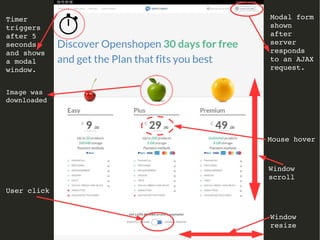
Timer 
triggers 
after 5 
seconds 
and shows 
a modal 
window. 
Modal form 
shown 
after 
server 
responds 
to an AJAX 
request. 
User click 
Mouse hover 
Window 
scroll 
Window 
resize 
Image was 
downloaded
Events : When 
do they occur? 
Anytime. 
And you can't do 
anything about that. 
Get over it.
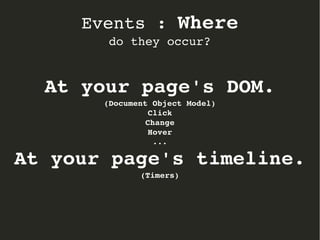
Events : Where 
do they occur? 
At your page's DOM. 
(Document Object Model) 
Click 
Change 
Hover 
... 
At your page's timeline. 
(Timers)
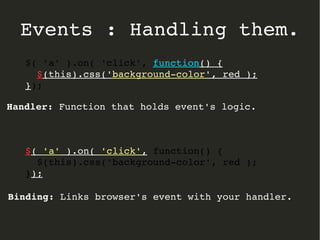
Events : Handling them. 
Use Handlers 
(Yes they are just functions/methods) 
$( 'a' ).on( 'click', function() { 
$(this).css('background­color', 
red ); 
});
Events : Handling them. 
$( 'a' ).on( 'click', function() { 
$(this).css('background­color', 
red ); 
}); 
Handler: Function that holds event's logic. 
$( 'a' ).on( 'click', function() { 
$(this).css('background­color', 
red ); 
}); 
Binding: Links browser's event with your handler.
Events : Event handling function. 
The event Object
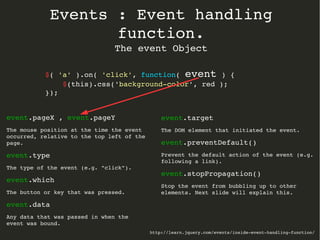
Events : Event handling 
function. 
The event Object 
$( 'a' ).on( 'click', function( event ) { 
$(this).css('background­color', 
red ); 
http://learn.jquery.com/events/inside­event­handling­function/ 
}); 
event.pageX , event.pageY 
The mouse position at the time the event 
occurred, relative to the top left of the 
page. 
event.type 
The type of the event (e.g. "click"). 
event.which 
The button or key that was pressed. 
event.data 
Any data that was passed in when the 
event was bound. 
event.target 
The DOM element that initiated the event. 
event.preventDefault() 
Prevent the default action of the event (e.g. 
following a link). 
event.stopPropagation() 
Stop the event from bubbling up to other 
elements. Next slide will explain this.
Events : Event propagation. 
AKA bubbling.
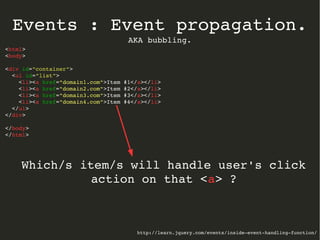
Events : Event propagation. 
AKA bubbling. 
<html> 
<body> 
<div id="container"> 
<ul id="list"> 
<li><a href="domain1.com">Item #1</a></li> 
<li><a href="domain2.com">Item #2</a></li> 
<li><a href="domain3.com">Item #3</a></li> 
<li><a href="domain4.com">Item #4</a></li> 
</ul> 
</div> 
</body> 
</html> 
Which/s item/s will handle user's click 
action on that <a> ? 
http://learn.jquery.com/events/inside­event­handling­function/
Events : Event propagation. 
AKA bubbling. 
http://learn.jquery.com/events/inside­event­handling­function/ 
<html> 
<body> 
<div id="container"> 
<ul id="list"> 
<li><a href="domain1.com">Item #1</a></li> 
<li><a href="domain2.com">Item #2</a></li> 
<li><a href="domain3.com">Item #3</a></li> 
<li><a href="domain4.com">Item #4</a></li> 
</ul> 
</div> 
</body> 
</html> 
1­< 
a> 
2­< 
li> 
3­< 
ul #list> 
4­< 
div #container> 
5­< 
body> 
6­< 
html> 
7­Document 
root 
Event will propagate until any DOM element has a handler binded 
to “click” event which stops propagation (executing 
event.stopPropagation() for instance). 
From the DOM item that triggered the event, bubbling it up to 
its ancestors, until document root is reached.
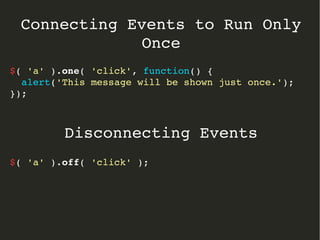
Connecting Events to Run Only 
Once 
$( 'a' ).one( 'click', function() { 
alert('This message will be shown just once.'); 
}); 
Disconnecting Events 
$( 'a' ).off( 'click' );
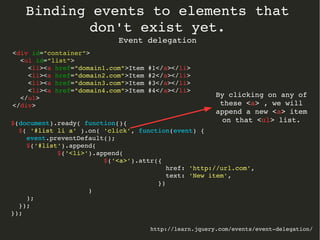
Binding events to elements that don't 
exist yet. 
Event delegation
Binding events to elements that 
don't exist yet. 
Event delegation 
http://learn.jquery.com/events/event­delegation/ 
<div id="container"> 
<ul id="list"> 
$(document).ready( function(){ 
$( '#list li a' ).on( 'click', function(event) { 
event.preventDefault(); 
$('#list').append( 
$('<li>').append( 
$('<a>').attr({ 
href: 'http://url.com', 
text: 'New item', 
}) 
) 
); 
}); 
}); 
<li><a href="domain1.com">Item #1</a></li> 
<li><a href="domain2.com">Item #2</a></li> 
<li><a href="domain3.com">Item #3</a></li> 
<li><a href="domain4.com">Item #4</a></li> 
</ul> 
</div> 
By clicking on any of 
these <a> , we will 
append a new <a> item 
on that <ul> list.
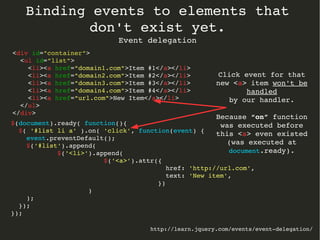
Binding events to elements that 
don't exist yet. 
Event delegation 
http://learn.jquery.com/events/event­delegation/ 
<div id="container"> 
<ul id="list"> 
<li><a href="domain1.com">Item #1</a></li> 
<li><a href="domain2.com">Item #2</a></li> 
<li><a href="domain3.com">Item #3</a></li> 
<li><a href="domain4.com">Item #4</a></li> 
<li><a href="url.com">New Item</a></li> 
</ul> 
</div> 
Click event for that 
new <a> item won't be 
handled 
by our handler. 
Because “on” function 
was executed before 
this <a> even existed 
(was executed at 
document.ready). 
$(document).ready( function(){ 
$( '#list li a' ).on( 'click', function(event) { 
event.preventDefault(); 
$('#list').append( 
$('<li>').append( 
$('<a>').attr({ 
href: 'http://url.com', 
text: 'New item', 
}) 
) 
); 
}); 
});
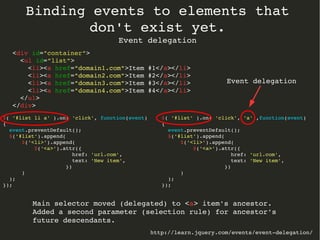
Binding events to elements that 
don't exist yet. 
Event delegation 
http://learn.jquery.com/events/event­delegation/ 
$( '#list li a' ).on( 'click', function(event) 
{ 
event.preventDefault(); 
$('#list').append( 
$('<li>').append( 
$('<a>').attr({ 
href: 'url.com', 
text: 'New item', 
}) 
) 
); 
}); 
<div id="container"> 
<ul id="list"> 
<li><a href="domain1.com">Item #1</a></li> 
<li><a href="domain2.com">Item #2</a></li> 
<li><a href="domain3.com">Item #3</a></li> 
<li><a href="domain4.com">Item #4</a></li> 
</ul> 
</div> 
$( '#list' ).on( 'click', 'a' ,function(event) 
{ 
event.preventDefault(); 
$('#list').append( 
$('<li>').append( 
$('<a>').attr({ 
href: 'url.com', 
text: 'New item', 
}) 
) 
); 
}); 
Event delegation 
Main selector moved (delegated) to <a> item's ancestor. 
Added a second parameter (selection rule) for ancestor's 
future descendants.
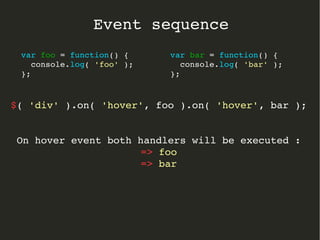
Event sequence
Event sequence 
var bar = function() { 
$( 'div' ).on( 'hover', foo ).on( 'hover', bar ); 
On hover event both handlers will be executed : 
=> foo 
=> bar 
console.log( 'bar' ); 
}; 
var foo = function() { 
console.log( 'foo' ); 
};
Events tips & examples
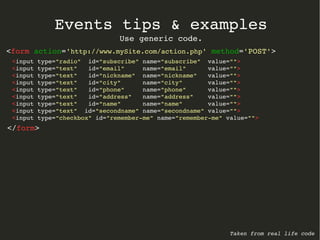
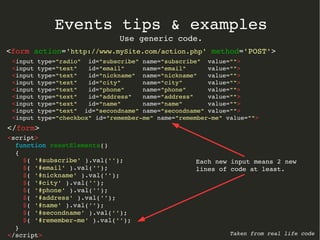
Events tips & examples 
Use generic code. 
<form action='http://www.mySite.com/action.php' method='POST'> 
<input type="radio" id="subscribe" name="subscribe" value=""> 
<input type="text" id="email" name="email" value=""> 
<input type="text" id="nickname" name="nickname" value=""> 
<input type="text" id="city" name="city" value=""> 
<input type="text" id="phone" name="phone" value=""> 
<input type="text" id="address" name="address" value=""> 
<input type="text" id="name" name="name" value=""> 
<input type="text" id="secondname" name="secondname" value=""> 
<input type="checkbox" id="remember­me" 
name="remember­me" 
value=""> 
</form> 
Taken from real life code
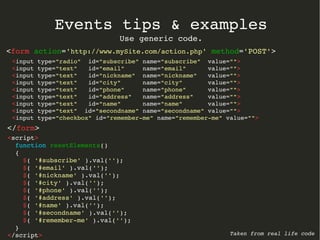
Events tips & examples 
Use generic code. 
<form action='http://www.mySite.com/action.php' method='POST'> 
<input type="radio" id="subscribe" name="subscribe" value=""> 
<input type="text" id="email" name="email" value=""> 
<input type="text" id="nickname" name="nickname" value=""> 
<input type="text" id="city" name="city" value=""> 
<input type="text" id="phone" name="phone" value=""> 
<input type="text" id="address" name="address" value=""> 
<input type="text" id="name" name="name" value=""> 
<input type="text" id="secondname" name="secondname" value=""> 
<input type="checkbox" id="remember­me" 
name="remember­me" 
value=""> 
</form> 
Taken from real life code 
<script> 
function resetElements() 
{ 
$( '#subscribe' ).val(''); 
$( '#email' ).val(''); 
$( '#nickname' ).val(''); 
$( '#city' ).val(''); 
$( '#phone' ).val(''); 
$( '#address' ).val(''); 
$( '#name' ).val(''); 
$( '#secondname' ).val(''); 
$( '#remember­me' 
).val(''); 
} 
</script>
Events tips & examples 
Use generic code. 
<form action='http://www.mySite.com/action.php' method='POST'> 
<input type="radio" id="subscribe" name="subscribe" value=""> 
<input type="text" id="email" name="email" value=""> 
<input type="text" id="nickname" name="nickname" value=""> 
<input type="text" id="city" name="city" value=""> 
<input type="text" id="phone" name="phone" value=""> 
<input type="text" id="address" name="address" value=""> 
<input type="text" id="name" name="name" value=""> 
<input type="text" id="secondname" name="secondname" value=""> 
<input type="checkbox" id="remember­me" 
name="remember­me" 
value=""> 
</form> 
Taken from real life code 
<script> 
function resetElements() 
{ 
$( '#subscribe' ).val(''); 
$( '#email' ).val(''); 
$( '#nickname' ).val(''); 
$( '#city' ).val(''); 
$( '#phone' ).val(''); 
$( '#address' ).val(''); 
$( '#name' ).val(''); 
$( '#secondname' ).val(''); 
$( '#remember­me' 
).val(''); 
} 
</script> 
Each new input means 2 new 
lines of code at least.
Events tips & examples 
Use generic code. 
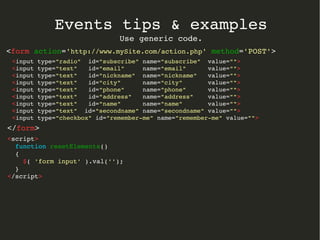
<form action='http://www.mySite.com/action.php' method='POST'> 
<input type="radio" id="subscribe" name="subscribe" value=""> 
<input type="text" id="email" name="email" value=""> 
<input type="text" id="nickname" name="nickname" value=""> 
<input type="text" id="city" name="city" value=""> 
<input type="text" id="phone" name="phone" value=""> 
<input type="text" id="address" name="address" value=""> 
<input type="text" id="name" name="name" value=""> 
<input type="text" id="secondname" name="secondname" value=""> 
<input type="checkbox" id="remember­me" 
name="remember­me" 
value=""> 
</form> 
<script> 
function resetElements() 
{ 
$( 'form input' ).val(''); 
} 
</script>
Events tips & examples 
$(document).ready mayhem. 
$(document).ready is an actual event! 
Mayhem : Violent or extreme disorder; chaos.
Events tips & examples 
$(document).ready mayhem. 
Taken from real life code 
$(document).ready(function(){ 
$('#login_store_modal').modal ({ show: false, keyboard: true }); 
$('#feedback_modal').modal ({ show: false, keyboard: false }); 
$('#newsletter_modal').modal ({ show: false, keyboard: false, remote: 'https://openshopen.com/xxxxxx' }); 
$('#outlet_modal').modal ({ show: false, keyboard: false, remote: 'https://openshopen.com/xxxxx' }); 
$('.shop_login').click(function() { 
$('#login_store_modal #shopName').val(""); 
$('#login_store_modal .error').css("visibility", "hidden"); 
$('#login_store_modal').modal('show'); 
}); 
$('.newsletter_access').click(function() { 
$('#'+$(this).attr('data­modal')). 
modal('show'); 
}); 
$('#login_store_modal form').submit( function(event) 
{ 
$('#login_store_modal .error').css("visibility", "hidden"); 
name = $('#shopName').val(); 
event.preventDefault(); 
var data; 
$.ajax 
({ 
async: false, 
url : "https://openshopen.com/xxxxxxx" , 
data: { shop: name, domain:'openshopen.com' }, 
type: 'POST', 
success: function(response) 
{ 
data = response; 
} 
}); 
if ( typeof(data) != "undefined" ) 
{ 
[...] 
} 
[...]
Events tips & examples 
$(document).ready mayhem. 
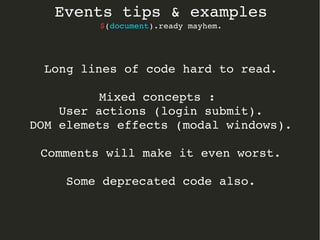
Long lines of code hard to read. 
Mixed concepts : 
User actions (login submit). 
DOM elemets effects (modal windows). 
Comments will make it even worst. 
Some deprecated code also.
Events tips & examples 
$(document).ready mayhem. 
Refactor it using functions.
Events tips & examples 
$(document).ready mayhem. 
$(document).ready(function(){ 
initModalWindows(); 
$('#login_store_modal').modal ({ show: false, keyboard: true }); 
$('#feedback_modal').modal ({ show: false, keyboard: false }); 
$('#newsletter_modal').modal ({ show: false, keyboard: false, remote: 'https://openshopen.com/xxxxxx' }); 
$('#outlet_modal').modal ({ show: false, keyboard: false, remote: 'https://openshopen.com/xxxxx' }); 
bindShopLoginEvent(); 
$('.shop_login').click(function() { 
$('#login_store_modal #shopName').val(""); 
$('#login_store_modal .error').css("visibility", "hidden"); 
$('#login_store_modal').modal('show'); 
}); 
bindShowNewslettersFormEvent(); 
$('.newsletter_access').click(function() { 
$('#'+$(this).attr('data­modal')). 
modal('show'); 
}); 
bindSubmitLoginFormEvent(); 
$('#login_store_modal form').submit( function(event) 
{ 
$('#login_store_modal .error').css("visibility", "hidden"); 
name = $('#shopName').val(); 
event.preventDefault(); 
var data; 
$.ajax 
({ 
async: false, 
url : "https://openshopen.com/xxxxxxx" , 
data: { shop: name, domain:'openshopen.com' }, 
type: 'POST', 
success: function(response) 
{ 
data = response; 
} 
}); 
if ( typeof(data) != "undefined" ) 
{ 
[...] 
} 
[...]
Events tips & examples 
$(document).ready mayhem. 
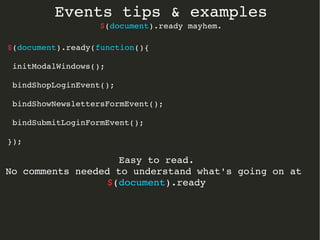
$(document).ready(function(){ 
initModalWindows(); 
bindShopLoginEvent(); 
bindShowNewslettersFormEvent(); 
bindSubmitLoginFormEvent(); 
}); 
Easy to read. 
No comments needed to understand what's going on at 
$(document).ready
Events tips & examples 
$(document).ready mayhem. 
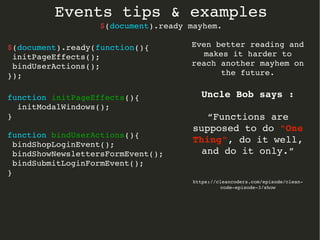
$(document).ready(function(){ 
initPageEffects(); 
bindUserActions(); 
}); 
function initPageEffects(){ 
initModalWindows(); 
} 
function bindUserActions(){ 
bindShopLoginEvent(); 
bindShowNewslettersFormEvent(); 
bindSubmitLoginFormEvent(); 
} 
Even better reading and 
makes it harder to 
reach another mayhem on 
the future. 
Uncle Bob says : 
“Functions are 
supposed to do "One 
Thing", do it well, 
and do it only.” 
https://cleancoders.com/episode/clean­code­episode­3/ 
show
Javascript events 
with jQuery 
December 2014 
Ibán Martínez 
iban@nnset.com 
www.openshopen.com 
http://learn.jquery.com/events/handling­events/ 
http://learn.jquery.com/

Event handling using jQuery

  • 1.
    Javascript events withjQuery December 2014 Ibán Martínez iban@nnset.com www.openshopen.com
  • 2.
    What actually arethose so called “events” ?
  • 3.
    Timer triggers after5 seconds and shows a modal window. Modal form shown after server responds to an AJAX request. User click Mouse hover Window scroll Window resize Image was downloaded
  • 4.
    Events : When do they occur? Anytime. And you can't do anything about that. Get over it.
  • 5.
    Events : Where do they occur? At your page's DOM. (Document Object Model) Click Change Hover ... At your page's timeline. (Timers)
  • 6.
    Events : Handlingthem. Use Handlers (Yes they are just functions/methods) $( 'a' ).on( 'click', function() { $(this).css('background­color', red ); });
  • 7.
    Events : Handlingthem. $( 'a' ).on( 'click', function() { $(this).css('background­color', red ); }); Handler: Function that holds event's logic. $( 'a' ).on( 'click', function() { $(this).css('background­color', red ); }); Binding: Links browser's event with your handler.
  • 8.
    Events : Eventhandling function. The event Object
  • 9.
    Events : Eventhandling function. The event Object $( 'a' ).on( 'click', function( event ) { $(this).css('background­color', red ); http://learn.jquery.com/events/inside­event­handling­function/ }); event.pageX , event.pageY The mouse position at the time the event occurred, relative to the top left of the page. event.type The type of the event (e.g. "click"). event.which The button or key that was pressed. event.data Any data that was passed in when the event was bound. event.target The DOM element that initiated the event. event.preventDefault() Prevent the default action of the event (e.g. following a link). event.stopPropagation() Stop the event from bubbling up to other elements. Next slide will explain this.
  • 10.
    Events : Eventpropagation. AKA bubbling.
  • 11.
    Events : Eventpropagation. AKA bubbling. <html> <body> <div id="container"> <ul id="list"> <li><a href="domain1.com">Item #1</a></li> <li><a href="domain2.com">Item #2</a></li> <li><a href="domain3.com">Item #3</a></li> <li><a href="domain4.com">Item #4</a></li> </ul> </div> </body> </html> Which/s item/s will handle user's click action on that <a> ? http://learn.jquery.com/events/inside­event­handling­function/
  • 12.
    Events : Eventpropagation. AKA bubbling. http://learn.jquery.com/events/inside­event­handling­function/ <html> <body> <div id="container"> <ul id="list"> <li><a href="domain1.com">Item #1</a></li> <li><a href="domain2.com">Item #2</a></li> <li><a href="domain3.com">Item #3</a></li> <li><a href="domain4.com">Item #4</a></li> </ul> </div> </body> </html> 1­< a> 2­< li> 3­< ul #list> 4­< div #container> 5­< body> 6­< html> 7­Document root Event will propagate until any DOM element has a handler binded to “click” event which stops propagation (executing event.stopPropagation() for instance). From the DOM item that triggered the event, bubbling it up to its ancestors, until document root is reached.
  • 13.
    Connecting Events toRun Only Once $( 'a' ).one( 'click', function() { alert('This message will be shown just once.'); }); Disconnecting Events $( 'a' ).off( 'click' );
  • 14.
    Binding events toelements that don't exist yet. Event delegation
  • 15.
    Binding events toelements that don't exist yet. Event delegation http://learn.jquery.com/events/event­delegation/ <div id="container"> <ul id="list"> $(document).ready( function(){ $( '#list li a' ).on( 'click', function(event) { event.preventDefault(); $('#list').append( $('<li>').append( $('<a>').attr({ href: 'http://url.com', text: 'New item', }) ) ); }); }); <li><a href="domain1.com">Item #1</a></li> <li><a href="domain2.com">Item #2</a></li> <li><a href="domain3.com">Item #3</a></li> <li><a href="domain4.com">Item #4</a></li> </ul> </div> By clicking on any of these <a> , we will append a new <a> item on that <ul> list.
  • 16.
    Binding events toelements that don't exist yet. Event delegation http://learn.jquery.com/events/event­delegation/ <div id="container"> <ul id="list"> <li><a href="domain1.com">Item #1</a></li> <li><a href="domain2.com">Item #2</a></li> <li><a href="domain3.com">Item #3</a></li> <li><a href="domain4.com">Item #4</a></li> <li><a href="url.com">New Item</a></li> </ul> </div> Click event for that new <a> item won't be handled by our handler. Because “on” function was executed before this <a> even existed (was executed at document.ready). $(document).ready( function(){ $( '#list li a' ).on( 'click', function(event) { event.preventDefault(); $('#list').append( $('<li>').append( $('<a>').attr({ href: 'http://url.com', text: 'New item', }) ) ); }); });
  • 17.
    Binding events toelements that don't exist yet. Event delegation http://learn.jquery.com/events/event­delegation/ $( '#list li a' ).on( 'click', function(event) { event.preventDefault(); $('#list').append( $('<li>').append( $('<a>').attr({ href: 'url.com', text: 'New item', }) ) ); }); <div id="container"> <ul id="list"> <li><a href="domain1.com">Item #1</a></li> <li><a href="domain2.com">Item #2</a></li> <li><a href="domain3.com">Item #3</a></li> <li><a href="domain4.com">Item #4</a></li> </ul> </div> $( '#list' ).on( 'click', 'a' ,function(event) { event.preventDefault(); $('#list').append( $('<li>').append( $('<a>').attr({ href: 'url.com', text: 'New item', }) ) ); }); Event delegation Main selector moved (delegated) to <a> item's ancestor. Added a second parameter (selection rule) for ancestor's future descendants.
  • 18.
  • 19.
    Event sequence varbar = function() { $( 'div' ).on( 'hover', foo ).on( 'hover', bar ); On hover event both handlers will be executed : => foo => bar console.log( 'bar' ); }; var foo = function() { console.log( 'foo' ); };
  • 20.
    Events tips &examples
  • 21.
    Events tips &examples Use generic code. <form action='http://www.mySite.com/action.php' method='POST'> <input type="radio" id="subscribe" name="subscribe" value=""> <input type="text" id="email" name="email" value=""> <input type="text" id="nickname" name="nickname" value=""> <input type="text" id="city" name="city" value=""> <input type="text" id="phone" name="phone" value=""> <input type="text" id="address" name="address" value=""> <input type="text" id="name" name="name" value=""> <input type="text" id="secondname" name="secondname" value=""> <input type="checkbox" id="remember­me" name="remember­me" value=""> </form> Taken from real life code
  • 22.
    Events tips &examples Use generic code. <form action='http://www.mySite.com/action.php' method='POST'> <input type="radio" id="subscribe" name="subscribe" value=""> <input type="text" id="email" name="email" value=""> <input type="text" id="nickname" name="nickname" value=""> <input type="text" id="city" name="city" value=""> <input type="text" id="phone" name="phone" value=""> <input type="text" id="address" name="address" value=""> <input type="text" id="name" name="name" value=""> <input type="text" id="secondname" name="secondname" value=""> <input type="checkbox" id="remember­me" name="remember­me" value=""> </form> Taken from real life code <script> function resetElements() { $( '#subscribe' ).val(''); $( '#email' ).val(''); $( '#nickname' ).val(''); $( '#city' ).val(''); $( '#phone' ).val(''); $( '#address' ).val(''); $( '#name' ).val(''); $( '#secondname' ).val(''); $( '#remember­me' ).val(''); } </script>
  • 23.
    Events tips &examples Use generic code. <form action='http://www.mySite.com/action.php' method='POST'> <input type="radio" id="subscribe" name="subscribe" value=""> <input type="text" id="email" name="email" value=""> <input type="text" id="nickname" name="nickname" value=""> <input type="text" id="city" name="city" value=""> <input type="text" id="phone" name="phone" value=""> <input type="text" id="address" name="address" value=""> <input type="text" id="name" name="name" value=""> <input type="text" id="secondname" name="secondname" value=""> <input type="checkbox" id="remember­me" name="remember­me" value=""> </form> Taken from real life code <script> function resetElements() { $( '#subscribe' ).val(''); $( '#email' ).val(''); $( '#nickname' ).val(''); $( '#city' ).val(''); $( '#phone' ).val(''); $( '#address' ).val(''); $( '#name' ).val(''); $( '#secondname' ).val(''); $( '#remember­me' ).val(''); } </script> Each new input means 2 new lines of code at least.
  • 24.
    Events tips &examples Use generic code. <form action='http://www.mySite.com/action.php' method='POST'> <input type="radio" id="subscribe" name="subscribe" value=""> <input type="text" id="email" name="email" value=""> <input type="text" id="nickname" name="nickname" value=""> <input type="text" id="city" name="city" value=""> <input type="text" id="phone" name="phone" value=""> <input type="text" id="address" name="address" value=""> <input type="text" id="name" name="name" value=""> <input type="text" id="secondname" name="secondname" value=""> <input type="checkbox" id="remember­me" name="remember­me" value=""> </form> <script> function resetElements() { $( 'form input' ).val(''); } </script>
  • 25.
    Events tips &examples $(document).ready mayhem. $(document).ready is an actual event! Mayhem : Violent or extreme disorder; chaos.
  • 26.
    Events tips &examples $(document).ready mayhem. Taken from real life code $(document).ready(function(){ $('#login_store_modal').modal ({ show: false, keyboard: true }); $('#feedback_modal').modal ({ show: false, keyboard: false }); $('#newsletter_modal').modal ({ show: false, keyboard: false, remote: 'https://openshopen.com/xxxxxx' }); $('#outlet_modal').modal ({ show: false, keyboard: false, remote: 'https://openshopen.com/xxxxx' }); $('.shop_login').click(function() { $('#login_store_modal #shopName').val(""); $('#login_store_modal .error').css("visibility", "hidden"); $('#login_store_modal').modal('show'); }); $('.newsletter_access').click(function() { $('#'+$(this).attr('data­modal')). modal('show'); }); $('#login_store_modal form').submit( function(event) { $('#login_store_modal .error').css("visibility", "hidden"); name = $('#shopName').val(); event.preventDefault(); var data; $.ajax ({ async: false, url : "https://openshopen.com/xxxxxxx" , data: { shop: name, domain:'openshopen.com' }, type: 'POST', success: function(response) { data = response; } }); if ( typeof(data) != "undefined" ) { [...] } [...]
  • 27.
    Events tips &examples $(document).ready mayhem. Long lines of code hard to read. Mixed concepts : User actions (login submit). DOM elemets effects (modal windows). Comments will make it even worst. Some deprecated code also.
  • 28.
    Events tips &examples $(document).ready mayhem. Refactor it using functions.
  • 29.
    Events tips &examples $(document).ready mayhem. $(document).ready(function(){ initModalWindows(); $('#login_store_modal').modal ({ show: false, keyboard: true }); $('#feedback_modal').modal ({ show: false, keyboard: false }); $('#newsletter_modal').modal ({ show: false, keyboard: false, remote: 'https://openshopen.com/xxxxxx' }); $('#outlet_modal').modal ({ show: false, keyboard: false, remote: 'https://openshopen.com/xxxxx' }); bindShopLoginEvent(); $('.shop_login').click(function() { $('#login_store_modal #shopName').val(""); $('#login_store_modal .error').css("visibility", "hidden"); $('#login_store_modal').modal('show'); }); bindShowNewslettersFormEvent(); $('.newsletter_access').click(function() { $('#'+$(this).attr('data­modal')). modal('show'); }); bindSubmitLoginFormEvent(); $('#login_store_modal form').submit( function(event) { $('#login_store_modal .error').css("visibility", "hidden"); name = $('#shopName').val(); event.preventDefault(); var data; $.ajax ({ async: false, url : "https://openshopen.com/xxxxxxx" , data: { shop: name, domain:'openshopen.com' }, type: 'POST', success: function(response) { data = response; } }); if ( typeof(data) != "undefined" ) { [...] } [...]
  • 30.
    Events tips &examples $(document).ready mayhem. $(document).ready(function(){ initModalWindows(); bindShopLoginEvent(); bindShowNewslettersFormEvent(); bindSubmitLoginFormEvent(); }); Easy to read. No comments needed to understand what's going on at $(document).ready
  • 31.
    Events tips &examples $(document).ready mayhem. $(document).ready(function(){ initPageEffects(); bindUserActions(); }); function initPageEffects(){ initModalWindows(); } function bindUserActions(){ bindShopLoginEvent(); bindShowNewslettersFormEvent(); bindSubmitLoginFormEvent(); } Even better reading and makes it harder to reach another mayhem on the future. Uncle Bob says : “Functions are supposed to do "One Thing", do it well, and do it only.” https://cleancoders.com/episode/clean­code­episode­3/ show
  • 32.
    Javascript events withjQuery December 2014 Ibán Martínez iban@nnset.com www.openshopen.com http://learn.jquery.com/events/handling­events/ http://learn.jquery.com/