




FIELD VALIDATION
USING MOBILE
APPLICATIONS
MODULE 2.0
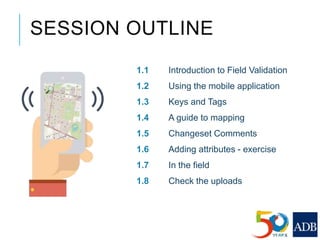
1.1 Introduction to Field Validation
1.2 Using the mobile application
1.3 Keys and Tags
1.4 A guide to mapping
1.5 Changeset Comments
1.6 Adding attributes - exercise
1.7 In the field
1.8 Check the uploads
SESSION OUTLINE
Field validation exercise is only possible when the area of
interest has been mapped on OSM map.
Please see Module 1 if you have not gone through the module
already.
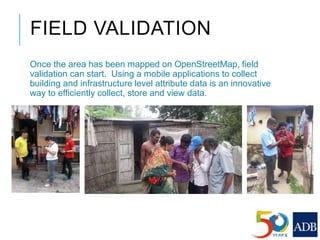
FIELD VALIDATION
Once the area has been mapped on OpenStreetMap, field
validation can start. Using a mobile applications to collect
building and infrastructure level attribute data is an innovative
way to efficiently collect, store and view data.
WHY FIELD VALIDATION
IS IMPORTANT
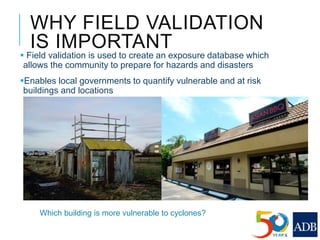
 Field validation is used to create an exposure database which
allows the community to prepare for hazards and disasters
Enables local governments to quantify vulnerable and at risk
buildings and locations
Which building is more vulnerable to cyclones?
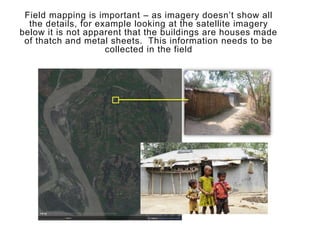
Field mapping is important – as imagery doesn’t show all
the details, for example looking at the satellite imagery
below it is not apparent that the buildings are houses made
of thatch and metal sheets. This information needs to be
collected in the field
CHOOSE A MOBILE
APPLICATION
This module was created using
observations made and experiences in
project implementation. During the
implementation the mobile application
geoMaptool was used.
http://geothings.tw/en/products/geomapto
ol/.
However other mobile applications exist
to assist you for field validation.
Research the mobile applications
available and select the one that fits your
implementation the best.
 At the time of module development only
one similar application was developed.
OpenMapKit, find information about the
application here http://openmapkit.org/
Kobo Toolbox also has similar features.
http://www.kobotoolbox.org/
IMPORTANT NOTES ON
FIELD VALIDATION
The following information will help
you determine the best mobile
application for your implementation
that allows you to meet the criteria for
field validation under this
strengthening resiliency training
course.
WHAT ARE WE
VALIDATING?
CRITICAL
INFRASTRUCTURE
To build the exposure database, you need to add attributes
to critical infrastructure.
Examples of critical infrastructure is:
Buildings
Bridges
Road
Pipe lines
Foot/cycle path (evacuation route: yes/no)
Open space and parks
ADDING ATTRIBUTES:
BUILDING TYPE
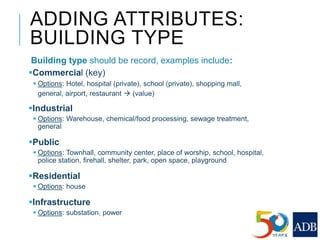
Building type should be record, examples include:
Commercial (key)
 Options: Hotel, hospital (private), school (private), shopping mall,
general, airport, restaurant  (value)
Industrial
 Options: Warehouse, chemical/food processing, sewage treatment,
general
Public
 Options: Townhall, community center, place of worship, school, hospital,
police station, firehall, shelter, park, open space, playground
Residential
 Options: house
Infrastructure
 Options: substation, power
ADDING ATTRIBUTES :
BUILDING MATERIAL
Example list:
 Wood/bamboo
 Wood/masonry
 Steal
 Concrete
 Mud
 Masonry/brick
 CI sheet
 Custom
Roof material
Thatch
Tile
Metal sheet
Concrete
Custom
Visual condition
Poor
Fair
Good
ADDING ATTRIBUTES:
OTHERS
Building type
 Permanent
 Semi-permanent
 Non-permanent
 Custom
Landuse
 Mountain
 Flat
 Coastal
 Custom
Basement?
 Yes
 No
Building Form
 T-shaped
 L-shaped
 Multi-projected
 Box
 Rectangular
 Other
 Custom
Building levels
1
2
3 or more levels
ADDING ATTRIBUTES:
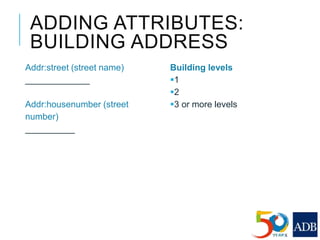
BUILDING ADDRESS
Addr:street (street name)
_____________
Addr:housenumber (street
number)
__________
Building levels
1
2
3 or more levels
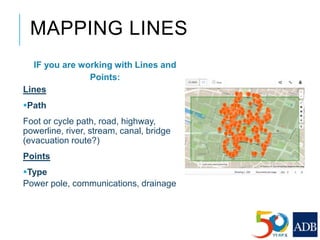
MAPPING LINES
IF you are working with Lines and
Points:
Lines
Path
Foot or cycle path, road, highway,
powerline, river, stream, canal, bridge
(evacuation route?)
Points
Type
Power pole, communications, drainage
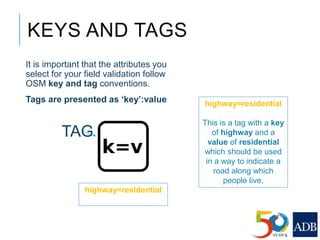
It is important that the attributes you
select for your field validation follow
OSM key and tag conventions.
Tags are presented as ‘key’:value
KEYS AND TAGS
TAG
highway=residential
highway=residential
This is a tag with a key
of highway and a
value of residential
which should be used
in a way to indicate a
road along which
people live.
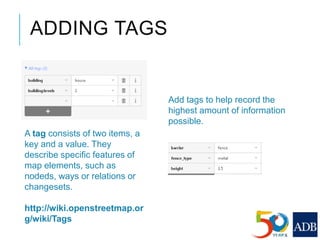
ADDING TAGS
Add tags to help record the
highest amount of information
possible.
A tag consists of two items, a
key and a value. They
describe specific features of
map elements, such as
nodeds, ways or relations or
changesets.
http://wiki.openstreetmap.or
g/wiki/Tags
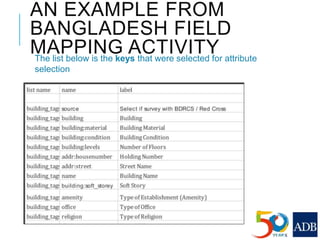
AN EXAMPLE FROM
BANGLADESH FIELD
MAPPING ACTIVITYThe list below is the keys that were selected for attribute
selection
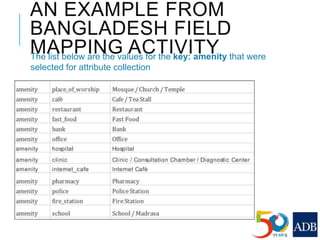
AN EXAMPLE FROM
BANGLADESH FIELD
MAPPING ACTIVITYThe list below are the values for the key: amenity that were
selected for attribute collection
AN EXAMPLE FROM
BANGLADESH FIELD
MAPPING ACTIVITYThe list below are the values for the key: building:material that
were selected for attribute collection
DESIGN FIELD
VALIDATION
SURVEY
WORKSHOP
Workshop Objective:
Work to draft a list of Tags and
Values that you want to collect to
create your exposure database.
Align the list you have created
with the OSM convention for
Tags and Values
APPLICATION
[**DESIGN YOUR
POWERPOINT DEPENDING
ON THE MOBILE
APPLICATION CHOSEN**]
The following is an example ppt.
ADDING ATTRIBUTES –
EXERCISE
ADDING ATTRIBUTES- FIELD
VALIDATION USING GEOMAPTOOL
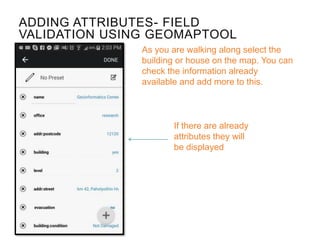
If there are already
attributes they will
be displayed
As you are walking along select the
building or house on the map. You can
check the information already
available and add more to this.
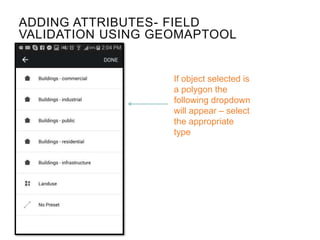
If object selected is
a polygon the
following dropdown
will appear – select
the appropriate
type
ADDING ATTRIBUTES- FIELD
VALIDATION USING GEOMAPTOOL
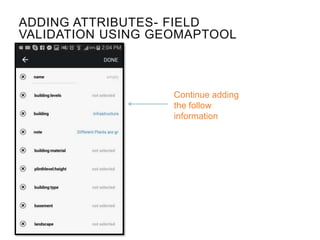
Continue adding
the follow
information
ADDING ATTRIBUTES- FIELD
VALIDATION USING GEOMAPTOOL
ADDING ATTRIBUTES- FIELD
VALIDATION USING GEOMAPTOOL
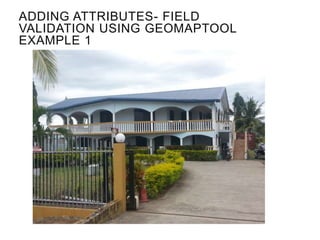
EXAMPLE 1
ADDING ATTRIBUTES- FIELD
VALIDATION USING GEOMAPTOOL
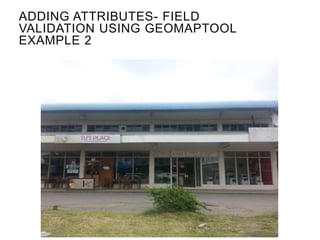
EXAMPLE 2
IN THE FIELD
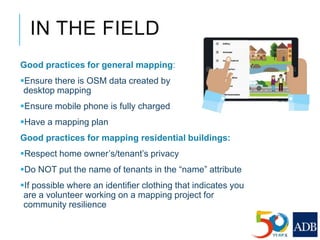
Good practices for general mapping:
Ensure there is OSM data created by
desktop mapping
Ensure mobile phone is fully charged
Have a mapping plan
Good practices for mapping residential buildings:
Respect home owner’s/tenant’s privacy
Do NOT put the name of tenants in the “name” attribute
If possible where an identifier clothing that indicates you
are a volunteer working on a mapping project for
community resilience
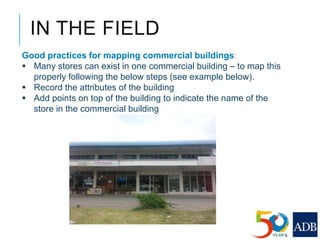
Good practices for mapping commercial buildings:
 Many stores can exist in one commercial building – to map this
properly following the below steps (see example below).
 Record the attributes of the building
 Add points on top of the building to indicate the name of the
store in the commercial building
IN THE FIELD
CHECK YOUR UPLOADS -
GEOMAPTOOL
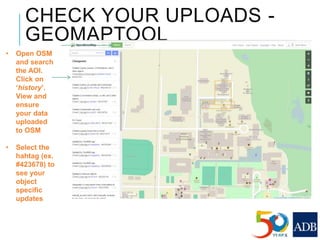
• Open OSM
and search
the AOI.
Click on
‘history’.
View and
ensure
your data
uploaded
to OSM
• Select the
hahtag (ex.
#423678) to
see your
object
specific
updates
THANK YOU FOR
COMPLETING
FIELD VALIDATION

Lesson 2. Field Validation

  • 1.
  • 2.
    1.1 Introduction toField Validation 1.2 Using the mobile application 1.3 Keys and Tags 1.4 A guide to mapping 1.5 Changeset Comments 1.6 Adding attributes - exercise 1.7 In the field 1.8 Check the uploads SESSION OUTLINE
  • 3.
    Field validation exerciseis only possible when the area of interest has been mapped on OSM map. Please see Module 1 if you have not gone through the module already.
  • 4.
    FIELD VALIDATION Once thearea has been mapped on OpenStreetMap, field validation can start. Using a mobile applications to collect building and infrastructure level attribute data is an innovative way to efficiently collect, store and view data.
  • 5.
    WHY FIELD VALIDATION ISIMPORTANT  Field validation is used to create an exposure database which allows the community to prepare for hazards and disasters Enables local governments to quantify vulnerable and at risk buildings and locations Which building is more vulnerable to cyclones?
  • 6.
    Field mapping isimportant – as imagery doesn’t show all the details, for example looking at the satellite imagery below it is not apparent that the buildings are houses made of thatch and metal sheets. This information needs to be collected in the field
  • 7.
    CHOOSE A MOBILE APPLICATION Thismodule was created using observations made and experiences in project implementation. During the implementation the mobile application geoMaptool was used. http://geothings.tw/en/products/geomapto ol/. However other mobile applications exist to assist you for field validation. Research the mobile applications available and select the one that fits your implementation the best.  At the time of module development only one similar application was developed. OpenMapKit, find information about the application here http://openmapkit.org/ Kobo Toolbox also has similar features. http://www.kobotoolbox.org/
  • 8.
    IMPORTANT NOTES ON FIELDVALIDATION The following information will help you determine the best mobile application for your implementation that allows you to meet the criteria for field validation under this strengthening resiliency training course.
  • 9.
    WHAT ARE WE VALIDATING? CRITICAL INFRASTRUCTURE Tobuild the exposure database, you need to add attributes to critical infrastructure. Examples of critical infrastructure is: Buildings Bridges Road Pipe lines Foot/cycle path (evacuation route: yes/no) Open space and parks
  • 10.
    ADDING ATTRIBUTES: BUILDING TYPE Buildingtype should be record, examples include: Commercial (key)  Options: Hotel, hospital (private), school (private), shopping mall, general, airport, restaurant  (value) Industrial  Options: Warehouse, chemical/food processing, sewage treatment, general Public  Options: Townhall, community center, place of worship, school, hospital, police station, firehall, shelter, park, open space, playground Residential  Options: house Infrastructure  Options: substation, power
  • 11.
    ADDING ATTRIBUTES : BUILDINGMATERIAL Example list:  Wood/bamboo  Wood/masonry  Steal  Concrete  Mud  Masonry/brick  CI sheet  Custom Roof material Thatch Tile Metal sheet Concrete Custom Visual condition Poor Fair Good
  • 12.
    ADDING ATTRIBUTES: OTHERS Building type Permanent  Semi-permanent  Non-permanent  Custom Landuse  Mountain  Flat  Coastal  Custom Basement?  Yes  No Building Form  T-shaped  L-shaped  Multi-projected  Box  Rectangular  Other  Custom Building levels 1 2 3 or more levels
  • 13.
    ADDING ATTRIBUTES: BUILDING ADDRESS Addr:street(street name) _____________ Addr:housenumber (street number) __________ Building levels 1 2 3 or more levels
  • 14.
    MAPPING LINES IF youare working with Lines and Points: Lines Path Foot or cycle path, road, highway, powerline, river, stream, canal, bridge (evacuation route?) Points Type Power pole, communications, drainage
  • 15.
    It is importantthat the attributes you select for your field validation follow OSM key and tag conventions. Tags are presented as ‘key’:value KEYS AND TAGS TAG highway=residential highway=residential This is a tag with a key of highway and a value of residential which should be used in a way to indicate a road along which people live.
  • 16.
    ADDING TAGS Add tagsto help record the highest amount of information possible. A tag consists of two items, a key and a value. They describe specific features of map elements, such as nodeds, ways or relations or changesets. http://wiki.openstreetmap.or g/wiki/Tags
  • 17.
    AN EXAMPLE FROM BANGLADESHFIELD MAPPING ACTIVITYThe list below is the keys that were selected for attribute selection
  • 18.
    AN EXAMPLE FROM BANGLADESHFIELD MAPPING ACTIVITYThe list below are the values for the key: amenity that were selected for attribute collection
  • 19.
    AN EXAMPLE FROM BANGLADESHFIELD MAPPING ACTIVITYThe list below are the values for the key: building:material that were selected for attribute collection
  • 20.
    DESIGN FIELD VALIDATION SURVEY WORKSHOP Workshop Objective: Workto draft a list of Tags and Values that you want to collect to create your exposure database. Align the list you have created with the OSM convention for Tags and Values
  • 21.
    APPLICATION [**DESIGN YOUR POWERPOINT DEPENDING ONTHE MOBILE APPLICATION CHOSEN**] The following is an example ppt.
  • 22.
  • 23.
    ADDING ATTRIBUTES- FIELD VALIDATIONUSING GEOMAPTOOL If there are already attributes they will be displayed As you are walking along select the building or house on the map. You can check the information already available and add more to this.
  • 24.
    If object selectedis a polygon the following dropdown will appear – select the appropriate type ADDING ATTRIBUTES- FIELD VALIDATION USING GEOMAPTOOL
  • 25.
    Continue adding the follow information ADDINGATTRIBUTES- FIELD VALIDATION USING GEOMAPTOOL
  • 26.
    ADDING ATTRIBUTES- FIELD VALIDATIONUSING GEOMAPTOOL EXAMPLE 1
  • 27.
    ADDING ATTRIBUTES- FIELD VALIDATIONUSING GEOMAPTOOL EXAMPLE 2
  • 28.
    IN THE FIELD Goodpractices for general mapping: Ensure there is OSM data created by desktop mapping Ensure mobile phone is fully charged Have a mapping plan Good practices for mapping residential buildings: Respect home owner’s/tenant’s privacy Do NOT put the name of tenants in the “name” attribute If possible where an identifier clothing that indicates you are a volunteer working on a mapping project for community resilience
  • 29.
    Good practices formapping commercial buildings:  Many stores can exist in one commercial building – to map this properly following the below steps (see example below).  Record the attributes of the building  Add points on top of the building to indicate the name of the store in the commercial building IN THE FIELD
  • 30.
    CHECK YOUR UPLOADS- GEOMAPTOOL • Open OSM and search the AOI. Click on ‘history’. View and ensure your data uploaded to OSM • Select the hahtag (ex. #423678) to see your object specific updates
  • 31.