Lesson 1 - Scratching the Surface
Lesson 1 – Scratching the Surface

 Lesson
This lesson introduces the Scratch programming
environment, including the basic terms utilised in
the language. You will create your first computer
program based on a cat walk scenario.
Objectives
 Identify the major parts of the scratch
 Understand how sprites and blocks work
 Understand the concept of a computer program
 Work with simple animation and sound
Lesson 1 - Scratching the Surface

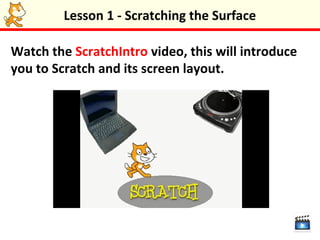
Watch the ScratchIntro video, this will introduce
you to Scratch and its screen layout.
Lesson 1 - Scratching the Surface

A Scratch program contains sprites (characters)
that “perform” on a stage. Sprites and the stage
have three kinds of properties (or settings).
Scripts: These are the instructions that control a
sprite. Scripts are made from blocks.
Costumes/Backgrounds: Costumes are “outfits” for
a sprite. Backgrounds are just like costumes but for
the stage.
Sounds: These are sounds that sprites or the stage
can use.
Lesson 1 - Scratching the Surface

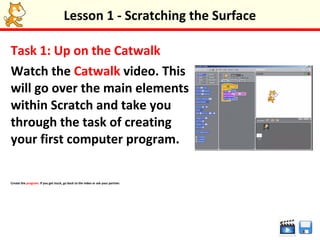
Task 1: Up on the Catwalk
Watch the Catwalk video. This
will go over the main elements
within Scratch and take you
through the task of creating
your first computer program.

Create the program. If you get stuck, go back to the video or ask your partner.
Lesson 1 - Scratching the Surface


 Congratulations – you have just started your
journey to become a computer programmer!
Lesson 1 - Scratching the Surface

Putting things in order
•Blocks in the same script get executed (carried
out) in sequence, one after the other.
•Blocks in separate scripts can sometimes be
executed at the same time. This is called parallel
processing – having the computer do more than
one thing at a time.
•For example, if you have several scripts, they will
all get executed together when the green flag is
clicked.
Lesson 1 - Scratching the Surface

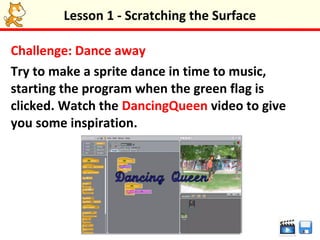
Challenge: Dance away
Try to make a sprite dance in time to music,
starting the program when the green flag is
clicked. Watch the DancingQueen video to give
you some inspiration.
Lesson 1 - Scratching the Surface

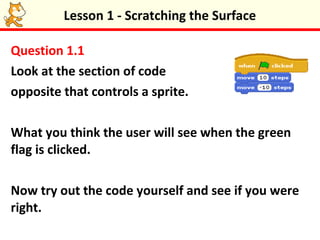
Question 1.1
Look at the section of code
opposite that controls a sprite.

What you think the user will see when the green
flag is clicked.

Now try out the code yourself and see if you were
right.
Lesson 1 - Scratching the Surface

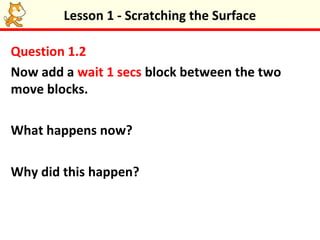
Question 1.2
Now add a wait 1 secs block between the two
move blocks.

What happens now?

Why did this happen?
Lesson 1 - Scratching the Surface

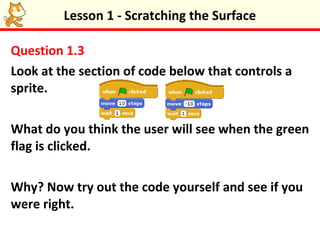
Question 1.3
Look at the section of code below that controls a
sprite.

What do you think the user will see when the green
flag is clicked.

Why? Now try out the code yourself and see if you
were right.
Lesson 1 - Scratching the Surface

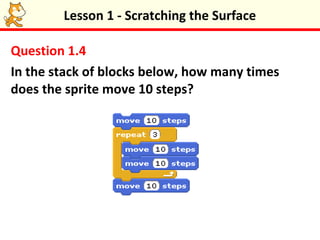
Question 1.4
In the stack of blocks below, how many times
does the sprite move 10 steps?
Lesson 1 - Scratching the Surface

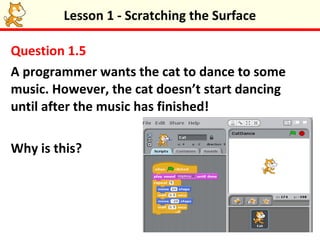
Question 1.5
A programmer wants the cat to dance to some
music. However, the cat doesn’t start dancing
until after the music has finished!

Why is this?
Lesson 1 - Scratching the Surface

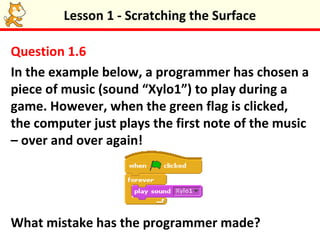
Question 1.6
In the example below, a programmer has chosen a
piece of music (sound “Xylo1”) to play during a
game. However, when the green flag is clicked,
the computer just plays the first note of the music
– over and over again!


What mistake has the programmer made?
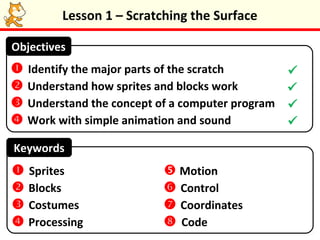
Lesson 1 – Scratching the Surface

Objectives
 Identify the major parts of the scratch        
 Understand how sprites and blocks work         
 Understand the concept of a computer program   
 Work with simple animation and sound           

Keywords
 Sprites                  Motion
 Blocks                   Control
 Costumes                 Coordinates
 Processing               Code

Lesson 1

  • 1.
    Lesson 1 -Scratching the Surface
  • 2.
    Lesson 1 –Scratching the Surface Lesson This lesson introduces the Scratch programming environment, including the basic terms utilised in the language. You will create your first computer program based on a cat walk scenario. Objectives  Identify the major parts of the scratch  Understand how sprites and blocks work  Understand the concept of a computer program  Work with simple animation and sound
  • 3.
    Lesson 1 -Scratching the Surface Watch the ScratchIntro video, this will introduce you to Scratch and its screen layout.
  • 4.
    Lesson 1 -Scratching the Surface A Scratch program contains sprites (characters) that “perform” on a stage. Sprites and the stage have three kinds of properties (or settings). Scripts: These are the instructions that control a sprite. Scripts are made from blocks. Costumes/Backgrounds: Costumes are “outfits” for a sprite. Backgrounds are just like costumes but for the stage. Sounds: These are sounds that sprites or the stage can use.
  • 5.
    Lesson 1 -Scratching the Surface Task 1: Up on the Catwalk Watch the Catwalk video. This will go over the main elements within Scratch and take you through the task of creating your first computer program. Create the program. If you get stuck, go back to the video or ask your partner.
  • 6.
    Lesson 1 -Scratching the Surface Congratulations – you have just started your journey to become a computer programmer!
  • 7.
    Lesson 1 -Scratching the Surface Putting things in order •Blocks in the same script get executed (carried out) in sequence, one after the other. •Blocks in separate scripts can sometimes be executed at the same time. This is called parallel processing – having the computer do more than one thing at a time. •For example, if you have several scripts, they will all get executed together when the green flag is clicked.
  • 8.
    Lesson 1 -Scratching the Surface Challenge: Dance away Try to make a sprite dance in time to music, starting the program when the green flag is clicked. Watch the DancingQueen video to give you some inspiration.
  • 9.
    Lesson 1 -Scratching the Surface Question 1.1 Look at the section of code opposite that controls a sprite. What you think the user will see when the green flag is clicked. Now try out the code yourself and see if you were right.
  • 10.
    Lesson 1 -Scratching the Surface Question 1.2 Now add a wait 1 secs block between the two move blocks. What happens now? Why did this happen?
  • 11.
    Lesson 1 -Scratching the Surface Question 1.3 Look at the section of code below that controls a sprite. What do you think the user will see when the green flag is clicked. Why? Now try out the code yourself and see if you were right.
  • 12.
    Lesson 1 -Scratching the Surface Question 1.4 In the stack of blocks below, how many times does the sprite move 10 steps?
  • 13.
    Lesson 1 -Scratching the Surface Question 1.5 A programmer wants the cat to dance to some music. However, the cat doesn’t start dancing until after the music has finished! Why is this?
  • 14.
    Lesson 1 -Scratching the Surface Question 1.6 In the example below, a programmer has chosen a piece of music (sound “Xylo1”) to play during a game. However, when the green flag is clicked, the computer just plays the first note of the music – over and over again! What mistake has the programmer made?
  • 15.
    Lesson 1 –Scratching the Surface Objectives  Identify the major parts of the scratch   Understand how sprites and blocks work   Understand the concept of a computer program   Work with simple animation and sound  Keywords  Sprites  Motion  Blocks  Control  Costumes  Coordinates  Processing  Code