Computer Codes
Lecturer: Jing Liu
Email: neouma@mail.xidian.edu.cn
Homepage: http://see.xidian.edu.cn/faculty/liujing
Computer Codes
 A computer is a digital system that stores and
processes different types of data in the form of 0s
and 1s.
 The different types of data handled by a computer
system include numbers, alphabets and some
special characters.
 Therefore, there is a need to change the data
entered by the users into a form that the
computer system can understand and process.
Computer Codes
 Different types of codes have been developed and
used to represent the data entered by the users in
the binary format.
 The binary system represents each type of data in
terms of binary digits, 0s and 1s.
 Since these codes convert the data into the binary
form, the computer codes are also referred as
binary codes.
Computer Codes
 Computer professionals use different number systems
according to their requirements to communicate with the
computer system.
 All the number systems used by computer professionals
to interact with computer systems come under the
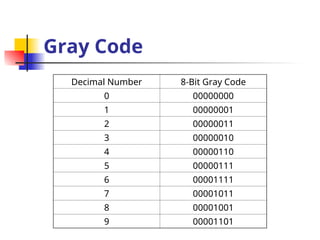
category of positional number system.
 The positional number system is a number system in
which numbers are represented using some symbols
called digits and the values of these numbers can be
determined by taking the position of digits into
consideration.
Computer Codes
The different positional number systems are:
 Decimal system
 Binary system
 Hexadecimal system
 Octal system
Decimal System
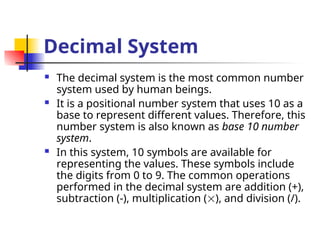
 The decimal system is the most common number
system used by human beings.
 It is a positional number system that uses 10 as a
base to represent different values. Therefore, this
number system is also known as base 10 number
system.
 In this system, 10 symbols are available for
representing the values. These symbols include
the digits from 0 to 9. The common operations
performed in the decimal system are addition (+),
subtraction (-), multiplication (), and division (/).
Decimal System
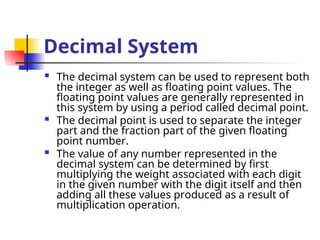
 The decimal system can be used to represent both
the integer as well as floating point values. The
floating point values are generally represented in
this system by using a period called decimal point.
 The decimal point is used to separate the integer
part and the fraction part of the given floating
point number.
 The value of any number represented in the
decimal system can be determined by first
multiplying the weight associated with each digit
in the given number with the digit itself and then
adding all these values produced as a result of
multiplication operation.
Decimal System
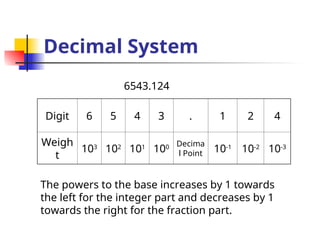
Digit 6 5 4 3 . 1 2 4
Weigh
t
103
102
101
100 Decima
l Point 10-1
10-2
10-3
6543.124
The powers to the base increases by 1 towards
the left for the integer part and decreases by 1
towards the right for the fraction part.
Binary System
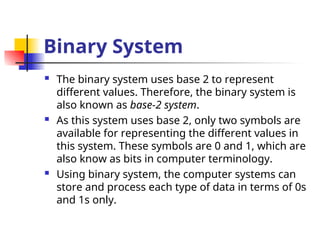
 The binary system uses base 2 to represent
different values. Therefore, the binary system is
also known as base-2 system.
 As this system uses base 2, only two symbols are
available for representing the different values in
this system. These symbols are 0 and 1, which are
also know as bits in computer terminology.
 Using binary system, the computer systems can
store and process each type of data in terms of 0s
and 1s only.
Binary System
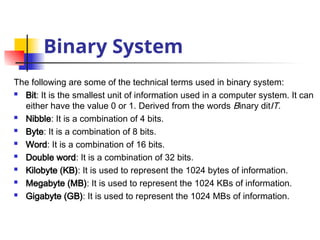
The following are some of the technical terms used in binary system:
 Bit: It is the smallest unit of information used in a computer system. It can
either have the value 0 or 1. Derived from the words Binary ditIT.
 Nibble: It is a combination of 4 bits.
 Byte: It is a combination of 8 bits.
 Word: It is a combination of 16 bits.
 Double word: It is a combination of 32 bits.
 Kilobyte (KB): It is used to represent the 1024 bytes of information.
 Megabyte (MB): It is used to represent the 1024 KBs of information.
 Gigabyte (GB): It is used to represent the 1024 MBs of information.
Binary System
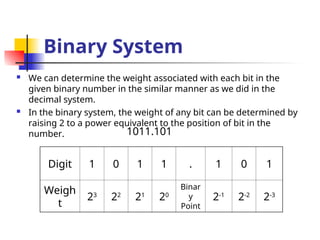
 We can determine the weight associated with each bit in the
given binary number in the similar manner as we did in the
decimal system.
 In the binary system, the weight of any bit can be determined by
raising 2 to a power equivalent to the position of bit in the
number.
Digit 1 0 1 1 . 1 0 1
Weigh
t
23
22
21
20
Binar
y
Point
2-1
2-2
2-3
1011.101
Hexadecimal System
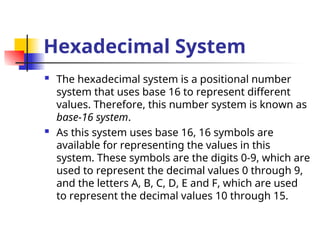
 The hexadecimal system is a positional number
system that uses base 16 to represent different
values. Therefore, this number system is known as
base-16 system.
 As this system uses base 16, 16 symbols are
available for representing the values in this
system. These symbols are the digits 0-9, which are
used to represent the decimal values 0 through 9,
and the letters A, B, C, D, E and F, which are used
to represent the decimal values 10 through 15.
Hexadecimal System
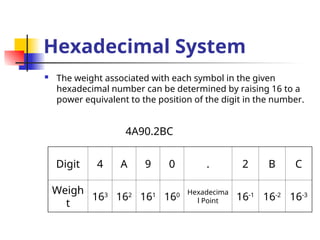
 The weight associated with each symbol in the given
hexadecimal number can be determined by raising 16 to a
power equivalent to the position of the digit in the number.
Digit 4 A 9 0 . 2 B C
Weigh
t
163
162
161
160 Hexadecima
l Point 16-1
16-2
16-3
4A90.2BC
Octal System
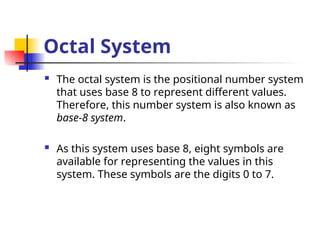
 The octal system is the positional number system
that uses base 8 to represent different values.
Therefore, this number system is also known as
base-8 system.
 As this system uses base 8, eight symbols are
available for representing the values in this
system. These symbols are the digits 0 to 7.
Octal System
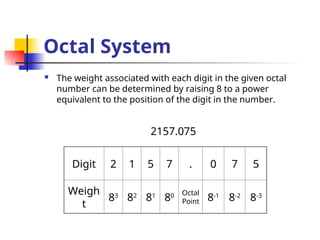
 The weight associated with each digit in the given octal
number can be determined by raising 8 to a power
equivalent to the position of the digit in the number.
Digit 2 1 5 7 . 0 7 5
Weigh
t
83
82
81
80 Octal
Point 8-1
8-2
8-3
2157.075
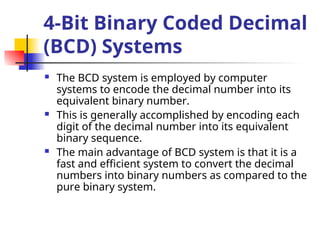
 The BCD system is employed by computer
systems to encode the decimal number into its
equivalent binary number.
 This is generally accomplished by encoding each
digit of the decimal number into its equivalent
binary sequence.
 The main advantage of BCD system is that it is a
fast and efficient system to convert the decimal
numbers into binary numbers as compared to the
pure binary system.
4-Bit Binary Coded Decimal
(BCD) Systems
4-Bit Binary Coded Decimal
(BCD) Systems
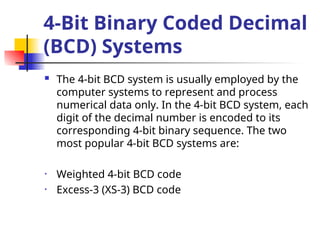
 The 4-bit BCD system is usually employed by the
computer systems to represent and process
numerical data only. In the 4-bit BCD system, each
digit of the decimal number is encoded to its
corresponding 4-bit binary sequence. The two
most popular 4-bit BCD systems are:
• Weighted 4-bit BCD code
• Excess-3 (XS-3) BCD code
Weighted 4-Bit BCD Code
 The weighted 4-bit BCD code is more commonly
known as 8421 weighted code.
 It is called weighted code because it encodes the
decimal system into binary system by using the
concept of positional weighting into consideration.
 In this code, each decimal digit is encoded into its
4-bit binary number in which the bits from left to
right have the weights 8, 4, 2, and 1, respectively.
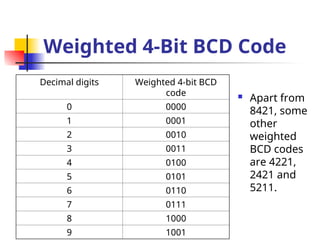
Weighted 4-Bit BCD Code
Decimal digits Weighted 4-bit BCD
code
0 0000
1 0001
2 0010
3 0011
4 0100
5 0101
6 0110
7 0111
8 1000
9 1001
 Apart from
8421, some
other
weighted
BCD codes
are 4221,
2421 and
5211.
Weighted 4-Bit BCD Code
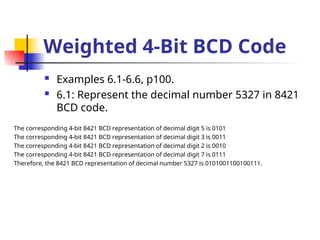
 Examples 6.1-6.6, p100.
 6.1: Represent the decimal number 5327 in 8421
BCD code.
The corresponding 4-bit 8421 BCD representation of decimal digit 5 is 0101
The corresponding 4-bit 8421 BCD representation of decimal digit 3 is 0011
The corresponding 4-bit 8421 BCD representation of decimal digit 2 is 0010
The corresponding 4-bit 8421 BCD representation of decimal digit 7 is 0111
Therefore, the 8421 BCD representation of decimal number 5327 is 0101001100100111.
Excess-3 BCD Code
 The Excess-3 (XS-3) BCD code does not use the principle of
positional weights into consideration while converting the
decimal numbers to 4-bit BCD system. Therefore, we can say
that this code is a non-weighted BCD code.
 The function of XS-3 code is to transform the decimal
numbers into their corresponding 4-bit BCD code.
 In this code, the decimal number is transformed to the 4-bit
BCD code by first adding 3 to all the digits of the number and
then converting the excess digits, so obtained, into their
corresponding 8421 BCD code. Therefore, we can say that
the XS-3 code is strongly related with 8421 BCD code in its
functioning.
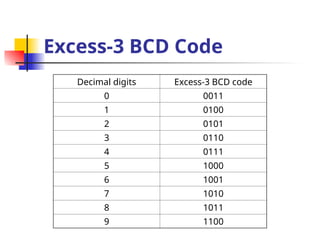
Excess-3 BCD Code
Decimal digits Excess-3 BCD code
0 0011
1 0100
2 0101
3 0110
4 0111
5 1000
6 1001
7 1010
8 1011
9 1100
Excess-3 BCD Code
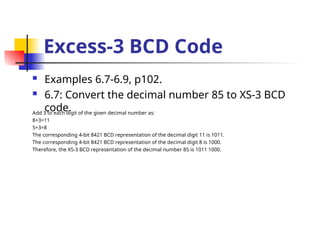
 Examples 6.7-6.9, p102.
 6.7: Convert the decimal number 85 to XS-3 BCD
code.
Add 3 to each digit of the given decimal number as:
8+3=11
5+3=8
The corresponding 4-bit 8421 BCD representation of the decimal digit 11 is 1011.
The corresponding 4-bit 8421 BCD representation of the decimal digit 8 is 1000.
Therefore, the XS-3 BCD representation of the decimal number 85 is 1011 1000.
Excess-3 BCD Code
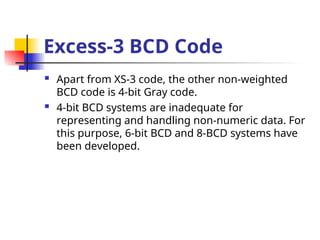
 Apart from XS-3 code, the other non-weighted
BCD code is 4-bit Gray code.
 4-bit BCD systems are inadequate for
representing and handling non-numeric data. For
this purpose, 6-bit BCD and 8-BCD systems have
been developed.
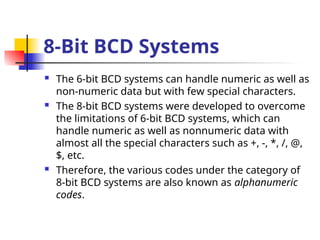
8-Bit BCD Systems
 The 6-bit BCD systems can handle numeric as well as
non-numeric data but with few special characters.
 The 8-bit BCD systems were developed to overcome
the limitations of 6-bit BCD systems, which can
handle numeric as well as nonnumeric data with
almost all the special characters such as +, -, *, /, @,
$, etc.
 Therefore, the various codes under the category of
8-bit BCD systems are also known as alphanumeric
codes.
8-Bit BCD Systems
 The three most popular 8-bit BCD codes are:
• Extended Binary Coded Decimal Interchange
Code (EBCDIC)
• American Standard Code for Information
Interchange (ASCII)
• Gray Code
EBCDIC Code
 The EBCDIC code is an 8-bit alphanumeric code
that was developed by IBM to represent
alphabets, decimal digits and special
characters, including control characters.
 The EBCDIC codes are generally the decimal
and the hexadecimal representation of different
characters.
 This code is rarely used by non IBM-compatible
computer systems.
ASCII Code
 The ASCII code is pronounced as ASKEE and is
used for the same purpose for which the
EBCDIC code is used. However, this code is
more popular than EBCDIC code as unlike the
EBCDIC code this code can be implemented by
most of the non-IBM computer systems.
 Initially, this code was developed as a 7-bit BCD
code to handle 128 characters but later it was
modified to an 8-bit code.
Gray Code
 Gray code is another important code that is
also used to convert the decimal number into
8-bit binary sequence. However, this
conversion is carried in a manner that the
contiguous digits of the decimal number differ
from each other by one bit only.
Gray Code
Decimal Number 8-Bit Gray Code
0 00000000
1 00000001
2 00000011
3 00000010
4 00000110
5 00000111
6 00001111
7 00001011
8 00001001
9 00001101
Gray Code
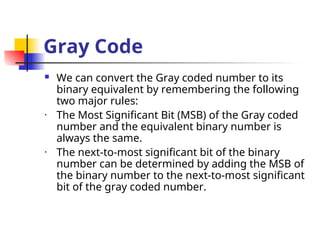
 We can convert the Gray coded number to its
binary equivalent by remembering the following
two major rules:
• The Most Significant Bit (MSB) of the Gray coded
number and the equivalent binary number is
always the same.
• The next-to-most significant bit of the binary
number can be determined by adding the MSB of
the binary number to the next-to-most significant
bit of the gray coded number.
Gray Code
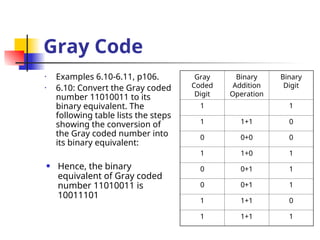
• Examples 6.10-6.11, p106.
• 6.10: Convert the Gray coded
number 11010011 to its
binary equivalent. The
following table lists the steps
showing the conversion of
the Gray coded number into
its binary equivalent:
Gray
Coded
Digit
Binary
Addition
Operation
Binary
Digit
1 1
1 1+1 0
0 0+0 0
1 1+0 1
0 0+1 1
0 0+1 1
1 1+1 0
1 1+1 1
• Hence, the binary
equivalent of Gray coded
number 11010011 is
10011101
Gray Code
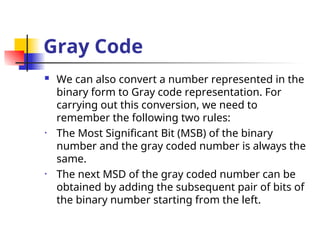
 We can also convert a number represented in the
binary form to Gray code representation. For
carrying out this conversion, we need to
remember the following two rules:
• The Most Significant Bit (MSB) of the binary
number and the gray coded number is always the
same.
• The next MSD of the gray coded number can be
obtained by adding the subsequent pair of bits of
the binary number starting from the left.
Gray Code
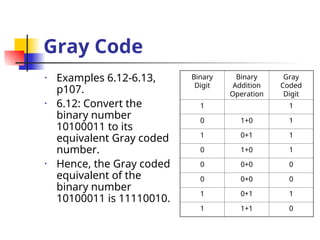
• Examples 6.12-6.13,
p107.
• 6.12: Convert the
binary number
10100011 to its
equivalent Gray coded
number.
• Hence, the Gray coded
equivalent of the
binary number
10100011 is 11110010.
Binary
Digit
Binary
Addition
Operation
Gray
Coded
Digit
1 1
0 1+0 1
1 0+1 1
0 1+0 1
0 0+0 0
0 0+0 0
1 0+1 1
1 1+1 0
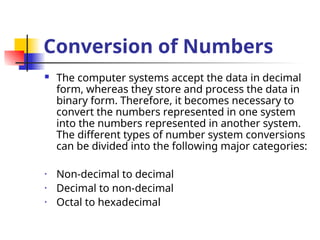
Conversion of Numbers
 The computer systems accept the data in decimal
form, whereas they store and process the data in
binary form. Therefore, it becomes necessary to
convert the numbers represented in one system
into the numbers represented in another system.
The different types of number system conversions
can be divided into the following major categories:
• Non-decimal to decimal
• Decimal to non-decimal
• Octal to hexadecimal
Non-Decimal to Decimal
 The non-decimal to decimal conversions can be
implemented by taking the concept of place
values into consideration. The non-decimal to
decimal conversion includes the following number
system conversions:
• Binary to decimal conversion
• Hexadecimal to decimal conversion
• Octal to decimal conversion
Binary to Decimal
Conversion
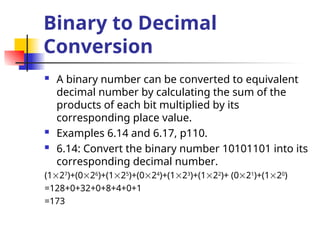
 A binary number can be converted to equivalent
decimal number by calculating the sum of the
products of each bit multiplied by its
corresponding place value.
 Examples 6.14 and 6.17, p110.
 6.14: Convert the binary number 10101101 into its
corresponding decimal number.
(127
)+(026
)+(125
)+(024
)+(123
)+(122
)+ (021
)+(120
)
=128+0+32+0+8+4+0+1
=173
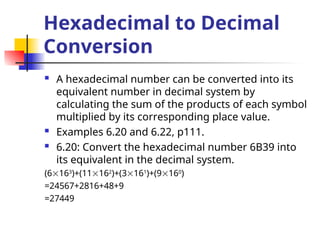
Hexadecimal to Decimal
Conversion
 A hexadecimal number can be converted into its
equivalent number in decimal system by
calculating the sum of the products of each symbol
multiplied by its corresponding place value.
 Examples 6.20 and 6.22, p111.
 6.20: Convert the hexadecimal number 6B39 into
its equivalent in the decimal system.
(6163
)+(11162
)+(3161
)+(9160
)
=24567+2816+48+9
=27449
Octal to Decimal
Conversion
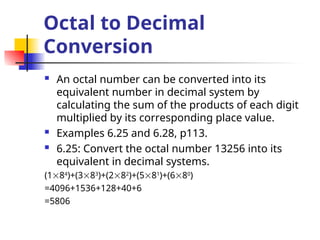
 An octal number can be converted into its
equivalent number in decimal system by
calculating the sum of the products of each digit
multiplied by its corresponding place value.
 Examples 6.25 and 6.28, p113.
 6.25: Convert the octal number 13256 into its
equivalent in decimal systems.
(184
)+(383
)+(282
)+(581
)+(680
)
=4096+1536+128+40+6
=5806
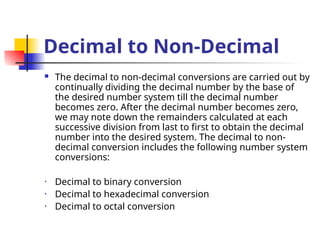
Decimal to Non-Decimal
 The decimal to non-decimal conversions are carried out by
continually dividing the decimal number by the base of
the desired number system till the decimal number
becomes zero. After the decimal number becomes zero,
we may note down the remainders calculated at each
successive division from last to first to obtain the decimal
number into the desired system. The decimal to non-
decimal conversion includes the following number system
conversions:
• Decimal to binary conversion
• Decimal to hexadecimal conversion
• Decimal to octal conversion
Decimal to Binary
Conversion
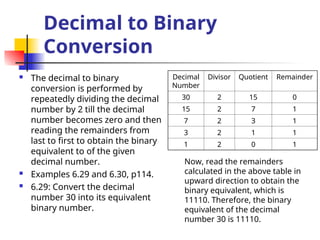
 The decimal to binary
conversion is performed by
repeatedly dividing the decimal
number by 2 till the decimal
number becomes zero and then
reading the remainders from
last to first to obtain the binary
equivalent to of the given
decimal number.
 Examples 6.29 and 6.30, p114.
 6.29: Convert the decimal
number 30 into its equivalent
binary number.
Decimal
Number
Divisor Quotient Remainder
30 2 15 0
15 2 7 1
7 2 3 1
3 2 1 1
1 2 0 1
Now, read the remainders
calculated in the above table in
upward direction to obtain the
binary equivalent, which is
11110. Therefore, the binary
equivalent of the decimal
number 30 is 11110.
Decimal to Hexadecimal
Conversion
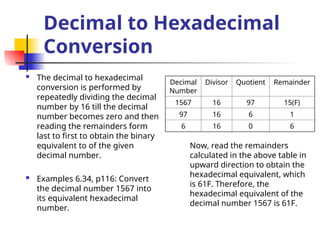
 The decimal to hexadecimal
conversion is performed by
repeatedly dividing the decimal
number by 16 till the decimal
number becomes zero and then
reading the remainders form
last to first to obtain the binary
equivalent to of the given
decimal number.
 Examples 6.34, p116: Convert
the decimal number 1567 into
its equivalent hexadecimal
number.
Decimal
Number
Divisor Quotient Remainder
1567 16 97 15(F)
97 16 6 1
6 16 0 6
Now, read the remainders
calculated in the above table in
upward direction to obtain the
hexadecimal equivalent, which
is 61F. Therefore, the
hexadecimal equivalent of the
decimal number 1567 is 61F.
Decimal to Octal
Conversion
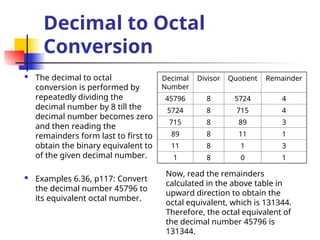
 The decimal to octal
conversion is performed by
repeatedly dividing the
decimal number by 8 till the
decimal number becomes zero
and then reading the
remainders form last to first to
obtain the binary equivalent to
of the given decimal number.
 Examples 6.36, p117: Convert
the decimal number 45796 to
its equivalent octal number.
Decimal
Number
Divisor Quotient Remainder
45796 8 5724 4
5724 8 715 4
715 8 89 3
89 8 11 1
11 8 1 3
1 8 0 1
Now, read the remainders
calculated in the above table in
upward direction to obtain the
octal equivalent, which is 131344.
Therefore, the octal equivalent of
the decimal number 45796 is
131344.
Octal to Hexadecimal
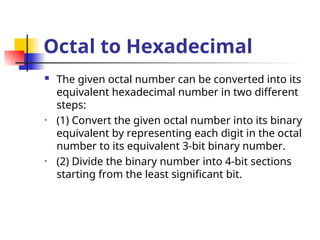
 The given octal number can be converted into its
equivalent hexadecimal number in two different
steps:
• (1) Convert the given octal number into its binary
equivalent by representing each digit in the octal
number to its equivalent 3-bit binary number.
• (2) Divide the binary number into 4-bit sections
starting from the least significant bit.
Octal to Hexadecimal
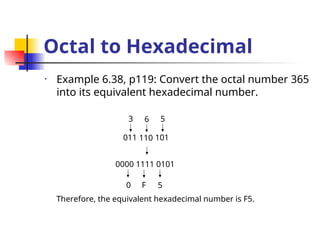
• Example 6.38, p119: Convert the octal number 365
into its equivalent hexadecimal number.
3
011
6
110
5
101
0000 1111 0101
0 F 5
Therefore, the equivalent hexadecimal number is F5.
Computer Arithmetic
Computer Arithmetic
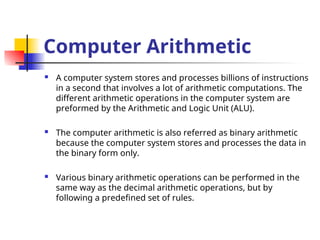
 A computer system stores and processes billions of instructions
in a second that involves a lot of arithmetic computations. The
different arithmetic operations in the computer system are
preformed by the Arithmetic and Logic Unit (ALU).
 The computer arithmetic is also referred as binary arithmetic
because the computer system stores and processes the data in
the binary form only.
 Various binary arithmetic operations can be performed in the
same way as the decimal arithmetic operations, but by
following a predefined set of rules.
Computer Arithmetic
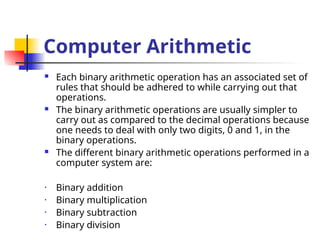
 Each binary arithmetic operation has an associated set of
rules that should be adhered to while carrying out that
operations.
 The binary arithmetic operations are usually simpler to
carry out as compared to the decimal operations because
one needs to deal with only two digits, 0 and 1, in the
binary operations.
 The different binary arithmetic operations performed in a
computer system are:
• Binary addition
• Binary multiplication
• Binary subtraction
• Binary division
Binary Addition
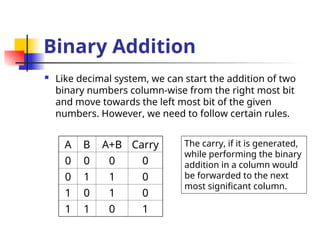
 Like decimal system, we can start the addition of two
binary numbers column-wise from the right most bit
and move towards the left most bit of the given
numbers. However, we need to follow certain rules.
A B A+B Carry
0 0 0 0
0 1 1 0
1 0 1 0
1 1 0 1
The carry, if it is generated,
while performing the binary
addition in a column would
be forwarded to the next
most significant column.
Binary Addition
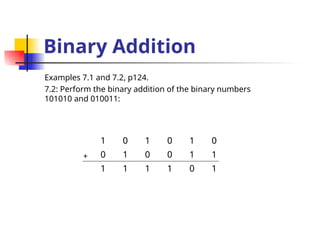
Examples 7.1 and 7.2, p124.
7.2: Perform the binary addition of the binary numbers
101010 and 010011:
1 0 1 0 1 0
0 1 0 0 1 1
1 1 1 1 0 1
+
Binary Addition
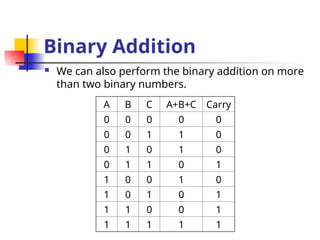
 We can also perform the binary addition on more
than two binary numbers.
A B C A+B+C Carry
0 0 0 0 0
0 0 1 1 0
0 1 0 1 0
0 1 1 0 1
1 0 0 1 0
1 0 1 0 1
1 1 0 0 1
1 1 1 1 1
Binary Addition
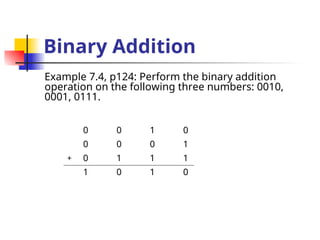
Example 7.4, p124: Perform the binary addition
operation on the following three numbers: 0010,
0001, 0111.
0 0 1 0
0 0 0 1
0 1 1 1
1 0 1 0
+
Binary Multiplication
 The multiplication of two binary numbers can be carried out in the same manner as the
decimal multiplication.
 Unlike decimal multiplication, only two values are generated as the outcome of multiplying
the multiplication bit by 0 or 1 in the binary multiplication. These values are either 0 or 1.
 The binary multiplication can also be considered as repeated binary addition. Therefore,
the binary multiplication is performed in conjunction with the binary addition operation.
Binary Multiplication
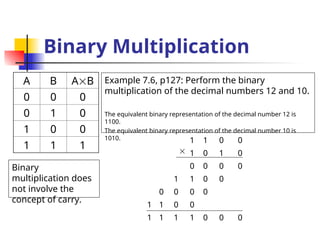
A B AB
0 0 0
0 1 0
1 0 0
1 1 1
Binary
multiplication does
not involve the
concept of carry.
Example 7.6, p127: Perform the binary
multiplication of the decimal numbers 12 and 10.
The equivalent binary representation of the decimal number 12 is
1100.
The equivalent binary representation of the decimal number 10 is
1010. 1 1 0 0
1 0 1 0
0 0 0 0
1 1 0 0
0 0 0 0
1 1 0 0
1 1 1 1 0 0 0

Binary Subtraction
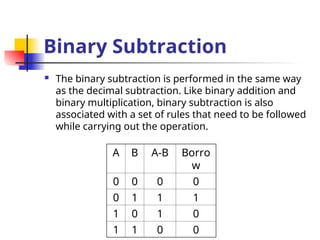
 The binary subtraction is performed in the same way
as the decimal subtraction. Like binary addition and
binary multiplication, binary subtraction is also
associated with a set of rules that need to be followed
while carrying out the operation.
A B A-B Borro
w
0 0 0 0
0 1 1 1
1 0 1 0
1 1 0 0
Binary Subtraction
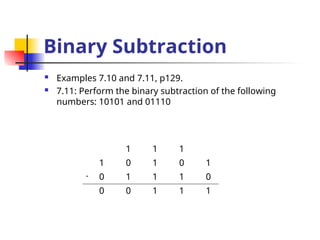
 Examples 7.10 and 7.11, p129.
 7.11: Perform the binary subtraction of the following
numbers: 10101 and 01110
1 1 1
1 0 1 0 1
0 1 1 1 0
0 0 1 1 1
-
Binary Division
 Binary division is also performed in the same way as we perform decimal division. Like decimal
division, we also need to follow the binary subtraction rules while performing the binary division.
The dividend involved in binary division should be greater than the divisor. The following are the
two important points, which need to be remembered while performing the binary division.
• If the remainder obtained by the division process is greater than or equal to the divisor, put 1 in
the quotient and perform the binary subtraction.
• If the remainder obtained by the division process is less than the divisor, put 0 in the quotient and
append the next most significant digit from the dividend to the remainder.
Binary Division
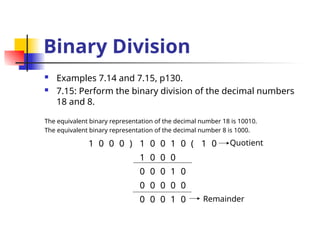
 Examples 7.14 and 7.15, p130.
 7.15: Perform the binary division of the decimal numbers
18 and 8.
The equivalent binary representation of the decimal number 18 is 10010.
The equivalent binary representation of the decimal number 8 is 1000.
1 0 0 0 ) 1 0 0 1 0 ( 1 0
1 0 0 0
0 0 0 1 0
0 0 0 0 0
0 0 0 1 0
Quotient
Remainder
Signed/Unsigned Numbers
 The unsigned binary number is the number with
a magnitude of either zero or greater than zero,
and are usually represented using the unsigned-
magnitude representation, which only represents
the magnitude of the numbers.
 This type of representation does not take the sign
of the binary numbers into consideration while
representing these numbers.
Signed/Unsigned Numbers
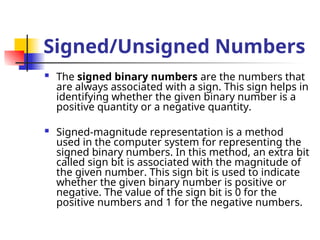
 The signed binary numbers are the numbers that
are always associated with a sign. This sign helps in
identifying whether the given binary number is a
positive quantity or a negative quantity.
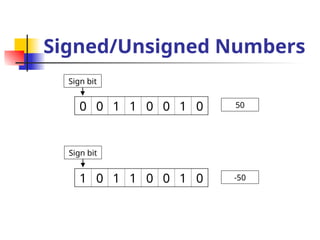
 Signed-magnitude representation is a method
used in the computer system for representing the
signed binary numbers. In this method, an extra bit
called sign bit is associated with the magnitude of
the given number. This sign bit is used to indicate
whether the given binary number is positive or
negative. The value of the sign bit is 0 for the
positive numbers and 1 for the negative numbers.
Signed/Unsigned Numbers
0 0 1 1 0 0 1 0
1 0 1 1 0 0 1 0
Sign bit
Sign bit
50
-50
Signed/Unsigned Numbers
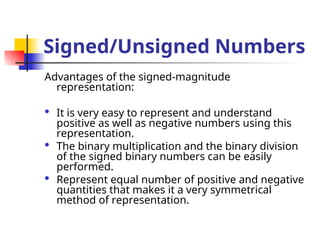
Advantages of the signed-magnitude
representation:
 It is very easy to represent and understand
positive as well as negative numbers using this
representation.
 The binary multiplication and the binary division
of the signed binary numbers can be easily
performed.
 Represent equal number of positive and negative
quantities that makes it a very symmetrical
method of representation.
Signed/Unsigned Numbers
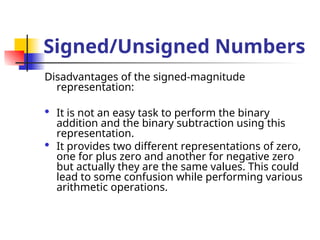
Disadvantages of the signed-magnitude
representation:
 It is not an easy task to perform the binary
addition and the binary subtraction using this
representation.
 It provides two different representations of zero,
one for plus zero and another for negative zero
but actually they are the same values. This could
lead to some confusion while performing various
arithmetic operations.
Complements of Binary
Numbers
 The complement system can also be used to
represent the signed binary numbers apart from the
signed-magnitude representation method.
 In the complement system, the positive integers are
represented in a similar manner as they are
represented in the signed-magnitude representation.
The following are the two most popular complement
methods used in the computer system:
 One’s complement
 Two’s complement
One’s Complement
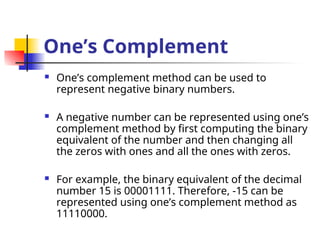
 One’s complement method can be used to
represent negative binary numbers.
 A negative number can be represented using one’s
complement method by first computing the binary
equivalent of the number and then changing all
the zeros with ones and all the ones with zeros.
 For example, the binary equivalent of the decimal
number 15 is 00001111. Therefore, -15 can be
represented using one’s complement method as
11110000.
One’s Complement
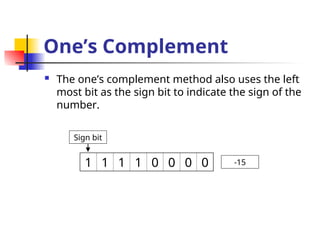
 The one’s complement method also uses the left
most bit as the sign bit to indicate the sign of the
number.
1 1 1 1 0 0 0 0
Sign bit
-15
One’s Complement
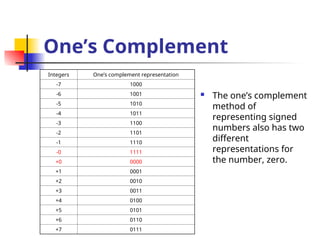
 The one’s complement
method of
representing signed
numbers also has two
different
representations for
the number, zero.
Integers One’s complement representation
-7 1000
-6 1001
-5 1010
-4 1011
-3 1100
-2 1101
-1 1110
-0 1111
+0 0000
+1 0001
+2 0010
+3 0011
+4 0100
+5 0101
+6 0110
+7 0111
One’s Complement
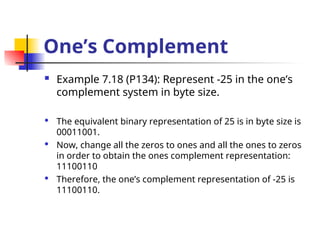
 Example 7.18 (P134): Represent -25 in the one’s
complement system in byte size.
 The equivalent binary representation of 25 is in byte size is
00011001.
 Now, change all the zeros to ones and all the ones to zeros
in order to obtain the ones complement representation:
11100110
 Therefore, the one’s complement representation of -25 is
11100110.
Two’s Complement
 Two’s complement is the most widely used
method for representing negative numbers in the
computer system.
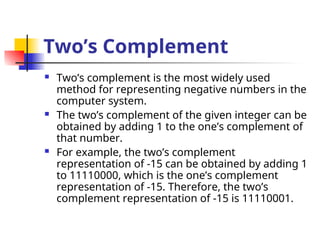
 The two’s complement of the given integer can be
obtained by adding 1 to the one’s complement of
that number.
 For example, the two’s complement
representation of -15 can be obtained by adding 1
to 11110000, which is the one’s complement
representation of -15. Therefore, the two’s
complement representation of -15 is 11110001.
Two’s Complement
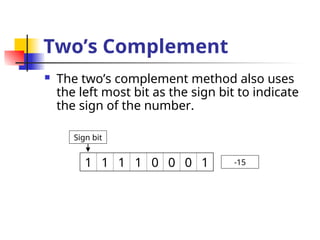
 The two’s complement method also uses
the left most bit as the sign bit to indicate
the sign of the number.
1 1 1 1 0 0 0 1
Sign bit
-15
Two’s Complement
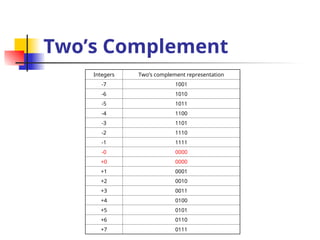
Integers Two’s complement representation
-7 1001
-6 1010
-5 1011
-4 1100
-3 1101
-2 1110
-1 1111
-0 0000
+0 0000
+1 0001
+2 0010
+3 0011
+4 0100
+5 0101
+6 0110
+7 0111
Two’s Complement
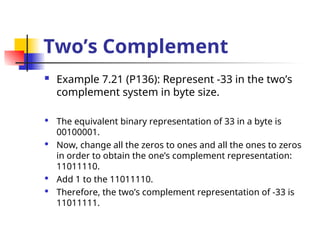
 Example 7.21 (P136): Represent -33 in the two’s
complement system in byte size.
 The equivalent binary representation of 33 in a byte is
00100001.
 Now, change all the zeros to ones and all the ones to zeros
in order to obtain the one’s complement representation:
11011110.
 Add 1 to the 11011110.
 Therefore, the two’s complement representation of -33 is
11011111.
Binary Subtraction Using
Complements
 The complement methods can be used to perform
the binary subtraction of the signed integers:
 Smaller number from larger one
 Larger number from smaller one
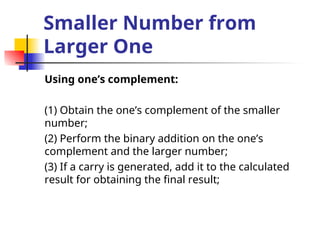
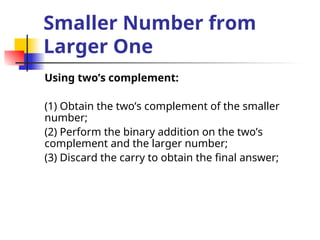
Smaller Number from
Larger One
Using one’s complement:
(1) Obtain the one’s complement of the smaller
number;
(2) Perform the binary addition on the one’s
complement and the larger number;
(3) If a carry is generated, add it to the calculated
result for obtaining the final result;
Smaller Number from
Larger One
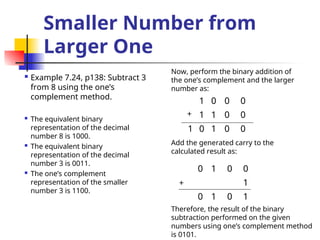
 Example 7.24, p138: Subtract 3
from 8 using the one’s
complement method.
 The equivalent binary
representation of the decimal
number 8 is 1000.
 The equivalent binary
representation of the decimal
number 3 is 0011.
 The one’s complement
representation of the smaller
number 3 is 1100.
1 0 0 0
1 1 0 0
1 0 1 0 0
+
Add the generated carry to the
calculated result as:
0 1 0 0
1
0 1 0 1
Now, perform the binary addition of
the one’s complement and the larger
number as:
+
Therefore, the result of the binary
subtraction performed on the given
numbers using one’s complement method
is 0101.
Smaller Number from
Larger One
Using two’s complement:
(1) Obtain the two’s complement of the smaller
number;
(2) Perform the binary addition on the two’s
complement and the larger number;
(3) Discard the carry to obtain the final answer;
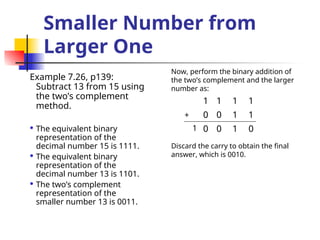
Smaller Number from
Larger One
Example 7.26, p139:
Subtract 13 from 15 using
the two’s complement
method.
 The equivalent binary
representation of the
decimal number 15 is 1111.
 The equivalent binary
representation of the
decimal number 13 is 1101.
 The two’s complement
representation of the
smaller number 13 is 0011.
1 1 1 1
0 0 1 1
0 0 1 0
+
Discard the carry to obtain the final
answer, which is 0010.
Now, perform the binary addition of
the two’s complement and the larger
number as:
1
Larger Number from
Smaller One
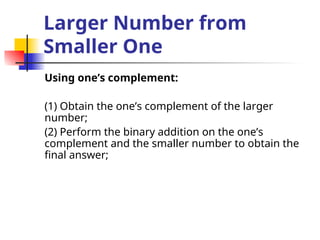
Using one’s complement:
(1) Obtain the one’s complement of the larger
number;
(2) Perform the binary addition on the one’s
complement and the smaller number to obtain the
final answer;
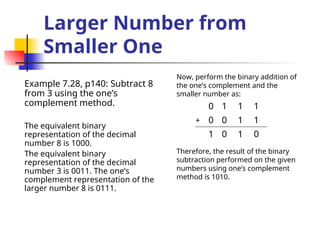
Larger Number from
Smaller One
Example 7.28, p140: Subtract 8
from 3 using the one’s
complement method.
The equivalent binary
representation of the decimal
number 8 is 1000.
The equivalent binary
representation of the decimal
number 3 is 0011. The one’s
complement representation of the
larger number 8 is 0111.
0 1 1 1
0 0 1 1
1 0 1 0
Therefore, the result of the binary
subtraction performed on the given
numbers using one’s complement
method is 1010.
Now, perform the binary addition of
the one’s complement and the
smaller number as:
+
Larger Number from
Smaller One
Using two’s complement:
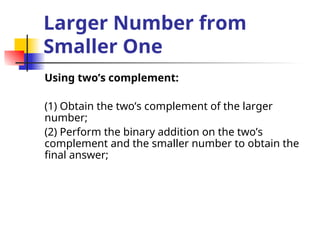
(1) Obtain the two’s complement of the larger
number;
(2) Perform the binary addition on the two’s
complement and the smaller number to obtain the
final answer;
Larger Number from
Smaller One
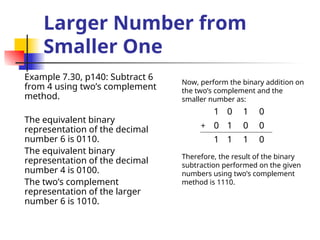
Example 7.30, p140: Subtract 6
from 4 using two’s complement
method.
The equivalent binary
representation of the decimal
number 6 is 0110.
The equivalent binary
representation of the decimal
number 4 is 0100.
The two’s complement
representation of the larger
number 6 is 1010.
1 0 1 0
0 1 0 0
1 1 1 0
Therefore, the result of the binary
subtraction performed on the given
numbers using two’s complement
method is 1110.
Now, perform the binary addition on
the two’s complement and the
smaller number as:
+
Representing Numbers
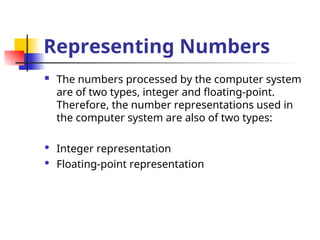
 The numbers processed by the computer system
are of two types, integer and floating-point.
Therefore, the number representations used in
the computer system are also of two types:
 Integer representation
 Floating-point representation
Integer Representation
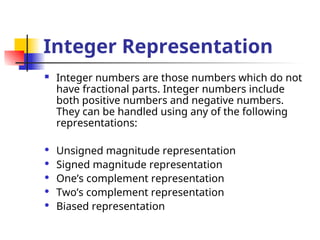
 Integer numbers are those numbers which do not
have fractional parts. Integer numbers include
both positive numbers and negative numbers.
They can be handled using any of the following
representations:
 Unsigned magnitude representation
 Signed magnitude representation
 One’s complement representation
 Two’s complement representation
 Biased representation
Floating-Point
Representation
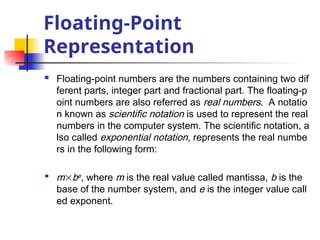
 Floating-point numbers are the numbers containing two dif
ferent parts, integer part and fractional part. The floating-p
oint numbers are also referred as real numbers. A notatio
n known as scientific notation is used to represent the real
numbers in the computer system. The scientific notation, a
lso called exponential notation, represents the real numbe
rs in the following form:
 mbe, where m is the real value called mantissa, b is the
base of the number system, and e is the integer value call
ed exponent.
Floating-Point
Representation
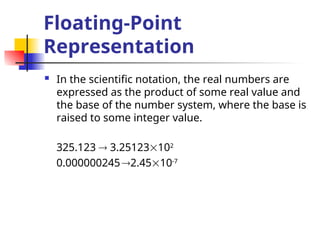
 In the scientific notation, the real numbers are
expressed as the product of some real value and
the base of the number system, where the base is
raised to some integer value.
325.123  3.25123102
0.0000002452.4510-7
Floating-Point
Representation
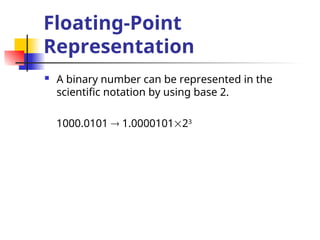
 A binary number can be represented in the
scientific notation by using base 2.
1000.0101  1.000010123
Floating-Point
Representation
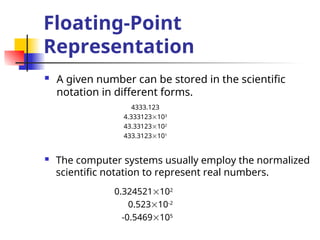
 A given number can be stored in the scientific
notation in different forms.
4333.123
4.333123103
43.33123102
433.3123101
 The computer systems usually employ the normalized
scientific notation to represent real numbers.
0.324521102
0.52310-2
-0.5469105
Lecture_Computer_Codes.pptaaaaaaaaaaaaaaaaaaaaaaaa

  • 1.
    Computer Codes Lecturer: JingLiu Email: neouma@mail.xidian.edu.cn Homepage: http://see.xidian.edu.cn/faculty/liujing
  • 2.
    Computer Codes  Acomputer is a digital system that stores and processes different types of data in the form of 0s and 1s.  The different types of data handled by a computer system include numbers, alphabets and some special characters.  Therefore, there is a need to change the data entered by the users into a form that the computer system can understand and process.
  • 3.
    Computer Codes  Differenttypes of codes have been developed and used to represent the data entered by the users in the binary format.  The binary system represents each type of data in terms of binary digits, 0s and 1s.  Since these codes convert the data into the binary form, the computer codes are also referred as binary codes.
  • 4.
    Computer Codes  Computerprofessionals use different number systems according to their requirements to communicate with the computer system.  All the number systems used by computer professionals to interact with computer systems come under the category of positional number system.  The positional number system is a number system in which numbers are represented using some symbols called digits and the values of these numbers can be determined by taking the position of digits into consideration.
  • 5.
    Computer Codes The differentpositional number systems are:  Decimal system  Binary system  Hexadecimal system  Octal system
  • 6.
    Decimal System  Thedecimal system is the most common number system used by human beings.  It is a positional number system that uses 10 as a base to represent different values. Therefore, this number system is also known as base 10 number system.  In this system, 10 symbols are available for representing the values. These symbols include the digits from 0 to 9. The common operations performed in the decimal system are addition (+), subtraction (-), multiplication (), and division (/).
  • 7.
    Decimal System  Thedecimal system can be used to represent both the integer as well as floating point values. The floating point values are generally represented in this system by using a period called decimal point.  The decimal point is used to separate the integer part and the fraction part of the given floating point number.  The value of any number represented in the decimal system can be determined by first multiplying the weight associated with each digit in the given number with the digit itself and then adding all these values produced as a result of multiplication operation.
  • 8.
    Decimal System Digit 65 4 3 . 1 2 4 Weigh t 103 102 101 100 Decima l Point 10-1 10-2 10-3 6543.124 The powers to the base increases by 1 towards the left for the integer part and decreases by 1 towards the right for the fraction part.
  • 9.
    Binary System  Thebinary system uses base 2 to represent different values. Therefore, the binary system is also known as base-2 system.  As this system uses base 2, only two symbols are available for representing the different values in this system. These symbols are 0 and 1, which are also know as bits in computer terminology.  Using binary system, the computer systems can store and process each type of data in terms of 0s and 1s only.
  • 10.
    Binary System The followingare some of the technical terms used in binary system:  Bit: It is the smallest unit of information used in a computer system. It can either have the value 0 or 1. Derived from the words Binary ditIT.  Nibble: It is a combination of 4 bits.  Byte: It is a combination of 8 bits.  Word: It is a combination of 16 bits.  Double word: It is a combination of 32 bits.  Kilobyte (KB): It is used to represent the 1024 bytes of information.  Megabyte (MB): It is used to represent the 1024 KBs of information.  Gigabyte (GB): It is used to represent the 1024 MBs of information.
  • 11.
    Binary System  Wecan determine the weight associated with each bit in the given binary number in the similar manner as we did in the decimal system.  In the binary system, the weight of any bit can be determined by raising 2 to a power equivalent to the position of bit in the number. Digit 1 0 1 1 . 1 0 1 Weigh t 23 22 21 20 Binar y Point 2-1 2-2 2-3 1011.101
  • 12.
    Hexadecimal System  Thehexadecimal system is a positional number system that uses base 16 to represent different values. Therefore, this number system is known as base-16 system.  As this system uses base 16, 16 symbols are available for representing the values in this system. These symbols are the digits 0-9, which are used to represent the decimal values 0 through 9, and the letters A, B, C, D, E and F, which are used to represent the decimal values 10 through 15.
  • 13.
    Hexadecimal System  Theweight associated with each symbol in the given hexadecimal number can be determined by raising 16 to a power equivalent to the position of the digit in the number. Digit 4 A 9 0 . 2 B C Weigh t 163 162 161 160 Hexadecima l Point 16-1 16-2 16-3 4A90.2BC
  • 14.
    Octal System  Theoctal system is the positional number system that uses base 8 to represent different values. Therefore, this number system is also known as base-8 system.  As this system uses base 8, eight symbols are available for representing the values in this system. These symbols are the digits 0 to 7.
  • 15.
    Octal System  Theweight associated with each digit in the given octal number can be determined by raising 8 to a power equivalent to the position of the digit in the number. Digit 2 1 5 7 . 0 7 5 Weigh t 83 82 81 80 Octal Point 8-1 8-2 8-3 2157.075
  • 16.
     The BCDsystem is employed by computer systems to encode the decimal number into its equivalent binary number.  This is generally accomplished by encoding each digit of the decimal number into its equivalent binary sequence.  The main advantage of BCD system is that it is a fast and efficient system to convert the decimal numbers into binary numbers as compared to the pure binary system. 4-Bit Binary Coded Decimal (BCD) Systems
  • 17.
    4-Bit Binary CodedDecimal (BCD) Systems  The 4-bit BCD system is usually employed by the computer systems to represent and process numerical data only. In the 4-bit BCD system, each digit of the decimal number is encoded to its corresponding 4-bit binary sequence. The two most popular 4-bit BCD systems are: • Weighted 4-bit BCD code • Excess-3 (XS-3) BCD code
  • 18.
    Weighted 4-Bit BCDCode  The weighted 4-bit BCD code is more commonly known as 8421 weighted code.  It is called weighted code because it encodes the decimal system into binary system by using the concept of positional weighting into consideration.  In this code, each decimal digit is encoded into its 4-bit binary number in which the bits from left to right have the weights 8, 4, 2, and 1, respectively.
  • 19.
    Weighted 4-Bit BCDCode Decimal digits Weighted 4-bit BCD code 0 0000 1 0001 2 0010 3 0011 4 0100 5 0101 6 0110 7 0111 8 1000 9 1001  Apart from 8421, some other weighted BCD codes are 4221, 2421 and 5211.
  • 20.
    Weighted 4-Bit BCDCode  Examples 6.1-6.6, p100.  6.1: Represent the decimal number 5327 in 8421 BCD code. The corresponding 4-bit 8421 BCD representation of decimal digit 5 is 0101 The corresponding 4-bit 8421 BCD representation of decimal digit 3 is 0011 The corresponding 4-bit 8421 BCD representation of decimal digit 2 is 0010 The corresponding 4-bit 8421 BCD representation of decimal digit 7 is 0111 Therefore, the 8421 BCD representation of decimal number 5327 is 0101001100100111.
  • 21.
    Excess-3 BCD Code The Excess-3 (XS-3) BCD code does not use the principle of positional weights into consideration while converting the decimal numbers to 4-bit BCD system. Therefore, we can say that this code is a non-weighted BCD code.  The function of XS-3 code is to transform the decimal numbers into their corresponding 4-bit BCD code.  In this code, the decimal number is transformed to the 4-bit BCD code by first adding 3 to all the digits of the number and then converting the excess digits, so obtained, into their corresponding 8421 BCD code. Therefore, we can say that the XS-3 code is strongly related with 8421 BCD code in its functioning.
  • 22.
    Excess-3 BCD Code Decimaldigits Excess-3 BCD code 0 0011 1 0100 2 0101 3 0110 4 0111 5 1000 6 1001 7 1010 8 1011 9 1100
  • 23.
    Excess-3 BCD Code Examples 6.7-6.9, p102.  6.7: Convert the decimal number 85 to XS-3 BCD code. Add 3 to each digit of the given decimal number as: 8+3=11 5+3=8 The corresponding 4-bit 8421 BCD representation of the decimal digit 11 is 1011. The corresponding 4-bit 8421 BCD representation of the decimal digit 8 is 1000. Therefore, the XS-3 BCD representation of the decimal number 85 is 1011 1000.
  • 24.
    Excess-3 BCD Code Apart from XS-3 code, the other non-weighted BCD code is 4-bit Gray code.  4-bit BCD systems are inadequate for representing and handling non-numeric data. For this purpose, 6-bit BCD and 8-BCD systems have been developed.
  • 25.
    8-Bit BCD Systems The 6-bit BCD systems can handle numeric as well as non-numeric data but with few special characters.  The 8-bit BCD systems were developed to overcome the limitations of 6-bit BCD systems, which can handle numeric as well as nonnumeric data with almost all the special characters such as +, -, *, /, @, $, etc.  Therefore, the various codes under the category of 8-bit BCD systems are also known as alphanumeric codes.
  • 26.
    8-Bit BCD Systems The three most popular 8-bit BCD codes are: • Extended Binary Coded Decimal Interchange Code (EBCDIC) • American Standard Code for Information Interchange (ASCII) • Gray Code
  • 27.
    EBCDIC Code  TheEBCDIC code is an 8-bit alphanumeric code that was developed by IBM to represent alphabets, decimal digits and special characters, including control characters.  The EBCDIC codes are generally the decimal and the hexadecimal representation of different characters.  This code is rarely used by non IBM-compatible computer systems.
  • 28.
    ASCII Code  TheASCII code is pronounced as ASKEE and is used for the same purpose for which the EBCDIC code is used. However, this code is more popular than EBCDIC code as unlike the EBCDIC code this code can be implemented by most of the non-IBM computer systems.  Initially, this code was developed as a 7-bit BCD code to handle 128 characters but later it was modified to an 8-bit code.
  • 29.
    Gray Code  Graycode is another important code that is also used to convert the decimal number into 8-bit binary sequence. However, this conversion is carried in a manner that the contiguous digits of the decimal number differ from each other by one bit only.
  • 30.
    Gray Code Decimal Number8-Bit Gray Code 0 00000000 1 00000001 2 00000011 3 00000010 4 00000110 5 00000111 6 00001111 7 00001011 8 00001001 9 00001101
  • 31.
    Gray Code  Wecan convert the Gray coded number to its binary equivalent by remembering the following two major rules: • The Most Significant Bit (MSB) of the Gray coded number and the equivalent binary number is always the same. • The next-to-most significant bit of the binary number can be determined by adding the MSB of the binary number to the next-to-most significant bit of the gray coded number.
  • 32.
    Gray Code • Examples6.10-6.11, p106. • 6.10: Convert the Gray coded number 11010011 to its binary equivalent. The following table lists the steps showing the conversion of the Gray coded number into its binary equivalent: Gray Coded Digit Binary Addition Operation Binary Digit 1 1 1 1+1 0 0 0+0 0 1 1+0 1 0 0+1 1 0 0+1 1 1 1+1 0 1 1+1 1 • Hence, the binary equivalent of Gray coded number 11010011 is 10011101
  • 33.
    Gray Code  Wecan also convert a number represented in the binary form to Gray code representation. For carrying out this conversion, we need to remember the following two rules: • The Most Significant Bit (MSB) of the binary number and the gray coded number is always the same. • The next MSD of the gray coded number can be obtained by adding the subsequent pair of bits of the binary number starting from the left.
  • 34.
    Gray Code • Examples6.12-6.13, p107. • 6.12: Convert the binary number 10100011 to its equivalent Gray coded number. • Hence, the Gray coded equivalent of the binary number 10100011 is 11110010. Binary Digit Binary Addition Operation Gray Coded Digit 1 1 0 1+0 1 1 0+1 1 0 1+0 1 0 0+0 0 0 0+0 0 1 0+1 1 1 1+1 0
  • 35.
    Conversion of Numbers The computer systems accept the data in decimal form, whereas they store and process the data in binary form. Therefore, it becomes necessary to convert the numbers represented in one system into the numbers represented in another system. The different types of number system conversions can be divided into the following major categories: • Non-decimal to decimal • Decimal to non-decimal • Octal to hexadecimal
  • 36.
    Non-Decimal to Decimal The non-decimal to decimal conversions can be implemented by taking the concept of place values into consideration. The non-decimal to decimal conversion includes the following number system conversions: • Binary to decimal conversion • Hexadecimal to decimal conversion • Octal to decimal conversion
  • 37.
    Binary to Decimal Conversion A binary number can be converted to equivalent decimal number by calculating the sum of the products of each bit multiplied by its corresponding place value.  Examples 6.14 and 6.17, p110.  6.14: Convert the binary number 10101101 into its corresponding decimal number. (127 )+(026 )+(125 )+(024 )+(123 )+(122 )+ (021 )+(120 ) =128+0+32+0+8+4+0+1 =173
  • 38.
    Hexadecimal to Decimal Conversion A hexadecimal number can be converted into its equivalent number in decimal system by calculating the sum of the products of each symbol multiplied by its corresponding place value.  Examples 6.20 and 6.22, p111.  6.20: Convert the hexadecimal number 6B39 into its equivalent in the decimal system. (6163 )+(11162 )+(3161 )+(9160 ) =24567+2816+48+9 =27449
  • 39.
    Octal to Decimal Conversion An octal number can be converted into its equivalent number in decimal system by calculating the sum of the products of each digit multiplied by its corresponding place value.  Examples 6.25 and 6.28, p113.  6.25: Convert the octal number 13256 into its equivalent in decimal systems. (184 )+(383 )+(282 )+(581 )+(680 ) =4096+1536+128+40+6 =5806
  • 40.
    Decimal to Non-Decimal The decimal to non-decimal conversions are carried out by continually dividing the decimal number by the base of the desired number system till the decimal number becomes zero. After the decimal number becomes zero, we may note down the remainders calculated at each successive division from last to first to obtain the decimal number into the desired system. The decimal to non- decimal conversion includes the following number system conversions: • Decimal to binary conversion • Decimal to hexadecimal conversion • Decimal to octal conversion
  • 41.
    Decimal to Binary Conversion The decimal to binary conversion is performed by repeatedly dividing the decimal number by 2 till the decimal number becomes zero and then reading the remainders from last to first to obtain the binary equivalent to of the given decimal number.  Examples 6.29 and 6.30, p114.  6.29: Convert the decimal number 30 into its equivalent binary number. Decimal Number Divisor Quotient Remainder 30 2 15 0 15 2 7 1 7 2 3 1 3 2 1 1 1 2 0 1 Now, read the remainders calculated in the above table in upward direction to obtain the binary equivalent, which is 11110. Therefore, the binary equivalent of the decimal number 30 is 11110.
  • 42.
    Decimal to Hexadecimal Conversion The decimal to hexadecimal conversion is performed by repeatedly dividing the decimal number by 16 till the decimal number becomes zero and then reading the remainders form last to first to obtain the binary equivalent to of the given decimal number.  Examples 6.34, p116: Convert the decimal number 1567 into its equivalent hexadecimal number. Decimal Number Divisor Quotient Remainder 1567 16 97 15(F) 97 16 6 1 6 16 0 6 Now, read the remainders calculated in the above table in upward direction to obtain the hexadecimal equivalent, which is 61F. Therefore, the hexadecimal equivalent of the decimal number 1567 is 61F.
  • 43.
    Decimal to Octal Conversion The decimal to octal conversion is performed by repeatedly dividing the decimal number by 8 till the decimal number becomes zero and then reading the remainders form last to first to obtain the binary equivalent to of the given decimal number.  Examples 6.36, p117: Convert the decimal number 45796 to its equivalent octal number. Decimal Number Divisor Quotient Remainder 45796 8 5724 4 5724 8 715 4 715 8 89 3 89 8 11 1 11 8 1 3 1 8 0 1 Now, read the remainders calculated in the above table in upward direction to obtain the octal equivalent, which is 131344. Therefore, the octal equivalent of the decimal number 45796 is 131344.
  • 44.
    Octal to Hexadecimal The given octal number can be converted into its equivalent hexadecimal number in two different steps: • (1) Convert the given octal number into its binary equivalent by representing each digit in the octal number to its equivalent 3-bit binary number. • (2) Divide the binary number into 4-bit sections starting from the least significant bit.
  • 45.
    Octal to Hexadecimal •Example 6.38, p119: Convert the octal number 365 into its equivalent hexadecimal number. 3 011 6 110 5 101 0000 1111 0101 0 F 5 Therefore, the equivalent hexadecimal number is F5.
  • 46.
  • 47.
    Computer Arithmetic  Acomputer system stores and processes billions of instructions in a second that involves a lot of arithmetic computations. The different arithmetic operations in the computer system are preformed by the Arithmetic and Logic Unit (ALU).  The computer arithmetic is also referred as binary arithmetic because the computer system stores and processes the data in the binary form only.  Various binary arithmetic operations can be performed in the same way as the decimal arithmetic operations, but by following a predefined set of rules.
  • 48.
    Computer Arithmetic  Eachbinary arithmetic operation has an associated set of rules that should be adhered to while carrying out that operations.  The binary arithmetic operations are usually simpler to carry out as compared to the decimal operations because one needs to deal with only two digits, 0 and 1, in the binary operations.  The different binary arithmetic operations performed in a computer system are: • Binary addition • Binary multiplication • Binary subtraction • Binary division
  • 49.
    Binary Addition  Likedecimal system, we can start the addition of two binary numbers column-wise from the right most bit and move towards the left most bit of the given numbers. However, we need to follow certain rules. A B A+B Carry 0 0 0 0 0 1 1 0 1 0 1 0 1 1 0 1 The carry, if it is generated, while performing the binary addition in a column would be forwarded to the next most significant column.
  • 50.
    Binary Addition Examples 7.1and 7.2, p124. 7.2: Perform the binary addition of the binary numbers 101010 and 010011: 1 0 1 0 1 0 0 1 0 0 1 1 1 1 1 1 0 1 +
  • 51.
    Binary Addition  Wecan also perform the binary addition on more than two binary numbers. A B C A+B+C Carry 0 0 0 0 0 0 0 1 1 0 0 1 0 1 0 0 1 1 0 1 1 0 0 1 0 1 0 1 0 1 1 1 0 0 1 1 1 1 1 1
  • 52.
    Binary Addition Example 7.4,p124: Perform the binary addition operation on the following three numbers: 0010, 0001, 0111. 0 0 1 0 0 0 0 1 0 1 1 1 1 0 1 0 +
  • 53.
    Binary Multiplication  Themultiplication of two binary numbers can be carried out in the same manner as the decimal multiplication.  Unlike decimal multiplication, only two values are generated as the outcome of multiplying the multiplication bit by 0 or 1 in the binary multiplication. These values are either 0 or 1.  The binary multiplication can also be considered as repeated binary addition. Therefore, the binary multiplication is performed in conjunction with the binary addition operation.
  • 54.
    Binary Multiplication A BAB 0 0 0 0 1 0 1 0 0 1 1 1 Binary multiplication does not involve the concept of carry. Example 7.6, p127: Perform the binary multiplication of the decimal numbers 12 and 10. The equivalent binary representation of the decimal number 12 is 1100. The equivalent binary representation of the decimal number 10 is 1010. 1 1 0 0 1 0 1 0 0 0 0 0 1 1 0 0 0 0 0 0 1 1 0 0 1 1 1 1 0 0 0 
  • 55.
    Binary Subtraction  Thebinary subtraction is performed in the same way as the decimal subtraction. Like binary addition and binary multiplication, binary subtraction is also associated with a set of rules that need to be followed while carrying out the operation. A B A-B Borro w 0 0 0 0 0 1 1 1 1 0 1 0 1 1 0 0
  • 56.
    Binary Subtraction  Examples7.10 and 7.11, p129.  7.11: Perform the binary subtraction of the following numbers: 10101 and 01110 1 1 1 1 0 1 0 1 0 1 1 1 0 0 0 1 1 1 -
  • 57.
    Binary Division  Binarydivision is also performed in the same way as we perform decimal division. Like decimal division, we also need to follow the binary subtraction rules while performing the binary division. The dividend involved in binary division should be greater than the divisor. The following are the two important points, which need to be remembered while performing the binary division. • If the remainder obtained by the division process is greater than or equal to the divisor, put 1 in the quotient and perform the binary subtraction. • If the remainder obtained by the division process is less than the divisor, put 0 in the quotient and append the next most significant digit from the dividend to the remainder.
  • 58.
    Binary Division  Examples7.14 and 7.15, p130.  7.15: Perform the binary division of the decimal numbers 18 and 8. The equivalent binary representation of the decimal number 18 is 10010. The equivalent binary representation of the decimal number 8 is 1000. 1 0 0 0 ) 1 0 0 1 0 ( 1 0 1 0 0 0 0 0 0 1 0 0 0 0 0 0 0 0 0 1 0 Quotient Remainder
  • 59.
    Signed/Unsigned Numbers  Theunsigned binary number is the number with a magnitude of either zero or greater than zero, and are usually represented using the unsigned- magnitude representation, which only represents the magnitude of the numbers.  This type of representation does not take the sign of the binary numbers into consideration while representing these numbers.
  • 60.
    Signed/Unsigned Numbers  Thesigned binary numbers are the numbers that are always associated with a sign. This sign helps in identifying whether the given binary number is a positive quantity or a negative quantity.  Signed-magnitude representation is a method used in the computer system for representing the signed binary numbers. In this method, an extra bit called sign bit is associated with the magnitude of the given number. This sign bit is used to indicate whether the given binary number is positive or negative. The value of the sign bit is 0 for the positive numbers and 1 for the negative numbers.
  • 61.
    Signed/Unsigned Numbers 0 01 1 0 0 1 0 1 0 1 1 0 0 1 0 Sign bit Sign bit 50 -50
  • 62.
    Signed/Unsigned Numbers Advantages ofthe signed-magnitude representation:  It is very easy to represent and understand positive as well as negative numbers using this representation.  The binary multiplication and the binary division of the signed binary numbers can be easily performed.  Represent equal number of positive and negative quantities that makes it a very symmetrical method of representation.
  • 63.
    Signed/Unsigned Numbers Disadvantages ofthe signed-magnitude representation:  It is not an easy task to perform the binary addition and the binary subtraction using this representation.  It provides two different representations of zero, one for plus zero and another for negative zero but actually they are the same values. This could lead to some confusion while performing various arithmetic operations.
  • 64.
    Complements of Binary Numbers The complement system can also be used to represent the signed binary numbers apart from the signed-magnitude representation method.  In the complement system, the positive integers are represented in a similar manner as they are represented in the signed-magnitude representation. The following are the two most popular complement methods used in the computer system:  One’s complement  Two’s complement
  • 65.
    One’s Complement  One’scomplement method can be used to represent negative binary numbers.  A negative number can be represented using one’s complement method by first computing the binary equivalent of the number and then changing all the zeros with ones and all the ones with zeros.  For example, the binary equivalent of the decimal number 15 is 00001111. Therefore, -15 can be represented using one’s complement method as 11110000.
  • 66.
    One’s Complement  Theone’s complement method also uses the left most bit as the sign bit to indicate the sign of the number. 1 1 1 1 0 0 0 0 Sign bit -15
  • 67.
    One’s Complement  Theone’s complement method of representing signed numbers also has two different representations for the number, zero. Integers One’s complement representation -7 1000 -6 1001 -5 1010 -4 1011 -3 1100 -2 1101 -1 1110 -0 1111 +0 0000 +1 0001 +2 0010 +3 0011 +4 0100 +5 0101 +6 0110 +7 0111
  • 68.
    One’s Complement  Example7.18 (P134): Represent -25 in the one’s complement system in byte size.  The equivalent binary representation of 25 is in byte size is 00011001.  Now, change all the zeros to ones and all the ones to zeros in order to obtain the ones complement representation: 11100110  Therefore, the one’s complement representation of -25 is 11100110.
  • 69.
    Two’s Complement  Two’scomplement is the most widely used method for representing negative numbers in the computer system.  The two’s complement of the given integer can be obtained by adding 1 to the one’s complement of that number.  For example, the two’s complement representation of -15 can be obtained by adding 1 to 11110000, which is the one’s complement representation of -15. Therefore, the two’s complement representation of -15 is 11110001.
  • 70.
    Two’s Complement  Thetwo’s complement method also uses the left most bit as the sign bit to indicate the sign of the number. 1 1 1 1 0 0 0 1 Sign bit -15
  • 71.
    Two’s Complement Integers Two’scomplement representation -7 1001 -6 1010 -5 1011 -4 1100 -3 1101 -2 1110 -1 1111 -0 0000 +0 0000 +1 0001 +2 0010 +3 0011 +4 0100 +5 0101 +6 0110 +7 0111
  • 72.
    Two’s Complement  Example7.21 (P136): Represent -33 in the two’s complement system in byte size.  The equivalent binary representation of 33 in a byte is 00100001.  Now, change all the zeros to ones and all the ones to zeros in order to obtain the one’s complement representation: 11011110.  Add 1 to the 11011110.  Therefore, the two’s complement representation of -33 is 11011111.
  • 73.
    Binary Subtraction Using Complements The complement methods can be used to perform the binary subtraction of the signed integers:  Smaller number from larger one  Larger number from smaller one
  • 74.
    Smaller Number from LargerOne Using one’s complement: (1) Obtain the one’s complement of the smaller number; (2) Perform the binary addition on the one’s complement and the larger number; (3) If a carry is generated, add it to the calculated result for obtaining the final result;
  • 75.
    Smaller Number from LargerOne  Example 7.24, p138: Subtract 3 from 8 using the one’s complement method.  The equivalent binary representation of the decimal number 8 is 1000.  The equivalent binary representation of the decimal number 3 is 0011.  The one’s complement representation of the smaller number 3 is 1100. 1 0 0 0 1 1 0 0 1 0 1 0 0 + Add the generated carry to the calculated result as: 0 1 0 0 1 0 1 0 1 Now, perform the binary addition of the one’s complement and the larger number as: + Therefore, the result of the binary subtraction performed on the given numbers using one’s complement method is 0101.
  • 76.
    Smaller Number from LargerOne Using two’s complement: (1) Obtain the two’s complement of the smaller number; (2) Perform the binary addition on the two’s complement and the larger number; (3) Discard the carry to obtain the final answer;
  • 77.
    Smaller Number from LargerOne Example 7.26, p139: Subtract 13 from 15 using the two’s complement method.  The equivalent binary representation of the decimal number 15 is 1111.  The equivalent binary representation of the decimal number 13 is 1101.  The two’s complement representation of the smaller number 13 is 0011. 1 1 1 1 0 0 1 1 0 0 1 0 + Discard the carry to obtain the final answer, which is 0010. Now, perform the binary addition of the two’s complement and the larger number as: 1
  • 78.
    Larger Number from SmallerOne Using one’s complement: (1) Obtain the one’s complement of the larger number; (2) Perform the binary addition on the one’s complement and the smaller number to obtain the final answer;
  • 79.
    Larger Number from SmallerOne Example 7.28, p140: Subtract 8 from 3 using the one’s complement method. The equivalent binary representation of the decimal number 8 is 1000. The equivalent binary representation of the decimal number 3 is 0011. The one’s complement representation of the larger number 8 is 0111. 0 1 1 1 0 0 1 1 1 0 1 0 Therefore, the result of the binary subtraction performed on the given numbers using one’s complement method is 1010. Now, perform the binary addition of the one’s complement and the smaller number as: +
  • 80.
    Larger Number from SmallerOne Using two’s complement: (1) Obtain the two’s complement of the larger number; (2) Perform the binary addition on the two’s complement and the smaller number to obtain the final answer;
  • 81.
    Larger Number from SmallerOne Example 7.30, p140: Subtract 6 from 4 using two’s complement method. The equivalent binary representation of the decimal number 6 is 0110. The equivalent binary representation of the decimal number 4 is 0100. The two’s complement representation of the larger number 6 is 1010. 1 0 1 0 0 1 0 0 1 1 1 0 Therefore, the result of the binary subtraction performed on the given numbers using two’s complement method is 1110. Now, perform the binary addition on the two’s complement and the smaller number as: +
  • 82.
    Representing Numbers  Thenumbers processed by the computer system are of two types, integer and floating-point. Therefore, the number representations used in the computer system are also of two types:  Integer representation  Floating-point representation
  • 83.
    Integer Representation  Integernumbers are those numbers which do not have fractional parts. Integer numbers include both positive numbers and negative numbers. They can be handled using any of the following representations:  Unsigned magnitude representation  Signed magnitude representation  One’s complement representation  Two’s complement representation  Biased representation
  • 84.
    Floating-Point Representation  Floating-point numbersare the numbers containing two dif ferent parts, integer part and fractional part. The floating-p oint numbers are also referred as real numbers. A notatio n known as scientific notation is used to represent the real numbers in the computer system. The scientific notation, a lso called exponential notation, represents the real numbe rs in the following form:  mbe, where m is the real value called mantissa, b is the base of the number system, and e is the integer value call ed exponent.
  • 85.
    Floating-Point Representation  In thescientific notation, the real numbers are expressed as the product of some real value and the base of the number system, where the base is raised to some integer value. 325.123  3.25123102 0.0000002452.4510-7
  • 86.
    Floating-Point Representation  A binarynumber can be represented in the scientific notation by using base 2. 1000.0101  1.000010123
  • 87.
    Floating-Point Representation  A givennumber can be stored in the scientific notation in different forms. 4333.123 4.333123103 43.33123102 433.3123101  The computer systems usually employ the normalized scientific notation to represent real numbers. 0.324521102 0.52310-2 -0.5469105