Cookies, Sessions, and
Authentication
2
Server Side Includes
It is possible to insert the content of
one PHP file into another PHP file with
the include or require statement.
The include and require statements are
identical, except upon failure:
require will produce a fatal error
(E_COMPILE_ERROR) and stop the script
include will only produce a warning
(E_WARNING) and the script will continue
3
Server Side Includes
Syntax
<?php require("header.htm"); ?>
<?php include("footer.php");?>
How to create variables storing
values across php scripts’ calls?
Client-server connection is not permanent
=> Cannot be saved in program memory
There are many clients connecting
simultaneously
=> Cannot be saved in file (you cannot identify
clients as well sometimes)
.
.
.
Different mechanisms of the
same solution
 Cookies
 Cookies are a mechanism for storing data
in the remote browser and thus tracking or
identifying return users.
 Sessions
 Session support in PHP consists of a way
to preserve certain data across subsequent
accesses. This enables you to build more
customized applications and increase the
appeal of your web site.
What is a Cookie?
A cookie is a small file that the
server embeds on the user's
computer. Each time the same
computer requests for a page with
a browser, it will send the cookie
too. With PHP, you can both create
and retrieve cookie values.
How to Create a Cookie
The setcookie() function is used to create
cookies.
Note: The setcookie() function must
appear BEFORE the <html> tag.
setcookie(name, [value], [expire], [path],
[domain], [secure]);
This sets a cookie named "uname" - that expires after ten
hours.
<?php setcookie("uname", $name, time()+36000); ?>
<html> <body> …
How to Retrieve a Cookie
Value
 To access a cookie you just refer to the cookie
name as a variable or use $_COOKIE array
 Tip: Use the isset() function to find out if a
cookie has been set.
<html> <body>
<?php
if (isset($uname))
echo "Welcome " . $uname . "!<br />";
else
echo "You are not logged in!<br />"; ?>
</body> </html>
How to Delete a Cookie
 It will expire
or
 Cookies must be deleted with the same
parameters as they were set with. If the
value argument is an empty string (""),
and all other arguments match a
previous call to setcookie, then the
cookie with the specified name will be
deleted from the remote client.
What is a Session?
 The session support allows you to
register arbitrary numbers of variables
to be preserved across requests.
 A visitor accessing your web site is
assigned an unique id, the so-called
session id. This is either stored in a
cookie on the user side or is propagated
in the URL.
How to Create a Session
The session_start() function is
used to create cookies.
<?php
session_start();
?>
How do ‘Sessions’ work?
 They are based on assigning each user
a unique number, or session id. Even
for extremely heavy use sites, this
number can for all practical purposes
can be regarded as unique.
e.g.
26fe536a534d3c7cde4297abb45e275
a
How do ‘Sessions’ work?
 This session id is stored in a cookie, or
passed in the URL between pages
while the user browses.
 The data to be stored (e.g. name, log-in
state, etc.) is stored securely server-
side in a PHP superglobal, and
referenced using the session id.
Crucially, sessions are easy to
implement as PHP does all the
work!
Starting/Resuming a Session
session_start();
PHP does all the work: It looks for a
valid session id in the $_COOKIE or
$_GET superglobals – if found it
initializes the data. If none found, a new
session id is created. Note that like
setcookie(), this function must be
called before any echoed output to
browser.
Starting/Resuming a Session
session_start();
When doing anything with sessions,
this is always called first!
Storing Session Data
 The $_SESSION superglobal array can
be used to store any session data.
e.g.
$_SESSION[‘name’] = $name;
$_SESSION[‘age’] = $age;
Reading Session Data
 Data is simply read back from the
$_SESSION superglobal array.
e.g.
$name = $_SESSION[‘name’];
$age = $_SESSION[‘age’];
Session Propagation
 Sessions need to pass the session id
between pages as a user browses to
track the session.
 It can do this in two ways:
 Cookie propagation
 URL propagation
How to Retrieve a Session Value
Register Session variable
session_register('var1','var2',...); // will also create a session
PS:Session variable will be created on using even if you will not register it!
Use it
<?php
session_start();
if (!isset($_SESSION['count']))
$_SESSION['count'] = 0;
else
$_SESSION['count']++;
?>
Delete a Session Value
session_unregister(´varname´);
How to destroy a session:
session_destroy()
Destroying a Session
Often not required, but if we want to destroy a session:
// clear all session variables
$_SESSION = array();
// delete the session cookie if there is one
if (isset($_COOKIE[session_name()])) {
setcookie(session_name(),'',time()-42000,'/');
}
// destroy session
session_destroy();
// avoid reusing the SID by redirecting
// back to the same page to regenerate session
header('Location: '.$_SERVER['PHP_SELF']);
Session Expiry
 By default, PHP sessions expire:
 after a certain length of inactivity (default 1440s), the
PHP garbage collection processes deletes session
variables. Important as most sessions will not be
explicitly destroyed.
 if propagated by cookies, default is to set a cookie
that is destroyed when the browser is closed.
 If URL propagated, session id is lost as soon as
navigate away from the site.
Long-term Sessions
 Although it is possible to customize
sessions so that they are maintained after
the browser is closed, for most practical
purposes PHP sessions can be regarded
as short-term.
 Long-term session data (e.g. ‘remember
me’ boxes) is usually maintained by
explicitly setting and retrieving cookie
data.
Using Cookies
 Cookies are small pieces of data that a
server sends to a browser for storage.
When a browser contacts a server, it
sends along any cookies for that server
under the variable $_COOKIES.
Similarly, a server can set one or more
cookies on the browser for retrieval at a
later time.
The first part of program session-cookies.php illustrates the typical use of cookies, with these lines:
 $today = date('l, F j, Y');
 $timestamp = date('g:i A');
 if (strcmp($_COOKIE[LAST_VISIT], "") == 0) {
 $lasttime = "";
 } else {
 $lasttime = $_COOKIE[LAST_VISIT];
 }
 $LAST_VISIT = $today . " at " . $timestamp;
 // set last_visit cookie with date/time, with expiration for 2 full weeks
 setcookie ("LAST_VISIT", $LAST_VISIT, time() + 3600*24*14);

 if ($_COOKIE[VISIT_NUMBER] == 0) {
 $visitcount = 0;
 } else {
 $visitcount = $_COOKIE[VISIT_NUMBER];
 }
 // set visit_number cookie with count, with expiration for 2 full weeks
 setcookie ("VISIT_NUMBER",1 + $visitcount, time() + 3600*24*14);
additional notes:
 Here are a few additional notes:
 Cookies are sent with Web page headers,
so any setting of cookies must take place
BEFORE the DOCTYPE line in an
HTML/PHP script.
 PHP function setcookie specifies a cookie
ID, a value, and a length of time for which
the cookie will be kept by the browser.
 PHP variable $_COOKIE is an associative
array that maintains the list of cookies set
previously.
Check if your browser is usually set to accept
cookies.
 If you use the Mozilla browser, this information can be found by
looking under "Preferences" in the "Edit" menu, and then going
to "Privacy & Security" and "Cookies".
 If you use the Iceweasel browser, this information can be found
by looking under "Preferences" in the "Edit" menu, and then
going to the "Privacy" tab.
 If you use Internet Explorer under Windows, this information can
be found by looking under select "Internet Options" from the
"Tools" menu, then look under "General" and "Settings" in the
"Temporary Internet Files" section.
 If you use Internet Explorer on a Macintosh, this information can
be found by looking under "Preferences" under the "Explorer"
menu, and then looking under "Cookies" in the "Receiving Files"
section.
Session Variables
 Effectively, session variables are cookies that
remain active only while the browser is actively
interacting with the server. When time elapses,
or when you close your browser, the session
variables disappear. (If cookies are not allowed
by a user, then information for sessions may be
placed in a query string at the end of a URL.)
 The following lines from session-cookies-
2.php illustrate typically processing of session
variables.
The following lines illustrate typically processing of session variables.
 // check if person has logged in previously
 session_start();
 $processingOK = "not yet";
 $firstLogin = "no";
 if (isset ($_SESSION['authorized'])) {
 // user already logged in
 $processingOK = $_SESSION['authorized'];
 } else {
 // user not logged in, so check password
 $password = trim($_POST['password']);
 if ($password == 'Test') {
 // correct password given
 $processingOK = 'ok';
 $_SESSION['authorized'] = 'ok';
 $firstLogin="yes";
 } else {
 // invalid password
 }
 }
Here are some notes regarding session variables:
 A script uses session_start() to initialize and register any
session variables.
 As with cookies, session variables are sent with Web
page headers, so any setting of session information
must take place before the DOCTYPE tag.
 PHP variable $_SESSION is an associative array that
maintains the list of session variables set previously.
 PHP function isset determines whether a
specific $_SESSION field has a designated value.
 PHP function unset removes a session value that was
sent previously, and session_unset() removes all
session values.
 <?php
 // Note - cannot have any output before this
 session_start();
 if ( ! isset($_SESSION['value']) ) {
 echo("<p>Session is empty</p>n");
 $_SESSION['value'] = 0;
 } else if ( $_SESSION['value'] < 3 ) {
 $_SESSION['value'] = $_SESSION['value'] + 1;
 echo("<p>Added one...</p>n");
 } else {
 session_destroy();
 session_start();
 echo("<p>Session Restarted</p>n");
 }
 ?>
 <p><a href="sessfun.php">Click Me!</a></p>
 <p>Our Session ID is: <?php echo(session_id()); ?></p>
 <pre>
 <?php print_r($_SESSION); ?>
 </pre>
http://www.php-intro.com/code/sessions/sessfun.php
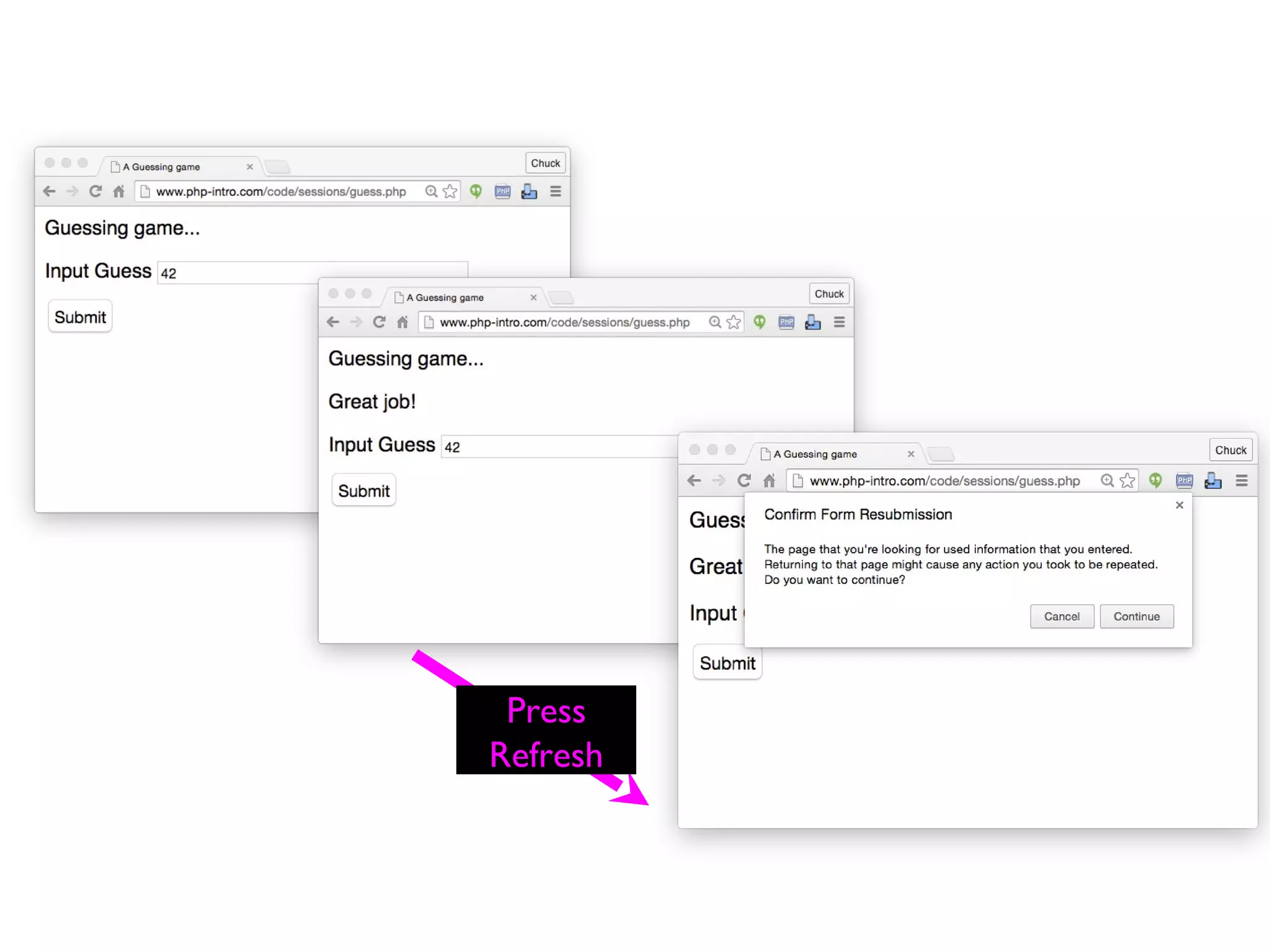
POST / Redirect / GET
 Once you do a POST, if you do
refresh, the browser will re-send the
POST data a second time
 The user gets a popup that tries to
explain what is about to happen
guess.php
Press
Refresh
<?php
session_start();
if ( isset($_POST['where']) ) {
if ( $_POST['where'] == '1' ) {
header("Location: redir1.php");
return;
} else if ( $_POST['where'] == '2' ) {
header("Location: redir2.php?parm=123");
return;
} else {
header("Location: http://www.dr-chuck.com");
return;
}
}
?>
<html>
<body style="font-family: sans-serif;">
<p>I am Router Two...</p>
<form method="post">
<p><label for="inp9">Where to go? (1-3)</label>
<input type="text" name="where" id="inp9" size="5"></p>
<input type="submit"/></form>
</body>
http://www.php-intro.com/code/sessions/redir1.php
Approved
 <?php
 session_start();
 if ( isset($_POST['guess']) ) {
 $guess = $_POST['guess'] + 0;
 $_SESSION['guess'] = $guess;
 if ( $guess == 42 ) {
 $_SESSION['message'] = "Great job!";
 } else if ( $guess < 42 ) {
 $_SESSION['message'] = "Too low";
 } else {
 $_SESSION['message'] = "Too high...";
 }
 header("Location: guess2.php");
 return;
 }
 ?>
 <html>
Login / Logout
 Having a session is not the same as being
logged in.
 Generally you have a session the instant you
connect to a web site
 The Session ID cookie is set when the first
page is delivered
 Login puts user information in the session
(stored in the server)
 Logout removes user information from the
session
http://www.php-intro.com/code/sessions
http://www.php-intro.com/code/sessions.zip
Simple address book with login,
logout, and session as storage.
POST-Redirect-GET-Flash
 POST detects error in
input data and puts a
message into
$_SESSION and
redirects
 GET sees the
message in the
session, displays it
and then deletes it
 Flash = "Seen once"
?><html>
<head></head>
<body style="font-family: sans-serif;">
<h1>Please Log In</h1>
<?php
if ( isset($_SESSION["error"]) ) {
echo('<p style="color:red">'.
$_SESSION["error"]."</p>n");
unset($_SESSION["error"]);
}
if ( isset($_SESSION["success"]) ) {
echo('<p style="color:green">'.
$_SESSION["success"]."</p>n");
unset($_SESSION["success"]);
}
?>
<form method="post">
<p>Account: <input type="text" name="account" value=""></p>
<p>Password: <input type="text" name="pw" value=""></p>
<p><input type="submit" value="Log In"></p>
</form>
</body>
login.php
<?php
session_start();
session_destroy();
header("Location: index.php");
logout.php
?><html><head></head>
<body style="font-family: sans-serif;">
<h1>Online Address Book</h1>
<?php
if ( isset($_SESSION["success"]) ) {
echo('<p style="color:green">'.$_SESSION["success"]."</p>n");
unset($_SESSION["success"]);
}
// Retrieve data from the session for the view
$street = isset($_SESSION['street']) ? $_SESSION['street'] : '';
$city = isset($_SESSION['city']) ? $_SESSION['city'] : '';
$state = isset($_SESSION['state']) ? $_SESSION['state'] : '';
$zip = isset($_SESSION['zip']) ? $_SESSION['zip'] : '';
http://www.php-intro.com/code/sessions/index.php
if ( ! isset($_SESSION["account"]) ) { ?>
Please <a href="login.php">Log In</a> to start.
<?php } else { ?>
<p>Please enter your address:<form method="post">
<p>Street: <input type="text" name="street" size="50"
value="<?= echo(htmlentities($street) ?>"></p>
<p>City: <input type="text" name="city" size="20"
value="<?= echo(htmlentities($city) ?>"></p>
<p>State: <input type="text" name="state" size="2"
value="<?= echo(htmlentities($state) ?>">
Zip: <input type="text" name="zip" size="5"
value="<?= echo(htmlentities($zip) ?>"></p>
<p><input type="submit" value="Update">
<input type="button" value="Logout"
onclick="location.href='logout.php'; return false"></p>
</form>
<?php } ?>
</body>
index.php
<?php
session_start();
if ( isset($_POST["street"]) && isset($_POST["city"]) &&
isset($_POST["state"]) && isset($_POST["zip"]) ) {
$_SESSION['street'] = $_POST['street'];
$_SESSION['city'] = $_POST['city'];
$_SESSION['state'] = $_POST['state'];
$_SESSION['zip'] = $_POST['zip'];
header( 'Location: index.php' );
return;
}
?><html>
index.php
Exercise
 Write a program called Web
page session-cookies.php that tries to
save a cookie to keep track of whether
or not you have visited this page
previously.

Lecture8 php page control by okello erick

  • 1.
  • 2.
    2 Server Side Includes Itis possible to insert the content of one PHP file into another PHP file with the include or require statement. The include and require statements are identical, except upon failure: require will produce a fatal error (E_COMPILE_ERROR) and stop the script include will only produce a warning (E_WARNING) and the script will continue
  • 3.
    3 Server Side Includes Syntax <?phprequire("header.htm"); ?> <?php include("footer.php");?>
  • 4.
    How to createvariables storing values across php scripts’ calls? Client-server connection is not permanent => Cannot be saved in program memory There are many clients connecting simultaneously => Cannot be saved in file (you cannot identify clients as well sometimes) . . .
  • 5.
    Different mechanisms ofthe same solution  Cookies  Cookies are a mechanism for storing data in the remote browser and thus tracking or identifying return users.  Sessions  Session support in PHP consists of a way to preserve certain data across subsequent accesses. This enables you to build more customized applications and increase the appeal of your web site.
  • 6.
    What is aCookie? A cookie is a small file that the server embeds on the user's computer. Each time the same computer requests for a page with a browser, it will send the cookie too. With PHP, you can both create and retrieve cookie values.
  • 7.
    How to Createa Cookie The setcookie() function is used to create cookies. Note: The setcookie() function must appear BEFORE the <html> tag. setcookie(name, [value], [expire], [path], [domain], [secure]); This sets a cookie named "uname" - that expires after ten hours. <?php setcookie("uname", $name, time()+36000); ?> <html> <body> …
  • 8.
    How to Retrievea Cookie Value  To access a cookie you just refer to the cookie name as a variable or use $_COOKIE array  Tip: Use the isset() function to find out if a cookie has been set. <html> <body> <?php if (isset($uname)) echo "Welcome " . $uname . "!<br />"; else echo "You are not logged in!<br />"; ?> </body> </html>
  • 9.
    How to Deletea Cookie  It will expire or  Cookies must be deleted with the same parameters as they were set with. If the value argument is an empty string (""), and all other arguments match a previous call to setcookie, then the cookie with the specified name will be deleted from the remote client.
  • 10.
    What is aSession?  The session support allows you to register arbitrary numbers of variables to be preserved across requests.  A visitor accessing your web site is assigned an unique id, the so-called session id. This is either stored in a cookie on the user side or is propagated in the URL.
  • 11.
    How to Createa Session The session_start() function is used to create cookies. <?php session_start(); ?>
  • 12.
    How do ‘Sessions’work?  They are based on assigning each user a unique number, or session id. Even for extremely heavy use sites, this number can for all practical purposes can be regarded as unique. e.g. 26fe536a534d3c7cde4297abb45e275 a
  • 13.
    How do ‘Sessions’work?  This session id is stored in a cookie, or passed in the URL between pages while the user browses.  The data to be stored (e.g. name, log-in state, etc.) is stored securely server- side in a PHP superglobal, and referenced using the session id.
  • 14.
    Crucially, sessions areeasy to implement as PHP does all the work!
  • 15.
    Starting/Resuming a Session session_start(); PHPdoes all the work: It looks for a valid session id in the $_COOKIE or $_GET superglobals – if found it initializes the data. If none found, a new session id is created. Note that like setcookie(), this function must be called before any echoed output to browser.
  • 16.
    Starting/Resuming a Session session_start(); Whendoing anything with sessions, this is always called first!
  • 17.
    Storing Session Data The $_SESSION superglobal array can be used to store any session data. e.g. $_SESSION[‘name’] = $name; $_SESSION[‘age’] = $age;
  • 18.
    Reading Session Data Data is simply read back from the $_SESSION superglobal array. e.g. $name = $_SESSION[‘name’]; $age = $_SESSION[‘age’];
  • 19.
    Session Propagation  Sessionsneed to pass the session id between pages as a user browses to track the session.  It can do this in two ways:  Cookie propagation  URL propagation
  • 20.
    How to Retrievea Session Value Register Session variable session_register('var1','var2',...); // will also create a session PS:Session variable will be created on using even if you will not register it! Use it <?php session_start(); if (!isset($_SESSION['count'])) $_SESSION['count'] = 0; else $_SESSION['count']++; ?>
  • 21.
    Delete a SessionValue session_unregister(´varname´); How to destroy a session: session_destroy()
  • 22.
    Destroying a Session Oftennot required, but if we want to destroy a session: // clear all session variables $_SESSION = array(); // delete the session cookie if there is one if (isset($_COOKIE[session_name()])) { setcookie(session_name(),'',time()-42000,'/'); } // destroy session session_destroy(); // avoid reusing the SID by redirecting // back to the same page to regenerate session header('Location: '.$_SERVER['PHP_SELF']);
  • 23.
    Session Expiry  Bydefault, PHP sessions expire:  after a certain length of inactivity (default 1440s), the PHP garbage collection processes deletes session variables. Important as most sessions will not be explicitly destroyed.  if propagated by cookies, default is to set a cookie that is destroyed when the browser is closed.  If URL propagated, session id is lost as soon as navigate away from the site.
  • 24.
    Long-term Sessions  Althoughit is possible to customize sessions so that they are maintained after the browser is closed, for most practical purposes PHP sessions can be regarded as short-term.  Long-term session data (e.g. ‘remember me’ boxes) is usually maintained by explicitly setting and retrieving cookie data.
  • 25.
    Using Cookies  Cookiesare small pieces of data that a server sends to a browser for storage. When a browser contacts a server, it sends along any cookies for that server under the variable $_COOKIES. Similarly, a server can set one or more cookies on the browser for retrieval at a later time.
  • 26.
    The first partof program session-cookies.php illustrates the typical use of cookies, with these lines:  $today = date('l, F j, Y');  $timestamp = date('g:i A');  if (strcmp($_COOKIE[LAST_VISIT], "") == 0) {  $lasttime = "";  } else {  $lasttime = $_COOKIE[LAST_VISIT];  }  $LAST_VISIT = $today . " at " . $timestamp;  // set last_visit cookie with date/time, with expiration for 2 full weeks  setcookie ("LAST_VISIT", $LAST_VISIT, time() + 3600*24*14);   if ($_COOKIE[VISIT_NUMBER] == 0) {  $visitcount = 0;  } else {  $visitcount = $_COOKIE[VISIT_NUMBER];  }  // set visit_number cookie with count, with expiration for 2 full weeks  setcookie ("VISIT_NUMBER",1 + $visitcount, time() + 3600*24*14);
  • 27.
    additional notes:  Hereare a few additional notes:  Cookies are sent with Web page headers, so any setting of cookies must take place BEFORE the DOCTYPE line in an HTML/PHP script.  PHP function setcookie specifies a cookie ID, a value, and a length of time for which the cookie will be kept by the browser.  PHP variable $_COOKIE is an associative array that maintains the list of cookies set previously.
  • 28.
    Check if yourbrowser is usually set to accept cookies.  If you use the Mozilla browser, this information can be found by looking under "Preferences" in the "Edit" menu, and then going to "Privacy & Security" and "Cookies".  If you use the Iceweasel browser, this information can be found by looking under "Preferences" in the "Edit" menu, and then going to the "Privacy" tab.  If you use Internet Explorer under Windows, this information can be found by looking under select "Internet Options" from the "Tools" menu, then look under "General" and "Settings" in the "Temporary Internet Files" section.  If you use Internet Explorer on a Macintosh, this information can be found by looking under "Preferences" under the "Explorer" menu, and then looking under "Cookies" in the "Receiving Files" section.
  • 29.
    Session Variables  Effectively,session variables are cookies that remain active only while the browser is actively interacting with the server. When time elapses, or when you close your browser, the session variables disappear. (If cookies are not allowed by a user, then information for sessions may be placed in a query string at the end of a URL.)  The following lines from session-cookies- 2.php illustrate typically processing of session variables.
  • 30.
    The following linesillustrate typically processing of session variables.  // check if person has logged in previously  session_start();  $processingOK = "not yet";  $firstLogin = "no";  if (isset ($_SESSION['authorized'])) {  // user already logged in  $processingOK = $_SESSION['authorized'];  } else {  // user not logged in, so check password  $password = trim($_POST['password']);  if ($password == 'Test') {  // correct password given  $processingOK = 'ok';  $_SESSION['authorized'] = 'ok';  $firstLogin="yes";  } else {  // invalid password  }  }
  • 31.
    Here are somenotes regarding session variables:  A script uses session_start() to initialize and register any session variables.  As with cookies, session variables are sent with Web page headers, so any setting of session information must take place before the DOCTYPE tag.  PHP variable $_SESSION is an associative array that maintains the list of session variables set previously.  PHP function isset determines whether a specific $_SESSION field has a designated value.  PHP function unset removes a session value that was sent previously, and session_unset() removes all session values.
  • 32.
     <?php  //Note - cannot have any output before this  session_start();  if ( ! isset($_SESSION['value']) ) {  echo("<p>Session is empty</p>n");  $_SESSION['value'] = 0;  } else if ( $_SESSION['value'] < 3 ) {  $_SESSION['value'] = $_SESSION['value'] + 1;  echo("<p>Added one...</p>n");  } else {  session_destroy();  session_start();  echo("<p>Session Restarted</p>n");  }  ?>  <p><a href="sessfun.php">Click Me!</a></p>  <p>Our Session ID is: <?php echo(session_id()); ?></p>  <pre>  <?php print_r($_SESSION); ?>  </pre> http://www.php-intro.com/code/sessions/sessfun.php
  • 33.
  • 34.
    POST / Redirect/ GET  Once you do a POST, if you do refresh, the browser will re-send the POST data a second time  The user gets a popup that tries to explain what is about to happen
  • 35.
  • 36.
    <?php session_start(); if ( isset($_POST['where'])) { if ( $_POST['where'] == '1' ) { header("Location: redir1.php"); return; } else if ( $_POST['where'] == '2' ) { header("Location: redir2.php?parm=123"); return; } else { header("Location: http://www.dr-chuck.com"); return; } } ?> <html> <body style="font-family: sans-serif;"> <p>I am Router Two...</p> <form method="post"> <p><label for="inp9">Where to go? (1-3)</label> <input type="text" name="where" id="inp9" size="5"></p> <input type="submit"/></form> </body> http://www.php-intro.com/code/sessions/redir1.php
  • 37.
    Approved  <?php  session_start(); if ( isset($_POST['guess']) ) {  $guess = $_POST['guess'] + 0;  $_SESSION['guess'] = $guess;  if ( $guess == 42 ) {  $_SESSION['message'] = "Great job!";  } else if ( $guess < 42 ) {  $_SESSION['message'] = "Too low";  } else {  $_SESSION['message'] = "Too high...";  }  header("Location: guess2.php");  return;  }  ?>  <html>
  • 38.
    Login / Logout Having a session is not the same as being logged in.  Generally you have a session the instant you connect to a web site  The Session ID cookie is set when the first page is delivered  Login puts user information in the session (stored in the server)  Logout removes user information from the session
  • 39.
  • 40.
    POST-Redirect-GET-Flash  POST detectserror in input data and puts a message into $_SESSION and redirects  GET sees the message in the session, displays it and then deletes it  Flash = "Seen once"
  • 41.
    ?><html> <head></head> <body style="font-family: sans-serif;"> <h1>PleaseLog In</h1> <?php if ( isset($_SESSION["error"]) ) { echo('<p style="color:red">'. $_SESSION["error"]."</p>n"); unset($_SESSION["error"]); } if ( isset($_SESSION["success"]) ) { echo('<p style="color:green">'. $_SESSION["success"]."</p>n"); unset($_SESSION["success"]); } ?> <form method="post"> <p>Account: <input type="text" name="account" value=""></p> <p>Password: <input type="text" name="pw" value=""></p> <p><input type="submit" value="Log In"></p> </form> </body> login.php
  • 42.
  • 43.
    ?><html><head></head> <body style="font-family: sans-serif;"> <h1>OnlineAddress Book</h1> <?php if ( isset($_SESSION["success"]) ) { echo('<p style="color:green">'.$_SESSION["success"]."</p>n"); unset($_SESSION["success"]); } // Retrieve data from the session for the view $street = isset($_SESSION['street']) ? $_SESSION['street'] : ''; $city = isset($_SESSION['city']) ? $_SESSION['city'] : ''; $state = isset($_SESSION['state']) ? $_SESSION['state'] : ''; $zip = isset($_SESSION['zip']) ? $_SESSION['zip'] : ''; http://www.php-intro.com/code/sessions/index.php
  • 44.
    if ( !isset($_SESSION["account"]) ) { ?> Please <a href="login.php">Log In</a> to start. <?php } else { ?> <p>Please enter your address:<form method="post"> <p>Street: <input type="text" name="street" size="50" value="<?= echo(htmlentities($street) ?>"></p> <p>City: <input type="text" name="city" size="20" value="<?= echo(htmlentities($city) ?>"></p> <p>State: <input type="text" name="state" size="2" value="<?= echo(htmlentities($state) ?>"> Zip: <input type="text" name="zip" size="5" value="<?= echo(htmlentities($zip) ?>"></p> <p><input type="submit" value="Update"> <input type="button" value="Logout" onclick="location.href='logout.php'; return false"></p> </form> <?php } ?> </body> index.php
  • 45.
    <?php session_start(); if ( isset($_POST["street"])&& isset($_POST["city"]) && isset($_POST["state"]) && isset($_POST["zip"]) ) { $_SESSION['street'] = $_POST['street']; $_SESSION['city'] = $_POST['city']; $_SESSION['state'] = $_POST['state']; $_SESSION['zip'] = $_POST['zip']; header( 'Location: index.php' ); return; } ?><html> index.php
  • 46.
    Exercise  Write aprogram called Web page session-cookies.php that tries to save a cookie to keep track of whether or not you have visited this page previously.