Sessions 
A session begins when a visiting client somehow identifies itself to the web server. 
The web server assigns the client a unique session id, which the client uses to re-identify 
itself as it moves from page to page on the website. Most of the time, these 
unique ids are stored in session cookies that expire after the client hasn't interacted 
with the server for some amount of time. The amount of time varies depending on 
the web application. For example, an online investment site might have very short 
sessions, so that if a user leaves her computer without logging out, another user who 
sits down at the same computer several minutes later cannot continue with the first 
user's session. 
Configuring Sessions 
In PHP, session management is configured in the php.ini file. To have a user's session 
start as soon as the user visits the website, the session.auto_start flag must be set to 1. 
The session length is also set in the php.ini file with the session.gc_maxlifetime 
variable. The default value is 1440 seconds (24 minutes).
Session Functions 
Function Explanation 
session_start() 
Starts new session if one 
does not exist. Continues 
current session if one exists. 
session_unset() Unsets all session variables. 
session_destroy() Kills session. 
Ex 1. 
<?php 
//Begin a session and create a session variable in 
//the $_SESSION array. 
session_start(); 
$_SESSION['Greeting'] = 'Hello world!'; 
echo $_SESSION['Greeting']; 
?> 
<hr> 
<a href="Session2.php">Next page</a>
Ex 2. 
<?php 
//Continue session, show that session variable still 
//exists and then unset the session variable 
session_start(); 
echo $_SESSION['Greeting']; 
unset($_SESSION['Greeting']); 
?> 
<a href="Session3.php">Next page</a> 
Ex 3. 
<?php 
//Continue session, show that session variable no longer 
//exists and then kill session. 
session_start(); 
echo $_SESSION['Greeting']; 
session_unset(); 
session_destroy(); 
?>
Cookies 
Cookies are stored in text files that sit on the client machine. Web pages with the 
right permissions can read from and write to cookies. They are generally used to 
track user information between visits. 
In PHP, cookies are set with the setcookie() function, which can take several 
parameters including: 
The cookie's name (required). 
The cookie's value. 
The cookie's expiration date (if this isn't set, the cookie will expire when the 
browser window is closed). 
The directory path on the server that can read the cookie. 
The domain name that can read the cookie. 
A flag indicating whether the cookie should only be read over https.
Create a Cookie? 
The setcookie() function is used to set a cookie. 
Note: The setcookie() function must appear BEFORE the <html> tag. 
Syntax 
setcookie(name, value, expire, path, domain); 
Example 1 
In the example below, we will create a cookie named "user" and assign the value 
"Alex Porter" to it. We also specify that the cookie should expire after one hour: 
< ?php 
setcookie("user", "Alex Porter", time()+3600); 
?> 
< html> 
..... 
Note: The value of the cookie is automatically URLencoded when sending the 
cookie, and automatically decoded when received (to prevent URLencoding, use 
setrawcookie() instead).
Retrieve a Cookie Value? 
The PHP $_COOKIE variable is used to retrieve a cookie value. 
In the example below, we retrieve the value of the cookie named "user" and display 
it on a page: 
< ?php 
// Print a cookie 
echo $_COOKIE["user"]; 
// A way to view all cookies 
print_r($_COOKIE); 
?> 
In the following example we use the isset() function to find out if a cookie has been 
set: 
< html> 
< body> 
< ?php 
if (isset($_COOKIE["user"])) 
echo "Welcome " . $_COOKIE["user"] . "!<br>"; 
else 
echo "Welcome guest!<br>"; 
?> 
< /body> 
< /html>
PHP Simple E-Mail 
The simplest way to send an email with PHP is to send a text email. 
In the example below we first declare the variables ($to, $subject, $message, 
$from, $headers), then we use the variables in the mail() function to send an 
e-mail: 
< ?php 
$to = "someone@example.com"; 
$subject = "Test mail"; 
$message = "Hello! This is a simple email message."; 
$from = "someonelse@example.com"; 
$headers = "From:" . $from; 
mail($to,$subject,$message,$headers); 
echo "Mail Sent."; 
?>
PHP Mail Form 
With PHP, you can create a feedback-form on your website. The example below 
sends a text message to a specified e-mail address: 
< html> 
< body> 
< ?php 
if (isset($_REQUEST['email'])) 
//if "email" is filled out, send email 
{ 
//send email 
$email = $_REQUEST['email'] ; 
$subject = $_REQUEST['subject'] ; 
$message = $_REQUEST['message'] ; 
mail("someone@example.com", $subject, 
$message, "From:" . $email); 
echo "Thank you for using our mail form"; 
}
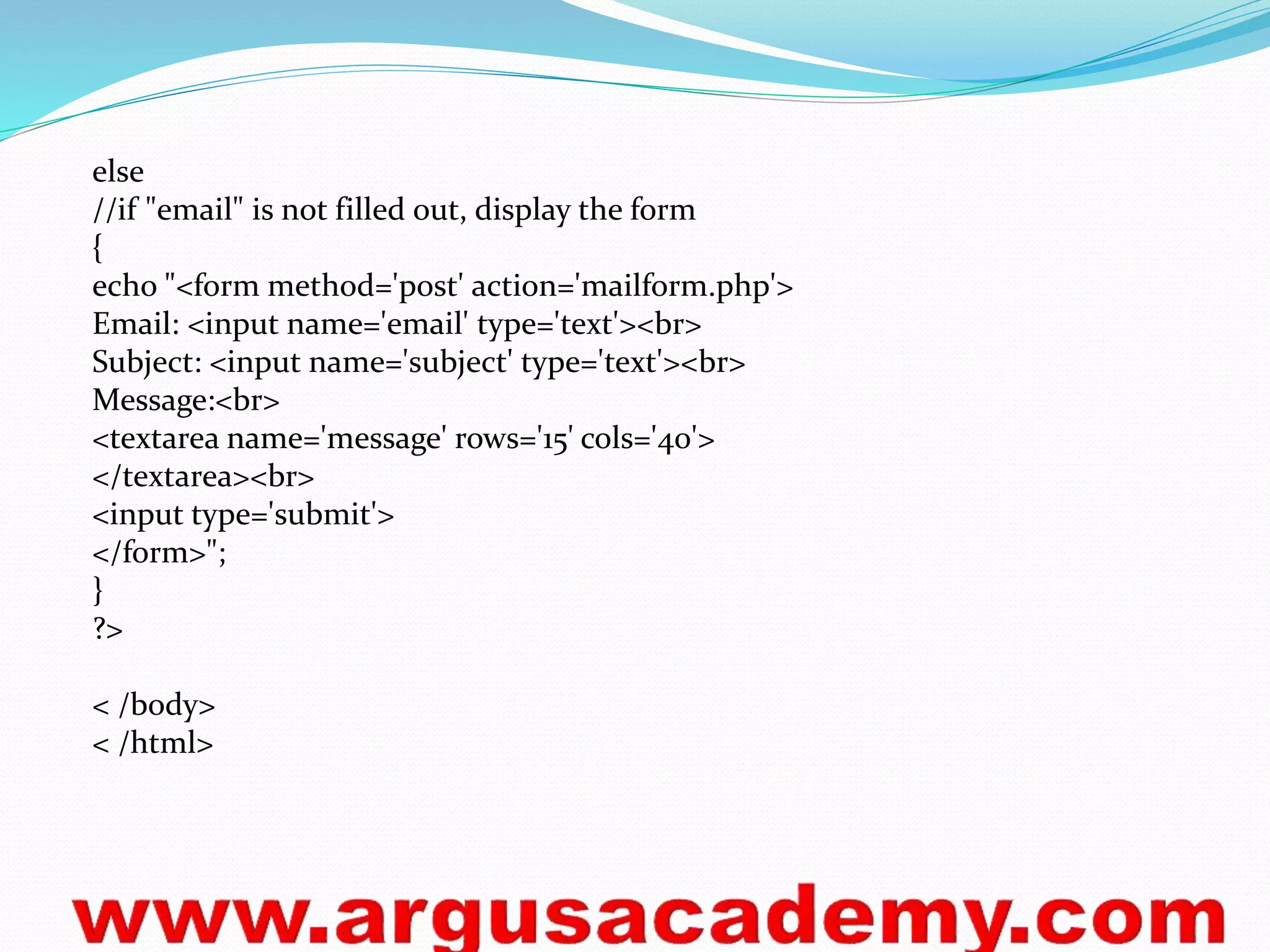
else 
//if "email" is not filled out, display the form 
{ 
echo "<form method='post' action='mailform.php'> 
Email: <input name='email' type='text'><br> 
Subject: <input name='subject' type='text'><br> 
Message:<br> 
<textarea name='message' rows='15' cols='40'> 
</textarea><br> 
<input type='submit'> 
</form>"; 
} 
?> 
< /body> 
< /html>
What is an Exception 
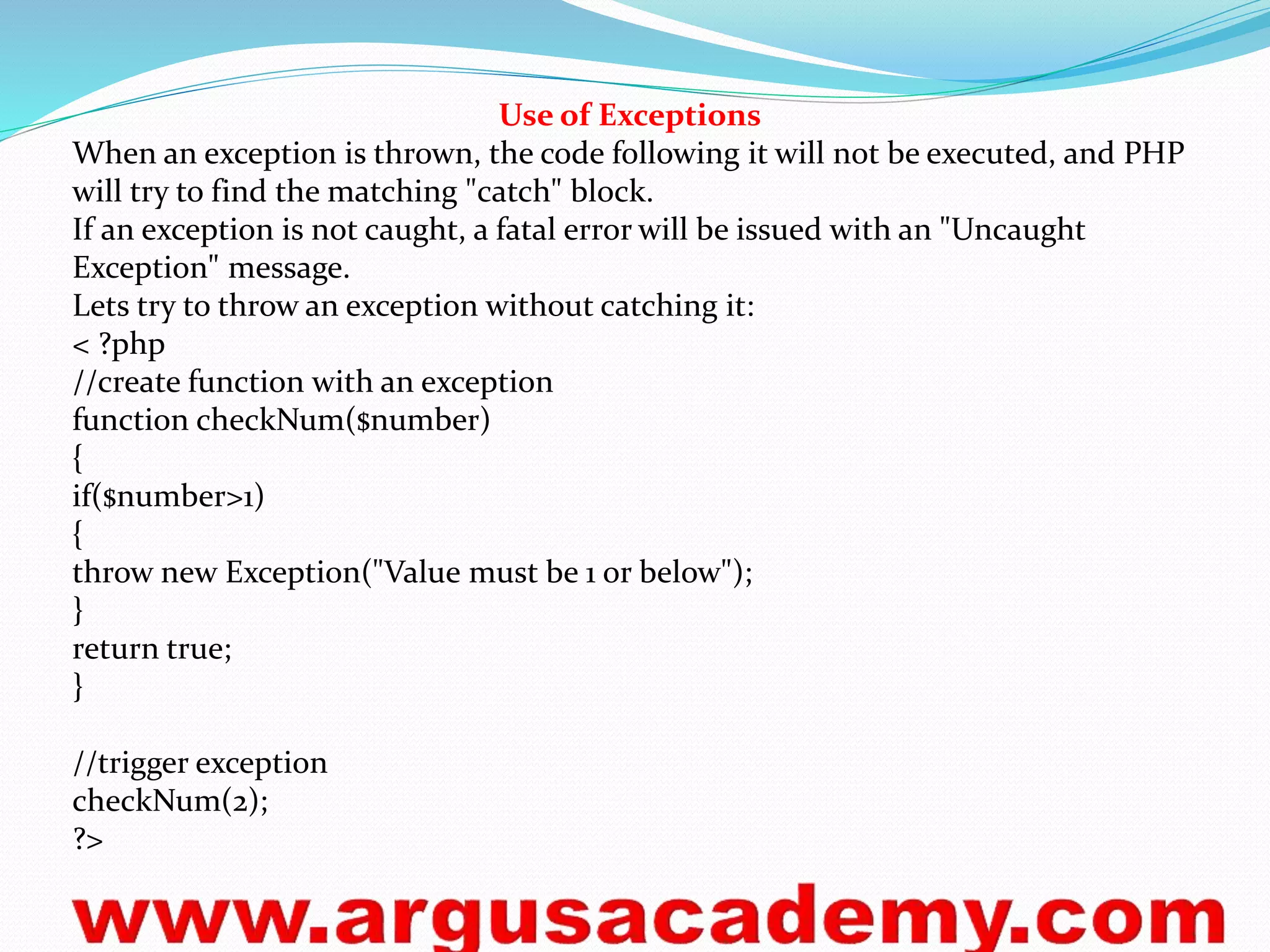
With PHP 5 came a new object oriented way of dealing with errors. 
Exception handling is used to change the normal flow of the code execution if a 
specified error (exceptional) condition occurs. This condition is called an 
exception. 
This is what normally happens when an exception is triggered: 
The current code state is saved 
The code execution will switch to a predefined (custom) exception handler 
function 
Depending on the situation, the handler may then resume the execution from 
the saved code state, terminate the script execution or continue the script from a 
different location in the code 
We will show different error handling methods: 
Basic use of Exceptions 
Creating a custom exception handler 
Multiple exceptions 
Re-throwing an exception 
Setting a top level exception handler
Use of Exceptions 
When an exception is thrown, the code following it will not be executed, and PHP 
will try to find the matching "catch" block. 
If an exception is not caught, a fatal error will be issued with an "Uncaught 
Exception" message. 
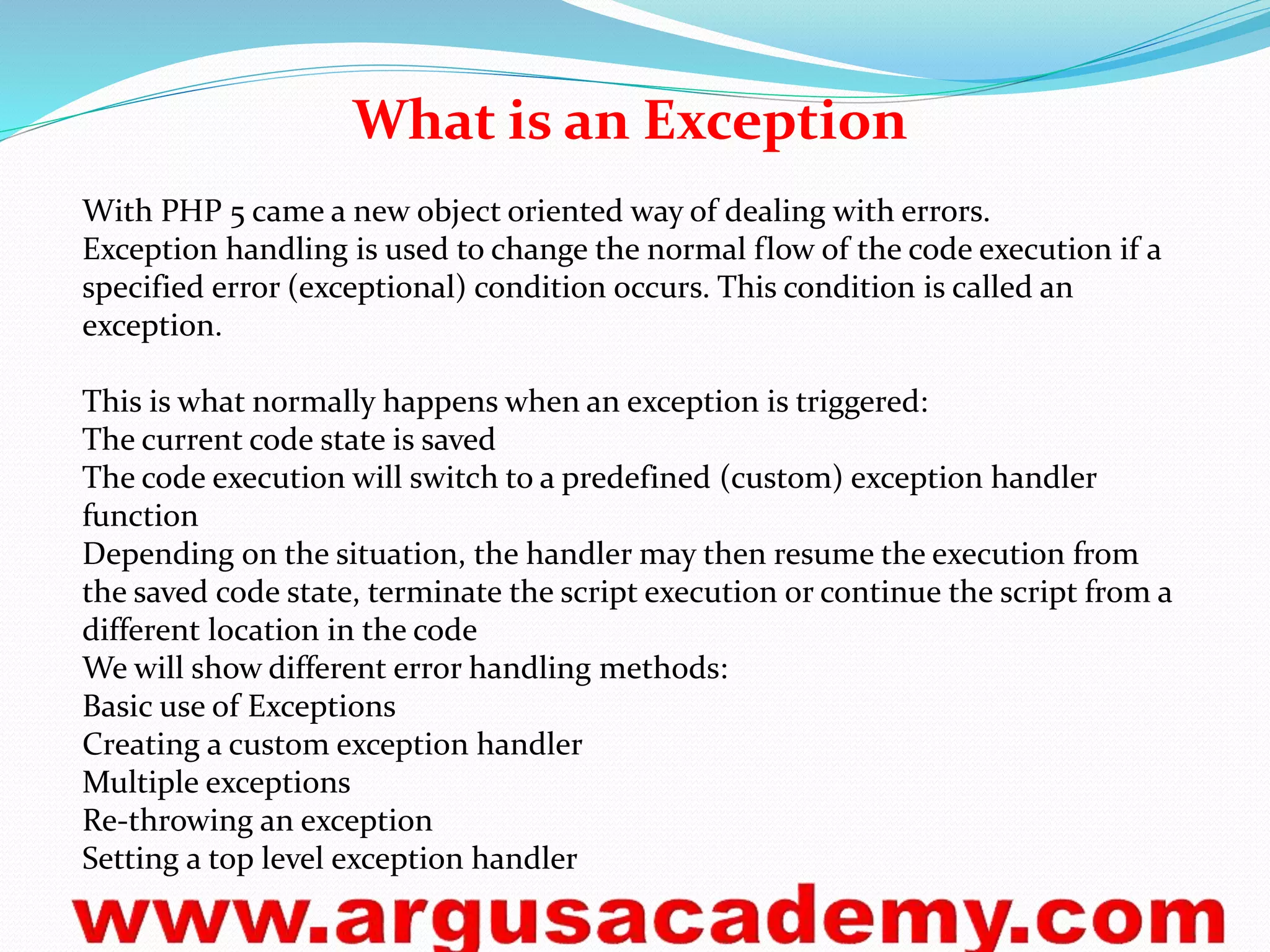
Lets try to throw an exception without catching it: 
< ?php 
//create function with an exception 
function checkNum($number) 
{ 
if($number>1) 
{ 
throw new Exception("Value must be 1 or below"); 
} 
return true; 
} 
//trigger exception 
checkNum(2); 
?>
Databases Connection 
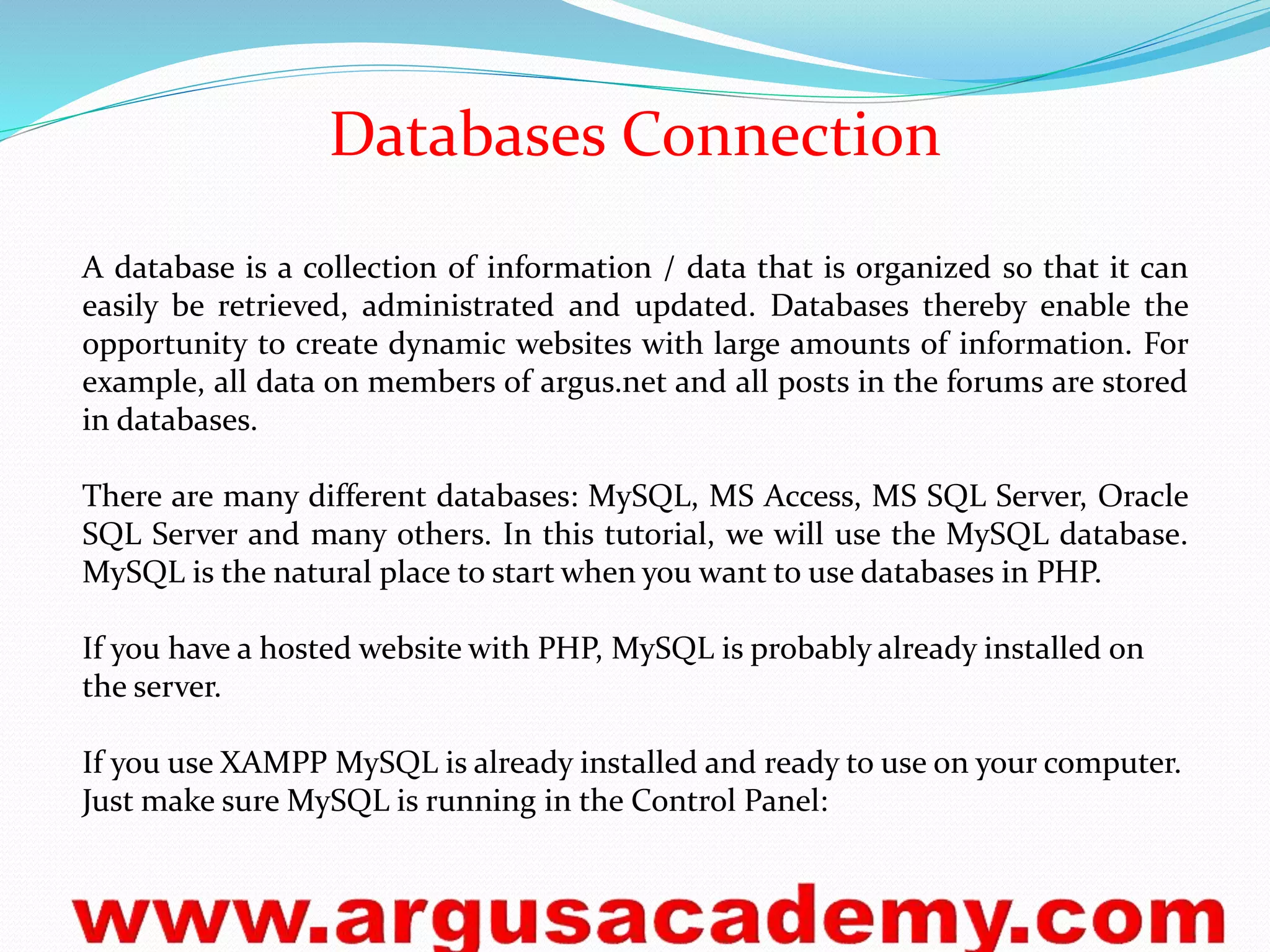
A database is a collection of information / data that is organized so that it can 
easily be retrieved, administrated and updated. Databases thereby enable the 
opportunity to create dynamic websites with large amounts of information. For 
example, all data on members of argus.net and all posts in the forums are stored 
in databases. 
There are many different databases: MySQL, MS Access, MS SQL Server, Oracle 
SQL Server and many others. In this tutorial, we will use the MySQL database. 
MySQL is the natural place to start when you want to use databases in PHP. 
If you have a hosted website with PHP, MySQL is probably already installed on 
the server. 
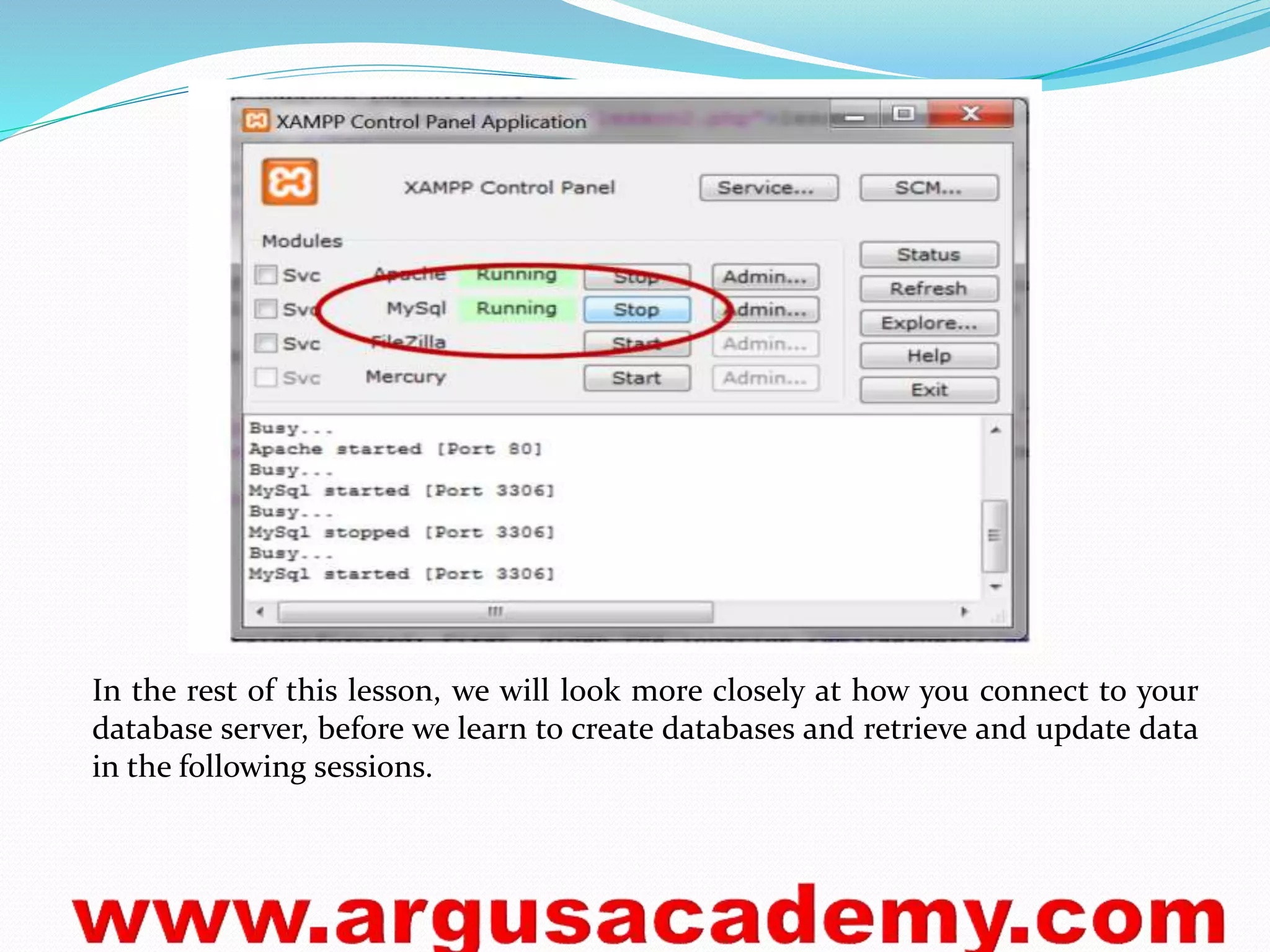
If you use XAMPP MySQL is already installed and ready to use on your computer. 
Just make sure MySQL is running in the Control Panel:
In the rest of this lesson, we will look more closely at how you connect to your 
database server, before we learn to create databases and retrieve and update data 
in the following sessions.
Connection to database server 
First, you need to have access to the server where your MySQL database is 
located. This is done with the function mysql_connect with the following syntax: 
mysql_connect(server, username, password) 
Example of a MySQL connection with XAMPP (default settings): 
mysql_connect("localhost", "root", "") or die (mysql_error()); 
Create database and tables with phpMyAdmin 
It can be useful to be able to create databases and tables directly in PHP. But 
often, it will be easier to use phpMyAdmin (or any other MySQL administration 
tool), which is standard on most web hosts and XAMPP. The screendumps below 
shows how to create a database and tables in phpMyAdmin. 
Start by logging onto phpMyAdmin. Often, the address will be the same as your 
MySQL server (eg. "http://mysql.myhost.com") and with the same username and 
password. In XAMPP, the address is http://localhost/phpmyadmin/. 
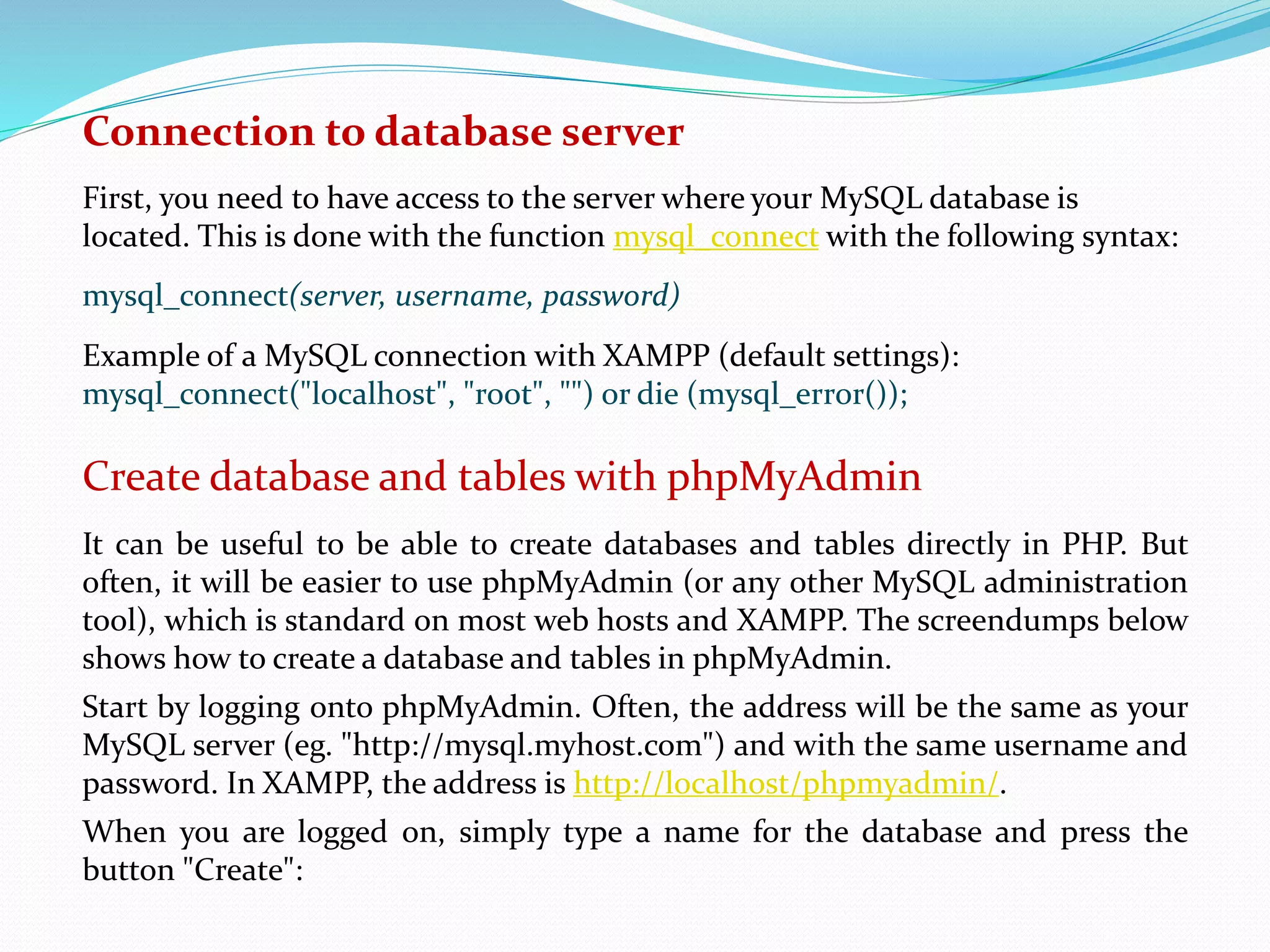
When you are logged on, simply type a name for the database and press the 
button "Create":
At some hosts, it's possible the have already created a database, and you may 
not have the rights to create more. If that is the case, you obviously just use the 
assigned database. 
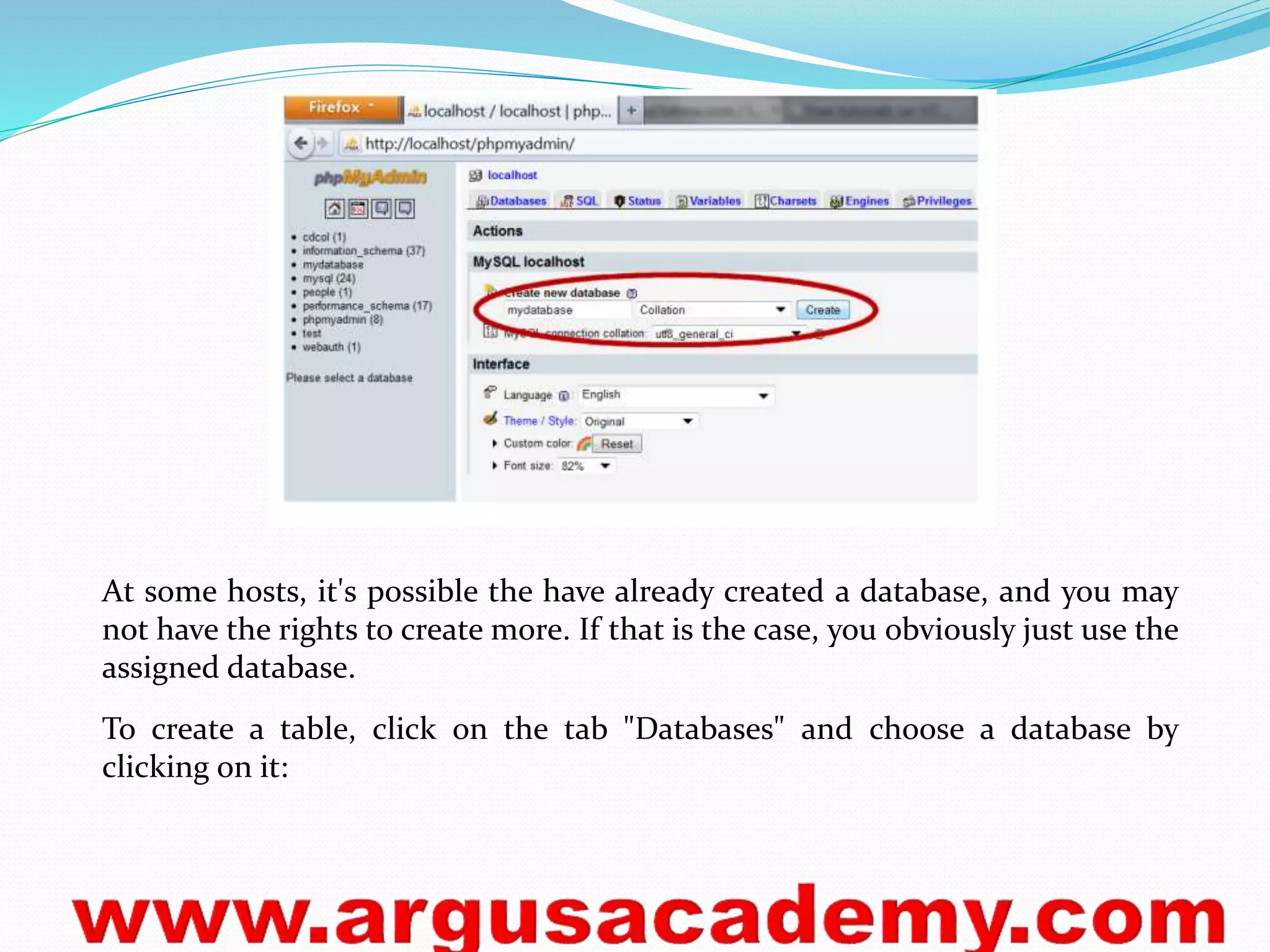
To create a table, click on the tab "Databases" and choose a database by 
clicking on it:
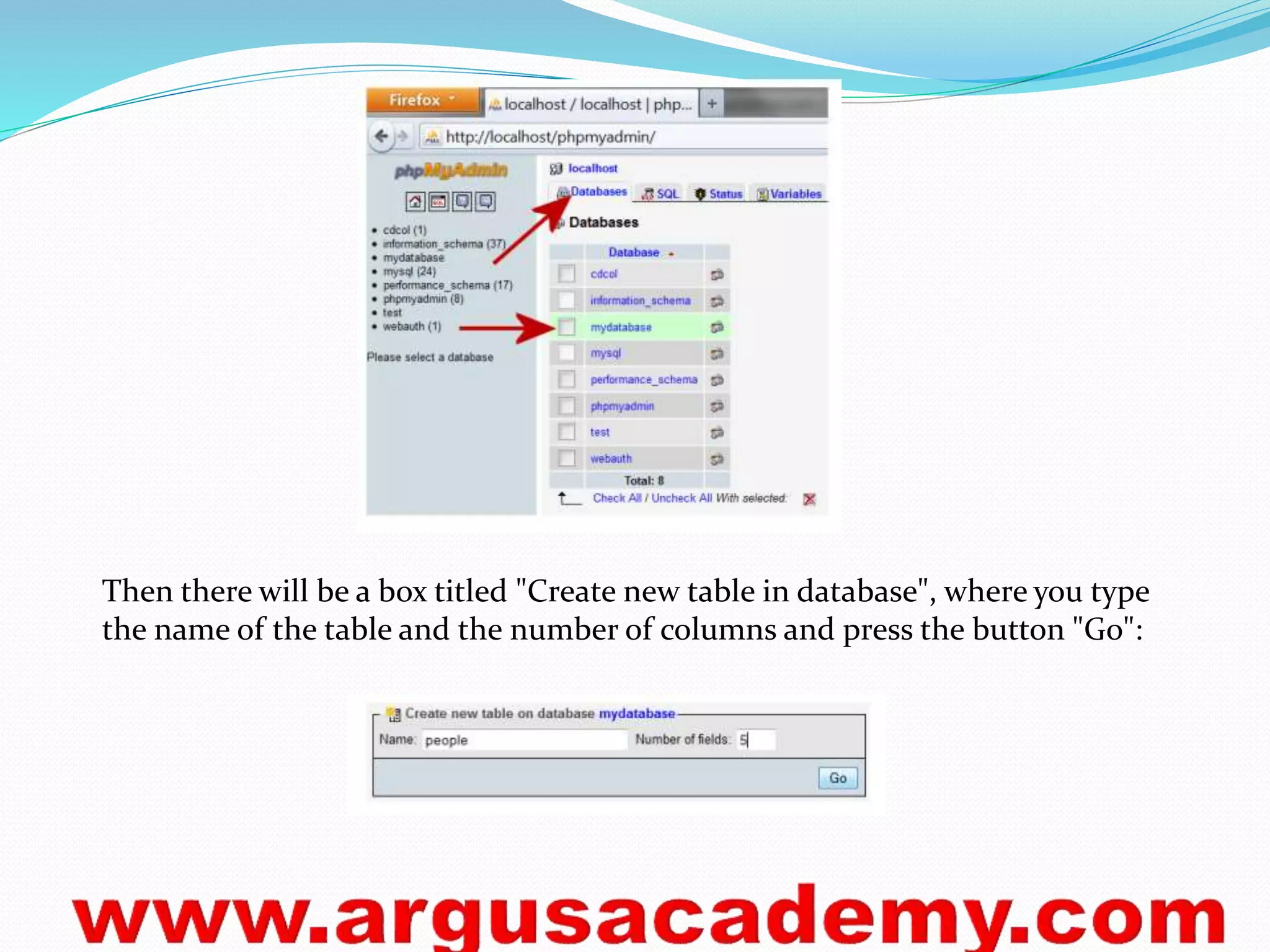
Then there will be a box titled "Create new table in database", where you type 
the name of the table and the number of columns and press the button "Go":
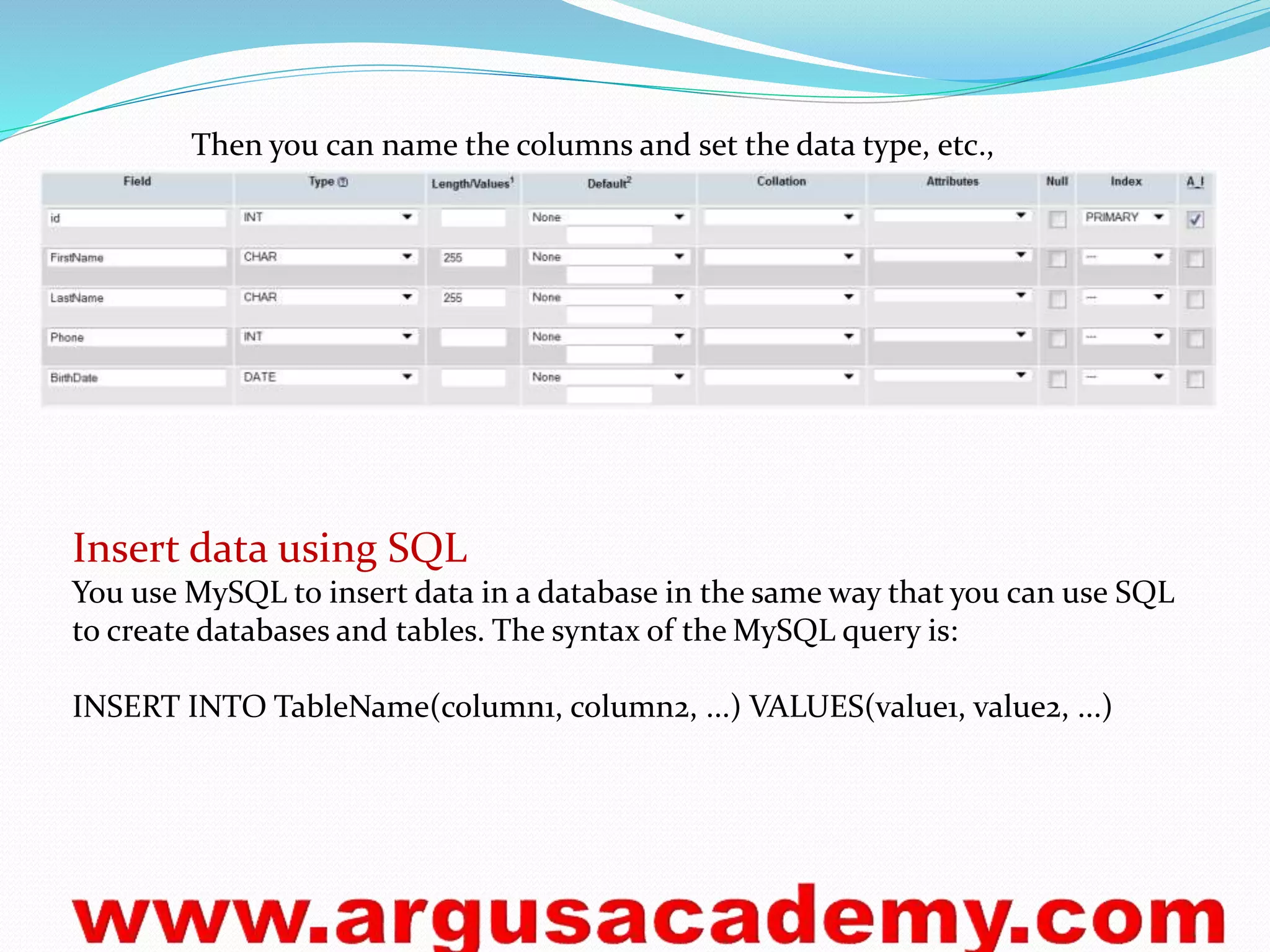
Then you can name the columns and set the data type, etc., 
Insert data using SQL 
You use MySQL to insert data in a database in the same way that you can use SQL 
to create databases and tables. The syntax of the MySQL query is: 
INSERT INTO TableName(column1, column2, ...) VALUES(value1, value2, ...)
Get data from database 
The MySQL query returns a result in the form of a series of records. These 
records are stored in a so-called recordset. A recordset can be described as a kind 
of table in the server's memory, containing rows of data (records), and each 
record is subdivided into individual fields (or columns). 
A recordset can be compared to a table where each record could be compared to a 
row in the table. In PHP, we can run through a recordset with a loop and the 
function mysql_fetch_array, which returns each row as an array. 
The code below shows how to use mysql_fetch_array to loop through a recordset: 
<html> 
<head> <title>Retrieve data from database </title> </head> 
<body> 
<?php 
// Connect to database server 
mysql_connect("mysql.myhost.com", "user", "sesame") or die (mysql_error ()); 
// Select database 
mysql_select_db("mydatabase") or die(mysql_error()); 
// SQL query 
$strSQL = "SELECT * FROM people"; 
// Execute the query (the recordset $rs contains the result) 
$rs = mysql_query($strSQL);
// Loop the recordset $rs 
// Each row will be made into an array ($row) using mysql_fetch_array 
while($row = mysql_fetch_array($rs)) 
{ 
// Write the value of the column FirstName (which is now in the array $row) 
echo $row['FirstName'] . "<br />"; 
} 
// Close the database connection 
mysql_close(); 
?> 
</body> 
</html>
Delete a record 
When deleting a record, you can use the unique AutoNumber field in the 
database. In our database, it is the column named id. Using this unique 
identifier ensures that you only delete one record. In the next example, we delete 
the record where id has the value 24: 
<html> 
<head> <title>Delete data in the database</title> </head> 
<body> 
<?php 
// Connect to database server 
mysql_connect("mysql.myhost.com", "user", "sesame") or die (mysql_error ()); 
// Select database 
mysql_select_db("mydatabase") or die(mysql_error()); 
// The SQL statement that deletes the record 
$strSQL = "DELETE FROM people WHERE id = 24"; 
mysql_query($strSQL); 
// Close the database connection 
mysql_close(); 
?> 
<h1>Record is deleted!</h1> 
</body> </html>
Update cells in the table "people“ 
The code below updates Donald Duck's first name to D. and changes the phone 
number to 44444444. The other information (last name and birthdate) are not 
changed. You can try to change the other people's data by writing your own SQL 
statements. 
<html> 
<head> <title>Update data in database</title> </head> <body> 
<?php 
// Connect to database server 
mysql_connect("mysql.myhost.com", "user", "sesame") or die (mysql_error ()); 
// Select database 
mysql_select_db("mydatabase") or die(mysql_error()); 
// The SQL statement is built 
$strSQL = "Update people set "; 
$strSQL = $strSQL . "FirstName= 'D.', "; 
$strSQL = $strSQL . "Phone= '44444444' "; 
$strSQL = $strSQL . "Where id = 22"; 
// The SQL statement is executed 
mysql_query($strSQL); 
// Close the database connection 
mysql_close(); 
?> 
<h1>The database is updated!</h1> </body> </html>

Php session

  • 1.
    Sessions A sessionbegins when a visiting client somehow identifies itself to the web server. The web server assigns the client a unique session id, which the client uses to re-identify itself as it moves from page to page on the website. Most of the time, these unique ids are stored in session cookies that expire after the client hasn't interacted with the server for some amount of time. The amount of time varies depending on the web application. For example, an online investment site might have very short sessions, so that if a user leaves her computer without logging out, another user who sits down at the same computer several minutes later cannot continue with the first user's session. Configuring Sessions In PHP, session management is configured in the php.ini file. To have a user's session start as soon as the user visits the website, the session.auto_start flag must be set to 1. The session length is also set in the php.ini file with the session.gc_maxlifetime variable. The default value is 1440 seconds (24 minutes).
  • 2.
    Session Functions FunctionExplanation session_start() Starts new session if one does not exist. Continues current session if one exists. session_unset() Unsets all session variables. session_destroy() Kills session. Ex 1. <?php //Begin a session and create a session variable in //the $_SESSION array. session_start(); $_SESSION['Greeting'] = 'Hello world!'; echo $_SESSION['Greeting']; ?> <hr> <a href="Session2.php">Next page</a>
  • 3.
    Ex 2. <?php //Continue session, show that session variable still //exists and then unset the session variable session_start(); echo $_SESSION['Greeting']; unset($_SESSION['Greeting']); ?> <a href="Session3.php">Next page</a> Ex 3. <?php //Continue session, show that session variable no longer //exists and then kill session. session_start(); echo $_SESSION['Greeting']; session_unset(); session_destroy(); ?>
  • 4.
    Cookies Cookies arestored in text files that sit on the client machine. Web pages with the right permissions can read from and write to cookies. They are generally used to track user information between visits. In PHP, cookies are set with the setcookie() function, which can take several parameters including: The cookie's name (required). The cookie's value. The cookie's expiration date (if this isn't set, the cookie will expire when the browser window is closed). The directory path on the server that can read the cookie. The domain name that can read the cookie. A flag indicating whether the cookie should only be read over https.
  • 5.
    Create a Cookie? The setcookie() function is used to set a cookie. Note: The setcookie() function must appear BEFORE the <html> tag. Syntax setcookie(name, value, expire, path, domain); Example 1 In the example below, we will create a cookie named "user" and assign the value "Alex Porter" to it. We also specify that the cookie should expire after one hour: < ?php setcookie("user", "Alex Porter", time()+3600); ?> < html> ..... Note: The value of the cookie is automatically URLencoded when sending the cookie, and automatically decoded when received (to prevent URLencoding, use setrawcookie() instead).
  • 6.
    Retrieve a CookieValue? The PHP $_COOKIE variable is used to retrieve a cookie value. In the example below, we retrieve the value of the cookie named "user" and display it on a page: < ?php // Print a cookie echo $_COOKIE["user"]; // A way to view all cookies print_r($_COOKIE); ?> In the following example we use the isset() function to find out if a cookie has been set: < html> < body> < ?php if (isset($_COOKIE["user"])) echo "Welcome " . $_COOKIE["user"] . "!<br>"; else echo "Welcome guest!<br>"; ?> < /body> < /html>
  • 7.
    PHP Simple E-Mail The simplest way to send an email with PHP is to send a text email. In the example below we first declare the variables ($to, $subject, $message, $from, $headers), then we use the variables in the mail() function to send an e-mail: < ?php $to = "someone@example.com"; $subject = "Test mail"; $message = "Hello! This is a simple email message."; $from = "someonelse@example.com"; $headers = "From:" . $from; mail($to,$subject,$message,$headers); echo "Mail Sent."; ?>
  • 8.
    PHP Mail Form With PHP, you can create a feedback-form on your website. The example below sends a text message to a specified e-mail address: < html> < body> < ?php if (isset($_REQUEST['email'])) //if "email" is filled out, send email { //send email $email = $_REQUEST['email'] ; $subject = $_REQUEST['subject'] ; $message = $_REQUEST['message'] ; mail("someone@example.com", $subject, $message, "From:" . $email); echo "Thank you for using our mail form"; }
  • 9.
    else //if "email"is not filled out, display the form { echo "<form method='post' action='mailform.php'> Email: <input name='email' type='text'><br> Subject: <input name='subject' type='text'><br> Message:<br> <textarea name='message' rows='15' cols='40'> </textarea><br> <input type='submit'> </form>"; } ?> < /body> < /html>
  • 10.
    What is anException With PHP 5 came a new object oriented way of dealing with errors. Exception handling is used to change the normal flow of the code execution if a specified error (exceptional) condition occurs. This condition is called an exception. This is what normally happens when an exception is triggered: The current code state is saved The code execution will switch to a predefined (custom) exception handler function Depending on the situation, the handler may then resume the execution from the saved code state, terminate the script execution or continue the script from a different location in the code We will show different error handling methods: Basic use of Exceptions Creating a custom exception handler Multiple exceptions Re-throwing an exception Setting a top level exception handler
  • 11.
    Use of Exceptions When an exception is thrown, the code following it will not be executed, and PHP will try to find the matching "catch" block. If an exception is not caught, a fatal error will be issued with an "Uncaught Exception" message. Lets try to throw an exception without catching it: < ?php //create function with an exception function checkNum($number) { if($number>1) { throw new Exception("Value must be 1 or below"); } return true; } //trigger exception checkNum(2); ?>
  • 12.
    Databases Connection Adatabase is a collection of information / data that is organized so that it can easily be retrieved, administrated and updated. Databases thereby enable the opportunity to create dynamic websites with large amounts of information. For example, all data on members of argus.net and all posts in the forums are stored in databases. There are many different databases: MySQL, MS Access, MS SQL Server, Oracle SQL Server and many others. In this tutorial, we will use the MySQL database. MySQL is the natural place to start when you want to use databases in PHP. If you have a hosted website with PHP, MySQL is probably already installed on the server. If you use XAMPP MySQL is already installed and ready to use on your computer. Just make sure MySQL is running in the Control Panel:
  • 13.
    In the restof this lesson, we will look more closely at how you connect to your database server, before we learn to create databases and retrieve and update data in the following sessions.
  • 14.
    Connection to databaseserver First, you need to have access to the server where your MySQL database is located. This is done with the function mysql_connect with the following syntax: mysql_connect(server, username, password) Example of a MySQL connection with XAMPP (default settings): mysql_connect("localhost", "root", "") or die (mysql_error()); Create database and tables with phpMyAdmin It can be useful to be able to create databases and tables directly in PHP. But often, it will be easier to use phpMyAdmin (or any other MySQL administration tool), which is standard on most web hosts and XAMPP. The screendumps below shows how to create a database and tables in phpMyAdmin. Start by logging onto phpMyAdmin. Often, the address will be the same as your MySQL server (eg. "http://mysql.myhost.com") and with the same username and password. In XAMPP, the address is http://localhost/phpmyadmin/. When you are logged on, simply type a name for the database and press the button "Create":
  • 15.
    At some hosts,it's possible the have already created a database, and you may not have the rights to create more. If that is the case, you obviously just use the assigned database. To create a table, click on the tab "Databases" and choose a database by clicking on it:
  • 16.
    Then there willbe a box titled "Create new table in database", where you type the name of the table and the number of columns and press the button "Go":
  • 17.
    Then you canname the columns and set the data type, etc., Insert data using SQL You use MySQL to insert data in a database in the same way that you can use SQL to create databases and tables. The syntax of the MySQL query is: INSERT INTO TableName(column1, column2, ...) VALUES(value1, value2, ...)
  • 18.
    Get data fromdatabase The MySQL query returns a result in the form of a series of records. These records are stored in a so-called recordset. A recordset can be described as a kind of table in the server's memory, containing rows of data (records), and each record is subdivided into individual fields (or columns). A recordset can be compared to a table where each record could be compared to a row in the table. In PHP, we can run through a recordset with a loop and the function mysql_fetch_array, which returns each row as an array. The code below shows how to use mysql_fetch_array to loop through a recordset: <html> <head> <title>Retrieve data from database </title> </head> <body> <?php // Connect to database server mysql_connect("mysql.myhost.com", "user", "sesame") or die (mysql_error ()); // Select database mysql_select_db("mydatabase") or die(mysql_error()); // SQL query $strSQL = "SELECT * FROM people"; // Execute the query (the recordset $rs contains the result) $rs = mysql_query($strSQL);
  • 19.
    // Loop therecordset $rs // Each row will be made into an array ($row) using mysql_fetch_array while($row = mysql_fetch_array($rs)) { // Write the value of the column FirstName (which is now in the array $row) echo $row['FirstName'] . "<br />"; } // Close the database connection mysql_close(); ?> </body> </html>
  • 20.
    Delete a record When deleting a record, you can use the unique AutoNumber field in the database. In our database, it is the column named id. Using this unique identifier ensures that you only delete one record. In the next example, we delete the record where id has the value 24: <html> <head> <title>Delete data in the database</title> </head> <body> <?php // Connect to database server mysql_connect("mysql.myhost.com", "user", "sesame") or die (mysql_error ()); // Select database mysql_select_db("mydatabase") or die(mysql_error()); // The SQL statement that deletes the record $strSQL = "DELETE FROM people WHERE id = 24"; mysql_query($strSQL); // Close the database connection mysql_close(); ?> <h1>Record is deleted!</h1> </body> </html>
  • 21.
    Update cells inthe table "people“ The code below updates Donald Duck's first name to D. and changes the phone number to 44444444. The other information (last name and birthdate) are not changed. You can try to change the other people's data by writing your own SQL statements. <html> <head> <title>Update data in database</title> </head> <body> <?php // Connect to database server mysql_connect("mysql.myhost.com", "user", "sesame") or die (mysql_error ()); // Select database mysql_select_db("mydatabase") or die(mysql_error()); // The SQL statement is built $strSQL = "Update people set "; $strSQL = $strSQL . "FirstName= 'D.', "; $strSQL = $strSQL . "Phone= '44444444' "; $strSQL = $strSQL . "Where id = 22"; // The SQL statement is executed mysql_query($strSQL); // Close the database connection mysql_close(); ?> <h1>The database is updated!</h1> </body> </html>