1 of 81Module 6 : Flow control
Introduction to       
Computational Thinking
Module 6 : Flow control #2
Asst Prof Chi‐Wing FU, Philip
Office: N4‐02c‐104
email: cwfu[at]ntu.edu.sg
2 of 81Module 6 : Flow control
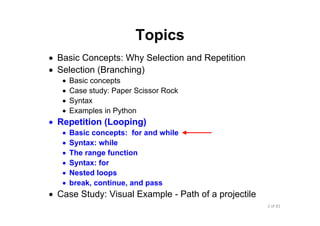
Topics
• Basic Concepts: Why Selection and Repetition
• Selection (Branching)
• Basic concepts
• Case study: Paper Scissor Rock
• Syntax
• Examples in Python
• Repetition (Looping)
• Basic concepts: for and while
• Syntax: while
• The range function
• Syntax: for
• Nested loops
• break, continue, and pass
• Case Study: Visual Example - Path of a projectile
3 of 81Module 6 : Flow control
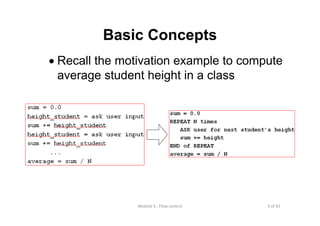
Basic Concepts
• Recall the motivation example to compute
average student height in a class
4 of 81Module 6 : Flow control
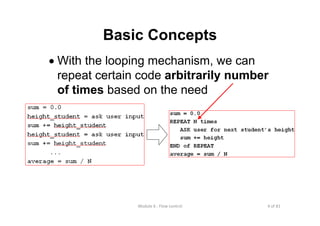
Basic Concepts
• With the looping mechanism, we can
repeat certain code arbitrarily number
of times based on the need
5 of 81Module 6 : Flow control
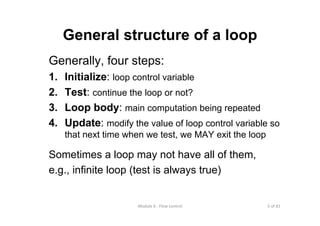
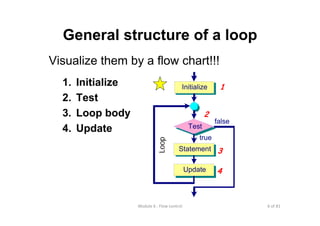
General structure of a loop
Generally, four steps:
1. Initialize: loop control variable
2. Test: continue the loop or not?
3. Loop body: main computation being repeated
4. Update: modify the value of loop control variable so
that next time when we test, we MAY exit the loop
Sometimes a loop may not have all of them,
e.g., infinite loop (test is always true)
6 of 81Module 6 : Flow control
General structure of a loop
Visualize them by a flow chart!!!
1. Initialize
2. Test
3. Loop body
4. Update
Initialize
Statement
Update
Test
true
false
4
3
2
1
Loop
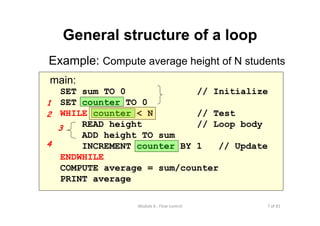
7 of 81Module 6 : Flow control
main:
SET sum TO 0 // Initialize
SET counter TO 0
WHILE counter < N // Test
READ height // Loop body
ADD height TO sum
INCREMENT counter BY 1 // Update
ENDWHILE
COMPUTE average = sum/counter
PRINT average
General structure of a loop
Example: Compute average height of N students
1
2
3
4
8 of 81Module 6 : Flow control
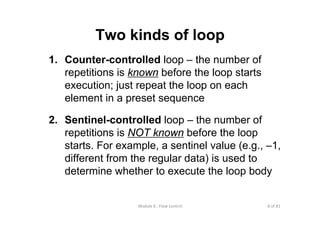
Two kinds of loop
1. Counter-controlled loop – the number of
repetitions is known before the loop starts
execution; just repeat the loop on each
element in a preset sequence
2. Sentinel-controlled loop – the number of
repetitions is NOT known before the loop
starts. For example, a sentinel value (e.g., –1,
different from the regular data) is used to
determine whether to execute the loop body
9 of 81Module 6 : Flow control
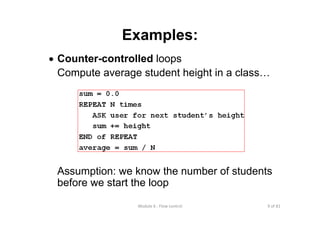
Examples:
• Counter-controlled loops
Compute average student height in a class…
Assumption: we know the number of students
before we start the loop
10 of 81Module 6 : Flow control
Examples:
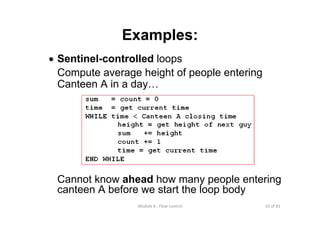
• Sentinel-controlled loops
Compute average height of people entering
Canteen A in a day…
sum = count = 0
time = get current time
WHILE time < Canteen A closing time
height = get height of next guy
sum += height
count += 1
time = get current time
END WHILE
Cannot know ahead how many people entering
canteen A before we start the loop body
11 of 81Module 6 : Flow control
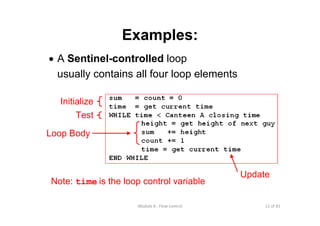
Examples:
• A Sentinel-controlled loop
usually contains all four loop elements
Initialize
Test
Loop Body
Update
Note: time is the loop control variable
12 of 81Module 6 : Flow control
In Python
We can implement loops by:
• for – usually for counter-controlled loops
• while – usually for sentinel-controlled
loop, but may also be used to implement
counter-controlled loops
13 of 81Module 6 : Flow control
Topics
• Basic Concepts: Why Selection and Repetition
• Selection (Branching)
• Basic concepts
• Case study: Paper Scissor Rock
• Syntax
• Examples in Python
• Repetition (Looping)
• Basic concepts: for and while
• Syntax: while
• The range function
• Syntax: for
• Nested loops
• break, continue, and pass
• Case Study: Visual Example - Path of a projectile
14 of 81Module 6 : Flow control
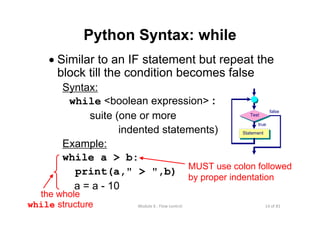
Python Syntax: while
• Similar to an IF statement but repeat the
block till the condition becomes false
Syntax:
while <boolean expression> :
suite (one or more
indented statements)
Example:
while a > b:
print(a," > ",b)
a = a - 10
MUST use colon followed
by proper indentation
the whole
while structure
Test
true
Statement
false
15 of 81Module 6 : Flow control
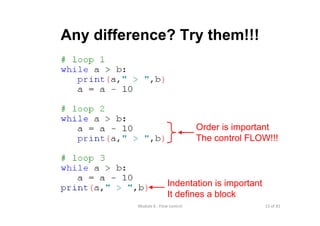
Any difference? Try them!!!
Order is important
The control FLOW!!!
Indentation is important
It defines a block
16 of 81Module 6 : Flow control
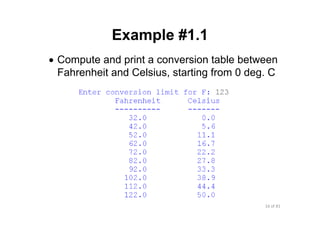
Example #1.1
• Compute and print a conversion table between
Fahrenheit and Celsius, starting from 0 deg. C
17 of 81Module 6 : Flow control
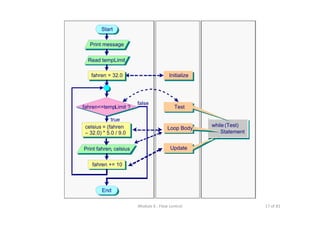
Print message
Read tempLimit
Start
fahren = 32.0
fahren<=tempLimit ?
true
fahren += 10
Print fahren, celsius
false
End
Initialize
while (Test)
Statement
Update
Loop Body
Test
celsius = (fahren
– 32.0) * 5.0 / 9.0
18 of 81Module 6 : Flow control
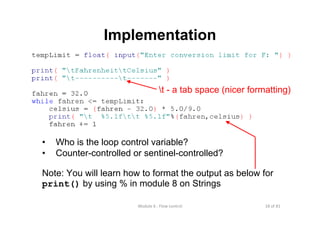
Implementation
• Who is the loop control variable?
• Counter-controlled or sentinel-controlled?
Note: You will learn how to format the output as below for
print() by using % in module 8 on Strings
t - a tab space (nicer formatting)
19 of 81Module 6 : Flow control
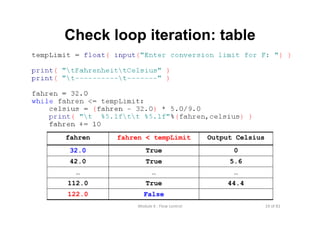
Check loop iteration: table
False122.0
44.4True112.0
………
5.6True42.0
0True32.0
Output Celsiusfahren < tempLimitfahren
20 of 81Module 6 : Flow control
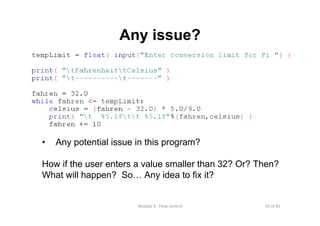
Any issue?
• Any potential issue in this program?
How if the user enters a value smaller than 32? Or? Then?
What will happen? So… Any idea to fix it?
21 of 81Module 6 : Flow control
Example #1.2
• Maybe… we can force the user to input
again? But how?
• Idea:
• Keep asking until he/she enters a number that is
at least 32 and at most a certain reasonable limit
• Now… we can add a while loop
22 of 81Module 6 : Flow control
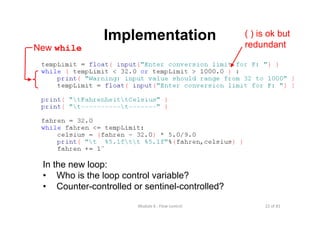
Implementation
New while
In the new loop:
• Who is the loop control variable?
• Counter-controlled or sentinel-controlled?
( ) is ok but
redundant
23 of 81Module 6 : Flow control
Note:
• while loop is useful if we want to
repeatedly ask user for input until the
input fulfills our requirement
24 of 81Module 6 : Flow control
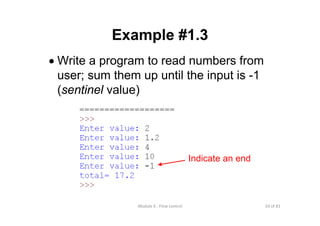
Example #1.3
• Write a program to read numbers from
user; sum them up until the input is -1
(sentinel value)
Indicate an end
25 of 81Module 6 : Flow control
Implementation
• Again, we can use while loop to
continue asking for user input…
• Who is the loop control variable?
• Counter-controlled or sentinel-controlled?
• Any issue to ensure for this design?
[Make sure: sentinel value will not appear in normal cases]
while
structure
26 of 81Module 6 : Flow control
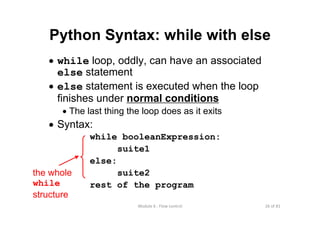
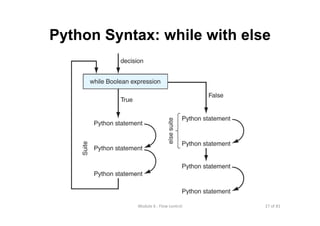
Python Syntax: while with else
• while loop, oddly, can have an associated
else statement
• else statement is executed when the loop
finishes under normal conditions
• The last thing the loop does as it exits
• Syntax:
while booleanExpression:
suite1
else:
suite2
rest of the program
the whole
while
structure
27 of 81Module 6 : Flow control
Python Syntax: while with else
28 of 81Module 6 : Flow control
Topics
• Basic Concepts: Why Selection and Repetition
• Selection (Branching)
• Basic concepts
• Case study: Paper Scissor Rock
• Syntax
• Examples in Python
• Repetition (Looping)
• Basic concepts: for and while
• Syntax: while
• The range function
• Syntax: for
• Nested loops
• break, continue, and pass
• Case Study: Visual Example - Path of a projectile
29 of 81Module 6 : Flow control
range
• Before we discuss "for" loop, we first
learn a useful built-in function in Python
called range()
• Note: range() is often used in "for" loop
30 of 81Module 6 : Flow control
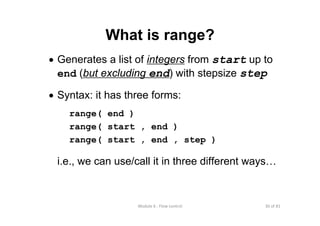
What is range?
• Generates a list of integers from start up to
end (but excluding end) with stepsize step
• Syntax: it has three forms:
range( end )
range( start , end )
range( start , end , step )
i.e., we can use/call it in three different ways…
31 of 81Module 6 : Flow control
Meaning
• range( end )
- Python puts start to 0 and step to 1 (default values)
- range(11) gives [ 0 , 1 , 2 , … , 10 ]
• range( start , end )
- Python puts step to 1 (default value)
- range(1,11) gives [ 1 , 2 , 3 , … , 10 ]
• range( start , end , step )
- Python returns a list (sequence) of integers from
start to end-1 with stepsize step
- range(1,11,2) gives [ 1 , 3 , 5 , …, 9 ]
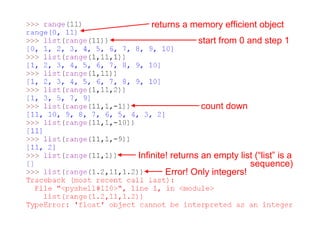
However, range() returns a memory efficient object implicitly rather
than an explicit list; we can use list to see its contents, see next page
32 of 81Module 6 : Flow control
count down
Infinite! returns an empty list (“list” is a
Error! Only integers!
start from 0 and step 1
sequence)
returns a memory efficient object
33 of 81Module 6 : Flow control
Exercises for you
• How can you create a list containing
[ 0, 3, 6, 9, 12, 15 ] ?
• How can you create a list containing
[ 10, 9, 8, 7, 6, 5, 4, 3, 2, 1, 0 ] ?
• How can you create a list containing
[ 4, 2, 0, -2, -4 ] ?
34 of 81Module 6 : Flow control
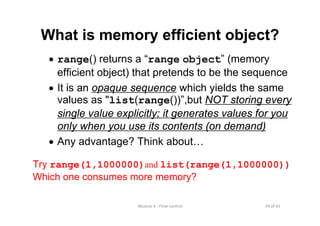
What is memory efficient object?
• range() returns a “range object” (memory
efficient object) that pretends to be the sequence
• It is an opaque sequence which yields the same
values as "list(range())”,but NOT storing every
single value explicitly; it generates values for you
only when you use its contents (on demand)
• Any advantage? Think about…
Try range(1,1000000)and list(range(1,1000000))
Which one consumes more memory?
35 of 81Module 6 : Flow control
Topics
• Basic Concepts: Why Selection and Repetition
• Selection (Branching)
• Basic concepts
• Case study: Paper Scissor Rock
• Syntax
• Examples in Python
• Repetition (Looping)
• Basic concepts: for and while
• Syntax: while
• The range function
• Syntax: for
• Nested loops
• break, continue, and pass
• Case Study: Visual Example - Path of a projectile
36 of 81Module 6 : Flow control
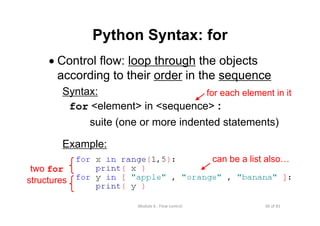
Python Syntax: for
• Control flow: loop through the objects
according to their order in the sequence
Syntax:
for <element> in <sequence> :
suite (one or more indented statements)
Example:
for each element in it
two for
structures
can be a list also…
37 of 81Module 6 : Flow control
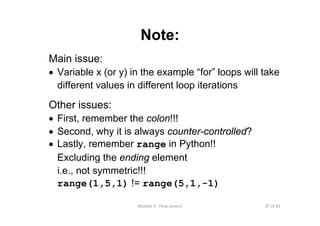
Note:
Main issue:
• Variable x (or y) in the example “for” loops will take
different values in different loop iterations
Other issues:
• First, remember the colon!!!
• Second, why it is always counter-controlled?
• Lastly, remember range in Python!!
Excluding the ending element
i.e., not symmetric!!!
range(1,5,1) != range(5,1,-1)
38 of 81Module 6 : Flow control
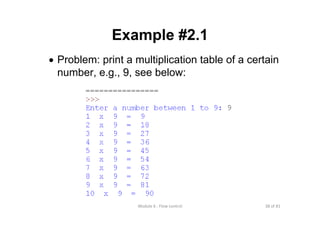
Example #2.1
• Problem: print a multiplication table of a certain
number, e.g., 9, see below:
39 of 81Module 6 : Flow control
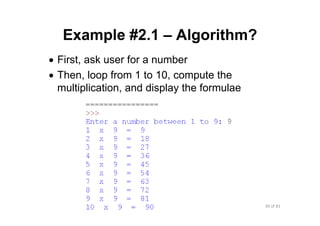
Example #2.1 – Algorithm?
• First, ask user for a number
• Then, loop from 1 to 10, compute the
multiplication, and display the formulae
40 of 81Module 6 : Flow control
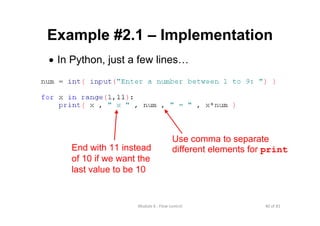
Example #2.1 – Implementation
• In Python, just a few lines…
Use comma to separate
different elements for printEnd with 11 instead
of 10 if we want the
last value to be 10
41 of 81Module 6 : Flow control
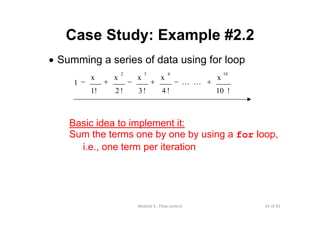
Case Study: Example #2.2
• Summing a series of data using for loop
!10
x
!4
x
!3
x
!2
x
1!
x
1
10432
+−+−+− LL
Basic idea to implement it:
Sum the terms one by one by using a for loop,
i.e., one term per iteration
42 of 81Module 6 : Flow control
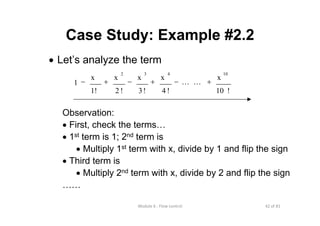
Case Study: Example #2.2
• Let’s analyze the term
Observation:
• First, check the terms…
• 1st term is 1; 2nd term is
• Multiply 1st term with x, divide by 1 and flip the sign
• Third term is
• Multiply 2nd term with x, divide by 2 and flip the sign
……
!10
x
!4
x
!3
x
!2
x
1!
x
1
10432
+−+−+− LL
43 of 81Module 6 : Flow control
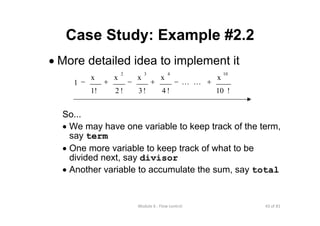
Case Study: Example #2.2
• More detailed idea to implement it
So...
• We may have one variable to keep track of the term,
say term
• One more variable to keep track of what to be
divided next, say divisor
• Another variable to accumulate the sum, say total
!10
x
!4
x
!3
x
!2
x
1!
x
1
10432
+−+−+− LL
44 of 81Module 6 : Flow control
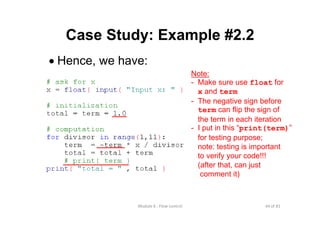
Case Study: Example #2.2
• Hence, we have:
Note:
- Make sure use float for
x and term
- The negative sign before
term can flip the sign of
the term in each iteration
- I put in this “print(term)”
for testing purpose;
note: testing is important
to verify your code!!!
(after that, can just
comment it)
45 of 81Module 6 : Flow control
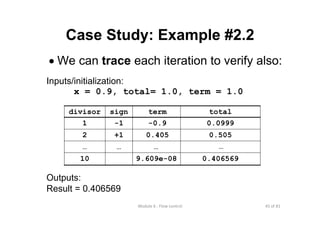
Inputs/initialization:
x = 0.9, total= 1.0, term = 1.0
Case Study: Example #2.2
• We can trace each iteration to verify also:
Outputs:
Result = 0.406569
…
+1
-1
sign
0.4065699.609e-0810
…
0.5050.4052
0.0999-0.91
totaltermdivisor
… …
46 of 81Module 6 : Flow control
Topics
• Basic Concepts: Why Selection and Repetition
• Selection (Branching)
• Basic concepts
• Case study: Paper Scissor Rock
• Syntax
• Examples in Python
• Repetition (Looping)
• Basic concepts: for and while
• Syntax: while
• The range function
• Syntax: for
• Nested loops
• break, continue, and pass
• Case Study: Visual Example - Path of a projectile
47 of 81Module 6 : Flow control
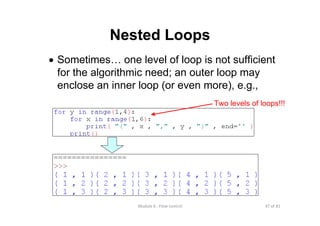
Nested Loops
• Sometimes… one level of loop is not sufficient
for the algorithmic need; an outer loop may
enclose an inner loop (or even more), e.g.,
Two levels of loops!!!
48 of 81Module 6 : Flow control
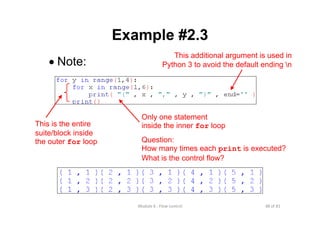
Example #2.3
• Note:
This additional argument is used in
Python 3 to avoid the default ending n
This is the entire
suite/block inside
the outer for loop
Only one statement
inside the inner for loop
Question:
How many times each print is executed?
What is the control flow?
49 of 81Module 6 : Flow control
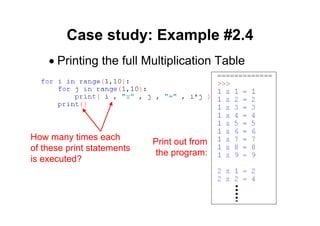
Case study: Example #2.4
• Printing the full Multiplication Table
Print out from
the program:
How many times each
of these print statements
is executed?
50 of 81Module 6 : Flow control
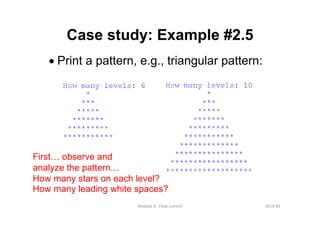
Case study: Example #2.5
• Print a pattern, e.g., triangular pattern:
First… observe and
analyze the pattern…
How many stars on each level?
How many leading white spaces?
51 of 81Module 6 : Flow control
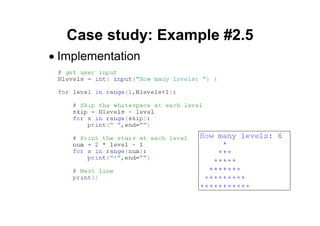
Case study: Example #2.5
• Implementation
52 of 81Module 6 : Flow control
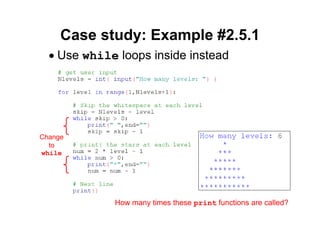
Case study: Example #2.5.1
• Use while loops inside instead
How many times these print functions are called?
Change
to
while
53 of 81Module 6 : Flow control
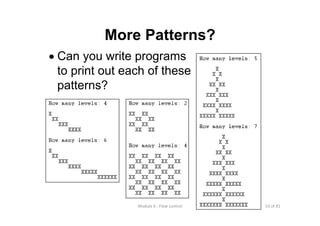
More Patterns?
• Can you write programs
to print out each of these
patterns?
54 of 81Module 6 : Flow control
Topics
• Basic Concepts: Why Selection and Repetition
• Selection (Branching)
• Basic concepts
• Case study: Paper Scissor Rock
• Syntax
• Examples in Python
• Repetition (Looping)
• Basic concepts: for and while
• Syntax: while
• The range function
• Syntax: for
• Nested loops
• break, continue, and pass
• Case Study: Visual Example - Path of a projectile
55 of 81Module 6 : Flow control
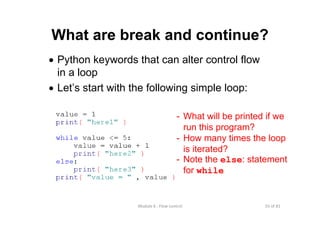
What are break and continue?
• Python keywords that can alter control flow
in a loop
• Let’s start with the following simple loop:
- What will be printed if we
run this program?
- How many times the loop
is iterated?
- Note the else: statement
for while
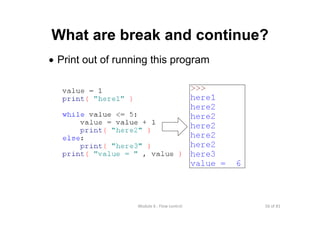
56 of 81Module 6 : Flow control
What are break and continue?
• Print out of running this program
57 of 81Module 6 : Flow control
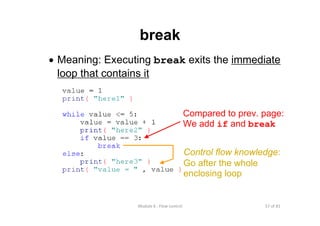
break
• Meaning: Executing break exits the immediate
loop that contains it
Compared to prev. page:
We add if and break
Control flow knowledge:
Go after the whole
enclosing loop
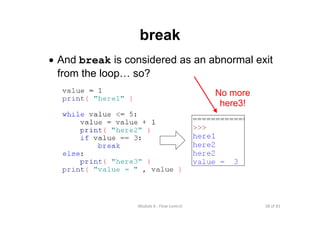
58 of 81Module 6 : Flow control
break
• And break is considered as an abnormal exit
from the loop… so?
No more
here3!
59 of 81Module 6 : Flow control
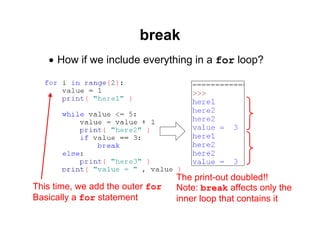
break
• How if we include everything in a for loop?
This time, we add the outer for
Basically a for statement
The print-out doubled!!
Note: break affects only the
inner loop that contains it
60 of 81Module 6 : Flow control
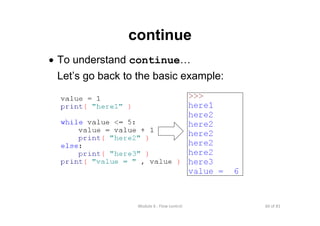
continue
• To understand continue…
Let’s go back to the basic example:
61 of 81Module 6 : Flow control
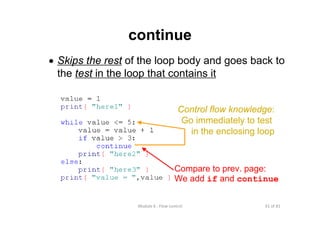
continue
• Skips the rest of the loop body and goes back to
the test in the loop that contains it
Compare to prev. page:
We add if and continue
Control flow knowledge:
Go immediately to test
in the enclosing loop
62 of 81Module 6 : Flow control
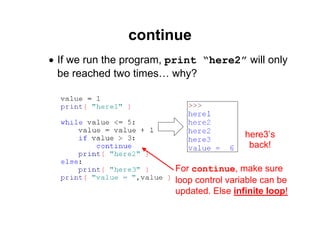
continue
• If we run the program, print “here2” will only
be reached two times… why?
For continue, make sure
loop control variable can be
updated. Else infinite loop!
here3’s
back!
63 of 81Module 6 : Flow control
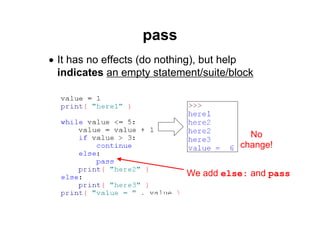
pass
• It has no effects (do nothing), but help
indicates an empty statement/suite/block
We add else: and pass
No
change!
64 of 81Module 6 : Flow control
Topics
• Basic Concepts: Why Selection and Repetition
• Selection (Branching)
• Basic concepts
• Case study: Paper Scissor Rock
• Syntax
• Examples in Python
• Repetition (Looping)
• Basic concepts: for and while
• Syntax: while
• The range function
• Syntax: for
• Nested loops
• break, continue, and pass
• Case Study: Visual Example - Path of a projectile
65 of 81Module 6 : Flow control
Case Study: Path of a projectile
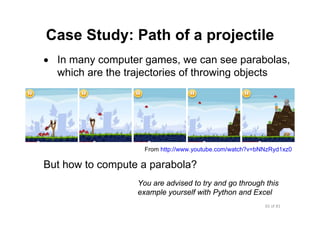
• In many computer games, we can see parabolas,
which are the trajectories of throwing objects
But how to compute a parabola?
From http://www.youtube.com/watch?v=bNNzRyd1xz0
You are advised to try and go through this
example yourself with Python and Excel
66 of 81Module 6 : Flow control
Input and coordinate system
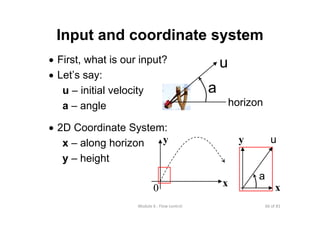
• First, what is our input?
• Let’s say:
u – initial velocity
a – angle
• 2D Coordinate System:
x – along horizon
y – height
0
y
x
u
horizon
a
x
y u
a
67 of 81Module 6 : Flow control
Initial velocity along x and y
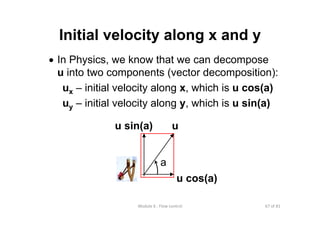
• In Physics, we know that we can decompose
u into two components (vector decomposition):
ux – initial velocity along x, which is u cos(a)
uy – initial velocity along y, which is u sin(a)
u sin(a) u
a
u cos(a)
68 of 81Module 6 : Flow control
The Physics
• First, let’s look at the Physics…
• We can use the following formula:
s = u t + ½ a t2
where
• s = distance travelled (in m)
• u = initial velocity (in ms-1)
• t = time (in s)
• a = acceleration (in ms-2)
(unit: m – meter, s – second)
69 of 81Module 6 : Flow control
The Physics
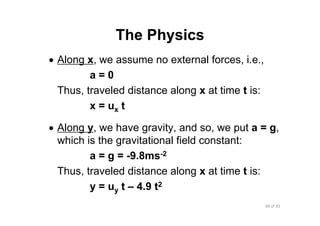
• Along x, we assume no external forces, i.e.,
a = 0
Thus, traveled distance along x at time t is:
x = ux t
• Along y, we have gravity, and so, we put a = g,
which is the gravitational field constant:
a = g = -9.8ms-2
Thus, traveled distance along x at time t is:
y = uy t – 4.9 t2
70 of 81Module 6 : Flow control
To compute the parabola…
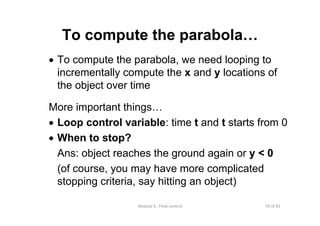
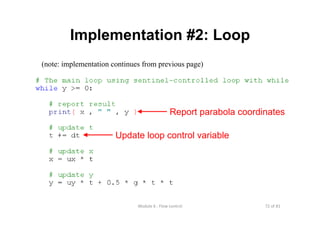
• To compute the parabola, we need looping to
incrementally compute the x and y locations of
the object over time
More important things…
• Loop control variable: time t and t starts from 0
• When to stop?
Ans: object reaches the ground again or y < 0
(of course, you may have more complicated
stopping criteria, say hitting an object)
71 of 81Module 6 : Flow control
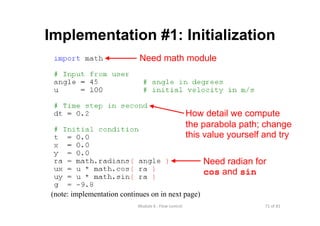
Implementation #1: Initialization
(note: implementation continues on in next page)
How detail we compute
the parabola path; change
this value yourself and try
Need radian for
cos and sin
Need math module
72 of 81Module 6 : Flow control
Implementation #2: Loop
(note: implementation continues from previous page)
Report parabola coordinates
Update loop control variable
73 of 81Module 6 : Flow control
Results
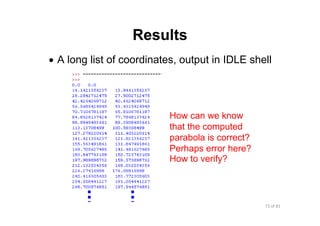
• A long list of coordinates, output in IDLE shell
How can we know
that the computed
parabola is correct?
Perhaps error here?
How to verify?
74 of 81Module 6 : Flow control
Verify… Plot it with Excel #1
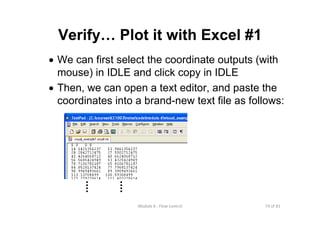
• We can first select the coordinate outputs (with
mouse) in IDLE and click copy in IDLE
• Then, we can open a text editor, and paste the
coordinates into a brand-new text file as follows:
75 of 81Module 6 : Flow control
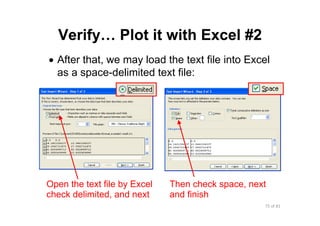
Verify… Plot it with Excel #2
• After that, we may load the text file into Excel
as a space-delimited text file:
Open the text file by Excel
check delimited, and next
Then check space, next
and finish
76 of 81Module 6 : Flow control
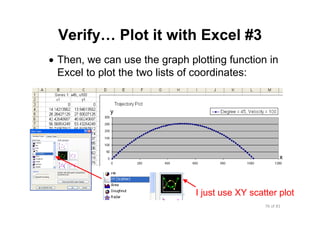
Verify… Plot it with Excel #3
• Then, we can use the graph plotting function in
Excel to plot the two lists of coordinates:
y
x
I just use XY scatter plot
77 of 81Module 6 : Flow control
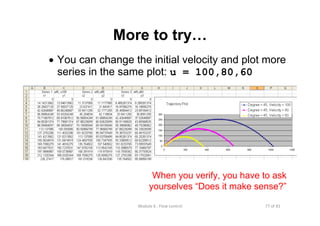
More to try…
• You can change the initial velocity and plot more
series in the same plot: u = 100,80,60
When you verify, you have to ask
yourselves “Does it make sense?”
78 of 81Module 6 : Flow control
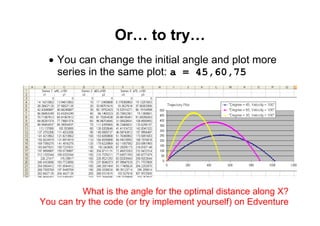
Or… to try…
• You can change the initial angle and plot more
series in the same plot: a = 45,60,75
What is the angle for the optimal distance along X?
You can try the code (or try implement yourself) on Edventure
79 of 81Module 6 : Flow control
Take Home Messages
• General structure of a loop:
– Initialize; Test; Loop body; Update
• Concepts: loop control variable, counter-controlled and
sentinel-controlled loops, nested loops
• Syntax: while, for, and range
• Reminders:
– Dry run and check the number of iterations!!!
One more or one less iteration can kill the program… bug!!!
– Understand how and when to stop!!!
– Use break and continue very carefully!!!
– Read (trace code and logic) and try (work it out) more examples...
– Always test and verify your code
Think and try test data that causes different consequences!!!
Practice! Practice!! Practice!!!
80 of 81Module 6 : Flow control
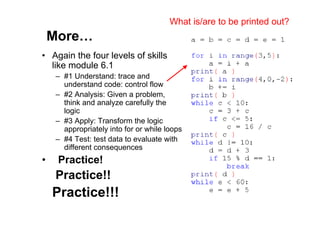
More…
• Again the four levels of skills
like module 6.1
– #1 Understand: trace and
understand code: control flow
– #2 Analysis: Given a problem,
think and analyze carefully the
logic
– #3 Apply: Transform the logic
appropriately into for or while loops
– #4 Test: test data to evaluate with
different consequences
• Practice!
Practice!!
Practice!!!
What is/are to be printed out?
81 of 81Module 6 : Flow control
Reading Assignment
• Textbook
Chapter 2: Control
2.1 to 2.4
Note: Though some material (2.3 and 2.4) in
textbook is not directly related to the lecture
material, you can learn more from them. Note:
other than using Excel, Python has module
pylab for graph plotting (see 2.4)

Lecture 6.2 flow control repetition

  • 1.
  • 2.
    2 of 81Module 6 : Flow control Topics • BasicConcepts: Why Selection and Repetition • Selection (Branching) • Basic concepts • Case study: Paper Scissor Rock • Syntax • Examples in Python • Repetition (Looping) • Basic concepts: for and while • Syntax: while • The range function • Syntax: for • Nested loops • break, continue, and pass • Case Study: Visual Example - Path of a projectile
  • 3.
    3 of 81Module 6 : Flow control Basic Concepts •Recall the motivation example to compute average student height in a class
  • 4.
    4 of 81Module 6 : Flow control Basic Concepts •With the looping mechanism, we can repeat certain code arbitrarily number of times based on the need
  • 5.
    5 of 81Module 6 : Flow control General structureof a loop Generally, four steps: 1. Initialize: loop control variable 2. Test: continue the loop or not? 3. Loop body: main computation being repeated 4. Update: modify the value of loop control variable so that next time when we test, we MAY exit the loop Sometimes a loop may not have all of them, e.g., infinite loop (test is always true)
  • 6.
    6 of 81Module 6 : Flow control General structureof a loop Visualize them by a flow chart!!! 1. Initialize 2. Test 3. Loop body 4. Update Initialize Statement Update Test true false 4 3 2 1 Loop
  • 7.
    7 of 81Module 6 : Flow control main: SET sumTO 0 // Initialize SET counter TO 0 WHILE counter < N // Test READ height // Loop body ADD height TO sum INCREMENT counter BY 1 // Update ENDWHILE COMPUTE average = sum/counter PRINT average General structure of a loop Example: Compute average height of N students 1 2 3 4
  • 8.
    8 of 81Module 6 : Flow control Two kindsof loop 1. Counter-controlled loop – the number of repetitions is known before the loop starts execution; just repeat the loop on each element in a preset sequence 2. Sentinel-controlled loop – the number of repetitions is NOT known before the loop starts. For example, a sentinel value (e.g., –1, different from the regular data) is used to determine whether to execute the loop body
  • 9.
    9 of 81Module 6 : Flow control Examples: • Counter-controlledloops Compute average student height in a class… Assumption: we know the number of students before we start the loop
  • 10.
    10 of 81Module 6 : Flow control Examples: • Sentinel-controlledloops Compute average height of people entering Canteen A in a day… sum = count = 0 time = get current time WHILE time < Canteen A closing time height = get height of next guy sum += height count += 1 time = get current time END WHILE Cannot know ahead how many people entering canteen A before we start the loop body
  • 11.
    11 of 81Module 6 : Flow control Examples: • ASentinel-controlled loop usually contains all four loop elements Initialize Test Loop Body Update Note: time is the loop control variable
  • 12.
    12 of 81Module 6 : Flow control In Python Wecan implement loops by: • for – usually for counter-controlled loops • while – usually for sentinel-controlled loop, but may also be used to implement counter-controlled loops
  • 13.
    13 of 81Module 6 : Flow control Topics • BasicConcepts: Why Selection and Repetition • Selection (Branching) • Basic concepts • Case study: Paper Scissor Rock • Syntax • Examples in Python • Repetition (Looping) • Basic concepts: for and while • Syntax: while • The range function • Syntax: for • Nested loops • break, continue, and pass • Case Study: Visual Example - Path of a projectile
  • 14.
    14 of 81Module 6 : Flow control Python Syntax:while • Similar to an IF statement but repeat the block till the condition becomes false Syntax: while <boolean expression> : suite (one or more indented statements) Example: while a > b: print(a," > ",b) a = a - 10 MUST use colon followed by proper indentation the whole while structure Test true Statement false
  • 15.
    15 of 81Module 6 : Flow control Any difference?Try them!!! Order is important The control FLOW!!! Indentation is important It defines a block
  • 16.
    16 of 81Module 6 : Flow control Example #1.1 •Compute and print a conversion table between Fahrenheit and Celsius, starting from 0 deg. C
  • 17.
    17 of 81Module 6 : Flow control Print message ReadtempLimit Start fahren = 32.0 fahren<=tempLimit ? true fahren += 10 Print fahren, celsius false End Initialize while (Test) Statement Update Loop Body Test celsius = (fahren – 32.0) * 5.0 / 9.0
  • 18.
    18 of 81Module 6 : Flow control Implementation • Whois the loop control variable? • Counter-controlled or sentinel-controlled? Note: You will learn how to format the output as below for print() by using % in module 8 on Strings t - a tab space (nicer formatting)
  • 19.
    19 of 81Module 6 : Flow control Check loopiteration: table False122.0 44.4True112.0 ……… 5.6True42.0 0True32.0 Output Celsiusfahren < tempLimitfahren
  • 20.
    20 of 81Module 6 : Flow control Any issue? •Any potential issue in this program? How if the user enters a value smaller than 32? Or? Then? What will happen? So… Any idea to fix it?
  • 21.
    21 of 81Module 6 : Flow control Example #1.2 •Maybe… we can force the user to input again? But how? • Idea: • Keep asking until he/she enters a number that is at least 32 and at most a certain reasonable limit • Now… we can add a while loop
  • 22.
    22 of 81Module 6 : Flow control Implementation New while Inthe new loop: • Who is the loop control variable? • Counter-controlled or sentinel-controlled? ( ) is ok but redundant
  • 23.
    23 of 81Module 6 : Flow control Note: • whileloop is useful if we want to repeatedly ask user for input until the input fulfills our requirement
  • 24.
    24 of 81Module 6 : Flow control Example #1.3 •Write a program to read numbers from user; sum them up until the input is -1 (sentinel value) Indicate an end
  • 25.
    25 of 81Module 6 : Flow control Implementation • Again,we can use while loop to continue asking for user input… • Who is the loop control variable? • Counter-controlled or sentinel-controlled? • Any issue to ensure for this design? [Make sure: sentinel value will not appear in normal cases] while structure
  • 26.
    26 of 81Module 6 : Flow control Python Syntax:while with else • while loop, oddly, can have an associated else statement • else statement is executed when the loop finishes under normal conditions • The last thing the loop does as it exits • Syntax: while booleanExpression: suite1 else: suite2 rest of the program the whole while structure
  • 27.
  • 28.
    28 of 81Module 6 : Flow control Topics • BasicConcepts: Why Selection and Repetition • Selection (Branching) • Basic concepts • Case study: Paper Scissor Rock • Syntax • Examples in Python • Repetition (Looping) • Basic concepts: for and while • Syntax: while • The range function • Syntax: for • Nested loops • break, continue, and pass • Case Study: Visual Example - Path of a projectile
  • 29.
    29 of 81Module 6 : Flow control range • Beforewe discuss "for" loop, we first learn a useful built-in function in Python called range() • Note: range() is often used in "for" loop
  • 30.
    30 of 81Module 6 : Flow control What isrange? • Generates a list of integers from start up to end (but excluding end) with stepsize step • Syntax: it has three forms: range( end ) range( start , end ) range( start , end , step ) i.e., we can use/call it in three different ways…
  • 31.
    31 of 81Module 6 : Flow control Meaning • range(end ) - Python puts start to 0 and step to 1 (default values) - range(11) gives [ 0 , 1 , 2 , … , 10 ] • range( start , end ) - Python puts step to 1 (default value) - range(1,11) gives [ 1 , 2 , 3 , … , 10 ] • range( start , end , step ) - Python returns a list (sequence) of integers from start to end-1 with stepsize step - range(1,11,2) gives [ 1 , 3 , 5 , …, 9 ] However, range() returns a memory efficient object implicitly rather than an explicit list; we can use list to see its contents, see next page
  • 32.
    32 of 81Module 6 : Flow control count down Infinite!returns an empty list (“list” is a Error! Only integers! start from 0 and step 1 sequence) returns a memory efficient object
  • 33.
    33 of 81Module 6 : Flow control Exercises foryou • How can you create a list containing [ 0, 3, 6, 9, 12, 15 ] ? • How can you create a list containing [ 10, 9, 8, 7, 6, 5, 4, 3, 2, 1, 0 ] ? • How can you create a list containing [ 4, 2, 0, -2, -4 ] ?
  • 34.
    34 of 81Module 6 : Flow control What ismemory efficient object? • range() returns a “range object” (memory efficient object) that pretends to be the sequence • It is an opaque sequence which yields the same values as "list(range())”,but NOT storing every single value explicitly; it generates values for you only when you use its contents (on demand) • Any advantage? Think about… Try range(1,1000000)and list(range(1,1000000)) Which one consumes more memory?
  • 35.
    35 of 81Module 6 : Flow control Topics • BasicConcepts: Why Selection and Repetition • Selection (Branching) • Basic concepts • Case study: Paper Scissor Rock • Syntax • Examples in Python • Repetition (Looping) • Basic concepts: for and while • Syntax: while • The range function • Syntax: for • Nested loops • break, continue, and pass • Case Study: Visual Example - Path of a projectile
  • 36.
    36 of 81Module 6 : Flow control Python Syntax:for • Control flow: loop through the objects according to their order in the sequence Syntax: for <element> in <sequence> : suite (one or more indented statements) Example: for each element in it two for structures can be a list also…
  • 37.
    37 of 81Module 6 : Flow control Note: Main issue: •Variable x (or y) in the example “for” loops will take different values in different loop iterations Other issues: • First, remember the colon!!! • Second, why it is always counter-controlled? • Lastly, remember range in Python!! Excluding the ending element i.e., not symmetric!!! range(1,5,1) != range(5,1,-1)
  • 38.
    38 of 81Module 6 : Flow control Example #2.1 •Problem: print a multiplication table of a certain number, e.g., 9, see below:
  • 39.
    39 of 81Module 6 : Flow control Example #2.1– Algorithm? • First, ask user for a number • Then, loop from 1 to 10, compute the multiplication, and display the formulae
  • 40.
    40 of 81Module 6 : Flow control Example #2.1– Implementation • In Python, just a few lines… Use comma to separate different elements for printEnd with 11 instead of 10 if we want the last value to be 10
  • 41.
    41 of 81Module 6 : Flow control Case Study:Example #2.2 • Summing a series of data using for loop !10 x !4 x !3 x !2 x 1! x 1 10432 +−+−+− LL Basic idea to implement it: Sum the terms one by one by using a for loop, i.e., one term per iteration
  • 42.
    42 of 81Module 6 : Flow control Case Study:Example #2.2 • Let’s analyze the term Observation: • First, check the terms… • 1st term is 1; 2nd term is • Multiply 1st term with x, divide by 1 and flip the sign • Third term is • Multiply 2nd term with x, divide by 2 and flip the sign …… !10 x !4 x !3 x !2 x 1! x 1 10432 +−+−+− LL
  • 43.
    43 of 81Module 6 : Flow control Case Study:Example #2.2 • More detailed idea to implement it So... • We may have one variable to keep track of the term, say term • One more variable to keep track of what to be divided next, say divisor • Another variable to accumulate the sum, say total !10 x !4 x !3 x !2 x 1! x 1 10432 +−+−+− LL
  • 44.
    44 of 81Module 6 : Flow control Case Study:Example #2.2 • Hence, we have: Note: - Make sure use float for x and term - The negative sign before term can flip the sign of the term in each iteration - I put in this “print(term)” for testing purpose; note: testing is important to verify your code!!! (after that, can just comment it)
  • 45.
    45 of 81Module 6 : Flow control Inputs/initialization: x =0.9, total= 1.0, term = 1.0 Case Study: Example #2.2 • We can trace each iteration to verify also: Outputs: Result = 0.406569 … +1 -1 sign 0.4065699.609e-0810 … 0.5050.4052 0.0999-0.91 totaltermdivisor … …
  • 46.
    46 of 81Module 6 : Flow control Topics • BasicConcepts: Why Selection and Repetition • Selection (Branching) • Basic concepts • Case study: Paper Scissor Rock • Syntax • Examples in Python • Repetition (Looping) • Basic concepts: for and while • Syntax: while • The range function • Syntax: for • Nested loops • break, continue, and pass • Case Study: Visual Example - Path of a projectile
  • 47.
    47 of 81Module 6 : Flow control Nested Loops •Sometimes… one level of loop is not sufficient for the algorithmic need; an outer loop may enclose an inner loop (or even more), e.g., Two levels of loops!!!
  • 48.
    48 of 81Module 6 : Flow control Example #2.3 •Note: This additional argument is used in Python 3 to avoid the default ending n This is the entire suite/block inside the outer for loop Only one statement inside the inner for loop Question: How many times each print is executed? What is the control flow?
  • 49.
    49 of 81Module 6 : Flow control Case study:Example #2.4 • Printing the full Multiplication Table Print out from the program: How many times each of these print statements is executed?
  • 50.
    50 of 81Module 6 : Flow control Case study:Example #2.5 • Print a pattern, e.g., triangular pattern: First… observe and analyze the pattern… How many stars on each level? How many leading white spaces?
  • 51.
    51 of 81Module 6 : Flow control Case study:Example #2.5 • Implementation
  • 52.
    52 of 81Module 6 : Flow control Case study:Example #2.5.1 • Use while loops inside instead How many times these print functions are called? Change to while
  • 53.
    53 of 81Module 6 : Flow control More Patterns? •Can you write programs to print out each of these patterns?
  • 54.
    54 of 81Module 6 : Flow control Topics • BasicConcepts: Why Selection and Repetition • Selection (Branching) • Basic concepts • Case study: Paper Scissor Rock • Syntax • Examples in Python • Repetition (Looping) • Basic concepts: for and while • Syntax: while • The range function • Syntax: for • Nested loops • break, continue, and pass • Case Study: Visual Example - Path of a projectile
  • 55.
    55 of 81Module 6 : Flow control What arebreak and continue? • Python keywords that can alter control flow in a loop • Let’s start with the following simple loop: - What will be printed if we run this program? - How many times the loop is iterated? - Note the else: statement for while
  • 56.
    56 of 81Module 6 : Flow control What arebreak and continue? • Print out of running this program
  • 57.
    57 of 81Module 6 : Flow control break • Meaning:Executing break exits the immediate loop that contains it Compared to prev. page: We add if and break Control flow knowledge: Go after the whole enclosing loop
  • 58.
    58 of 81Module 6 : Flow control break • Andbreak is considered as an abnormal exit from the loop… so? No more here3!
  • 59.
    59 of 81Module 6 : Flow control break • Howif we include everything in a for loop? This time, we add the outer for Basically a for statement The print-out doubled!! Note: break affects only the inner loop that contains it
  • 60.
    60 of 81Module 6 : Flow control continue • Tounderstand continue… Let’s go back to the basic example:
  • 61.
    61 of 81Module 6 : Flow control continue • Skipsthe rest of the loop body and goes back to the test in the loop that contains it Compare to prev. page: We add if and continue Control flow knowledge: Go immediately to test in the enclosing loop
  • 62.
    62 of 81Module 6 : Flow control continue • Ifwe run the program, print “here2” will only be reached two times… why? For continue, make sure loop control variable can be updated. Else infinite loop! here3’s back!
  • 63.
    63 of 81Module 6 : Flow control pass • Ithas no effects (do nothing), but help indicates an empty statement/suite/block We add else: and pass No change!
  • 64.
    64 of 81Module 6 : Flow control Topics • BasicConcepts: Why Selection and Repetition • Selection (Branching) • Basic concepts • Case study: Paper Scissor Rock • Syntax • Examples in Python • Repetition (Looping) • Basic concepts: for and while • Syntax: while • The range function • Syntax: for • Nested loops • break, continue, and pass • Case Study: Visual Example - Path of a projectile
  • 65.
    65 of 81Module 6 : Flow control Case Study:Path of a projectile • In many computer games, we can see parabolas, which are the trajectories of throwing objects But how to compute a parabola? From http://www.youtube.com/watch?v=bNNzRyd1xz0 You are advised to try and go through this example yourself with Python and Excel
  • 66.
    66 of 81Module 6 : Flow control Input andcoordinate system • First, what is our input? • Let’s say: u – initial velocity a – angle • 2D Coordinate System: x – along horizon y – height 0 y x u horizon a x y u a
  • 67.
    67 of 81Module 6 : Flow control Initial velocityalong x and y • In Physics, we know that we can decompose u into two components (vector decomposition): ux – initial velocity along x, which is u cos(a) uy – initial velocity along y, which is u sin(a) u sin(a) u a u cos(a)
  • 68.
    68 of 81Module 6 : Flow control The Physics •First, let’s look at the Physics… • We can use the following formula: s = u t + ½ a t2 where • s = distance travelled (in m) • u = initial velocity (in ms-1) • t = time (in s) • a = acceleration (in ms-2) (unit: m – meter, s – second)
  • 69.
    69 of 81Module 6 : Flow control The Physics •Along x, we assume no external forces, i.e., a = 0 Thus, traveled distance along x at time t is: x = ux t • Along y, we have gravity, and so, we put a = g, which is the gravitational field constant: a = g = -9.8ms-2 Thus, traveled distance along x at time t is: y = uy t – 4.9 t2
  • 70.
    70 of 81Module 6 : Flow control To computethe parabola… • To compute the parabola, we need looping to incrementally compute the x and y locations of the object over time More important things… • Loop control variable: time t and t starts from 0 • When to stop? Ans: object reaches the ground again or y < 0 (of course, you may have more complicated stopping criteria, say hitting an object)
  • 71.
    71 of 81Module 6 : Flow control Implementation #1:Initialization (note: implementation continues on in next page) How detail we compute the parabola path; change this value yourself and try Need radian for cos and sin Need math module
  • 72.
    72 of 81Module 6 : Flow control Implementation #2:Loop (note: implementation continues from previous page) Report parabola coordinates Update loop control variable
  • 73.
    73 of 81Module 6 : Flow control Results • Along list of coordinates, output in IDLE shell How can we know that the computed parabola is correct? Perhaps error here? How to verify?
  • 74.
    74 of 81Module 6 : Flow control Verify… Plotit with Excel #1 • We can first select the coordinate outputs (with mouse) in IDLE and click copy in IDLE • Then, we can open a text editor, and paste the coordinates into a brand-new text file as follows:
  • 75.
    75 of 81Module 6 : Flow control Verify… Plotit with Excel #2 • After that, we may load the text file into Excel as a space-delimited text file: Open the text file by Excel check delimited, and next Then check space, next and finish
  • 76.
    76 of 81Module 6 : Flow control Verify… Plotit with Excel #3 • Then, we can use the graph plotting function in Excel to plot the two lists of coordinates: y x I just use XY scatter plot
  • 77.
    77 of 81Module 6 : Flow control More totry… • You can change the initial velocity and plot more series in the same plot: u = 100,80,60 When you verify, you have to ask yourselves “Does it make sense?”
  • 78.
    78 of 81Module 6 : Flow control Or… totry… • You can change the initial angle and plot more series in the same plot: a = 45,60,75 What is the angle for the optimal distance along X? You can try the code (or try implement yourself) on Edventure
  • 79.
    79 of 81Module 6 : Flow control Take HomeMessages • General structure of a loop: – Initialize; Test; Loop body; Update • Concepts: loop control variable, counter-controlled and sentinel-controlled loops, nested loops • Syntax: while, for, and range • Reminders: – Dry run and check the number of iterations!!! One more or one less iteration can kill the program… bug!!! – Understand how and when to stop!!! – Use break and continue very carefully!!! – Read (trace code and logic) and try (work it out) more examples... – Always test and verify your code Think and try test data that causes different consequences!!! Practice! Practice!! Practice!!!
  • 80.
    80 of 81Module 6 : Flow control More… • Againthe four levels of skills like module 6.1 – #1 Understand: trace and understand code: control flow – #2 Analysis: Given a problem, think and analyze carefully the logic – #3 Apply: Transform the logic appropriately into for or while loops – #4 Test: test data to evaluate with different consequences • Practice! Practice!! Practice!!! What is/are to be printed out?
  • 81.
    81 of 81Module 6 : Flow control Reading Assignment •Textbook Chapter 2: Control 2.1 to 2.4 Note: Though some material (2.3 and 2.4) in textbook is not directly related to the lecture material, you can learn more from them. Note: other than using Excel, Python has module pylab for graph plotting (see 2.4)