1 of 31Module 7 : Algorithms and Program Development
Introduction to       
Computational Thinking
Module 7 :
Program Development Issues
(supplementary material)
Asst Prof Chi‐Wing FU, Philip
Office: N4‐02c‐104
email: cwfu[at]ntu.edu.sg
2 of 31Module 7 : Algorithms and Program Development
Topics
• Basic Rules in writing programs
• Program Readability
• More on Problem Solving
• Planning for testing, verification, and
documentation
3 of 31Module 7 : Algorithms and Program Development
A Good Program
What makes a good program?
• A program is a reflection of the writer and
their thoughts
• First, you must have some thoughts
(computational thinking)!
• The difficulty for most people is to figure out
what has to be done, the problem solving,
before writing a program
4 of 31Module 7 : Algorithms and Program Development
Three Rules
Rule 1: Think before you program
* Understand & Analyze the problem
Rule 2: A program is a human-readable essay
on problem solving that also happens to be
executable on a computer
* A program -- Not just for computer to run,
but also for human to read
Rule 3: Practice! Practice! Practice!
The best way to improve your programming
and problem solving skills is to practice
5 of 31Module 7 : Algorithms and Program Development
Topics
• Basic Rules in writing programs
• Program Readability
• More on Problem Solving
• Planning for testing, verification, and
documentation
6 of 31Module 7 : Algorithms and Program Development
Program Readability
• We will emphasize, over and over, that a
program is not just for computers to read, but
also intended to be read by other people,
even if “other people” is you in the future!
• Write a program so that you can read it,
because sometime in the future you may
have to read it again…
• So… Any guideline?
7 of 31Module 7 : Algorithms and Program Development
Readability(1): Naming
• The easiest thing to do that affects
readability is good naming
• Use meaningful names for the items
you create that reflect their purpose
• To help keep straight the types used,
include that as part of the name.
Python does not care about the type
stored, but you do!
8 of 31Module 7 : Algorithms and Program Development
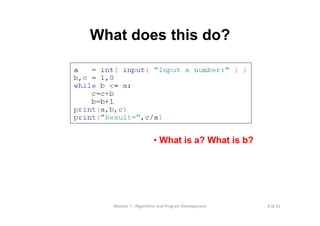
What does this do?
• What is a? What is b?
9 of 31Module 7 : Algorithms and Program Development
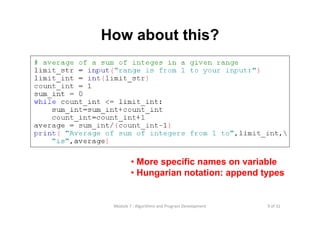
How about this?
• More specific names on variable
• Hungarian notation: append types
10 of 31Module 7 : Algorithms and Program Development
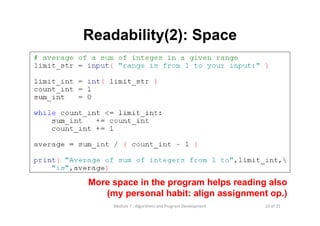
Readability(2): Space
More space in the program helps reading also
(my personal habit: align assignment op.)
11 of 31Module 7 : Algorithms and Program Development
Readability(3): Comments
• info at the top, the goal of the code
• purpose of variables (if not obvious by
the name)
• purpose of other functions being used
• anything “tricky”? If a piece of code took
you some time to write, it is probably hard
to read and demands for a comment
12 of 31Module 7 : Algorithms and Program Development
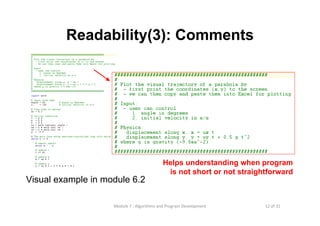
Readability(3): Comments
Visual example in module 6.2
Helps understanding when program
is not short or not straightforward
13 of 31Module 7 : Algorithms and Program Development
Readability(4): Indentation
• A visual cue to say what code is
“part of” other code
• This is not always required in many
programming languages (more freedom),
but Python forces you to indent properly
• This aids readability greatly
14 of 31Module 7 : Algorithms and Program Development
Topics
• Basic Rules in writing programs
• Program Readability
• More on Problem Solving
• Planning for testing, verification, and
documentation
15 of 31Module 7 : Algorithms and Program Development
Strategies: Problem Solving
• Engage/Commit
• Visualize/See
• Try it/Experiment
• Simplify
• Analyze/Think
• Relax
16 of 31Module 7 : Algorithms and Program Development
Engage
• You need to commit yourself to
addressing the problem.
• Don’t give up easily
• Try different approaches
• Set the “mood”
• Just putting in time does not mean you
put in a real effort!!!
17 of 31Module 7 : Algorithms and Program Development
Visualize/See the Problem
• Find a way that works for you,
some way to make the problem tangible.
• Draw pictures
• Layout tables
• Literally “see” the problem somehow
• Everyone has a different way, find yours!
18 of 31Module 7 : Algorithms and Program Development
Try It/Experiment
• For some reason, people are afraid to just
“try” some solutions. Perhaps they fear
failure, but experiments, done just for you,
are the best way to figure out problems.
• Be willing to try, and fail, to solve a
problem. Get started, don’t wait for
enlightenment!
19 of 31Module 7 : Algorithms and Program Development
Simplify
• Simplifying the problem so you can get a
handle on it is one of the most powerful
problem solving tools.
• Given a hard problem, make is simplier
(smaller, clearer, easier), figure that out,
then ramp up to the harder problem.
20 of 31Module 7 : Algorithms and Program Development
Think it Over/Analyze
• If your solution isn’t working:
• Stop
• Evaluate how you are doing
• Analyze and keep going, or start over.
• People can be amazingly “stiff”, banging
their heads against the same wall over
and over again. Loosen up, find another
way!
21 of 31Module 7 : Algorithms and Program Development
One More Thing: Relax
• Take your time. Not getting an answer
right away is not the end of the world. Put
it away and come back to it.
• You’d be surprised how easy it is to solve
if you let it go for awhile. That’s why
starting early is a luxury you should afford
yourself.
22 of 31Module 7 : Algorithms and Program Development
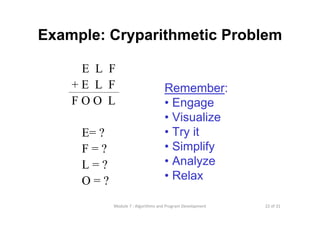
Example: Cryparithmetic Problem
E L F
+ E L F
F O O L
E= ?
F = ?
L = ?
O = ?
Remember:
• Engage
• Visualize
• Try it
• Simplify
• Analyze
• Relax
23 of 31Module 7 : Algorithms and Program Development
Topics
• Basic Rules in writing programs
• Program Readability
• More on Problem Solving
• Planning for testing, verification, and
documentation
24 of 31Module 7 : Algorithms and Program Development
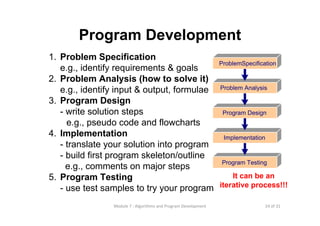
Program Development
1. Problem Specification
e.g., identify requirements & goals
2. Problem Analysis (how to solve it)
e.g., identify input & output, formulae
3. Program Design
- write solution steps
e.g., pseudo code and flowcharts
4. Implementation
- translate your solution into program
- build first program skeleton/outline
e.g., comments on major steps
5. Program Testing
- use test samples to try your program
ProblemSpecification
Problem Analysis
Program Design
Implementation
Program Testing
It can be an
iterative process!!!
25 of 31Module 7 : Algorithms and Program Development
Program Testing
• A program is correct if it returns the correct result for
every possible combination of input values.
Exhaustive testing: use all possible combinations of
input values and check the output is correct. This will
take a whole year, or forever, to show the program is
correct.
-> Impractical!!!
• What we can do: 1) use test data that causes every
program path (e.g., in branching and looping) to be
executed at least once; and 2) think and be creative!!!
26 of 31Module 7 : Algorithms and Program Development
Programming Errors
• Syntax Errors
• “grammatical” errors
• detected by compiler and found automatically
• need to be fixed before the compiler can understand the
code
• E.g., missing colon before a block in while or for loops
• Runtime Errors
• execution error (e.g., divide by zero, program crash, etc.)
• detected during the execution of code
• error messages may be useful to help identify the
reasons and locations
• sometimes not easy to fix
27 of 31Module 7 : Algorithms and Program Development
Programming Errors
• Logical Errors
• due to error in designing the algorithm or
implementation
• no compilation errors; no run-time error message
• most difficult to detect
• e.g., in a role-playing game, you killed a monster
but experience point is not given to you (but not
supposed to!!!)… note: you can still play the
game… no crash! But no level up!
28 of 31Module 7 : Algorithms and Program Development
Debugging
• The process of finding and correcting
errors, especially logic errors (BUG!!!)
• Strategies:
• Hand Tracing or Simulation
• Program Tracing
• Use print() function at appropriate program
locations to check:
• Program control flow
• Values of the variables
• Try different user input
• Be Patient! Don’t give up!!!
29 of 31Module 7 : Algorithms and Program Development
Documentation
• Documentation is needed for further modification
and maintenance
• Proper documentation includes:
• problem definition and specification;
• program inputs, outputs, constraints and mathematical
equations;
• algorithms and logic, e.g., flowchart, pseudo code, etc.
• source code with appropriate comments;
• sample test run of the program; and
• user manual for end users (how to use it)
• It should be done alongside with the program
development but not the very end!!!
30 of 31Module 7 : Algorithms and Program Development
Take Home Messages
Basic Rules:
- Think before you program
- A program is a human-readable essay on problem solving
- Practice! Practice!! Practice!!!
Program Readability: Naming; Space; Comments; Indentation
Problem Solving Strategies:
- Engage/Commit; Visualize/See; Try it/Experiment; Simplify;
Analyze/Think; Relax
Program Testing
- need to design test data to try every program path
- unit test: test your code piece by piece on their correctness!
Programming Errors
- Syntax Errors; Runtime Errors; Logical Errors
Other issues: Debugging and Documentation
31 of 31Module 7 : Algorithms and Program Development
Reading Assignment
• Textbook
Chapter 3: Algorithms and Program Development
3.1 to 3.5
Note: Though some material in textbook is not
directly related to the lecture material, you can
learn more from them.

Lecture 7 program development issues (supplementary)