Galgotias University 4
Atthe end of this session students will be able to
Learning Outcome 1:Define CSS
Selectors & Discuss it’s types.
Leraning Outcome 2: Describe Tags and
Attributes for CSS
GSCALE full formand date 6
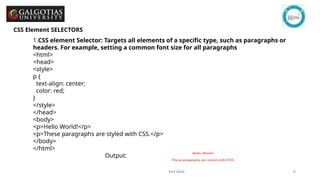
CSS Element SELECTORS
1.CSS element Selector: Targets all elements of a specific type, such as paragraphs or
headers. For example, setting a common font size for all paragraphs
<html>
<head>
<style>
p {
text-align: center;
color: red;
}
</style>
</head>
<body>
<p>Hello World!</p>
<p>These paragraphs are styled with CSS.</p>
</body>
</html>
Output:
7.
GSCALE full formand date 7
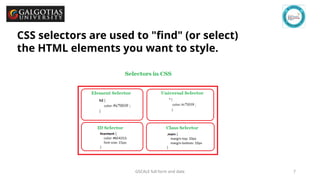
CSS selectors are used to "find" (or select)
the HTML elements you want to style.
8.
GSCALE full formand date 8
CSS Universal SELECTORS
Universal Selector (*): Selects all elements on the page and applies the same style universally.
For example :setting the font Blue color for every element.
9.
GSCALE full formand date 9
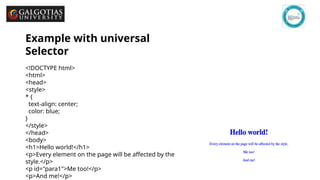
Example with universal
Selector
<!DOCTYPE html>
<html>
<head>
<style>
* {
text-align: center;
color: blue;
}
</style>
</head>
<body>
<h1>Hello world!</h1>
<p>Every element on the page will be affected by the
style.</p>
<p id="para1">Me too!</p>
<p>And me!</p>
10.
Galgotias University 10
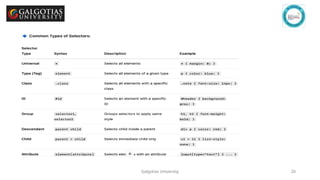
📝Summary Table
Concept Usage Example
Targeted
Element
CSS Selector .btn-primary
All elements with class "btn-
primary"
CSS Tag Selector h2 { color: blue; } All <h2> tags
CSS Attribute Selector input[type="checkbox"] Only checkboxes
11.
GSCALE full formand date 11
ACTIVITY 1
(Think Pair Share)
Question:Create a heading centered on the page with all of its text color yellow.
Think(3 minute) :Think About the asked question by yourself
Pair(2): Pair with your peers and discuss.
Share(3) share with the whole table and discuss and give your responce.
GSCALE full formand date 13
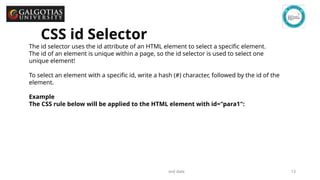
The id selector uses the id attribute of an HTML element to select a specific element.
The id of an element is unique within a page, so the id selector is used to select one
unique element!
To select an element with a specific id, write a hash (#) character, followed by the id of the
element.
Example
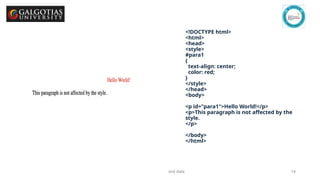
The CSS rule below will be applied to the HTML element with id="para1":
CSS id Selector
14.
GSCALE full formand date 14
<!DOCTYPE html>
<html>
<head>
<style>
#para1
{
text-align: center;
color: red;
}
</style>
</head>
<body>
<p id="para1">Hello World!</p>
<p>This paragraph is not affected by the
style.
</p>
</body>
</html>
15.
GSCALE full formand date 15
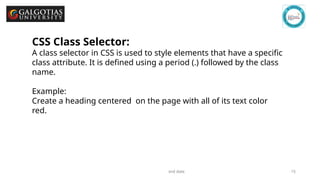
CSS Class Selector:
A class selector in CSS is used to style elements that have a specific
class attribute. It is defined using a period (.) followed by the class
name.
Example:
Create a heading centered on the page with all of its text color
red.
16.
GSCALE full formand date 16
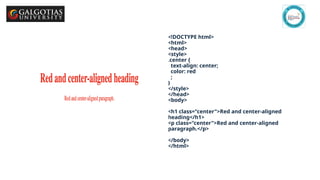
<!DOCTYPE html>
<html>
<head>
<style>
.center {
text-align: center;
color: red
;
}
</style>
</head>
<body>
<h1 class="center">Red and center-aligned
heading</h1>
<p class="center">Red and center-aligned
paragraph.</p>
</body>
</html>
17.
GSCALE full formand date 17
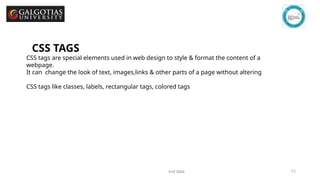
CSS TAGS
CSS tags are special elements used in web design to style & format the content of a
webpage.
It can change the look of text, images,links & other parts of a page without altering
CSS tags like classes, labels, rectangular tags, colored tags
18.
GSCALE full formand date 18
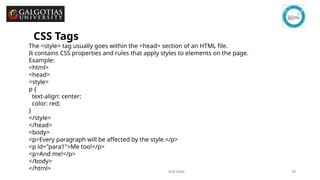
CSS Tags
The <style> tag usually goes within the <head> section of an HTML file.
It contains CSS properties and rules that apply styles to elements on the page.
Example:
<html>
<head>
<style>
p {
text-align: center;
color: red;
}
</style>
</head>
<body>
<p>Every paragraph will be affected by the style.</p>
<p id="para1">Me too!</p>
<p>And me!</p>
</body>
</html>
19.
Galgotias University 19
CSSAttributes
CSS attributes are properties that influence the styling and layout of
HTML elements.
Each property controls a small part of the overall style.
<html>
<head>
<style>
a[target] {
background-color: yellow;
}
</style>
</head>
<body>
<a href="http://www.disney.com" target="_blank">disney.com</a>
<a href="http://www.wikipedia.org" target="_top">wikipedia.org</a>
</body>
</html>
Galgotias University 23
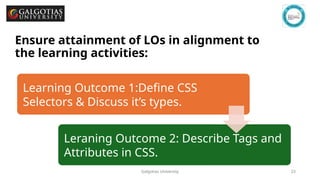
Ensureattainment of LOs in alignment to
the learning activities: outcomes (1-2)
Learning Outcome 1:Define CSS
Selectors & Discuss it’s types.
Leraning Outcome 2: Describe Tags and
Attributes in CSS.


![Galgotias University 10
📝 Summary Table
Concept Usage Example
Targeted
Element
CSS Selector .btn-primary
All elements with class "btn-
primary"
CSS Tag Selector h2 { color: blue; } All <h2> tags
CSS Attribute Selector input[type="checkbox"] Only checkboxes](https://image.slidesharecdn.com/lecture12syntaxselectorsandstyling-260107124002-56fb2b37/85/lecture-12-Syntax-Selectors-and-styling-pptx-10-320.jpg)

![Galgotias University 19
CSS Attributes
CSS attributes are properties that influence the styling and layout of
HTML elements.
Each property controls a small part of the overall style.
<html>
<head>
<style>
a[target] {
background-color: yellow;
}
</style>
</head>
<body>
<a href="http://www.disney.com" target="_blank">disney.com</a>
<a href="http://www.wikipedia.org" target="_top">wikipedia.org</a>
</body>
</html>](https://image.slidesharecdn.com/lecture12syntaxselectorsandstyling-260107124002-56fb2b37/85/lecture-12-Syntax-Selectors-and-styling-pptx-19-320.jpg)