Programming
with
Lecture 1:
Data and Expressions:
Literals, Variables and Identifiers
Dr. Hemant Petwal
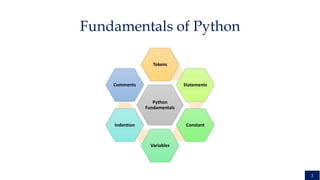
Python
Fundamentals
Tokens
Statements
Constant
Variables
Indention
Comments
2
Fundamentals of Python
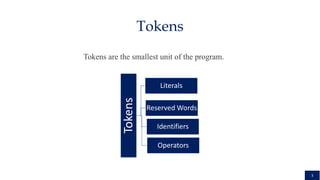
Tokens
3
Tokens
Reserved Words
Identifiers
Literals
Operators
Tokens are the smallest unit of the program.
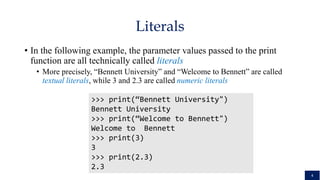
• In the following example, the parameter values passed to the print
function are all technically called literals
• More precisely, “Bennett University” and “Welcome to Bennett” are called
textual literals, while 3 and 2.3 are called numeric literals
>>> print(“Bennett University")
Bennett University
>>> print(“Welcome to Bennett")
Welcome to Bennett
>>> print(3)
3
>>> print(2.3)
2.3
Literals
4
Literals
String
Numeric
Boolean
Collection
Special
5
Literals
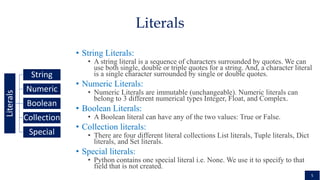
• String Literals:
• A string literal is a sequence of characters surrounded by quotes. We can
use both single, double or triple quotes for a string. And, a character literal
is a single character surrounded by single or double quotes.
• Numeric Literals:
• Numeric Literals are immutable (unchangeable). Numeric literals can
belong to 3 different numerical types Integer, Float, and Complex.
• Boolean Literals:
• A Boolean literal can have any of the two values: True or False.
• Collection literals:
• There are four different literal collections List literals, Tuple literals, Dict
literals, and Set literals.
• Special literals:
• Python contains one special literal i.e. None. We use it to specify to that
field that is not created.
• Python statements are nothing but logical instructions that interpreter
can read and execute. It can be both single and multiline.
There are two categories of statements in Python:
6
Statements
Statements
Assignments
Simple
Value Based
Variable Based
Operation based
Multiple
Expression
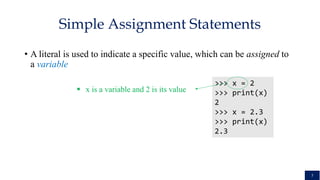
• A literal is used to indicate a specific value, which can be assigned to
a variable
>>> x = 2
>>> print(x)
2
>>> x = 2.3
>>> print(x)
2.3
Simple Assignment Statements
 x is a variable and 2 is its value
7
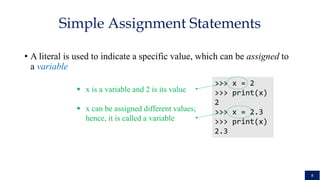
• A literal is used to indicate a specific value, which can be assigned to
a variable
>>> x = 2
>>> print(x)
2
>>> x = 2.3
>>> print(x)
2.3
Simple Assignment Statements
 x is a variable and 2 is its value
 x can be assigned different values;
hence, it is called a variable
8
• A simple way to view the effect of an assignment is to assume that when
a variable changes, its old value is replaced
>>> x = 2
>>> print(x)
2
>>> x = 2.3
>>> print(x)
2.3
Simple Assignment Statements: What we
Think
2
Before
x = 2.3
2.3
After
x x
9
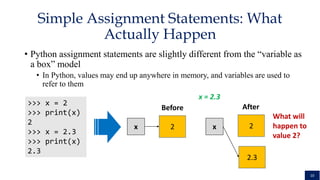
• Python assignment statements are slightly different from the “variable as
a box” model
• In Python, values may end up anywhere in memory, and variables are used to
refer to them
>>> x = 2
>>> print(x)
2
>>> x = 2.3
>>> print(x)
2.3
Simple Assignment Statements: What
Actually Happen
2
Before
x = 2.3
2
After
x x
2.3
What will
happen to
value 2?
10
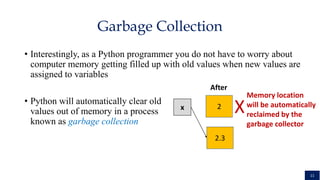
• Interestingly, as a Python programmer you do not have to worry about
computer memory getting filled up with old values when new values are
assigned to variables
• Python will automatically clear old
values out of memory in a process
known as garbage collection
Garbage Collection
2
After
x
2.3
X
Memory location
will be automatically
reclaimed by the
garbage collector
11
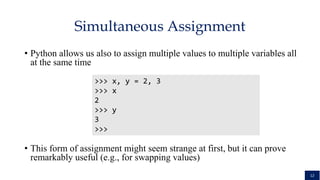
• Python allows us also to assign multiple values to multiple variables all
at the same time
• This form of assignment might seem strange at first, but it can prove
remarkably useful (e.g., for swapping values)
Simultaneous Assignment
>>> x, y = 2, 3
>>> x
2
>>> y
3
>>>
12
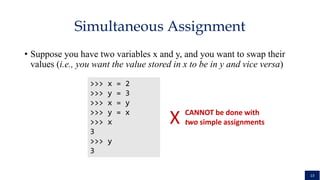
• Suppose you have two variables x and y, and you want to swap their
values (i.e., you want the value stored in x to be in y and vice versa)
Simultaneous Assignment
>>> x = 2
>>> y = 3
>>> x = y
>>> y = x
>>> x
3
>>> y
3
X CANNOT be done with
two simple assignments
13
• Suppose you have two variables x and y, and you want to swap their
values (i.e., you want the value stored in x to be in y and vice versa)
Simultaneous Assignment
>>> x = 2
>>> y = 3
>>> temp = x
>>> x = y
>>> y = temp
>>> x
3
>>> y
2
>>> x,y = y,x

CAN be done with
three simple assignments,
but more efficiently with
simultaneous assignment
Thus far, we have been using
different names for
variables. These names
are technically called
identifiers
14
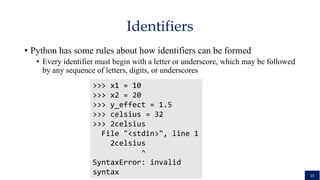
• Python has some rules about how identifiers can be formed
• Every identifier must begin with a letter or underscore, which may be followed
by any sequence of letters, digits, or underscores
>>> x1 = 10
>>> x2 = 20
>>> y_effect = 1.5
>>> celsius = 32
>>> 2celsius
File "<stdin>", line 1
2celsius
^
SyntaxError: invalid
syntax
Identifiers
15
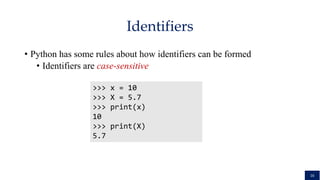
• Python has some rules about how identifiers can be formed
• Identifiers are case-sensitive
>>> x = 10
>>> X = 5.7
>>> print(x)
10
>>> print(X)
5.7
Identifiers
16
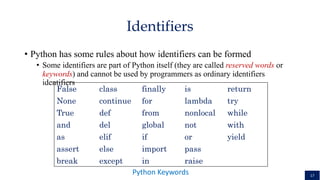
• Python has some rules about how identifiers can be formed
• Some identifiers are part of Python itself (they are called reserved words or
keywords) and cannot be used by programmers as ordinary identifiers
identifiers
Identifiers
False class finally is return
None continue for lambda try
True def from nonlocal while
and del global not with
as elif if or yield
assert else import pass
break except in raise
Python Keywords 17
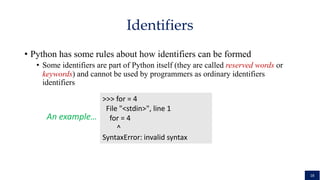
• Python has some rules about how identifiers can be formed
• Some identifiers are part of Python itself (they are called reserved words or
keywords) and cannot be used by programmers as ordinary identifiers
identifiers
Identifiers
>>> for = 4
File "<stdin>", line 1
for = 4
^
SyntaxError: invalid syntax
An example…
18
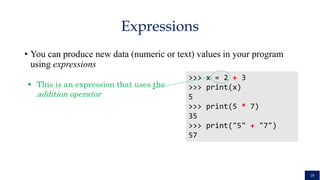
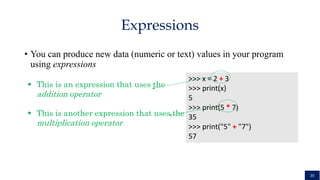
• You can produce new data (numeric or text) values in your program
using expressions
Expressions
>>> x = 2 + 3
>>> print(x)
5
>>> print(5 * 7)
35
>>> print("5" + "7")
57
 This is an expression that uses the
addition operator
19
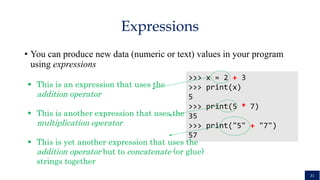
• You can produce new data (numeric or text) values in your program
using expressions
Expressions
>>> x = 2 + 3
>>> print(x)
5
>>> print(5 * 7)
35
>>> print("5" + "7")
57
 This is an expression that uses the
addition operator
 This is another expression that uses the
multiplication operator
20
• You can produce new data (numeric or text) values in your program
using expressions
Expressions
>>> x = 2 + 3
>>> print(x)
5
>>> print(5 * 7)
35
>>> print("5" + "7")
57
 This is an expression that uses the
addition operator
 This is another expression that uses the
multiplication operator
 This is yet another expression that uses the
addition operator but to concatenate (or glue)
strings together
21
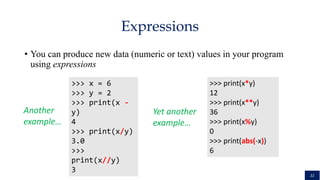
• You can produce new data (numeric or text) values in your program
using expressions
Expressions
>>> x = 6
>>> y = 2
>>> print(x -
y)
4
>>> print(x/y)
3.0
>>>
print(x//y)
3
>>> print(x*y)
12
>>> print(x**y)
36
>>> print(x%y)
0
>>> print(abs(-x))
6
Yet another
example…
Another
example…
22
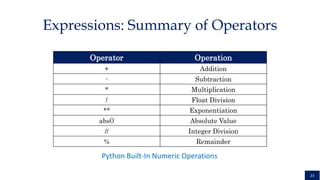
Expressions: Summary of Operators
Operator Operation
+ Addition
- Subtraction
* Multiplication
/ Float Division
** Exponentiation
abs() Absolute Value
// Integer Division
% Remainder
Python Built-In Numeric Operations
23
• One problem with entering code interactively into a Python shell is
that the definitions are lost when we quit the shell
• If we want to use these definitions again, we have to type them all over again!
• To this end, programs are usually created by typing definitions into a
separate file called a module or script
• This file is saved on disk so that it can be used over and over again
• A Python module file is just a text file with a .py extension, which can
be created using any program for editing text (e.g., notepad or vim)
Script
24
• A special type of software known as a programming environment
simplifies the process of creating modules/programs.
• A programming environment helps programmers write programs and
includes features such as automatic indenting, color highlighting, and
interactive development.
• The standard Python distribution includes a programming environment
called IDLE that you can use for working on the programs of this
course.
Programming Environments and IDLE
25
• Programs are composed of statements that are built from identifiers and
expressions
• Identifiers are names
• They begin with an underscore or letter which can be followed by a combination
of letter, digit, and/or underscore characters
• They are case sensitive
• Expressions are the fragments of a program that produce data
• They can be composed of literals, variables, and operators
Summary
26
• A literal is a representation of a specific value (e.g., 3 is a literal
representing the number three)
• A variable is an identifier that stores a value, which can change (hence,
the name variable)
• Operators are used to form and combine expressions into more complex
expressions (e.g., the expression x + 3 * y combines two expressions
together using the + and * operators)
Summary
27
• In Python, assignment of a value to a variable is done using the equal
sign (i.e., =)
• Using assignments, programs can get inputs from users and manipulate
them internally
• Python allows simultaneous assignments, which are useful for swapping
values of variables
Summary
28
Thank You
29

Lecture 1- Python.pptxjhhhfdzdfdggcfffff

  • 1.
    Programming with Lecture 1: Data andExpressions: Literals, Variables and Identifiers Dr. Hemant Petwal
  • 2.
  • 3.
  • 4.
    • In thefollowing example, the parameter values passed to the print function are all technically called literals • More precisely, “Bennett University” and “Welcome to Bennett” are called textual literals, while 3 and 2.3 are called numeric literals >>> print(“Bennett University") Bennett University >>> print(“Welcome to Bennett") Welcome to Bennett >>> print(3) 3 >>> print(2.3) 2.3 Literals 4
  • 5.
    Literals String Numeric Boolean Collection Special 5 Literals • String Literals: •A string literal is a sequence of characters surrounded by quotes. We can use both single, double or triple quotes for a string. And, a character literal is a single character surrounded by single or double quotes. • Numeric Literals: • Numeric Literals are immutable (unchangeable). Numeric literals can belong to 3 different numerical types Integer, Float, and Complex. • Boolean Literals: • A Boolean literal can have any of the two values: True or False. • Collection literals: • There are four different literal collections List literals, Tuple literals, Dict literals, and Set literals. • Special literals: • Python contains one special literal i.e. None. We use it to specify to that field that is not created.
  • 6.
    • Python statementsare nothing but logical instructions that interpreter can read and execute. It can be both single and multiline. There are two categories of statements in Python: 6 Statements Statements Assignments Simple Value Based Variable Based Operation based Multiple Expression
  • 7.
    • A literalis used to indicate a specific value, which can be assigned to a variable >>> x = 2 >>> print(x) 2 >>> x = 2.3 >>> print(x) 2.3 Simple Assignment Statements  x is a variable and 2 is its value 7
  • 8.
    • A literalis used to indicate a specific value, which can be assigned to a variable >>> x = 2 >>> print(x) 2 >>> x = 2.3 >>> print(x) 2.3 Simple Assignment Statements  x is a variable and 2 is its value  x can be assigned different values; hence, it is called a variable 8
  • 9.
    • A simpleway to view the effect of an assignment is to assume that when a variable changes, its old value is replaced >>> x = 2 >>> print(x) 2 >>> x = 2.3 >>> print(x) 2.3 Simple Assignment Statements: What we Think 2 Before x = 2.3 2.3 After x x 9
  • 10.
    • Python assignmentstatements are slightly different from the “variable as a box” model • In Python, values may end up anywhere in memory, and variables are used to refer to them >>> x = 2 >>> print(x) 2 >>> x = 2.3 >>> print(x) 2.3 Simple Assignment Statements: What Actually Happen 2 Before x = 2.3 2 After x x 2.3 What will happen to value 2? 10
  • 11.
    • Interestingly, asa Python programmer you do not have to worry about computer memory getting filled up with old values when new values are assigned to variables • Python will automatically clear old values out of memory in a process known as garbage collection Garbage Collection 2 After x 2.3 X Memory location will be automatically reclaimed by the garbage collector 11
  • 12.
    • Python allowsus also to assign multiple values to multiple variables all at the same time • This form of assignment might seem strange at first, but it can prove remarkably useful (e.g., for swapping values) Simultaneous Assignment >>> x, y = 2, 3 >>> x 2 >>> y 3 >>> 12
  • 13.
    • Suppose youhave two variables x and y, and you want to swap their values (i.e., you want the value stored in x to be in y and vice versa) Simultaneous Assignment >>> x = 2 >>> y = 3 >>> x = y >>> y = x >>> x 3 >>> y 3 X CANNOT be done with two simple assignments 13
  • 14.
    • Suppose youhave two variables x and y, and you want to swap their values (i.e., you want the value stored in x to be in y and vice versa) Simultaneous Assignment >>> x = 2 >>> y = 3 >>> temp = x >>> x = y >>> y = temp >>> x 3 >>> y 2 >>> x,y = y,x  CAN be done with three simple assignments, but more efficiently with simultaneous assignment Thus far, we have been using different names for variables. These names are technically called identifiers 14
  • 15.
    • Python hassome rules about how identifiers can be formed • Every identifier must begin with a letter or underscore, which may be followed by any sequence of letters, digits, or underscores >>> x1 = 10 >>> x2 = 20 >>> y_effect = 1.5 >>> celsius = 32 >>> 2celsius File "<stdin>", line 1 2celsius ^ SyntaxError: invalid syntax Identifiers 15
  • 16.
    • Python hassome rules about how identifiers can be formed • Identifiers are case-sensitive >>> x = 10 >>> X = 5.7 >>> print(x) 10 >>> print(X) 5.7 Identifiers 16
  • 17.
    • Python hassome rules about how identifiers can be formed • Some identifiers are part of Python itself (they are called reserved words or keywords) and cannot be used by programmers as ordinary identifiers identifiers Identifiers False class finally is return None continue for lambda try True def from nonlocal while and del global not with as elif if or yield assert else import pass break except in raise Python Keywords 17
  • 18.
    • Python hassome rules about how identifiers can be formed • Some identifiers are part of Python itself (they are called reserved words or keywords) and cannot be used by programmers as ordinary identifiers identifiers Identifiers >>> for = 4 File "<stdin>", line 1 for = 4 ^ SyntaxError: invalid syntax An example… 18
  • 19.
    • You canproduce new data (numeric or text) values in your program using expressions Expressions >>> x = 2 + 3 >>> print(x) 5 >>> print(5 * 7) 35 >>> print("5" + "7") 57  This is an expression that uses the addition operator 19
  • 20.
    • You canproduce new data (numeric or text) values in your program using expressions Expressions >>> x = 2 + 3 >>> print(x) 5 >>> print(5 * 7) 35 >>> print("5" + "7") 57  This is an expression that uses the addition operator  This is another expression that uses the multiplication operator 20
  • 21.
    • You canproduce new data (numeric or text) values in your program using expressions Expressions >>> x = 2 + 3 >>> print(x) 5 >>> print(5 * 7) 35 >>> print("5" + "7") 57  This is an expression that uses the addition operator  This is another expression that uses the multiplication operator  This is yet another expression that uses the addition operator but to concatenate (or glue) strings together 21
  • 22.
    • You canproduce new data (numeric or text) values in your program using expressions Expressions >>> x = 6 >>> y = 2 >>> print(x - y) 4 >>> print(x/y) 3.0 >>> print(x//y) 3 >>> print(x*y) 12 >>> print(x**y) 36 >>> print(x%y) 0 >>> print(abs(-x)) 6 Yet another example… Another example… 22
  • 23.
    Expressions: Summary ofOperators Operator Operation + Addition - Subtraction * Multiplication / Float Division ** Exponentiation abs() Absolute Value // Integer Division % Remainder Python Built-In Numeric Operations 23
  • 24.
    • One problemwith entering code interactively into a Python shell is that the definitions are lost when we quit the shell • If we want to use these definitions again, we have to type them all over again! • To this end, programs are usually created by typing definitions into a separate file called a module or script • This file is saved on disk so that it can be used over and over again • A Python module file is just a text file with a .py extension, which can be created using any program for editing text (e.g., notepad or vim) Script 24
  • 25.
    • A specialtype of software known as a programming environment simplifies the process of creating modules/programs. • A programming environment helps programmers write programs and includes features such as automatic indenting, color highlighting, and interactive development. • The standard Python distribution includes a programming environment called IDLE that you can use for working on the programs of this course. Programming Environments and IDLE 25
  • 26.
    • Programs arecomposed of statements that are built from identifiers and expressions • Identifiers are names • They begin with an underscore or letter which can be followed by a combination of letter, digit, and/or underscore characters • They are case sensitive • Expressions are the fragments of a program that produce data • They can be composed of literals, variables, and operators Summary 26
  • 27.
    • A literalis a representation of a specific value (e.g., 3 is a literal representing the number three) • A variable is an identifier that stores a value, which can change (hence, the name variable) • Operators are used to form and combine expressions into more complex expressions (e.g., the expression x + 3 * y combines two expressions together using the + and * operators) Summary 27
  • 28.
    • In Python,assignment of a value to a variable is done using the equal sign (i.e., =) • Using assignments, programs can get inputs from users and manipulate them internally • Python allows simultaneous assignments, which are useful for swapping values of variables Summary 28
  • 29.