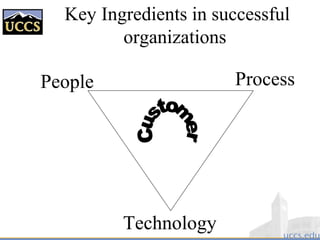
Key Ingredients in successful
organizations
People
Technology
Process
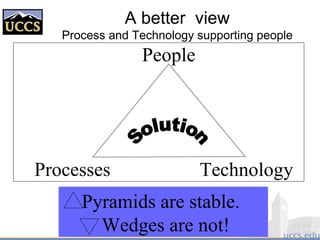
A better view
Process and Technology supporting people
Processes Technology
People
Pyramids are stable.
Wedges are not!
What is software?
 Computer programs and associated
documentation
 Software products may be developed for a
particular customer or may be developed for a
general market
 Software products may be
– Generic - developed to be sold to a range of different
customers
– Custom- developed for a customer according to their
specification
Engineering
 Engineering is …
– The application of scientific principles and methods to
the construction of useful structures & machines
 Examples
– Mechanical engineering
– Computer engineering
– Civil engineering
– Chemical engineering
– Electrical engineering
– Nuclear engineering
– Aeronautical engineering
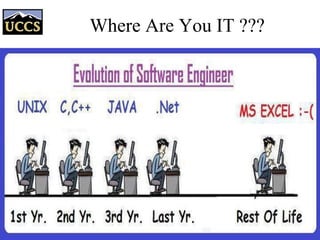
Where Are You IT ???
Software Engineering
 The term is 48 years old: NATO Conferences
– Garmisch, Germany, October 7-11, 1968
– Rome, Italy, October 27-31, 1969
 The reality is it is finally beginning to arrive
– Computer science one the scientific basis
• Years of studies/experience/statistics provide basis too
– Many aspects have been made systematic
• Methods/methodologies/techniques
• Languages
• Tools
• Processes
Why Engineer Software ?
 The problem is complexity
 Many sources, but size is a key:
– Mozilla contains 3 Million lines of code
– UNIX contains 4 million lines of code
– Windows 2000 contains 108
lines of code
 Second is role and combinatorics of “state”
 Third is uncertainty of “inputs” and their timing
 Fourth is the continuing changing “environment”
and demands.
Software engineering is about managing
all the sources of complexity to
produce effective software.
Software Engineering in a
Nutshell
 Development of software systems whose
size/complexity warrants team(s) of engineers
– multi-person construction of multi-version software
[Parnas 1987]
 Scope
– study of software process,
development/management principles, techniques,
tools and notations
 Goal
– production of quality software, delivered on time,
within budget, satisfying customers’ requirements
and users’ needs
What does a software
engineer do?
Software engineers should
– adopt a systematic and organised approach to all
aspects of software development.
– use appropriate tools and techniques depending on
• the problem to be solved,
• the development constraints and
• the resources available
– Understand and communicate processes for
improved software development within their
organization
– Be effective team members and/or leaders.
– Can be very technical or more managerial depending
on organizational need.
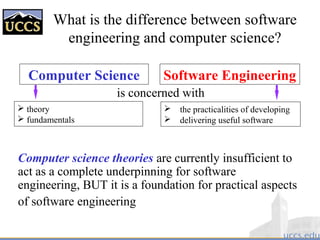
What is the difference between software
engineering and computer science?
Computer Science Software Engineering
is concerned with
Computer science theories are currently insufficient to
act as a complete underpinning for software
engineering, BUT it is a foundation for practical aspects
of software engineering
 theory
 fundamentals
 the practicalities of developing
 delivering useful software
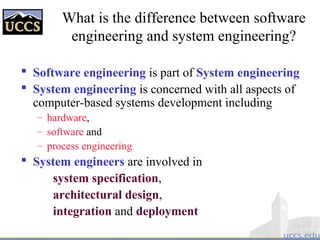
What is the difference between software
engineering and system engineering?
 Software engineering is part of System engineering
 System engineering is concerned with all aspects of
computer-based systems development including
– hardware,
– software and
– process engineering
 System engineers are involved in
system specification,
architectural design,
integration and deployment
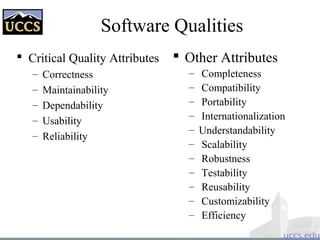
Software Qualities
 Critical Quality Attributes
– Correctness
– Maintainability
– Dependability
– Usability
– Reliability
 Other Attributes
– Completeness
– Compatibility
– Portability
– Internationalization
– Understandability
– Scalability
– Robustness
– Testability
– Reusability
– Customizability
– Efficiency
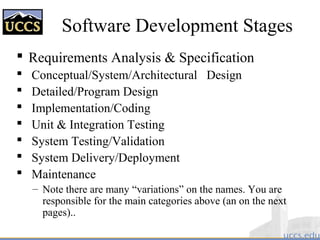
Software Development Stages
 Requirements Analysis & Specification
 Conceptual/System/Architectural Design
 Detailed/Program Design
 Implementation/Coding
 Unit & Integration Testing
 System Testing/Validation
 System Delivery/Deployment
 Maintenance
– Note there are many “variations” on the names. You are
responsible for the main categories above (an on the next
pages)..
16
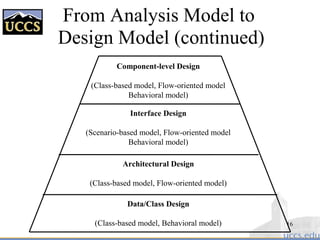
From Analysis Model to
Design Model (continued)
Data/Class Design
(Class-based model, Behavioral model)
Architectural Design
(Class-based model, Flow-oriented model)
Interface Design
(Scenario-based model, Flow-oriented model
Behavioral model)
Component-level Design
(Class-based model, Flow-oriented model
Behavioral model)
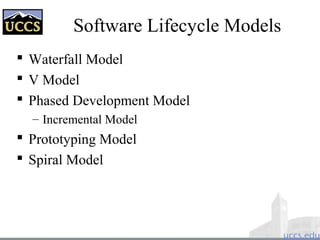
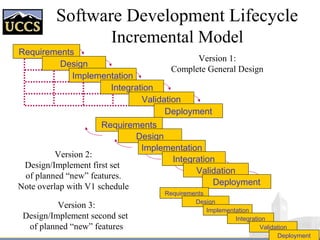
Software Lifecycle Models
 Waterfall Model
 V Model
 Phased Development Model
– Incremental Model
 Prototyping Model
 Spiral Model
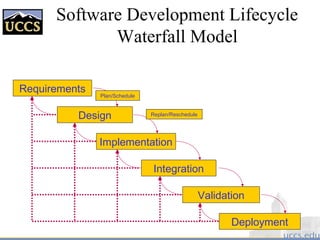
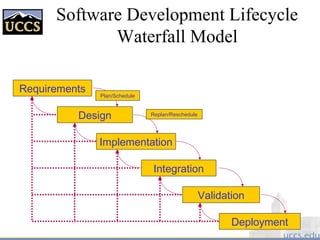
Software Development Lifecycle
Waterfall Model
Requirements
Design
Implementation
Integration
Validation
Deployment
Plan/Schedule
Replan/Reschedule
V Model
REQUIREMENTS
ANALYSIS
SYSTEM
DESIGN
PROGRAM
DESIGN
CODING
UNIT & INTE-
GRATION TESTING
SYSTEM
TESTING
ACCEPTANCE
TESTING
OPERATION
& MAINTENANCE
Verify design
Validate requirements
[Pfleeger 98]
Phased Development Model
Development systems
Production systems
DEVELOPERSUSERS
Build Release 1
Use Release 1
Build Release 2
Use Release 2
Build Release 3
Use Release 3
Time
[Pfleeger 98]
Software Development Lifecycle
Incremental Model
Requirements
Design
Implementation
Integration
Validation
Deployment
Requirements
Design
Implementation
Integration
Validation
Deployment
Requirements
Design
Implementation
Integration
Validation
Deployment
Version 1:
Complete General Design
Version 2:
Design/Implement first set
of planned “new” features.
Note overlap with V1 schedule
Version 3:
Design/Implement second set
of planned “new” features
Prototyping Model
[Pressman 97]
Listen to
Customer
Customer
Test-drives
Mock-up
Build/Revise
Mock-Up
Prototyping Model
LIST OF
REVISIONS
LIST OF
REVISIONS
LIST OF
REVISIONS
PROTOTYPE
REQUIREMENTS
PROTOTYPE
DESIGN
PROTOTYPE
SYSTEM
TEST
DELIVERED
SYSTEMSYSTEM
REQUIREMENTS
(sometimes informal
or incomplete)
revise
prototype
user/
customer
review
[Pfleeger 98]
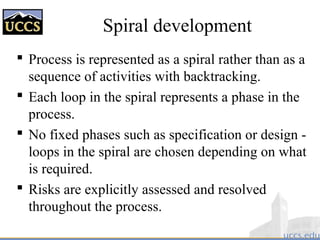
Spiral development
 Process is represented as a spiral rather than as a
sequence of activities with backtracking.
 Each loop in the spiral represents a phase in the
process.
 No fixed phases such as specification or design -
loops in the spiral are chosen depending on what
is required.
 Risks are explicitly assessed and resolved
throughout the process.
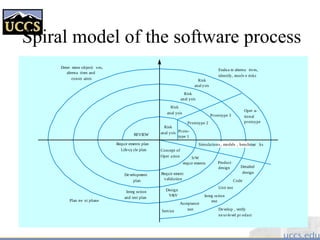
Spiral model of the software process
Risk
anal ysis
Risk
anal ysis
Risk
anal ysis
Risk
anal ysis Proto-
type 1
Prototype 2
Prototype 3
Oper a-
tional
protoype
Concept of
Oper ation
Simulations , models , benchmar ks
S/W
requir ements
Requir ement
validation
Design
V&V
Product
design Detailed
design
Code
Unit test
Integ ration
test
Acceptance
testService Develop , verify
next-level pr oduct
Evalua te alterna tives,
identify, resolv e risks
Deter mine objecti ves,
alterna tives and
constr aints
Plan ne xt phase
Integ ration
and test plan
Development
plan
Requir ements plan
Life-cy cle plan
REVIEW
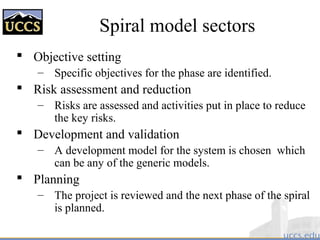
Spiral model sectors
 Objective setting
– Specific objectives for the phase are identified.
 Risk assessment and reduction
– Risks are assessed and activities put in place to reduce
the key risks.
 Development and validation
– A development model for the system is chosen which
can be any of the generic models.
 Planning
– The project is reviewed and the next phase of the spiral
is planned.
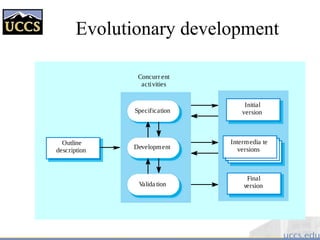
Evolutionary development
 Exploratory development
– Objective is to work with customers and to evolve a
final system from an initial outline specification.
Should start with well-understood requirements and
add new features as proposed by the customer.
 Throw-away prototyping
– Objective is to understand the system requirements.
Should start with poorly understood requirements to
clarify what is really needed.
Evolutionary development
Concurr ent
activities
Valida tion
Final
version
Development
Intermedia te
versions
Specification
Initial
version
Outline
description
Evolutionary development
 Problems
– Lack of process visibility;
– Systems are often poorly structured;
– Special skills (e.g. in languages for rapid prototyping)
may be required.
 Applicability
– For small or medium-size interactive systems;
– For parts of large systems (e.g. the user interface);
– For short-lifetime systems.
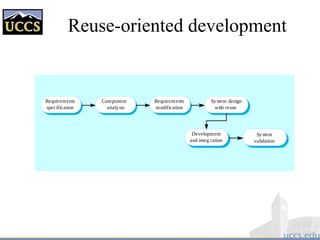
Component-based software
engineering
 Based on systematic reuse where systems are
integrated from existing components or COTS
(Commercial-off-the-shelf) systems.
 Process stages
– Component analysis;
– Requirements modification;
– System design with reuse;
– Development and integration.
 This approach is becoming increasingly used as
component standards have emerged.
Reuse-oriented development
Requirements
specification
Component
analysis
Development
and integ ration
System design
with reuse
Requirements
modification
System
validation
Component-Based Development
 Develop generally applicable components of a
reasonable size and reuse them across systems
 Make sure they are adaptable to varying contexts
 Extend the idea beyond code to other
development artifacts
 Question: what comes first?
– Integration, then deployment
– Deployment, then integration
Different Flavors of Components
 Third-party software “pieces”
 Plug-ins / add-ins
 Applets
 Frameworks
 Open Systems
 Distributed object infrastructures
 Compound documents
 Legacy systems
Process iteration
 System requirements ALWAYS evolve in the
course of a project so process iteration where
earlier stages are reworked is always part of the
process for large systems.
 Iteration can be applied to any of the generic
process models.
 Two (related) approaches
– Incremental delivery;
– Spiral development.
Incremental delivery
 Rather than deliver the system as a single
delivery, the development and delivery is
broken down into increments with each
increment delivering part of the required
functionality.
 User requirements are prioritised and the
highest priority requirements are included in
early increments.
 Once the development of an increment is
started, the requirements are frozen though
requirements for later increments can continue
to evolve.
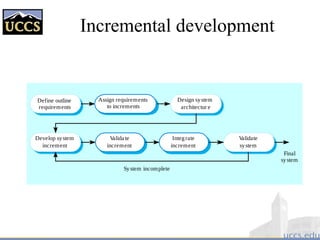
Incremental development
Valida te
increment
Develop system
increment
Design system
architectur e
Integrate
increment
Validate
system
Define outline
requirements
Assign requirements
to increments
System incomplete
Final
system
Incremental development
advantages
 Customer value can be delivered with each
increment so system functionality is available
earlier.
 Early increments act as a prototype to help elicit
requirements for later increments.
 Lower risk of overall project failure.
 The highest priority system services tend to
receive the most testing.
Extreme programming
 An approach to development based on the
development and delivery of very small
increments of functionality.
 Relies on constant code improvement, user
involvement in the development team and
pairwise programming.
 Covered in Chapter 17
Software Development Lifecycle
Waterfall Model
Requirements
Design
Implementation
Integration
Validation
Deployment
Plan/Schedule
Replan/Reschedule
Software specification
 The process of establishing what services are
required and the constraints on the system’s
operation and development.
 Requirements engineering process
– Feasibility study;
– Requirements elicitation and analysis;
– Requirements specification;
– Requirements validation.
Requirements
 Problem Definition → Requirements/Specification
– determine exactly what the customer and user need (maybe want)
– Requirements develop a contract with the customer
– Specification say what the software product is to do
 Difficulties
– client is computer/software illiterate (no idea what is doable)
– client asks for wrong product (want vs need)
– client is computer/software literate (specifies solution not need)
– specifications are ambiguous, inconsistent, incomplete
 Studies have shown that the percentage of defects
originating during requirements engineering is estimated at
more than 50 percent. The total percentage of project
budget due to requirements defects is 25 to 40 percent.
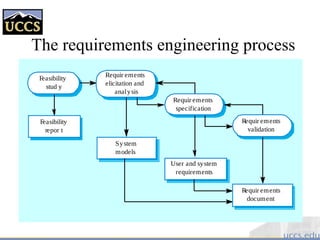
The requirements engineering process
Feasibility
stud y
Requir ements
elicitation and
analysis
Requir ements
specification
Requir ements
validation
Feasibility
repor t
System
models
User and system
requirements
Requir ements
document
Software design and implementation
 The process of converting the system
specification into an executable system.
 Software design
– Design a software structure that realises the
specification;
 Implementation
– Translate this structure into an executable program;
 The activities of design and implementation are
closely related and may be inter-leaved.
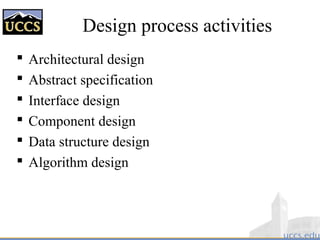
Design process activities
 Architectural design
 Abstract specification
 Interface design
 Component design
 Data structure design
 Algorithm design
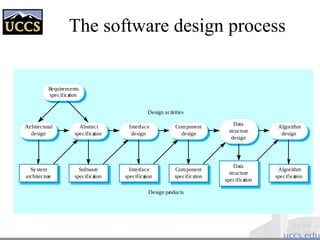
The software design process
Architectural
design
Abstract
specification
Interface
design
Component
design
Data
structure
design
Algorithm
design
System
architecture
Software
specification
Interface
specification
Component
specification
Data
structure
specification
Algorithm
specification
Requirements
specification
Design activities
Design products
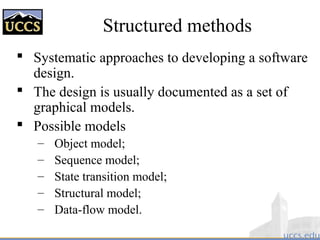
Structured methods
 Systematic approaches to developing a software
design.
 The design is usually documented as a set of
graphical models.
 Possible models
– Object model;
– Sequence model;
– State transition model;
– Structural model;
– Data-flow model.
Architecture vs. Design
[Perry & Wolf 1992]
 Architecture is concerned with the selection of
architectural elements, their interactions, and the
constraints on those elements and their interactions
necessary to provide a framework in which to satisfy
the requirements and serve as a basis for the design.
 Design is concerned with the modularization and
detailed interfaces of the design elements, their
algorithms and procedures, and the data types needed
to support the architecture and to satisfy the
requirements.
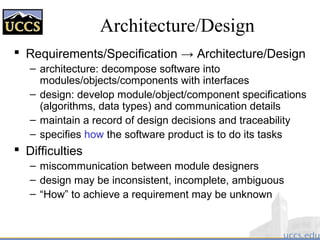
Architecture/Design
 Requirements/Specification → Architecture/Design
– architecture: decompose software into
modules/objects/components with interfaces
– design: develop module/object/component specifications
(algorithms, data types) and communication details
– maintain a record of design decisions and traceability
– specifies how the software product is to do its tasks
 Difficulties
– miscommunication between module designers
– design may be inconsistent, incomplete, ambiguous
– “How” to achieve a requirement may be unknown
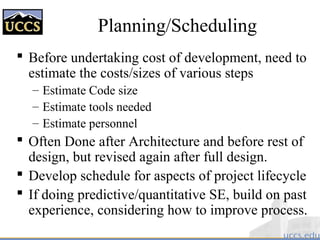
Planning/Scheduling
 Before undertaking cost of development, need to
estimate the costs/sizes of various steps
– Estimate Code size
– Estimate tools needed
– Estimate personnel
 Often Done after Architecture and before rest of
design, but revised again after full design.
 Develop schedule for aspects of project lifecycle
 If doing predictive/quantitative SE, build on past
experience, considering how to improve process.
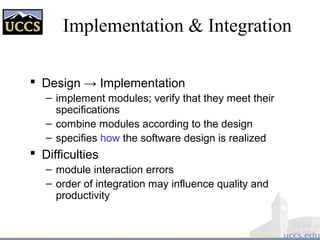
Implementation & Integration
 Design → Implementation
– implement modules; verify that they meet their
specifications
– combine modules according to the design
– specifies how the software design is realized
 Difficulties
– module interaction errors
– order of integration may influence quality and
productivity
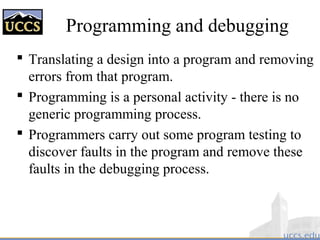
Programming and debugging
 Translating a design into a program and removing
errors from that program.
 Programming is a personal activity - there is no
generic programming process.
 Programmers carry out some program testing to
discover faults in the program and remove these
faults in the debugging process.
The debugging process
Locate
error
Design
error repair
Repair
error
Re-test
pr ogram
Software validation
 Verification and validation (V & V) is intended
to show that a system conforms to its
specification and meets the requirements of the
system customer.
 Involves checking and review processes and
system testing.
 System testing involves executing the system
with test cases that are derived from the
specification of the real data to be processed by
the system.
Verification and Validation
 Analysis
– Static
– “Science”
– Formal verification
– Informal reviews and walkthroughs
 Testing
– Dynamic
– “Engineering”
– White box vs. black box
– Structural vs. behavioral
– Issues of test adequacy
The testing process
Component
testing
System
testing
Acceptance
testing
Testing stages
 Component or unit testing
– Individual components are tested independently;
– Components may be functions or objects or coherent
groupings of these entities.
 System testing
– Testing of the system as a whole. Testing of
emergent properties is particularly important.
 Acceptance testing
– Testing with customer data to check that the system
meets the customer’s needs.
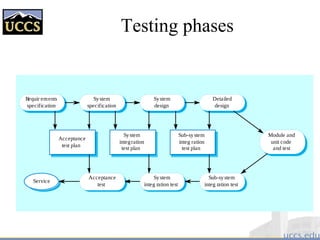
Testing phases
Requir ements
specification
System
specification
System
design
Detailed
design
Module and
unit code
and test
Sub-system
integ ration
test plan
System
integration
test plan
Acceptance
test plan
Service
Acceptance
test
System
integ ration test
Sub-system
integ ration test
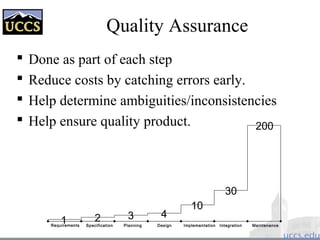
Quality Assurance
 Done as part of each step
 Reduce costs by catching errors early.
 Help determine ambiguities/inconsistencies
 Help ensure quality product.
Requirements Specification Planning Design Implementation Integration Maintenance
1 2 3 4
10
30
200
Deployment
 Completed End-User Documentation
– Separate from Developer documentation
 Installation Process(es)
 Customer test procedures
 Support Processes (help desk, etc…)
 Trouble Tracking
 Repair/rework to address bugs
 Regression testing (as bugs are fixed)
Maintenance & Evolution
 Operation → Change
– maintain software during/after user operation
– determine whether the product still functions correctly
 Difficulties
– Rigid or fragile designs
– lack of documentation
– personnel turnover
Software evolution
 Software is inherently flexible and can change.
 As requirements change through changing
business circumstances, the software that supports
the business must also evolve and change.
 Although there has been a demarcation between
development and evolution (maintenance) this is
increasingly irrelevant as fewer and fewer
systems are completely new.
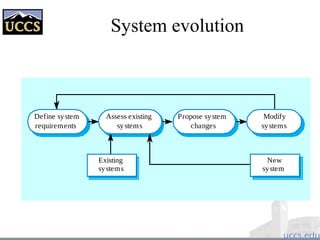
System evolution
Assess existing
systems
Define system
requirements
Propose system
changes
Modify
systems
New
system
Existing
systems
Why I include CASE Tools
 Computer Aides Software
Engineering tools support
good SE processes (e.g. UML)
 Some tools absolute
requirement for scaling e.g.
build and configuration
management.
 Integrated CASE (ICASE)
tools embody good processes
and improve productivity (E.g.
Rational tool set)
 Some tools (e.g. debuggers,
Purify) do almost impossible
for humans.
 But.. Tools change
– No SE tools from my first
3 jobs exist (except
Fortran/C languages)
– I use regularly use 3 SE
tools from my next set of
jobs.
– Other tools I learned have
been replaced with similar
but expanded concepts..
Understanding today;s
tools gives a basis for
learning future ones.
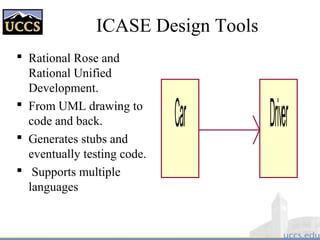
ICASE Design Tools
 Rational Rose and
Rational Unified
Development.
 From UML drawing to
code and back.
 Generates stubs and
eventually testing code.
 Supports multiple
languages
Car Driver
Configuration Management
 CM is a discipline whose goal is to control
changes to large software through the
functions of
– Component identification
– Change tracking
– Version selection and baselining
– Managing simultaneous updates (team work)
– Build processes with automated regression
testing
– Software manufacture
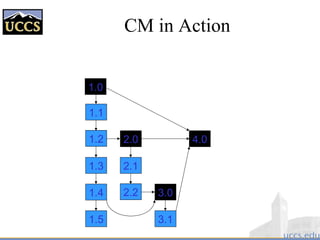
CM in Action
1.1
1.2
1.4
2.0
2.1
2.2
3.1
3.0
1.5
4.0
1.0
1.3
Build Tools
 Necessary for large projects. Keep track of what depends
upon on what, and what needs recompiled or regenerated
when things change.
 Important even for small 1-person projects as soon as you
have multiple files.
 Can do much more than just “compile”, can generate
document (if using code-based docs), generate
manufactured code (e.g. SOAP interfaces), even send
emails or suggest alternatives.
 E.g. in our “IUE” project, edit some files compile was one in
seconds, edit another and a rebuild taking days would be needed. If
more than 30 files impacted, our make process recommend a new
“branch” to avoid conflicts!
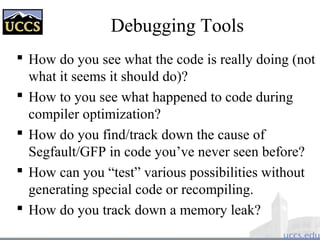
Debugging Tools
 How do you see what the code is really doing (not
what it seems it should do)?
 How to you see what happened to code during
compiler optimization?
 How do you find/track down the cause of
Segfault/GFP in code you’ve never seen before?
 How can you “test” various possibilities without
generating special code or recompiling.
 How do you track down a memory leak?
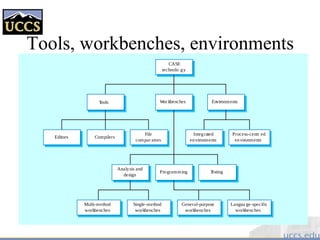
Tools, workbenches, environments
Single-method
workbenches
General-purpose
workbenches
Multi-method
workbenches
Langua ge-specific
workbenches
Programming Testing
Analysis and
design
Integrated
environments
Process-centr ed
environments
File
compar ators
CompilersEditors
EnvironmentsWor kbenchesTools
CASE
technolo gy
The Rational Unified Process
 A modern process model derived from the work
on the UML and associated process.
 Normally described from 3 perspectives
– A dynamic perspective that shows phases over time;
– A static perspective that shows process activities;
– A practive perspective that suggests good practice.
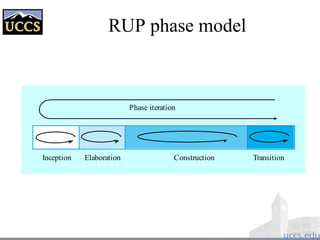
RUP phase model
Phase iteration
Inception Elaboration Construction Transition
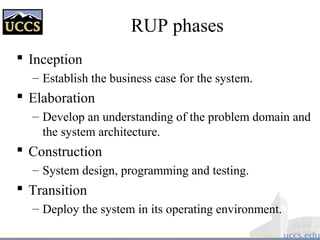
RUP phases
 Inception
– Establish the business case for the system.
 Elaboration
– Develop an understanding of the problem domain and
the system architecture.
 Construction
– System design, programming and testing.
 Transition
– Deploy the system in its operating environment.
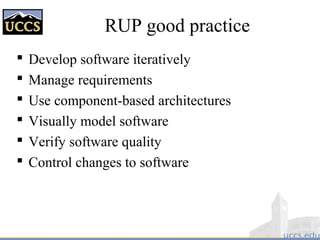
RUP good practice
 Develop software iteratively
 Manage requirements
 Use component-based architectures
 Visually model software
 Verify software quality
 Control changes to software
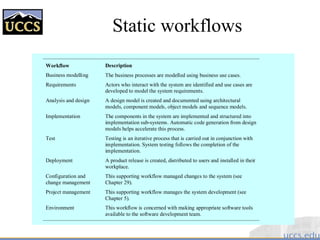
Static workflows
Workflow Description
Business modelling The business processes are modelled using business use cases.
Requirements Actors who interact with the system are identified and use cases are
developed to model the system requirements.
Analysis and design A design model is created and documented using architectural
models, component models, object models and sequence models.
Implementation The components in the system are implemented and structured into
implementation sub-systems. Automatic code generation from design
models helps accelerate this process.
Test Testing is an iterative process that is carried out in conjunction with
implementation. System testing follows the completion of the
implementation.
Deployment A product release is created, distributed to users and installed in their
workplace.
Configuration and
change management
This supporting workflow managed changes to the system (see
Chapter 29).
Project management This supporting workflow manages the system development (see
Chapter 5).
Environment This workflow is concerned with making appropriate software tools
available to the software development team.
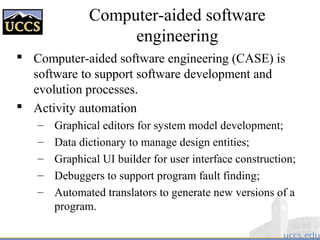
Computer-aided software
engineering
 Computer-aided software engineering (CASE) is
software to support software development and
evolution processes.
 Activity automation
– Graphical editors for system model development;
– Data dictionary to manage design entities;
– Graphical UI builder for user interface construction;
– Debuggers to support program fault finding;
– Automated translators to generate new versions of a
program.
Case technology
 Case technology has led to significant
improvements in the software process. However,
these are not the order of magnitude
improvements that were once predicted
– Software engineering requires creative thought - this is
not readily automated;
– Software engineering is a team activity and, for large
projects, much time is spent in team interactions.
CASE technology does not really support these.
CASE classification
 Classification helps us understand the different types
of CASE tools and their support for process activities.
 Functional perspective
– Tools are classified according to their specific function.
 Process perspective
– Tools are classified according to process activities that
are supported.
 Integration perspective
– Tools are classified according to their organisation into
integrated units.
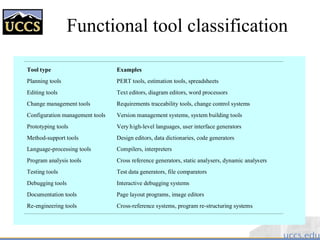
Functional tool classification
Tool type Examples
Planning tools PERT tools, estimation tools, spreadsheets
Editing tools Text editors, diagram editors, word processors
Change management tools Requirements traceability tools, change control systems
Configuration management tools Version management systems, system building tools
Prototyping tools Very high-level languages, user interface generators
Method-support tools Design editors, data dictionaries, code generators
Language-processing tools Compilers, interpreters
Program analysis tools Cross reference generators, static analysers, dynamic analysers
Testing tools Test data generators, file comparators
Debugging tools Interactive debugging systems
Documentation tools Page layout programs, image editors
Re-engineering tools Cross-reference systems, program re-structuring systems
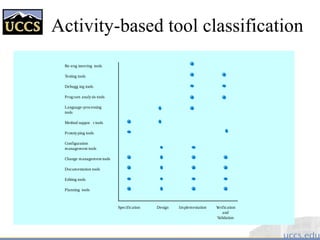
Activity-based tool classification
Specification Design Implementation Verification
and
Validation
Re-eng ineering tools
Testing tools
Debugg ing tools
Program analysis tools
Language-processing
tools
Method suppor t tools
Prototyping tools
Configuration
management tools
Change management tools
Documentation tools
Editing tools
Planning tools
CASE integration
 Tools
– Support individual process tasks such as design
consistency checking, text editing, etc.
 Workbenches
– Support a process phase such as specification or
design, Normally include a number of integrated
tools.
 Environments
– Support all or a substantial part of an entire software
process. Normally include several integrated
workbenches.
Boult’s view of SE
 SE must balance risks in software development process:
– Risks of error in
• requirements
• specification,
• design,
• implementation,
• and integration
– Risks of exceeding available resources
– Risks of being late on delivery or missing the market
 Don’t let push for formality dominate your process.
 Don’t let push for expedience destroy your process.
Software Process Qualities
 Process is reliable if it consistently leads to high-
quality products
 Process is robust if it can accommodate
unanticipated changes in tools and
environments
 Process performance is productivity
 Process is evolvable if it can accommodate new
management and organizational techniques
 Process is reusable if it can be applied across
projects and organizations
Assessing Software Qualities
 Qualities must be measurable/quantifiable
 Measurement requires that qualities be
precisely defined
 Improvement requires accurate and
consistent measurements
 For most SD groups, qualities are informally
defined and are difficult to assess
Software Engineering “Axioms”
 Adding developers to a project will likely result in further
delays and accumulated costs
 The longer a fault exists in software
– the more costly it is to detect and correct
– the less likely it is to be properly corrected
 Up to 70% of all faults detected in large-scale software
projects are introduced in requirements and design
– detecting the causes of those faults early may reduce their
resulting costs by a factor of 200 or more
 Basic tension of software engineering
– better, cheaper, faster — pick any two!
– functionality, scalability, performance — pick any two!
 Want/Need Management’s buy in to formal SE process.
 If you don’t document your process, you don’t have one!
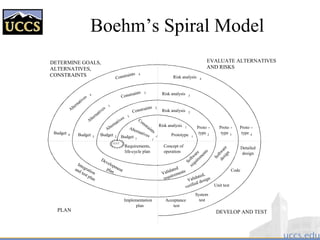
Boehm’s Spiral Model
PLAN DEVELOP AND TEST
DETERMINE GOALS,
ALTERNATIVES,
CONSTRAINTS
EVALUATE ALTERNATIVES
AND RISKS
Requirements,
life-cycle plan
Budget 1
Alternatives
1
Constraints
1
Risk analysis 1
Risk analysis 2
Risk analysis 3
Risk analysis 4
Constraints 2
Constraints 3
Constraints 4
Budget 2Budget 3
Budget 4
Alternatives 2
Alternatives 3
Alternatives 4
Prototype 1
Proto -
type 2
Proto -
type 3
Proto -
type 4
Concept of
operation
Software
requirem
ents
Validated
requirements
Developmentplan
Integration
and test plan
Software
design
Validated,
verified design
Detailed
design
Code
Unit test
System
testAcceptance
test
Implementation
plan
start
Key points
 Software processes are the activities involved in
producing and evolving a software system.
 Software process models are abstract representations
of these processes.
 General activities are specification, design and
implementation, validation and evolution.
 Generic process models describe the organisation of
software processes. Examples include the waterfall
model, evolutionary development and component-
based software engineering.
 Iterative process models describe the software process
as a cycle of activities.
Key points
 Requirements engineering is the process of developing
a software specification.
 Design and implementation processes transform the
specification to an executable program.
 Validation involves checking that the system meets to
its specification and user needs.
 Evolution is concerned with modifying the system
after it is in use.
 The Rational Unified Process is a generic process
model that separates activities from phases.
 CASE technology supports software process activities.

Lect 1- software engineering

  • 2.
    Key Ingredients insuccessful organizations People Technology Process
  • 3.
    A better view Processand Technology supporting people Processes Technology People Pyramids are stable. Wedges are not!
  • 5.
    What is software? Computer programs and associated documentation  Software products may be developed for a particular customer or may be developed for a general market  Software products may be – Generic - developed to be sold to a range of different customers – Custom- developed for a customer according to their specification
  • 6.
    Engineering  Engineering is… – The application of scientific principles and methods to the construction of useful structures & machines  Examples – Mechanical engineering – Computer engineering – Civil engineering – Chemical engineering – Electrical engineering – Nuclear engineering – Aeronautical engineering
  • 7.
  • 8.
    Software Engineering  Theterm is 48 years old: NATO Conferences – Garmisch, Germany, October 7-11, 1968 – Rome, Italy, October 27-31, 1969  The reality is it is finally beginning to arrive – Computer science one the scientific basis • Years of studies/experience/statistics provide basis too – Many aspects have been made systematic • Methods/methodologies/techniques • Languages • Tools • Processes
  • 9.
    Why Engineer Software?  The problem is complexity  Many sources, but size is a key: – Mozilla contains 3 Million lines of code – UNIX contains 4 million lines of code – Windows 2000 contains 108 lines of code  Second is role and combinatorics of “state”  Third is uncertainty of “inputs” and their timing  Fourth is the continuing changing “environment” and demands. Software engineering is about managing all the sources of complexity to produce effective software.
  • 10.
    Software Engineering ina Nutshell  Development of software systems whose size/complexity warrants team(s) of engineers – multi-person construction of multi-version software [Parnas 1987]  Scope – study of software process, development/management principles, techniques, tools and notations  Goal – production of quality software, delivered on time, within budget, satisfying customers’ requirements and users’ needs
  • 11.
    What does asoftware engineer do? Software engineers should – adopt a systematic and organised approach to all aspects of software development. – use appropriate tools and techniques depending on • the problem to be solved, • the development constraints and • the resources available – Understand and communicate processes for improved software development within their organization – Be effective team members and/or leaders. – Can be very technical or more managerial depending on organizational need.
  • 12.
    What is thedifference between software engineering and computer science? Computer Science Software Engineering is concerned with Computer science theories are currently insufficient to act as a complete underpinning for software engineering, BUT it is a foundation for practical aspects of software engineering  theory  fundamentals  the practicalities of developing  delivering useful software
  • 13.
    What is thedifference between software engineering and system engineering?  Software engineering is part of System engineering  System engineering is concerned with all aspects of computer-based systems development including – hardware, – software and – process engineering  System engineers are involved in system specification, architectural design, integration and deployment
  • 14.
    Software Qualities  CriticalQuality Attributes – Correctness – Maintainability – Dependability – Usability – Reliability  Other Attributes – Completeness – Compatibility – Portability – Internationalization – Understandability – Scalability – Robustness – Testability – Reusability – Customizability – Efficiency
  • 15.
    Software Development Stages Requirements Analysis & Specification  Conceptual/System/Architectural Design  Detailed/Program Design  Implementation/Coding  Unit & Integration Testing  System Testing/Validation  System Delivery/Deployment  Maintenance – Note there are many “variations” on the names. You are responsible for the main categories above (an on the next pages)..
  • 16.
    16 From Analysis Modelto Design Model (continued) Data/Class Design (Class-based model, Behavioral model) Architectural Design (Class-based model, Flow-oriented model) Interface Design (Scenario-based model, Flow-oriented model Behavioral model) Component-level Design (Class-based model, Flow-oriented model Behavioral model)
  • 17.
    Software Lifecycle Models Waterfall Model  V Model  Phased Development Model – Incremental Model  Prototyping Model  Spiral Model
  • 18.
    Software Development Lifecycle WaterfallModel Requirements Design Implementation Integration Validation Deployment Plan/Schedule Replan/Reschedule
  • 19.
    V Model REQUIREMENTS ANALYSIS SYSTEM DESIGN PROGRAM DESIGN CODING UNIT &INTE- GRATION TESTING SYSTEM TESTING ACCEPTANCE TESTING OPERATION & MAINTENANCE Verify design Validate requirements [Pfleeger 98]
  • 20.
    Phased Development Model Developmentsystems Production systems DEVELOPERSUSERS Build Release 1 Use Release 1 Build Release 2 Use Release 2 Build Release 3 Use Release 3 Time [Pfleeger 98]
  • 21.
    Software Development Lifecycle IncrementalModel Requirements Design Implementation Integration Validation Deployment Requirements Design Implementation Integration Validation Deployment Requirements Design Implementation Integration Validation Deployment Version 1: Complete General Design Version 2: Design/Implement first set of planned “new” features. Note overlap with V1 schedule Version 3: Design/Implement second set of planned “new” features
  • 22.
    Prototyping Model [Pressman 97] Listento Customer Customer Test-drives Mock-up Build/Revise Mock-Up
  • 23.
    Prototyping Model LIST OF REVISIONS LISTOF REVISIONS LIST OF REVISIONS PROTOTYPE REQUIREMENTS PROTOTYPE DESIGN PROTOTYPE SYSTEM TEST DELIVERED SYSTEMSYSTEM REQUIREMENTS (sometimes informal or incomplete) revise prototype user/ customer review [Pfleeger 98]
  • 24.
    Spiral development  Processis represented as a spiral rather than as a sequence of activities with backtracking.  Each loop in the spiral represents a phase in the process.  No fixed phases such as specification or design - loops in the spiral are chosen depending on what is required.  Risks are explicitly assessed and resolved throughout the process.
  • 25.
    Spiral model ofthe software process Risk anal ysis Risk anal ysis Risk anal ysis Risk anal ysis Proto- type 1 Prototype 2 Prototype 3 Oper a- tional protoype Concept of Oper ation Simulations , models , benchmar ks S/W requir ements Requir ement validation Design V&V Product design Detailed design Code Unit test Integ ration test Acceptance testService Develop , verify next-level pr oduct Evalua te alterna tives, identify, resolv e risks Deter mine objecti ves, alterna tives and constr aints Plan ne xt phase Integ ration and test plan Development plan Requir ements plan Life-cy cle plan REVIEW
  • 26.
    Spiral model sectors Objective setting – Specific objectives for the phase are identified.  Risk assessment and reduction – Risks are assessed and activities put in place to reduce the key risks.  Development and validation – A development model for the system is chosen which can be any of the generic models.  Planning – The project is reviewed and the next phase of the spiral is planned.
  • 27.
    Evolutionary development  Exploratorydevelopment – Objective is to work with customers and to evolve a final system from an initial outline specification. Should start with well-understood requirements and add new features as proposed by the customer.  Throw-away prototyping – Objective is to understand the system requirements. Should start with poorly understood requirements to clarify what is really needed.
  • 28.
    Evolutionary development Concurr ent activities Validation Final version Development Intermedia te versions Specification Initial version Outline description
  • 29.
    Evolutionary development  Problems –Lack of process visibility; – Systems are often poorly structured; – Special skills (e.g. in languages for rapid prototyping) may be required.  Applicability – For small or medium-size interactive systems; – For parts of large systems (e.g. the user interface); – For short-lifetime systems.
  • 30.
    Component-based software engineering  Basedon systematic reuse where systems are integrated from existing components or COTS (Commercial-off-the-shelf) systems.  Process stages – Component analysis; – Requirements modification; – System design with reuse; – Development and integration.  This approach is becoming increasingly used as component standards have emerged.
  • 31.
    Reuse-oriented development Requirements specification Component analysis Development and integration System design with reuse Requirements modification System validation
  • 32.
    Component-Based Development  Developgenerally applicable components of a reasonable size and reuse them across systems  Make sure they are adaptable to varying contexts  Extend the idea beyond code to other development artifacts  Question: what comes first? – Integration, then deployment – Deployment, then integration
  • 33.
    Different Flavors ofComponents  Third-party software “pieces”  Plug-ins / add-ins  Applets  Frameworks  Open Systems  Distributed object infrastructures  Compound documents  Legacy systems
  • 34.
    Process iteration  Systemrequirements ALWAYS evolve in the course of a project so process iteration where earlier stages are reworked is always part of the process for large systems.  Iteration can be applied to any of the generic process models.  Two (related) approaches – Incremental delivery; – Spiral development.
  • 35.
    Incremental delivery  Ratherthan deliver the system as a single delivery, the development and delivery is broken down into increments with each increment delivering part of the required functionality.  User requirements are prioritised and the highest priority requirements are included in early increments.  Once the development of an increment is started, the requirements are frozen though requirements for later increments can continue to evolve.
  • 36.
    Incremental development Valida te increment Developsystem increment Design system architectur e Integrate increment Validate system Define outline requirements Assign requirements to increments System incomplete Final system
  • 37.
    Incremental development advantages  Customervalue can be delivered with each increment so system functionality is available earlier.  Early increments act as a prototype to help elicit requirements for later increments.  Lower risk of overall project failure.  The highest priority system services tend to receive the most testing.
  • 38.
    Extreme programming  Anapproach to development based on the development and delivery of very small increments of functionality.  Relies on constant code improvement, user involvement in the development team and pairwise programming.  Covered in Chapter 17
  • 39.
    Software Development Lifecycle WaterfallModel Requirements Design Implementation Integration Validation Deployment Plan/Schedule Replan/Reschedule
  • 40.
    Software specification  Theprocess of establishing what services are required and the constraints on the system’s operation and development.  Requirements engineering process – Feasibility study; – Requirements elicitation and analysis; – Requirements specification; – Requirements validation.
  • 41.
    Requirements  Problem Definition→ Requirements/Specification – determine exactly what the customer and user need (maybe want) – Requirements develop a contract with the customer – Specification say what the software product is to do  Difficulties – client is computer/software illiterate (no idea what is doable) – client asks for wrong product (want vs need) – client is computer/software literate (specifies solution not need) – specifications are ambiguous, inconsistent, incomplete  Studies have shown that the percentage of defects originating during requirements engineering is estimated at more than 50 percent. The total percentage of project budget due to requirements defects is 25 to 40 percent.
  • 42.
    The requirements engineeringprocess Feasibility stud y Requir ements elicitation and analysis Requir ements specification Requir ements validation Feasibility repor t System models User and system requirements Requir ements document
  • 43.
    Software design andimplementation  The process of converting the system specification into an executable system.  Software design – Design a software structure that realises the specification;  Implementation – Translate this structure into an executable program;  The activities of design and implementation are closely related and may be inter-leaved.
  • 44.
    Design process activities Architectural design  Abstract specification  Interface design  Component design  Data structure design  Algorithm design
  • 45.
    The software designprocess Architectural design Abstract specification Interface design Component design Data structure design Algorithm design System architecture Software specification Interface specification Component specification Data structure specification Algorithm specification Requirements specification Design activities Design products
  • 46.
    Structured methods  Systematicapproaches to developing a software design.  The design is usually documented as a set of graphical models.  Possible models – Object model; – Sequence model; – State transition model; – Structural model; – Data-flow model.
  • 47.
    Architecture vs. Design [Perry& Wolf 1992]  Architecture is concerned with the selection of architectural elements, their interactions, and the constraints on those elements and their interactions necessary to provide a framework in which to satisfy the requirements and serve as a basis for the design.  Design is concerned with the modularization and detailed interfaces of the design elements, their algorithms and procedures, and the data types needed to support the architecture and to satisfy the requirements.
  • 48.
    Architecture/Design  Requirements/Specification →Architecture/Design – architecture: decompose software into modules/objects/components with interfaces – design: develop module/object/component specifications (algorithms, data types) and communication details – maintain a record of design decisions and traceability – specifies how the software product is to do its tasks  Difficulties – miscommunication between module designers – design may be inconsistent, incomplete, ambiguous – “How” to achieve a requirement may be unknown
  • 49.
    Planning/Scheduling  Before undertakingcost of development, need to estimate the costs/sizes of various steps – Estimate Code size – Estimate tools needed – Estimate personnel  Often Done after Architecture and before rest of design, but revised again after full design.  Develop schedule for aspects of project lifecycle  If doing predictive/quantitative SE, build on past experience, considering how to improve process.
  • 50.
    Implementation & Integration Design → Implementation – implement modules; verify that they meet their specifications – combine modules according to the design – specifies how the software design is realized  Difficulties – module interaction errors – order of integration may influence quality and productivity
  • 51.
    Programming and debugging Translating a design into a program and removing errors from that program.  Programming is a personal activity - there is no generic programming process.  Programmers carry out some program testing to discover faults in the program and remove these faults in the debugging process.
  • 52.
    The debugging process Locate error Design errorrepair Repair error Re-test pr ogram
  • 53.
    Software validation  Verificationand validation (V & V) is intended to show that a system conforms to its specification and meets the requirements of the system customer.  Involves checking and review processes and system testing.  System testing involves executing the system with test cases that are derived from the specification of the real data to be processed by the system.
  • 54.
    Verification and Validation Analysis – Static – “Science” – Formal verification – Informal reviews and walkthroughs  Testing – Dynamic – “Engineering” – White box vs. black box – Structural vs. behavioral – Issues of test adequacy
  • 55.
  • 56.
    Testing stages  Componentor unit testing – Individual components are tested independently; – Components may be functions or objects or coherent groupings of these entities.  System testing – Testing of the system as a whole. Testing of emergent properties is particularly important.  Acceptance testing – Testing with customer data to check that the system meets the customer’s needs.
  • 57.
    Testing phases Requir ements specification System specification System design Detailed design Moduleand unit code and test Sub-system integ ration test plan System integration test plan Acceptance test plan Service Acceptance test System integ ration test Sub-system integ ration test
  • 58.
    Quality Assurance  Doneas part of each step  Reduce costs by catching errors early.  Help determine ambiguities/inconsistencies  Help ensure quality product. Requirements Specification Planning Design Implementation Integration Maintenance 1 2 3 4 10 30 200
  • 59.
    Deployment  Completed End-UserDocumentation – Separate from Developer documentation  Installation Process(es)  Customer test procedures  Support Processes (help desk, etc…)  Trouble Tracking  Repair/rework to address bugs  Regression testing (as bugs are fixed)
  • 60.
    Maintenance & Evolution Operation → Change – maintain software during/after user operation – determine whether the product still functions correctly  Difficulties – Rigid or fragile designs – lack of documentation – personnel turnover
  • 61.
    Software evolution  Softwareis inherently flexible and can change.  As requirements change through changing business circumstances, the software that supports the business must also evolve and change.  Although there has been a demarcation between development and evolution (maintenance) this is increasingly irrelevant as fewer and fewer systems are completely new.
  • 62.
    System evolution Assess existing systems Definesystem requirements Propose system changes Modify systems New system Existing systems
  • 63.
    Why I includeCASE Tools  Computer Aides Software Engineering tools support good SE processes (e.g. UML)  Some tools absolute requirement for scaling e.g. build and configuration management.  Integrated CASE (ICASE) tools embody good processes and improve productivity (E.g. Rational tool set)  Some tools (e.g. debuggers, Purify) do almost impossible for humans.  But.. Tools change – No SE tools from my first 3 jobs exist (except Fortran/C languages) – I use regularly use 3 SE tools from my next set of jobs. – Other tools I learned have been replaced with similar but expanded concepts.. Understanding today;s tools gives a basis for learning future ones.
  • 64.
    ICASE Design Tools Rational Rose and Rational Unified Development.  From UML drawing to code and back.  Generates stubs and eventually testing code.  Supports multiple languages Car Driver
  • 65.
    Configuration Management  CMis a discipline whose goal is to control changes to large software through the functions of – Component identification – Change tracking – Version selection and baselining – Managing simultaneous updates (team work) – Build processes with automated regression testing – Software manufacture
  • 66.
  • 67.
    Build Tools  Necessaryfor large projects. Keep track of what depends upon on what, and what needs recompiled or regenerated when things change.  Important even for small 1-person projects as soon as you have multiple files.  Can do much more than just “compile”, can generate document (if using code-based docs), generate manufactured code (e.g. SOAP interfaces), even send emails or suggest alternatives.  E.g. in our “IUE” project, edit some files compile was one in seconds, edit another and a rebuild taking days would be needed. If more than 30 files impacted, our make process recommend a new “branch” to avoid conflicts!
  • 68.
    Debugging Tools  Howdo you see what the code is really doing (not what it seems it should do)?  How to you see what happened to code during compiler optimization?  How do you find/track down the cause of Segfault/GFP in code you’ve never seen before?  How can you “test” various possibilities without generating special code or recompiling.  How do you track down a memory leak?
  • 69.
    Tools, workbenches, environments Single-method workbenches General-purpose workbenches Multi-method workbenches Language-specific workbenches Programming Testing Analysis and design Integrated environments Process-centr ed environments File compar ators CompilersEditors EnvironmentsWor kbenchesTools CASE technolo gy
  • 70.
    The Rational UnifiedProcess  A modern process model derived from the work on the UML and associated process.  Normally described from 3 perspectives – A dynamic perspective that shows phases over time; – A static perspective that shows process activities; – A practive perspective that suggests good practice.
  • 71.
    RUP phase model Phaseiteration Inception Elaboration Construction Transition
  • 72.
    RUP phases  Inception –Establish the business case for the system.  Elaboration – Develop an understanding of the problem domain and the system architecture.  Construction – System design, programming and testing.  Transition – Deploy the system in its operating environment.
  • 73.
    RUP good practice Develop software iteratively  Manage requirements  Use component-based architectures  Visually model software  Verify software quality  Control changes to software
  • 74.
    Static workflows Workflow Description Businessmodelling The business processes are modelled using business use cases. Requirements Actors who interact with the system are identified and use cases are developed to model the system requirements. Analysis and design A design model is created and documented using architectural models, component models, object models and sequence models. Implementation The components in the system are implemented and structured into implementation sub-systems. Automatic code generation from design models helps accelerate this process. Test Testing is an iterative process that is carried out in conjunction with implementation. System testing follows the completion of the implementation. Deployment A product release is created, distributed to users and installed in their workplace. Configuration and change management This supporting workflow managed changes to the system (see Chapter 29). Project management This supporting workflow manages the system development (see Chapter 5). Environment This workflow is concerned with making appropriate software tools available to the software development team.
  • 75.
    Computer-aided software engineering  Computer-aidedsoftware engineering (CASE) is software to support software development and evolution processes.  Activity automation – Graphical editors for system model development; – Data dictionary to manage design entities; – Graphical UI builder for user interface construction; – Debuggers to support program fault finding; – Automated translators to generate new versions of a program.
  • 76.
    Case technology  Casetechnology has led to significant improvements in the software process. However, these are not the order of magnitude improvements that were once predicted – Software engineering requires creative thought - this is not readily automated; – Software engineering is a team activity and, for large projects, much time is spent in team interactions. CASE technology does not really support these.
  • 77.
    CASE classification  Classificationhelps us understand the different types of CASE tools and their support for process activities.  Functional perspective – Tools are classified according to their specific function.  Process perspective – Tools are classified according to process activities that are supported.  Integration perspective – Tools are classified according to their organisation into integrated units.
  • 78.
    Functional tool classification Tooltype Examples Planning tools PERT tools, estimation tools, spreadsheets Editing tools Text editors, diagram editors, word processors Change management tools Requirements traceability tools, change control systems Configuration management tools Version management systems, system building tools Prototyping tools Very high-level languages, user interface generators Method-support tools Design editors, data dictionaries, code generators Language-processing tools Compilers, interpreters Program analysis tools Cross reference generators, static analysers, dynamic analysers Testing tools Test data generators, file comparators Debugging tools Interactive debugging systems Documentation tools Page layout programs, image editors Re-engineering tools Cross-reference systems, program re-structuring systems
  • 79.
    Activity-based tool classification SpecificationDesign Implementation Verification and Validation Re-eng ineering tools Testing tools Debugg ing tools Program analysis tools Language-processing tools Method suppor t tools Prototyping tools Configuration management tools Change management tools Documentation tools Editing tools Planning tools
  • 80.
    CASE integration  Tools –Support individual process tasks such as design consistency checking, text editing, etc.  Workbenches – Support a process phase such as specification or design, Normally include a number of integrated tools.  Environments – Support all or a substantial part of an entire software process. Normally include several integrated workbenches.
  • 81.
    Boult’s view ofSE  SE must balance risks in software development process: – Risks of error in • requirements • specification, • design, • implementation, • and integration – Risks of exceeding available resources – Risks of being late on delivery or missing the market  Don’t let push for formality dominate your process.  Don’t let push for expedience destroy your process.
  • 82.
    Software Process Qualities Process is reliable if it consistently leads to high- quality products  Process is robust if it can accommodate unanticipated changes in tools and environments  Process performance is productivity  Process is evolvable if it can accommodate new management and organizational techniques  Process is reusable if it can be applied across projects and organizations
  • 83.
    Assessing Software Qualities Qualities must be measurable/quantifiable  Measurement requires that qualities be precisely defined  Improvement requires accurate and consistent measurements  For most SD groups, qualities are informally defined and are difficult to assess
  • 84.
    Software Engineering “Axioms” Adding developers to a project will likely result in further delays and accumulated costs  The longer a fault exists in software – the more costly it is to detect and correct – the less likely it is to be properly corrected  Up to 70% of all faults detected in large-scale software projects are introduced in requirements and design – detecting the causes of those faults early may reduce their resulting costs by a factor of 200 or more  Basic tension of software engineering – better, cheaper, faster — pick any two! – functionality, scalability, performance — pick any two!  Want/Need Management’s buy in to formal SE process.  If you don’t document your process, you don’t have one!
  • 85.
    Boehm’s Spiral Model PLANDEVELOP AND TEST DETERMINE GOALS, ALTERNATIVES, CONSTRAINTS EVALUATE ALTERNATIVES AND RISKS Requirements, life-cycle plan Budget 1 Alternatives 1 Constraints 1 Risk analysis 1 Risk analysis 2 Risk analysis 3 Risk analysis 4 Constraints 2 Constraints 3 Constraints 4 Budget 2Budget 3 Budget 4 Alternatives 2 Alternatives 3 Alternatives 4 Prototype 1 Proto - type 2 Proto - type 3 Proto - type 4 Concept of operation Software requirem ents Validated requirements Developmentplan Integration and test plan Software design Validated, verified design Detailed design Code Unit test System testAcceptance test Implementation plan start
  • 86.
    Key points  Softwareprocesses are the activities involved in producing and evolving a software system.  Software process models are abstract representations of these processes.  General activities are specification, design and implementation, validation and evolution.  Generic process models describe the organisation of software processes. Examples include the waterfall model, evolutionary development and component- based software engineering.  Iterative process models describe the software process as a cycle of activities.
  • 87.
    Key points  Requirementsengineering is the process of developing a software specification.  Design and implementation processes transform the specification to an executable program.  Validation involves checking that the system meets to its specification and user needs.  Evolution is concerned with modifying the system after it is in use.  The Rational Unified Process is a generic process model that separates activities from phases.  CASE technology supports software process activities.

Editor's Notes

  • #15 Definition of Critical Attributes: Maintainability - possible to evolve software to meet changing needs Dependability - includes range of characteristics: reliability, security and safety; should not cause physical or economic damage in the event of system failure Efficiency - should not make wasteful use of system resources such as memory and process cycles Usability - should have appropriate user interface and adequate documentation Other Attributes: Safety Security Reliability Resilience Robustness Understandability Testability Adaptability Modularity Complexity Portability Reusability Learnability
  • #16 Requirements analysis & specification Conceptual/System design Detailed/Program design Coding/Implementation Unit Testing & Integration System Testing System Delivery Maintenance
  • #20 [German Ministry of Defense 1992] Variation that shows how testing activities relate to analysis and design Makes more explicit the iteration and rework that are hidden in waterfall
  • #21 Iterative vs. Incremental Development Iterative - full system at beginning, changes functionality with each release Incremental - subsystems are added & functionality builds with each release ADVANTAGES: Early training on early release Create markets for non-existing functionality Bundle patches in with frequent releases Development team can focus on different areas with each release
  • #24 All or part of a system constructed quickly to understand or clarify issues Overall goal: reducing risk and uncertainty in development Explore alternative designs
  • #86 [Boehm 88] Viewed in light of risks involved Combine development with risk MGT