SQL - 1
DSE003 – DATABASE MANAGEMENT SYSTEM
HASANKA WIJESINGHE M I T, B . S c
Hasanka Wijesinghe 1
Learning Outcomes
End of this lesson student will be able to
Change structure of database tables
Retrieve data from database
Hasanka Wijesinghe 2
Create Query
Hasanka Wijesinghe 3
SQL Not Null
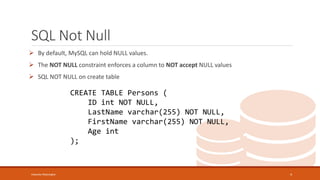
 By default, MySQL can hold NULL values.
 The NOT NULL constraint enforces a column to NOT accept NULL values
 SQL NOT NULL on create table
CREATE TABLE Persons (
ID int NOT NULL,
LastName varchar(255) NOT NULL,
FirstName varchar(255) NOT NULL,
Age int
);
Hasanka Wijesinghe 4
SQL Not Null cont.
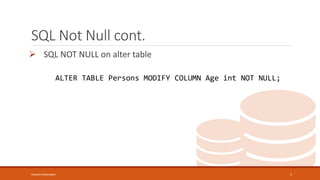
 SQL NOT NULL on alter table
ALTER TABLE Persons MODIFY COLUMN Age int NOT NULL;
Hasanka Wijesinghe 5
Alter Query
CHANGE STRUCTURE OF DATABASE TABLES
Hasanka Wijesinghe 6
Add New Column
Syntax:
ALTER TABLE [table_name] ADD [column_name] [datatype][size];
Ex:
ALTER TABLE Customers ADD Email varchar(255);
Hasanka Wijesinghe 7
Delete Column
 Syntax:
ALTER TABLE [table_name] DROP COLUMN [column_name];
Ex:
ALTER TABLE Customers DROP COLUMN Email;
Hasanka Wijesinghe 8
Remove Primary Key
 Syntax:
ALTER TABLE [table_name] DROP PRIMARY KEY;
Ex:
ALTER TABLE Customers DROP PRIMARY KEY;
Hasanka Wijesinghe 9
Add Primary Key
 Syntax:
ALTER TABLE [table_name] ADD PRIMARY KEY ([column name]);
Ex:
ALTER TABLE Customers ADD PRIMARY KEY (id);
Hasanka Wijesinghe 10
Add Foreign Key
 Syntax:
ALTER TABLE [table_name] ADD FOREIGN KEY ([column name]) REFERENCES [reference
table]([column name]);
Ex:
ALTER TABLE Orders ADD FOREIGN KEY (PersonID) REFERENCES
Persons(PersonID);
Hasanka Wijesinghe 11
Select Query
RETRIEVE DATA FROM DATABASE TABLES
Hasanka Wijesinghe 12
Retrieve All Data
 Syntax:
SELECT * FROM [table name];
Ex:
SELECT * FROM customers;
Hasanka Wijesinghe 13
Retrieve Selected Columns
 Syntax:
SELECT [column name],[column name],…. FROM [table name];
Ex:
SELECT c_id, c_name FROM customers;
Hasanka Wijesinghe 14
Select with WHERE Clause
 Syntax:
SELECT [column name],[column name],…. FROM [table name] WHERE [condition];
Ex:
SELECT * FROM customers WHERE c_id = 1;
SELECT order_id FROM orders WHERE qty > 5;
Hasanka Wijesinghe 15
Select with LIMIT Clause
 Syntax:
SELECT [column name],[column name],…. FROM [table name]
WHERE [condition]
LIMIT [number];
Ex:
SELECT * FROM customers LIMIT 5;
SELECT order_id FROM orders WHERE qty > 5 LIMIT 2;
Hasanka Wijesinghe 16
Select with MIN() Function
 Syntax:
SELECT MIN([column name]) FROM [table name]
WHERE [condition];
Ex:
SELECT MIN(qty) FROM orders WHERE order_id = 2;
Hasanka Wijesinghe 17
Select with MAX() Function
 Syntax:
SELECT MAX([column name]) FROM [table name]
WHERE [condition];
Ex:
SELECT MAX(qty) FROM orders WHERE order_id = 2;
Hasanka Wijesinghe 18
Select with COUNT() Function
 Syntax:
SELECT COUNT([column name]) FROM [table name]
WHERE [condition];
Ex:
SELECT COUNT(qty) FROM orders WHERE order_id = 2;
Hasanka Wijesinghe 19
Select with AVG() Function
 Syntax:
SELECT AVG([column name]) FROM [table name]
WHERE [condition];
Ex:
SELECT AVG(qty) FROM orders WHERE order_id = 2;
Hasanka Wijesinghe 20
Select with SUM() Function
 Syntax:
SELECT SUM([column name]) FROM [table name]
WHERE [condition];
Ex:
SELECT SUM(qty) FROM orders WHERE order_id = 2;
Hasanka Wijesinghe 21
Select with LIKE operator
 Syntax:
SELECT [column name], [column name],… FROM [table name]
WHERE [column name] LIKE [pattern];
Hasanka Wijesinghe 22
Like Operator Description
WHERE [column name] LIKE 'a%' Finds any values that start with "a"
WHERE [column name] LIKE '%a' Finds any values that end with "a"
WHERE [column name] LIKE ‘%or%' Finds any values that have "or" in any position
WHERE [column name] LIKE ‘_r%' Finds any values that have "r" in the second position
WHERE [column name] LIKE 'a_%' Finds any values that start with "a" and are at least 2 characters in length
WHERE [column name] LIKE 'a__%' Finds any values that start with "a" and are at least 3 characters in length
WHERE [column name] LIKE 'a%o' Finds any values that start with "a" and ends with "o"
emp_no name address emp_district emp_dep contact_no Salary des
A0001 Kamal Perera Temple Road,
Homagama
Colombo Finance 0771234567 75000/= Accountant
A0002 Namal de
Silva
Main Street,
Badulla
Badulla Sales 0711234567 65000/= Group
Leader
A0003 Nimali Peries New Town,
Embilipitiya
Ratnapura Finance 0781234567 78000/= Manager
A0004 Kasun
Wijesinghe
New Town,
Ratnapura
Ratnapura HR 0721234567 25000/= Trainee
A0005 Ridmi Perera Galle Road,
Moratuwa
Colombo Marketing 0781234566 50000/= Manager
A0006 Nalin Peries Jaffna Road,
Anuradhapura
Anuradhapura Transport NULL 35000/= Driver
Emp_details
Create following table and insert data
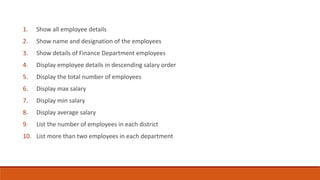
1. Show all employee details
2. Show name and designation of the employees
3. Show details of Finance Department employees
4. Display employee details in descending salary order
5. Display the total number of employees
6. Display max salary
7. Display min salary
8. Display average salary
9. List the number of employees in each district
10. List more than two employees in each department
JOIN QUERY
Hasanka Wijesinghe 25
Join Query
 LEFT JOIN
 RIGHT JOIN
 INNER JOIN
Hasanka Wijesinghe 26
Create following table and insert data
Hasanka Wijesinghe 27
emp_no name address emp_district emp_dep contact_no Salary des
A0001 Kamal Perera Temple Road,
Homagama
1 3 0771234567 75000/= 1
A0002 Namal de
Silva
Main Street,
Badulla
2 2 0711234567 65000/= 2
A0003 Nimali Peries New Town,
Embilipitiya
3 1 0781234567 78000/= 3
A0004 Kasun
Wijesinghe
New Town,
Ratnapura
3 1 0721234567 25000/= 4
A0005 Ridmi Perera Galle Road,
Moratuwa
1 2 0781234566 50000/= 3
A0006 Nalin Peries Jaffna Road,
Anuradhapura
4 NULL NULL 35000/= 5
Emp_details
Hasanka Wijesinghe 28
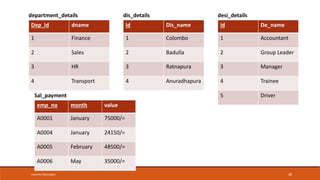
Dep_id dname
1 Finance
2 Sales
3 HR
4 Transport
department_details
id Dis_name
1 Colombo
2 Badulla
3 Ratnapura
4 Anuradhapura
dis_details
id De_name
1 Accountant
2 Group Leader
3 Manager
4 Trainee
5 Driver
desi_details
emp_no month value
A0001 January 75000/=
A0004 January 24150/=
A0005 February 48500/=
A0006 May 35000/=
Sal_payment
Hasanka Wijesinghe 29
1. List employees name and their designation (Use left join)
2. List employees name and their district (Use right join)
3. List employees name and their department (Use inner join)
4. List all employees full details
5. List the employees not included in the salary table
Hasanka Wijesinghe 30
Q & A
Hasanka Wijesinghe 31
Thank You!

Lec 07 SQL - 1.pptx

  • 1.
    SQL - 1 DSE003– DATABASE MANAGEMENT SYSTEM HASANKA WIJESINGHE M I T, B . S c Hasanka Wijesinghe 1
  • 2.
    Learning Outcomes End ofthis lesson student will be able to Change structure of database tables Retrieve data from database Hasanka Wijesinghe 2
  • 3.
  • 4.
    SQL Not Null By default, MySQL can hold NULL values.  The NOT NULL constraint enforces a column to NOT accept NULL values  SQL NOT NULL on create table CREATE TABLE Persons ( ID int NOT NULL, LastName varchar(255) NOT NULL, FirstName varchar(255) NOT NULL, Age int ); Hasanka Wijesinghe 4
  • 5.
    SQL Not Nullcont.  SQL NOT NULL on alter table ALTER TABLE Persons MODIFY COLUMN Age int NOT NULL; Hasanka Wijesinghe 5
  • 6.
    Alter Query CHANGE STRUCTUREOF DATABASE TABLES Hasanka Wijesinghe 6
  • 7.
    Add New Column Syntax: ALTERTABLE [table_name] ADD [column_name] [datatype][size]; Ex: ALTER TABLE Customers ADD Email varchar(255); Hasanka Wijesinghe 7
  • 8.
    Delete Column  Syntax: ALTERTABLE [table_name] DROP COLUMN [column_name]; Ex: ALTER TABLE Customers DROP COLUMN Email; Hasanka Wijesinghe 8
  • 9.
    Remove Primary Key Syntax: ALTER TABLE [table_name] DROP PRIMARY KEY; Ex: ALTER TABLE Customers DROP PRIMARY KEY; Hasanka Wijesinghe 9
  • 10.
    Add Primary Key Syntax: ALTER TABLE [table_name] ADD PRIMARY KEY ([column name]); Ex: ALTER TABLE Customers ADD PRIMARY KEY (id); Hasanka Wijesinghe 10
  • 11.
    Add Foreign Key Syntax: ALTER TABLE [table_name] ADD FOREIGN KEY ([column name]) REFERENCES [reference table]([column name]); Ex: ALTER TABLE Orders ADD FOREIGN KEY (PersonID) REFERENCES Persons(PersonID); Hasanka Wijesinghe 11
  • 12.
    Select Query RETRIEVE DATAFROM DATABASE TABLES Hasanka Wijesinghe 12
  • 13.
    Retrieve All Data Syntax: SELECT * FROM [table name]; Ex: SELECT * FROM customers; Hasanka Wijesinghe 13
  • 14.
    Retrieve Selected Columns Syntax: SELECT [column name],[column name],…. FROM [table name]; Ex: SELECT c_id, c_name FROM customers; Hasanka Wijesinghe 14
  • 15.
    Select with WHEREClause  Syntax: SELECT [column name],[column name],…. FROM [table name] WHERE [condition]; Ex: SELECT * FROM customers WHERE c_id = 1; SELECT order_id FROM orders WHERE qty > 5; Hasanka Wijesinghe 15
  • 16.
    Select with LIMITClause  Syntax: SELECT [column name],[column name],…. FROM [table name] WHERE [condition] LIMIT [number]; Ex: SELECT * FROM customers LIMIT 5; SELECT order_id FROM orders WHERE qty > 5 LIMIT 2; Hasanka Wijesinghe 16
  • 17.
    Select with MIN()Function  Syntax: SELECT MIN([column name]) FROM [table name] WHERE [condition]; Ex: SELECT MIN(qty) FROM orders WHERE order_id = 2; Hasanka Wijesinghe 17
  • 18.
    Select with MAX()Function  Syntax: SELECT MAX([column name]) FROM [table name] WHERE [condition]; Ex: SELECT MAX(qty) FROM orders WHERE order_id = 2; Hasanka Wijesinghe 18
  • 19.
    Select with COUNT()Function  Syntax: SELECT COUNT([column name]) FROM [table name] WHERE [condition]; Ex: SELECT COUNT(qty) FROM orders WHERE order_id = 2; Hasanka Wijesinghe 19
  • 20.
    Select with AVG()Function  Syntax: SELECT AVG([column name]) FROM [table name] WHERE [condition]; Ex: SELECT AVG(qty) FROM orders WHERE order_id = 2; Hasanka Wijesinghe 20
  • 21.
    Select with SUM()Function  Syntax: SELECT SUM([column name]) FROM [table name] WHERE [condition]; Ex: SELECT SUM(qty) FROM orders WHERE order_id = 2; Hasanka Wijesinghe 21
  • 22.
    Select with LIKEoperator  Syntax: SELECT [column name], [column name],… FROM [table name] WHERE [column name] LIKE [pattern]; Hasanka Wijesinghe 22 Like Operator Description WHERE [column name] LIKE 'a%' Finds any values that start with "a" WHERE [column name] LIKE '%a' Finds any values that end with "a" WHERE [column name] LIKE ‘%or%' Finds any values that have "or" in any position WHERE [column name] LIKE ‘_r%' Finds any values that have "r" in the second position WHERE [column name] LIKE 'a_%' Finds any values that start with "a" and are at least 2 characters in length WHERE [column name] LIKE 'a__%' Finds any values that start with "a" and are at least 3 characters in length WHERE [column name] LIKE 'a%o' Finds any values that start with "a" and ends with "o"
  • 23.
    emp_no name addressemp_district emp_dep contact_no Salary des A0001 Kamal Perera Temple Road, Homagama Colombo Finance 0771234567 75000/= Accountant A0002 Namal de Silva Main Street, Badulla Badulla Sales 0711234567 65000/= Group Leader A0003 Nimali Peries New Town, Embilipitiya Ratnapura Finance 0781234567 78000/= Manager A0004 Kasun Wijesinghe New Town, Ratnapura Ratnapura HR 0721234567 25000/= Trainee A0005 Ridmi Perera Galle Road, Moratuwa Colombo Marketing 0781234566 50000/= Manager A0006 Nalin Peries Jaffna Road, Anuradhapura Anuradhapura Transport NULL 35000/= Driver Emp_details Create following table and insert data
  • 24.
    1. Show allemployee details 2. Show name and designation of the employees 3. Show details of Finance Department employees 4. Display employee details in descending salary order 5. Display the total number of employees 6. Display max salary 7. Display min salary 8. Display average salary 9. List the number of employees in each district 10. List more than two employees in each department
  • 25.
  • 26.
    Join Query  LEFTJOIN  RIGHT JOIN  INNER JOIN Hasanka Wijesinghe 26
  • 27.
    Create following tableand insert data Hasanka Wijesinghe 27 emp_no name address emp_district emp_dep contact_no Salary des A0001 Kamal Perera Temple Road, Homagama 1 3 0771234567 75000/= 1 A0002 Namal de Silva Main Street, Badulla 2 2 0711234567 65000/= 2 A0003 Nimali Peries New Town, Embilipitiya 3 1 0781234567 78000/= 3 A0004 Kasun Wijesinghe New Town, Ratnapura 3 1 0721234567 25000/= 4 A0005 Ridmi Perera Galle Road, Moratuwa 1 2 0781234566 50000/= 3 A0006 Nalin Peries Jaffna Road, Anuradhapura 4 NULL NULL 35000/= 5 Emp_details
  • 28.
    Hasanka Wijesinghe 28 Dep_iddname 1 Finance 2 Sales 3 HR 4 Transport department_details id Dis_name 1 Colombo 2 Badulla 3 Ratnapura 4 Anuradhapura dis_details id De_name 1 Accountant 2 Group Leader 3 Manager 4 Trainee 5 Driver desi_details emp_no month value A0001 January 75000/= A0004 January 24150/= A0005 February 48500/= A0006 May 35000/= Sal_payment
  • 29.
    Hasanka Wijesinghe 29 1.List employees name and their designation (Use left join) 2. List employees name and their district (Use right join) 3. List employees name and their department (Use inner join) 4. List all employees full details 5. List the employees not included in the salary table
  • 30.
  • 31.