Learning and
Teaching in the
Digital Age
Adapting to Social Media
Cameron Furnival 2014
Introduction
• Where are YOU in the world of social media
• What will happen in 2, 5, 10 years?
• Some activities and practical help
• Conclusions
Where are YOU?
Pop quiz…10 points for each answer
1. Do you have a mobile phone and
have you used it to access the
internet?
2. Have you got a google plus account?
3. Have you scanned a barcode with
your phone?
4. Have you shared a photograph on
line?
5. Have you got a twitter account?
Where are YOU?
6. Have you got a Facebook account?
7. Have you played a social game like
Farmville?
8. Do you have a Dropbox?
9. Do you know what buzzfeed is?
10. Have you used a wiki ?
• 10 points for each answer.
• Results
• 70 to 100 Great! You are digitally engaged but
do you know how to use technology for teaching
and learning?
• Over 50. You are on the way to being a 21st
century citizen
• Less than 50… You are in the right place…use this
session as a start to becoming more engaged.
next generation user skills
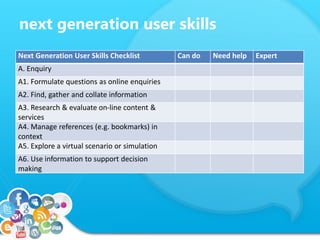
Next Generation User Skills Checklist Can do Need help Expert
A. Enquiry
A1. Formulate questions as online enquiries
A2. Find, gather and collate information
A3. Research & evaluate on-line content &
services
A4. Manage references (e.g. bookmarks) in
context
A5. Explore a virtual scenario or simulation
A6. Use information to support decision
making
next generation user skills
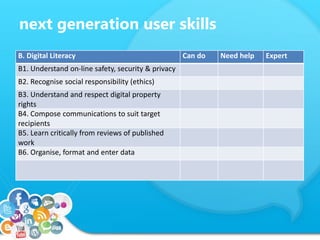
B. Digital Literacy Can do Need help Expert
B1. Understand on-line safety, security & privacy
B2. Recognise social responsibility (ethics)
B3. Understand and respect digital property
rights
B4. Compose communications to suit target
recipients
B5. Learn critically from reviews of published
work
B6. Organise, format and enter data
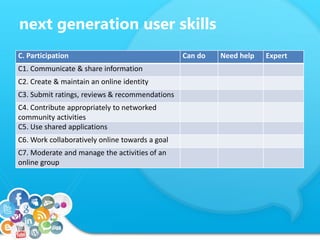
next generation user skills
C. Participation Can do Need help Expert
C1. Communicate & share information
C2. Create & maintain an online identity
C3. Submit ratings, reviews & recommendations
C4. Contribute appropriately to networked
community activities
C5. Use shared applications
C6. Work collaboratively online towards a goal
C7. Moderate and manage the activities of an
online group
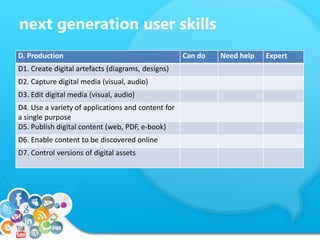
next generation user skills
D. Production Can do Need help Expert
D1. Create digital artefacts (diagrams, designs)
D2. Capture digital media (visual, audio)
D3. Edit digital media (visual, audio)
D4. Use a variety of applications and content for
a single purpose
D5. Publish digital content (web, PDF, e-book)
D6. Enable content to be discovered online
D7. Control versions of digital assets
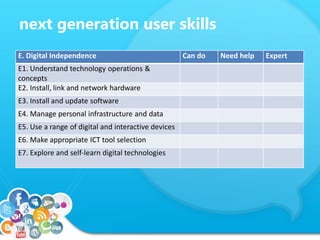
next generation user skills
E. Digital Independence Can do Need help Expert
E1. Understand technology operations &
concepts
E2. Install, link and network hardware
E3. Install and update software
E4. Manage personal infrastructure and data
E5. Use a range of digital and interactive devices
E6. Make appropriate ICT tool selection
E7. Explore and self-learn digital technologies
SO WHERE ARE YOU?
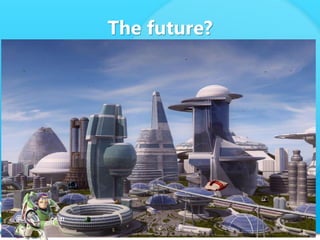
The future?
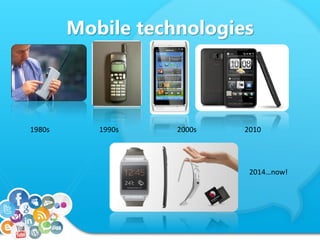
Mobile technologies
1980s 1990s 2000s 2010
2014…now!
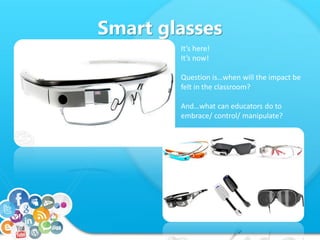
Smart glasses
It’s here!
It’s now!
Question is…when will the impact be
felt in the classroom?
And…what can educators do to
embrace/ control/ manipulate?
Impact of Social Media
• Social media is leading the development of the
web at the moment
• The big .coms are trying to control the social
media bandwagon.
– Google --- google+
– Yahoo – led instant messaging
– Facebook merger with WhatsApp
– Look on Wikipedia to find out which companies the
big companies have acquired. (Microsoft has shares in
Facebook for example).
10 years ago…
• I was laughing at the idea that computers would
rely on Apps: little downloadable programs to
solve instant problems in your day to day life.
• Could you ever have imagined the effect FB has
on students?
• Texting was a problem in classrooms – who
would have even thought of the idea of snap-
chat!
• I started a twitter account in 2007. Then
immediately dropped it as being pointless!
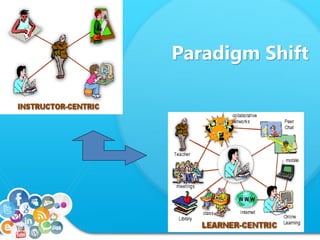
Paradigm Shift
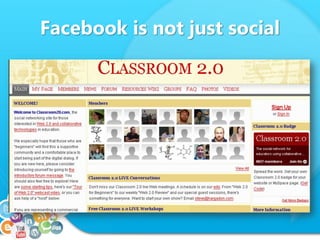
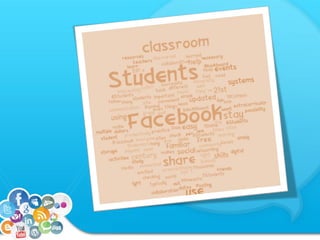
Facebook is not just social
Practical help
• Make your own learning spaces
• Using free technology for learning in a
functional sense is about six core concepts.
1. Find somewhere to host learning content.
2. Develop the learning space.
3. Find starter content for use with learners
4. Invite learners
5. Engage Learners
6. Interact with Learners
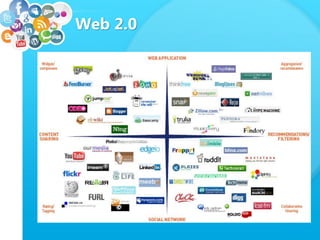
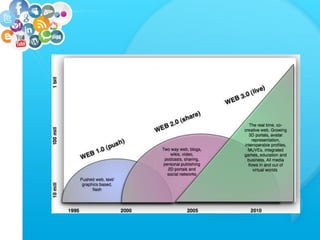
Web 2.0
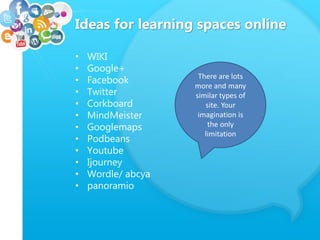
Ideas for learning spaces online
• WIKI
• Google+
• Facebook
• Twitter
• Corkboard
• MindMeister
• Googlemaps
• Podbeans
• Youtube
• Ijourney
• Wordle/ abcya
• panoramio
There are lots
more and many
similar types of
site. Your
imagination is
the only
limitation
Time to play
• Using the list or web2.0 applications,
try and have a go at some you may not
have come across before.
• As you are working through, evaluate
how you might use it in an educational
context and how a student might
perceive it.
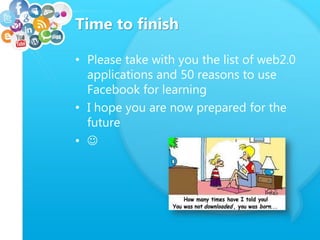
Time to finish
• Please take with you the list of web2.0
applications and 50 reasons to use
Facebook for learning
• I hope you are now prepared for the
future
• 

Learning and teaching in the digital age

  • 1.
    Learning and Teaching inthe Digital Age Adapting to Social Media Cameron Furnival 2014
  • 2.
    Introduction • Where areYOU in the world of social media • What will happen in 2, 5, 10 years? • Some activities and practical help • Conclusions
  • 3.
    Where are YOU? Popquiz…10 points for each answer 1. Do you have a mobile phone and have you used it to access the internet? 2. Have you got a google plus account? 3. Have you scanned a barcode with your phone? 4. Have you shared a photograph on line? 5. Have you got a twitter account?
  • 4.
    Where are YOU? 6.Have you got a Facebook account? 7. Have you played a social game like Farmville? 8. Do you have a Dropbox? 9. Do you know what buzzfeed is? 10. Have you used a wiki ?
  • 5.
    • 10 pointsfor each answer. • Results • 70 to 100 Great! You are digitally engaged but do you know how to use technology for teaching and learning? • Over 50. You are on the way to being a 21st century citizen • Less than 50… You are in the right place…use this session as a start to becoming more engaged.
  • 6.
    next generation userskills Next Generation User Skills Checklist Can do Need help Expert A. Enquiry A1. Formulate questions as online enquiries A2. Find, gather and collate information A3. Research & evaluate on-line content & services A4. Manage references (e.g. bookmarks) in context A5. Explore a virtual scenario or simulation A6. Use information to support decision making
  • 7.
    next generation userskills B. Digital Literacy Can do Need help Expert B1. Understand on-line safety, security & privacy B2. Recognise social responsibility (ethics) B3. Understand and respect digital property rights B4. Compose communications to suit target recipients B5. Learn critically from reviews of published work B6. Organise, format and enter data
  • 8.
    next generation userskills C. Participation Can do Need help Expert C1. Communicate & share information C2. Create & maintain an online identity C3. Submit ratings, reviews & recommendations C4. Contribute appropriately to networked community activities C5. Use shared applications C6. Work collaboratively online towards a goal C7. Moderate and manage the activities of an online group
  • 9.
    next generation userskills D. Production Can do Need help Expert D1. Create digital artefacts (diagrams, designs) D2. Capture digital media (visual, audio) D3. Edit digital media (visual, audio) D4. Use a variety of applications and content for a single purpose D5. Publish digital content (web, PDF, e-book) D6. Enable content to be discovered online D7. Control versions of digital assets
  • 10.
    next generation userskills E. Digital Independence Can do Need help Expert E1. Understand technology operations & concepts E2. Install, link and network hardware E3. Install and update software E4. Manage personal infrastructure and data E5. Use a range of digital and interactive devices E6. Make appropriate ICT tool selection E7. Explore and self-learn digital technologies
  • 11.
  • 12.
  • 13.
    Mobile technologies 1980s 1990s2000s 2010 2014…now!
  • 14.
    Smart glasses It’s here! It’snow! Question is…when will the impact be felt in the classroom? And…what can educators do to embrace/ control/ manipulate?
  • 15.
    Impact of SocialMedia • Social media is leading the development of the web at the moment • The big .coms are trying to control the social media bandwagon. – Google --- google+ – Yahoo – led instant messaging – Facebook merger with WhatsApp – Look on Wikipedia to find out which companies the big companies have acquired. (Microsoft has shares in Facebook for example).
  • 16.
    10 years ago… •I was laughing at the idea that computers would rely on Apps: little downloadable programs to solve instant problems in your day to day life. • Could you ever have imagined the effect FB has on students? • Texting was a problem in classrooms – who would have even thought of the idea of snap- chat! • I started a twitter account in 2007. Then immediately dropped it as being pointless!
  • 17.
  • 18.
    Facebook is notjust social
  • 19.
    Practical help • Makeyour own learning spaces • Using free technology for learning in a functional sense is about six core concepts. 1. Find somewhere to host learning content. 2. Develop the learning space. 3. Find starter content for use with learners 4. Invite learners 5. Engage Learners 6. Interact with Learners
  • 20.
  • 22.
    Ideas for learningspaces online • WIKI • Google+ • Facebook • Twitter • Corkboard • MindMeister • Googlemaps • Podbeans • Youtube • Ijourney • Wordle/ abcya • panoramio There are lots more and many similar types of site. Your imagination is the only limitation
  • 24.
    Time to play •Using the list or web2.0 applications, try and have a go at some you may not have come across before. • As you are working through, evaluate how you might use it in an educational context and how a student might perceive it.
  • 25.
    Time to finish •Please take with you the list of web2.0 applications and 50 reasons to use Facebook for learning • I hope you are now prepared for the future • 